battery AUDI A4 2018 User Guide
[x] Cancel search | Manufacturer: AUDI, Model Year: 2018, Model line: A4, Model: AUDI A4 2018Pages: 403, PDF Size: 66.81 MB
Page 87 of 403

you stop it. You also cannot lock the vehicle from
the outside .
Applies to: vehicles with au tomatic transm issions
Shift to P , otherwise vehicle can roll away.
Doors do not lock if gearshift is not in P
This message appears for safety reasons if the
selector lever is in the N position when you
sw itch the ignition off. Move the selector leve r to
the P position. Otherwise the vehicle is not pro
tected from ro lling and it cannot be locked .
DJ Remote control key: hold back of key
against the designated area . See owner 's man
ual
If the indicator light turns on and th is message
appears, there is a malfunction
q page 85 .
Applies to: vehicles with automatic transmissions
Shift to P before leaving car, otherwise vehicle
can roll away
This message appears if the driver's door is
opened while the ignition is switched on and the
transmission has not been shifted to the P posi
tion . Sh ift the transmiss ion into the P position
and turn off the ignition if you are leaving the ve
hicle . Otherwise the vehicle could roll. Also see
c::> page87 .
Starting the engine when there is a
malfunction
It may not be possible to start the engine under
certain circumstances, for example if the battery
in the vehicle key is drained, if interference is af
fected the key or if there is a system malfunc
tion .
Fig. 94 Cente r console/ remote contro l key: starting t he
eng ine if there is a malfunc tion
Driving
Requirement: the message Remote control key:
hold back of key against the designated area .
See owner's manual
must display and the DJ i n
dicator light must turn on.
.,. Place the remote control key on the location
shown in the illustration
y >l) c::> fig . 94.
Applies to: vehicles with manual transmission
.,. Press the clutch pedal.
Applies to: vehicles with automatic transmissions
• Press the brake pedal.
.. Press the !START ENGINE STOP ! button. The
engine will start.
.,. Drive to an authorized Audi dea ler or author
ized Aud i Service Facility immediately to have
the malfunction corrected.
@ Tips
You can view the message again by pressing
the
I S TART ENGINE STOP I button.
Start/Stop system
Description
Applies to: vehicles with Start/Stop system
The Start/Stop system can help increase fue l
economy and reduce CO2 emissions.
In Sta rt/Stop mode, the engine shuts off auto
matically when the vehicle is stopped, such as at
a traffic light. The ignition remains switched on
during this stop phase . The engine wi ll restart
automatica lly when needed .
Th e Start/Stop system is a utomaticall y activated
as soon as the ignition is switched on.
Basic requirements for Start/Stop mode
-The driver's door must be closed .
-The driver's seat belt much be fastened.
- The hood must be closed.
- The vehicle must have driven faster than
2 mph
(3 km/h) since the last time it stopped .
- A trailer must not be hitched to the vehicle.
If you leave the vehicle during a stop phase, the
engine can be restarted within approximately 30
seconds if the following requi rements are met:
IJ>
85
Page 89 of 403

a co .... N ,....
N .... 0 0
3 co
@j indicator light appears in the instrument clus
ter disp lay, the engine will not be stopped, for
examp le in the following situations:
- T he eng ine has not reached the minimum re
quired temperature for Start/Stop mode.
- T he interior temperature selected by the cli-
mate contro l system has not been reached .
- T he outs ide temperature is ext remely h igh/low.
- The windshield is being defrosted.
- The vehicle battery charge level is too low.
- The steering whee l is turned at a sharp angle or
is mov ing .
- After engaging the reverse gear.
- On sharp inclines.
- At high a ltitudes.
Engine automatically restarts
The standard Start/Stop mode will be cance led
during a stop phase in the follow ing s ituations .
The engine restarts without any action by the
d river.
- The vehicle rolls, for examp le while on a slope.
- The interior temperature differs from the tem-
perature se lected in the A/C system .
- The windshield is being defrosted .
- The brake pedal is pressed several times in a
row.
- The vehicle battery charge level is too low.
- Power consumption is high.
The engine can t urn off again when the condi
tions for Start/Stop mode are met.
Ignition is switched off automatically
To prevent the veh icle battery from drain ing, the
ignition will switch off automat ica lly under the
following conditions :
- The Start/Stop system has stopped the engine .
- The veh icle is stationary.
- You left the vehicle and the engine was not re -
started within approximately 30 seconds .
I f this happens, you wi ll see the message
Igni
tion turns off automatically
in the instrument
cluster and the activated low beams are replaced by the parking light. The parking lights will
sw itch off after approximately 30 minutes or
when you lock the vehicle .
Driving
The ignition also switches off when you lock the
vehicle from the outside during a stop phase.
If the Start/Stop system has not turned off the
engine or if you have switched the Start/Stop sys
tem off manually, the ignition will not be auto
matically switched off and the engine will contin
ue to run
¢ .&..
A WARNING
To reduce the risk of poisoning, never allow
the eng ine to run in confined spaces .
(D Tips
Applies to : vehicles with auto matic transmissions
-
- If you leave the vehicle with the D/S or R se
lector lever position engaged, the parking
brake is automatically set.
- If you select the D or N selector lever posi
tion after shifting into reverse, the vehicle
must be driven faster than 6 mph ( 10 km/h)
in o rder fo r the engine to switch off again .
' Manually switching the Start/Stop system
, off/on
Applies to: vehicles wi th Start/Stop syste m
If you do not wish to use the system, you can
switch it off manually.
Fig. 96 Cente r console : Start/Stop system button
.,. To switch the Start/Stop system off/on man
ually, press the
l v'> ~I button. The LED in the but
ton turns on when the system is switched off .
(D Tips
If you switch the system off during a stop
phase, the engine will start aga in automati
cally .
87
Page 153 of 403
a co .... N ,....
N .... 0 0
3 co
Also see¢ page 146, Electronic stabilization
control (ESC) .
The all-wheel drive system dist ributes the d riving
power var iably to the front and rear axle. It works
together with selective whee l torque cont rol,
which activates when driving through curves
c:> page 146. With the sport differentia l*, power
d istribution to the rear wheels is variable and can
be adjusted using the dr ive select
c:> page 134.
The all wheel drive concept is designed for high
engine power. Your ve hicle is exceptionally pow
erful and has excellent driving characterist ics
both under norma l dr iving condit ions and on
snow and ice . Always read and fo llow safety pre
cautions
c:> .&. .
Winter t ires
By us ing all wheel drive, yo ur vehicle has good
forward motion with standard tires in w inte r con
d itions. However, using winter or all season tires
on
all four wheels in the winter is recommended ,
because this will improve the
braking effec t.
Snow chains
If there are snow chain laws, snow chains must
also be used on vehicles with all wheel drive
c:> page 350, Snow chains .
Replacing tire s
For vehicles with all whee l drive, only whee ls with
the same ro lling circumference s hou ld be used.
Avoid using tires w ith different tread depths
c:> page 341, New tires or wheels.
Offroad vehicle?
The ground clearance is too low on some mode ls
to drive on rough terrain. Therefore, avoid off road trips.
A WARNING
-Also, in vehicles with a ll w heel d rive, adapt
your dr iv ing style to the current road and
t raff ic conditions . Do not let the increased
safety provided tempt you into tak ing risks,
because t his increases the r is k of an acci
dent .
Intellig ent Technology
- The braking ab ility o f your vehicle is limited
to the traction of the wheels. In this way, it
is not different from a two wheel drive vehi
cle . Do not be tempted to accelerate to a
h igh speed whe n the road is sli ppery, be
cause this i ncreases the risk of an accident.
- No te that o n wet streets, the fron t wheels
can "hydrop la ne" if dr iv ing at speeds that
are too high. Unlik e front wheel d rive
veh icles, the engine does not rev h ig her sud
denly when the vehicle begins hydrop laning.
F orthisre ason,ad aptyo urspeedto the
road conditions to re duce the risk of an acci
dent .
Energy management
The starting ability is optimized
The energy management system manages the
electrical energy distribution and optimizes the
availability of electrical energy for starting the
engine .
When a vehicle with a conventional energy sys
tem is not drive n for a long time, the ve hicle bat
te ry is d rained by equipment (for example, t he
immob ilizer). In certa in circ ums tances , there
c ou ld m ay no t be eno ugh e nergy to start the en
gine.
You r vehicle is equi pped with an in tell igent ener
gy manageme nt system fo r dist ributing electrici
ty. This sig nifican tly improves the start ing ability
and in cre ase s t he vehicle battery life.
The ene rgy ma nagement system Is made up of
battery diagnosi s, idling current management ,
and dynamic energy management .
Battery diagnosis
The battery diagnos is determines the vehicle bat
te ry c harge level. The sensors determine the bat
te ry vo ltage, the batte ry cu rrent, and the batte ry
temperat ure. The current c ha rge level and t he
perfo rman ce of the vehicle battery a re de ter-
mine d base d on this.
..,.
151
Page 154 of 403
Intelligent Technology
Idling current management
The idling c urrent management dec reases the
energy used w hile pa rked. With the engine
sw itched off, it manages the energy distribution
to the different elect rical components . Data from
the battery diagnosis is taken into account for
this .
Depending on the vehicle battery charge level,
e lectrical equipment is switched off one item af
ter the other to prevent the vehicle battery from
draining and to maintain the starting ability.
Dynamic energy manag em ent
W hil e driving, dynamic energy management dis
tr ibutes the appropriate amount of energy to the
electrical equipment. It controls the battery
charge level so that the amount of energy is not
greater than the amount being generated in or
der to mai nta in a n optimal vehicle battery charge
level.
(D Tips
- Energy management cannot overcome the
l aws of phys ics . Note that the charge leve l
and leng th of the vehicle battery life a re
li mi ted .
- When the starting ability is endanger ed, the
(•) ind icator light turns on~ page 30.
What you should know
Maintaining the starting ability is the highest
priority.
A lot of stress is placed on the vehicle battery
when dr iv ing short d istances, dur ing c ity dr iv ing,
and at cold times of the year . A lot of energy is
used but little is gene rated . It is a lso cri tical
wh en the engine is not runn ing but e lectr ica l
e qui pment is swi tc h ed o n. In this case, energy is
u sed bu t none is ge nera te d.
In s ituatio ns l ike this, energy management will
actively regu late the d ist ribu tion of ene rgy.
Long pe riods without use
If you do not drive your vehicle for several days or
weeks, electrica l equipment is gradually scaled
back or swi tched off . This reduces energy use and
152 ensures
the vehicle will be ab le to s tart a fter long
periods of time. Some conven ience f unctions,
such as interior lig hting or power seat ad just
ment, may not be avai lab le under ce rtain circum
stances. These conven ience functions will be
available again once you switch the ignit ion on
and sta rt the eng ine.
With the engine switched off
The vehicle battery will drain if you use Infotain
ment functions such as listening to the radio
whi le the engine is switched off.
If the vehicle's ability to start may be impaired by
the energy use, a message will appear i n the In
fota inment system display. The message indi
cates that the system will switc h off automatical
l y soon. If yo u wou ld like to continue using the
funct io ns, you must s tart the engine .
With the engine running
Although electr ica l energy is generated w hile
driv ing, the veh icle battery can d ra in. This can
happe n if litt le ene rgy is generated but much is
used, and the charge level of the vehicle battery
is not optimal.
To resto re t he ba lance of energy, components
that require large amounts of energy are tempo rarily scaled back or sw itched off. Heat ing sys
te ms in pa rticula r r equir e a great deal of e nergy .
I f you notice, fo r example, t hat the seat heati ng*
o r r ear window defogger is not wor king, then it
h as been tempor arily reduce d or switched off.
These sys tems are avai lab le aga in as soon as t he
energy supp ly has been restored.
I n add it ion, yo u may notice tha t the idle speed
h as slig htly incre ase d. Tha t is normal and no
ca use for concer n. By in creasing the idling spee d,
the addit io na l required energy will be gene rated
and t he vehicle battery w ill be charged.
Page 158 of 403
Multi Media Interface
Switching the MMI on /off : the M MI can be
switched on/off manua lly.
- Switching on manu ally : press the On/Off knob
@ c> fig. 159 briefly . Or: press the I MENU ! but
ton ®
c> page 155 , fig. 157 or c> page 155,
fig . 158,
or one of the buttons to open the me
nus d irectly @.
-Switching off manually : press and hold the
On/Off knob
@ c> fig. 159 until the MMI
switches
off. If the MMI has bee n switched off
manually, it does not switch on again au tomati
ca lly the next time the ignit io n is switched on .
Additional functions :
- Adjusting the volume :
tu rn the On/Off k nob @
.:>fig. 159.
-Muting : press the O n/Off knob @.:> fig. 159
briefly.
-Selecting the previou s/next function (for ex
ample, a radio stat ion /tra ck ):
press the On/Off
kn ob @ .:> fig. 159 briefly toward the le ft l«l or
rightt>C>I .
-Fast forwarding /re winding (for example
song s):
p ress and hold the On/ Off knob @
c> fig. 159 toward the left l«l or right t>C>I.
A WARNING
Adjust the volume of t he a udi o system so that
signa ls from outside t he ve hicle, such as po
lice and fire sirens, can be heard easily at all
times .
@ Tips
The MMI sw itches off automatically if the en
gine is not r unning and the vehicle battery is
low .
Infotainment system
display
Switching on and off
- Switching on and off manually :
press the roJ
button @ c> page 8, fig. 2.
When the M MI i s switched o n and the disp lay is
sw itched off, you can operate certa in f unct io ns
using the On/Off knob with t he M MI joystick
function
.:> page 155.
156
Information on display images
The display version depends on vehicle equip
ment .
Fig. 16 0 Disp lay ve rs ion A
F ig. 161 Disp lay ve rs ion B
Additional content (such as album cover and map
mater ial) is shown on display ve rsion
B, if appli
cable@.:> fig. 161 . Because the other content
shown on the displays is nearly identical between
the two vers ions, this manual will p rimari ly de
scribe display version A .
Page 199 of 403

Audi connect vehicle control
Audi connect vehicle
control
Introduction
Applies to veh icles with Audi co nnect vehicle control
With the Audi connect vehicle control services 1>,
you can access various information or use individ
ual functions in the
Audi MMI connect app or in
myAudi .
Audi connect vehicle control includes the follow
ing services:
- Remote locking and unlocking ¢
page 199.
-Vehicle status report <:!>page 199 .
-Parking location o page 199.
-Geofencing Alert r::!> page 200.
-Speed Alert o page 200 .
-Valet Alert o page 200 .
- Stolen Vehicle Locator o page 200.
-Online Audi service request o page 200.
(D Tips
-Accessing specific data or controlling func
tions remote ly depends on the charge level
of the vehicle battery. Therefore, these
funct ions only have limited availability after
switching off the ignit ion.
- The services are provided through a SIM
card installed in the vehicle. The cost of the
call and data connections is included in the
price for the services . Services are provided
assuming that the cell phone network re
quired for the installed S IM card is funct ion
in g and ready to operate. The available serv
ic es set by Aud i AG are only available within
the cell phone network coverage area for
the cell phone service provider selected by
Audi AG .
- You can also find more information on Audi
connect on line at www .audiusa .com .
ll In pr ep aratio n at t he tim e of p rinting. The ava ilab ilit y o f
the serv ice s offe re d depends on th e co untry and may
c han ge ove r tim e.
198
Setup
Applies to vehicles w it h Aud i connect vehicle control
To use Audi connect vehicle control services l),
please note the fo llowing :
Creating and verifying a user account
""Create an account at www.audiusa.com/myaudi
and verify it.
Setting a key user in the vehicle
Requirements : the ignit ion must be switched on .
Anothe r key user must not be set in the veh icle .
If necessary, reset the key user ¢
page 199.
""Select in the Infotainment system: IMENU ! but-
ton >
Audi connect > if necessary, Display
available functions >
right control button>
Audi connect user management > Key user >
Set key user .
"" Enter the user name for your ve rified account
and enter the IO-digit vehicle code. You can rub
the key tag for your remote control key to re
veal the vehicle code
r::!> page 38.
"" Select and confirm Log in .
You can now use the veh icle control services
through the
Audi MMI connect app or through
www.audiusa.com/myaudi .
Using vehicle control services in the Audi
MMI connect app
Requirement: your mobile devices must be com
patible.
"" Insta ll and start the
Audi MMI connect app on
your mobi le device .
"" Log in to the
Audi MMI connect app using your
user name and Audi online password and select
your vehicle .
(D Tips
-Store the vehicle code in a secure place. It
may be necessary to re-enter the vehicle
code.
Page 231 of 403
Media
When importing, the audio files are automatical
ly sorted into the media center categories based
on the stored addit ional information
¢ page 237. The copied video files are stored in
t he media center under the
Videos category.
Playing the Jukebox
Requirement: the Jukebox must contain audio/
video fi les
¢ page 229, Adding files to the Juke
box.
The Jukebox is accessed and operated through
the
MMl (D¢page236, fig . 215.
Displaying Jukebox memory capacity
Select: right control button > Jukebox memory
capacity .
Information about the Jukebox memory
cap acity and the number of sto red tracks is dis
p la yed.
Deleting tracks from the Jukebox1
)
Requ irement: the Jukebox must contain audio/
video fi les.
- Delet ing an entry: select an entry from the
Jukebox media center . Select: right control but
ton
> Delete from jukebox > This entry or En
tire list.
- The status of the deleting process is shown in
the MMI. Jukebox playback stops during the de
leting process and starts again automatically
once the dele tion is complete .
0 Note
Do not import aud io/video files when the en
gine is t urned off because this will drain the
veh icle battery.
(D Tips
- Tracks from aud io CDs cannot be imported
to the Jukebox for legal reasons .
- Files that have already been imported are
automat ically recognized and cannot be
copied to the Jukebox again.
- It is not possible to play audio/v ideo* files
in the CD/DVD* drive while importing them.
1> N ot i n t he Playback view.
230
- Th e Juk ebox does not provide an export
function due to legal reasons .
- Files or tracks without additional stored in
formation a re listed as
Unknown . Audi rec
ommends adding additional information
(such as ID3 tags) to audio files.
- Reset the
Jukebox to the factory defau lt
settings when selling your vehicle
¢ page 249.
Bluetooth audio player
App lies to: vehicles wi th Blue toot h audio playe r
With the Bluetoo th audio player, you can play
music wirelessly from your Bluetooth-capable
device (such as a cell phone) through the MMI .
Requirement: the vehicle must be stationary and
the Bluetooth function on your Bluetooth device
and the
Bluetooth audio player ¢ page 250 in
the
MMI must both be sw itched on .
-Connecting a Bluetooth device: press the
!MEDIA ! button. Press the left control button
until the sources overview is displayed . Select
and confirm
Bluetooth audio player @
¢page 236, fig. 216 .
-If necessary, select and confirm, Not connected
> Connect Bluetooth audio player . The Blue
tooth device search starts. Follow the instruc
tions in the MMI.
- Select and confirm the desired Bluetooth de
vice from the list. The
MMI generates a PIN for
the connection.
- Select and confirm
Yes.
-Enter the PIN for connecting on your Bluetooth
dev ice.
Or : if the PIN is already displayed on
your Bl uetoo th device , confi rm it in the Blue
tooth device and in the
MMI. The time allowed
for entering the PIN is limited to approximately
30 seconds.
The media is started and operated thro ugh the
mobile device o r the
MMI, depending on the de-
vice being used.
..,.
Page 234 of 403
-Do not use any wireless devices on the front
seats within range of the airbags while driv
ing. Also read and follow the warnings in
c::> page 275, Front airbags.
CJ) Note
- Always follow the information found in c::>0
in Wi-Fi hotspot on page 194.
- Please note that there genera lly are addi
tional costs when using an online media
service account, especially when it is used internationally .
@ Tips
-Depending on the Internet connection and
network traffic, a connection loss can occur
during playback of on line media services.
-Online media and Internet radio usage de
pends on the service availability of the third
party provider.
- Audi AG simply makes the access to on line
media services possible through the MMI
and does not take any responsibility for the
contents of the on line media services.
- Always read the chapter
c::> page 195, Audi
connect (Infotainment) general informa
tion.
- Depending on the mobile device used, there
may be interruptions during media playback
and when using the
Audi MMI connect app.
To avoid interruptions when using a mobile
device, do not lock the screen on your mo
bile device and keep the
Audi MMI connect
app in the foreground .
- Contact an authorized Audi dealer or au
thorized Audi Service Facility for additional
information about online media.
Media
Multimedia connections
USB adapter for Audi music interface
You can connect your mobile devices (such as a
smartphone or
MP3 player) to the Audi music in
terface and charge them using a special
USB
adapter .
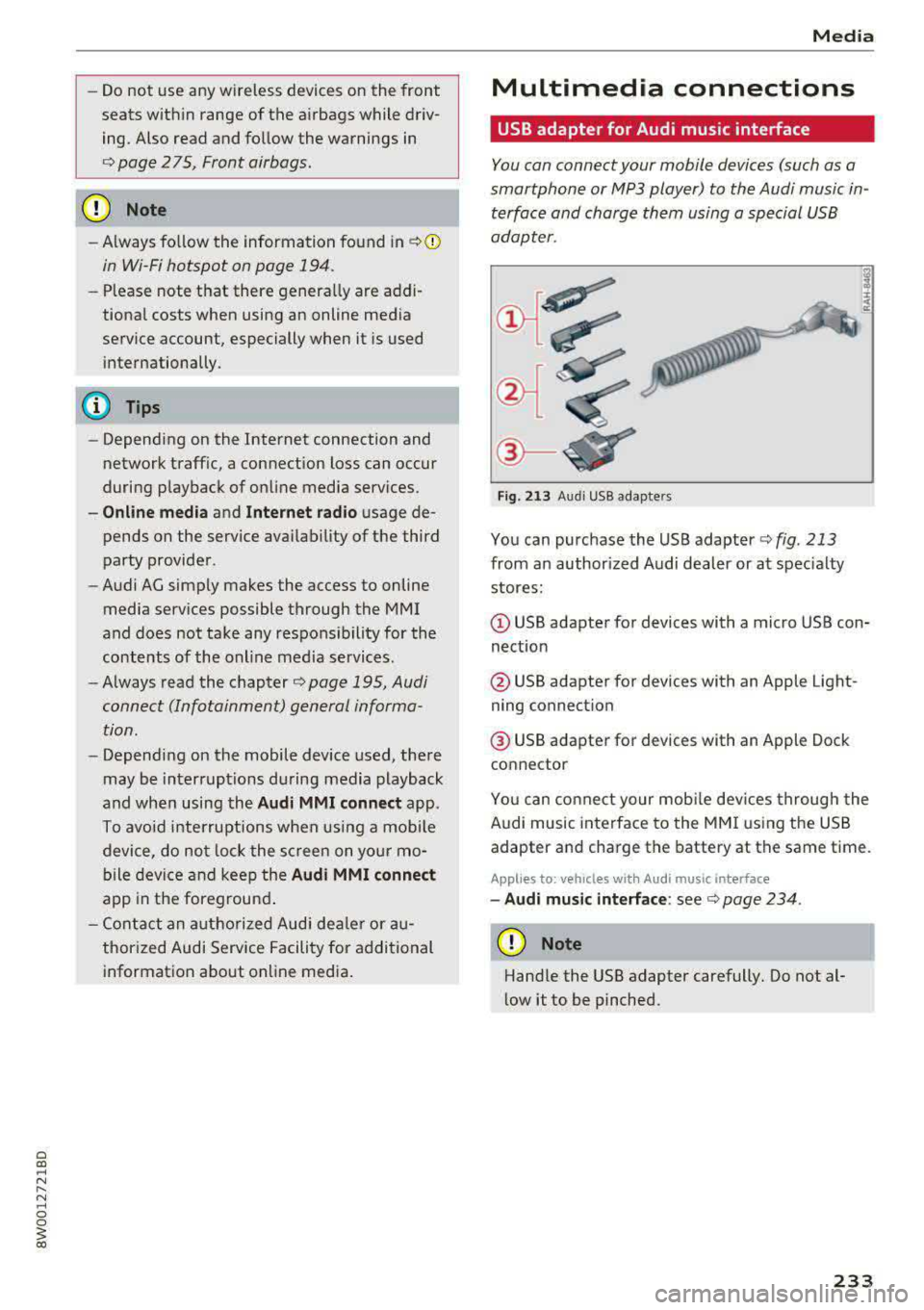
Fig. 213 Audi USB adap ters
You can purchase the USB adapter c::> fig. 213
from an author ized Audi dealer or at specialty
stores:
(D USB adapter for devices with a micro USB con
nection
@ USB adapter for devices with an Apple Light
ning connect ion
@ USB adapter for devices with an Apple Dock
connector
You can connect your mobile dev ices through the
Audi music interface to the MMI using the USB
adapter and charge the battery at the same time.
Applies to : veh icles w it h Aud i music interface
- Audi music interface: see c::> page 234.
(D Note
Handle the USB adapter carefully. Do not al
low it to be pinched.
233
Page 235 of 403
Media
Audi music interface
Connect your mobile devices to the Audi music
interface in order to operate them through the
MMI and charge the battery.
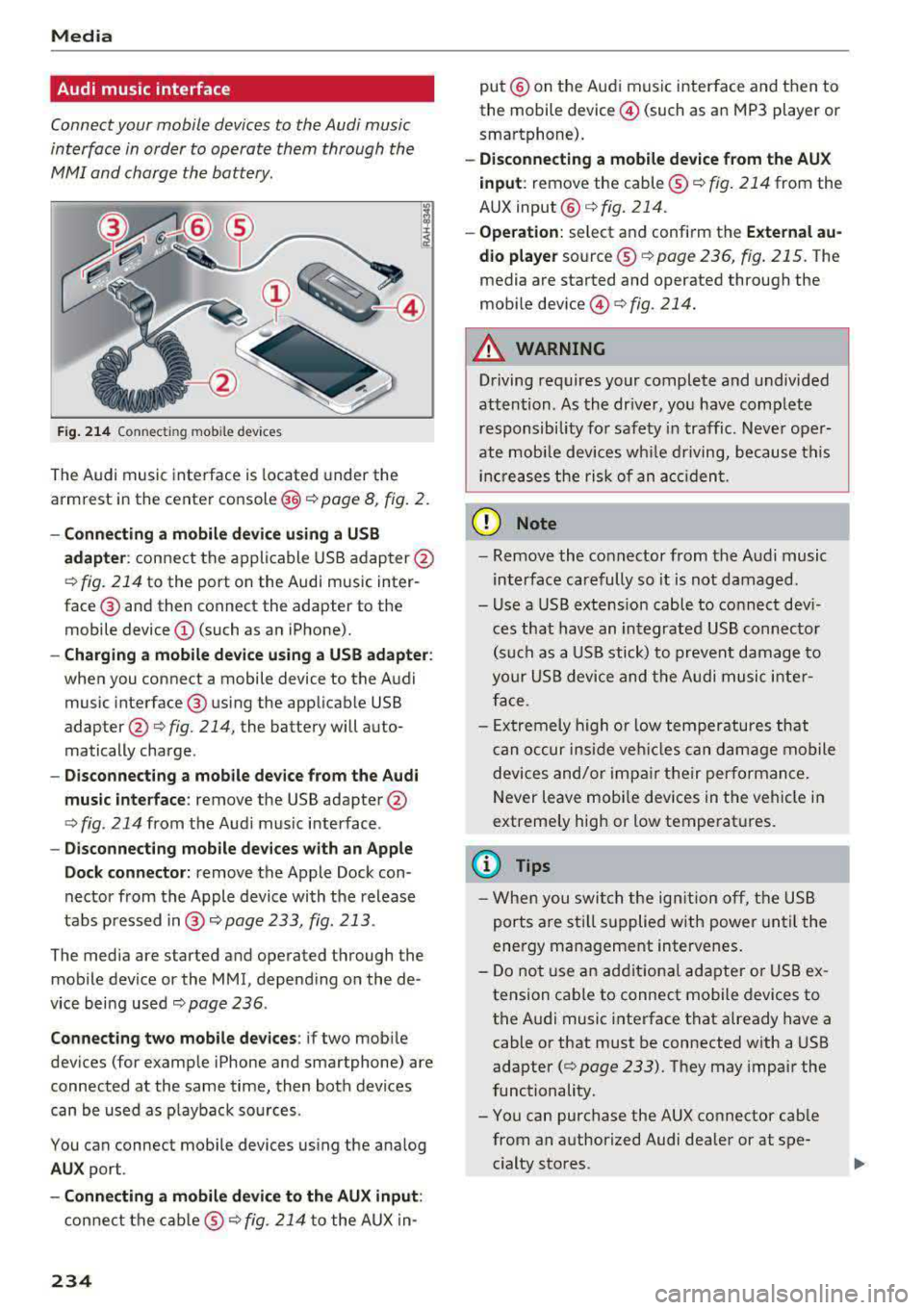
F ig . 214 Connec ting mob ile dev ices
The Audi music inte rface is located under the
armrest in the center
console @c::> page 8, fig. 2.
-Connecting a mobile device u sin g a U SB
a dapt er:
connect the applicable USB adap ter @
c::> fig. 214 to the port on the Audi music inter
face ® and then connect the adapter to the
mobile device @(such as an iPhone).
-Charging a mobile device u sing a USB adapter :
when you connect a mobile device to the Audi
music interface ® using the applicab le USB
adapter @
c::> fig. 214, the battery will auto
matically charge .
-Disconnec ting a mobil e dev ice from the Au di
music int erfac e:
remove the USB adapter@
<=> fig. 214 from the Audi music interface .
-Di sco nn ect ing mob ile d evices with an Apple
Do ck con nector:
remove the Apple Dock con
nector from the Apple device with the release
tabs pressed
i n @ c::> page 233, fig. 213 .
The media are started and operated through the
mobile device or the MMI, depending on the de
vice being used
c::> page 236 .
Connecting two m obile d evi ce s: if two mob ile
dev ices (for example iPhone and smartphone) are
connected at the same time, then both devices
can be used as p layback so urces .
You can connect mobile devices using the analog
AU X port .
-Conn ecting a mobile d evic e to th e AU X input :
connect the cab le ® c::> fig. 214 to the AUX in-
234
put @ on the Audi music interface and then to
the mobile device @(such as an MP3 player or
smartphone).
- Discon necti ng a mobile d evice from the AU X
i nput :
remove the cable ® c::> fig. 214 from the
AUX
input @c::> fig. 214.
-Ope ration: select and confirm the Extern al au
d io player
source ® c::> page 236, fig. 215 . The
media are started and operated through the
mobile
device @<=> fig. 214.
A WARNING
Driving requires your complete and undivided
attention . As the dr iver, you have complete
responsibility for safety in traffic . Neve r oper
ate mobi le devices wh ile driving, because this
inc reases the risk of an acc iden t.
(D Note
- Remove the connector from the A udi music
interface carefully so it is not damaged.
- Use a USB extens ion cable to connect dev i
ces that have an integrated USB connecto r
(s uch as a USB stick) to prevent damage to
your USB device and the A udi musi c inte r
face.
- Ex tremely high o r low temperatures that
c an occur inside veh icles can damage mobile
devices and/or impa ir their performan ce.
Never leave mobi le devices in the vehicle in
extremely high or low temperat ures.
(D Tips
- Whe n you swi tch the ign ition o ff, the USB
ports are sti ll supplied w ith power until the
energy management intervenes.
- Do not use an additiona l adapter o r USB ex
tension cab le to connect mobile devices to
the A udi music interface that already have a
cable or that must be connected with a USB
adapter
(c::> page 233). They may impair the
functionality.
- You can purchase the AUX connector cab le
from an authorized Audi dealer or at spe
cialty stores .
Page 245 of 403
Media
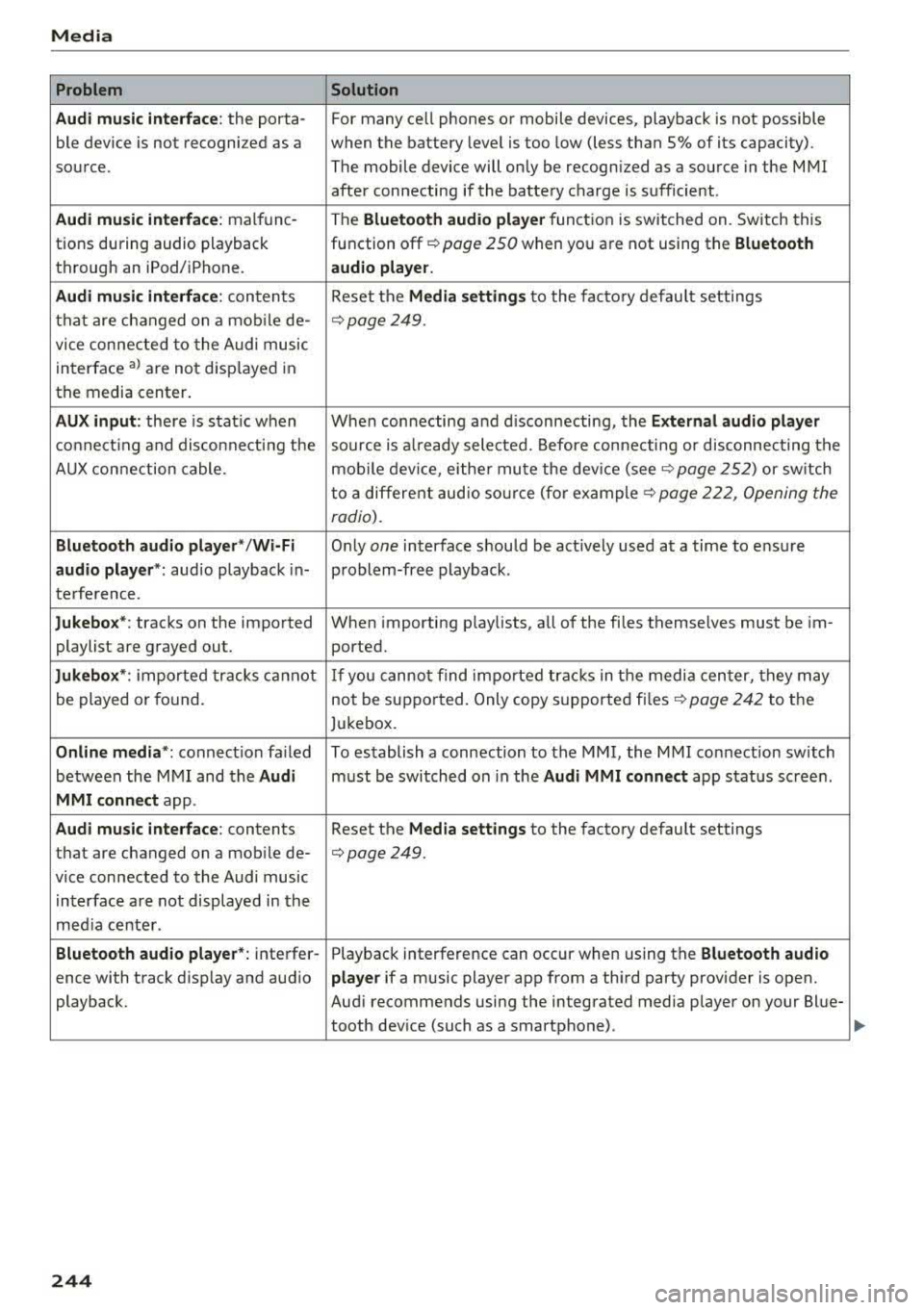
Problem Solution
Audi music inte rface :
the porta- For many ce ll phones or mobile devices, playback is not possible
ble device is not recognized as a when the battery level is too low (less than 5% of its capacity).
source. The mobile device will only be recognized as a source in the MMI
after connecting if the battery charge is sufficient .
Audi music interface: malfunc-The Bluetooth audio player function is switched on. Switch this
tions during audio playback function
off¢ page 250 when you are not using the Bluetooth
through an iPod/ iPhone. audio player.
Audi music interface:
contents Reset the Media settings to the factory default settings
that are changed on a mobile de-
¢page 249.
vice connected to the Audi music
interface
al are not disp layed in
the media center.
AUX input: there is stat ic when When connecting and disconnecting, the External audio player
connecting and disconnecti ng the source is already selected. Before connecting or disconnecting the
AUX connection cable. mobile device, either mute the device
(see¢ page 252) or sw itch
to a different audio sourc e (fo r
example ¢ page 222, Opening the
radio).
Bluetooth audio player* /Wi-Fi Only one interface should be act ively used at a time to ensure
audio player*: audio playback in- problem-free playback.
terference.
Jukebox*: tracks on the imported When importing playlists, all of the fi les themselves must be im-
playlist are grayed out. ported.
Jukebox*: imported tracks ca nnot If you cannot find imported tracks in the media center, they may
be played or found. not be supported. Only copy supported
files¢ page 242 to the
Jukebox.
Online media *: connection fa iled To establish a connection to the MMI, the MMI connection switch
between the MMI and the
Audi must be switched on in the Audi MMI connect app status sc reen.
MMI connect app.
Audi music interface: contents Reset the Media settings to the factory default settings
that are changed on a mob ile de-
¢page 249.
vice connected to the Audi music
interface are not displayed in the
med ia center .
Bluetooth audio player *: interfer- Playback interference can occur when using the Bluetooth audio
ence with track d isp lay and aud io player if a music player app from a third party provider is open.
playback. Audi recommends using the integrated media player on your Blue-
tooth device (such as a smartphone) .
244