service indicator AUDI A4 2018 User Guide
[x] Cancel search | Manufacturer: AUDI, Model Year: 2018, Model line: A4, Model: AUDI A4 2018Pages: 403, PDF Size: 66.81 MB
Page 87 of 403

you stop it. You also cannot lock the vehicle from
the outside .
Applies to: vehicles with au tomatic transm issions
Shift to P , otherwise vehicle can roll away.
Doors do not lock if gearshift is not in P
This message appears for safety reasons if the
selector lever is in the N position when you
sw itch the ignition off. Move the selector leve r to
the P position. Otherwise the vehicle is not pro
tected from ro lling and it cannot be locked .
DJ Remote control key: hold back of key
against the designated area . See owner 's man
ual
If the indicator light turns on and th is message
appears, there is a malfunction
q page 85 .
Applies to: vehicles with automatic transmissions
Shift to P before leaving car, otherwise vehicle
can roll away
This message appears if the driver's door is
opened while the ignition is switched on and the
transmission has not been shifted to the P posi
tion . Sh ift the transmiss ion into the P position
and turn off the ignition if you are leaving the ve
hicle . Otherwise the vehicle could roll. Also see
c::> page87 .
Starting the engine when there is a
malfunction
It may not be possible to start the engine under
certain circumstances, for example if the battery
in the vehicle key is drained, if interference is af
fected the key or if there is a system malfunc
tion .
Fig. 94 Cente r console/ remote contro l key: starting t he
eng ine if there is a malfunc tion
Driving
Requirement: the message Remote control key:
hold back of key against the designated area .
See owner's manual
must display and the DJ i n
dicator light must turn on.
.,. Place the remote control key on the location
shown in the illustration
y >l) c::> fig . 94.
Applies to: vehicles with manual transmission
.,. Press the clutch pedal.
Applies to: vehicles with automatic transmissions
• Press the brake pedal.
.. Press the !START ENGINE STOP ! button. The
engine will start.
.,. Drive to an authorized Audi dea ler or author
ized Aud i Service Facility immediately to have
the malfunction corrected.
@ Tips
You can view the message again by pressing
the
I S TART ENGINE STOP I button.
Start/Stop system
Description
Applies to: vehicles with Start/Stop system
The Start/Stop system can help increase fue l
economy and reduce CO2 emissions.
In Sta rt/Stop mode, the engine shuts off auto
matically when the vehicle is stopped, such as at
a traffic light. The ignition remains switched on
during this stop phase . The engine wi ll restart
automatica lly when needed .
Th e Start/Stop system is a utomaticall y activated
as soon as the ignition is switched on.
Basic requirements for Start/Stop mode
-The driver's door must be closed .
-The driver's seat belt much be fastened.
- The hood must be closed.
- The vehicle must have driven faster than
2 mph
(3 km/h) since the last time it stopped .
- A trailer must not be hitched to the vehicle.
If you leave the vehicle during a stop phase, the
engine can be restarted within approximately 30
seconds if the following requi rements are met:
IJ>
85
Page 90 of 403

Driving
Messages in the instrument cluster display
Applies to: vehicles with Start/Stop system
Automatic start /stop deactivated: Please
re sta rt engin e manually
This message appea rs when specific conditions
are not met dur ing a stop phase. The Sta rt/Stop
system wi ll not be able to restart the engine . The
engine must be started with the
I S TAR T ENGINE STOP I button .
Automatic start /stop system: malfunction!
Function unavailabl e. Ple as e cont act Serv ic e
There is a malfunction in the Start/Stop system .
Drive the vehicle to an authorized Audi dealer or
author ized Service Facility as soon as poss ible to
have the ma lfunction corrected.
Electromechanical
parking brake
F ig. 97 Center console: park ing b rake
Your veh icle is equipped with an electromechani
cal parking brake
(D ¢ fig. 97. The parking brake
is designed to prevent the vehicle from rolling
un intent ionally and replaces the hand brake .
Setting/manu ally rele asing the parking
brake
~ Pull the(®) switch to set the parking brake. The
LED in the sw itch turns on . The
-(USA mod
els) ;II (Canada models) indicator light a lso
turns on in the inst rument cluste r display .
~ To release the parking brake manually, press
the brake o r accelerator pedal whi le the igni
tion is switched on and press
t h e®> switch at
the same time. The LED in the button and the indicator light in the display turn off.
88
Releasing the pa rking brake automatically
Requirement: the drive r's door must be closed.
~ To start d riving and release the pa rking brake
automatically, p ress the accelerator pedal as
usual.
In add ition to releas ing the parking brake auto
matically, other convenience and safety functions
are avai lab le w hen you sta rt
d rivi ng¢ page 89,
Starting to drive .
Preventing the automatic parking brake
release
The veh icle cou ld beg in ro lli ng u nintentionally,
depe nding on the hill o r if towing a trai le r.
~ To prevent the park ing brake from releasing au
tomatically, pull and hold
the(®) switch and
press the accele rator peda l. The pa rking brake
remai ns set a nd p revents the vehicle from roll
ing backwa rd.
~ You can release the®) switch again on ce you
are sure that you are giving enough driving
force to the wheels by pressing the accelerator
pedal.
Eme rgency braking function
You can use t he emergency b raking func tion in an
emergency situation, or i f the standard brake op
eration ma lfunctions or is disab led .
~ Pull and ho ld the(®) swi tch.
~ As soon as you re lease the®> switch or acceler -
ate, the braking stops.
P ull ing and ho ld ing
t h e®) sw itch wh ile driving
the ve hicle ac tiva tes the eme rge ncy brak ing func
tion. The ve hicle is bra ked at a ll four wheels by
activating the hydraulic b rake system . The brak
ing effect is sim ilar to heavy
braking ¢ ,A.
To reduce the risk of act ivat ing the emergency
braking by m istake, a w arning tone (buzzer)
sounds when
the© sw itch is p ulled . Emergency
braking stops as soon as
the(®) sw itch is released
o r the accelerator pedal is pressed .
Parking
~ Press the bra ke pedal to stop the veh icle.
~ Pull the®) swi tch to set the par king b rake .
Page 107 of 403

-Under some circumstances, traffic sign rec
ognition may not detect traffic s igns cor
rectly or detect them at all. As a result, the
system may not display the correct speed
limit or any speed limit.
- Traffic sign recognition does not adapt your
vehicle's speed to match the speed
limit!
-The display in the instrument cluster is
based on the units of measurement used for
speed in that country. As a result, the d is
play
50 in the instrument cluster can mean
either km/h o r mph, depending on the coun
try .
Operation
Applies to: ve hicles with camera-based traffic sign recogni
tio n
Fig . 106 In strument cluste r: add it iona l display
Accessing traffic sign recognition
• Select: the first tab > Traffic signs.
Setting a speed warning
You can set a warn ing threshold down to 10 mph
(lS km/h). The traffic sign fo r the current detect
ed speed limit w ill blink in the display if you ex
ceed the set threshold .
• Select in the Infotainment system: !MENUI but
ton
> Vehicle > left control button > Driver as
sistance
> Speed warning > Traffic sign based
warning.
Additional display
If a v iew other than the traffic sign recognition is
selected in the ins trument cluster display, the
speed limit will be shown in another display
co fig. 106 . The current applicable speed limit will
Assistance systems
be shown there, if possible within the limits of
the system.
(D Tips
- An additional indicator appea rs in the head
up display* .
- Your speed warning settings are stored au
tomatically and assigned to the remote con
trol key in use.
Messages
Appl ies to: vehicles with camera-based traff ic sig n recog ni·
tio n
f!ji Traffic sign recognition : currently unavaila
ble . Camera view restricted due to surroundings
Function currently unavailable. Camera view re
stricted due to surroundings
This message appears if the camera's visual field
is covered
<:::>page 104, fig . 105. The system w ill
switch itself off.
f!ji Traffic sign recognition: currently restricted.
See owner's manual
This message appears if there is a malfunction in
the navigation system, for examp le. The speed
limit display is limited, which increases the risk
of an incorrect d isplay .
lj Traffic sign based speed warning: currently
unavailable. See owner's manual
There is no warning when the set th reshold is ex
ceeded.
No traffic sign information available
There is no valid navigation data and do speed
li mits were detected . Or there is a recommended
speed but the re is not a speed limit (for examp le
driv ing on and off the expressway).
Malfunction! See owner's manual
The system cannot guarantee correct function
and is switched
off. See an authorized Audi deal
er or authorized Audi Service Facility for assis
tance .
Function not available in this country
105
Page 120 of 403

Assistance systems
Distance indicator and
distance warning
Description
Applies to: vehicles with Aud i adapt ive cruise control
F ig. 12 1 In stru ment cl uste r: dis tance indica tor/wa rning
At speeds above 40 mph (65 km/h), this funct ion
measures the time betwee n the vehicle driv ing
ahead and s hows th is in the instrument cl uster
d isp lay¢ fig. 121 .
You can set a warning t hreshold between 0 .6 and
3.0 seconds . The. indicator light t urns on if
you fall be low the set d is tance.
Switching the distance indicator/warning on
and off
.. In the Infotainment system, selec t: I MENU !
button > Vehicle > left contro l button > Driver
assistance > Distance warning.
A WARNING
-Read an d follow th e warn ings on ¢.&. in
Gen eral inf orma tion on page 1 09.
-The driv er is always r espons ib le for a dhering
to the regulations applicable in that co un
t ry .
{!) Tips
You may fall below he warn ing t hreshold
briefly whe n pass ing or when quickly ap
proac hing a s low veh icle . T h er e is no wa rning
in this scen ario . A warn ing is gi ve n only if you
f al l b elow the war ning thr eshold f or an ex
t en ded pe rio d o f tim e.
118
Messages
Appl ies to: vehicles with Audi adaptive cruise control
ii ACC with traffic jam assist: unavailable . See
owner's manual
The sy stem cannot gu aran tee t hat i t will dete ct
vehicle s cor re ctl y an d it h as sw itched
off . The ra
dar sensors have shifted or are fau lty . D rive to an
aut ho rize d Audi dea ler o r a uth orized Audi Service
Facility immed iate ly to have the malfunct ion cor
r ected .
ii ACC with traffic jam assist: currently un
available. See owner's manual
This mes sage ap pears if the ada ptive cruise con
t ro l canno t be activ ated, for example i f th e hood
is ope n.
ti ACC with traffic jam assist : currently un
available. Sensor vision restricted due to sur roundings. See owner 's manual
This message ap pears if the radar se nsor v iew is
obstr ucted, for e xamp le by leaves, snow, heavy
s p ra y or dirt . Cle an the
se nso rs ¢ pa ge 1 09,
fi g. 108 .
ill ACC with traffic jam assist: currently un
available. Grade too steep
T he road exceeds the maxim um poss ible g rade
for saf e operation . The systems cannot be sw itch
ed o n.
ill ACC with traffic jam assist: only available in
D, Sor M
Se lect t he D/S or M se lector lever position.
flJ ACC: available from 1st gear up
Manua l transmiss io n: ada ptive cr uise con trol
works in 1s t gear an d higher.
ti ACC: clutch pedal pressed
Manua l transmiss io n: pressing the clutc h pedal
l onger inte rrupts the cont rol.
IIJ ACC: note engine speed
Manu al transmissio n: this message appea rs if t he
d rive r ha s not shift ed up or down in t ime when
t he a dap tive cr uise co ntrol is b raking o r accele r-
at ing , ca usi ng the ve hicle to excee d or to not
.,.
Page 129 of 403
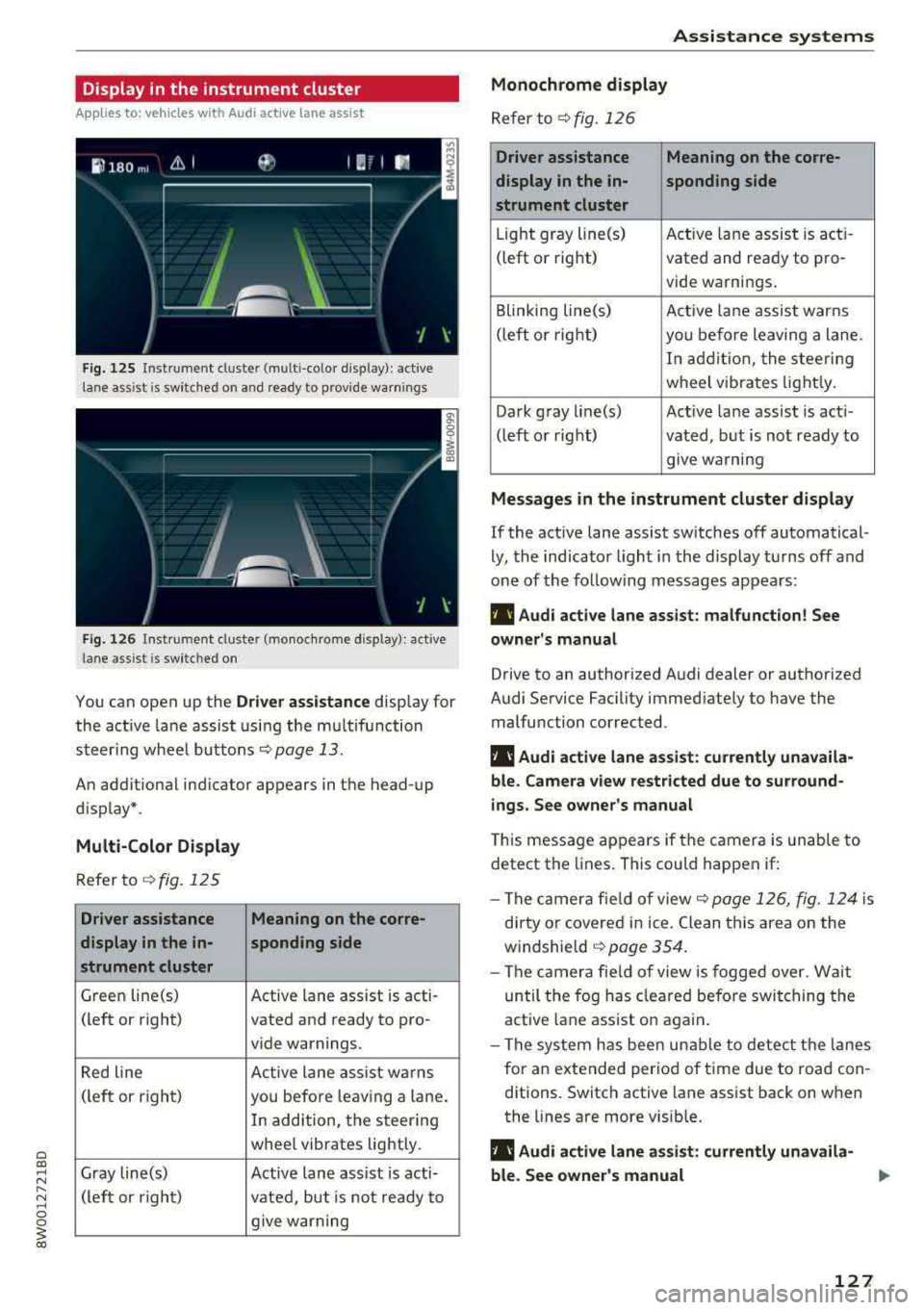
Display in the instrument cluster
App lies to: ve hicles with Audi active lane assist
Fig. 125 Instrument cluster (multi-color display): ac tive
lane ass ist is sw itched on and ready to provide warnings
Fig. 126 Instrument cl uster (monoc hrome display): active
lane ass ist is switched on
You can open up the Dr ive r assistance display for
the act ive lane assist using the multifunction
steer ing whee l buttons
c::> page 13.
An additional ind icator appears in the head-up
display*.
Multi-Color Display
Refer to¢ fig. 125
Driver assistance Meaning on the corre-
display in the in-sponding side
strument cluster
Green line(s) Active lane assist is acti -
(left or right) vated and ready to pro-
vide warnings.
Red line Active lane assist warns
(left or right) you before leav ing a lane.
In addition, the steering
whee l vibrates lightly.
Gray line(s) Active lane assist is acti-
(left or right)
vated, but is not ready to
give warning
Assistance systems
Monochrome display
Refer to¢ fig. 126
Driver assistance Meaning on the corre-
display in the in-
sponding side
strument cluster
Light gray line(s) Act ive lane assist is acti-
(left o r right) vated and ready to pro-
vide warnings .
Blinking line(s)
Active lane assist warns
(left or right)
you before leaving a lane.
In addition, the steering
wheel vibrates lightly.
Dark gray line(s) Active lane assist is acti-
(left or right) vated, but is not ready to
. . give warning
Messages in the instrument cluster display
If the active lane assist switches off automatical
ly, the indicator light in the display turns off and
one of the following messages appears:
fl! Audi active lane assist: malfunction! See
owner's manual
Drive to an authorized Audi dealer or authorized
Audi Service Facility immediately to have the
malfunction corrected.
fl! Audi active lane assist: currently unavaila
ble . Camera view restricted due to surround
ings. See owner's manual
This message appears if the camera is unable to
detect the lines. This could happen if:
- The camera fie ld of view
c::> page 126, fig. 124 is
dirty or covered in ice. Clean this area on the
windshie ld
¢ page 354.
- The camera field of view is fogged over. Wait
until the fog has cleared before switching the
active lane assist on again.
- The system has been unable to detect the lanes
for an extended period of time due to road con
ditions. Switch active lane assist back on when
the lines are more visible.
fl! Audi active lane as sist: currently unavaila
ble. See owner's manual
127
Page 152 of 403
Intelligent Technology
& WARNING
- Only apply the brakes for the purpose of
cleaning the brake system whe n road and
t raffic conditions perm it . You must not en
dange r othe r road users . This increases the
risk of an accide nt.
- Never let the vehicle roll while the e ng ine is
stopped because this increases the risk of a n
a cci den t.
([) Note
- Neve r let the brakes " rub" by pressing the
pedal lightly when braki ng is not actually
necessa ry . T his ca uses the bra kes to over
h ea t an d inc reases br akin g d istance an d
c a uses wear .
- B efo re driv ing downhill a long distance on a
steep hi ll, decre ase your spee d an d se lec t a
l ower gear . This makes use of t he engine
b raking effe ct and re lieves the brakes . If
you nee d to b rake additionally, b rake in in
tervals and not continuously .
(D Tips
- If the brake booste r is no t working, yo u
must press the brake pedal with much more
fo rce than normal.
- If you retrofit you r vehicle with a front spoil
er, whee l covers o r similar items, ma ke sure
that the a ir flow to the front whee ls is not
i nte rr u pted. Othe rw ise the brake system
ca n become too hot.
Electromechanical
steering, Dynamic
steering
T h e electromechanical st eering supports the
driver's steering movements.
Power steering adapts electronically based on
the vehicle speed.
Indicator lights and messages
• St ee ring : malfunction! Plea se stop vehicle
150
If this indicato r light turns on and stays on and
this message appears, the power steering may
have failed.
Stop t he vehi cle in a sa fe location as soon as pos
s ible . Do
not contin ue driving . See an authorized
Audi dealer or authorized A udi Service Facility for
ass istance .
'I- ij Steering: malfun ction! You may continue
driving
I f the indicato r light turns on and the message
a ppears, the steeri ng wheel may be more d iffi
cu lt to move o r more sensitive than usu al. The
stee ring wheel may also be at a n ang le when
driving straight.
D rive slowly to an auth o rized Audi dea ler or au
thorized Aud i Serv ice Facili ty to have t he mal
f unct io n corre cted .
t$Jj Dynamic steering: correcting steering wheel
position
If the indicator light turns on and this message
appears , the dynamic steering * is re in it ia liz ing .
The s teer ing whee l will be easy to move afte r
st ar ting t he engine . Reinitializa tio n might be
ne cessary if the stee ring w heel was moved while
t h e engine was switched off. The disp lay t urns
off if the initialization was successfu l.
(D Tips
- If the . or krfl i ndi cato r ligh t only s tays on
f or a sho rt time, you may cont inue driving .
- Th e dynamic stee ring s tabili ty sys tem s
¢ page 14 6 are not av ailabl e in the event of
a system malfunction .
- For add ition al informa tion o n dynamic
s teering, see
¢ page 133.
ALL-wheel drive (quattro)
App lies to: vehicles wi th all wheel drive
General information
In all whee l dr ive, the dr iv ing power is dis trib ut-
ed between all fo ur whee ls when needed. This
happens automatically depending on your driving
behavior as we ll as the c urrent road conditions.
.,_
Page 204 of 403
a co .... N ,....
N .... 0 0
3 co
Messages
Appl ies to: ve hicles with emergency call f unctio n
II Emergency call function : malfunction! Re
stricted functionality . Pl ease contact Servi ce
If the indicator lig ht turns on and the message
appears, you ca n only make an emergency ca ll
wit h restricted f unc tion. For examp le, yo u ca nnot
call the emergen cy c all cente r, b ut d ata may st ill
b e tra nsmi tted under cert ain circumst ances/
D rive to an autho rized Aud i dea le r or a uthorized
Audi Service Facility immediately to have t he
mal funct ion corrected.
II Emergency call function : malfunction! Fun c
tion unavailable. Plea se contact Servi ce
If t he i ndi cator lig ht tur ns on and t he message
ap pears, yo u ca nn ot m ake a n eme rge ncy call.
D rive to an autho rize d Aud i de aler or au th orized
Au di Service Facility immediately to have the
malfunct ion corrected.
Online roadside
assistance
Description
A pp lies to: ve hicles with online roads ide ass istance
You can request help if you are in an accident o r
b reakdown situation using on line roadside assis
tance
l) _ A roads ide ass istance call is a comb ina
tion of data transmission and a ph one call. The
data tra nsmission from your vehicle fo rwards im
portant information to the A udi se rvice cente r,
such as the vehicle and posit io n d ata.
l) The ava ilab ility of the services offered depends on t he
c oun try and may ch an ge over tim e.
Emergency call
Calling online roadside assistance
App lies to : vehicles wit h on li ne roa dside assista nce
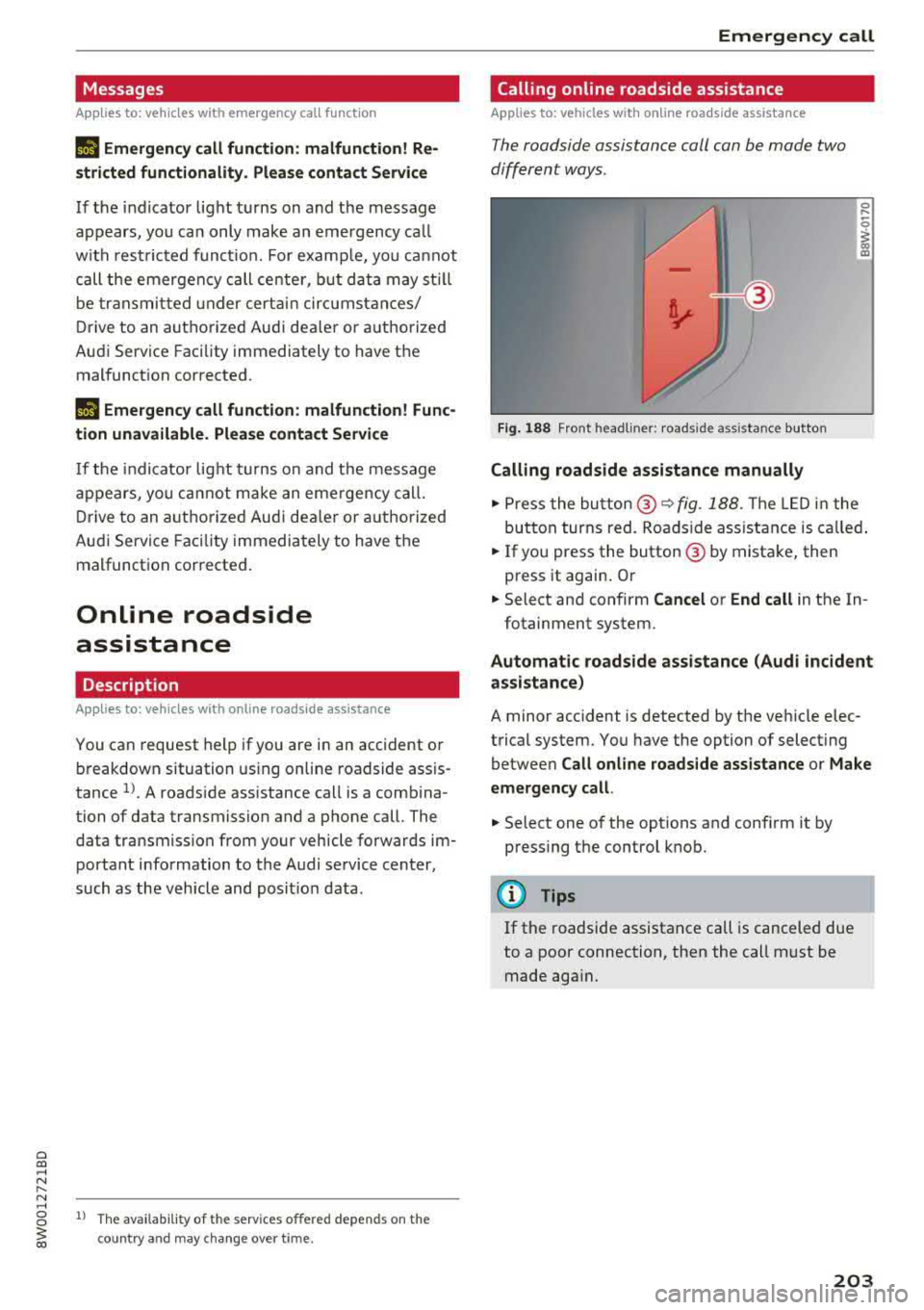
The roadside assistance call can be made two
diff ere nt ways .
Fig. 188 Front headl ine r: roads ide assistance button
Calling roadside assistance manually
.,. Press the bu tton @~ fig. 188. The LED in t he
but ton turns red. Roadside ass ist an ce is c alled.
.,. If you press the button @ by mista ke , then
press it again. Or
.,. Select an d confirm Cancel or End call in the In -
fotainment system.
Automatic roadside assistance (Audi incident
assistance)
A minor accident is detected by the ve hicle elec
trical system. You have the option of select ing
betwee n
Call online roads ide assistance o r Make
emergency call.
.,. Select one of the options and conf irm it by
press ing the control knob.
(D Tips
If the roadside assistance call is canceled due
to a poor connection, then the call m ust be
made aga in.
203
Page 328 of 403
a co .... N ,....
N .... 0 0
3 co
(D Note
Driving with an insufficient oil level is likely to
cause severe damage to the engine.
@ Tips
-The oil pressure warning display. is not
an indicator of the oil level. Do not rely on
it. Instead, check the oil level in your en
gine at regular intervals, preferably each
time you refuel, and always before going
on a long trip.
-If you have the impression your engine con
sumes excessive amounts of oil, we recom
mend that you consult an authorized Audi
dealer to have the cause of your concern
properly diagnosed. Keep in mind that the
accurate measurement of oil consumption
requires great care and may take some
time. An authorized Audi dealer has instruc
tions about how to measure oil consump
tion accurately.
Checking the engine oil level and adding
engine oil
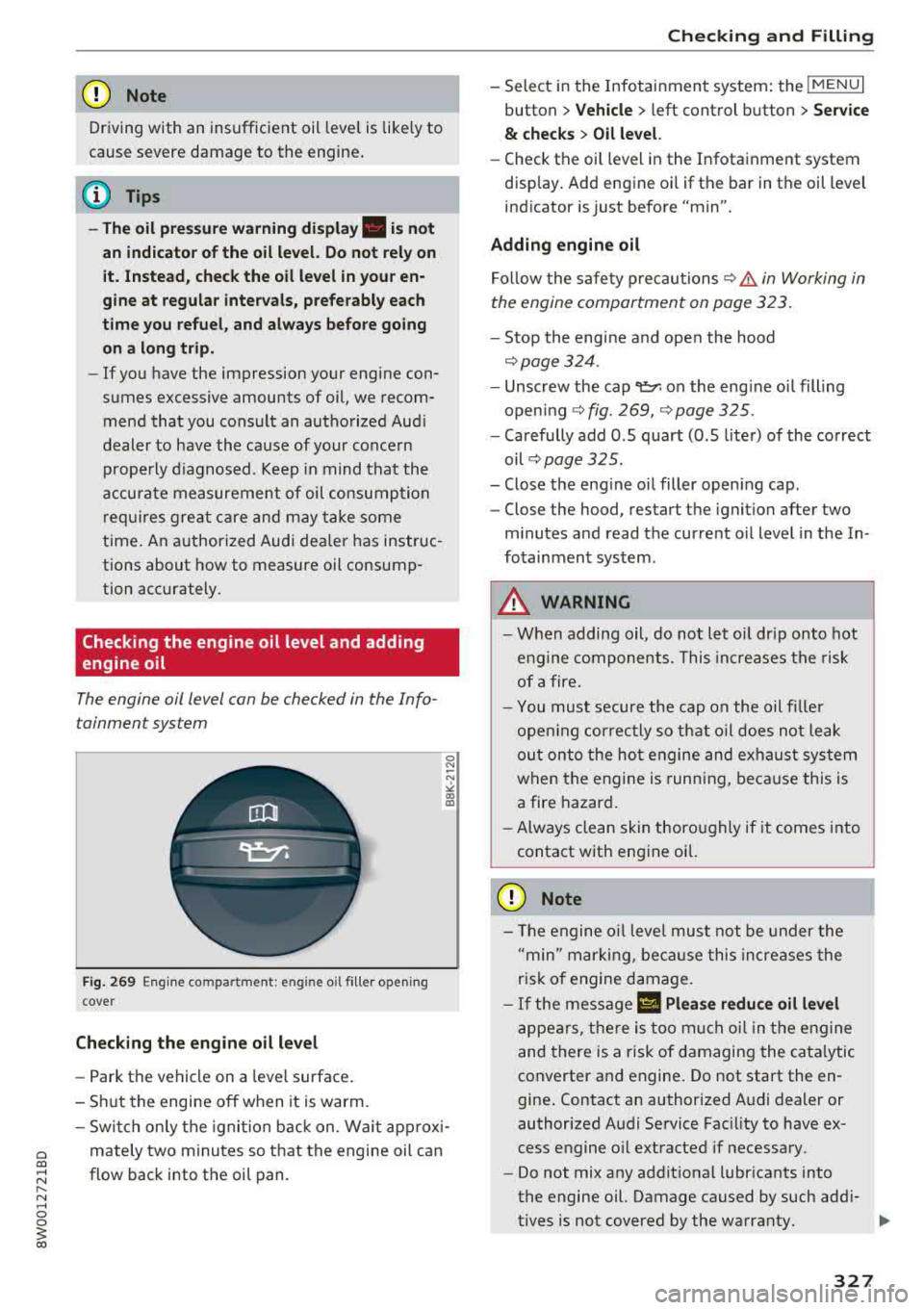
The engine oil level can be checked in the Info
tainment system
Fig. 269 Engine compa rtment: eng ine oil filler opening
cove r
Checking the engine oil level
- Park the vehicle on a level surface.
- Shut the engine off when it is warm.
0 N
-N
" 00 IX)
-Switch only the ignition back on. Wait approxi-
mately two minutes so that the engine oil can
flow back into the oil pan .
Checking and Filling
- Select in the Infotainment system: the !MENUI
button > Vehicle > left control button > Service
& checks > Oil level.
-Check the oil level in the Infotainment system
display. Add engine oil if the bar in the oil level
indicator is just before "min".
Adding engine oil Follow the safety precautions
~&. in Working in
the engine compartment on page 323.
- Stop the engine and open the hood
~page 324 .
-Unscrew the cap~ on the engine oil filling
opening
~ fig. 269, Qpage 325.
- Carefully add O .S quart (O .S liter) of the correct
oil
~ page 325.
- Close the engine oil filler opening cap.
- Close the hood, restart the ignition after two
minutes and read the current oil level in the In
fotainment system.
A WARNING ...__ --When adding oil, do not let oil drip onto hot
engine components. This increases the risk
of afire.
-You must secure the cap on the oil filler
opening correctly so that oil does not leak
out onto the hot engine and exhaust system
when the engine is running, because this is
a fire hazard.
-Always clean skin thoroughly if it comes into
contact with engine oil.
0 Note
- The engine oil level must not be under the
"min" marking, because this increases the
risk of engine damage.
- If the message II Please reduce oil level
appears, there is too much oil in the engine
and there is a risk of damaging the catalytic
converter and engine. Do not start the en
gine. Contact an authorized Audi dealer or
authorized Audi Service Facility to have ex
cess engine oil extracted if necessary.
- Do not mix any additional lubricants into
the engine oil. Damage caused by such addi-
tives is not covered by the warranty.
IJJ>
327
Page 329 of 403

Check ing and F illing
@ For the sake of the environment
- Oil should never enter the sewer system or
come into contact with the gro und.
- Pay attention to legal requirements when
disposing of empty oil containers .
@ Tips
- The oil leve l indicator in the d isplay is only
an informationa l disp lay .
If the oil leve l is
too low, a minimum oil warning appea rs in
the instrument cluster. Add oil and close
the hood . The current oil level is displayed
i n the instrument cluster the next t ime the
i gnition is switched on .
- The engine oil consumption may be up to
0 .5 quart/600 miles (0 .5 liter/1,000 km),
depend ing on driving style a nd operating
cond itions . Consumption may be higher
d ur in g the first 3,000 miles (5,000 km). Be
cause of t his, the engi ne oil level m ust be
chec ked regular ly.
It would be best to check
each time you ref uel your veh icle and before
l ong drives.
Changing the engine oil
We recommend that hove your oil changed by an
authorized Audi dealer or a qualified service sta
tion .
Before you c heck a nyth ing in the eng ine compart
men t,
alway s read and heed all WARNINGS ¢.&
in Working in the engine compartment on
page 323.
T he engine oil must be change d accord ing to the
intervals specified in your Warranty
& Mainte
nance booklet . This is very important because the
lubricat ing propert ies of oi l diminish gradually
during normal vehicle use.
Under some circ umstances the engine o il should
be changed more frequently. Change oil more of
ten if yo u drive most ly short distances, operate
the vehicle in dusty areas or under predominantly
stop-and-go traffic cond it ions, or have yo ur vehi
cle where temperatures remain below freezing
for extended periods .
328
Detergent add itives in the oi l will make fres h oil
l ook dark after the engine has been r unning for a
sho rt time . This is normal and is not a reason to
change the oil more often than recommended.
Because o f the p roblem o f prope r disposa l, along
with t he specia l too ls and necessary expertise re
quired, we strongly recommend that yo u have
yo ur oil changed by an authori zed
Audi dealer or
a qua lified service station.
If you choose to change your oil yourself , please
note the fo llow ing important information:
_& WARNING
To reduce the risk of persona l injury if you
must change the eng ine oil in your vehicle
yourself:
- Wea r eye protect ion.
- To red uce the r is k of bur ns from hot engine
oil, let the engine cool down to the touch.
-
- W hen removin g the oil drain plug with your
fingers, stay as far away as possible. Always
keep your forearm pa rallel to the gro und to
he lp prevent hot oil from run ning down your
arm .
- Drain the oil into a container designed for
this purpose, one la rge enough to hold at
least the tota l amount of oi l in you r engine.
- Engi ne oil is poisonous. Keep it well out of
the reach of childre n.
- Continuous contact with used eng ine o il is
ha rmf ul to your skin . Always protect your
skin by washi ng oil off thoroughly with soap
a nd wate r.
(D Note
N eve r mix oil additives with you r engine oil.
These add itives can damage your engine and
advers ely affect you r Audi Limit ed New Veh i
cle Warranty .
@ For the sake of the environment
-Before cha ng ing you r oi l, first make s ure
you know where you can properly dispose o f
t h e used oil.
- Always dispose of used e ngine o il pro perly .
Do not dump i t on garden soil, wooded
Page 334 of 403
a co .... N ,....
N .... 0 0
3 co
-Do not use a glass cleaner that contains
paint solvents, because this could damage
the paint.
Service interval display
The service interval display detects when your ve
hicle is due for service.
Checking service intervals
You can check the remaining distance or time un
til the next oil change or next inspection in the
Infotainment system .
.,. Select in the Infotainment system: the I MENU I
button >
Vehicle > left control button > Service
& checks > Service intervals.
Resetting the indicator
An authorized Audi dealer or authorized Audi
Service Facility will reset the service interval dis
play after performing service.
If you have changed the oil yourself, you must re
set the oil change interval.
.,. Select in the Infotainment system: the !MENUI
button >
Vehicle > left control button > Service
& checks > Service intervals > Reset oil change
interval.
If an oil change or inspection is due, you can ac
cess it in the Infotainment system. The display
works in two stages:
-Service reminder: after a certain distance is
driven, a message appears in the instrument
cluster display every time the ignition is switch
ed on. The remaining distance and time is dis
played briefly.
- Service due: if your vehicle has reached a serv
ice interval , a message appears briefly after
switching the ignition on.
(D Note
-Only reset the oil change indicator if the oil
was changed.
- Following the service intervals is critical to
maintaining the service life and value of
your vehicle, especially the engine. Even if
Checking and Filling
the mileage on the vehicle is low, do not ex
ceed the time for the next service.
333