radio AUDI A4 2018 Owner's Guide
[x] Cancel search | Manufacturer: AUDI, Model Year: 2018, Model line: A4, Model: AUDI A4 2018Pages: 403, PDF Size: 66.81 MB
Page 239 of 403
Media
@ Tips
-Only the categories supported by the medi
um are available. For example, CD/DVD
ROM tracks cannot be selected with catego
ries such as
Ar tists, A lbum s or Ge nre s.
With an iPod/iPhone (so urce : Audi music in
terface <=>
page 233), the Podca st s, A udio
boo ks
and Compo ser s categories are also
available.
- For safety reasons, the video image is only
displayed when the vehicle is stationary. On
l y the sound from the v ideo p lays while d riv
ing .
-When synchronizing a po rtable device with
"Cloud " se rvices, p lay lists may display in co r
rectly in the MM I. Use the media center in
the device .
- With an iPod/iPhone (med ia source: Audi
music interface
<=> page 233), the Pod ca sts,
Audio bo oks
and C omp osers categories are
a lso available .
@ Tips
Applies to: iPod/iPhone on Audi music interface
- An Internet connection is requ ired to use
the add it ional
Radio category, an online
media serv ice. Also see the chapter
c:> page 194, Wi -Fi hotspot . Also read the in
formation on the Aud i mus ic interface and
the supported devices
c:> page 233.
- Depending on the Internet connection and
network traff ic, a connection loss can occur
d uring p layback o f on line media serv ices.
- The use of online media se rvices depends on
the service ava ilability of the third party
provide r.
- Audi AG simply makes the access to online
media serv ices possible through the MM I
and does not take any respo nsibility for the
contents of the on line med ia services .
238
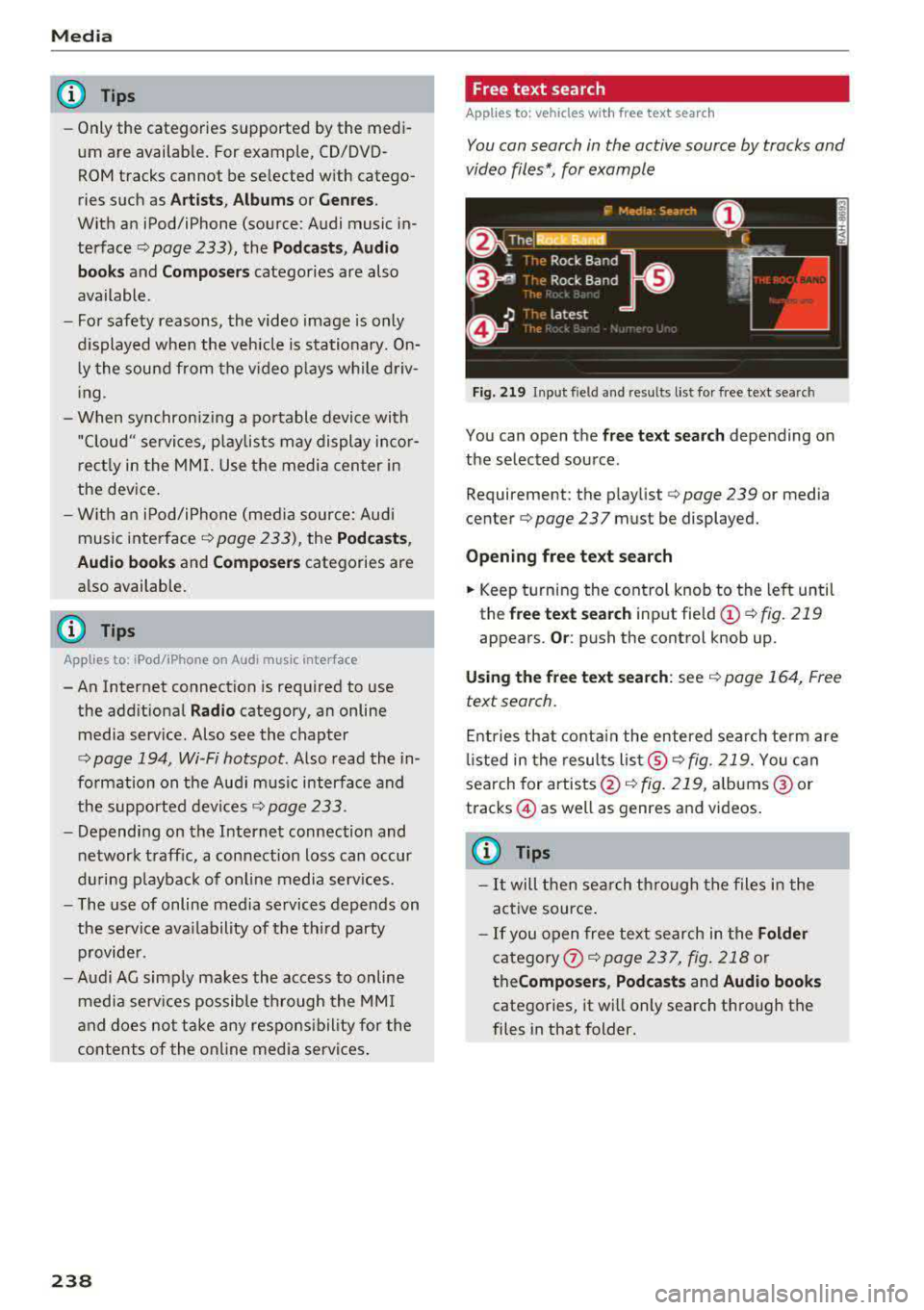
Free text search
Applies to: vehicles with free text search
You can search in the active sour ce by tracks and
video files*, for example
Fig. 219 Inp ut field and res ults list fo r fr ee text se arch
You can open the free te xt sea rch depending on
the selected source .
Requ irement: the p laylist
c:> page 239 or med ia
cen ter
c:> page 237 must be d isplayed.
Openin g free te xt s ear ch
.. Keep turning the cont rol knob to the left until
th e
free text searc h input field @c:>fig. 219
appears . Or: push the control knob up .
Usi ng the free text sea rch : see c:> page 164, Free
text search .
Entries that conta in the entered search te rm are
li sted in the results
lis t@ c:> fig . 219. You can
search for
artists @<=> fig. 219, albums @or
t racks @as w ell as g enres and vid eos .
(0 Tips
-It will then search through the files in the
active source .
- If you open free text search in the
Folder
category
the Compo ser s, Podca sts and Audio book s
categories, it will only search through the
files in that folder.
Page 245 of 403
Media
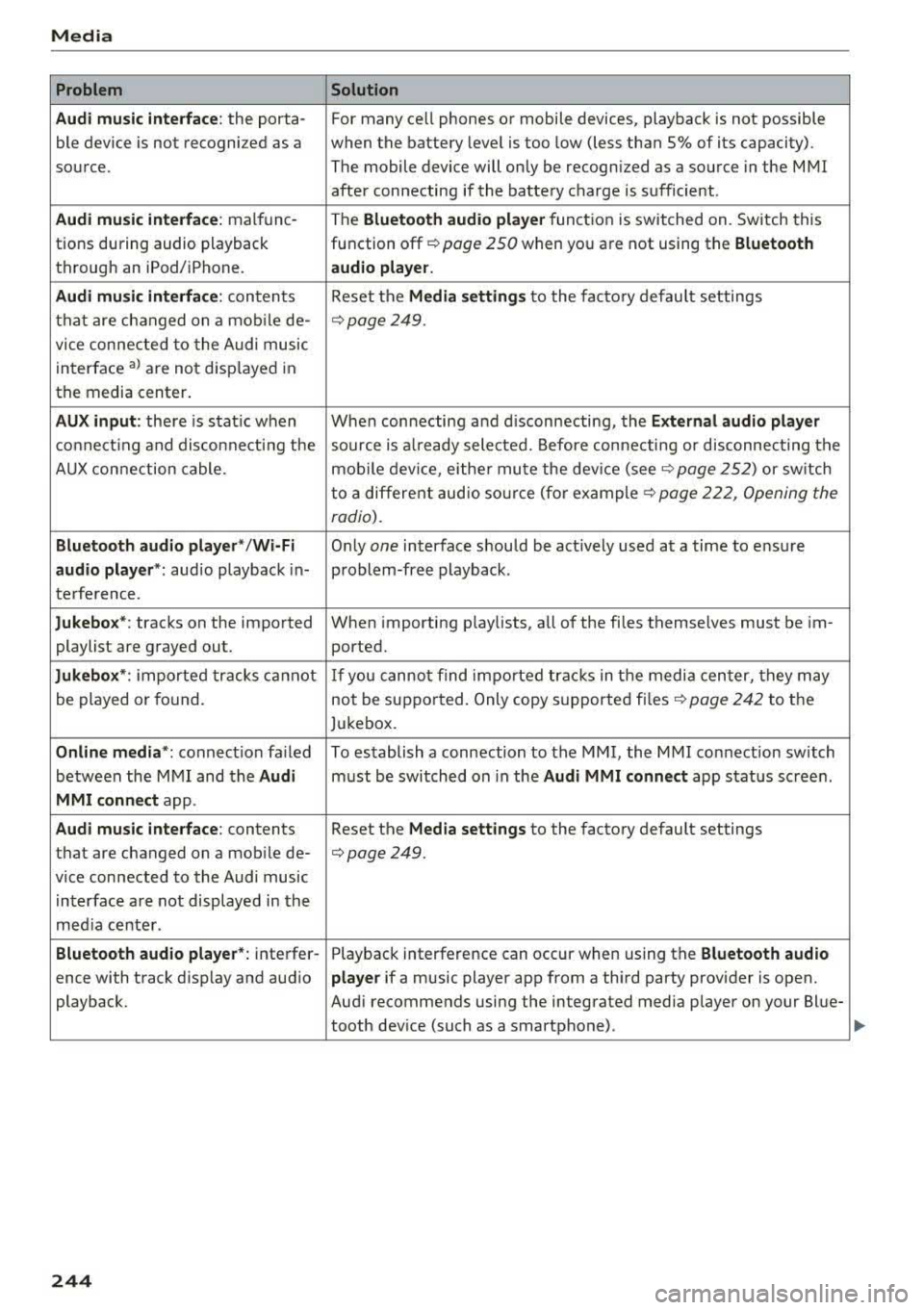
Problem Solution
Audi music inte rface :
the porta- For many ce ll phones or mobile devices, playback is not possible
ble device is not recognized as a when the battery level is too low (less than 5% of its capacity).
source. The mobile device will only be recognized as a source in the MMI
after connecting if the battery charge is sufficient .
Audi music interface: malfunc-The Bluetooth audio player function is switched on. Switch this
tions during audio playback function
off¢ page 250 when you are not using the Bluetooth
through an iPod/ iPhone. audio player.
Audi music interface:
contents Reset the Media settings to the factory default settings
that are changed on a mobile de-
¢page 249.
vice connected to the Audi music
interface
al are not disp layed in
the media center.
AUX input: there is stat ic when When connecting and disconnecting, the External audio player
connecting and disconnecti ng the source is already selected. Before connecting or disconnecting the
AUX connection cable. mobile device, either mute the device
(see¢ page 252) or sw itch
to a different audio sourc e (fo r
example ¢ page 222, Opening the
radio).
Bluetooth audio player* /Wi-Fi Only one interface should be act ively used at a time to ensure
audio player*: audio playback in- problem-free playback.
terference.
Jukebox*: tracks on the imported When importing playlists, all of the fi les themselves must be im-
playlist are grayed out. ported.
Jukebox*: imported tracks ca nnot If you cannot find imported tracks in the media center, they may
be played or found. not be supported. Only copy supported
files¢ page 242 to the
Jukebox.
Online media *: connection fa iled To establish a connection to the MMI, the MMI connection switch
between the MMI and the
Audi must be switched on in the Audi MMI connect app status sc reen.
MMI connect app.
Audi music interface: contents Reset the Media settings to the factory default settings
that are changed on a mob ile de-
¢page 249.
vice connected to the Audi music
interface are not displayed in the
med ia center .
Bluetooth audio player *: interfer- Playback interference can occur when using the Bluetooth audio
ence with track d isp lay and aud io player if a music player app from a third party provider is open.
playback. Audi recommends using the integrated media player on your Blue-
tooth device (such as a smartphone) .
244
Page 287 of 403
Airbag syste m
Make sure that the PASSENGER AIR BAG
OFF
11;; li ght comes on and stays on all t he
t ime whenever the ignition is switched on.
A WARNING
- If the PA SSEN GER AIR BAG OFF 11;; light
does not go ou t when an adult is sitting on
the front passe nger seat a fte r ta king the
steps described above, make sure the adult is p roperly seated and restrained at one of
the rear seating positions.
- Have the airbag system inspected by your
authorized Aud i dealer before transporting
anyone on the front passenger seat.
@ Tips
If the capacitive passenger detection system
determines that the front passenger seat is
empty, the frontal airbag on the passenge r
side w ill be tu rned off, and the
PASSENGER
AIR BAG OFF
11;; light will stay on.
-
Repair , care and disposal of the airbags
Parts of the a irbag system are installed at many
different places on your Audi. Installing, remov ing, servic ing or repa iring a part in an area of the
ve hicle can damage a part of an airbag system
and prevent that system from working properly
i n a collision .
There are some important things you have to
know to make sure that the effectiveness of the
system w ill not be impaired and that discarded
components do not cause injury or pollute the
env ironment.
A WARNING
Improper care, serv icing and repai r proce
dures can increase the r is k of personal injury
and death by preventing an airbag from de
ploying when needed or dep loying an airbag
unexpectedly:
-
- Never cover, obstruct, or change the steer
ing wheel horn pad or airbag cover or the in
strument pane l or modify them in any way.
286
- Never attach any objects s uch as c upholders
or telephone mountings to the surfaces cov
ering the a irbag un its.
- For cleaning the horn pad or instrument
panel, use only a soft, dry cloth or one mois
tened w ith plain water. Solvents or cleaners
could damage the airbag cover or change
the st iffness or strength of the material so
that the airbag cannot deploy and p rotect
properly.
- Never repair, adjust, or change any parts of
the airbag system.
- All work on the steering wheel, inst rument
panel, front seats or e lectr ica l system ( in
cluding the installation of a udio eq uipment,
cellular telephones and C B radio s, etc.)
m ust be perfo rmed by a qualified techn ician
who has the training and specia l equipment
necessary.
- For any work on the airbag system, we strong ly recommend that you see your au
thorized A udi dealer or qualified workshop.
- Never modify the front b umper or parts of
the vehicle body.
- Always make sure that the side a irbag can
inflate w ithout interference:
- Never install seat covers or replacement
u pholstery ove r the front seatbacks that
have not been specifically approved by
A udi.
- Never use additional seat cushions that
cover the areas where the side airbags in
flate.
- Damage to the orig inal seat cove rs or to
the seam in the area of the s ide airbag
module mus t always be repaired immedi
ate ly by an authori zed Au di dealer.
- The a irbag system can deploy on ly once. Af
ter an airbag h as been deployed, i t m ust be
repla ced with new replacement parts de
signed and approved espec ia lly for your
Audi model version . Replacement of com
plete airbag systems or airbag components
must be perfo rmed by qua lified workshops
only. Make sure that any airbag service ac
tion is entered in your A udi Warranty
&
Ma intenance boo klet under AIRBAG RE-
PLAC EM EN T RECORD.
~
Page 337 of 403

Wheel s
® Mud and snow capability
"M/5" or "M+S" indicates the tire
is sui table for driving on mud and
snow.
& indicates a winter tire.
@ Composition of the tire cord
and materials
The number of plies indicates the
number of rubberized fabric lay
ers in the t ire. In general: the
more layers, the more weight a
tire can carry . Tire manufacturers
must also specify the materials
used in the tire. These include
steel, nylon, po lyester and other
materials.
@ Maximum permitted load
This number indicates the maxi
mum load in kilograms and
pounds that the tire can carry .
@Uniform tire quality grade
standards for treadwear,
traction and temperature resist ance
Treadwear, traction and tempera
ture
ranges ¢ page 351.
@ Running direction
The arrows indicate the running
direction of unidirectional t ires .
You must always follow the speci
fied running direction
¢page 366 .
336
@ Maximum permitted
inflation pressure
This number indicates the maxi
mum pressure to which a tire can
be inflated under normal operat
ing condit ions.
Glossary of tire and loading
terminology
Acces sory we ight
means the combined weight (in
excess of those standard items
which may be replaced) of auto matic transmission, power steer
ing, power brakes, power win
dows, power seats, radio, and
heater, to the extent that these
items are available as factory-in
stalled equipment (whether in
stalled or not) .
Aspect ratio
means the ratio of the height to
the width of the tire in percent .
Numbers of 55 or lower indicate a
low sidewall for improved steer
ing response and better overall
handling on dry pavement.
Bead
means the part of the tire that is
made of steel wires, wrapped or
reinforced by ply cords and that is
shaped to fit the r im .
...
Page 362 of 403
-Never use the jack supplied with your Audi
on another vehicle, particularly on a heav ier
one. The jack is only suitable for use on the
vehicle it came w ith .
(D Tips
The vehicle jack in your vehicle is mainte
nance-free.
Tire mobility kit
Preparation
Appl ies to: vehicles with tire mobility kit
• Read and follow the impor tant safety p recau
t ions
q page 360.
• Set the parking b rake.
Applies to: vehicles with manual tra nsmission
• Shift into 1st gear.
Applies to: vehicles with automatic transm issions
• Select the P select or lever posit ion .
• Check if a repair with the t ire mobi lity kit is pos
sibl e
qpage 361 .
Using the tire mobility kit
Applies to: ve hicl es with tire mobility kit
@
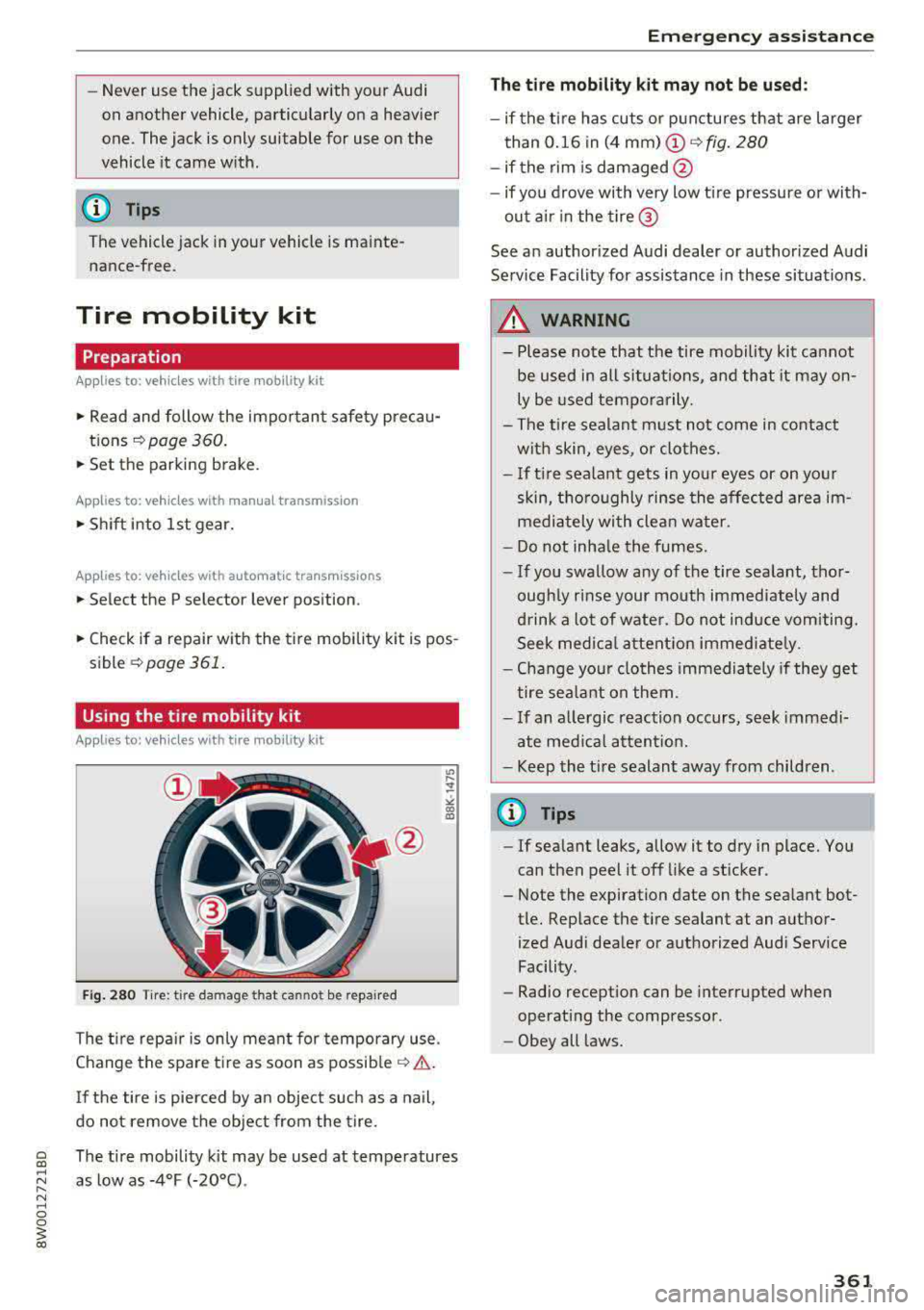
Fig. 280 Tire : tire da mag e t hat ca nnot be repa ired
The t ire repa ir is only mea nt for temporary use .
Change the spare tire as soon as possib le
q ,&. .
If the tire is pie rced by a n object such as a nail,
do not remove the object from the tire.
~ The t ire mobility kit may be used at temperatures
~ "' as low as -4°F (-20°C) .
" N ~ 0 0
~ co
Emergen cy a ssis tanc e
The tire mobility kit may not be used :
-if the tir e has cuts or p unctures that are larger
than 0.16 in (4 mm)
(D ~ fig. 280
- if the rim is damaged @
- if you drove with very low t ire pressure or wi th-
out ai r in the tire @
See a n author ized Audi dealer or authorized Audi
Service Facility for assistance in these situations .
,&. WARNING
-
- Please note that the tire mobility kit ca nnot
be used in all situations, a nd that it may
on
ly be used temporarily.
- The tire sealant m ust not come in contact
with skin, eyes , o r clothes.
- I f ti re sealant gets in you r eyes or on yo ur
skin, t ho roughly rinse the affected area
im
mediately with clean water .
- Do not inha le the fumes.
- If you swallow any of the tire sea lant, thor-
ough ly rinse your mouth immediately and
d rink a lot of water. Do not induce vomi ting.
Seek med ic al attent ion immed iate ly.
- Change yo ur clothes immediately if they get
tire sea lant on them .
- I f an a lle rgic reaction occurs, seek immed i
ate med ica l atten tion .
- Keep the t ire sealant away from children .
(D Tips
-If sea lant leaks, allow itto dry in place. You
can then peel it off like a st icker.
- Note the expiration date on the sea lant bot
tle. Replace the t ire sealant at an author
ized Aud i dea ler or authorized Aud i Serv ice
Facility .
- Radio reception can be interrupted when
operating the compresso r.
- Obey all laws.
361
Page 375 of 403

Emergency situations
Emergency situations
General
This chapter is intended for trained emergency crews and working personnel who have the nec
essary tools and equipment to perform these
operations.
Starting by pushing or
towing
(D Note
Vehicles with an automatic transmission
cannot be started by pushing or towing.
Starting with jumper
cables
If necessary, the engine con be started by con
necting it to the battery of another vehicle.
If the engine should fail to start because of a dis
charged or weak battery, the battery can be con
nected to the battery of
another vehicle, using a
pair of jumper cables to start the engine.
Jumper cables
Use only jumper cables of sufficiently large cross
section
to carry the starter current safely. Refer
to the manufacturer's specifications.
Use only jumper cables with
insulated terminal
clamps which are distinctly marked :
plus(+) cable in most cases colored red
minus(-) cable
in most cases colored black.
A WARNING
Batteries contain electricity, acid, and gas.
Any of these can cause very serious or fatal in
jury. Follow the instructions below for
safe
handling of your vehicle's battery.
-Always shield your eyes and avoid leaning
over the battery whenever possible.
-A dead battery can freeze at temperatures
around 32 °F (0 °C) . If the vehicle battery is
frozen, you must thaw it before connecting
the jump start cables.
If you do not, this in-
374
creases the risk of an explosion and chemi
cal burns. After jump starting the vehicle,
drive to an authorized Audi dealer or author ized Audi Service Facility immediately to
have the vehicle battery checked.
- Do not allow battery acid to contact eyes or
skin . Flush any contacted area with water
immediately.
- Improper use of a booster battery to start a
vehicle may cause an explosion .
- Vehicle batteries generate explosive gases.
Keep sparks, flame and lighted cigarettes
away from batteries.
- Do not try to jump start any vehicle with a
low acid level in the battery.
- The voltage of the booster battery must also
have a 12-Volt rating. The capacity (Ah) of
the booster battery should not be lower
than that of the discharged battery. Use of
batteries of different voltage or substantial
ly different
"Ah" rating may cause an explo
sion and personal injury.
- Never charge a frozen battery. Gas trapped
in the ice may cause an explosion.
- Never charge or use a battery that has been
frozen. The battery case may have be weak
ened.
- Use of batteries of different voltage or sub
stantially different capacity (Ah) rating may
cause an explosion and injury. The capacity (Ah) of the booster battery should not be
lower than that of the discharged battery.
- Before you check anything in the engine
compartment, always read and heed all
WARNINGS
r=:> poge 323.
([) Note
-Applying a higher voltage booster battery
will cause expensive damage to sensitive electronic components, such as control
units, relays, radio, etc.
- There must be no electrical contact between
the vehicles as otherwise current could al
ready start to flow as soon as the positive
(+) terminals are connected.
Page 387 of 403

Consumer Info rmation
Technical Modifications
Our guidelines must be complied with when tech
nical modifications are made .
Always consult an authorized Audi dealer before
starting work on any modificat ions.
This will he lp ensure that vehicle function, per
formance and safety are not impaired
9 & .
Attempting to work on electronic components
and the software used with them can cause mal
functions. Because of the way electronic compo nents are interconnected with each other, such
malfunctions can also have an adverse affect on
other systems that are not directly involved. This
means that you risk both a substantial reduction
in the operational safety of your veh icle and an
i n creased wea r of ve hicle parts
9 ,&. .
Author ized Audi dealers w ill perform this work in
a profess ional and competent manner or, in spe
cial cases, refer you to a professional company
that spec ial izes in such modifications.
_& WARNING
Improper repairs and modifications can
change the way veh icle systems work and
cause damage to the veh icle and ser ious per
sonal injury.
([) Note
I f emergency repa irs mus t be pe rformed else
where, have the vehicle examined by an a u
t horized Audi dealer as soon as possib le .
Declaration of
Compliance, Telecom munications and
Electronic Systems
Radio Frequency Devices and Radiocommunica
tion Equipment User Manual Notice .
The manufacturer is not responsible for any radio
or TV interference caused by unauthorized modi
fications to this equipment .
386
Devices
The following devices each comply wi th FCC Part
15.19, FCC Part 15.21 and RSS-Gen Issue 1:
- Audi adapt ive cru ise cont rol*
- Audi side assist*
- Cell phone package*
- Conven ience key*
- Electronic immobilize r
- Garage door opener (Homelink)*
- Remote cont rol key
FCC Part 15.19
This device complies with part 15 of the FCC
R ules . Ope ration is subject to the follow ing two
cond it ions:
(1) T his dev ice may not cause harmful interfer
ence, and
(2) this device must accept any interference re
ce ived, includ ing interference that may cause un
desired operation.
FCC Part 15.21
CAUTION:
Changes or modificat io ns not express ly approved
by the pa rty responsible fo r compliance cou ld
vo id the user's a uthority to operate the equ ip
ment.
RSS-G en Issue 1
Operat ion is s ubject to the following two cond i
tions:
(1) this device may not cause interference, and
(2) this device must accept any interference, in
clud ing interference that may cause undesired
operation of the device.
Page 392 of 403
a co .... N ..... N .... 0 0
3 co
Emergency call f unction
Au di connect emergency ca ll and service . 202
E me rgency flashe rs . . . . . . . . . . . . . . . . . . . . 56
Emergency starting . . . . . . . . . . . . . . . . . . . 374
E m issions cont rol sys tem . . . . . . . . . . . . . . 32 2
E nergy management . . . . . . . . . . . . . . . . . . 151
Eng ine
Coolant . . . . . . . . . . . . . . . . . . . . . . . . . . . . 329
Start/Stop system . . . . . . . . . . . . . . . . . . . . 85
Starting/stopping . . . . . . . . . . . . . . . . . . . . 83
Starting w it h jumper cables . . . . . . . . . . . 374
Eng ine compartment . . . . . . . . . . . . . . . . . . 323
Opening and clos ing the hood . . . . . . . . . . 324
Safety precautions . . . . . . . . . . . . . . . . . . . 323
E ng ine oi l . . . . . . . . . . . . . . . . . . . . . . . . . . . 325
Adding . ... ... .. .. ..... ... .. .. .... . 327
Changing . . . . . . . . . . . . . . . . . . . . . . . . . . 328
Checking the oil leve l . . . . . . . . . . . . . . . . . 327
Consumption . ............. .. .. .... .
D. t· k lpS IC .. ... ............. ...... ... .
327
327
O il consumption . . . . . . . . . . . . . . . . . . . . . 326
Specification and viscos ity . . . . . . . . . . . . . 325
T empe rature d isp lay . . . . . . . . . . . . . . . . . . 11
Eng ine sound . . . . . . . . . . . . . . . . . . . . . . . . 134
Eng ine Start/Stop mode
refer to Start/Stop system . . . . . . . . . . . . . 87
E nter ing cha racters/numbers (speller) . . . . 162
Enter ing letters (speller) . . . . . . . . . . . . . . . 162
E n terta inment s liding me nu . . . . . . . . . . . . 160
E ntry/ex it lighting . . . . . . . . . . . . . . . . . . . . . 56
Environment Proper disposal of drained engine o il ... .
Unleaded fuel . .. ........... .. .. .... .
E S C
.. .. .. .. ... .. .. ..... ... .. .. .... .
Hill descent assist ... .... ... .. .. .... .
Offroad mode ... .. .. .... ... .. .. .... .
Sport mode 328
315
1 46
148
147
147
E v asive steering suppo rt . . . . . . . . . . . . . . . 12 1
Event Data Recorder (EDR) . . . . . . . . . . . . . 153
Expanded view . . . . . . . . . . . . . . . . . . . . . . . . 1 5
E xterio r ligh ting . . . . . . . . . . . . . . . . . . . . . . . 54
Exterior mirrors . . . . . . . . . . . . . . . . . . . . . . . 58
E xternal voice operat ion.... ... .. .. .... . 173
Index
F
Factory default settings
Multi Media Interface . . . . . . . . . . . . . . . . 249
Fader (sound) . . . . . . . . . . . . . . . . . . . . . . . . 252
Fastening Booster seats . . . . . . . . . . . . . . . . . . . . . . . 305
Convertib le child safety seats . . . . . . . . . . 303
I n fan t seats . . . . . . . . . . . . . . . . . . . . . . . . 301
Fast forwarding/rewind ing (a udio/video
file) . . . . . . . . . . . . . . . . . . . . . . . . . . . . . . . . 236
F ast forwarding ( aud io/v ideo file) . . . . . . . . 236
Fast route
Favorites Media 211
239
Navigation . . . . . . . . . . . . . . . . . . . . . . . . . 206
Telephone. . . . . . . . . . . . . . . . . . . . . . . . . . 180
F ile formats (media drives) . . . . . . . . . . . . . 242
Floor ma ts ..... ... .. ................ .
Foot peda ls . .... .. ................. . . 259
259
F o r the s ake o f th e e nv ironmen t
E nvironmenta lly-friend ly driving . . . . . . . . 80
Fueling . . . . . . . . . . . . . . . . . . . . . . . . . . . . 317
Leaks ... .. .... .. .. ... .. ..... ... .. .. 324
Warming up the engine . . . . . . . . . . . . . . . . 83
F ree text search . .. .. .. .
............ ..
Media .. .. .... .. .. .... . ..... ... .. ..
Navigation .... .. ... .. .. ..... ... .. . .
Radio
. . .. .. ' . .. .. ... .. ..... ... .. . .
Telephone . .... .. ................. . .
F ree ze p ro tect ion 164
2 38
205
223 184
Coo lant . . . . . . . . . . . . . . . . . . . . . . . . . . . . 32 9
Freq uency band . . . . . . . . . . . . . . . . . . 222, 225
Front airbags Desc ription . . . . . . . . . . . . . . . . . . . . . . . . . 275
How they work . . . . . . . . . . . . . . . . . . . . . . 281
F rontal collisions and the laws o f physics . . 264
Front passenger 's doo r eme rgency locking . . 42
Front seats Adjusting . . . . . . . . . . . . . . . . . . . . . . . . . . 256
Child restra ints in the front seat . . . . . . . . 272
also refer to Seats . . . . . . . . . . . . . . . . . . . . 65
Fuel Additives
.. .... .. ................. .. 315
B lended gasoline . . . . . . . . . . . . . . . . . . . . 315
Current consumpt io n . . . . . . . . . . . . . . . . . .
17
D iesel . . . . . . . . . . . . . . . . . . . . . . . . . . . . . 315
391
Page 393 of 403
Index
Fue l filler neck . . . . . . . . . . . . . . . . . . . . . . 317
F ue l gauge . . . . . . . . . . . . . . . . . . . . . . . 10, 12
Fue l tank capac ity . . . . . . . . . . . . . . . . . . . 381
Gasoline . .. .. ...... ......... .... ... 315
Gasoline additives . . . . . . . . . . . . . . . . . . . 316
Octane rating . . . . . . . . . . . . . . . . . . . . . . . 315
Recommendation . . . . . . . . . . . . . . . . . . . . 315
Saving fue l . . . . . . . . . . . . . . . . . . . . . . 80, 134
Fueling Fue l gauge . . . . . . . . . . . . . . . . . . . . . . . . . . 12
Fuel tank capac ity . . . . . . . . . . . . . . . . . . . 381
O pening the fuel fille r door . . . . . . . . . . . . 317
Fuses Assignment . . . . . . . . . . . . . . . . . . . . . . . . 370
Replac ing . . . . . . . . . . . . . . . . . . . . . . . . . . 369
G
Garage doo r opener
refer to Homelink . . . . . . . . . . . . . . . . . . . . 52
Garment hoo ks . . . . . . . . . . . . . . . . . . . . . . . . 69
Gas discharge lamps . . . . . . . . . . . . . . . . . . . 373
Glossary of tire and loading terminology .. 336
Glove compartment . . . . . . . . . . . . . . . . . . . . 69
V al et par kin g f unction . . . . . . . . . . . . . . . . . 5 1
Gross Vehicle Weight Rat ing (GVWR) . . . . . 380
H
Handsfree . . . . . . . . . . . . . . . . . . . . . . . . . . . 175
H ead -up display . . . . . . . . . . . . . . . . . . . . . . . 24
H eadlight range control system . . . . . . . . . . 54
Headlights . . . . . . . . . . . . . . . . . . . . . . . . . . . 54
C lean ing . . . . . . . . . . . . . . . . . . . . . . . . . . . 355
H eadlight range control system . . . . . . . . . 54
Washer system . . . . . . . . . . . . . . . . . . . . . . 60
Head restraints . . . . . . . . . . . . . . . . . . . . 66, 25 7
Adj usti ng . . . . . . . . . . . . . . . . . . . . . . . . . . 257
H ea ting . . . . . . . . . . . . . . . . . . . . . . . . . . . . . . 76
H eavy clothing and safety belts . . . . . . . . . . 265
High beams . . . . . . . . . . . . . . . . . . . . . . . . . . . 55
Assistant . . . . . . . . . . . . . . . . . . . . . . . . . . . . 55
Hi ll descent ass ist. . . . . . . . . . . . . . . . . . . . . 14 8
Hi ll descent control . . . . . . . . . . . . . . . . . . . . 94
H ill hold ass ist . . . . . . . . . . . . . . . . . . . . . . . . 89
also refer to Hill hold ass ist . . . . . . . . . . . . 89
H ome address .. .. .. .............. 206, 2 12
392
Homelink . . . . . . . . . . . . . . . . . . . . . . . . . . . . 52
Hor n . . . . . . . . . . . . . . . . . . . . . . . . . . . . . . . . . 8
How are child restraint system anchors relat-
ed to c hild safety . . . . . . . . . . . . . . . . . . . . . 309
How many a irbags does my vehicle have? . . 278
How safety belt pre tensioners work . . . . . . 269
I
Imbalance (whee ls) . . . . . . . . . . . . . . . . . . . 342
Immobilize r . . . . . . . . . . . . . . . . . . . . . . . . . . 38
Important things to do before dr iv in g . . . . 254
Importing and expo rting (contacts) . . . . . . 185
I mprope rly wo rn safety bel ts . . . . . . . . . . . 269
Ind icator lights . . . . . . . . . . . . . . . . . . . . . . . . 25
Airbag system . . . . . . . . . . . . . . . . . . . . . . 283
PASS ENG ER A IR BAG . . . . . . . . . . . . . . . . . 283
Infant seats . . . . . . . . . . . . . . . . . . . . . . . . . 301
I np ut
U sing the M MI touch . . . . . . . . . . . . . . . . . 158
U sing the speller . . . . . . . . . . . . . . . . . . . . 162
I np ut level (media) . . . . . . . . . . . . . . . . . . . . 239
Inspection interva l . . . . . . . . . . . . . . . . . . . . 333
Installing the upper te ther s trap on t he an
c h o rage . . . . . . . . . . . . . . . . . . . . . . . . . . . . . 313
Instrument cluster . . . . . . . . . . . . . . . . . . . . . 10
Cleaning . . . . . . . . . . . . . . . . . . . . . . . . . . . 356
Messages . . . . . . . . . . . . . . . . . . . . . . . . . . . 25
Instrument illumination . . . . . . . . . . . . . . . . 58
Interior lighting . . . . . . . . . . . . . . . . . . . . . . . 57
Internet
refer to Aud i connec t (Infotainmen t) . . . . 188
Internet radio . . . . . . . . . . . . . . . . . . . . . . . . 232
Interval mode (wipers) . . . . . . . . . . . . . . . . . . 60
i Phone
refer to Aud i m usic interface . . . . . . . 233, 234
J
Jukebox 229
Jump-start ing . .. .. .. .. .. ........... .. 374
Jump start cable . .. .. .. .. ........... .. 375
Page 396 of 403
Panorama glass roof. . . . . . . . . . . . . . . . . . . . 50
Emergency operation........... ..... .. 51
Parental control
DVD ... .. .. .. .. ........... .. .. .... . 239
Parking aid
Cleaning sensors/camera . . . . . . . . . . . . .
355
Parking brake
refer to Electromechanical parking brake . 88
Par king lights . . . . . . . . . . . . . . . . . . . . . . . . . 54
Parking location Audi connect vehicle control . . . . . . . . . . .
199
Parking system
refer to Parking systems ....... .. . 137, 138
Parking systems . . . . . . . . . . . . . . . . . . . . . . 136
Peripheral cameras . . . . . . . . . . . . . . . . . . 140
Rearview camera . . . . . . . . . . . . . . . . . . . .
138
Settings . . . . . . . . . . . . . . . . . . . . . . . . . . . 143
Trai ler hitch . . . . . . . . . . . . . . . . . . . . . . . . 144
Particulate filter (diesel) . . . . . . . . . . . . . . .
322
Partition net . . . . . . . . . . . . . . . . . . . . . . . . . . 72
Parts replacement . . . . . . . . . . . . . . . . . . . . 385
Pass-through . . . . . . . . . . . . . . . . . . . . . . . . . 73
PASSENGER AIR BAG light . . . . . . . . . . . . . . 283
Paths (Owner's Manual) . . . . . . . . . . . . . . . . 158
Pause (audio/video file) . . . . . . . . . . . . . . . . 236
Pedals . . . . . . . . . . . . . . . . . . . . . . . . . . . . . . 259
Peripheral display . . . . . . . . . . . . . . . . . . . . . 13 7
Personal route assistance . . . . . . . . . . . . . . 210
Phonebook
refer to Contacts . . . . . . . . . . . . . . . . . . . . 183
Physical princ iples of a frontal collision . . . 264
Picture format (video) . . . . . . . . . . . . . . . . .
239
Playback (media) . . . . . . . . . . . . . . . . . . . . . 236
Playlist . . . . . . . . . . . . . . . . . . . . . . . . . . . . . 239
Point of interest . . . . . . . . . . . . . . . . . . . . . . 207
Point of interest search . . . . . . . . . . . . . . . . 208
also refer to Point of interest . . . . . . . . . . 207
Polishing . . . . . . . . . . . . . . . . . . . . . . . . . . . . 356
Pollutant filter (automatic A/C system) . . . . 76
Predictive efficiency assist . . . . . . . . . . . . . . 107
Pregnant women Special considerations when wearing a safe -
a ty belt . . . . . . . . . . . . . . . . . . . . . . . . . . . . . 268 co .... ~ pre sense
:::l refer to Audi pre sense . . . . . . . . . . . . . . . 120 0
3 Presentation mode . . . . . . . . . . . . . . . . . . . . 213
co
Index
Presets list
refer to Favorites . . . . . . . . . . . . . . . . . . . . 225
Presets (radio) . . . . . . . . . . . . . . . . . . . . . . . 225
Pressure
Tire pressure monitoring system . . . . . . .
352
Prewarming . . . . . . . . . . . . . . . . . . . . . . . . . . 83
Program guide
Radio .... .... .. .. ............... ..
223
Prompt
refer to Command (voice recognition sys -
tem) . . . . . . . . . . . . . . . . . . . . . . . . . . . . . .
167
Proper occupant seating positions . . . . . . . 255
Proper safety be lt pos ition . . . . . . . . . . . . . . 267
Proper seating position
Front passenger . . . . . . . . . . . . . . . . . . . . .
256
Occupants . . . . . . . . . . . . . . . . . . . . . . . . . . 255
Rear passengers . . . . . . . . . . . . . . . . . . . . . 257
Protecting . . . . . . . . . . . . . . . . . . . . . . . . . . . 356
Q
quattro
Se lective wheel torque control ....... . .
Question 150
146
What happens to unbelted occupants?
264
R
Radio . . . . . . . . . . . . . . . . . . . . . . . . . . . . . . . 222
Additional station information . . . . . . . . . 224
Presets . . . . . . . . . . . . . . . . . . . . . . . . . . . . 225
Radio text . . . . . . . . . . . . . . . . . . . . . . . . . . 223
Station list . . . . . . . . . . . . . . . . . . . . . . . . . 222
Rain/l ight sensor
Headlights . . . . . . . . . . . . . . . . . . . . . . . . . . 54
Interval mode (wipers) . . . . . . . . . . . . . . . . 60
Raising the vehicle . . . . . . . . . . . . . . . . . . . .
377
Random
refer to Shuffle . . . . . . . . . . . . . . . . . . . . . 239
Range (fue l level) . . . . . . . . . . . . . . . . . . . . . . 17
Reading lights . . . . . . . . . . . . . . . . . . . . . . . . . 5 7
Rear fog lights . . . . . . . . . . . . . . . . . . . . . . . . 54
Rear lid Escape latch . . . . . . . . . . . . . . . . . . . . . . . . .
46
also refer to Luggage compartment lid 43, 44
Rear Seat Entertainment preparation
refer to Audi Entertainment mobile . . . . . 235
395