ESP AUDI A4 2018 Repair Manual
[x] Cancel search | Manufacturer: AUDI, Model Year: 2018, Model line: A4, Model: AUDI A4 2018Pages: 403, PDF Size: 66.81 MB
Page 235 of 403
Media
Audi music interface
Connect your mobile devices to the Audi music
interface in order to operate them through the
MMI and charge the battery.
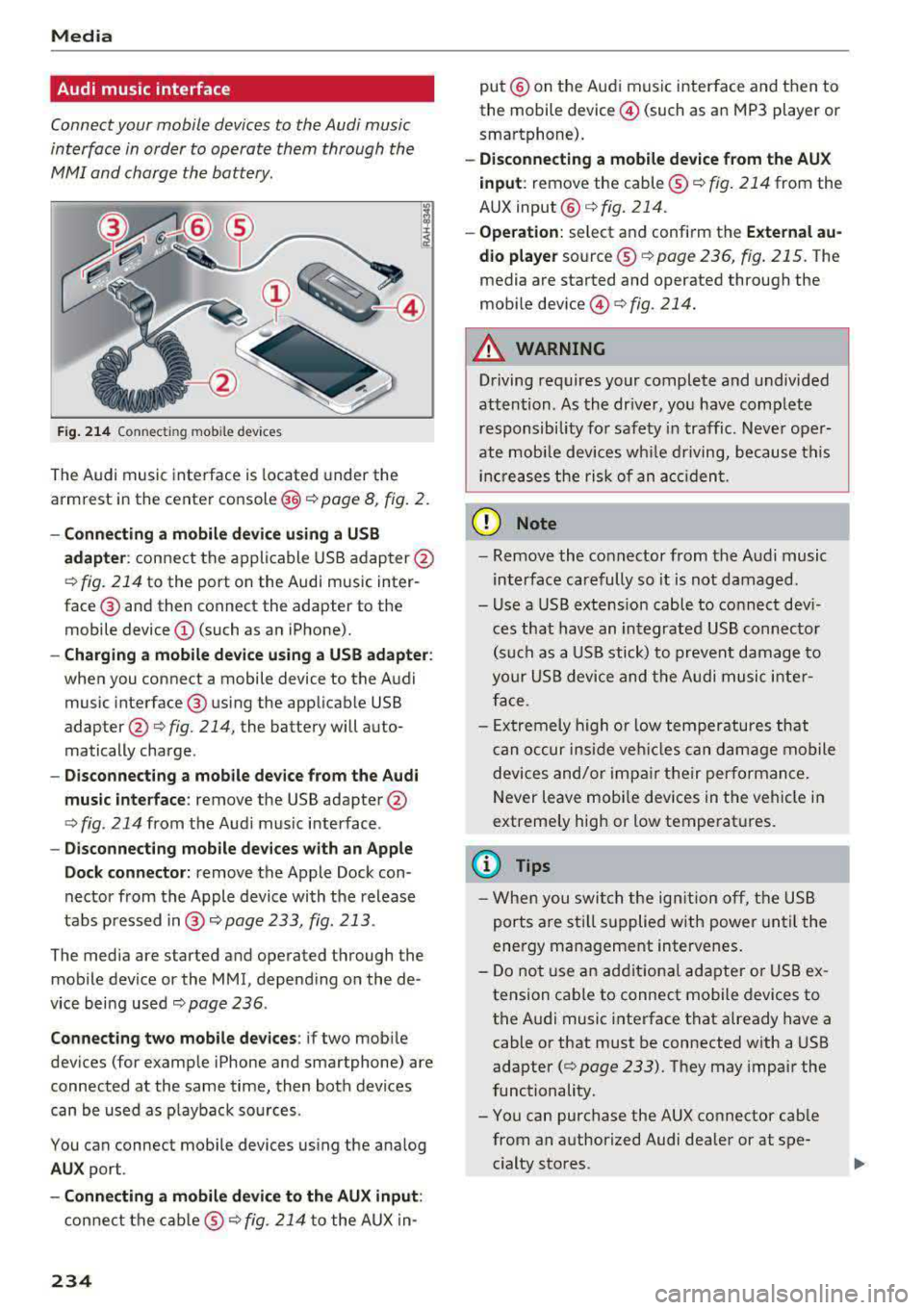
F ig . 214 Connec ting mob ile dev ices
The Audi music inte rface is located under the
armrest in the center
console @c::> page 8, fig. 2.
-Connecting a mobile device u sin g a U SB
a dapt er:
connect the applicable USB adap ter @
c::> fig. 214 to the port on the Audi music inter
face ® and then connect the adapter to the
mobile device @(such as an iPhone).
-Charging a mobile device u sing a USB adapter :
when you connect a mobile device to the Audi
music interface ® using the applicab le USB
adapter @
c::> fig. 214, the battery will auto
matically charge .
-Disconnec ting a mobil e dev ice from the Au di
music int erfac e:
remove the USB adapter@
<=> fig. 214 from the Audi music interface .
-Di sco nn ect ing mob ile d evices with an Apple
Do ck con nector:
remove the Apple Dock con
nector from the Apple device with the release
tabs pressed
i n @ c::> page 233, fig. 213 .
The media are started and operated through the
mobile device or the MMI, depending on the de
vice being used
c::> page 236 .
Connecting two m obile d evi ce s: if two mob ile
dev ices (for example iPhone and smartphone) are
connected at the same time, then both devices
can be used as p layback so urces .
You can connect mobile devices using the analog
AU X port .
-Conn ecting a mobile d evic e to th e AU X input :
connect the cab le ® c::> fig. 214 to the AUX in-
234
put @ on the Audi music interface and then to
the mobile device @(such as an MP3 player or
smartphone).
- Discon necti ng a mobile d evice from the AU X
i nput :
remove the cable ® c::> fig. 214 from the
AUX
input @c::> fig. 214.
-Ope ration: select and confirm the Extern al au
d io player
source ® c::> page 236, fig. 215 . The
media are started and operated through the
mobile
device @<=> fig. 214.
A WARNING
Driving requires your complete and undivided
attention . As the dr iver, you have complete
responsibility for safety in traffic . Neve r oper
ate mobi le devices wh ile driving, because this
inc reases the risk of an acc iden t.
(D Note
- Remove the connector from the A udi music
interface carefully so it is not damaged.
- Use a USB extens ion cable to connect dev i
ces that have an integrated USB connecto r
(s uch as a USB stick) to prevent damage to
your USB device and the A udi musi c inte r
face.
- Ex tremely high o r low temperatures that
c an occur inside veh icles can damage mobile
devices and/or impa ir their performan ce.
Never leave mobi le devices in the vehicle in
extremely high or low temperat ures.
(D Tips
- Whe n you swi tch the ign ition o ff, the USB
ports are sti ll supplied w ith power until the
energy management intervenes.
- Do not use an additiona l adapter o r USB ex
tension cab le to connect mobile devices to
the A udi music interface that already have a
cable or that must be connected with a USB
adapter
(c::> page 233). They may impair the
functionality.
- You can purchase the AUX connector cab le
from an authorized Audi dealer or at spe
cialty stores .
Page 239 of 403
Media
@ Tips
-Only the categories supported by the medi
um are available. For example, CD/DVD
ROM tracks cannot be selected with catego
ries such as
Ar tists, A lbum s or Ge nre s.
With an iPod/iPhone (so urce : Audi music in
terface <=>
page 233), the Podca st s, A udio
boo ks
and Compo ser s categories are also
available.
- For safety reasons, the video image is only
displayed when the vehicle is stationary. On
l y the sound from the v ideo p lays while d riv
ing .
-When synchronizing a po rtable device with
"Cloud " se rvices, p lay lists may display in co r
rectly in the MM I. Use the media center in
the device .
- With an iPod/iPhone (med ia source: Audi
music interface
<=> page 233), the Pod ca sts,
Audio bo oks
and C omp osers categories are
a lso available .
@ Tips
Applies to: iPod/iPhone on Audi music interface
- An Internet connection is requ ired to use
the add it ional
Radio category, an online
media serv ice. Also see the chapter
c:> page 194, Wi -Fi hotspot . Also read the in
formation on the Aud i mus ic interface and
the supported devices
c:> page 233.
- Depending on the Internet connection and
network traff ic, a connection loss can occur
d uring p layback o f on line media serv ices.
- The use of online media se rvices depends on
the service ava ilability of the third party
provide r.
- Audi AG simply makes the access to online
media serv ices possible through the MM I
and does not take any respo nsibility for the
contents of the on line med ia services .
238
Free text search
Applies to: vehicles with free text search
You can search in the active sour ce by tracks and
video files*, for example
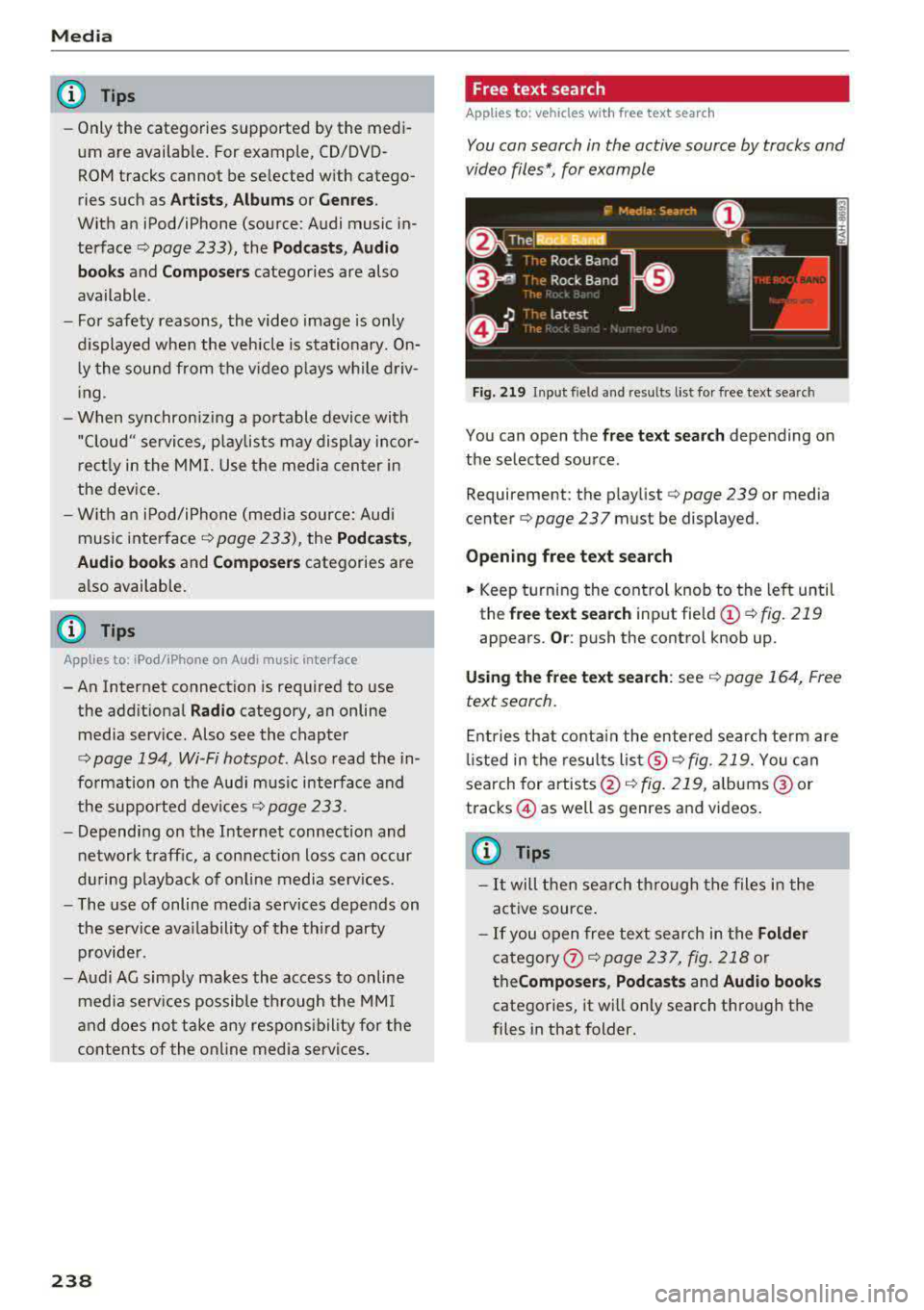
Fig. 219 Inp ut field and res ults list fo r fr ee text se arch
You can open the free te xt sea rch depending on
the selected source .
Requ irement: the p laylist
c:> page 239 or med ia
cen ter
c:> page 237 must be d isplayed.
Openin g free te xt s ear ch
.. Keep turning the cont rol knob to the left until
th e
free text searc h input field @c:>fig. 219
appears . Or: push the control knob up .
Usi ng the free text sea rch : see c:> page 164, Free
text search .
Entries that conta in the entered search te rm are
li sted in the results
lis t@ c:> fig . 219. You can
search for
artists @<=> fig. 219, albums @or
t racks @as w ell as g enres and vid eos .
(0 Tips
-It will then search through the files in the
active source .
- If you open free text search in the
Folder
category
the Compo ser s, Podca sts and Audio book s
categories, it will only search through the
files in that folder.
Page 249 of 403
System settings
System settings
Setting the date and
time
You con set the cloc k time manually or using the
CPS*.
"' Se lect : I MENU I button> Settings > left contro l
button >
MMI settings > Date & time .
"'Or: select : I MENU I but ton> Vehicle > lef t con-
t ro l button >
Vehicle settings > Date & time .
Automatic setting
W hen th is function is sw itched on~. the time
a nd date are a utomatically set.
Time
R equi rement: the Automatic setting must be
sw itche d off .
Pr ess the cont ro l knob . Yo u can set t he
Time
manu ally by tur ning and press ing the co ntr ol
knob.
Date
R equir em en t: the Automatic setting mus t be
s w itche d off .
P ress th e cont rol knob . Yo u ca n set the
Date
manually by tur ning and pr ess ing the cont rol
knob .
Time zone
When se lecting the approp riate t ime zone, a
sampling of countr ies in this zo ne will be lis ted .
Automatic time zone*
Wh en th is function is sw itche d on~, the t ime
w ill automatically a djust to the correspon ding
time zone .
Automatic daylight saving time*
When th is function is sw itche d on~, the tim e
wi ll automatically sw itch to day light saving time .
Time format
If yo u se lec t 24h , th e cl ock w ill disp lay, for ex
am ple,
13:00 . If you s elec t AM/PM , the clock
w ill di sp la y, for examp le,
1:00 PM .
248
Date format
If you se le ct DD.MM.YYYY , the d ate di spl ay will
show, fo r exam ple ,
31.08.2018. If you select
MM/DD/YYYY , th e date displ ay wi ll show, for ex
amp le,
08/31/2018. If you s elect YYYY -MM
DD ,
the date display will show, fo r example,
2018-08 -31 .
MMI settings
"'Select: !ME NUI button> Settings > left cont rol
button >
MMI settings .
Language
Y o u c an chan ge the display langua ge as well as
t h e lan guage fo r th e voice guidance * and vo ice
r ecognition system *.
The num ber o f langu ages av a ila ble depe nds on
t h e mar ket.
Measurement units
The following meas uremen t uni ts can be set d e
pend ing on av a ilab ility:
Speed , Distance , Tem
perature , Fuel consumption , Volume , Pressure.
Tool tips
Whe n this f unction is switched on ~' you r MMI
shows you tips fo r inpu t. The fre quency of how
oft en it displays decr ease s w it h tim e.
Speech dialog system
App lies to : vehicles with voice recog nitio n syste m
Depend ing on veh icle equipment, the following
funct io ns may be ava ilable:
Command display : when this function is switch
ed
on ~. the MMI will show yo u the p ossible
commands for voice input in the respective
menu.
Short dialog : when this function is sw itche d on
~' a shorter form of the promp ts is used .
Command during voice output* : thi s f un ction is
swi tc h ed on at t he factory . When this func tion is
switc hed
on ~' you can say new command s dur-
i ng announcements . You do no t need to wait for
the signal tone (beep) dur ing an anno unceme nt.
When the funct io n is swi tched off
0, you need to .,,.
Page 250 of 403
wait for the signal tone (beep) to say a new
command.
Volum e: you can adjust t he volume of the
prompts by turning the control knob.
Indi vidual sp eech training (only when the vehi
cle is stationary): yo u can adapt the vo ice recog
ni tion system to yo ur vo ice or pronunc iation in
order to improve the system 's ability to recognize
your speech . Individua l train ing is comprised of
20 speech entries that consist of commands and
sequences of numbers. Yo u can delete the pro
grammed voice training w ith the
Reset indi vidu
al speech training
function.
Display brightnes s
You can adjust the brightness of the Infotain
m ent system disp lay by turning the control knob.
Factory s ettings
The fo llow ing funct ions can be reset to the facto
r y default settings :
-Sound setting s
- Rad io
- Media sett ings
- Jukebo x*
- Directory
-Tel ephone
- Bluetooth and Wi -Fi *
- Nav igat ion sett ings *
- Nav iga tion and onlin e mem ory *
- Voice recognition s ystem *
- Shortcut ke ys
- Me ssage se ttings *
-A pps*
- Tool tips
- Aud i conn ect *
- Aud i smartphone in terface *
You can se lect the desired functions individually
or all at once with the option
S ele ct all ent rie s.
Select and confirm Res tore factor y settings .
(D Tips
~ Make sure that not only the settings were de-....
~ leted but also the stored data, if applicable.
N .... 0 0
3
Connection manager
Introduction
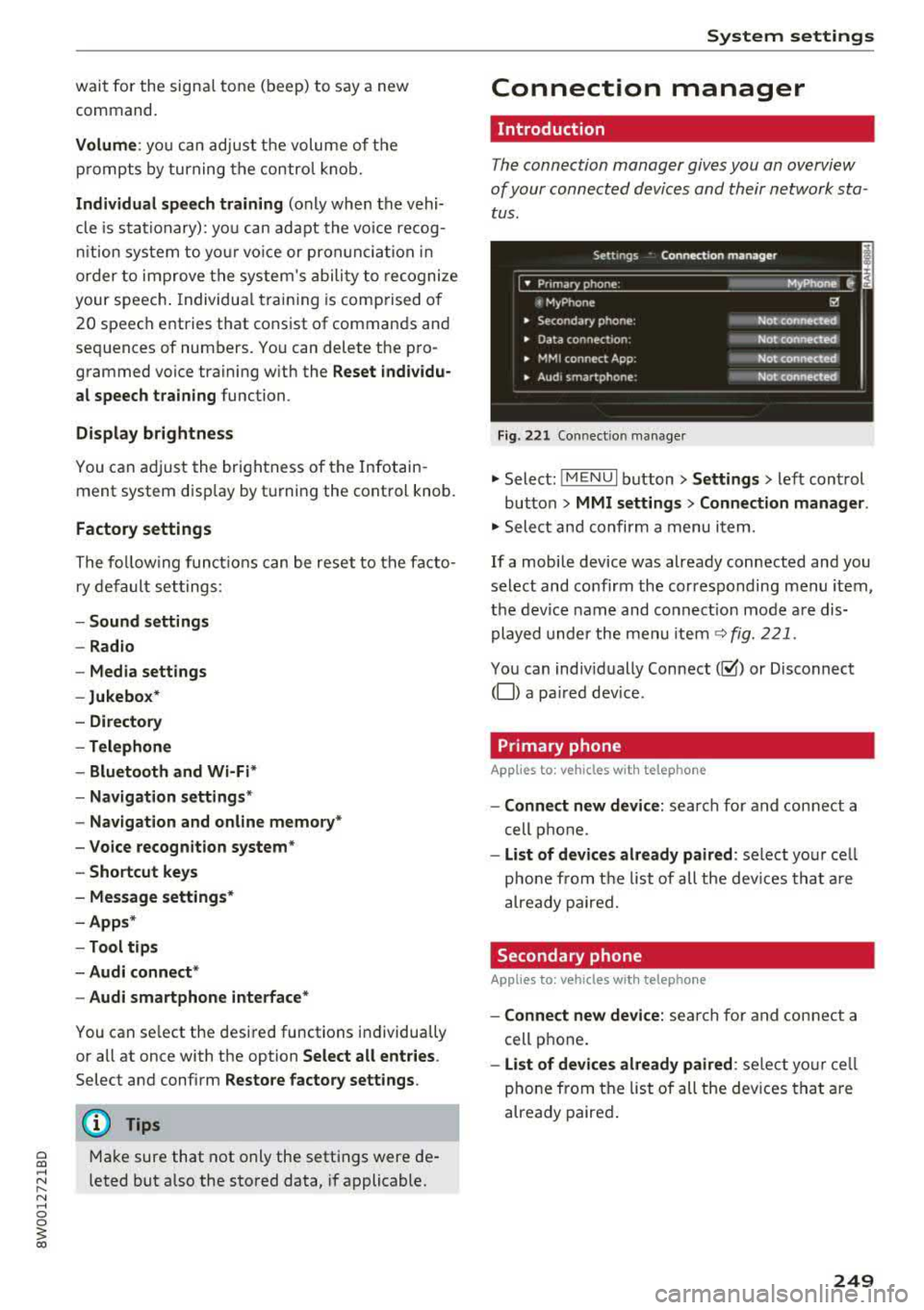
The connection manager gives you an overview
of your connected devices and their network sta
tus .
Settings Connection mana ger I
====-... · • Prima hone: MyPhone ..
c M yPhone
• Secondary phone :
" Data connection:
• MM I connect App :
• Audi smartphone:
Fig. 221 Co nnect io n manager
@
Not connected
Not connected
Not connected
Not
connect"d
.,. Select: ! M EN UI button> Settings > left control
button >
MMI setting s> Connection manager .
.,. Select and confirm a menu item.
If a mobile device was already connected and you
select and confirm the corresponding menu item,
the device name and connect ion mode a re dis
played under the menu item
~ fig. 221.
You can indiv idually Connect(~ or Disconnect
(0) a pa ired dev ice .
Primary phone
Applies to : veh icles w ith telep hone
- Connect new de vice : search for and connect a
cell phone.
- List of d evic es alre ady pai red : select you r cell
phone from the list of all the dev ices that a re
already paired.
Secondary phone
Appl ies to: veh icles w ith telep hone
- Connect new device: sea rch fo r and connect a
cell phone .
-List of devi ces alre ad y paired : select yo ur ce ll
phone from the list of all the devices that a re
already paired .
249
Page 255 of 403
Driving sa fe ty
Driving safety
Basics
Safe driving habits
Please remember -safe ty first!
The individua l safety features of your vehicle can
work together as a system to help protect you
and your passengers in a wide range of accidents.
These features cannot work as a system if they
are not always correctly adjusted and correctly
used .
This chapter contains important informat ion,
tips, instruct ions and warn ings that you need to
read and observe for your own safety, the safety
of your passengers and others . We have summar
ized here what you need to know about safety
be lts , a ir bags, child restra ints as well as child
safety. Yo ur sa fe ty is for us
priority number 1 . Al
ways observe the information and wa rnings in
this section - for your own safety as well as that
of your passengers.
The informa tion in this section applies to all
model ve rsions of your vehicle . Some of the fea
tures described in th is sections may be standard
equipment on some models, or may be optional
equ ipment on others. If you are not sure, ask
your author ized Audi dealer.
A WARNING
- Always make sure that you follow the in
structions and heed the WARNINGS in th is
manual. It is in your inte rest and i n the in
te res t of your passengers .
- Always keep all of the Owner 's L iterature
man uals in yo ur Audi when you lend o r sell
yo ur vehicle so that this importan t info rma
t ion w ill always be availab le to the dr iver
and passenge rs.
- Alw ays keep t he Owner 's L ite ra tu re han dy
so that you can find i t easi ly if yo u have
questions .
254
· Important things to do before driving
Safety is everybody 's job! Vehicle and occupant
safety always depends on the informed and care
ful driver .
For your safety and the safety of your passen
gers,
before driving always:
.. Make sure that a ll lights and signals are operat
ing correctly .
.. Make sure tha t the tire pressure is correct .
.. Make sure that all windows are clean and afford
good vis ibility to the outs ide .
.,. Sec ure all luggage and othe r items ca refully
¢ page 259 .
.,. Mak e sure tha t noth ing ca n interfere with the
pedals .
.. Adjust front seat, head restraint and mirrors
correctly for your height.
.. Applies to: adjustable head restraints: Instruct
passengers to adjust the head restraints ac
cording to the ir height .
.. Make sure to use the rig ht child restraint cor
rectly to protect
chi ldren ~ page 295 , Child
safety.
.,. Si t properly in yo ur seat a nd make su re t hat
your passengers do the same ¢
page 65, Front
seats.
.. Fasten your safety belt and wear it properly . Al
so instruct your passenge rs to fasten thei r sa fe
ty belts properly ¢
page 263.
What impairs driving safety?
Safe driving is directly related to the condition of
the vehicle , the driver as well as the driver's abili
ty to concentra te on the road withou t being dis
tracted.
The driver is responsib le for the sa fety of the ve
hicle and a ll of its occupants . If your ability to
drive is impa ired, safety risks for everybody in the
vehicle increase and you a lso become a hazard to
everyone else on the road ¢
,&.. There fore:
.. Do not let yourse lf be distracted by passengers
or by using a cellular telephone .
.. NEVER dr ive whe n your driving ab ility is im -
paired (by med ications, alcohol, drugs, e tc.) .
..,.
Page 259 of 403
Driving sa fe ty
-Never attempt to adjust head restraint
wh ile driving. If you have dr iven
off and
must adjust the driver headrest for any rea
son, first stop the vehicle safely before at
tempting to adjust the head restra int.
- Children must always be properly restrained
in a child restraint that is appropriate for
their age and size
¢ page 295.
Examples of improper seating positions
The occupant restraint system can only reduce
the risk of injury if vehicle occupants are properly
seated .
Improper seating positions can cause serious in
jury or deat h. Safety belts can only work when
they are properly positioned on the body . Im
proper seating positions reduce the effect iveness
of safety belts and w ill even increase the r isk of
i njur y and dea th by moving the safety be lt to crit
ical areas of the body. Impro per sea ting posit ions
a lso increase the risk of ser ious injury and dea th
when an airbag deploys and strikes an occupant
who is not in the proper seat ing position. A driver
is responsib le for the safety of all vehicle occu
pants and especially for children. Therefore :
~ Never allow anyone to assume an incorrect
seat ing pos ition when the vehicle is being used
c> .&, .
The fo llowing bulletins list only some sample po
sitions that will increase the risk of serio us inj ury
and death. Our hope is that these examp les will
make you more aware of seating posit ions that
are dangerous.
The ref ore, when ever th e vehicle i s moving:
- never stand up in the ve hicle
- never s tand on the seats
- never knee l on the seats
- never r ide with the seatback reclined
- never lie down on t he seats
- never lean up against the instrument pane l
- never sit on the edge of the seat
- never sit s ideways
- never le an out the w indow
- never put yo ur feet out the window
258
- never put your feet on the instrument panel
- neve r rest your feet on the seat c ushion or back
o f the seat
- neve r ride in the footwell
- neve r ride in the ca rgo area
A WARNING
I mp roper seating positions inc re ase the risk
of ser iou s personal inju ry and de ath whenever
a veh icle is being used.
- Always make sure that all veh icle occupants
s tay in a proper sea ting posit ion and are
pro perly restrained whenever the vehicle is
be ing used .
Driver's and front
passenger's footwell
Important safety instructions
A WARNING
A lways make sure that the knee airbag can in
flate w ithout interference. Objects between
yourself and the airbag can inc rease the risk
of injury in an accident by interfering with the
way the ai rbag dep loys o r by being pushed in
to you as the airbag dep loys.
- No persons (ch ild ren) or animals should ride
in the footwell in front of the passenger
seat . If the airbag deploys, this can res ult in
serio us or fat al injuries.
- No objects of any kind should be carried i n
the footwell area in front of the dr iver's or
passenger's seat. Bu lky objects (shopping
bags, for examp le) can hamper or prevent
proper dep loyment of the airbag . Sma ll ob
jects can be thrown thro ugh the vehicle if
the airbag deploys and injure you or your passengers.
Page 261 of 403
Driving sa fe ty
Loose items in the luggage compartment can
shift s udden ly, changing vehicle handling charac
ter istics. Loose items can also increase the risk of
serious personal in jury in a sudden vehicle
ma
neuver or in a coll is ion.
.,. Distribute the load evenly in the luggage com
partment .
.,. Always place and properly secure heavy items in
the luggage compartment as low and as far for
ward as possible
c> fig . 226 .
.,. Secure luggage us ing the tie-downs provided
¢ page 73 .
.,. Make su re that the rea r seatbac k is securely
latched in place.
A WARNING
Improperly stored luggage or othe r items can
fly through the vehicle causing serious per
sonal injury in the event of hard braking or an
accident. To help reduce the risk of serious
personal injury:
- Always put objects, for example, luggage or
other heavy items in the luggage compart
ment.
- Always sec ure objects in the luggage com
partment using the tie-down eyelets and
s u itable straps.
A WARNING
Heavy loads will influence the way your vehi
cle handles. To he lp reduce the r isk of a loss
of contro l leading to serious pe rsonal i njury:
- Always keep in mind when transporting heavy objects, that a change i n the center of
grav ity can also cause changes in vehicle
hand ling:
- Always distr ibute the load as even ly as
possible.
- Place heavy objects as far forward in the
luggage compartment as poss ible.
- Never exceed the Gross Axle Weight Rating
o r the Gross Vehicle Weight Rating specified
on the safety compliance sticker on the driv
er's side B-pillar respective ly on the front
end of the driver's door. Exceeding permissi
ble weight standards can cause the veh icle
to slide and handle differently .
260
-Please observe info rmation on safe driving
¢page 254.
A WARNING
To he lp prevent po isonous exhaust gas from
being drawn into the vehicle, always keep the
rear lid closed while driving.
- Never transport objects larger than those
fitting completely into the luggage area be
cause the rear lid cannot be fully closed.
- If you absolutely must dr ive with the rear lid
open, observe the following notes to reduce
the risk of poisoning :
- C lose all windows,
- Close the s unroof*,
- Open all a ir outlets in the instrument pan-
el,
- Switc h off the air reci rculat ion,
- Set the fresh air fan to the highest speed.
A WARNING
-
Always make sure that the doo rs, all win
dows, the sunroof * an d the rear lid are se
curely closed and locked to red uce the risk of
i n jury when the veh icle is not being used.
- After closing the rear lid, always make sure
that it is properly closed and locked.
- Never leave your ve hicle unattended espe
cially with the rear lid left open. A child
co uld crawl into the vehicle th rough the lug
g age com partment an d close the rea r lid
be
coming tr apped and unab le to ge t out . Be
ing trapped in a vehicle can lead to ser ious
pe rsonal i nju ry.
- Never let c hild ren p lay in or around the vehi
cle.
- Never let passengers ride in the luggage
compa rtment. Vehicle occupants mus t
al
ways be p roperly restrained in one of the ve
hicle's seat ing pos itions.
(D Tips
- Air circul ation helps to reduce w indow fog
ging . Stale ai r escapes to the o uts ide
t h roug h vents in the trim panel. Be sure to
keep these slots free and open.
Page 262 of 403
a co .... N ,....
N .... 0 0
3 co
-The tire pressure must correspond to the
load. The tire pressure label lists the recom
mended cold tire inflation pressures for the
vehicle at its maximum capacity weight and
the tires that were on your vehicle at the
time it was manufactured. For recommend
ed tire pressures for normal load condi
tions, please see chapter
c:> page 345.
Tie-downs
The luggage compartment is equipped with four
tie-downs to secure luggage and other items .
Use the tie-downs to secure your cargo properly
c:> page 259, Loading the luggage compartment.
In a collision, the laws of physics mean that even
smaller items that are loose in the vehicle will
become heavy missiles that can cause serious in
jury. Items in the vehicle possess energy which
vary with vehicle speed and the weight of the
item . Vehicle speed is the most significant factor .
For example, in a frontal collision at a speed of
30 mph (48 km/h), the forces acting on a 10 -lb
(4 .5 kg) object are about 20 times the normal
weight of the item . This means that the weight
of the item would suddenly be about
200 lbs . (90 kg). You can imagine the injuries
that a 200 lbs. (90 kg) item flying free ly through
the passenger compartment could cause in a col
lision like this.
A WARNING
Weak, damaged or improper straps used to
secure items to tie-downs can fail during hard braking or in a collision and cause serious per
sonal injury.
- Always use suitable mounting straps and
properly secure items to the tie-downs in
the luggage compartment to help prevent
items from shifting or flying forward as dan
gerous missiles .
-When the rear seat backrest is folded down,
always use suitable mounting straps and
properly secure items to the tie-downs in
the luggage compartment to help prevent
items from flying forward as dangerous
missiles into the passenger compartment .
-
Driving safety
-Never attach a child safety seat tether strap
to a tie-down.
Reporting Safety Defects
Applicable to U.S.A.
If you believe that your vehicle
has a defect which could cause a
crash or could cause injury or
death, you should immediately in
form the National Highway Traffic
Safety Administration (NHTSA) in
addition to notifying Audi of
America, Inc.
If NHTSA receives similar com
plaints, it may open an investiga
tion, and if it finds that a safety
defects exists in a group of
vehicles, it may order a recall and
remedy campaign. However,
NHTSA cannot become involved in
individual problems between you,
your dealer, or Audi of America,
Inc.
To contact the N HTSA, you may
either call:
Tel.:
1-888-327-4236 (TTY:
1-800-424-9153) or
1 -800- 424-9393
or you may write to:
261
Page 264 of 403
Safety belts
General information
Always wear safety belts!
Wearing safety belts correctly saves lives!
This chapter explains why safety belts are neces
sary, how they work and how to adjust and wear
them correctly.
.. Read all the information that follows and heed
all of the instructions and WARNINGS.
A WARNING
Not wearing safety belts or wearing them im
properly increases the risk of serious personal
injury and death.
- Safety belts are the single most effective
means available to reduce the risk of serious
injury and death in automobile accidents.
For your protection and that of your passen
gers, always correctly wear safety belts
when the vehicle is moving.
- Pregnant women, injured, o r physically
im
paired persons must also use safety belts.
Like all vehicle occupants, they are more
likely to be seriously injured if they do not
wear safety belts. The best way to protect a
fetus is to protect the mother
-throughout
the entire pregnancy.
Number of seats
Your Audi has a total of five seating positions:
two in the front and three in the rear. Each seat
ing position has a safety belt.
A WARNING
Not wearing safety belts or wearing them im
properly increases the risk of serious personal
injury and death.
- Never strap more than one person, includ
ing small children, into any belt.
It is espe
cially dangerous to place a safety belt over a
~ child sitting on your lap.
~ -Never let mo re people ride in the vehicle
:::l than there are safety belts available. 0 0
3
-Be sure everyone riding in the vehicle is
properly restrained with a separate safety
belt or child restraint.
Safety belt warning light
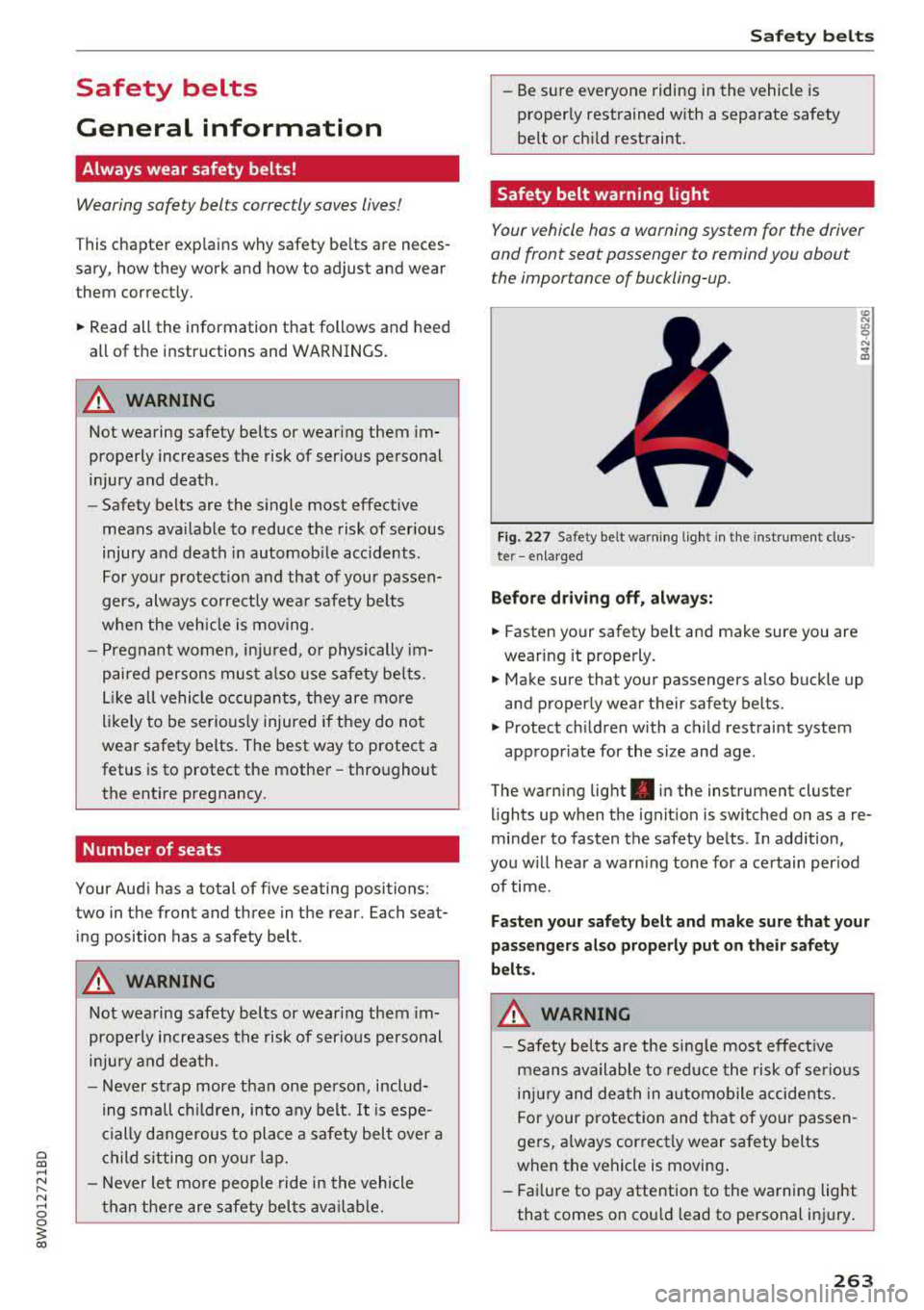
Your vehicle has a warning system for the driver
and front seat passenger to remind you about the importance of buckling-up.
Fi g. 227 Safety belt warn ing light in the instrument clus ·
te r
-enlarged
Before driving off, always:
.. Fasten your safety belt and make sure you are
wearing it properly.
.,. Make sure that your passengers also buckle up
and properly wear their safety belts.
.,. Protect children with a child restraint system
appropr iate for the size and age.
The warning light . in the instrument cluster
lights up when the ignit ion is switched on as a re
minder to fasten the safety belts . In addition,
you w ill hear a warn ing tone for a certain period
of time.
Fasten your safety belt and make sure that your
passengers also properly put on their safety
belts.
A WARNING
-
- Safety belts are the sing le most effective
means available to reduce the risk of serious
injury and death in automobile accidents.
For your protection and that of your passen
gers, a lways correctly wear safety belts
when the vehicle is moving .
- Failure to pay attention to the warning light
that comes on could lead to personal injury.
263
Page 268 of 403
Automatic safety belt r etractors
Every safety be lt is equ ipped wi th an automatic
be lt retractor on the shoulder belt. Th is feature
l ocks the belt when the belt is p ulled out fast,
during hard braking and in an accident. The belt may also lock when you drive up or down a steep
h ill or through a sharp curve. During normal driv
ing the belt lets you move freely .
Safety be lt pret en sioner s
The safety belts are equipped with a belt preten
sioner that helps to tighten the safety belt and
remove slack when the pretensioner is activated
c:> page 269. The function of the pretensioner is
monitored by a warning light
c:> page 32.
Con vertible loc king retractor
Every safety belt exc ept the one on the driver
seat is equipped with a convertible locking retrac
tor that
mu st be used when the safety belt is
used to attach a child safety seat. Be sure to read
the impo rtant information about this feature
c:> page 306.
A WARNING
Improperly posit ioned safety be lts ca n cause
ser ious injury in an accident
c:> page 267,
Safety belt position.
-Safety belts offer optimum protection only
when the seatback is upr ight and belts are
prope rly pos itioned on the body.
-Always ma ke sure tha t the rear sea t bac k
rest to wh ic h t he cente r rea r safety be lt is
attached is secure ly latched whenever the
rear center safety belt is being used. If the
backrest is not securely latched, the passen
ger will move forward with the backrest dur
ing sudden braking, in a sudden maneuver
and especially in a cras h.
-Never attach the safety belt to the buckle
for another seat. Attaching the belt to the
wrong buckle w ill red uce safety belt effec
t iveness and can cause serious personal in
jury.
-A passenger who is not p roperly restrained
can be seriously in ju red by the safety be lt it
self when it moves from the stronger par ts
Safet y bel ts
of the body into critical areas like the abdo
men .
-Always lock the convertible locking retractor
when you are securing a child safety seat in
the vehicle
c:> page 308.
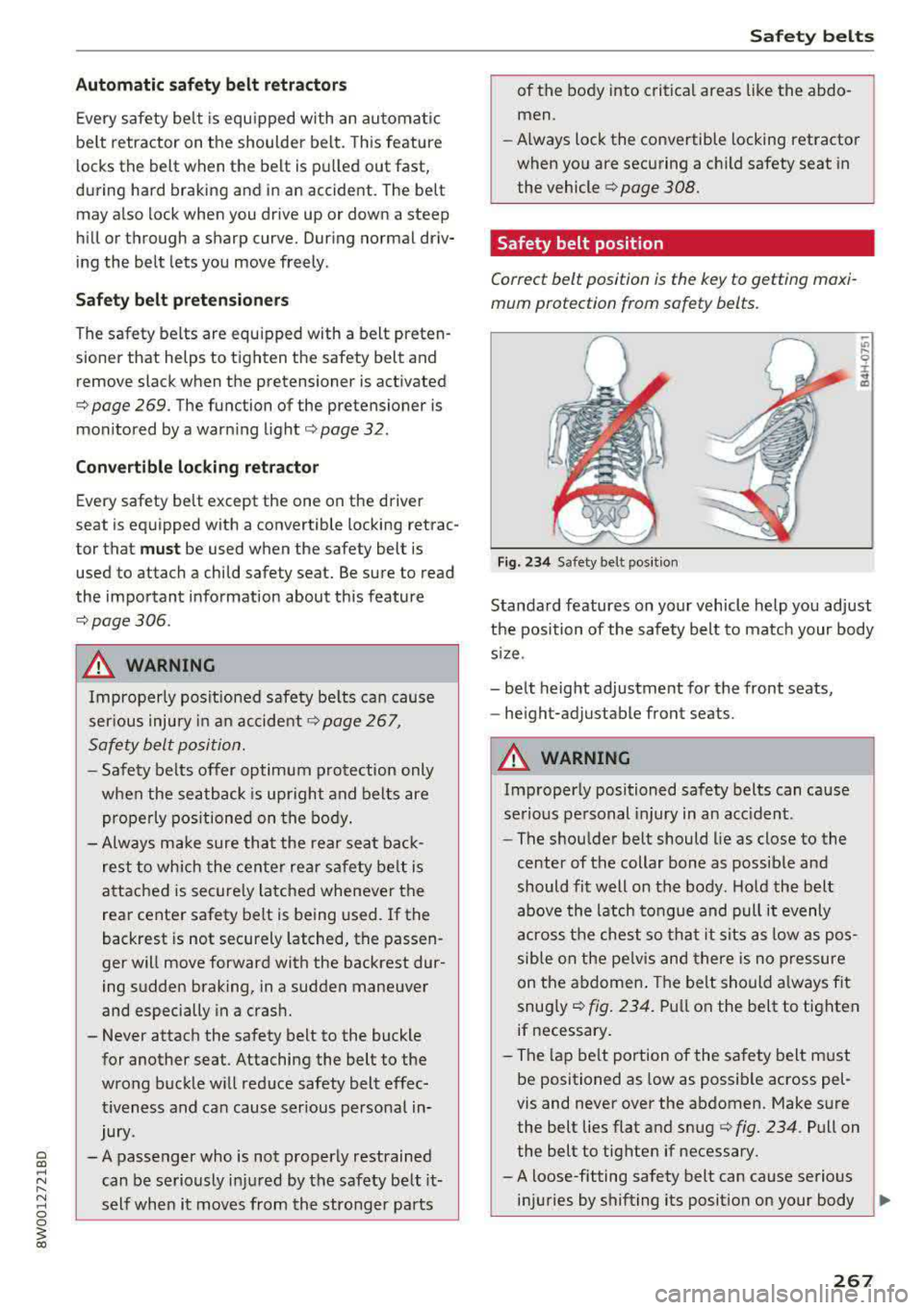
Safety belt position
Correct belt position is the key to getting maxi
mum protection from safety belts.
Fig. 23 4 Safety belt pos it ion
Standard features on your vehicle help you adjust
the position of the safety belt to ma tch your body
s iz e.
-be lt height adjustment for the front seats,
-he ight-adjustable front seats .
A WARNING
Improperly positioned safety belts can ca use
se rious personal injury in an acc ident.
-The shou lder belt should lie as close to the
center of the collar bone as possib le and
should fit well on the body . Ho ld the belt
above the latch to ngue and pull it evenly
across the chest so th at it sits as low as pos
sible on the pe lvis and there is no p ressure
on the abdomen . The belt should a lway s fit
snug ly
c:> fig. 234. Pu ll on the belt to tighten
if necessary .
-The lap be lt portion of the sa fety belt must
be positioned as low as possible across pel
vis and never over the abdomen. Make sure
the belt lies flat and snug
c:> fig. 234 . Pull on
the belt to tighte n if necessary.
-A loose-fitting safety belt can cause serious
in ju ries by shifting its position on your body
~
267