roof AUDI A4 2018 Owners Manual
[x] Cancel search | Manufacturer: AUDI, Model Year: 2018, Model line: A4, Model: AUDI A4 2018Pages: 403, PDF Size: 66.81 MB
Page 4 of 403
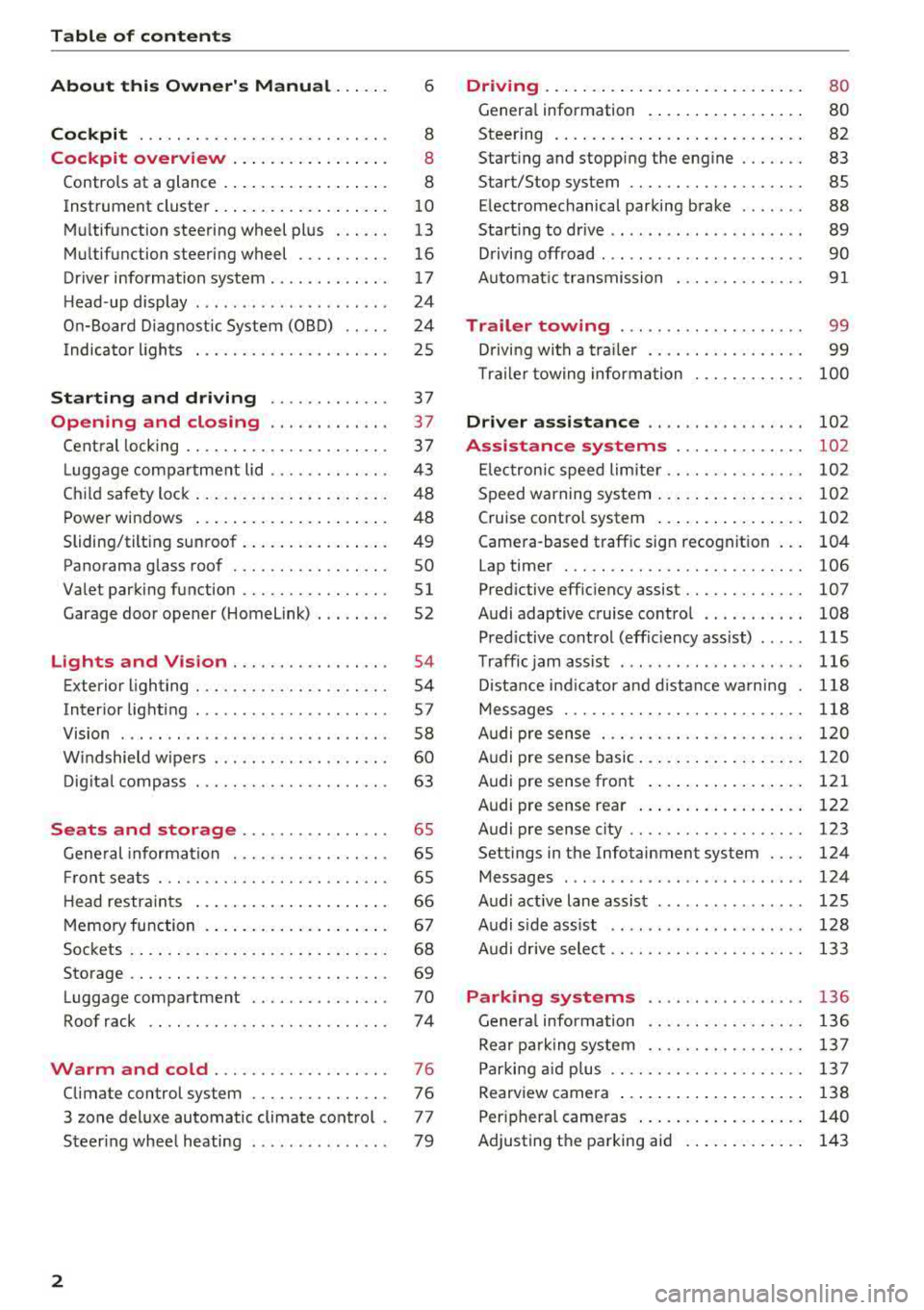
Table of contents
About this Owner's Manual . .. .. .
Cockpit ... .. ............... .... .. .
Cockpit overview ................ .
Controls at a glance ... .......... .. .. .
Instrument cluster .. .......... .. .. .. .
Multifunction steering wheel plus ... .. .
Multifunction steering wheel ......... .
Driver information system ...... .. .. .. .
H ead-up display .... .. .. ..... ... .. .. .
On-Board Diagnostic System (OBD) .. .. .
I ndicator lights .................... . 6
8
8
8
10
13
16
17
24
24
25
Starting and driving . . . . . . . . . . . . . 37
Opening and closing . . . . . . . . . . . . . 3 7
Central locking . . . . . . . . . . . . . . . . . . . . . . 3 7
L uggage compartment lid . . . . . . . . . . . . .
43
Child safety lock . . . . . . . . . . . . . . . . . . . . . 48
Power windows . . . . . . . . . . . . . . . . . . . . . 48
Sliding/tilting sunroof . . . . . . . . . . . . . . . . 49
Panorama glass roof . . . . . . . . . . . . . . . . . SO
Valet parking function . . . . . . . . . . . . . . . .
51
Garage door opener (Homelink) . . . . . . . . 52
L ights and Vision . . . . . . . . . . . . . . . . . 54
Exterior lighting . . . . . . . . . . . . . . . . . . . . . 54
Interior lighting . . . . . . . . . . . . . . . . . . . . . 57
V1s1on . . . . . . . . . . . . . . . . . . . . . . . . . . . . . 58
Windshield wipers . . . . . . . . . . . . . . . . . . .
60
Digital compass . . . . . . . . . . . . . . . . . . . . . 63
Seats and storage . . . . . . . . . . . . . . . . 65
General information . . . . . . . . . . . . . . . . . 65
Front seats . . . . . . . . . . . . . . . . . . . . . . . . . 65
H ead restraints . . . . . . . . . . . . . . . . . . . . . 66
Memory function . . . . . . . . . . . . . . . . . . . .
67
Sockets . . . . . . . . . . . . . . . . . . . . . . . . . . . . 68
Storage . . . . . . . . . . . . . . . . . . . . . . . . . . . . 69
Luggage compartment ........ .... .. .
Roof rack .. .. ... ............ .... .. .
Warm and cold ................ .. .
Climate control system .............. .
3 zone deluxe automatic climate control .
Steer ing wheel heating .. ........ .. .. .
2
70
74
76
76
77
79
Driving ... .. .. .. .. .. ... .......... . .
General information . ... ........... . .
Steering .......... .. .. . .......... . .
Start ing and stopping the eng ine ..... . .
Start/Stop system .. .. ............. . .
E le ctromechanical parking brake ...... .
Start ing to drive .. .. .. ........ ..... . .
D rivi ng offroad . .. ... ...... ....... .. .
Automatic transmission
Trailer towing ..... .............. .
Driving with a trailer .. ............. . .
8 0
80
82
83
85
88
89
90
91
99
99
T raile r towing information . . . . . . . . . . . . 100
Driver assistance . . . . . . . . . . . . . . . . . 102
Assistance systems . . . . . . . . . . . . . . 102
Electronic speed limiter. . . . . . . . . . . . . . . 102
Speed warning system . . . . . . . . . . . . . . . . 102
Cruise control system . . . . . . . . . . . . . . . . 102
Camera-based traffic sign recognition . . . 104
Lap timer . . . . . . . . . . . . . . . . . . . . . . . . . . 106
Pred ictive efficiency assist. . . . . . . . . . . . . 107
Audi adaptive cruise contro l . . . . . . . . . . . 108
Pred ictive control (eff ic ie ncy assist) . . . . . 115
Traffic jam assist . . . . . . . . . . . . . . . . . . . . 116
Distance indicat or and distance warnin g 118
Messages . . . . . . . . . . . . . . . . . . . . . . . . . . 118
Audi pre sense . . . . . . . . . . . . . . . . . . . . . . 120
Audi pre sense basic . . . . . . . . . . . . . . . . . . 120
Audi pre sense front . . . . . . . . . . . . . . . . . 121
Audi pre sense rea r . . . . . . . . . . . . . . . . . . 122
Audi pre sense city . . . . . . . . . . . . . . . . . . . 123
Settings in the Infotainment system . . . . 124
Messages . . . . . . . . . . . . . . . . . . . . . . . . . . 124
Audi active lane assist . . . . . . . . . . . . . . . . 125
Audi s ide assist . . . . . . . . . . . . . . . . . . . . . 128
Audi drive select . . . . . . . . . . . . . . . . . . . . . 133
Parking systems
General information .. ... .......... . .
Rear parking system .. .. ........... . .
Parking aid plus .. .. .. ............. . .
Rearview camera ... .. .. ........... . .
Periphera l cameras ... ... .......... . .
Adjusting th e parking aid . ........... .
136
136
137
137
138
140
143
Page 50 of 403
Opening and closing
Child safety lock
The child safety lock prevents the rear doors
from being opened from the inside and the rear
power windows from be operated .
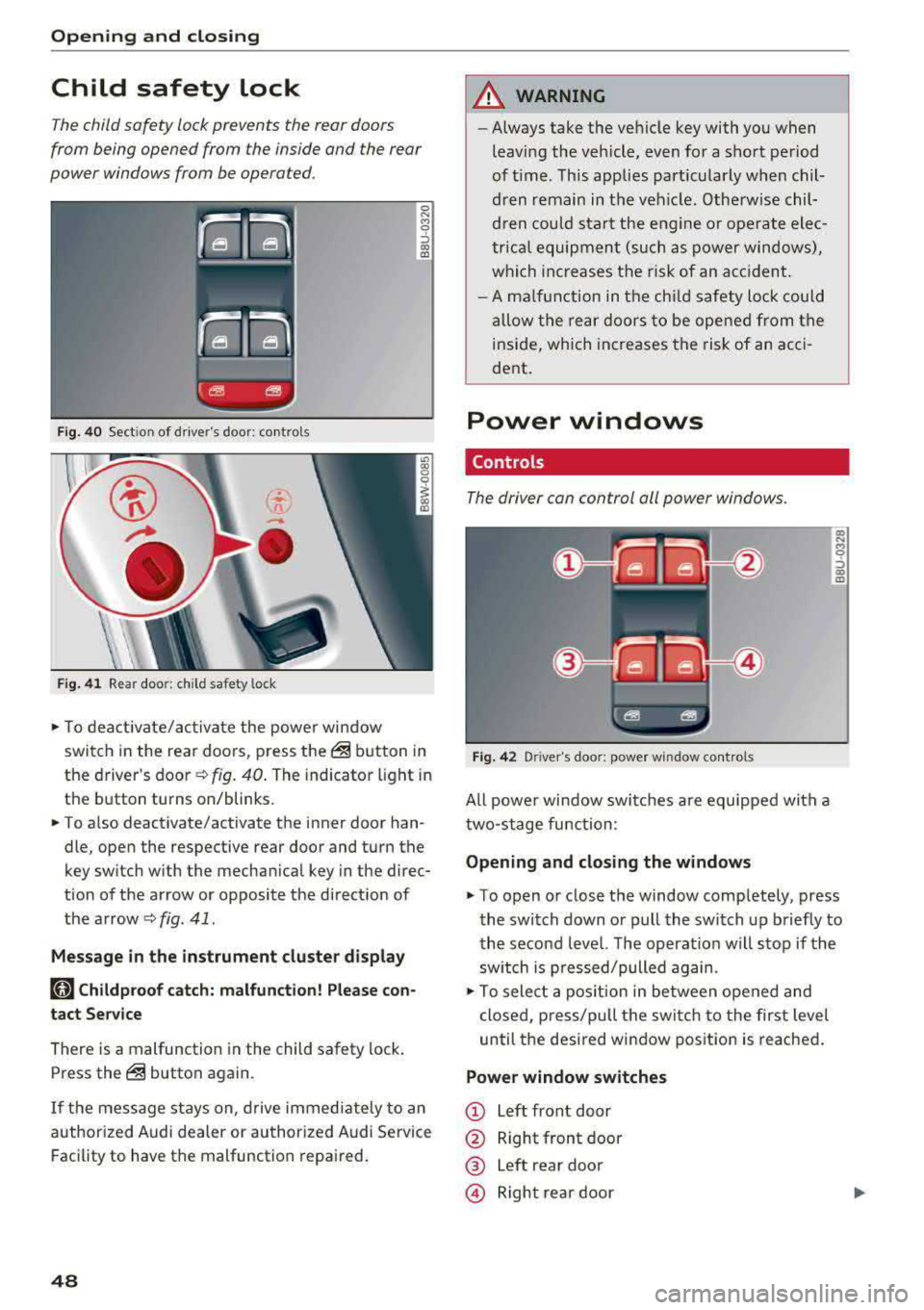
Fig. 40 Section of driver's door: co ntrols
Fig. 41 Rear door: chil d safety lock
0 N M 9 ::J co (D
• T o deactivate/activate the power window
switch in the rear doors, press the@ button in
the driver 's
door ¢ fig. 40. The indicator light in
the button turns on/blinks.
• To also deactivate/activate the inner door han
dle, open the respective rear door and turn the
key switch with the mechan ical key in the direc
tion of the arrow or opposite the direct ion of
the arrow
<=> fig. 41 .
Message in the instrument cluster display
faj Childproof catch: malfunction! Please con
tact Service
There is a malfunction in the child safety lock.
Press the@ button again.
If the message stays on, drive immediately to an
authori zed Audi dealer or authorized Audi Service
Facility to have the malfunction repaired.
48
A WARNING
-Always take the vehicle key with you when
leav ing the vehicle, even for a short period
of time . This applies part icularly when chil
dren remain in the vehicle . Otherwise chil
dren could start the engine or ope rate elec
trical equipment (such as power windows),
which increases the risk of an acc ident.
- A malfunction in the child safety lock could
allow the rear doors to be opened from the
inside, which increases the risk of an acci
dent .
Power windows
Controls '
The driver con control all power windows .
Fig. 42 Driver"s door: power w indow controls
All powe r window switches are equipped with a
two-stage function :
Opening and closing the windows
a, .... M 0 ::, (X) (D
• To open or close the window completely, press
the switch down or pull the switch up briefly to
the second level. The operat ion will stop if the
sw itch is p ressed/pulled again.
• To select a position in between opened and
closed, p ress/pu ll the switch to the first level
until the desired window position is reached.
Power window switches
CD Left front door
@ Right front door
® Left rear door
© Right rear door
Page 51 of 403

_& WARNING
-Always take the vehicle key with you when
leaving the vehicle, even for a short period
of time . This applies particularly when chil
dren remain in the vehicle . Otherwise chil
dren could start the engine or operate e lec
trical equipment (such as power windows),
which increases the risk of an accident . The
power windows continue to function until
the driver's door or front passenger's door
has been opened.
- Pay careful attent ion when closing the win
dows . Pinching could cause serious injuries .
- When locking the vehicle from outside, the vehicle must be unoccupied since the win
dows can no longer be opened in an emer
gency .
@ Tips
You can still open and close the w indows for
approximately 10 minutes after turning the
ignition
off . The power windows do not switch
off until the driver's door or front passenger's
door has been opened.
Convenience opening/closing
Applies to: vehicles with convenience key
All of the windows and the roof* con be opened/
closed at the some time .
Convenience opening feature
.. Press and hold the CD button on the remote con
trol key until all of the windows reach the de
sired position and the
roof* is tilted open.
Convenience closing feature
.. Press the @ button on the remote control key
until the roof* is closed
c::> .&,, or
.. Touch the sensor* on the door handle until a ll
of the windows and the roof* are closed. Do not
place your hand in the door handle when doing
this.
Setting convenience opening in the
Infotainment system
.. Select in the Infotainment system: !MENUI but
ton
> Vehicle > left control button > Vehicle
Open ing and closing
settings > Central locking > Long press to
open windows.
_& WARNING
- To reduce the r isk of injury, never close the
windows or the roof* carelessly or in an un
controlled manner .
- For secur ity reasons, the windows and the
roof* can only be opened and closed with
the remote control key at a maximum dis
tance of approx imately 6.5 feet (2 m) away
from the vehicle. Always pay attent ion when
using
the@ button to close the windows
and the roof* so that no one is pinched. The
closing process will stop immediately when
the@ button is released.
(D Tips
Applies to: vehicles with panorama glass roof:
the power sunshade also opens/closes when
opening/closing the roof.
Correcting power window malfunctions
You can reactivate the one-touch up/down func
tion if it malfunctions.
"' Pull the power window switch up until the win
dow is comple tely raised .
.. Release the switch and pull it up again for at
least one second.
Sliding/tilting sunroof
Operating
Applies to: vehicles with sliding/tilting sunroof
Fig. 43 Section of front head lin er: sliding/tilt ing sunroof
button
....
49
Page 52 of 403

Opening and clo sin g
@ Tilting and clo sing the r oof
.. To tilt the sunroof completely open, press the
?::> button up brief ly to the second leve l.
.. To close the sunroof comp letely, pull the?::>
button down briefly to the second
level ¢ _A.
.. To set a position between opened and closed,
press/pull the?::> button up to the first leve l
unt il the roof reaches the desired position .
@ Opening and closing the r oof
.. To open the sunroof completely, push the?::>
button back brief ly to the second level.
.. To close the sunroof completely, push the?::>
button forward briefly to the second level
¢ _& .
.. To select a pa rtially open position, push the?::>
button forward/back to the first leve l until the
desired position is reached.
The sunshade can be opened and closed manual
ly in any position. The sunshade ope ns automati
cally when the roof is opened.
,&. WARNING
T o red uce the risk of inj ury, always p ay atten
ti on whe n closi ng the sliding/t ilting sun roof.
Always switch off the ignit ion when exiting
the vehicle .
0 Note
Always close your sliding/tilt ing sunroof when
leaving your ve hicle. Rain can ca use damage
to the interior equipment of yo ur vehicle, par
ticularly the electronic equipment.
(D Tips
- F or i nformat ion about convenience open
i ng/closing, see ¢
page 49.
-You can still operate the sliding/tilting s un
roof for about 10 m inutes after the ig nition
i s switched off . The switch is deactivated
once the driver's or front passenger's door is
opened.
- The s unroof will only open down to -20 °C
(-4 °F).
50
Sliding/tilting sunroof emergency
operation
Applies to : vehicles with sliding/tilting sunroof
If an object is dete cted when closing, the roof
will open again automat ica lly. In this case, you
can then close it with the power emergency clos
ing function.
.. Within five seconds after the sunroof opens au
tomatically, pull the applicable button unt il the
roof is closed .
Panorama glass roof
Panorama glass roof, opening/closing the
sunshade
Appl ies to: vehicles with panorama glass roof
The front segment can tilt and slide open.
Fig. 44 Section o f the front headliner: panorama glass roof
but ton
@ Tilting and closing the roof
.. To t ilt the sunroof completely open, press the
~ button up br iefly to the second level.
.. T o close the sunroof completely, pull the ~
button down briefly to the se cond leve l c;:> ,&..
.. To set a position between opened and closed ,
press/pu ll
the~ button up to the first level
until the roof reaches the desired pos ition .
@ Opening and closing the roof
.. To open the sun roof complete ly, slide the~
sw itch back b riefly to the second leve l.
.. To close the sunroo f complete ly, push the ~
button forward briefly to the second level
¢ _A .
.. To select a partia lly open pos ition, push the?::>
button forward/back to the first level unti l the
desired pos ition is reached.
Page 53 of 403
a co .... N ,....
N .... 0 0
3 co
© Opening and clo sing th e sunshad e
"'To open the sunshade comp lete ly, slide the -:<'-'.i.
switch back briefly to the second level.
"' To close the sunshade complete ly, slide the .-;- ;, .
switch forward briefly to the second level.
"' To se lect a partially open position, slide the -:c ,,.
switch to the first level until the sunshade
reaches the desired position.
A WARNING
To reduce the risk of injury, always pay atten
tion when closing the panorama glass roof.
Always sw itch off the ignit io n when exiting
the vehicle.
(D Note
Always close the panorama glass roof when
leaving your veh icle. Rain can cause damage
to the inter ior equipment of yo ur vehicle, par
ticularly the e lectronic equipment.
@ Tips
- Fo r informat ion about convenience open
i ng/closing,
see~ page 49.
- You can still operate the panorama glass
r oof fo r abo ut 10 m inutes afte r the ig nitio n
i s sw itched off. The switch is deact ivated
once the dr ive r's or front passenger's door is
opened.
- The panorama glass roof will only open
down to -4°F (-20°) .
Panorama glass roof emergency operation
Applies to: vehicles with panorama glass roof
If an object is detected when closing, the roof
will open again automatically. In this case, yo u
can then close it with the power emergency clos ing function.
"' Within five seconds after the sunroof opens au
tomatica lly, pull the applicable button until the
roof is closed.
l ) Th is function is not available in all countr ies.
Op ening and cl osing
Valet parking function
Applies to: vehicles with valet parking function
The valet parking function protects the luggage
compartment from unauthorized access.
"'
I
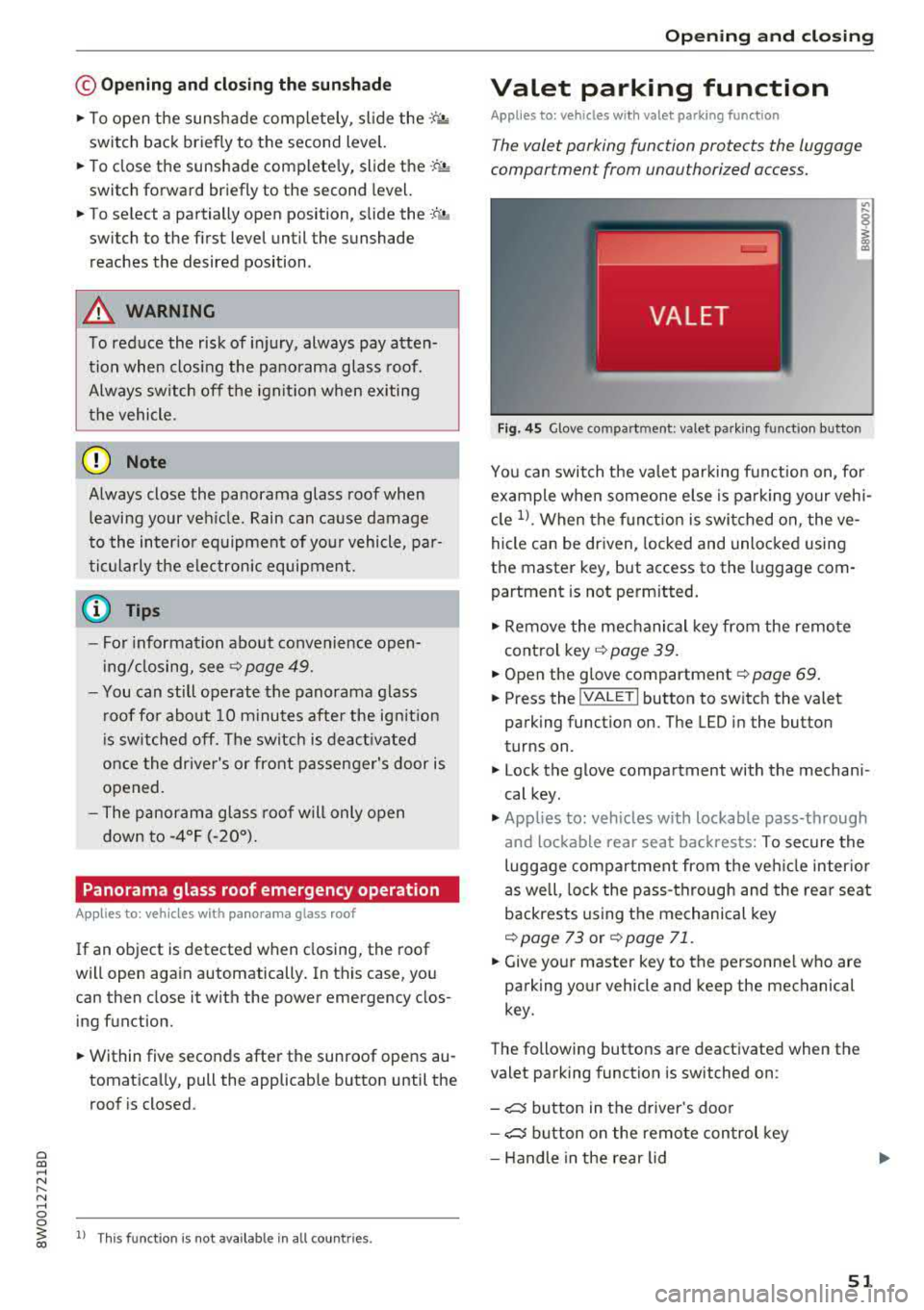
F ig . 4 5 Glove compartment: valet parking funct io n button
You can switch the valet par king function on, fo r
example when someone e lse is pa rking your vehi
cle
1> . When the f unct ion is swi tched on, the ve
hicle can be driven, locked and unlocked using
the master key, but access to the luggage com partment is not perm itted.
"' Remove the mechanical key from the remote
control key
~ page 39.
"'Open the g love compartment~ page 69 .
"'Press the !VA LET I button to switch the valet
parking function on. The LED in the button
turns on .
"' Lock the glove compartment with the mechani
cal key.
"' Applies to: vehicles with lockable pass-through
and lockable rear seat backrests: To secure the
luggage compartment from the veh icle inter io r
as well, lock the pass-through and the rear seat
backrests using the mechanical key
~page 73 or ~ page 71.
"'Give yo ur master key to the personne l who are
parking your vehicle and keep the mechanical
key.
The following buttons are deactivated when the
valet parking function is switched on :
- ,:::::::, button in the driver 's door
- ,:::::::, button on the remote con trol key
- Handle in the rear lid
51
Page 76 of 403

Sea ts and stor age
Reversible cargo floor
Applies to: vehicles with reve rs ible cargo f loor
You can transport dirty and damp objects in the
reversible cargo area floor .
Fig . 86 Luggage compartment: cargo area floor
Fig . 87 Luggage compartment: cargo area floor reversed
Reve rsing the cargo area floor
.,. L ift up the cargo area floo r using the handle
-arrow-
c::> fig . 86.
.,. Flip the floor over and install it .
Roof rack
Applies to: sedan
Fig. 88 Roof : mounting points for the roof rack
74
Applies to: allroad
Fig. 89 Roof: mount ing points for the roof rack
If luggage or cargo is to be ca rr ied on the roof,
you m ust observe the fo llow ing:
- On ly a specially designed roof rack may be used
on you r vehicle. These roof racks are the bas is
for a comple te roof rack system. Additional at
t achments/ca rrier systems are necessary to
transpo rt luggage and spo rts equipment. We
recommend roof racks and attachments from
the Audi Genuine Accessories program.
- When installing the roo f rack, make sure that it
is mounted only at the designated points on
the roof
c::> fig. 88 or c::> fig. 89.
- The max imum permissib le roof load for your
vehicle is 200 lbs (90 kg). The roof load is the
total of the weight of the roof rack, the attach
ments and the cargo you are carrying. However,
please note the permissib le load of the carrier
system being used, the permissible axle loads
and the permissible total vehicle weight
c::> page 3 79.
.&_ WARNING
- Follow the install ation instru ct ions prov ided
w ith the roof rack system.
If you do not se
cure the roof rack system and objects on the
roof correctly, they could come loose from
the vehicle and ca use an accident.
- The risk of an accident increases when using
a roof rack system, because it changes the
driving characterist ics by shifting the center
of grav ity and/or the increasing the surface
area exposed to wind. Adapt your driving
and speed to the current cond itions.
~
Page 77 of 403
a co .... N ,....
N .... 0 0
3 co
(D Note
Make sure that the open luggage compart
ment lid and the ti lting/sliding sunroof* or
panorama glass roof* do not come into con
tact with objects on the roof.
@ For the sake of the environment
Your veh icle will use more fuel due to the in
creased wind res istance. So remove the roof
rack after using it.
Seats and storage
75
Page 78 of 403
Warm and cold
Warm and cold
Climate control system
Description
The climate control system warms, cools and re moves humidity from the air in the vehicle interi
or. It is the most effective when the windows and
sunroof * are closed. If there is a bui ld-up of heat
inside the vehicle, ventilation can he lp to speed
up the cooling process.
I n all heating mode f unctions except for
defrost,
the blower only switches to a higher speed once
the engine coolant has reached a sufficient tem
perature .
Pollutant filt er
The po llutant filter removes poll utants such as
dust and pollen from the a ir .
Ke y recognit ion
The climate control settings are automatically
stored and assigned to the remote contro l key
that is in use .
76
® For the sake of the environment
-If you would like to reduce fuel consump
t ion, sw itch the air conditioning
off. This
will also reduce emissions.
- In veh icles with a diesel engine, you can
switch the auxiliary heater
off in the Info
tainment system.
(D Tips
- To prevent interference with the heating
and cooling output and to prevent the win
dows from fogging over, the air intake in
front of the windshie ld must be free of ice,
snow or leaves.
- Condensation from the cooling system can
dr ip and form a pudd le of water under the
vehicle . This is norma l and does not mean
there is a leak.
- The energy management system may tem porarily switch
off certain functions, such as
the seat heating* o r rear window defogger.
T hese systems are ava ilable again as soon
as the ene rgy supply has been restored.
Page 83 of 403
a co .... N ,....
N .... 0 0
3 co
engaged, for example when you notice that the next traffic light is red . This produces an engine
braking effect, which helps to protect the brakes
and tires and reduces the emissions and fuel con
sumpt ion to zero (fuel shut-off dur ing decelera
tion) .
Shift efficiently
Upshifting earlier is an effective way to save fuel.
Staying in a gear too long uses fuel unnecessari
ly.
Applies to: vehicles with manual transmission
Shift as soon as possible from first to second
gear. S hifting to the next highest gear at approxi
mately 2,000 RPMs if poss ible is recommended.
Applies to: vehicles with automatic transmissions
Press down on the acce le rator peda l slowly and
avoid "kick -down".
Avoid full acceleration
You should rarely travel at the maximum vehicle
speed. High speeds cause a disproportionately
high increase in fuel consumption, emissions and
traffic noise. Driving more slowly saves fuel.
Reduce idling time
The Start/Stop system* he lps to reduce the idling
time automatically. In vehicles without the Start/
Stop system*, it is efficient to switch the engine
off when stopped at railroad cross ings and long
r ed lights. Stopping the engine for 30-40 sec
onds already saves more fuel than the amount of
extra fuel needed to restart the eng ine.
It takes a very long time in idle to warm the en
g ine up to operating temperature. Wear and
emissions are especially h igh in the wa rm-up
phase . Therefore, you should begi n driving im
mediately a fter starting the engine . Avoid high
RPMs while do ing this .
Have maintenance performed regularly
By having maintenance performed regu larly on
your veh icle, yo u ca n he lp to reduce f uel con
sumption before yo u even start to drive. The
maintenance condition of your vehicle not only
affects traffic safety and long-term value but a l-
Driving
so impacts fuel consumption . A poorly main
tained engine can lead to fuel consumption that is 10% higher than norma l.
Avoid short trips
The eng ine and exhaust cleaning system must
reach their optimal operat ing temperatu re to ef
f ectively reduce consumption and emissions.
A cold engine uses a disproportionately high
amount of fue l. The engine reaches operating
temperat ure and consumption normalizes on ly
after approximate ly 2.5 miles (4 km).
Check the tire pressure
To save fuel, make sure the tires are always in
flated to the correct press ure
~ page 344. The
fuel consumption can increase by 5% if the pres
s u re is only 0.5 bar too low. Due to the increased
rolling resistance, low tire pressures wi ll also
l ead to greater tire wear and will affect driving
behavior.
Do not drive on winter tires year-round, as this
will consume up to 10% more fuel.
Eliminate unnecessary weight
S in ce eve ry po und of ext ra weight increases f uel
consumption , a quick inspection of the luggage
compartment may be worth it to avoid unneces
sary weight .
When not be ing used , a roof rack should be re
moved to decrease the wind resistance of the ve
hicle. This will save you approximately 12% fuel
at speeds from 62 -75 mph (100 - 120 km/h) .
Save energy
The eng ine drives the generator, which generates
electric ity; the fuel consumpt io n also incr eases
with the demand for electr icity. The refore, switch
electrical eq uipment off when you no longer
need it . Examples of equipment that uses a lo t of
energy are air blowers at a high setting, the rear
window defogger and seat heating* .
@ Note
Do not leave engine idling unattended after
starting. If warning lights shou ld come on to
indicate improper operation, they would go
81
Page 122 of 403
Assistance systems
This message appears if you would like to switch
the system on and there is a stationary object di
rectly in front of your veh icle.
Door open
The system is not ava ilable when the door is
open.
Audi pre sense
Introduction
A pp lies to: ve hicles w ith Audi p re se nse
W ithin the limits of the system, the pre sense
functions can initiate measures in particularly
dangerous situations to protect the veh icle pas
sengers and other road users .
- Due to the interlinking of various vehicle sys
tems, crit ical dr iving s ituations can be detected
by
pre sense basic and measures for preventa
tive occupant protection are can be initiated .
- The
pre sense front system uses the data from
the adapt ive cruise control* radar sensors and
the camera to calculate the probab ility of a col
li sion. Withi n the limits of the system, an im
pending collision with vehicles can be dete cted
in both urban and rural speed ranges. In this
case, the system warns the driver visually,
acoustically and with a jerk on the brakes if nec
essary. If needed, it can initiate a partial or full
deceleration to reduce the co llision speed or to
avo id the collision under certain c ircumstances .
In conjunct ion with pre sense basic/rear, the
front safety belts are also revers ibly tensioned
when needed . The pre sense front is also active
whe n adapt ive cruise control* is swit ched off.
- Pre sense rear contains pre sense basic func
tions. It uses the data from the side assist* ra
dar sensors and calculates within the limits of
the system the probab ility of a rear end coll i
s ion with the vehicle behind you. Pre sense rear
is also active when side assist* is switched off.
- Within the limits of the system,
pre sense city
uses the camera data and can detect an im
pending collision with vehicles and pedestrians.
In this case, the system warns the driver visual
ly, acoustically and with a jerk on the brakes if
necessary. If needed, it can initiate a full decel
eration to reduce the collision speed or to avoid
120
the collision under certa in circumstances . In
conjunction with pre sense basic/rear, the front
safety belts are also reversibly tensioned when
needed .
A WARNING
-
Read the general information inc> & in Gen-
eral information on page 109,
c> & in Gener
al information on page 130.
(D Tips
- Certain pre sense funct ions sw itch off when
dr iving in reverse.
- The pre sense functions may not be availa
ble if there is a malfunct ion in the ESC sys
tem or the a irbag control module.
- Note that the reversible belt tensioner on
the front passenger's side deactivates when
the front passenger's airbag is deactivated .
- Switch the pre sense off when you are not
using public streets or when loading the ve
hicle onto a vehicle carrier, tra in, sh ip or
other type of transportation. This can pre
vent an undesired intervention from
the pre
sense system.
Audi pre sense basic
Description
App lies to : vehicles wi th Audi pre sense basic
The pre sense bas ic functions are activated at a
speed of approx imately 20 mph (30 km/h) or
higher .
The following functions can be triggered under certain condit ions w ith in the lim its of the sys
tem:
- Tensioning of the safety belts (for examp le,
during heavy brak ing): the front safety belts
have reversib le be lt tens ioners. If a collision
does not occur, the safety belts loosen slightly
and are ready to trigger again.
- Closing the windows and sunroof* .
-