ECU AUDI A4 2019 Workshop Manual
[x] Cancel search | Manufacturer: AUDI, Model Year: 2019, Model line: A4, Model: AUDI A4 2019Pages: 392, PDF Size: 99.53 MB
Page 191 of 392
8W0012721BG
Audiconnect
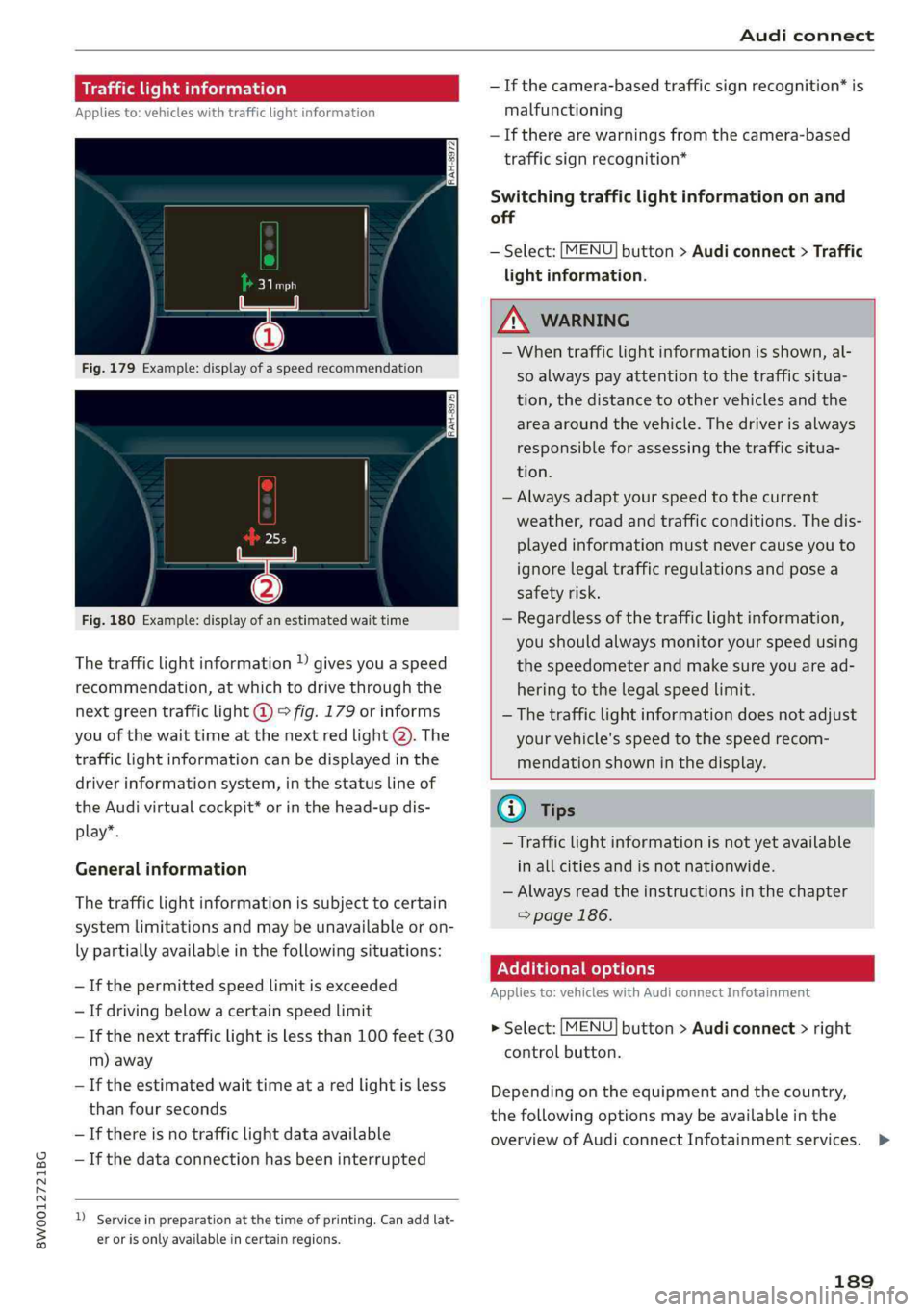
Trafficlightinformation
Appliesto:vehicleswithtrafficlightinformation
Fig.180Example:displayofanestimatedwaittime
Thetrafficlightinformation»givesyouaspeed
recommendation,atwhichtodrivethroughthe
nextgreentrafficlight@°fig.179orinforms
youofthewaittimeatthenextredlight@).The
trafficlightinformationcanbedisplayedinthe
driverinformationsystem,inthestatuslineof
theAudivirtualcockpit*orinthehead-updis-
play”.
Generalinformation
Thetrafficlightinformationissubjecttocertain
systemlimitationsandmaybeunavailableoron-
lypartiallyavailableinthefollowingsituations:
—Ifthepermittedspeedlimitisexceeded
—Ifdrivingbelowacertainspeedlimit
—Ifthenexttrafficlightislessthan100feet(30
m)away
—Iftheestimatedwaittimeataredlightisless
thanfourseconds
—If thereisnotrafficlightdataavailable
—Ifthedataconnectionhasbeeninterrupted
)Serviceinpreparationatthetimeofprinting.Can addlat-
erorisonlyavailableincertainregions.
—Ifthecamera-basedtrafficsignrecognition*is
malfunctioning
—Iftherearewarningsfromthecamera-based
trafficsignrecognition*
Switchingtrafficlightinformationonand
off
—Select:[MENU]button>Audiconnect>Traffic
lightinformation.
ZAWARNING
—Whentrafficlightinformationisshown,al-
soalways payattentiontothetrafficsitua-
tion,thedistancetoothervehiclesandthe
areaaroundthevehicle.Thedriverisalways
responsibleforassessingthetrafficsitua-
tion.
—Alwaysadaptyourspeedtothecurrent
weather,roadandtrafficconditions.Thedis-
playedinformationmustnevercauseyouto
ignorelegaltrafficregulationsandposea
safetyrisk.
—Regardlessofthetrafficlightinformation,
youshouldalwaysmonitoryourspeedusing
thespeedometerandmakesureyouaread-
hering
tothelegalspeedlimit.
—
Thetrafficlightinformationdoesnotadjust
yourvehicle'sspeedtothespeedrecom-
mendationshowninthedisplay.
@)Tips
—Trafficlightinformationisnotyetavailable
inallcitiesandisnotnationwide.
—Alwaysreadtheinstructionsinthe chapter
=>page186.
Additionaloptions
Appliesto:vehicleswith AudiconnectInfotainment
>Select:[MENU]button>Audiconnect>right
controlbutton.
Depending ontheequipmentandthecountry,
thefollowingoptionsmaybeavailableinthe
overviewofAudiconnectInfotainmentservices.>
189
Page 193 of 392
8W0012721BG
Audiconnect
Appliesto:vehicleswithAudiconnectvehiclecontrol
ForsomeAudiconnectvehiclecontrolservices,
thevehicleownermustbesetupasthekeyuser.
Setkeyuser
Requirement:akeyusermustnotbesetyet.The
ignitionmustbe switchedon.
>Tosetakeyuserforthevehicle,youwillneeda
myAudiaccount.Registeratwww.audiusa.
com/myaudi.
>Linkyourvehicletotheaccountatwww.
audiusa.com/myaudiandthenverifyyour
myAudiaccountimmediatelyinordertouse
the Audiconnectvehiclecontrolservices.
»YoucanalsoverifyyourmyAudiaccountlater.
Log
inatwww.audiusa.com/myaudiwithyour
accessinformationandverifyyourmyAudiac-
countinusermanagementusingtheverifica-
tionprocessthatisgiven.
>Select:[MENU]button>Audiconnect>ifnec-
essary,Displayavailablefunctions>rightcon-
trolbutton>Audiconnectusermanagement>
Keyuser>Set keyuser.
>
EnteryourmyAudiusernameandthe10-digit
vehiclecode=page29.Thekeyuserisset.You
havetherightstouse the Audiconnectvehicle
controlservices>page191aswellastheabili-
tytomanageothervehiclefunctionsandany
otherusers.
Resettingtheprimaryuser
Ifyouremovethekeyuser,allotherusersand
theirauthorizationswillbedeleted.Itwillno
longerbepossible touse the Audiconnectvehi-
clecontrolservices.
Requirement:akeyusermustbe set.Theignition
mustbe switchedon.
Select:[MENU]button>Audiconnect>right
controlbutton>Audiconnectusermanagement
>Keyuser>Resetkeyuser.
UsingthemyAudiapp
>InstallthemyAudiapponyourmobiledevice
andloginwithyouraccessinformation.
@Tips
—Ifyousellyourvehicle,resetthekeyuser
andrestoreallsettings tothefactoryde-
faultsettings>page241.
—Itmayalsobenecessarytoenteryour4-
digitmyAudiPINwhenaccessingsomeAudi
connectvehiclecontrolservices.
—Storethevehiclecodeinasecureplace.It
maybenecessarytore-enterthevehicle
code.
—Payattentiontoupper-andlower-caselet-
terswhenenteringthevehiclecode.
—Ifyoudonot havethe10-digitvehiclecode,
contactanauthorizedAudidealerorauthor-
izedAudiServiceFacility.
Additionaloptions
Appliesto:vehicleswith Audiconnectvehiclecontrol
Licensesubscription
Thevalidityandexpirationdateofyoursubscrip-
tionsaredisplayed.Whenthisfunctionisactivat-
ed,youwillbenotifiedbeforeyoursubscription
expires.
Select:[MENU]button>Audiconnect>Display
availablefunctions>rightcontrolbutton>Li-
censesubscription.
Warninglevels
Requirement:theprimaryusermusthavesetone
ormorewarninglevels.Secondaryuserscanonly
seeifawarninglevelisactiveornot.
Select:[MENU]button>Audiconnect>right
controlbutton>Alerts.
Appliesto:vehicleswith Audiconnectvehiclecontrol
Depending onthecountryandthevehicleequip-
ment,thefollowingservicesmaybeavailable:
Remotelockingandunlocking
Requirement:thevehiclemustbeparkedandthe
ignitionmustbeswitchedoff.
Thisserviceallowsyoutounlockor lockyourve-
hicle.>
191
Page 195 of 392
8W0012721BG
Audiconnect
Internet.TheInternetconnectiondisconnects
automaticallyoncethe requested Audiconnect
Infotainmentservicenolongerrequiresanydata.
—Connectionsetup:youcanselectwhenadata
connection should beestablished.
—Audiconnect(MMI):whenthisfunctionis
switchedon,adataconnectionisautomatically
establishedinordertouseAudiconnectInfo-
tainmentservices.
—Wi-Fidevices:whenthisfunctionisswitched
on,youcanallowordenyInternet connections.
@)Note
Alwaysfollow theinformationfoundin>@in
Wi-Fisettingsonpage193.
G)Tips
Formoreinformationonroamingcharges,
contactyourcellphoneserviceprovider.
Wi-Fisettings
Appliesto:vehicleswithWi-Fihotspot
Youcanuse theMMIasaWi-Fihotspottocon-
nect
uptoeight Wi-FidevicestotheInternet.
Requirement:theignitionmustbe switchedon.
>Select:[MENU]button>Telephone>rightcon-
trolbutton>Wi-Fisettings.
Dependingonthecountryandthevehicleequip-
ment,thefollowing functionsmaybeavailable:
Wi-Fi
Whenthisfunctionisswitchedon,theMMIWi-Fi
hotspotisactiveandvisibletootherdevices(for
example,laptopsandcellphones).Youcancon-
nectyourWi-FidevicetotheMMIandusetheIn-
ternetconnectionifnecessary.Ifyouswitchoff
theWi-FiintheMMI,theWi-Fihotspotwillbe
deactivated.Therefore,anyotherdevices access-
ingtheWi-Fihotspotwillnolongerbeconnected
totheWi-Fi.
Networkkey
TheWi-Ficonnectionbetweenyourvehicleand
yourWi-Fideviceisencrypted.Toestablishacon-
nection,youmustenterthefollowingvalues
whensettingupyourwirelessdevice.Youcan
changethemifnecessary.
—Accesspoint(SSID):nameoftheWi-Finet-
work.
—Password:arandompasswordwassetatthe
factoryintheMMI.Thepasswordcanbe
changed.Theencryptionmethodrequiresa
passwordtobeatleasteightcharacterslong.
Chooseasecurepassword.
—Visibletoothers:yourWi-Finetworkvisibility
can be switchedonoroff.
Z\WARNING
—Itisonlysafe tousetablets,laptops,mobile
devicesandothersimilardeviceswhenthe
vehicleisstationarybecause,likeallloose
objects,theycouldbethrownaroundthein-
sideofthevehicleinacrashandcauseseri-
ousinjuries.Storethesetypesofdevicesse-
curelywhiledriving.
—Toreducetheriskofanaccident,use theAu-
diconnectInfotainmentserviceswithaWi-
Fihotspotonlyintherearseatwhentheve-
hicleisinmotion,oronlywhenthevehicleis
stationary.
—Donotuseanywirelessdevicesonthefront
seatswithinrangeoftheairbagswhiledriv-
ing.Also readthewarningsinthechapter
=page265,Frontairbags.
—Asthedriver,donotallowusageoftheWi-
Fihotspottodistractyoufromdriving,as
thiscouldincreasetheriskofanaccident.
CG)Note
—Incertainsituations,theWi-Fihotspotdata
connectionmaybeestablishedasareplace-
mentfortheSIMcardonyourWi-Fidevice.
Thisfeaturedependsontheconfiguration
ofyourWi-Fideviceandoperatingsystem.
Thiscouldresultinfeesdependingonyour
cellphoneserviceprovider,especiallyifyou
areusingthisfeaturewhileabroad.Aflat
ratedataplanisstronglyrecommended.For
moreinformation,contactyourcellphone
serviceproviderorrefertotheowner'sman-
ualforyourWi-Fidevice.
193
>
Page 196 of 392
Audiconnect
—Appliesto:embeddedSIMcardusage:The
connectioncostsforAudiconnectInfotain-
mentservicesareincludedinthepriceof
AudiconnectInfotainment.Pleasenote
thatchargesmayapplywhenusingcertain
services.Forexample,thisapplies toInter-
netradio/podcastsorforservicesthatuse
theWi-Fihotspot,suchasonlinemedia
sources.Depending onthecountry,data
plansmayneedtobepurchasedforthese
services>page194.Foradditionalinfor-
mation,seewww.audiusa.com/myaudi.
—Youareresponsibleforallprecautionstaken
fordataprotection,anti-virusprotection,
andprotectionagainstlossofdataonmo-
biledevicesthatareusedtoaccesstheIn-
ternetthroughtheWi-Fihotspot.
@Tips
InvehicleswithoutAudiconnectInfotain-
ment,theuseoftheWi-Fihotspotisonly
possiblefortheWi-Fiaudioplayer*.Adata
connectiontotheInternetcannot beestab-
lished.
Dataplans)
Appliesto:vehicleswith dataplans
Requirement: youmusthavecreatedamyAudi
accountatwww.audiusa.com/myaudi.Yourvehi-
clemustberegisteredinyourmyAudiaccount.
Youcanpurchasedataplansatwww.audiusa.
com/myaudi.
Z\WARNING
—Asthedriver,donotallowusageoftheWi-
Fihotspottodistractyoufromdriving,as
thiscouldincreasetheriskofanaccident.
—Itisonlysafe tousetablets,laptops,mobile
devices,andothersimilardeviceswhenthe
vehicleisstationarybecause,likeallloose
objects,theycouldbethrownaroundthein-
sideofthevehicleinacrashandcauseseri-
ousinjuries.Storethesetypesofdevicesse-
curelywhiledriving.
))_Notavailableineverymarket.
194
—Donotuseanywirelessdevicesonthefront
seatswithinrangeoftheairbagswhiledriv-
ing.Also readthewarningsinthechapter
=page265,Frontairbags.
@)Note
ReadtheinformationaboutAudiconnect,and
besuretonotetheconnectivitycostssection
=>)inWi-Fisettingsonpage193.
G)Tips
—Pleasenotethatanyvehiclepassengercan
deletetheSIMowner.
— Theassociatedvehicleisnotautomatically
deletedfromthecustomerportalforthe
cellphoneserviceproviderwhenyoudelete
theSIMownerinthevehicle.Ifsellingyour
vehicle,youshoulddeletethevehiclefrom
thecustomerportalforthecellphoneserv-
iceprovidertoavoidbeingchargedforaddi-
tionalpurchases.
DataPrivacy
Appliesto:vehicleswith AudiconnectInfotainment
AUDIAGcollects,uses,storesandsharesyour
personalinformation,suchascontactdata,vehi-
cledata,usagedata,drivingdataandprecisege-
olocation,inordertoprovideyouwiththeprod-
uctsandservicesyouhavepurchasedorrequest-
ed,andforanumberofotherpurposes,forex-
ample,totrackqualityissues,toperformance
andsafety,tomeetourinternalcomplianceorle-
galrequirementsandtomarkettocustomers
andpotentialcustomers.Foramorecomplete
listofthedatawecollect,howweuseitandwith
whomweshareit,pleasevisityourAudination-
al/salesregionwebsiteatwww.audi.com.
Thecollection,useandsharingmayvarydepend-
ingonyourmodelandmodelyear,yoursubscrip-
tionstatus,ortheserviceoffering.Forexample,
collection,useandsharingmayvarybetweenAu-
diconnectservices,ifyouhavedesignatedakey
user,orifyouaredrivingamodelequippedwith
persistentdatalogging.Please reviewthe>
Page 206 of 392
Navigation
Personalroute
assistance
Appliesto:vehicleswithnavigationsystemandpersonal
routeassistance
YourMMIcanlearntheroutesthatyoudrivefre-
quently(suchasyourdailycommutetoworkand
back)andsuggestrouteguidancebasedonthe
currentvehicleposition.
UnColnnt-e-lelelg-ey
5Siegal7)
®a
®MarketStreet
14
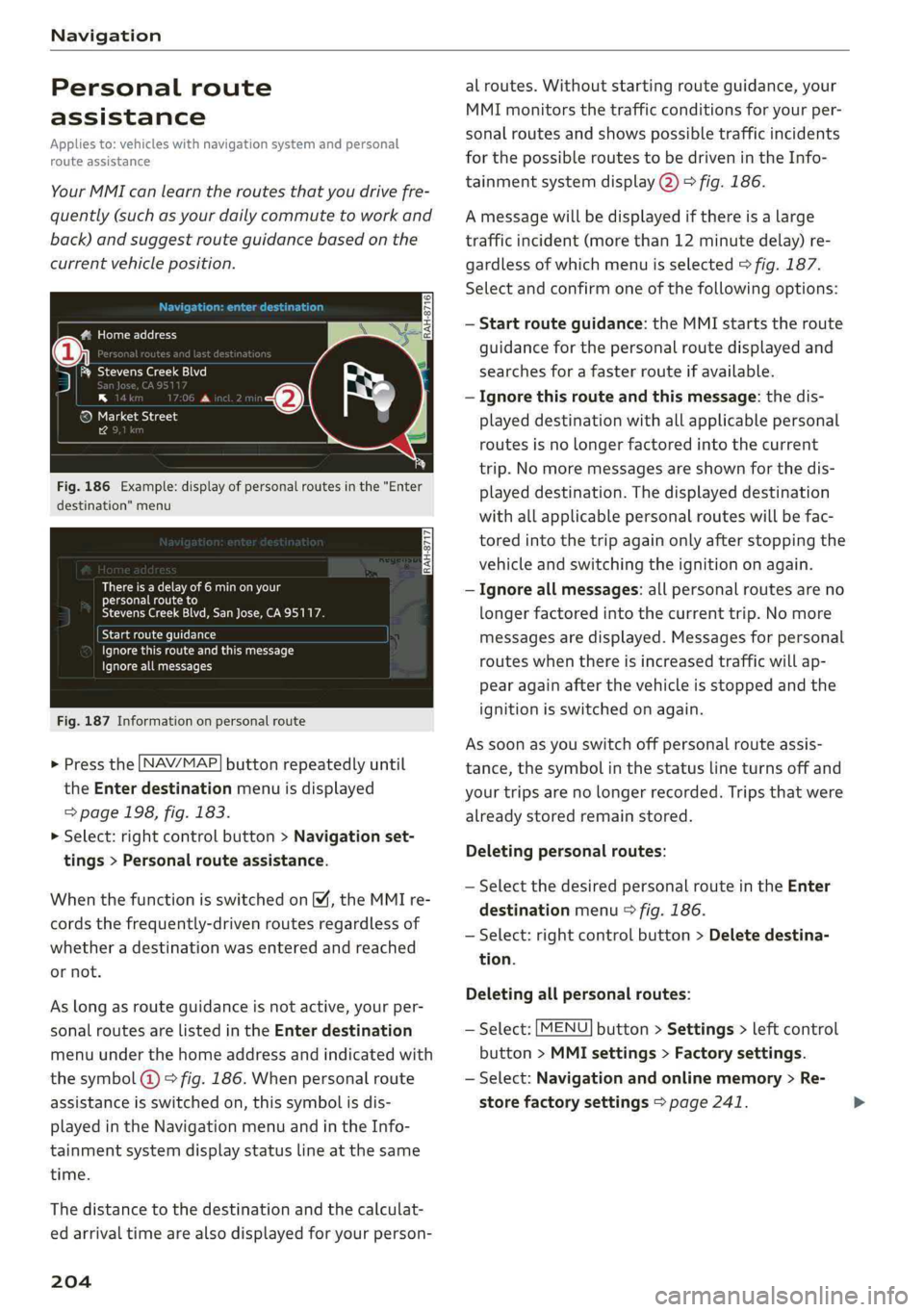
Fig.186Example:displayofpersonalroutesinthe"Enter
destination"menu
Thereisadelayof6minonyour
personalrouteto
StevensCreekBlvd,SanJose,CA95117.
yelamerella)
Pceuoersentkurtacorr
Ignoreallmessages
Fig.187Informationonpersonalroute
>Pressthe LNAV/MAP]buttonrepeatedlyuntil
the Enterdestinationmenuisdisplayed
=>page198,fig. 183.
>Select:rightcontrolbutton>Navigationset-
tings>Personalrouteassistance.
WhenthefunctionisswitchedonM,theMMIre-
cordsthefrequently-drivenroutesregardlessof
whetheradestinationwasenteredandreached
ornot.
Aslongasrouteguidanceisnotactive,yourper-
sonalroutesarelistedinthe Enterdestination
menuunderthehomeaddressandindicatedwith
thesymbol@©fig.186.Whenpersonalroute
assistanceisswitchedon,thissymbolisdis-
playedintheNavigationmenuandintheInfo-
tainmentsystemdisplaystatuslineatthesame
time.
Thedistancetothedestinationandthecalculat-
edarrivaltimearealsodisplayedforyourperson-
204
alroutes.Withoutstartingrouteguidance,your
MMImonitorsthetrafficconditionsforyourper-
sonalroutesandshowspossibletrafficincidents
forthepossibleroutestobedrivenintheInfo-
tainmentsystemdisplay@)>fig.186.
Amessagewillbedisplayedifthereisalarge
trafficincident(morethan12minutedelay)re-
gardlessofwhichmenuisselected>fig.187.
Selectandconfirmoneofthefollowingoptions:
—Startrouteguidance:theMMIstartstheroute
guidanceforthepersonalroutedisplayedand
searchesforafasterrouteifavailable.
—Ignorethisrouteandthismessage:thedis-
playeddestinationwithallapplicablepersonal
routesisnolongerfactoredintothecurrent
trip.Nomoremessagesareshownforthedis-
playeddestination.Thedisplayeddestination
withallapplicablepersonalrouteswillbefac-
toredintothetripagainonlyafterstoppingthe
vehicleandswitchingtheignitiononagain.
—Ignoreallmessages:allpersonalroutesareno
longerfactoredintothecurrenttrip.No more
messagesaredisplayed.Messagesforpersonal
routeswhenthereisincreasedtrafficwillap-
pearagainafterthevehicleisstoppedandthe
ignitionisswitchedonagain.
Assoonasyouswitchoffpersonalrouteassis-
tance,thesymbolinthestatuslineturnsoffand
yourtripsarenolongerrecorded.Tripsthatwere
alreadystoredremainstored.
Deletingpersonalroutes:
—SelectthedesiredpersonalrouteintheEnter
destinationmenu>fig.186.
—Select:rightcontrolbutton>Deletedestina-
tion.
Deletingallpersonalroutes:
—Select:[MENU]button>Settings>leftcontrol
button>MMIsettings>Factorysettings.
—Select:Navigationandonlinememory>Re-
storefactorysettings>page241.
Page 207 of 392
8W0012721BG
Navigation
@)Tips
—Personalroutesarelearnedbasedontheve-
hicleposition.Therouteisprioritizedac-
cordingtohowfrequentlyyoudrivetoa
destination.
—Amaximumofthreepersonalroutesare
displayedinthe Enterdestinationmenu.
Basedonthecurrentvehicleposition,the
trafficsituation fortheroutethatismost
likelytobedrivenoutofthethreeroutes
willalways bemonitored.
—Pleasenotethatpersonalroutesthathave
alreadybeenstoredwillremainstoredafter
theignitionisswitchedoffandtheymust
bedeletedmanually.
Alternativeroutes
Appliesto:vehicleswithnavigationsystem
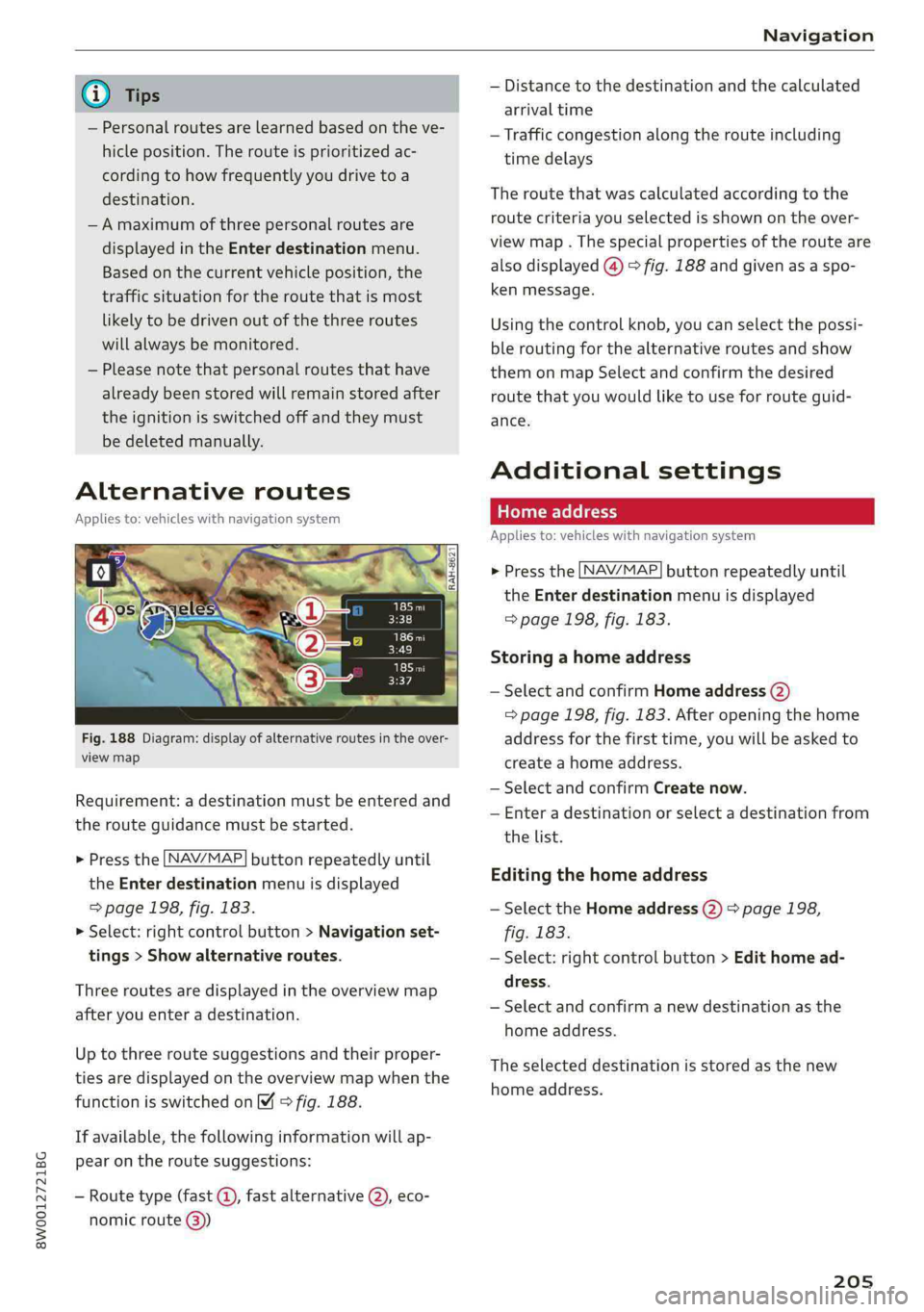
Fig.188Diagram:displayofalternativeroutesintheover-
viewmap
Requirement:adestinationmustbe enteredand
therouteguidancemustbestarted.
>Pressthe [NAV/MAP]buttonrepeatedlyuntil
the Enterdestinationmenuisdisplayed
=>page198,fig. 183.
>Select:rightcontrolbutton>Navigationset-
tings>Showalternativeroutes.
Threeroutesaredisplayedinthe overviewmap
afteryouenteradestination.
Uptothree routesuggestionsandtheirproper-
tiesaredisplayedonthe overviewmapwhenthe
functionisswitchedon4©fig.188.
Ifavailable,thefollowinginformationwillap-
pearontheroutesuggestions:
—Routetype(fast©,fastalternative(2),eco-
nomicroute@))
—Distancetothedestinationandthecalculated
arrivaltime
—Trafficcongestionalong therouteincluding
timedelays
Theroutethatwascalculatedaccordingtothe
routecriteriayouselectedisshownontheover-
viewmap.Thespecialpropertiesoftherouteare
alsodisplayed(@)>fig.188andgivenasaspo-
kenmessage.
Usingthecontrolknob,youcanselectthepossi-
ble
routingforthealternativeroutesandshow
themonmapSelectandconfirmthedesired
routethatyouwouldliketouseforrouteguid-
ance.
Additionalsettings
Appliesto:vehicleswithnavigationsystem
>Pressthe [NAV/MAP]buttonrepeatedlyuntil
the Enterdestinationmenuisdisplayed
=>page198,fig. 183.
Storingahomeaddress
—SelectandconfirmHomeaddress(2)
=>page198,fig.183.Afteropeningthehome
addressforthefirsttime,youwillbe askedto
createahomeaddress.
—SelectandconfirmCreatenow.
—Enteradestinationorselectadestinationfrom
thelist.
Editingthehomeaddress
—SelecttheHomeaddress(2)>page198,
fig.183.
—Select:rightcontrolbutton>Edithomead-
dress.
—Selectandconfirmanewdestinationasthe
homeaddress.
Theselecteddestinationisstoredasthenew
homeaddress.
205
Page 208 of 392
![AUDI A4 2019 Workshop Manual Navigation
Appliesto:vehicleswithnavigationsystem
>Pressthe LNAV/MAP]buttonrepeatedlyuntil
the Enterdestinationmenuisdisplayed
=>page198,fig.183.
—Storingadestinationasafavorite:searchfor
th](/img/6/57555/w960_57555-207.png "AUDI A4 2019 Workshop Manual Navigation
Appliesto:vehicleswithnavigationsystem
>Pressthe LNAV/MAP]buttonrepeatedlyuntil
the Enterdestinationmenuisdisplayed
=>page198,fig.183.
—Storingadestinationasafavorite:searchfor
th")
Navigation
Appliesto:vehicleswithnavigationsystem
>Pressthe LNAV/MAP]buttonrepeatedlyuntil
the Enterdestinationmenuisdisplayed
=>page198,fig.183.
—Storingadestinationasafavorite:searchfor
thedesireddestinationusingtheinputfield.
Or:selectadestinationfromthelist.Select:
rightcontrolbutton>Storeasfavorite.
—Renamingafavorite:selecttheleftcontrol
button>Favorites>afavoritefromthelist>
rightcontrolbutton>Renamefavorite.
—Movefavorite:selectafavoritefromthelist>
rightcontrolbutton>Movefavorite.Select
andconfirmthelocationoftheselectedfavor-
ite.
—Deletingafavorite:selectafavoritefromthe
list>rightcontrolbutton>Deletefavorite>
DeletethisfavoriteorDeleteallfavorites.
Directorycontacts
Appliesto:vehicleswithnavigationsystem
Twoaddresses(private/business)canbeas-
signedasdestinationsforeachcontactinthedi-
rectory.
>Pressthe [NAV/MAP]buttonrepeatedlyuntil
theEnterdestinationmenuisdisplayed
=>page198,fig. 183.
Storingadestinationasacontactinthe
directory
Requirement:amobiledevicemustbeconnected
totheMMI>page171.
—Select:adestination>rightcontrolbutton>
Adddestinationtocontact.
—Enterthefirstlettersofthedesiredcontactin
thefreetextsearchinputfield>page198,
fig.183andthenselectacontactfromthelist.
—SelectandconfirmAddbusinessdestinationor
Addprivatedestination.
206
Navigationsettings
Appliesto:vehicleswithnavigationsystem
>Pressthe [NAV/MAP]buttonrepeatedlyuntil
the Enterdestinationmenuisdisplayed
=>page198,fig. 183.
>Select:rightcontrolbutton>Navigationset-
tings.
Dependingontheselectedfunction,thefollow-
ingsettingscan beselected:
Showalternativeroutes
Uptothreesuggestedroutesareshownonthe
mapwhenthisfunctionisswitchedon
=>page205.
Lowfuelwarning
Amessageisdisplayedifthefuelgaugegoesbe-
lowthereservemarkingwhenthisfunctionis
switchedon M.Confirmingthismessagedisplays
alistofgasstationsinthearea.Whenagassta-
tionisselected,routeguidancefromthecurrent
vehiclepositioniscalculated.
Trailermode*
Trailermodeisswitchedoffatthefactory.
Whenthefunctionisswitchedon M,themaxi-
mumpermittedspeedforvehicleswithtrailersis
incorporatedintotherouteguidanceandthecal-
culatedarrivaltimeisadjustedaccordingly.Trail-
ermodeisdisplayedusingsymbols"8intheside
menuonthemap.
Personalrouteassistance*
Personalrouteassistanceisswitchedoffatthe
factory.
Yourtripsarerecordedanddestinationsaresug-
gestedbytheMMIwhenthisfunctionisswitched
on=page204.
Thepersonalrouteassistanceisindicatedbythe
P&symbolinthestatuslineoftheInfotainment
systemdisplay.
Notificationwhennearby*
Thenotificationwhennearbyisswitchedoffat
thefactory.
Page 210 of 392
Navigation
>Pressthe
NAV/MAP. buttonrepeatedlyuntil
themapisdisplayed>fig.190.
Zoomingin/outonthemap
—Turn thecontrolknobtotheleftor totheright.
Alternatively,youcanalsozoomin/outonthe
mapusingtheMMItouchcontrolpad*
=>page150,ifthecrosshairsareswitchedon.
Or:
turntheleftthumbwheelonthemultifunc-
tionsteeringwheel*>page16.
Turningthecrosshairson/off
—Switchingthecrosshairson:pressthecontrol
knobinthemapview>fig.190.
—Switchingthecrosshairsoff:pressthe[BACK
button.
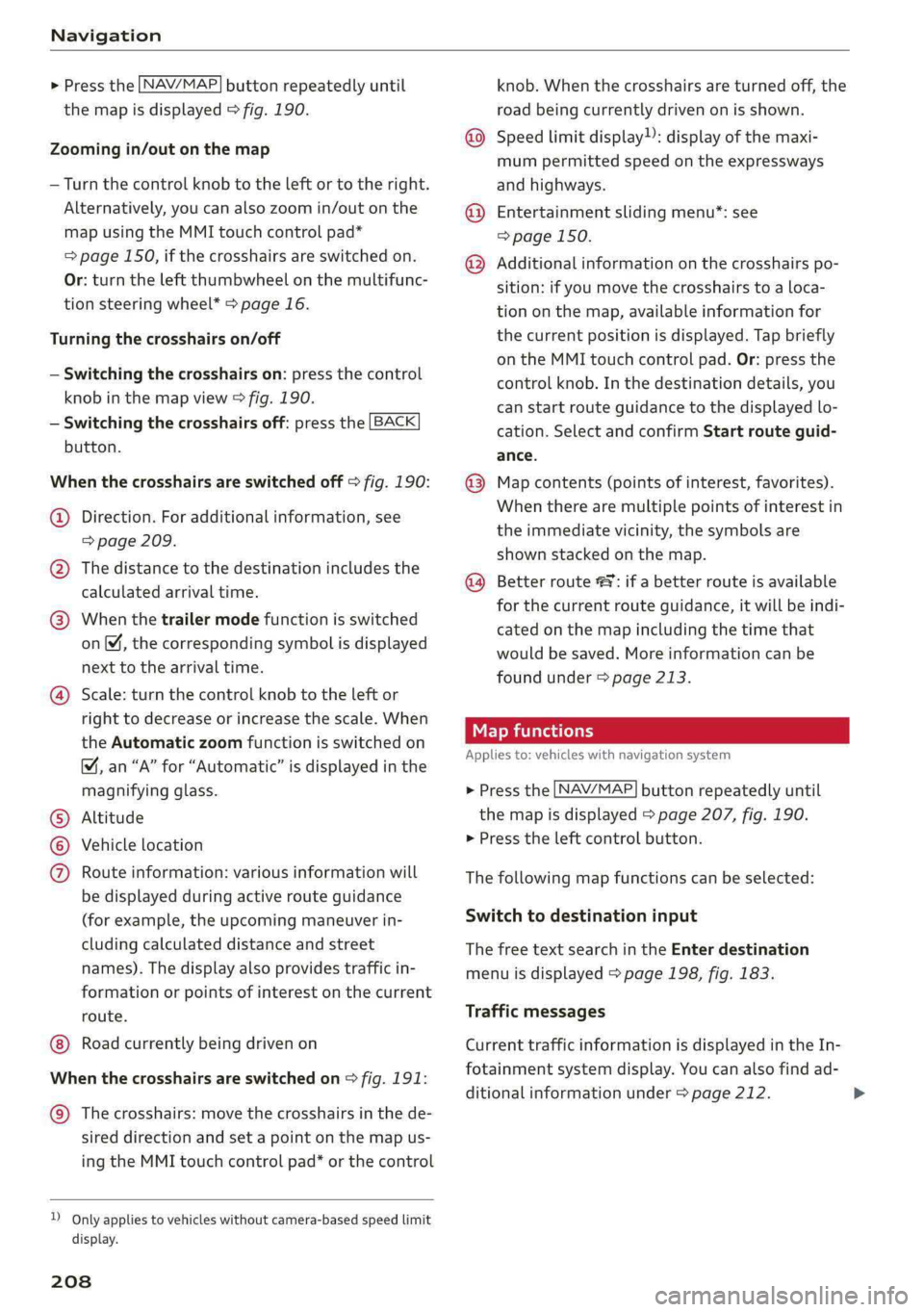
Whenthecrosshairsareswitchedoff>fig.190:
@Direction.Foradditionalinformation,see
knob.Whenthecrosshairsareturnedoff,the
roadbeingcurrentlydrivenonisshown.
@Speedlimit display”):displayofthemaxi-
mumpermittedspeedontheexpressways
andhighways.
@Entertainmentslidingmenu*:see
=>page150.
@®Additionalinformationonthecrosshairspo-
sition:ifyoumovethecrosshairstoa loca-
tiononthemap,availableinformationfor
thecurrentpositionisdisplayed.Tapbriefly
ontheMMItouchcontrolpad.Or:pressthe
controlknob.Inthedestinationdetails,you
canstartrouteguidancetothedisplayedlo-
cation.SelectandconfirmStartrouteguid-
ance.
@Mapcontents(pointsofinterest,favorites).
Whentherearemultiplepointsofinterestin
=>page209.
@Thedistancetothedestinationincludesthe
calculatedarrivaltime.
@Whenthetrailermodefunctionisswitched
on,thecorrespondingsymbolisdisplayed
nexttothearrivaltime.
@Scale:turnthecontrolknobtotheleftor
righttodecreaseor increasethescale.When
theAutomaticzoomfunctionisswitchedon
&,an“A”for“Automatic”isdisplayedinthe
magnifyingglass.
Altitude
Vehiclelocation
Routeinformation:variousinformationwill
bedisplayedduringactiverouteguidance
(forexample,theupcomingmaneuverin-
cludingcalculateddistanceandstreet
names).Thedisplayalsoprovidestrafficin-
formationorpointsofinterestonthecurrent
route.
Roadcurrentlybeingdrivenon
CO®
Whenthecrosshairsareswitchedon>fig.191:
@)Thecrosshairs:movethecrosshairsinthede-
sireddirectionandsetapointonthemapus-
ingtheMMItouchcontrolpad”orthecontrol
D_Onlyappliestovehicleswithoutcamera-basedspeedlimit
display.
208
theimmediatevicinity,thesymbolsare
shownstackedonthemap.
@®)Betterroute#9 ifabetterrouteisavailable
forthecurrentrouteguidance,itwillbeindi-
catedonthemapincludingthetimethat
wouldbesaved.Moreinformationcanbe
foundunder>page213.
Mapfunctions
Appliesto:vehicleswithnavigationsystem
>Pressthe
NAV/MAP buttonrepeatedlyuntil
themapisdisplayed>page207,fig.190.
>Presstheleftcontrolbutton.
Thefollowingmapfunctionscan beselected:
Switchtodestinationinput
ThefreetextsearchintheEnterdestination
menuisdisplayed>page198,fig.183.
Trafficmessages
CurrenttrafficinformationisdisplayedintheIn-
fotainmentsystemdisplay.Youcanalsofindad-
ditionalinformationunder>page212.
Page 211 of 392
8W0012721BG
Navigation
Routelist
Theroutelistcanonlybedisplayedwhenroute
guidanceisactiveandcontainsinformationre-
gardingtheroute,thenamesofthestreetsand
the lengthoftheroutesections.Whentraveling
onhighways,possibleparkinglotsandrestareas
areshown,whichyoucanselectasastopover.
POIsalongtheroute
Requirement:routeguidancemustbeactive.
Searchingforpointsofinterestalongyourcur-
rentrouteForadditionalinformation,see
=>page201.
Additionaloptionsonthemap
Appliesto:vehicleswithnavigationsystem
>Pressthe [NAV/MAP|buttonrepeatedlyuntil
themapisdisplayed>page207,fig.190.
>Presstherightcontrolbutton.
Dependingonthefunctionselected,thefollow-
ingoptionscanalsobeselectedundertheMap
menu:
Cancelrouteguidance:see>page203.
Mapsettings:see>page209.
Routecriteria:see>page207.
Voiceguidance:see>page207.
Navigationsettings:see>page206.
Showalternativeroutes:see>page205.
Parkingalongtheroute”:parkingoptionsnear
thevehiclearedisplayed.
Savecurrentposition:youcansaveyourcurrent
vehiclepositionasafavorite>page206orsave
itasacontactinthedirectory>page206.
Audiconnectatthislocation*:allowsyouto
searchforTravelinformationattheenteredlo-
cation(events,weatheratthedestination,etc.).
Onlinetrafficdata*:youcanswitchtheonline
trafficdataonoroff(M).
2)AUDIAGprovidesaccesstoservicesfromthirdpartypro-
viders.Permanentavailabilitycannotbeguaranteed,be-
causethatdependsonthethirdpartyprovider.
Countryinformation:see>page203.
Avoidroute*:whenrouteguidanceisactive,the
calculatedroutewillavoidtheareayouhave
specified(maximum:12mi(20km)),ifpossible.
Thenavigationsystemcalculatesanalternative
route.Theroutetobeavoidedthatyouhaveen-
teredappliesonlytothecurrentrouteandmust
beset again,ifneeded.Theareasyouhavese-
lectedtoavoidwillappearwithredandwhite
shadingonthemap.
Moveroute”:moveyourfingerovertheMMI
touchcontrolpad*orusethecontrolknobto ad-
justtherouteonthe overviewmap.
Mapsettings
Appliesto:vehicleswithnavigationsystem
>Pressthe [NAV/MAP]buttonrepeatedlyuntil
themapisdisplayed.
>Select:rightcontrolbutton>Mapsettings.
Dependingontheselectedfunction,thefollow-
ingsettingscan beselected:
Mapcolors
Day/Night:themapisdisplayedwitha light/
darkbackground.
Automatic:themapdisplayadaptstothelight-
ingconditions(forexample,changingfromDay
toNightwhendrivingthroughatunnel).
Mapdisplay
Standard:see>page207,fig.191.
Satellitemap”):see>page210,fig.192.
Maporientation
Destinationmap:themapindicatesthedestina-
tionandisorientedtothenorth.
2Dheading-upmap/2Dnorth-upmap:thecur-
rentvehiclepositionisdisplayed.Themapisori-
entedinthedirectionoftravelor tothenorth.
3Dheading-upmap”:thecurrentvehicleposi-
tionisshownonathree-dimensionalmapandis>
209
Page 212 of 392
Navigation
alignedtothedirectionoftravel.Atascaleof62
mi(100km)andlarger,themaporientationisto
thenorth.
Overviewmap:theentireroutefromthevehicle
positiontothedestinationorthenextstopoveris
displayedonthemap.Themapscaledependson
the lengthoftherouteandadaptsautomatically.
Themapisorientedtothenorth.
Routeinformation
Thedisplayofrouteinformation,suchasthecur-
rentstreetbeingdrivenonorpointsofinterest
alongthecurrentroute>page207,fig.190,can
be switchedon/offorcanbeminimizedonthe
displayofupcomingmaneuvers.
Automaticzoom
On:themapscaleisadaptedautomaticallyde-
pendingonthetypeof roadbeingtraveled(ex-
pressway,highway,otherroads)sothatyoual-
wayshaveanoptimaloverviewoftheroadahead.
Thescalewillalsobeautomaticallyadapted
whenthereareupcomingmaneuverstoprovidea
betterdetailedview.
Intersection:whenrouteguidanceisactive,the
maptemporarilyzoomsintoadetailedscale
whenthereareupcomingmaneuverssothatyou
can see thestreetorturnbetter.
Off:themapscaleyouhavechosenismain-
tained.
MMImapcontents
Youcanswitchthedisplayofadditionalinforma-
tiononthemapintheInfotainmentsystemdis-
playonoroff.
Theweatherforecastisdisplayedona3mi(5
km)scaleonthemap.
Instrumentclustermapcontents
Youcanalsosetwhichmapcontentdisplaysin
theinstrumentcluster>page160.
2)AUDIAGprovidesaccesstoservicesfromthirdpartypro-
viders.Permanentavailabilitycannotbeguaranteed,be-
causethatdependsonthethirdpartyprovider.
210
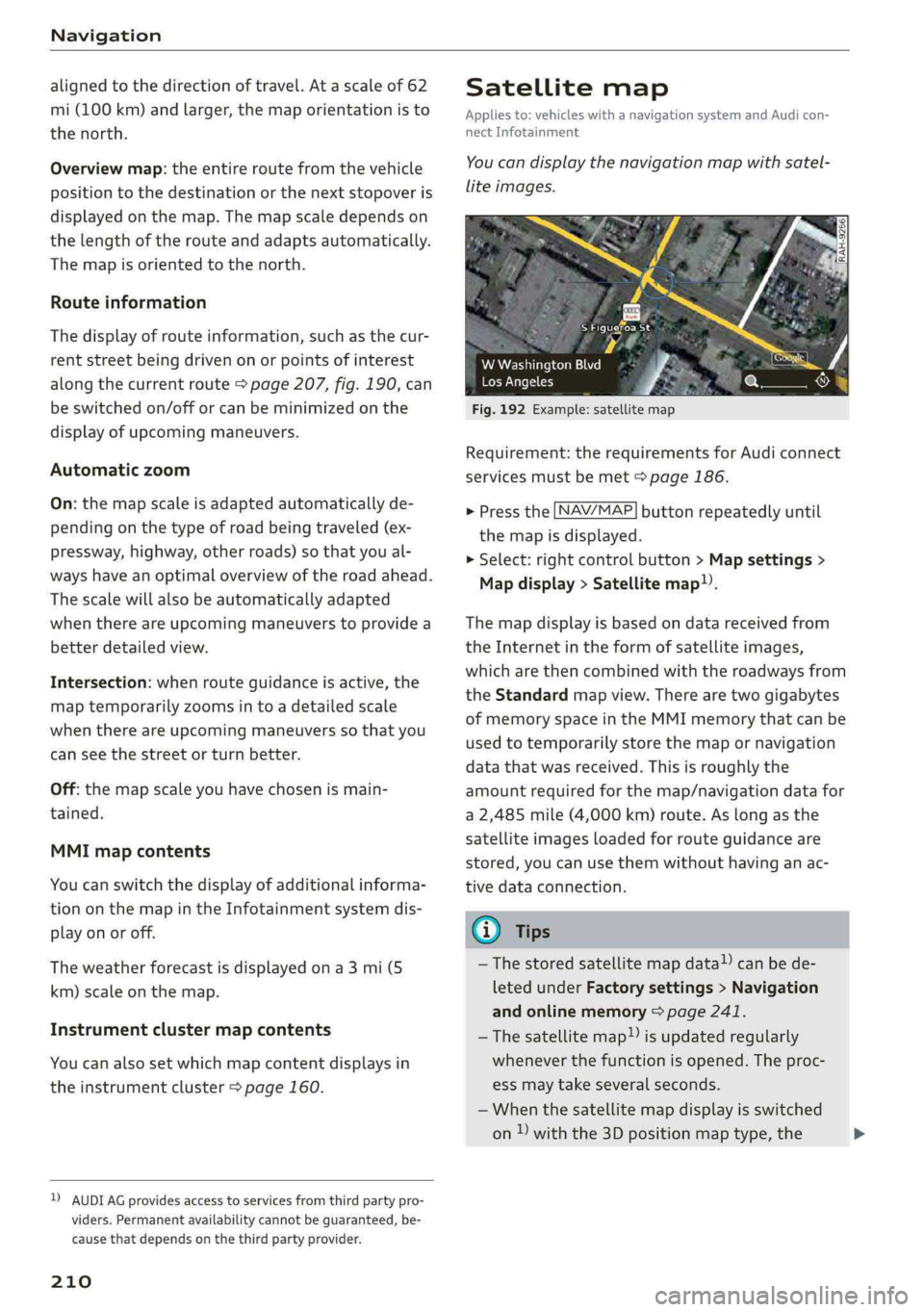
Satellitemap
Appliesto:vehicleswithanavigationsystem andAudicon-
nectInfotainment
You candisplaythenavigationmapwithsatel-
liteimages.
Sitters
Fig.192Example:satellitemap
WWashingtonBlvd
LosAngeles
Requirement:therequirementsforAudiconnect
servicesmustbemet>page186.
>Pressthe[NAV/MAP
themapisdisplayed.
>Select:rightcontrolbutton>Mapsettings>
Mapdisplay>Satellitemap).
buttonrepeatedlyuntil
Themapdisplayisbasedondatareceivedfrom
theInternetintheformofsatelliteimages,
whicharethencombinedwiththeroadwaysfrom
theStandardmapview.Therearetwogigabytes
ofmemoryspaceintheMMImemorythatcanbe
usedtotemporarilystorethemapornavigation
datathatwasreceived.Thisisroughlythe
amountrequiredforthemap/navigationdatafor
a2,485mile(4,000km)route.Aslongasthe
satelliteimagesloadedforrouteguidanceare
stored,youcanusethemwithouthavinganac-
tivedataconnection.
G)Tips
—Thestoredsatellitemapdata!)canbede-
letedunderFactorysettings>Navigation
andonlinememory>page241.
—Thesatellitemap)isupdatedregularly
wheneverthefunctionisopened.Theproc-
essmaytakeseveralseconds.
—Whenthesatellitemapdisplayisswitched
on)withthe3Dpositionmaptype,the>