display AUDI A4 2019 Repair Manual
[x] Cancel search | Manufacturer: AUDI, Model Year: 2019, Model line: A4, Model: AUDI A4 2019Pages: 392, PDF Size: 99.53 MB
Page 137 of 392
8W0012721BG
Parkingaid
Switchingonautomatically
Thesystemswitchesonautomaticallywhenre-
versegearisengagedwhiletheengineisrun-
ning.Abrieftonewillsound.
Switchingoffautomatically
The
systemswitchesoffautomaticallywhendriv-
ingforwardfasterthan6mph(10 km/h).
Selectingthemode
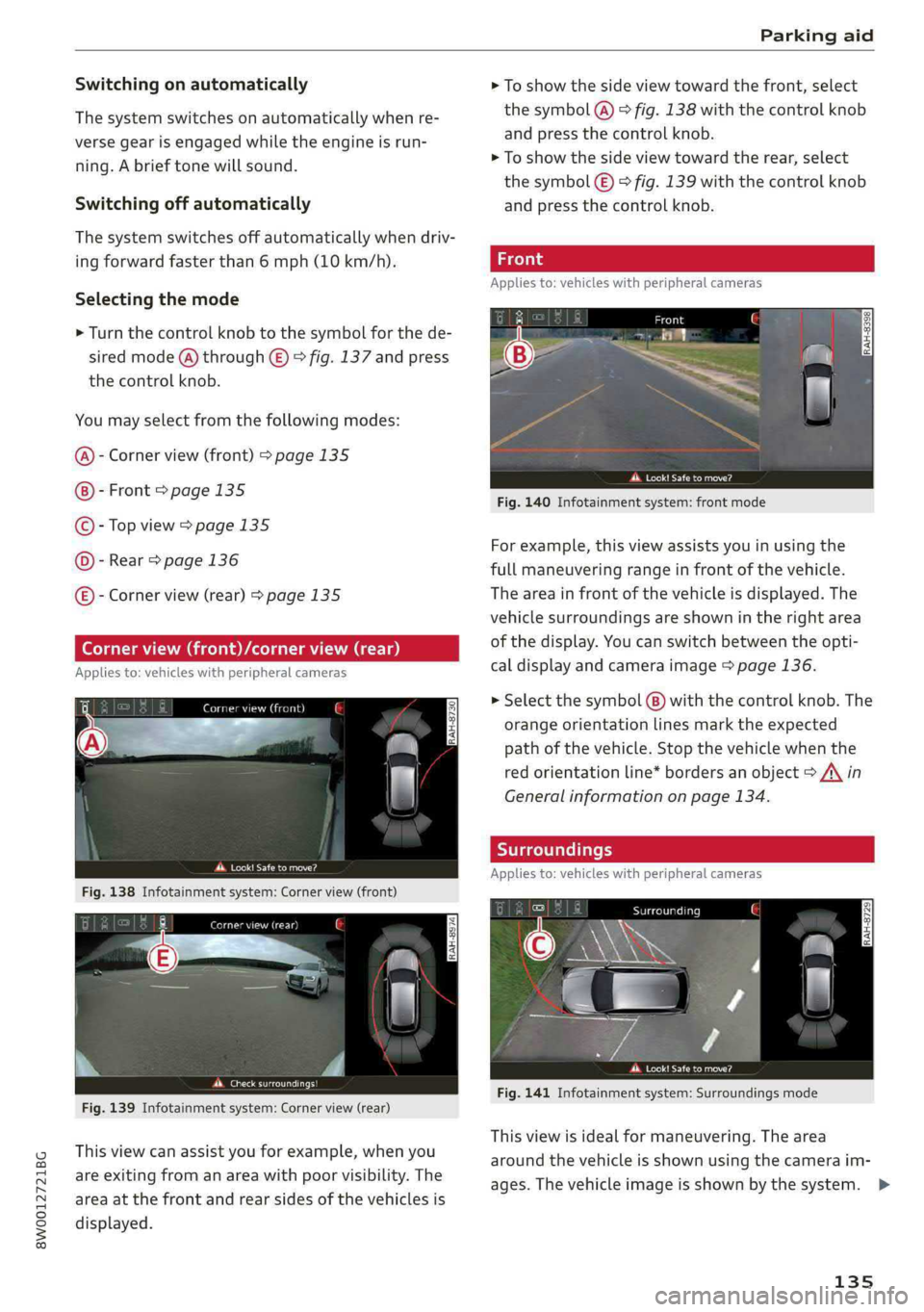
>Turn thecontrolknobtothesymbolforthede-
siredmode(@)through©)©fig.137andpress
thecontrolknob.
Youmayselectfromthefollowingmodes:
Cornerview(front)>page135
Front>page135
Topview>page135
Rear>page136
E)-Cornerview(rear)>page135
precata
Fig.138Infotainmentsystem:Cornerview(front)
Werertener
Fig.139Infotainmentsystem:Cornerview(rear)
Thisviewcanassistyouforexample,whenyou
areexitingfromanareawithpoorvisibility.The
areaatthefrontandrearsidesofthevehiclesis
displayed.
>Toshowthesideviewtowardthefront,select
thesymbol@)©fig.138withthecontrolknob
andpressthecontrolknob.
>Toshowthesideviewtowardtherear,select
thesymbol€)>fig.139withthecontrolknob
and
pressthecontrolknob.
Appliesto:vehicleswithperipheralcameras
eect
Fig.140Infotainmentsystem:frontmode
Forexample,thisviewassistsyouinusingthe
fullmaneuveringrangeinfrontofthevehicle.
Theareainfront ofthevehicleisdisplayed.The
vehiclesurroundingsareshownintherightarea
ofthedisplay.Youcanswitchbetweentheopti-
caldisplayandcameraimage>page136.
>Selectthesymbol(8)withthecontrolknob.The
orangeorientationlinesmarktheexpected
pathofthevehicle.Stopthevehiclewhenthe
redorientationline*bordersanobject>A\in
Generalinformationonpage134.
Appliesto:vehicleswithperipheralcameras
Scara
Perea
Fig.141Infotainmentsystem:Surroundingsmode
Thisviewisidealformaneuvering.Thearea
aroundthevehicleisshownusingthecameraim-
ages.Thevehicleimageisshownby thesystem.>
135
Page 138 of 392
Parkingaid
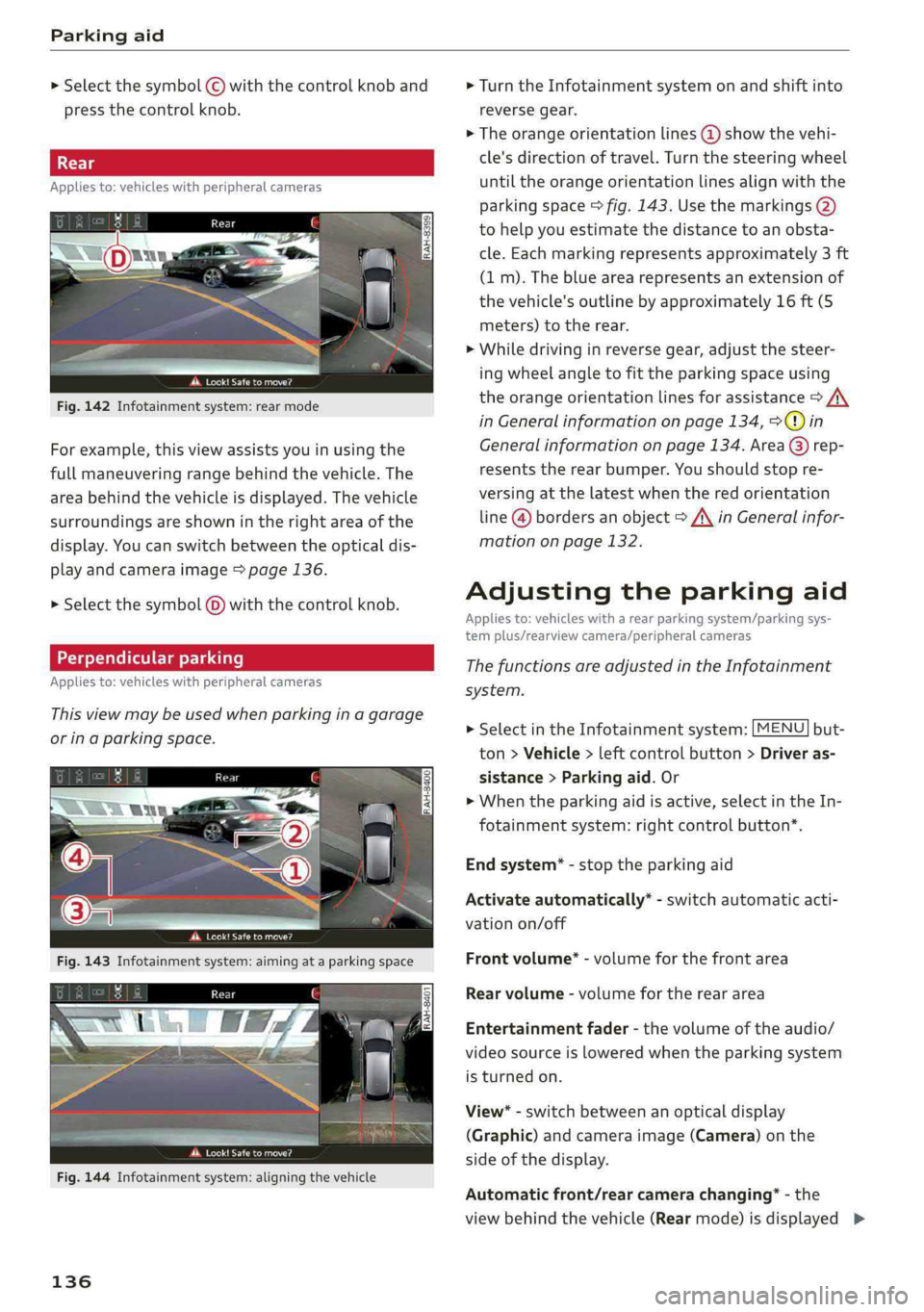
> Selectthesymbol©withthecontrolknoband
pressthecontrolknob.
Appliesto:vehicleswithperipheralcameras
Peat
Fig.142Infotainmentsystem:rearmode
Forexample,thisviewassistsyouinusingthe
fullmaneuveringrangebehindthevehicle.The
areabehindthevehicleisdisplayed.Thevehicle
surroundingsareshownintherightareaofthe
display.Youcanswitchbetweentheopticaldis-
playandcameraimage>page136.
> Selectthesymbol@)withthecontrolknob.
Perpendicularparking
Appliesto:vehicleswithperipheralcameras
Thisviewmaybe usedwhenparkinginagarage
orinaparkingspace.
ae-
dd.Look!Safetomove?
Fig.144Infotainmentsystem:aligningthevehicle
136
>Turn theInfotainmentsystemonandshiftinto
reversegear.
>Theorangeorientationlines@showthevehi-
cle'sdirectionoftravel.Turn thesteeringwheel
untiltheorangeorientationlinesalignwiththe
parkingspace>fig.143.Usethemarkings@)
tohelpyouestimatethedistancetoanobsta-
cle.Eachmarkingrepresentsapproximately3ft
(1m).Thebluearearepresentsanextensionof
thevehicle'soutlinebyapproximately16ft(5
meters)totherear.
>Whiledrivinginreversegear,adjustthesteer-
ing
wheelangletofittheparkingspaceusing
theorangeorientationlinesforassistance>A\
inGeneralinformationonpage134,>@)in
Generalinformationonpage134. Area@)rep-
resentstherearbumper.Youshouldstopre-
versingatthelatestwhenthered orientation
line@bordersanobject>AinGeneralinfor-
mationonpage132.
Adjustingtheparkingaid
Appliesto:vehicleswitharearparkingsystem/parkingsys-
templus/rearviewcamera/peripheralcameras
ThefunctionsareadjustedintheInfotainment
system.
>SelectintheInfotainmentsystem:[MENU]but-
ton>Vehicle>leftcontrolbutton>Driveras-
sistance>Parkingaid.Or
>Whentheparkingaidisactive,selectintheIn-
fotainmentsystem:rightcontrolbutton*.
Endsystem*-stoptheparkingaid
Activateautomatically*-switchautomaticacti-
vationon/off
Frontvolume*-volumeforthefrontarea
Rearvolume-volumeforthereararea
Entertainmentfader-thevolumeoftheaudio/
videosourceisloweredwhentheparkingsystem
isturnedon.
View*-switchbetweenanopticaldisplay
(Graphic)andcameraimage(Camera)onthe
sideofthedisplay.
Automaticfront/rearcamerachanging”-the
viewbehindthevehicle(Rearmode)isdisplayed>
Page 139 of 392
8W0012721BG
Parkingaid
automaticallywhenyoushiftintoreversegear.
Theviewinfrontofthevehicle(Frontmode)is
displayedautomaticallywhenyoushiftintothe
forwardgears.Whenfirstactivatinginaforward
gearwiththePbutton,thefrontsideviewis
displayed(Cornerview(front)mode).
IfyoudonotsettheV,theviewbehindthevehi-
cle(Rearmode)isalwaysdisplayedanditdoes
notswitchtothe Frontmodewhenaforward
gearisselected.
@Tips
—Severalmenuscanbeaccessedwiththe
rightcontrolbuttononlywhentheparking
aidisactive.
—Certain settingsareautomaticallystored
andassignedtothevehiclekeybeingused.
— Thenewlevelisdemonstratedbriefly*when
thevolumeisadjusted.
Errormessages
Appliesto:vehicleswitharearparkingsystem/parkingsys-
templus/rearviewcamera/peripheralcameras
wmRearparkingaid:malfunction!Obstacles
cannotbedetected
wmFrontparkingaid:malfunction!Obstacles
cannotbedetected
wmParkingaid:malfunction!Obstaclescannot
bedetected
Whenoneofthesemessagesappears,thereisa
systemmalfunction.TheLEDintheP4buttonal-
soblinkswhenswitchingiton.Therelevantmes-
sageonlyappearsagainwhenyoumanuallyacti-
vatetheparkingaidwiththebutton.
Rearparkingaid:obstacledetectionrestrict-
ed
Therearcross-trafficassist*>page125,Rear
cross-trafficassistisnotavailable.EithertheESC
isswitchedoff,ortheradarsensorsmaybecov-
ered byabikerack,stickers,leaves,snoworother
objects.SwitchtheESCon,orcleantheareain
frontofthesensorsifnecessary>page122,
fig.122.Ifthismessagecontinuestobedis-
played,driveimmediatelytoanauthorizedAudi
dealerorauthorizedAudiServiceFacilitytohave
themalfunctionrepaired.
Parkingsystemplus*
If asensororspeakerisfaulty,theP4symbol
willappearinfrontof/behindthevehicleinthe
Infotainmentsystemdisplay.If arearsensoris
faulty,onlyobstaclesthatareinareas(@)and
areshown>page130,fig.128.Ifafrontsensor
isfaulty,onlyobstaclesthatareinareas©and
©areshown.
Peripheralcameras*
Thereisasystemmalfunctionifthe#«symbol
appearsandthecorrespondingareaofthedis-
playisshowninblack.Thecameraisnotworking
inthisarea.
DrivetoanauthorizedAudidealerorauthorized
AudiServiceFacilityimmediatelytohavethe
malfunctioncorrected.
137
Page 144 of 392
IntelligentTechnology
Brakebooster
Thebrakeboosteramplifiesthepressureyouap-
plytothebrakepedal.
ZAWARNING
—Onlyapplythebrakesforthepurposeof
cleaningthebrakesystemwhenroadand
trafficconditionspermit.Youmustnoten-
danger
otherroadusersandincreasethe
riskofanaccident.
—Duetotheriskofinjury,onlyhave anau-
thorizedAudidealerorauthorizedAudi
ServiceFacilityworkonthebrakesystem.
Incorrectrepairscouldimpair thefunction.
—Neverletthevehiclerollwhiletheengineis
stoppedbecausethisincreasestheriskofan
accident.
@)Note
—Neverletthe brakes“rub”bypressingthe
pedallightlywhenbrakingisnotactually
necessary.Thiscauses thebrakestoover-
heatandincreasesbrakingdistanceand
causeswear.
—Beforedrivingdownhillalongdistanceona
steephill,decreaseyourspeedandselecta
lowergear.Thismakesuseoftheengine
brakingeffectandreducestheloadplaced
onthebrakes.Ifyouneedtobrakeaddition-
ally,brakeinintervalsandnotcontinuously.
@Tips
—Ifthebrakeboosterisnotworking,you
mustpressthebrake pedalwithmuchmore
forcethannormal.
—Ifyouretrofityourvehiclewithafrontspoil-
er,wheelcoversorsimilaritems,makesure
thattheairflowtothefrontwheelsisnot
obstructed.Otherwisethebrakesystemcan
overheat.
142
Electromechanical
steering,Dynamic
steering
Theelectromechanicalsteeringsupportsthe
driver'ssteeringmovements.
Powersteeringadaptselectronicallybasedon
thevehiclespeed.
Indicatorlightsandmessages
aSteering:malfunction!Pleasestopvehicle
Ifthisindicatorlightturnsonandstaysonand
thismessageappears,thepowersteeringmay
havefailed.
Stopthevehicleinasafelocationassoonaspos-
sible.Donotcontinuedriving.Seeanauthorized
AudidealerorauthorizedAudiServiceFacilityfor
assistance.
aSteering:malfunction!Youcancontinue
driving
Iftheindicatorlightturnsonandthismessage
appears,thesteeringwheelmaybemoredifficult
tomoveormoresensitivethanusual.Thesteer-
ingwheelmayalsobeturnedtothesidewhen
drivingstraight.
DriveslowlytoanauthorizedAudidealerorau-
thorizedAudiServiceFacilitytohavethe mal-
functioncorrected.
Dynamicsteering:correctingsteeringwheel
position
Iftheindicatorlightturnsonandthismessage
appears,thedynamicsteering”isreinitializing.
Thesteeringwheelwillbeeasytomoveafter
startingtheengine.Reinitializationmightbe
necessaryifthesteeringwheelwasmovedwhile
theenginewasswitchedoff.Thedisplayturnsoff
iftheinitializationwassuccessful.
(i)Tips
—Iftheaorlindicatorlightonlystayson
forashorttime,youmaycontinuedriving.
— Thedynamicsteeringstabilitysystems
=>page138arenotavailableintheeventof
asystemmalfunction.
Page 148 of 392
![AUDI A4 2019 Repair Manual MultiMediaInterface
SwitchingtheMMIon/off:theMMIcanbe
switched
on/offmanually.
—Switchingonmanually:presstheOn/Offknob
@briefly>fig.149.Or:pressthe[MENU]but-
ton©>page145,fig.147or>page145,
fig.1](/img/6/57555/w960_57555-147.png "AUDI A4 2019 Repair Manual MultiMediaInterface
SwitchingtheMMIon/off:theMMIcanbe
switched
on/offmanually.
—Switchingonmanually:presstheOn/Offknob
@briefly>fig.149.Or:pressthe[MENU]but-
ton©>page145,fig.147or>page145,
fig.1")
MultiMediaInterface
SwitchingtheMMIon/off:theMMIcanbe
switched
on/offmanually.
—Switchingonmanually:presstheOn/Offknob
@briefly>fig.149.Or:pressthe[MENU]but-
ton©>page145,fig.147or>page145,
fig.148,oroneofthebuttonstoopentheme-
nusdirectly©).
—Switchingoffmanually:pressandholdthe
On/Offknob@)>fig.149untiltheMMI
switchesoff.IftheMMIhasbeenswitchedoff
manually,itdoesnotswitchonagainautomati-
callythenexttimetheignitionisswitchedon.
Additionalfunctions:
—Adjustingthevolume:turntheOn/Offknob@
>fig.149.
—Muting:presstheOn/Offknob@)©fig.149
briefly.
—Selectingtheprevious/nextfunction(forex-
ample,aradiostation/track):presstheOn/Off
knob@)°fig.149brieflytowardtheleftKKor
rightDDI.
—Fastforwarding/rewinding(forexample
songs):pressandholdtheOn/Offknob@)
=>fig.149towardtheleftKdorrightPPI.
ZA\WARNING
Adjustthevolumeoftheaudiosystemsothat
signalsfromoutsidethevehicle,suchas po-
liceandfiresirens,canbeheardeasilyatall
times.
@Tips
TheMMIswitchesoffautomaticallyiftheen-
gineisnotrunningandthevehiclebatteryis
low.
Infotainmentsystem
display
Switchingon/off
>Pressthe[olbuttontoswitchtheInfotainment
systemonandoff.
WhentheMMIisswitchedonandthedisplayis
switchedoff,youcanoperatecertainfunctions
146
usingtheOn/OffknobwiththeMMIjoystick
function>page145.
Gi)Tips
Theremaybedelayswhenswitchingonthe
display.
Informationondisplayimages
Thedisplayversiondependsonvehicleequip-
ment.
Fig.150Display versionA
Fig.151Display versionB
Additionalcontent(such asalbumcoverandmap
material)isshownondisplayversionB,ifappli-
cable@)©fig.151.Becausetheothercontent
shownonthedisplaysisnearlyidenticalbetween
thetwoversions,thismanualwillprimarilyde-
scribedisplayversionA.
Page 149 of 392
8W0012721BG
MultiMediaInterface
MMIoperation
IRAH-8539
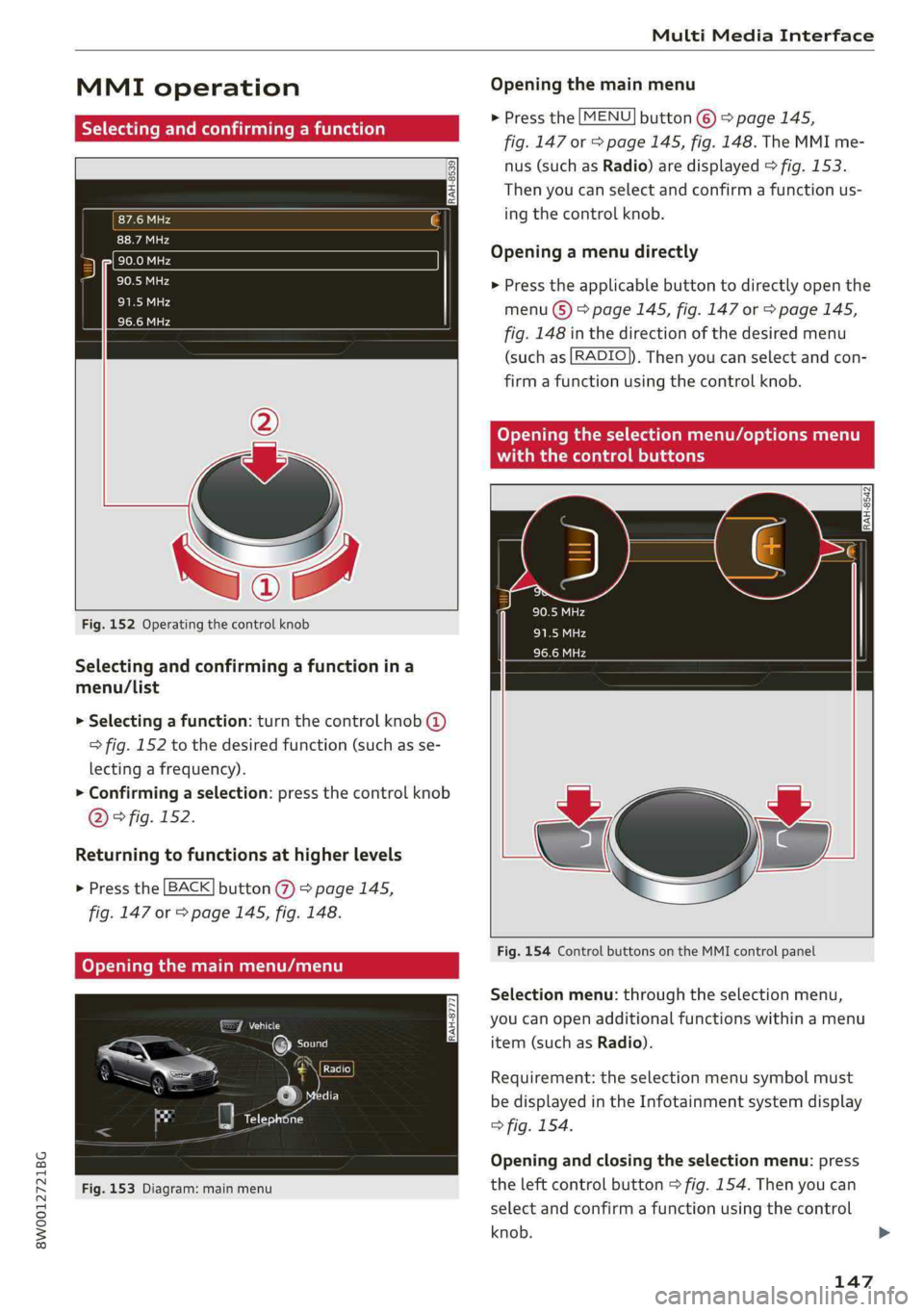
Fig.152Operatingthecontrolknob
Selectingandconfirmingafunctionina
menu/List
>Selectingafunction:turnthecontrolknob@
>fig.152tothedesiredfunction(suchasse-
lectingafrequency).
>Confirmingaselection:pressthecontrolknob
D)>fig.152.
Returningtofunctionsathigherlevels
>Pressthe[BACK]button@%)>page145,
fig.147or>page145,fig. 148.
Fig.153Diagram:mainmenu
Openingthemainmenu
>Pressthe[MENU]button©)>page145,
fig.147or>page145,fig.148.TheMMIme-
nus(suchasRadio)aredisplayed>fig.153.
Thenyoucanselectandconfirmafunctionus-
ing
thecontrolknob.
Openingamenudirectly
>Presstheapplicablebuttontodirectlyopenthe
menu(S)>page145,fig.147or>page145,
fig.148inthedirectionofthedesiredmenu
(suchas[RADIO]).Thenyoucanselectandcon-
firmafunctionusingthecontrolknob.
RAH-8542
Fig.154ControlbuttonsontheMMIcontrolpanel
Selectionmenu:throughtheselectionmenu,
youcanopenadditionalfunctionswithinamenu
item(suchasRadio).
Requirement:theselectionmenusymbolmust
bedisplayedintheInfotainmentsystemdisplay
>fig.154.
Openingandclosingtheselectionmenu:press
theleftcontrolbutton>fig.154.Thenyoucan
selectandconfirmafunctionusingthecontrol
knob.
147
Page 150 of 392
![AUDI A4 2019 Repair Manual MultiMediaInterface
Optionsmenu:usingtheoptionsmenu,youcan
selectandconfirmcontext-dependentfunctions
aswellas settingswithinamenuitem(suchas
Radio).
Requirement:theoptionsmenusymbol[+]must
bed](/img/6/57555/w960_57555-149.png "AUDI A4 2019 Repair Manual MultiMediaInterface
Optionsmenu:usingtheoptionsmenu,youcan
selectandconfirmcontext-dependentfunctions
aswellas settingswithinamenuitem(suchas
Radio).
Requirement:theoptionsmenusymbol[+]must
bed")
MultiMediaInterface
Optionsmenu:usingtheoptionsmenu,youcan
selectandconfirmcontext-dependentfunctions
aswellas settingswithinamenuitem(suchas
Radio).
Requirement:theoptionsmenusymbol[+]must
bedisplayedintheInfotainmentsystemdisplay
>fig.154.
Openingandclosingtheoptionsmenu:press
therightcontrolbutton>fig.154.Thenyoucan
selectandconfirmafunctionusingthecontrol
knob.
leurelieelmer
Thisguideshowsyouat aglancethepathsfor
openingadesiredmenuanditssettingsand
functions.
Exampleofapath
>Select:[RADIO]button>leftcontrolbutton>
FM.
Followingthepath
>Pressthe[RADIO]button.
>Presstheleftcontrolbutton.
>Turn thecontrolknobtotheFMmenuitemto
selectit.
>Pressthecontrolknobtoconfirm theselected
FMmenuitem.
>Theselectedandconfirmedfunctionisexecut-
ed.In thisexample,theFMfrequencybandis
set.
148
MMItouch
MMItouchcontrolpad
Appliesto:vehicleswithMMItouch
You canenterdatausinghandwritingrecogni-
tionontheMMItouchcontrolpad.
RAH-8776
Angeles,CA
wntown,LosAngeles,CA
“onKRx
Fig.155Example:enteringanavigationdestinationusing
theMMItouch
TheMMItouchcontrolpadisonthesurfacewith
thecontrolknob>fig.155.
Enteringnumbers,letters,andsymbols
Appliesto:vehicleswithMMItouch
TheMMItouchallowsyoutoenterdataonthe
MMItouchcontrolpadusinghandwritingrecog-
nition.
Fig.156DisplaywhenMMItouchisactive
Page 151 of 392
8W0012721BG
MultiMediaInterface
Requirement:itmustbepossibletoentertext or
numbersandthesymbol@)9fig.156mustap-
pearintheInfotainmentsystemdisplay.
—Initialentry:writeanindividualuppercaseor
lowercaseletterornumber/symbolonthe
MMItouchcontrolpadusingyourfinger.A
symbolthatisrecognizedclearlyby thesystem
isdisplayedintheInfotainmentsystemdisplay
@©page148,fig. 155,confirmedwithanau-
diblesignalifnecessary,andtransferredtothe
inputfield.
—Enteringspaces:moveyourfingeracrossthe
MMItouchcontrolpadfromlefttoright.
—Deletingcharacters:moveyourfingeracross
theMMItouchcontrolpadfromrighttoleft.
—Selectingtheinputsuggestion:pressthecon-
trolknob.
—Switchingdirectlytotheresultslist:turnthe
controlknobtotheright.
—Openingthespeller:selecttherightcontrol
button>Openspeller.Textornumbersare en-
teredusingthespeller>page152.
—MMItouchvolume:presstherightcontrolbut-
ton.
See>page245.
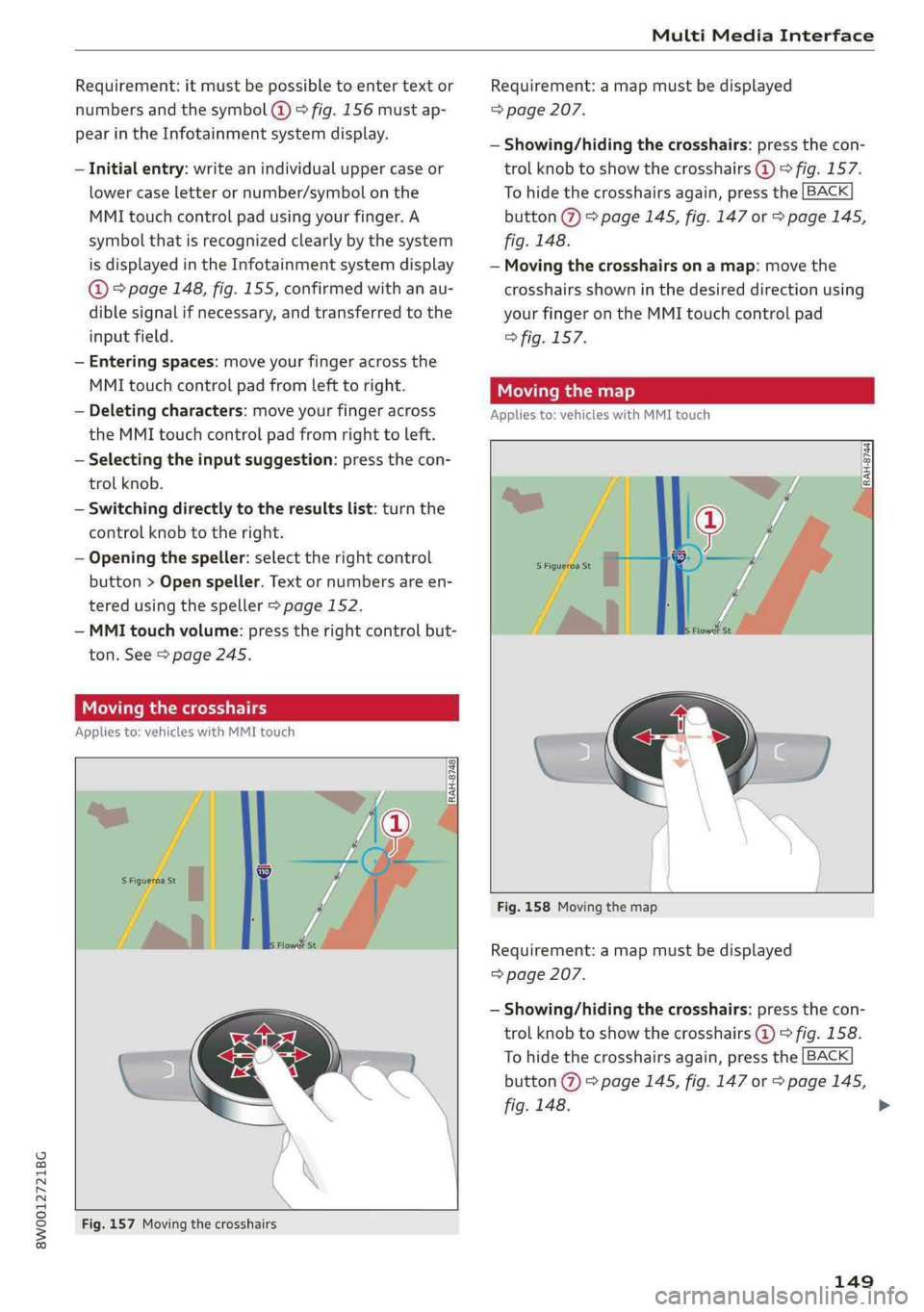
Uemater
Appliesto:vehicleswithMMItouch
Fig.157Movingthecrosshairs
Requirement:amapmustbedisplayed
=>page207.
—Showing/hidingthecrosshairs:pressthecon-
trolknobtoshowthecrosshairs@)©fig.157.
Tohidethecrosshairsagain,pressthe[BACK
button@)>page145,fig.147or>page145,
fig.148.
—Movingthecrosshairsonamap:movethe
crosshairsshowninthedesireddirectionusing
yourfingerontheMMItouchcontrolpad
>fig.157.
Movingthemap
Appliesto:vehicleswithMMItouch
Fig.158Movingthemap
Requirement:amapmustbedisplayed
=>page207.
—Showing/hidingthecrosshairs:pressthecon-
trolknobtoshowthecrosshairs@)©fig.158.
Tohidethecrosshairsagain,pressthe[BACK
button@)>page145,fig.147or>page145,
fig.148.
149
>
Page 152 of 392
MultiMediaInterface
—Movingthestandardmap/satellitemap):
movethecrosshairsshowninthedesireddirec-
tionusingtwofingersontheMMItouchcon-
trolpad>fig.158.
—Movingthemapquickly:whenthecrosshairs
arevisible,pulltwofingersacrosstheMMI
touchcontrolpadquicklyinthedesireddirec-
tion.Themapwillcometoastopafterseveral
seconds.
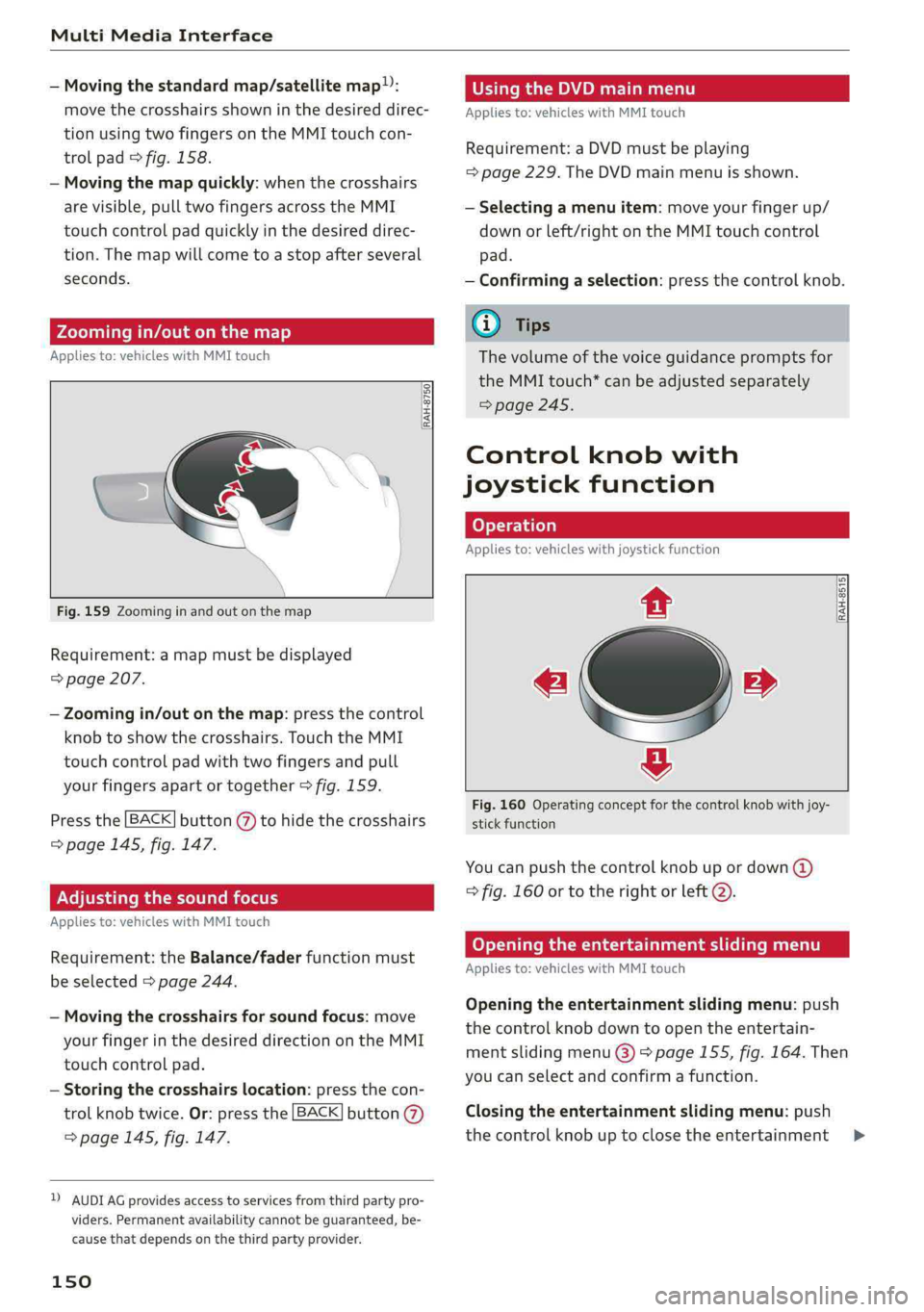
Zoomingin/outonthemap
Appliesto:vehicleswithMMItouch
RAH-8750|
Fig.159Zoominginandoutonthemap
Requirement:amapmustbedisplayed
=>page207.
—Zoomingin/outonthemap:pressthecontrol
knobtoshowthecrosshairs.TouchtheMMI
touchcontrolpadwithtwofingersandpull
yourfingersapartortogether>fig.159.
Pressthe[BACK]button()tohidethecrosshairs
=>page145,fig.147.
Adjustingthesoundfocus
Appliesto:vehicleswithMMItouch
Requirement:theBalance/faderfunctionmust
beselected>page244.
—Movingthecrosshairsforsoundfocus:move
yourfingerinthedesireddirectionontheMMI
touchcontrolpad.
—Storingthecrosshairslocation:pressthecon-
trolknobtwice.Or:pressthe[BACK]button@
=>page145,fig. 147.
2)AUDIAGprovidesaccesstoservicesfromthirdpartypro-
viders.Permanentavailabilitycannotbeguaranteed,be-
causethatdependsonthethirdpartyprovider.
150
UsingtheDVDmainmenu
Appliesto:vehicleswithMMItouch
Requirement:aDVDmustbeplaying
=>page229.TheDVDmainmenuisshown.
—Selectingamenuitem:moveyourfingerup/
downorleft/rightontheMMItouchcontrol
pad.
—Confirmingaselection:pressthecontrolknob.
Gi)Tips
Thevolumeofthevoiceguidancepromptsfor
theMMItouch*canbeadjustedseparately
=>page245.
Controlknobwith
joystickfunction
Operation
Appliesto:vehicleswithjoystickfunction
2
RAH-8515,
e»
&
Fig.160Operatingconceptforthecontrolknobwithjoy-
stickfunction
Youcanpushthecontrolknobupordown(@)
=fig.160ortotherightorleft@).
Openingtheentertainmentslidingmenu
Appliesto:vehicleswithMMItouch
Openingtheentertainmentslidingmenu:push
thecontrolknobdowntoopentheentertain-
mentslidingmenu@)>page155,fig.164.Then
youcanselectandconfirmafunction.
Closingtheentertainmentslidingmenu:push
thecontrolknobuptoclosetheentertainment>
Page 153 of 392
![AUDI A4 2019 Repair Manual 8W0012721BG
MultiMediaInterface
slidingmenu.Or:Pressthe[BACK]button(7)
=>page145,fig.147or>page145,fig. 148.
Additionalfunctions
Appliesto:vehicleswithjoystickfunction
Displayingtheinputfield/](/img/6/57555/w960_57555-152.png "AUDI A4 2019 Repair Manual 8W0012721BG
MultiMediaInterface
slidingmenu.Or:Pressthe[BACK]button(7)
=>page145,fig.147or>page145,fig. 148.
Additionalfunctions
Appliesto:vehicleswithjoystickfunction
Displayingtheinputfield/")
8W0012721BG
MultiMediaInterface
slidingmenu.Or:Pressthe[BACK]button(7)
=>page145,fig.147or>page145,fig. 148.
Additionalfunctions
Appliesto:vehicleswithjoystickfunction
Displayingtheinputfield/switchingto
spellerinput
Pushthecontrolknobup>page150,fig.160to
reachthe beginningofalistinthecentralarea or
theinputfield.Iftheinputfieldisalreadyopen,
switchdirectlytothespellerintheinputfieldby
pushingthecontrolknobupagain>page152,
Letter/numberspeller.
Onthemap
Requirement:amapmustbedisplayed
=>page207.
—Displayingtheinputfield:pushthecontrol
knobup.
—Displaying routeguidance:whenrouteguid-
anceisactive,youcanalsodisplaytheroute
guidancebypushingthecontrolknobup
=>page202,fig.185.
—Zoomingin/outonthemap(zoom):turnthe
controlknobtotheright/lefttozoomin/outon
themap.
Appliesto:vehicleswithoutMMItouchwithjoystickfunction
—Showing/hidingthecrosshairs:pressthecon-
trolknob.Thecrosshairsareshownonthemap.
Pressthe[BACK]buttonto hidethecrosshairs.
—Movingthecrosshairs:whenthecrosshairsare
visible,turnthecontrolknobinthedirection
thecrosshairsshouldmove.Pressthecontrol
knob andholdituntilthecrosshairsareinthe
desiredpointonthemap.
—Additionaloptionsonthemap:see
=>page209
Adjustingthesoundfocus
Appliesto:vehicleswithoutMMItouchwithjoystickfunction
Requirement:thebalance/faderfunctionmust
beselected>page244.
—Movingthesoundfocususingthecrosshairs:
thecrosshairscanbemovedhorizontally.Turn
the
controlknobtotheleftortotheright.
Pressthecontrolknobtomovethecrosshairs
vertically.Turnthecontrolknobtotheleftor to
theright.Pressthecontrolknobagaintosave
thesetting.
UsingtheDVDmainmenu
Requirement:aDVDmustbeplaying
=>page229.TheDVDmainmenuisshown.
—Selectingamenuitem:movethecontrolknob
withjoystickfunctionupordownortotheleft
orright.
—Confirmingaselection:pressthecontrolknob.
CoyoXTalemanswers(redColayQelLiClMalemaida)
thecontrolknob
Appliesto:vehicleswithjoystickfunction
¢»
Fig.161Openingtheselection/optionsmenuwith the
controlknob
Requirement:theselectionmenusymbol3must
bedisplayedintheInfotainmentsystemdisplay
=>fig.161.
Openingandclosingtheselectionmenu:push
thecontrolknobtotheleft>fig.161toopen
theselectionmenu.Thenyoucanselectandcon-
firm
afunctionusingthecontrolknob.
Pressthe[BACK]button@>page145,fig.147
or>page145,fig.148toreturn tothefunction
onelevelup.
151
>