display AUDI A4 2019 Manual PDF
[x] Cancel search | Manufacturer: AUDI, Model Year: 2019, Model line: A4, Model: AUDI A4 2019Pages: 392, PDF Size: 99.53 MB
Page 154 of 392
![AUDI A4 2019 Manual PDF MultiMediaInterface
Requirement:theoptionsmenusymbol[+]must
bedisplayedintheInfotainmentsystemdisplay
>fig.161.
Openingandclosingtheoptionsmenu:push
thecontrolknobtotheright>fig.161toopen
theo](/img/6/57555/w960_57555-153.png "AUDI A4 2019 Manual PDF MultiMediaInterface
Requirement:theoptionsmenusymbol[+]must
bedisplayedintheInfotainmentsystemdisplay
>fig.161.
Openingandclosingtheoptionsmenu:push
thecontrolknobtotheright>fig.161toopen
theo")
MultiMediaInterface
Requirement:theoptionsmenusymbol[+]must
bedisplayedintheInfotainmentsystemdisplay
>fig.161.
Openingandclosingtheoptionsmenu:push
thecontrolknobtotheright>fig.161toopen
theoptionsmenu.Thenyoucanselectandcon-
firm
afunctionusingthecontrolknob.
Pressthe button@)9page145,fig.147
or>page145,fig.148to return tothefunction
onelevelup.
BACK
Shortcutkeys
Frequentlyusedradiostationscanbestoredon
theshortcutkeys.
Appliesto:vehicleswithautomatictransmission
TheshortcutkeysarelocatedontheMMIcontrol
panel@)9page145,fig. 147.
Appliesto:vehicleswithmanualtransmission
Theshortcutkeysarelocatedonthecenter con-
sole(8)>page145,fig.148.
Letter/numberspeller
Storingradiostations:turnthecontrolknobto
thedesiredradiostationinalist(forexample,a
radiostationintheFMstationlist).Pressand
holdthedesiredshortcutkeyforseveralseconds.
Theactiveradiostationwillbestoredonthe
shortcutkey.
Accessingaradiostation:presstheshortcutkey.
Displayingaradiostation:swipeyourfingerover
theshortcutkeys.
Deletingastoredradiostation:resetthe Short-
cut
keystothefactorydefaultsetting
=>page241.
(i)Tips
Itisnotpossibletoenternumbersusingthe
shortcutkeys.Usethenumberspeller
=page 152orMMItouch*>page148to en-
ternumbers.
(SEES,en
.ornrycm
RAH-8666
——e
=°
Crear4
PCaEL
ttle1e
as)
Fig.162Diagram:letter/numberspeller
Youcanenterletters,numbersandsymbolsin
theMMIusingtheletter/numberspeller.Thisop-
tionisavailablewhentheinputfield@isactive
>fig.162.
—Openingandclosingtheletter/numberspell-
er:movethecontrolknobup/downwhenthe
152
inputfieldisactive.Or:selecttherightcontrol
button>Openspeller/Closespeller.
—Enteringcharacters:turnthecontrolknobwith
thecharacterselection@0>fig.162tothede-
siredsymbol.Pressthecontrolknobtoconfirm
thecharacter.Yourinputisdisplayedinthein-
putfield@).Whenyouhaveenteredallofthe>
Page 155 of 392
![AUDI A4 2019 Manual PDF 8W0012721BG
MultiMediaInterface
characters,selectandconfirm the[LIST]button
@°fig.162.Or:pushthecontrolknobdown.
—Enteringaccentedcharacters (suchas4,¢,fi,
6)*:turnthecontrolknobwiththechar](/img/6/57555/w960_57555-154.png "AUDI A4 2019 Manual PDF 8W0012721BG
MultiMediaInterface
characters,selectandconfirm the[LIST]button
@°fig.162.Or:pushthecontrolknobdown.
—Enteringaccentedcharacters (suchas4,¢,fi,
6)*:turnthecontrolknobwiththechar")
8W0012721BG
MultiMediaInterface
characters,selectandconfirm the[LIST]button
@°fig.162.Or:pushthecontrolknobdown.
—Enteringaccentedcharacters (suchas4,¢,fi,
6)*:turnthecontrolknobwiththecharacter
selection@9>fig.162toacharacter.Toopen
theselectedaccentedcharacters,pressand
holdthecontrolknob.Turnthecontrolknob
withthecharacterselection@0>fig.162toan
accentedcharacter.Pressthecontrolknobto
inserttheaccentedcharacter.Toclosetheac-
centedcharacterswithoutselectingacharacter,
pressandholdthecontrolknobagain.Or:se-
lectandconfirm[a6t]Z)9fig.162.Selectand
confirmanaccentedcharacter.
—Deletingcharacters:selectandconfirm]@
=>fig.162.Todeleteallcharactersintheinput
field,pressandholdthecontrolknobon&]un-
tilallcharactersintheinputfieldare deleted.
—Enteringspecial characters:selectandcon-
firm!&2]©©fig.162or[123]@).Selectand
confirm thedesiredspecialcharacter(forex-
ample,ahyphenorperiod)withthenumber
speller.
—Inputassistance:insomecasessuchasinnavi-
gation*,thereisawordsuggestion*@)
=>fig.162basedonavailableentrieswhileyou
areenteringdata.Youcanselectthissugges-
tionbypushingthecontrolknobupward.
—Resultslist:insomecases,suchasinthedirec-
tory,thesystemswitchesautomaticallytothe
resultslistbasedonavailableentries@)
>fig.162.Selectandconfirmasuggestion
fromthelist.
Requirement:theinputfield@)>fig.162must
beactive.
—SwitchingbetweenspellerandMMItouch*:
thehandwritingrecognitionfortheMMItouch
controlpad*isactivatedautomatically.Simply
startwriting.
Overviewofsymbolsinthespeller
Thesymbolsintheletter/numberspellerareex-
plainedinthefollowingtable:
Symbol/DescriptionDescription
LIST]orlSwitchestotheresultslist.
InputfieldDisplaysthecurrentinput.
Resultslist
tered.
Displaysalistwithsuggestionsbasedonthelettersalreadyen-
t
Switchesfromlowercasetouppercaselettersorfromuppercaseto
lowercaseletters.
G
Opensadditionalspelleroptions,forexampleClosespellerand
Clearinputfield.
©
|E|O|
©
|
©
|
©
|O/|O
1&2Charactersetsandspecialcharacters
aouDisplaysaccentedcharacters(suchas4,¢,fi,6).
TSS/ABESwitchesfromlettertonumberinputorfromnumbertoletterin-
put.
Addsaspaceintheinputfield.
—
CharacterselectionHighlightstheselectedcharacter.
A
Insertsthesuggestedword*whenyoupushthecontrolknobup.
®
|
©
|O|
©
ea)
Deletesthecharactertotheleftofthecursor.
153
Page 156 of 392
MultiMediaInterface
@Tips
Accentedcharactersarenotavailable forev-
eryletter.
Freetextsearch
Appliesto:vehicleswithfree textsearch
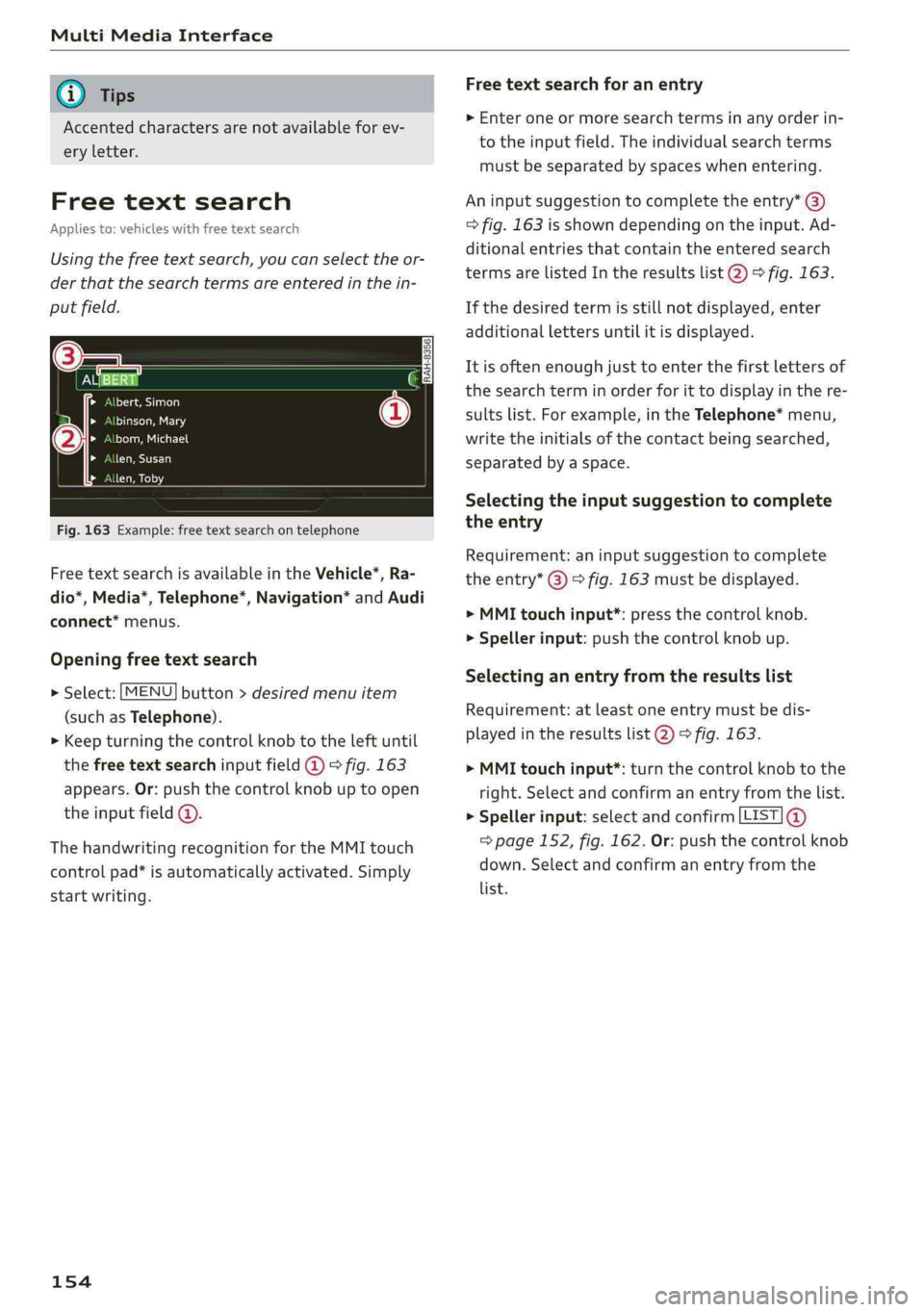
Usingthefreetextsearch,youcanselecttheor-
derthatthesearchtermsareenteredinthein-
putfield.
Na55a
Leallleeelao)
teleeg
tleog
len,Susan
(2
Fig.163Example:free textsearchontelephone
FreetextsearchisavailableintheVehicle*,Ra-
dio*,Media*,Telephone*,Navigation*andAudi
connect*menus.
Openingfreetextsearch
>»Select:[MENU]button>desiredmenuitem
(such asTelephone).
>Keepturningthecontrolknobtotheleftuntil
thefreetextsearchinputfield@©fig.163
appears.Or:pushthecontrolknobuptoopen
theinputfield@.
ThehandwritingrecognitionfortheMMItouch
controlpad*isautomaticallyactivated.Simply
startwriting.
154
Freetextsearchforanentry
>Enteroneormoresearchtermsinanyorderin-
totheinputfield.Theindividualsearchterms
mustbe separated by spaceswhenentering.
Aninputsuggestiontocompletetheentry*@)
>fig.163isshowndependingontheinput.Ad-
ditionalentriesthatcontaintheenteredsearch
termsarelistedIntheresultslist@)>fig.163.
Ifthedesiredtermisstillnotdisplayed,enter
additionallettersuntilitisdisplayed.
Itisoftenenoughjusttoenterthefirstlettersof
thesearchterminorderforittodisplayinthere-
sultslist.Forexample,intheTelephone*menu,
writetheinitialsofthecontactbeingsearched,
separatedbyaspace.
Selectingtheinputsuggestiontocomplete
theentry
Requirement:aninputsuggestiontocomplete
theentry*@)>fig.163 mustbedisplayed.
>MMItouchinput*:pressthecontrolknob.
>Spellerinput:pushthecontrolknobup.
Selectinganentryfromtheresultslist
Requirement:atleastoneentrymustbedis-
playedintheresultslist@)>fig.163.
>MMItouchinput*:turnthecontrolknobtothe
right.Selectandconfirm anentryfromthelist.
>Spellerinput:selectandconfirm[LIST]@
=>page152,fig.162.Or:pushthecontrolknob
down.Selectandconfirm anentryfromthe
list.
Page 157 of 392
![AUDI A4 2019 Manual PDF 8W0012721BG
MultiMediaInterface
MenusandSymbols
Q+iz]
Teareeetoda)
eeetelaseR
aac
om
Tbaseeutey
3
Colas
Fig.164Diagram:menusandsymbols
Symbol/DescriptionDescription
@SelectedtextSelecte](/img/6/57555/w960_57555-156.png "AUDI A4 2019 Manual PDF 8W0012721BG
MultiMediaInterface
MenusandSymbols
Q+iz]
Teareeetoda)
eeetelaseR
aac
om
Tbaseeutey
3
Colas
Fig.164Diagram:menusandsymbols
Symbol/DescriptionDescription
@SelectedtextSelecte")
8W0012721BG
MultiMediaInterface
MenusandSymbols
Q+iz]
Teareeetoda)
eeetelaseR
aac
om
Tbaseeutey
3
Colas
Fig.164Diagram:menusandsymbols
Symbol/DescriptionDescription
@SelectedtextSelectedfunction
@TMCTMC/onlinetrafficinformationreception>page212
©
Entertainmentsliding
menu
Displaysinformationaboutthemediasourcethatiscurrentlyse-
lectedorasituation(suchasanincomingcall).Dependingonvehi-
cleequipment,operationmightalsobepossibleusingtheopenen-
tertainmentslidingmenu(suchasselectingaradiostationorac-
ceptingacall)>page150.
Jukebox*importingproc-
Copyaudio/videofilestotheJukebox>page222
textisactive
Telephonesignal
strengthbars
®ess
®RepeattrackThetrackcurrentlyplayingisrepeated.>page233
Allfilesontheplaylistareplayedinrandomorder>page233,
huffl
©=Shuffle
®ArrowAccessinformationbypressingthecontrolknobwhentheselected
Telephonesignalstrength
©
Exclamationpointonthe
telephone
Indicatesmissedcalls
©
Data connectionsignal
strengthbars*
Signalstrengthfortheactivedataconnection,or
PIN:enterthePIN(SIM)
PUK:enterthePUK
Networkcoveragefortheactivedataconnection>page 192
2G:GSMnetwork
®2G/3G/LTE*3G:UMTSnetwork
LTE*:LTEnetwork
®MuteTheaudiosourceismuted>page245
@RearingOutsidethemobilenetworkfortheconnectedcellphoneorthein-
sertedSIMcard
155
Page 159 of 392
8W0012721BG
Multifunctionsteeringwheel
Multifunctionsteering
wheel
Introduction
Appliesto:vehicleswith multifunctionsteeringwheel
Inthedriverinformationsystemdisplay,youcan
controlnumerousInfotainmentfunctionsusing
themultifunctionsteeringwheelplus*>page 15
orthemultifunctionsteeringwheel*>page18.
Youcancontrol additionalInfotainmentfunc-
tionsusingtheMMIcontrolpanel>page145in
theInfotainmentsystemdisplay.
ZAWARNING
Directyourfullattentiontodriving.Asthe
driver,youhavecompleteresponsibilityfor
safetyintraffic.Only use thefunctionsinsuch
awaythatyoualwaysmaintaincompletecon-
troloveryourvehicleinalltrafficsituations.
Radio
Appliesto:vehicleswith multifunctionsteeringwheelandra-
dio
Appliesto:vehicleswith multifunctionsteeringwheel
>Pressthe[MODE]buttononthemultifunction
steeringwheelrepeatedlyuntiltheRadio/
Mediatabisdisplayed.
Appliesto:vehicleswith multifunctionsteeringwheelplus
>Pressthe|< >|buttononthemultifunction
steeringwheelrepeatedlyuntiltheRadio/
Mediatabisdisplayed.
>Presstheleftcontrolbutton>page16.
Dependingonvehicleequipment,thefollowing
functions
maybeavailableinthedriverinforma-
tionsystem.
—Selectingthefrequencyband:selectandcon-
firmafrequencyband.
—Selectingastationfromthestationlist:select
andconfirmaradiostation.
—Selectingastationfromthepresetslist:select
andconfirmPresetsandthenaradiostation.
—Openingamediasource:selectandconfirmTo
media.
Additionalsettings
—Select:rightcontrolbutton>desiredentry.
See>page218.
G)Tips
PayattentiontotheInfotainmentsystemdis-
playifnecessary.Dependingontheselected
function,itmaybenecessarytousetheMMI
control panel.
Media
Appliesto:vehicleswithmultifunctionsteeringwheeland
media
Requirement:amediadrivemustcontainaudio/
videofiles>page221.
Appliesto:vehicleswithmultifunctionsteeringwheel
>Pressthe[MODE]buttononthemultifunction
steeringwheelrepeatedlyuntiltheRadio/
Mediatabisdisplayed.
Appliesto:vehicleswithmultifunctionsteeringwheelplus
>»Pressthe[<>]buttononthemultifunction
steeringwheelrepeatedlyuntiltheRadio/
Mediatabisdisplayed.
>Presstheleftcontrolbutton>page16.
Depending onvehicleequipment,thefollowing
functionsmaybeavailableinthedriverinforma-
tionsystem.
—Selectingamediasource:selectandconfirma
sourcesuchastheSDcard.
—Switchingtotheradio:selectandconfirm
Switchtoradio.
—Playinganaudio/videofile:selectandconfirm
afile.
—Pausing/resumingplayback:presstheright
thumbwheel@)>page17,fig.11.Toresume
playback,presstherightthumbwheelagain.
—Openingadditionaltrackinformation:select:
rightcontrolbutton>Show"NowPlaying"
screen.
Foradditionalinformation, see>page232.>
157
Page 160 of 392
Multifunctionsteeringwheel
@Tips
—Alwaysfollowtheinformationfoundin
=>page220.
—Pleasenotethatwithinamediasourcein
thedriverinformationsystem,onlyplaylists
thatwereselectedthroughtheMMIcontrol
panelcanbeplayed>page230.
—PayattentiontotheInfotainmentsystem
displayifnecessary.Dependingonthese-
lectedfunction,itmaybenecessarytouse
theMMIcontrolpanel.
Telephone
Appliesto:vehicleswith multifunctionsteeringwheeland
telephone
AlPe
Calllist
Pe
Weg
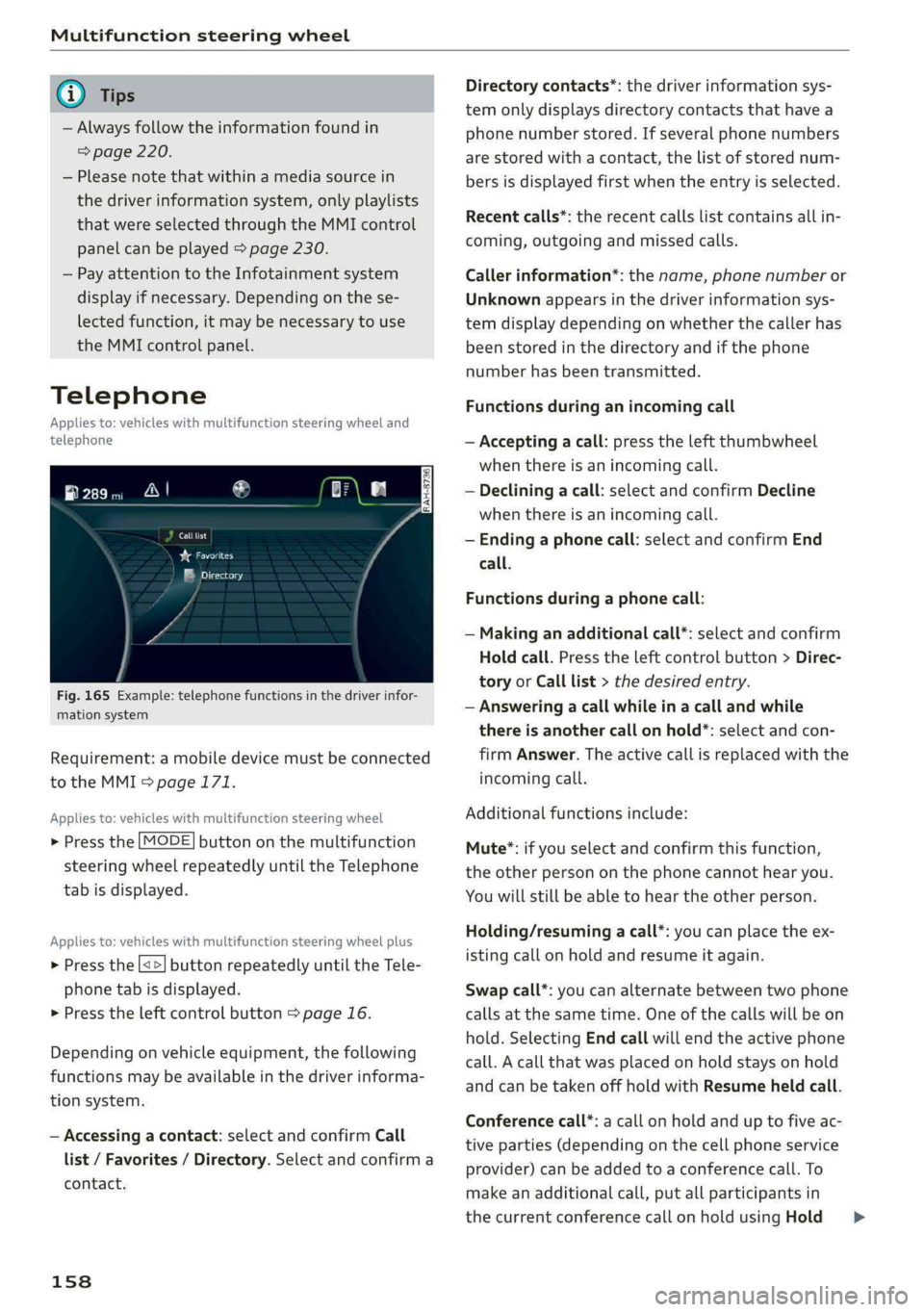
Fig.165Example:telephonefunctionsinthedriverinfor-
mationsystem
Requirement:amobiledevicemustbeconnected
totheMMI>page171.
Appliesto:vehicleswith multifunctionsteeringwheel
>Pressthe[MODE]buttononthemultifunction
steeringwheelrepeatedlyuntiltheTelephone
tabisdisplayed.
Appliesto:vehicleswith multifunctionsteeringwheelplus
> Pressthe[<>]buttonrepeatedlyuntiltheTele-
phonetabisdisplayed.
>Presstheleftcontrolbutton>page16.
Dependingonvehicleequipment,thefollowing
functionsmaybeavailableinthedriverinforma-
tionsystem.
—Accessingacontact:selectandconfirmCall
list/Favorites/Directory.Selectandconfirma
contact.
158
Directorycontacts*:thedriverinformationsys-
temonlydisplaysdirectorycontacts thathavea
phonenumberstored.Ifseveralphonenumbers
arestoredwithacontact,thelistofstorednum-
bersisdisplayedfirstwhentheentryisselected.
Recentcalls*:therecentcallslistcontainsallin-
coming,outgoingandmissedcalls.
Callerinformation*:thename,phonenumberor
Unknownappearsinthedriverinformationsys-
temdisplaydependingonwhetherthecallerhas
beenstoredinthedirectoryandifthephone
numberhasbeentransmitted.
Functionsduringanincomingcall
—Acceptingacall:presstheleftthumbwheel
whenthereisanincomingcall.
—Decliningacall:selectandconfirmDecline
whenthereisanincomingcall.
—Endinga phonecall:selectandconfirmEnd
call.
Functionsduringa phonecall:
—Makinganadditionalcall*:selectandconfirm
Holdcall.Presstheleftcontrolbutton>Direc-
toryorCalllist>thedesiredentry.
—Answeringacallwhileinacallandwhile
thereisanothercall onhold*:selectandcon-
firmAnswer.Theactivecallisreplacedwiththe
incomingcall.
Additionalfunctionsinclude:
Mute®*:ifyouselectandconfirmthisfunction,
theotherpersononthephonecannothearyou.
Youwillstillbeabletohear theotherperson.
Holding/resumingacall*:youcanplacetheex-
istingcallonholdandresumeitagain.
Swapcall*:youcanalternatebetweentwophone
callsatthesametime.Oneofthecallswillbeon
hold.SelectingEndcallwillendtheactivephone
call.Acallthatwasplacedonholdstaysonhold
andcanbetakenoffholdwithResumeheldcall.
Conferencecall*:acallonholdanduptofiveac-
tiveparties(dependingonthecellphoneservice
provider)canbeaddedtoaconferencecall.To
makeanadditionalcall,putallparticipantsin
thecurrentconferencecallonholdusingHold>
Page 161 of 392
8W0012721BG
Multifunctionsteeringwheel
conference™.Bypressingtheleftcontrolbutton,
youcanmakeadditionalcallsfromthedirectory
orthecalllist.Resumeconference*takesallpar-
ticipantsoffhold.
@Tips
— Thephonefunctionscanonlybecontrolled
withthemultifunctionsteeringwheelifthe
phoneequipmentwasinstalledatthefac-
tory.
— Thetelephonefunctionsdependonthecell
phoneandwhethertheyaresupportedby
yourcellphoneserviceproviderornot.
— TheCallwaiting*functionmustbeactivat-
edinyourcellphoneandintheMMIinor-
dertobealerted whenthereisanincoming
callduringanactivecall.Thecalloptions
dependonthecellphoneandservicepro-
vider.Youcanobtainmoreinformationfrom
yourcellphoneserviceprovider.
Navigation
Co)YeeeCLy1)
Appliesto:vehicleswithmultifunctionsteeringwheeland
navigationsystem
Requirement:adestinationmustbe entered
=page198andtherouteguidancemustbe
started.
>Pressthe[<>]buttononthemultifunction
steeringwheelrepeatedlyuntiltheNavigation
tabisdisplayed.
>Presstheleftcontrolbutton>page16.
Dependingonvehicleequipment,thefollowing
functions
maybeavailableinthedriverinforma-
tionsystem.
—Displayingnavigationduringactiveroute
guidance:selectandconfirmMap*/Street
view*orArrowview”.
— Showingthemapwhenrouteguidanceisnot
active*:selectandconfirmMap”.
—Accessinglastdestinations:selectandconfirm
Lastdestinations>thedesireddestination.
—Accessingfavorites*:selectandconfirmFavor-
ites>thedesireddestination.
—Startingrouteguidancetothestoredhome
address:selectandconfirmCancelrouteguid-
anceifnecessaryandthenHomeaddress.
Ifyouhavenotstartedanyrouteguidance,a
compass(analoginstrumentcluster)orthear-
rowview(monochromeinstrumentcluster)is
displayeddependingontheequipment.Themap
isdisplayedintheAudivirtualcockpit*.
Cancelingactiverouteguidance
—Select:rightcontrolbutton>Cancelroute
guidance
Additionalsettings
—Select:rightcontrolbutton>desiredentry.
Depending onthefunctionselected,thefollow-
ingadditional settingsmaybepossible:
—Mapdisplay>page209.
—Mapcolors>page209.
—Maporientation>page209.
—Automaticzoom>page210.
Navigationviewwithrouteguidance
tad)
Appliesto:vehicleswithnavigationsystem andAudivirtual
cockpit
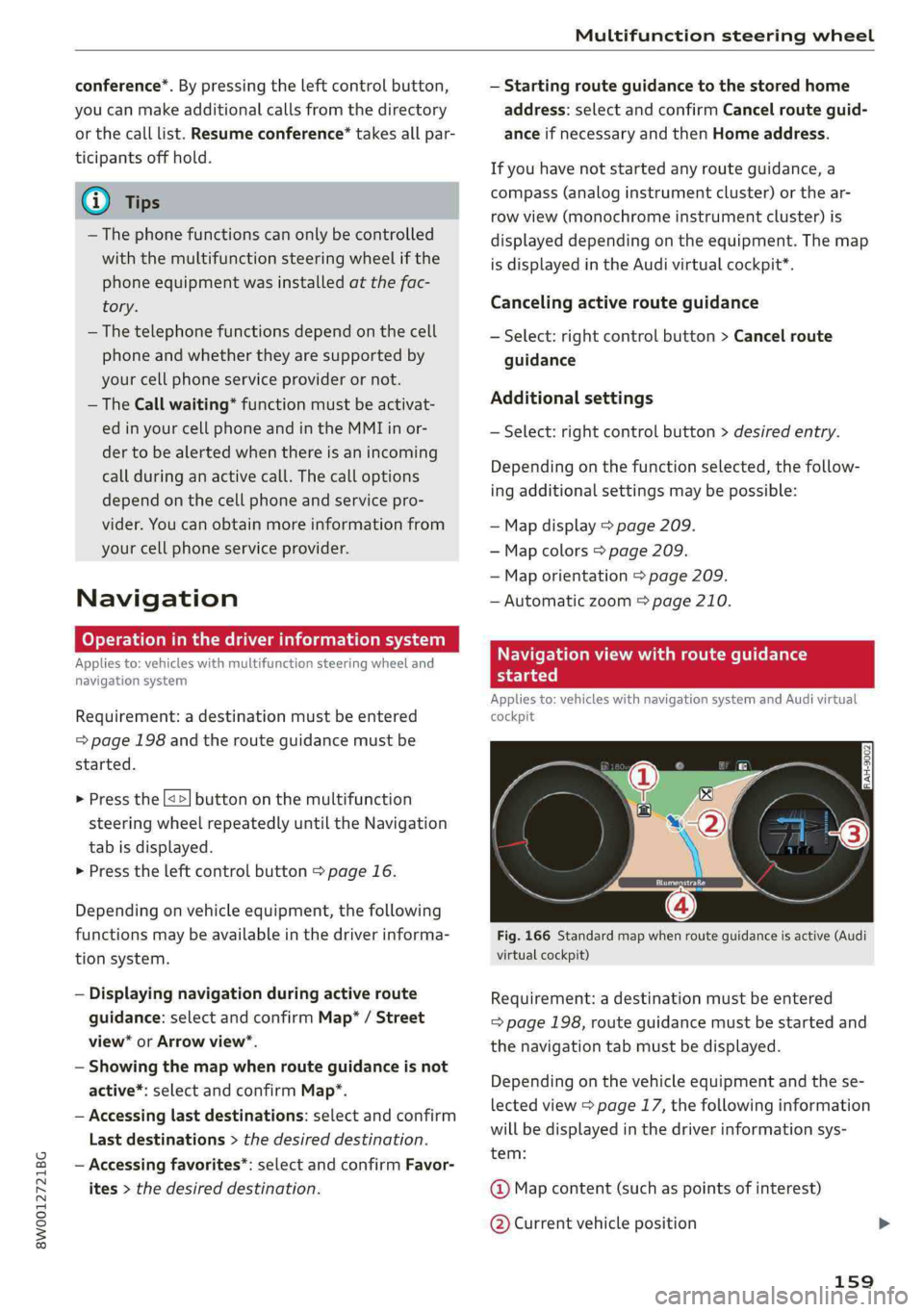
Fig.166Standardmapwhenrouteguidanceisactive(Audi
virtualcockpit)
Requirement:adestinationmustbeentered
=>page198,routeguidancemustbestartedand
thenavigationtabmustbedisplayed.
Depending onthevehicleequipmentandthese-
lectedview>page17,thefollowinginformation
willbedisplayedinthedriverinformationsys-
tem:
@Mapcontent(suchaspointsofinterest)
@Currentvehicleposition
159
Page 162 of 392
Multifunctionsteeringwheel
@Abargraphappearswhenthereisanupcom-
ingturn.Thefewerthebarsthatareshown,the
shorterthedistanceisuntiltheturn.Ifthereis
not anupcomingturn,thedistancetothedesti-
nation/stopoverandthecalculatedarrivaltimeis
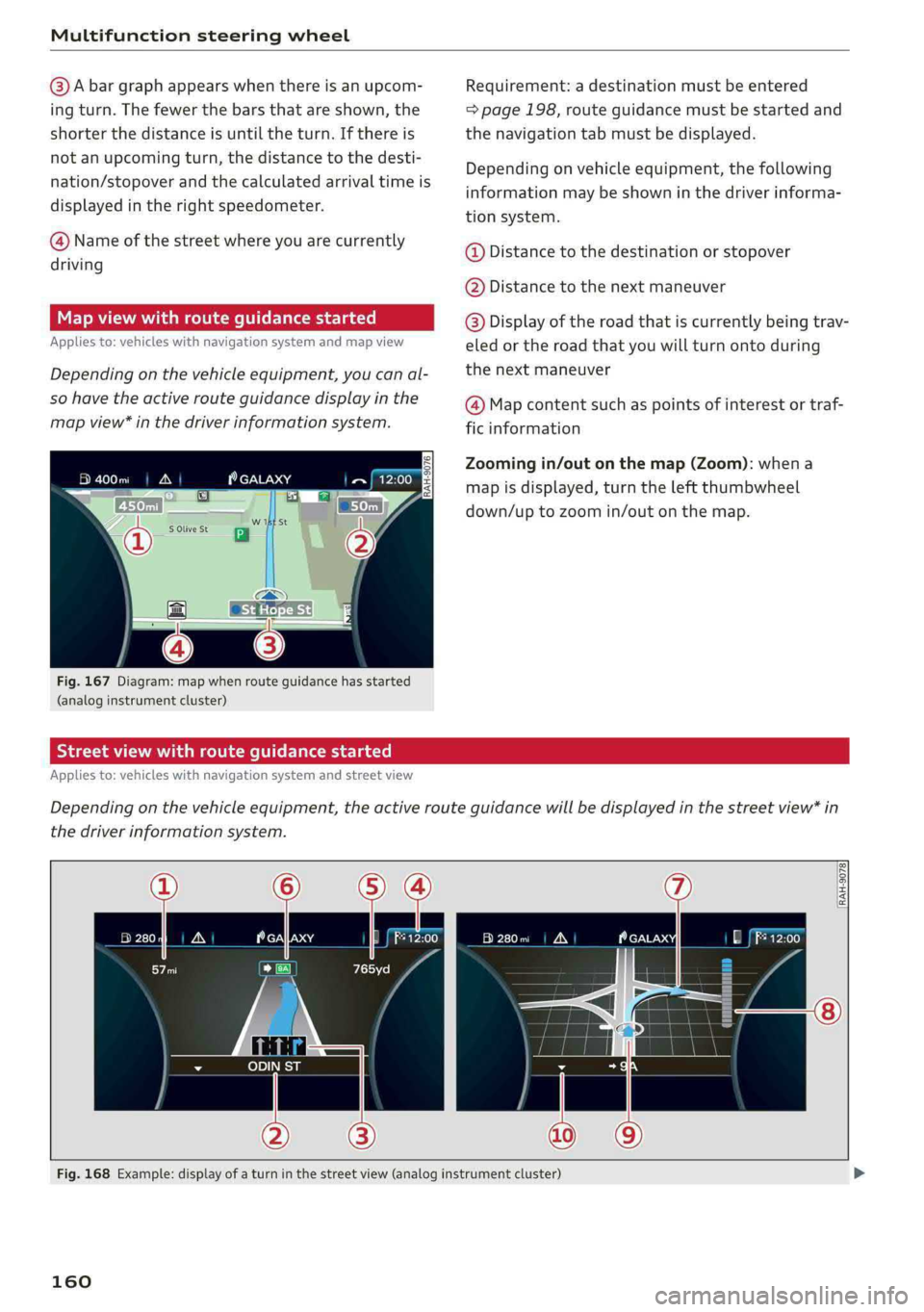
displayedintherightspeedometer.
@Nameofthestreetwhereyouarecurrently
driving
Mapviewwithrouteguidancestarted
Appliesto:vehicleswithnavigationsystemandmapview
Dependingonthevehicleequipment,youcanal-
sohavetheactiverouteguidancedisplayinthe
mapview*inthedriverinformationsystem.
eeele
Fig.167Diagram:mapwhenrouteguidancehasstarted
(analoginstrumentcluster)
Requirement:adestinationmustbeentered
=>page198,routeguidancemustbestartedand
thenavigationtabmustbedisplayed.
Dependingonvehicleequipment,thefollowing
informationmaybeshowninthedriverinforma-
tionsystem.
@Distancetothedestinationorstopover
@Distancetothenextmaneuver
@Display oftheroadthatiscurrentlybeingtrav-
eled ortheroad thatyouwillturnontoduring
thenextmaneuver
@Mapcontentsuchas pointsofinterestortraf-
ficinformation
Zoomingin/outonthemap(Zoom):whena
mapisdisplayed,turntheleftthumbwheel
down/uptozoomin/outonthemap.
Streetviewwithrouteguidancestarted
Appliesto:vehicleswithnavigationsystemandstreetview
Dependingonthevehicleequipment,theactiverouteguidancewillbedisplayedinthestreetview*in
thedriverinformationsystem.
uN
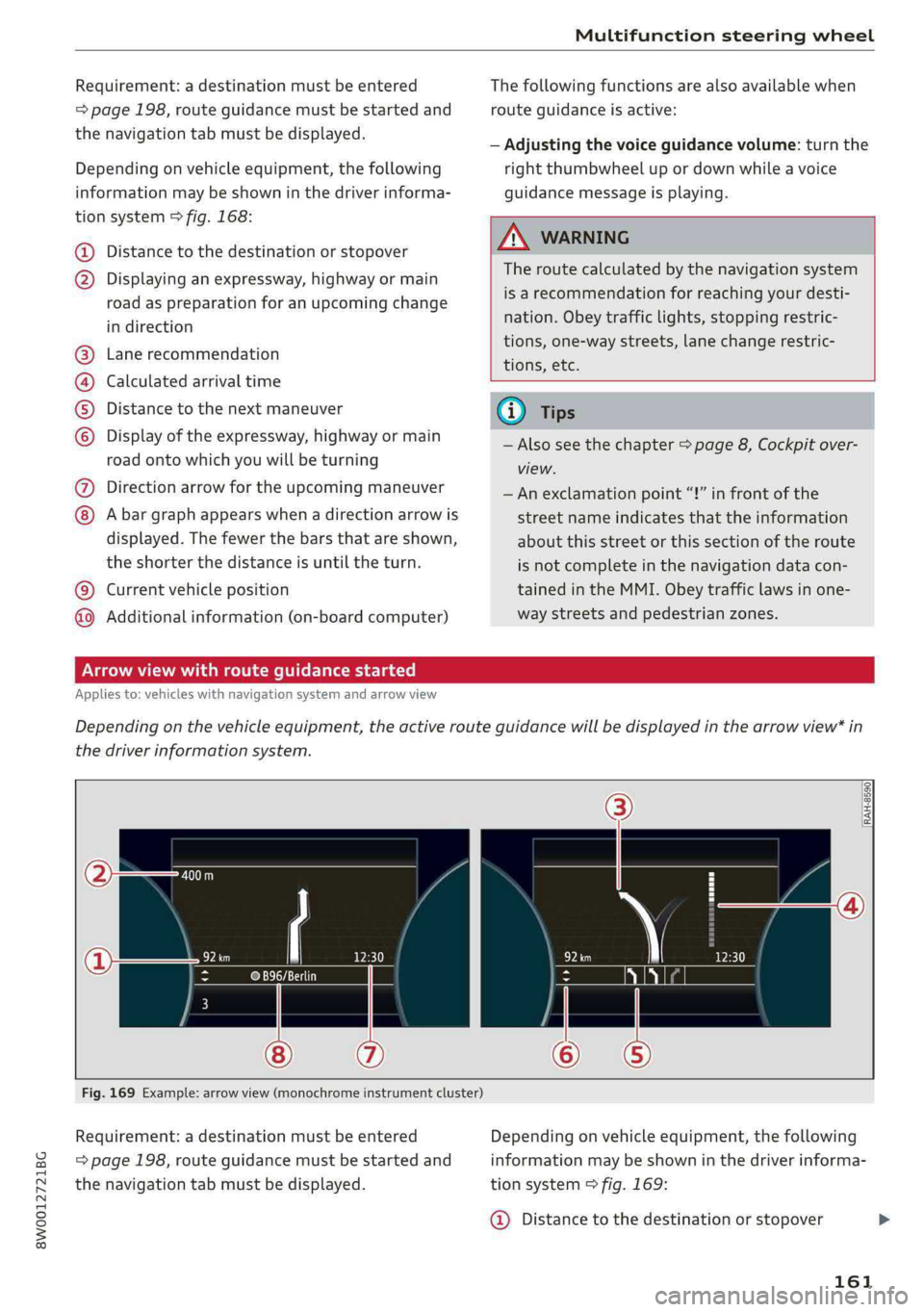
Fig.168Example:displayofaturninthestreetview(analoginstrumentcluster)
160
Page 163 of 392
8W0012721BG
Multifunctionsteeringwheel
Requirement:adestinationmustbeentered
=>page198,routeguidancemustbestartedand
thenavigationtabmustbedisplayed.
Dependingonvehicleequipment,thefollowing
informationmaybeshowninthedriverinforma-
tionsystem>fig.168:
Distancetothedestinationorstopover
©oDisplayinganexpressway,highwayormain
roadaspreparationforanupcomingchange
indirection
Lanerecommendation
Calculatedarrivaltime
Distancetothenextmaneuver
Display oftheexpressway,highwayormain
roadontowhichyouwillbeturning
Directionarrowfortheupcomingmaneuver
©
O80
Abargraphappearswhenadirectionarrowis
displayed.Thefewerthebars thatareshown,
theshorterthedistanceisuntiltheturn.
Currentvehicleposition©
Additionalinformation(on-boardcomputer)
Thefollowingfunctionsarealsoavailablewhen
routeguidanceisactive:
—Adjustingthevoiceguidancevolume:turnthe
rightthumbwheelupordownwhileavoice
guidancemessageisplaying.
ZA\WARNING
Theroutecalculatedby thenavigationsystem
isarecommendationforreachingyourdesti-
nation.Obeytrafficlights,stoppingrestric-
tions,one-waystreets,lanechangerestric-
tions,etc.
(i)Tips
—Alsoseethechapter>page8,Cockpitover-
view.
— Anexclamationpoint“!”infront ofthe
streetnameindicatesthattheinformation
aboutthisstreetorthissectionoftheroute
isnotcompleteinthenavigationdatacon-
tainedintheMMI.Obeytrafficlawsinone-
waystreetsandpedestrianzones.
TAUAmelhmeereeitanle)
Appliesto:vehicleswithnavigationsystemandarrowview
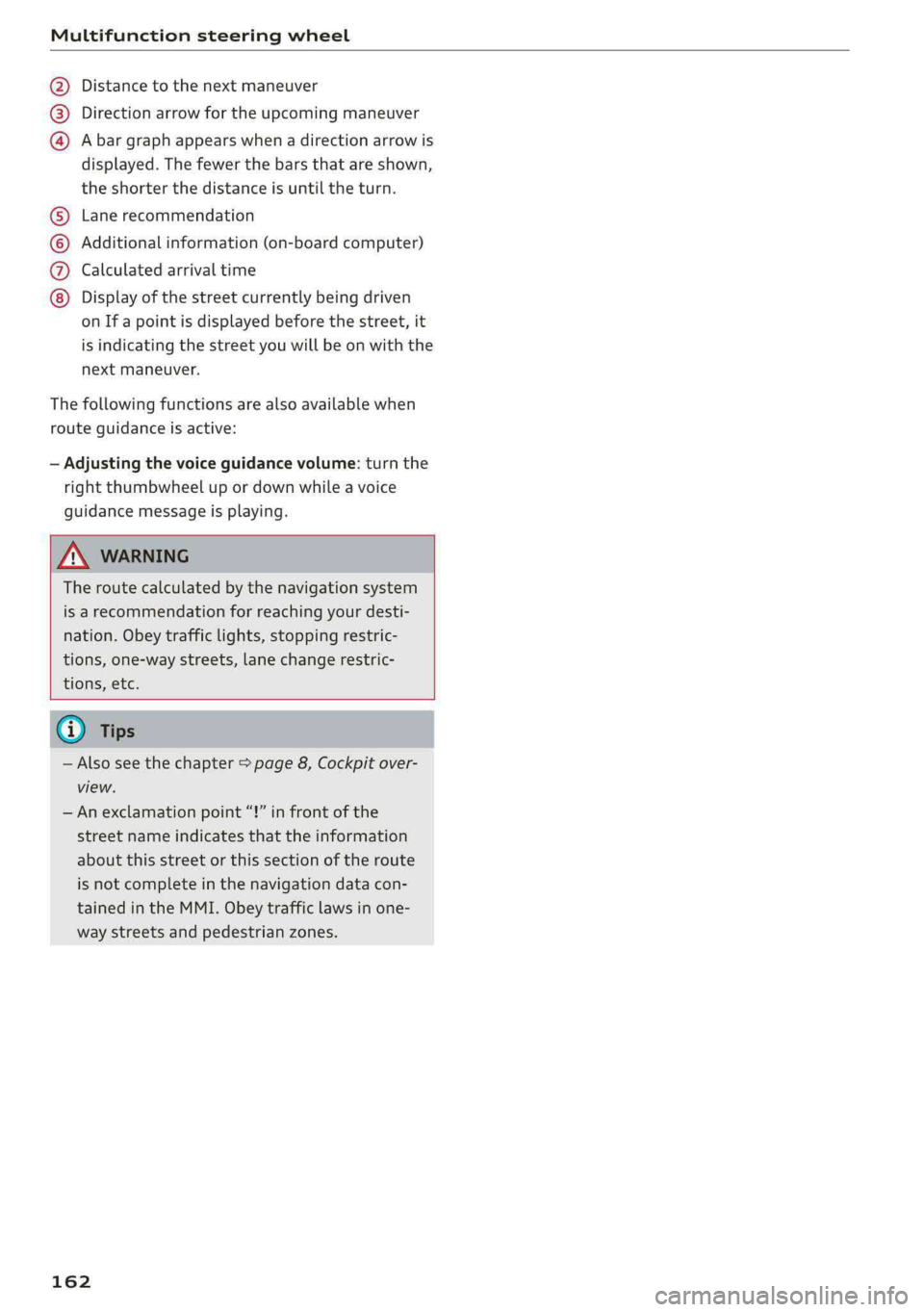
Dependingonthevehicleequipment,theactiverouteguidancewillbedisplayedinthearrowview*in
thedriverinformationsystem.
om:
Fig.169Example:arrowview(monochromeinstrumentcluster)
Requirement:adestinationmustbeentered
=page198,routeguidancemustbestartedand
thenavigationtabmustbedisplayed.
Dependingonvehicleequipment,thefollowing
informationmaybeshowninthedriverinforma-
tionsystem>fig.169:
@Distancetothedestinationorstopover
161
Page 164 of 392
Multifunctionsteeringwheel
Distancetothenextmaneuver
Directionarrowfortheupcomingmaneuver
Abargraphappearswhen adirectionarrowis
displayed.Thefewerthebars thatareshown,
theshorterthedistanceisuntiltheturn.
®O®
Lanerecommendation
Additionalinformation(on-boardcomputer)
Calculatedarrivaltime
©0G®@Displayofthestreetcurrentlybeingdriven
onIfapointisdisplayedbeforethestreet,it
isindicatingthestreetyouwillbe onwiththe
nextmaneuver.
Thefollowingfunctionsarealsoavailablewhen
routeguidanceisactive:
—Adjustingthevoiceguidancevolume:turnthe
rightthumbwheelupordownwhileavoice
guidancemessageisplaying.
ZXWARNING
Theroutecalculatedby thenavigationsystem
isarecommendationforreachingyourdesti-
nation.Obeytrafficlights,stoppingrestric-
tions,one-waystreets,lanechangerestric-
tions,etc.
@Tips
—Alsosee thechapter>page8,Cockpitover-
view.
—Anexclamationpoint“!”infront ofthe
streetnameindicatesthattheinformation
aboutthisstreetorthissectionoftheroute
isnotcompleteinthenavigationdatacon-
tainedintheMMI.Obeytrafficlawsinone-
waystreetsandpedestrianzones.
162