ignition AUDI A4 2020 Workshop Manual
[x] Cancel search | Manufacturer: AUDI, Model Year: 2020, Model line: A4, Model: AUDI A4 2020Pages: 296, PDF Size: 80.45 MB
Page 129 of 296
8W1012721BB
Driver assistance
and road conditions. If necessary, apply the
brakes and reduce the selected speed to be
maintained in the Adjustment to curves
along route setting to reduce the risk of an
accident.
G) Tips
— Predictive control can exceed or drop below
the maximum permitted speed. The driver
is responsible for adhering to the permitted
speed limit.
— The traffic signs on the road always take pri-
ority over the display. The driver is always
responsible for adhering to the regulations
applicable in the country where the vehicle
is being operated.
— Ifa speed limit is detected, the marking @
= page 128 of the set speed limit will be ad-
justed even if Audi adaptive cruise control is
not actively regulating.
— Control by the system depends on which
adaptive cruise control driving program is
set or on the selected Audi drive select*
mode.
— After switching on the ignition and first
driving onto a freeway or similar road with-
out a speed limit, the system will regulate
the speed to 80 mph (130 km/h)). Then
the system adjusts to the last speed set by
the driver.
— There is no adaptation to speed limits when
driving through highway interchanges and
when driving on or off the expressway.
— The system can fail to provide control or the
control may be faulty if the values from the
camera-based traffic sign recognition” are
incorrect or the navigation system map data
is outdated.
— When route guidance is switched on, the
system adapts to the route provided by the
navigation system. Driving without route
guidance or leaving a route can result in
faulty control.
D_ In certain countries
Audi adaptive cruise
control
General information
Applies to: vehicles with Audi adaptive cruise control
Depending on vehicle equipment, Audi adaptive
cruise control may consist of the following func-
tions:
Within the limits of the system, the adaptive
speed
and distance control assists the driver in
controlling the speed and the set distance to the
vehicle driving ahead. If the system detects a ve-
hicle driving ahead, the adaptive cruise control
can brake and accelerate your vehicle within the
limits of the system. On open roads with no traf-
fic, it functions like a cruise control system. The
stored speed is maintained. When approaching a
vehicle driving ahead, the adaptive cruise control
system automatically brakes to match that vehi-
cle's speed and then maintains the set distance
as much as possible. As soon as the system does
not detect a vehicle driving ahead, adaptive
cruise control accelerates up to the stored speed.
In stop-and-go traffic, the vehicle may brake to a
full stop and then may also start driving again
automatically under certain conditions.
Applies to: vehicles with traffic jam assist: In
traffic jams or in stop-and-go traffic, the traffic
jam assist can assist the driver to stay within the
lane detected by the system > page 134.
Applies to: vehicles with efficiency assist: Predic-
tive control can adjust the set speed based on
traffic and road conditions > page 126.
ZA WARNING
Follow the safety precautions and note the
limits of the assist systems, sensors, and
cameras > page 114.
G) Tips
For an explanation on conformity with the
FCC regulations in the United States and the
Industry Canada regulations, see > page 275.
127
Page 133 of 296

8W1012721BB
Driver assistance
— If you switch the ignition or the adaptive
cruise control system off, the set speed is
erased for safety reasons.
— When adaptive cruise control is switched
on, the ESC and ASR automatically switch
on.
— The system cannot be switched off or it may
be interrupted if the road exceeds the maxi-
mum possible grade for safe operation.
Setting the distance
Applies to: vehicles with Audi adaptive cruise control
B4M-0234
Fig. 117 Operating lever: setting the distance
If you adjust the speed, you must also change the
time gap to the vehicle driving ahead. The higher
the speed, the greater the distance that is need-
ed.
> Tap the rocker switch to display the distance
that is currently set.
> To increase or decrease the distance in incre-
ments, tap the switch again toward @) or G).
The newly-set distance will be shown briefly, for
example with the indicator light. In the Driv-
er assistance display, a graphic display is shown
instead of the indicator lights > page 128,
fig. 114. The display matches the functions of
the indicator lights.
When approaching a vehicle driving ahead, the
adaptive cruise control system brakes to match
that vehicle's speed and then adjusts to the set
distance. If the vehicle driving ahead accelerates,
then the adaptive cruise control will accelerate
up to the speed that you have set.
The following distances can be set:
Meaning
The time between is approximately 1
eee second. This setting corresponds toa
= distance of approximately 92 feet (28
m) when traveling at 62 mph (100
km/h).
The time between is approximately 1.3
seconds. This setting corresponds toa
distance of approximately 118 feet (36
m) when traveling at 62 mph (100
km/h).
The time between is approximately 1.8
seconds. This setting meets the general
recommendation of “half the speed
shown on the speedometer”. This cor-
responds to a distance of approximate-
ly 164 feet (SO m) when traveling at
62 mph (100 km/h).
The time between is approximately 2.4
seconds. This setting corresponds to a
distance of approximately 219 feet
(67 m) when traveling at 62 mph (100
km/h).
The time between is approximately 3.6
seconds. This setting corresponds toa
distance of approximately 328 feet
(100 m) when traveling at 62 mph (100
km/h).
i)
1D
Z\ WARNING
Follow the safety precautions and note the
limits of the assist systems, sensors, and
cameras > page 114.
G@) Tips
— When setting the distance, the driver is re-
sponsible for adhering to any applicable le-
gal regulations.
— Depending on the selected driving program
and distance, driving behavior when acceler-
ating may vary from moderate to sporty
=> page 133, Adjusting adaptive cruise con-
trol.
— The distances provided are specified values.
Depending on the driving situation and how
the vehicle ahead is driving, the actual >
131
Page 135 of 296
8W1012721BB
Driver assistance
the sensors or cameras, the A indicator light The request for driver intervention instructs you
will warn you of the danger. to take over if the adaptive cruise control braking
function is not able to maintain a sufficient dis-
tance to the vehicle driving ahead. The system
will warn you of the hazard with the A indicator
light and the message Distance!. An audio signal
will also sound.
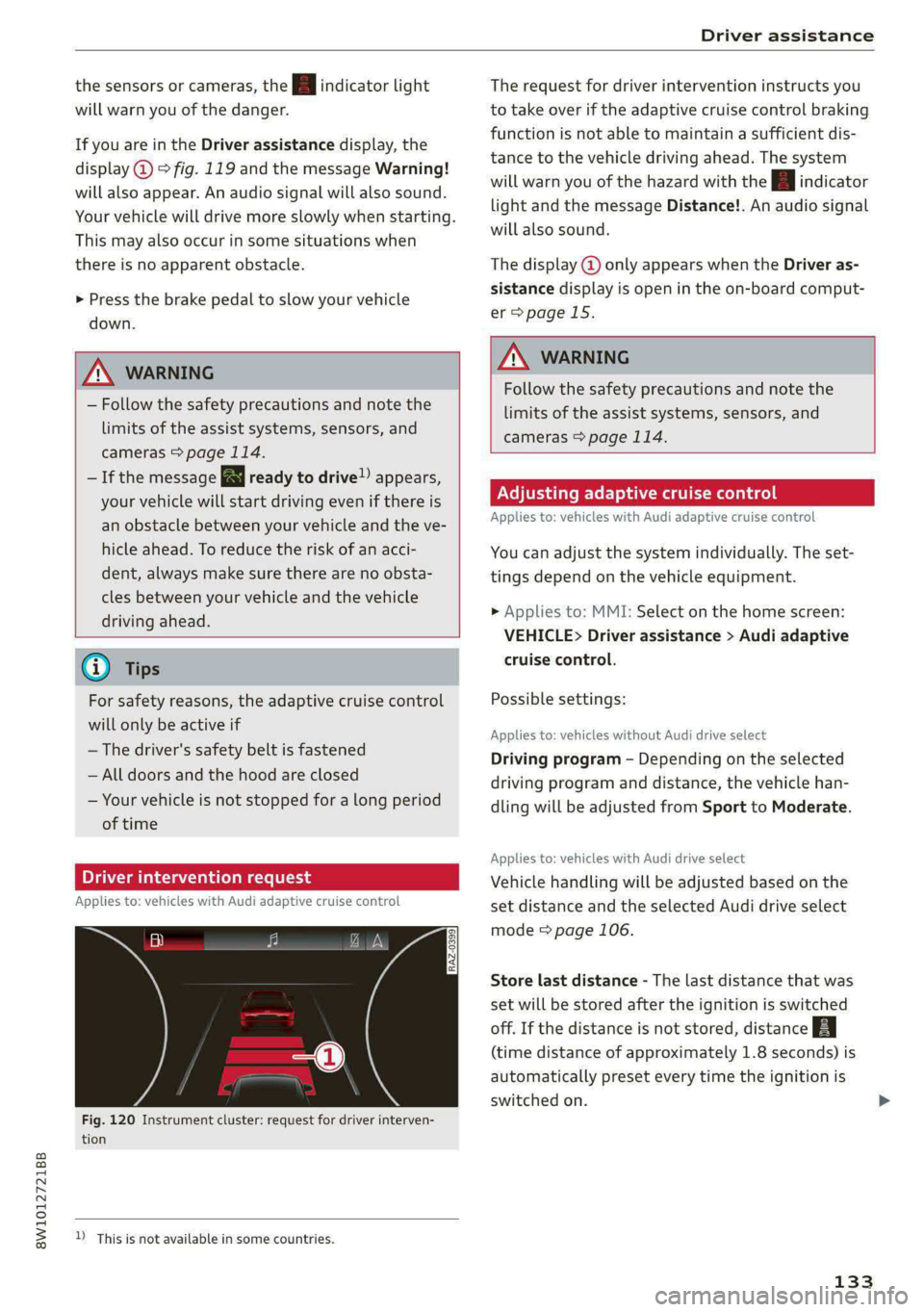
If you are in the Driver assistance display, the
display @) © fig. 119 and the message Warning!
will also appear. An audio signal will also sound.
Your vehicle will drive more slowly when starting.
This may also occur in some situations when
there is no apparent obstacle. The display @ only appears when the Driver as-
> Press the brake pedal to slow your vehicle sistance display is open in the on-board comput-
er > page 15.
down.
ZA\ WARNING
ZA WARNING
Follow the safety precautions and note the
limits of the assist systems, sensors, and
cameras > page 114.
— Follow the safety precautions and note the
limits of the assist systems, sensors, and
cameras > page 114.
— If the message BS ready to drive!) appears,
your vehicle will start driving even if there is CE Tere Tac
- Applies to: vehicl ith Audi adapti i trol
an obstacle between your vehicle and the ve- PP ISS ROS MENICIES REE AMEL 2lapenercrutseiconnr
hicle ahead. To reduce the risk of an acci- You can adjust the system individually. The set-
dent, always make sure there are no obsta- tings depend on the vehicle equipment.
cles between your vehicle and the vehicle
driving ahead.
> Applies to: MMI: Select on the home screen:
VEHICLE> Driver assistance > Audi adaptive
@ Tips cruise control.
For safety reasons, the adaptive cruise control Possible settings:
will only be active if
Applies to: vehicles without Audi drive select
Driving program - Depending on the selected
driving program and distance, the vehicle han-
dling will be adjusted from Sport to Moderate.
—The driver's safety belt is fastened
— All doors and the hood are closed
— Your vehicle is not stopped for a long period
of time
Applies to: vehicles with Audi drive select
Driver intervention request Vehicle handling will be adjusted based on the
Applies to: vehicles with Audi adaptive cruise control set distance and the selected Audi drive select
mode > page 106.
RAZ-0399)
Store last distance - The last distance that was
set will be stored after the ignition is switched
off. If the distance is not stored, distance
(time distance of approximately 1.8 seconds) is
automatically preset every time the ignition is
switched on.
Fig. 120 Instrument cluster: request for driver interven-
tion
D_ This is not available in some countries.
133
Page 140 of 296

Driver assistance
Steering intervention request
If no steering activity is detected or the steering
power from the system is not sufficient, the driv-
er steering intervention request will alert the
driver using audio and visual signals. Take over
the steering and keep your hands on the steering
wheel so that you will be ready to steer at any
time. The system may no longer be ready to pro-
vide warnings after a short time, and it will only
become active again later.
If the driver takes over steering, active lane assist
will be switched off.
Behavior when a turn signal is active
Applies to: vehicles with side assist: The system
will not warn you if you activate a turn signal be-
fore crossing the lane marker line. In this case, it
assumes that you are changing lanes intentional-
ly.
Applies to: vehicles with side assist: If the side
assist system classifies a lane change as critical
due to other vehicles traveling with your vehicle
or approaching your vehicle when your turn sig-
nal is activated, there will be a noticeable steer-
ing correction shortly before your vehicle leaves
the lane. This will attempt to keep your vehicle in
the lane.
ZX WARNING
— Follow the safety precautions and note the
limits of the assist systems, sensors, and
cameras > page 114.
— The system warns the driver that the vehicle
is leaving the lane using corrective steering.
The driver is always responsible for keeping
the vehicle within the lane.
— Corrective steering may not occur at all in
certain situations, such as during heavy
braking. Always be ready to intervene.
G) Tips
— Always keep your hands on the steering
wheel so you can be ready to steer at any
time. The driver is always responsible for
YD In certain countries
138
adhering to the regulations applicable in
the country where the vehicle is being oper-
ated.
— The system does not provide any corrective
steering or steering wheel vibrations if it de-
tects that you are passing another vehicle.
— The image in the Driver assistance display
only appears if it was opened in the on-
board computer = page 15.
Scare Le melal
Applies to: vehicles with Audi active lane assist
B8V-0692
Fig. 125 Turn signal lever: switching Audi active lane assist
on and off
Active lane assist switches on automatically as
soon as the ignition is switched on )).
> To switch the system on or off, press the button
=> fig. 125. The respective indicator light in the
instrument cluster will turn off or on.
ZA\ WARNING
Follow the safety precautions and note the
limits of the assist systems, sensors, and
cameras > page 114.
Adjusting Audi active lane assist
Applies to: vehicles with Audi active lane assist
You can adjust active lane assist individually. The
settings depend on the vehicle equipment.
> Applies to: MMI: Select on the home screen:
VEHICLE > Driver assistance > Audi active lane
assist
Possible settings:
Page 142 of 296

Driver assistance
— It has only been several seconds since the
ignition was switched on Th indicator
light turns on.
— When driving in reverse
— The front passenger's airbag is switched
off
— There is an airbag control module mal-
function
— System functions may not be available if
the ESC is limited or switched off, or if
there is a malfunction.
PN eye
Applies to: vehicles with Audi pre sense basic
Audi pre sense basic is automatically active at
speeds of approximately 20 mph (30 km/h) and
higher. The system can trigger the Audi pre sense
preemptive safety measures during emergency
braking and dangerous braking maneuvers as
well as in unstable driving situations, such as
oversteering or understeering.
ZA WARNING
Follow the safety precautions and note the
limits of the assist systems, sensors, and
cameras > page 114.
Audi pre sense front
Applies to: vehicles with Audi pre sense front
The Audi pre sense front system uses the data
from the radar sensors and calculates the proba-
bility of a rear-end collision. Within the limits of
the system, an impending collision with the front
of the vehicle can be detected in both urban and
rural speed ranges.
Early warning/acute warning
The system can recognize various dangerous sit-
uations. The early warning occurs if:
— Avehicle driving ahead brakes suddenly
— Your own vehicle approaches a significantly
slower vehicle or stationary vehicle in the direc-
tion of travel
The message Audi pre sense [@) or Audi pre
sense wa and a warning tone will warn you about
the danger.
140
If there is an impending collision with vehicles,
there may also be an acute warning in the form
of sharp braking. You will also be warned by an
indicator in the instrument cluster display. When
this warning occurs, it may only be possible to
avoid a collision by swerving or braking strongly.
Automatic deceleration
If you do not react to the acute warning, Audi pre
sense can brake the vehicle to a full stop within
the limits of the system if the vehicle is traveling
at low speeds. This reduces the vehicle speed in
the event of a collision.
Automatic braking force increase
If Audi pre sense determines that you are not
braking strongly enough when a collision is immi-
nent, it can increase the braking force based on
the situation.
Z\ WARNING
— Follow the safety precautions and note the
limits of the assist systems, sensors, and
cameras > page 114.
— Audi pre sense front cannot overcome natu-
ral physical laws. It is a system designed to
assist and it cannot prevent a collision in ev-
ery circumstance. The driver must always in-
tervene. The driver is always responsible for
braking at the correct time. Do not let the
increased safety provided tempt you into
taking risks. This could increase your risk of
a collision.
— Audi pre sense front does not react to cer-
tain objects, such as people/cyclists, ani-
mals, crossing or oncoming vehicles, bars,
railings, or railcars.
— Audi pre sense front may be limited or un-
available when driving in curves.
— Loose objects can be thrown around the ve-
hicle interior during sudden driving or brak-
ing maneuvers, which increases the risk of
an accident. Store objects securely while
driving.
G) Tips
Certain pre sense front functions will switch
off when the ESC is restricted or switched off >
Page 145 of 296

8W1012721BB
Driver assistance
Set the warning time for the early warning to
Early at first. If this causes undesired early warn-
ings to appear, then set the warning time to Me-
dium. The Late warning time should only be set
in special circumstances.
Tips
— If Audi pre sense is switched off, it switches
on again automatically once the ignition is
switched on again.)
— Switch Audi pre sense off when you are not
using public streets, when loading the vehi-
cle onto a vehicle carrier, train, ship, or oth-
er type of transportation, or when towing
the vehicle. This can help to prevent an un-
desired intervention from the Audi pre
sense system.
— Certain settings are automatically stored
and assigned to the remote control key be-
ing used.
Messages
Applies to: vehicles with Audi pre sense
re ° is displayed when there is a malfunc-
tion, the Audi pre sense functions may be un-
available or may be limited.
A message that indicates the cause and possible
solution may appear with some displays. The
weather conditions may be too poor or a sensor
may be covered. Clean the area in front of the
sensors © page 116 and try to turn on the sys-
tems again later.
If the malfunction remains, drive to an author-
ized Audi dealer or authorized Audi Service Facili-
ty immediately to have the malfunction correct-
ed.
D_Incertain countries
Side assist
Cette) aCoy a)
Applies to: vehicles with side assist
al 3 a z
e|
Fig. 126 Examples: driving situations and exterior mirror
display
General information
Side assist monitors the blind spot and traffic be-
hind your vehicle and provides assistance when
you are changing lanes. If the system detects an
object approaching and classifies it as critical, the
display @ in the exterior mirror on that side of
the vehicle will turn on,
Driving situations
The side assist warning is active at speeds above
approximately 9 mph (15 km/h) and can help in
situations such as the following:
@ Your vehicle is being passed. The faster an-
other vehicle approaches from behind, the
sooner the display in the outside mirror will
turn on.
@® There are vehicles traveling in the same direc-
tion as you ina lane adjacent to yours. The
display in the exterior mirror will turn on
143
>
Page 146 of 296

Driver assistance
when the detected object is in the “blind
spot”, at the latest.
@ You are slowly passing another vehicle. If the
difference in speed between the two vehicles
is less than 9 mph (15 km/h), the display in
the exterior mirror will turn on.
Information stage
If you do not activate a turn signal, the system
will inform you about objects classified as critical
by turning on the display in the respective exteri-
or mirror. The display remains dim in the infor-
mation stage so that you are not distracted while
looking forward.
Warning stage
Once you activate a turn signal, the system will
inform you about objects classified as critical by
turning on the display in the respective exterior
mirror.
Depending on vehicle equipment, the display
may also provide a warning when the turn signal
is not activated: if driver assist systems detect
that your vehicle is about to leave a lane, the dis-
play will blink to warn you about objects classi-
fied as critical. You can also be warned with cor-
rective steering > page 137, Audi active lane as-
sist.
System limitations
The system uses the data from the radar sensors
at the rear corners of the vehicle > page 116,
fig. 107. They are designed to detect the left and
right adjacent lanes when the road lanes are the
normal width. In some situations, the system
may react to vehicles in your own lane or lanes
that are not directly adjacent to yours, or to ob-
jects on the side of the road. In this case, the dis-
play will turn on even though there is no vehicle
in the critical area. These situations may include:
— Driving on the edge of your own lane
— Narrow lanes
— Curves
— High barriers on the side of the road
144
AN WARNING
— Follow the safety precautions and note the
limits of the assist systems, sensors, and
cameras > page 114.
— The display may not appear on time when
vehicles are approaching or being passed
very quickly.
G) Tips
— If the window glass in the driver's door or
front passenger's door has been tinted, the
display in the exterior mirror may be incor-
rect.
— For an explanation on conformity with the
FCC regulations in the United States and the
Industry Canada regulations, see
=>page 275.
Adjusting side assist
Applies to: vehicles with side assist
You can adjust the side assist to your preferences.
The settings depend on the vehicle equipment.
> Applies to: MMI: Select on the home screen:
VEHICLE > Driver assistance > Side assist.
Possible settings:
The system can be switched on and off. If the sys-
tem is switched on, the displays in the exterior
mirrors will turn on briefly each time the ignition
is switched on.
Brightness - Change the brightness only when
side assist is switched on, so that the selected
setting can be checked in the exterior mirror dis-
plays. Adjust the brightness to a level where the
display will not interfere with your view ahead.
Because the display brightness automatically
adapts to the ambient light, it may have already
been adjusted to the highest or lowest setting
during the automatic adaptation.
G) Tips
— If you switch side assist on or off, the exit
warning will also switch on or off.
Page 148 of 296

Driver assistance
— The exit warning system can be available for
up to approximately three minutes after un-
locking the vehicle and opening the door as
well as after switching off the ignition. Then
the displays flash briefly and the system
switches off.
— The display brightness for the exit warning
system cannot be adjusted.
— For an explanation on conformity with the
FCC regulations in the United States and the
Industry Canada regulations, see
=> page 275.
146
Page 150 of 296

Parking and maneuvering
forward faster than approximately 6 mph (10
km/h).
ZA\ WARNING
Follow the safety precautions and note the
limits of the assist systems, sensors, and
cameras > page 114.
@) Note
Keep enough distance from the curb to avoid
damage to the rims.
G) Tips
— If the parking aid is switched off, it can only
be reactivated automatically when one of
the following conditions is met:
— The vehicle speed exceeds 6 mph (10 km/h)
— The ignition was switched off and back on
again
— The parking brake was set and then released
— The “P” gear was engaged and released
again
Applies to: vehicles with parking aid plus
Fig. 129 Center display: distance display
If the sensors detect an obstacle, audible and vis-
ual signals will warn you.
Visual warnings
The visual warnings in the center display help you
to detect the critical vehicle area and to estimate
the distance to an obstacle.
Red segments (2) show detected obstacles that
are in your vehicle's path. The red lines 2) mark
the expected direction of travel based on the
steering angle. A white segment (8) indicates a
detected obstacle that is outside of the vehicle's
148
path. The closer your vehicle comes to the obsta-
cle, the closer the segments will move to the ve-
hicle. The collision area has been reached when
the next to last segment is displayed. Obstacles
in the collision area, including those outside of
the vehicle's path, are shown in red. Do not con-
tinue driving farther.
Audio signals
The closer your vehicle gets to a detected obsta-
cle, the shorter the time between the audible sig-
nals. A continuous tone sounds when an obstacle
is less than approximately 1 foot (0.30 m) away
from the front or rear of the vehicle. A continu-
ous tone sounds when an obstacle is less than
approximately 0.7 feet (0.20 m) away from the
sides* of the vehicle. Do not continue driving for-
ward or in reverse >@).
> To deactivate audio signals while parking, press
(Jin the center display. The audio signals will
be automatically activated again the next time
the parking aid is activated.
Adjusting the volume
You can adjust the volume to your preferences.
The settings depend on the vehicle equipment.
> Applies to: MMI: Select on the home screen:
VEHICLE > Parking aid. Or:
> Press L-] in the center display when the parking
aid is active.
Possible settings:
Front volume - Volume for the front and side*
area.
Rear volume - Volume for the rear area.
Entertainment fader - The volume of the audio/
video source is lowered when the parking aid is
activated.
The new level is demonstrated briefly* when the
volume is adjusted.
Error messages
If P4 appears, the sensor in the respective area
or the speaker is faulty. Drive immediately to an
authorized Audi dealer or authorized Audi Service
Facility to have the malfunction repaired.
Page 151 of 296

8W1012721BB
Parking and maneuvering
iff or is displayed when there is a malfunc-
tion, the parking aid functions may be unavaila-
ble or may be limited.
A message that indicates the cause and possible
solution may appear with some displays. The
weather conditions may be too poor or a sensor
may be covered. Clean the area in front of the
sensors > page 116, fig. 106 and try to turn on
the systems again later.
If the malfunction remains, drive to an author-
ized Audi dealer or authorized Audi Service Facili-
ty immediately to have the malfunction correct-
ed.
Z\ WARNING
— Follow the safety precautions and note the
limits of the assist systems, sensors, and
cameras > page 114.
— Sensors and cameras have spots in which
the surrounding area cannot be detected.
Objects, animals, and people may only be
detected with limitations may not be detect-
ed at all. Always monitor the traffic and the
vehicle's surroundings directly and do not
become distracted.
©) Note
— Keep enough distance from the curb to
avoid damage to the rims.
— Applies to: vehicles with park assist: If you
park in short parking spaces using park as-
sist, a continuous tone will sound from the
parking aid when the distance to an object is
less than approximately 0.7 ft (0.20 m). Do
not continue driving farther.
@ Tips
— The segments in the side area* are detected
and analyzed when passing. If you switch
the ignition off and on again or open the
door, or if the vehicle is stationary for a peri-
od of time, the surrounding area may have
changed in the meantime. In this scenario,
the side area* will appear black until the
area has been detected and evaluated.
— If the distance to an obstacle remains con-
stant, the volume of the distance warning
gradually lowers after a few seconds until it
is muted (this does not apply to the continu-
ous tone). If the obstacle comes closer than
it was before the sound was muted, the
tone will sound again. If the obstacle be-
comes farther away than it was before the
sound was muted, no tone will sound. Pay
attention to the vehicle's surroundings
when you start to drive.
Rearview camera and
peripheral cameras
Introduction
Applies to: vehicles with rearview camera/peripheral cameras
B8V-0629
Fig. 130 Orientation line display when parking
Depending on the vehicle equipment, a rearview
camera or multiple peripheral cameras may be
available.
The rearview camera helps you to park or maneu-
ver using the orientation lines.
The peripheral cameras expand the vehicle over-
view to include various views around the vehicle
that can be selected.
Z\ WARNING
Follow the safety precautions and note the
limits of the assist systems, sensors, and
cameras > page 114.
Activating/deactivating
Applies to: vehicles with rearview camera/peripheral cameras
Activating/deactivating
> Press the Pt button in the center console.
When activating, a brief tone will sound and
the LED in the button will turn on. Or
149