ignition AUDI A4 2020 Owners Manual
[x] Cancel search | Manufacturer: AUDI, Model Year: 2020, Model line: A4, Model: AUDI A4 2020Pages: 296, PDF Size: 80.45 MB
Page 264 of 296

Emergency assistance
the special considerations when towing, especial-
ly when using a towing cable.
Always make sure the traction force does not ex-
ceed the permitted level and there are no shock
loading conditions. There is always the risk of the
coupling becoming overloaded when driving off-
road.
For the most safety and security, drive with a tow
bar. You should use a towing cable only if a tow
bar is not available. Use a towing cable made of
synthetic elastic cable similar elastic material.
Z\ WARNING
— Towing highly increases the risk of an acci-
dent, for example from colliding with the
towing vehicle.
—To reduce the risk of an accident, do not al-
low anyone to remain inside the vehicle
when it is being transported by a tow truck
or a special transporter.
@) Note
— If normal towing is not possible, for exam-
ple if the transmission is faulty or if the
towing distance is greater than 30 miles
(50 km), then transport the vehicle on a
special carrier.
— If the vehicle is towed by a tow truck at the
axle that is not permitted, this can cause se-
vere damage to the transmission.
— The vehicle must not be tow started for
technical reasons.
@ Tips
— If the power supply is interrupted, then it
will not be possible to move the selector
lever out of the "P" position. The parking
lock must be released using the emergency
release before towing the vehicle
=> page 97.
— Follow the local legal regulations for tow-
ing.
Read and follow the important information under
=> page 261.
262
Preparations
> Only secure the towing cable or tow bar at the
designated towing loop > page 262.
> Make sure the towing cable is not twisted. Oth-
erwise it could disconnect from the towing loop
while towing.
> Switch the emergency flashers on in both
vehicles > page 50. However, do not do this if it
prohibited by law.
Towing vehicle (front)
> Only start to drive when the towing cable is
taut.
> Press the brake pedal very carefully.
> Avoid sudden braking or driving maneuvers.
Vehicle being towed (rear)
> Make sure the ignition is switched on so that
the steering wheel is not locked and so that you
can use the turn signals, the horn, and the
windshield wipers if needed > A\.
> Switching it off before the vehicle has stopped
may impair the function of the brake booster
and power steering. You would then need to
use more force to steer and brake the vehicle.
> Release the parking brake > page 102.
> Select the “N” selector lever position.
» Make sure the towing cable is always taut.
ZA WARNING
Never tow a vehicle using a tow bar or towing
cable if the vehicle does not have electrical
power.
Rear towing loop
Fig. 184 Rear bumper: installing the towing loop
Page 266 of 296

Fuses and bulbs
Fig. 185 Driver's side footwell (left-hand drive vehicles):
footrest (@), front passenger's footwell (right-hand drive
vehicles): cover @)
5 g
=
=
8
=
Fig. 186 Driver's side cockpit (left-hand drive/right-hand
drive vehicles): cover ©, left side of luggage compartment:
cover ()
264
A fuse that has blown will have metal strips that
have burned through.
The fuses are located in the footwell under the
foot rest (left-hand drive vehicle) @
the cover (right-hand drive vehicle) (8). Additional
fuses are located on the front side of the cockpit
(driver's side) © and under the left cover in the
luggage compartment (
> Switch the ignition and all electrical equipment
off.
> Check the table that follows to see which fuse
belongs to the equipment.
> Remove the screwdriver and the reversible Torx
bit from the vehicle tool kit > page 253.
> Remove the footrest or the corresponding cov-
er.
> Remove the colored plastic clip from the fuse
panel, if necessary > page 265, fig. 187.
> Remove the clip from the rear side of the cover
» Remove the fuse using the clip.
> Replace the blown fuse only with a fuse that
has the same amp rating.
> Reinstall the plastic bracket.
> Reattach the footrest or the cover.
Fuse color identification
Color Current rating
in amps
Black 1
Purple 3
Light brown 5
Brown Z.9
Red 10
Blue 1S
Yellow 20
White or transparent [25
Green 30
Orange 40
Z\ WARNING
Do not repair fuses and never replace a blown
fuse with one that has a higher amp rating.
This can cause damage to the electrical sys-
tem and increases the risk of fire.
Page 268 of 296
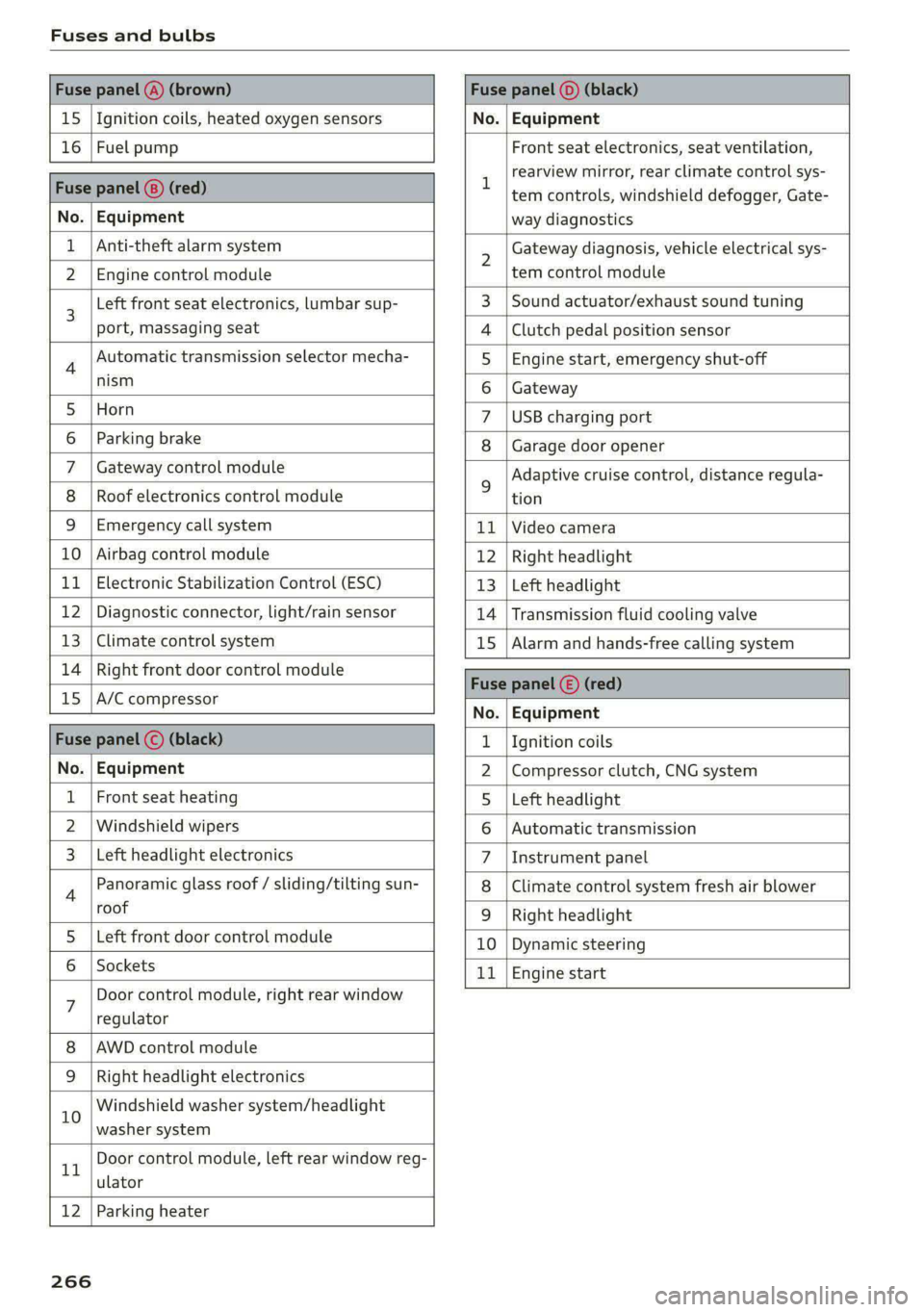
Fuses and bulbs
Fuse panel @) (brown) Fuse panel (0) (black)
15 |Ignition coils, heated oxygen sensors No. | Equipment
16 | Fuel pump Front seat electronics, seat ventilation,
= rearview mirror, rear climate control sys-
Fuse panel @) (red) | era controls, windshield defogger, Gate-
No. | Equipment way diagnostics
Anti-theft alarm system 2 Gateway diagnosis, vehicle electrical sys-
2 |Engine control module tem control module
3 [Left front seat electronics, lumbar sup- 3 | Sound actuator/exhaust sound tuning
port, massaging seat 4 |Clutch pedal position sensor
4 Automatic transmission selector mecha- 5 | Engine start, emergency shut-off
Sct 6 | Gateway
5 [Horn 7 |USB charging port
6 | Parking brake 8 | Garage door opener
7 | Gateway control module 5 Adaptive cruise control, distance regula-
8 | Roof electronics control module tion
9 |Emergency call system 11 |Video camera
10 | Airbag control module 12 | Right headlight
11
| Electronic Stabilization Control (ESC) 13 | Left headlight
12 | Diagnostic connector, light/rain sensor 14 | Transmission fluid cooling valve
13 | Climate control system 15 | Alarm and hands-free calling system
14 | Right front door control module Fuse panel © (red)
15 |A/C compressor ae
No. | Equipment
Fuse panel (©) (black) 1. |Ignition coils
No. | Equipment 2 |Compressor clutch, CNG system
Front seat heating 5 |Left headlight
2 |Windshield wipers 6 |Automatic transmission
Left headlight electronics 7 |Instrument panel
4 Panoramic glass roof / sliding/tilting sun- 8 | Climate control system fresh air blower
roof 9 | Right headlight
5 |Left front door control module 10 | Dynamic steering
6 | Sockets 11 | Engine start
7 Door control module, right rear window
regulator
AWD control module
Right headlight electronics
10 Windshield washer system/headlight
washer system
rT Door control module, left rear window reg-
ulator
12 | Parking heater
266
Page 272 of 296

Data privacy
These data can help provide a better understand-
ing of the circumstances in which crashes and in-
juries occur. NOTE: EDR data are recorded by your
vehicle only if a non-trivial crash situation occurs;
no data are recorded by the EDR under normal
driving conditions and no personal data (e.g.
name, gender, age, and crash location) are re-
corded. However, other parties, such as law en-
forcement, could combine the EDR data with the
type of personally identifying data routinely ac-
quired during a crash investigation.
To read data recorded by an EDR, special equip-
ment is required, and access to the vehicle or the
EDR is needed. In addition to the vehicle manu-
facturer, other parties, such as law enforcement,
that have the special equipment, can read the in-
formation if they have access to the vehicle or the
EDR.
Data usage
Audi can read out the information stored in the
data memories or similar data, or give this infor-
mation to third parties, especially in the follow-
ing situations:
— If the vehicle owner or lessee agrees
—If there is an official request from the police
— Ifa court or authorities request it
If legally permitted, Audi can also use the data
for analysis of vehicle operation and safety per-
formance or provide this data to third parties for
research purposes.
Transmitted information
Data collection
Applies to: vehicles with data collection
Depending on the country, AUDI AG may collect
data for the following purposes, for example: of-
fer and product optimization, public safety, pro-
vision of Audi connect remote vehicle services,
and adaptation to customer expectations. For ex-
ample, various technical function data, environ-
mental data, driving data, and usage data will be
collected for a specific purpose and forwarded to
AUDI AG. The data will be sent from the vehicle
at the time the data was collected.
270
Applies to: MMI: You can find additional informa-
tion about data collection in the MMI. Select on
the home screen: SETTINGS > General > Legal
notes > About Audi connect.
If you would like to deny data transmission to
AUDI AG, contact an authorized Audi dealer or
authorized Audi Service Facility for more infor-
mation. You also have the option to deactivate
data transmission within the privacy settings.
Privacy settings
Applies to: vehicles with Audi connect
> Applies to MMI: Select on the home screen:
SETTINGS > Privacy settings.
When using Audi connect services or during data
collection, data will be transmitted from the ve-
hicle.
> To display additional information about the pri-
vacy settings and the associated symbols in the
status bar, press @ in the MMI.
Requirement: the ignition must be switched on.
Setting the maximum privacy settings
When the Activate privacy mode function is
switched on, the data connection is deactivated
or sending of data is restricted, but all safety-re-
lated, legal, or contractually required Audi con-
nect services remain activated. The majority of
the Audi connect services are deactivated.
When the function is switched off, the data con-
nection will be available in order to use Audi con-
nect services.
Adjusting individual privacy settings
In the MMI, you can adjust individually which da-
ta should be transmitted from the vehicle. If you
switch on a data category, the data will be trans-
mitted.
@) Note
You are responsible for all precautions taken
for data protection, anti-virus protection, and
protection against loss of data on mobile de-
vices that are used to access the Internet
through the Wi-Fi hotspot.
Page 286 of 296

Index
HFP
refer to Hands Free Profile............. 158
High beams
High beam assistant................... 49
Highway lights ....... 0... ccc eee eee eee 48
Hill descent assist..............002000. 105
Hill descent control..... 00... .. ce eee eee 104
Hill HOLGIASSISE « move 2 os nanos © sues oo eae woe 94
Home
refer to Home address...........-0 008 183
Home address...........0 000. c eee eee 183
HomeLink
refer to Garage door opener............. 45
Home screen... . 2... cece eee eee ee eee 17
HOM... ee eee eee 6
Hotspot
refer to Wi-Fi...........0...0e eee eee 172
I
Idle
refer to Gears » scene = een ss een es ees ees 94
Ignition
Switchitig Orand Off sc ews se wows ss wean s 92
Imbalance (wheels) ............000 eee ee 236
Immobilizer
refer to Electronic immobilizer........... 34
IndicatOrlights « aon « ¢ way x 6 aeens s ¥ wares & 2 5 7
Inspection interWals « sew: < «sees se eeps a es 226
InStrurmient clusters s ¢ ews x «aes 2 eee i os 11
Adjusting the layout...............000. 12
Cleaning....... 0... cece eee eee 249
ENGING@:COdGs ¢ = ass + © canes f eros e Sees 208
Fail @tiss 2 was 2 x nese ov wie se ere 2 ee 11
On-board computer.............0 200 eee 15
Operating...............2.. 2000-0000 12
Service interval display................ 226
Software information................. 208
Switching tabs.................2200005 12
Switching the view............. eee eee 12
Vehicle FUmetions « cnvsscs « 2 sen w a avores 0 2 tens 15
Version information...............065 208
Instruments
Adjusting illumination.................. 52
Intelligent search
Navigationiss ¢ x sews + x uews 6 wuss 6 s wee 177
Intecior UGHEING « + ews + 2 eee s pager eo me 51, 52
284
Interior MONItOriNg’s ss cows + © vesse 2 ¥ aoeeene 33
Intermittent mode (windshield wipers) ..... 55
International travel wi: ¢ sass sé mews a owen 173
Internet
FEFErTOXCONNECE 5. = esses wo eieoees =v eeavee eH 169
Internet radio
refer to Online radio.............. 191, 192
iPhone
refer to Audi music interface........... 196
J
Jump starting ........... cece eee eens 260
K
Key... eee ee eee eee 30, 34
Convenience opening and closing......... 42
Key replacement..............---0 eee 34
Mechanical key..... 0... eee eee eee eee 34
PANIC. K6W iis: = © savon ¢ ¢ eane @ § SetR ys Hem ¢ & 34
Replacing the battery.................. 36
Unlocking and locking...............005 35
Vehicle code... 1... eee eee ee 34
Key user... 22. eee ee eee ee 28
Kick-down...... 2.20... 2 eee eee 96
L
Lane assist
refer to Audi active lane assist.......... 137
Laptimer................0..0.000000. Ii
EValW@Ling’: = x came + xameon 2 pee & & teem o 3 122
SEAM Gbcis ov svvins 6 o suncans w 2 eoTueDs © a KURA 9 121
LATCH (securing child safety seats)......... 74
Leather care and cleaning............... 250
Legal information
License subscriptions................. 208
Software information................. 208
Softwale licens@Sics ss wauy as meen ay weuee a 208
Versionsnformatiomss « s ssswe ¥ ccweasm & were 208
License plate bracket................... 274
Lifting points (vehicle jack).............. 256
Light/rain sensor
Automatic headlights .................. 48
Intermittent mode (windshield wipers).... 55