Page 97 AUDI A4 2021 Owner´s Manual
[x] Cancel search | Manufacturer: AUDI, Model Year: 2021, Model line: A4, Model: AUDI A4 2021Pages: 304, PDF Size: 107.89 MB
Page 21 of 304
8W1012721BC
Touch display
> Press the General button.
> If the Date & time button is not displayed,
swipe upward or downward with one finger un-
tilit appears.
> Press the Date & time button.
(i) Tips
If a menu or symbol is in parentheses in the
path, for example, (General) or ({2), then it is
an optional menu item that does not need to
be used in every system.
> Applies to MMI: Select on the home screen:
SETTINGS > Display & Brightness > MMI.
Possible settings:
— Brightness
— Touchscreen feedback
Multi Media Interface
ce mle)
Audi recommends performing certain Infotain-
ment system functions, such as entering a desti-
nation, only when the vehicle is stationary. Al-
ways be prepared to stop operating the Infotain-
ment system in the interest of your safety and
the safety of other road users.
ZX WARNING
Only use the Infotainment system when road,
traffic, weather, and visibility conditions per-
mit and always in a way that allows you to
maintain complete control over your vehicle.
G) Tips
Certain functions are not available while driv-
ing.
Scale Romeo
Switching the MMI on or off
> To switch the MMI off, press and hold the
On/Off knob > page 29, fig. 22 until all Info-
tainment functions are switched off.
> To switch the MMI on, press the On/Off knob.
Restarting the MMI
> Press and hold the On/Off knob for at least 10
seconds.
Switching the center display on or off
> To switch the center display on or off, press the
fo] button in the center console above the se-
lector lever, or
> To switch the center display off, press [Jin the
notification center > page 22.
> To switch the center display on, touch the dis-
play or press {oJ again.
Introduction
You can display and operate Infotainment system
and vehicle functions using the touch display in
the Multi Media Interface, abbreviated MMI.
Configuration wizard
After starting for the first time, the configuration
wizard helps you to set up the vehicle, for exam-
ple to set the desired system language and con-
nect
a telephone.
> Follow the instructions in the center display.
>» Applies to: MMI: To access the configuration
wizard at a later time, select on the home
screen: HELP > Configuration wizard.
Tool tips
You can have tool tips displayed if necessary.
They introduce various MMI functions to you.
>» Applies to: MMI: To open the tool tips, select on
the home screen: HELP > Tool tips > Basic in-
formation or Expert information.
> Follow the instructions in the display.
19
Page 22 of 304
Touch display
Menus and symbols
RAX-0176.
m< po
Cer
Oo er
ce
ce oS Eee had
Co) Peo eens ETc)
© SETTINGS eh aed CNet a Ts)
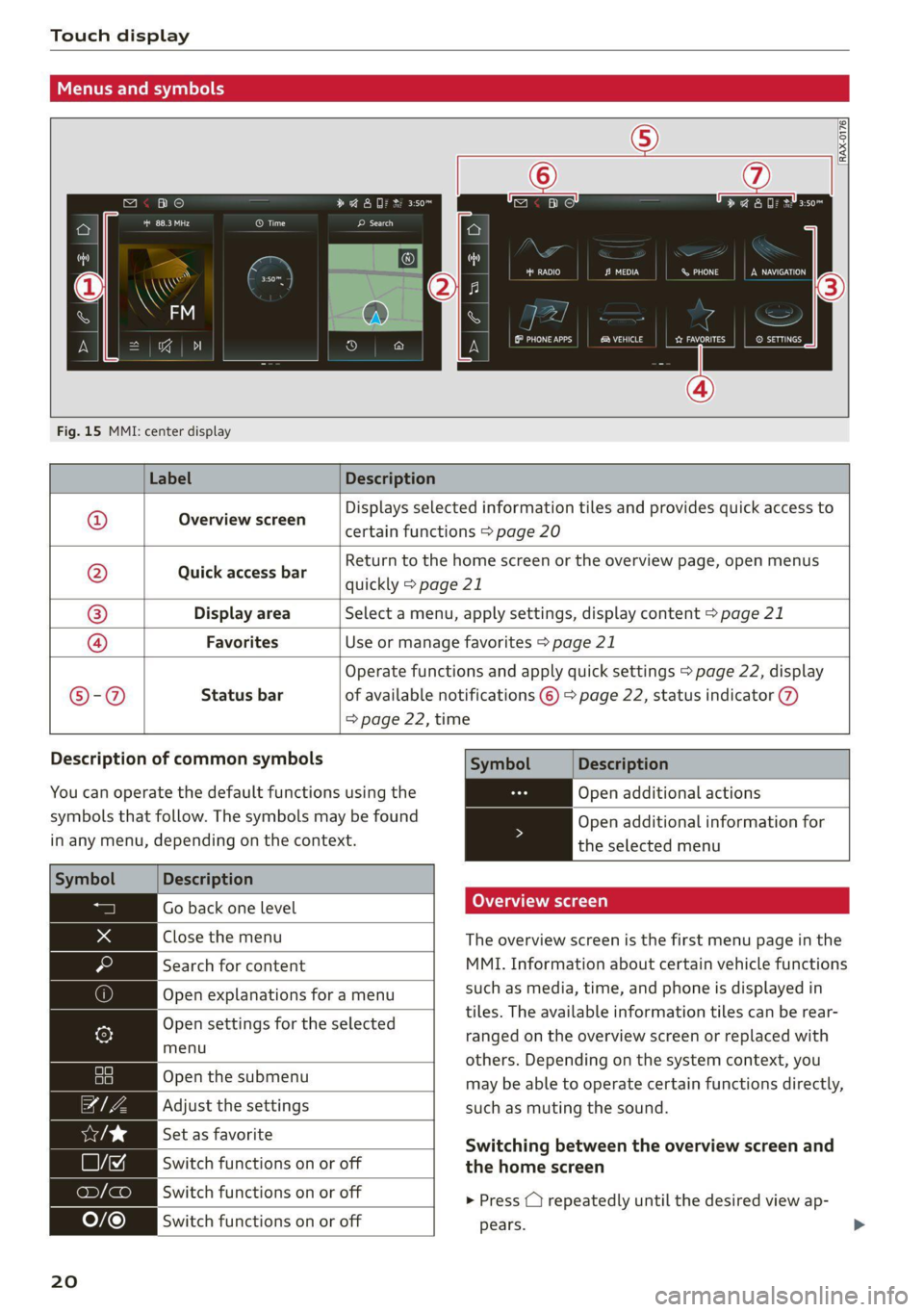
Fig. 15 MMI: center display
Label Description
Displays selected information tiles and provides quick access to
Overview screen ‘
certain functions > page 20
Return to the home screen or the overview page, open menus
Quick access bar guidlly pageei
Display area Select a menu, apply settings, display content > page 21
®|O|
©
|
©
Favorites Use or manage favorites > page 21
Operate functions and apply quick settings > page 22, display
©-@ Status bar of available notifications © > page 22, status indicator
=> page 22, time
Description of common symbols
You can operate the default functions using the
symbols that follow. The symbols may be found
in any menu, depending on the context.
Description
Go back one level
Close the menu
Search for content
Open explanations for a menu
Open settings for the selected
menu
Open the submenu
Adjust the settings
Set as favorite
Switch functions on or off
Switch functions on or off
Switch functions on or off
20
Symbol Description
Open additional actions
Open additional information for
the selected menu
Overview screen
The overview screen is the first menu page in the
MMI. Information about certain vehicle functions
such as media, time, and phone is displayed in
tiles. The available information tiles can be rear-
ranged on the overview screen or replaced with
others. Depending on the system context, you
may be able to operate certain functions directly,
such as muting the sound.
Switching between the overview screen and
the home screen
> Press () repeatedly until the desired view ap-
pears.
Page 23 of 304
8W1012721BC
Touch display
Configuring the overview screen
> Press and hold an information tile on the over-
view screen.
> To change the position of an information tile,
press and hold it and then slide it to the desired
position.
> To replace an information tile, press Z and se-
lect the desired information tile.
> Press Done to complete the configuration.
With quick access, you can return to the home
screen and quickly switch between four menus
that can be individually configured.
Returning to the home screen or opening a
menu quickly
> Press ( or one of the four buttons.
Configuring quick access
> Press and hold a button on the home screen
display area or in the quick access bar.
> To move a button to the quick access bar, pull it
from the display area to the quick access bar.
> To adjust the placement of the buttons in the
quick access bar, pull them to the desired posi-
tion in the bar.
> Press Done to complete the configuration.
G) Tips
The position of © cannot be adjusted.
Display area
You can freely change the location of the buttons
on the home screen display area.
Configuring the display area
> Press and hold a button on the home screen
display area.
> To adjust the placement of the buttons, pull
them to the desired locations.
> Press Done to complete the configuration.
Switching between menu pages
If a menu contains multiple menu pages, B= is
displayed in the display area. The white bar
shows the location of the current menu page.
> To switch between menu pages, swipe your fin-
ger to the right or left.
Favorites
By creating favorites, you can have quick access
to various items, such as radio stations, frequent-
ly-used contacts, or vehicle settings. In the FA-
VORITES menu, the stored favorites are sorted
by topic into information tiles.
Adding a favorite
A YY button indicates if you can add a favorite,
such as a selected radio station. Depending on
the context, you may also be able to add items
without the yy button to the favorites, such as
entries ina list.
> Press YY, or
> Press and hold an item ina list.
> Press Store as favorite. The selected item will
be added as a favorite.
Using favorites
> Applies to: MMI: Select on the home screen:
FAVORITES. The stored favorites will be dis-
played.
> To access a stored favorite, press that favorite.
Stored favorites can only be deleted or config-
ured in the corresponding menu (such as RADIO).
Arranging information tiles
> Applies to: MMI: Select on the home screen:
FAVORITES.
>» Press and hold the desired information tile.
> Pull the information tile into the desired posi-
tion.
>» Press Done to confirm the configuration.
21
Page 24 of 304
Touch display
Off Of o8
Off of af
O88 OB of of
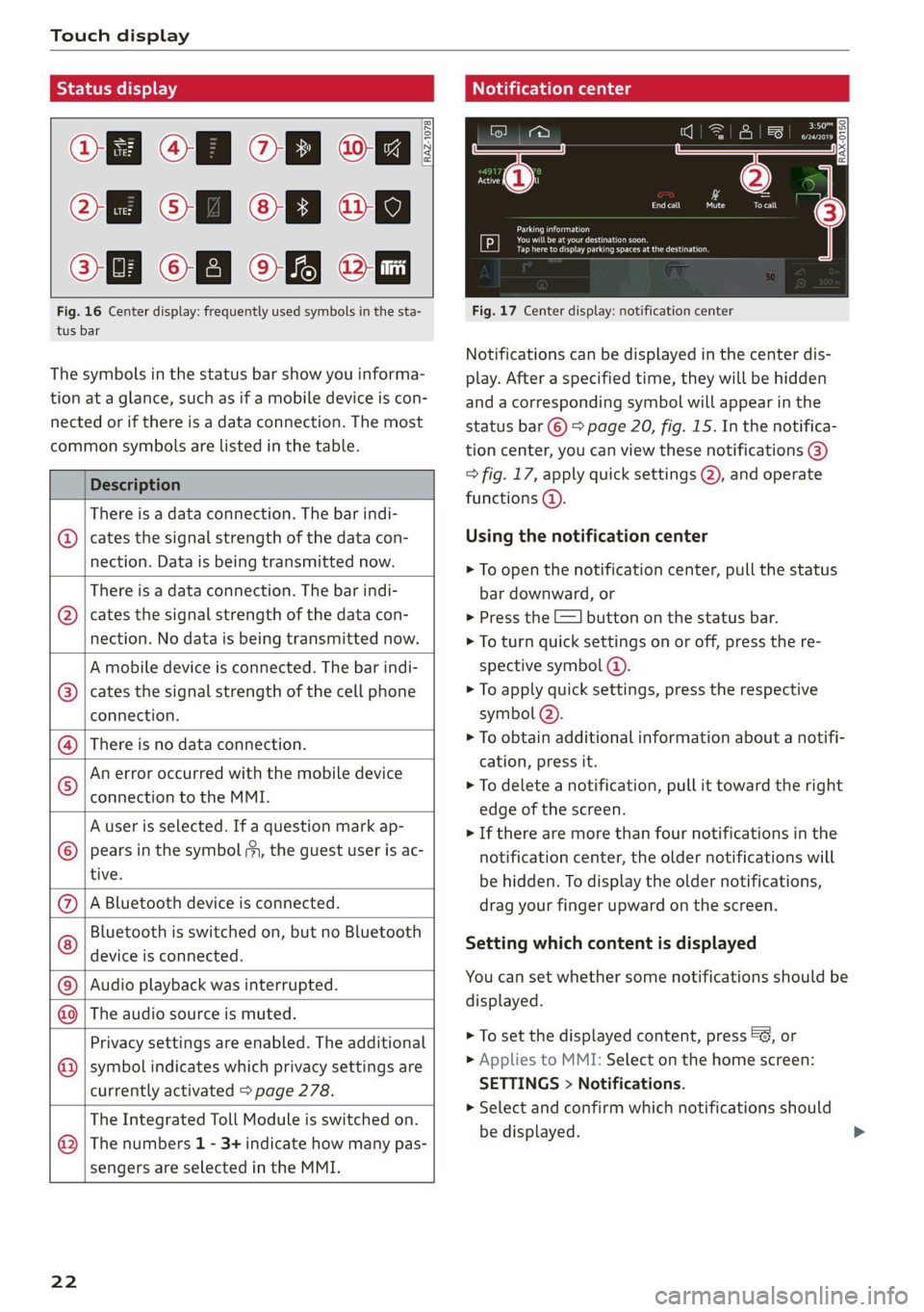
Fig. 16 Center display: frequently used symbols in the sta-
tus bar
[RAZ-1078
The symbols in the status bar show you informa-
tion at a glance, such as if a mobile device is con-
nected or if there is a data connection. The most
common symbols are listed in the table.
Description
There is a data connection. The bar indi-
@ | cates the signal strength of the data con-
nection. Data is being transmitted now.
There is a data connection. The bar indi-
cates the signal strength of the data con-
nection. No data is being transmitted now.
©
A mobile device is connected. The bar indi-
cates the signal strength of the cell phone
connection.
There is no data connection.
An error occurred with the mobile device
connection to the MMI.
A user is selected. If a question mark ap-
pears in the symbol my, the guest user is ac-
tive.
A Bluetooth device is connected.
Bluetooth is switched on, but no Bluetooth
device is connected. ©
|e;
©
|@|®|
©
Audio playback was interrupted.
NO) The audio source is muted.
Privacy settings are enabled. The additional
symbol indicates which privacy settings are
currently activated > page 278.
The Integrated Toll Module is switched on.
The numbers 1 - 3+ indicate how many pas-
sengers are selected in the MMI.
©
®
22
Notification center
Cee ay
debtors
Tap here to display parking spaces at the destination.
Fig. 17 Center display: notification center
Notifications can be displayed in the center dis-
play. After a specified time, they will be hidden
and a corresponding symbol will appear in the
status bar © > page 20, fig. 15. In the notifica-
tion center, you can view these notifications ®
> fig. 17, apply quick settings @, and operate
functions @).
Using the notification center
> To open the notification center, pull the status
bar downward, or
> Press the =] button on the status bar.
> To turn quick settings on or off, press the re-
spective symbol @).
> To apply quick settings, press the respective
symbol @).
> To obtain additional information about a notifi-
cation, press it.
> To delete a notification, pull it toward the right
edge of the screen.
> If there are more than four notifications in the
notification center, the older notifications will
be hidden. To display the older notifications,
drag your finger upward on the screen.
Setting which content is displayed
You can set whether some notifications should be
displayed.
> To set the displayed content, press &@, or
> Applies to MMI: Select on the home screen:
SETTINGS > Notifications.
> Select and confirm which notifications should
be displayed.
Page 25 of 304
8W1012721BC
Touch display
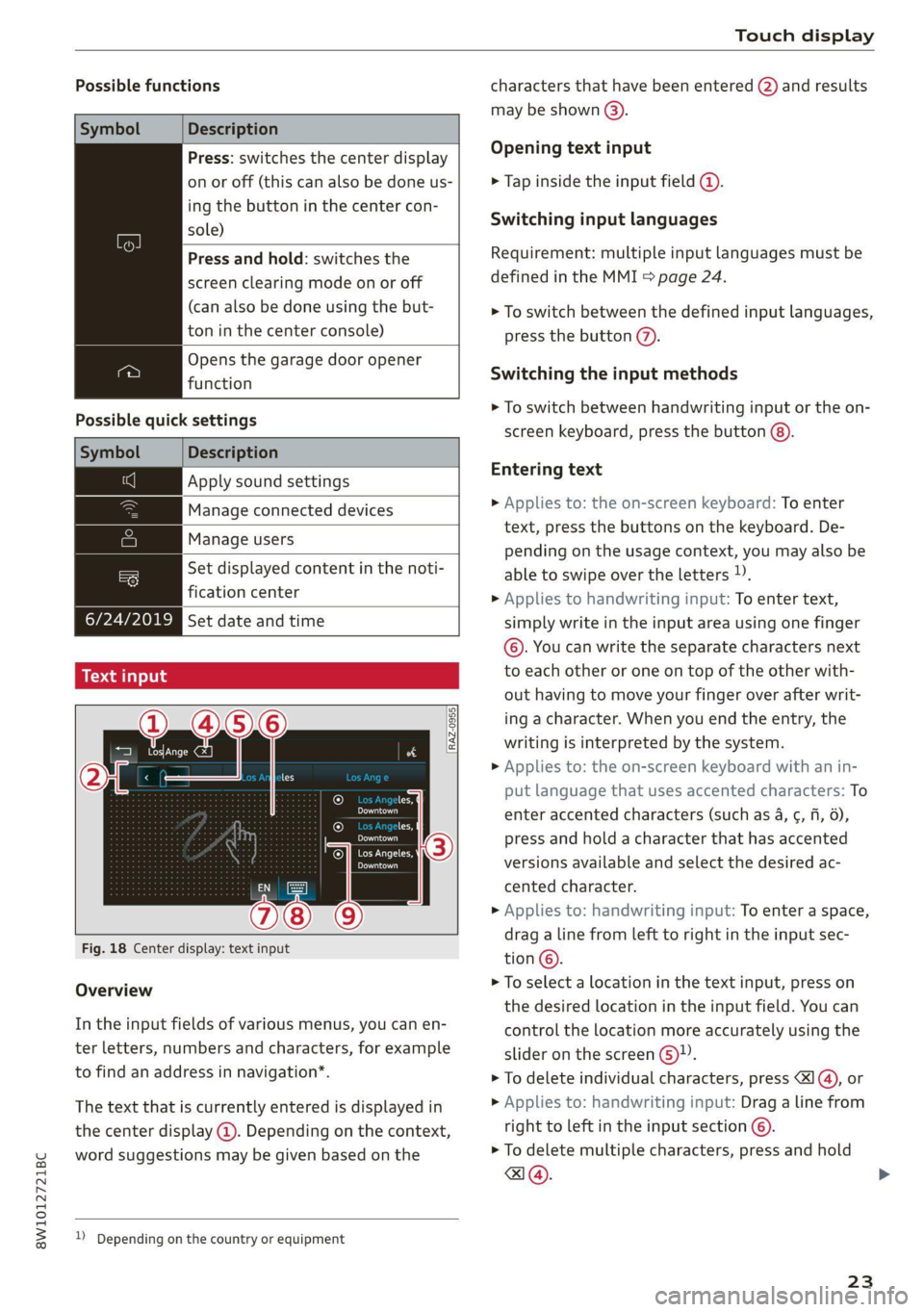
Possible functions characters that have been entered @) and results
may be shown @).
Description
Press: switches the center display Opening text input
on or off (this can also be done us- > Tap inside the input field @.
ing the button in the center con-
sole)
/Press and hold: switchesthe | Requirement: multiple input languages must be
defined in the MMI > page 24.
Switching input languages
screen clearing mode on or off
(can also be done using the but- > To switch between the defined input languages,
ton in the center console) press the button @.
Opens the garage door opener
function Switching the input methods
> To switch between handwriting input or the on-
Possible.quick:settings screen keyboard, press the button @).
Symbol Description
Apply sound settings Entering text
> Applies to: the on-screen keyboard: To enter
text, press the buttons on the keyboard. De-
pending on the usage context, you may also be
able to swipe over the letters )).
> Applies to handwriting input: To enter text,
Manage connected devices
Manage users
= Set displayed content in the noti-
fication center
PLwAec Set date and time simply write in the input area using one finger
©. You can write the separate characters next
Tonia: to each other or one on top of the other with-
out having to move your finger over after writ-
ing a character. When you end the entry, the
writing is interpreted by the system.
> Applies to: the on-screen keyboard with an in-
7 put language that uses accented characters: To
Maal enter accented characters (such as 4, ¢, fi, 6),
[RAZ-0955|
cH
Pea press and hold a character that has accented
eeu cn . .
:
Cea versions available and select the desired ac-
cented character.
» Applies to: handwriting input: To enter a space,
drag a line from left to right in the input sec-
Fig. 18 Center display: text input 5
tion ©.
> To select a location in the text input, press on
the desired location in the input field. You can
control the location more accurately using the
Overview
In the input fields of various menus, you can en-
ter letters, numbers and characters, for example slider on the screen ©.
to find an address in navigation*. > To delete individual characters, press 1@, or
The text that is currently entered is displayed in » Applies to: handwriting input: Drag a line from
the center display @. Depending on the context, right to left in the input section ©).
word suggestions may be given based on the > To delete multiple characters, press and hold
a@.
2) Depending on the country or equipment
23
Page 27 of 304
8W1012721BC
Head-up display
Head-up display
Description
Applies to: vehicles with head-up display
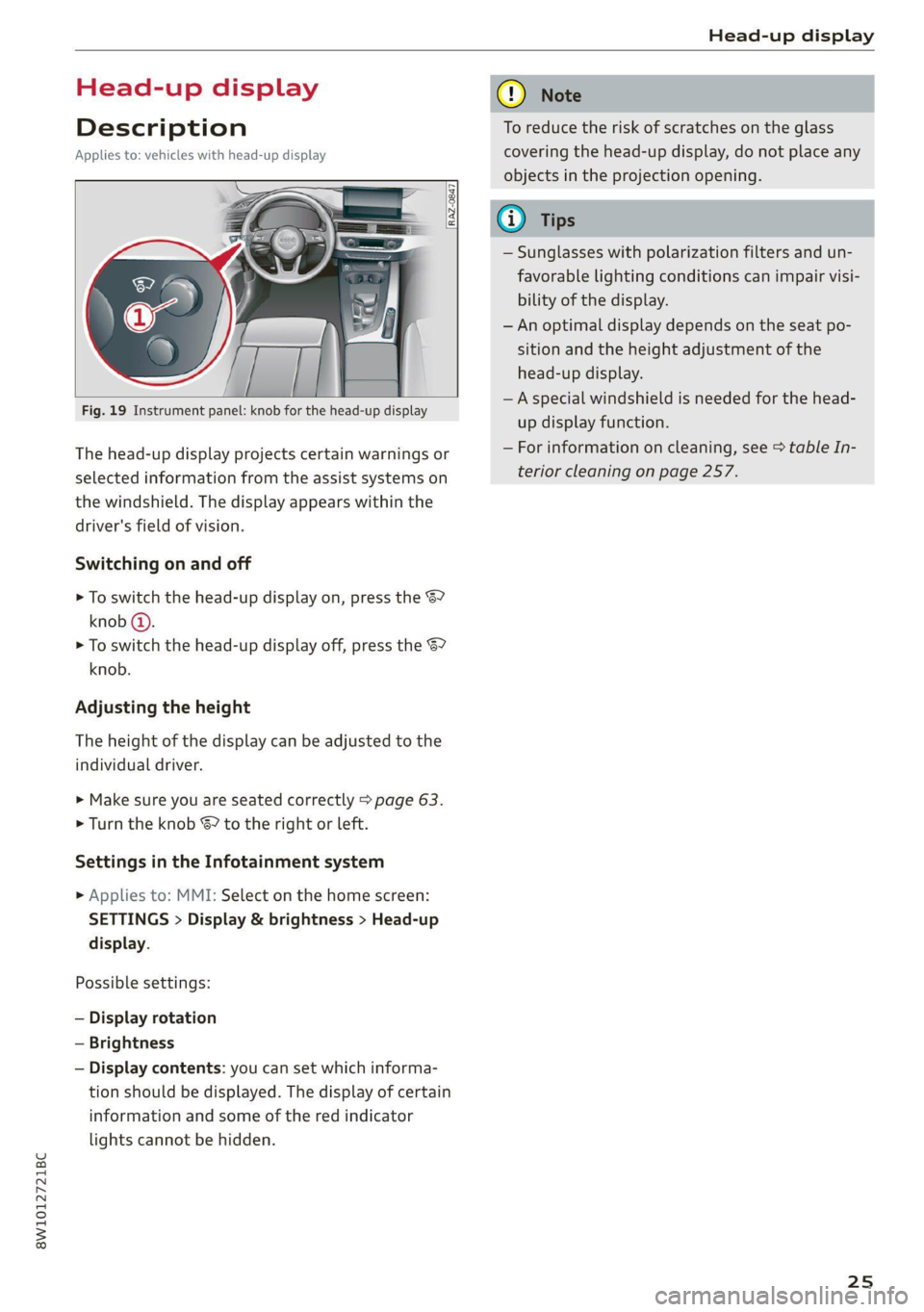
Fig. 19 Instrument panel: knob for the head-up display
The head-up display projects certain warnings or
selected information from the assist systems on
the windshield. The display appears within the
driver's field of vision.
Switching on and off
> To switch the head-up display on, press the 67
knob @.
> To switch the head-up display off, press the S7
knob.
Adjusting the height
The height of the display can be adjusted to the
individual driver.
> Make sure you are seated correctly > page 63.
> Turn the knob S? to the right or Left.
Settings in the Infotainment system
> Applies to: MMI: Select on the home screen:
SETTINGS > Display & brightness > Head-up
display.
Possible settings:
— Display rotation
— Brightness
— Display contents: you can set which informa-
tion should be displayed. The display of certain
information and some of the red indicator
lights cannot be hidden.
® Note
To reduce the risk of scratches on the glass
covering the head-up display, do not place any
objects in the projection opening.
iG) Tips
— Sunglasses with polarization filters and un-
favorable lighting conditions can impair visi-
bility of the display.
— An optimal display depends on the seat po-
sition and the height adjustment of the
head-up display.
—A special windshield is needed for the head-
up display function.
— For information on cleaning, see > table In-
terior cleaning on page 257.
25
Page 29 of 304
8W1012721BC
Voice recognition system
> To pause voice recognition, say or press Pause
@). To reactivate voice recognition, press ()
again or briefly press the «€ button on the mul-
tifunction steering wheel.
Additional functions
Applies to: vehicles with voice recognition system
Command during voice output
If the function is switched on, you can simply say
a new command during a prompt.
> Applies to: MMI: Select on the home screen:
SETTINGS > General > Speech dialog system >
Allow commands during voice output.
Online recognizer
Applies to: vehicles with online recognizer
You can activate the online recognizer for addi-
tional functions and to improve the results of
voice recognition. A supported menu language
must be selected. When there is an active Inter-
net connection, the spoken command is evaluat-
ed in the vehicle and online.
> When you switch on the voice recognition sys-
tem for the first time, a menu for the online
recognizer will open, or
» Applies to MMI: Select on the home screen:
SETTINGS > General > Speech dialog system >
Consent to online speech recognizer.
> Read the licensing agreements and accept
them.
Amazon Alexa
Applies to: vehicles with Amazon Alexa Integration
You can activate Amazon Alexa to access certain
functions. A reduced number of commands for
Amazon Alexa are available during this.
Requirement: you must be logged in to your
myAudi account in the vehicle. The online recog-
nizer must be activated. A system language that
is supported by both the voice recognition system
and Amazon Alexa must be selected.
> Applies to: MMI: Select on the home screen:
USER > Connect to Amazon Alexa.
> Follow the instructions in the display.
>» Applies to: MMI: To operate Amazon Alexa us-
ing voice commands, select on the home
screen: SETTINGS > General > (Speech dialog
system) > Activate the speech dialog system
with "Hey Audi".
>» Say the activation phrase “Alexa” together with
the desired command.
() Note
Read the information about Audi connect, and
be sure to note the connectivity costs section
=>@ in General information on page 173.
@ Tips
Audi provides access to services from third
party providers. Permanent availability cannot
be guaranteed, because that depends on the
third party provider.
External voice operation
Applies to: vehicles with external speech dialog system
You can access and control the voice operation on
a connected mobile device through your vehicle.
Switching external voice operation on or off
Requirement: the ignition and the MMI must be
switched on. A cell phone must be connected to
the MMI with the Handsfree profile > page 162.
The mobile device being connected must have
voice control that can be controlled externally.
There must be no phone calls in progress and the
parking aid must not be active.
> To switch on the external voice operation, press
and hold the «€ button longer on the multifunc-
tion steering wheel.
> To switch off the external voice operation, press
and hold the «€ button longer on the multifunc-
tion steering wheel or press Cancel.
Using external voice operation
» Say the desired command after the signal tone.
> To reactivate voice recognition when it is
paused, press the w£ button briefly on the mul-
tifunction steering wheel or press Resume.
@) Tips
Audi simply provides access to control your
cell phone with voice operation and does not
27
>
Page 31 of 304
![AUDI A4 2021 Owner´s Manual 8W1012721BC
Global functions
Global functions
Additional function
buttons
[RAz-0846]
[
Fig. 22 MMI On/Off knob with joystick function
Adjusting the volume
You can adjust t](/img/6/40260/w960_40260-30.png "AUDI A4 2021 Owner´s Manual 8W1012721BC
Global functions
Global functions
Additional function
buttons
[RAz-0846]
[
Fig. 22 MMI On/Off knob with joystick function
Adjusting the volume
You can adjust t")
8W1012721BC
Global functions
Global functions
Additional function
buttons
[RAz-0846]
[
Fig. 22 MMI On/Off knob with joystick function
Adjusting the volume
You can adjust the volume of an audio source or a
system message (for example, from the voice
recognition system) when the sound is playing.
> To increase or decrease the volume, turn the
right
thumbwheel @) © fig. 21 upward or
downward, or turn the On/Off knob > fig. 22 to
the right or left.
> To mute, push the right thumbwheel or the
On/Off knob.
Selecting the previous/next track or station
> Press the d
Fast forward/rewind
> Press and hold the l
the desired playback position is reached.
Quick access steering wheel button
Depending on vehicle equipment, the button @)
may provide quick access to various functions.
> & button, see > page 93.
You can program the >K button with various func-
tions.
> To bring up the function that is currently set,
press the * button.
> To perform the function that is currently set,
press and hold the >K button, or:
> Applies to MMI: Select on the home screen: VE-
HICLE > Settings & Service > Steering wheel
button assignment.
> Select and confirm the desired function.
Switching voice operation on or off
«€ button @, see > page 26.
Using the telephone functions
button @, see > page 168.
Adjust the volume of the audio system so that
signals from outside the vehicle, such as po-
lice and fire sirens, can be heard easily at all
times.
29
Page 32 of 304

Personalization
Personalization
Users
(eT e e eeu)
Applies to: vehicles with personalized user settings
Depending on vehicle equipment and your coun-
try, your vehicle may be able to manage various
users in the MMI. Each user will be assigned the
settings that they last used.
Before you begin driving, you can select a user in
the MMI and load personalized Infotainment and
vehicle settings.
Possible users in the MMI:
— myAudi user: as a myAudi user, you can use
Audi connect services that require a myAudi ac-
count. Certain settings are transferred online to
your myAudi account. If you log into your
myAudi account in another vehicle, you can
load your settings in the other vehicle.
— Local user: as a local user, you can only store
settings in the current vehicle. Your settings
cannot be transferred to other vehicles. Audi
connect services that can only be used with a
myAudi account will not be available.
— Guest: as a guest, you can store settings in the
vehicle without changing the settings for other
users. Audi recommends only using the guest
user temporarily, because settings can be over-
written by other users.
Depending on vehicle equipment, the following
options may be used to detect the active user so
that the user settings can be loaded automatical-
ly before you start driving.
— Vehicle key
Requirement: the driver's door has been opened.
The detected user must be shown in the MMI.
Confirm the user shown, select another user
= page 30, or add another user > page 30.
ZA\ WARNING
It may not be possible to load Infotainment
and vehicle settings, or they may only load
partially. The driver is always responsible for
the Infotainment and vehicle settings in order
to reduce the risk of an accident.
30
G) Tips
— Certain Infotainment and vehicle settings
(such as mirrors, last radio stations) may be
stored, depending on vehicle equipment.
You can find additional information in the
MMI. Select on the home screen: SETTINGS
> General > Legal notes > About Audi con-
nect.
— Applies to: myAudi users: The stored set-
tings can only be transferred to vehicles
that are capable of receiving the transmit-
ted information. There may be restrictions
that prevent this, particularly in other coun-
tries.
— Applies to: myAudi users: The settings can
only be transferred and loaded when there
is coverage from the applicable mobile
phone service provider.
— Applies to: myAudi users with PIN protec-
tion switched on: If the MMI displays a de-
tected user but you simply start driving or
wait without entering the 4-digit PIN, then
the guest user will be selected. Some set-
tings for the detected myAudi user will be
transferred to the guest user.
OTe le le (a4
Applies to: vehicles with user management
Opening user management
Applies to: MMI
> Press USER on the home screen.
Selecting a user
Applies to: MMI
> Press on the desired user.
> Enter the 4-digit myAudi PIN, if necessary.
Adding myAudi users
Applies to MMI and Audi connect
Requirement: you must have successfully regis-
tered at my.audi.com and have created a 4-digit
myAudi PIN.
> Press Add user.
> Press Log in now to log in with your myAudi
credentials.
> Follow the system instructions.
Page 33 of 304

8W1012721BC
Personalization
To transfer existing destinations from the MMI to
your myAudi account one time, confirm the sys-
tem prompts with Yes.
You can set a profile pictured for your myAudi
user at my.audi.com.
Adding a local user
Applies to: MMI
> Press Add user.
> Press Initiate setup.
> Press Local user.
> Follow the system instructions.
Editing users
Applies to: MMI
Requirement: the user must be selected and that
user’s settings must be loaded.
> Press on the user.
Depending on the user type, available options
may include the following.
PIN protection: when this function is switched
on, the 4-digit myAudi PIN must be entered be-
fore any settings for this user can be loaded.
Remove the user from the vehicle: the user will
only be deleted in the vehicle from the list in the
MMI.
Change name: you can change the name of the
local user.
Removing users
Applies to: MMI
> Select on the home screen: Users > Z > one or
more entries > Delete. The user will only be de-
leted from the list in the MMI. The authoriza-
tions for the user in the vehicle (such as key
user) will not be removed.
@ Tips
— The guest user cannot be renamed.
— When changing users, the new user settings
are loaded in the vehicle.
— Ifa user has the & symbol, PIN protection is
active. To switch off PIN protection, you can
edit the user.
— Depending on the country, you may be able
to use the myAudi app or my.audi.com.
Applies to: vehicles with key user management
Depending on vehicle equipment, the vehicle
owner must be set as the key user for certain
Audi connect vehicle control services and possibly
for functions on demand.
The key user automatically has remote access au-
thorization that allows control of certain func-
tions such as Audi connect vehicle control serv-
ices through the myAudi app.
Setting the key user
Requirement: a key user must not be set yet.
> To set a key user for the vehicle, you will need a
myAudi account. Register at my.audi.com.
> Add your vehicle at my.audi.com and then veri-
fy your myAudi account using the verification
process that is provided.
> Applies to: MMI: Select on the home screen:
USER > © > Set key user.
> Follow the system instructions and enter the
10-digit vehicle code > page 37. The key user
is set. You have the rights to use the Audi con-
nect vehicle control services > page 175 that
depend on vehicle equipment as well as the
ability to manage other vehicle functions and
any other users.
Managing additional users
Depending on the vehicle equipment, you can
grant authorization for additional users to use
Audi connect vehicle control services at my.audi.
com.
Removing the key user
If you remove the key user, all other users that
were stored by the key user at my.audi.com and
their authorizations will be deleted. It will no
longer be possible to use the Audi connect vehi-
cle control services, depending on the vehicle
equipment.
Requirement: a key user must be set.
> Applies to: MMI: Select on the home screen:
USER > ©} > Remove key user.
31