power steering AUDI A4 2021 Owner´s Manual
[x] Cancel search | Manufacturer: AUDI, Model Year: 2021, Model line: A4, Model: AUDI A4 2021Pages: 304, PDF Size: 107.89 MB
Page 113 of 304
8W1012721BC
Driving dynamic
Suspension
CET tes un) Led
Applies to: vehicles with suspension control
The adaptive dampers are an electronically-con-
trolled damping system. The firmness of the sus-
pension will adapt to the driving conditions and
the driving situation. The settings depend on the
selected Audi drive select* mode.
Ground clearance
The vehicle height and clearance can be influ-
enced by the following factors:
— Change in temperature
— Change in load
Z\ WARNING
To reduce the risk of injury, make sure no one
gets pinched when the vehicle level is chang-
ing, for example when cleaning the under-
body or the wheel housings.
@) Note
Always make sure there is enough clearance
above and below the vehicle. This is especially
important for entrances with height restric-
tions, for example, before driving into under-
ground garages. You could also scrape the
ground when driving over the edges of curbs
or on steep ramps, which could damage your
vehicle.
Werle
8 | Suspension: malfunction! You can continue
driving
There is a malfunction. See an authorized Audi
dealer or authorized Audi Service Facility for as-
sistance.
Steering
Electromechanical steering supports the driver's
steering movements by electronically adapting
the power steering depending on the vehicle
speed. The settings depend on the selected Audi
drive select* mode.
Dynamic steering
Applies
to: vehicles with dynamic steering
The driving dynamic and driving stability are in-
creased by the steering ratio based on the speed.
At reduced speeds, steering is direct in order to
provide agile steering behavior and keep the
steering effort as minimal as possible when the
driver is maneuvering the vehicle. This sets the
steering to be less sensitive at higher speeds in
order to provide improved vehicle control.
a Steering: malfunction! Please stop vehicle
The power steering may have failed. Adapt your
driving style immediately to compensate for the
fact that it may be more difficult to turn the
steering wheel, and stop your vehicle in a safe lo-
cation as soon as possible. Secure the vehicle
against rolling before exiting the vehicle
=> page 96. Do not continue driving. See an au-
thorized Audi dealer or authorized Audi Service
Facility for assistance.
|e —e| Steering: malfunction! Please stop vehicle
There is a malfunction in the electronic steering
lock. You cannot turn the ignition on. Secure the
vehicle against rolling before exiting the vehicle
= page 96. Do not tow your vehicle because it
cannot be steered. See an authorized Audi dealer
or authorized Audi Service Facility for assistance.
a Steering: malfunction! You can continue
driving
There is a malfunction in the steering system.
Steering may be more difficult or more sensitive.
Adapt your driving style. Have the steering sys-
tem checked immediately by an authorized Audi
dealer or authorized Audi Service Facility. Please
note that the red indicator light may turn on af-
ter restarting the engine. Do not continue driving
if it does.
l@-| Steering lock: malfunction! Please contact
Service
111
>
Page 114 of 304
Driving dynamic
There is a malfunction in the electronic steering
lock. Drive immediately to an authorized Audi
dealer or authorized Audi Service Facility to have
the malfunction repaired.
Dynamic steering: correcting steering wheel
position
The steering is reinitializing. The steering wheel
will move easily after starting the vehicle. Reiniti-
alization might be necessary if the steering wheel
was moved while the engine was switched off.
The display turns off if the initialization was suc-
cessful.
ZA\ WARNING
Do not tow your vehicle if there is a malfunc-
tion in the electronic steering lock because
this increases the risk of an accident.
@) Tips
— If there is a malfunction, the steering wheel
may be crooked when driving straight.
—Ifthe Ba or fal indicator light only stays on
for a short time, you may continue driving.
All wheel drive (quattro)
Applies to: vehicles with all wheel drive
The all-wheel drive system distributes the driving
power variably to the front and rear axle to im-
prove the driving characteristics. It works togeth-
er with selective wheel torque control, which can
activate when driving through curves
=> page 113.
Applies to: vehicles with quattro ultra: If the driv-
ing situation does not require all wheel drive,
then the rear section of the drivetrain will decou-
ple to save fuel. The system constantly deter-
mines and anticipates if all wheel drive is needed.
This allows the rear drivetrain to recouple shortly
before it is needed.
The all-wheel drive system is designed for high
engine power. Your vehicle is exceptionally pow-
erful and has excellent driving characteristics
both under normal driving conditions and on
112
snow and ice. Always read and follow safety pre-
cautions > A\.
ZA WARNING
— Even in vehicles with all wheel drive, you
should adapt your driving style to the cur-
rent road and traffic conditions to reduce
the risk of an accident.
—The braking ability of your vehicle is limited
to the traction of the wheels. In this way, it
is not different from a two wheel drive vehi-
cle. Do not drive too fast because this in-
creases the risk of an accident.
— Note that on wet streets, the front wheels
can “hydroplane’” if driving at speeds that
are too high. Unlike front wheel drive
vehicles, the engine RPM does not increase
suddenly when the vehicle begins hydro-
planing. Adapt your speed to the road condi-
tions to reduce the risk of an accident.
Sy amet
Applies to: vehicles with sport differential
The sport differential distributes the drive power
to the rear axle based on the situation. The goal
is a high level of agility and ability to accelerate
on curves. The vehicle is very responsive to steer-
ing. The settings depend on the selected Audi
drive select* mode.
WEE Tel
it} All-wheel drive: malfunction! You can con-
tinue driving. Please contact Service
Drive immediately to an authorized Audi dealer
or authorized Audi Service Facility to have the
malfunction repaired.
it} Sport differential: malfunction! Please con-
tact Service
Drive immediately to an authorized Audi dealer
or authorized Audi Service Facility to have the
malfunction repaired.
it} All-wheel drive: too hot. Please adapt driv-
ing style. See owner's manual
Page 115 of 304
8W1012721BC
Driving dynamic
The transmission temperature has increased sig-
nificantly due to the sporty driving manner. Drive
in a less sporty manner until the temperature re-
turns to the normal range and the indicator light
switches of.
it} Sport differential: temperature too high.
Please adapt driving style
The transmission temperature has increased sig-
nificantly due to the sporty driving manner. Drive
in a less sporty manner until the temperature re-
turns to the normal range and the indicator light
switches of.
Z\ WARNING
Contact an authorized Audi dealer or author-
ized Audi Service Facility if the sport differen-
tial is faulty or malfunctioning. The repair
must be performed by trained personnel us-
ing
the correct oil in order to ensure safety.
Electronic Stabilization
Control
Electronic Stabilization Control (ESC) supports
driver safety. It reduces the risk of slipping and
improves driving stability. ESC detects critical sit-
uations, such as if the vehicle is oversteering or
understeering, or if the wheels are spinning.
The brakes are applied or the engine torque is re-
duced in order to stabilize the vehicle.
The following stabilization functions are integrat-
ed into the ESC, among others:
Anti-lock Braking System (ABS)
ABS prevents the wheels from locking when brak-
ing. The vehicle can still be steered even during
hard braking. Apply steady pressure to the brake
pedal. Do not pump the pedal.
A pulsing in the brake pedal indicates that the
system is acting to stabilize the vehicle.
Anti-Slip Regulation (ASR)
ASR reduces drive power when the wheels begin
spinning and adapts the power to the road condi-
tions. This will increase the driving stability.
Electronic Differential Lock (EDL)
The EDL applies the brakes to wheels that are
slipping and transfers the drive power to the oth-
er wheels. This function is not available at higher
speeds.
In extreme cases, EDL automatically switches off
to keep the brake on the braked wheel from over-
heating. The vehicle is still functioning correctly.
EDL will switch on again automatically when con-
ditions have returned to normal.
Selective wheel torque control
Selective wheel torque control is used when driv-
ing on curves. Braking is targeted toward the
wheels on the inside of the curve as needed. This
allows more precise driving in curves.
Power steering
The ESC can also support vehicle stability
through steering.
ZA\ WARNING
—The ESC and its integrated systems cannot
overcome the limits imposed by natural
physical laws. This is especially important on
slippery or wet roads. If the systems begin
acting to stabilize your vehicle, you should
immediately alter your speed to match the
road and traffic conditions. Do not let the in-
creased safety provided tempt you into tak-
ing risks. This could increase your risk of a
collision.
— Please note the risk of a collision increases
when driving fast, especially through curves
and on slippery or wet roads, and when driv-
ing too close to objects ahead. There is still
a risk of accidents because the ESC and its
integrated systems cannot always prevent
collisions.
— Accelerate carefully when driving on
smooth, slippery surfaces such as ice and
snow. The drive wheels can spin even when
113
Page 141 of 304
8W1012721BC
Driver assistance
B - Traffic jam assist switches off if the driver
does not take over steering after multiple driver
intervention requests. The system brakes the ve-
hicle until it is stationary.
Steering intervention request
If no steering activity is detected or the steering
power from the system is not sufficient, the driv-
er steering intervention request will alert the
driver using audio and visual signals, such as
or E. Take over the steering and keep your
hands on the steering wheel so that you will be
ready to steer at any time.
If the driver does not take over steering, adaptive
cruise control (with traffic jam assist) will be
switched off. The system brakes the vehicle until
it is stationary.*
ZA WARNING
— Observe the safety precautions and note the
limits of the assist systems, sensors, and
cameras page 117.
— The activated traffic jam assist is only an as-
sist system, and the driver is still responsi-
ble for controlling the vehicle. The driver is
especially responsible for braking, steering,
starting to drive, and controlling the speed
and the distance from other vehicles.
— Turn on the traffic jam assist only if the sur-
rounding conditions permit it. Always adapt
your driving style to the current visual,
weather, road, and traffic conditions.
— Switch the traffic jam assist off temporarily
when driving in turning lanes or highway ex-
its. This prevents the vehicle from accelerat-
ing to the stored speed when in these situa-
tions.
@) Tips
— Always keep your hands on the steering
wheel. The driver is always responsible for
adhering to the regulations applicable in
the country where the vehicle is being oper-
ated.
— Pay attention to applicable local regulations
relating to driving tasks, leaving space for
emergency vehicles, etc. The driver is always
responsible for following the laws that are
applicable in the location where the vehicle
is being operated.
— If traffic jam assist was deactivated through
the MMI, you can continue operating the
Audi active lane assist using the > fig. 115
button > page 141. The traffic jam assist
functions are no longer available.
— You are not necessarily guided to the center
of your lane.
Messages
Applies to: vehicles with traffic jam assist
if &. or |i is displayed when there is a mal-
function, the traffic jam assist functions may be
unavailable or may be limited.
A message that indicates the cause and possible
solution may appear with some displays. The
weather conditions may be too poor or a sensor
may be covered. Clean the area in front of the
sensors > page 119 and try to turn on the sys-
tems again later.
If the malfunction remains, drive to an author-
ized Audi dealer or authorized Audi Service Facili-
ty immediately to have the malfunction correct-
ed.
139
Page 156 of 304
Parking and maneuvering
Symbols
Applies to: vehicles with peripheral cameras
If 2/€9/< is displayed and the display area
represented by that symbol is not available, then
the camera on the that side is not available. The
power exterior mirrors may have been folded in
or a door or the luggage compartment lid may
have been opened.
If # is displayed, there is a system malfunction
and the display area represented by that symbol
is not available. The camera is not working in this
area.
If one of the symbols continues to be displayed,
drive immediately to an authorized Audi dealer or
authorized Audi Service Facility to have the mal-
function repaired.
Objects, animals, and people may only be
detected with limitations may not be detect-
ed at all. Always monitor the traffic and the
vehicle's surroundings directly and do not
become distracted.
ZA\ WARNING
— Observe the safety precautions and note the
limits of the assist systems, sensors, and
cameras > page 117.
— Sensors and cameras have spots in which
the surrounding area cannot be detected.
C) Note
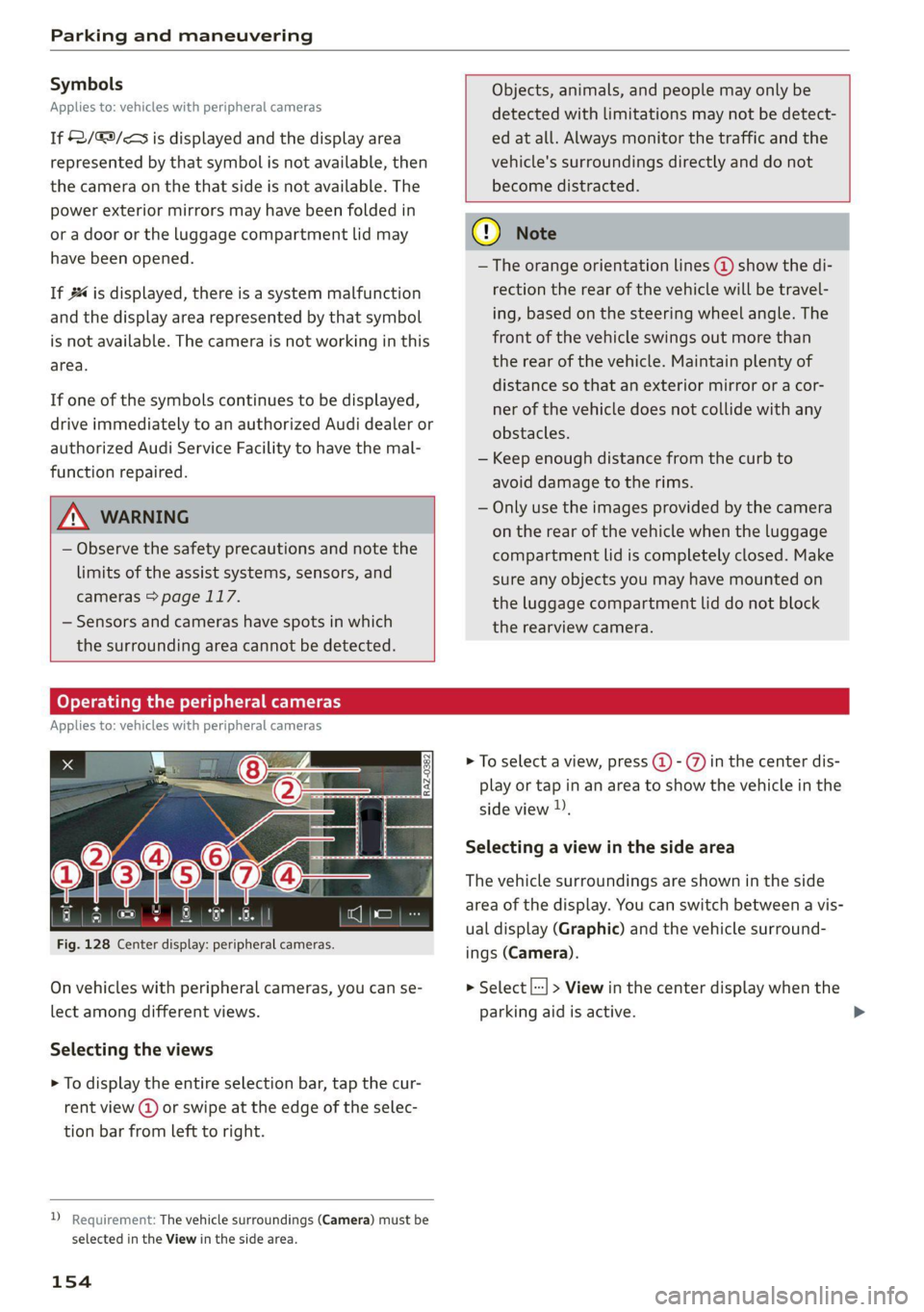
— The orange orientation lines @) show the di-
rection the rear of the vehicle will be travel-
ing, based on the steering wheel angle. The
front of the vehicle swings out more than
the rear of the vehicle. Maintain plenty of
distance so that an exterior mirror or a cor-
ner of the vehicle does not collide with any
obstacles.
— Keep enough distance from the curb to
avoid damage to the rims.
— Only use the images provided by the camera
on the rear of the vehicle when the luggage
compartment lid is completely closed. Make
sure any objects you may have mounted on
the luggage compartment lid do not block
the rearview camera.
Operating the peripheral cameras
Applies to: vehicles with peripheral cameras
Fig. 128 Center display: peripheral cameras.
On vehicles with peripheral cameras, you can se-
lect among different views.
Selecting the views
> To display the entire selection bar, tap the cur-
rent view (d) or swipe at the edge of the selec-
tion bar from left to right.
2 Requirement: The vehicle surroundings (Camera) must be
selected in the View in the side area.
154
> To select a view, press (2) - ) in the center dis-
play or tap in an area to show the vehicle in the
side view ).
Selecting a view in the side area
The vehicle surroundings are shown in the side
area of the display. You can switch between a vis-
ual display (Graphic) and the vehicle surround-
ings (Camera).
> Select |--] > View in the center display when the
parking aid is active.
Page 205 of 304
8W1012721BC
Media
ZA WARNING
Driving requires your complete and undivided
attention. As the driver, you have complete re-
sponsibility for safety in traffic. Never operate
mobile devices while driving, because this in-
creases the risk of an accident.
@) Note
— Pull the cable out of the Audi music inter-
face carefully so that the USB ports are not
damaged.
— Use a USB extension cable to connect devi-
ces that have an integrated USB connector
(such as a USB stick) to reduce the risk of
damage to your USB device and the Audi
music interface.
— Extremely high or low temperatures that
can occur inside vehicles can damage mobile
devices and/or impair their performance.
Never leave mobile devices in the vehicle in
extremely high or low temperatures.
G) Tips
— Always follow the information found in
=> page 82.
—When you switch the ignition off, the USB
ports are still supplied with power until the
energy management intervenes.
— Do not use an additional adapter cable or
USB extension cable to connect mobile devi-
ces to the Audi music interface that already
have a cable or that must be connected with
a USB adapter cable (9 page 202, fig. 150).
Using an additional adapter or US extension
cable may impair functionality.
— Functionality is not guaranteed for mobile
devices that do not conform to the USB 2.0
specification.
— USB hubs are not supported.
— Video playback through the Audi music in-
terface is not supported on Apple devices
and MTP devices (such as smartphones).
— iPod touch or iPhone malfunctions also af-
fect the operation of the MMI. Reset your
mobile device in these situations.
— Audi recommends updating the iPod touch
or iPhone software to the latest version. Re-
fer to your mobile device owner's manual
for more information.
— The USB adapter on the Audi music inter-
face will support iPod touch or iPhone devi-
ces from the 5th generation or newer with
the lightning connector.
—Aselection of supported devices can be
found in the database for tested mobile de-
vices at www.audi.com/mp3.
Playing media
The following sources can be selected depending
on the vehicle equipment:
— Amazon Alexa > page 202.
— USB device = page 202.
— External device: you can connect external devi-
ces via Bluetooth and use the Bluetooth audio
player > page 201, or you can connect an exter-
nal device directly to the Audi music interface
=> page 202.
Accessing media
Playing media files using the MMI
> Applies to: MMI: Select on the home screen:
MEDIA > Source > a source. Depending on the
connected device, the symbol for a source may
change. The device name may be displayed (for
example: myPhone).
> Select a track from the categories in the media
center > page 204.
Playing media files using the multifunction
steering wheel
Requirement: a media source must contain me-
dia files > page 203.
> Select the radio/media tab in the instrument
cluster.
> Turn the left thumbwheel to display the play-
list.
> To switch to a different source, press the [=]
button.
> To select a media file or a source, turn and
press the left thumbwheel.
203
Page 272 of 304
Emergency assistance
Tow bar and towing cable
The vehicle can be towed with a tow bar or tow-
ing cable. Both drivers should be familiar with
the special considerations when towing, especial-
ly when using a towing cable.
Always make sure the traction force does not ex-
ceed the permitted level and there are no shock
loading conditions. There is always the risk of the
coupling becoming overloaded when driving off-
road.
For the most safety and security, drive with a tow
bar. You should use a towing cable only if a tow
bar is not available. Use a towing cable made of
synthetic elastic cable similar elastic material.
ZA\ WARNING
— Towing highly increases the risk of an acci-
dent, for example from colliding with the
towing vehicle.
— To reduce the risk of an accident, do not al-
low anyone to remain inside the vehicle
when it is being transported by a tow truck
or a special transporter.
@) Note
— If normal towing is not possible, for exam-
ple if the transmission is faulty or if the
towing distance is greater than 30 miles
(50 km), then transport the vehicle on a
special carrier.
— If the vehicle is towed by a tow truck at the
axle that is not permitted, this can cause se-
vere damage to the transmission.
— The vehicle must not be tow started for
technical reasons.
G) Tips
— If the power supply is interrupted, then it
will not be possible to move the selector
lever out of the "P" position. The parking
lock must be released using the emergency
release before towing the vehicle
=> page 100.
— Switch Audi pre sense* off > page 146 when
loading the vehicle onto a vehicle carrier,
train, ship,
or other type of transportation,
270
or when towing the vehicle. This can prevent
an undesired intervention from the pre
sense* system.
— Follow the local legal regulations for tow-
ing.
Read and follow the important information under
=> page 269.
Preparations
> Only secure the towing cable or tow bar at the
designated towing loop > page 271.
> Make sure the towing cable is not twisted. Oth-
erwise it could disconnect from the towing loop
while towing.
> Switch the emergency flashers on in both
vehicles > page 53. However, do not do this if it
prohibited by law.
Towing vehicle (front)
> Only start to drive when the towing cable is
taut.
> Press the brake pedal very carefully.
> Avoid sudden braking or driving maneuvers.
Vehicle being towed (rear)
» Make sure the ignition is switched on so that
the steering wheel is not locked and so that you
can use the turn signals, the horn, and the
windshield wipers if needed > A\.
> Switching it off before the vehicle has stopped
may impair the function of the brake booster
and power steering. You would then need to
use more force to steer and brake the vehicle.
> Release the parking brake > page 106.
> Select the “N” selector lever position.
> Make sure the towing cable is always taut.
ZA\ WARNING
— Never tow a vehicle using a tow bar or tow-
ing cable if the vehicle does not have electri-
cal power.
— If the vehicle runs out of power while it is
being towed, stop towing the vehicle imme-
diately and consult an authorized Audi deal-
er or qualified repair facility.
Page 276 of 304
Fuses and bulbs
Fuse panel @) (brown) Fuse panel (© (black)
14 | Fuel injectors, engine control module 11 Left rear door control module, left rear
15 |Ignition coils, heated oxygen sensors power window
16 | Fuel pump 12 | Parking heater
Fuse panel (®) (red) Fuse panel (0) (black)
No. | Equipment No. | Equipment
Anti-theft alarm system
Front seat electronic, seat ventilation,
rearview mirror, rear climate control sys-
tem control panel, windshield heating, di-
agnostic connection
2 Diagnostic interface, vehicle electrical sys-
tem control module
3 |Sound generator
4 |Clutch position sensor
5S |Engine start, emergency shut-off
6 Diagnostic connection, traffic information
antenna (TMC)
7 |USB input
8 |Garage door opener
9 Audi adaptive cruise control, distance reg-
ulation
11 | Front camera
12 | Right headlight
13 | Left headlight
14 | Transmission fluid cooling
Fuse panel (©) (red)
No. | Equipment
1 {Ignition coils
2 |Climate control system compressor
S |Left headlight
6 |Automatic transmission
7 |Instrument panel
8 | Climate control system blower
9 |Right headlight
10 | Dynamic steering
11 | Engine start
2 | Engine control module
3 Left front seat electronics, lumbar sup-
port, massaging seat
4 | Automatic transmission selector lever
5 |Horn
6 |Parking brake
7 | Diagnostic interface
8 | Roof electronics control module
9 |Emergency call module
10 | Airbag control module
11 Electronic Stabilization Control (ESC), An-
ti-Lock Braking System (ABS)
12 | Diagnostic connection, light/rain sensor
13 | Climate control system
14 | Right front door control module
15 | Climate control system compressor
16 | Brake system pressure reservoir
Fuse panel (©) (black)
No. | Equipment
Front seat heating
2 |Windshield wipers
Left headlight electronics
4 Panoramic glass roof / sliding/tilting sun-
roof
5 |Left front door control module
6 | Sockets
7 Right rear door control module, right rear
power window
All wheel drive control module
9 | Right headlight electronics
10 Windshield washer system/headlight
washer system control module
274
Page 296 of 304
Index
Light/rain sensor
Automatic headlights...............00. 51
Intermittent mode (windshield wipers).... 58
CIGHEING': « = sex & = eees & 3 Raw & HeieE 2 F eee 51
EXteriOr’s + cess 2 vem av cen a 2 ee a 2 es 51
TCORIOR ccioe + 0 soniane » : semcace wo wsesure aw ececeat as 54
Listening to music
referto Media................-4- 201, 203
Load... . i.e eee ee 287
E@GAULUSERS ti « sietas oo exansie a « ainsi o x avesiee 8 8 30
Locking and unlocking
By remote control..............-.000-- 38
Using the lock cylinder................. 36
With the convenience key............... 38
Low beam headlights.................00. 51
LTE
refer to Exterior antenna.............. 165
Luggage compartment.................. 83
Cover (power)... ... ce eee eee eee eee 85
Increasing the size................. 85, 86
Passethroughiis « essen s sons a o cos @ sens 6 86
Power SOUrCES .... 1 ee eee eee eee 82
TIG-COWNS sss = ses & z gars se peen st wen ee 87
Valet parking’: « cca es weve ae seme se corre 48
also refer to Luggage compartment...... 83
Luggage compartment lid................ 44
Closing button... ..... 0. cee eee eee eee 4l
General information.................05 40
Mechanically unlocking..............45. 43
Opening and closing................... 41
Opening and closing with foot motion..... 42
Opening from the inside in an emergency... 44
Power opening and closing.............. 41
Luggage compartment net............... 87
Lumbar support...........2.-.000 eee eee 64
M
Maintenance’. » seica i sce ov aveasc vo acanans os 281
Maintenance intervals................-5 233:
Malfunction Indicator Lamp (MIL)........ 220
Manual SHIMING:: « « cows a « cows a x cow a 2 Hew 99
Map
Changing the scale........... 000. seen 184
Display.... 2.0... ee eee eee eee 186
Operating: « asx s x news ¢ o Rew 2 b eRe Fe 185
Setting the destination................ 184
294
MAP
refer to Message Access Profile......... 170
Map preview............0..0 0000000008 184
Map update................02..000 00 189
myAudi app... .. eee c cece eee ee eee 189
ONUNG:: s sexe + 2 wees 2 Ree es Sea Gof Here 189
USBiGONMECEION sxicase s % suncane « © sxenass « © sons 190
Massage function
Front... cece eee eee ees 65
Mechanical key........ 0.0.0 e eee eee eee 37
Media « sisi s ccinene vo anvensa we ot aweseni a aie 201, 203
Supported formats.................-- 207
Media
center.................00000 eee 204
Memory function. ......... 0.0 eee eee eee 71
Menu language
refer to Setting the language........... 212
Menu paths......... 0.0.0... eee eee eee ee 18
Message Access Profile................. 170
MesSagesins « « sows so cavewse 9 a exmnsue wv oss ¥ 6 170
Mitrorcompassy oe sic 3 2 miss oo mar 2 8 aw 61
Mirrors
Adjusting exterior mirrors............... 55
Dimming... 06... cee e eee eee eee 56
Vanity mitror's « wax » ¢ anes 2 y tows © s ewe 57
MMI Navigation plus
refer to Multi Media Interface........... 19
MMI radio
refer
to Multi Media Interface........... 19
MMI Radio plus
refer to Multi Media Interface........... 19
Mobile device
refer to Telephone.............00e000 162
Mobile device reminder signal............ 166
Mountain passes...................00. 107
Mountain roads................0000 eee 107
Multifunction steering wheel
Buttons... 0... 02... cee eee eee 13,29
Operating: « s ws « x eeu sy eee so ewe se 13
Programming buttons...............05- 29
Voice recognition system.............-. 26
Multi Media Interface................... 19
Menus and symbols...............--04- 20
Operating’: « owes 2 wae o 6 wore oo were 17,20
Switching on or off..............02.00. 19
MWC Gpceie 3 5 coveine 6 & cxemens «4 carves ww sagan © & ome 29
MYAUG Es. : aseuore & csesain o cauees oe wrens woo 30,174
Page 302 of 304
Index
Washing matte finish paint.............. 255
Wave band
refer to Frequency band............... 193
Weights ........ 20.0.0 cece eee eee eee
Wheel bolts « ssscs vo sssme vo sence vo avemee 9 oe
Cleaning....
Glossary of tire and loading terminology .. 238
Replacing. ......... 0. cece eee eee eee 263
Tire pressure monitoring system........ 253
Tires and vehicle load limits............ 248
Wheel.wrenelis = sens ss zeus < + cea + x seme 261
Wi-Fi
Hotspotsetti gsi s & sce 6 o soscs oa sniwace o 176
Using ahotspot............. 00.2 eee 174
Windows
Child safety lock......... 2.0.0 eee eee 44
Cleaning and removing ice............. 257
Convenience opening and closing......... 46
Defrosting............ 0. cece eee eee 93
Opening and closing.................-. 45
Power windows: « « ssc 3 cscs v 6 soevens ¥ a 45
Windshield
Cleaning.................2.20.000.00 00 58
DE@TROSEING + = same ¢ s coms 3 x eR GC BEE EF 93
also refer to Windshield................ 58
Windshield washer system........... 58, 233
Windshield wipers...............-.0000- 58
Winter operation
Gar Washes « scm « 2 sam 4 2 soon o 2 oun oo 255
Cooling systeM.......... cee cece eee 227
Defrosting the windows................ 93
Rear window defogger...........-..005 93
Removing ice from windows............ 257
Seat heating... 0... cece ee eee eee eee 92
SNOW CHAINS swe « s wep « = womys go Qe eo oe 2511,
Steering wheel heating................. 93
TiOS 0. ete 250
Vehicle battery (12 Volt).............0. 231
Windshield washer system............. 233
WINtErtIReS sriseas a 3 aeveses ao oramees 5 w mesaun oe vd 250
Wireless Apple CarPlay
refer to Audi smartphone interface...... 210
Wireless charging...............+++05- 165
300