fuel AUDI A4 AVANT 2008 User Guide
[x] Cancel search | Manufacturer: AUDI, Model Year: 2008, Model line: A4 AVANT, Model: AUDI A4 AVANT 2008Pages: 368, PDF Size: 46.19 MB
Page 43 of 368
Single -t rip memory
If you interrupt your trip for more than two hours , the average fuel
consumption value will be reset automatically .
Complete-trip memory
The value for average fue l economy will be stored when the ignition
is off. Once you resume driving. the new mileage figures will be
included into the calculation of the average .•
Applies to vehicles: with trip computer
Average speed
The average speed display helps you plan your progress .
The average speed in mph (km/h) since the last time the display was
reset appears in the display. If you want to determine your average
speed over a new time period, reset the memory using the reset
button
~ page 39, fig . 28 .
Single-trip memory
If you interrupt your trip for more than two hours the average speed
value will be reset automatically.
Complete-trip memory
The average speed value remains in the memory when the ignition
is off . The new data will be entered in to the calculation when you
resume driving.•
Appl ies to vehicles: with trip computer
Instantaneous fuel consumption
The instantaneous fuel consumption display helps you
save fuel.
The instantaneous fuel consumption in miles per gallon (1/100 km)
is shown in this display. You can use this disp lay to adjust your
driving technique to achieve a desired mileage.
Controls and equip
ment
Driver information display
Fuel consumption is recalculated in intervals of 33 yards (30
metres). When the vehic le is standing still, the most recent fue l
consumption is displayed .•
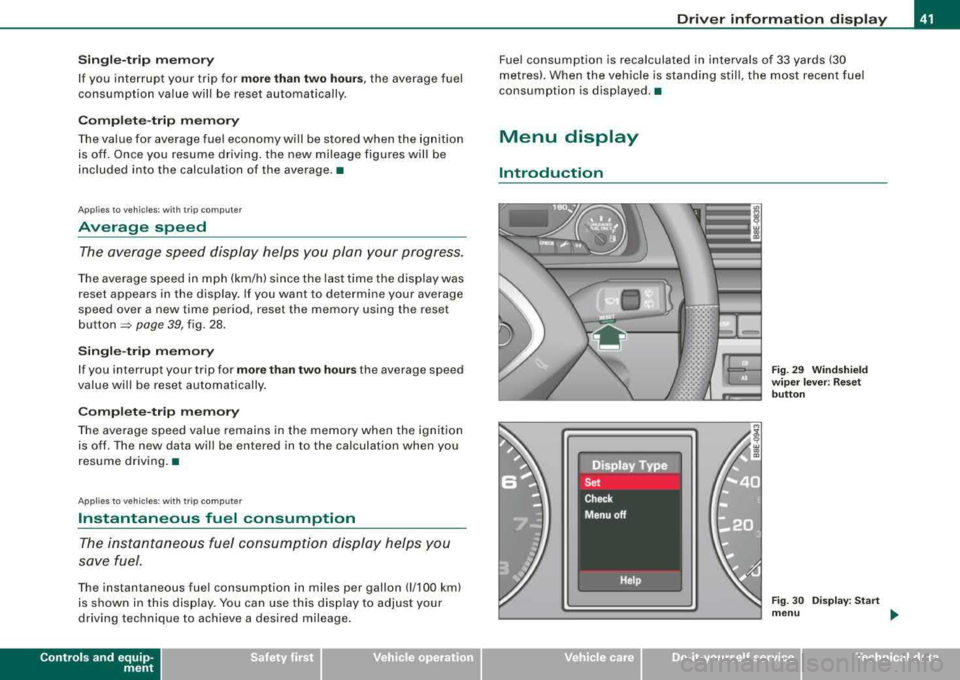
Menu display
Introduction
Fig. 29 Windshield
w iper lever : Reset
button
Fig . 30 Display: Start
menu ...
irechnical data
Page 44 of 368
Driver inf orma tion di spl ay
Several functions in your vehicle can be set, activated and
controlled by means of
Menu s. With these menus, you can addition
ally select which information is to be shown in the DIS (Driver Infor
mation System) disp lay. This functions on ly with the ignit ion
switched on. Operation is controlled through the [Reset] button on
the windshield wiper
lever => page 41, fig. 29.
The
S ta rt me nu shows you the different types of d isplays:
S et
Check
Menu off
H el p•
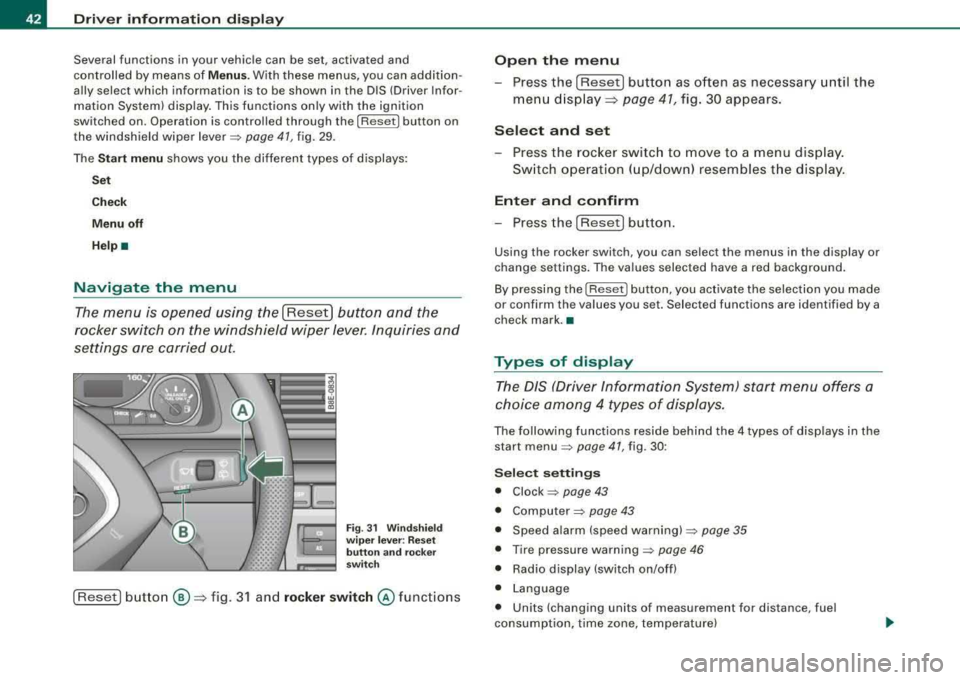
Navigate the menu
The menu is opened using the I Reset] button and the
rocker switch on the windshield wiper lever. Inquiries and
settings are carried out.
F ig. 31 W inds hield
w ip er le ver: R es et
butt on and rocker
sw itch
[Reset] button ®=> fig. 3 1 and rock er switch @ functions
Open th e menu
- Press the [Reset) button as often as necessary until the
menu d isplay::::>
page 41, fig. 30 appears.
S elect and set
- Press the rocker switch to move to a menu display.
Sw itch operation ( up/down) resembles the disp lay .
Enter and confirm
- Press the [Reset! button.
Using the rocker switch, you can select the menus in the display or
change settings. The values selected have a red background .
By pressing the [ Reset] button, you activate the selection you made
or confirm the va lues you set. Selected functions are identified by a
check mark. •
Types of display
The DIS (Driver Information System) start menu offers a
choice am ong 4 types of displays.
The following functions reside behind the 4 types of displays in the
start
menu => page 41, fig. 30 :
Selec t se tting s
• Clock => page 43
• Computer=> page 43
• Speed alarm (speed warning) => page 35
• Tire pressure warning => page 46
• Radio display (switch on/off)
• Language
• Units (changing units of measurement for distance, fuel
consumption, time zone, temperature)
Page 49 of 368
pressures for normal load conditions, p lease see chapter
~ p ag e 297 .
& WARNING
• When the tire pre ssure monitoring sy stem warning light i s lit ,
one or more of your tires is sign ifi cantly under-inflated . You should
s top and check your tire s as soon as possible , and inflate them to
the p rope r pres sure a s indicated on the vehicle's tire pre ssure
label
~ page 297 . Driving on a significantly under -inflated tire
c ause s the t ire to overheat and can lead to tire failure . Under -infla
tion also is likely to impair the vehicle's handling and stopping
ability .
• Do not adjust tire pre ssure when tire temperature is excessive.
Thi s could lead to serious tire damage and even cause the tire to
burst , with the additional danger of an ac cident .
<£' For the sake of the environment
Driving wi th under -inflated tires reduces fuel efficiency and tire
tread life.
[ i ] Tips
• Each tire should be checked mon th ly when cold and set to the
recommended inf lat ion pressure as specified on the tire pressure
table~ page 297 .
• The tire pre ssur e monito ring system he lp s the drive r to kee p
t rack of the tire pressures. But the d river s til l has the responsibi lity
for maintaining the correct tire p ressure .
• Tire pressure must only be adjusted when th e temperature of the
t ires is about the same as am bien t air temperatu re .
• When tires are replaced , the sensors and va lves must not be
detached or exchanged. Only the valve co re needs t o be rep laced
and, if necessary, the valve and the wheel e lectronics replaced.
Controls and equip
ment
Driver information display
• If you should put different whee ls and tires on your vehic le (e .g.
win ter wheels a nd ti res), you must be certa in that the wheels a nd
tires are compatible with the t ire pressure monitoring system .
O therwise the system will register a ma lfunction and a fau lt
message will be displayed. For more information, contact your Audi
dea ler .•
Ap plie s to veh ic les: with tir e pr ess ure mon ito ring syste m
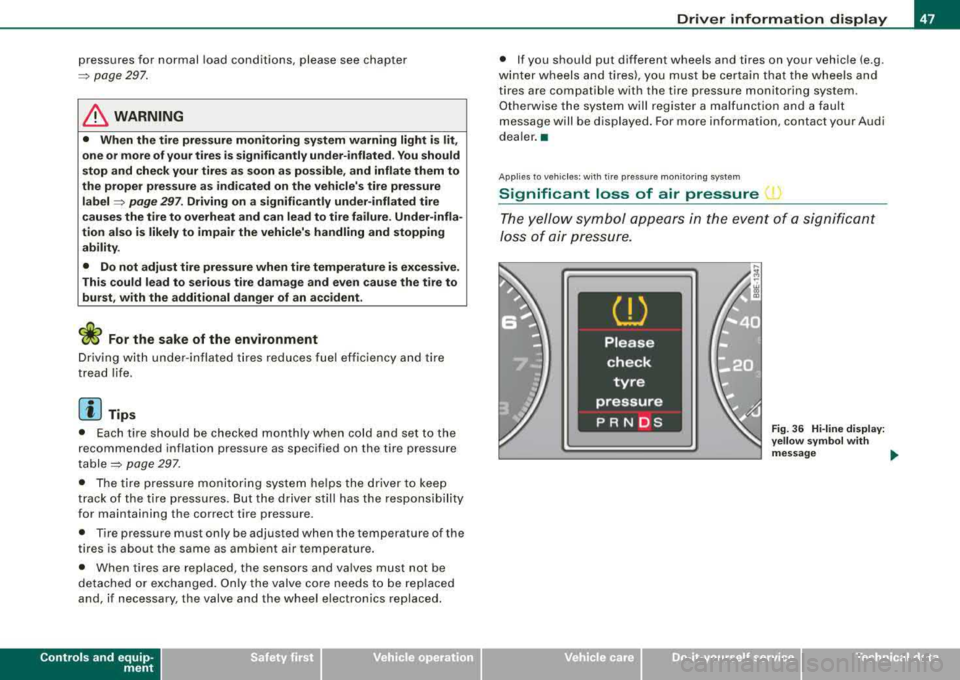
Significant loss of air pressure 1
The yello w symbo l app ear s in the e ve n t of a s ignific a n t
Jo ss of air pre ss ure.
Fig . 36 Hi -lin e di splay:
y ellow s ymbol w ith
message ....
irechnical data
Page 52 of 368
Driver inf orma tion di spl ay
-Push the I RESET I button.
-Push in the upper (lower) protrusion on the function
se lector switch
@ to select the Sto re pre ssure s option
~ page 49, fig. 41.
Following each intentional change in specified pressures , tire pres
sures must be resaved .
Af ter the pressures are saved, the tire pressure monitoring system
measures the current tire pressures and saves them as the new
specified pressures .
[ i] Tips
• The tire pressure is shown on the tire pressure label. On USA
vehic les, the tire pressure label is located on the driver's side 8-
pillar. On Canada vehicles, the tire pressure labe l is located either on
the driver's side 8 -pillar or inside the fuel filler flap . The tire pressure
label lists the recommended cold tire inflation pressures for the
vehicle at its maximum capacity weight and the tires that were on
your vehicle at the time it was manufactured. For recommended tire
pressures for normal load cond itions, please see chapter
~ page 297.
• The tire pressure monitoring system he lps the driver to keep an
eye on tire pressures. But the driver stil l has the responsibility for
mainta ining the correct tire pressure. •
Applies to vehic les : w it h tir e press ure m onit oring sys te m
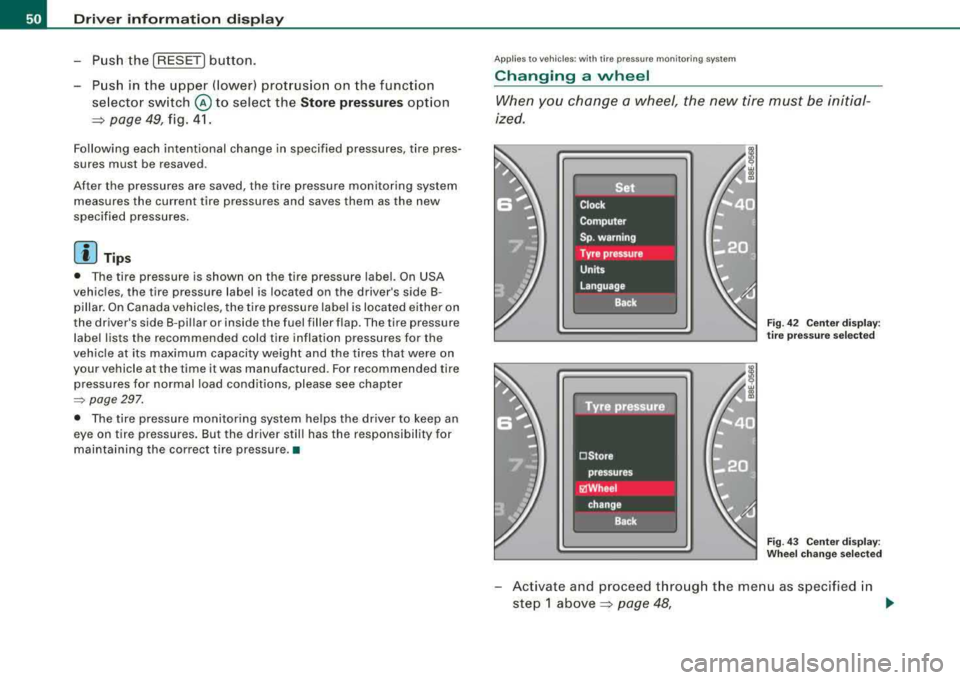
Changing a wheel
When you change a wheel, the new tire mus t be initial
ized.
Fi g. 4 2 C enter display :
t ir e pr ess ure se lected
Fig . 4 3 Ce nter displa y:
W heel ch ang e se lecte d
-Act ivate and proceed through the menu as specified in
step 1
above~ page 48, .,
Page 66 of 368
Openin g and closing
Anti-theft alarm system
Description
The anti-theft alarm triggers an alarm if anyone attempts
to break int o the vehicle.
The anti-theft alarm system triggers an audible alarm and turns on
t he emergency flasher if an unauthorized interference with the
vehic le is sensed by the system .
How is the anti-theft al arm sy stem swit ched on ?
The anti -theft alarm system is switched on when you lock the
dr iver's door manually using your key, o r w hen you use the remote
control. The system is activated approximate ly 30 seconds after the
vehic le is locked. T he indicator light on top of the door trim s tart
flashing rapidly for 30 seconds and then b link slowly.
How is th e anti -theft alarm system switched off ?
The anti-theft alarm system is switched off only when you use the
r emote contro l to unlock your vehicle. If you do not open a doo r
within 60 seconds after you have un locked with the remote control,
the vehicle wi ll loc k itse lf aga in automat ical ly .
If you lock just the driver's door using your key , the front
passenger 's door, the rear and the fue l filler flap remain locked.
I f you use the veh icle key to unlock the driver's door, the other
doors , the rear lid and the fuel tank flap will remain locked . The
a lar m system wil l not be deactivated u nless you insert the key in the
ignition switch within 15 seconds and turn on the ignition . If you fail
to do this, the alarm wi ll sound.
Wh en w ill t he anti th eft ala rm sys tem b e trigg ere d?
When the vehicle is locked, the ala rm system monitors and pr otects
the fo llowing parts of the vehic le:
• engine compartment
• luggage compartment •
doors
• veh ic le incline
• ignition
• factory installed radio .
When the system is activated , the alarm will be triggered if one of
the doors, the engine hood or the rear lid are opened, or if the igni
tion is turned on or the radio removed or if the vehicle incline has
been changed .
The anti -theft alarm system wi ll also go off when you unlock the rear
lid with yo ur key and open it. The alarm is switched off again when
you c lose the rear lid .
The anti -theft alarm system wil l also go off when the battery is
disconnected.
You can also trigger the alarm by pressing the PANIC button on your remote c ontro l. This wil l a lert other people in case of emergency.
Press the
PANI C button again to turn off the a larm .
How i s the anti-theft alarm switched off when
trigg ere d ?
The ala rm system is switched off when you un lock the veh ic le using
the remote contro l or when the ignition is switched on . The a larm
wi ll also switch itse lf off when it co mes to the end of its cyc le .
Em ergen cy flash er
The emergency flasher wil l b link briefly when the doors, engine
hood and rear lid are properly closed .
I f the emergency flashers do not blink, check the doors, engine hood
and rear l id to make sure t hey are proper ly c losed . If you close a
door, the hood or the rear lid with the anti -theft a larm switched on,
the emergency flas hers wil l b link only after you have closed the
door or lid .
.,_
Page 118 of 368
___ S_ e_a _t_s _ a_n_ d_ s_ t_ o_ ra~ g_e ______________________________________________ _
Roof rack installation
General information
The vehicle is equipped with integrated r oof railings. A
r oo f rack c an be used to carry additional luggage on the
r oo f.
- Always heed and read t he instructions prov ided by the
roo f rack manuf act urer when t he roof rack system must
be installed.
If a roof rack or simi lar luggage carry ing equipment is to be
insta lled, please note the fo llowing :
• T he ve hicle is eq uip ped with
integrated roof railings, which can
be covered into roof rack by installing cross bars . Only insta ll cross
b ars spec ifically des igned for this vehicle .
• These bars are the basis for a comp lete roof rack system . Addi
tio nal a ttachments are necessary to safe ly t ransport luggage, b icy
cles, surf boards, skis or small boats .
• All n ecessary har dware for these systems is ava ilable from your
authorized Audi dea ler.
When should the ro of r ac k be removed ?
• Before going through an automatic car wash (it is best to ask the
car was h operator}.
• When not in use (reduce fuel consumption, reduce wind noise
and guard agai nst theft).
_& WARNING
• Use of an unappro ved roof ra ck or incorre ct mounting of an
approved roof rack can cause the roof rack or the items carried on
it to fall off the roof onto the ro ad .
& W ARNING (continued )
• Objects falling from the roof of a vehi cle can cause a crash and
per sonal injury .
• Only mount the sy stem between the markings shown in
=> page 11 7, fig. 124.
• The roof ra ck sy stem must be installed exactly according to the
instruct ions prov ided.
0 Note
• Any damage to the vehicle caused by using roof racks or other
t ypes o f cross bars that have not been approved by Audi for y our
vehic le, or incorrect roof rack instal lation, is not covered by the
Warranty .
• Always check the roof rack mountings and hardware before each
t rip and during a trip to make s ure everyth ing is securely tightened .
If necessary, retighten the mountings and check the entire system
from time to time.
• After mounting a roof rack system, or when you transport
objects on the roo f of your vehicle, the height of the vehicle is natu
ra lly increased . Be carefu l when driving under low bridges or in
park garages for example . Th is cou ld cause damage to the vehic le
and even the load. •
Page 120 of 368
___ S_ e_ a_t _s _a_ n_d _ s_t _o _ r_ a...: g==-- e ______________________________________________ _
vehicle wi ll unnecessarily use more fuel. Remove the roof rack if you
are not going to use i t.•
Cupholder
Cuphold er in th e center consol e
---==-----
Fig. 12 5 Center
c onsole : d u al
c uph older
T here are two cupholders in the center console => fig. 125.
& WARNING
Spilled hot liquid can cau se an accident and pe rsonal injury .
• Never carry any beverage containers with hot liquid s, such as
hot coffee or hot tea , in the vehi cle while it i s moving . In case of an
accident , sudden braking or other vehicle movement , hot liquid
could spill , cau sing scalding burns. Spilled hot liquid can also
c ause an ac cident and personal injury .
• Use only soft cups in the cup holder . Hard c ups and gla sses can
c au se injury in an accident.
0 Note
On ly dr ink containers with lids shou ld be carr ied in the cupholder .
Li quid could spill out and damage your vehicle's electronic equip
ment or stai n th e upho lstery, etc .•
Cupholder in the re ar center armrest
Opening the cup holder
Fig . 126 Rea r center
a rmrest : cupholder
extended
- Press both spots marked wit h 'i@ ~ fig. 1 26 ~ & .T he
holde r exte nds.
Adjusting the retainer individually
Pr ess an d ho ld t he retain er arm ® inwar d -arrow -an d
adjust it to
fi t th e cup size.
The retainer arm sh ould fi t snugly ar oun d the c up or can .
The cup holder is designed to secure no more than two cups or cans .
Page 130 of 368
_L_W:...:._: a::..:_: rm:....:...:..~ a::..: n~ d~ c~o :.:l.:::d :.._ _______________________________________________ _
By pressing both !AUTO l buttons for several seconds, the tempera
ture on the passenger's side can be set to the temperature of the
driver's side or vice versa . The new temperature set ting will be
shown in the display. The old temperature setting can be restored
by resetting the display as required. •
Switching between Fahrenheit and
Centigrade
You can change the temperature display from °F (Fahren
heit) to
°C (Centigrade) and vice versa.
- Press and hold[ ~] and press the plus button on the
driver's side temperature
switch ~ page 126, fig. 137 . •
Air recircul ation [~]
The air recirculation prevents exhaust fumes or other
pollution from entering the vehicle.
Switching on the air recirculation
-Press[ ~]~ page 126, fig. 137 ~ &
Switching off the air recirculation
-Press~ again, or
- press [AUTO], or
press[ ®].
In the air recirculation mode , the air in the passenger compartment
is recirculated to prevent exhaust fumes and other pollution from
entering the vehicle. We recommend that you use the manual air recirculation under the following conditions:
• when driving through tunnels
• in a tra ffic jam.
& WARNING
Do not use this setting for extended periods of time . The windows
could fog up since no fresh air can enter the vehicle.
If the
windows fog up, press the air recirculation button again immedi ately to switch off the air recirculation function or select defrost. •
ECON [ECON]
Using ECON helps save fuel
- Press [ECON] to activate ~ page 126, fig. 137.
Press [ECON] again or press [AUTO] to switch off.
In ECON mode the air conditioner is shut off and heating and venti
lation are automatically controlled . "ECON" translates "Economy"
since driving with the air conditioning compressor disengaged
improves your mileage noticeably.
When operating in ECON mode make sure the temperature inside
the vehicle is not lower than the outside temperature. The air is
nei ther cooled nor dehumidified, so there is a risk that the windows
can fog up .•
Switching the air conditioning on and off [ OFF]
Switching the air conditioning off
-Press [ OFF] to turn the air conditioner off and block
outside air from entering the vehicle.
Switching the air conditioning on
-Press [ OFF] again (indicator light comes on again), or
- Press [AUTO], or
- Press one of the following buttons:
[O J,[@!] or [-0, ].
Page 134 of 368
-
Warm and cold
----------------
The rear window defogger works only when the ignition is switched
on. The light in the switch will illuminate when the defogger is on .
When the outside temperature is warmer than 32 °F (O °Cl , the rear
window defogger switches off automatically after about ten minutes.
'£> F o r the sake of the environment
Switch off the defogger when the rear window is clear . When you
save e lectricity, you save fuel. •
Using the climate controls economically
Using the climate controls prudently can help save fuel .
When you use the air conditioner, engine power is reduced
and fuel consumption increases . To save fuel, you should
use the air conditioner only when necessary . Also please
note the following points:
-If you want to save fuel, activate ECON.
-If you are goi ng to drive w ith the windows open, use
ECON.
'£> For th e sake of the environment
By reducing the amount of fue l you use , you also reduce the amount
of pollutants emitted into the air. •
Key coded settings
When the ignition is switched on, the air conditioner
settings are automatically assigned to the key being used.
The air conditioner settings selected are automatically stored and
assigned to the key being used. When the vehicle is started, the air
conditioner automatically selects the settings assigned to that key.
This way every dr iver will ma intain his/her own personal settings
and does not have to reset them manually .
[ i ] Tip s
If a different driver uses your key and changes the air conditioner
set tings, the latest adjustments will erase and replace the settings
you have stored. •
App lies to ve hicles: w ith e lec tric ally heat ed front seats
Electrically heated front seats
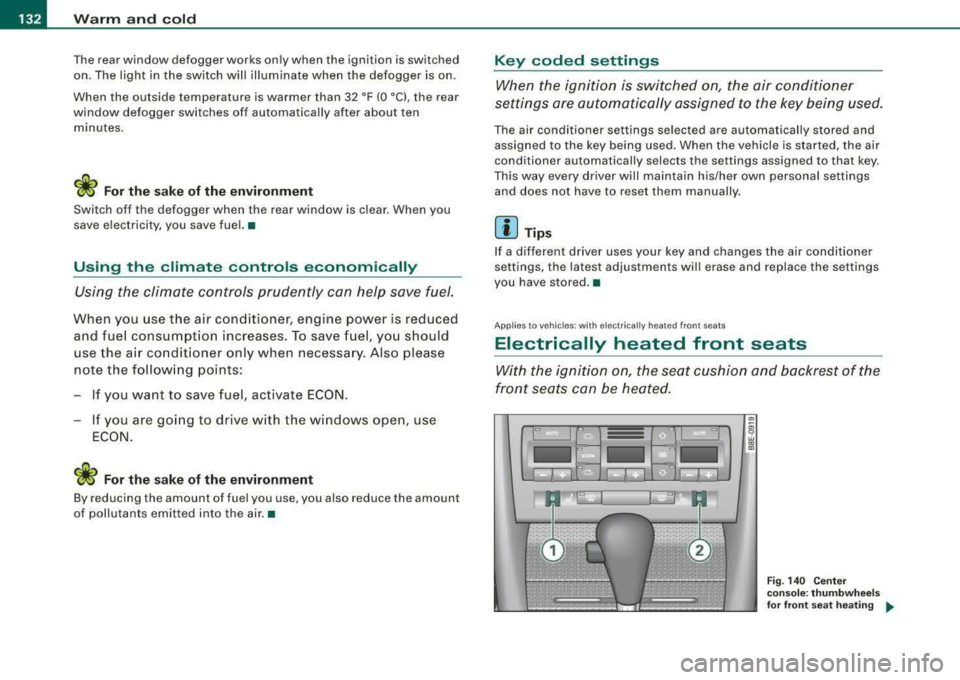
With the ignition on, the seat cushion and backrest of the
front seats can be heated.
Fig . 140 Cente r
cons ole: thumb whe els
fo r fr ont seat heati ng
....
Page 140 of 368
___ o_ n_ t_h _e _ r_o _a_ d __________________________________________________ _
-Keep the release button pressed and lower the parking
brake~ &.
If you should drive off with the parking brake still set, a warning tone
will sound and the following will appear in the instrument cluster to
remind you to release the parking brake:
Parking brake set
The parking brake warning comes on only after you have driven for
longer than 3 seconds and faster than 5 mph (5 km/h).
The parking brake warning light Brake (USA)/
«Dl (CDN) illuminates
when the parking brake is set and you switch on the ignition.
& WARNING
Always release the parking brake completely. A partially engaged
brake will overheat the rear brakes, reduce their effectiveness and
cause excessive wear. This could lead to brake failure and an acci
dent.
0 Note
Only after the vehicle has come to complete stop, should you firmly
set the parking brake and either move the gearshift lever into 1st.
gear (manual transmission) or move the selector lever into
"P"
(Automatic transmission).•
Parking
To prevent a parked vehicle from rolling away, there are a
few things you should do.
When you park your vehicle, do the following:
-Stop the vehicle using the brake pedal.
-Set the parking brake firmly.
-Move the selector lever into the P position ~ &.
-Switch off the engine and remove the ignition key from
the ignition lock.
What else you should do when parking your vehicle on
an incline or decline
Turn the steering wheel so that if the vehicle should start to roll, it
will roll into the curb.
If you are parking on a
decline (the front of your vehicle facing
downhill), turn the front wheels to the right so that they point
toward the curb.
If you are parking on an incline (the front of your vehicle facing
uphill), turn the front wheels to the left so that they point
away from
the curb.
Move the selector lever into the P position.
& WARNING
This is how you can reduce the risk of injury when leaving your
vehicle.
• Never park the vehicle where it can come in contact with dry
grass, spilled fuel or any other flammable materials.
• Never allow anyone -especially small children -to remain in the
vehicle when it is locked. Locked doors make it more difficult for
rescuers to access the passenger compartment in the event of an
emergency. Danger to life!
• Never leave children unsupervised in the vehicle. Children
could release the parking brake or move the gearshift lever out of
gear. The vehicle could start to roll away and cause an accident.
• No matter what the season is, the temperature in a parked
vehicle can reach dangerous levels. •