instrument cluster AUDI A4 AVANT 2008 User Guide
[x] Cancel search | Manufacturer: AUDI, Model Year: 2008, Model line: A4 AVANT, Model: AUDI A4 AVANT 2008Pages: 368, PDF Size: 46.19 MB
Page 31 of 368

Driver information messages
Along with some particular warning/indicator lights and instrument cluster symbols, additional messages will
appear in the display .
A driver information message will appear in the display when, for
example :
a light bulb has burnt
out => page 35,
or if you drive off with the parking brake s till engaged (pulled up).
or before you move the selector lever in gear (automatic transmis
sion).
Driver information messages can be switched o n by the driver when
a priority 1 symbol appears and flashes =>
page 28.
Sw it c hing on th e dri ver inf orm ati on me ssage
For example, if there is a malfunction in the engine oil pressure, the
~ symbo l will appear in the display . If you press the CHECK button ,
the following message will appear:
Sw itch off en gin e, check oil l evel
The message goes out after approximately 5 seconds. Press the
CHECK button to display the message again.
[ i ] Tip s
The following two messages, Handb ra ke i s a pplie d and Wh en
s tati onary ap ply foot br ake while selecting g ear ,
cannot be
switched on again . T hese messages will remain in the display until
you release the parking brake or unti l you move the selector lever
into a gear .•
Controls and equip
ment
Dri ver inf orma tio n di spl ay
Parking brake warning
To release the parking brake, first press the release button in the
lever and lift the lever s lightly. Then lower it all the way down.
If you should drive off with the parking brake still engaged, a
warning tone will sound to remind you to release the pa rking brake.
Also, the following message will appear in the display :
Handbrake is a pplied
The parking brake warning is activated when you drive longer than
3 seconds and faster than 3 mph (5 km/h) .•
Ap plies to vehi cles: w it h ma nua l trans mission
Function test : manual transmission
Fig. 17 Dis pl ay:
man ual trans missio n
fu ncti on test
perfo rmed
The Auto -Check Control will automatically perform a test each time
you switch on the ignition.
If the functions monitored by the Auto-Check Control are working
properly, the
O K => fig. 17 will light up for a few seconds. .,_
irechnical data
Page 39 of 368
will remain stored in the system until it is changed by briefly
pressing the button again or until it is reset by holding down the
button for at least two seconds. •
Speed warning 2: setting a speed limit
Switches in the wiper arm are used to operate warning
threshold 2.
Controls and equip
ment
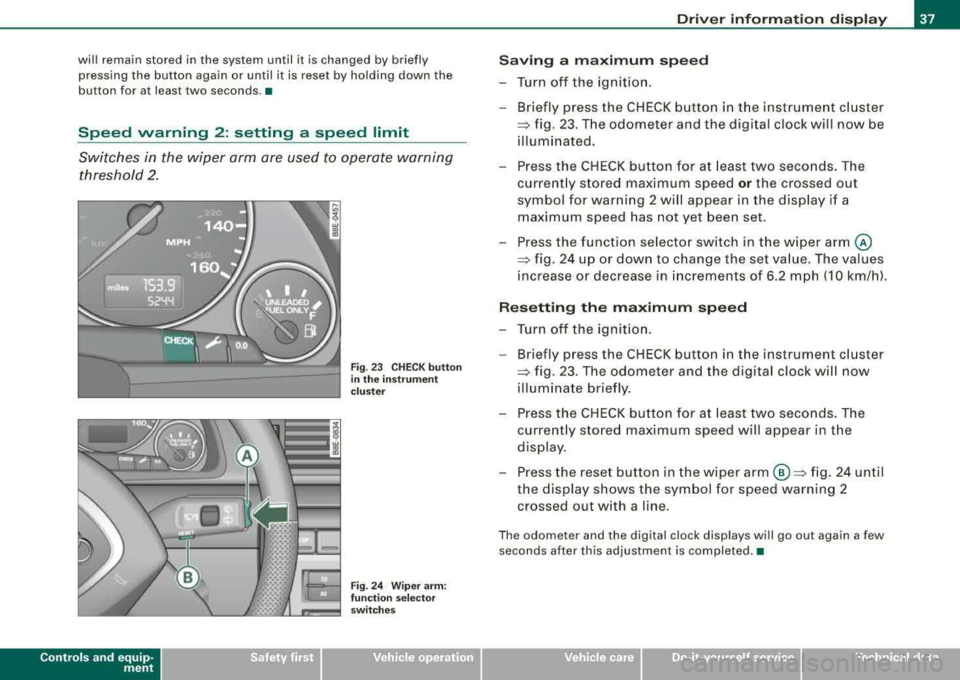
Fig . 23 CHECK button
in the instrument
cluster
Fig. 24 Wiper arm:
function selector
switches
Driver information display
Saving a maximum speed
-Turn off the ignition.
-Briefly press the CHECK button in the instrument cluster
=> fig. 23 . The odometer and the digital clock will now be
illuminated.
-Press the CHECK button for at least two seconds. The
currently stored maximum speed
or the crossed out
symbol for warning 2 will appear in the display if a maximum speed has not yet been set.
Press the function selector switch in the wiper
arm @
=> fig. 24 up or down to change the set value. The values
increase or decrease in increments of 6.2 mph (10 km/h).
Resetting the maximum speed
-Turn off the ignition.
- Briefly press the CHECK button in the instrument cluster
=> fig. 23. The odometer and the digital clock will now
illuminate briefly.
-Press the CHECK button for at least two seconds. The
currently stored maximum speed will appear in the
display.
-Press the reset button in the wiper arm ©=> fig. 24 until
the display shows the symbol for speed warning 2 crossed out with a line.
The odometer and the digital clock displays will go out again a few
seconds after this adjustment is completed. •
irechnical data
Page 48 of 368
Driver inf ormation di spl ay
tire pressure, even if under-inflation has not reached the level to
t rigger il lum ination of the TPMS low tire pressure te llta le .
• Each tire should be checked month ly when cold and inflated to
the infla tion pressure recommended by the vehic le manufacturer
on the vehicle placard , tire inflation pressure label, or in chapter
=> page 297 . (If your ve hicle has tires o f a different size than t he size
indicated on the vehicle placard or tire inf lation pressure label, you
should de termine the proper tire inflation pressure for those
tires.) •
Applies to vehi cles : with tire p ress ure mo nit o ring system
TPMS malfunction indicator
Your vehic le has also been equipped with a TPMS ma lfunction indi
cator to indicate when the system is not operating properly. The
TPMS ma lfunct ion indicator is combined with the low tire pressure
telltale . When the system detects a ma lfunction, t he tellta le wi ll
f lash for approximately one minute and then remain continuous ly
il lum inated. T his sequence wil l continue upo n subsequent veh icle
star ts up as long as the malfunction exists.
When the ma lfunc tion ind icator is ill uminated, the system may not
be able to detect or signal low tire pressure as intended .
TPMS malfunctions may occur for a variety of reasons, including the
installation o f rep lacement or a lternate tires or wheels on the
vehic le that prevent the TPMS from functioning properly . A lways
check t he TPMS malfunction tellta le after replac ing one or more
tires or whee ls on your v ehicle to ensur e that the replacement or
a lternate t ires and wheels al low the TP MS to continue to function
proper ly. •
Ap plies to ve hicles : w it h tir e pressu re m oni to ring sy ste m
Introduction
T he tire pressure monitoring system monitors air pressure
in all four road wheels while the vehicle is moving.
As soon as the tire pressure monito ring system se nses a significant
loss of air pressure in one or several tires, text messages and yel low
symbo ls appear in the instrument clus ter disp lay to a lert the driver.
The
(l) warning light in the instrument cluster comes on when the
t ire is significa ntly under inflated.
The warning light
(l) also lights up during a system failure .
When the whee l is turning, the system receives radio signals from
sensors located inside each tire.
A factory spare wheel is delivered with sensor . However, the spare
whee l is not checked by the ti re pressure monitoring sys tem. Such
monitoring can on ly occur after the spare wheel has been insta lled
and
initia lized => page 50.
Be aware that t ire pressure is a lso dependent o n the temperature of
the tire . For every 18 °F (1
O °C) increase in tire temperature, tire pres
su re increases by about 1.5 psi (0 .1 barl. The tire warms up wh ile the
vehic le is moving and t ire pressure rises. So you should adjust tire
pressure only when they are
cold, when tire temperature is roughly
the same as ambient air temperature .
I n order to keep the tire pressure moni toring system prope rly ca li
brated, tire pressure on all four tires shou ld be checked at regular
intervals, adjusted if necessary and saved in the proper sett ing
(reco mmended
pressure) => page 48.
The tire pressure is shown on the tire pressure label. On USA vehi
cles, the tire pressure label is located on the dr iver's side B -pillar. On
Canada vehicles, the tire pressure labe l is located either on the
driver's side B -p illar o r inside the fue l fi ller flap. The tire pressure
label l ists the recommended cold tire inflation pressures for the
vehic le at its maximum capacity weight and the tires that were on
your vehicle at the t ime it was manu factured . For recommended tire
~
Page 50 of 368
Driver inf orma tion di spl ay
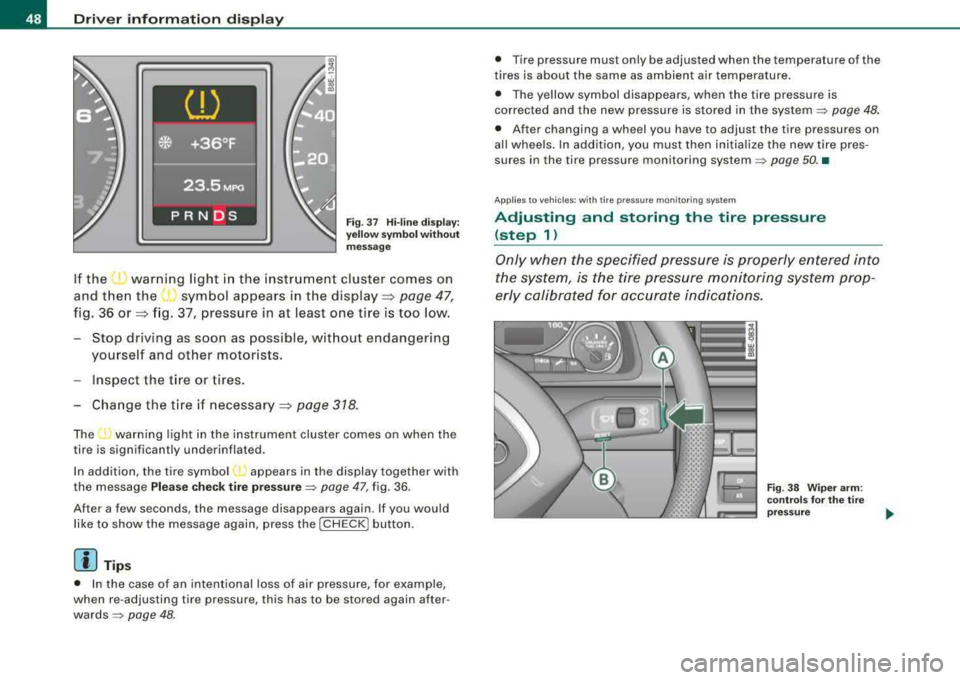
Fig. 3 7 H i-lin e dis play:
ye llow sy mbo l w ith out
m essa ge
If the ~ warning light in the instrument cluster comes on
and then the
( symbol appears in the display=> page 47,
fig. 36 or => fig. 37, pressure in at least one tire is too low.
- Stop driving as soon as possible, without endangering yourself and other motorists.
Inspect the t ire or tires .
Change the t ire if necessary=>
page 318.
The ...., warning light in the ins trument cluster comes on when the
tire is significantly underinflated.
In addition, the tire symbol appears in the display together with
the message
Ple ase c hec k tire p re ss ure ~ page 47, fig. 36 .
After a few seconds , the message disappears again. If you would
like to show the message again, press the
I CH ECK I button.
[ i ] Tips
• In the case of an intentional loss of air pressure, for examp le,
when re -adjusting tire pressure, this has to be stored again after
wards~ page 48.
• Tire pressure must only be adjusted when the temperature of the
t ires is about the same as ambient air temperature.
• The yellow symbol disappears, when the tire pressure is
corrected and the new pressure is s tored in the system
~ page 48 .
• After changing a wheel you have to adjust the tire pressures on
all wheels. In addition, you must then initia lize the new tire pres
sures in the tire pressure monitoring
system ~ page 50. •
Ap plies to vehic les : w it h tir e pressu re m onit oring syste m
Adjusting and storing the tire pressure
(step 1)
Only when the specified pressure is properly entered into
the system, is the tire pressure monitoring system prop
erly calibrated for accurate indications.
Fi g. 38 Wiper ar m:
co ntr ols fo r the t ire
press ure
Page 53 of 368

-select Whe el ch ange in the Tir e pr ess ure menu.
Programming is necessary:
• aft e r rotating th e wh eels on the vehicle,
• if whee ls with new wheel sensors are used .
Your tire change is incomplet e if you do no t access the Driver Infor
mation System menu, and select and confirm
Wh eel ch ang e. You
mus t do this each time to change a tire. The procedure can take up
to 20 minutes driving time. During this time, the sensors are read
justing to the new wheel/tire combination, and the new pressures are stored .
During the learning phase, the tire pressure monitoring system is
not availabl e.•
App lies to veh ic les: w ith tir e p ressure monitor in g sys tern
Malfunctions
A ma/function can have various causes.
F ig . 44 D isplay:
Syste m malfun ction
If the warning light in the instrument cluster flashes for approxi
mately one minute and then remains continuously illuminated and
Controls and equip
ment
Dri ver inf orma tio n di spl ay
additional ly the => fig. 44 symbol appears in the display, the
tire pressure monitoring system is not available . This can have
various causes.
• If the message appears at the end of the learning phase, the
system cannot recognize the wheels insta lled on the vehicle . This
can be because one or more wheels without a wheel sensor were
installed .
• A wheel sensor or other component may have failed.
• The system has detected more than 4 wheels in the vehicle, for
example while driving beneath another car with tire pressure moni
toring system .
• A tire was changed but
the => page 50, "Changing a wheel"
procedure was not activated
=> page 50.
• Audi replacement parts were not used .
• If snow chains are being used , system function can be compro
mised due to the shie lding properties of the chains .
• The tire pressure monitoring system may not be available
because of a radio malfunction .
• Transmitters with the same frequency , such as radio head
phones in the vehicle or radio equipment, can cause a temporary
dis ruption of the system through excessive el ectromagn etic fie lds.
• Try to find the cause of the interference, and then perform the
=> page 50, "Changing a wheel" procedure one more time . If this not
e liminate the prob lem , contact your authorized Audi dea ler for
assistance .
• Do not use commercially available tire sealants. Otherwise , the
electrica l components of the tire pressure monitoring system will
no longer work properly and the sensor for the tire pressure moni
toring system will have to be replac ed by a qualified workshop. •
Technical data
Page 80 of 368
![AUDI A4 AVANT 2008 User Guide Clear vision
[ i] Tips
• Do not attach any stickers to the windshield in front of the two
light sensors, as this would interfere with both the automatic oper
ation of t](/img/6/57552/w960_57552-79.png "AUDI A4 AVANT 2008 User Guide Clear vision
[ i] Tips
• Do not attach any stickers to the windshield in front of the two
light sensors, as this would interfere with both the automatic oper
ation of t")
Clear vision
[ i] Tips
• Do not attach any stickers to the windshield in front of the two
light sensors, as this would interfere with both the automatic oper
ation of the headlights and the automatic dimming of the inside
mirror(sl.
• If the vehicle is remotely unlocked and locked
three times in
succession,
leaving home will not turn on the lights a fourth time to
safeguard the battery and lights .
• If you wish to use the coming home/leaving home function regu
larly, you can leave it activated at all times without risking perma
nent strain on the electrical system. As the system is controlled by
light sensors, it wi ll only be energized in darkness.
• Frequent use of the coming home/leaving home function for
approaching and departing a vehicle parked in the dark wil l strain
the battery. This applies particularly if only short distances are
driven between stops . Occas ionally drive longer distances to make
sure the battery is recharged sufficiently.
• If the fog lights have been switched on by the coming
home/leaving home function, they will always be switched off when
you switch on the ignition .•
Instrument panel illumination
The glow of the instruments, displays and the center
console can be adjusted to increase or reduce brightness.
Fig. 76 Instrumen t
panel illumination
Press the"+" button to increase the brightness.
- Press the"-" button to reduce the brightness.
Ignition ON, light switch at @.
With the ignition switched ON, the glow of instrument needles can
be adjusted to appear brighter or dimmer.
Ignition ON, light switch at ;oo~ or io.
With the lights switched on, the brightness of instrument cluster
!i.e . needles, gauges and displays) and center console illumination
can be adjusted.
0 Note
The instrument cluster and center console illumination (gauges and needles) comes on when you switch on the ignition and the vehicle
headlights are off. Be aware of the following difference between
models built to US or Canadian specifications : ..,
Page 82 of 368
Clear vision
• your vehicle is being towed by a tow truck or if you a re towing
another vehicle behind you. •
Turn signals -¢ ¢ and high beam ~D lever
The lever on the left side of the steering column is used to
operate the turn signals and the high beam as well as the
headlight flasher.
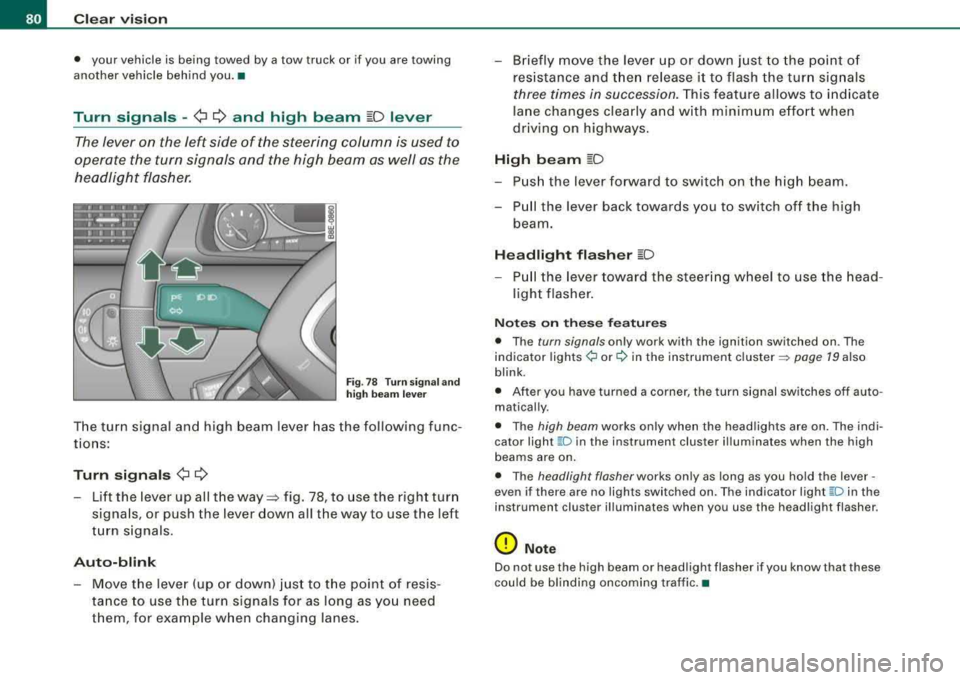
Fig. 78 Turn signa l and
high beam lever
The turn signal and high beam lever has the following func
tions:
Turn signals ¢ ¢
-Lift the lever up all the way~ fig. 78, to use the right turn
signals, or push the lever down all the way to use the left
turn signals .
Auto-blink
-Move the lever (up or down) just to the point of resis
tance to use the turn signals for as long as you need
them , for example when changing lanes.
-Briefly move the lever up or down just to the point of
resistance and t hen release it to flash the turn signals
three times in succession. This feature allows to indicate
lane changes clearly and with minimum effort when
driving on highways.
High beam ~D
-Push the lever forward to switch on the high beam.
-Pull the lever back towards you to switch off the high
beam.
Headlight flasher ~D
-P ull the lever toward the steering wheel to use the head
light flasher .
Notes on these features
• The turn signals only work with the ignition switched on . The
indicator
lights ¢ or¢ in the instrument cluster => page 19 also
blink .
• After you have turned a corner, the turn signal switches off auto
matically .
• The high beam works only when the head lights are on . The indi
cator light
~ D in the instrument clus ter illuminates when the high
beams are on.
• The headlight flasher works only as long as you hold the lever -
even if there are no lights switched on. The indicator light
~Din the
instrument cluster illuminates when you use the headlight flasher .
0 Note
Do not use the high beam or headlight flasher if you know that these
could be blinding oncoming traffic. •
Page 140 of 368
___ o_ n_ t_h _e _ r_o _a_ d __________________________________________________ _
-Keep the release button pressed and lower the parking
brake~ &.
If you should drive off with the parking brake still set, a warning tone
will sound and the following will appear in the instrument cluster to
remind you to release the parking brake:
Parking brake set
The parking brake warning comes on only after you have driven for
longer than 3 seconds and faster than 5 mph (5 km/h).
The parking brake warning light Brake (USA)/
«Dl (CDN) illuminates
when the parking brake is set and you switch on the ignition.
& WARNING
Always release the parking brake completely. A partially engaged
brake will overheat the rear brakes, reduce their effectiveness and
cause excessive wear. This could lead to brake failure and an acci
dent.
0 Note
Only after the vehicle has come to complete stop, should you firmly
set the parking brake and either move the gearshift lever into 1st.
gear (manual transmission) or move the selector lever into
"P"
(Automatic transmission).•
Parking
To prevent a parked vehicle from rolling away, there are a
few things you should do.
When you park your vehicle, do the following:
-Stop the vehicle using the brake pedal.
-Set the parking brake firmly.
-Move the selector lever into the P position ~ &.
-Switch off the engine and remove the ignition key from
the ignition lock.
What else you should do when parking your vehicle on
an incline or decline
Turn the steering wheel so that if the vehicle should start to roll, it
will roll into the curb.
If you are parking on a
decline (the front of your vehicle facing
downhill), turn the front wheels to the right so that they point
toward the curb.
If you are parking on an incline (the front of your vehicle facing
uphill), turn the front wheels to the left so that they point
away from
the curb.
Move the selector lever into the P position.
& WARNING
This is how you can reduce the risk of injury when leaving your
vehicle.
• Never park the vehicle where it can come in contact with dry
grass, spilled fuel or any other flammable materials.
• Never allow anyone -especially small children -to remain in the
vehicle when it is locked. Locked doors make it more difficult for
rescuers to access the passenger compartment in the event of an
emergency. Danger to life!
• Never leave children unsupervised in the vehicle. Children
could release the parking brake or move the gearshift lever out of
gear. The vehicle could start to roll away and cause an accident.
• No matter what the season is, the temperature in a parked
vehicle can reach dangerous levels. •
Page 142 of 368
___ O_ n_ t_h _e_ r_o _ a_ d ____________________________________________________ _
Cruise control
General information
The cruise control system allows you to maintain a
constant speed.
The cruise control system allows you to maintain and constant
driving speed when driving faster than 18 mph (30 km/h) -to the
extent this is possible with the given engine power and braking
characteristics. This allow you to take your foot off the "gas" and
rest it, especially on long trips .
The indicator light CRUISE (USA)/
•l'l (CDNl in the instrument cluster
illuminates when the system is on .
& WARNING
• To help keep the vehicle under control, do not use the cruise
control system when driving on winding or slippery roads (as
caused by heavy rain or loose gravel on the road surface), or in
heavy or varying traffic.
• Only use the cruise control when traffic, road and weather
co nd itions allow you to drive at a steady speed.
[ i] Tips
The cruise control cannot maintain a constant speed when driving
downhill. The vehicle will accelerate under its own weight. Down
shift to a lower gear or use the brakes to slow down .•
Storing a speed
You must set and then store a vehicle speed using the
cruise control.
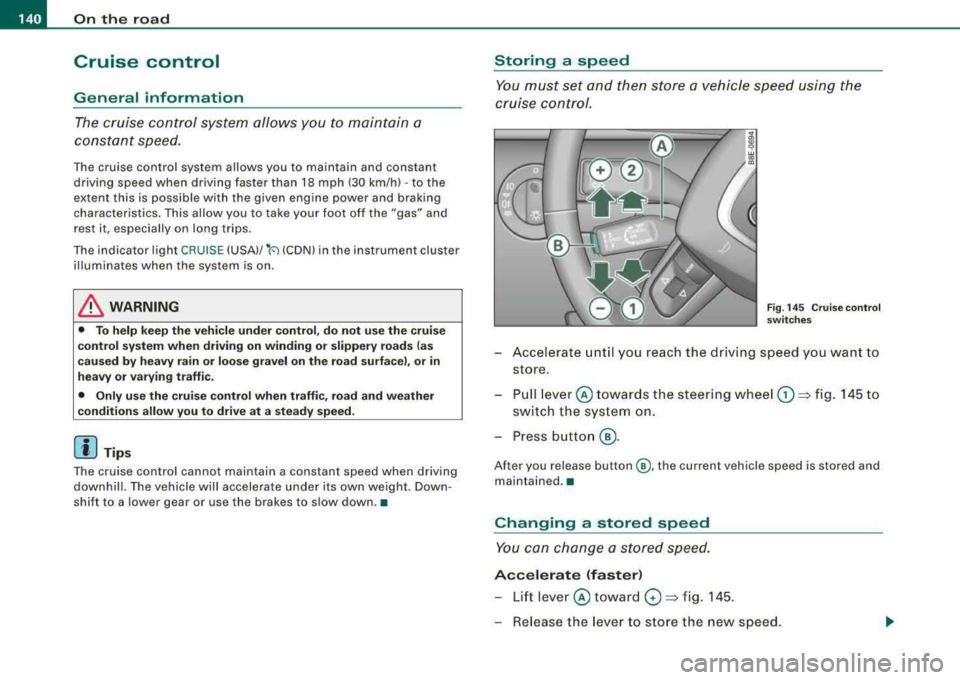
Fig. 145 Cruise control
switches
- Accelerate until you reach the driving speed you want to
store.
- Pull
lever © towards the steering wheel G) => fig. 145 to
switch the system on.
- Press button
@.
After you release button @, the current vehicle speed is stored and
maintained .•
Changing a stored speed
You can change a stored speed.
Accelerate (faster)
-Lift lever © toward 0 => fig. 145 .
- Release the lever to store the new speed.
Page 178 of 368
___ S_a_ f_ e_ t...: y_ b_e_ l_ t _s _______________________________________________ _
Safety belts
General notes
Always wear safety belts!
Wearing safe ty belts correctly saves lives!
T hi s ch apter explain s why s afe ty belts ar e necess ary , h ow
they w ork an d how t o ad just an d wear th em corr ectly.
- Read all the inf ormat ion that follows a nd heed all of the
i ns tru ction s and WARNINGS.
LJ}. WARNING
Not wearing safety belts or wearing them improperly increases
the risk of serious personal injury and death .
• Safety belts are the single most effective means available to
reduce the risk of serious injury and death in automobile acci
dents . For your protection and that of your passengers , always
wear the safety belts properly when the vehicle is moving .
• Pregnant women , injured, or physically impaired persons must
also use safety belts . Like all vehicle o ccupants , they are more
likely to be seriously injured if they do not wear safety belts . The
best way to protect a fetus is to protect the mother - throughout
the entire pregnancy . •
Number of seats
Y o ur Aud i has a total of fi ve seati ng po siti ons: tw o in t he fr ont and
three in t he rear . E ac h seating position has a safety b elt.
LJ}. WARNING
Not wearing safety belts or wearing them improperly increases
the risk of serious personal injury and death.
• Never strap more than one person , including small children,
into any belt . It is especially dangerous to place a safety belt over
a child sitting on your lap.
• Never let more people ride in the vehicle than there are safety
belts available.
• Be sure everyone riding in the vehicle is properly restrained
with a separate safety belt or child restraint . •
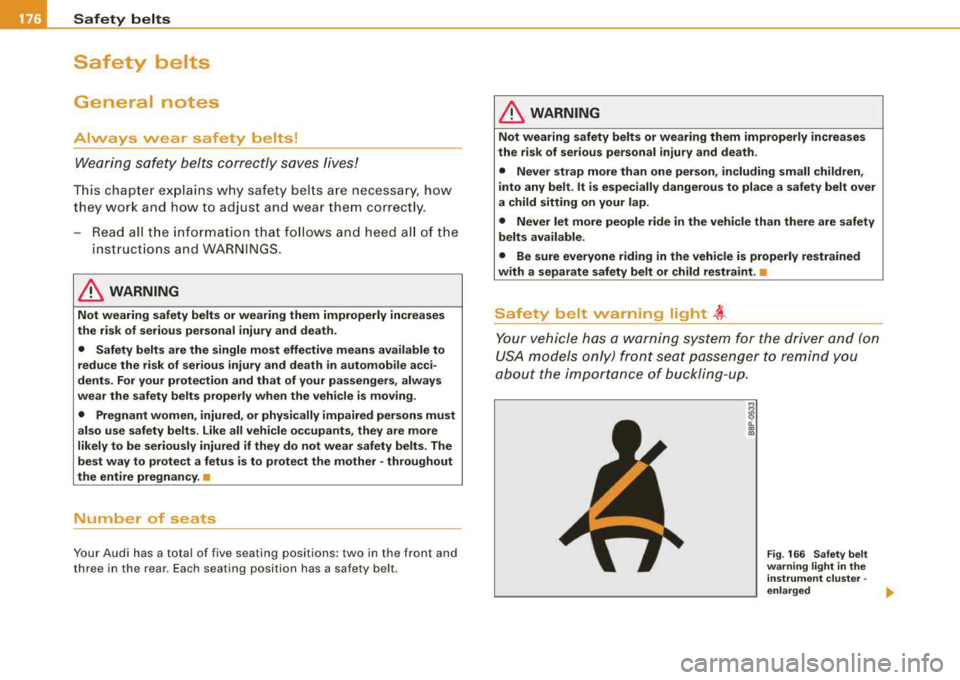
Safety belt warning light ~
Your vehicle has a warn ing system for the d river and (on
USA models only) f ront seat passenger to re mind you
a b ou t the i mpor tanc e o f b uckl in g -up.
Fig . 166 Safety belt
warning light in the instrument cluster -
enlarged
.,.