lights AUDI A4 AVANT 2008 User Guide
[x] Cancel search | Manufacturer: AUDI, Model Year: 2008, Model line: A4 AVANT, Model: AUDI A4 AVANT 2008Pages: 368, PDF Size: 46.19 MB
Page 24 of 368

Instruments and warnin g/indi cat or li ghts
Safety belts i
This warning/indicator light reminds y ou to put on your
safety belt.
The .ft warning/indicator light i lluminates when the ignition is
switched on to remind the driver and (on USA mode ls only) any front
passenger to put on the safety belt. Additiona lly, an acoustic
warn ing (gong) w ill also sound.
For more
information~ page 176 , "Safety belt warning light 4". •
Turn signals ¢ ¢
The in dicator light flashes when you use either turn
signal.
Whenever you use the left ¢ or the right ¢ turn signal, the indicator
l ight flashes. W hen you use the emerge ncy flasher, both indicator
lights f lash .
I f one of the turn signal light bulbs burn out, the turn signal will
flash twice as fast as normal. •
Electronic Stabilization Program (ESP) fJ
The warning/indicator ligh t monit ors the electr onic s tabi
lization program.
The ~ warning/indicator light has the fol lowing functions:
• it flashes while you are driving, when the ESP is working .
• it illuminates when you switch on the ignition for approximately
2 seconds as a funct ion check.
• it illuminates when there is a ma lfunction in the ESP.
• it illuminates after the battery has been disconnected .
• it illuminates continuous ly when the ESP is switched off . •
it illuminates if there is a malfunction in the ABS, since the ESP
is part o f the ABS system.
If the ESP warning/indicator light illuminates and stays on after you
have started the engine, this may mean that the control system has
temporar ily switched o ff the ESP . If this is case, you can reactivate
the ESP by switching the ignition off and then on again . The
warning/indicator light should go out to show that the system is
ful ly functional again .
I f the battery terminals were disconnected and re -connected, the
vehic le was jump started or the battery is very weak, the ESP sensor
system goes through a learning p rocess for the firs t few yards.
D uring th is time, t he ind icator l ight i llu minates. It goes out as soo n
as the learning process is comp lete.
For more information about the
ESP ~ page 236. •
Generator 0
T his warning/indicator light detects a malfunction in the
generator or i n t he vehicle's elec trical system.
T he O warning/indicator light i lluminates w hen you switch on the
ignition and must go out after the engine has started .
I f the
O warni ng/ind icator light illum inates while you a re driv ing,
you shou ld contact your authorized Audi dealer . Since the vehicle
battery is dischargi ng, you should sw itch off any unnecessary elec
trical consumers (for example, the air conditioner) .
0 Note
If the _JL warning/indicator light (ma lfunction in the engine coo ling
system) i n the instrument cluster shou ld
i llumi nate ~ page 31, stop
the ve hicle and turn o ff the engine . The coo lant pump is not work ing
-this can cause engine damage! •
Page 25 of 368

High beam [D
The ~D warning/indicator light il lu m inates when the high beams are
on or w hen you use the head lig ht flash er. For mo re inf ormation
about using the h igh beams,
see=> page 80 . •
Electronic power control EPC
Th is warn ing /indicator l ig ht m on ito rs the ele ctr onic
po wer co nt rol.
The EPC warning/indicator light (E lectronic Power Control) illumi
n at es w he n yo u switch o n the ignitio n as a functi on ch ec k.
[ i] Tips
If thi s wa rning/indi cator light i llum ina tes w hile you a re driving , then
there is a ma lfunction in the engine electronics . Have the malfunc
t io n co rre cte d as so on as p oss ible by your auth orized Audi de aler or
qualified wor kshop .•
Brake system BRAKE (USA models)/ (CD)
(Canada models)
Th is warn ing /indicator l ight i llu minates when the brake
fl uid leve l is t oo low or wh en ther e is a ma lf u nct io n in t he
ABS , or when the pa rkin g brake i s se t.
T he lig ht illu min ate s w hen the igni tio n is turn ed on. It goes out aft er
the engine has be en started and the parking bra ke is fu lly released .
T his i ndicate s th at th e br ake w arni ng lig ht is fun cti onin g prop erl y.
If the brake warning light does not light up when the engine is
cranking or the parking brake is applied , there may be a malfunction
in the electrical system. In this case, contact your Audi dealer.
When the l ig ht comes on, an audible warning si gnal is also given.
Controls and equip
ment
Instruments and warning /indicator lights
Parking brake set
T he BRAKE or CCD) (Canada) wa rning/indicat or l igh t illum in ate s wh en
t h e pa rkin g b rake is
se t=> ,&.
& WARNING
• USA models : If the BRAKE warning light and the ABS warning
light come on together , the rear wheels could lock up first under
hard braking . Rear wheel lock-up can cause loss of vehicle control
and an accident . Have your vehicle repaired immediately by your
authorized Audi dealer or a qualified workshop. Drive slowly and
avoid sudden, hard brake applications.
• Canada models : If the brake warning light
{(j)) and the ABS
warning light
0 come on together , the rear wheels could lock up
first under hard braking . Rear wheel lock-up can cause loss of
vehicle control and an accident. Have your vehicle repaired imme
diately by your authorized Audi dealer or a qualified workshop .
Drive slowly and avoid sudden , hard brake applications.
• If the brake warning/indicator light does not go out after a few
seconds and the parking brake released, or lights up while you are
driving, the fluid level in the brake fluid reservoir is too low. If you
believe that it is safe to do so , proceed immediately at low speed
to the nearest authorized Audi dealer or qualified repair facility and have the brake system inspected .
• Always keep in mind that after several brake applications , you
will need greater pressure on the brake pedal to stop your vehicle .
Do not rely on strained brakes to respond with maximum stopping
power in critical situations . You must allow for increased braking
distances . The extra distance u sed up by fading brakes could lead
to an accident . •
Page 31 of 368

Driver information messages
Along with some particular warning/indicator lights and instrument cluster symbols, additional messages will
appear in the display .
A driver information message will appear in the display when, for
example :
a light bulb has burnt
out => page 35,
or if you drive off with the parking brake s till engaged (pulled up).
or before you move the selector lever in gear (automatic transmis
sion).
Driver information messages can be switched o n by the driver when
a priority 1 symbol appears and flashes =>
page 28.
Sw it c hing on th e dri ver inf orm ati on me ssage
For example, if there is a malfunction in the engine oil pressure, the
~ symbo l will appear in the display . If you press the CHECK button ,
the following message will appear:
Sw itch off en gin e, check oil l evel
The message goes out after approximately 5 seconds. Press the
CHECK button to display the message again.
[ i ] Tip s
The following two messages, Handb ra ke i s a pplie d and Wh en
s tati onary ap ply foot br ake while selecting g ear ,
cannot be
switched on again . T hese messages will remain in the display until
you release the parking brake or unti l you move the selector lever
into a gear .•
Controls and equip
ment
Dri ver inf orma tio n di spl ay
Parking brake warning
To release the parking brake, first press the release button in the
lever and lift the lever s lightly. Then lower it all the way down.
If you should drive off with the parking brake still engaged, a
warning tone will sound to remind you to release the pa rking brake.
Also, the following message will appear in the display :
Handbrake is a pplied
The parking brake warning is activated when you drive longer than
3 seconds and faster than 3 mph (5 km/h) .•
Ap plies to vehi cles: w it h ma nua l trans mission
Function test : manual transmission
Fig. 17 Dis pl ay:
man ual trans missio n
fu ncti on test
perfo rmed
The Auto -Check Control will automatically perform a test each time
you switch on the ignition.
If the functions monitored by the Auto-Check Control are working
properly, the
O K => fig. 17 will light up for a few seconds. .,_
irechnical data
Page 34 of 368

Driver information display
-Check coolant level :::> page 281.
-Add coolant if necessary=> page 282.
-Continue driving only after the engine coolant
warning/indicator light goes out.
-Contact your authorized Audi dealer for assistance if
necessary.
If the engine coolant level is correct, then the radiator fan may be
the cause of the malfunction.
I f the generator warning/indicator light should also illuminate
=> page 22, then the fan belt may be damaged.
& WARNING
• If your vehicle should break down for mechanical or other
reasons, park at a safe distance from moving traffic, turn off the
engine and turn on the hazard warning lights
=> page 79, "Emer
gency flasher
A" .
• Never open the hood if you see or hear steam or coolant
escaping from the engine compartment -you risk being scalded .
Wait until you can no longer see or hear steam or coolant escaping.
• The engine compartment of any vehicle is a dangerous area.
Before you perform any work in the engine compartment, turn of
the engine and allow it to cool. Follow the warning stickers
=> page 265, "Engine compartment" .
0 Note
Do not continue driving if the-~-symbol illuminates. It indicates a
cooling system malfunction likely to result in serious damage to the
engine. •
Engine oil pressure malfunction ~
The red engine oil pressure warning symbol requires
immediate service or repair. Driving with a low-oil-pres
sure indication is likely to result in serious damage to the
engine.
If the 9=::;,. symbol appears in the display and blinks, the oil
pressure is too low. In addition to the symbol, the following
message also appears in the display:
Switch off engine, check oil level
Immediate actions
-Pull off the road and stop the vehicle.
-Shut the engine down.
-Check the engine oil level with the dipstick=> page 277.
Dipstick reading checks too lovv
-Top off oil to the proper level => page 278.
-Make sure that the oil pressure warning symbol 9=::;f.
appears no longer in the display before you start driving
again.
Dipstick reading checks OK
-If the 9=::;f. symbol starts flashing again even though the
engine oil level checks OK on the dipstick,
do not start
driving again and do not let the engine run at idle .
Instead, contact your authorized Audi dealer for assis-
tance.
.,_
Page 36 of 368
Driver inf ormation di spl ay
priority 2 malfunction is detected, al l symbols will appear one after
t he other for about two seconds. •
Applie s to ve hicles: with Ligh ting pac kage
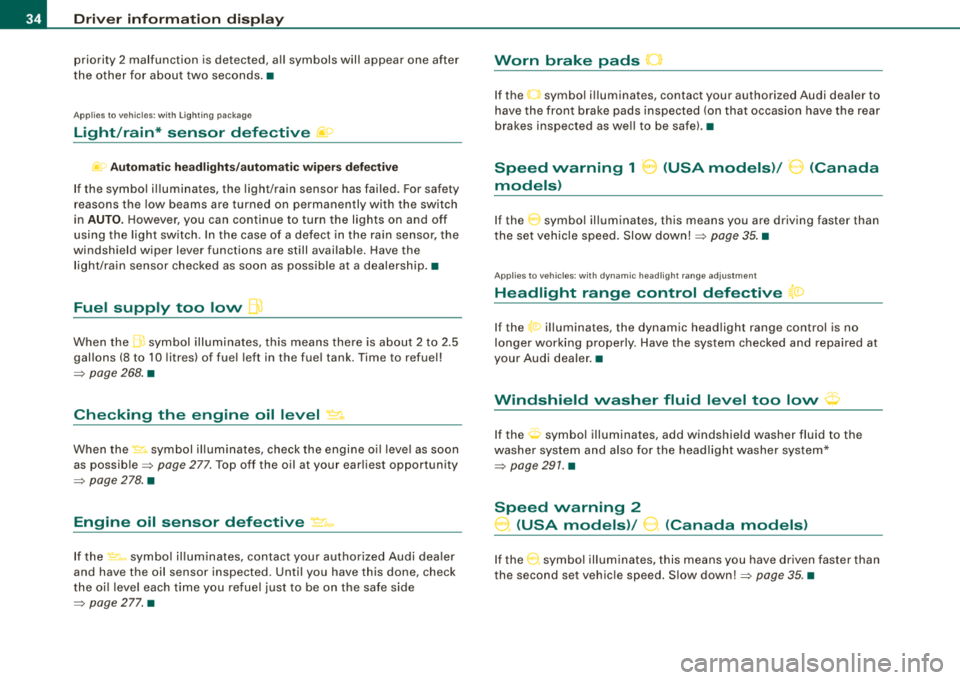
Light/rain* sensor defective fif>
~o Aut om atic hea dlig ht s/a utom atic w ipers defe ct iv e
If the symbol il luminates, the light /rain sensor has failed. For safety
reasons the low beams a re turned on permanently with the switch
in
AUTO. H owever, you can continue to turn the lights on and off
using the light sw itch . In the case of a defect in the ra in se nsor, the
windshield wiper lever functions are still available. Have the
l ight/ra in sensor checked as soon as poss ible at a dealersh ip .•
Fuel supply too low flt)
When the .ffi symbol illuminates, th is means there is about 2 to 2 .5
gallons (8 to 10 l itres) of fue l left in the fue l tank. Time to refuel!
=> page 268 . •
Checking the engine oil level ~ ..
When the ~ symbol illum inates, check the engine o il leve l as soon
as
possib le => page 277. Top off the oil at your ear liest opportunity
=> page 278 . •
Engine oil sensor defective ~ ...
If the ~-symbo l il lum inates, contact your authorized Audi dea ler
and have the oil sensor inspected . Until you have this done, check
the oi l leve l each t ime you refuel just to be on t he safe side
=> page 277. •
Worn brake pads 0
If the O symbo l illuminates, contact your authorized Audi dealer to
have the front brake pads inspected (on that occasion have the rear
brakes inspected as we ll to be safe) .•
Speed warning 1 8 (USA models)/ 0 (Canada
models)
I f the 0 symbo l il luminates, this means you are driving faster than
the set vehicle speed. Slow
down! => page 35. •
Applies to ve hicles : w ith d ynami c head light rang e adjus tment
Headlight range control defective {a:>
If the t0 illuminates, the dynamic head light range control is no
longer working properly. Have the system checked a nd repaired at
your Audi dealer .•
t·,···
Windshield washer fluid level too low <;p
If the O symbol illuminates, add windshield washer fluid to the
washer system and a lso fo r the headlight washer system*
=> page 291. •
Speed warning 2
0, (USA models)/ 9. (Canada models)
If the 0 symbol illum inates, this means you have driven faster than
the second set vehic le speed . S low
down!=> page 35 . •
Page 37 of 368
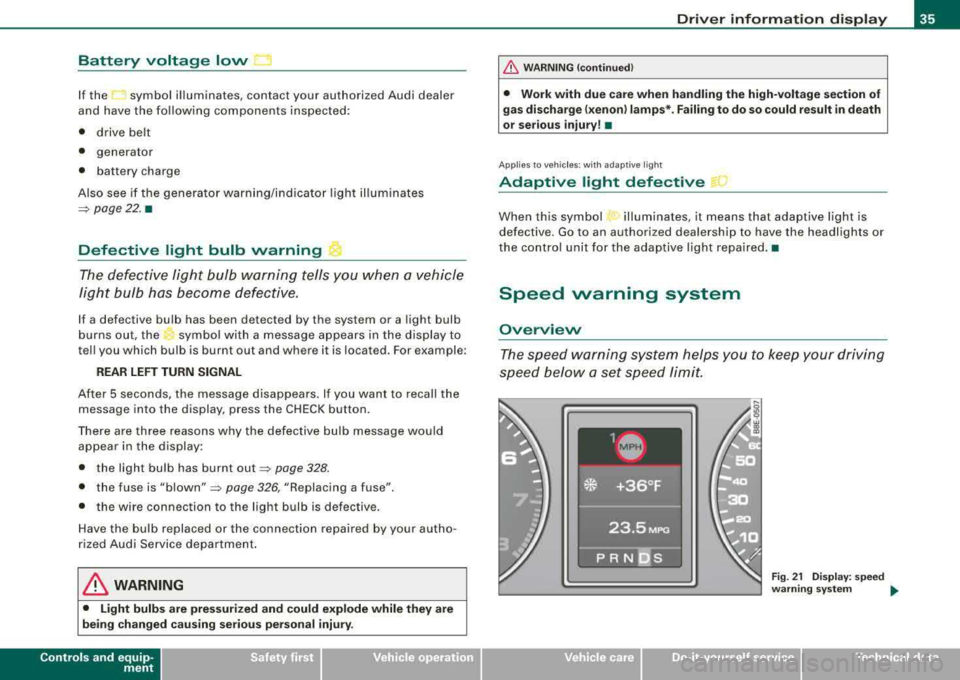
Battery voltage low .::::3
If the symbol illuminates, contact your authorized Audi dealer
and have the following components inspected:
• drive belt
• generator
• battery charge
Also see if the generator warning/indicator light illuminates
=> page 22. •
Defective light bulb warning ~
The defective light bulb warning tells you when a vehicle
light bulb has become defective.
If a defective bulb has been detected by the system or a light bulb
burns out, the symbol wi th a message appears in the display to
tell you which bulb is burnt out and where it is located . For example :
REAR LEFT TURN SIGNAL
After 5 seconds, the message d isappears . If you want to reca ll the
message into the display, press the CHECK button.
There are three reasons why the defective bulb message wou ld
appear in the display:
• the light bulb has burnt
out => page 328.
• the fuse is "blown"=> page 326, "Replacing a fuse" .
• the wire connec tion to the light bulb is defective .
Have the bulb replaced or the connection repaired by your autho
rized Audi Service department .
& WARNING
• Light bulb s are pres sur ized and c ou ld expl ode whi le they are
be ing changed causing seri ou s pe rso nal inju ry .
Controls and equip
ment
Dri ver inf orma tio n di spl ay
& WARNI NG ( conti nued )
• Work with due care wh en h andling th e high-vol tage s ecti on of
gas disch arge (xe non
I la mp s*. Fa ili ng to d o so could result in de ath
or se riou s inj ury !
•
Ap plie s to veh ic les: with a dapt iv e ligh t
Adaptive light defective
When th is symbol illuminates, it means that adaptive light is
defective. Go to an authorized dea lership to have the headlights or
the control unit for the adaptive light repa ired. •
Speed warning system
Overview
The speed warning system helps you to keep your driving
speed below a
set speed limit.
Fig . 21 Disp lay : s pee d
wa rning syste m
.,.
irechnical data
Page 48 of 368
Driver inf ormation di spl ay
tire pressure, even if under-inflation has not reached the level to
t rigger il lum ination of the TPMS low tire pressure te llta le .
• Each tire should be checked month ly when cold and inflated to
the infla tion pressure recommended by the vehic le manufacturer
on the vehicle placard , tire inflation pressure label, or in chapter
=> page 297 . (If your ve hicle has tires o f a different size than t he size
indicated on the vehicle placard or tire inf lation pressure label, you
should de termine the proper tire inflation pressure for those
tires.) •
Applies to vehi cles : with tire p ress ure mo nit o ring system
TPMS malfunction indicator
Your vehic le has also been equipped with a TPMS ma lfunction indi
cator to indicate when the system is not operating properly. The
TPMS ma lfunct ion indicator is combined with the low tire pressure
telltale . When the system detects a ma lfunction, t he tellta le wi ll
f lash for approximately one minute and then remain continuous ly
il lum inated. T his sequence wil l continue upo n subsequent veh icle
star ts up as long as the malfunction exists.
When the ma lfunc tion ind icator is ill uminated, the system may not
be able to detect or signal low tire pressure as intended .
TPMS malfunctions may occur for a variety of reasons, including the
installation o f rep lacement or a lternate tires or wheels on the
vehic le that prevent the TPMS from functioning properly . A lways
check t he TPMS malfunction tellta le after replac ing one or more
tires or whee ls on your v ehicle to ensur e that the replacement or
a lternate t ires and wheels al low the TP MS to continue to function
proper ly. •
Ap plies to ve hicles : w it h tir e pressu re m oni to ring sy ste m
Introduction
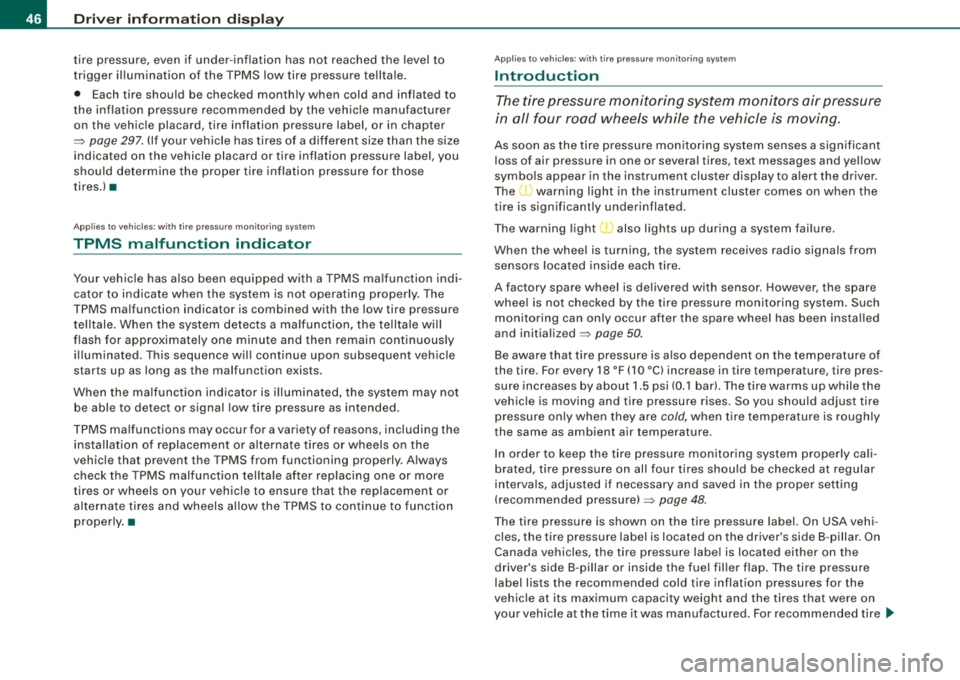
T he tire pressure monitoring system monitors air pressure
in all four road wheels while the vehicle is moving.
As soon as the tire pressure monito ring system se nses a significant
loss of air pressure in one or several tires, text messages and yel low
symbo ls appear in the instrument clus ter disp lay to a lert the driver.
The
(l) warning light in the instrument cluster comes on when the
t ire is significa ntly under inflated.
The warning light
(l) also lights up during a system failure .
When the whee l is turning, the system receives radio signals from
sensors located inside each tire.
A factory spare wheel is delivered with sensor . However, the spare
whee l is not checked by the ti re pressure monitoring sys tem. Such
monitoring can on ly occur after the spare wheel has been insta lled
and
initia lized => page 50.
Be aware that t ire pressure is a lso dependent o n the temperature of
the tire . For every 18 °F (1
O °C) increase in tire temperature, tire pres
su re increases by about 1.5 psi (0 .1 barl. The tire warms up wh ile the
vehic le is moving and t ire pressure rises. So you should adjust tire
pressure only when they are
cold, when tire temperature is roughly
the same as ambient air temperature .
I n order to keep the tire pressure moni toring system prope rly ca li
brated, tire pressure on all four tires shou ld be checked at regular
intervals, adjusted if necessary and saved in the proper sett ing
(reco mmended
pressure) => page 48.
The tire pressure is shown on the tire pressure label. On USA vehi
cles, the tire pressure label is located on the dr iver's side B -pillar. On
Canada vehicles, the tire pressure labe l is located either on the
driver's side B -p illar o r inside the fue l fi ller flap. The tire pressure
label l ists the recommended cold tire inflation pressures for the
vehic le at its maximum capacity weight and the tires that were on
your vehicle at the t ime it was manu factured . For recommended tire
~
Page 57 of 368
Power locking system
General description The power Jocking system J ocks all the vehicle d oors and
rear lid simultaneously or allows you to unlock either just the driver's door or all the vehicle doors and rear lid
simultaneously.
The power locking system in your vehic le incorporates the following
f unctions:
• Central locking function
• Remote contro l feature
:::::, page 56 .
• Anti -theft alarm system :::::, page 64 .
All the doors and the rear lid are locked by the central locking
system when you lock the vehicle .
Unlo cking th e vehicle
You can un lock the vehicle from outside either by using the remote
control
or by inserting and turning the key in the driver's door lock.
When you
unlo ck your vehicle:
• The anti-the ft alarm sys tem is deactivated briefly.
• The vehicle interior l ights illuminate for approximate ly 30
seco nds.
• All turn signal lights will flash twice when the car is unlocked.
• After unlocking the vehic le, you have 60 seconds to open a door
or the rear lid. After 60 seconds, t he vehicle automatically locks and
the anti -theft a larm system activates again .
The rear lid can be locked or unlocked either by using the remote
co ntr ol
or by insert ing and turning the key in the driver's door lock .
Unlocking the vehicle with the remote contro l wi ll only
unlock the
rear lid, t o
open it, the lid handle needs to be pressed .
Controls and equip
ment
Op ening and clo sin g
Lo cking the vehicle
You can lock the veh icle from outside e ithe r by using the remote
control
or by inserting and turning the key in the drivers 's door lock.
When you
lock the ve hicle:
• All doors and the rear lid are locked .
• All tu rn signal lights will flash once when the car is locked.
• The anti -theft alarm system is activated . The horn of the anti
theft alarm sys tem wi ll sound and the anti -theft a larm sys tem read i
ness light, located in t he upper part of the driver's door panel, w ill
start to blink.
• The vehicle interior lights turn off .
Automati c locking *
The automatic locking feature locks all the vehicle doors and the rear lid when you drive faster t han 9 mph (15 km/h).
You can unlock the vehicle from the inside by :
• removing the key from the ignition switch (the vehicle wil l auto
mat ically un lock itself) or
• pressing the unlock part of the power lock switch
(l::[) or
pull ing the door handle (twice to open the door!.
If you wish, you can have an authorized Audi dea ler convert your
power doo r loc k system to au tomatic locking .
LJ}. WARNING
• When you lo ck your vehicle from out side , nobody -especially
c hildren - sho uld remain in side the vehi cle . Remember , when you
lock the vehicle from the out side the windows c annot be opened
from the in side .
• When you leave the vehicle , alway s remove the ignition key and
take it with you . Thi s will pre vent pa ssenger s (children , for
example ) from accidentally being locked in the vehicle should the y
a ccidentally pre ss the power locking swit ch on the center con sole . .,_
Page 58 of 368
Opening and clo sing
& W ARNI NG (c onti nued )
• Do not le ave ch ildr en in side th e vehicle uns upervi sed. In an
em erge ncy it would be i mpos sible to open t he doors from the
out side w it h out the key .
[ i] Tips
• In the event of a crash with airbag deployment all locked doors
wi ll be automatically unlocked to give access to the vehicle occu
pants from the outside .
• If the power locking system should fail, you can still open the
fue l tank flap in an emergency =>
page 271.
• You are well advised not to keep va luables inside an unattended
vehicle, visible or not. Even a properly locked vehicle cannot provide
the security of a safe!
•
Keyless entry remote control
General description
The remote controls allows you to :
• lock or unlock the vehicle
• selectively unlock the rear lid.
The turn signals will flash briefly whenever you lock or unlock the
veh ic le . Also, the interior light will come on or go off whenever you
open or close the driver's door.
T he transmitter and battery are located in the head of the remote
control. The receiver is located inside the vehicle. The maximum
effective range depends on several things. Remember, if the battery
is weak, the effective range decreases .
The remote-contro l key contains a fold-out key that you can use to
manually lock or unlock the vehicle and to start the engine . I
f you need to replace the remote control, or if you need to have it
repaired, you must see your authorized Audi dealer. Only then can
you use the key again .•
Unlocking and locking the vehicle with the
remote control
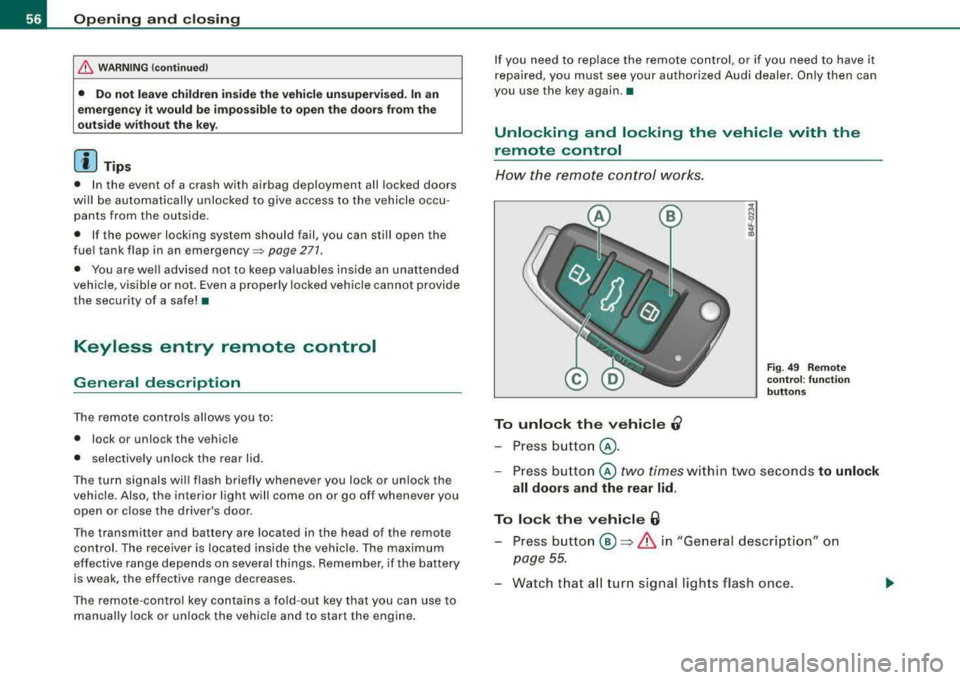
How the remote cont rol works.
To unlock the vehicle 0
- Press button @.
Fig. 4 9 Rem ote
co ntrol: fu nct ion
b utto ns
- Press bu tton @ two times within two seconds to unlock
all doors and th e rear lid .
To lock the v ehi cle 6
- Press button ® => & in "General description" on
page
55.
- Watch that a ll turn signal lights flash once .
Page 74 of 368
Clear vision
Clear vision
Lights
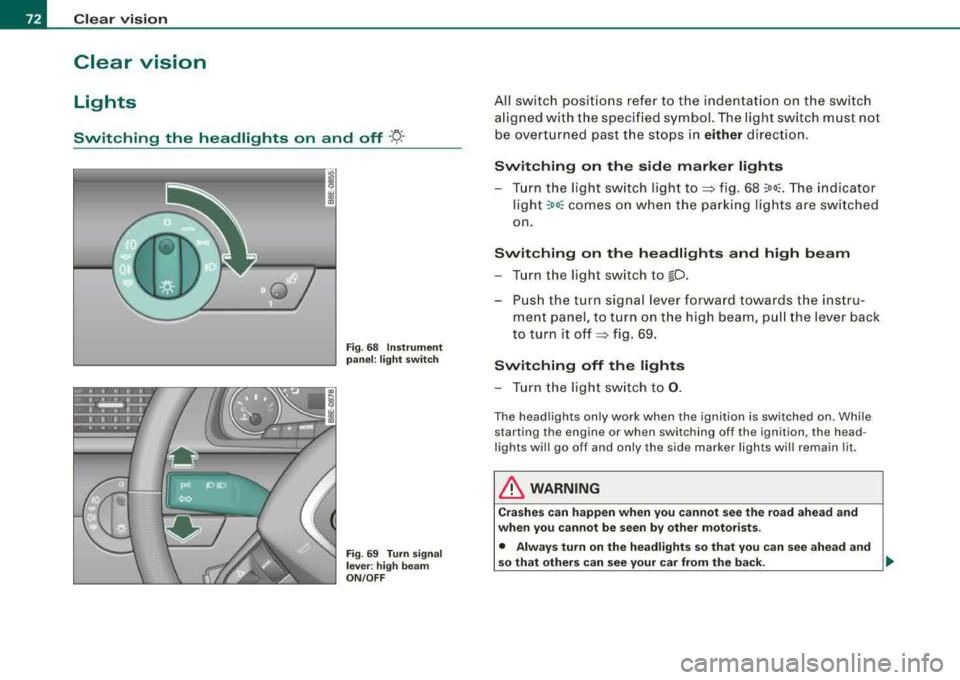
Switching the headlights on and off ·f!-·
Fig. 68 Instrument
panel: light switch
Fig .
69 Turn signal
lever : high beam
ON /OFF
All switch positions refer to the indentation on the switch
aligned with the specified symbol. The light switch must not
be overturned past the stops in
either direction.
Switching on the side marker lights
-Turn the light switch light to~ fig. 68 ;oo~. The indicator
ligh t
;oo; comes on when the parking lights are switched
on.
Switching on the headlights and high beam
-Turn the light switch to lD .
-Push the turn signal lever forward towards the instru-
ment panel, to turn on the high beam, pull the lever back
to turn it
off ~ fig. 69.
Switching off the lights
-Turn the light switch to 0.
The headlights only work when the ignition is switched on. While
starting the engine or when switching off the ignition, the head
lights will go off and only the side marker lights will remain lit.
& WARNING
Crashes can happen when you cannot see the road ahead and
when you cannot be seen by other motorists .
• Always turn on the headlights so that you can see ahead and
so that others can see your car from the back.
I)),