lock AUDI A4 AVANT 2008 User Guide
[x] Cancel search | Manufacturer: AUDI, Model Year: 2008, Model line: A4 AVANT, Model: AUDI A4 AVANT 2008Pages: 368, PDF Size: 46.19 MB
Page 33 of 368
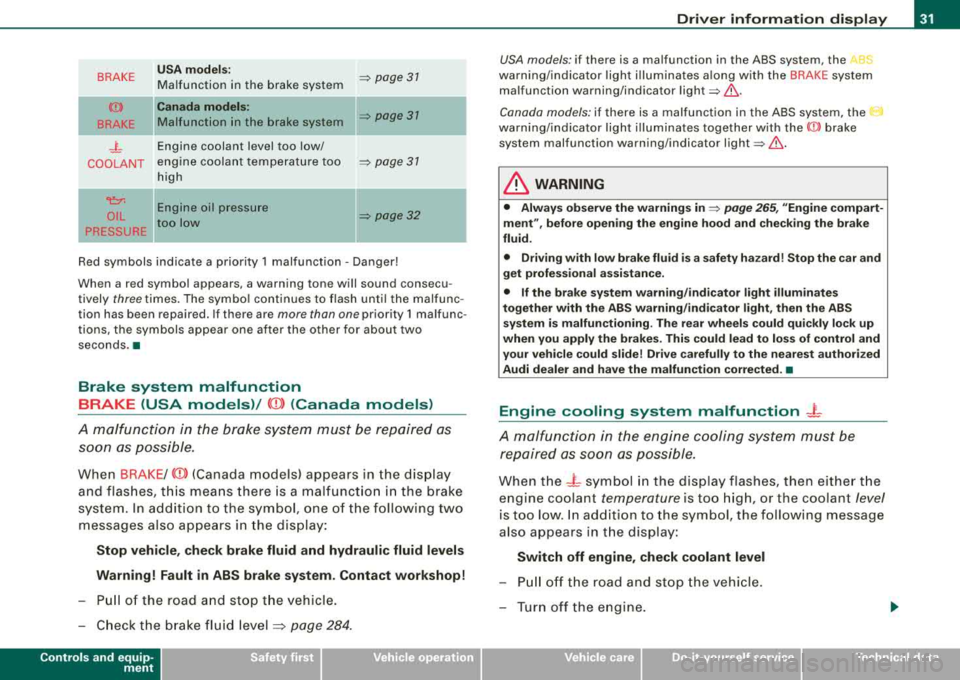
BRAKE
(Ci))
BRAKE
_j_
COOLANT
~
OIL
PRESSURE USA
models:
Malfunction in the brake system
Canada models:
Malfunction in the brake system
Engine coolant level too low/
engine coolant temperature too
high
-
Engine oil pressure
too low =>
page 31
=> page 31
=> page 31
=> page 32
Red symbols indicate a priority 1 malfunction -Danger!
When a red symbol appears , a warning tone will sound consecu
tively three times. The symbol continues to flash until the malfunc
tion has been repaired. If there are more than one priority 1 malfunc
tions, the symbols appear one after the other for about two
seconds .a
Brake system malfunction BRAKE (USA models)/
(CD) (Canada models)
A malfunction in the brake system must be repaired as soon as possible.
When BRAKE/ (CD) (Canada models) appears in the display
and flashes, this means there is a malfunction in the brake
system. In addition to the symbol, one of the following two
messages also appears in the display:
Stop vehicle, check brake fluid and hydraulic fluid levels
Warning! Fault in ABS brake system. Contact workshop!
- Pull of the road and stop the vehicle.
- Check the brake fluid
level :::;, page 284.
Controls and equip
ment
Driver information display
USA models : if there is a malfunction in the ABS system, the ABS
warning/indicator light illuminates along with the BRAKE system
malfunction warning/indicator
light=> ,&..
Canada models: if there is a malfunction in the ABS system, the 0
warning/indicator light illuminates together with the ((l)) brake
system malfunction warning/indicator
light =>,&. .
& WARNING
• Always observe the warnings in => page 265, "Engine compart
ment", before opening the engine hood and checking the brake
fluid.
• Driving with low brake fluid is a safety hazard! Stop the car and
get professional assistance.
• If the brake system warning/indicator light illuminates
together with the ABS warning/indicator light, then the ABS
system is malfunctioning. The rear wheels could quickly lock up
when you apply the brakes. This could lead to loss of control and
your vehicle could slide! Drive carefully to the nearest authorized
Audi dealer and have the malfunction corrected. •
Engine cooling system malfunction -L
A malfunction in the engine cooling system must be
repaired as soon as possible.
When the - L symbol in the display flashes, then either the
engine coolant
temperature is too high, or the coolant level
is too low. In addition to the symbol, the following message
also appears in the display:
Switch off engine, check coolant level
- Pull off the road and stop the vehicle.
- Turn off the engine.
Page 39 of 368
will remain stored in the system until it is changed by briefly
pressing the button again or until it is reset by holding down the
button for at least two seconds. •
Speed warning 2: setting a speed limit
Switches in the wiper arm are used to operate warning
threshold 2.
Controls and equip
ment
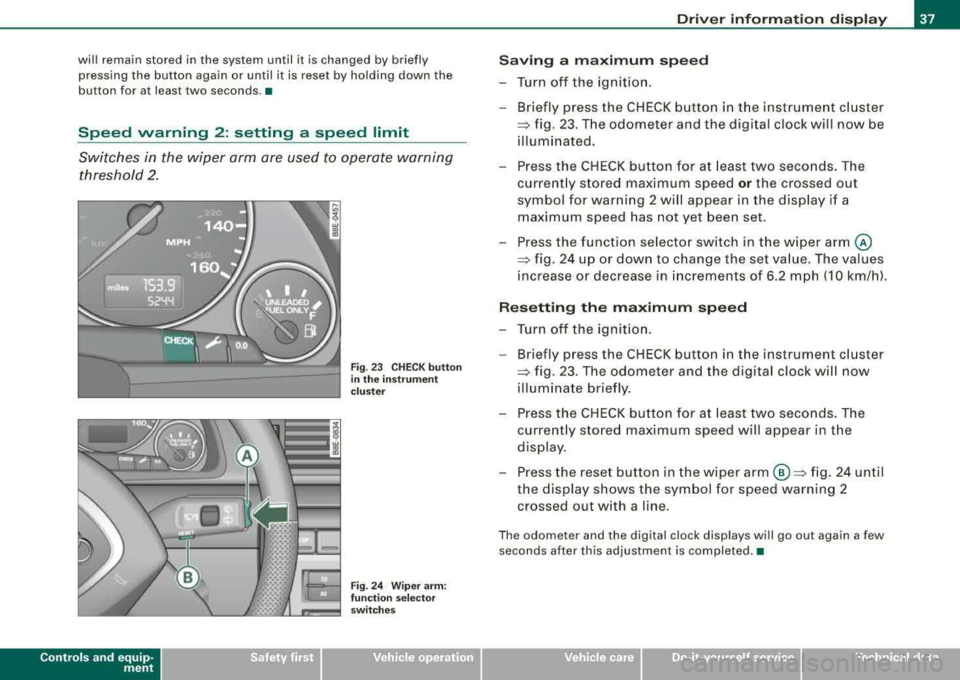
Fig . 23 CHECK button
in the instrument
cluster
Fig. 24 Wiper arm:
function selector
switches
Driver information display
Saving a maximum speed
-Turn off the ignition.
-Briefly press the CHECK button in the instrument cluster
=> fig. 23 . The odometer and the digital clock will now be
illuminated.
-Press the CHECK button for at least two seconds. The
currently stored maximum speed
or the crossed out
symbol for warning 2 will appear in the display if a maximum speed has not yet been set.
Press the function selector switch in the wiper
arm @
=> fig. 24 up or down to change the set value. The values
increase or decrease in increments of 6.2 mph (10 km/h).
Resetting the maximum speed
-Turn off the ignition.
- Briefly press the CHECK button in the instrument cluster
=> fig. 23. The odometer and the digital clock will now
illuminate briefly.
-Press the CHECK button for at least two seconds. The
currently stored maximum speed will appear in the
display.
-Press the reset button in the wiper arm ©=> fig. 24 until
the display shows the symbol for speed warning 2 crossed out with a line.
The odometer and the digital clock displays will go out again a few
seconds after this adjustment is completed. •
irechnical data
Page 44 of 368
Driver inf orma tion di spl ay
Several functions in your vehicle can be set, activated and
controlled by means of
Menu s. With these menus, you can addition
ally select which information is to be shown in the DIS (Driver Infor
mation System) disp lay. This functions on ly with the ignit ion
switched on. Operation is controlled through the [Reset] button on
the windshield wiper
lever => page 41, fig. 29.
The
S ta rt me nu shows you the different types of d isplays:
S et
Check
Menu off
H el p•
Navigate the menu
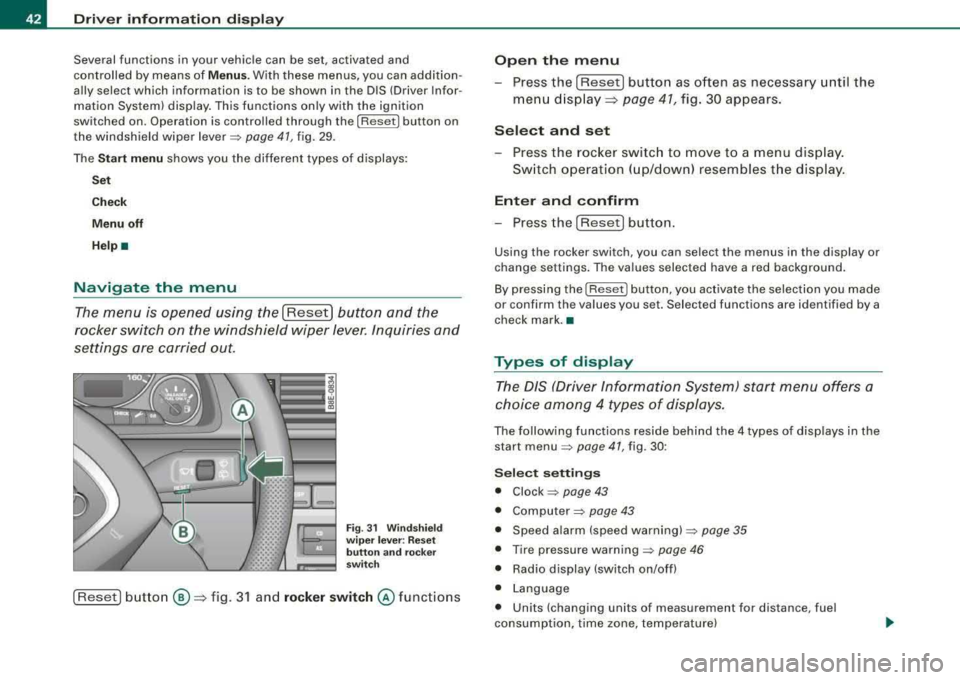
The menu is opened using the I Reset] button and the
rocker switch on the windshield wiper lever. Inquiries and
settings are carried out.
F ig. 31 W inds hield
w ip er le ver: R es et
butt on and rocker
sw itch
[Reset] button ®=> fig. 3 1 and rock er switch @ functions
Open th e menu
- Press the [Reset) button as often as necessary until the
menu d isplay::::>
page 41, fig. 30 appears.
S elect and set
- Press the rocker switch to move to a menu display.
Sw itch operation ( up/down) resembles the disp lay .
Enter and confirm
- Press the [Reset! button.
Using the rocker switch, you can select the menus in the display or
change settings. The values selected have a red background .
By pressing the [ Reset] button, you activate the selection you made
or confirm the va lues you set. Selected functions are identified by a
check mark. •
Types of display
The DIS (Driver Information System) start menu offers a
choice am ong 4 types of displays.
The following functions reside behind the 4 types of displays in the
start
menu => page 41, fig. 30 :
Selec t se tting s
• Clock => page 43
• Computer=> page 43
• Speed alarm (speed warning) => page 35
• Tire pressure warning => page 46
• Radio display (switch on/off)
• Language
• Units (changing units of measurement for distance, fuel
consumption, time zone, temperature)
Page 46 of 368
![AUDI A4 AVANT 2008 User Guide Driver information display
Select your settings as follows:
- Press the
(Reset] button:::;, page 42, fig. 31. The Start
menu
appears:::;, page 41, fig. 30.
- Press the rocker switch](/img/6/57552/w960_57552-45.png "AUDI A4 AVANT 2008 User Guide Driver information display
Select your settings as follows:
- Press the
(Reset] button:::;, page 42, fig. 31. The Start
menu
appears:::;, page 41, fig. 30.
- Press the rocker switch")
Driver information display
Select your settings as follows:
- Press the
(Reset] button:::;, page 42, fig. 31. The Start
menu
appears:::;, page 41, fig. 30.
- Press the rocker switch
:::;, page 42, fig. 31 as often as
necessary until
Set is displayed.
- Press the
(Reset] button. All the menus appear.
- Press the rocker switch until the line you want is acti-
vated (red
background):::;, page 43, fig. 33.
- Press the
(Reset] button.
-If necessary, scroll by selecting and activating the
symbol for "Next page" or "Previous page".
When you have selected the Computer menu and activated it by
pressing the
I Reset) button, two computer levels appear (computer
1 and computer
2). Now you have to select the level you want using
the rocker switch and activate it with the [Reset) button.
Continued=> page 44, "Adjust settings (part 2)". •
Adjust settings (part 2)
Continue to make your settings as follows:
- Press the rocker switch
:::;, page 42, fig. 31 until the line
you want is activated (red background).
- Now activate or deactivate the function selected by
pressing the
(Reset] button and entering a check mark -
(for "Yes") in the box or no check mark (for "No").
Press the rocker switch as often as necessary until
Back
is selected and press the (Reset) button to return to the
next higher menu level.
For several of the settings, numerical values also have to be entered,
e.g. when setting the date. This is also done by using the rocker
switch .•
Practical example (part 1)
The example shows a complete, menu-guided operation
for a setting.
Fig. 34 Display: Start
menu, Settings
selected
Fig . 35 Display :
Settings menu, clock
selected
....
Page 47 of 368
![AUDI A4 AVANT 2008 User Guide To set the date, for example, proceed as follows :
- Press the [R eset] button . The Start menu appears
=> page 41, fig . 30.
- Tap the rocker
switch => page 42, fig. 3 1 until Set](/img/6/57552/w960_57552-46.png "AUDI A4 AVANT 2008 User Guide To set the date, for example, proceed as follows :
- Press the [R eset] button . The Start menu appears
=> page 41, fig . 30.
- Tap the rocker
switch => page 42, fig. 3 1 until Set")
To set the date, for example, proceed as follows :
- Press the [R eset] button . The Start menu appears
=> page 41, fig . 30.
- Tap the rocker
switch => page 42, fig. 3 1 until Set
=> page 44, fig. 34 is activated.
- Press the [Reset] button. The men us avai lab le under
Set
appear.
- Tap the rocker switc h unti l
Clock => page 44, fig . 35 is
disp layed .
- Press the [Reset] button . The c lock settings menu
appears .
Continued => page 45, "Practica l examp le (part 2)" . •
Practical example (part 2)
Continue w ith se tting the date as follows :
- Tap the rocker
switch => page 42, fig. 3 1 until Date is acti
vated.
- If there a n empty box in front o f Date, press the [Reset]
button. Now a check mark appears in t he box .
- Tap the rocker switc h until the date display is activated
and press the [Reset] button. The day flashes.
- Tap the rocker switc h up or down until the correct
number for the day appears . Press the [Reset] button .
Now the month flashes.
- Chan ge the mon th and th e year as needed in the same
way.
Controls and equip
ment
Dri ver information di spl ay
Continued=> page 45 , "Practical example (part 3)" . •
Practical example (part 3)
Close setting the da te as follows:
- Tap the rocker
switch => page 42, fig. 31 until Back is act i
vated.
- Press the [Reset] button. The
Set menu appears again .
- Press th e [Reset] butto n again. The Star t menu appears
agai n.•
Tire pressure monitoring system
Applies to veh ic les: with tir e pr essure monitor in g system
General notes
As an adde d safe ty feature, your vehicle has been equ ipped wit h a
tire pressure monitoring sys tem (TPMS) that i lluminates a low tire
pressure te llta le when one or more of your tires is significant ly
under-inflated . The TPMS only provides a low tire pressure warning
and does not reinflate your tires.
According ly, when the low tire pressure te llta le i llum inates, you
shou ld stop and check your tires as soon as possib le, and infla te
them to the proper pressure . Driv ing on a significantly under
inf lated tire causes the tire to overheat and can lead to tire failure.
Under -inflation a lso reduces fue l efficiency and tire tread life, and
may affect the vehicle 's hand ling and stopping ab ility .
0 Note
• Please note that the TPMS is not a substitute for proper tire
maintenance , and it is the driver's responsibility to maintain correct
..,_
Page 54 of 368
Opening and closing
Opening and closing
Keys
Key set
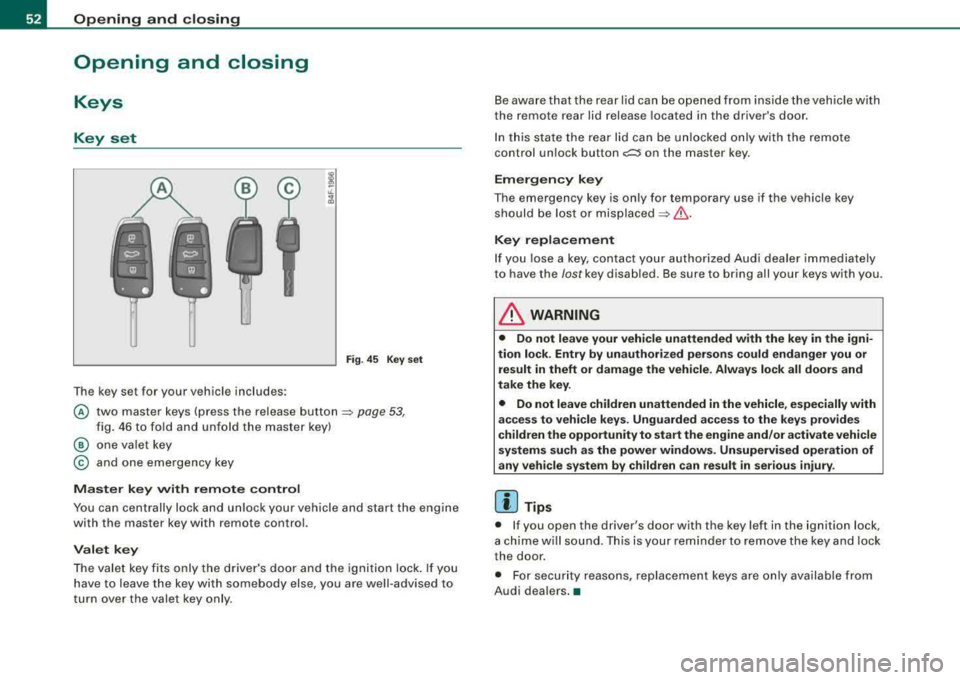
The key set for your vehicle includes:
Fig. 45 K ey set
@ two master keys (press the release button ~ page 53,
fig. 46 to fo ld and unfold the master key)
@ one valet key
© and one emergency key
Master key with remote control
You can centrally lock and unlock your vehicle and start the engine
with the master key with remote control.
Valet key
The valet key fits only the driver's door and the ignition lock. If you
have to leave the key with somebody else, you are well-advised to
turn over the valet key only. Be
aware that the rear lid can be opened from inside the vehicle with
the remote rear lid release located in the driver's door .
In this state the rear lid can be unlocked only with the remote
control un lock bu tton
c:::::5 on the master key.
Emergency key
The emergency key is only for temporary use if the vehicle key
should be lost or
misplaced~ &.
Key replacement
If you lose a key, contact your authorized Audi dealer immediately
to have the
lost key disabled. Be sure to bring all your keys with you .
L1}. WARNING
• Do not leave your vehicle unattended with the key in the igni
tion lock . Entry by unauthorized persons could endanger you or
result in theft or damage the vehicle. Always lock all doors and
take the key.
• Do not leave children unattended in the vehicle , especially with
access to vehicle keys . Unguarded access to the keys provides
children the opportunity to start the engine and/or activate vehicle
systems such as the power windows. Unsupervised operation of
any vehicle system by children can result in serious injury .
[ i ] Tips
• If you open the driver's door with the key left in the ignition lock,
a chime will sound. This is your reminder to remove the key and lock
the door.
• For security reasons, replacement keys are only available from
Audi dealers.
•
Page 55 of 368
Master key with remote control
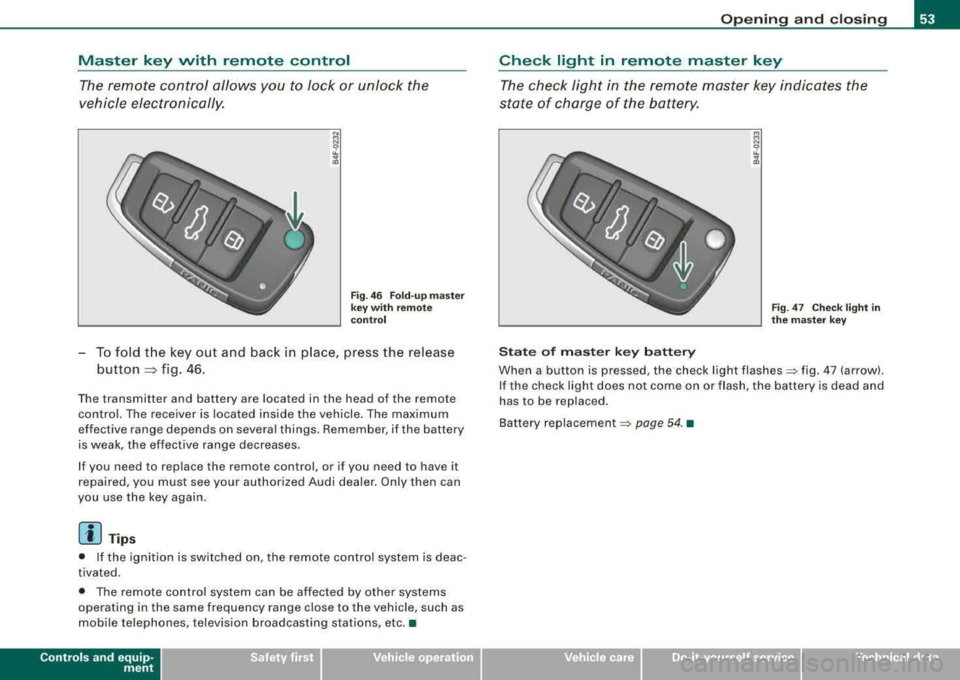
The remote control allows you to lock or unlock the
vehicle electronically.
Fig . 46 Fold-up master
key with remote
control
-To fold the key out and back in place, press the release
button
~ fig . 46 .
Th e transmitt er and battery are located in the head o f the remo te
control. The receiver is located inside the vehicle. The maximum
effec tive range depends on several things. Remember, if the battery
is weak, the effective range decreases.
If you need to replace the remote control , o r if you need to have it
repaired, you must see your authorized Audi dealer. Only then can
you use the key again.
[ i] Tips
• If the ignition is switched on, the remote control system is deac
tivated .
• The remote control system can be affected by other systems
operating in the same frequency range close to the vehicle, such as
mobile telephones, television broadcasting stations, etc. •
Controls and equip
ment
Opening and closing
Check light in remote master key
The check light in the remote master key indicates the
state of charge of the battery.
State of master key battery
Fig . 47 Check light in
the master key
When a button is pressed , the check light flashes=:. fig . 47 (arrow) .
If the check light does not come on or flash, the battery is dead and
has to be replaced.
Ba ttery
replacem ent =:. page 54. •
irechnical data
Page 56 of 368
Opening and clo sing
Master key battery replacement
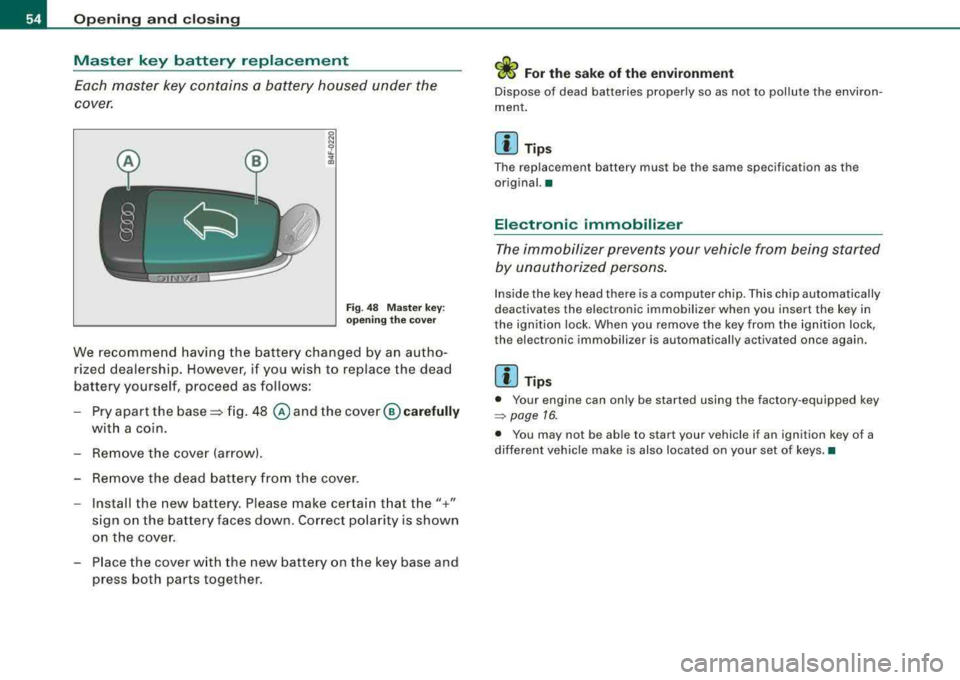
Each master key contains a battery housed under the
cover.
F ig. 48 Mas ter key:
o p enin g the cover
We recommend having the battery changed by an autho
rized dealership. However, if you wish to replace the dead
battery yourself, proceed as follows:
- Pry apart the
base~ fig. 48 @ and the cover ® car efully
with a coin .
- Remove the cover (arrow).
- Remove the dead battery from the cover .
- Install the new battery. Please make certain t hat the"+"
sign on the battery faces down . Correct polarity is shown
on the cover.
- Place the cover w ith the new battery on the key base and
press both parts together.
ffi For the sake of the environment
Dispose of dead batteries properly so as not to pollute the environ
ment .
[ i ] Tip s
The replacement battery must be the same specification as the
original. •
Electronic immobilizer
The immobilizer prevents y our vehicle from being started
b y u nau thor ized pers ons.
Inside the key head there is a computer ch ip. Th is ch ip automatically
deactivates the e lectronic immobilizer when you insert the key in
the ignit ion lock. When you remove the key from t he ignition lock,
the electron ic immobili zer is automatical ly activated once again .
[ i ] Tips
• Your engine can only be started using the factory -equipped key
=> page 16.
• You may not be able to start your vehicle if an ignition key of a
different vehicle make is also located on your set of keys. •
Page 57 of 368
Power locking system
General description The power Jocking system J ocks all the vehicle d oors and
rear lid simultaneously or allows you to unlock either just the driver's door or all the vehicle doors and rear lid
simultaneously.
The power locking system in your vehic le incorporates the following
f unctions:
• Central locking function
• Remote contro l feature
:::::, page 56 .
• Anti -theft alarm system :::::, page 64 .
All the doors and the rear lid are locked by the central locking
system when you lock the vehicle .
Unlo cking th e vehicle
You can un lock the vehicle from outside either by using the remote
control
or by inserting and turning the key in the driver's door lock.
When you
unlo ck your vehicle:
• The anti-the ft alarm sys tem is deactivated briefly.
• The vehicle interior l ights illuminate for approximate ly 30
seco nds.
• All turn signal lights will flash twice when the car is unlocked.
• After unlocking the vehic le, you have 60 seconds to open a door
or the rear lid. After 60 seconds, t he vehicle automatically locks and
the anti -theft a larm system activates again .
The rear lid can be locked or unlocked either by using the remote
co ntr ol
or by insert ing and turning the key in the driver's door lock .
Unlocking the vehicle with the remote contro l wi ll only
unlock the
rear lid, t o
open it, the lid handle needs to be pressed .
Controls and equip
ment
Op ening and clo sin g
Lo cking the vehicle
You can lock the veh icle from outside e ithe r by using the remote
control
or by inserting and turning the key in the drivers 's door lock.
When you
lock the ve hicle:
• All doors and the rear lid are locked .
• All tu rn signal lights will flash once when the car is locked.
• The anti -theft alarm system is activated . The horn of the anti
theft alarm sys tem wi ll sound and the anti -theft a larm sys tem read i
ness light, located in t he upper part of the driver's door panel, w ill
start to blink.
• The vehicle interior lights turn off .
Automati c locking *
The automatic locking feature locks all the vehicle doors and the rear lid when you drive faster t han 9 mph (15 km/h).
You can unlock the vehicle from the inside by :
• removing the key from the ignition switch (the vehicle wil l auto
mat ically un lock itself) or
• pressing the unlock part of the power lock switch
(l::[) or
pull ing the door handle (twice to open the door!.
If you wish, you can have an authorized Audi dea ler convert your
power doo r loc k system to au tomatic locking .
LJ}. WARNING
• When you lo ck your vehicle from out side , nobody -especially
c hildren - sho uld remain in side the vehi cle . Remember , when you
lock the vehicle from the out side the windows c annot be opened
from the in side .
• When you leave the vehicle , alway s remove the ignition key and
take it with you . Thi s will pre vent pa ssenger s (children , for
example ) from accidentally being locked in the vehicle should the y
a ccidentally pre ss the power locking swit ch on the center con sole . .,_
Page 58 of 368
Opening and clo sing
& W ARNI NG (c onti nued )
• Do not le ave ch ildr en in side th e vehicle uns upervi sed. In an
em erge ncy it would be i mpos sible to open t he doors from the
out side w it h out the key .
[ i] Tips
• In the event of a crash with airbag deployment all locked doors
wi ll be automatically unlocked to give access to the vehicle occu
pants from the outside .
• If the power locking system should fail, you can still open the
fue l tank flap in an emergency =>
page 271.
• You are well advised not to keep va luables inside an unattended
vehicle, visible or not. Even a properly locked vehicle cannot provide
the security of a safe!
•
Keyless entry remote control
General description
The remote controls allows you to :
• lock or unlock the vehicle
• selectively unlock the rear lid.
The turn signals will flash briefly whenever you lock or unlock the
veh ic le . Also, the interior light will come on or go off whenever you
open or close the driver's door.
T he transmitter and battery are located in the head of the remote
control. The receiver is located inside the vehicle. The maximum
effective range depends on several things. Remember, if the battery
is weak, the effective range decreases .
The remote-contro l key contains a fold-out key that you can use to
manually lock or unlock the vehicle and to start the engine . I
f you need to replace the remote control, or if you need to have it
repaired, you must see your authorized Audi dealer. Only then can
you use the key again .•
Unlocking and locking the vehicle with the
remote control
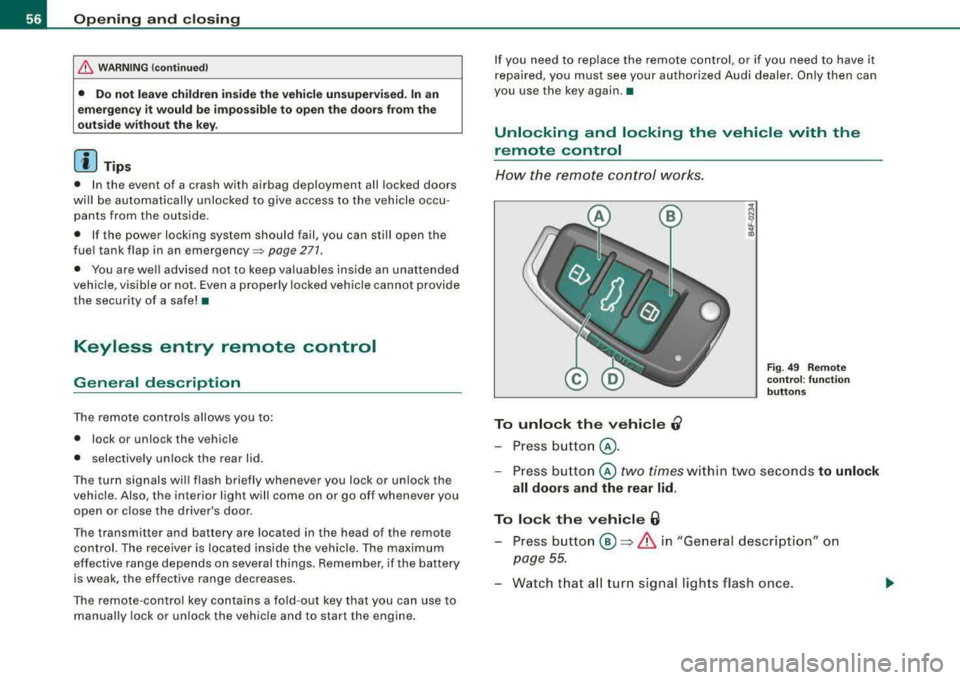
How the remote cont rol works.
To unlock the vehicle 0
- Press button @.
Fig. 4 9 Rem ote
co ntrol: fu nct ion
b utto ns
- Press bu tton @ two times within two seconds to unlock
all doors and th e rear lid .
To lock the v ehi cle 6
- Press button ® => & in "General description" on
page
55.
- Watch that a ll turn signal lights flash once .