lock AUDI A4 AVANT 2008 Owner's Manual
[x] Cancel search | Manufacturer: AUDI, Model Year: 2008, Model line: A4 AVANT, Model: AUDI A4 AVANT 2008Pages: 368, PDF Size: 46.19 MB
Page 59 of 368
To unlock rear lid only ~
- Press button © for approximately one second.
PANIC Button Push the red
butto n@) to activate the panic function. The
horn sounds and t he turn signals flash.
- P ush the
button @) again to deact ivate the panic fu nc
t io n.
& WARNING
R ead and fo llow all WARNIN GS=> & in "G eneral de scr iption " on
page 5 5.
[ i] Tip s
• In orde r to make sure the locking function is working, you should
always keep your eye on the vehic le to make sure it is proper ly
locked .
• Do not use the remote control if you are inside the car, otherwise
you may uninten tiona lly lo ck the vehicle, and then you would set off
the anti -t heft alarm when you try to s tart the engine or open a door.
In case this happens anyhow, push the unlock button
ft .
• Use the panic funct ion only if you are in an emergency
situation .•
Controls and equip
ment
Op ening and closing
Resetting the remote control
The remote control must be reset if the vehicle does not
unlock .
0
Fig . 50 Ig ni tio n l ock
p ositi ons
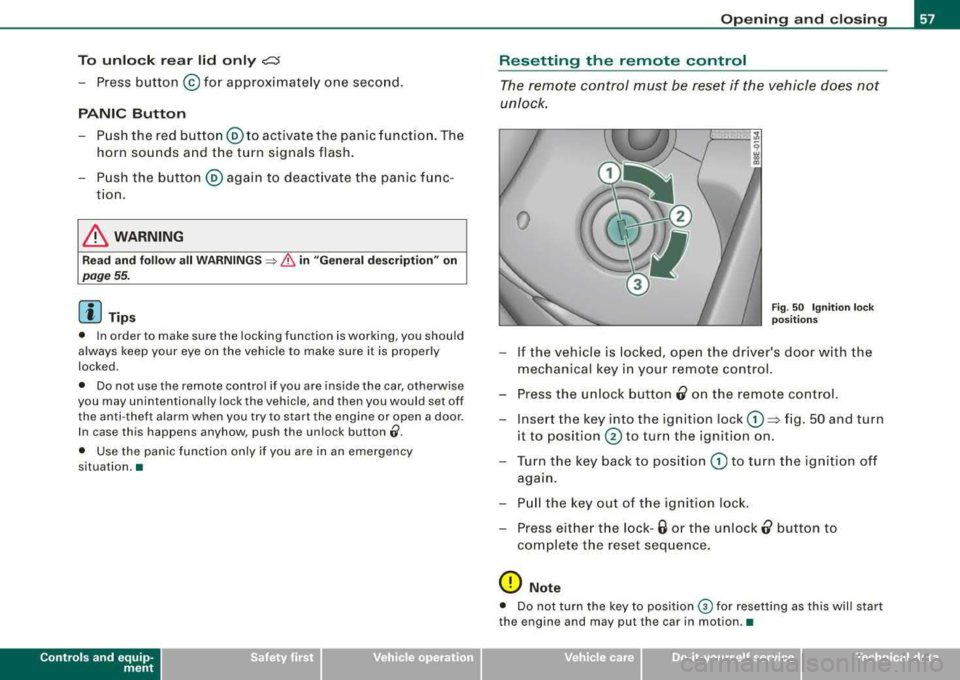
- If the vehicle is locked, ope n the driver's door w ith the
mechanical key in your remote control.
- Press the u nlock button
0 on the remote co ntrol.
- Inse rt the key into the ignition lock
G) => fig. 50 and turn
it to
position @ to turn the ignition on .
- T urn the key back to posit ion
G) to turn t he ignition off
aga in.
- P ull the key out of the igniti on lock.
- Press eithe r the lock -
6 or the unlock 0 button to
co mplete t he reset seque nce .
0 Note
• Do not turn the key to position ® for resetting as this will start
the engine and may pu t the car in motion .•
irechnical data
Page 60 of 368
Opening and clo sing
Certification
The remote control device comp lies with
• USA model s: Part 15 of the FCC Rules.
• Cana da models : RSS-210 of Industry Canada .
Operation is subject to the following conditions:
• this device may not cause harmful interference, and
• this device must accept any interference received, including
interference that may cause undesired operation.
0 Note
The manufacturer is not responsible for ANY RADIO OR TV interfer ence caused by unauthorized modifications to this equipment .
Changes or modifications to this unit not expressly app roved by the
party responsible for compliance cou ld void the user's authority to
operate the equipment .•
Doors, power locks
Operating locks from with key
To lock a nd unl ock the vehicle from the outside, turn the
key in the lock of the driver's do or.
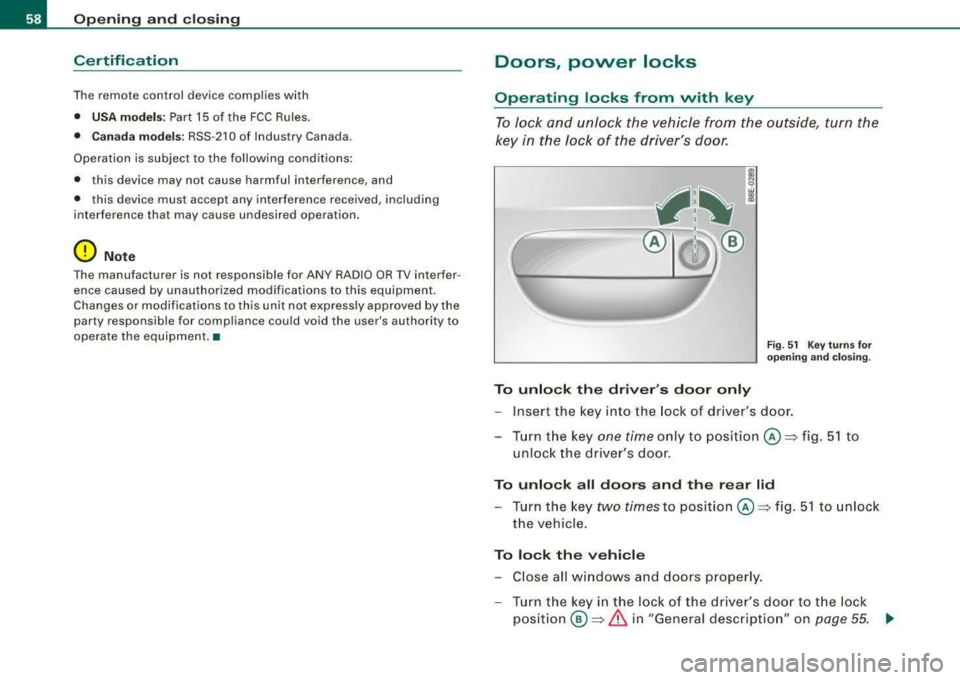
To unlo ck the driver 's door only
F ig . 51 Key turns for
o pening and clo sing .
-Insert the key into the lock of dr iver's door.
- Tur n t he key
one time onl y to position @=> fig. 5 1 to
unlock the driver's door.
To unlo ck all doors and th e re ar lid
- Turn the key two times to position @=> fig. 51 to unlock
the vehicle .
To lock the vehicle
-Close all windows and doors proper ly.
- Tur n the key in the l ock o f the driver's door t o th e lo ck
po sit ion @ => & in "General desc rip tio n" on page 55. ~
Page 61 of 368
& WARNING
Always read and heed WARNING =:> & in "General description" on
page 55. •
Convenience close /open feature with the
lock in the driver's door
You can close or open the windows from outside when
you lock or unlock your car with the key in the driver's
door lock.
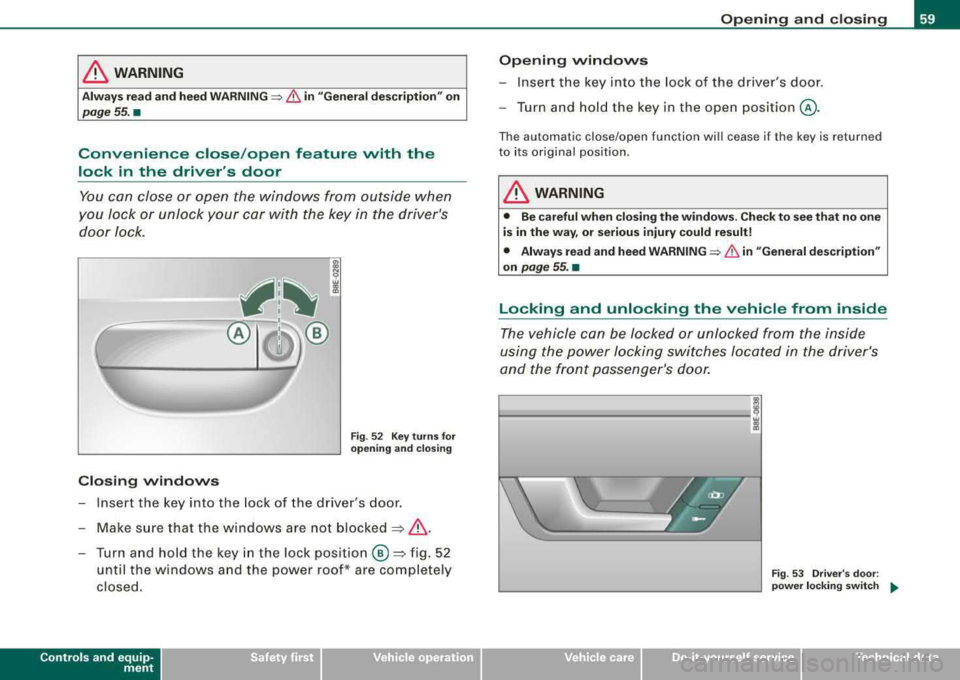
Closing windows
Fig . 52 Key turns for
opening and closing
- Insert the key into the lock of the driver's door.
- Make sure that the windows are not
blocked=> &.
- Turn and hold the key in the lock pos ition ® =>fig. 52
until the windows and the power roof* are completely
closed.
Controls and equip
ment
Opening and closing
Opening windows
- Insert the key into the lock of the driver's door.
- Turn and hold th e key in the open position @.
The automatic close/open function will cease if the key is returned
to its original position .
& WARNING
• Be careful when closing the windows . Check to see that no one
is in the way, or serious injury could result!
• Always read and heed
WARNING=:> & in "General description"
on
page 55. •
Locking and unlocking the vehicle from inside
The vehicle can be locked or unlocked from the inside
using the power locking switches located in the driver's
and the front passenger's door.
------ ' i
Fig. 53 Driver's door :
power locking switch
....
irechnical data
Page 62 of 368
Opening and closing
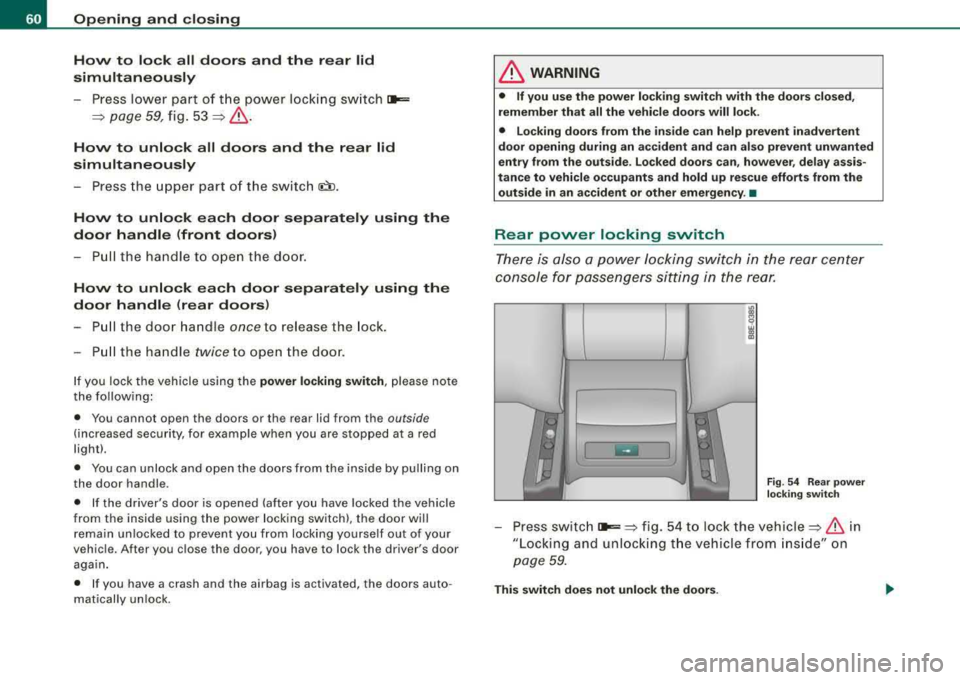
How to lock all doors and the rear lid
simultaneously
P ress lower p art of t he power lock ing sw itc h i:a,,:=:
=> page 59 , fig. 53 => &.
How to unlock all doors and the rear lid
simultaneously
- P ress the upper part o f th e s witch (il) .
How to unlock each door separately using the
door handle (front doors)
- P ull the hand le to open the door.
How to unlock each door separately using the
door handle (rear doors)
- Pull the door ha ndle once to re lease the lock.
- Pull the handl e
twi ce to open th e doo r.
If you lock the vehicle us ing the power locking switch , pl ease no te
the following :
• Y ou cannot open the doors or the rear lid from the
outside
(increas ed s ecu rity, for exa mple when yo u are s top ped at a r ed
l ight).
• You can unlock and ope n th e doo rs fr om the inside by pu lling on
the doo r handle.
• If the drive r's door is opened (a fter yo u have loc ked the ve hicle
from the i nside using the power locking switch), the door will
rem ain un loc ked to p revent you from lock ing you rsel f ou t of yo ur
vehic le. Afte r you c lose the door, you have to lock the driver's door
aga in.
• I f you have a c rash and the air bag is activated, the door s auto
m at ica lly u nlock.
& WARNING
• If you use the power locking switch with the doors closed ,
remember that all the vehicle doors will lock .
• Locking doors from the inside can help prevent inadvertent
door opening during an accident and can also prevent unwanted
entry from the outside . Locked doors can , however , delay assis
tance to vehicle occupants and hold up rescue efforts from the outside in an accident or other emergency . •
Rear power locking switch
Ther e is a lso a powe r Jockin g sw itch in the rear center
con sol e f or pa ssen gers s ittin g in th e re ar.
F ig . 54 Rear p owe r
loc king switch
- Pr ess s wit c h i:a,,:=: => fig . 54 to loc k the vehi cle => & in
" Lo ckin g an d unloc kin g t he ve hic le from in sid e" on
p ag e 59 .
This switch does not unlock the doors .
Page 63 of 368
See also:::::, page 59, "Locking and unlocking the vehicle from
inside". •
Emergency locking
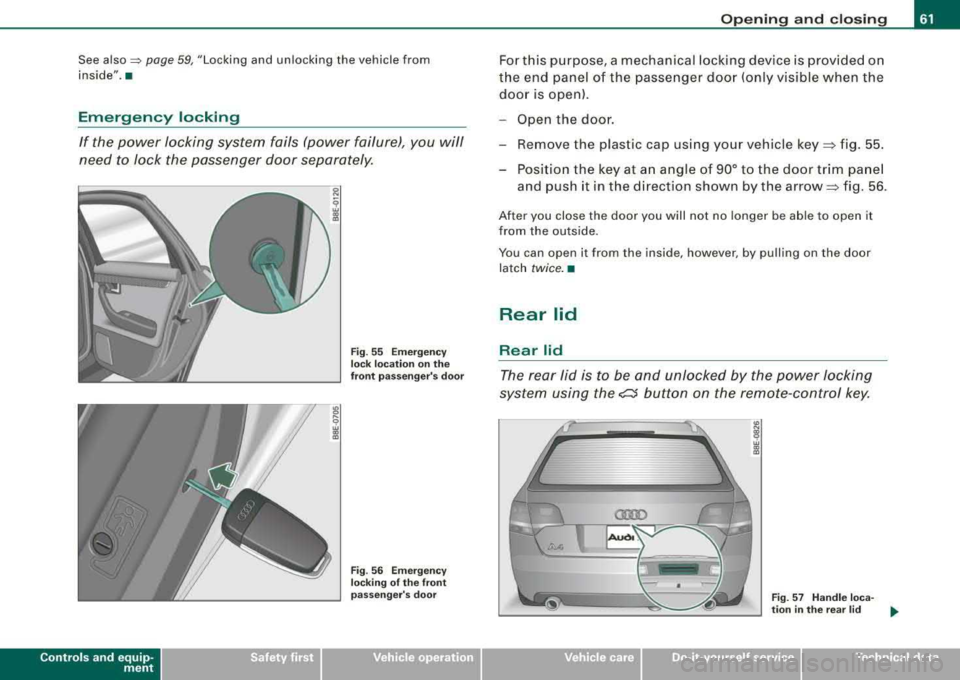
If the power locking system fails (power failure), you will
need to lock the passenger door separately.
Controls and equip
ment
Fig . 55 Emergency
lock location on the
front passenger's door
Fig . 56 Emergency
locking of the front
passenger's door
Opening and closing
For this purpose, a mechanical locking device is provided on
the end panel of the passenger door (only visible when the
door is open).
- Open the door.
- Remove the plast ic cap using your vehicle
key ~ fig. 55.
- Position the key at an angle of 90° to the door trim panel and push it in the direction shown by the
arrow ~ fig. 56.
After you close the door you will not no longer be able to open it
from the outside .
You can op en it from the insid e, however , by pulling on the door
latch
twice. •
Rear lid
Rear lid
The rear lid is to be and unlocked by the power locking
system using the
e::5 button on the remote-control key.
-
Fig. 57 Handle loca-
tion in the rear lid _,.,
irechnical data
Page 64 of 368
Opening and closing
Opening the rear lid
First unlock the rear lid by pressing the cs button on the
remote control.
-Pull the handle=> page 61, fig. 57 and lift the lid.
Closing the rear lid
-Pull it down and shut it firmly=>& . There is a recess in
the interior trim of the lid to make it easier to pull down.
& WARNING
• After closing the rear lid, always pull up on it to make sure that
it is properly closed. Otherwise it could open suddenly when the
vehicle is moving.
• To help prevent poisonous exhaust gas from being drawn into
the vehicle, always keep the rear lid closed while driving. Never
transport objects larger than those fitting completely into the
luggage area, because then the rear lid cannot be fully closed.
• Never leave your vehicle unattended especially with the rear lid
left open. A child could crawl into the car through the luggage
compartment and pull the lid shut, becoming trapped and unable
to get out. To reduce the risk of personal injury, never let children play in or around your vehicle . Always keep the rear lid, as well as
the vehicle doors, closed when not in use.
[ i ] Tips
In case of an emergency, the rear lid can be opened from the inside
~ page 62. •
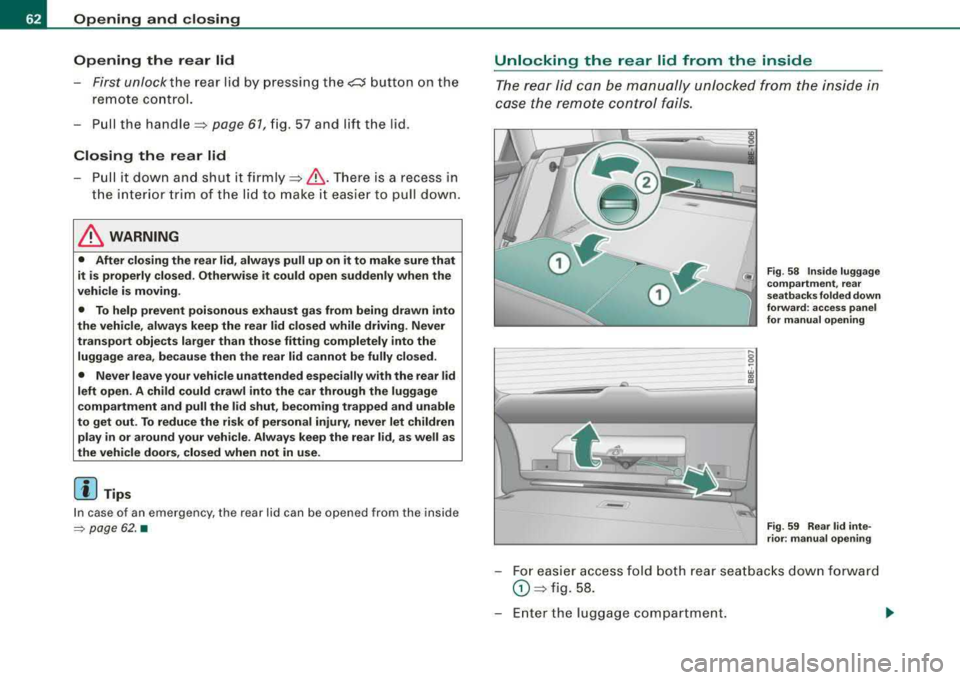
Unlocking the rear lid from the inside
The rear lid can be manually unlocked from the inside in
case the remote control fails.
•
-
Fig. 58 Inside luggage
compartment, rear
seat backs folded down
forward : access panel
for manual opening
Fig . 59 Rear lid inte
rior: manual opening
For easier access fold both rear seatbacks down forward
0 => fig. 58.
Enter the luggage compartment.
Page 65 of 368
-Open the cover panel holding the emergency warning
triangle @=>
page 62, fig. 58.
-To unlock the rear lid, swing the cover panel upwards and
pull out the red plastic cord as indicated by the arrows
=> page 62, fig. 59 -arrows -.•
Remote rear lid release
c:::::5
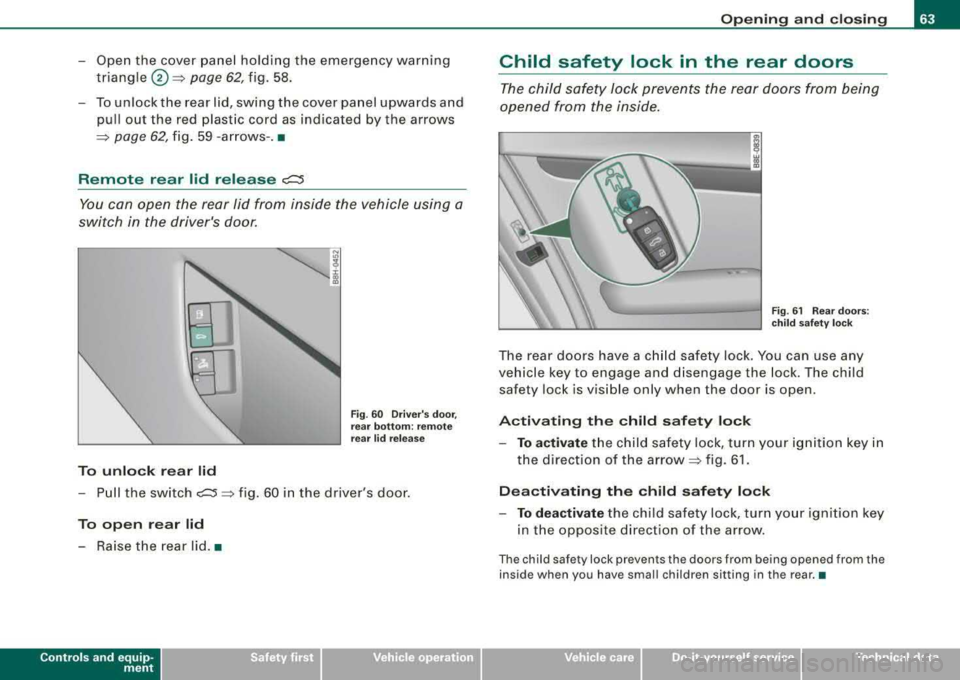
You can open the rear lid from inside the vehicle using a
switch in the driver's door.
To unlock rear lid
Fig. 60 Driver's door,
rear bottom: remote
rear lid release
-Pull the switch c:::5 => fig. 60 in the driver's door.
To open rear lid
-Raise the rear lid. •
Controls and equip
ment
Opening and closing
Child safety lock in the rear doors
The child safety lock prevents the rear doors from being
opened from the inside.
Fig. 61 Rear doors:
child safety lock
The rear doors have a child safety lock. You can use any
vehicle key to engage and disengage the lock. The child
safety lock is visible only when the door is open.
Activating the child safety lock
-To activate the child safety lock, turn your ignition key in
the direction of the
arrow=> fig. 61.
Deactivating the child safety lock
-To deactivate the child safety lock, turn your ignition key
in the opposite direction of the arrow.
The child safety lock prevents the doors from being opened from the
inside when you have small children sitting in the rear.•
Technical data
Page 66 of 368
Openin g and closing
Anti-theft alarm system
Description
The anti-theft alarm triggers an alarm if anyone attempts
to break int o the vehicle.
The anti-theft alarm system triggers an audible alarm and turns on
t he emergency flasher if an unauthorized interference with the
vehic le is sensed by the system .
How is the anti-theft al arm sy stem swit ched on ?
The anti -theft alarm system is switched on when you lock the
dr iver's door manually using your key, o r w hen you use the remote
control. The system is activated approximate ly 30 seconds after the
vehic le is locked. T he indicator light on top of the door trim s tart
flashing rapidly for 30 seconds and then b link slowly.
How is th e anti -theft alarm system switched off ?
The anti-theft alarm system is switched off only when you use the
r emote contro l to unlock your vehicle. If you do not open a doo r
within 60 seconds after you have un locked with the remote control,
the vehicle wi ll loc k itse lf aga in automat ical ly .
If you lock just the driver's door using your key , the front
passenger 's door, the rear and the fue l filler flap remain locked.
I f you use the veh icle key to unlock the driver's door, the other
doors , the rear lid and the fuel tank flap will remain locked . The
a lar m system wil l not be deactivated u nless you insert the key in the
ignition switch within 15 seconds and turn on the ignition . If you fail
to do this, the alarm wi ll sound.
Wh en w ill t he anti th eft ala rm sys tem b e trigg ere d?
When the vehicle is locked, the ala rm system monitors and pr otects
the fo llowing parts of the vehic le:
• engine compartment
• luggage compartment •
doors
• veh ic le incline
• ignition
• factory installed radio .
When the system is activated , the alarm will be triggered if one of
the doors, the engine hood or the rear lid are opened, or if the igni
tion is turned on or the radio removed or if the vehicle incline has
been changed .
The anti -theft alarm system wi ll also go off when you unlock the rear
lid with yo ur key and open it. The alarm is switched off again when
you c lose the rear lid .
The anti -theft alarm system wil l also go off when the battery is
disconnected.
You can also trigger the alarm by pressing the PANIC button on your remote c ontro l. This wil l a lert other people in case of emergency.
Press the
PANI C button again to turn off the a larm .
How i s the anti-theft alarm switched off when
trigg ere d ?
The ala rm system is switched off when you un lock the veh ic le using
the remote contro l or when the ignition is switched on . The a larm
wi ll also switch itse lf off when it co mes to the end of its cyc le .
Em ergen cy flash er
The emergency flasher wil l b link briefly when the doors, engine
hood and rear lid are properly closed .
I f the emergency flashers do not blink, check the doors, engine hood
and rear l id to make sure t hey are proper ly c losed . If you close a
door, the hood or the rear lid with the anti -theft a larm switched on,
the emergency flas hers wil l b link only after you have closed the
door or lid .
.,_
Page 67 of 368

[ i J Tips
• For the anti-theft a larm system to function properly, make sure
all vehicle doors and windows are closed before leaving the vehicle.
• When you open the vehicle from the driver's door using the key,
the central locking switch will work only after you have switched on
the ignition .•
$ Tilt sensors ~
The tilt sensors trigger an alarm if they detect vehicle
movement.
Fig. 62 Driver's door,
rear bottom: tilt sensor
switch
Switch off the tilt sensors if you are going to have your
vehicle transported.
Switch off the tilt sensors
- Press the switch~ located in the driver's door~ fig. 62.
- Lock the vehicle.
Controls and equip
ment
Opening and closing
When you turn off the tilt sensors, the diode in the switch -IQ will illu
minate. Also, the indicator light in the door trim will illuminate for
about three seconds . After you lock the vehicle, the indicator light
in the door trim will blink quickly for about three seconds. After that,
the blinking slows down.
The next time the vehicle is locked, the tilt sensors are automatically
turned on again. •
Power windows
Controls
Fig. 63 Driver's door :
power window
switches
The switches are located in the driver's door. The front passenger's
door has a own power window switch of its own .
To open/close If the respective switch is pushed or pulled, the
window will, respectively .
Switches for front door windows
@ operates the window in the driver 's door.
@ operates the window in the front passenger's door.
irechnical data
Page 68 of 368
Opening and closing
Switches for rear windows
© operates the left rear window.
@ operates the right rear window.
Safety switch
© Safety switch for rear window operation.
_& WARNING
• Do not leave children unattended in the vehicle, especially with
access to vehicle keys. Unsupervised use of the keys can result in
starting of the engine and use of vehicle systems such as power
windows, etc. which could result in serious injury.
• Remember -you can still open or close the power windows for
about ten minutes after the ignition is switched off. Only when
either of the front doors are opened are the power windows
switched off.
• Be careful when closing the windows. Check to see that no one
is in the way, or serious injury could result!
• Always remove the ignition key whenever you leave your
vehicle.
• If you lock your vehicle from the outside, no one, especially chil
dren, should remain in the vehicle.
• Do not stick anything on the windows or the windshield that
may interfere with the driver's field of vision. •
Switches in the driver's door
The driver can operate all windows.
If the respective switch is pushed or pulled the window will
open or close. The power window switches have a
two-posi
tion function:
Opening the windows
- Push the switch to the first stop and hold it there until the
window has lowered to the desired position.
- Push the switch briefly to the
second stop: the window
wi ll automatically open all the way.
Closing the windows
- Pull the switch up to the first stop and hold it there until
the window has risen to the desired position.
- Pull the switch quickly to the
second position: the
window will automatically close all the
way => & in
"Controls" on page 65.
Activating/deactivating rear windows
- Push the switch to the depressed position to activate the
rear windows - the light in the switch will go out.
- Briefly press the switch to deactivate the rear windows -
the switch will return to the safety position and the light
~ will illuminate.
The safety switch©~ page 65, fig. 63 in the armrest on the driver's
door turns off the rear power windows. Only when the safety switch
is depressed can the rear windows be opened or closed . The symbol
in the safety switch illuminates when the power windows in the rear
doors are switched off (button NOT depressed) . This feature has
been provided for the safety of small children riding in the rear of
the vehicle.
[ i] Tips
The windows can still be opened and closed for about ten minutes
after the ignition has been turned off. The power windows are not
shut off until one of the front doors is opened .•