lock AUDI A4 AVANT 2008 Owner's Guide
[x] Cancel search | Manufacturer: AUDI, Model Year: 2008, Model line: A4 AVANT, Model: AUDI A4 AVANT 2008Pages: 368, PDF Size: 46.19 MB
Page 70 of 368
Opening and clo sing
You can still close or open the sunroof for up to ten minut es after
y ou have switched off the igni tion with the key remaining in the igni
tion lock. If either door is opened , powered opera tion of the sunroof
wi ll be deactivated .
[ i ] Tips
Always close the roof completely if you are going to park and leave
your vehicle unattend ed. •
Ap plies to ve hic les : w ith po wer s unroof
Sliding /tilting the power sunroof open
Sliding the power sunroof open to the comfort position
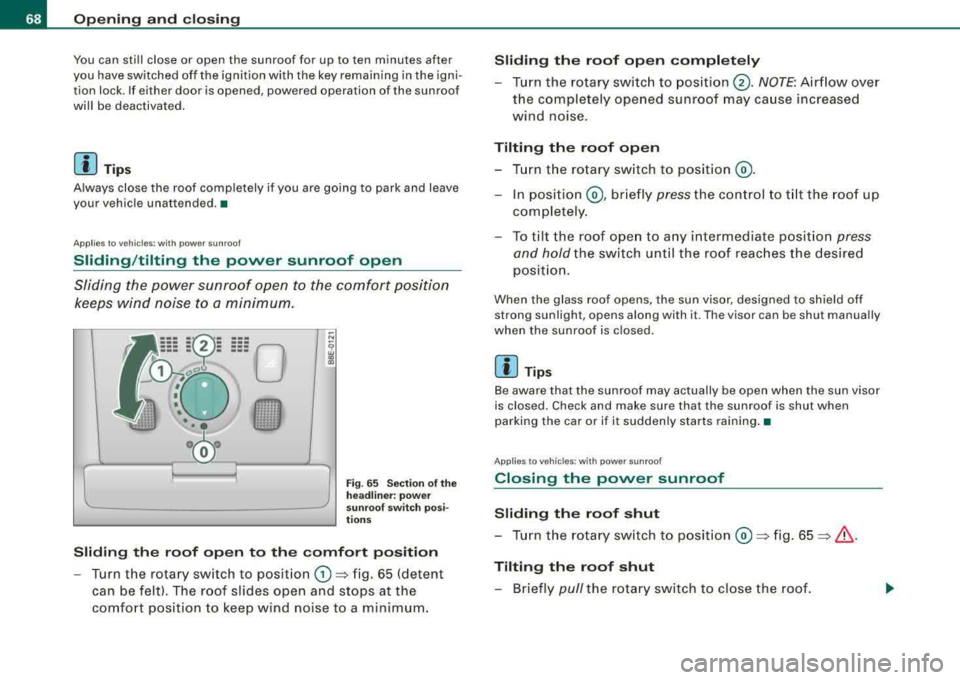
kee ps wind noise to a minimum.
Fig . 6 5 S ectio n of the
h eadliner: p ow er
s un roof sw itch p osi
ti ons
Sliding the roof open to the comfort position
- Turn the rotary sw itch to posit ion G) => fig. 65 (detent
can be felt). The roof slides open and stops at the
comfo rt pos ition to keep wind noise to a m inimum .
Sliding the roof open completely
- Turn the rotary swi tc h to position @. NOTE : Airflow over
the complete ly opened sunroof may ca use increased
wind noise.
Tilting the roof open
- T urn the rotary sw itch to posit ion @ .
- In position @, br iefly pre ss the c ontrol to t ilt the roof up
co mpletely .
- To til t the roof ope n to a ny intermediate positio n
press
and hold
the sw itch unt il the roof reac hes the desired
p osi tion.
When the glass roof opens, the sun visor , designed to sh ield off
strong sunlight , opens along with it . The visor can be shut manually
when the sunroof is c losed .
[ i] Tips
Be aware that the sunroof may actually be open when the sun visor
is closed . Check and make sure that the sunroof is shut when
parking the car or if it suddenly starts raining .•
Ap plies to ve hicl es: wit h power sunroof
Closing the power sunroof
Sliding the roof shut
- Tu rn the rotary sw itch to posit ion @ =>fig. 65 => & .
Tilting the roof shut
- Briefly pull the rotary sw itch to close the roof.
Page 71 of 368
-To tilt the roof down to any intermediate position pull and
hold
the switch until the roof reaches the desired posi
tion.
& WARNING
Improper use of the power sunroof can cause serious personal
injury.
• Be careful when closing the power sunroof. Not paying atten
tion could cause you or others to be caught and injured as the roof
closes.
• Always take the key with you whenever you leave the vehicle to
safeguard against injuries caused by closing the roof.
• Never leave children or persons depending on assistance alone
in the vehicle, especially when they could access the vehicle keys.
Unsupervised use of the keys can result in starting of the engine
or in the use of vehicle systems such as the power sunroof, etc.
which could result in serious injury . The doors could be locked
with the remote key, delaying help in an emergency.
• The power sunroof will continue to operate until the ignition
key has been removed and one of the front doors has been
opened. •
Applies to vehic les: w ith powe r sunroof
Convenience closing feature
The power sunroof can be closed from outside with a
vehicle key.
-Insert the key into the driver's door lock.
-Turn and hold the key in the lock pos ition => & in
"Closing the power sunroof" on
page 68.
Controls and equip
ment
Opening and closing
[ i] Tips
The convenience feature cannot be activated by pressing a button
on the remote key uni t. •
Ap plies to vehic les: wit h p ower sunroof
Power emergency closing
The sunroof can still be closed electrically if for some
reason the overload protection function becomes acti
vated.
The power sunroof is equipped with an overload protection
feature. If, under normal conditions, the power sunroof will
not close , you can close it using this feature.
-Turn the rotary switch to position@=> page 68, fig. 65.
-Now pull the switch and hold it in this position until the
power sunroof closes completely.
& WARNING
Improper use of the power sunroof can cause serious personal
injury.
• Be careful when closing the power sunroof. Not paying atten
tion could cause you or others to be trapped and injured as the
roof closes.
• Always take the key with you when you leave the vehicle to
prevent injuries caused by the roof closing
• Never leave children or persons requiring assistance alone in
the vehicle, especially when they could access the vehicle keys.
Unsupervised use of the keys can result in the engine being
started or use of vehicle systems such as the power windows, etc.
which could result in serious injury. The doors could be locked
with the remote key, delaying help in an emergency .
...
Page 75 of 368
![AUDI A4 AVANT 2008 Owners Guide [ i] Tip s
• If you remove the ignition from the ignit ion lock whi le the head
lights are still on, a buzzer wi ll sound as long as the drivers door is
open to remind](/img/6/57552/w960_57552-74.png "AUDI A4 AVANT 2008 Owners Guide [ i] Tip s
• If you remove the ignition from the ignit ion lock whi le the head
lights are still on, a buzzer wi ll sound as long as the drivers door is
open to remind")
[ i] Tip s
• If you remove the ignition from the ignit ion lock whi le the head
lights are still on, a buzzer wi ll sound as long as the driver's door is
open to remind you to switch off the lights.
• Always observe the specific loca l regu lat ions for your area when
to use your lights. •
Applies to veh icles : w ith ligh t sens or p ackag e
Sensor activated head- and tail light control
In the "AUTO" position light sensors switch the head -and
tail lights on and off.
Activating
Fig . 70 In stru ment
pane l: light swit ch in
A UTO po siti on
-Tur n th e light swi tch => fig. 70 to pos iti on AUTO.
Deactivating
-Tu rn the light sw itch to posit ion 0.
Controls and equip
ment
Cl ea r vision
In the switch position AUTO the aut omatic head -and taillight
control is activated . The correspo nding symbol on the light sw itch
is li t.
Light sensors located in the inside mirror housing and stem
constantly check the lig ht conditio ns surrounding t he ve hicle . If
ambient brightness falls below a factory set value (e.g . when driving
into a tunnel!, the head -and tai llights i nc ludi ng the l icense plate
il lumination are automatically turned on. When ambient brightness
increases again, t he external lights are turned off
aga in => & .
& WARNING
• Autom atic head - and taillight control is only intended to as sis t
the dri ver . Th is feature does not rel ieve the driver of h is respons i
bili ty to check the headlights and to turn them on manually
a ccord ing to the current light and visibility conditions . For
example , fog and rain cannot be detected by the light sen sors.
Consequently , alway s swit ch the headlight s
io on under these
weather condition s and when driving in the dark .
• Cras hes c an happen when you c annot see the road ahe ad and
when you cannot be seen by other motori sts.
• Alwa ys turn on the headlight s so that you can see ahead and
s o that others can see your car from the back.
[ i ] Tips
• In the AUTO mode, the low bea ms are turned off w hen t he ign i
tion is turned off. The remaining lights are turned off when th e ke y
is take n out of the ignition lock .
• Do not attach stickers to the windshie ld in front of the sensors as
this can disab le the automat ic head -and taill ight contro l and the
automa tic glare-dimming of the rearview mirror(sl.
• Always observe the spec ific loca l regulations for your area when
to use your lights.
• In the event of a light sensor ma lfunction, the drive r inf ormat ion
display wi ll show the
symbol ~. If a light sensor malfunction is indi -..,
Page 79 of 368
Applies to vehi cles: with Ligh ting p ackag e
Coming home/leaving home function
The coming home/leaving home function switches on the
external lights on a vehicle parked in the dark to illumi
nate the surroundings.
Activating the function
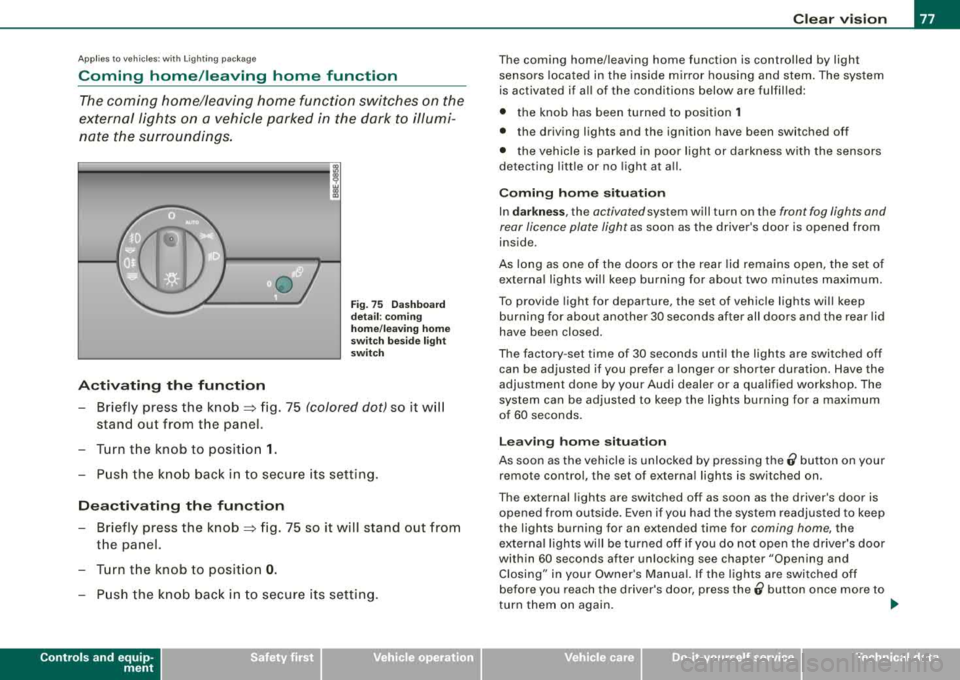
Fig. 75 Dashboard
detail : coming
home/leaving home
switch beside light
switch
- Briefly press the knob => fig. 75 (colored dot) so it will
stand out from the panel.
- Turn the knob to position
1.
- Push the knob back in to secure its setting.
Deactivating the function
- Briefly press the knob => fig. 75 so it will stand out from
the panel.
- Turn the knob to position
0.
- Push the knob back in to secure its setting.
Controls and equip
ment
Clear vision
The coming home/leaving home function is controlled by light
sensors located in the inside mirror housing and stem. The system
is activated if all of the conditions below are fulfilled :
• the knob has been turned to position
1
• the driving lights and the ignition have been switched off
• the vehicle is parked in poor light or darkness with the sensors
detecting little or no light at all.
Coming home situation
In darkness, the activated system will turn on the front fog lights and
rear licence plate light as soon as the driver's door is opened from
inside .
As long as one of the doors or the rear lid remains open, the set of
external lights will keep burning for about two minutes maximum.
To provide light for departure, the set of vehicle lights will keep
burning for about another 30 seconds after all doors and the rear lid
have been closed.
The factory -set time of 30 seconds until the lights are switched off
can be adjusted if you prefer a longer or shorter duration. Have the
adjustment done by your Audi dealer or a qualified workshop. The
system can be adjusted to keep the lights burning for a maximum
of 60 seconds.
Leaving home situation
As soon as the vehicle is unlocked by pressing the ti button on your
remote control, the set of external lights is switched on.
The external lights are switched off as soon as the driver's door is
opened from outside. Even if you had the system readjusted to keep
the lights burning for an extended time for coming home, the
external lights will be turned off if you do not open the driver's door
within 60 seconds after unlocking see chapter "Opening and Closing" in your Owner's Manual. If the lights are switched off
before you reach the driver's door, press the
0 button once more to
turn them on again. _,,,
Page 80 of 368
![AUDI A4 AVANT 2008 Owners Guide Clear vision
[ i] Tips
• Do not attach any stickers to the windshield in front of the two
light sensors, as this would interfere with both the automatic oper
ation of t](/img/6/57552/w960_57552-79.png "AUDI A4 AVANT 2008 Owners Guide Clear vision
[ i] Tips
• Do not attach any stickers to the windshield in front of the two
light sensors, as this would interfere with both the automatic oper
ation of t")
Clear vision
[ i] Tips
• Do not attach any stickers to the windshield in front of the two
light sensors, as this would interfere with both the automatic oper
ation of the headlights and the automatic dimming of the inside
mirror(sl.
• If the vehicle is remotely unlocked and locked
three times in
succession,
leaving home will not turn on the lights a fourth time to
safeguard the battery and lights .
• If you wish to use the coming home/leaving home function regu
larly, you can leave it activated at all times without risking perma
nent strain on the electrical system. As the system is controlled by
light sensors, it wi ll only be energized in darkness.
• Frequent use of the coming home/leaving home function for
approaching and departing a vehicle parked in the dark wil l strain
the battery. This applies particularly if only short distances are
driven between stops . Occas ionally drive longer distances to make
sure the battery is recharged sufficiently.
• If the fog lights have been switched on by the coming
home/leaving home function, they will always be switched off when
you switch on the ignition .•
Instrument panel illumination
The glow of the instruments, displays and the center
console can be adjusted to increase or reduce brightness.
Fig. 76 Instrumen t
panel illumination
Press the"+" button to increase the brightness.
- Press the"-" button to reduce the brightness.
Ignition ON, light switch at @.
With the ignition switched ON, the glow of instrument needles can
be adjusted to appear brighter or dimmer.
Ignition ON, light switch at ;oo~ or io.
With the lights switched on, the brightness of instrument cluster
!i.e . needles, gauges and displays) and center console illumination
can be adjusted.
0 Note
The instrument cluster and center console illumination (gauges and needles) comes on when you switch on the ignition and the vehicle
headlights are off. Be aware of the following difference between
models built to US or Canadian specifications : ..,
Page 83 of 368
Interior lights
Interior lights and glove compartment light The interior lights include the both reading lights for the
driver and the front passenger.
--
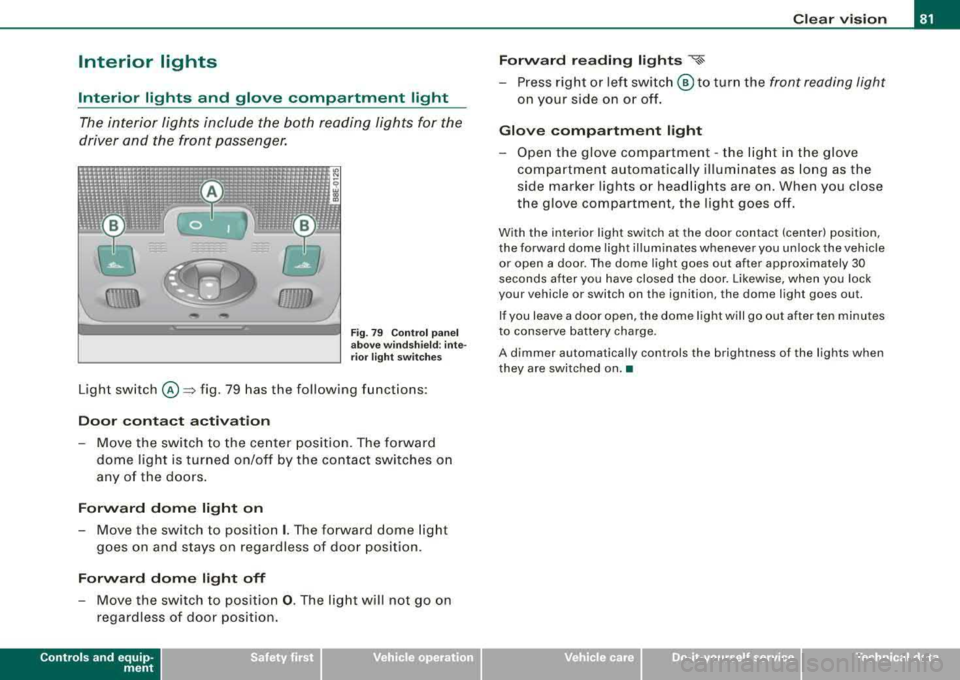
Fi g. 7 9 Control pan el
a bov e wind sh ie ld : int e
r ior ligh t sw itche s
Light sw itch @=> fig. 79 has the following funct ions :
Door contact activation
-Move the switch to the ce nter positi on. The forward
dome light is tur ned on/off by the contact switches o n
any of the doors.
Forward dome light on
- Move the switch to positio n I. The forward dome lig ht
g o es on an d stays on regardless of doo r position .
Forward dome light off
- Move the switch to positio n 0. The lig ht will not go on
regardless of door position.
Controls and equip
ment
Clear v ision
Forw ard reading lights
~
-Press right or left switch @ to turn the front reading light
on your side on or off.
Glove compartment light
-Open the glove com partment -the lig ht in the g love
compartment automatica lly il lum inates as lo ng as the
side marker lights or head lights are on. When you c lose
the glove compartment, the light goes off.
With the interior light switch at the door contact (center) position,
the forward dome light il luminates whenever you unlock the veh icle
or open a door . The dome light goes out after approximately 30
seconds after you have closed the door . Likewise, when you lock
your vehicle or switch on the ignition, the dome light goes out.
If you leave a door open, the d ome light wi ll go out after ten minutes
to conserve battery charge.
A dimmer automatically controls the brightness of the lights when
they are switched on .•
irechnical data
Page 94 of 368
Clear vision
Adjusting th e outside mirrors
- Turn the adjus ting knob
to=> page 91, fig. 93 © (drive r's
side ou tside mirror)
to @ (front passenger's outside
m irror).
- Press the knob in the appropriate direction to move the
m irror surface so t hat you have a good view to the rear.
Folding both outside mirrors *
- Turn t he kn ob
to @ .
The mirror surfaces are heated whenever you sw itch on the rear
window defogger regardless of the outside temperature .
You are we ll- advised to fold the outside mirro rs in when maneu
vering in t ight spaces or when leaving the car parked close to other
vehic les.
A uto matic tilt -d own of passen ger side outsid e mirr or*
With the knob turned to posi tion ®=> page 91, fig. 93, the mirror on
the front passenger door will tilt downward s lightly when you move
the selector lever into
R ( R everse) . This feature provides a better
view of the curb when you are backing into a parking space.
T he mirror wil l go back to its original position when you shift out of
Reverse, or when y ou turn the control k nob back
to © or@ .
Memo ry setting for the outsid e mirrors *
On veh ic les w it h the memory function *, w hen you store a seat posi
tion in the memory, the position of the outside mirrors is a lso stored
in the
memory => page 100.
0 Note
• Curved mirror surfaces (co nvex o r spher ical*) i ncrease you r fie ld
of view . Remember that vehic les or other objects wil l appear smaller
and fa rther away than w he n seen in a fla t mi rro r. If yo u use t his mirror to estimate distances of following vehic
les when changing
lanes, you cou ld esti mate incorrec tly a nd cause an acc ident .
• I f the mirror housing is moved unintentional ly (for example,
while parking y our vehicle), t hen you must first fo ld the mirror e lec
trically. Do not readjust the mirror housing manually . You cou ld
damage the m otor which controls t he m irror.
[ i ] Tips
If there shou ld be a malfunction in t he electrical syste m, you can
sti ll ad just the outside mirrors by pressing the edge of the mirror .•
Ap plies to vehicles : wit h au tomat ica lly a djus tin g outs ide mirro rs
Automatic dimming for the outside mirrors
The outside mirro rs d im at t he same t ime as the ins ide mirror. W hen
the ignition is switched on, the mirrors automatical ly dim
depending on the amount of flight striking the mir ro rs (such as
headlights shinin g into the veh ic le from the rear).
When you switch on the in terior light , or when you move the
selector lever into
R (Reverse), the d imm ing function stops and the
mirrors return to their original condition (not darkened).
[ i ] Tips
The automat ic dimming feature on the mirrors wil l not operate
pro per ly if the ligh t shining on the m irrors is blocked by other
objects .•
Page 103 of 368
________________________________________________ S_ e_ a
_ t_
s _a_ n_d _ s_t _o _ r_ a_ g~ e __ ffllll
Memory buttons
On each memory button (On each memory button G) ,@ , G) and ©
=> page 100, fig. 102 , you can sto re a sea t and outside mirror posi
tion . Up to 4 different drivers can store their
settings .=> page 100,
fig. 102 , you can sto re a seat and outside mirro r position . Up to 4
d iffer ent driv ers can stor e their s ettings .
ST OP b utton
Press the STOP button to switch off the seat memory.
The word
OFF next to the STOP button wi ll illuminate. The 4 different
sea t adjust ments remain stored in th e memory . When the s eat
memory is switched off, then you can only adjust the seat and
outsid e mirrors in th e usual way .
It is recommended to use the STOP feature if your vehicle is going
to be used by another driver temporarily .
[ i ] Ti ps
• The vehicle must be turned on to p rogram the memory button
settings .
• You can recall a seat posi tion using either the memory bu ttons
or using the remote contro l
=> page 102.
• Seat position settings cannot be re ca lled if the s eat back is folded
forward. •
Applies t o vehi cle s: w ith po wer seats and driver's seat memory
Storing a seat position
Before you can store your seat position, the S TOP button
must be engaged (down) .
-Adjust the driver 's seat => page 97 .
Adjust both outside mirrors=> page 91.
Controls and equip
ment
-Press the MEMO button and hold it down. A t th e same time,
press one of the memory buttons for at least one seco nd.
-Re lease the buttons . The seat and outside mirror pos i-
t ions are now stored on that memory button.
Each time to assign a sea t position to a key , you ca ncel the seat posi
t ion, wh ich had be en assigned to that key befor e.
Whenever you store a new pos it ion on a memory button, the former
position is erased. W e recommend you assign m emory buttons
starting with button 1.
When you
l ock your vehicle using the remote control, the las t seat
and mirror position wil l be stored.
When you
unl ock your vehic le the next t ime, the mirrors and the
seat wi ll adjust automat ica lly to the last pos ition stor ed in your k ey .
This wil l not erase the seat posi tion a lready stored on memory
buttons (1) th rough (4).
•
App lies to veh ic les: w ith power seats and d river 's se at memory
Recalling a seat position
You can recall a seat position using either the memory
buttons or using the remote control in your key.
Usin g th e memory buttons
-Driver's door open -press the desired memo ry button.
-Driver's door c losed -press and hold the respective
memory button unt il the seat and the m irrors move into
t h eir store posi tion .
U sing th e remote control
-Un lock the vehicle using the remote contro l. Then open
the driver's door w ithin ten minutes . .,._
Page 104 of 368
___ S_ e
_ a_t_s _ a_n_ d
__ s _t _o _r_a ...::g==---- e ________________________________________________ _
If you do not open the door within ten minutes after unlocking it,
then you have to use the memory button to recall a seat position.
& WARNING
In an emergency, the recall operation can be stopped by pressing
the STOP button or by briefly pressing any given store button . •
App lies to vehicles: with power seats and driver's seat memory
Assigning the keys
Each remote key can be assigned to a memory button.
After you have stored your seat adjustments on a memory
button~ page 101 you can assign the remote key to the
memory button
Assigning a seat position to a key
- Press the memory button of the seat position you wish to
assign to your key.
- Hold down the memory button and within
ten seconds
press the unlock button on your remote control key.
- Release both buttons after
two seconds . Now that seat
position has been assigned to that remote key.
Canceling a seat position assigned to a key
-Hold the MEMO button depressed and within ten seconds,
press the unlock button on the remote control key.
- Release the
MEMO button after two seconds.
Each time to assign a seat position to a key, you cancel the seat posi
tion, which had been assigned to that key before. We recommend you assign
memory buttons (1) and (2) to the two
remote control keys you received with your vehicle. You can obtain
additional remote control keys from your authorized Audi dealer. •
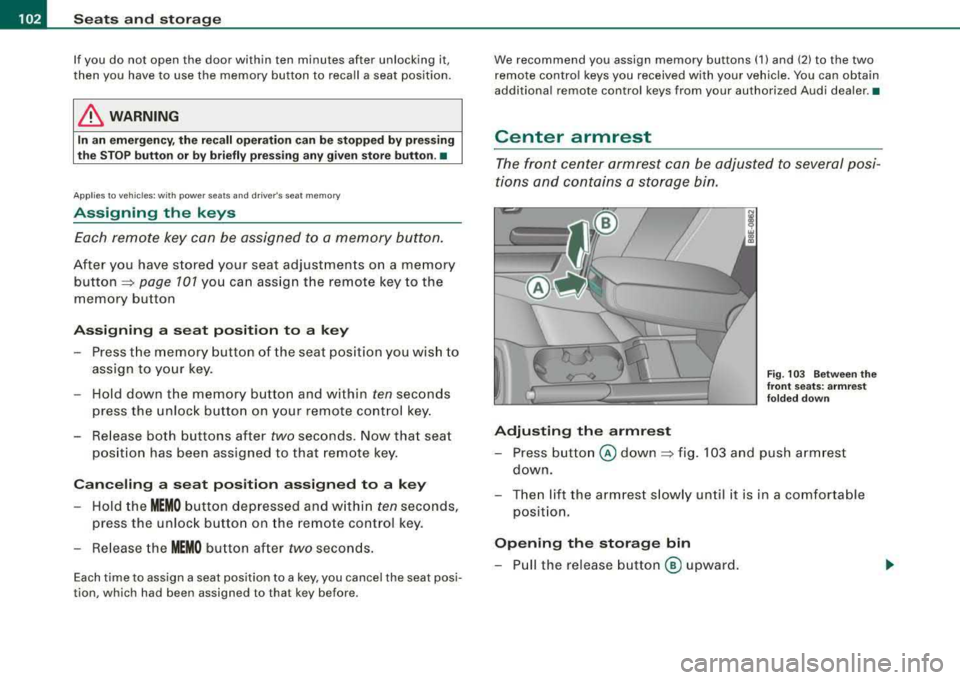
Center armrest
The front center armrest can be adjusted to several posi
tions and contains a storage bin.
Adjusting the armrest
Fig. 103 Between the
front seats: armrest
folded down
- Press button @ down ~ fig. 103 and push armrest
down.
- Then lift the armrest slowly until it is in a comfortable
position.
Opening the storage bin
- Pull the release button ® upward.
Page 112 of 368
___ S_ e
_ a_t_s _ a_n_ d
__ s _t _o _r_a ...::g==---- e ________________________________________________ _
& WARNING
Fo r st rength -related r easons, th e partition net can o nly be us ed to
s ecure object s weigh ing 10 lb (5 kg ) or le ss. Heavier objects will
not be adequ atel y sec ured -risk of i njury ! •
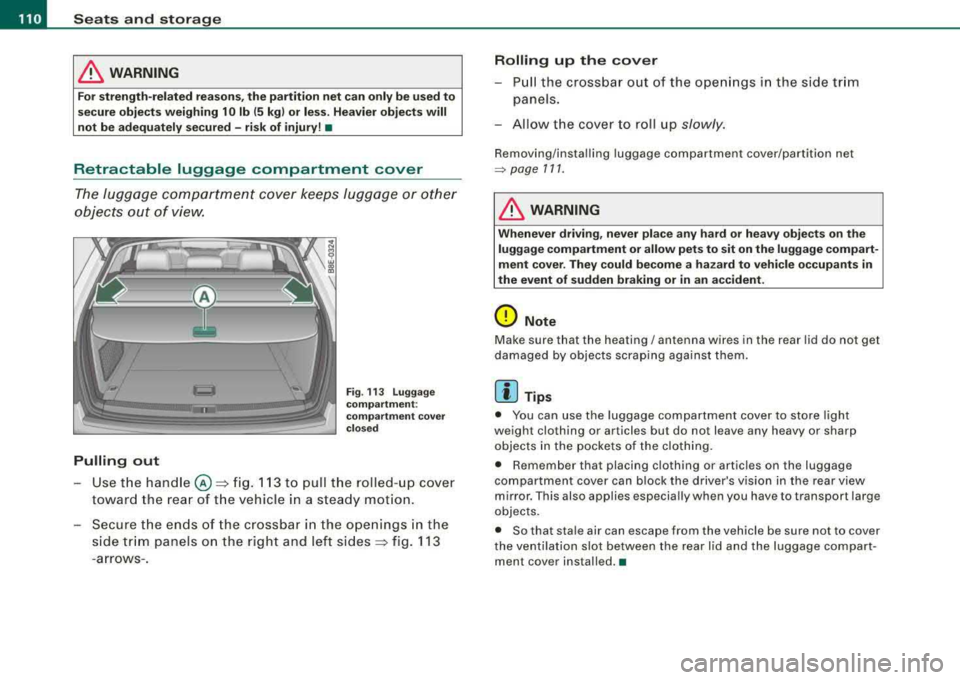
Retractable luggage compartment cover
The luggage comp artment cover keeps luggage or other
objects out of view.
Pulling out
Fi g. 113 Lugga ge
co mp art m ent:
co mp artm ent c over
c lo se d
- Use t he hand le @ ~ fig. 11 3 to pull the rolled- up cover
toward the rear of t he veh icle in a steady mot ion.
- Secure the en ds of the crossbar in the o penings in the
s ide tr im panels on the right and left
sides ~ fig. 113
-arrows-.
Rolling up th e cov er
- Pull the crossbar out of the ope nings in the side trim
panels.
- Allow the cover to roll up
slowly.
Removing /insta lling luggage compartment cover/partition net
~ page 111.
& WARNING
Whenev er dri vin g, ne ver pl ace any h ard or heavy ob ject s on th e
luggage comp art m ent or allow p ets to sit on the luggage compart
m ent c over. They could become a hazar d to vehic le occupant s in
the e vent of sudden bra king or in an a ccident.
0 Note
Make sure that the heating/ antenna wires in th e rear lid do no t get
damaged by objects scraping against them.
[ i ] Tips
• You can use the luggage compartment cover to store light
weight clothing or ar ticles bu t do not leave any heavy or sharp
objects in the pockets of the clothing .
• Remember that placing c lothing or articl es on the luggage
compartment cover can block the driver 's vis ion in the rear view
mirror. This also applies especially when you have to transport larg e
objects .
• So that sta le air can escap e from the vehicle b e sure not to cov er
the venti lation slot between the rear lid and the luggage compart
men t cov er ins talled. •