brake AUDI A4 AVANT 2008 Owner's Manual
[x] Cancel search | Manufacturer: AUDI, Model Year: 2008, Model line: A4 AVANT, Model: AUDI A4 AVANT 2008Pages: 368, PDF Size: 46.19 MB
Page 147 of 368
_______________________________________________________ T:...:.; ra::.:.. n:.:s:.: m
:..:.:.:.: is::::s::.:.: io::.:.. n:__JIIII
Select R only when the vehicle is at a full stop and the engine is
running at idle
speed.~ & in "Driving the 6 -speed automatic trans
mission" on
page 143.
Before you move the selector lever to R, press both, the button in the
handle of the selector lever
and the brake peda l at the same time.
When the ignition is on, the backup lights i lluminate when the
selector lever is moved into R.
N -Neutral
Shift to this position for standing with brakes applied ~ page 145.
When the vehicle is stationary or at speeds below 3 mph (5 km/h),
you must always apply the footbrake before and while moving the
lever out of
N.
D -Normal driving position for forward
Position Dis for norma l city and highway driving. It ranges from zero
to top speed and all six gears automatically shift, depending on
engine load, driving speed and automatically selected shift
programs.
When the vehicle is stationary or at speeds below 3 mph (5 km/h),
you must always apply the foot brake before and whi le moving the
lever out of
N to D or S.
In certain circumstances it may be advantageous to temporarily
switch to the manual shift program to manually se lect gear ratios to
match specific driving
conditions~ page 147.
S -Sport position
Selec t this position for sportier performance. In this position, the
eng ine wi ll not upshift as soon, allowing the vehic le to use the
increased power avai lable at higher engine speeds to achieve live
lier acceleration.
Before you move the selector lever from
D to S, press the button in
the handle of the selector lever.
Controls and equip
ment
LJ}. WARNING
• Always read and heed WARNINGS ~ & in "D riving the 6-speed
automatic transmission" on
page 143.
0 Note
Coasting downhill with the transmission in N and the engine not
operating will result in damage to the automatic transmission and
possibly the catalytic converter. •
Applie s to vehicles: wi th G·sp eed automatic tra nsm iss ion
Automatic Shift Lock (ASL )
Automatic selector lever lock prevents you from acciden
tally shifting into a forward gear or into reverse , thus
causing the vehicle to move unintentionally.
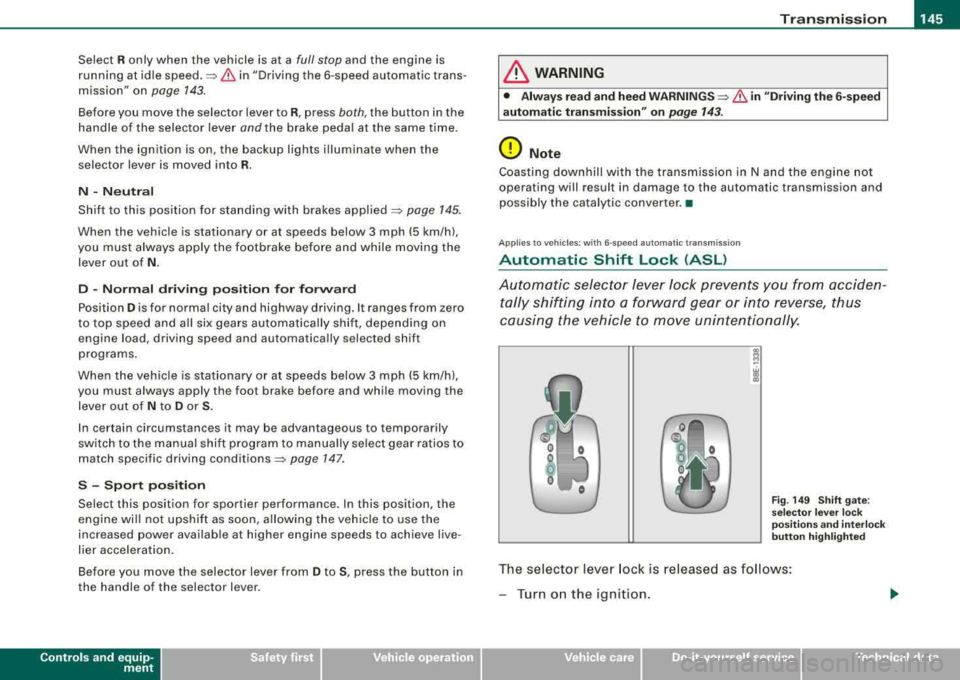
Fig. 149 Shift gate:
selector lever lock
positions and interlock
button highlighted
The selector lever lock is re lease d as follows:
-Turn on the ignition .
irechnical data
Page 148 of 368
___ T
_ r_a _ n_ s_m _ i_s _s _i_o _n ______________________________________________________ _
- Step on the brake pedal. At the same time press and hold
the lock button -green
st ub-=> page 145, fig. 1 49 w it h
your t humb until you have moved the se lector leve r to
the desired posit ion.
Au toma tic selec tor le ver lo ck (IS,
The se lector lever is locked in the P and N positions when the igni
t io n is turned on .
When the selector lever is in the
P or N positions, the message
When station ary app ly footbr ake while sele ct ing ge ar
appears on the instrument c luster display on vehicles equipped
with the Driver Information System as a reminder to the driver. I
addition, the symbo l
53 will light up on the shift gate at the base of
the selector lever.
A time delay e lement prevents the se lector lever from locking when
it is moved through the
N position (going from R to D ). The locking
element will lock the selector lever if the lever is left in N (Neutral)
for more than approximate ly 1 seco nd, without the brake peda l
being pressed.
At speeds above about 3 mph (5 km/h) the Automatic Shift Lock is automatically deactivated in the
N position .
The button needs to be pressed to shift from
D to S to avoid unnec
essari ly high fuel consump tion in the
Sport mode.
Int erlock button
The lock button on t he se lector lever preve nts the lever from bei ng
accidentally shifted into certain positions. Pressing this button
deactivates the selector leve r lock.
Depending on the direction of shift, the se lector lever locks at
different positions. The positions are highlighted in the il lustration
above~ page 145, fig. 149 .
Ignition ke y sa fe ty int erlo ck
The key cannot be removed from the ignition un less the selector
lever is in the P park position.
When the ignition key is removed, the selector lever will be locked
i n the
P position. •
Applies to vehicles : with 6-speed automatic transmiss ion
Kick-down
T he kick-down feature allows the vehicle to generate
maximum acceleration.
When you press the accelerator pedal beyond the resistance point
that is reached at fu ll thrott le, the transmiss ion w ill se lect a lower
gear ratio based on the vehicle speed and engine RPM . T he engine
RPM w ill be contro lled to produce maximum veh ic le acce leration as
long as you keep pressing the accelerator peda l beyond this resis
t ance point.
& WARNING
Be c are ful when u sing the ki ck-down on slippery ro ads. R apid
a cc elerat ion m ay ca use skidd ing .
•
Ap plies t o vehic les : with 6-s pee d auto mat ic tran smi ssi on
Dynamic Shift Program (DSP)
The automatic transmission is electronically controlled.
The transm ission is self adapting and wi ll automatically se lect the
best shift program suited to the driving conditions and driving style.
The transmission wil l se lect one of the
e conomy programs when
you drive at a steady speed or a gradually changing speeds without heavy acce leration. This achieves optimum fuel efficiency, with early
upshifting and delayed downshifting.
~
Page 149 of 368
_______________________________________________________ T_ r
_ a_ n_s_ m __ is_ s_ io_ n _ ___._
The transmission wil l automatically select the s port y shift programs
when you drive at higher speeds, or wi th heavy acceleration and
frequently changing speeds . Upshifts are delayed to make full use
of engine power. Downshifting takes place at higher engine speeds
than in the economy programs.
The selection of the most suitable shift program is a continuous, automatic process. The driver can a lso make the transmiss ion
switch to a sporty program by
qu ick ly pressing down the gas pedal.
This causes the transmission to shift down to a lower gear to
achieve rapid acceleration, e.g . for quickly passing another vehicle.
You do not need to press the gas pedal into the kick -down range.
After the transmission has upshifted, the original program is selected according to your driving style .
An additional shift program allows the automatic transmission to select the proper gear for uphill and downhill gradients .
This keeps the transmission from shifting up and down unneces
sari ly on h ills. The transmiss ion wil l shift down to a lower gear when
t he drive r presses the brake pedal on a downhi ll gradient. This
makes use of the braking effect of the engine without the need to
manual ly shift down .
With th is function, the transmission will only shift down as far as
second gear.
•
Controls and equip
ment
App lies to ve hicles: w ith 6-speed automat ic tra nsmission
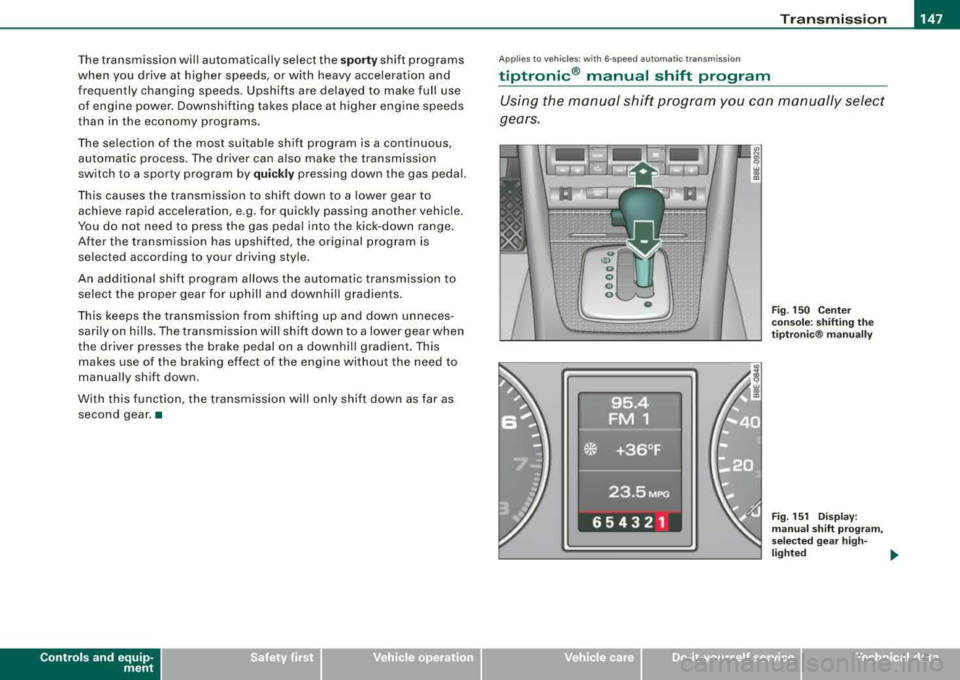
tiptronic ® manual shift program
Using the manual shift program you can manually select
gears.
0 F ig . 150 C enter
c on sole: shifting the
tip tro ni c® manu ally
F ig . 151 Dis play:
man ual shift pr ogr am ,
s el ec te d gea r high -
li g ht ed
.,,_
irechnical data
Page 152 of 368
___ T_ r
_ a_ n_s _m_ i_s _s _i_o _n ___________________________________________________ _
Applies to vehi cles: with mu ltit ron ic '" C ont in uo usly Va riab le Tr ansmiss ion {CVT I
Driving the multitronic ™
The gear ratio is continuously adapted to vehicle speed
and load.
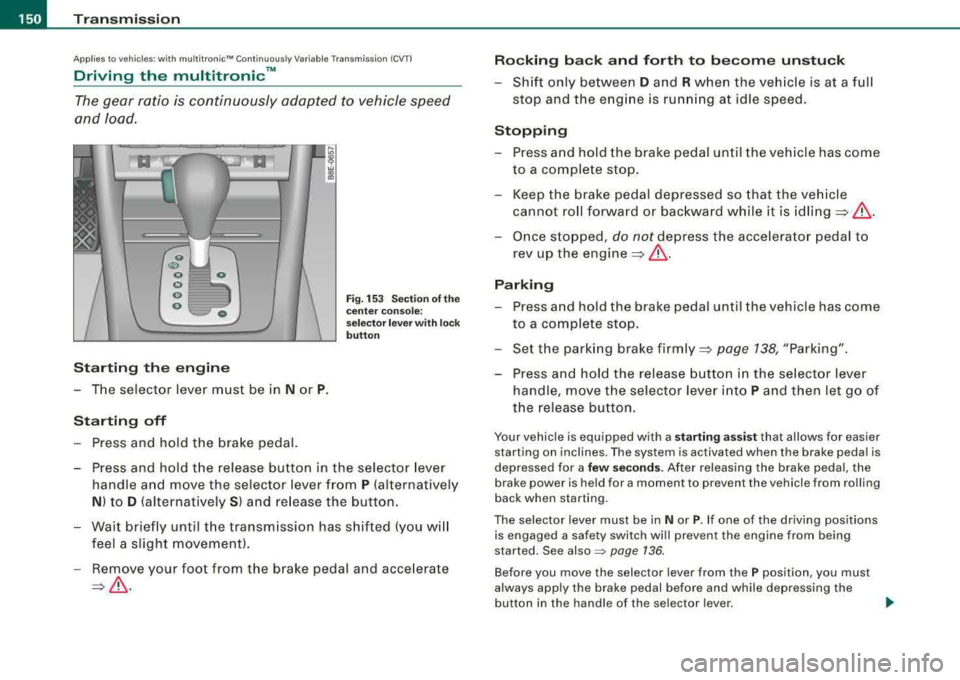
Starting the engine
-The selector lever must be in N or P.
Starting off
Press and hold the brake pedal.
Fig. 153 Section of the
center console:
selector lever with lock
button
-Press and hold the release button in the selector lever
handle and move the selector lever from
P (alternatively
N) to D (alternatively S) and release the button.
-Wait briefly until the transmission has shifted (you will
feel a slight movement).
-Remove your foot from the brake pedal and accelerate
=>& .
Rocking back and forth to become unstuck
-Shift only between D and R when the vehicle is at a full
stop and the engine is running at idle speed.
Stopping
-Press and hold the brake pedal until the vehicle has come
to a complete stop.
-Keep the brake pedal depressed so that the vehicle
cannot roll forward or backward while it is
idling=>& .
-Once stopped, do not depress the accelerator pedal to
rev up the
engine =>& .
Parking
-Press and hold the brake pedal until the vehicle has come
to a complete stop.
-Set the parking brake firmly=> page 138, "Parking".
-Press and hold the release button in the selector lever
handle, move the selector lever into
P and then let go of
the release button.
Your vehicle is equipped with a starting assist that allows for easier
starting on inclines. The system is activated when the brake pedal is
depressed for a
few seconds. After releasing the brake pedal, the
brake power is held for a moment to prevent the vehicle from rolling
back when starting.
The selector lever must be in
Nor P. If one of the driving position s
is engaged a safety switch wi ll prev ent the engine from being
started. See
also ~ page 136.
Before you move the selec tor lever from the P position, you must
always apply the brake pedal before and while depressing the
button in the handle of the se lector lever.
~
Page 153 of 368
Transmission -
-----------------'
& WARNING
• Unintended veh icle mo vement can cause serious injury .
-When the selector lever is in a driving position, the vehicle
m ay creep , even at idle speed . Therefore do not relea se the
parking brake o r foot brake until you are read y to move ,
becau se power is transmitted to the wheel s as soon a s a
dri ving position is eng aged .
-Do not accelerate while selecting a driving position . At this
time the engine must be at idle speed so that undue stress is
not placed on the clutche s in the transmission.
-Remember: - even when stopped briefly with the automatic
tr ansmission in
" D" , "S " or "R ", engine power i s being t rans
mitted to the wheels. Your vehicle could
" creep " forward or
b ackward . When stopped , keep the brake pedal fully depressed
and use the p ark ing brake if necessary to keep the veh icle from
rolling .
-If the selector lever is un intentionally moved into N wh ile you
are driving , take your foot off the accelerator pedal and wait for
the eng ine to return to idle speed before selecting a driving
position.
-Never shift into " R " or "P " when the vehicle is in mot ion .
-Never get out of the dr iver 's seat when the engine is running.
-If you must get out of the vehicle , move the selector lever
se curely into the P position and apply the park ing bra ke firmly .
-If the engine must remain running, never have any driving
position engaged when che cking under the hood . Make sure
the selector lever has se curely engaged and is lo cked in
"P "
with the parking brake firmly set :::::, page 265 , "Eng ine
compartment ". Otherwise , any increase in engine speed may
set the vehicle in motion , even with the park ing brake
applied. •
Controls and equip
ment
Ap plies to ve hicles : wi th m ultit r on ic ™ Co ntin uo usly V ariab le Tr ansmissio n ICVT I
Selector lever positions
Th is sec tio n describes the selector le ver posi tions and
driving ranges.
Fig . 154 Display in the
in strument clu ste r:
s elec tor lever in p osi
tion P
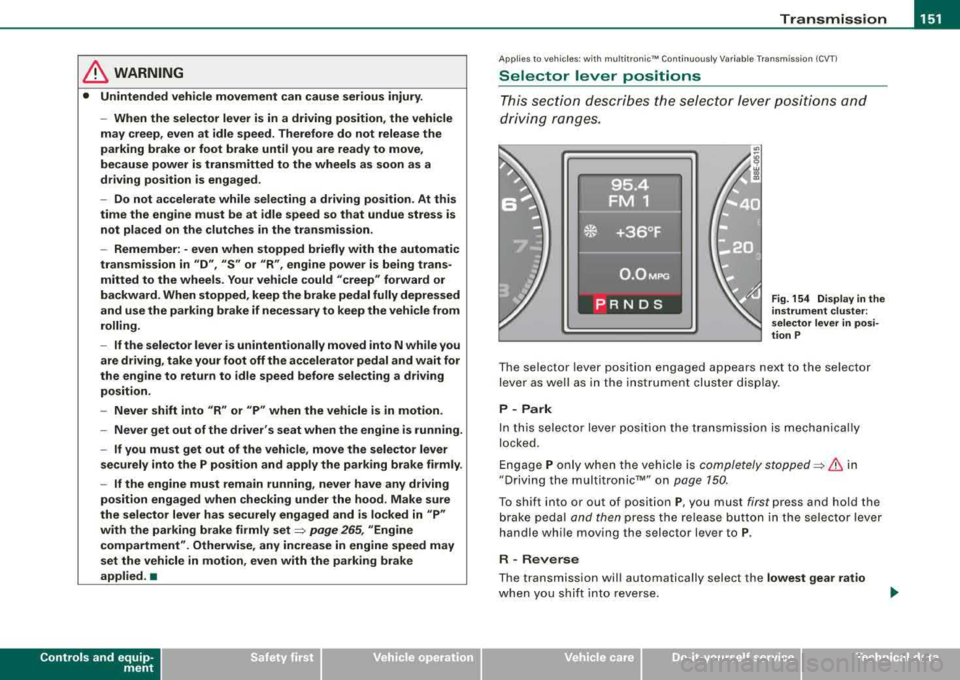
T he selector lever posit ion engaged appears next to the selector
lever as well as in the inst rumen t cluster dis play .
P - Park
In this selector lever posit ion the transmission is mechanica lly
locked .
E ngage P only w hen the vehicle is completely
stopped:::::, & in
"Driving the multi tronic™" on page 150.
T o shift into or out of posit ion P, you must first press and hold the
brake pedal and then press the release button in the selector lever
handle whi le moving the selec tor lever to P.
R -Rever se
The transmission wil l automatically select the lowest gear ratio
when you sh if t in to reverse .
irechnical data
Page 154 of 368
-
Transmission
----------------
Select R only when the vehicle is at a full stop and the engine is
running at idle
speed~ & in "Driving the multitronic™" on
page 750.
Before you move the selector lever to R, press both, the button in the
handle of the selector lever
and the brake pedal at the same time.
When the ignition is on, the backup lights illuminate when the selector lever is moved into R.
N -Neutral
Shift to this position for standing with brakes applied ~ page 152.
When the vehicle is stationary or at speeds below 3 mph (5 km/h),
you must always apply the footbrake before and while moving the
lever out of
N .
Do not use N for coasting downhill.
D -Normal driving position for forward
Depending on the load on the engine, vehicle speed and the
dynamic control program, the transmission will select the
optimal
gear ratio.
In certain circumstances it may be advantageous to temporarily
switch to the manual shift program to manually select gear ratios to
match specific driving
conditions ~ page 154.
When the vehicle is stationary or at speeds below 3 mph (5 km/h),
you must always apply the footbrake before and while moving the
lever to
D out of N.
S -Sport position
Select this position for sportier performance. In this position, the
transmission will not upshift as soon, allowing the vehicle to use
the increased power available at higher engine speeds to achieve livelier acceleration.
Before you move the selector lever from
D to S, press the button in
the handle of the selector lever. When the vehicle is stationary or at speeds below 3 mph (5 km/h),
you must always apply the foot brake before and while moving the
lever to
S out of N.
& WARNING
Read and follow all WARNINGS ~ & in "Driving the multitronic™"
on
page 150.
0 Note
Coasting downhill with the transmission in N and the engine not
operating will result in damage to the automatic transmission and
possibly the catalytic converter. •
Applies to vehi cles : wi th mu ltitroni c'" Continuous ly Variable Transm ission (CVT )
Automatic Shift Lock (ASL )
The Automatic Shift Lock safeguards you against acciden
tally shifting into a forward or the reverse gear and
causing the vehicle to move unintentionally.
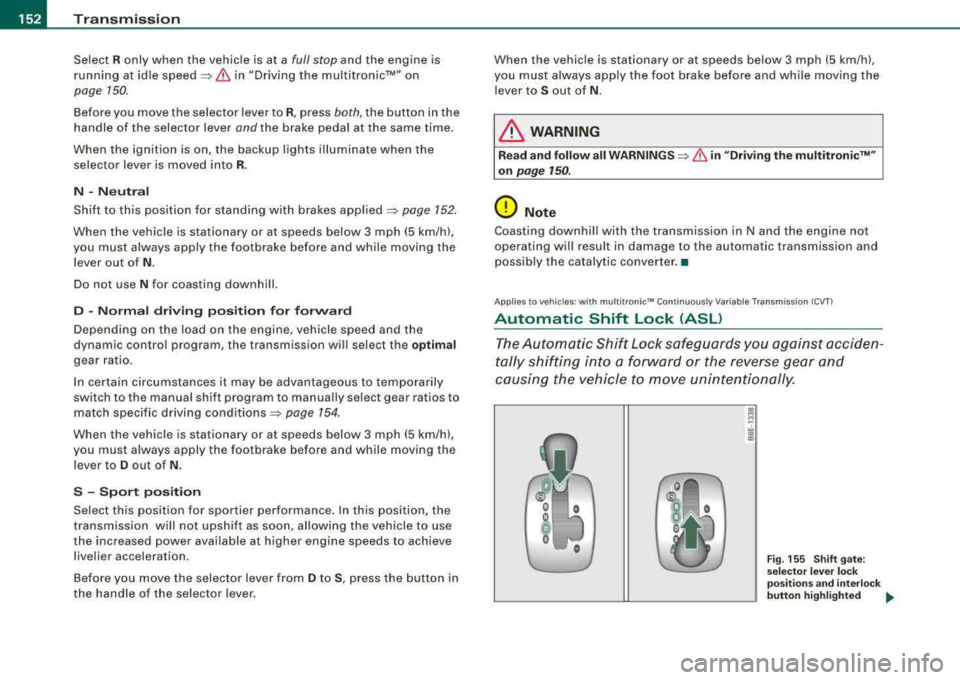
~ M -w a, .,
Fig. 155 Shift gate:
selector lever lock
positions and interlock
button highlighted
..
Page 155 of 368
Transmis sio n -
----------------
The selector lever lock is released as fo llows:
- Turn t he ignition on.
- Step on the brake pedal.
At the some time press and hold
the inter lock button on the side of the gear selector knob
=> page 145, f ig. 149 with your thumb until you have
moved the selector lever to the desi red position.
A uto mat ic se lec to r l eve r lock C\S)
The se lector lever is locked in the P and N posi tions when the igni
tion is turned on.
When the selector lever is in the
P or N pos itions , th e m essage
When statio nary appl y footbrak e while sel ecting gear
appears on the instrument c luster disp lay on vehicles equipped
with the Driver Informatio n System as a reminder to the driver . The
symbo l
Cs» will a lso light up on the shi ft gate at the base of the
selector lever.
In additio n, the symbo l for the automatic selector level lock with
light up in th e shift ga te .
A time delay e lement prevents the selecto r lever from loc king when
it is moved through the
N position (going from R to Dl. The locking
e lement will lock the selector lever if the lever is left in
N (Neutral)
for more than approx imately one second , without the brake peda l
being pressed.
At speeds above abou t 3 mph (5 km/h) the Automatic Shift Lock is
automatically deactivated in the
N position.
The button needs to be pressed to sh ift from
D to S to avoid unnec
essari ly high fuel consumption in the
S po rt mode .
Interlock but ton
The lock button on the selec tor lever prevents the lever from be ing
accidentally shifted into certain pos it ions . Pressing this button
deactivates the selector lever
lock=> page 152 , fig. 155.
Controls and equip
ment
Igniti on key sa fe ty int erlo ck
The key cannot be removed from the ignition un less the se lector
lever is in the
P park posi tion . When the ignition key is removed , the
selector lever wil l be locked in the
P posit ion. •
Applies t o ve hic les: w it h m ultitron ic™ C ontin uo usly Var iab le Tra nsmiss ion (CVTl
Kick-down
The kick -d own feature allows the veh icle to generate
maximum acceler ati on.
When you press the accelerator peda l beyond the resistance point
that is reached at ful l throttle, the trans mission wi ll select a lower
gea r ratio based on vehicle speed and engine RPM . The engine RPM
wil l be control led to produce max imum veh ic le acceleration as long
as you continue to press the acce lerator pedal beyond this resis
tance point .
& WARNING
Be careful when u sing the kic k-down f eature on slipp ery ro ad s.
R apid acceler ation m ay cause the vehicle to skid . •
A pplies to v ehicles: w ith mult it ro nic™ Con tinuo usly Var iab le Tra nsmiss ion (CV Tl
Dynamic shift program (DSP)
The multitronic™ transmission is electronically
controlled.
The transmiss ion se lec ts the appropr ia te gear rat io (upshifts and
downshifts) automatically based on preset driving programs .
However, you can also manua lly select a s hift program (tiptronic ®
f eature)
=> page 154 .
The transmission will select on e of th e econom y programs when
you drive at a s teady speed or a gradually changing speeds without
~
Page 156 of 368
___ T_ ra_ n_ s_ m_ is_ s_ io_ n _____________________________________________________ _
heavy acceleration. This gives best fuel efficiency, with early
upshifting and delayed downshifting.
The transmission will automatically select the
sporty shift programs
when you drive at higher speeds, or with heavy acceleration and
frequently changing speeds. Upshifts are delayed to make full use
of engine power. Downshifting takes place at higher engine speeds
than in the economy programs.
The selection of the most suitable shift program is a continuous,
automatic process. The driver can a lso make the transmission
switch to a sporty program by
quickly pressing down the gas pedal.
This causes the transmission to shift down into a lower gear ratio
and makes quick acceleration possible (to pass another vehicle) You
do not need to press the gas pedal into the kickdown range. After
the transmission has upshifted, the original program is selected
according to your driving style .
An additiona l shift program allows the automatic transmission to
select the proper gear for uphill and downhill gradients.
This prevents the transmission from shifting up and down unneces
sari ly on hills. The transmission will shift down to a lower gear ratio
when the driver presses the brake pedal on a downhill gradient. This
makes use of the braking effect of the engine without the need to
shift down manually .
If you are driving in hills and mountains, the transmission will
continuously adjust the gear ratio to the road grade. If you press the
brake pedal when driving downhill, the transmission will downshift
automatically . This increases the braking effect of the engine.
If the cruise control is on when you are traveling downhill, the trans
mission will automatical ly select a lower gear ratio in order to main
tain the set vehicle speed . This will cause the engine speed to
increase. •
Applies to vehi cles : wi th mu ltit roni c™ Con tinu ousl y V ariabl e Tra nsmi ssio n lC VT I
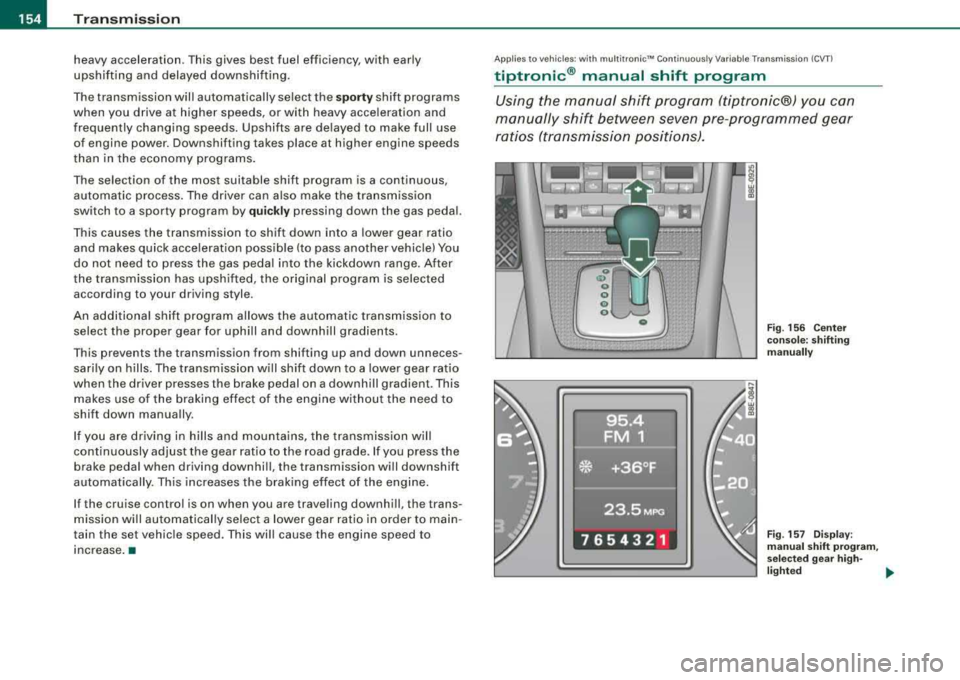
tiptronic ® manual shift program
Using the manual shift program (tiptronic®) you can
manually shift between seven pre-programmed gear
ratios (tran smission positions).
Fig. 156 Center
console: shifting
manually
Fig . 157 Display:
manual shift program,
se lecte d gear high -
lighted ~
Page 160 of 368
___ H_ o_ m_ e_L_ i_n _k_ ® __________________________________________________ _
Applies to vehicles: with Home link® univer sal rad io frequency remote contro l
Programming the HomeLink ® Universal
Remote Control
The Homelink® Universal Remote Control is programmed
in two phases: inside the vehicle at the overhead keypad
and outside the vehicle at the front bumper.
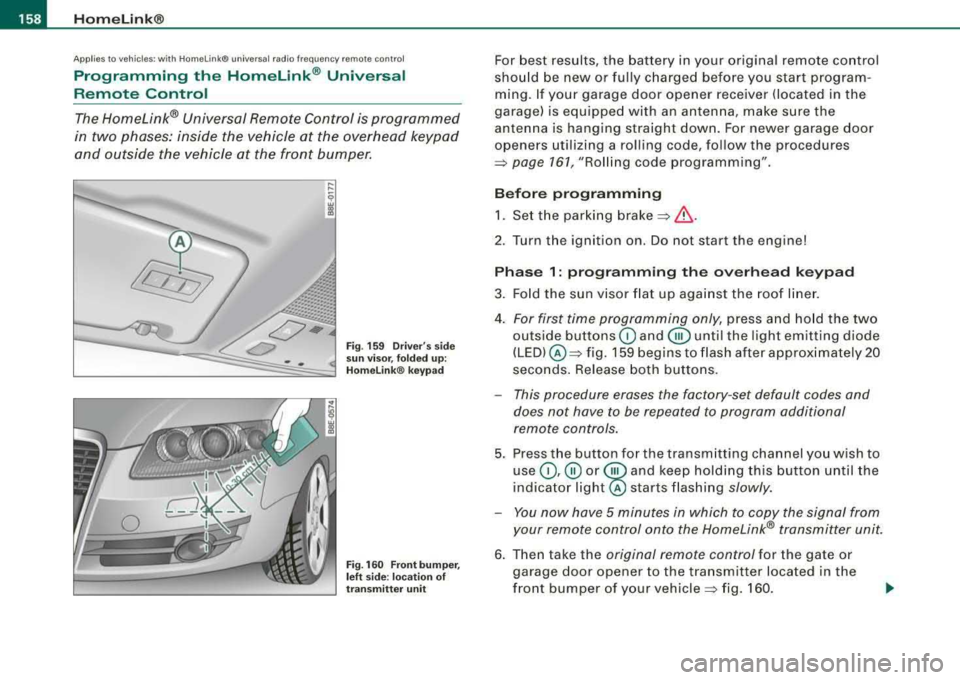
Fig . 159 Driver's side
sun visor, folded up:
Homelink ® keypad
Fig. 160 Front bumper,
left side : location of
transmitter unit
For best results, the battery in your original remote control
should be new or fully charged before you start program
ming. If your garage door opener receiver (located in the
garage) is equipped with an antenna, make sure the
antenna is hanging straight down. For newer garage door
openers utilizing a rolling code, follow the procedures
=> page 161, "Rolling code programming" .
Before programming 1. Set the parking
brake =>& .
2. Tur n the ignition on. Do not start the engine!
Phase 1: programming the overhead keypad
3. Fold the sun visor flat up against the roof liner.
4.
For first time programming only, press and hold the two
outside buttons
G) and @until the light emitting diode
(LED) @=> fig. 159 begins to flash after approximately 20
seconds. Release both buttons.
- This procedure erases the factory -set default codes and
does not have to be repeated to program additional
remote controls.
5. Press the button for the transmitting channel you wish to
use
G) ,@ or @ and keep holding this button until the
indica tor
light@ starts flashing slowly.
- You now have 5 minutes in which to copy the signal from
your remote control onto the Homelink® transmitter unit.
6. Then take the original remote control for the gate or
garage door opener to the transmitter located in the
front bumper of your
vehicle => fig. 160.
Page 163 of 368
_________________________________________________ H_ o_m _ e_L _i_n _k _® __ ftllll
Identifying a rolling code:
-Press the button for the programmed transmitter
channel again and hold it down.
- If the light emitting
diode @=> page 160 , fig. 161 first
flashes quickly and then remains lit after 2 seconds, the
garage door opener is using a rolling code.
•
A pplies to vehicle s: w it h H omelin k® u niv ers al radio fr equ enc y remot e con tro l
Rolling code programming
A rolling code is programmed in two phases: at the
garage door opener motor and inside the vehicle at the
overhead keypad.
Phase 1:
programming the garage door opener motor
1. Make sure that your vehicle is located within operat ing
range of the remote controlled garage door opener.
2. Locate the set button (teach button) on the garage door
opener motor (refer to the operating instructions for the
garage door opener).
3. Press the set button (teach button) on the garage door
opener motor.
Phase 2: programming the overhead keypad
4. Set the parking brake.
5. Turn the ignition on. Do not start the engine!
6. On the overhead keypad press the button for the previ
ously programmed transmitter channel.
7. Press this button a
second time in order to finish the
rolling code programming.
Controls and equip
ment The vehicle should be
located no further than 15 ft (5 m) from the
remote controlled garage door opener to remain within the average
signal range o f mos t remote con trolled systems.
Refer to the garage door opener operating instructions to locate the
set button (t each button) on the garage door opener motor .
After the keypad has been programmed, the g arage door opener
should recognize the radio frequency s ignal from the Homelink ®
Universal Remote Control and respond to signals from it.
[ i] Tips
Having a second person assist you makes programming of the
rolling code easier and faster . For some makes of garage door
op eners t he Homelink ® button may have to b e press ed a third time
to complete the teaching sequence. •
Applies to vehic le s: w it h Hom elink® univ ers al ra dio fr eque ncy remote c ontro l
Erasing the programming of the Homelink ®
universal remote control
When you erase the programming, the programming on
all three of the transmitter channels with be lost!
1. Set the parking brake.
2. Turn the ignition on. Do not start the engine!
3. Hold down both outside buttons
Ci) and @=> page 160,
fig. 161 simultaneously, until the diode begins to flash
(after about 20 seconds).
4. Release both buttons immediately. The programming on
all three transmitter channels is now erased.
.,_