light AUDI A4 AVANT 2008 Manual Online
[x] Cancel search | Manufacturer: AUDI, Model Year: 2008, Model line: A4 AVANT, Model: AUDI A4 AVANT 2008Pages: 368, PDF Size: 46.19 MB
Page 155 of 368
Transmis sio n -
----------------
The selector lever lock is released as fo llows:
- Turn t he ignition on.
- Step on the brake pedal.
At the some time press and hold
the inter lock button on the side of the gear selector knob
=> page 145, f ig. 149 with your thumb until you have
moved the selector lever to the desi red position.
A uto mat ic se lec to r l eve r lock C\S)
The se lector lever is locked in the P and N posi tions when the igni
tion is turned on.
When the selector lever is in the
P or N pos itions , th e m essage
When statio nary appl y footbrak e while sel ecting gear
appears on the instrument c luster disp lay on vehicles equipped
with the Driver Informatio n System as a reminder to the driver . The
symbo l
Cs» will a lso light up on the shi ft gate at the base of the
selector lever.
In additio n, the symbo l for the automatic selector level lock with
light up in th e shift ga te .
A time delay e lement prevents the selecto r lever from loc king when
it is moved through the
N position (going from R to Dl. The locking
e lement will lock the selector lever if the lever is left in
N (Neutral)
for more than approx imately one second , without the brake peda l
being pressed.
At speeds above abou t 3 mph (5 km/h) the Automatic Shift Lock is
automatically deactivated in the
N position.
The button needs to be pressed to sh ift from
D to S to avoid unnec
essari ly high fuel consumption in the
S po rt mode .
Interlock but ton
The lock button on the selec tor lever prevents the lever from be ing
accidentally shifted into certain pos it ions . Pressing this button
deactivates the selector lever
lock=> page 152 , fig. 155.
Controls and equip
ment
Igniti on key sa fe ty int erlo ck
The key cannot be removed from the ignition un less the se lector
lever is in the
P park posi tion . When the ignition key is removed , the
selector lever wil l be locked in the
P posit ion. •
Applies t o ve hic les: w it h m ultitron ic™ C ontin uo usly Var iab le Tra nsmiss ion (CVTl
Kick-down
The kick -d own feature allows the veh icle to generate
maximum acceler ati on.
When you press the accelerator peda l beyond the resistance point
that is reached at ful l throttle, the trans mission wi ll select a lower
gea r ratio based on vehicle speed and engine RPM . The engine RPM
wil l be control led to produce max imum veh ic le acceleration as long
as you continue to press the acce lerator pedal beyond this resis
tance point .
& WARNING
Be careful when u sing the kic k-down f eature on slipp ery ro ad s.
R apid acceler ation m ay cause the vehicle to skid . •
A pplies to v ehicles: w ith mult it ro nic™ Con tinuo usly Var iab le Tra nsmiss ion (CV Tl
Dynamic shift program (DSP)
The multitronic™ transmission is electronically
controlled.
The transmiss ion se lec ts the appropr ia te gear rat io (upshifts and
downshifts) automatically based on preset driving programs .
However, you can also manua lly select a s hift program (tiptronic ®
f eature)
=> page 154 .
The transmission will select on e of th e econom y programs when
you drive at a s teady speed or a gradually changing speeds without
~
Page 156 of 368
___ T_ ra_ n_ s_ m_ is_ s_ io_ n _____________________________________________________ _
heavy acceleration. This gives best fuel efficiency, with early
upshifting and delayed downshifting.
The transmission will automatically select the
sporty shift programs
when you drive at higher speeds, or with heavy acceleration and
frequently changing speeds. Upshifts are delayed to make full use
of engine power. Downshifting takes place at higher engine speeds
than in the economy programs.
The selection of the most suitable shift program is a continuous,
automatic process. The driver can a lso make the transmission
switch to a sporty program by
quickly pressing down the gas pedal.
This causes the transmission to shift down into a lower gear ratio
and makes quick acceleration possible (to pass another vehicle) You
do not need to press the gas pedal into the kickdown range. After
the transmission has upshifted, the original program is selected
according to your driving style .
An additiona l shift program allows the automatic transmission to
select the proper gear for uphill and downhill gradients.
This prevents the transmission from shifting up and down unneces
sari ly on hills. The transmission will shift down to a lower gear ratio
when the driver presses the brake pedal on a downhill gradient. This
makes use of the braking effect of the engine without the need to
shift down manually .
If you are driving in hills and mountains, the transmission will
continuously adjust the gear ratio to the road grade. If you press the
brake pedal when driving downhill, the transmission will downshift
automatically . This increases the braking effect of the engine.
If the cruise control is on when you are traveling downhill, the trans
mission will automatical ly select a lower gear ratio in order to main
tain the set vehicle speed . This will cause the engine speed to
increase. •
Applies to vehi cles : wi th mu ltit roni c™ Con tinu ousl y V ariabl e Tra nsmi ssio n lC VT I
tiptronic ® manual shift program
Using the manual shift program (tiptronic®) you can
manually shift between seven pre-programmed gear
ratios (tran smission positions).
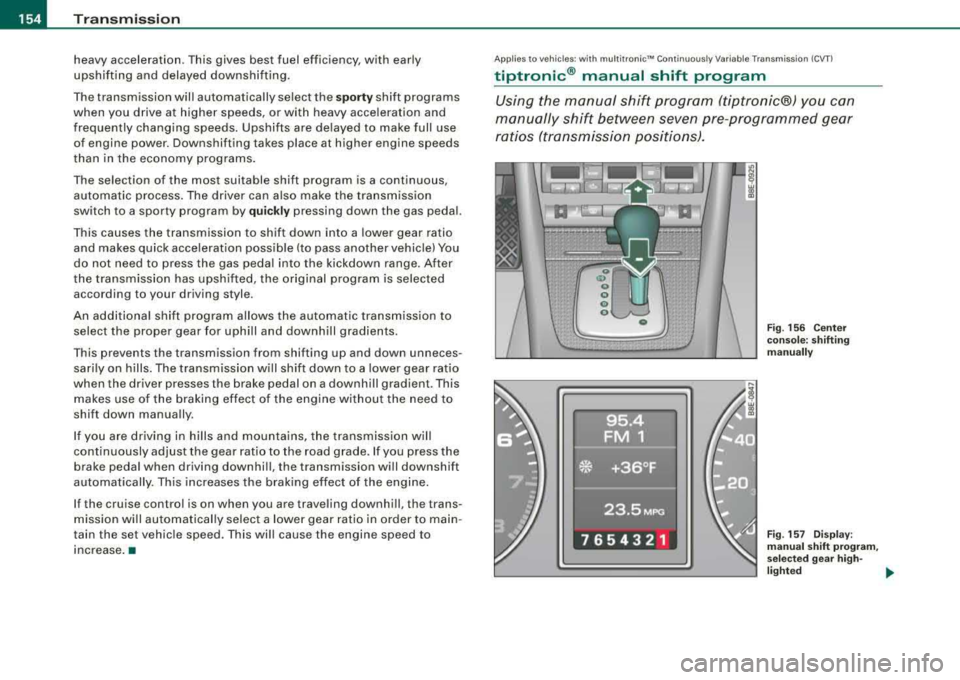
Fig. 156 Center
console: shifting
manually
Fig . 157 Display:
manual shift program,
se lecte d gear high -
lighted ~
Page 157 of 368
_______________________________________________________ T:...:.; ra::.:.. n:.:s:.: m
:..:.:.:.: is:::: s::.:.: io::.:.. n:__J""
Swi tching to ma nual s hift pro gra m
- With the selector lever in
D, push lever to the right. The
display will show7
6 5 4 3 2 1 as soon as the selector lever
is switched over. The gear you select wi ll also be h igh
lighted in the
display => page 154, fig. 157.
To up shift
- Push the selector lever forward to the plus position
=> page 154, f ig. 156 G) .
To d ownshift
- P ush the lever to the mi nus positio n
Q.
When accelerating, the transmission will automatically shift into the
next higher gear before the engine reaches the maximum RPM .
When accelerating, if you apply a light throttle, the tiptronic® wil l
automatically shift into the next higher gear to save fuel. If you apply
a heavy throttle, the transmission will stay in gear engaged until
near maximum RPM are reached, or until the driver manually shifts
into a higher gear.
If you take your foot off the accelerator pedal when driving down a
steep incline, the tiptronic ® wi ll downshift from the selected gear
into the next lower gear based on road speed and engine RPM . The
automatic downshifting is interrupted as soon as you apply throttle
again .
[ i ] Tips
• When you shift into the next lower gear, the engine will down
shift only when there is no possibility of over-revving.
• When the kick -down comes on, the transmission will sh ift down
to a lower gear depending on vehicle and engine speeds.
• The tiptronic® is inoperative when the transmission is in the fail
safe mode. •
Controls and equip
ment
Ap plies to vehi cles: with mult it r o ni c™ Cont inuo usly V ariab le Tr ansm iss io n (CV Tl -not
a vail abl e at the t ime of p rin ting
Steering wheel with tiptronic ®
The shift buttons on the steering wheel allow the driver to
shift gears manually .
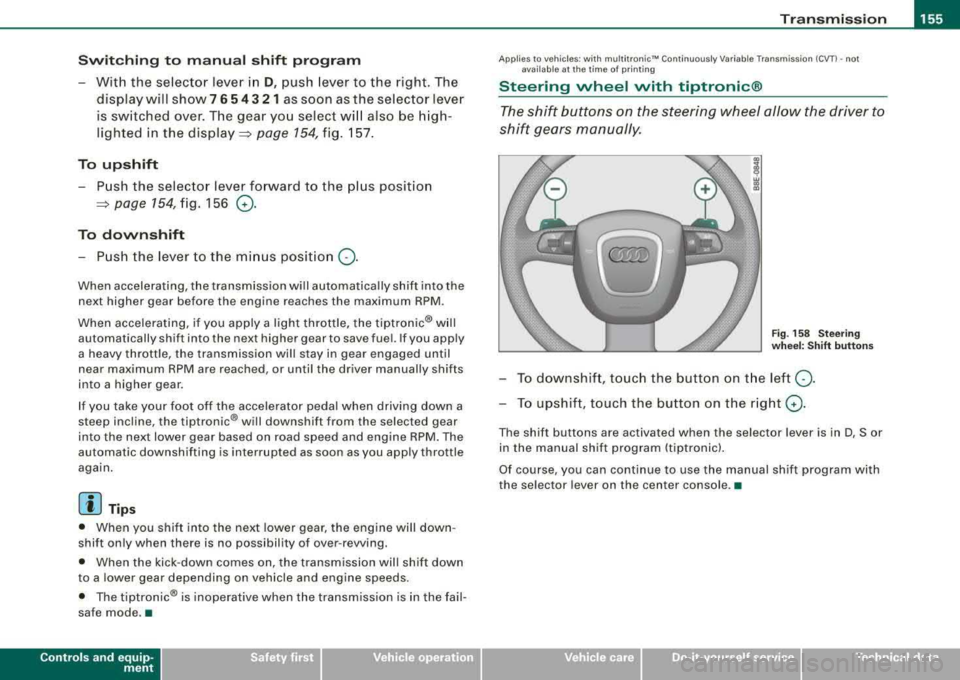
Fig. 158 Stee ring
w hee l: S hift butt ons
To d ownshif t, touch the button on t he left Q .
To upshift, touch the button on the right G) .
The shift buttons are activated when the selector lever is in D, Sor
in the manual shift program (tiptronicl.
Of course, you can continue to use the manual shift program with
the selector lever on the center console. •
irechnical data
Page 158 of 368
___ T
_ r_a _ n_ s_m _ i_s _s _i_o _n ______________________________________________________ _
Applies to vehicles: w ith mu ltitroni c"" Continu ously Variab le Tr ansmiss ion {CVT I
Fail-safe mode
If the multitronic™ suffers a malfunction the fail-safe
mode maintains minimum driveability.
If there is a malfunction in the system, the automatic transmission
will shift to the fail-safe mode. All the segments in the display will
light up to indicate this condition.
Display inverse
If there's a malfunction in the system , the multitronic will shift to the
fail -safe mode. The entire row of gear selector positions will light up
in the display in inverse colors (light background, dark characters)
to indicate this condition. If there is an electrica l failure, the gear
position indicator row will turn blank. You can continue to drive, but
you should take the vehicle to an authori zed Audi dealer as soon as
possible to have the multitronic checked.
Display flashing
If the display is flashing, a serious malfunction has occurred. Drive
the vehicle in a gentle and cautious manner to the nearest autho
rized Audi dealer and have the problem corrected. •
Page 160 of 368
___ H_ o_ m_ e_L_ i_n _k_ ® __________________________________________________ _
Applies to vehicles: with Home link® univer sal rad io frequency remote contro l
Programming the HomeLink ® Universal
Remote Control
The Homelink® Universal Remote Control is programmed
in two phases: inside the vehicle at the overhead keypad
and outside the vehicle at the front bumper.
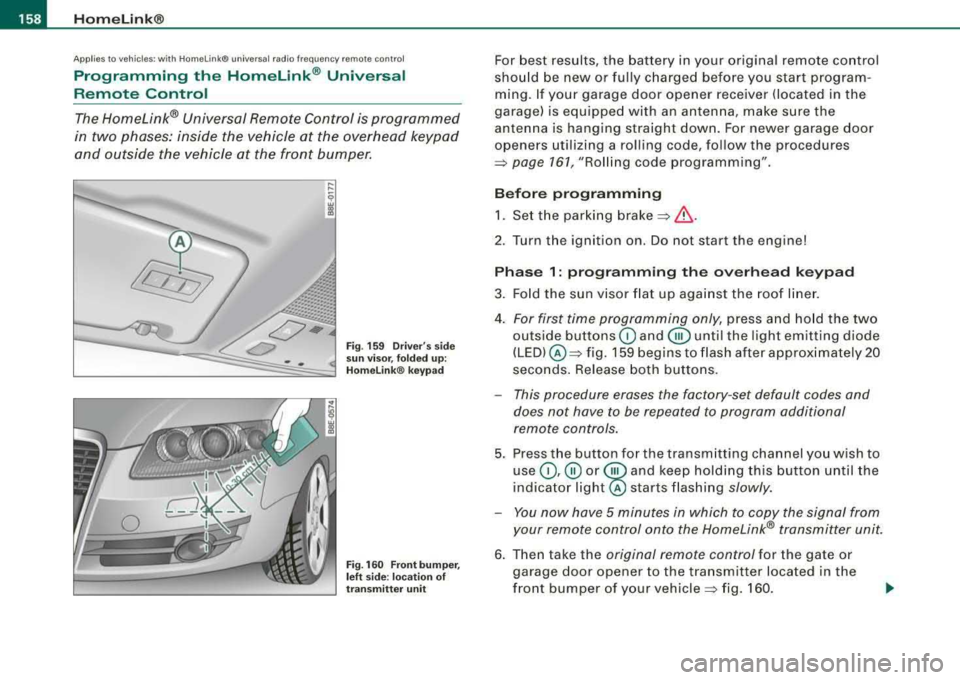
Fig . 159 Driver's side
sun visor, folded up:
Homelink ® keypad
Fig. 160 Front bumper,
left side : location of
transmitter unit
For best results, the battery in your original remote control
should be new or fully charged before you start program
ming. If your garage door opener receiver (located in the
garage) is equipped with an antenna, make sure the
antenna is hanging straight down. For newer garage door
openers utilizing a rolling code, follow the procedures
=> page 161, "Rolling code programming" .
Before programming 1. Set the parking
brake =>& .
2. Tur n the ignition on. Do not start the engine!
Phase 1: programming the overhead keypad
3. Fold the sun visor flat up against the roof liner.
4.
For first time programming only, press and hold the two
outside buttons
G) and @until the light emitting diode
(LED) @=> fig. 159 begins to flash after approximately 20
seconds. Release both buttons.
- This procedure erases the factory -set default codes and
does not have to be repeated to program additional
remote controls.
5. Press the button for the transmitting channel you wish to
use
G) ,@ or @ and keep holding this button until the
indica tor
light@ starts flashing slowly.
- You now have 5 minutes in which to copy the signal from
your remote control onto the Homelink® transmitter unit.
6. Then take the original remote control for the gate or
garage door opener to the transmitter located in the
front bumper of your
vehicle => fig. 160.
Page 162 of 368
___ H_ o_m_ e_ L_ in_ k_® ____________________________________________________ _
time interval is not sufficient for the Homelink® system to learn the
radio frequency signal, perform the
alternate step 8 in Phase 2:
programming the bumper mounted transmitter:
Alternate step 8
• Press and re-press ("cycle") the activation button on your remote
control every two seconds.
Once programming is successfully completed, the emergency
flashers will flash
three times (after about 15-60 seconds). You can
now release the button on the remote control.•
Applies to vehi cles: w ith Hom eLink ® un iversal r adio frequency re mo te con tro l
Oper ating the Homelink ® universal remote
control
The Homelink® Universal Remote Control activates the
functions of your garage door opener in precisely the
same manner as the original handheld remote control
that came with the system.
... ...
9 w a,
"'
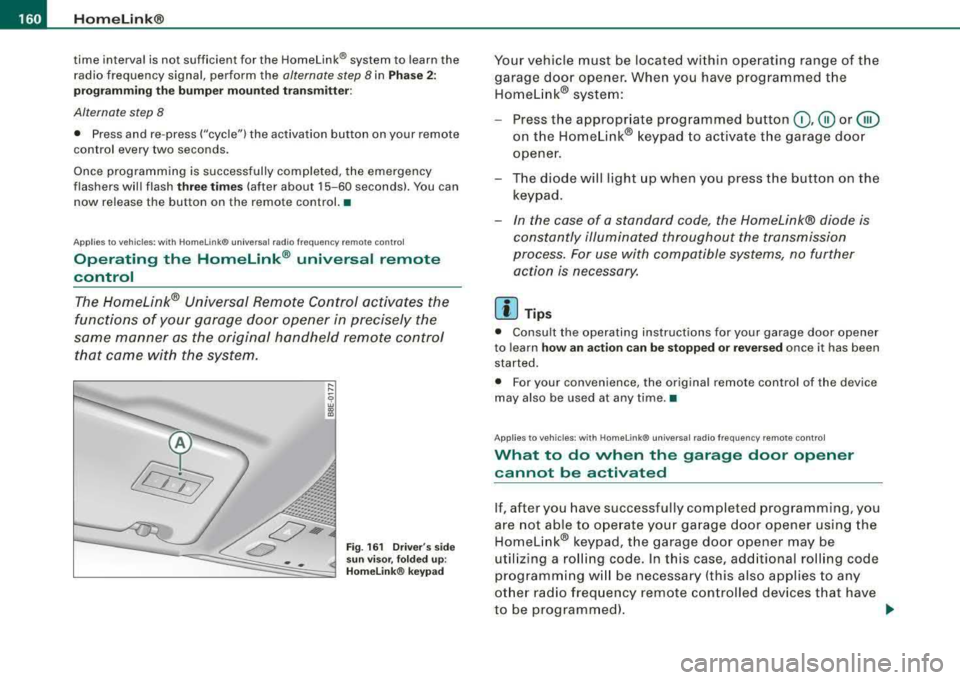
Fig. 161 Driver 's side
sun visor, folded up :
Homelink® keypad
Your vehicle must be located within operating range of the
garage door opener. When you have programmed the Homelink® system:
- Press the appropriate programmed button
0,@ or @
on the Homelink® keypad to activate the garage door
opener.
- The diode will light up when you press the button on the
keypad.
- In the case of a standard code, the Homelink® diode is
constantly illuminated throughout the transmission
process. For use with compatible systems, no further action is necessary.
[ i ] Tips
• Consult the operating instructions for your garage door opener
to learn
how an action can be stopped or reversed once it has been
started.
• For your convenience, the original remote control of the device
may also be used at any time. •
Applies to vehicles : wi th HomeLink® universal radio frequency remote cont ro l
What to do when the garage door op ener
cannot b e activat ed
If, after you have successfully completed programming, you
are not able to operate your garage door opener using the
Homelink® keypad, the garage door opener may be
utilizing a rolling code. In this case, additional rolling code
programming will be necessary (this also applies to any
other radio frequency remote controlled devices that have
to be programmed).
~
Page 163 of 368
_________________________________________________ H_ o_m _ e_L _i_n _k _® __ ftllll
Identifying a rolling code:
-Press the button for the programmed transmitter
channel again and hold it down.
- If the light emitting
diode @=> page 160 , fig. 161 first
flashes quickly and then remains lit after 2 seconds, the
garage door opener is using a rolling code.
•
A pplies to vehicle s: w it h H omelin k® u niv ers al radio fr equ enc y remot e con tro l
Rolling code programming
A rolling code is programmed in two phases: at the
garage door opener motor and inside the vehicle at the
overhead keypad.
Phase 1:
programming the garage door opener motor
1. Make sure that your vehicle is located within operat ing
range of the remote controlled garage door opener.
2. Locate the set button (teach button) on the garage door
opener motor (refer to the operating instructions for the
garage door opener).
3. Press the set button (teach button) on the garage door
opener motor.
Phase 2: programming the overhead keypad
4. Set the parking brake.
5. Turn the ignition on. Do not start the engine!
6. On the overhead keypad press the button for the previ
ously programmed transmitter channel.
7. Press this button a
second time in order to finish the
rolling code programming.
Controls and equip
ment The vehicle should be
located no further than 15 ft (5 m) from the
remote controlled garage door opener to remain within the average
signal range o f mos t remote con trolled systems.
Refer to the garage door opener operating instructions to locate the
set button (t each button) on the garage door opener motor .
After the keypad has been programmed, the g arage door opener
should recognize the radio frequency s ignal from the Homelink ®
Universal Remote Control and respond to signals from it.
[ i] Tips
Having a second person assist you makes programming of the
rolling code easier and faster . For some makes of garage door
op eners t he Homelink ® button may have to b e press ed a third time
to complete the teaching sequence. •
Applies to vehic le s: w it h Hom elink® univ ers al ra dio fr eque ncy remote c ontro l
Erasing the programming of the Homelink ®
universal remote control
When you erase the programming, the programming on
all three of the transmitter channels with be lost!
1. Set the parking brake.
2. Turn the ignition on. Do not start the engine!
3. Hold down both outside buttons
Ci) and @=> page 160,
fig. 161 simultaneously, until the diode begins to flash
(after about 20 seconds).
4. Release both buttons immediately. The programming on
all three transmitter channels is now erased.
.,_
Page 164 of 368
-~_H
_ o_ m
_ e
_ L_i _
n _k _® ____________________________________________________ _
The Homelink® system is now in the programming mode and is
ready to learn the codes for devices that are remote controlled by
radio frequency.
[ i] Tips
• Programmed buttons cannot be erased individually .
• For security reasons you are advised to erase the programming
of the Homelink® Universal radio frequency remote control system
before you sell your vehicle. •
Applies to vehic les: with Home link® universal radio frequency remote contro l
Homelink® universal transmitter,
reprogramming a single channel
A HomeLink® button can be reprogrammed individually without affecting the other button allocations.
Proceed as outlined in=> page 158, "Programming the Homelink®
Universal Remote Control" if you wish to program a different radio
frequency remote controlled device on a transmitter channel that is
already being used.
This procedure will cause the existing programming on these trans
mitter channels to be erased! •
Applies to vehic les: w ith Ho me link® universal radio frequency remote contro l
Accessories
Accessories for the Homelink® Universal Transmitter are available
from various sources.
If you would like more information on Homelink®, where to
purchase the Homelink® compatib le products, or would like to
purchase the Homelink® Home Lighting Package, please call toll
free : 1-800-355-3515
•
App lies to vehic les: with Homelin k® un iversal radio frequency remo te contro l
General notes
0 Note
The transmitter has been tested and complies with FCC and
DOC/MDC rules. Changes or modifications not expressly approved
by the party responsible for compliance could void the user's
authority to operate the device (DOC: ISTC 1763 102 264 Prince
MODEUFCC ID : CB2 V94800).
[ i] Tips
• The Homelink® Universal Transmitter complies with FCC rules
part 15. Operation is subject to the following conditions:
- this device may not cause any harmful interference, and
- this device must accept any interference that may be received
including interference that may cause undesired operation.•
Page 169 of 368
________________________________________________ D_r_iv _ i
_ n..; g::;_ S_ a_ fe---' ly'-----"'
Important things to do before driving
Safety is everybody's job! Vehicle and occupant safety
always depends on the informed and careful driver.
For your safety and the safety of your passengers, before
driving always:
- Make sure that all lights and signals are operat ing
correctly.
- Make sure that the tire pressure is correct.
- Make sure that all windows are clean and afford good
visibility to the outside.
- Secure all luggage and other items
carefully=> page 122.
-Make sure that nothing can interfere with the pedals.
- Adjust front seat, head restraint and mirrors correctly for your height .
- Instruct passengers to adjust the head restraints
according to their height.
- Make sure to use the right child restraint correctly to
protect
children => page 210, "Child Safety".
- Sit properly in your seat and make sure that your passen
gers do the
same => page 95, "General recommenda
tions".
- Fasten your safety belt and wear it properly. Also instruct
your passengers to fasten their safety belts properly
=> page 176. •
Controls and equip
ment Safety first
Vehicle operation
What impairs driving safety?
Safe driving is directly related to the condition of the
vehicle, the driver as well as the driver's ability to concen
trate on the road without being distracted.
The driver is responsible for the safety of the vehicle and all
of its occupants. If your ability to drive is impaired, safety
risks for everybody in the vehicle increase and you also
become a hazard to everyone else on the road
=>& .There
fore:
Do not let yourself be distracted by passengers or by
using a cellular telephone .
NEVER drive when your driving ability is impaired (by
medications, alcohol, drugs, etc.).
- Observe all traffic laws, rules of the road and speed limits
and plain common sense .
- ALWAYS adjust your speed to road, traffic and weather
conditions.
- Take frequent breaks on long trips. Do not drive for more
than two hours at a stretch.
- Do NOT drive when you are tired, under pressure or when
you are stressed .
& WARNING
Impaired driving safety increases the risk of serious personal
injury and death whenever a vehicle is being used. •
Vehicle care Do-it-yourself service Technical data
Page 170 of 368
___ D_ ri_v _i_n ..;::g:c..- S_ a_ f
_ e____, ly'---------------------------------------------------
Proper occupant seating positions
Proper seating position for the driver
The proper driver seating position is important for safe,
relaxed driving.
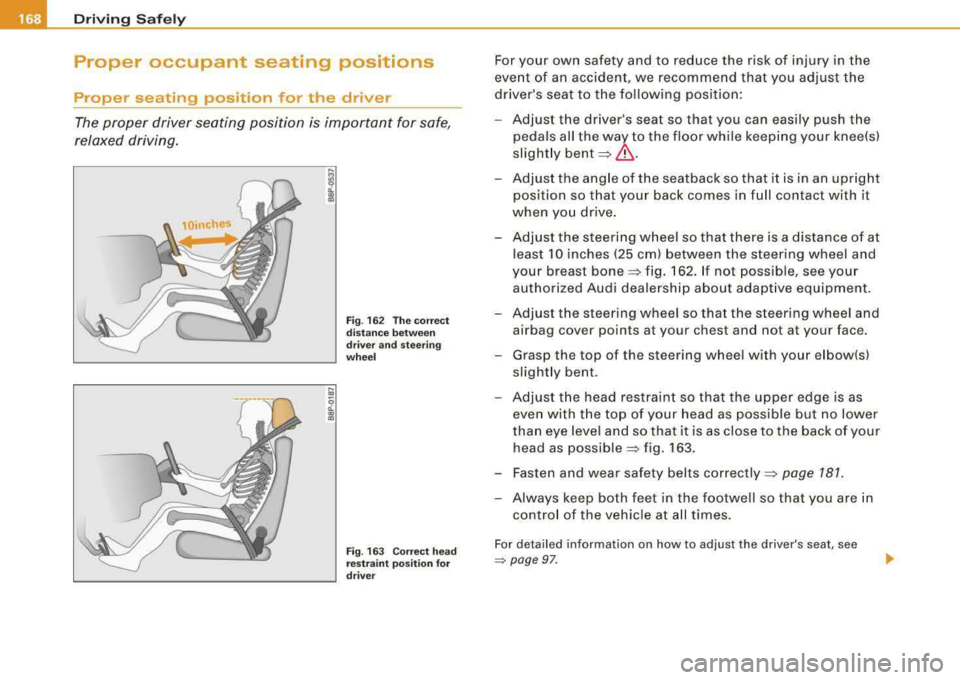
Fig . 162 The correct
distance between
driver and stee ring
whee l
Fig . 163 Correc t head
restraint position for
driver
For your own safety and to reduce the risk of injury in the
event of an accident, we recommend that you adjust the
driver's seat to the following position :
- Adjust the driver's seat so that you can easily push the
pedals all the way to the floor while keeping your knee(s)
slightly
bent =>& .
-Adjust the angle of the seatback so that it is in an upright
position so that your back comes in full contact with it
when you drive .
- Adjust the steering wheel so that there is a distance of at
least 10 inches (25 cm) between the steering wheel and
your breast
bone => fig. 162. If not possible, see your
authorized Audi dealership about adaptive equipment.
- Adjust the steering wheel so that the steering wheel and airbag cover points at your chest and not at your face.
- Grasp the top of the steering wheel with your e lbow(s)
slight ly bent .
- Adjust the head restraint so that the upper edge is as
even with the top of your head as possible but no lower
than eye level and so that it is as close to the back of your
head as
possible=> fig. 163.
- Fasten and wear safety belts
correctly=> page 7 81.
- Always keep both feet in the footwell so that you are in
control of the vehicle at all times.
For detailed information on how to adjust the driver's seat, see
~ page 97 .