wheel AUDI A4 CABRIOLET 2009 Owner's Manual
[x] Cancel search | Manufacturer: AUDI, Model Year: 2009, Model line: A4 CABRIOLET, Model: AUDI A4 CABRIOLET 2009Pages: 340, PDF Size: 77.32 MB
Page 126 of 340
• .___O_ n_ t_ h _e _ ro_ a_d __________________________________________________ _
Storing a sp eed
You must set and then store a vehicle speed using the
cruise control.
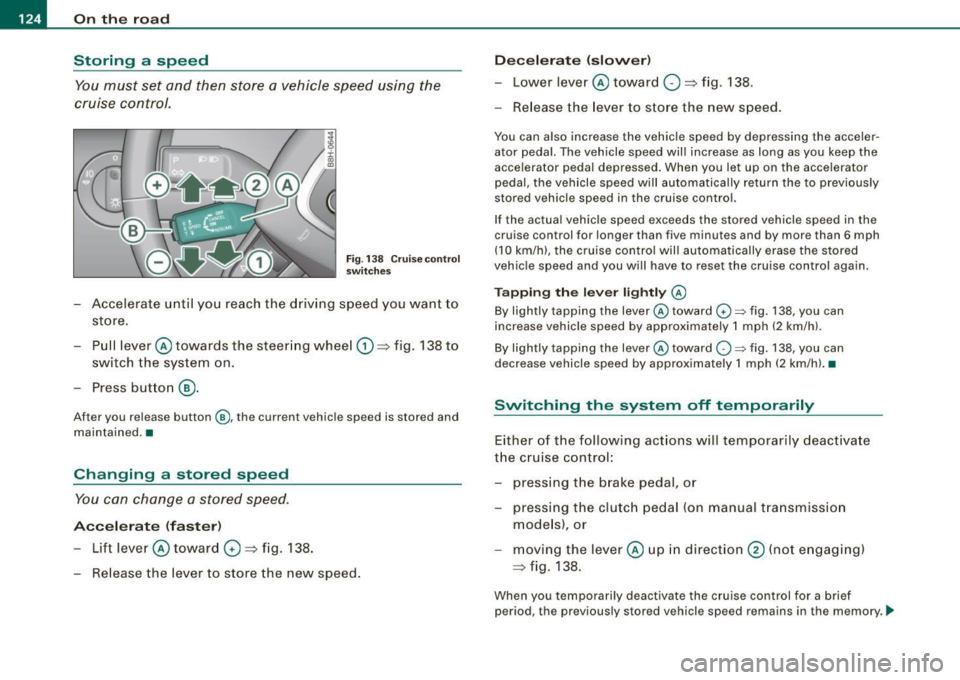
Fig . 138 Cruise control
switches
- Accelerate until you reach the driving speed you want to
store.
Pull lever @ towards the steering wheel
G) => fig. 138 to
switch the system on.
Press button
® ·
After you release button@, the current vehicle speed is stored and
maintained. •
Changing a stored speed
You can change a stored speed.
Accelerate (faster)
-Lift lever @ toward 0 => fig. 138.
Release the lever to store the new speed.
Decelerate (slower)
-Lower lever@ toward O => fig. 138.
- Release the lever to store the new speed.
You can also increase the vehicle speed by depressing the acceler
ator pedal. The vehicle speed will increase as long as you keep the
accelerator pedal depressed. When you let up on the accelerator
pedal, the vehicle speed will automatically return the to previously
stored vehicle speed in the cruise control.
If the actual vehicle speed exceeds the stored vehicle speed in the
cruise control for longer than five minutes and by more than 6 mph
(10 km/h), the cruise control will automatically erase the stored
vehicle speed and you will have to reset the cruise control again.
Tapping the lever lightly @
By lightly tapping the lever@toward G) ~ fig. 138, you can
increase vehicle speed by approximately 1 mph (2 km/h).
By lightly tapping the lever @toward
O ~ fig. 138, you can
decrease vehicle speed by approximately 1 mph (2 km/hl. •
Switching the system off t emporarily
Either of the following actions will temporarily deactivate
the cruise control:
- pressing the brake pedal, or
- pressing the clutch pedal (on manual transmission
models), or
moving the lever@ up in direction
@ (not engaging)
=>fig .138.
When you temporarily deactivate the cruise control for a brief
period, the previously stored vehicle speed remains in the memory. -.,
Page 129 of 340

_______________________________________________________ T_ ra_ n_s_ m __ is_s_ io_ n ____ !II
The se lector lever must be in Nor P. If one of the driving positions
is engaged a safety switch w ill preven t the eng ine from being
started. See also=> page 120 .
Before you move the selector lever from the P position, you must
a lways apply the brake peda l before and wh ile de press ing the
button in the hand le of the selector lever.
& WARNING
• Unintended vehicle movement can cause serious injury .
- When the selector lever is in a driving position , the vehicle
may creep , even at idle speed . Therefore do not release the
parking brake or foot brake until you are ready to move,
because power is transmitted to the wheels as soon as a
driving position is engaged.
- Do not accelerate while selecting a driving position . At this
time the engine must be at idle speed so that undue stress is
not placed on the clutches in the transmission .
- Remember: -even when stopped briefly with the automatic
transmission in "D ", "S " or "R ", engine power is being trans
mitted to the wheels. Your vehicle could "creep" forward or
ba ckward . When stopped , keep the brake pedal fully depressed
and use the parking brake if necessary to keep the vehicle from
rolling .
• If the selector lever is unintentionally moved into N while you
are driving , take your foot off the accelerator pedal and wait for
the engine to return to idle speed before selecting a driving posi
tion .
• Never shift into "R " or "P " when the vehicle is in motion .
• Never get out of the driver 's seat when the engine is running .
• If you must get out of the vehicle , move the selector lever
securely into the P pos ition and apply the parking brake firmly .
• If the engine must remain running , never have any dr iving posi
tion engaged when checking under the hood . Make sure the
selector lever has securely engaged and is locked in "P " with the
Controls and equip
ment
& W ARNING (continued )
park ing brake firmly set=> page 242, "Engine compartment ".
Otherwi se , any increase in engine speed may set the vehi cle in
motion , even w ith the parking brake appl ied . •
App lies to veh icles: wi th 6-speed automatic transm ission
Selector lever positions
T his sec tion d escri be s th e sel ector le ver po sitio ns an d
d ri vin g rang es.
Fig. 140 D ispl ay in the
in strument c luster:
se lector lever in posi
tion D
The se lecto r lev er p ositi on engage d ap pears next to t he se lec to r
leve r as well as in the instrument cluster display .
P -Park
In this selecto r lever position the transmission is mechanica lly
l oc ked. Engage P only whe n th e ve hicle is completely stopped=>
&
in "Dr iving the automatic transmission" on page 126.
To shift in or out o f po sition P, yo u m ust firs t pr ess an d hol d th e
brake pedal and then press the re lease button in the se lector lever
handle w hile mov ing the se lector leve r to or from P. Yo u can shif t
out o f this pos it io n onl y wit h th e i gn it ion on. _..,
Page 133 of 340
Transmi ssio n -_______________ ___,
[ i J Tip s
• When you shi ft into the next lower gear, the transmission wi ll
downshi ft only when there is no poss ibi lity of over -rew ing the
engine.
• When the kick -down com es on, the transmission will shift down
to a lower gear, depending on vehicle and engine speeds .
• The tiptronic® is inoperative when the transmission is in the fail
sa fe mode .•
A pplies to vehicles : wit h 6-s pee d aut om ati c tra nsm is si on
Steering wheel with tiptronic ®
The shift buttons on the steering wheel allow the driver to
shift gears manually.
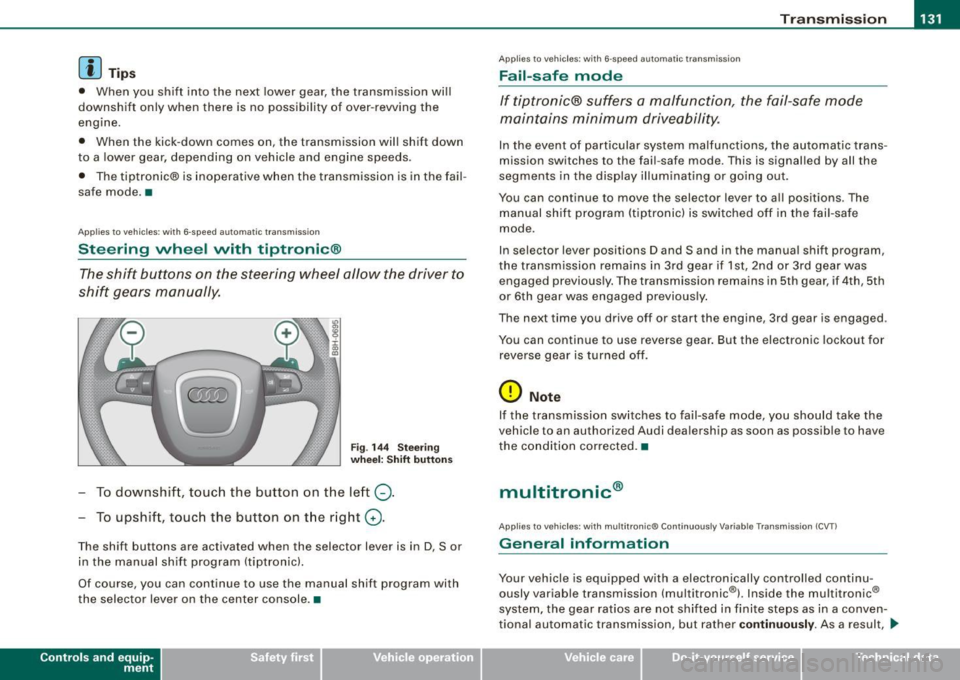
F ig . 14 4 Steer ing
w heel: Shi ft button s
-To downshif t, touch the button on the left Q .
To upshift, touch the button on the right G) .
The shift buttons are activated when the selector lever is in D, Sor
in the manual shift program (tiptronic).
Of course, you can continue to use the manual shift program with
the selector lever on the center console .•
Contro ls and eq uip
ment
A pp lies to vehicles: w ith 6-speed automat ic tra nsmission
Fail -safe mode
If tiptronic® suffers a malfunction, the fail-safe mode
maintains minimum drive ability .
In the event of particular system malfunct ions, the automatic trans
m ission switches to th e fail -saf e mode. This is signalled by all the
seg ments in the display illuminating or going out .
You can continue to move the selec tor lever to all positions . The
manual shift program (tiptronic) is switched off in the fail -safe
mode .
In selector lever posi tions D and Sand in the manual shift program,
the transmission remains in 3rd gear if 1st, 2nd or 3rd gear was engaged previous ly. The transmission remains in 5th g ear, if 4th , 5th
or 6 th gear was engaged previous ly .
The next time you drive off o r start the engine , 3rd gear is engaged .
You can continu e to use reverse gear . But the electron ic lockout for
reverse gear is turned off.
0 Note
If the transmission sw itches to fail -sa fe mo de, you should take the
vehicle to an authori zed Audi dea le rship as soon as possib le to have
the condition corrected .•
multitronic ®
Applies t o vehic les: w it h mu lt itr on ic® Co nti nuous ly V aria ble Trans mission (CVT )
General information
Your vehicle is equipped with a electron ically controlled continu
ously variable transmission (mult itronic ®l. Inside the multitronic ®
system, the gear ratios are not shifted in finite steps as in a conven
tional automatic transm ission, but rath er
contin uousl y. As a result, ...
~ehicle care Technical data
Page 135 of 340

Tra nsmission -
----------------
Your vehicle is equipped with a starting assis t that a llows for easier
starting on inclines. The system is activated when the brake pedal is
depressed for a few sec onds. After releasing the brake pedal, the
brake power is he ld for a moment to prevent the vehicle from rol ling
back when starting .
The se lector lever must be in Nor
P. If one of the driv ing positions
is engaged a safety switch will prevent the eng ine from being
star ted. See also=>
page 120.
Before you move the selector lever from the P position, you must
a lways apply the brake peda l before and while depressing the
button in the handle of the selecto r lever.
& WARNING
• Unint ended vehicle movement can cau se seriou s injury.
- When the select or lever i s
in a dri ving p osition , th e vehi cle
may cre ep , even at idle speed . Ther efore do not release the
parking br ake or foot br ake until you are r eady to move ,
because powe r is tran smitted to the wheel s as soon as a
driving po sition i s engaged.
- Do not acce lerate while sele cting a driving po sition. At thi s
time th e engine mu st be at idle spe ed so th at undu e stre ss is
not pla ced on the c lut che s in the transmis sion .
- Remember : - even when stopp ed briefly with the automatic
tran smi ssion in "D ", "S " or "R ", eng ine power is being tran s
mitted to the wheel s. Your vehicle could "creep " forw ard or
b ac kw ard . Wh en stopped , keep th e brake pedal full y depre ssed
a nd u se the parking br ake if nece ssary to keep the vehicle from
rolling.
- If the selector lev er i s unintentionally moved into N while you
are dr iv ing , take your foot off the accelerator ped al and wait for
the eng ine to return to idle speed before selecting a driving
p osition .
- Never shift into "R " or ''P " when the vehicle is in motion .
- Never get out of the dr iver 's seat when the engine is running.
Controls and equip
ment
& WAR NING (conti nued )
- If yo u mu st get out of the vehicle , move the selector lever
s ecurel y into the P po sition and apply the pa rking br ake fir mly.
- If the engine mu st remain running , never have any driving
po sition eng aged when che cking under the h ood. M ake sure
t he selector lever ha s secure ly engaged and i s lo cked in "P "
w ith the parkin g brake firmly set =>
page 242, "Engine
c ompartment ". Otherwise , any incre ase in eng ine speed may
s et the vehicle in motion , e ven with the parking brake
a ppl ied.•
Ap plies to vehic les : wit h mu lt itro nic® Conti nuous ly Va riab le Tra nsmissi on (CVT )
Selector lever positions
This section describes the selector lever positi ons and
drivi ng r anges.
Fig . 1 46 Dis pl ay in th e
in strum ent c lust er:
s el ector le ver in po si
tion P
The se lector lever posit ion engaged appears next to the se lector
lever as w ell as in the instrum ent clust er display .
P -Pa rk
In this selector lever position the transmission is mechanica lly
locked .
Page 139 of 340
_______________________________________________________ T_ r _a_ n_s_ m __ is_ s_ io_ n _ ___,_
Swi tching to m anual shift pro gra m
- With the selector lever in D, push lever to the right. The
display will show7
6 5 4 3 21 as soon as the selector lever
is switched over. The gear you select wi ll also be h igh
lighted in the display:::::,
page 136, fig. 149 .
To up shift
Push the selecto r lever forward to the plus position
:::::, page 136, fig. 148 G) .
To d ownshift
- Pu sh the lever to the mi nus positio n Q.
When accelerating, the transmission wi II a utomatica I ly shift into the
next higher gear before the engine reaches the maximum RPM .
When accelerating, if you apply a light throttle, the tiptronic® wil l
automatically shift into the next higher gear to save fuel. If you app ly
a heavy throttle, the transmission will stay in gear engaged until
near maximum RPM are reached, or until the driver manually shifts
into a higher gear .
If you take your foot off the accelerator peda l when driving down a
steep incline, the tiptronic ® wi ll downshift from the selected gear
into the next lower gear based on road speed and engine RPM . The
automatic downshifting is interrupted as soon as you apply throttle
again .
[ i ] Tips
• When you shift into the next lower gear, the engine will down
shift only when there is no possibility of over-revving.
• When the kick -down comes on, the transmission wi ll sh ift down
to a lower gear depending on vehicle and engine speeds.
• The tiptronic® is inoperative when the transmission is in the fai l
safe mode .•
Contro ls and eq uip
ment
Ap plies to vehicles : w it h mu ltit ron ic® Co nti nuou sly V ariable Transmi ssion ( CVT)
Steering vvheel vvith t iptronic ®
The shift buttons on the steering wheel allow the driver to
shift gears manually.
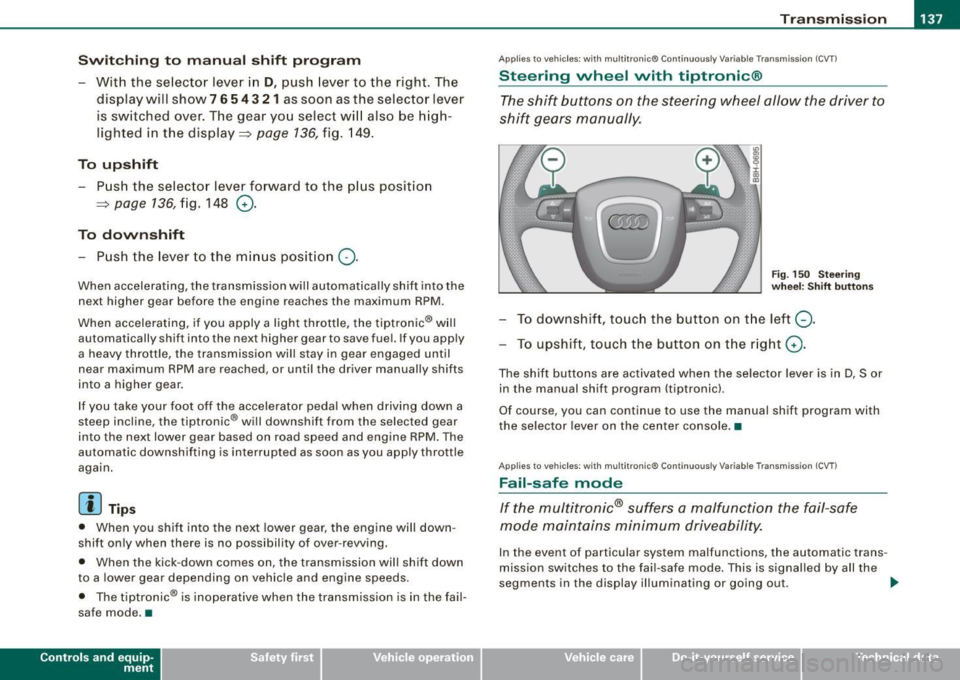
F ig. 15 0 Stee ring
w he el: S hift b utto ns
To downshift, touch the button on the left Q .
To upshift , touch the button on the r ight G) .
The shif t buttons are activated when the selector lever is in D, S or
in the manual shift program (tiptronic).
Of course, you can continue to use the manual shift program with
the selector lever on the center console. •
Applies to vehicles : wi th mu lt itro nic® Co nti nuously Var iab le Tra nsmis sion (CVT)
Fail -safe mode
If the multitronic® suffers a malfunction the fail-safe
mode maintains minimum driveability.
In the event of particular system malfunctions, the automatic trans
mission switches to the fai l-safe mode. This is signal led by all the
segments in the display illuminating or going out . _,,,
~ehicle care irechnical data
Page 150 of 340
___ D_ r_ i_v _in -= g'- S _ a_f _e _ly.:,._ ______________________________________________ _
Proper occupant seating positi·ons
Proper seating position for the driver
The proper driver seating position is important for safe,
relaxed driving.
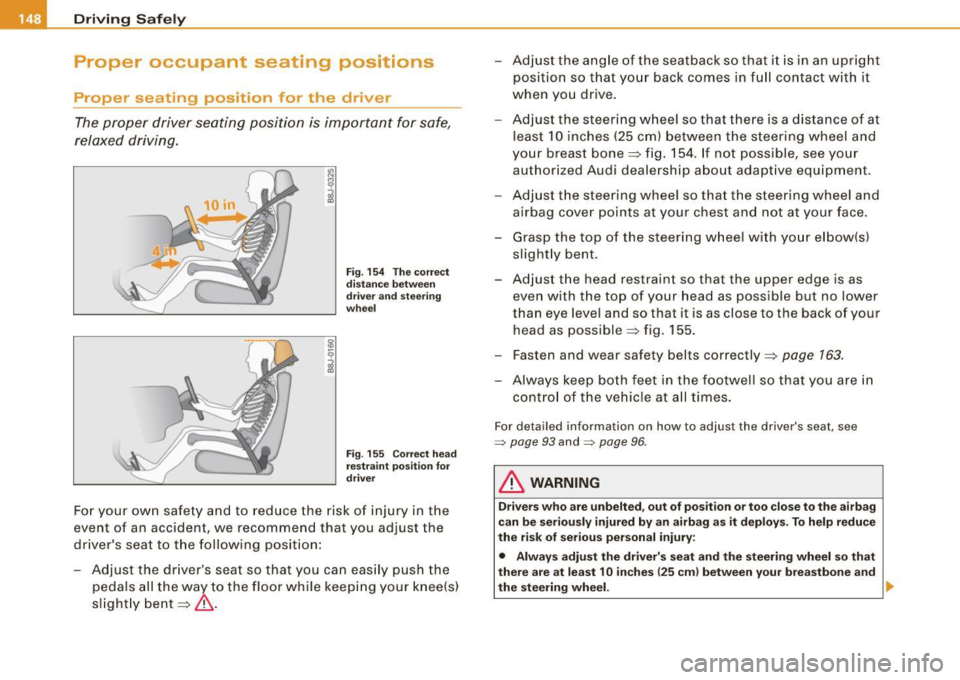
Fig. 154 The correct
distance between
driver and steering
wheel
Fig . 155 Correct head
restraint position for
driver
For your own safety and to reduce the risk of injury in the
event of an accident, we recommend that you adjust the
driver's seat to the following position:
- Adjust the driver's seat so that you can easily push the
pedals all the way to the floor while keeping your knee(s)
slightly bent=:>& . - Adjust the angle of the seatback so that
it is in an upright
position so that your back comes in full contact with it
when you drive.
- Adjust the steering wheel so that there is a distance of at
least 10 inches (25 cm) between the steering wheel and
your breast bone=:> fig. 154. If not possible, see your
authorized Audi dealership about adaptive equipment.
- Adjust the steering wheel so that the steering wheel and
airbag cover points at your chest and not at your face.
- Grasp the top of the steering wheel with your elbow(s)
slightly bent.
- Adjust the head restraint so that the upper edge is as
even with the top of your head as possible but no lower
than eye level and so that it is as close to the back of your
head as possible =:> fig. 155.
- Fasten and wear safety belts correctly=:>
page 163.
- Always keep both feet in the footwell so that you are in
control of the vehicle at all times.
For detailed information on how to adjust the driver's seat, see
=> page 93 and :::::, page 96 .
& WARNING
Drivers who are unbelted, out of position or too close to the airbag
can be seriously injured by an airbag as it deploys. To help reduce
the risk of serious personal injury:
• Always adjust the driver's seat and the steering wheel so that
there are at least 10 inches
125 cm) between your breastbone and
the steering wheel. ...
Page 151 of 340
__________________________________________________ D _r_iv _ in_ g=- S_ a_f _e _l..:.. Y _ ....... 911
& WARNING (continued)
• Always adjust the driver's seat and the steering wheel so that
there are at least 4 inches 110 cm) between the knees and the
lower part of the instrument panel.
• Always hold the steering wheel on the outside of the steering
wheel rim with your hands at the 9 o'clock and 3 o'clock positions
to help reduce the risk of personal injury if the driver's airbag inflates .
• Never hold the steering wheel at the 12 o'clock position or with
your hands at other positions inside the steering wheel rim or on
the steering wheel hub. Holding the steering wheel the wrong way can cause serious injuries to the hands, arms and head if the
driver's airbag inflates
• Pointing the steering wheel toward your face decreases the
ability of the supplemental driver's airbag to protect you in a colli
sion .
• Always sit in an upright position and never lean against or
place any part of your body too close to the area where the airbags
are located.
• Before driving, always adjust the front seats and head
restraints properly and make sure that all passengers are properly
restrained.
• Never adjust the seats while the vehicle is moving. Your seat
may move unexpectedly and you could lose control of the vehicle.
• Never drive with the backrest reclined or tilted far back! The
farther the backrests are tilted back, the greater the risk of injury
due to incorrect positioning of the safety belt and improper
seating position.
• Children must always ride in child seats
=> page 190. Special
precautions apply when installing a child seat on the front
passenger seat
=> page 168. •
Controls and equip
ment Safety first
Vehicle operation
Proper seating position for the front
passenger
The proper front passenger seating position is important
for safe, relaxed driving.
For your own safety and to reduce the risk of injury in the
event of an accident, we recommend that you adjust the
seat for the front passenger to the following pos ition:
- Move the front passenger seat back as far as possible.
There must be a minimum of 10 inches (25 cm) between
the breastbone and the instrument panel =>
&.
- Adjust the angle of the seatback so that it is in an upright
position and your back comes in full contact with it
whenever the vehicle is moving.
- Adjust the head restraint so that the upper edge is as
even with the top of your head as possible but not lower
than eye level and so that it is as close to the back of your
head as possible =>
page 151.
-Keep both feet flat on the floor in front of the front
passenger seat.
- Fasten and wear safety belts correctly=>
page 163.
For detailed information on how to adjust the front passenger's
seat, see => page 92.
LJ}. WARNING
Front seat passengers who are unbelted, out of position or too
close to the airbag can be seriously injured or killed by the airbag
as it unfolds. To help reduce the risk of serious personal injury :
jll,,
Vehicle care Do-it-yourself service Technical data
Page 163 of 340

Because the passengers of this vehicle are not using safety belts
~ page 160, fig. 162, they will keep moving at the same speed the
vehicle was moving just before the crash, until something stops
them -here, the wall
~ page 160, fig. 163.
The same principles apply to people sitting in a vehicle that is involved in a frontal collision. Even at city speeds of 20 to 30 mph
(30 to 50 km/h), the forces acting on the body can reach one ton
(2,000 lbs, or 1,000 kg) or more. At greater speeds, these forces are
even higher.
People who do not use safety belts are also not attached to their
vehicle. In a frontal collision they will also keep moving forward at
the speed their vehicle was travelling just before the crash. Of course, the laws of physics don't just apply to frontal collisions, they
determine what happens in all kinds of accidents and collisions. •
What happens to occupants not wearing
safety belts?
In crashes unbelted occupants cannot stop themselves
from flying forward and being injured or killed. Always
wear your safety belts!
Safety first
Fig . 164 A driver not
wearing a safety belt is
violently thrown
forward
Safety belts
Fig. 165 A rear
passenger not wearing
a safety belt will fly
forward and strike the
driver
Unbelted occupants are not able to resist the tremendous forces of
impact by holding tight or bracing themselves. Without the benefit
of safety restraint systems, the unrestrained occupant will slam
violently into the steering wheel, instrument panel, windshield, or
whatever else is in the way~ fig. 164 . This impact with the vehicle
interior has all the energy they had just before the crash.
Never rely on airbags alone for protection. Even when they deploy,
airbags provide only additional protection. Airbags are not
supposed to deploy in all kinds of accidents. Although your Audi is
equipped with airbags, all vehicle occupants, including the driver,
must wear safety belts correctly in order to minimize the risk of
severe injury or death in a crash.
Remember too, that airbags will deploy only once and that your
safety belts are always there to offer protection in those accidents
in which airbags are not supposed to deploy or when they have
already deployed. Unbelted occupants can also be thrown out of the
vehicle where even more severe or fatal injuries can occur.
It is also important for the rear passengers to wear safety belts
correctly . Unbelted passengers in the rear seats endanger not only
themselves but also the driver and other passengers~ fig. 165. In a
frontal collision they will be thrown forward violently, where they can hit and injure the driver and/or front seat passenger. •
~ehicle care Technical data
Page 170 of 340
___ A_ ir_b _ a_ g~ s_ y_s _t _e _m _________________________________________________ _
Airbag system
Important things to know
Importance of wearing safety belts and
sitting properly
Airbags are only supplemental restraints. For airbags to
do their job, occupants must always properly wear their
safety belts and be in a proper seating position.
For your safety and the safety of your passengers, before
driving off, a lways:
- Adjust the driver's seat and steering wheel properly
=>
page 148,
- Adjust the front passenger's seat properly => page 93,
- Wear safety belts properly=> page 162,
- Always properly use the proper child restraint to protect
children=>
page 190 .
In a collision airbags must inflate within the blink of an eye and with
considerable force . Th e suppl emental airbags can caus e injuries if
the driver or the front seat passenger are not seated proper ly . There
fore in order to help the airbag to do its job, it is impor tant, both as
a driver and as a passenger to sit properly at all times.
By keeping room between your body and the steering wheel and the
front of the passenger compartment, the airbag can inflate fully and
completely and prov ide supplementa l protection in certain frontal
collisions ~
page 148, "Proper occupant seating positions" . For
details on the operation of the seat adjustment controls~
page 93
and ~ page 96.
It's especially important that chi ldren are proper ly restrained
~ page 190.
There is a lot that the driver and the passengers can and must do to
help the individual safety features installed in your Audi work
together as a system.
Proper seating posi tion is important so that the front airbag on the
driver side can do its job. If you have a physical impairment or
condition that prevents you from sitting properly on the driver seat
with the safety belt properly fastened and reaching the pedals, or if
you have concerns with regard to the function or operation of the
Advanced Airbag System, please contact your authorized Audi
dea ler or qua lif ied workshop, or call Audi Customer CARE at 1-800 -
822 -2834 for possible modifications to your vehicle .
When the airbag system deploys, a gas generator wi ll fill the
airbags, break open the padded covers, and inflate between the
steering wheel and the driver and between the instrument panel
and the front passenger. The airbags will deflate immediately after
deployment so that the front occupants can see through the wind
shield again without interruption .
All of this takes p lace in the blink of an eye, so fast that many people
don't even rea lize that the airbags have dep loyed. The airbags also
inflate with a great deal of force and nothing should be in their way
when they deploy . Front airbags in combination with properly worn
safety bel ts slow down and limit the occupant's forward movement.
Together they help to prevent the driver and front seat passenger
from hitting parts of the inside the vehicle while reducing the forces acting on the occupant during the crash . In this way they help to
reduce the risk of injury to the head and upper body in the crash .
Airbags do not protect the arms or the lower parts of the body.
Both front airbags w ill not in flate in al l frontal collisions . The trig
gering of the airbag system depends on the vehic le deceleration
rate caused by the collision and registered by the electronic contro l
unit. If this rate is below the reference value programmed into the
control unit, the airbags will not be triggered, even though the car
may be badly damaged as a result of the collision . Vehicle damage, .,
Page 171 of 340
__________________________________________________ A_ i_ r _b _a...; g::- s_ y=--- s_t _e _m ___ lJII
repair costs or even the lack of vehicle damage is not necessarily an
indication of whether an airbag should inflate or not .
It is not possible to define a range of vehicle speeds that will cover
every possible kind and angle of impact that will always trigger the
airbags, since the circumstances will vary considerably between
one collision and another. Important factors include, for example,
the nature (hard or soft) of the object which the car hits, the angle of impac t, vehicle sp eed , etc . The front airbags will also not inflate
in side or rear collisions, or in roll-overs.
Always remember : Airbags will deploy only once, and only in certain
kinds of collisions. Your safety belts are always there to offer protec
tion in those situations in which airbags are not supposed to deploy,
or when they have already deployed; for example, when your vehicle
strikes or is struck by another after the first collision.
This is just one of the reasons why an airbag is a suppl em entary
restraint and is not a substitute for a safety belt. The airbag system
works most effectively when used with the safety belts. Therefore ,
always properly wear your safety belts=>
page 159.
& WARNING
Sitting too close to the steering wheel or instrument panel will
decrease the effectiveness of the airbags and will increase the risk
of personal injury in a collision.
• Never sit closer than 10 inches (25 cm) to the steering wheel or
instrument panel.
• If you cannot sit more than 10 inches (25 cm) from the steering
wheel, investigate whether adaptive equipment may be available
to held you reach the pedals and increase your seating distance
from the steering wheel.
• If you are unrestrained, leaning forward, sitting sideways or out
of position in any way, your risk of injury is much higher.
• You will also receive serious injuries and could even be killed if
you are up against the airbag or too close to it when it inflates -
even with an Advanced Airbag.
Controls and equip ment Safety first
Vehicle operation
& WARNING (continued)
• To reduce the risk of injury when an airbag inflates, always
wear safety belts properly~
page 163, "Safety belts".
• Always make certain that children age 12 or younger always
ride in the rear seat. If children are not properly restrained, they
may be severely injured or killed when an airbag inflates.
• Never let children ride unrestrained or improperly restrained in
the vehicle. Adjust the front seats properly.
• Never ride with the backrest reclined.
• Always sit as far as possible from the steering wheel or the
instrument panel~
page 148, "Proper occupant seating posi
tions".
• Always sit upright with your back against the backrest of your
seat.
• Never place your feet on the instrument panel or on the seat .
Always keep both feet on the floor in front of the seat to help
prevent serious injuries to the legs and hips if the airbag inflates.
• Never recline the front passenger's seat to transport objects.
Items can also move into the area of the side airbag or the front
airbag during braking or in a sudden maneuver. Objects near the
airbags can become projectiles and cause injury when an airbag
inflates.
& WARNING
Airbags that have deployed in a crash must be replaced.
• Use only original equipment airbags approved by Audi and
installed by a trained technician who has the necessary tools and
diagnostic equipment to properly replace any airbag in your
vehicle and assure system effectiveness in a crash.
• Never permit salvaged or recycled airbags to be installed in
your vehicle. •
Vehicle care Do-it-yourself service Technical data