light AUDI A4 CABRIOLET 2009 Repair Manual
[x] Cancel search | Manufacturer: AUDI, Model Year: 2009, Model line: A4 CABRIOLET, Model: AUDI A4 CABRIOLET 2009Pages: 340, PDF Size: 77.32 MB
Page 122 of 340
• .___O_ n_ t_h _e _ r_o _a_ d __________________________________________________ _
Starting and stopping the engine
Starting the engine
The engine can only be started with your original Audi
key.
- Set the parking brake.
- Move the selector lever to the neutral position (automatic
transmission: selector lever in P or N)
=> &.
- On vehicles with manual transmission, fully depress the
clutch pedal.
- Turn the ignition key to position
0 => page 119, fig. 136
- do not depress the gas pedal when starting the engine!
- Let go of the key as soon as the engine starts.
A cold engine may at first be loud after it has been started. This is
due to the hydraulic valves building up the oil pressure. This normal
and no need for concern.
If the engine does not start immediately, stop trying after 10
seconds and then try to restart the engine about 30 seconds later.
What to do if the engine does not start
• ~ page 304, "Starting with jumper cables"
• ~ page 306, "Emergency towing with commercial tow truck".
& WARNING
Never start or let the engine run in a confined or enclosed area .
Exhaust fumes from the engine contain carbon monoxide, a color
less and odorless gas. Carbon monoxide can be fatal if inhaled.
• Never leave the engine idling unattended. An unattended
vehicle with a running engine poses a danger of personal injury or
theft.
0 Note
• Avoid high engine speeds, fast acceleration or heavy engine
loads while the engine is still cold. This could damage the engine.
• The engine cannot be started by pushing or towing the vehicle.
~ For the sake of the environment
To avoid unnecessary engine wear and to reduce exhaust emis
sions, do not let your vehicle stand and warm up. Be ready to drive
off immediately after starting your vehicle. Maintain moderate
speed until the engine is completely warm. Remember, the engine
performs best at operating temperature.•
Stopping the engine
- Turn the ignition key to position (D => page 119, fig. 136.
& WARNING
• Never turn off the engine until the vehicle has come to a
complete stop.
• The brake booster and servotronic only work when the engine
is running . With the ignition turned off, you have to apply more
force when steering or braking. Since you cannot steer and stop
normally, this can lead to accidents and serious injuries.
• The radiator fan can continue to run for up to 10 minutes even
after you have turned off the engine and removed the ignition key.
The radiator fan can also turn on again if the engine coolant heats
up because of intense sunlight or heat build-up
in the engine
compartment. _,.
Page 123 of 340

On the road -_______________ ____,
0 Note
Do not stop the engine immediately after hard or extended driving.
Keep the engine running for approximately two minutes to prevent
excessive heat build-up. •
Parking brake
Parking brake
When the parking brake is set, it prevents the vehicle from
rolling away unintentionally.
Setting the parking brake
Fig . 137 Center
console: Parking brake
set
- Pull the parking brake lever all the way up.
Releasing the parking brake
- Pull the parking brake lever up slightly
and press the
release button at the same time=:> fig. 137 -arrow-.
- Keep the release button pressed and lower the parking
brake =>
&-
Contro ls and eq uip
ment
If you should drive off with the parking brake still set, a warning tone
will sound and the following will appear in the instrument cluster to
remind you to release the parking brake:
Parking brake set
The parking brake warning comes on only after you have driven for longer than 3 seconds and faster than 5 mph (5 km/h).
The parking brake warning light Brake (Canada:
{(j))) illuminates
when the parking brake is set and you switch on the ignition .
& WARNING
Always release the parking brake completely. A partially engaged
brake will overheat the rear brakes, reduce their effectiveness and
cause excessive wear. This could lead to brake failure and an acci
dent.
0 Note
Only after the vehicle has come to complete stop, should you firmly
set the parking brake and either move the gearshift lever into 1st.
gear (manual transmission) or move the selector lever into P (Auto
matic transmission). •
Parking
To prevent a parked vehicle from rolling away, there are a
few things you should do.
When you park your vehicle, do the following:
- Stop the vehicle using the brake pedal.
- Set the parking brake firmly.
- Move the selector lever into the
P position =:> &.
~ehicle care Technical data
Page 125 of 340

On the road ------------------------------.J
Keep the sensors in the rear bumper clean and free from ice so that
the acoustic park assist system can function properly.
& WARNING
• Sensors have dead spaces in which objects cannot be
detected . Be especially alert for small children and animals, since
they are not always detected by the sensors.
• The acoustic park assist system is not a substitute for the
driver's own caution and alertness. Ultimate responsibility always
remains with the driver during parking and similar maneuvers .
Always watch where you are driving.
0 Note
• Remember that low obstacles for which a warning has already
been issued may "dive" below the system's sensing zone if the
vehicle is being backed up closer. In this case, the warning sound
shutting off does
not indicate that you have cleared the obstacle .
Instead, impact is imminent.
• Objects such as trailer hitches, barrier chains, narrow posts or
fences covered by a thin layer of paint may not always be detected
by the system . They can still damage your vehicle without a
warning.
[ i] Tips
Keep the sensors in the rear bumper clean and free of snow and ice
so that the acoustic parking assist system can function properly. •
Controls and equip
ment
Cruise control
General information
The cruise control system allows you to maintain a
constant speed.
The cruise control system allows you to maintain a constant driving
speed when driving faster than 18 mph (30 km/h) -to the extent this
is possible with the given engine power and braking characteristics .
This allows you to take your foot off the "gas" and rest it, especially
on long trips.
The indicator light (U.S. models :
CRUISE , Canadian models:•(') ) in the
instrument cluster illuminates when the system is on.
& WARNING
• To help keep the vehicle under control, do not use the cruise
control system when driving on winding or slippery roads (as
caused by heavy rain or loose gravel on the road surface), or in
heavy or varying traffic.
• Only use the cruise control when traffic, road and weather
conditions allow you to drive at a steady speed.
[ i] Tips
The cruise control cannot maintain a constant speed when driving
downhill. The vehicle will accelerate under its own weight. Down
shift to a lower gear or use the brakes to slow down .•
Page 126 of 340
• .___O_ n_ t_ h _e _ ro_ a_d __________________________________________________ _
Storing a sp eed
You must set and then store a vehicle speed using the
cruise control.
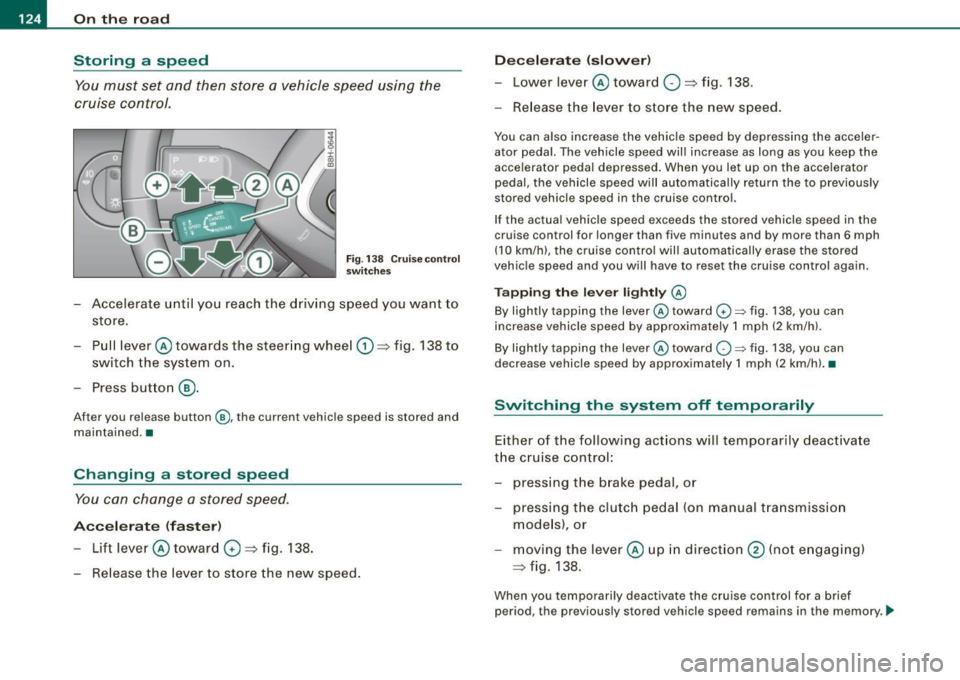
Fig . 138 Cruise control
switches
- Accelerate until you reach the driving speed you want to
store.
Pull lever @ towards the steering wheel
G) => fig. 138 to
switch the system on.
Press button
® ·
After you release button@, the current vehicle speed is stored and
maintained. •
Changing a stored speed
You can change a stored speed.
Accelerate (faster)
-Lift lever @ toward 0 => fig. 138.
Release the lever to store the new speed.
Decelerate (slower)
-Lower lever@ toward O => fig. 138.
- Release the lever to store the new speed.
You can also increase the vehicle speed by depressing the acceler
ator pedal. The vehicle speed will increase as long as you keep the
accelerator pedal depressed. When you let up on the accelerator
pedal, the vehicle speed will automatically return the to previously
stored vehicle speed in the cruise control.
If the actual vehicle speed exceeds the stored vehicle speed in the
cruise control for longer than five minutes and by more than 6 mph
(10 km/h), the cruise control will automatically erase the stored
vehicle speed and you will have to reset the cruise control again.
Tapping the lever lightly @
By lightly tapping the lever@toward G) ~ fig. 138, you can
increase vehicle speed by approximately 1 mph (2 km/h).
By lightly tapping the lever @toward
O ~ fig. 138, you can
decrease vehicle speed by approximately 1 mph (2 km/hl. •
Switching the system off t emporarily
Either of the following actions will temporarily deactivate
the cruise control:
- pressing the brake pedal, or
- pressing the clutch pedal (on manual transmission
models), or
moving the lever@ up in direction
@ (not engaging)
=>fig .138.
When you temporarily deactivate the cruise control for a brief
period, the previously stored vehicle speed remains in the memory. -.,
Page 130 of 340
• .___T_ r_a _n_ s_ m_ is_ s_io _ n ______________________________________________________ _
R -Reverse
The transmission will automatically select the lowest gear ratio
when you shift into reverse.
Select
R only when the vehicle is at a full stop and the engine is
running at idle speed~
& in "Driving the automat ic transmission"
on
page 126 .
Before you move the selector lever to R, press both the button in the
handle of the selector lever
and the brake pedal at the same time.
When the ignition is on, the backup lights illuminate when the selector lever is moved into
R.
N -Neutral
The transmission is in neutral in this position. Shift to this position
for standing with the brakes applied~
page 128.
When the vehicle is stationary or at speeds below 3 mph (5 km/h),
you must always apply the footbrake before and while moving the
lever out of
N.
D -Normal position for driving forward
Position Dis for normal city and highway driving. It ranges from zero
to top speed and all six gears shift automatica lly, depending on
engine load, driving speed and automatically selected shift
programs. The gear engaged is shown in the right of the display
~ page 127, fig. 140.
When the vehicle is stationary or at speeds below 3 mph (5 km/h),
you must always apply the foot brake before and whi le moving the
lever to
D out of N .
In certain circumstances it may be advantageous to temporarily
switch to the manual shift program to manua lly se lect gear ratios to
match specific driving conditions~
page 130.
S -Sport position
Select this position for sportier performance. In this position, the
t ransmission will not upshift as soon, allowing the vehic le to use the increased power available at higher engine speeds
to achieve live
lier accelera tion .
When the vehicle is stationary or at speeds below 3 mph (5 km/h),
you must always apply the foot brake before and while moving the lever to
S out of N.
& WARNING
Read and follow all WARNINGS ~ & in "Driving the automatic
transmission" on
page 126.
(D Note
Coasting downhil l with the transmission in N and the engine not
running w ill result in damage to the automatic transmission and
possibly the catalytic converter. •
Applies t o veh icles: with 6-speed automat ic transmission
Automatic Shift Lock (ASL)
The Automatic Shift Lock safeguards you against acciden
tally shifting into a forward or the reverse gear and
causing the vehicle to move unintentionally.
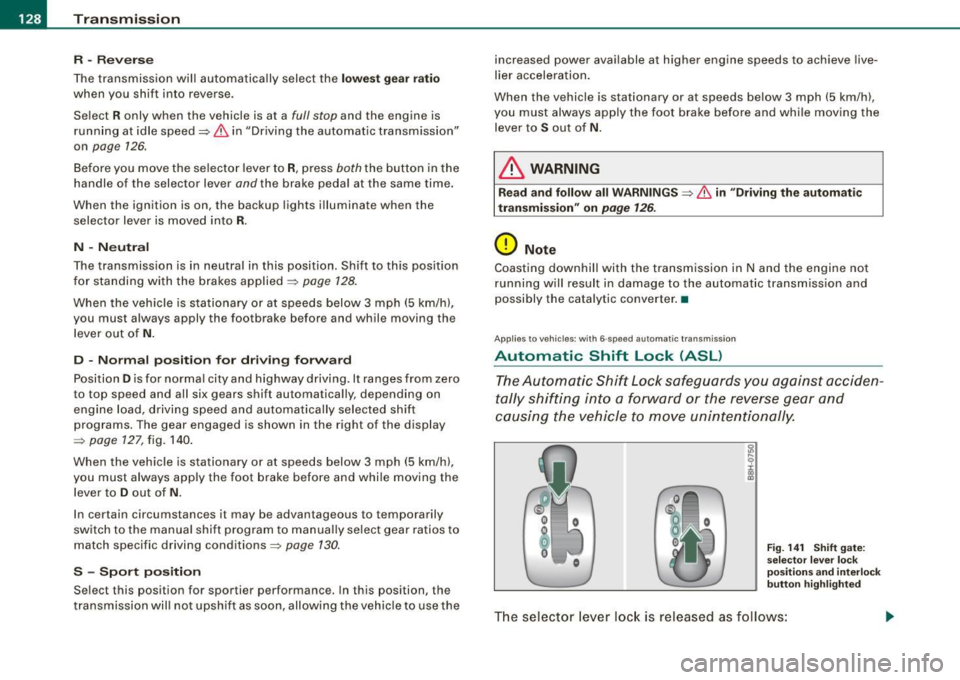
Fig. 141 Shift gate:
se lector leve r lock
position s and interlock
butt on highlighted
The selector lever lock is released as follows :
Page 131 of 340
_______________________________________________________ T_ ra_ n_s_ m __ is_s_ io_ n ____ llJIII
- Tur n t he ignition on.
- Step on the brake pedal.
At the same time press and hold
the interlock butto n on the side of the gear selector knob
=> page 128, fig. 141 with your thumb until you have
moved the selector lever to the desi red posi tion .
Autom atic s elect or l ever l ock 53
The se lector lever is locked in the
P and N positions when the igni
tion is turned on. To move the lever from these positions the driver must depress the brake pedal. As a reminder to the driver, the
f ollow ing warning appears in the instrument c luster display when
the selector is in
P and N :
When sta tionary apply footbr ake whil e selecting gear
In addition, the symbol 53 will light up on the shift gate at the base
of the selector lever.
A time delay e lement prevents the selecto r lever from locking when
it is moved through the
N position (going from R to Dl. The locking
element will lock the selector lever if the lever is left in N (Neutral)
for more than approx imately 1 second, without the brake pedal
being pressed .
At speeds above about 3 mph (5 km/h) t he Automatic Shif t Lock is
automatically deactivated in the
N position.
Int erlock button
The lock button on the selector lever prevents the lever from be ing
accidentally shifted into certain positions . Pressing this bu tton
deactivates the selector lever lock . Depending on the direction of
the shift, the se lec tor lever locks at different posi tions. The positions
are highlighted in the illustration~
page 128, fig. 141 .
Ignition key safety int erlo ck
The key cannot be removed from the ignition un less the selector
lever is in the
P park position. When the ignitio n key is re moved, the
selector lever wil l be locked in the
P position. •
Controls and equip
ment
App lies to veh icles: with 6-speed automatic transmission
Kick-down
T he kick-down feature allows the vehicle to generate
ma ximum acceler ati on.
When you press the accelerator peda l beyond the resistance point
that is reached at ful l throttle, the transmission will select a lower
gear ratio based o n vehicle speed and engine RPM. The engine RP M
wil l be control led to produce maximum vehicle acceleration as long
as you continue to press the acce lerato r pedal beyond this resis
tance point.
& WARNING
Be care ful when using the ki ck-down feature on slippery road s.
Rapid acceleration may cause the vehicle to skid . •
App lies to vehicles: with 6-speed automatic transm iss ion
Dynamic shift program (DSP)
T he aut omatic transmission is electronically controlle d.
The transmission is se lf adapting and will auto matically se lect the
best sh ift program suited to the driving conditions and driving style.
The transmission wil l select one of the
e conomy programs when
you drive at a steady speed or a gradually changing speed without
heavy acceleration. This achieves optimum fuel efficiency, with early
upshifting and delayed downshifting.
The transmiss ion w ill automatically select the
s porty shift programs
when you drive at higher speeds, or with heavy acceleration and
frequently changing speeds . Upshifts are delayed to make full use
of engine power. Downshifting takes place at higher engine speeds
than in the economy p rog rams . _,.
Page 132 of 340
• .___T_ r_a _n_ s_ m_ is_ s_io _ n ______________________________________________________ _
The selection of the most suitable shift program is a continuous,
automatic process . The driver can a lso make the transmission
switch to a sporty program by
qu ickly pressing down the gas pedal.
This causes the transmission to shift down to a lower gear to achieve rapid acceleration, e .g. for quickly passing another vehicle.
You do not need to press the gas pedal into the kick -down range.
After the transmission has upshi fted , the original program is
selected according to your driving style.
An additiona l shift program allows the automatic transmission to
select the proper gear for uphill and downhill gradients.
This keeps the transmission from shifting up and down unneces
sari ly on hills . The transmission will shift down to a lower gear when
the driver presses the brake pedal on a downhill gradient . This
makes use of the braking effect of the engine wi thout the need to
shift down manua lly .•
Ap plies to ve hicles: wit h 6-spee d automat ic tr ans mission
Manual shift program
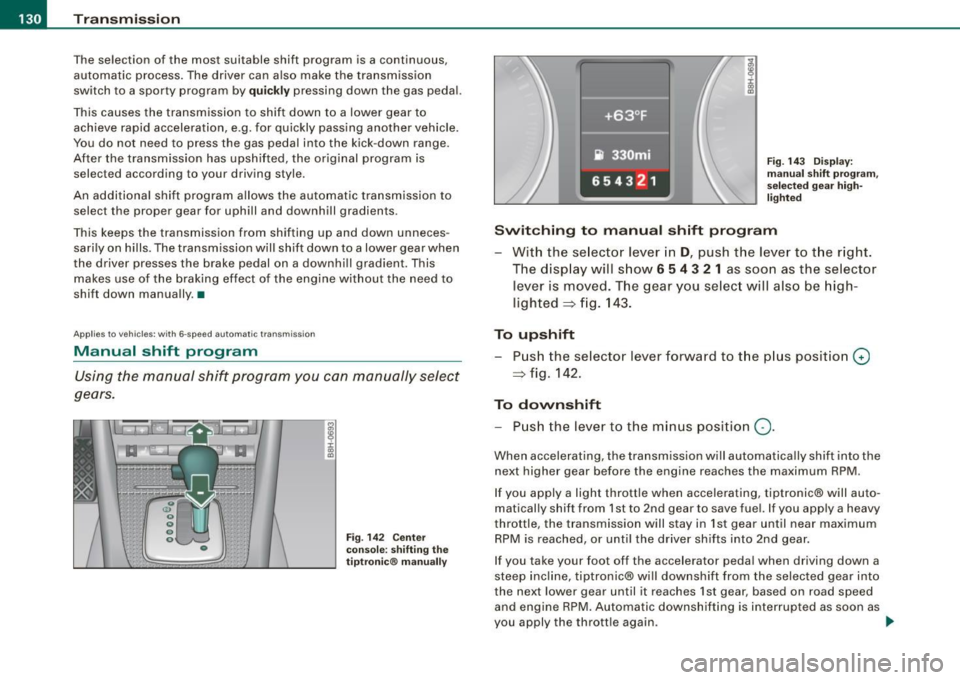
Using the manual shift program you can manually select
gears.
Fi g. 142 Cente r
co nso le: s hifting the
t ipt roni c® manu ally Fig.
143 Dis play :
m an ual s hift p rogram,
se lec te d g ear h igh
lig hted
Switching to m anual shift program
With the se lector lever in D, push the lever to t he right .
The disp lay w ill s how
6 5 4 3 2 1 as soon as the selector
lever is moved. The gear you selec t will also be high
lighted => fig. 1 43.
To upshift
Push the selector lever forward to t he p lus position 0
=> fig. 142 .
To downshift
-Push th e lever to the minus position Q.
When accelerating, the transm ission will automatica lly shift into the
next higher gear before the engine reaches the maximum RPM .
I f you apply a light throttle when accelerating, tiptronic® will auto
matically shift from 1st to 2nd gear to save fuel. If you apply a heavy
throttle, the transmission will stay in 1st gear until near maximum
RPM is reached, or until the driver sh ifts into 2nd gear.
If you take your foot off the accelerator peda l when driving down a
steep inc lin e, tiptronic® will downshift from the selec ted gear into
the next lower gear until it reaches 1st gear, based on road speed
and engine RPM. Automatic downshif ting is interrup ted as soon as
you apply the thrott le again . .,_
Page 134 of 340

-Tr
ansmi ssion
.___ ______________ _
engine power is applied smoothly and comfortably , and better fuel
economy is achieved.
The transmiss ion selects the appropria te gear ra tio (upshifts and
downshiftsl automatically based on set driving programs
=> page 136.
You can a lso manually select a shift program (tiptronic®)
=> page 136 .
You should note, that the multit ronic transmission differs from a
conventional Automatic Transmission. In the multitronic transmis
sion the engine power is transferred via a link -plate chain, rather
than by a conventional torque converter. The multitronic transmis
sion greatly reduces vehicle "creep"" when at a standstil l and the
transmission is in
D Sor R. •
Ap plies to vehicles: with mult it ro nic® Contin uous ly Va ria ble Transm iss ion ( CVT)
Driving the multitroni c®
The gear ratio is continuously adapted to vehicle speed
and load.
Start ing the engine
- The s ele ctor lever mus t be i n Nor P.
Fi g. 14 5 Sec tion of th e
ce nte r c on sol e:
s ele ctor leve r wit h lo ck
b utt on
St arting off
- Press and hold the brake pedal.
- Press and hold the release butto n in the se lector lever
handle and move the selector lever from
P (a lternatively
N ) to D (alternatively S) and release the button.
- Wait br iefly u ntil the transm ission has shif ted (you will
fee l a slight movem ent) .
- Rem ove your foot from the b rake p edal a nd acce lera te
=> & .
Rocking ba ck and forth to b ecom e unstu ck
- Shift only between D and R when the ve hicle is at a fu ll
stop and the eng ine is runn ing at idle speed .
Stopping
- Press a nd h old the brake pedal un til the vehicle has com e
to a comp le te stop.
- Keep the brake pedal depressed so that the vehic le
cann ot ro ll forwa rd or ba ckw ard while it is id lin g => & .
- Once stop ped,
do not depress the acce lera to r p edal to
r ev up the engine => & .
Parking
- Press and hold the brake pedal until the vehicle has come
to a complete stop .
- Set t he park ing brake firmly =>
page 121, "Parking" .
- Press and hold the release button in the se lector lever
handle, m ove the select or leve r in to
P and then let go of
the releas e button => & . .,
Page 136 of 340
....... _T _r_a _ n_ s_m _ i_s _s _i_o _n ______________________________________________________ _
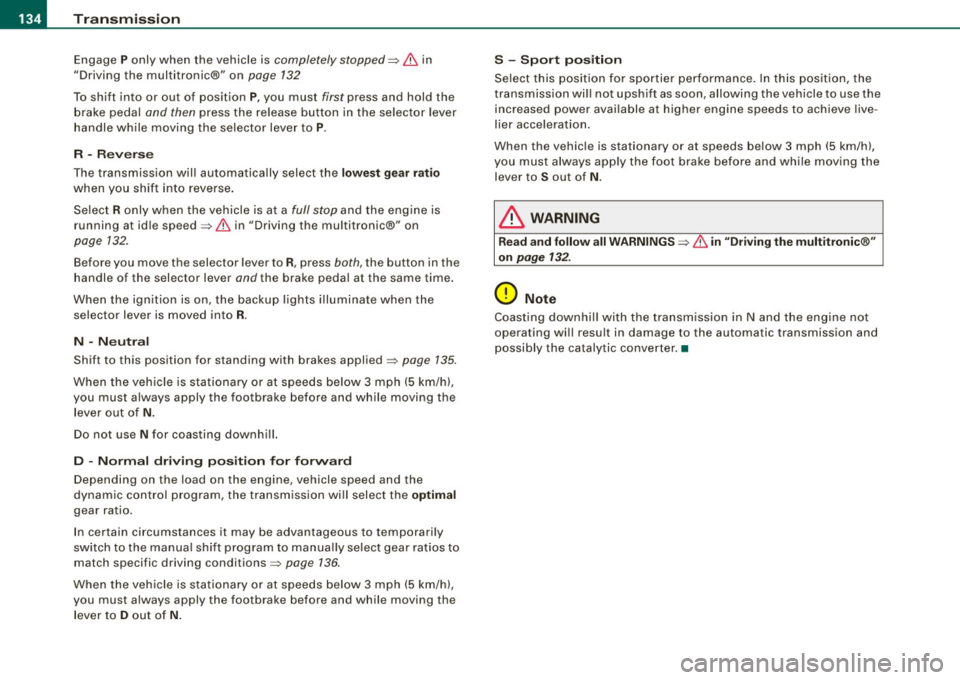
Engage P only when the vehicle is completely stopped=> & in
"Driving the multitronic®" on
page 132
To shift into or out of position P, you must first press and hold the
brake pedal
and then press the release button in the selector lever
handle while moving the selector lever to
P.
R -Reverse
The transmission will automatically select the lowest gear ratio
when you shift into reverse.
Select R only when the vehicle is at a
full stop and the engine is
running at idle speed=>
& in "Driving the multitronic®" on
page 132.
Before you move the selector lever to R, press both, the button in the
handle of the selector lever
and the brake pedal at the same time.
When the ignition is on, the backup lights illuminate when the
selector lever is moved into
R.
N -Neutral
Shift to this position for standing with brakes applied=> page 135.
When the vehicle is stationary or at speeds below 3 mph (5 km/h),
you must always apply the footbrake before and while moving the
lever out of
N.
Do not use N for coasting downhill.
D -Normal driving position for forward
Depending on the load on the engine, vehicle speed and the
dynamic control program, the transmission will select the
optimal
gear ratio.
In certain circumstances it may be advantageous to temporarily
switch to the manual shift program to manually select gear ratios to
match specific driving conditions=>
page 136.
When the vehicle is stationary or at speeds below 3 mph (5 km/h),
you must always apply the footbrake before and while moving the lever to
D out of N.
S -Sport position
Select this position for sportier performance. In this position, the
transmission will not upshift as soon, allowing the vehicle to use the increased power available at higher engine speeds to achieve live
lier acceleration.
When the vehicle is stationary or at speeds below 3 mph (5 km/h),
you must always apply the foot brake before and while moving the
lever to
S out of N.
& WARNING
Read and follow all WARNINGS=> & in "Driving the multitronic®"
on
page 132.
0 Note
Coasting downhill with the transmission in N and the engine not
operating will result in damage to the automatic transmission and
possibly the catalytic converter. •
Page 137 of 340
Transmission -
----------------
Applies to vehi cles : wit h m ultit r o ni c® Con tin uous ly Variab le Tra nsmi ssion (CVTl
Automatic Shift Lock (ASL)
The Automatic Shift Lock safeguards you against acciden
tally shifting into a forward or the reverse gear and
causing the vehicle to move unintentionally.
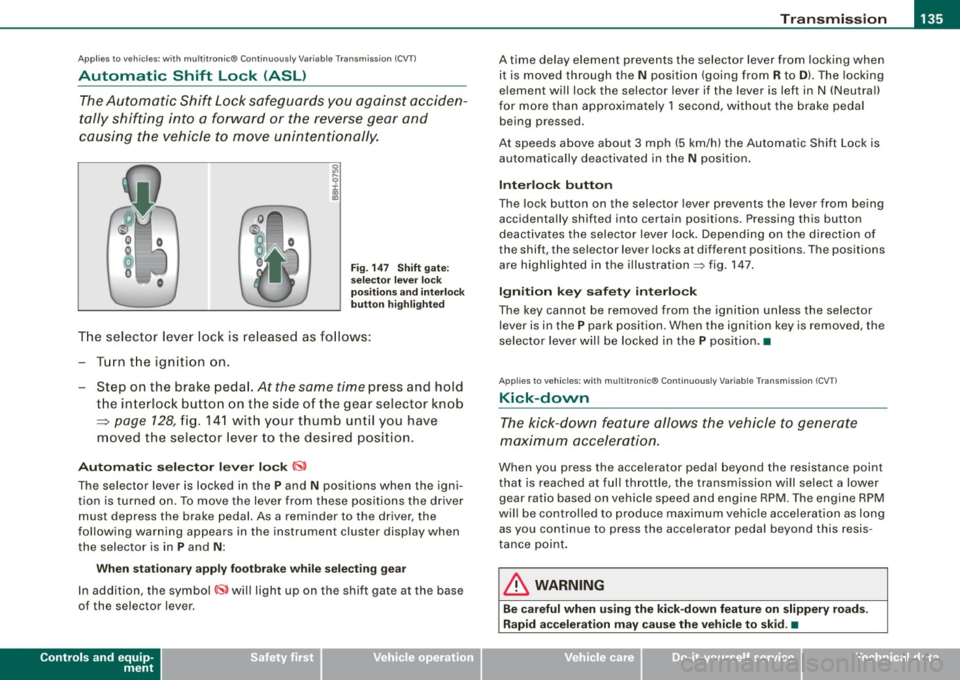
Fig. 147 Shift gate:
selector lever lock
positions and interlock
button highlighted
The selector lever lock is released as follows:
-Turn the ignition on.
- Step on the brake pedal.
At the same time press and hold
the interlock button on the side of the gear selector knob
=> page 128, fig. 141 with your thumb until you have
moved the selector lever to the desired position.
Automatic selector lever lock CS,
The selector lever is lock ed in the P and N positions when the igni
tion is turned on. To move the lever from these positions the driver
must depress the brake pedal. As a reminder to the driver, the
following warning appears in the instrument cluster display when
the selec tor is in
P and N :
When stationary apply footbrake while selecting gear
In addition, the symbol~ will light up on the shift gate at the base
of the selector l ever.
Controls and equip
ment
A time delay element prevents the selector lever from locking when
it is moved through the
N position (going from R to D). The locking
element will lock the selector lever if the lever is left in N (Neutral)
for more than approximately 1 second, without the brake pedal
being p ressed .
At speeds above about 3 mph (5 km/h) the Automatic Shift Lock is
automatically deactivated in the
N position.
Interlock button
The lock button on the selecto r lever prevents the lever from being
acc identally sh ifted into certain positions. Pressing this button
deactivates the selector lever lock. Depending on the direction of
the shift, the sel ector lever locks at different positions . Th e positions
are highlighted in the illustration=> fig. 147.
Ignition key safety interlock
The key cannot be removed from the ignition unless the selector
lever is in the
P park posit ion . Wh en the ignition key is removed , th e
selector lever will be locked in the P position. •
Applies to vehicl es : wit h mu lt itro nic® Co nti nuous ly V ariab le Tra nsmi ssion ( CVTl
Kick-down
The kick-down feature allows the vehicle to generate
maximum acceleration.
Wh en you press the accel erator pedal beyond the res istance point
that is reached at full throttle , the transmission will select a lower
gear ra tio based on veh icle speed and engin e RPM . The eng ine RPM
will be controlled to produce maximum vehicle acceleration as long as you cont inu e to press the accelerator pedal beyond this resis
tance point.
& WARNING
Be careful when using the kick-down feature on slippery roads.
Rapid acceleration may cause the vehicle to skid . •