light AUDI A4 CABRIOLET 2009 Workshop Manual
[x] Cancel search | Manufacturer: AUDI, Model Year: 2009, Model line: A4 CABRIOLET, Model: AUDI A4 CABRIOLET 2009Pages: 340, PDF Size: 77.32 MB
Page 95 of 340
- Adjust the seat in fore and aft direction so that you can
easily push the pedals to the floor while keeping your
knee slightly bent==>
& in "Why is your seat adjustment
so important?".
- Adjust the seatback so that when you sit with your back against the seatback, you can still grasp the top of the
steering wheel.
- Position the head restraints according to the occupant's
height. For maximum protection, the upper edge of the
head restraints should be at least at eye level, or higher
==>
page 757,fig.156.
& WARNING
Never place any objects in the driver's footwell. An object could
get into the pedal area and interfere with pedal function. In case
of sudden braking or an accident, you would not be able to brake
or accelerate! •
Front passenger seat
Always move the front passenger seat into the rearmost
position.
To avoid contact with the airbag while it is deploying, do not
sit any closer to the instrument panel than necessary and
always wear the three-point safety belt provided adjusted
correctly. We recommend that you adjust the passenger's
seat in the following manner:
- Move the front passenger seat into the rearmost position
of the fore and aft adjustment range ==>
& in "W hy is
your seat adjustment so important?" on
page 92.
Controls and eq uip
ment
Seats and storage
- Bring the backrest up to an (almost) upright position . Do
not ride with the seat reclined.
- The ideal position for the head restra int is with the upper
edge of the restraint level with the top of your head
==>
page 95 and ==> page 98. You should not lower the top
of the rest ra int below the level of your eyes.
- Place your feet on the floor in front of the passenger's
seat. •
Manual seats
Applies to veh ic les: with manua lly adjustab le seats
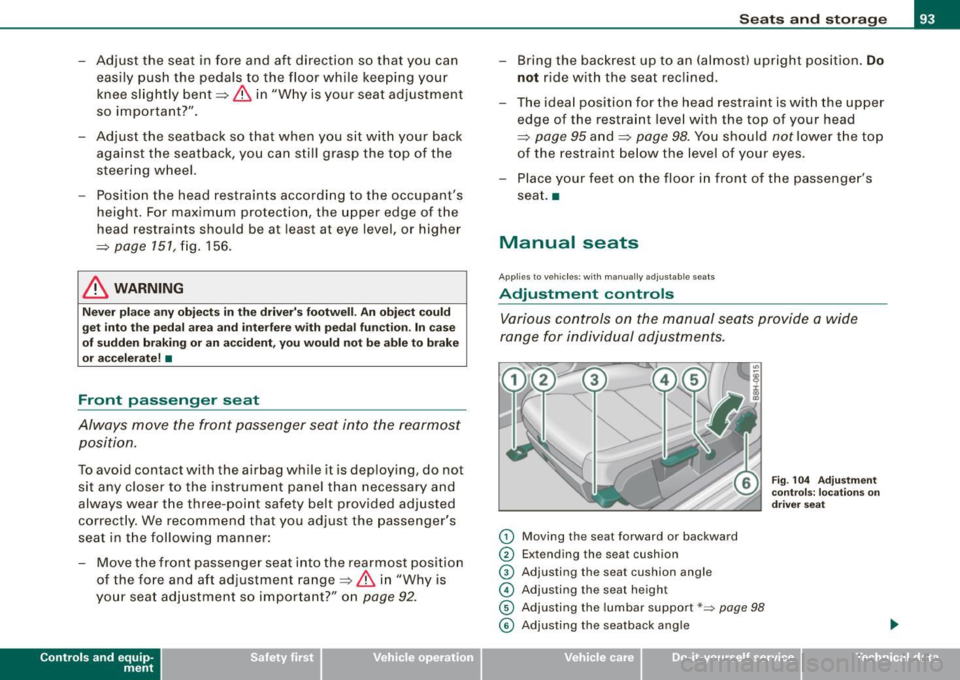
Adjustment controls
Various controls on the manual seats provide a wide
range for individual adjustments.
0 Moving the seat forward or backward
0 Extending the seat cushion
© Adjusting the seat cushion angle
© Adjusting the seat height
© Adjusting the lumbar support*~ page 98
Fig. 104 Adjustment
controls: locations on
driver seat
© Adjusting the seatback angle .,
~ehicle care irechnical data
Page 105 of 340
__________________________________________________ S_ e_ a_t _s _ a_n _ d_ s_ t _ o_ r_a ...;:g ::.. e _ ___,_
Luggage compartment
Ski sack
Use the ski sack to transport and protect skis and other
long , light items in the passenger compartment.
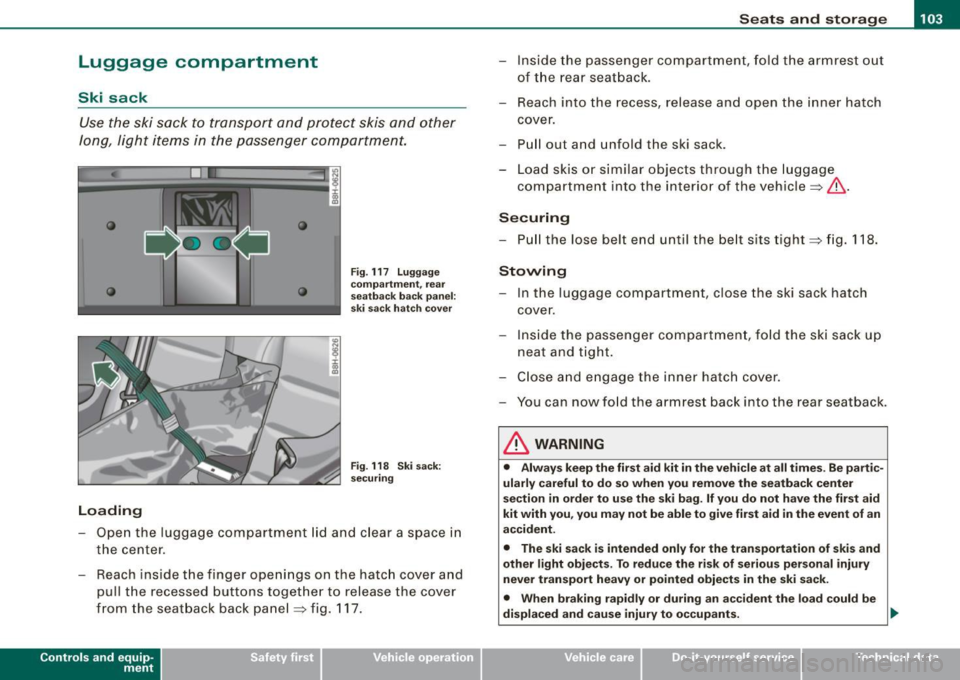
Loading
Fig . 117 Luggage
compartment, rear
seatback back panel:
ski sack hatch cover
Fig . 118 Ski sack:
securing
- Open the luggage compartment lid and clear a space in
the center.
- Reach ins ide the finger openings on the hatch cover and
pull the recessed buttons together to release the cover
from the seatback back panel :::;, fig. 117.
Contro ls and eq uip
ment
- Inside the passenger compartment, fold the armrest out
of the rear seatback.
- Reach into the recess, release and open the inner hatch
cover.
- Pull out and unfold the ski sack .
- Load skis or similar objects through the luggage
compartment into the interior of the vehicle :::;,,& .
Securing
-Pull the lose belt end until the belt sits tight :::;, fig. 118.
Stowing
- In the luggage compartment, close the ski sack hatch
cover .
- Inside the passenger compartment, fold the ski sack up
neat and tight.
- Close and engage the inner hatch cover.
- You can now fold the armrest back into the rear seat back.
& WARNING
• Always keep the first aid kit in the vehicle at all times . Be partic
ularly careful to do so when you remove the seatback center
section in order to use the ski bag. If you do not have the first aid
kit with you, you may not be able to give first aid in the event of an
accident.
• The ski sack is intended only for the transportation of skis and
other light objects . To reduce the risk of serious personal injury
never transport heavy or pointed objects in the ski sack.
• When braking rapidly or during an accident the load could be
displaced and cause injury to occupants. .,
~ehicle care irechnical data
Page 107 of 340
________________________________________________ S_e_ a_ ts_ a_ n_d _ s_t _o _r_ a ....; g::. e _ ___,1111
To reinstall ashtray
- Press the ashtray insert back into its holder.
& WARNING
Never put waste paper in the ashtray. Hot ashes or other hot
objects in the ashtray could set waste paper on fire. •
Rea r as htr ay
& WARNING
Never put waste paper in the ashtray. Hot ashes or other hot
objects in the ashtray could set waste paper on fire. •
Cigarette lighter/socket
Cig are tt e light er
r 00 a,
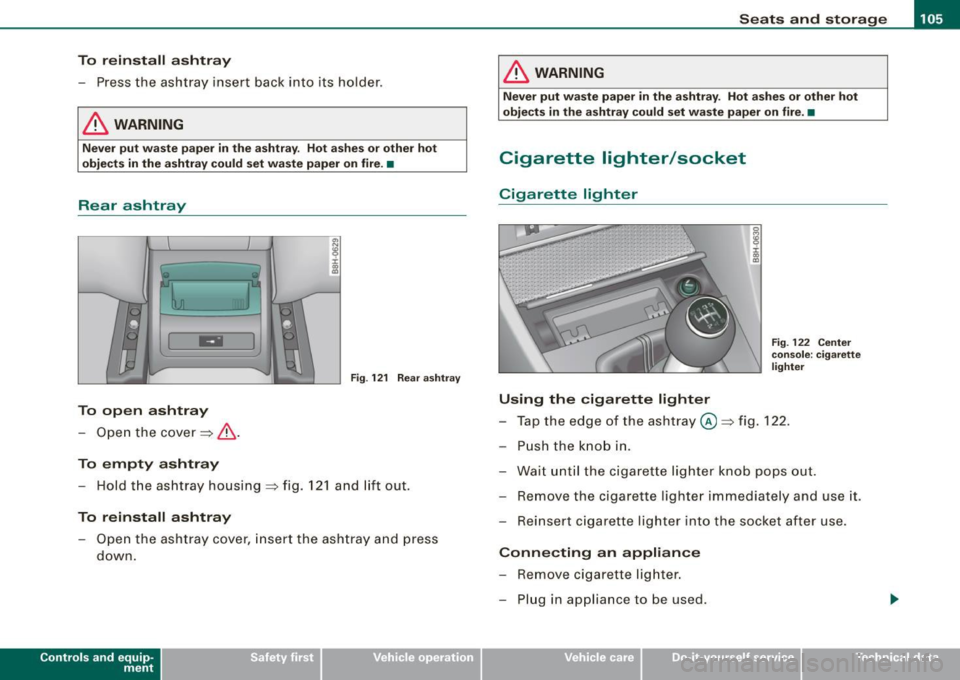
m:I Fig. 122 Center
Fig . 121 Rear ashtray
To open ashtray
- Open the cover==> &.
To empty ashtray
- Hold the ashtray housing ==> fig. 121 and lift out.
To reinstall ashtray
-Open the ashtray cover, insert the ashtray and press
down.
Contro ls and eq uip
ment
console : cigarette
lighter
Using the cigarette lighter
- Tap the edge of the ashtray @==> fig. 122.
- Push the knob in.
- Wait until the cigarette lighter knob pops out.
- Remove the cigarette lighter immediately and use it.
- Reinsert cigarette lighter into the socket after use.
Connecting an appliance
- Remove cigarette lighter.
- Plug in appliance to be used.
~ehicle care irechnical data
Page 108 of 340
• .___S_ e_a _ t_ s_ a_ n_ d_ s_t _o _r_ a...; g==- e ________________________________________________ _
The socket of the cigarette lighter may be used for 12 -volt appli
ances with maximum consumption of up to 100 wat ts, such as a
flash light, small vacuum cleaner, etc.
Before you purchase any accessories, always read and fo llow the
informat ion in~ page
318, "Additional accessories and parts
replacement".
& WARNING
Improper use of the cigare tte l ighter can cause seriou s injury or
s ta rt a fire .
• Be c are ful when u sing the cigarette lighter. If you do n ot pay
attention t o what you a re do ing wh en you are u sing the cig are tte
lighter you can burn yourself .
• The cig arette lighte r and so ck et r em ain fu nctio nal e ven if the
ign ition i s switched off or the ig nition k ey is re m oved . Never l eave
c hildren in side the veh icle w ithout supe rvisi on.
0 Note
• To avoid damaging the socket, only use p lugs that fit properly .
• Only use the cigarette lighter socket as a power source for elec
trical accessories for short durations. Use the socke ts in the vehicle
when a power source is needed for longer durations .
[ i ] Tips
When the engine is off and accessories are sti ll plugged in and are
on, the vehic le battery can sti ll be drained. •
Outlets
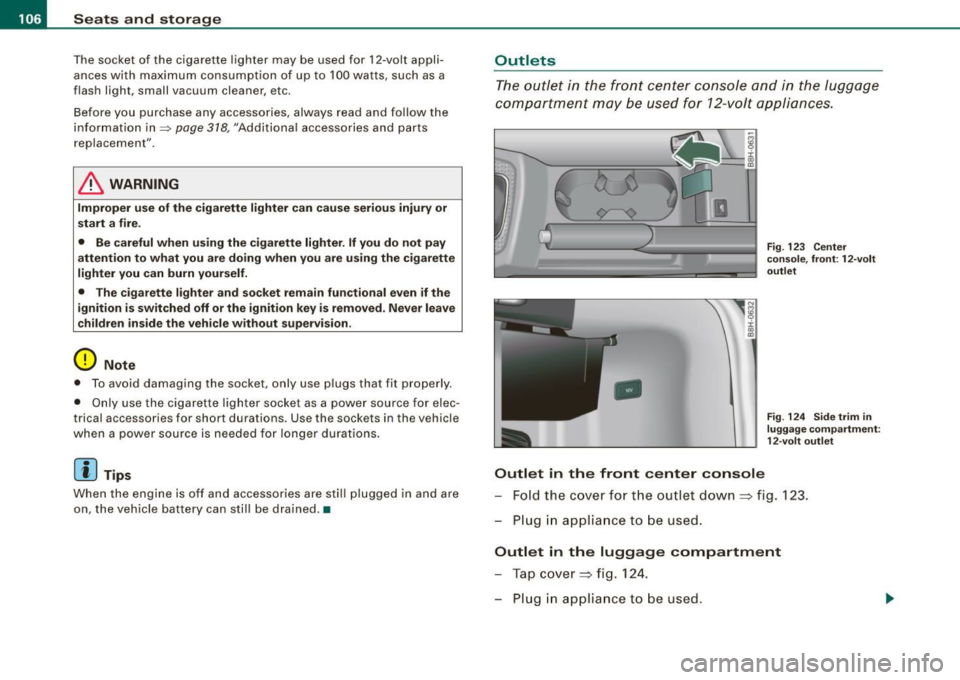
The outlet in the front center console and in the luggage
compartment may be used for 12-volt appliances .
IJ
-
Outlet in the front cent er co nsole
Fig. 12 3 Center
co nsole, fron t: 12-volt
outl et
F ig . 12 4 Sid e trim i n
lu gga ge co mpartmen t:
1 2- vol t outl et
Fo ld the cover fo r the outlet down => fig . 123.
Plug in appliance to be used .
Outlet in the luggage compartment
Tap cover => fig. 124.
Plug in appliance to be used .
Page 109 of 340
________________________________________________ S_e_ a_ ts_ a_ n_d _ s_t _o _r_ a ....; g::. e _ ___,_
The outlet may be used for 12-volt appliances with maximum
consumption of up to 100 watts, such as a flash light, small vacuum
cleaner, etc.
Before you purchase any accessories, a lways read and follow the
information in~
page 318, "Additional accessories and parts
replacement".
& WARNING
The outlet plus any appliances plugged into it remain functional
even if the ignition is switched off or the ignition key is removed.
Never leave children inside the vehicle without supervision.
0 Note
To avoid damaging the socket, only use plugs that fit properly.
[ i] Tips
When the engine is off and accessories are still plugged in and are
on, the vehic le battery can still be drained. •
Storage
General
& WARNING
• Always remove objects from the instrument panel. Any items
not put away could slide around inside the vehicle while driving or
when accelerating or when applying the brakes or when driving
around a corner.
• When you are driving make sure that anything you may have
placed in the center console or other storage locations cannot fall
Contro ls and eq uip
ment
& WARNING (continued)
out into the footwells . In case of sudden braking you would not be
able to brake, depress the clutch or accelerate .
• Any pieces of clothing that you have hung up must not interfere
with the driver's view. The coat hooks are designed only for light
weight clothing . Never hang any clothing with hard , pointed or
heavy objects in the pockets on the coat hooks . During sudden
braking or in an accident -especially if the airbag is deployed -
these objects could injure any passengers inside the vehicle. •
Glove compartment
The glove compartment is illuminated and can be locked.
To open glove compartment
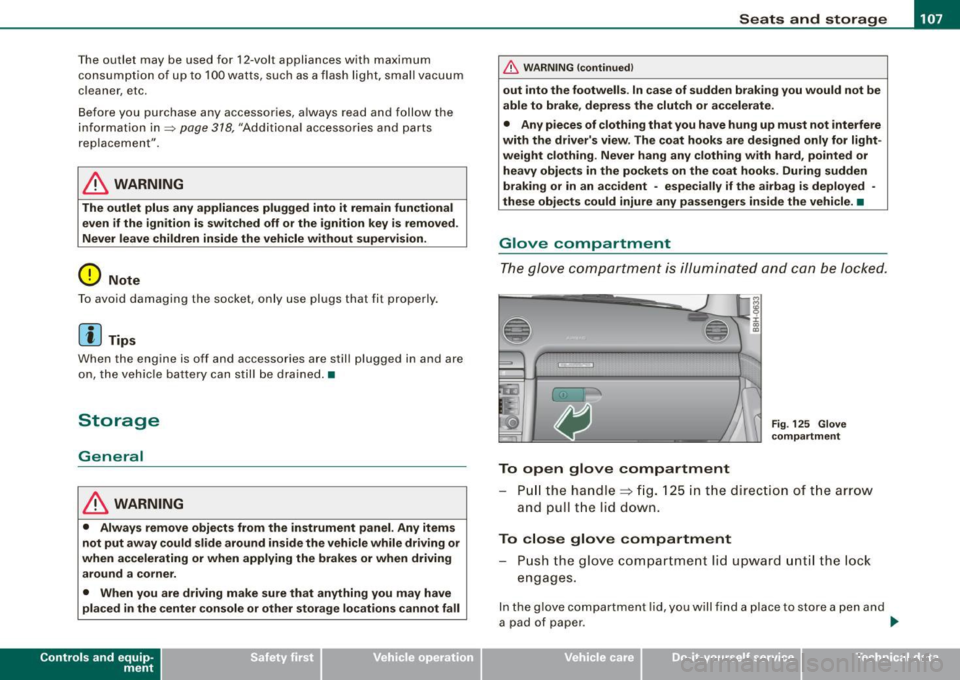
Fig. 125 Glove
compartment
P ull the handle~ fig. 125 in the direction of the arrow
and pull the lid down.
To close glove compartment
Push the glove compartment lid upward until the lock
engages.
In the glove compartment lid, you w ill find a place to store a pen and
a pad of paper . ..,_
~ehicle care irechnical data
Page 112 of 340
• .___w __ a _r _m _ a _n_d_ c_ o _ ld __________________________________________________ _
Warm and cold
Climate controls
Description
The air conditioner is fully automatic and is designed to
maintain a comfortable and uniform climate inside the
vehicle.
We recommend the following settings:
- Select and set a temperature between 64 °F (+22 °C) and
86 °F (+29 °C).
- Press the !AUTO
I button.
With this setting, you attain maximum comfort in the least amount
of time. Change this setting, as desired, to meet your personal
needs.
The climate controls are a combination of heating, ventilation and cooling systems, which automatically reduce humidity and cool the
air inside your vehicle.
The air temperature, air flow and air distribution are automatically regulated to achieve and maintain the desired passenger compart
ment temperature as quickly as possible.
The system automatically compensates for changes in the outside
temperature and for the intensity of the sunlight entering the
vehicle. We recommend you use the
Automatic mode=> page 112
for year -round comfort.
Please note the following:
Turn on the air conditioner to reduce humidity in the vehicle. This
also prevent the windows from fogging up. When the outside temperature is high and the air is very
humid,
condensation from the evaporator may drip under the vehicle. This
is normal and does not indicate a leak.
I f the outside temperature is low, the fan normally only switches to
a higher speed once the engine coolant has warmed up sufficiently.
The air conditioner temporarily switches off when you drive off from a standstill using full throttle to save engine power.
The compressor also switches off if the coolant temperature is too
high so that the engine can be adequately cooled under extreme
loads.
Air pollutants filter
The air pollutants filter (a combined particle filter and activated charcoal filter) reduces or eliminates outside air pollution (dust, or
pollen) from entering the vehicle.
The air pollutants filter must be changed at the intervals specified in your Warranty
& Maintenance booklet, so that the air conditioner
can properly work.
If you drive your vehicle in an area with high air pollution, the filter
may need to be changed more frequently than specified in your
Audi Warranty
& Maintenance booklet. If in doubt, ask your autho
rized Audi Service Advisor for advice.
Key coded settings
The air conditioner settings selected are automatically stored and
assigned to the key being used. When the vehicle is started, the air
conditioner automatically selects the settings assigned to that key.
These settings will differ depending if the roof is opened or closed.
This way every driver will maintain his/her own personal settings
and does not have to reset them manually.
~
Page 113 of 340
Warm and cold -
----------------
If a different driver uses your key and changes the air conditioner
settings, the latest adjustments will erase and replace the settings
you have stored.
& WARNING
Reduced visibility is dangerous and can cause accidents .
• For safe driving it is very important that all windows be free of
ice, snow and condensation.
• Fully familiarize yourself with the proper use and function of
the heating and ventilation system and especially how to defog
and defrost the windows.
• Never use the windshield wiper/washer system in freezing
weather until you have warmed the windshield first, using the
heating and ventilation system. The washer solution may freeze
on the windshield and reduce visibility.
0 Note
• If you suspect that the air conditioner has been damaged, switch
on ECON and contact an authorized Audi dealer to have the system
inspected.
• Repairs to the Audi air conditioner require special technical
knowledge and special tools. Contact an authorized Audi dealer for
assistance.
[ i] Tips
• Keep the air intake slots (in front of the windshield) free from ice,
snow and debris in order to maintain the proper function of the
climate control system.
• Air escapes through vents under the rear window. When placing
items of clothing on the luggage compartment cover, ensure that
the openings are not covered.
Controls and equip
ment
• If the inside temperature is very high (for example, if the vehicle
has been parked in sun), open the windows and allow the hot air to
escape before turning on the air conditioner. •
Controls
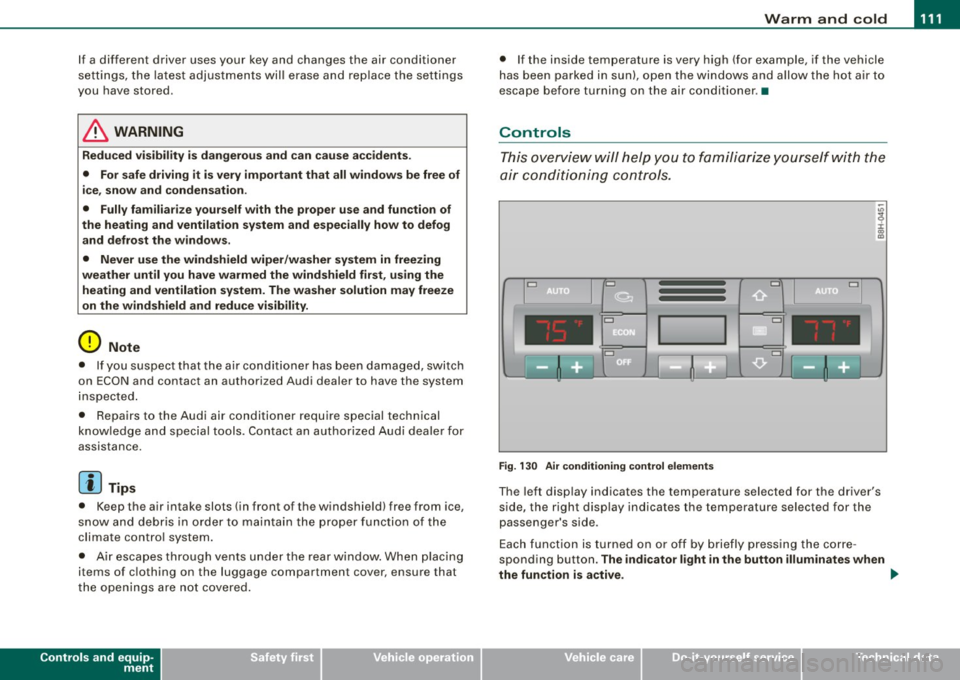
This overview will help you to familiarize yourself with the
air conditioning controls.
Cl Cl
Cl •
I I
•
Fig. 130 Air conditioning control elements
The left display indicates the temperature selected for the driver's
side, the right display indicates the temperature selected for the
passenger's side.
Each function is turned on or off by briefly pressing the corre
sponding button.
The indicator light in the button illuminates when
the function is active. _,.
Page 114 of 340
![AUDI A4 CABRIOLET 2009 Workshop Manual -W
arm and cold --------------------
Button (s )
!AU TO)
88
(left and right)
§)
!ECON]
!OFF)
88
!in the center)
Fun cti on
Automatic operation
Temperature controls for
drivers](/img/6/57553/w960_57553-113.png "AUDI A4 CABRIOLET 2009 Workshop Manual -W
arm and cold --------------------
Button (s )
!AU TO)
88
(left and right)
§)
!ECON]
!OFF)
88
!in the center)
Fun cti on
Automatic operation
Temperature controls for
drivers")
-W
arm and cold --------------------
Button (s )
!AU TO)
88
(left and right)
§)
!ECON]
!OFF)
88
!in the center)
Fun cti on
Automatic operation
Temperature controls for
driver's side and passenger side
Air recirculation
Switches off air conditioning
Switches off air conditioning (rather than using
@a)
Switches o ff the air reci rculation (rather than
using
I O FF])
Adjusts fan speed
Air directed to the windows
A ir directed to the footwells
Air from dashboard outlets
Windshie ld defroster/defogger
Rear window defroste r/defogger
The buttons
I -O J, IEJJ, and j-0,,J can be selected individually or in
combination .•
Automatic mode [AU TO]
The automatic mode is the standard setting for all
seas ons.
Swit ching on AUTO
- Set the temperature between 64 °F (+ 18 °C) and 86 °F
(+29 °C) . -
Press [AUTO
I=> page 111, fig. 130.
AUTO on ly works when you set the inside temperature between
64 °F (18 °C) and 86 ° F (29 °Cl. If you select a temperature be low
64 °F (18 °C),
LO will appear in the display. If you se lect a tempera
ture above 86 °F (29 °C),
H I wi ll appear in the display.
The system automatically compensates for changes in outside
temperature and for the intens ity of the sunlight.
[ i ] T ips
By keeping the !AUTO l button on the driver's side pressed for
severa l seconds, the temperature of the passenger side can be set
t o the tempera ture of the driver's side or vice versa . The new
temperature setting will be shown in the disp lay .•
Setting the temperature
Sep arate temperatures can be selected for the driver's
and front passenger side.
- Press the(:) button or t he G button under each display
=> page 111, fig. 130 until the desired temperature is
reached.
The selected temperature setting appears in the display above the
buttons .
By pressing both
! AUTO l buttons for severa l seconds, the tempera
ture on the passenger side can be set to the temperature of the
driver's side or v ice versa . The new temperature setting will be
shown in the display. The old temperature setting can be restored
by resett ing the display as required .•
Page 115 of 340
Warm and cold -------------------------------.J
Switching between Fahrenheit and
Centigrade
You can change the temperature display from °F (Fahren
heit) to
°C (Centigrade) and vice versa.
- Press and hold[~] and press the p lus button on the
driver's s ide temperature switch =>
page 111, fig. 130. •
Air recirculation [ <8?)
The air recirculation prevents exhaust fumes or other
pollution from entering the vehicle.
Switching on th e air re cir culation
- Press[ ~]=> page 777,fig.130 =>&
Switching off the air recirculation
- Press~ again, or
- press (AUTO], or
press[ @].
In the air recirculation mode , the air in the passenger compar tment
is recircula ted to p revent exhaust fumes and other pollution from
entering the vehicle . We recommend that you use the manua l air
recircula tion under the following conditions :
• when driving through tunnels
• in a traffic jam .
& WARNING
Do not use this setting for extended period s of time . The windo ws
c o uld fog up since no fresh air ca n enter the veh icle . If th e
Controls and equip
ment
& WAR NING (c onti nued)
wind ows fog up, pre ss th e air r ecirculat ion butt on a gai n immed i
atel y to s witch off the air re circula tion function or sel ect defro st. •
ECON [ECO N]
Using ECON helps save fuel
-Press [ECON] to switch on=> page 111 , fig. 130 .
- Press [ECON] o r pre ss [AUTO] to switch off.
In ECON mode the air condit ioner is shut off and heating and venti
lation are automat ically controlled. "ECON" translates "Economy"
s ince driving with the air conditioning compressor
disengaged
improves your mileage noticeably.
When operating in ECO N mode make sure the temperature inside
the vehicle is not lower than the outside temperature. The air is
neither cooled nor dehumidified, so there is a risk that the windows
can fog up. •
Switching the air conditioning on and off [ OFF ]
Switching the air conditioning off
- Press [ OFF] to tu rn the air condit ioner off a nd block
o utside a ir from entering the vehicle .
Switching the air conditioning on
- Press [ OFF] aga in (indicator light comes on aga in), or
- Press [AUTO], or
- Press one of the following butto ns: [ {)' ], [@ ]or
I -0, ].
Page 121 of 340
___________________________________________________ O_ n_ t_h _e_ r_o _a_ d _ ___,11111
Ignition lock and ignition switch
Ignition lock
T he i gnition k ey sta rts or st ops t he e ngin e.
0
Ignition off 0
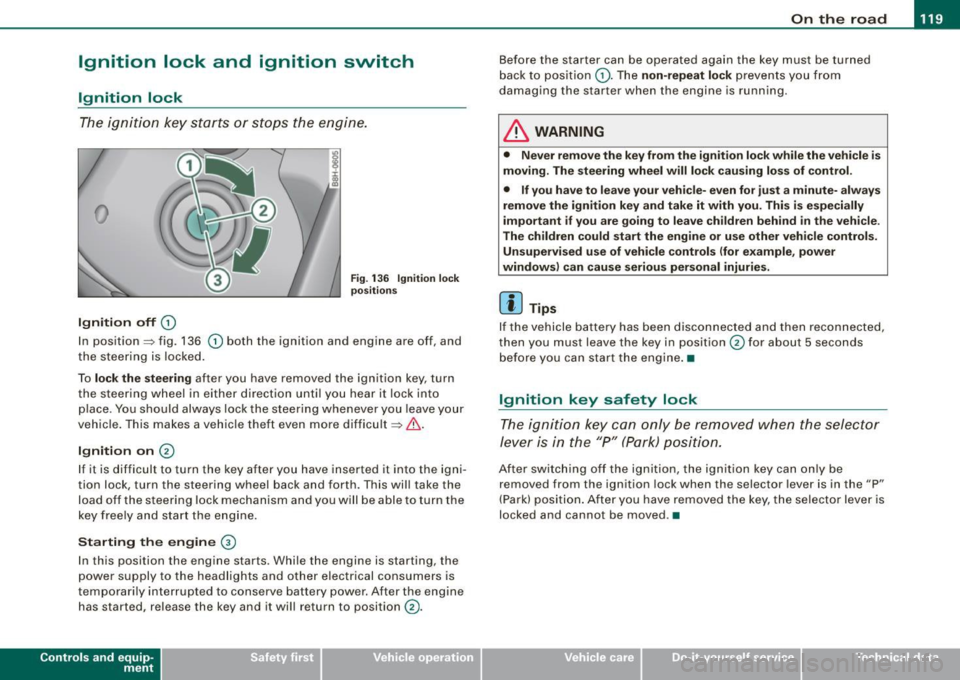
Fig. 13 6 Ignition lock
positi ons
In position~ fig. 136 0 both the ignition and engine are off, and
t he stee rin g is locke d.
To
lo ck the steering after you have removed the ignit ion key, turn
t he stee rin g wheel in either direc tion un til you hear it loc k into
p lace . You should always lock the steering whenever you leave your
vehicle . This ma kes a vehic le theft even more difficult ~ & .
Ignition on 0
If it is difficult to turn the key afte r yo u have inserted it into the igni
tion lock, turn the steering wheel back and forth. This will take the
load off the steering lock mechanism and you will be able to turn the
key free ly an d start the engine.
Starting the engine @
In th is position the engine starts . While the engine is starting, the
power supply to the headlights and other electrical consumers is
temporarily interrupted to conserve battery power. After the engine has started, release the key and it wi ll return to position
(v.
Contro ls and eq uip
ment
Before the starter can be operated again the key must be turned
b ack to position
(D . Th e non -repeat lock p re vents y ou fr om
damag ing the starter when the engine is running .
& WARNING
• Never remove the key from the ignit ion lock while the vehicle is
moving. The steering wheel will lock causing loss of control .
• If you have to leave your vehi cle- even for just a minute- always
remove the ignition key and take it with you. This is especially
important if you are going to leave children behind in the vehicle.
The children could start the engine or use other vehicle controls. Unsupervised use of vehicle controls (for e xample , power
windows) can cause serious personal injuries.
[ i ] Tips
If the vehicle battery has been disco nnec ted and then recon nected,
then you must leave the key in position
0 for about 5 seconds
be fore you can start the eng ine .•
Ignition key safety lock
T he i gnit ion key ca n only be remove d when the se lector
lever is in the "P " (Pa rk) pos itio n.
A fte r swi tc h ing o ff th e ig nition, the ig nition key can only be
removed from the ignition lock when the selector lever is in the "P"
(Park) posi tio n. Af ter y ou h ave remo ved the key, the selec to r lever is
locked and cannot be moved. •
~ehicle care irechnical data