light AUDI A4 CABRIOLET 2009 Manual PDF
[x] Cancel search | Manufacturer: AUDI, Model Year: 2009, Model line: A4 CABRIOLET, Model: AUDI A4 CABRIOLET 2009Pages: 340, PDF Size: 77.32 MB
Page 138 of 340
• .___T_ r_a _n_ s_ m_ is_ s_io _ n ______________________________________________________ _
Applies to vehicles: with mult it ron ic® Contin uously Variable Transm iss io n (CVT )
Dynamic shift program (DSP)
The multitronic® transmission is electronically
controlled .
The transmission selects the appropriate gear ratio (upshifts and
downshiftsl automatically based on preset driving programs .
The transmission will select one of the
economy programs when
you drive at a steady speed or a gradually changing speeds without heavy acceleration. This gives best fuel efficiency, with early
upshifting and delayed downshifting .
The transmission will automatically select th e
sporty shift programs
when you drive at higher speeds, or with heavy acceleration and
fr equ ently changing speeds. Upshifts are d elay ed to make full use
of engine power. Downshifting takes place at higher engine speeds
than in the economy programs .
The selection of the most suitable shift program is a continuous,
automatic process . The driver can also make the transmission
switch to a sporty program by
quickly pressing down the gas pedal.
This causes the transmission to shift down into a lower gear ratio
a n d makes quick acceleration possible (to pass another vehicle) You
do not need to press the gas pedal into the kickdown range. After
the transmission has upshifted, the original prog ram is selected
according to your driving style .
An additional shift program allows the automatic transmission to select the prop er gear for uphill and downhill gradients .
This prevents the transmission from shifting up and down unneces
sarily on hills. The transmission
will shift down to a lower gear ratio
when the driver presses the brake pedal on a downhill gradient . This
makes use of the braking effect of the engine without the need to
shift down manually.
If you are driving in hills and mountains, the transmission will
continuously adjust the g ear ratio to the road grade . If you press the brake pedal when driving downhill, the transmission will downshift
automatically. This increases the braking effect
of the engine.
If the cruise control is on when you are trave.ling downhill, the trans
mission will automatically select a lower gear ratio in order to main
tain the set vehicle speed. This will cause the engine speed to
increase. •
Applies to vehic les: with mult it ro ni c® Continu ous ly Varia ble Trans mission (CVT )
tiptronic ® manual shift program
Using the manual shift program (tiptronic®) you can
manually shift between seven pre -programmed gear
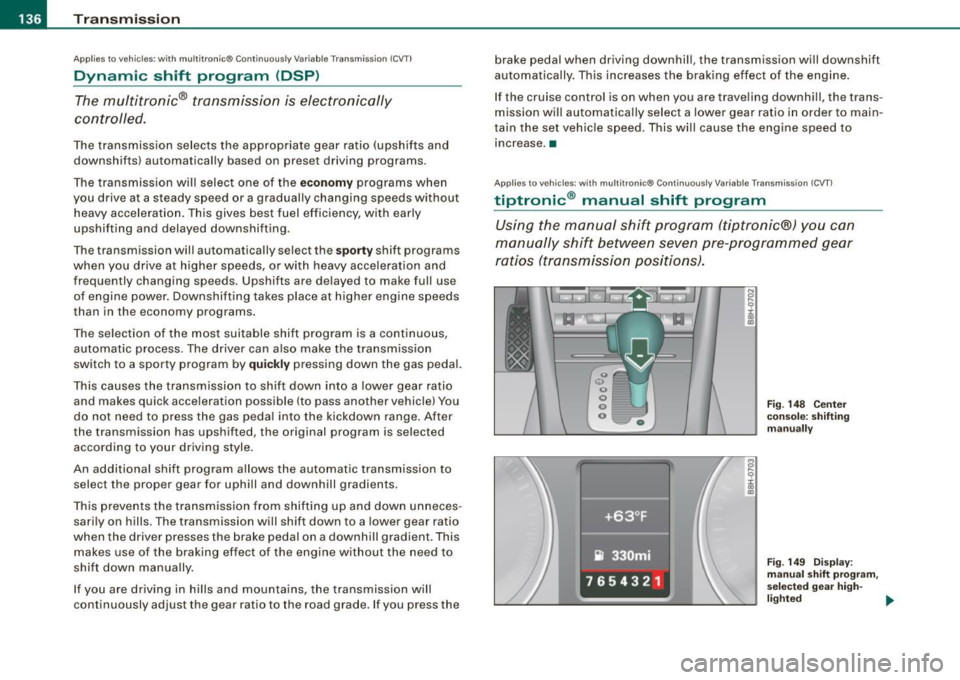
ratios (transmission positions).
I
Fig . 148 Center
console: shifting
manually
Fig. 149 Display:
manual shift program ,
selected gear high-
lighted ._
Page 139 of 340
_______________________________________________________ T_ r _a_ n_s_ m __ is_ s_ io_ n _ ___,_
Swi tching to m anual shift pro gra m
- With the selector lever in D, push lever to the right. The
display will show7
6 5 4 3 21 as soon as the selector lever
is switched over. The gear you select wi ll also be h igh
lighted in the display:::::,
page 136, fig. 149 .
To up shift
Push the selecto r lever forward to the plus position
:::::, page 136, fig. 148 G) .
To d ownshift
- Pu sh the lever to the mi nus positio n Q.
When accelerating, the transmission wi II a utomatica I ly shift into the
next higher gear before the engine reaches the maximum RPM .
When accelerating, if you apply a light throttle, the tiptronic® wil l
automatically shift into the next higher gear to save fuel. If you app ly
a heavy throttle, the transmission will stay in gear engaged until
near maximum RPM are reached, or until the driver manually shifts
into a higher gear .
If you take your foot off the accelerator peda l when driving down a
steep incline, the tiptronic ® wi ll downshift from the selected gear
into the next lower gear based on road speed and engine RPM . The
automatic downshifting is interrupted as soon as you apply throttle
again .
[ i ] Tips
• When you shift into the next lower gear, the engine will down
shift only when there is no possibility of over-revving.
• When the kick -down comes on, the transmission wi ll sh ift down
to a lower gear depending on vehicle and engine speeds.
• The tiptronic® is inoperative when the transmission is in the fai l
safe mode .•
Contro ls and eq uip
ment
Ap plies to vehicles : w it h mu ltit ron ic® Co nti nuou sly V ariable Transmi ssion ( CVT)
Steering vvheel vvith t iptronic ®
The shift buttons on the steering wheel allow the driver to
shift gears manually.
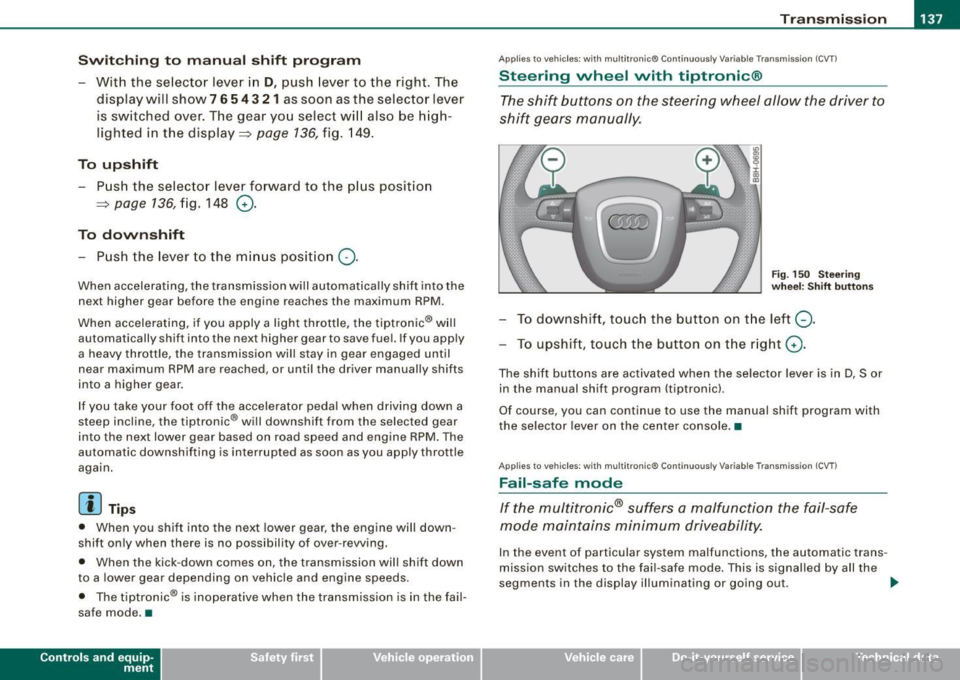
F ig. 15 0 Stee ring
w he el: S hift b utto ns
To downshift, touch the button on the left Q .
To upshift , touch the button on the r ight G) .
The shif t buttons are activated when the selector lever is in D, S or
in the manual shift program (tiptronic).
Of course, you can continue to use the manual shift program with
the selector lever on the center console. •
Applies to vehicles : wi th mu lt itro nic® Co nti nuously Var iab le Tra nsmis sion (CVT)
Fail -safe mode
If the multitronic® suffers a malfunction the fail-safe
mode maintains minimum driveability.
In the event of particular system malfunctions, the automatic trans
mission switches to the fai l-safe mode. This is signal led by all the
segments in the display illuminating or going out . _,,,
~ehicle care irechnical data
Page 142 of 340

• .___H_ o_m _ e_ L_ i_ n _k_ ®_R __________________________________________________ _
App lies to vehicles: w ith Homelin k® un ive rsal remote contro l
Programmi ng th e Hom eLink ® transmitt er
The transmitter is programmed in two phases. For rolling
code transmitters, a third phase is also necessary .
Fig. 151 Overhead
console : Homelink®
keypad
Fig.152 Frontbumper,
driver side: location of
transmitter unit
Phase 1: programming the overhead keypad
1. Make sure your vehicle is w ithin operat ing range o f the
remote controlled garage door opener .
2. Set the parking brake=>
& in "General information" on
page 139.
3. Turn the ignit ion on. Do not sta rt the engine! 4. Press and ho
ld the two outside Homelink® buttons
(D
and @for app roximately 20 seconds until indicator
light ©=:> fig.
151 beg ins to flash. Then release both
buttons . Do not hold the buttons for longer than
30
seconds.
This procedure only needs to be performed
once. It
erases the factory-set default codes and does not have to
be repeated to program additional remote controls.
5. Press and hold the Homelink ® button (D, ® or @ until
the indicator light © starts flashing
slowly. Release the
button.
- The system will remain in programming mode for 5
minutes.
Go to the front of the v ehicle and proceed w ith
phase 2.
Phase 2:
programming the bumper mounted transmitter
6. Hold the original remote control at a distance between 0-
6 in. (0-15 cm) from the b umper below the appropriate
headlight for your vehicle => fig.
152 (use the shortest
distance possible) .
7. Aim the remote control just below the
driver side head
lig ht.
8. Press and hold the act ivation button on the remote
control.
- May be different in Canada . If so, press and re-press
(cycle) the activation button on your remote control every
two seconds. -.,
Page 143 of 340
______________________________________________________ H_o_ m __ e_L _i_n _k _@_R _ __,_
9. The emergency flashers will flash three times (after
about 15-60 seconds) when the programming is
successful. Release the button on the remote control.
- To program more devices, repeat steps 4 to 9 .
10. Press and hold the trained Homelink® button and observe the ind icator light@=> page 140, fig. 151.
- If the indicator light is solid/continuous, programming is complete and your device should activate when you press and release the trained Homelink® button.
- If the indicator light blinks rapidly for 2 seconds and is
then a solid/continuous light , proceed with phase 3 to
program a rolling code device.
Phase 3: rolling code programming
- A second person on a ladder who can safely reach the
garage door opener motor is recommended.
11. Locate the "learn" button on the garage door opener
motor (refer to the operating instructions for the opener,
as the location of this button may vary by manufacturer).
12. Press and release the learn button on the garage door
opener motor.
- Note: once the button is pressed, there are 30 seconds in
which to initiate the next step.
13. On the Homelink® keypad inside the vehicle, firmly
press and hold the Homelink® button previously
programmed in phases 1 and 2 for two seconds and
release. Repeat this sequence
twice.
Contro ls and eq uip
ment
- Some vehicles may require the press/hold/release
sequence up to three times to complete the training
process.
- HomeLink ® should now activate your rolling code
equipped device.
If the 5 minute time limit is exceeded , the emergency flashers will
flash one time to indicate that the proc ess has been terminated . In
this case, repeat steps 4 through 9 .
If the em erg ency flashers do not flash
three tim es (after about 15-
60 seconds), programming was not successful. In this case, repeat
s teps 4 through 9.
Remote control units for garage door openers in Canada are set to
stop transmitting radio frequency signals after two seconds. This
t ime may no t be sufficient for the HomeLink® system to l earn th e
radio frequency signal. Perform all other steps as described
above. •
Applies to vehicles: with H omel ink® un iversal re m ote cont ro l
Operating the HomeLink ® transmitter
The Homelink® transmitter works in the same manner as
the original hand held remote control that came with the
system.
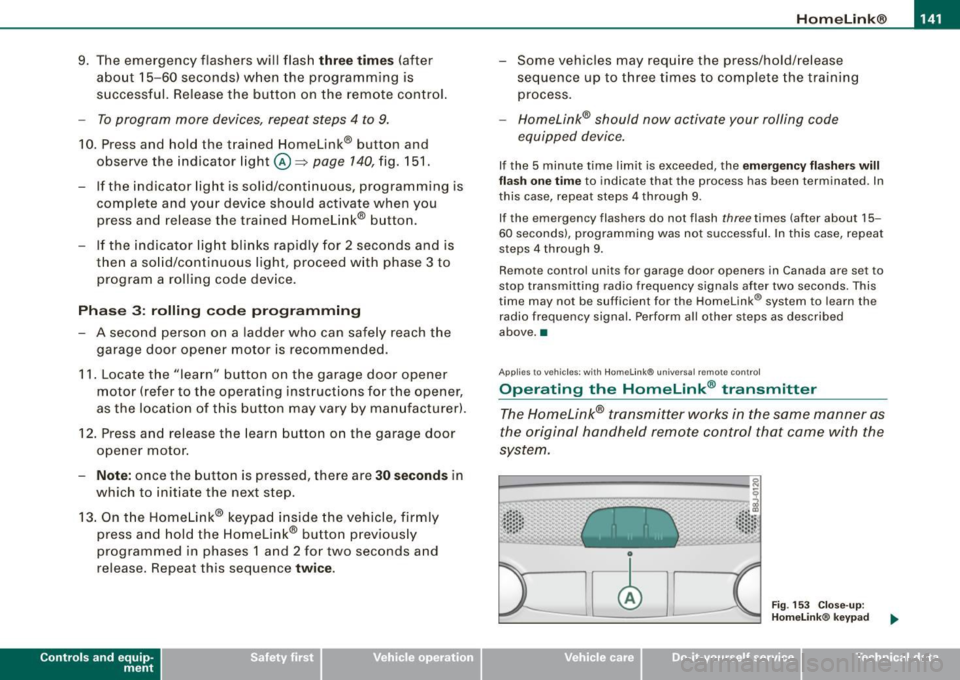
· ·· ·· ····· · ~::: ::; .• ... .. , '~· ·" ..
Fig . 153 Close-up:
Homelink® keypad
~ehicle care irechnical data
Page 144 of 340
• .___H_ o_m_ e_ L_ · _,n _k_ ® __________________________________________________ _
- Press the appropriate programmed button 0,@ or@
to activate the desired remote control function~
& in
"General information" on
page 139. •
Applies to vehicles: with Homelink® universal remote contro l
Reprogramming a single button
A HomeLink® button can be reprogrammed individually without affecting the other button a/locations.
Programming the overhead keypad
- Press the appropriate Homelink® button until the indi
cator light begins flashing slowly.
Programming the bumper mounted transmitter 1. Hold t he
original remote control at a distance between 0-
5 in. (0-13 cm) from the bumper below the appropriate
headlight for your vehicle (use the shortest distance
possible).
2. Aim the remote control just below the
driver side head
light.
3. Press and hold the activation button on the remote control.
4. The emergency flashers will flash
three times (after
about
15-60 seconds) when the programming is
successful. Now release the button on the remote
control.
- If the device utilizes a rolling code, please follow phase 3
of ~
page 140, "Programming the Homelink® trans
mitter" for rolling code programming.
This procedure will cause the existing programming on the
Homelink ® button to be erased! •
App lies to vehicles: with Homelink® unive rsa l remote contro l
Erasing the programming of the Homelink ®
transmitter
When you erase the programming, the programming on
all three of the transmitter channels with be lost!
- Perform steps 1 to 4 as described on~ page 140, "Phase
1: programming the overhead keypad".
When completed , the Homelink® system will be in the prog ram
ming mode and is then ready to learn the codes for remote
controlled devices.
[I) Tips
• Programmed buttons cannot be erased individually.
• For security reasons you are advised to erase the programming
of the Homelink ® system befo re you sell your vehicle.•
Page 149 of 340
________________________________________________ D_r_iv _ i _n...: g=--- S_ a_ fe--= ly'---------"'
- Make sure that all lights and signals are operating
correctly.
- Make sure that the tire pressure is correct.
- Make sure that all windows are clean and afford good
visibility to the outside.
- Secure all luggage and other items carefully~
page 107.
-Make sure that nothing can interfere with the pedals.
- Adjust front seat, head restraint and mirrors correctly for
your height.
- Instruct passengers to adjust the head restraints
according to their height.
- Make sure to use the right child restraint correctly to
protect children~
page 190, "Child Safety".
- Sit properly in your seat and make sure that your passen
gers do the same
~ page 92, "General recommenda
t ions" .
- Fasten your safety belt and wear it properly. Also instruct
your passengers to fasten their safety belts properly
~ page 159. •
What impairs driving safety?
Safe driving is directly related to the condition of the
vehicle, the driver as well as the driver's ability to concen
trate on the road without being distracted.
The driver is responsible for the safety of the vehicle and all
of its occupants. If your ability to drive is impaired, safety
risks for everybody in the vehicle increase and you also
Controls and equip
ment Safety first Vehicle operation
become a
hazard to everyone else on the road ~& .There
fore:
- Do not let yourself be distracted by passengers or by
using a cellular telephone.
- NEVER drive when your driving ability is impaired (by
medications, alcohol, drugs, etc.I.
- Observe all traffic laws, rules of the road and speed limits
and plain common sense.
- ALWAYS adjust your speed to road, traffic and weather
conditions.
- Take frequent breaks on long trips. Do not drive for more
than two hours at a stretch.
- Do NOT drive when you are tired, under pressure or when
you are stressed.
& WARNING
Impaired driving safety increases the risk of serious personal
injury and death whenever a vehicle is being used. •
Vehicle care Do-it-yourself service Technical data
Page 150 of 340
___ D_ r_ i_v _in -= g'- S _ a_f _e _ly.:,._ ______________________________________________ _
Proper occupant seating positi·ons
Proper seating position for the driver
The proper driver seating position is important for safe,
relaxed driving.
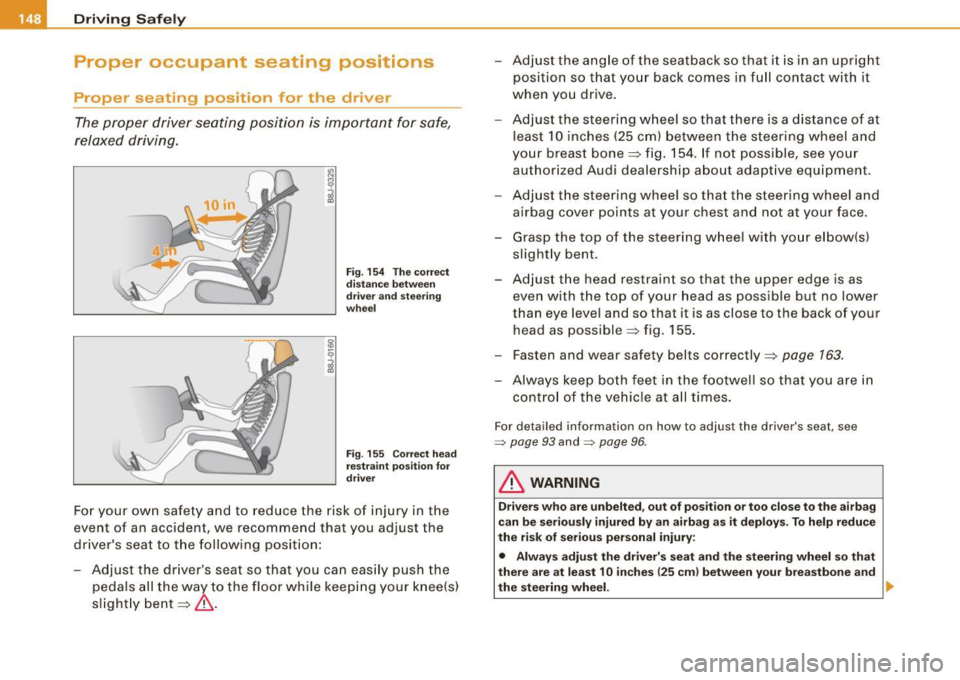
Fig. 154 The correct
distance between
driver and steering
wheel
Fig . 155 Correct head
restraint position for
driver
For your own safety and to reduce the risk of injury in the
event of an accident, we recommend that you adjust the
driver's seat to the following position:
- Adjust the driver's seat so that you can easily push the
pedals all the way to the floor while keeping your knee(s)
slightly bent=:>& . - Adjust the angle of the seatback so that
it is in an upright
position so that your back comes in full contact with it
when you drive.
- Adjust the steering wheel so that there is a distance of at
least 10 inches (25 cm) between the steering wheel and
your breast bone=:> fig. 154. If not possible, see your
authorized Audi dealership about adaptive equipment.
- Adjust the steering wheel so that the steering wheel and
airbag cover points at your chest and not at your face.
- Grasp the top of the steering wheel with your elbow(s)
slightly bent.
- Adjust the head restraint so that the upper edge is as
even with the top of your head as possible but no lower
than eye level and so that it is as close to the back of your
head as possible =:> fig. 155.
- Fasten and wear safety belts correctly=:>
page 163.
- Always keep both feet in the footwell so that you are in
control of the vehicle at all times.
For detailed information on how to adjust the driver's seat, see
=> page 93 and :::::, page 96 .
& WARNING
Drivers who are unbelted, out of position or too close to the airbag
can be seriously injured by an airbag as it deploys. To help reduce
the risk of serious personal injury:
• Always adjust the driver's seat and the steering wheel so that
there are at least 10 inches
125 cm) between your breastbone and
the steering wheel. ...
Page 161 of 340
_______________________________________________ S_a _f _e _t -=-y _ b_ e_lt _s ______ lffllll
Safety belts
General notes
Always wear safety belts!
Wearing safety belts correctly saves lives!
This chapter explains why safety belts are necessary, how
they work and how to adjust and wear them correctly.
- Read all the information that follows and heed all of the
instructions and WARNINGS.
& WARNING
Not wearing safety belts or wearing them improperly increases
the risk of serious personal injury and death.
• Safety belts are the single most effective means available to
reduce the risk of serious injury and death in automobile acci
dents. For your protection and that of your passengers, always
correctly wear safety belts when the vehicle is moving.
• Pregnant women, injured, or physically impaired persons must
also use safety belts . Like all vehicle occupants, they are more
likely to be seriously injured if they do not wear safety belts. The
best way to protect a fetus is to protect the mother -throughout
the entire pregnancy. •
Number of seats
Your vehicle has a total of four seating positions : two in the front
and two in the rear. Each seating posi tion has a safety belt .
Controls and equip ment Safety first
Vehicle operation
& WARNING
Not wearing safety belts or wearing them improperly increases
the risk of serious personal injury and death.
• Never strap more than one person, including small children,
into any belt. It is especially dangerous to place a safety belt over
a child sitting on your lap.
• Never let more people ride in the vehicle than there are safety
belts available.
• Be sure everyone riding in the vehicle is properly restrained
with a separate safety belt or child restraint. •
Safety belt warning light ~
Your vehicle has a warning system to remind you about
the importance of buckling-up.
Before driving off, always:
Fig. 161 Safety belt
warning light in the
instrument cluster ·
enlarged
- Fasten your safety belt and make sure you are wearing it
properly. .,
Vehicle care Do-it-yourself service Technical data
Page 162 of 340
___ S_a_ f_ e_ t-= y_ b_e_ l_ t _s _______________________________________________ _
- Make sure that your passengers also buckle up and prop
er ly wea r th eir sa fe ty be lts.
Protect your children with a child restraint system appro
pria te for t he size and age o f the children.
The warning light~ in the instrument cluster lights up when the
ignition is switched on as a reminder to fasten the safety belts. In
addition, you will hear a warning sound.
After the ignition is switched on, the warning tone will come on for about 6 seconds a long w ith a-~ warning light in the instru ment
cluster if the driver has not fastened his safety belt . As soon as the
driver has fastened his safety belt, the warning tone will stop and
the warning light will go out .
I f the driver has not buckled -up within about 24 seconds after the
warn ing tone has stopped, the warn ing tone will sound again for
about 6 seconds. The warning tone will sound repeated ly for about
6 seconds at 24 second intervals unti l the driver has buckled-up . The
safety belt warning system is active for about 5 minutes and during
this time the wa rning light in the instrument c luster will stay on.
Fa sten you r safety belt no w and make sure that your pa ssengers
also properl y put on the ir saf ety belts. •
Why safety belts?
Frontal collisions and the law of physics
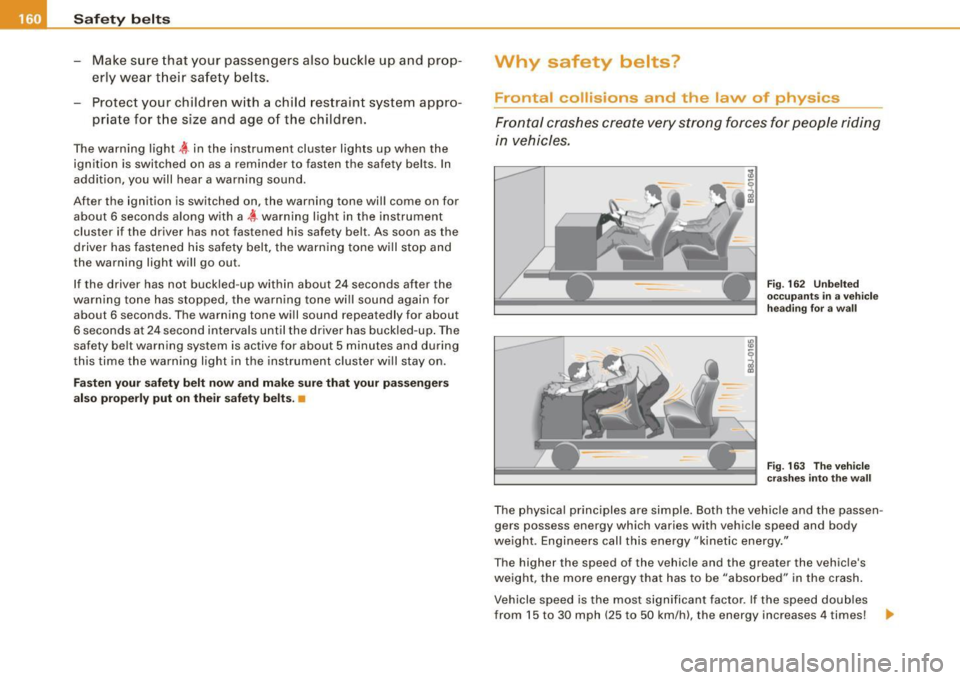
Frontal crashes create ve ry strong forces for pe ople ri ding
in vehicles.
Fig . 16 2 Unbel ted
occ upants in a ve hicle
h ead in g fo r a wall
F ig . 16 3 T he vehi cle
c ras he s in to t he wa ll
The physica l principles are simple. Both the vehicle and the passen
gers possess energy which varies with vehicle speed and body
we ight . Engineers call this energy "kinetic energy ."
The higher the speed of the vehicle and the greater the vehicle's
we ight, the mo re energy that has to be "absorbed" in the crash .
Vehicle speed is the most significant factor. If the speed doub les
from 15 to 30 mph (25 to 50 km/h), the energy increases 4 times!
~
Page 166 of 340
-Safety belts ___ .:,__ _____________________________________ _
Automatic safety belt retractors
Every safety belt is equipped with an automatic belt retractor on the
shoulder bel t. This featu re locks the bel t when the belt is pulled out
fast, during hard braking and in an accident. The belt may also lock
when you drive up or down a steep hill or through a sharp curve. During normal driving the bel t lets you move freely.
Safety belt pretensioners
The safety belts are equipped with a belt pretension er that helps to
tighten the safety belt and remove slack when the pretensioner is
activated. The function of the pretensioner is monitored by a
warning light:::::, page
20, "Airbag system @;".
Switchable locking feature
Every safe ty belt except the one on the driver seat is equipped with
a switchable locking feature that must be used when the safety belt
is used to attach a child seat . Be sure to read the important informa
tion about this feature:::::, page
200.
& WARNING
Improperly positioned safety belts can cause serious injury in an
accident :::::,
page 164, "Safety belt position" .
• Safety belts offer optimum protection only when the seat back
is upright and belts are properly positioned on the body.
• Never attach the safety belt to the buckle for another seat.
Attaching the belt to the wrong buckle will reduce safety belt
effectiveness and can cause serious personal injury.
• A passenger who is not properly restrained can be seriously
injured by the safety belt itself when it moves from the stronger
parts of the body into critical areas like the abdomen.
• Always lock the convertible locking retractor when you are
securing a child seat in the vehicle :::::,
page 202. •
Safety belt position
Correct belt position is the key to getting maximum
protection from safety belts.
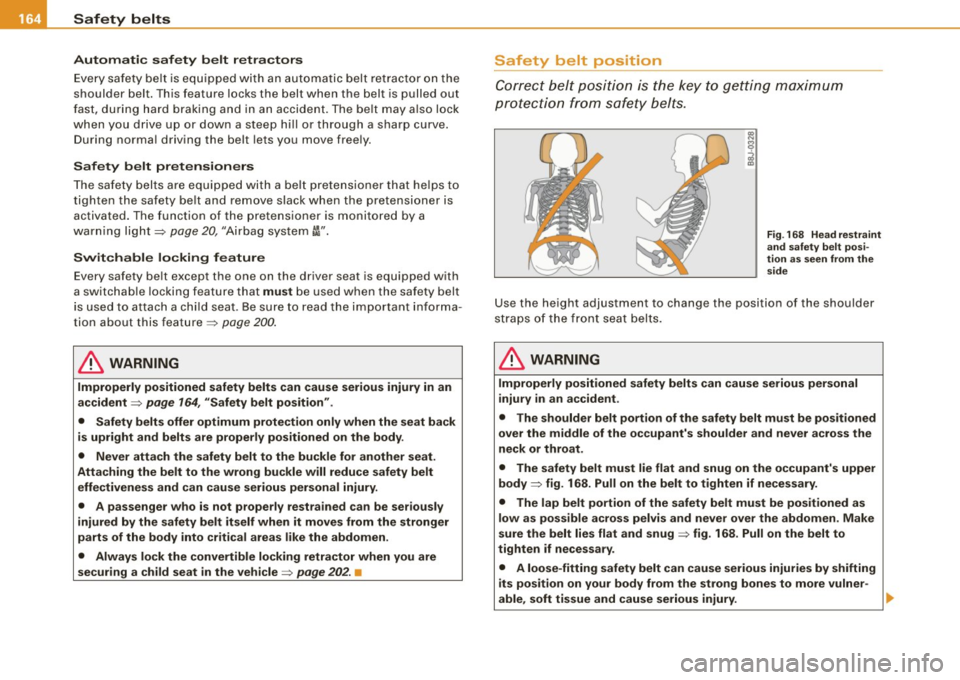
Fig . 168 Head restraint
and safety belt posi
tion as seen from the
side
Use the height adjustmen t to change the position of the shoulder
straps of the front seat belts.
in. WARNING
Improperly positioned safety belts can cause serious personal
injury in an accident .
• The shoulder belt portion of the safety belt must be positioned
over the middle of the occupant's shoulder and never across the
neck or throat.
• The safety belt must lie flat and snug on the occupant's upper
body
:::::> fig. 168. Pull on the belt to tighten if necessary.
• The lap belt portion of the safety belt must be positioned as
low as possible across pelvis and never over the abdomen. Make
sure the belt lies flat and snug :::::, fig. 168. Pull on the belt to
tighten if necessary.
• A loose-fitting safety belt can cause serious injuries by shifting
its position on your body from the strong bones to more vulner-
able, soft tissue and cause serious injury. ..,.