ignition AUDI A4 SEDAN 2013 Workshop Manual
[x] Cancel search | Manufacturer: AUDI, Model Year: 2013, Model line: A4 SEDAN, Model: AUDI A4 SEDAN 2013Pages: 294, PDF Size: 73.71 MB
Page 116 of 294
114 Park assist
Park assist
Parking system
Applies to vehicles: with pa rking system
Different park assist systems may be used for
parking or maneuvering, depending on the
vehicle's features.
Parking system (rear)*:
For the parking system (rear), the acoustic
park assist system is installed in the rear of
the vehicle
¢ page 114.
The rear parking assist system uses ultrason ic
sensors to determine the distance of the vehi
cle from a detected obstacle. There are a total
of four sensors located on the rear bumper
(two in the middle and two on the sides).
Parking system (rear, with rear view
camera)*:
For the parking system (rear, with rear view
camera),
the rear acoustic park assist system
is integrated in the rear of the vehicle and the
rear view camera is integrated in the rear lid
¢page 117.
The parking system (rear, with rear view cam
era)
uses ultrasonic sensors to determine the
distance of the vehicle from a detected obsta
cle . There are a total of four sensors located
on the rear bumper (two in the middle and
two on the sides).
Parking system (rear)
Rear acoustic park assist
Applies to vehicles: with parking system (rear)
The rear acoustic park assist warns you of ob
stacles or objects behind your car.
Description
The rear acoustic parking ass ist system deter
mines the distance of the vehicle from an ob
stacle using ultrasonic sensors. There are 4
sensors in the rear bumper.
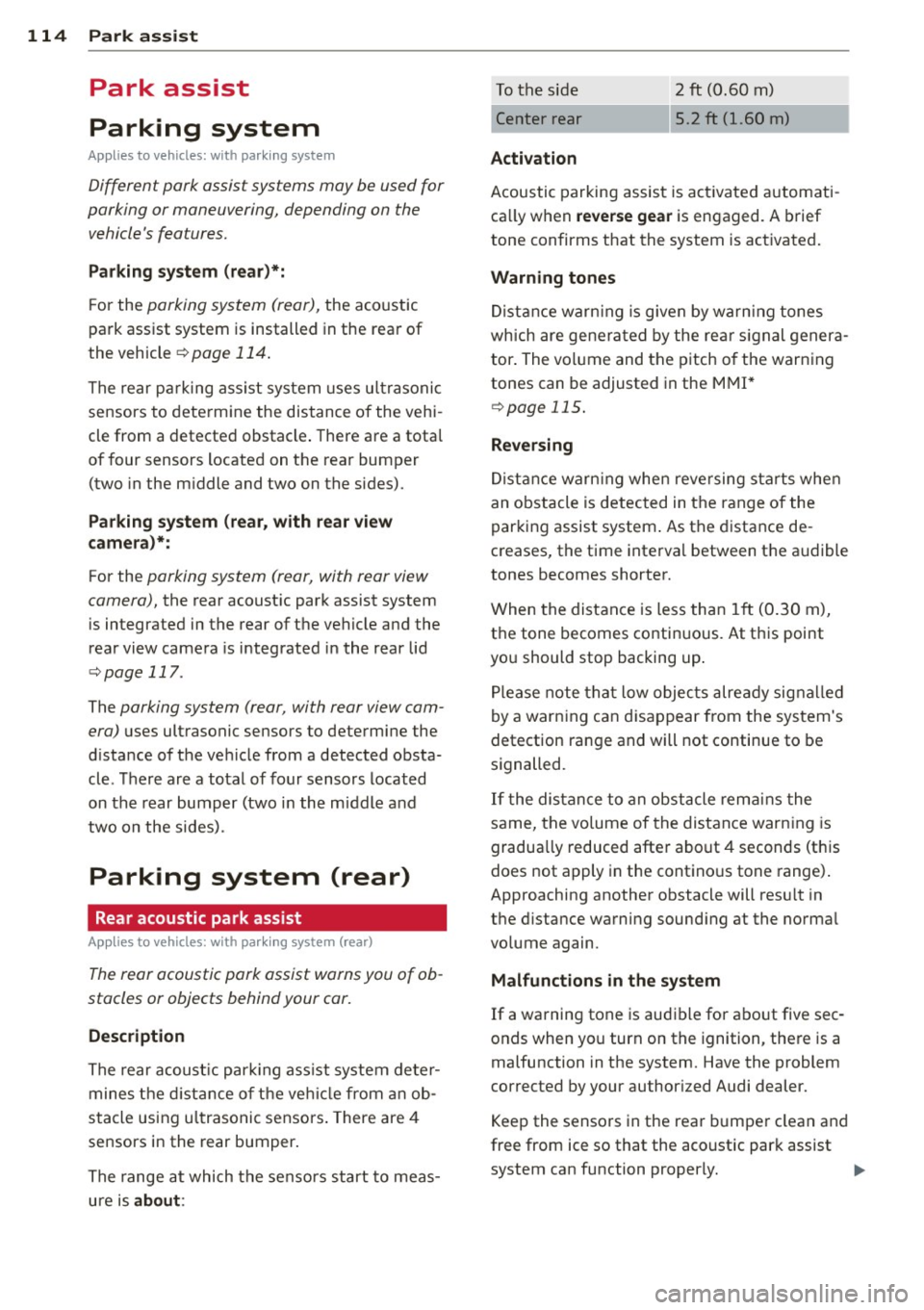
The range at which the senso rs start to meas
ure is
about :
To the side 2 ft (0.60 m)
Center rear 5.2 ft (1.60 m)
Activation
Acoustic parking assist is activated automati
ca lly when
reverse gear is engaged. A brief
tone confirms that the system is activated.
Warning tones
Distance warning is given by warn ing tones
which are generated by the rear signal genera
tor. The volume and the pitch of the warning
tones can be adjusted in the MMI*
¢page 115.
Reversing
Distance warning when reversing starts when
an obstacle is detected in the range of the
parking assist system . As the distance de
creases, the time interval between the audible
tones becomes shorter.
When the distance is less than 1ft (0.30 m),
the tone becomes continuous. At this point
you should stop backing up .
Please note that low objects already signalled
by a warning can disappear from the system's
detection range and will not continue to be
signalled .
If the distance to an obstacle remains the
same, the volume of the distance warning is
gradua lly reduced after about 4 seconds (this
does not apply in the continous tone range).
Approaching another obstacle will resu lt in
the distance warning sounding at the normal
volume again.
Malfunctions in the system
If a warning tone is audible for about five sec
onds when you turn on the ignition , there is a
malfunction in the system. Have the problem
corrected by your authorized Audi dealer.
Keep the sensors in the rear bumper clean and
free from ice so that the acoustic park assist
system can function properly.
Page 119 of 294
The accuracy of the orientation lines and blue
surfaces diminis hes if:
- the rear view camera does not prov ide a re li
able image, for examp le, in poor vis ibility
conditions or if the lens is dirty,
- the image on the screen is not visible due to
sun g lare and reflection .
Caring for th e rear view came ra lens
The rear view camera is located above the rear
license plate b racket . Fo r the pa rking assist to
ope rate, the lens,=:,
fig. 117 must be kept
clean:
- Dampen the lens with a househo ld alcohol
based glass cleane r, and clean the lens with
a dry cloth
,=:, CD.
- Remove s now with a hand brush and ice
prefe rably with a de-icing spray
,=:, (D .
A WARNING
- T he pa rking aid cannot repla ce the dr iv
er's attention. The driver a lone is respon
sible for parking and similar driving ma
neuvers .
- Always keep your eyes on the vehicle's
su rroundings, using the rear view mirror
as well.
- Do not a llow yourse lf to be d istracted
from traffic by the rear view camera pic
tures.
- If the position and the installation ang le
of the camera has changed, fo r example,
after a rear end collision, do not continue
to use the system for safety reasons. Have it checked by a qua lified dealership.
(D Note
- Low obstacles already signaled by a
warning can disappear from the system's
detection range as they are approached
and will not continue to be signaled . Ob
jects such as barrier cha ins, trailer draw
bars, thin pa inted ve rtical po les o r fe n
ces may not be detected by t he system,
pos ing risk of damage.
- Never use warm or hot water to remove
s n ow or ice from the rear view camera
.
P ark a ssis t 11 7
lens -dange r of crack format ion on the
lens !
- When cleani ng the lens, never use prod
ucts that a re ab rasive.
Switching on/off
Applies to vehicles: with parking system (rear, with rear
view camera)
The rear view camera switches on automati
cally together with the acoustic park assist
when you put the vehicle in reverse.
Switching on
"' Put the veh icle in reverse gear, the acoust ic
parking system with rear view camera is ac
tivated automat ica lly. Act ivat ion of the
acoust ic par king system is confirmed by a
brief ac knowledgement sou nd.
Switching off
"' Drive faster than 9 mph (15 km/h) , or
"' take the vehicle out of reverse gear . The
acoust ic park ing system is immediate ly de
activated, and the rea r view came ra p icture
is deact ivated a utomat ically afte r a pe riod
o f abo ut 1 5 seconds , or
"' switch off the ignition.
T he de lay in deact ivat ing the came ra prov ides
an unin terrup ted view beh ind the ve hicle es
pe cially when mane uver ing in tig ht park ing
spaces and prevents the picture from t urning
off the every time you shift out of reverse .
If the wa rning mess age ap pears in the dis play
but not the rea r view came ra p icture, read and
confirm the warni ng message. The acoustic
distance signal is always active .
If you press a fu nction button on the M MI
control console, the rea r view came ra p icture
disappears . The rear view camera picture reap
pears the next time yo u pa rk.
Fur the r in forma tion on the warning mess age
and the MMI con tro l conso le can be found in
the MMI instruction book let.
Ill-
Page 122 of 294
120 Park assis t
In the MMI display, the d irection of travel
of the vehicle rear is represented depend ing on the steering wheel angle. The vehi
cle front sw ings out more than the ve hicle
rear. Maintain plenty of distance from an
obstacle so that your o utside mirror or a
corne r of your veh icle does not co llide with
any obs ta cl es -danger of ac cident!
@ Tips
The left or right orientation li nes and sur
faces wi ll be displayed, depending on the
t urn sig na l being used.
Adjusting the display and warning tones
A ppl ies to vehicles: with pa rk in g system (rear, with rea r
view ca mera )
The display and warning tones are adjusted in
the radio or MM!*.
"' Se lect:
I CARI f u nction button > Parking sys ·
tern .
Or
"' Se lect: ~I C~A~R~I funct ion button > Car systems
control button > Dr iver assist > Parking aid .
Display
- Off -when the parking system is switched
off, on ly aud ible signals are given .
-On -when t he parking system is switched
on, the pict ure from the rear view camera is
displayed.
Warning tone s
- Rear volume -
rear sensor volume
-Rear frequency -rear sensor frequency
-Music volum e while parking -when the
park ing system is switched on, the volume
of the act ive a udio source is lowered.
The new ly adjusted value is briefly heard from
the signal gene rator. The sett ings a re auto
mat ica lly stored and assigned to the remote
con trol key.
_& WARNING
- Alw ays m ake su re th at the volume and
freq uency of the warning tones is adjus t-
-
ed so that you can easily hear the acous
tic d istance signa l even if the radio is
playing, the air-cond it ioner blower is on
H igh or there is a hig h level of outside
noise.
- Check the settings w henever someone
else has driven the vehicle before you.
(D Tips
- The warn ing tones can also be adjusted
directly from the rear view camera im
age. Simply press the Settings* contro l
butto n.
- Changed settings are activated when
park ing ass ist is switc hed on aga in.
Error messages
App lies to vehicles: wit h parking system (rear, wit h rear
v iew camera)
If a warning tone is aud ible for about five sec
onds when you turn on the ignition, there is a
malfunction in the system . Have the problem
cor rected by your author ized Audi dealer.
Keep the senso rs in the rear bumpe r clean and
free from ice so that the acoustic park assist
system can function properly.
Page 124 of 294
122 Homelink®
Programming the transmitter (version
A)
Applies to vehicles: with Homelink
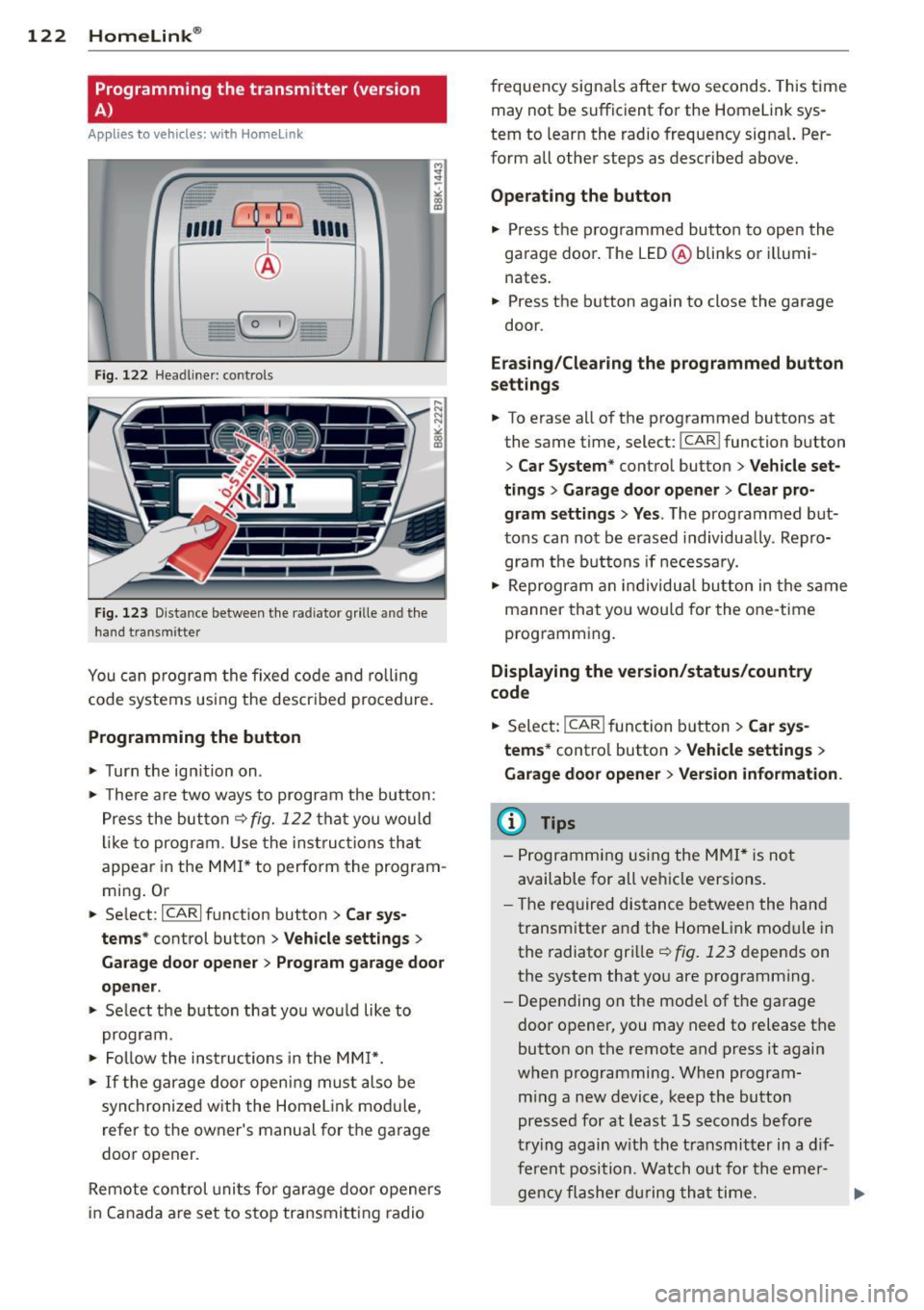
Fig. 122 Head line r: controls
Fig. 123 Dista nce between the radiator grille and the
hand transm itter
You can program the fixed code and rolling
code systems using the described procedure.
Programming the button
.,. Turn the ignition on .
.,. There are two ways to program the button:
Press the button
q fig. 122 that you would
like to program . Use the instructions that
appear in the MMI* to perform the program
ming. Or
.,. Select :
~IC~A~R~I function button > Car sys
tems*
control button > Vehicle settings>
Garage door opener> Program garage door
opener .
.,. Select the button that you would like to
program.
.,. Follow the instructions in the
MMI*.
.,. If the garage door opening must also be
synchronized with the Homelink module,
refer to the owner's manual for the garage
door opener.
Remote control units for garage door openers
in Canada are set to stop transmitting radio frequency
signals after two seconds. This time
may not be sufficient for the Homelink sys
tem to learn the radio frequency signal. Per
form all other steps as described above.
Operating the button
.,. Press the programmed button to open the
garage door. The LED@blinks or illumi
nates .
.,. Press the button again to close the garage
door.
Erasing/Clearing the programmed button
settings
.,. To erase all of the programmed buttons at
the same time, select:
I CAR ! function button
> Car System* control button > Vehicle set·
tings
> Garage door opener> Clear pro
gram settings> Yes .
The programmed but
tons can not be erased individually. Repro
gram the buttons if necessary .
.,. Reprogram an individual button in the same
manner that you would for the one-time
programming .
Displaying the version/status/country
code
.,. Select: !CAR ! function button> Car sys
tems*
control button > Vehicle settings >
Garage door opener > Version information .
@ Tips
- Programming using the MMI* is not
available for all vehicle versions.
- The required distance between the hand
transmitter and the Homelink module in
the radiator grille
q fig. 123 depends on
the system that you are programming .
- Depending on the model of the garage
door opener, you may need to release the
button on the remote and press it again
when programming. When program
ming a new device, keep the button
pressed for at least 15 seconds before
trying again with the transmitter in a dif
ferent position . Watch out for the emer-
gency flasher during that time. .,..
Page 125 of 294
-For security reasons, we recommend that
you clear the programmed buttons be
fore se lling the vehicle .
Programming the transmitter (version
B)
Applies to vehicles: with Home Link
,,,,, r ,o :O·,) ,,;;~
®
Fig. 124 Hea dli ner: c o n tro ls
Fig. 125 Dis ta n ce betw een th e radiato r gri lle a nd the
hand t rans mitte r
Programming: phase 1 on the control unit
l. Switch on the ignition (do not start the
engine) .
2 . Press and hold both of the outer Home
Link buttons ¢
fig. 124 unti l the LED @
turns off completely (about 20 seconds).
This procedure clears the standard codes
that were set at the factory and does
not
need to be repeated again to program the
other buttons .
3 . Briefly press the Homelink button that
you would like to program .
4. Wait until the LED @beg ins to blink
quickly . The Homelink module will now
remain in learning mode for 5 minutes.
5 . Now stand in front of your vehicle with
the original hand transmitter for the ga
rage door opener or for the device that
Homelink ® 123
you wou ld like to allocate to the Home
Link button .
Programming: phase 2 on the radiator
grille
6. Hold the or iginal hand transmitter some
what towards the center of your vehicle's radiator grille ¢
fig. 125.
7. Now activate (press) the hand transm it
ter.
8. Pay attention to the turn sig nals for your
vehicle when activating the hand trans
mitter .
If the emergency flashers blink
three times, the programm ing was suc
cessful. If the emergency flasher only
blinks one time, the 5 minute time lim it
for the adaptation has expired or the pro
gramming was unsuccessful. Repeat the
programming from step 3 on the controls
or se lect another distance from the radia
tor grille.
9. If the garage door or other devices still
fail to be activated with the Homelink control buttons after programming is
completed, it is possible that these sys
tems might be working with a roll ing code
instead of the normal fixed code . A
Roll
ing code programming must be per
formed ¢
page 124.
Program the remaining two buttons according
to the instructions ment ioned above . Begin
similarly with the 3rd step if the program
ming connection was successful for the f irst
button .
Remote contro l units for garage door openers
in Canada are set to stop transmitting radio
frequency signa ls after two seconds . This time
may not be sufficient for the Homelink sys
tem to learn the radio frequency signal. Per
form all other steps as described above.
Pressing a button
.,. To open the garage door, press the pro
grammed b utton. The LED @will light up or
flash.
.,. To close the garage door, press the button
aga in.
Page 126 of 294
124 Homelink®
Erasing the button s
.. Switch on the igni tion (do not start the en
gine) .
.. Press and ho ld both of the o uter buttons
until the LED @ turns off complete ly (about
20 seconds) to erase all of the buttons si
multaneously .
.. Programmed buttons cannot be erased indi
vidually . Reprogram the buttons if necessa
ry.
Reprog ramming the button s
.. Switch on the ignition (do not start the en
gine).
.. To reprogram an ind ividual button, press
and hold the des ired button unt il the L ED @
begins to blink (about 10 seconds) . Re lease
the button .
.. Wait until the L ED@ begins to blink quic k
ly . T he Homelink module will now remain in
l earning mode for 5 minutes .
.. Cont in u e with step 5 .
(D Tips
-The requ ired distance between the hand
transmitter and the Homelin k module in
the radiator grille¢
fig. 125 depends on
the system that you are programming.
- Depending on the mode l of the garage
door opener, you may need to release the
button on the remote and press it again
when programming. When program ming a new dev ice, keep the button
pressed for at least 15 seco nds befo re
trying again with the transmitte r in a dif
ferent pos it ion. Watch out fo r the emer
gency flasher duri ng t hat time.
- Fo r secu rity reaso ns, we recommend that
you clear the programmed but tons be
fore se lling the vehicle.
Programming the rolling code
Applies to veh icles: w ith Homelink
Additionally, a rolling code programming for
the Homelink universal remote control is re
quired for some systems .
Identifying the rolling code
.. Press the previously programmed HomeLink
button again and hold it down .
.. Look at the LED@¢
page 123, fig . 124 . If
the L ED blinks q uickly, the feat ures, such as
the garage door opene r, a re eq uipped w ith
t he rol ling code.
.. Program the rolling code as follows:
Activating the garage door opener motor
unit
.. Locate the setting but ton on the garage
door opene r motor un it. The exac t loca tion
and colo r of the bu tton may vary depending
on the garage door opener manufacturer .
.. Press the setting button on the garage door
opener motor unit ( usua lly this will activate
a "setting light display" on the motor unit).
Now you will have about
3 0 seconds time to
pe rform the Homelink button programm ing
on the controls .
Programming on the controls
.. Quickly press the p rev iously programmed
Homelink b utton .
.. Press the Home link button once more to
end the roll ing code programm ing .
After the controls have been programmed, the garage door opener s hou ld recognize the
Homelink signa l and operate when the Home
Li nk button is pressed. Now you may program
the other buttons as needed .
(D Tips
-Programming the rolling code can be
performed quicke r and more easily with
th e help of a second person. The Home
Li nk button may need to be pressed a
t hird t ime to en d the adjus tment pro ce
dure for some garage door openers.
Page 148 of 294
146 Airbag system
Even though your vehicle is equipped with an
Advanced Airbag System, make certain that
all chi ldren, especially those 12 years and
younger, a lways ride in the back seat properly
restrained for their age and size. The airbag
on the passenger side makes the front seat a potentially dangerous place for a ch ild to ride.
The front seat is not the safest place for a
child in a forward-facing child safety seat. It
can be a very dangerous place for an infant or
a child in a rearward-facing seat.
The Advanced Airbag System in your veh icle
has been certified to comply with the Requ ire
ments of United States Federal Motor Vehicle
Safety Standard 208 as applicable at the time
your vehicle was manufactured.
The Standard requires the front a irbag on the
passenger side to be turned off ("sup
pressed") if a child up to about one year of
age restrained in one of the rear-facing or for
ward -facing infant restraints listed in Federal
Motor Vehicle Safety Standard 208 with which
the Advanced Airbag System in your vehicle
was certified has been installed on the front passenger seat . For a listing of the child re
strai nts that we re used to certify compliance
with the US Safety Standard
r=v page 167.
The PASSENGER AIR BAG OFF light in the in
strument panel te lls you when the front Ad
vanced A irbag on the passenger side has been
turned off by the e lectronic control unit.
Each t ime you turn on the ignition, the
PAS
SENGER AIR BAG OFF
light will come on for a
few seconds and:
- will stay on if the front passenger seat is not
occupied,
- will stay on if there is a small child or child restraint on the front passenger seat,
- wi ll go off if the front passenger seat is oc
cupied by an adult as registered by the
weight-sensing mat
r=v page 155, Monitor
ing the Advanced Airbag System .
The PASSENGER AIR BAG OFF light comes on
when the control un it detects a total weight
on the front passenger seat that requires the
front airbag to be turned off.
If the total weight on the front passenge r
seat is more than that of a typica l 1 year -old
chi ld but less than the weight of a small
adult, the front airbag on the passenger side
can deploy (the
PASSENGER AIR BAG OFF
light does not come on). If the PASSENGER
AIR BAG OFF
light does not come on, the
front airbag on the passenger side has not
been turned off by the electronic con trol unit
and can deploy if the control unit senses an
impact that meets the cond itions stored in its
memory .
For example, the airbag may deploy if:
-a small ch ild that is heav ier than a typical 1
year-old ch ild is on the front passenger seat
( re gard less of whether the child is in one of
the child safety seats listed
r=v page 167), or
- a child who has outgrown ch ild restraints is
on the front passenger seat.
If the front passenger airbag is turned off, the
PASSENGER AIR BAG OFF light comes on in
the instrument cluster and stays on.
The front airbag on the passenger s ide may
not deploy (the PASSENGER AIR BAG OFF
light does not illum inate and stay lit) even if a
small adult or teenager, or a passenger who is
not sitt ing upright with their back against a
non-reclined backrest with their feet on the
vehicle floor in front of the seat is on the front
passenger seat
r=v page 12 7, Proper seating
position for the driver.
If the front passenger airbag deploys, the
Federal Standard requires the airbag to meet
the "low risk" deployment criteria to reduce
the risk of injury t hroug h interaction with the
airbag. "Low risk" deployment occurs in those
crashes that take place at lower dece lerat ions
as defined in the electronic control unit
r=v page 155, PASSENGER AIR BAG OFF light .
Always remember, a child safety seat or infant
carr ier installed on the front seat may be
struck and knocked out of posit ion by the rap
idly inflat ing passenger's airbag in a frontal
collision . The air bag could greatly reduce the
effectiveness of the ch ild restraint and even
seriously injure the child during inflation .
Page 149 of 294
For this reason, and because the back seat is
the safest place for children - when properly restrained according to their age and size - we
strongly recommend that children always sit in the back seat
Q page 165, Child Safety.
A WARNING
-
A child in a rearward-facing child safety
seat installed on the front passenger seat
w ill be seriously injured and can be k illed if
the front a irbag inflates - even with an Ad
vanced Airbag System.
- T he inflating a irbag w ill hit the child
safety seat or infant carrier w ith great
force and w ill smash the ch ild safety sea t
and child against the backrest, cente r
armrest, door or roof .
- Always install rear -facing child safety
seats on the rear seat.
- If you mus t inst all a rearward facing
child safety seat on the front passenger
seat beca use of exceptional circumstan
ces and the
PASSENGER AIR BAG OFF
light does not come on and stay on , im
med iately install the rear-facing child
safety seat in a rear seating posit ion and
have the a irbag system inspected by your
authorized Aud i dealer .
- Forward-fac ing ch ild safety seats instal
led on the front passenger's seat may in
terfe re with the deployment of the air
bag and cause se rious personal injury to
the ch ild.
A WARNING
If, in exceptional c irc umstances, you mus t
install a forwa rd-facing child restra int on
the front passenger's seat:
- Alw ays make sure the forw ard -fac ing
sea t has been des igned and certified by
its manufacturer for use on a front seat
with a passenger front and side airbag.
- Never put the forward -facing child re
straint up aga inst or very near the instru
ment pane l.
- Always move the passenger seat into its
rearmost position in the seat's fore and
A irbag system 147
aft ad justment range, as far away from
the airbag as possible before installing
the forward-fac ing ch ild restraint. The
backrest must be adj usted to an upright
position .
- Make sure that the
PASSENGER AIR BAG
OFF
li ght comes on and stays on all the
time wheneve r the ignit ion is switched
on.
A WARNING
T o reduce the risk of ser ious injury, make
su re that the
PASSENGER AIR BAG OFF
light w ill be displayed whenever a child re
straint is installed on the front passenger
seat and the ignition is switched on.
- If the
PASSENGER AIR BAG OFF light
does not s tay on, per form the checks de
scribed
Q page 155, Monitoring the Ad
vanced Airbag System.
- Take the chi ld restraint off the front pas
senger seat and install it properly at one
of the rear seat positions if the
PASSEN
GER AIR BAG Off light does not stay on.
- Have the airbag system inspected by
your author ized Audi dealer immed iate
ly .
-Always carefu lly follow instr uctions from
child restraint manufacturers when in
stall ing ch ild restra ints .
A WARNING
If, in except iona l circumstances, you must
install a forward or rearward-facing child
restra int on the front passenger's seat :
- Improper instal lation of ch ild restraints
can reduce their effectiveness o r even
prevent them from providing any protec
tion.
- An improper ly installed ch ild restra int
can interfere with the airbag as it de
ploys and seriously i njure o r even kill the
child -even with an Advanced Airbag
System.
- Always carefu lly follow the manufact ur
er 's ins tructions p rov ided with the ch ild
safety seat or carrier . •
•
Page 153 of 294
-Always move the passenger seat into its
rearmost position in the seat's fore and
aft adjustment range, as far away from
the a irbag as poss ible, before installing
the forward-facing child restraint. The backrest must be adjusted to an upr ight
posit ion.
- Make sure that the
PASSENGER AIR BAG
OFF
light comes on and stays on all the
t ime w henever the ignition is sw itched
on.
Advanced Airbag System components
The fron t passenger seat in your vehicle has a
lot of very important parts of the Advanced
Airbag System in it. These parts include the
weight-sensing mat, sensors, wiring, brack
ets, and more. The function of the system in
the front passenger seat is checked by the
e lectronic control u nit when the ignit ion is on .
The control un it mon itors the Advanced Air
bag System and turns the airbag indicator
l ight on whe n a ma lfunction in t he sys tem
components is de tected. The function of the
airbag indicator light is described in greater
detai l below . Because the front passenger
seat contains important parts of the Ad
vanced A irbag System, you m ust take care to
prevent it from being damaged. Damage to
the seat may prevent the Advanced Airbag for
the front passenger seat from doing its job in
a crash .
The front Advanced Airb ag Sy stem
consists of the following:
- Crash sensors in the front of the veh icle that
measure veh icle acceleration/decele ration
to provide information to the Advanced Air
bag System about the seve rity of the crash.
- An electronic co ntrol unit, with integrated
c rash se nsors for front and side impacts .
T he cont ro l unit " decides " whethe r to fire
the front airbags based on the inform ation
received from the crash senso rs . The contro l
unit a lso "decides" whether the safety belt
pretensioners should be activated .
Airbag system 15 1
-An Advanced A irbag w ith gas gene rator and
contro l valve fo r the driver ins ide the steer
ing wheel h ub.
- An Advanced Airbag w ith gas gene rator and
contro l valve inside the instrument pane l for
the front passenger.
- A weight-sensing mat under the upholstery
padding of the front passenger seat cushion
that measures the total weight on the seat.
The informat ion reg istered is sent continu
ously to the electronic control unit to regu
late deployment of the front Advanced Air
bag on the passenger side.
- An airbag monitor ing system and ind icator
light in the instrument cluster
q page 155 .
-A sensor in each front seat registers the dis
tance between the respective seat and the
steer ing whee l o r inst rument panel. The in
forma tion registered is sent cont inuo usly to
t he elect ron ic cont ro l uni t to regula te de
ployment o f the front Advance d Airbags .
- The
PASSENGER AIR BAG OFF ligh t comes
on and st ays on in the cen ter o f th e instr u
ment panel
<:!;> page 155, fig . 143 and tells
you whe n the front Advanced Airbag on the
passenger side has been tu rned
off .
-A sensor below the safety be lt latch fo r the
front seat passenger to measure the tension on the safety be lt . The tension on the safety
be lt and the weight registered by the
weight-sensi ng mat he lp the control unit
"decide" whether the front a irbag for the
front passenge r seat should be turned
off or
not
r:!;> pag e 145, Child restraints on the
front seat -some important things to
know.
- A senso r in the safety belt latch fo r the d riv
er and fo r the front sea t passenger tha t
senses w hethe r that safe ty belt is latched or
not and transmi ts this informa tion to the
electronic control unit.
_&. WARNING
Damage to the front passenger seat can
prevent the front airbag from work ing
properly.
-
•
•
Page 155 of 294
BAG OFF light comes on and stays on to tell
you when the front Advanced Airbag on the
passenger side has been turned
off
c:> page 145, Child restraints on the front seat
- some important things to know.
A WARNING
To reduce the risk of injury whe n an airbag
inflates, always wear safety belts properly .
- If you are unrestrained, lean ing forward,
sitting sideways or out of position in any
way, your risk of injury is much highe r.
- You w ill also receive serious injuries and
could even be killed if you are up against
the a irbag or too close to it when it in
flates -even with an Advanced Airbag
c:> page 144.
More important things to know about
front airbags
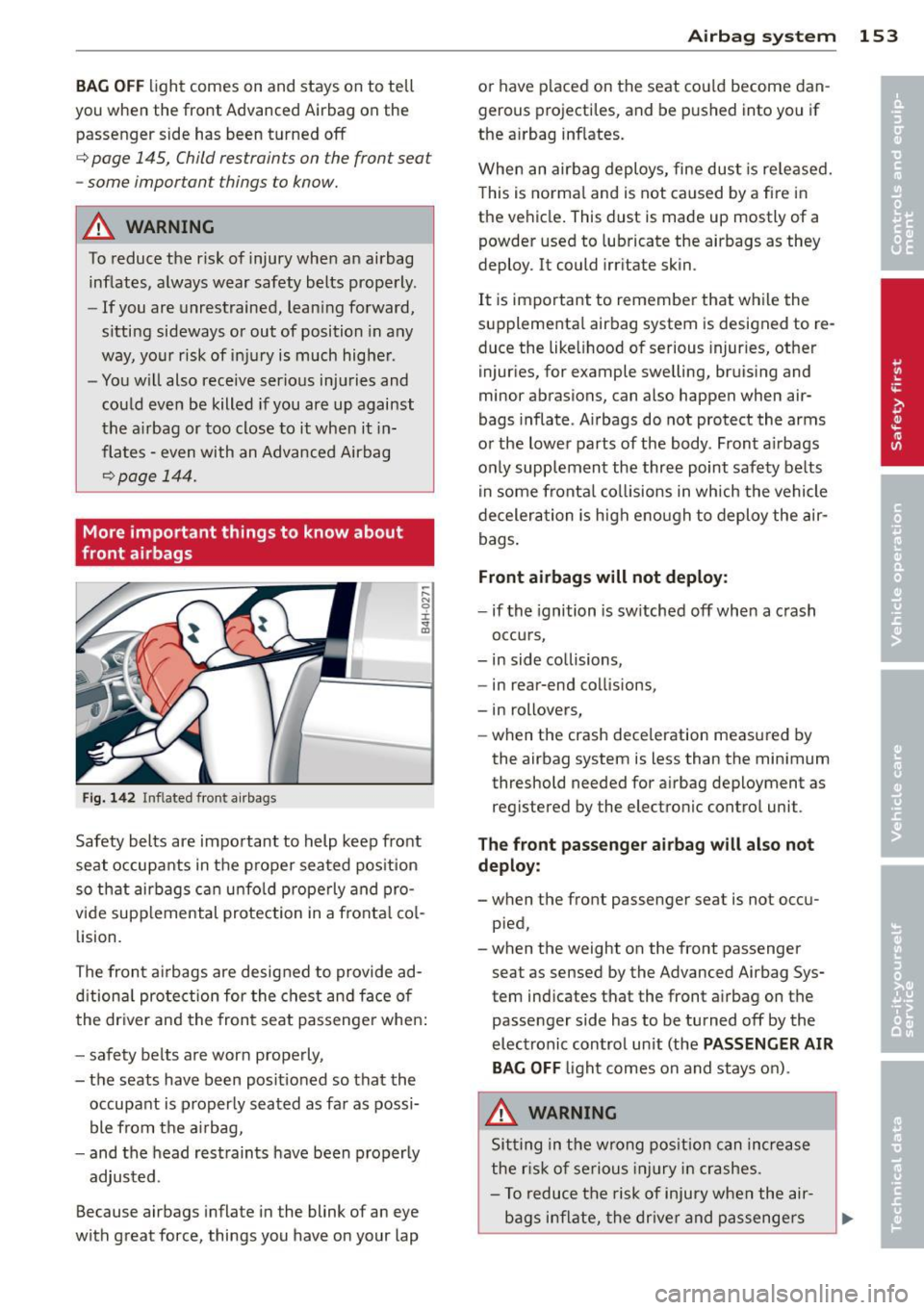
Fi g. 1 42 Inflated front a irbags
Safety belts are important to help keep front
seat occupants in the proper sea ted pos ition
so that airbags c an u nfo ld properly and pro
vide supp lemental protection in a fronta l co l
lision.
The front a irbags are designed to provide ad
d itiona l protection for the chest and face of
the dr iver and the front seat passenge r when:
- safety belts are worn properly,
- the seats have been posit io ned so that the
occupant is p roperly seated as far as possi
ble from the a irbag,
- and the head restraints have been properly
adjusted.
Because airbags inflate in the blink of an eye
with great force, things you have on your lap
A irba g sy stem 153
or have p laced on the seat co uld become dan
gerous projectiles, and be p ushed into you if
the a irbag inf lates.
When an airbag deploys, fine dust is re leased.
T his is norma l and is not caused by a fi re in
the ve hicle . This dust is made up mostly of a
powder used to lubricate the airbags as they
deploy. It could irr itate skin .
It is important to remembe r that wh ile the
supplementa l airbag system is designed to re
duce the like lihood of serious injur ies, other
injuries, for example swelling, bruis ing and
minor abrasions, can also happen when air
bags inflate . A irbags do not protect the arms
o r the lower parts of the body. Front a irbags
on ly supp lement the three point safety belts
in some fronta l co llisions in which the vehicle
decelera tion is high e no ugh to deploy the air
bags .
Front airbags will not deploy :
-if the ignition is sw itched off when a crash
occu rs,
- in side collisions,
- in rear-end collisions,
- in rollovers,
- when the crash deceleration measured by
the airbag system is less than the minimum
threshold needed for a irbag deployment as
reg istered by the electronic control unit .
The front pa sse n ger ai rbag will also not
deplo y:
- when the front passenger seat is not occu
pied,
- when the weight on the front passenger seat as sensed by the Advanced Airbag Sys
tem ind icates that the front airbag on the
passe nger side has to be turned off by the
electronic control unit (the
PAS SENGER A IR
BAG OFF
light comes on and stays on) .
A WARNING
Sitting in the wrong position can increase
the r is k of se rious inj ury in crashes.
- To reduce the risk of injury when the air
bags inflate, the drive r and passenge rs