clutch AUDI A4 SEDAN 2013 Owners Manual
[x] Cancel search | Manufacturer: AUDI, Model Year: 2013, Model line: A4 SEDAN, Model: AUDI A4 SEDAN 2013Pages: 294, PDF Size: 73.71 MB
Page 29 of 294
The values in the single-t rip or the total-trip
memory can a ll be reset to zero at the same
time under
Reset in the menu .
I n addition, you can determine what informa
tion from the trip computer should be shown
in the instrument cluster display. If one of the
p ieces of driver information is turned
Off , that
driver information w ill not be shown in the
display. The information will continue to be
calculated by the trip computer and can be
turned back
On at any t ime.
(D Tips
- This function is not avai lab le on all
vehicles.
- The driving information in the efficiency
program is also reset to zero with the
s ingle-trip memory.
Gearshift Indicator
A ppl ies to vehicles: with manu al transmi ssion a nd gea r·
shi ft indica tor
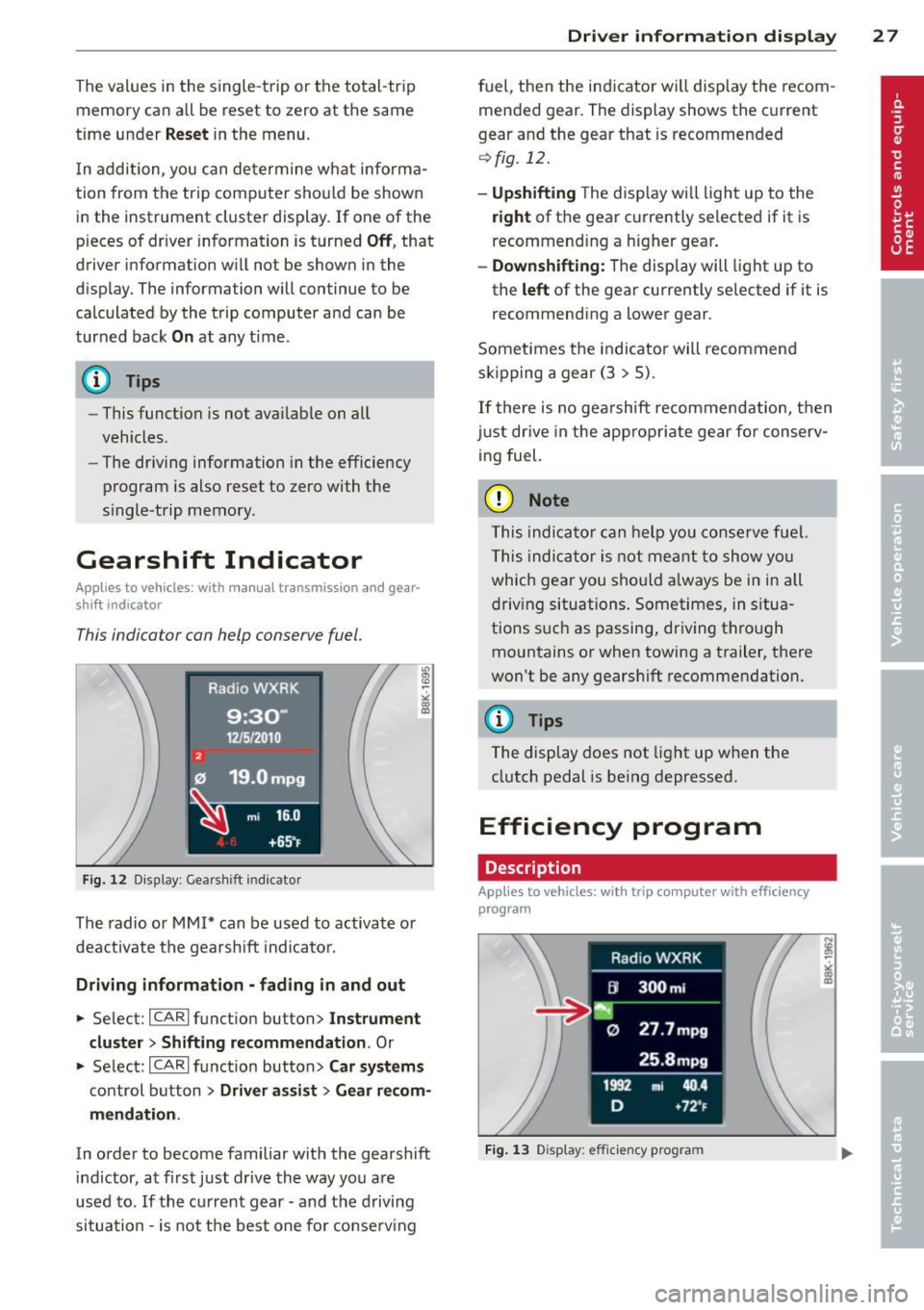
This indicator con help conserve fuel.
~~~------------~~ ~.;;-
Fig. 12 Display: Gea rs hi ft indicator
The radio or MMI* can be used to activate or
deactivate the gearsh ift indicator.
Driving information -fading in and out
.,. Se lect: ICARlfunction button> Instrument
cluster
> Shifting recommendation . Or
m ~ ~ a, a,
.,. Select: ICARI funct ion button> Car systems
control button > Driver assist > Gear recom
mendation .
In order to become familiar with the gearshift
indictor, at first just drive the way you are
used to.
If the current gear -and the driving
situation -is not th e best one for conserving
Driver information display 2 7
fuel, then the indicator wi ll display the recom
mended gear. The display shows the current
gear and the gear that is recommended
¢fig. 12.
-Upshifting The disp lay wi ll light up to the
right of the gear currently selected if it is
recommend ing a higher gear .
-Downshifting: The display wi ll lig ht up to
the
left of the gear currently se lected if it is
recommending a lower gear .
Sometimes the indicator will recommend
skipping a gear (3
> 5).
If there is no gearshift recommendation, then
just drive in the appropriate gear for conserv
ing fuel.
(D Note
This indicator can help you conserve fuel.
This indicator is not meant to show you
which gear you sho uld always be in in all
driving situations . Sometimes, in situa
tions s uch as passing, dr iv ing through
mountains or when towing a trailer, there
won't be any gearshift recommendation.
(D Tips
The display does not light up when the
clutch pedal is be ing depressed.
Efficiency program
Description
App lies t o vehicles: wi th trip co mp ute r wi th effici ency
prog ram
Fig. 13 D isplay: efficie ncy progra m
Page 62 of 294
60 Seats and st o rage
12-volt socket
Appl ies to vehicles: wit h 12-volt socket
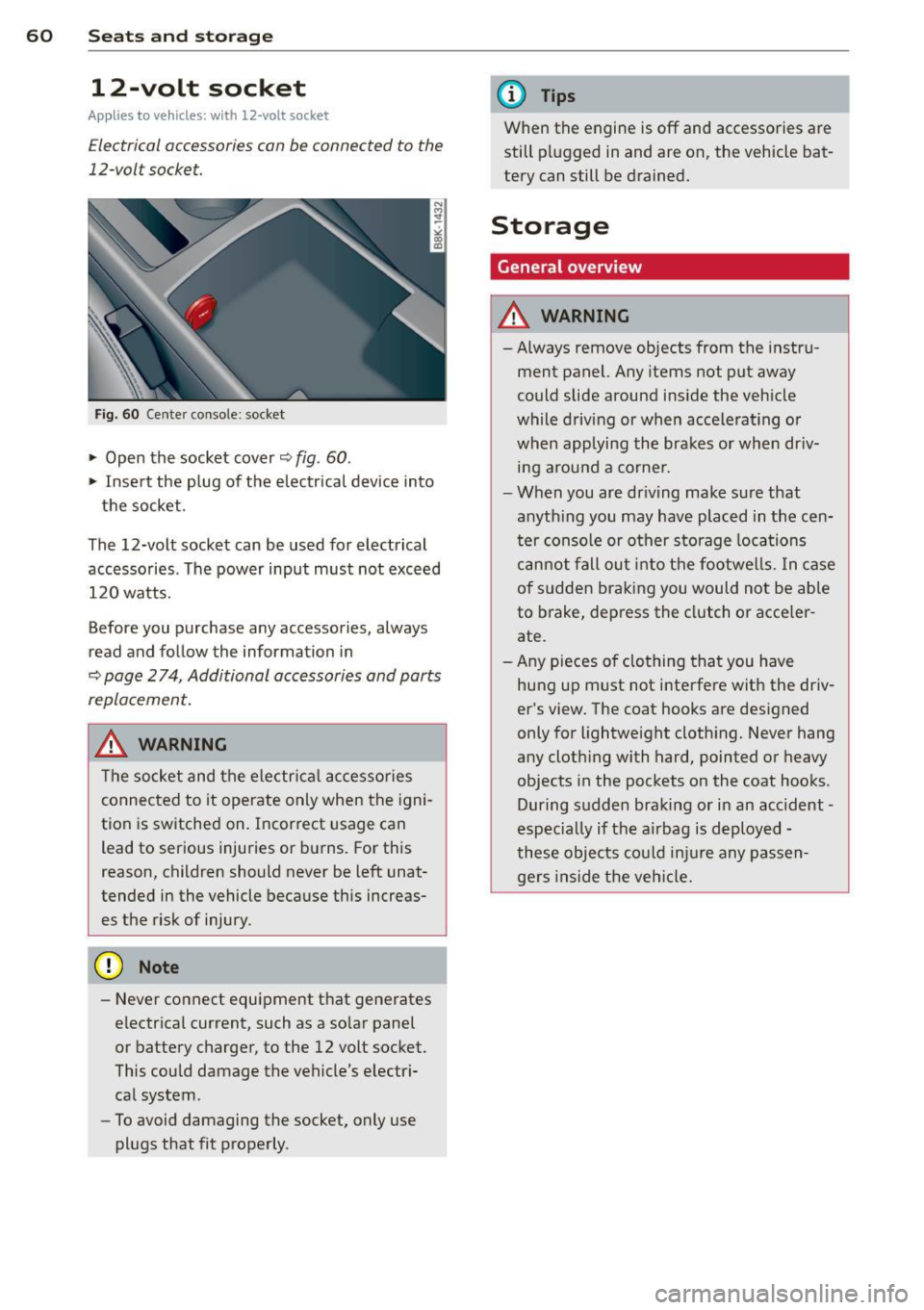
Electrical accessories can be connected to the
12-volt socket.
Fig. 60 Cente r console: socket
.,. Open the socket cover~ fig. 60 .
.,. Insert the plug of the electrical device into
the socket.
The 12-volt socket can be used for electrical accessories. The power input must not exceed 120 watts.
Before you purchase any accessories, always
read and follow the information in
~ page 2 74, Additional accessories and parts
replacement.
.&_ WARNING
The socket and the electr ica l accesso ries
connected to it operate only when the igni
tion is switched on. Incorrect usage can lead to ser ious injuries or burns. For this
reason, children should never be Left unat
tended in the vehicle because this increas es the risk of injury.
- Never connect equipment that generates
electrical current, such as a so lar panel
or battery charger, to the 12 volt socket.
This could damage the vehicle's electr i
cal system .
- To avoid damaging the socket, only use
plugs that fit properly .
(D Tips
When the engine is off and accessories are
still plugged in and are on, the vehicle bat
tery can still be drained.
Storage
General overview
.&_ WARNING
-Always remove objects from the instru
ment panel. Any items not put away
could slide around inside the veh icle
while driv ing or when accelerat ing o r
when applying the brakes or when dr iv
ing around a corne r .
- When you are driving make sure that
anyth ing you may have placed in the cen
ter console or other storage locations
cannot fall out into the footwells. In case
of sudden braking you would not be able
to brake, depress the clutch or acce ler
ate.
- Any pieces o f clothing that you have
hung up must not i nterfere wit h the driv
er's view . The coat hooks are designed
only for lightweight clothing. Never hang
any cloth ing with hard, pointed or heavy
objects in the pockets on the coat hooks .
During sudden braking or in an accident -
especia lly if the a irbag is deployed -
these objects could injure any passen gers inside the vehicle.
-
Page 74 of 294
7 2 On the road
On the road
Steering
Manually adjustable steering wheel
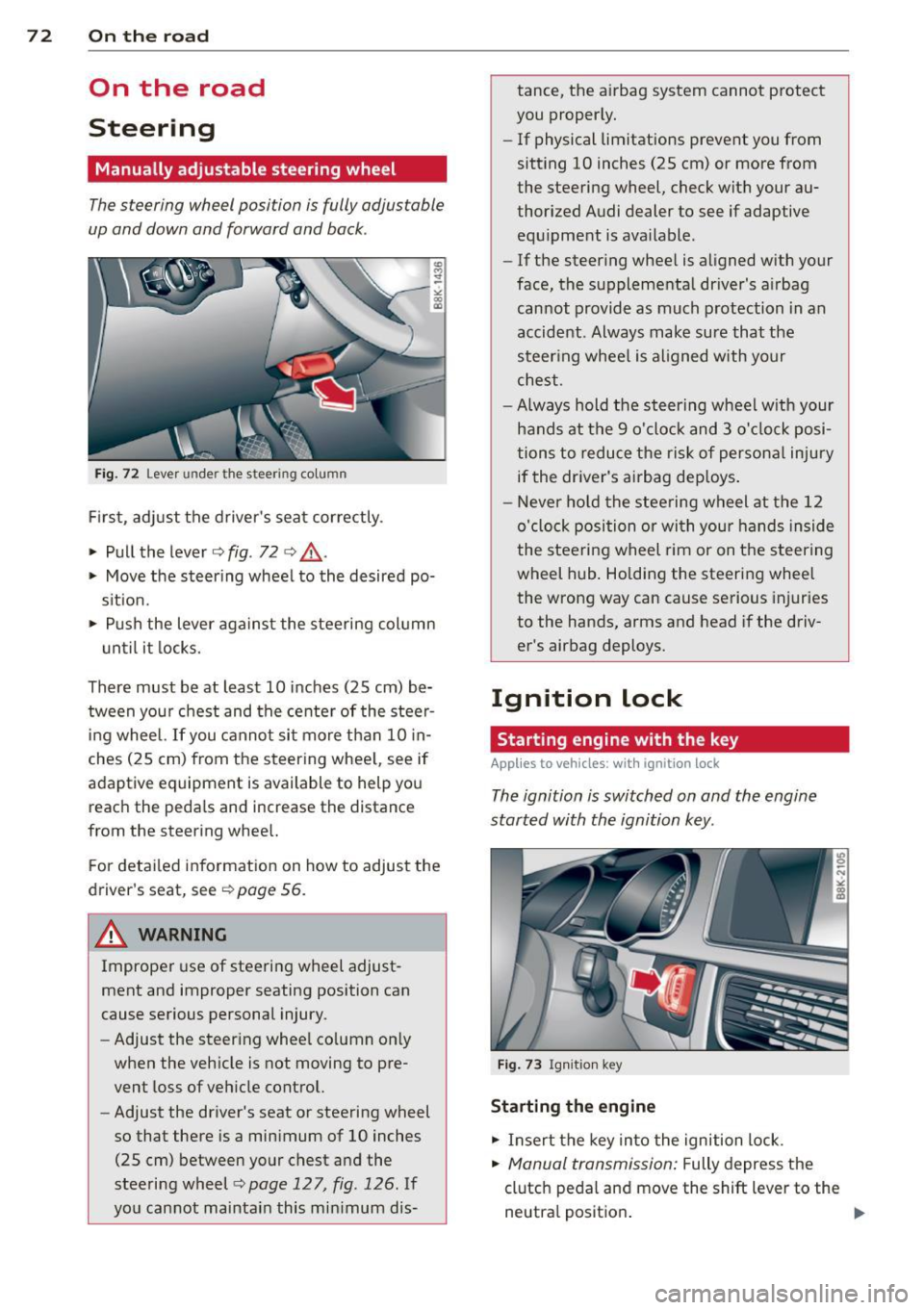
The steering wheel position is fully adjustable
up and down and forward and bock .
" a, a,
Fig. 72 Lever under the steer ing colu mn
First, adjust the driver's seat correctly .
• Pull the lever
o fig . 72 o ,& .
• Move the steer ing whee l to the desired po
s it ion.
~ Push the lever aga inst the steering column
u ntil it locks.
There must be at least 10 inches (25 cm) be tween your chest and the center of the steer
ing wheel. If you cannot sit more than 10 in
ches (25 cm) from the steering whee l, see if
adaptive equipment is available to help you
reach the pedals and increase the distance
from the steering whee l.
F or detai led information on how to adjust the
driver's seat, see
o poge 56.
A WARNING
Improper use of steering wheel adjust
ment and improper seating position can
cause serious personal injury.
- Adjust the steer ing whee l co lumn on ly
when the veh icle is not moving to pre
vent loss of veh icle control.
- Adjust the driver's seat or steering wheel
so that there is a minimum of 10 inches
(25 cm) between your chest and the
steering wheel
c;, page 12 7, fig . 126 . If
yo u cannot maintain this min imum dis- tance, the airbag system cannot protect
you proper ly.
- If physical limitations prevent you from
sitting 10 inches (25 cm) or more from
the steering wheel, check with your au
thorized Audi dealer to see if adaptive equ ipment is ava ilable .
- If the steer ing wheel is aligned with your
face, the supplemental driver's a irbag
cannot provide as much protection in an
accident . Always make sure that the
steer ing wheel is aligned with your
chest.
- Always hold the steering wheel w ith your
hands at the 9 o'clock and 3 o'clock posi
tions to reduce the risk of persona l injury
if the driver's airbag dep loys .
- Never hold the stee ring wheel at the 12
o'clock position or with your hands inside
the steeri ng wheel rim or on the steering
wheel hub . Holding the steering wheel
the wrong way can cause se rious injuries
to the hands, arms and head if the driv
er's airbag deploys.
Ignition lock
Starting engine with the key
Applies to vehicles : w ith ign ition lock
The ignition is switched on and the engine
started with the ignition key .
Fig. 73 Igni tion k ey
Sta rting the engine
• Insert the key into the ignition lock.
• Manual transmission: Fully depress the
clutch pedal and move the shift lever to the
neutra l position .
Page 75 of 294
~ Automatic transmission: Step on the brake
peda l and move the se lector lever to the P
or N position .
~ Press the key c:> fig. 73 -the eng ine will
start.
Sw itching the i gnition on /off
If you wou ld like to switch the ignition on
without starting the engine, follow t hese
steps :
~ Insert the key i nto the igni tion lock .
~ Press the key b riefly w ithout press ing the
clutch peda l (for manual transmissions) or
the brake peda l (for automatic transmis
s ions) .
~ To sw itch the ignition off, press the key
again .
When starting the engine, ma jor e lectr ica l
loads are switched off temporarily .
You can only remove the key with the ignition
switched off.
I f the engine sho uld not star t immediately,
the starting process is automatically stopped
after a short time. Repeat starting procedure .
A WARNING
-Never allow the engine to run in confined
spaces -danger of asphyxiation.
- Never remove the ign ition key from the
ignition look while the vehicle is moving.
Otherw ise, the steering lock could sud
denly engage and you would not be able
to steer the vehicle.
- Always take the key with you whenever
you leave your vehicle . Otherwise, the
engine could be star ted or e lectr ica l
equipment such as the power w indows
cou ld be operated. This ca n lead to seri
o us inj ury.
- Never leave c hildren or persons requ iring
assistan ce unattended in the vehicle. The
doors c an be lo cked using the remote
t ransmit ter, preventing people from es
caping from the vehicle on their own in
the event of an emergency. Depend ing
on the time of year, people inside the ve-
On the ro ad 73
hicle can be exposed to very high or very
low temperatu res.
(D Note
Avoid high eng ine rpm, fu ll th rottle and
heavy engine loads unti l the engine has
reached operating tempe rat ure -other
wise you r isk eng ine damage.
@ For the sake of the environment
Do not let the engine run w hile parked to
warm up. Begin dr iv ing immediately. T his
reduces unnecessary emissions.
@ Tips
- If the key cannot be removed from the
ignition lock, you have to pull the me
chanical key out of the maste r key in or
der to be able to lock the vehi-
cle c:>
page 35.
-After starting a cold engine, t here may
be a brief peri od of increased no ise be
cause the oil press ure must first bu ild up
in the hydraulic valve ad justers. This is
normal and not a cause for concern.
- If you leave the veh icle with the ignition
switched on, the ig nition w ill switch off
afte r a certa in per iod of t ime . Please
note that ele ctrical eq uipment such as
exterior ligh ts w ill sw itch off as well
w hen that happens .
Page 77 of 294
CD Note
If the engine has been under heavy load
for an extended period, heat builds up in
the engine compartment after the engine
is switched off- there is a risk of damaging
the engine . Allow the engine to run at idle
for about two minutes before switching it
off.
Convenience key
Starting the engine
Applies to vehicles: with convenience key
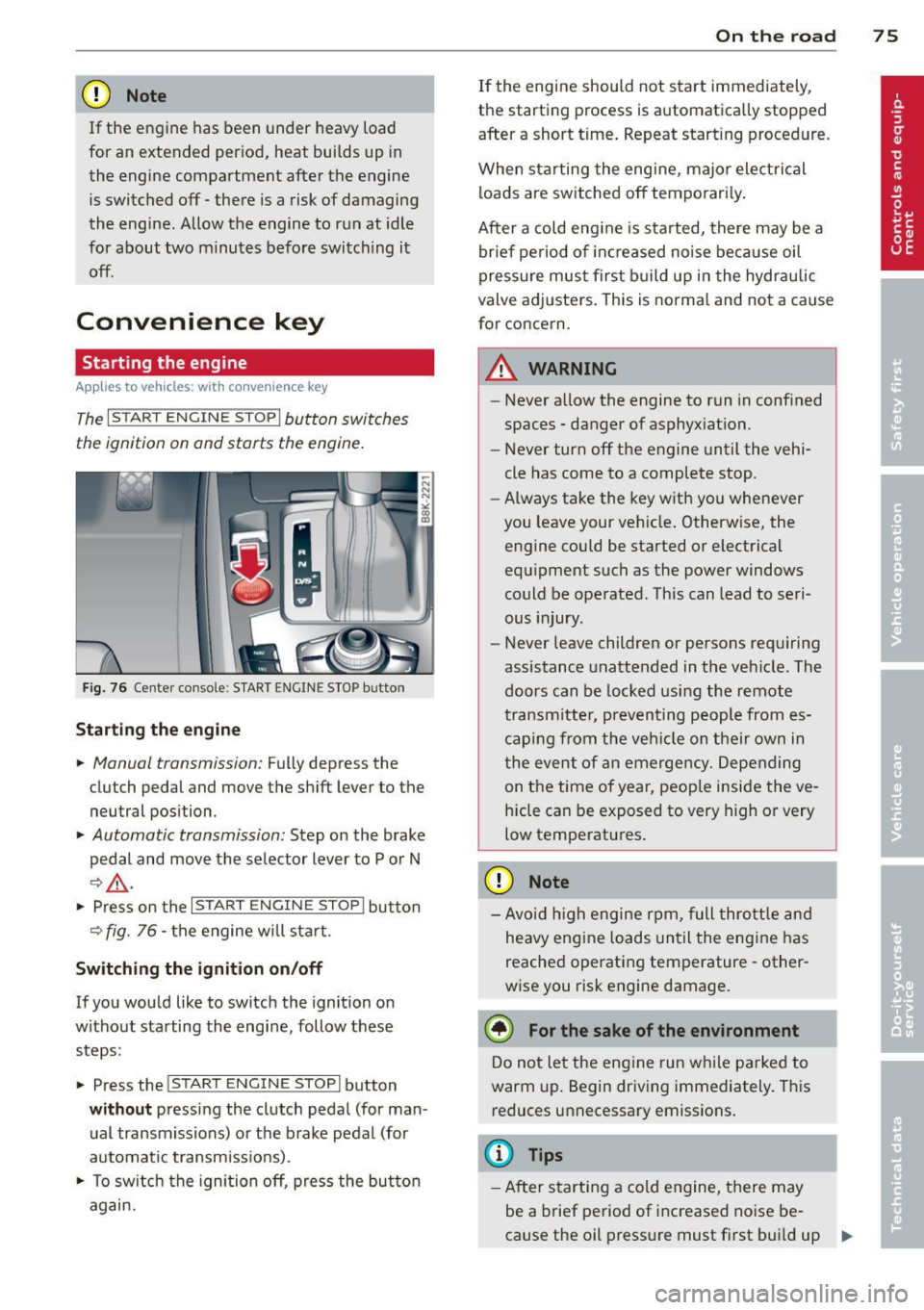
The I STAR T ENGINE ST OPI button switches
the ignition on and starts the engine.
Fig. 76 Ce nter console : S TART ENGINE STOP b utto n
Starting the engine
.. Manual transmission: Fully depress the
clutch pedal and
move the shift lever to the
neutral position .
.. Automatic transmission: Step on the brake
pedal and
move the selector lever to P or N
~ .&, .
.. Press on the I STAR T ENGINE S T OPI button
~ fig . 76 - the engine will sta rt.
Switching the ignition on/off
If you would like to switch the ignition on
without starting the engine, follow these
steps :
.. Press the
!START E NGIN E STOPI button
without pressing the clutch pedal (for man
ual transmissions) or the brake pedal (for
automatic transmissions) .
.. To switch the ignition off, press the button
again.
On the road 75
If the engine should not start immediately,
the starting process is automatically stopped
after a short time. Repeat starting procedure .
When starting the engine , major electrical
loads are switched off temporarily.
After a cold engine is started, there may be a
brief period of inc reased noise because oil
pressure must first build up in the hydraulic
valve adjusters. This is norma l and not a cause
for concern.
A WARNING
- Never allow the engine to run in confined
spaces - danger of asphyxiation.
- Never turn off the engine until the vehi
cle has come to a complete stop.
- Always take the key with you whenever
you leave your vehicle. Otherwise, the
engine could be started or electrical
equipment such as the power windows
could be operated . This can lead to seri
ous injury .
- Never leave children or persons requiring
assistance unattended in the vehicle. The
doors can be locked using the remote
transmitter, preventing people from es
caping from the vehicle on their own in
the event of an emergency. Depending
on the time of year, peop le inside the ve
hicle can be exposed to very high or very
low temperatures .
CD Note
-Avo id high engine rpm, full throttle and
heavy engine loads until the engine has
reached operating temperature - other
wise you risk engine damage.
@ For the sake of the environment
Do not let the engine run while parked to
warm up. Begin driving immediately. This
reduces unnecessary emissions.
(D Tips
-After starting a cold engine, there may
be a brief period of increased noise be-
cause the oil pressure must first bui ld up
II-
Page 78 of 294
76 On the road
in the hy dra ulic valve adjusters. This is
norma l and not a cause for concern.
- If you leave the vehicle with the ignit ion
switched on, the ignition will switch
off
after a certain period of time . Please
note that e lectrica l equipment such as
exter ior lights w ill switch
off as well
when that happens.
Switching engine off
Applies to vehicles: with conven ience key
" Bring your vehicle to a complete stop.
" Automat ic transm iss ion: Move the se lector
lever to the P or N pos it ion.
" Press the
!START ENGINE STOPI button
~ page 75, fig . 76.
St eering lock
The steering locks when you t urn the engine
off us ing the I STAR T ENGINE STOP I button
and open the dr iver's door. The locked stee r
i ng helps p reven t vehicle theft.
Emergency off
If necessary, the eng ine ca n be sw itched off
with the selector leve r in the R o r D/S pos i
tions. To do so, step on the brake pedal and
p ress and hold the
I START ENGINE STOP I but
ton vehicle speed must be less th an 6 mph
(10 km/h).
_& WARNING
- Never t urn off the eng ine before the ve
hicle has come to a complete stop . The
full f unction o f the brake booster and the
power steering is not guaranteed. You
must use more force to turn or brake if
necessary. Because you cannot steer and
brake as you usua lly would, this could
lead to crashes and se rious injur ies.
- For safety reasons, you s hould always
par k your vehicle with the se lector lever
in P. Ot herwi se, the ve hicle co uld i nad
vertent ly roll away.
- T he ra diator fan ca n continue to ru n for
up to 10 mi nutes even after yo u have
tu rne d off the eng ine and remove d the ignit
ion key. T he radiator fan can a lso
tur n on again if the engine coo lant heats
up because of intense sunlight or heat
bu ild-up in the engine compartment.
- Always take the key w ith you whenever
you leave your ve hicle. Otherw ise, the
eng ine could be sta rted or elect rical
equ ipme nt such as the power windows
could be ope rated. This can lead to seri
o us injury.
(D Note
If the engine has bee n under heavy load
fo r an extended pe riod, heat bu ilds up in
the engine compartment after the engine
i s sw itched off -there i s a r is k of damag ing
the e ngine. A llow the eng ine to run at i dle
for about two minutes before switching it
off.
Driver messages
Ignition i s on
This message appears and a warning tone
sounds if you open the d river's door when the
ignition is sw itched on.
No key id entified
This message appears when t he
I S TART ENGI NE STOPI button is pressed if
there is no master key ins ide the veh icle or if
the system does not recognize it . Fo r exam
ple, the master k ey cannot be recognized if it
is covered by an object (e.g. al uminum b rief
case) which
screens the radio s ignal. Elec tron
ic dev ices such as cell phones can also inter
fere with the radio s ignal.
Press brak e pedal to start engine
This message appears if you do not press the
brake pedal to start the eng ine in a veh icle
with an automat ic transm iss ion.
Press clutch pedal to sta rt engine
T his message ap pears if you do not press the
clutch pedal to start the engine in a vehicle
with a manual transmission. .,.
Page 84 of 294
82 On the road
• To increase/dec rease the speed qu ickly,
hold the lever in the
G) !Q direction unti l
the des ired speed is d isplayed.
You can a lso press the accelerator pedal down
to increase your speed , e .g. if you want to
pass someone . The speed yo u saved earlier
will resume as soon as you let off of the accel
erator pedal.
If , however, you exceed your saved speed by
6 mph (10 km/h) for longer than 5 minutes ,
the cruise contro l will be turned off tempora
rily. The green symbol in the display turns
white . The saved speed remains the same .
Presetting your speed
You con preset your desired speed while the
vehicle is not moving.
• Switch on the ignition.
• Pu ll lever into pos ition
CD c:> page 81 ,
fig. 79.
• Press the lever in the 0 or O direction to
incr ease or decrease yo ur speed .
• Re lease the lever to save that speed .
This funct ion makes it possible, for example,
to save the speed you want before driving on
the hig hway . Once o n the hig hway, activate
the cruise contro l by pulling the lever towa rd
(D .
Switching off
Temporary deactivation
• Pres s the bra ke peda l, or
• Manual transmission : Keep the clutch pedal
pressed down
longer , or
• Press the lever into position @ (not clicked
into p lace)
¢ page 81, fig . 79, or
• Drive for longer than 5 minutes at more
t h an 6 mph (10 km/h) above the stored
speed .
Switching off completely
• Press lever into position @(clicked into
place), or
• Switch the ignition off. The speed you saved will be retained if the
cruise control has been switched off tempora
rily . To resume the saved speed, let up on the
brake or clutch pedal and pu ll the lever to po
s ition (!).
Switching the ignition off erases the saved
speed.
_& WARNING
You shou ld only return to the saved speed
if it is not too fast for the current traffic
conditions -risk of an accident!
Page 85 of 294
Transmission Manual transmission
Gearshift lever
App lies to vehicles: with manu al transmission
The clutch pedal must be depressed all the
way before you can start the engine.
T he manua l transm ission in your Audi is
equ ipped w ith an
interlock-feature.
~ Depress the clutc h pedal all t he way .
~ Start the eng ine with the gea rshift lever in
Ne utral and the clutch peda l depressed.
(D Note
Always dep ress the clutch peda l fully when
chang ing gears . Do not hold the vehicle on
a hill with the clutch pedal partially de
pressed . This may cause p remature clutch
wear or damage .
@ Tips
-Resting your hand on the gearsh ift leve r
knob while driving will cause prematu re
w ear i n the t ransm ission.
- The back -up lights go on when you s hift
i nto Reverse w ith the igniti on o n.
Gearshift pattern (6-speed manual
transmission)
Applies to vehicles: with man ual transmission
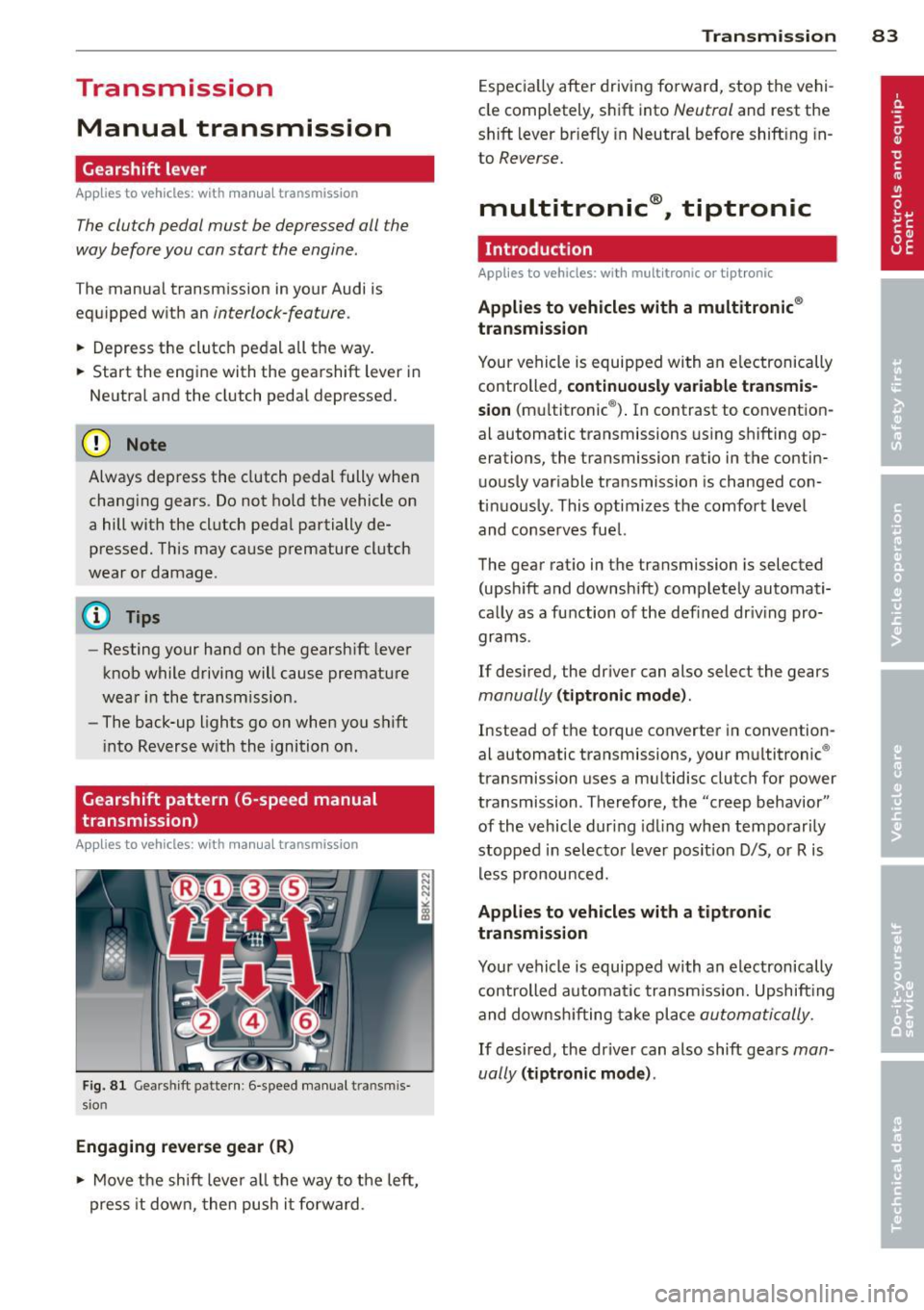
F ig . 8 1 Gears hift patte rn: 6 -speed manu al tran smi s
sio n
Engaging reverse gear (R)
~ Move t he sh ift leve r a ll the way to the left,
press it d ow n, then push it fo rward .
Transm ission 83
Espec ia lly afte r drivi ng fo rward, stop the vehi
cle completely, s hift into
Neutral and rest the
shift lever br iefly in Neutra l before shift ing in
to
Reverse .
multitronic ®, tiptronic
Introduction
App lies to vehicles: with multitronic or tiptr onic
Applies to vehicles with a multitronic ®
transmission
You r vehicle is equip ped wi th an e lectronically
controlled,
continuou sly variable transmis
sion (m ultitronic ®). In contrast to convention
al automatic transmissions us ing shifting op
erations, the transmission ratio in the contin uo usly var iable transmission is changed con
t in uously . This optimizes the comfort level
and conse rves fue l.
The gear rat io in the transmission is selected
(upsh ift and downshift) comp letely automati
ca lly as a function of the def ined dr iv ing pro
grams.
If desired, the driver can also select the gears
manually (t iptronic mode) .
Instead of the torque converter in convention
al automatic transmissi ons, your m ultitronic ®
transmission uses a mu ltidisc clutch for power
transmission . Therefore, the "creep behavior"
of the vehicle dur ing idling whe n temporar ily
st opped in selec to r l ever pos it ion D/S, or R is
l ess pronounced.
Applies to vehicles with a tiptronic
transmission
Your vehicle is equipped with an electronically
controlled automa tic transmiss io n. Upshift ing
and downsh ifting take place
automati cally.
If desired, the driver can also shift gears man
ually
( tiptronic mode ).
Page 86 of 294
84 Transmi ssion
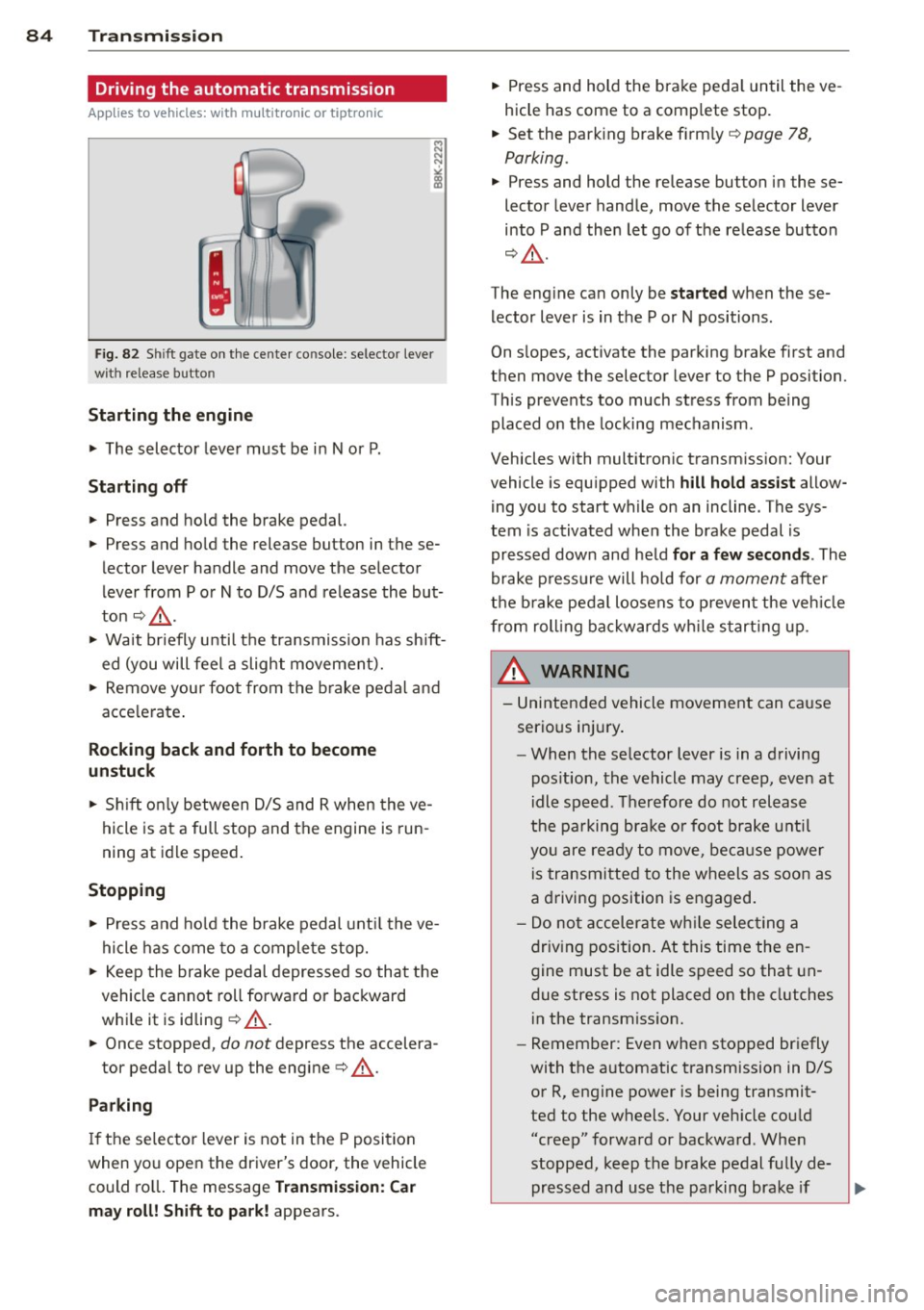
Driving the automatic transmission
App lies to vehicles: with multitron ic or tiptro nic
Fig. 82 Sh ift gate on the center co nso le : selector lever
with release button
Starting the engine
• The selector lever must be in N or P.
St arting off
• Press and hold the brake pedal.
• Press and hold the release button in these
lector lever handle and move the selector
lever from P or
N to D/S and release the but
ton¢ ,&..
> Wait briefly until the transmission has shift
ed (you will feel a slight movement).
> Remove your foot from the brake pedal and
acce lerate .
Rocking back and forth to become
un stuc k
• Sh ift on ly between D/S and R when the ve
hicle is at a full stop and the engine is run
ning at idle speed .
Stopp ing
> Press and ho ld the brake pedal unt il the ve
hicle has come to a complete stop.
• Keep the brake pedal depressed so that the
vehicle cannot roll forward or backward
whi le it is idling ¢,&. .
• Once stopped,
do not depress the accelera-
tor pedal to rev up the engine¢,&..
Parking
If the selector lever is not in the P position
when you open the driver's door, the vehicle
could ro ll. The message
Tra nsmi ssio n: C ar
m ay roll! Shift to p ark!
appears. •
Press and hold the brake peda l until the ve
hicle has come to a comp lete stop.
• Set the park ing brake firm ly ¢
page 78,
Parking.
• Press and hold the release button in these
lector lever handle, move the se lector lever
into P and then let go of the release button
¢ ,&. .
The eng ine can only be
s ta rt e d when these
lector lever is in the P or N positions .
On s lopes, activate the parking brake first and
then move the selector lever to the P position.
This prevents too much stress from being
placed on the locking mechanism.
Vehicles with multitronic transmission: Your
vehicle is equ ipped with
hill hold as sist allow
ing you to start while on an incline . The sys
tem is activated when the brake pedal is
pressed down and held
f or a few s econd s. The
brake p ressu re will hold for
a moment after
the b rake peda l loosens to p reven t the veh icle
from roll ing bac kwards wh ile s tarting up .
_& WARNING
-= -
- Unintended vehicle movement can cause
serio us injury .
- When the se lector lever is in a driving
pos ition, the vehicle may creep, even at
idle speed. Therefore do not release
the pa rking bra ke o r foot brake u ntil
you are ready to move, beca use power
is transmitted to the wheels as soon as
a driving position is engaged.
- Do no t accelerate wh ile selecting a
driv ing position. At this time the en
gine must be at idle speed so that un
due stress is not placed on the clutches
in the transmiss ion.
- Remember: Even when stopped briefly
with the automatic transmission in 0/5
or R, engine power is being transmit
ted to the wheels. Your veh icle cou ld
"creep" forward or backward . Whe n
stopped, keep the brake pedal fu lly de
pressed and use the parking brake if
Page 91 of 294
There is a system malfunction in the transmis
sion. You may continue driving. Drive to your
authorized Audi dealer or qualified repair fa
cility soon to have the malfunction corrected.
[O] Transmission malfunction: Limited driv·
ing functionality
There is a system malfunction in the transmis
sion . The transmission is switching to emer
gency mode. This mode only shifts into cer
tain gears or will no longer shift at all. The en
gine may stall. Drive to your authorized Audi
dealer or qualified repair facility immediately
to have the malfunction corrected .
[O] Transmission malfunction: Stop vehicle
and shift to park.
Do not continue driving. Select the P selector
lever position and see your authorized Audi
dealer or qualified repair facility for assis
tance.
([) Note
If the transmission switches to emergency
mode, you should take the vehicle to an
authorized Audi dealership as soon as pos
sible to have the condition corrected.
Emergency release of the selector lever
Applies to vehicles: with multitronic or tiptro nic
If the vehicle's power supply foils, the selec
tor lever can be released in an emergency.
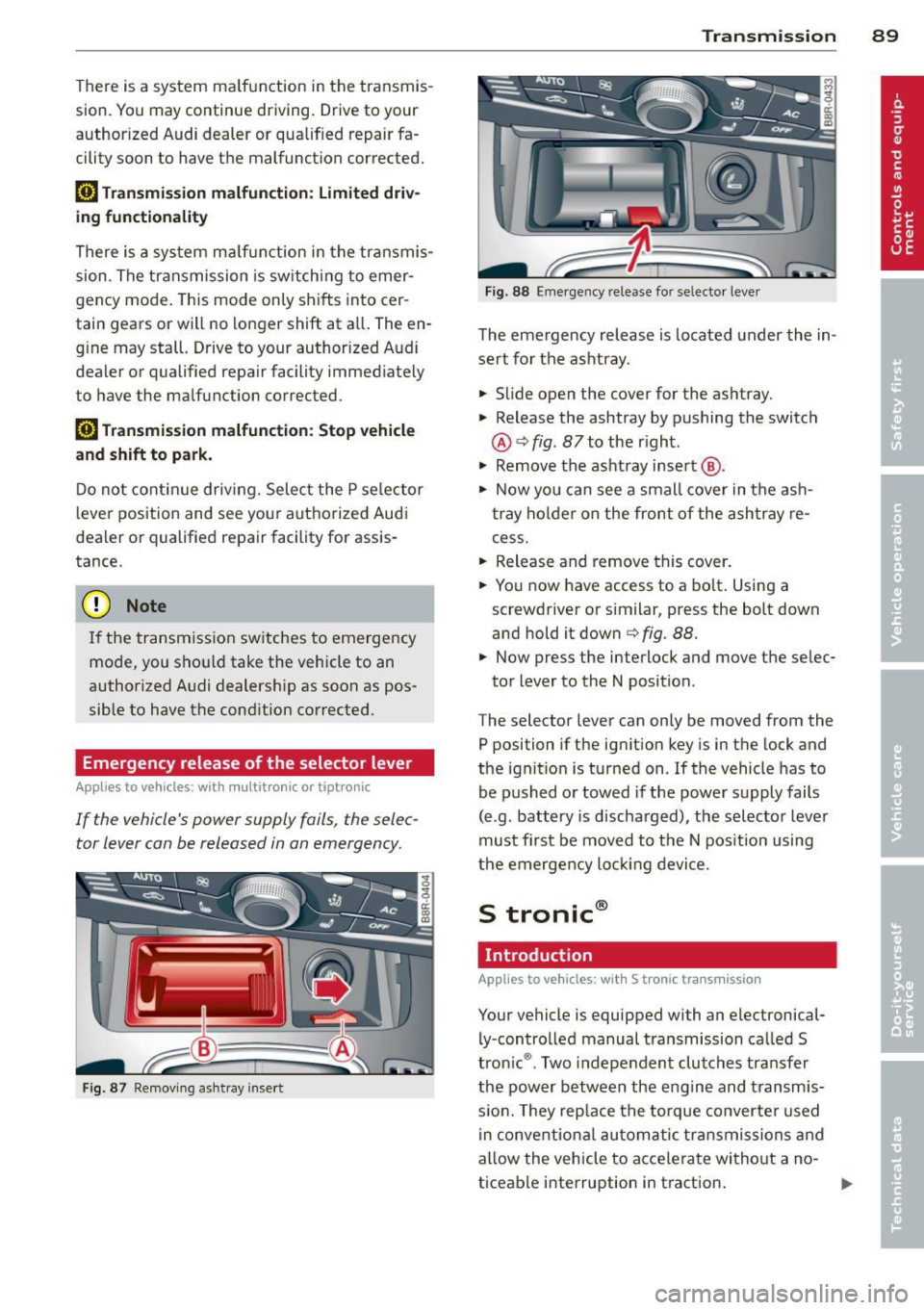
Fig . 87 Removing ashtray insert
Transmission 89
Fig . 88 Emerge ncy release fo r se lecto r lever
The emergency release is located under the in
sert for the ashtray.
.,. Slide open the cover for the ashtray.
.,. Release the ashtray by pushing the switch
@ ¢
fig. 87 to the right .
.,. Remove the ashtray insert @ .
.,. Now you can see a small cover in the ash
tray holder on the front of the ashtray re
cess .
.,. Release and remove this cover.
.,. You now have access to a bolt. Using a
screwdriver or similar, press the bolt down
and hold it down ¢
fig. 88.
.,. Now press the interlock and move the selec-
tor lever to the N position .
The selector lever can only be moved from the
P position if the ignition key is in the lock and
the ignition is turned on . If the vehicle has to
be pushed or towed if the power supply fails
(e .g . battery is discharged), the selector lever
must first be moved to the N position using
the emergency locking device.
S tronic®
Introduction
Applies to vehicles : with S tronic transmission
Your vehicle is equipped with an electronical
ly -controlled manual transmission called S
tronic ®. Two independent clutches transfer
the power between the engine and transmis
s ion. They rep lace the torque converter used
in conventional automatic transmissions and
allow the vehicle to accelerate without a no
ticeable interruption in traction.