heating AUDI A4 SEDAN 2013 Owners Manual
[x] Cancel search | Manufacturer: AUDI, Model Year: 2013, Model line: A4 SEDAN, Model: AUDI A4 SEDAN 2013Pages: 294, PDF Size: 73.71 MB
Page 24 of 294
22 Instruments and warning/indicator lights
If the message appea rs, there is a mal func
tion in the headlights or lig ht switch.
Dr ive to yo ur autho rize d Audi deale r i mmedi
a te ly to have the mal func tion cor re cte d.
8_ WARNING
- Ligh t bul bs are pressurized and co uld ex
plode while t hey are being changed caus
ing ser ious persona l injury.
- W ork w ith due care when handling the
high-volta ge section of gas discha rge
(xenon) lights*. Fai lure to do so could re
sult in death or se rious i njury.
Have the bulb replaced or t he connection
re paired by yo ur auth o rized Au di Service
department.
~()) Headlight range control
Applies to vehicles: with headlight range control
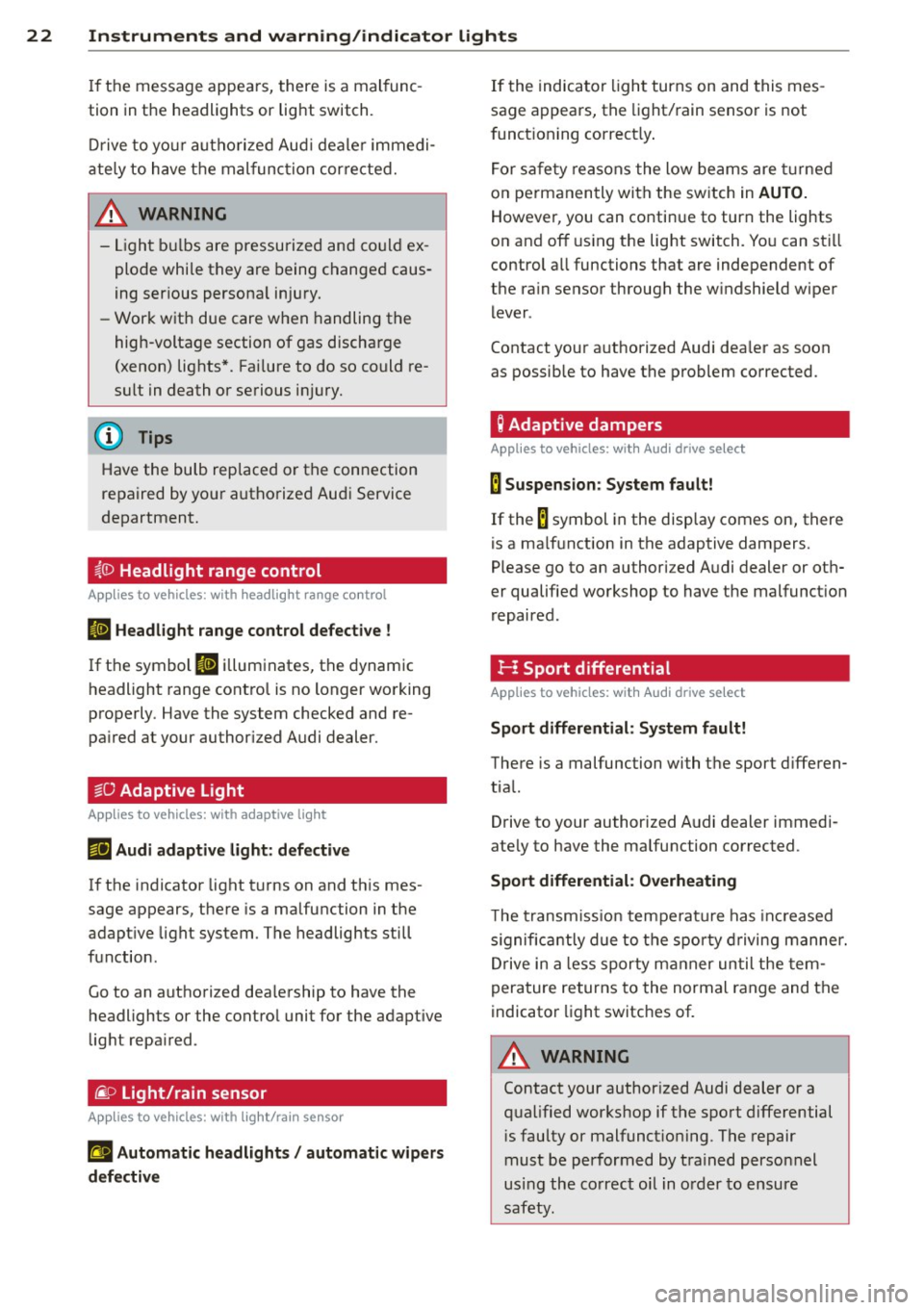
El Headlight range control defective !
If t he symbo l El il lum inates , the dynam ic
headlight range cont ro l is no longer wo rking
properly . Have the system checked and re
pa ired at your author ized Audi dealer.
§0 Adaptive Light
Applies to vehicles: with adaptive light
mil Audi adaptive light : defective
If the indicator light turns on and th is mes
sage appears, there is a malfunction in the
adapt ive light system. The headlights still
f u nction .
Go to an authori zed dea lership to have the
headlights or the contro l unit for the adapt ive
light repa ired .
~D Light/rain sensor
Applies to vehicles: with light/rain sensor
tfl Automatic headlights / automatic wipers
defective
If the indica to r li ght turns on and this mes
sage a ppears, the light/ rain senso r is not
f unct ioning correct ly .
F o r sa fe ty reasons the low be ams are turne d
o n pe rmanen tly with the sw itch in
AUTO.
However, you can conti nue to turn the lights
o n and off using the light switch. Yo u can st ill
control a ll functions that are independent of
the ra in sensor through the w indshield w iper
l ever .
Contact your a uthorized Aud i dea ler as soon
as possible to have the problem co rrected .
Q Adaptive dampers
Applies to vehicles: with Audi drive select
B Suspension : System fault!
If the B symbol in the disp lay comes on, there
is a ma lf u nction in the adaptive dampers.
Please go to an authori zed A udi dealer or ot h
er qualified wo rkshop to have the malfunct ion
r epaired .
I-: Sport differential
Applies to vehicles: with Audi drive select
Sport differential : System fault!
There is a malfunction with t he sport d iffe ren
tia l.
Drive to your auth orized A udi dealer immedi
ate ly to have the malfunction corrected .
Sport differential: Overheating
The t ransm iss ion t empe ra tur e has in cr eased
s ignific antly due to t he spo rty dr iving manner .
D rive in a less sporty m anner un til the tem
pera ture re turns to the normal range and the
indicato r light switches of.
8_ WARNING
Contact your author ized Audi dealer or a
q ua lified workshop if the spo rt differential
i s faulty or malfunct io ning . T he repair
must be performed by train ed perso nnel
usi ng the co rr e ct oil in o rder to e nsure
s a fety.
Page 69 of 294
@ Tips
-Never stow the ski sack away when it is
still wet or damp (for example, snow
melting from skis) . A llow it to dry com
plete ly before stowing it away .
- When transporting skis or snowboards,
tighten the securing strap between the
bindings.
- Position skis in the ski sack w ith the
po inted ends facing the front and ski
poles w ith the pointed ends facing the
rear .
- You can lock or unlock the pass-through
using the mechanical key . This prevents
any access to the luggage compartment
from the vehicle interio r.
Parcel shelf
The parce l shelf behind the rear seatback can
be used to carry light items of cloth ing.
& WARNING
No heavy or hard objects should be placed
on the parcel she lf. They are a hazard to
the vehicle occupants during sudden brak
ing. The is a r isk of injury .
Please make sure that the heating wires
for the rear window defogger are not dam
age by abrasive objects.
To ensure problem -free ventilation, the
ventilation s lots between the rear window
and the parce l shelf must not be covered .
Seat s an d sto rage 67
Page 70 of 294
68 Warm and cold
Warm and cold Climate controls
Description
The climate control system warms, cools and
adds humidity to the air in the vehicle interior.
It is the most effect ive when the windows and
sunroof are closed . If there is a build-up of
heat inside the vehicle, ventilation can help to
speed up the cooling process.
I n all heating mode functions except
defrost,
the blower on ly switches to a higher speed
once the engine coolant has reached a certain
temperature.
Condensat ion from the cooling system can
drip and form a puddle of water under the ve
hicle. This is normal and does not mean there
is a leak.
Pollutant filter
The pollutant filter removes pollutants s uch
as dust and pollen from the air.
The air pollutants filter must be changed at
the intervals spec ified in you r Warranty
&
Maintenance booklet, so that the air condi
tioner can properly work.
If you drive your vehicle in an area with h igh
a ir po llution, the fi lter may need to be
changed more frequent ly than specified in
your Aud i Wa rranty
& Ma intenance booklet. If
in doubt, ask your authorized Audi Service Ad
visor for advice .
Key coded settings
The climate control settings are automat ically
stored and assigned to the remote control key
that is in use.
A WARNING
Reduced visibility is dangerous and can
cause accidents.
-
- For safe driving it is very important that
all windows be free of ice, snow and con
densation.
- Comp letely familiarize yourself with the
proper use and function of the heating
and ventilation system and especially how to defog and defrost the windows.
- Never use the windshield wiper/washer
system in freez ing weather unt il you
have warmed the windshield first, using
the heating and ventilation system. The
washer solution may freeze on the wind shie ld and reduce visib ility.
(D Note
- If you suspect that the air conditioner
has been damaged, switch the system
off to avoid further damage and have it
inspected by a qualified dealership.
- Repairs to the Audi air conditioner re
quire special technical know ledge and
special tools. Contact an authorized Aud i
dea ler fo r assistance.
@ For the sake of the environment
By reducing the amount of fuel you use,
you also reduce the amount of pollutants
emitted into the air.
(D Tips
-Keep the air intake s lots (in fro nt of the
w indshield) free from ice, snow and de
bris in order to maintain the proper func
tion of the climate control system.
- T he energy management system may
switch the seat heating* or rear window
defroster off temporarily . These systems
are available again as soon as the energy
balance has been restored.
- Air escapes through vents under the rear
window. When placing items of clothing
on the luggage compartment cover, en
sure that the openings are not covered.
Page 72 of 294
70 Warm and cold
switching recirculation mode on when driving
through a tunnel or when sitting in traffic
c:::> &. .
The IAU TO I button or I@ FRON T I butt on
switches recircu lation mode off .
IAUTO I Switching automatic mode on
Automatic mode mainta ins a constant tem
perature inside the vehicle. Air temperature,
airflow and air distribution are controlled au
tomatically.
Adjusting the temperature
Temperatures between 60 °F (+16 °C) and
84 °F ( +28 °C) can be set . Outside of this
range,
LO or HI will appea r in the climate con
trol system disp lay. At both of these settings,
the climate control system runs continuously
at maximum cooling or heating power . There
is no temperature regu lation.
~ Adjusting the airflow
You can adjust the airflow manually to su it
your needs . To have the airflow regulated au
tomatically , press the
!AUTO ! button.
~ Adjusting the air distribution
You can manually select the vents where the
a ir will flow . To have the air d istribution regu
lated automatically, press the
IAUTOI button .
~ Adjusting seat heating*
Pressing the button switches the seat heating
on at the highest sett ing (level 3) . The LEDs
indicate the temperature leve l. To reduce the
temperature, press the button again . To
switch the seat heating off , press the button
repeatedly until the LED turns off .
After 10 minutes , the seat heating automati
cally switches from level 3 to leve l 2.
I@ FR ON T I Switch the defroster on/off
The windshield and s ide windows are defrost
ed or cleared of condensation as quickly as
possible . The max imum amount of air flows
mainly from the vents below the windshield.
Recirculation mode switches off . Th e tempera
ture is controlled automatically. T
he
!AUTO I button switches the defroster off.
l !iiil R EAR I Switching rear window heater
on/off
T he rea r window heater only operates when
the engine is running. It switches off auto
matically after a few m inutes, depending on
the outside temperature .
T o prevent the rea r window heater from
switching off automatically, press and hold
the
l oo REAR I button for more than 2 seconds .
This remains stored until the ignition is
switched off.
Air vents
You can open and close the center and rear air
vents using the thumbwhee ls. The levers ad
just the direction of the airflow from the
vents.
In vehicles with a 3-zone deluxe automatic cli
mate control system*, you can adjust the air
temperature in the rear by turning the thumb
wheel toward the red side to make it warmer
or toward the b lue s ide to make it cooler.
A WARNING
-- Do not use the recirculation for extended
periods of time . The windows could fog
up since no fresh air can enter the vehi
cle . If the windows fog up, press the air
recir culation butto n aga in imm ediately
to switch off the air recirculation func
tion or se lect defrost.
- I ndivid uals w ith reduced sensitivity to
pa in or temperature could develop burns
when using the seat heating function . To
red uce the risk of injury, these individu
als shou ld not use seat heating.
(D Note
To avoid damage to the heating elements
in the seats, do not kneel on the seats or
place heavy loads on a small area of the
seat.
Page 73 of 294
@ Tips
The seat heating only works when the seat detects body weight on it. P lacing objects
on the seat cou ld create enough we ight to
sw itch seat heat ing on.
Setup
The basic climate control settings can be ad
justed in the radio or MM!*.
~ Select: I CAR I f u nction button > A /C control
button. Or
~ Se lect: I CARI f u nct ion button > Car sys -
tems *
control button > AC.
Automatic recirculation*
When switched on, automatic recirculation
contro ls the recirculation mode automatica lly.
If the windows fog up, press the
1 ~ FRONTI
button.
Synchronization*
When synchronization is sw itched on, the
same settings are applied to both the drive r
a n d front passenger, except for the seat heat
ing/ventilation *. Synchronization switches off
when you ad just the settings on the front pas
senger's side.
You can a lso switc h synchronizatio n on by
press ing and ho lding the knob on the driver's
side.
Warm and c old 71
Page 83 of 294
.. Select : ICAR lfunction button> Car systems
control button > Driver assist > Speed
warning.
Warning thresho ld 2 can be set in the speed
range starting from 20 mph to 150 mph (30
km/h to 240 km/h). Settings can each be ad
justed in intervals of 6 mph (10 km/h).
Cruise control
Switching on
The cruise control system makes it possible to
drive at a constant speed starting at 20 mph (30 km/h).
®
f
®t
0
Fig. 79 Con tro l lev er w it h push-bu tton
Fig. 80 D isplay : S ele ct ed speed
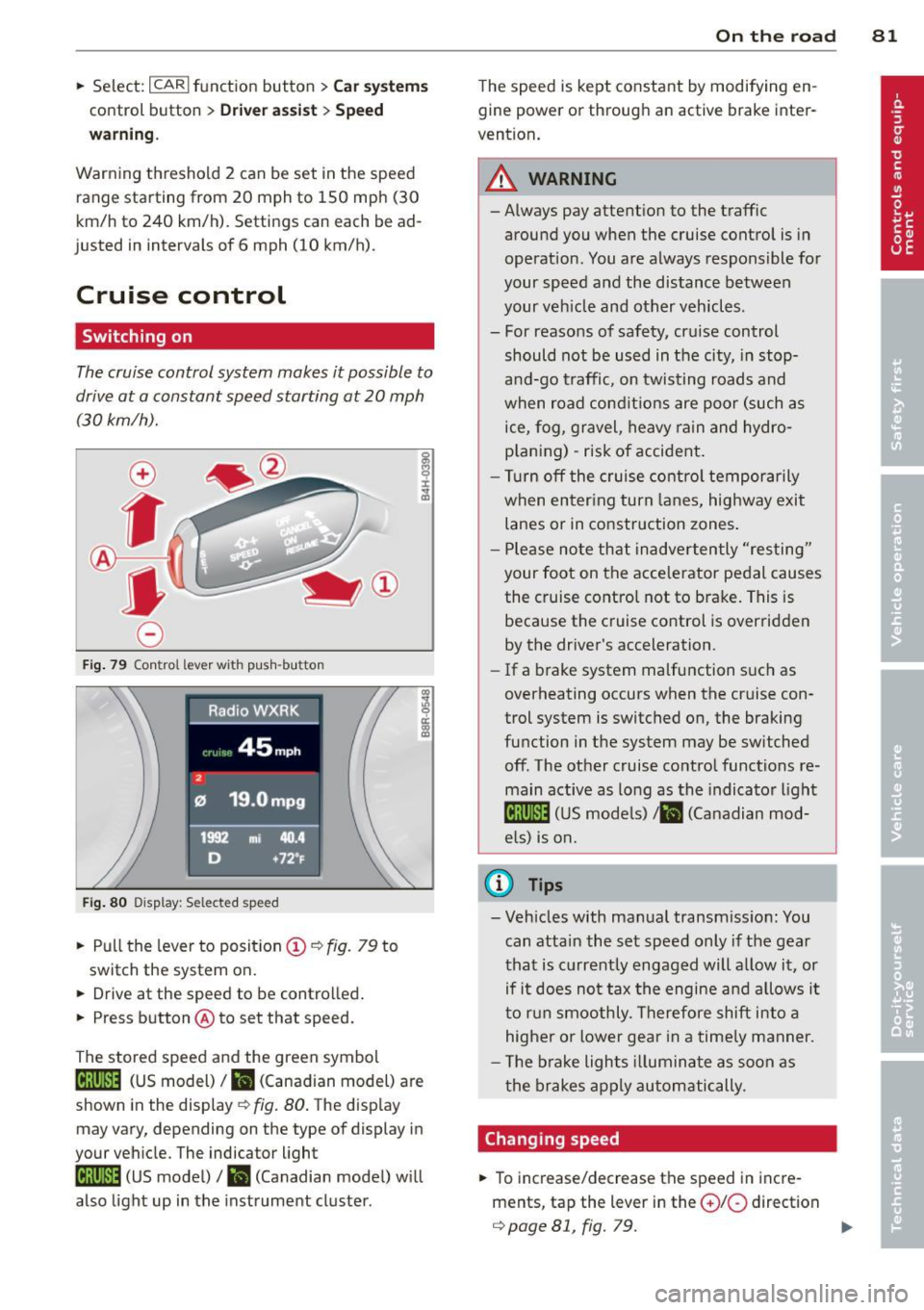
.. Pull the lever to position (D ¢ fig. 79 to
switch the system on.
.. Drive at the speed to be controlled .
.. Press button @to set that speed.
The stored speed and the green symbol
[ij;jl)~i~ (US model)/ .. (Canadian model) are
shown in the display ¢ fig. 80. The display
may vary, depending on the type of display in
your vehicle. The indicator light
[ij;(l)~i~ (US model)/ B (Canadian model) w ill
also light up in the instrument cluster.
On the road 81
The speed is kept constant by modifying en
gine power or through an active brake inter
vention.
_& WARNING
- Always pay attent ion to the traffic
around you when the cruise control is in
operation. You are always responsible for
your speed and the distance between
your veh icle and other vehicles .
- For reasons of safety, cru ise control
should not be used in the city, in stop
and-go traffic, on twisting roads and
when road conditions are poor (such as
ice, fog, gravel, heavy rain and hydro
p lani ng) -risk of accident.
- Turn off the cruise control temporarily
when enter ing turn lanes, highway exit
lanes or in construction zones .
- Please note that inadvertently "resting"
your foot on the accelerator pedal causes
the cruise control not to brake. This is
because the cruise control is overridden
by the driver's acceleration .
-If a brake system malfunction such as
overheating occurs when the cruise con
trol system is switched on, the braking
function in the system may be switched off. The other cruise control functions re
main active as long as the indicato r light
lijj(l )~i~ (US models) li'I (Canadian mod
e ls ) is on.
@ Tips
-Veh icles with manual transmiss ion: You
can attain the set speed only if the gear
that is currently engaged will allow it, or
if it does not tax the engine and allows i t
to run smoothly. Therefore shift into a
higher or lower gear in a timely manner.
- The brake lights illuminate as soon as
the brakes apply automatically.
Changing speed
.. To increase/decrease the speed in incre
ments, tap the lever in the
0 10 direction
¢ page 81, fig. 79. Ill>
Page 90 of 294
88 Transmission
Manual shift program
Applies to vehicles: with multitronic or tiptron ic
Using the manual shift program you can
manually select gears .
Fig. 85 Center console : shift ing t he multitro nic/t ip ·
tronic manual ly
Fig . 86 Steering wheel: Shift buttons
Gear selection with selector lever
"' N
N
~
" a> CD
The tiptronic mode can be selected either with
the vehicle stationary or on the move .
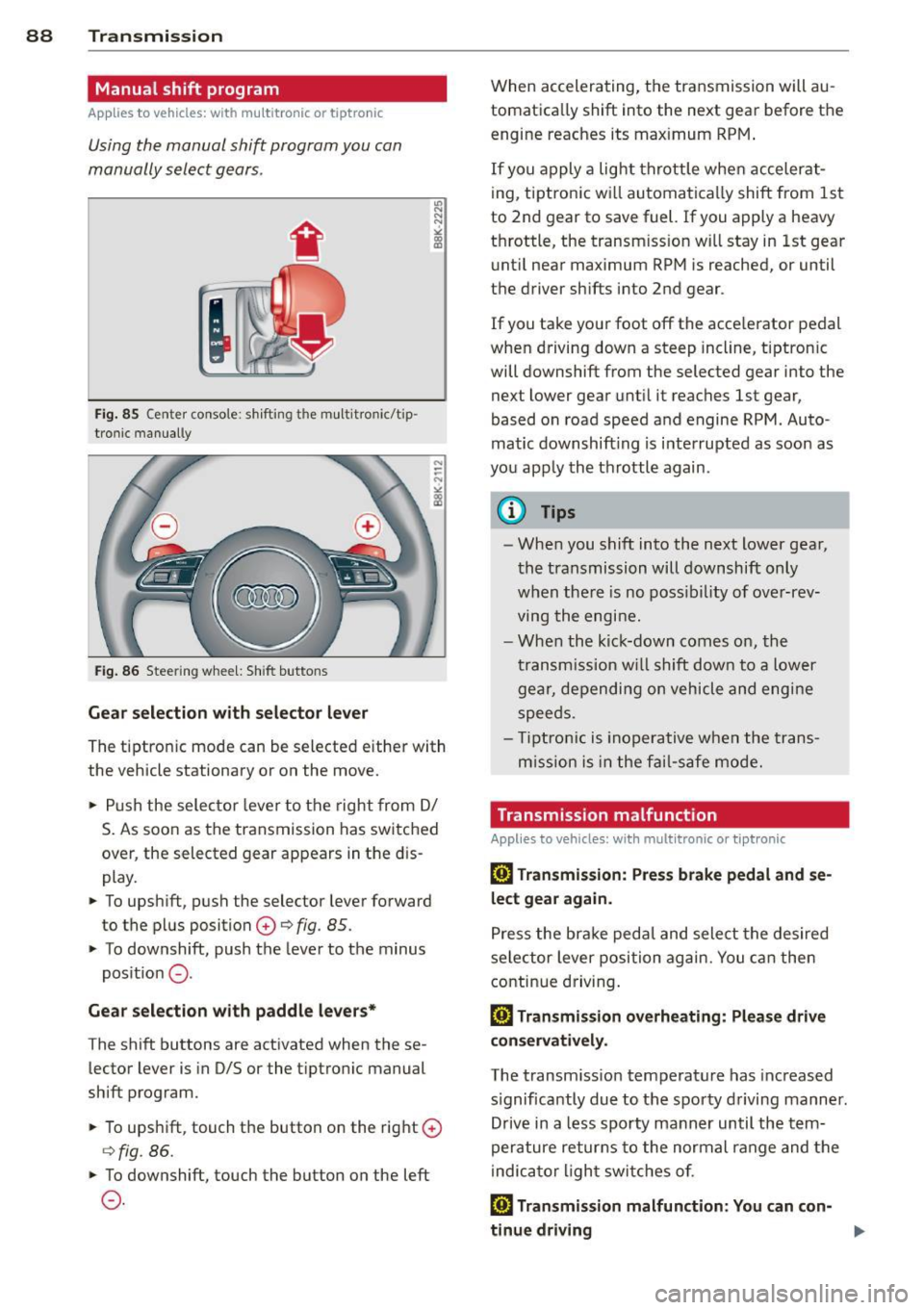
.,. Push the selector lever to the right from
DI
S. As soon as the transmission has switched
over , the selected gear appears in the dis
play.
.,. To upshift, push the selector lever forward
to the plus position
0 ¢ fig. 85 .
.,. To downshift, push the lever to the minus
position
0 -
Gear selection with paddle levers*
The shift buttons are activated when these
lector lever is in D/S or the tiptronic manual
shift program.
.,. To upshift, touch the button on the right
0
¢fig . 86.
.,. To downshift, touch the button on the left
0-
When accelerating, the transmission will au
tomatically shift into the next gear before the
engine reaches its maximum RPM .
If you apply a light throttle when accelerat
ing, tiptronic will automatically shift from 1st
to 2nd gear to save fuel. If you apply a heavy
throttle, the transm iss ion will stay in 1st gear
until near maximum RPM is reached, or until
the driver shifts into 2nd gear .
If you take your foot off the accelerator pedal
when driving down a steep incline, tiptronic
will downshift from the selected gear into the
next lower gear until it reaches 1st gear,
based on road speed and engine RPM . Auto ·
matic downshifting is interrupted as soon as
you apply the throttle again .
(D Tips
-When you shift into the next lower gear,
the transmission will downshift only
when there is no possibility of over-rev
ving the engine.
- When the kick-down comes on, the
transmission will shift down to a lower
gear, depending on vehicle and engine
speeds .
- Tiptronic is inoperative when the trans
m ission is in the fail-saf e mode.
Transmission malfunction
Applies to vehicles: with mult itronic or tiptronic
[O] Transmission: Press brake pedal and se
lect gear again .
Press the brake pedal and select the desired
selector lever position again. You can then
continue driving.
[O] Transmission overheating: Please drive
conservatively.
The transmission temperature has increased
s ignificantly due to the sporty driving manner.
Drive in a less sporty manner until the tern·
perature returns to the normal range and the
indicator light switches of.
[O] Transmission malfunction: You can con-
tinue driving ..,.
Page 97 of 294
@ Tips
-The t ransm ission tempe rat ure may in
crease significantly after using the l a unch control prog ram. If that happens,
the program may not be availab le for a
few m inutes . It will be ava ilab le aga in af
te r a coo l-down period .
- When accelerating us ing t he Launch
Control program, all vehicle parts a re
subjec t to heavy loads. This can res ult in
i n cre ased wea r.
Transmission malfunction
Applies to vehicles: with S tronic transmission
[O] Transmission: Press brake pedal and se
lect gear again.
P ress th e brake pedal and se lect t he des ired
selec to r lever posi tion aga in. You can then
c o ntinue dr iv ing .
[O] Transmission overheating: Please drive
con servatively.
The transmission temperature has increased
sign ificantly due to the sporty dr iving manner .
Drive in a less spo rty manner unt il the tem
pe rat ure retu rns to the norma l range and the
i nd icator light switches of.
[O] Transmission malfunction: You can con
tinue driving
There is a system ma lf u nction in the transmis
sion. You may continue driving. Drive to your
author ized Audi dealer or qua lified repair fa
cility soon to have the malfunc tion cor rected .
[O] Transmission malfunct ion: Limited driv
ing funct ionality
There is a system ma lf u nction in the transmis
sion. The transmission is sw itching to emer
gency mode. This mode only shifts into cer
tain gears or will no longer shift at a ll. The en
g ine may stall. Drive to your authorized A udi
dealer o r qualified repair facility immediately
to have the ma lfunction co rrected .
[O] lij Transmission malfunction: No reverse
You can continue driving
Transm ission 95
T he re is a system mal func tion in the t ransmis
sion . The transm ission is switching to eme r
gency mode . This mode on ly shifts into cer
ta in gears or will no longer shift at al l. The en
gine may sta ll. You cannot engage t he reverse
gear. Drive to your author ized Audi dealer or
qualified repa ir facili ty immed iately to have
the malfunction cor rected.
[O] Transmission malfunction : Stop vehicle
and shift to park.
Do not continue dr iv ing. Se lect the P selector
lever posit io n and see your authori zed A udi
dealer or qualified repair facility for assis
tance.
(D Note
If the transmission switches t o emergency
mode, you should take t he ve hicle to an
a uth orized Audi d ea lership as soon as pos
sible to have the con dit ion corrected .
Selector lever emergency release
Applies to vehicles: with S tronic transmission
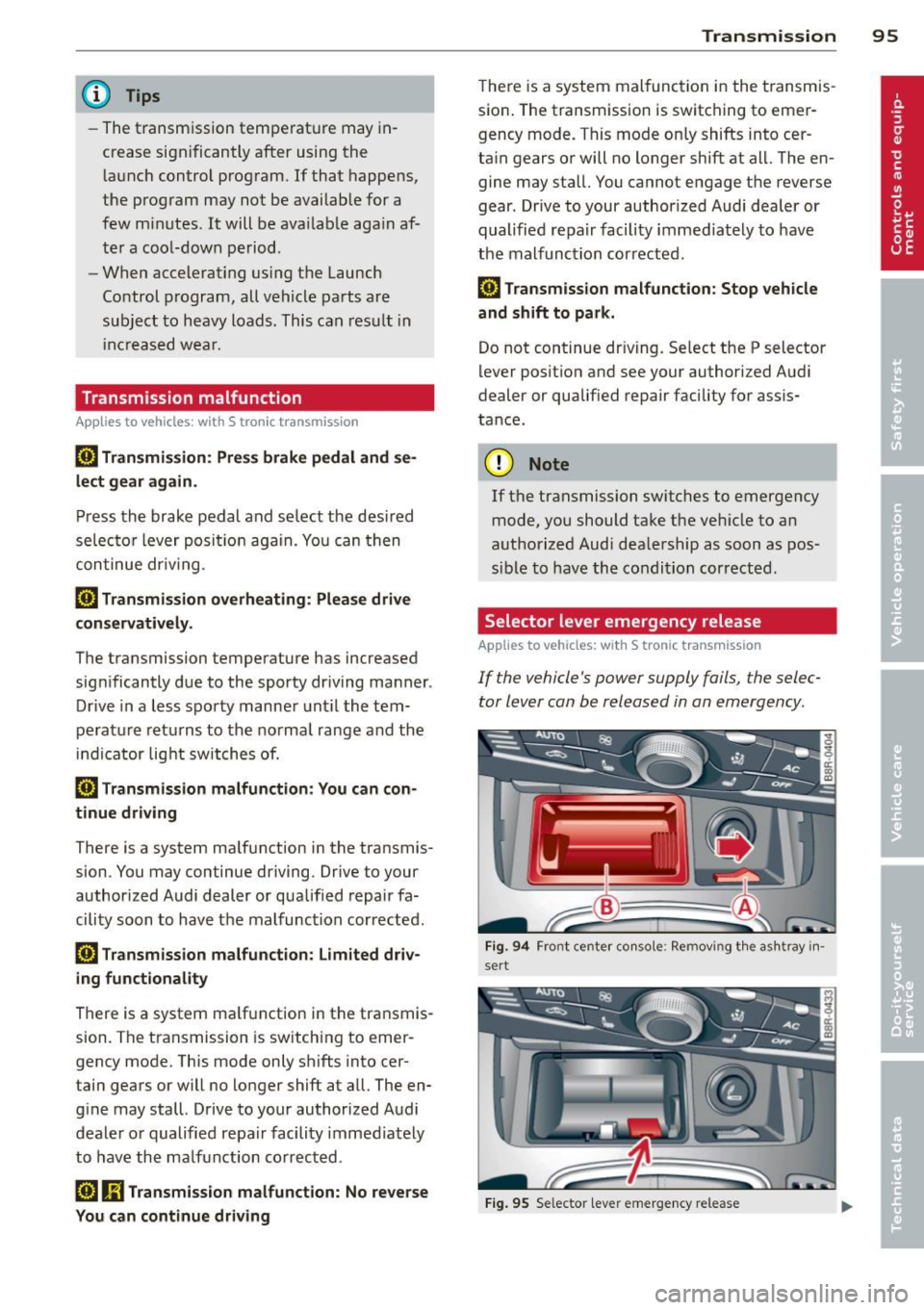
If the vehicle's power supply fails , the selec
tor lever can be released in an emergency.
Fig . 94 Fro nt cente r co nso le : Remov ing t he as htray in ·
sert
Fi g. 9 5 Selecto r lever e merge ncy release
Page 187 of 294
ESC includes and/or works together with the
anti-lock brake system (ABS), brake assist sys
tem, anti -slip regulation (ASR) , e lectronic dif
ferential lock (EDL), dynamic steering* and electronic i nteraxle differential lock* /selective
wheel torque control* . ESC is switched on all
the t ime. I n certain s ituations when you need
less traction, you can switch
off ASR by press
i ng the button~~
page 186, fig. 159 or
~ page 186, fig. 160. Be sure to sw itch ASR
on again when you no longer need less trac
tion.
Anti-lock b ra king s ystem (ABS)
ABS prevents the wheels from locking up
when braking. The vehicle can still be steered
even d uring hard brak ing . Apply ste ady p res
sure to the brake pedal. Do not pump the ped
a l. A pulsing in the brake peda l indicates t hat
the system is he lping you to brake the vehicle .
Brake assist system
The brake assist system can decrease bra king
d istance. It increases braking power when the
d river presses the brake pedal quick ly in eme r
gency situations . You must press and hold the
brake peda l until the situation is over. In
veh icles w ith adaptive cru ise contro l*, the
brake assist system is more sensit ive if the
d istance detected to the veh icle ahead is too
small.
Anti- slip regulati on (ASR)
ASR reduces engine power when the drive
wheels begin to spin and adapts the force to
the road condit ions. This makes it eas ier to
start, accelerate and drive up hills.
Elect ronic diffe renti al lo ck (EDL )
The ED L brakes wheels that are spinning and
transfers the drive power to the other drive
wheel or wheels if the vehicle is equipped with
all-wheel drive*. This function is available up
to about 60 mph (100 km/h) .
In extreme cases, EDL automatica lly switches
off to help keep the brake on the braked whee l
from overheating. EDL w ill switch on again au-
Intellig ent technolog y 185
tomat ica lly when conditions have returned to
norma l.
Dynamic steering*
On vehicles with dynam ic steering*, ESC helps
stab il ize the s teer ing in crit ica l sit uat io ns.
Electronic interaxle differential lock* /
selective wheel torque control*
T he electronic i nteraxle differential lock (front
whee l dr ive) or the se lective whee l to rque
control (all-whee l dr ive) opera tes when dr iv
ing thro ugh curves. The front wheel on the in
side of the c urve or both whee ls on the inside
of the curve are braked selectively as needed .
This min imizes sliding in the front wheels and
allows for more precise driving through
cu rves . The applicable system may not acti
vate when dr iv ing in wet or snowy conditions.
A WARNING
- ESC, ABS , ASR, EDL dynam ic steering*
a nd the elect ronic interaxle differential
loc k* /se lective wheel torque control*
function cannot overcome the laws of
physics. This is especially important on
slippery or wet roads . If the systems be
gin acting to stabilize your vehicle, you
should immediately change yo ur speed
to match the road and traff ic conditions.
Do not let the increased safety provided
by these systems tempt you to take risks .
Doing so will increase the risk of a loss of
veh icle contro l, col lision and ser ious per
sonal injuries.
- Always adapt your speed to road, traffi c
and wea ther conditions. The risk of los
ing con tro l of the vehicle increases when
driving too fast, espec ially through
curves and on slippery or wet roads, and
when dr iv ing too close to vehicles up
ahead. ESC, ABS, the brake ass ist sys
tem, ASR, EDL dynam ic steering* and the
electronic interaxle differentia l lock*/se
lective whee l torque control* function
cannot prevent collisions.
•
•
Page 193 of 294
With the engine turned off
If you listen to the radio, for example, with
the engine turned off or use other MMI func
tions, the battery is being discharged .
If starting capability is jeopardized due to en
ergy consumption, the following warning ap
pears in the MMI display :
Please start the engine soon or the system
will be turned off.
The warning indicates that the system will be
turned off automatically after 3 minutes . If
you wish to continue using the functions , you
have to start the engine.
With the engine running
Although electrical energy is generated when
the vehicle is being driven , the battery can be
come discharged . This happens mostly when
little energy is being generated and a great
deal consumed and the battery's state of
charge is not optimal.
To bring the energy balance back into equili brium, consumers which require especially
large amounts of energy are temporarily cut
back or switched off . Heating systems in par
ticular require a great deal of energy. If you
notice , for example , that the heated seats* or
the heated rear window are not heating, they
have been temporarily cut back or switched
off. These systems will be available again as
soon as the energy balance has been restored.
You will also notice that engine idle speed has
been increased slightly. This is normal and not
a cause for concern . By increasing engine idle
speed the additional energy required is gener
ated and the battery is charged.
Intelligent technology 191
•
•