key battery AUDI A4 SEDAN 2013 Owners Manual
[x] Cancel search | Manufacturer: AUDI, Model Year: 2013, Model line: A4 SEDAN, Model: AUDI A4 SEDAN 2013Pages: 294, PDF Size: 73.71 MB
Page 16 of 294
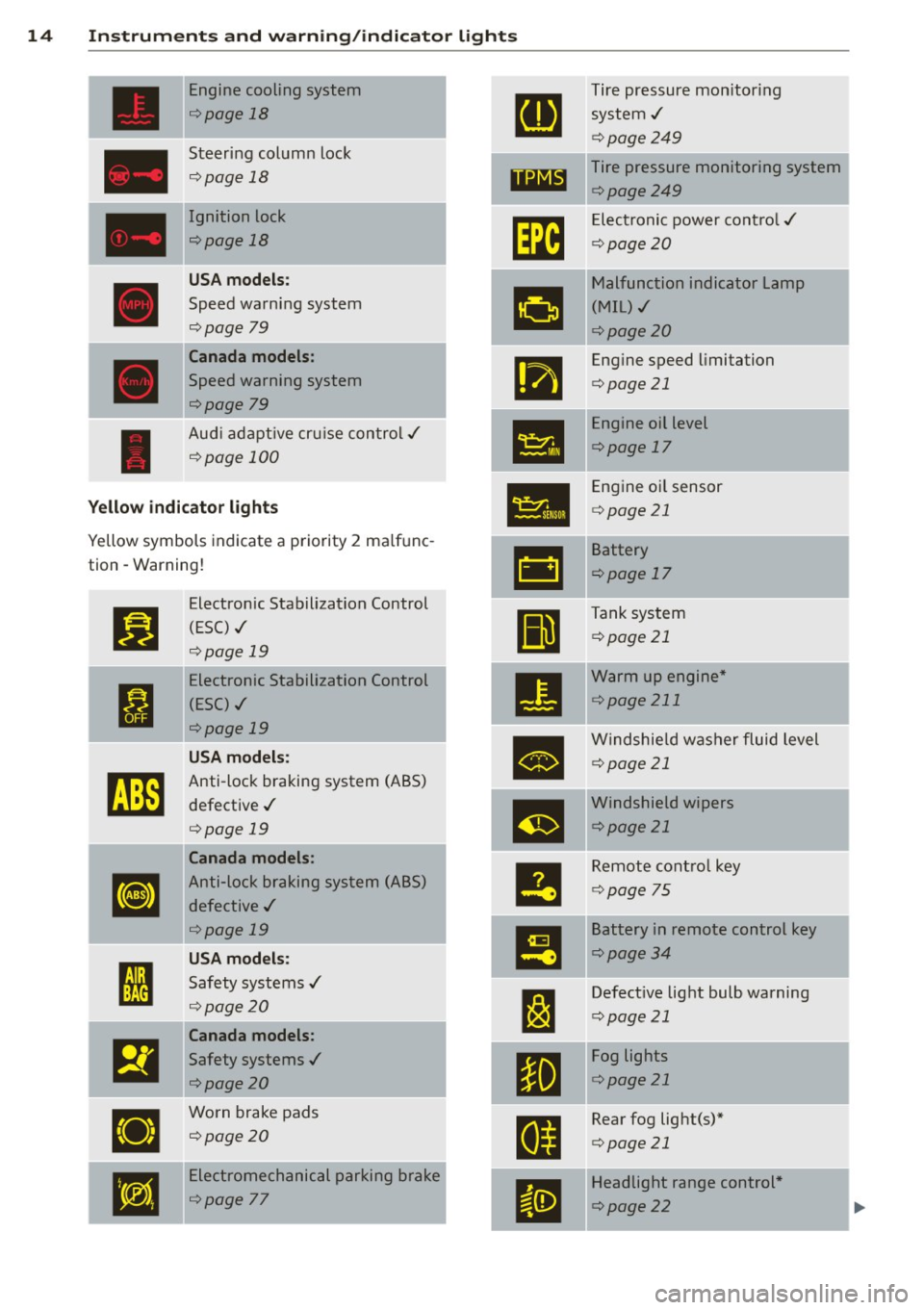
14 Instrum ent s and w arn ing /indic ato r light s
Engine cooling system Tire pressure monitor ing
¢ page 18
system,/
¢page249
Steering column lock Tire pressure monitoring system
¢ page 18
1181~1 ¢page249
Ignition lock
Im
Electronic power cont ro l ,/
r:::;,page 18
c:>page20
U SA mod els:
•
Malfunction indicator Lamp
Speed warning system (MIL),/
r:::;, page 79
c:> page 20
Canada models :
•
Engine speed limitation
Speed warning system c:>page 21
r:::;,page 79
Engine oil level
Aud i adapt ive cru ise control./
•
c:>page 17
¢ page 100
•
Engine o il sensor
Yellow indic ato r lights c:> page 21
Yellow symbols indicate a priority 2 ma lfunc-
-
&1
Battery
tion -Warning!
c:>page 17
Jj]
Electron ic Stabilization Control
Ill
Tank system
(ESC) ,/
c:>page 21
r:::;, page 19
-Electronic Stabilization Control
•
Warm up engine *
ti
(ESC) ./ c:>
page 211
r:::;, page 19
•
Windshie ld washer fluid level
U SA m odel s: c:>page 21
~
Anti-lock braking system (ABS)
defective ,/
m
Windshield wipers
r:::;, page 19 c:>page
21
Canada models :
le
Remote control key
[I]
Anti-lock braking system (ABS)
c:>page 75
defective ,/
r:::;, page 19
I!
Battery in remote control key
USA models: c:>page 34
I
Safety systems ,/ --
l:J
Defective light bulb warning ' r:::;, page 20
c:>page 21
Canada models :
El
Safety systems ,/
•
Fog lights
<=>page20 c:>
page 21
•
Worn brake pads
E
Rear fog light(s)*
<=> page 20
c:>page 21
•
Electromechanical parking brake
II
Headlight range control *
<=>page
77 c:> page 22
Page 36 of 294
34 Openin g and clo sing
keys. Unguarded access to the keys pro
vides children the opportunity to start the engine and/or act ivate vehicle sys
tems such as the power w indows etc . Un
supervised operation of any veh icle sys
tem by ch ildren can res ult in serious in
Jury.
- Do not remove the key from the ignition
lock until the vehicle has come to a com
plete stop. Otherwise the steering col
um n loc k co uld suddenly e ngage -caus
ing the risk of an accident.
@ Tips
- The operation of the remote contro l key
c a n be tempo rarily disrupted by in terfer
ence from tran smi tters in t he v ici nity of
the veh icle work ing in the same frequen
cy ra nge (e.g . a ce ll phone, radio equip
ment).
- Fo r security reasons, replacement keys
are on ly available from Aud i dea le rs .
- Fo r De clarat ion o f Compliance to United
States FCC and Industry Canada regu la
tions
¢ page 275.
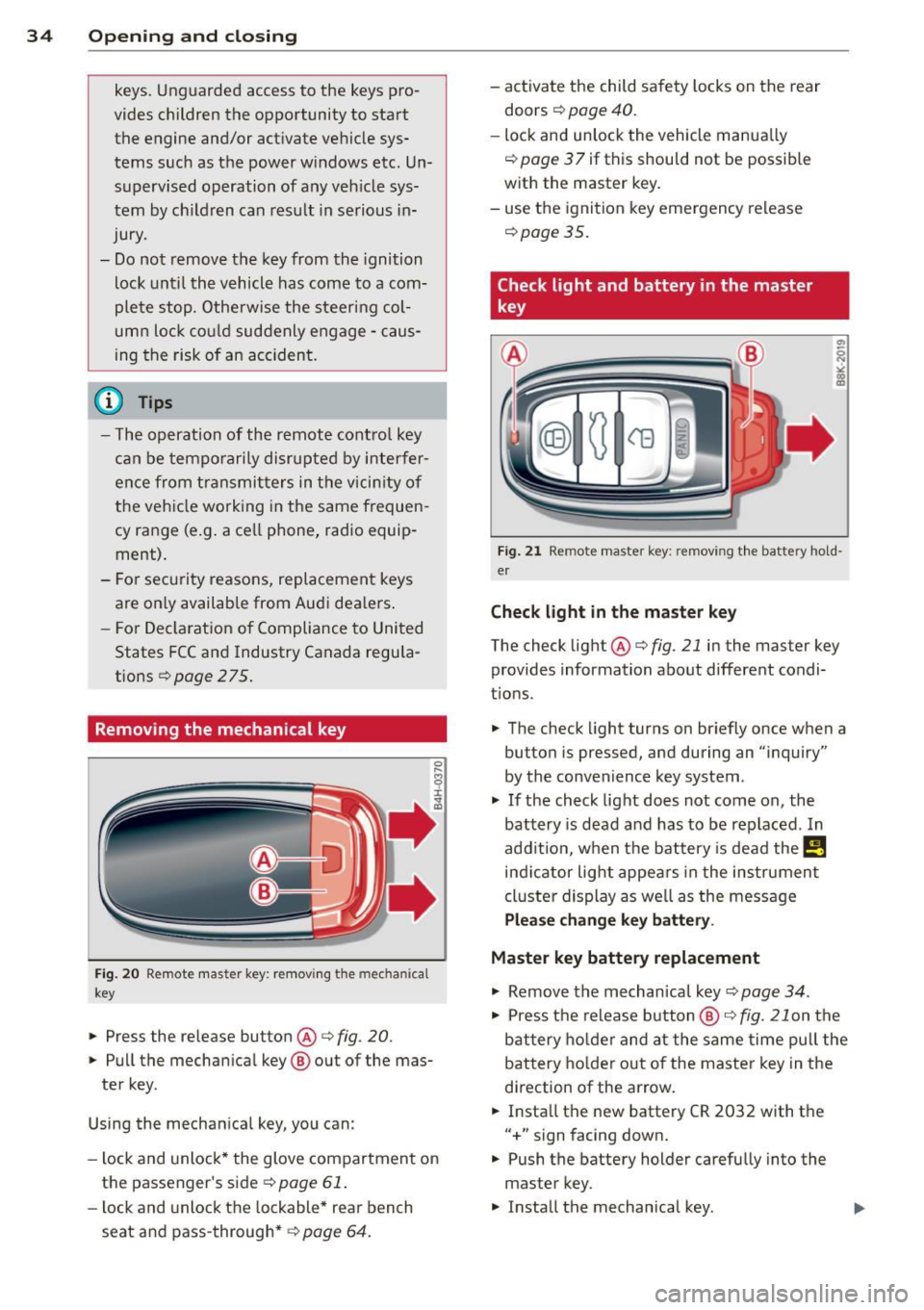
Removing the mechanical key
Fig . 20 Remot e ma ste r key: re mov ing the mec hanic al
key
.. Press the release button @¢ fig. 20.
.. Pu ll the mecha nical key @ out of the mas
te r key .
Using the mechan ica l key, you can :
- l ock and unlock* the glove compartmen t on
the passenger's side ¢
page 61 .
-lock and unlock t he lockable* rear bench
seat and pass-through* ¢
page 64. -
activate the child sa fety locks on the rear
doors ¢
page 40.
- lock and unlock the vehicle manua lly
~ page 3 7 if this should not be possible
w ith the master key.
- use t he ignition key emergency release
~ page 35.
Check light and battery in the master
key
Fig. 21 Rem ote mas ter key: re m ov ing th e ba ttery h old
e r
Check light in the ma ster key
The check light@¢ fig. 21 in the mas ter key
provides information about different condi
t ions .
.. The check light turns on br iefly once when a
button is pressed, and during an "inquiry"
by the convenience key system .
.,. If the check light does not come on, the
battery is dead and has to be replaced . In
add it io n, w hen t he battery is dead
the m
indicator light appea rs in the instrument
cl uster display as we ll as the message
Please change key battery .
Master key battery replacement
.,. Remove the m echan ical key ~ page 34.
.,. Press t he release button @~
fig. 21 on the
b attery ho lde r and at the same time pull the
battery holder o ut o f the master key in the
direction of the arrow .
.. Insta ll the new battery CR 2032 with the
"+ " sign facing down.
.. Push the battery holder carefully into the
master key .
.. Insta ll the mechanical key .
Page 37 of 294
@ For the sake of the environment
Dispose of dead batteries properly so as
not to pollute the environment.
@ Tips
The replacement battery must be the
same specification as the original.
Emergency unlocking of the ignition key
In the event of malfunctions in the electrical
system, it may happen that you cannot re move the ignition key .
• Remove the mechanical key<:? page 34.
• Lock the vehicle using the mechanical key
<:?page 37.
• Have the e lectrica l system inspected by an
authori zed Audi dealership .
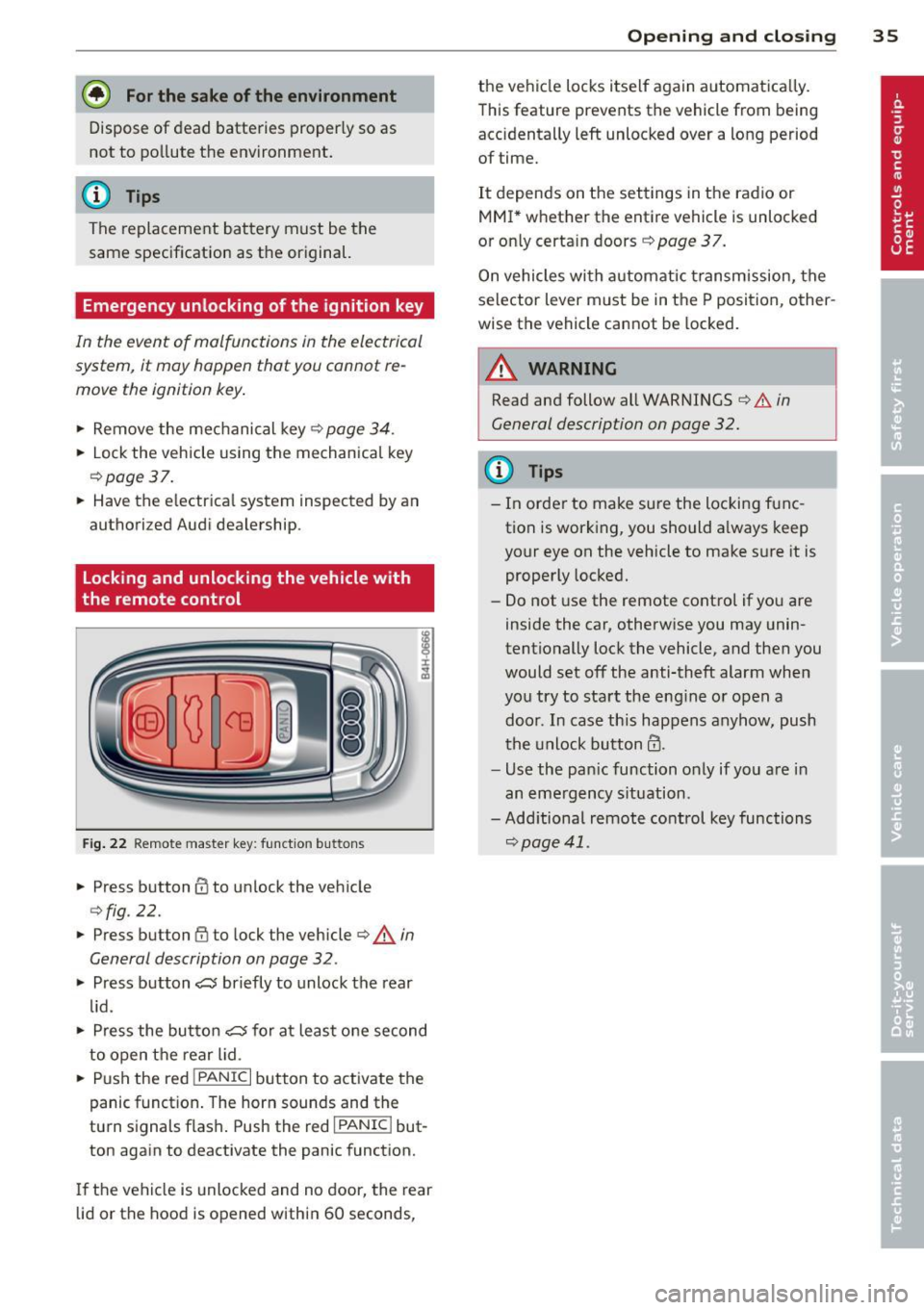
Locking and unlocking the vehicle with
the remote control
Fig. 22 Remote master key: function but tons
• Press button @to unlock the vehicle
Qfig . 22.
• Press button fij to lock the vehicle QA in
General description on page
32 .
• Press button ,c:;5 briefly to unlock the rear
lid .
• Press the button
,c:;5 for at least one second
to open the rear lid .
• Push the red
I PANIC I button to activate the
panic function. The horn sounds and the
turn s ignals flash . Push the red
I PANIC ! but
ton again to deactivate the panic function.
If the vehicle is unlocked and no door, the rear
lid or the hood is opened within 60 seconds,
Opening and closing 35
the vehicle locks itself again automat ica lly.
This feature prevents the vehicle from being
accidentally left unlocked over a long period of time.
It depends on the settings in the radio or
MMI* whether the entire vehicle is unlocked
or only certain doors <:?
page 37.
On vehicles with automatic transmission, the
selector lever must be in the P position, other
wise the vehicle cannot be locked.
A WARNING
Read and follow all WARNINGS ¢.&. in
General description on page
32.
(D Tips
- In order to make sure the locking func
tion is working, you should a lways keep
your eye on the vehicle to make sure it is properly locked.
- Do not use the remote control if you are
inside the car, otherwise you may unin
tentionally lock the vehicle, and then you
would set off the anti-theft alarm when
you try to start the eng ine or open a
door . In case this happens anyhow, push
t he unlock button@.
- Use the pan ic function only if you are in
an emergency s ituation.
-Add itional remote control key functions
¢page 41 .
Page 38 of 294
36 Opening and clo sing
locking and unlocking with convenience
key
Appl ies t o vehicles : wit h convenience key
The doors ond the rear lid can be unlocked
and locked without operating the master key.
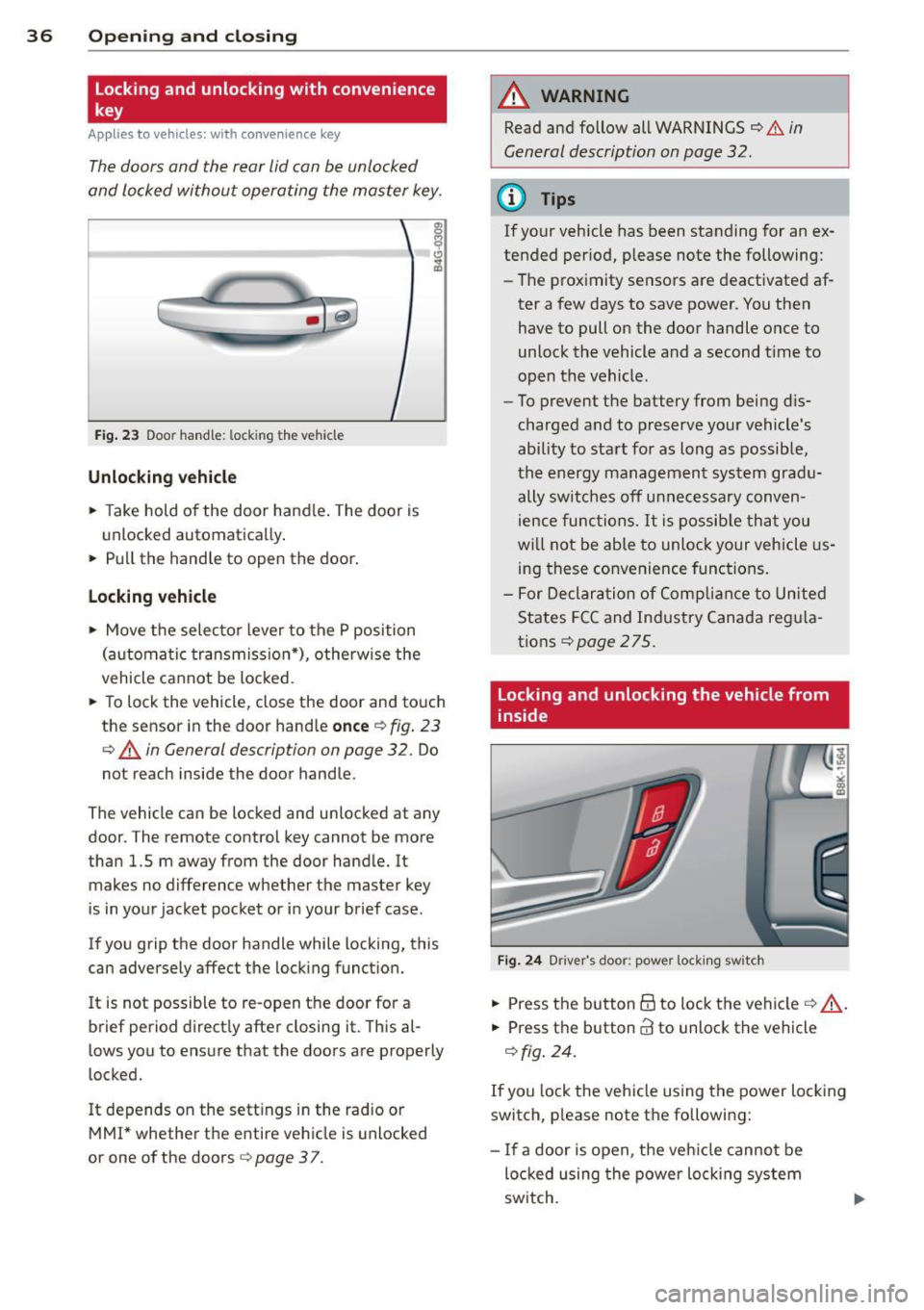
Fig . 23 Door hand le: lock ing the v ehi cle
Unlocking vehicl e
.. Take hold of the door hand le . The door is
unlocked automatically .
.. Pull the handle to open th e door .
locking vehicle
.. Move the selecto r lever to the P position
(a ut oma tic transmiss ion *) , othe rwi se the
vehicle cannot be locked.
.. To lock the vehicle , close the door and touch
the sensor in th e door hand le
onc e¢ fig. 23
c:> A in General description on page 32 . Do
not reach inside the door handle .
The vehicle ca n be locked and unlocked at any
door. The remote control key cannot be more
t han 1.5 m away from the door hand le. It
makes no difference whether the m aster key
is in your jacket pocket or i n your brief ca se .
If you grip the door handle while lo cking, th is
can adversely affect the lock ing funct ion.
I t is not possible to re-open the door for a
brief period direct ly after closing it. This al
l ows you to ensure that the doors are properly
locked.
I t depends on the sett ings in the radio or
MMI* whether the e ntire vehicle is unlocked
or one of the doors
c:> page 3 7 .
A WARNING
-
Read and follow all WARNINGS c:> .&. in
General description on page
32 .
(D Tips
If your vehicle has been standing for an ex
tended per iod, please note the following:
- The prox imity sensors are deactivated af-
ter a few days to save power. You then
have to pull on the door handle once to
unlock the vehicle and a second t ime to
open the vehicle .
- To prevent the battery from being d is
charged and to preserve your vehicle 's
ability to start for as long as possib le,
the energy managemen t system gra du
ally switches off u nnecessa ry c onven
ience func tions.
It is possib le th at you
w ill not be able to unloc k your vehicle us
ing these convenience func tions.
- F or Declar ation of Complian ce to Unite d
States FC C and Ind ustry Canada reg ula
tions
¢ page 275.
locking and unlocking the vehicle from
inside
Fi g. 24 Drive r's doo r: pow er lock ing sw it c h
.. Press the b utton B to lock the vehicle c::> ,& .
.. Press the button @ to unlock the vehicle
c::> fig. 24.
If you lock the veh icle using the power loc king
switch, p lease note the followi ng:
- I f a door is open, the veh icle canno t be
loc ked u sing the power loc king system
sw itch.
Page 44 of 294
42 Opening and clo sing
- Always read and heed WARNING ¢ &. in
General description on page 32.
Correcting window regulator
malfunction
After disconnecting the vehicle battery, the
one-touch up and down feature must be acti
vated again .
.. Pull and hold the power window switch un
til the window is completely closed.
.. Release the switch and pull the switch again
for one second.
Sliding/tilting sunroof
Operation
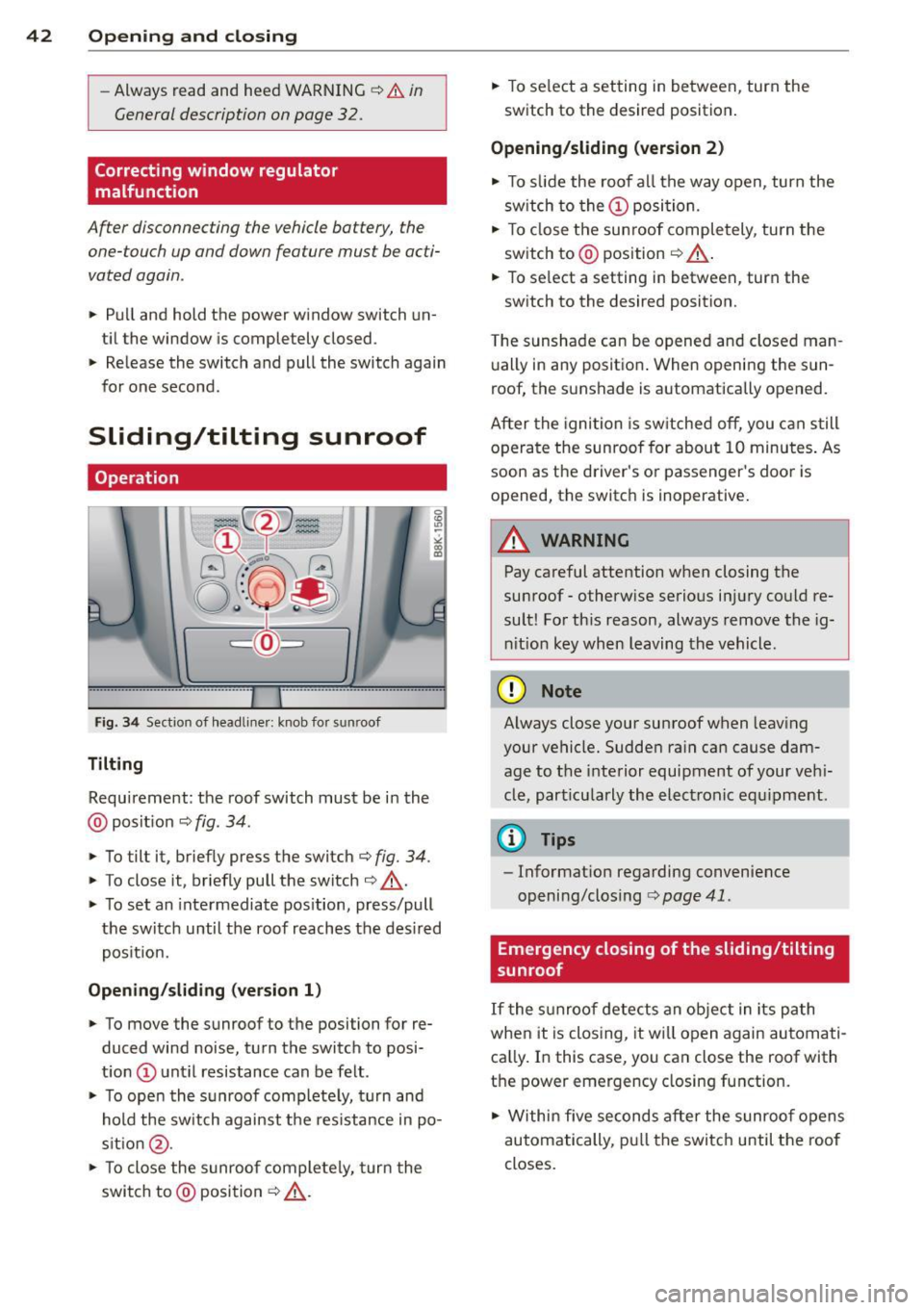
Fig. 3 4 Section of headli ner: knob fo r sunroof
Tilting
Requirement: the roof switch must be in the
@ pos it io n ¢
fig . 34.
.. To tilt it, briefly press the switch ¢ fig. 34.
.. To close it, briefly pull the switch¢.&._.
.. To set an inte rmediate pos ition, press/pull
the switch until the roof reaches the des ired
pos it ion.
Opening/ sliding (version 1 )
.. To move the sunroof to the position for re
duced wind noise, turn the switch to posi
t ion @ unt il resistance can be felt.
.. To ope n the s unroof comp lete ly, t urn and
hold the switch against t he res istance in po
s it ion @.
.. To close the sunroo f comple tely, turn the
switch to @posi tion
¢ .&._ . ..
To se lect a setting in between, turn the
switch to the desired position .
Opening/sliding (version 2)
.. To s lide the roof a ll the way open, turn the
sw itch to the
(D posi tion.
.. To close the sun roof completely, turn the
switch to @ position ¢ .&._ .
.. To se lect a setting in between, turn the
sw itch to the desired position .
T he sunshade can be opene d and closed man
u ally in any posit io n. When openi ng the sun
roof, the sunshade is automatically opened.
After the igni tion is sw itche d off , you can s till
o pera te the sunroof for about 1 0 minutes . As
soon as the driver's or passenger 's doo r is
opened, the switch is inoperative.
_8 WARNING ~ -
Pay careful attention when closing the
su nroof -otherw ise serio us i njury co uld re
sult! Fo r th is reason, always remove the ig
ni tio n key when leaving the vehicle.
(D Note
Always close your sun roof w hen leav ing
your vehicle. Sudde n ra in ca n cause dam
age to t he interior equipment of your ve hi
cle, part icu larly the ele ctronic equ ipment.
@ Tips
- Informat ion regarding convenience
opening/closing
c:> page 41 .
Emergency closing of the sliding/tilting
, sunroof
If the s unroof detects an object in its path
whe n it is closing, it w ill open again automati
ca lly. In this case, you can close the roof with
the power emergency closing function .
.. Within five seconds after the sunroo f opens
au tom atically, pull the switc h until the roof
closes .
Page 91 of 294
There is a system malfunction in the transmis
sion. You may continue driving. Drive to your
authorized Audi dealer or qualified repair fa
cility soon to have the malfunction corrected.
[O] Transmission malfunction: Limited driv·
ing functionality
There is a system malfunction in the transmis
sion . The transmission is switching to emer
gency mode. This mode only shifts into cer
tain gears or will no longer shift at all. The en
gine may stall. Drive to your authorized Audi
dealer or qualified repair facility immediately
to have the malfunction corrected .
[O] Transmission malfunction: Stop vehicle
and shift to park.
Do not continue driving. Select the P selector
lever position and see your authorized Audi
dealer or qualified repair facility for assis
tance.
([) Note
If the transmission switches to emergency
mode, you should take the vehicle to an
authorized Audi dealership as soon as pos
sible to have the condition corrected.
Emergency release of the selector lever
Applies to vehicles: with multitronic or tiptro nic
If the vehicle's power supply foils, the selec
tor lever can be released in an emergency.
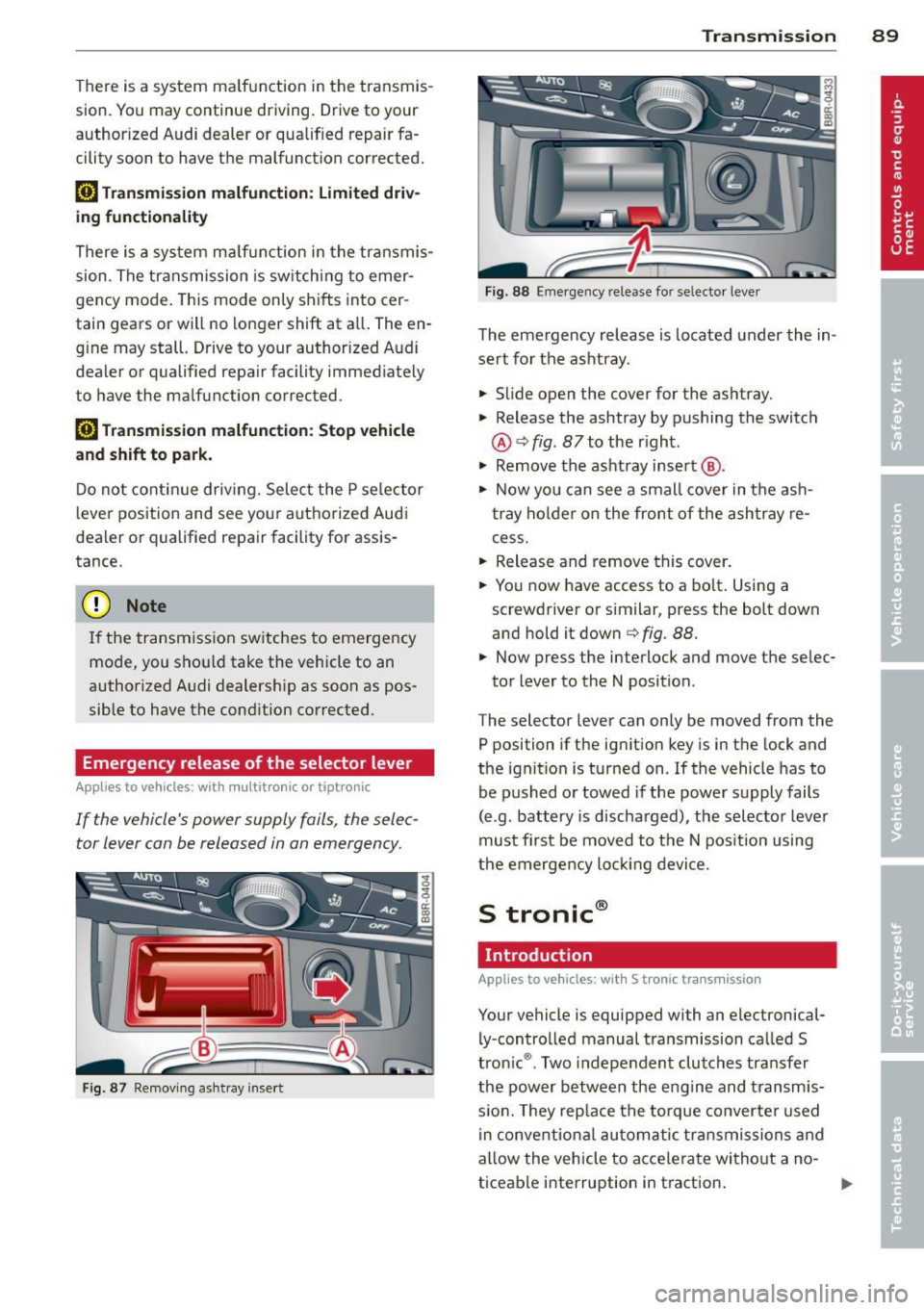
Fig . 87 Removing ashtray insert
Transmission 89
Fig . 88 Emerge ncy release fo r se lecto r lever
The emergency release is located under the in
sert for the ashtray.
.,. Slide open the cover for the ashtray.
.,. Release the ashtray by pushing the switch
@ ¢
fig. 87 to the right .
.,. Remove the ashtray insert @ .
.,. Now you can see a small cover in the ash
tray holder on the front of the ashtray re
cess .
.,. Release and remove this cover.
.,. You now have access to a bolt. Using a
screwdriver or similar, press the bolt down
and hold it down ¢
fig. 88.
.,. Now press the interlock and move the selec-
tor lever to the N position .
The selector lever can only be moved from the
P position if the ignition key is in the lock and
the ignition is turned on . If the vehicle has to
be pushed or towed if the power supply fails
(e .g . battery is discharged), the selector lever
must first be moved to the N position using
the emergency locking device.
S tronic®
Introduction
Applies to vehicles : with S tronic transmission
Your vehicle is equipped with an electronical
ly -controlled manual transmission called S
tronic ®. Two independent clutches transfer
the power between the engine and transmis
s ion. They rep lace the torque converter used
in conventional automatic transmissions and
allow the vehicle to accelerate without a no
ticeable interruption in traction.
Page 112 of 294
110 Audi side assist
-Side assist is not active while you are
making the adjustment.
- Your settings are automatically stored
and assigned to the remote control key
being used.
Driver messages
App lies to vehicles: with side assist
If side assist switches off by itself, the LED in
the button turns off and a message will ap
pear in the instrument cluster display:
Audi side assist unavailable: Sensors blocked
The radar sensors' vision is affected. Do not
cover the area in front of the sensors with bike
wheels, stickers, dirt or other objects. Clean
the area in front of the sensors, if necessary
c:::;,page 108, fig. 110.
Audi side assist: Currently unavailable
Side assist cannot be switched on temporarily
because there is a malfunction (for example,
the battery charge level may be too low).
Audi side assist: System fault!
The system cannot guarantee that it will de
tect vehicles correctly and it is switched off .
The sensors have been displaced or are faulty .
Have the system checked by an authorized
Audi dealer or authorized Audi Service Facility
soon .
Audi side assist: Unavailable when towing
Side assist switches off automatically when a
factory-installed trailer hitch is connected to
the electrical connector on the trailer . There is
no guarantee the system will switch off when
using a retrofitted trailer hitch. Do not use
side assist when towing a trailer.
Page 270 of 294
268 General information
General information Explanation of
technical data
Some of the technical data listed in this man
ual requires further explanation .
The technical data for your vehicle is listed in
the charts starting on
r:::> page 2 70. This sec
tion provides general information, notes and restrictions which apply to this data .
Vehicle identification
The key data is given on the vehicle identifica
tion number (VIN) plate and the vehicle data
sticker.
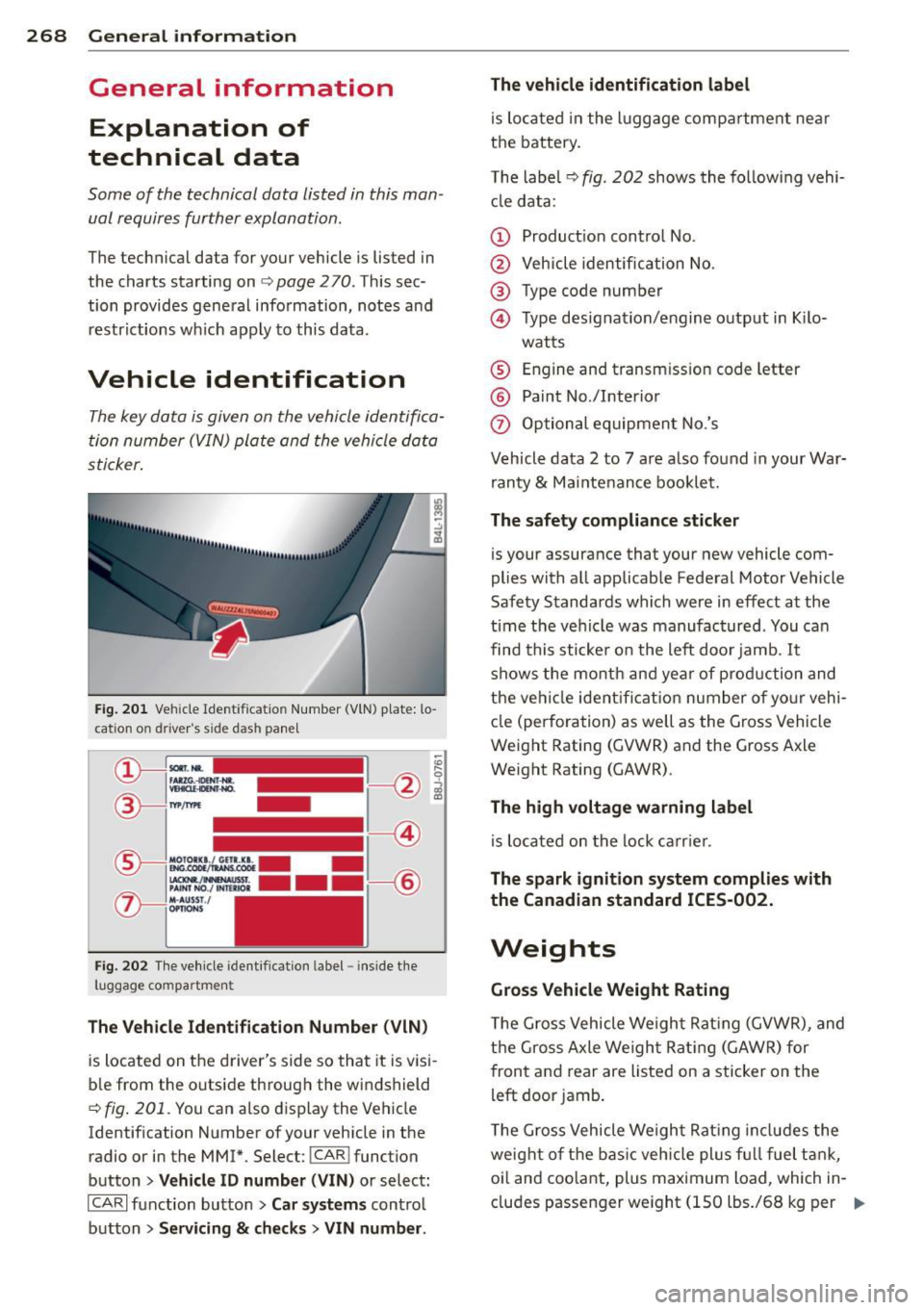
Fig. 201 Veh icle Ide ntific atio n Number (VlN) p late: lo
cation on driver 's sid e das h panel
Fig. 202 The vehicle identi fication label -inside the
luggage co mpa rtmen t
The Vehicle Identification Number (VIN)
is located on the driver's side so that it is visi
ble from the outside through the windshield
r:::> fig . 201 . You can also display the Vehicle
Identification Number of your vehicle in the
radio or in the MM!*. Select :
!CAR ! function
button
> Vehicle ID number (VIN) or select:
ICARI function button > Car systems control
button
> Servicing & checks > VIN number . The
vehicle identification label
is located in the luggage compartment near
the battery .
The label¢
fig. 202 shows the following vehi
cle data :
(D Production control No .
@ Vehicle identification No.
® Type code number
@ Type designation/engine output in Kilo-
watts
® Engine and transmission code letter
@ Paint No./Interior
(f) Optional equipment No.'s
Vehicle data 2 to 7 are also found in your War
ranty
& Maintenance booklet.
The safety compliance sticker
is you r assurance that your new vehicle com
plies with all applicable Federal Motor Vehicle
Safety Standards which were in effect at the
time the vehicle was manufactured . You can
find this sticker on the left door jamb.
It
shows the month and year of production and
the ve hicle ident ification number of your vehi
cle (perforation) as well as the Gross Vehicle
Weight Rating (GVWR) and the Gross Axle
Weight Rating (GAWR) .
The high voltage warning label
is located on the lock carr ier .
The spark ignition system complies with
the Canadian standard ICES-002.
Weights
Gross Vehicle Weight Rating
The Gross Vehicle Weight Rating (GVWR), and
the Gross Axle Weight Rating (GAWR) for
front and rear are Listed on a sticker on the
left door jamb.
The Gross Vehicle Weight Rating includes the
weight of the basic vehicle plus full fuel tank,
oi l and coolant, plus maximum load, wh ich in
cludes passenger weight (150 lbs./68 kg per
Ill>
Page 280 of 294
278 Index
Automatic Shift Lock (ASL) . . . . . . . . . . . . 86
Automatic transmission . . . . . . . . . . . 83, 89
Automatic Shift Lock (ASL) . . . . . . . . . . . 86
Driving .. .. .... .. ... .... .. .. .. .. .. 84
Dynamic shift program . . . . . . . . . . . . . . 87
Emergency mode . . . . . . . . . . . . . . . . . . . 88
Emergency release . . . . . . . . . . . . . . 89, 95
Kick-down . . . . . . . . . . . . . . . . . . . . . . . . . 87
Manual shift program . . . . . . . . . . . . . . . 88
multitronic . . . . . . . . . . . . . . . . . . . . . . . . 83
Removal lock (ignition key) ..... .. .. .. 72
Selector lever . . . . . . . . . . . . . . . . . . . . . . 85
S tron ic .. .. ................ ... ... . 89
tiptronic . . . . . . . . . . . . . . . . . . . . . . . . . . 83
also refer to S tron ic transmission ..... 89
Automatic wipers . . . . . . . . . . . . . . . . . . . . 50
Auto Safety Hotline ................. 134
Average speed . . . . . . . . . . . . . . . . . . . . . . . 25
Avoid damaging the vehicle .. .. .. .... . 192
B
Battery ..... ................ .. 17,225
Battery location inside the luggage com-
partment ........ ....... .. .. .... .
226
Charging . .. ... .. ..... ... .... .. .. . 228
Important warnings when working on
the battery .... ... .... ..... .. .. .. .
226
Jump starting . ........... .. .. .. .. . 262
Low . .. .. .. ............. .. .. .. .. . 190
Replacing the battery . .. .. .. .. .. .. . 229
State of charge ............ ... .... . 190
Winter operation .......... ... .... . 225
Working on the battery ..... .... ... . 226
Before driving .. ........... .... .... . 126
Bio-ethanol (Fuel) ............ .. .. .. . 211
Blended gasoline ................... 210
Blower (automatic climate control) . . . . . . 70
Body cavity sealing ........... .. .. .. . 204
Booster seats ...... ....... .. .. .... . 173
Brake fluid
Changing the brake flu id . ........ .. .
225
Check ing the brake fluid level . .. .. ... 224
Reservoir ... ............ .. .. .. .. . 224
What is the correct brake fluid level? . . 224
What should I do if the brake fluid warn-
ing light comes on? ........ ... .. ...
224
Brake system .... .. ............. .... 224
Anti- lock braking system ............. 19
Brake assist system ................ 184
Brake fluid .... .. ......... .... .... 224
Brake fluid specifications for refill and re-
placement ...... ................ .
225
Brake light defective . . . . . . . . . . . . . . . . 21
Brake power assist unit .......... ... 187
Brakes .. .. .. .. . ............ .... .. 187
Ceramic brakes . .. ... ... ... .... .. .. 187
Electromechanical parking brake ...... 77
Warning/indicator lights .......... .. . 15
Worn brake pads symbol . . . . . . . . . . . . . 20
Braking
Emergency braking funct ion ... .. .. .. .
79
braking guard . . . . . . . . . . . . . . . . . . . . . . . 97
Messages ..... .. .. ... ........... . 105
Settings .. ... ... .. .............. . 104
Break-in period . . . . . . . . . . . . . . . . . . . . . 192
Tires . .. .. .. .. .. ............. .. .. 192
Bulbs .......... .. ............. .... 261
C
Californ ia Proposition 65 Warn ing . .... 216
Battery specific .. ... .......... .. .. 227
Capac1t1es .. ... ... .. .............. . 270
Car care ........ .. ............. .... 199
Interior . .. .. .. .. ............. .. .. 205
Plastic and vinyl .. ... ...... .... .. .. 202
Care of exterior .... ................. 199
Cargo area
refer to Luggage compartment. . . 64, 132
Catalytic converter . . . . . . . . . . . . . . . . . . 193
Center armrest . . . . . . . . . . . . . . . . . . . . . . 56
Central lock ing .. .. .......... ...... .. 32
Central lock ing switch .... ...... .. .. . 36
Convenience key . . . . . . . . . . . . . . . . . . . . 36
Remote control key ............ .... . 35
Ceramic b rake ro tors
New brake pads .. ..... ........... .
18 7
Certification . ..... ................ . 275
Changing a flat t ire . ......... .... .... 252
Changing a wheel .. ......... .... .... 252
Changing engine oil
Chassis 221
Undercoating .. .. ... .. ... ..... .. .. 204
Page 282 of 294
280 Index
Cornering light ................ .... .. 44
Cruise control Changing speed .......... .... .... .. 81
Presetting your speed . . . . . . . . . . . . . . . 82
Sw itching off ............ .. .. .... .. 82
Switching on . .. . ...... ... .. .. .... .. 81
Cruising range . . . . . . . . . . . . . . . . . . . . . . . 25
(upho lder ..... ........... ........ .. 61
D
Data .. .... .. .............. ... .... .
Data recorder
Date display 270
184
12
Daytime ru nning lights . . . . . . . . . . . . 44, 45
Declaration of compl iance
Adaptive cruise control ...... .. .. ... 275
Audi side assist .......... .. .. .. .. . 275
Cell phone package ........... .... . 275
Conven ience key .......... .... .. .. . 275
Electronic immobilize r ............. . 275
Homelink ® universal remote control .. 275
Remote control key ....... .... .... . 275
Tire pressure monitoring system ..... 275
Defective light bulb warning . . . . . . . . . . . 21
Defrosting (w indows) ......... .. .. .... 70
Determining correct load limit .... ... . 239
Digital clock ... ........... .... .... .. 12
Digital compass ............. .. .... .. 52
Dimensions .. ... .... ......... ..... . 269
Dimming the rearview mirror .. .... .. .. 48
Doors Ch ild safety locks ......... .... ...... 40
emergency lock ing ... ... .. .... .. .. . . 37
Driver information system
Enhanced sh ift indicator ....... .... . . 28
Open door or front lid warning . . . . . . . . 24
Outside temperature display .. .. .. .. . . 24
Sound system display . . . . . . . . . . . . . . . 24
Driver seat
refer to Seating position ....... .. .. . 127
D . . f l riving sa e y .. ........... .. .. .. .. . 126
Driving through water ...... .... .... . 192
Driving time ............. .... ..... .. 25
D . t . ynam1c s eermg . . . . . . . . . . . . . . 111, 188
E
E85 (Fuel)
Efficiency program ........ ........ .. . 211
27
Fuel economy messages . . . . . . . . . . . . . 29
Memo ry levels ................ .. .. . 25
Other equipment .... .......... .. ... 28
Shift indicator . . . . . . . . . . . . . . . . . . . . . 28
Electro-mechanical power assist . .. .. .. 188
E lectromechanical parking brake
Emergency braking ............ .... . 79
Indicator light .................... . 77
Parking ....... .. .. ... ....... ... .. . 78
Releas ing and closing . ...... ... .. .. . 77
Starting assist . . . . . . . . . . . . . . . . . . . . . 78
Starting from rest ............. .. .. . 78
Starting off with a tra iler . . . . . . . . . . . . . 79
Warning/indicator lights ............. 16
Electronic differential lock (EDL) . .. .. .. 184
Warning/indicator lights ........ .. .. . 19
E lectronic immobilizer . . . . . . . . . . . . 12, 38
El ectronic power control
(EPC) warning/indicator ligh t . . . . . . . . . 20
Electronic speed limiter .... ........ .. . 31
E lectronic Stabilization Contro l (ESC) ... 184
Warning/ind icator lights ........ .... . 19
Emergency actuation
Doors .. .. .... .. .. .......... ..... . 37
Ignition key ..... ... .......... ..... 35
Rear lid . . . . . . . . . . . . . . . . . . . . . . . . . . . 39
Slid ing/tilting sunroof .......... ..... 42
Emergency braking .............. .... . 79
Emergency flasher .... ........... ... . 46
Warning/indicator lights ..... ..... .. . 23
Emergency key .. .. ............. .... . 33
Starting engine .. ... .......... ..... 74
Emergency operation
Emergency braking function (parking
brake) ........ .. .. ......... .... .. . 79
Emergency re lease
Selector lever .. .. ............. .... . 89
Emergency starting ....... ........ .. 262
Emergency towing .... .......... .. .. 264
En ergy management .............. .. 190
Battery power . . . . . . . . . . . . . . . . . . . . . 17
Driver notification . . . . . . . . . . . . . . . . . . 17