ECO mode AUDI A5 2015 Owner´s Manual
[x] Cancel search | Manufacturer: AUDI, Model Year: 2015, Model line: A5, Model: AUDI A5 2015Pages: 264, PDF Size: 66.83 MB
Page 52 of 264
Lights and Vi sion
You can adju st the settings for the rear sun shade
so the shade retracts a utomatica lly when you se
lect the reverse gear. To do this, se lect the
I CAR !
function button
> Windows > Rea r blind > au to
matic > on
or! CA R! function button> Car sys
tems *
control button > Vehicle sett ings > Auto
matic rear blind > On .
The cur ren t setting is au
tomatically stored and assigned to the remote
key. The sun shade is extended again as soon as
the vehicle is traveling forwa rd at a speed gre ater
than
9 mph (15 km/h) if the ignition has not
been switched off in t he meantime .
_& WARNING
Whe n lowe ring or raising the sunshade, make
sure there is nothing in its way and that it has
a free path to t ravel. Th is co uld cause perso n
al injury.
@ Tips
- Pressing t he button ru several times con
secutively can trigger the over load protec
tion. The sun shade can only be extended/ r etracted aga in after a br ief waiting period.
- The rear window sun shade only f unctions
when the vehicle interior is warmer tha n
14°F (-10°C).
Windshield wipers
Switching the windshield wipers on
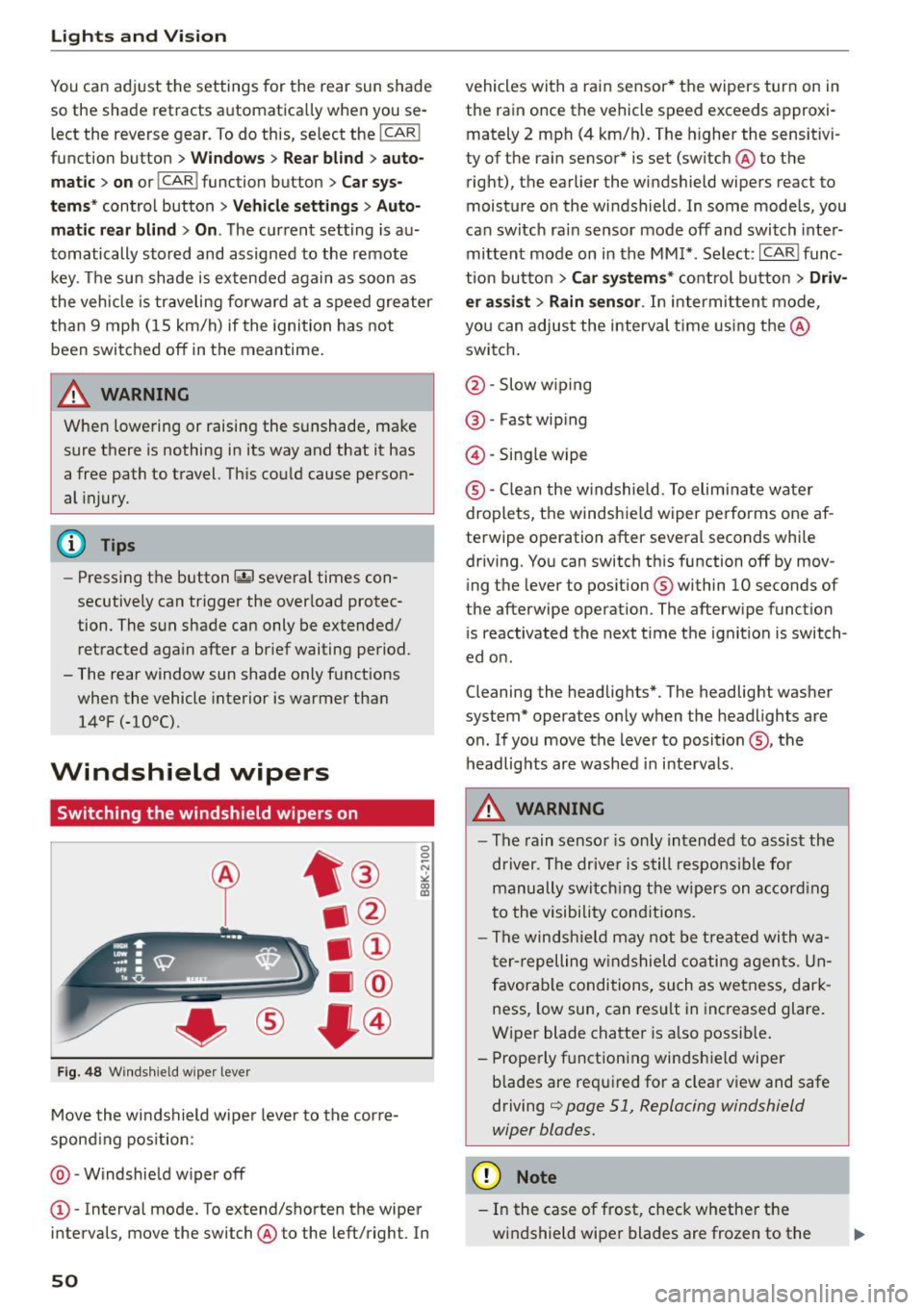
Fig . 48 W inds hield w iper leve r
Move the windshield wipe r leve r to the corre
spond ing pos ition:
@ -Windshie ld w iper off
0 0 -N st co Ul
© -Interva l mode. To extend/shorten the wiper
i n tervals , move the switch @to the left/right. In
50
vehicles with a rain sensor * the wipers turn on in
the rain once the vehicle speed exceeds approxi
mately 2 mph (4 km/h). The higher the sensitivi
ty of the ra in sensor * is set (switch @to the
right), the earlier the windshield wipe rs react to
moist ure o n the windsh ield . In some models, you
can switc h ra in sensor mode off and switch inte r
mittent mode on in the MM !* . Se lect :
I CAR I func
t ion but to n
> Car systems * cont rol bu tton > Driv
er assi st > Rain sensor .
In intermi tten t mode,
you can a djus t the interval time using the @
swi tch .
@ -Slow w iping
@ -Fast wip ing
@ -Sing le wipe
® -C le a n the w indshield. To elim inate water
droplets, the windsh ie ld wiper pe rforms one af
te rwipe operation after several seconds whi le
driv ing. You can switch th is function off by mov
ing the lever to pos ition ® within
10 seconds of
the afterwipe operation. The afterw ipe funct io n
i s reactivated the next t ime t he ignit ion is switch
ed o n.
C leaning the headlig hts". The headlight was her
system* operates on ly when the headlights are
o n. If you move the lever to position @, the
headlig hts are washed in in terva ls .
_& WARNING
- The rain senso r is only intended to assis t the
d river. The drive r is s till respons ible for
manu ally swi tching the wipers on a ccor din g
t o the visibility con ditions.
- The winds hiel d may not be treate d wi th w a
t er -repelling w ind shiel d coati ng a gents. Un
f avor able conditions, su ch as wetness, dar k
ness, low sun , can res ult in inc reased glare.
Wiper blade chatte r is a lso possib le .
- Properly f unctioning windsh ie ld wiper
b lades are req uired for a clear v iew and safe
driving
c::> page 51, Replacing windshield
wiper blades.
(D Note
- In the case of fr ost, check whether the
wi ndshie ld wipe r blades are frozen to t he
Page 55 of 264
M N
0 loo
rl I.O
"' N
"' rl
Adjusting the magnetic zone
Applies to vehicles: with digital compass
The magnetic zone must be adjusted correctly
for the compass to read accurately .
®
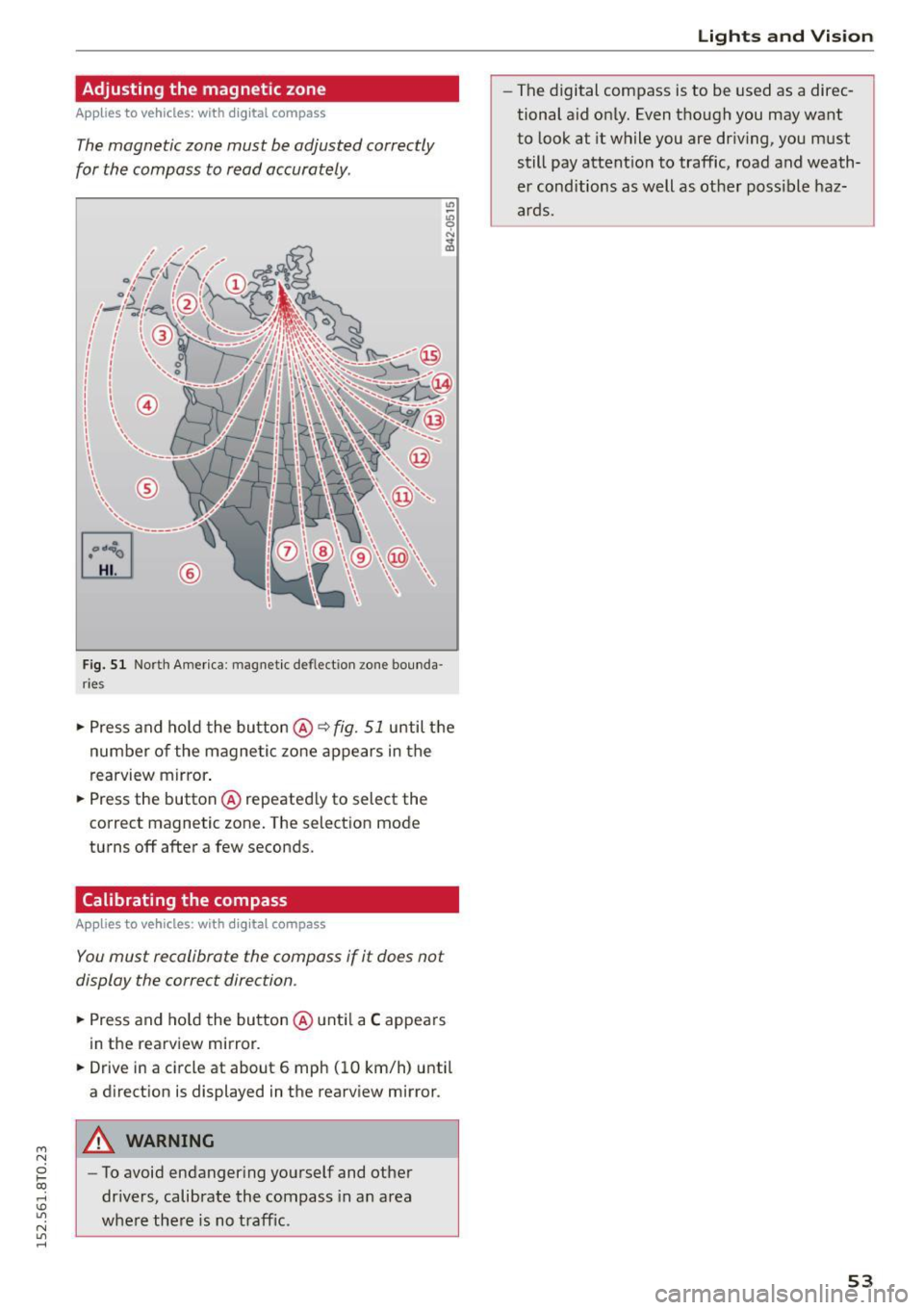
Fig. 51 North America : magnetic de flect io n zone bounda
r ie s
• Press and ho ld the button @~ fig. 51 until the
number of the magnetic zone appears in the
rearview mirror .
• Press the button @repeatedly to select the
correct magnetic zone. The selection mode
turns off after a few seconds .
Calibrating the compass
Applies to vehicles: with digital compass
You must recalibrate the compass if it does not
display the correct direction .
• Press and hold the button @until a C appears
in the rearview mirror.
• Drive in a circle at about 6 mph (10 km/h) until
a direction is displayed in the rearview mirror .
A WARNING
-To avoid endangering yourself and other
drivers, calibrate the compass in an area
whe re there is no traffic.
Lights and Vision
-The digital compass is to be used as a direc
tional aid only. Even though you may want
to look at it while you are driving, you must
still pay attention to traffic, road and weath
er conditions as well as other poss ible haz
ards.
53
Page 71 of 264

Warm and cold
Operation
We recommend pressing the !AUTO I button and setting the temperature to 72 °F (22 °C).
Fig. 74 Automatic cl imate control system: control
Fig. 75 3-zone del ux e automatic climate controt•: controls
Press the buttons to turn the functio ns on or off.
Use the dials to adjust the temperature, the
b lower speed and the air distrib ution . The LED in
a button will light up when the function is
switched on. The settings are displayed for a few
seconds in the radio or MMI* display.
In vehicles with a 3-zone del uxe automat ic cl i
mate control systems*, the dr iver and front pas
senger side can be adjusted separately. The set·
tings are also disp layed in the climate control
"' system display.
N
0 loo
rl I.O
"' N
"' rl
IOFF I Switching the climate control system
on/off
The i OFF i button switches the climate contro l
system on or off. It also sw itches on when you
press the knob. Airflow from outside is blocked
when the climate control system is switched off.
IA/Cl Switching cooling mode on/off
The air is not coo led and humidity is not removed
when cool ing mode is switched off. This can
cause fog on the windows . The cooling mode is
switched off automatically at low outside tern· peratures. .,.
69
Page 72 of 264
Warm and cold
l= I Swit ching recir culation m ode on /off
In recirculation mode, the air ins ide the vehicle is
circu lated and filtered . This prevents the unfil
tered air outside the vehicle from entering the
ve hicle interior . We recommend switching recir
culation mode on when driving through a tunne l
or when sitting in traffic
c:> ,&. .
The IAU TOI button or lllll> F RONT I button switches
recirculation mode off .
IAUTOI Switching automatic mode on
Automatic mode ma inta ins a constant tempera
ture inside the vehicle. A ir temperature, airflow
and ai r distribution are controlled automatica lly .
Adjusting th e tempe ratur e
Temperatures between 60 °F (+16 °C) and 84 °F
( + 28 °C) can be set. Outside of this range,
LO or
HI will appear in the cl imate control system dis
p lay. At both of these settings, the climate con
trol system r uns continuously at maximum cool
i n g or heating power. There is no temperat ure
regulation.
~ Ad justing the airflow
You can adjust the a irf low manually to su it yo ur
needs . To have the airf low regulated automatica l
ly, press the
IAUTO I button .
~ Adjusting the air distribution
You can manually se lect the vents where the air
will flow. To have the air distr ibution reg ulated
automatically , press the
!AUTO ! button.
QJ Adjusting seat h eating *
Pressing the button sw itches the seat heating on
at the h ighest setting (level 3) . The LEDs indicate
the tempe ratu re leve l. To reduce the tempe ra
ture, press the button again . To switch the seat
heating off, press the button repeatedly unt il the
L ED turns off .
Afte r 10 minutes, the seat heat ing automat ica lly
sw itches from level 3 to leve l 2.
~ Adjust ing seat ventilation*
Pressing the button switches the seat ventilation
on at the highest setting (level 3) . The LEDs indi-
70
cate the ventilation level. To reduce the ventila
tion level, press the button again. To switch the
seat ventilation off , press the button repeatedly
u nt il the LED turns off .
I@ FRONT I Switch the defro ste r on /off
The w indshield and side windows are defrosted
or cleared of condensation as q uickly as possib le.
The maximum amount of air f lows mainly from
the vents below the windshield. Recirculation
mode switches off. The temperature should be
set to 72 °F (22 °C) or h igher. The temperature is
controlled automat ically.
The
! AUTO ! button switches the defroster off.
lliil REAR I Switch ing rear window he ater on /
off
The rear window heater on ly operates when the
engine is runn ing . It switches off automatically
after a few minutes, depending on the outside
temperature.
To prevent the rear window heater from switch ing off automatically, press and hold the
I Cliil REARI
button for more than 2 seconds. This remains
stored until the ignit ion is switched off.
Air vents
You can open and close the center and rear air
vents using the th umbwhee ls . The levers adjust
the d irection of the airflow from the vents.
In vehicles with a 3-zone deluxe automa tic cli
mate control system*, you can adjust the air tem
perature in the rear by turning the thumbwhee l
toward the red side to make it warmer or toward
the blue side to make it cooler.
A WARNING
- Do not use the recircu lation for extended
periods of time. The windows could fog up
since no fresh air can enter the vehicle. If
the wi ndows fog up, press the air rec ircula
tion button again immed iate ly to sw itch off
the air recirc ulation func tion or selec t de
frost.
- I ndivid ua ls w ith red uced sensitivity to pain
or tempera ture could develop burns when
using the seat heating f unction . To reduce
-
Page 81 of 264
Emergency braking
In the event that the conventional brake system
fails or locks.
11-In an emergency, pull the switch@¢ page 77,
fig. 81 and continue to pull it to slow your vehi
cle down with the parking brake .
11-As soon as you release the switch @ or acceler-
ate, the braking process stops.
If you pull the sw itch @and ho ld it above a
speed of about
5 mph (8 km/h), the emergency
brak ing funct ion is initiated. The vehicle is braked
at all four wheels by activa ting the hydraulic
b rake system . The brake performance is similar
to making an eme rgency stop ¢
.&..
In o rder not to activate the emergency brak ing by
mista ke, an audible warning tone (b uzzer)
sounds when the sw itch @ is pulled . As soon as
the switch @ is released, or the accelerator pedal
is depressed, emergency braking stops .
A WARNING
Emergency braking should only be used in an
emergency, when the normal foot brake has
fai led or the brake pedal is obstructed. Using
the parking brake to perform emergency brak
ing w ill slow your vehicle down as if you had
made a full brake a pplicat io n. The laws of
physics cannot be suspended even with ESC
and its associa ted components (A BS, ASR,
ED S). In cor ners and w hen ro ad or weather
condi tions a re bad, a full brake app lication
can ca use the vehicle to skid or the rear end to
break away - risking an accident .
Speed warning system
Overview
The speed warning system helps you to keep your
driving speed below a set speed limit.
T he speed warning system warns if the driver ex
ceeds a previously stored maximum speed . A
~ war ning tone w ill sound as soon as the vehicle
~ speed exceeds the set speed by about 3 mph
~ (3 km/ h). At the same t ime, a warn ing symbol 1.1'1
N 1.1'1 ,....,
Dri ving
appea rs in the display. The symbol 's appea rance
mig ht be different in some models .
T he speed warn ing system h as two warning
t hr eshol ds that function i ndependen tly o f ea ch
othe r and t hat have somewhat d iffe rent p urpos
es :
Speed warning 1
You can use speed warning 1 to set t he maximum
speed w hile you are driv ing. This se tt ing will re
mai n in effec t unti l yo u turn off the ig nition, as
s u ming tha t you have not changed or reset the
setting .
T he . (USA models) /. (Can ada models)
speed wa rning symbo l in the warn ing
1 d isp lay
appears when you exceed the maxim um speed. It
goes out when the speed falls be low the stored
maximum speed.
T he speed warn ing symbol will also go out if the
speed
exceeds the stored maximum speed by
more than about
25 mph (40 km/h) for at least
10 seconds. The stored maximum speed is delet
ed.
Speed wa rning 2
Stor ing warning 2 is recommended if yo u always
want to be reminded of a certain speed, for ex
amp le when you are traveling in a country that
has a general max imum speed limit, or if yo u do
not want to exceed a specified speed for winter
t ir es .
T he . (USA models)
I. (Canada models)
speed warning 2 symbol appears in the display
when you exceed the stored speed lim it. Unlike
warning 1, it will not go out unt il the vehicle
speed drops below t he sto red speed l imit .
Setting speed warn ing 2 ¢
page 80 .
(D Tips
Even though yo ur vehicle is eq uipped w it h a
speed warning system, you should still watch
the speedometer to make sure yo u are not
drivi ng faste r than the speed lim it.
79
Page 82 of 264
Driving
Speed warning 1: setting a speed limit
Warning threshold 1 is set by the I SE TI button.
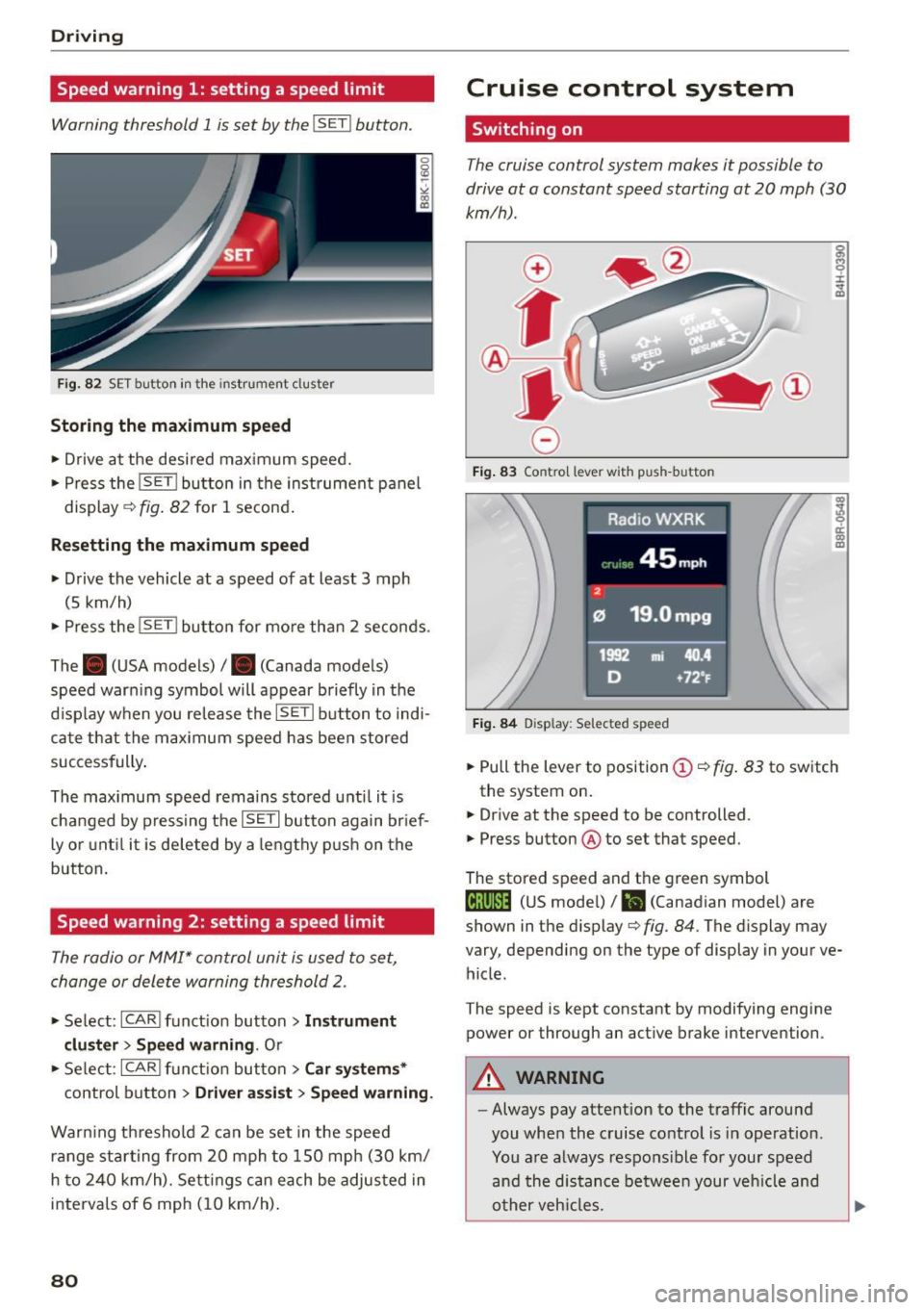
F ig. 82 SET button in the instrument cluster
Storing the m aximum spe ed
• Drive at the desired maximum speed.
• Press the
!SET I button in the instrument p anel
display
c;, fig. 82 for 1 second .
Resetting the ma ximum speed
• Drive the vehicle at a speed of at least 3 mph
(5 km/h)
• Press the
i~S-ET~ I button for mo re than 2 seconds .
The . (USA models) /. (Canada models)
speed warn ing symbol will appear briefly in the
d isplay when you release the
!SETI button to indi
ca te that the max imum speed has been stored
successfully .
The max imum speed remains stored unti l it is
changed by pressing the
! SET I button again br ief
ly or unt il it is deleted by a lengthy p ush on the
button.
Speed warning 2: setting a speed limit
The radio or MMI* control unit is used to set,
change or delete warning threshold 2.
• Se lect: !CARI funct ion button> Instrum ent
clu ster > Sp eed warning .
Or
• Se lect: !CARI funct ion button> Car syste m s*
control button> Dri ver a ss is t> Speed warning .
Warning th reshold 2 can be set in the speed
r a nge starting from 20 mph to 150 mph (30 km/
h to 240 km/h). Settings can each be adjus ted in
interva ls of 6 mph (10 km/h) .
80
Cruise control system
Switching on
The cruise control system makes it possible to
drive at a constant speed starting at
20 mph (30
km/h).
0
f
®l
0
Fig . 83 Contro l lever with push-button
Fi g. 84 D isplay: Selected speed
g M 0 ±
~
Q)
~ ci: Q) m
• Pull the lever to position (D <::> fig. 83 to sw itch
the system on .
• Drive at the speed to be controlled .
• Press button ® to set that speed.
The stored speed and th e green symbol
til;\IJM4 (US mode l)/ El (Canadian model) are
shown in the display
c;, fig. 84. The display may
vary, depending on the type of display in your ve
hicle.
The speed is kept constant by modifying engine
power or through an act ive brake intervention.
A WARNING
-Always pay atte ntion to the traffic around
you when the cruise control is in operation.
You a re always respons ible for your speed
and the distance between your veh icle and
o ther veh icles.
-
Page 84 of 264
Automatic transmission
Automatic transmission
Manual transmission
Gearshift lever
Applies to vehicles: with manual transmission
The clutch pedal must be depressed all the way
before you can start the engine .
The manual transmission in your Audi is equipped
with an
interlock-feature.
• Depress the clutch pedal all the way.
• Start the engine with the gearshift lever in Neu
tral and the clutch pedal depressed.
(D Note
Always depress the clutch pedal fully when
changing gears . Do not hold the vehicle on a
hill with the clutch pedal partially depressed.
This may cause premature clutch wear or damage.
@ Tips
- Resting your hand on the gearshift lever
knob while driving will cause premature
wear in the transmission.
- The back-up lights go on when you sh ift into
Reverse with the ignit ion on.
Gearshift pattern (6-speed manual
transmission)
Applies to vehicles: with manual transmission
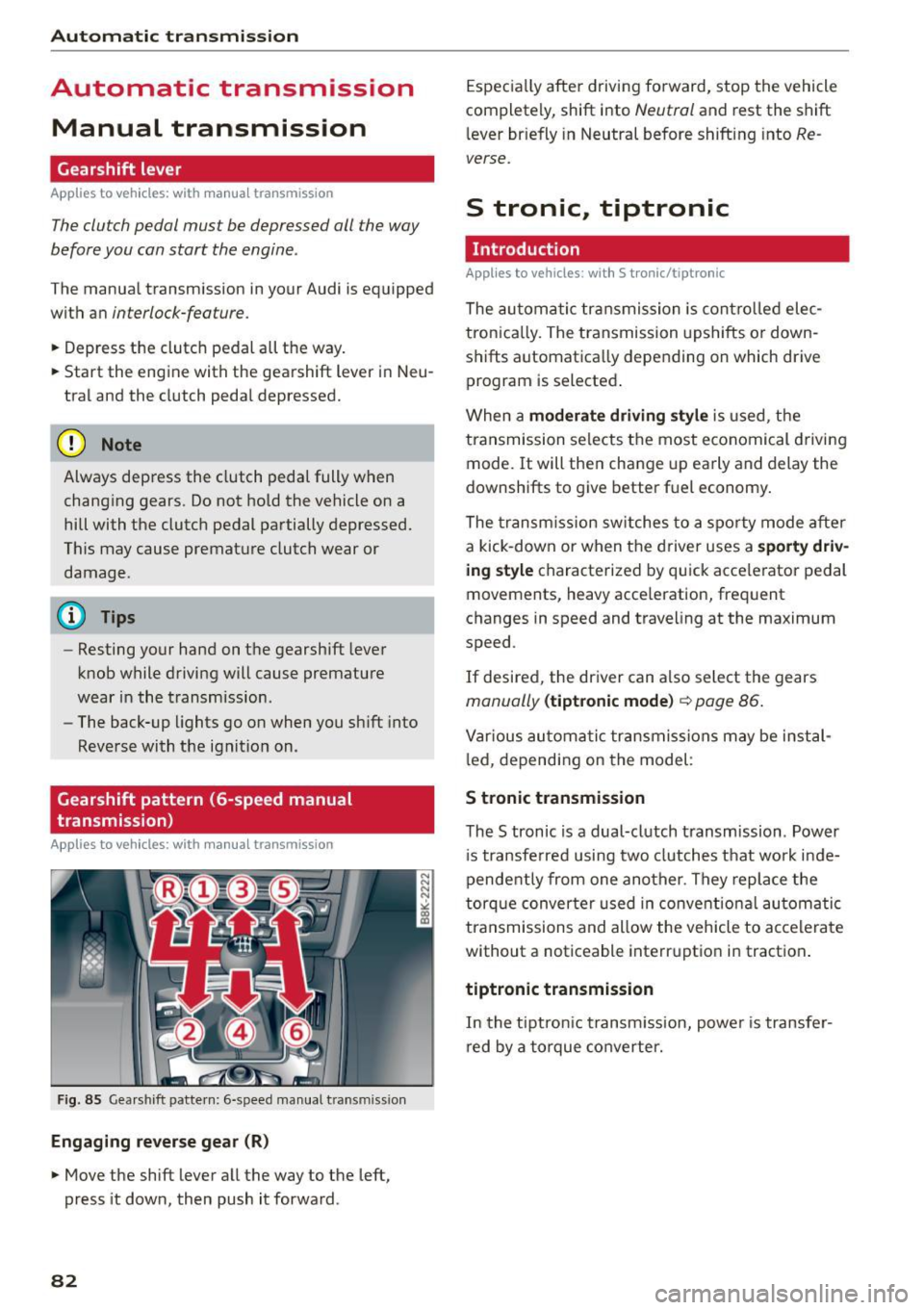
Fig. 85 Gearshift pattern: 6-speed manual transmiss ion
Engaging reverse gear (R)
• Move the shift lever all the way to the left,
press it down, then push it forward .
82
Especially after driving forward, stop the vehicle
completely, shift into
Neutral and rest the shift
lever briefly in Neutral before shifting into
Re
verse.
S tronic, tiptronic
Introduction
Applies to vehicles: with S tronic/tiptronic
The automatic transmission is controlled elec
tron ically. The transmission upshifts or down
shifts automatica lly depending on which drive
program is selected .
When a
moderate driving style is used, the
transmission selects the most economical driving
mode. It will then change up early and delay the
downshifts to give better fuel economy.
The transmission switches to a sporty mode after
a kick-down or when the driver uses a
sporty driv
ing style
characterized by quick acce lerator pedal
movements, heavy acce leration, frequent
changes in speed and traveling at the maximum
speed .
If desired, the driver can a lso select the gears
manually (tiptronic mode) c::> page 86.
Various automatic transmissions may be instal
l ed, depending on the model :
S tronic transmission
The S tronic is a dual-clutch transmission . Power
i s transferred using two clutches that work inde
pendently from one another . They replace the
torque converter used in conventio nal automatic
transmissions and allow the vehicle to accelerate
without a noticeable interruption in traction .
tiptronic transmission
In the tiptronic t ransm ission, power is transfer
red by a torque converter.
Page 85 of 264
M N
0 loo
rl I.O
"' N
"' rl
Selector lever positions
Applies to vehicles: with S tronic/tiptronic
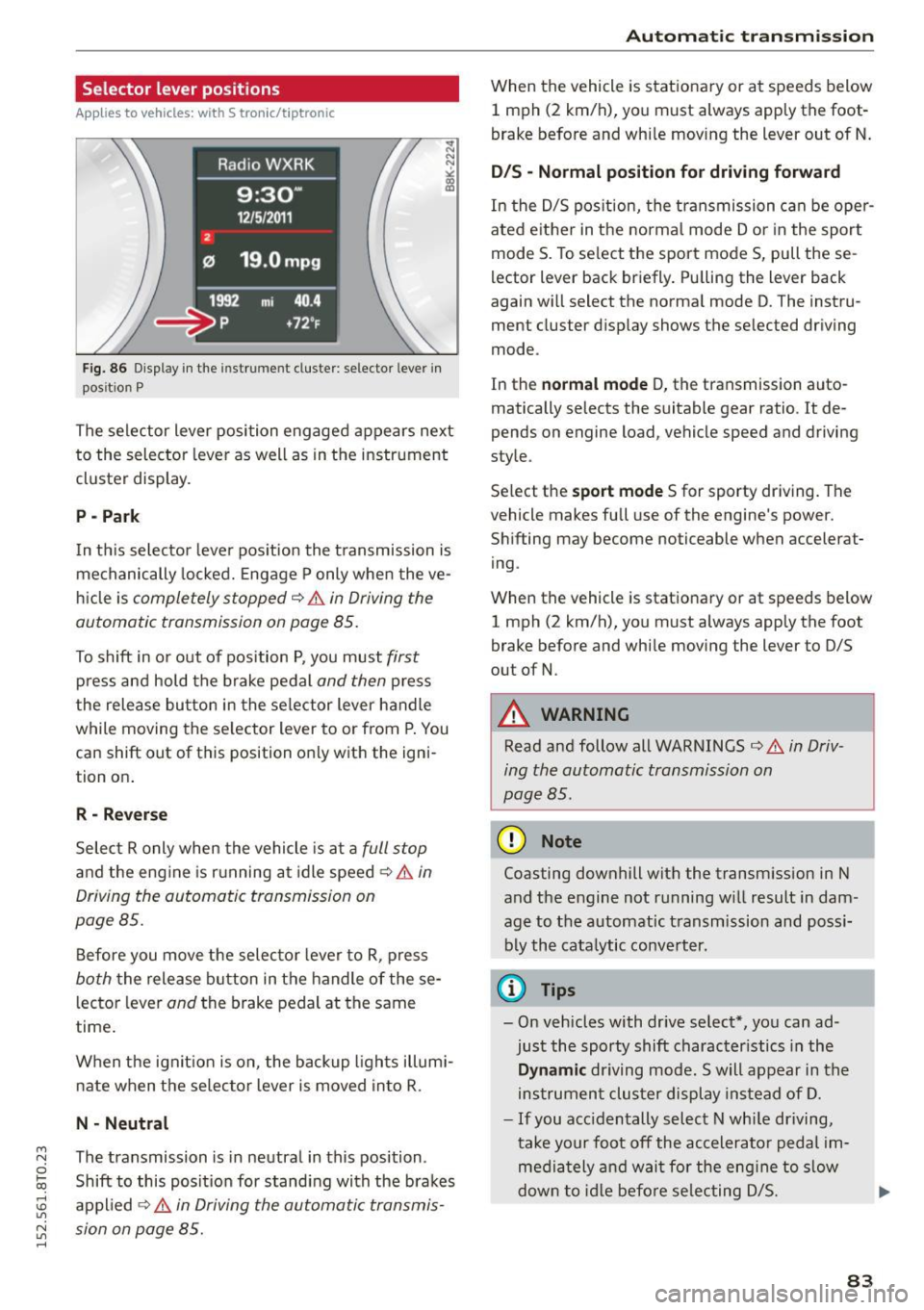
Fig. 86 Display in the instr um en t cluster : selecto r lever in
pos it ion P
The selector lever position engaged appears next
to the selector lever as well as in the instrument
cluster display.
P -Park
In th is selector lever pos ition the t ransmission is
mechanically locked. Engage P only when the ve
hicl e is
completely stopped q &. in Driving the
automatic transmission on page 85.
To shift in or out of position P, you must first
press and hold the brake pedal and then press
the release button in the selector lever handle
while moving the selector lever to or from P. You
can shift out of this position only with the igni
tion on .
R - Reverse
Select R only when the vehicle is at a full stop
and the engine is running at idle speed q &. in
Driving the automatic transmission on
page 85.
Before you move the selector lever to R, press
both the release button in the handle of the se
l ector lever
and the brake pedal at the same
time .
When the ignit ion is on, the backup lights illumi
nate when the se lector lever is moved in to R .
N · Neutral
The transmission is in neutral in this position .
Shift to this posit ion for standing with the brakes
applied ~
A in Driving the automatic transmis
sion on page 85.
Automatic transmission
When the vehicle is stationary or at speeds below
1 mph (2 km/h), yo u must always apply the foot
brake before and while moving the lever out of N.
D/S · Normal position for driving forward
In the D/S position, the transmission can be oper
ated e ither in the normal mode Dor in the sport
mode S. To se lect the sport mode S, pull these
l ector lever back briefly. Pu lling the lever back
again will select the norma l mode D. The instru
ment cluster display shows the selected driving
mode.
In the
normal mode D, the transmission auto
matically selects the suitable gear ratio.
It de
pends on engine load, vehicle speed and driving
style.
Se lect the
sport mode S for sporty driving. The
vehicle makes full use of the engine's power.
Shifting may become noticeable when accelerat
ing .
When the vehicle is stationary or at speeds below
1 mph (2 km/h), you must always app ly the foot
brake before and while moving the lever to D/S
out of N.
_& WARNING
--
Read and follow all WARNINGS ca> A in Driv
ing the automatic transmission on
page 85.
(D Note
Coasting downhill with the transm ission in N
and the engine not running w ill result in dam
age to the automatic transmission and possi
bly the cata lytic converter.
¢j) Tips
-On vehicles with dr ive select*, you can ad
just the sporty shift character istics in the
Dynamic driving mode. Swill appear in the
instrument cluster display instead of D.
- If you acc identally select N whi le driving,
take your foot off the accelerator pedal im
mediately and wait for the engine to slow
down to idle before selecting D/S.
83
Page 87 of 264
M N
i? co ,...., \!) 1.1'1
N 1.1'1 ,....,
~ Wait briefly until the transmission has shifted (you will feel a slight movement) .
~ Remove your foot from the brake pedal and ac
celerate.
Stopp ing tempo raril y
~ Keep the vehicle stationary using the b raking
pedal, for examp le at traffic lights.
~ Do not press the accelerator pedal when doing
this .
~ To prevent the vehicle from rolling when you
start driving , se t the parking brake when stop
ping on steep inclines¢&,. .
~ The parking brake will release automatically
and the vehicle will start moving once you press
the accelerator pedal.
Stopp ing /p ar kin g
If the selector lever is not in the P position when
you open the driver 's door, the veh icle could roll.
The message
Tr ansmi ssion : Car m ay roll ! Shift
t o park!
appears .
~ Press and hold the brake pedal until the vehicle
has come to a complete stop .
~ Apply the parking brake¢ page 78, Parking.
~ Select the P selector lever pos ition ¢ .&_.
Stopp ing on an incline
~ Always press the brake pedal to hold the vehi
cle in place and prevent it from "rolling back"
¢ &,. . Do
not try to prevent the vehicle from
"rolling back" when a gear is engaged by in
creasing the engine speed ¢0 .
Startin g on an incline
~ Activate the parking br ake.
~ With the driving gear selected, press the accel
erator pedal carefully . The parking brake will re
lease automat ically if you r seat belt is fastened.
Under certain circumstances, such as driv ing in
the mountains, it may be useful to switch tempo
rarily to the manual shift program in orde r to ad
just the gears to the d riving conditions by hand
¢ page 86.
On slopes, activate the parking brake first and
then move the selector lever to the P posit ion.
Aut omatic transm issio n
This prevents too much stress from being placed
on the locking mechanism .
A WARNING ,-
-The vehicle can also roll when the engine is
stopped.
- Unintended vehicle movement can cause se
rio us injury.
- Never leave your vehicle with the engine
running while in gear . If you must leave your
veh icle when the engine is running, activate
the park ing brake and move the selector lev
er to P .
- Power is still transmitted to the wheels
when the engine is runn ing at idle . To pre
vent the vehicle from "creep ing", you must
keep your foot on the brake when the eng ine
is running and the se lector lever is in D/S or
R or "tiptronic" mode is selected.
- Do not press the accelerator pedal when
changing the se lector lever position while
the vehicle is stationary and the eng ine is
r u nning .
- Never sh ift into R or P while driving ,
- Before driving down a steep s lope, reduce
your speed and sh ift into a lower gear with
" t ipt ronic ".
- Do not ride the brakes or press the brake pedal too ofte n or too long whe n driving
down a hi ll. Constant brak ing causes the
b rakes to overhea t and substantially re
duces braking performance, increases brak ing distance or causes comp lete fai lure of
the brake system.
- To prevent the vehicle from ro lling back
when stopping on inclines, always ho ld it in
p lace with the brake pedal or parking brake.
- Never hold the vehicle on an incline with a
slipping clutch. The clutch opens automati
cally when it becomes too hot from the
overload. An ind icator lamp@] illuminates
and a driver message appears¢
page 87
when the clutch is overloaded .
-If the engine must remain running, never
have any dr iving posit ion engaged when
checking under the hood . Make sure these
lecto r lever has secu rely engaged and is
locked in P with the parking brake set
85
Page 89 of 264
M N
i? co ,...., \!) 1.1'1
N 1.1'1 ,....,
will return to automatic mode. To keep shifting
using the shift paddles, move the s elector lever
to the right out of the 0/5 position.
The t ransmission automatically shifts up o r down
before critica l engine speed is reached.
The transmission only allows manua l shift ing
when the engine speed is within the permitted range .
@ Tips
-When you sh ift into the next lower gear, the
transmission will downshift only when there i s no poss ibility of over -revving the engine.
- When the kick-down comes on, the trans
mission will sh ift down to a lower gear, de
pending on vehicle and engine speeds .
- Tiptronic is inoperat ive when the transmis
s ion is in the fa il-safe mode .
Kick-down
Appl ies to vehicles: with S tro nic/t iptronic
Kick-down enables maximum acceleration.
When you depress the accelerato r pedal beyond
the resistance po int, the automatic transm iss ion
downshifts into a lower gear, depend ing o n ve hi
cle speed and engine speed. The upsh ift into the
nex t higher gear ta kes place once the maximum
specified engine speed is reached .
A WARNING
Please note that the drive wheels can spin if
kick-down is used on a smooth slippery road -
there is a risk of sk idding.
Launch Control Program
App lies to vehicles: with S tro nic
Th e Launch Control Program provides the best
acceleration possible when starting from a stop .
Requirement: The engine must be at operating
temperature and the steering wheel must not be
turn ed .
.,. Press the
1.$ O FF I button ¢ page 171 while the
engine is running. The
II i ndicator light ill umi
nates i n the instrument cluster and
Stabiliza-
Aut omatic transm issio n
tion control (ESC): Sport. W arning! Re stri cted
s tability
appears in the driver information sys
tem display .
.,. Move the sele ctor leve r to the 0/5 position to
select spo rt mode (5) or se lect the
d y namic
driving mode in drive se lect* ¢ page 103 .
.,. Press the brake pedal strongly with your left
foot and ho ld it down fo r at least 1 second.
.,. At the same time, press the accelerator pedal
down comp lete ly with yo ur right foot u nti l th e
eng ine reaches and mainta ins a high R PM .
.,. Remove your foot from the brake pedal within 5
seconds ¢
,A.
A WARNING
-Always adapt your dr iving to the traff ic flow.
- Onl y use the Launch Cont ro l Program when
road and traffic cond itions allow it and oth
er drivers will not be endangered or annoyed by your driving and the vehicle's acce lera
tion .
- Please note that the driving wheels can spin
and the vehicle can break away when sport
mode is switched on, especially when the
road is s lippery .
- Once you have accelerated, you shou ld
sw itch sport mode off by pressing the
l.f3 OFF I button .
(D Tips
-The tra nsmission temperature may increase
signif icant ly after us ing the Launch Contro l
Program. If that happens , the program may
not be availab le for a few minutes.
It wi ll be
available again afte r a cool-down per iod.
- When acc elerating using the Launch Control
program, a ll vehicle parts are subject to
heavy loads. Thi s can resu lt in in creased
wear.
Transmission malfunction
App lies to vehicles : wi th S tronic/tip tro nic
[cjJ Tran smi ssion: Pre ss brake pedal and select
gear again . ..,.
87