ignition AUDI A5 2015 Owner´s Manual
[x] Cancel search | Manufacturer: AUDI, Model Year: 2015, Model line: A5, Model: AUDI A5 2015Pages: 264, PDF Size: 66.83 MB
Page 27 of 264
M N
i? co ,...., \!) 1.1'1
N 1.1'1 ,....,
(memory level 2). The fuel pump nozz le iii
indicates the efficiency program*¢ page 26.
Single-t rip memory (Trip computer 1 )
The single -t rip memo ry s to res the trip informa
tion from the t ime the ig nit ion is tu rned on unt il
it is turned
off. If the t rip is con tinued within 2
hour s
from the time the ignition was turned off,
the new data wi ll be included in the calculation of
the current trip information .
If the trip is inter
rupted for
more than 2 hours the memory is re
set automat ica lly.
Total -trip memo ry (Trip computer 2 )
Unlike the single-trip memory , the tota l-trip
memory is not reset automatically. This permits
you to evaluate your driving data for the entire
period between manual resets.
Efficiency program*
The eff ic iency p rog ram can help you to use less
fuel ¢
page 26.
Operation
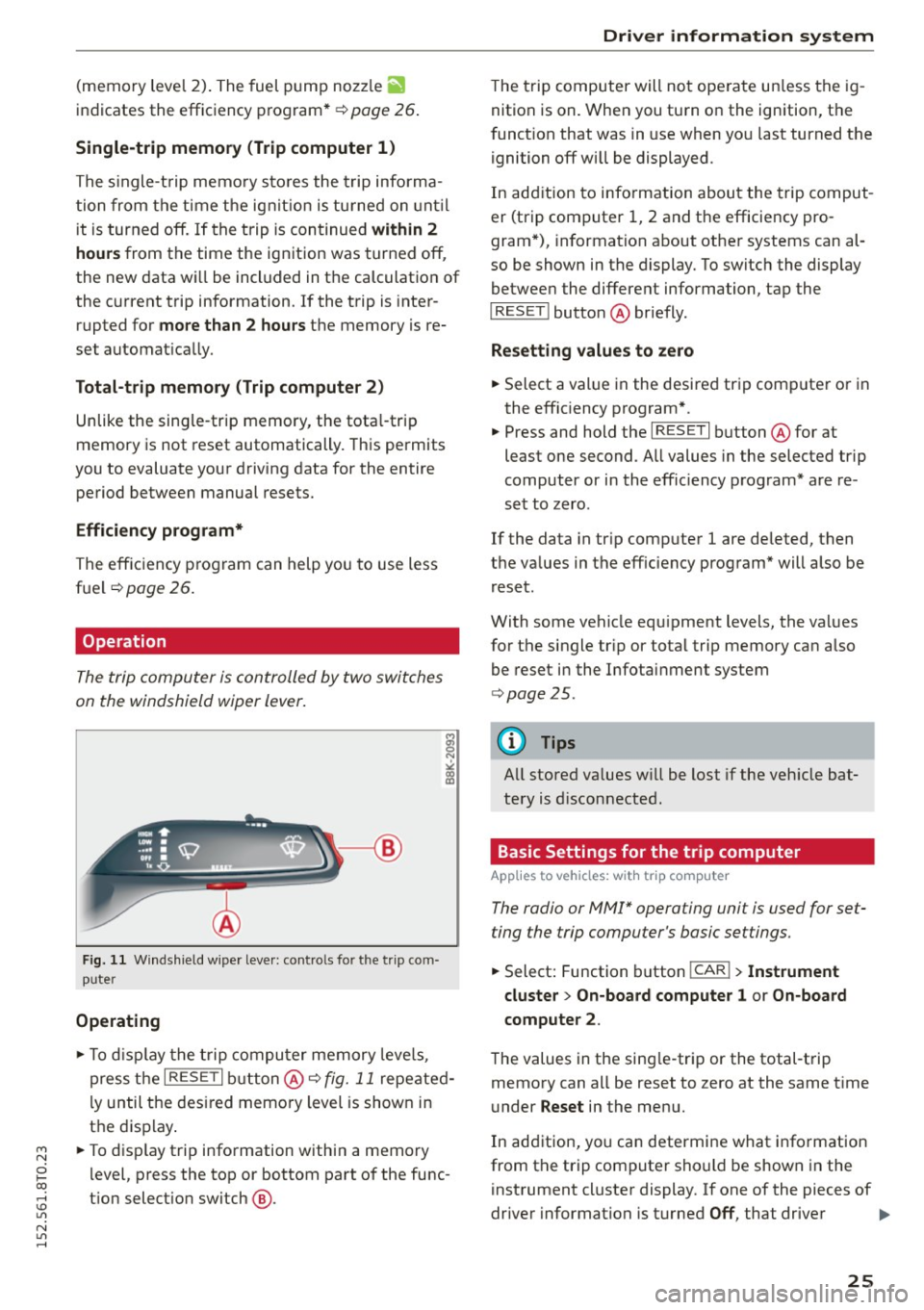
The trip computer is controlled by two switches
on the windshield wiper lever .
Fig . 11 W inds hield w ipe r leve r: co ntro ls fo r th e trip co m
p u ter
Operating
"'T o disp lay the t rip compu ter memory leve ls ,
press t he
I RESE T I but ton @¢ fig. 11 repeated
l y until the des ired memo ry level is shown in
t h e display .
"' To disp lay t rip information within a memory
l evel, press the top or bottom part of the func
t ion select io n switch @.
Dri ver information s ystem
The trip computer will not ope rate un less the ig
nition is on. When you turn o n the ignition, the
f unct ion that was in use when yo u last turned the
ignition
off wi ll be displayed.
In add ition to info rmation about the trip comput
er (trip computer 1, 2 and the efficiency pro
gram *), information about othe r systems can al
so be shown in the display. To switch the display betwee n the diffe rent information, tap the
I RESET ! button@ briefly .
Resetting values to zero
"' Select a value in the desired trip compute r or in
the effic iency program *.
"' Press and hold the
I RESE T I button @for at
least one second . All values in the selected trip
computer or in the eff ic iency program* a re re
set to zero .
If the data in tr ip computer 1 are deleted, then
t h e va lues in the eff iciency program* will also be
r eset.
With some vehicle equ ipment levels, the va lues
for the single tr ip or total trip memory can also
be reset i n the Infotai nment system
¢ page 25.
(D Tips
All stored va lues w ill be lost if the veh icle bat
tery is d isconnected .
Basic Settings for the trip computer
Applies to vehicles: with trip computer
The radio or MM!* operating unit is used for set
ting the trip computer 's basic settings.
"' Select: Function button I CAR!> Instrument
cluster > On -board computer 1 or On-board
computer 2 .
The values in the sing le-tr ip or the total-t rip
memory can all be reset to zero at the same t ime
u nder
Reset in the menu.
In addition, yo u can determi ne what info rmation
from t he trip computer sho uld be shown in the
instrument cluster display. If one of the pieces of
driver information is turned
Off , that driver .,.
25
Page 31 of 264
M N
0 loo
rl I.O
"' N
"' rl
the possibility to reset the oi l change schedu le af
ter having performed an oil change according to
Audi specif ications. Select
ICARI function button
> Service interval display > Reset oil change in
terval
or I CAR ! function button > Car systems*
control button > Servicing & checks > Reset oil
change interval.
(D Note
- Only reset the oil change d isp lay when you
have completed an oil change .
- If you d isconnect the battery terminals, no
calculations can be made for the service in
terval display during this t ime and no serv
i ce reminder will appear . Remember that
obse rv in g the proper serv ice intervals is vi
tally impor tant to extending the life of your
vehicle, particularly the engine, and main
taining its value. Even if the mi leage driven
i s low, the maximum period of one year
from one service to the next must not be ex
ceeded.
(D Tips
The information in the Service Reminder re
mains stored even when the veh icle battery is
disconnected.
On Board Diagnostic
System (OBD)
Malfunction Indicator Lamp (MIL)
The Malfunction Indicator Lamp (MIL) ¢-4 in the
instrument cluster is part of the On-Board Diag
nostic (OBD II) system.
The warning/indicator light illuminates when the
ignition is switched on and goes out after the en
gine starts and the idle has stabilized. This indi
cates that the MIL is working properly.
If the light does not go out after the engine is
started, or illuminates while you are driving, a malfunct ion may exist in the engine system. If
the light illuminates, the catalytic converter
could be damaged.
Continue driving
with reduced power (avoiding
sustained high speeds and/or rapid accelerations)
Dri ver information system
and have the condition corrected. Contact your
authorized Audi dea ler.
If t he light illuminates, the electronic speed lim
ite r may also be ma lf u nctioning. For more infor
mation
¢ page 30, Electronic speed limiter .
An improperly closed fuel filler cap may also
cause the MIL light to illuminate ¢
page 188.
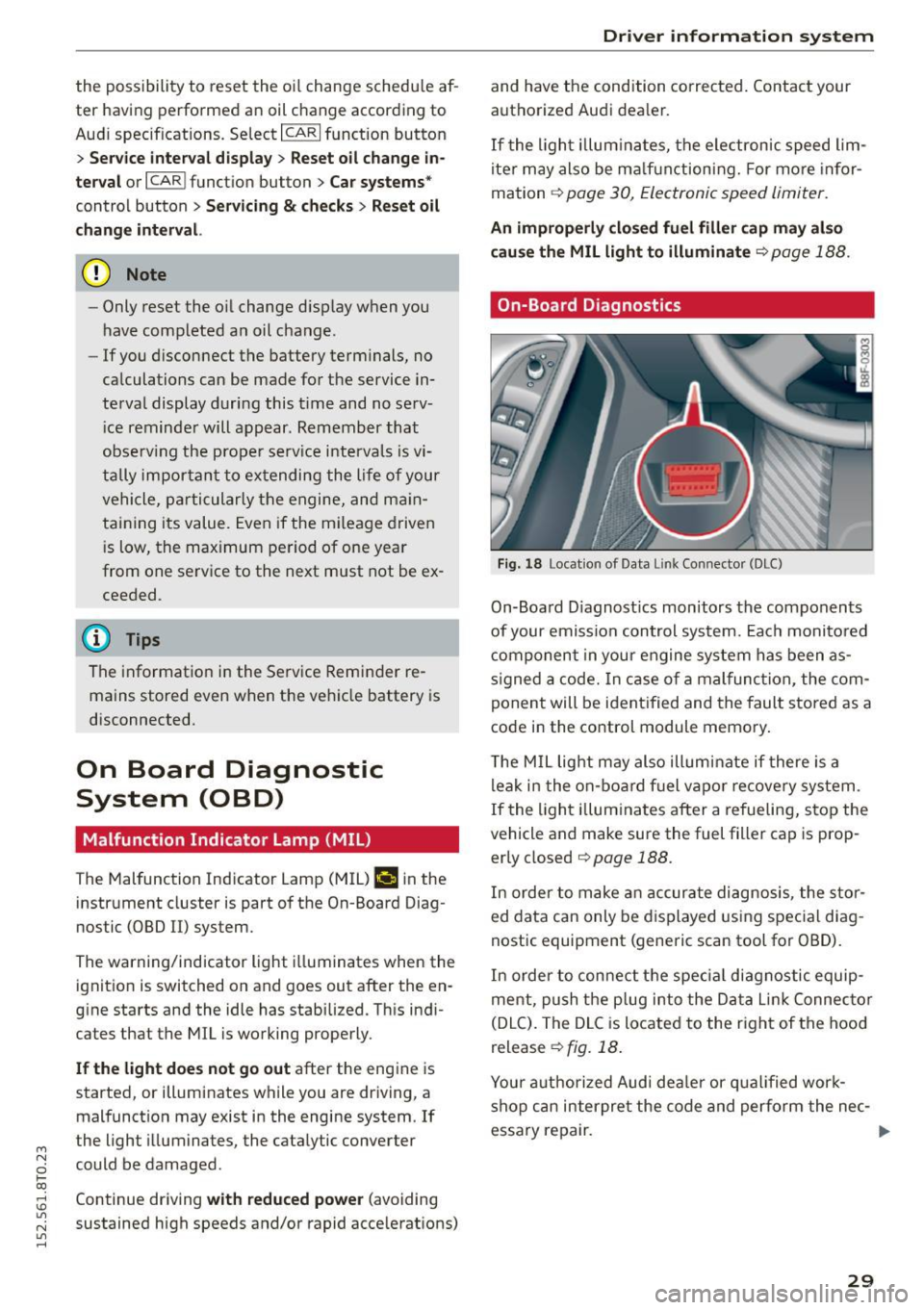
On-Board Diagnostics
Fig. 18 Locat ion of Data Link Connector (DLC)
On-Board D iagnost ics monitors the components
of your emission control system. Each monito red
component in your engine system has been as
signed a code. In case of a malfunction, the com
ponent will be ident ified and the fault stored as a
code in the control module memory.
T he MIL light may also illum inate if there is a
leak in the on-board fuel vapo r recovery system .
If the light illuminates after a refueling, stop the
vehicle and make sure the fuel filler cap is prop
erly closed
¢ page 188.
In order to make an accurate diagnosis, the stor
ed data can only be displayed using special diag
nostic equipment (generic scan tool for OBD).
In order to connect the spec ial diagnostic equip
ment, push the plug into the Data Lin k Connec tor
(DLC). The DLC is located to the right of the hood
release
¢ fig. 18.
Your authorized Audi deale r or qualified work
shop can interpre t the code and perform the nec-
essary repair. .,,.
29
Page 33 of 264
M N
i? co ,...., \!) 1.1'1
N 1.1'1 ,....,
Opening and closing
Central locking
General description
The power locking system locks or unlocks all
doors and the rear lid simultaneously.
You can lock and unlock the vehicle centrally. You
have the following choices:
- Remote master key
c:::> page 34,
-Door handles with convenience key*
c:::> page 34,
-Lock cylinder at the dr iver's door c:::> page 36,
or
- Power loc king switch inside
c:::> page 35.
Automatic locking
The automat ic locking feature locks all the veh i
cle doors and the rear l id when you drive faster
than 9 mph ( 15 km/h).
The car is unlocked again once the ignition key is
removed . In add ition, the vehicle can be unlocked
if the opening function in the power locking sys
tem sw itch or at one of the door levers is actuat
ed. The Auto Lock function can be turned on and
off in the rad io or MMI*
c:::> page 36.
Additionally, in the event of a crash with a irbag
deployment the doors are automatically un locked to allow access to the vehicle .
Selective unlo cking
When you lock the vehicle, the power locking sys
tem w ill lock the doors and the rear lid. When un
lock ing, you can set in the radio or
MMI* whether
only the drive r's door o r the ent ire vehicle should
be un locked
c:::> page 3 6.
Anti- theft alarm w arning sy stem
If the anti-theft alarm warning system detects a
break-in into the vehicle, acoustic and v isual
warn ing s ignals are tr iggered .
The anti-theft warning system is activated auto
mat ically when you lock the vehicle. It is deact i
vated when unlocking using the remote key, w ith
the mechanical key, and when you switch on the
i gnit ion.
Op ening and cl osing
The alarm also turns off when the a larm cycle has
expired.
Turn signals
When you unlock the veh icle, the turn s ignals
flash twice, when you lock it once. If they do not
flash , one of the doors, the luggage compart
ment lid or the hood is not locked or the ignition
is still switched on.
Unint entionally locking your self out
In the follow ing cases there safeguards to pre
vent you locking your remote master key in the
vehicle:
- The vehicle does not lock w ith the power lock
ing sw itch
c:::> page 35 if the d river's door is
open.
- On veh icles with co nvenience key*, if the most
recently used master key is in the luggage com
par tment, the rear lid is automatically unlocked
again after it is closed .
Do not lock your veh icle w ith the remote master
key or co nvenience key* unt il all doors and the
rear lid are closed. In this way you avoid locking
yourself out accidentally .
A WARNING ,-c=-
-When you leave the vehicle, always remove
the ignition key and take it with you. This
will prevent passengers (children, for exam
ple) from accidentally being locked in the
veh icle should they accidentally press the
power locking sw itch in the front doors .
- Do not leave children inside the vehicle un
supervised . In an emergency it would be im
possible to open the doors from the outs ide
without the key.
(D Tips
- In the event of a crash with airbag deploy
ment all locked doors w ill be automatically
unlocked to give access to the veh icle occu
pants from the outside.
- If the power locking system should mal
function, you can lock the driver's door us ing the mecha nical key
c:::> page 36.
3 1
Page 34 of 264
Opening and closing
-If the power locking system should fail, you
can still open the fuel tank flap in an emer
gency ~
page 190.
-You are well advised not to keep valuables
inside an unattended vehicle, visible or not.
Even a properly locked vehicle cannot pro
vide the security of a safe.
- If the LED in the upper edge of the driver's
door panel comes on for about 30 seconds
after the vehicle is locked, there is a mal
function in the power locking or the anti
theft warning system. Have the malfunction
corrected by an authorized Audi dealership
or qualified repair facility.
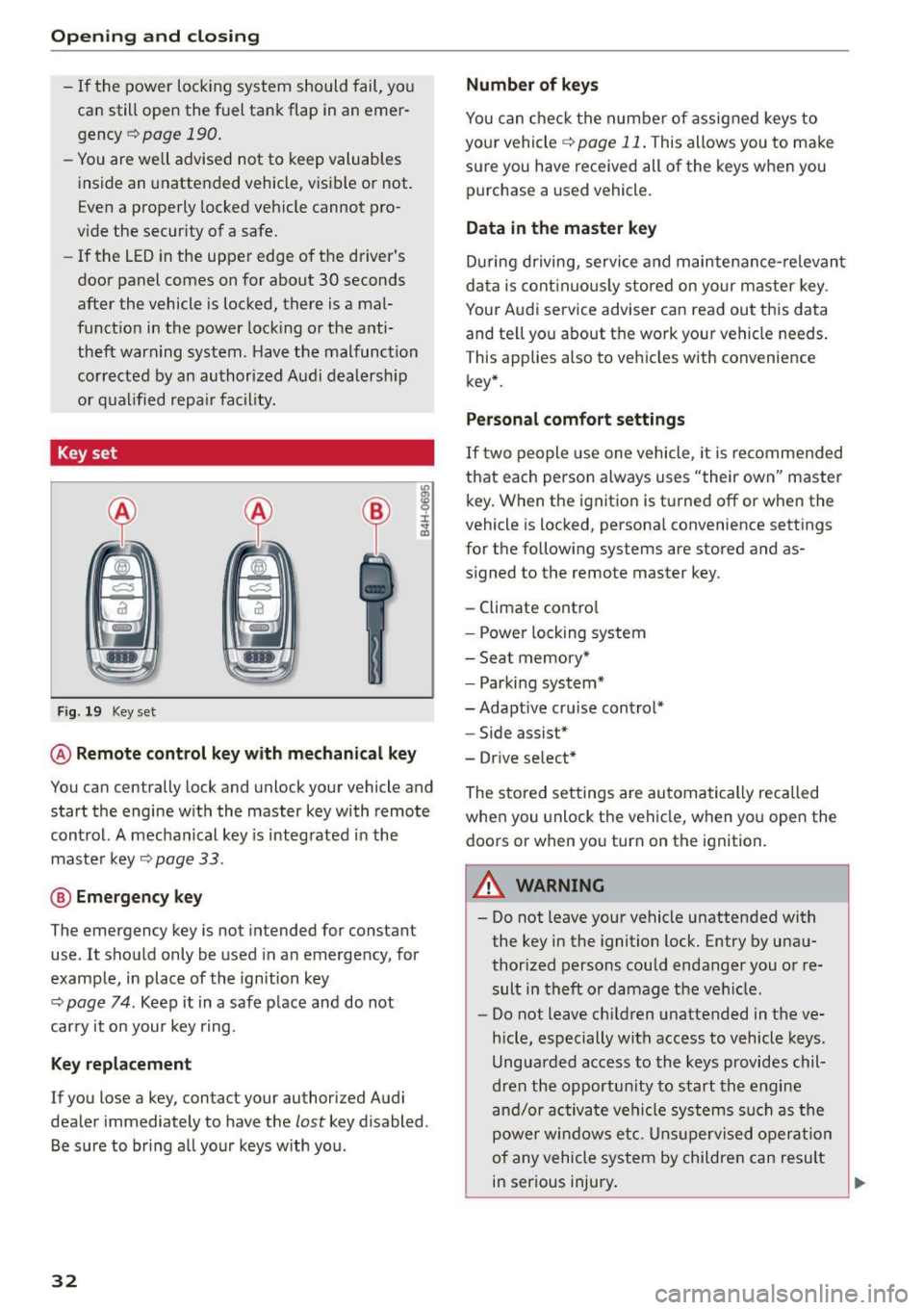
Key set
Fig . 19 Key set
m 0 ±
~
@ Remote control key with mechanical key
You can centrally lock and unlock your vehicle and
start the engine with the master key with remote
control. A mechanical key is integrated in the
master key
~ page 33.
@ Emergency key
The emergency key is not intended for constant
use . It should only be used in an emergency, for
example, in place of the ignition key
~ page 7 4 . Keep it in a safe place and do not
carry it on your key ring.
Key replacement
If you lose a key, contact your authorized Audi
dealer immediately to have the
lost key disabled.
Be sure to bring all your keys with you .
32
Number of keys
You can check the number of assigned keys to
your vehicle
¢ page 11. This allows you to make
sure you have received all of the keys when you purchase a used vehicle.
Data in the master key
During driving, service and maintenance-relevant
data is continuously stored on your master key .
Your Audi service adviser can read out this data
and tell you about the work your vehicle needs.
This applies also to vehicles with convenience
key*.
Personal comfort settings
If two people use one vehicle, it is recommended
that each person always uses "their own" master key. When the ignition is turned off or when the
vehicle is locked, personal convenience settings
for the following systems are stored and as
signed to the remote master key.
- Climate control
- Power locking system
- Seat memory*
- Parking system*
- Adaptive cruise control* - Side assist*
- Drive select*
The stored settings are automatically recalled
when you unlock the vehicle, when you open the
doors or when you turn on the ignition.
A WARNING
-Do not leave your vehicle unattended with
the key in the ignition lock. Entry by unau
thorized persons could endanger you or re
sult in theft or damage the vehicle.
- Do not leave children unattended in the ve
hicle, especially with access to vehicle keys.
Unguarded access to the keys provides chil
dren the opportunity to start the engine
and/or activate vehicle systems such as the
power windows etc. Unsupervised operation
of any vehicle system by children can result
in serious injury.
.
Page 35 of 264
-Do not remove the key from the ignition lock
until the vehicle has come to a complete
stop. Otherwise the steering column lock
could suddenly engage -causing the risk of
an acc ident.
(D Tips
- The operation of the remote control key can
be temporar ily disrupted by interference
from transmitters in the vicinity of the vehi
cle work ing in the same frequency range
(e .g. a cell phone, rad io equipment) .
- For security reasons, replacement keys are only available from author ized Audi dealer.
- For Declarat ion of Compliance to United
States FCC and Industry Canada regulations
<::>page 247.
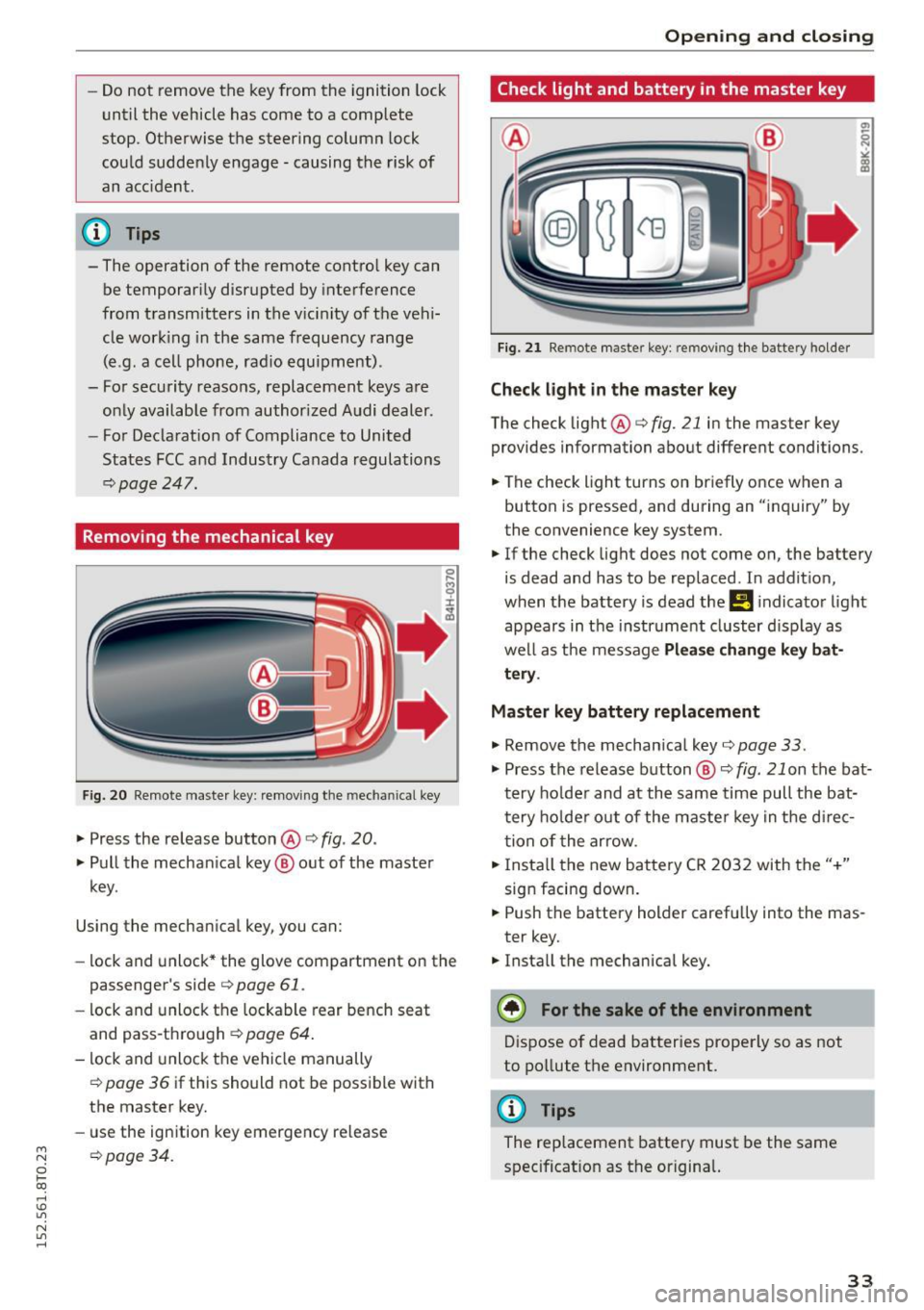
Removing the mechanical key
F ig. 20 Remote maste r key: remov ing the mechanical key
.,. Press the release button @ i:> fig. 20.
.,. Pull the mechan ical key @ out of the master
key .
Using the mechan ical key, you can:
- lock and unlock* the glove compartment on the
passenger's side
i:> page 61 .
-lock and unlock the lockable rear bench seat
and pass-through
c:> page 64 .
-lock and unlock the vehicle manually
i=> page 36 if this should not be possible with
the master key.
- use the ign ition key emergency release
~ i=> page 34.
0 loo
rl I.O
"' N
"' rl
Open ing and clo sing
Check light and battery in the master key
Fig. 2 1 Remote master key: removing th e battery holder
Check light in the master key
The check light @i=> fig. 21 in the master key
provides information about different conditions.
.,. The check light turns on briefly once when a
button is pressed, and during an "inquiry" by
the convenience key system.
.,. If the check light does not come on, the battery
is dead and has to be replaced. In addit ion,
when the battery is dead the
!I i ndicator light
appears in the instrument cluster d isp lay as
well as the message
Pl ea se change k ey bat
tery .
Master key battery replacement
.,. Remove the mechan ical key i=> page 33 .
.,. Press the release button @ c:> fig. 21 on the bat·
tery ho lder and at the same time pull the bat
tery ho lder out of the maste r key in the d irec
tion of the arrow .
.,. Insta ll the new battery CR 2032 with the"+"
sign facing down .
.,. Push the battery holder carefu lly into the mas·
ter key.
.,. Insta ll the mechanical key.
@) For the sake of the env ironment
Dispose of dead batteries properly so as not
to pollute the environment.
@ Tips
The replacement battery must be the same
spec ificat ion as the origina l.
33
Page 36 of 264
Opening and closing
Emergency unlocking of the ignition key
In the event of malfunctions in the electrical sys
tem, it may happen that you cannot remove the
ignition key.
.,. Remove the mechanical key <=>page 33.
.,. Lock the vehicle using the mechanical key
<=>page 36.
.,. Have the e lectrica l system inspected by an au
thorized Aud i dea lership.
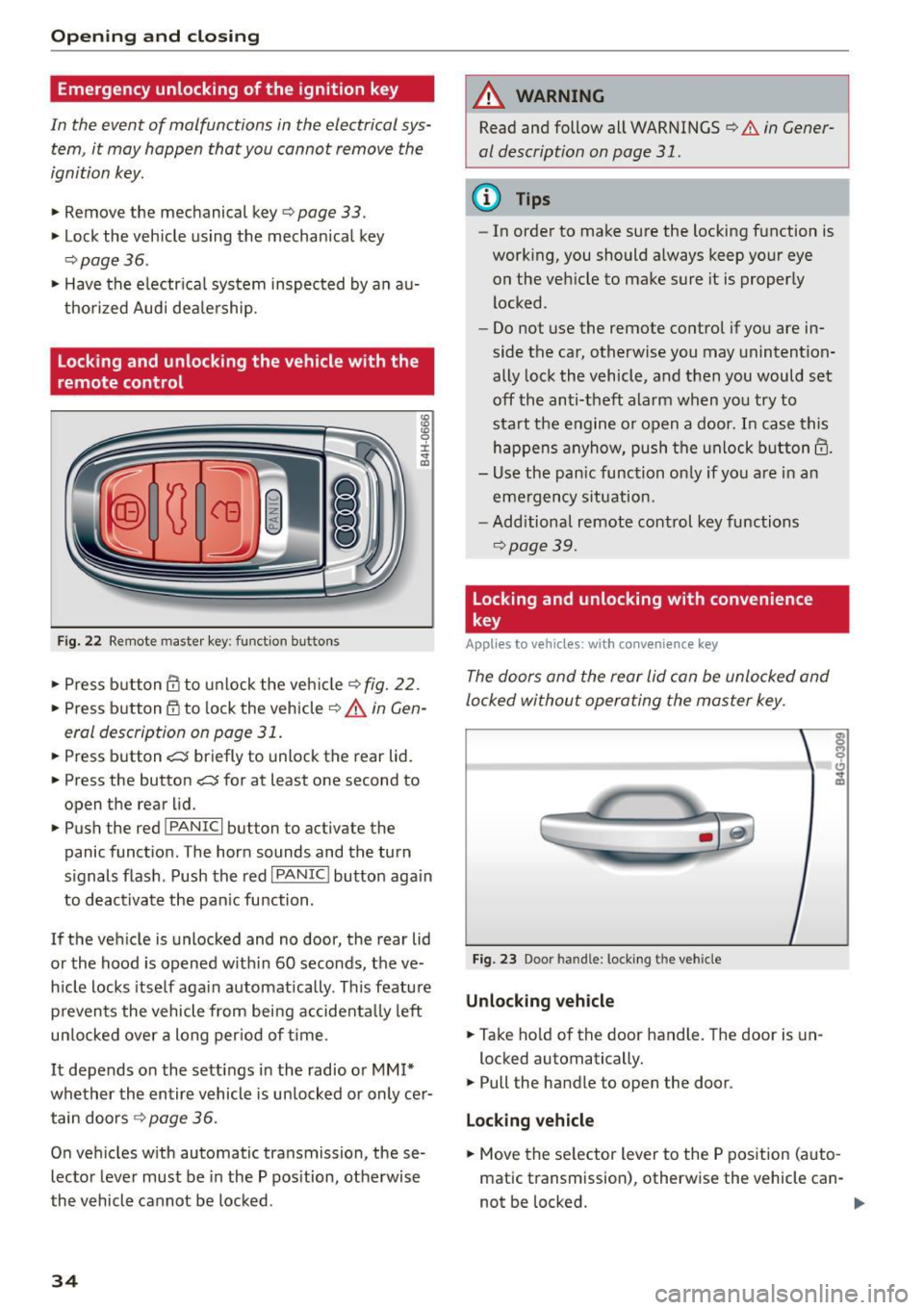
Locking and unlocking the vehicle with the
remote control
Fig. 22 Remote master key: funct ion bu tto ns
:8
"' 0 ±
"' OJ
.,. Press b utton ill to unlock the vehicle<=> fig. 22.
... Press button m to lock the vehicle ¢ A in Gen
eral description on page 31 .
.,. Press button c::5 briefly to unlock the rear lid .
.,. Press the button
c::5 for at least one second to
open the rear lid .
.,. Push the red
!PANIC I button to activate the
panic function. The horn sounds and the turn
s ignals flash . Push the red
I PANIC! button aga in
to deactivate the pan ic function .
If the vehicle is unlocked and no door, the rear lid
or the hood is opened w ith in 60 seconds, the ve
hicle locks itself again automatically . This feature
prevents the vehicle from being accidenta lly left
un locked over a long per iod of time .
It depends on the settings in the radio or
MM!*
whether the entire vehicle is unlocked or only cer
tain doors <=>
page 36.
On vehicles with automatic transmission, these
lector lever must be in the P pos ition, otherwise
the vehicle cannot be locked .
34
A WARNING
Read and follow all WARNINGS
<=> .&. in Gener
al description on page 31.
(D Tips
- In order to make sure the locking function is
work ing, you should always keep your eye
on the vehicle to make sure it is properly
locked .
- Do not use the remote control if you are in
side the car, otherwise you may unintention
ally lock the vehicle, and then you would set
off the anti-theft alarm when you try to
start the engine or open a door. In case this
happens anyhow, push the unlock button@.
- Use the pan ic function on ly if you are in an
emergency situation.
- Additional remote control key functions
¢page 39.
Locking and unlocking with convenience
key
Applies to vehicles: wit h co nvenience key
The doors and the rear lid can be unlocked and
locked without operating the master key .
Fig. 23 Door handle: lock ing the vehicle
Unlocking vehicle
.,. Ta ke hold of the door handle. The door is un-
locked automatically.
.,. Pull the handle to open the door .
Locking vehicle
.,. Move the se lector lever to the P position (auto
matic transmission), otherwise the vehicle can-
not be locked. .,..
Page 39 of 264
M N
0 loo
rl I.O
"' N
"' rl
Once the front passenger's door has been closed,
you cannot open it again from the outside. The
doo r can be opened from the inside by pulling
t he door hand le.
A WARNING
Read and follow all WARNINGS q .&. in Gener
al description on page 31 .
@ Tips
After the ignition is switched on, the power
locking system sw itch and the unlocking but
ton for the rear lid
.c::5 in the door are ena
bled .
Electronic immobilizer
The immobili zer prevents your vehicle from being
s tarted by unauthorized persons .
Inside the key there is a computer chip. This chip
automatically activates/deact ivates the electron
ic immobili zer.
Applie s to vehicl es with ign ition lock :
The electronic immobilizer deactivates automati
cally when you insert the remote control key into
the ignition lock . It activates again automatically
when you remove the remote control key from
t he ignition lock .
Applies to v eh icl es with conven ienc e key :
If t he remote control key is located inside the ve
hicle and you press the
! S TAR T ENGINE ST OPI
button, the electronic immobilizer deactivates
au tomatically . If you switch the igni tion off and
remove the remote control key from the ve hicle,
the electronic immobilizer activates again auto
mat ica lly.
A WARNING
Always take the key with you when you leave
the vehicle. The key ca n disa rm the electron ic
eng ine immob ilizer and permit an unau thor
ized pe rson to start the eng ine and enable op
eration of the vehicle systems such as power
w indow or power sunroof leading to serious
personal in jury.
Open ing and clo sing
(D Tips
- The vehicle cannot be started if an una u
thorized key is used . The vehicle may not
start if another radio device s uch as a key
for another ve hicle or a transponder is locat
ed on the key ring.
- For Declaration of Comp liance to United
States FCC and Industry Canada regulations
¢ page 247.
Luggage compartment
Lid
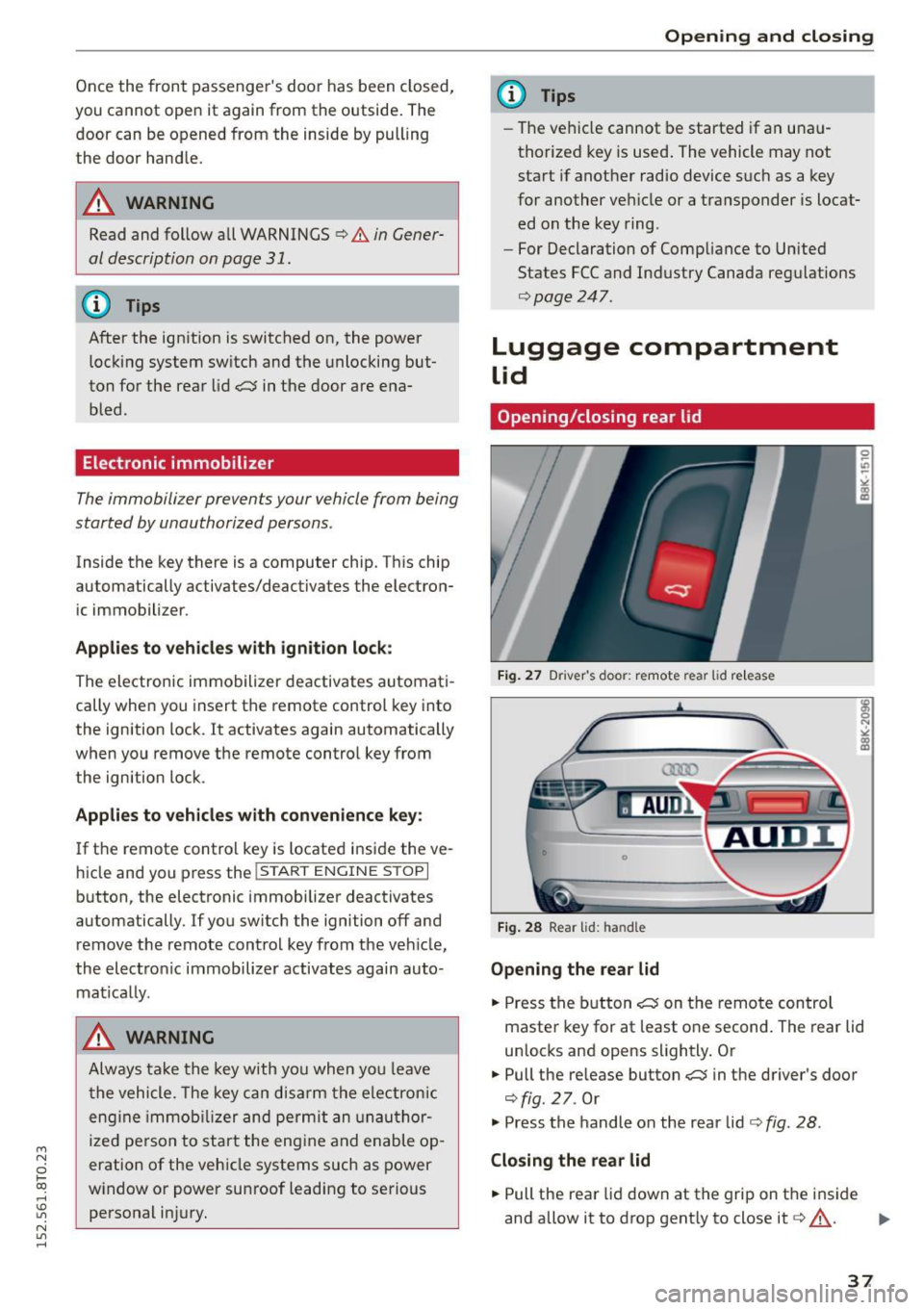
Opening/closing rear lid
Fig. 2 7 Drive r's doo r: remot e rear lid re le a se
Fig . 2 8 Rea r lid : han d le
Opening the rear lid
.. Press the b utton .c::5 on t he remote control
maste r key for at least o ne second. The rear lid
unlocks and opens slightly. Or
.,. Pull the release button
.c::5 in the driver's door
¢fig. 27. Or
.,. Press the handle on the rear lid¢
fig. 28 .
Closing the rear lid
.. Pull the rea r lid down at the grip on t he i nside
and allow it to drop gent ly to close it¢,&. .
II>-
37
Page 41 of 264
M N
i? co ,...., \!) 1.1'1
N 1.1'1 ,....,
• Pull the switch briefly to the se con d s top to au
tomatica lly close the window.
A WARNING
-When you leave your veh icle -even if only
br iefly -always remove the ignition key. This
applies part icularly when children remain in
the vehicle. Otherwise the children could start the engine o r operate electr ical equip
ment (e.g. power w indows). The power win
dows are functional until the d river's door o r
passenger's door has been opened.
- Pay close attention when closing the w in
dows to prevent pinch ing of hands or limbs.
- When loc king the veh icle from outs ide, the
vehicle must be unoccupied since t he win
dows can no longer be opened in an emer
gency.
@ Tips
- When you open the doors, the windows au
tomatically lower about 10 mm.
- After the ignition has been switched off, the
windows can st ill be opened or closed for
abo ut 10 m inutes. The window regulato rs
are not switched until the driver's or pas
senger's door is opened .
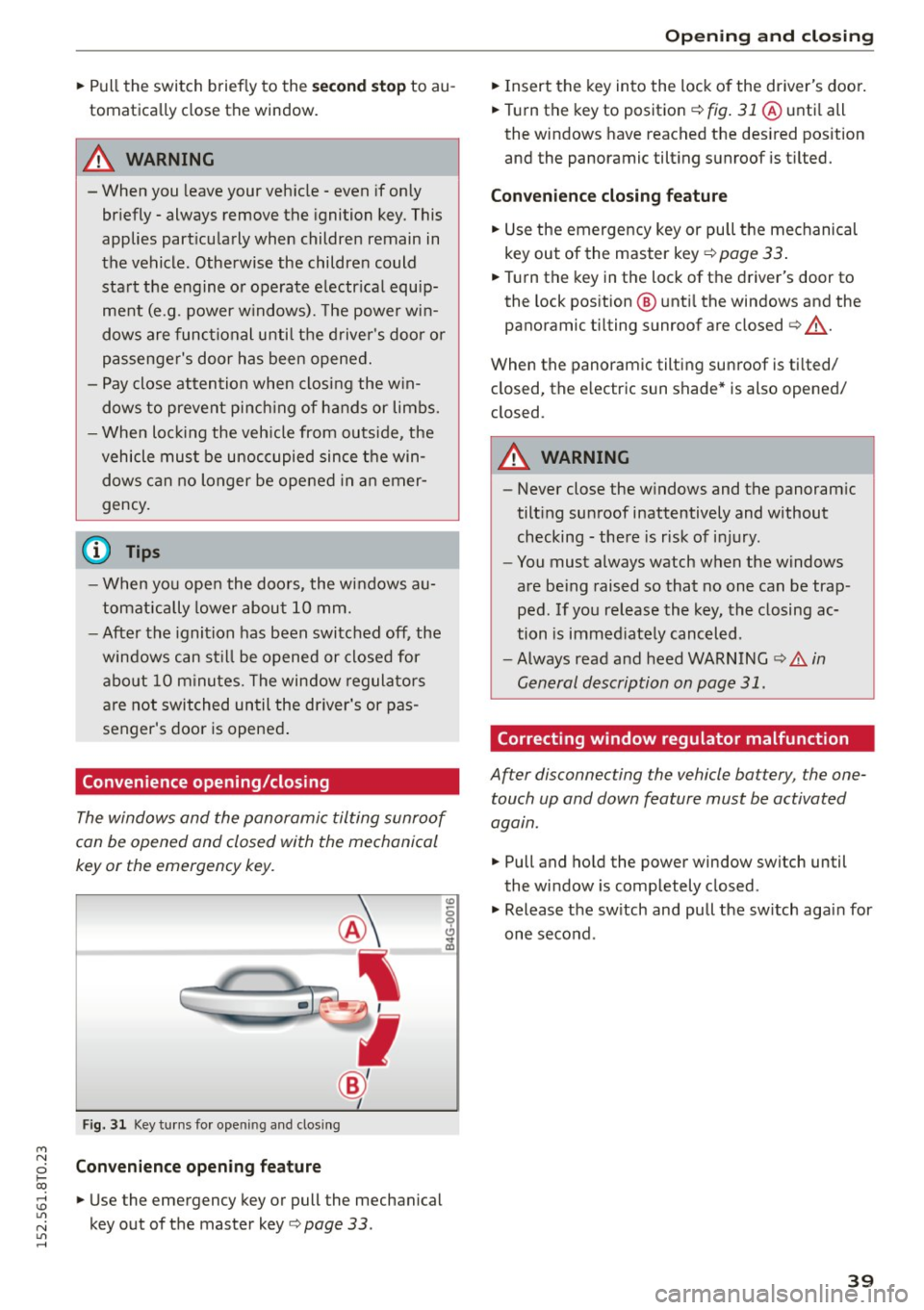
Convenience opening/closing
The windows and the panoramic tilting sunroof
can be opened and closed with the mechanical
key or the emergency key.
Fig. 3 1 Key tu rns fo r opening a nd clos ing
Con venience open ing fea ture
• Use the emergency key or pull the mechanical
key out of the master key
Q page 33 .
-
Opening and cl osing
• Insert the key into the lock of the driver's doo r.
• Turn the key to position
Q fig. 31 @ unti l all
the windows have reached the des ired pos ition
and the panoramic tilting sunroof is tilted.
Convenienc e clo sing featur e
• Use the emergency key or pull the mechanical
key out of the master key
Q page 33 .
• Turn the key in the lock of the d river's door to
the lock position @ unti l the windows and the
panoramic tilting sunroof are closed
Q ,A.
When the panoramic tilting sunroof is tilted/
closed, the electric sun shade* is also opened/
closed.
A WARNING
-- Never close the w indows and the panoram ic
tilt ing sunroof inattentively and without
checking - there is risk of injury.
- You must always watch when the windows
are be ing raised so that no one can be trap
ped. If you release the key, the closing ac
tion is immed iate ly canceled.
- Always read and heed WARNING
Q .&. in
General description on page 31.
Correcting window regulator malfunction
After disconnecting the vehicle battery , the one
touch up and down feature must be activated
again.
• Pull and hold the power window switch until
the window is completely closed.
• Release the sw itch and pull the sw itch again for
one second .
39
Page 42 of 264
Opening and closing
Panorama roof
Operation
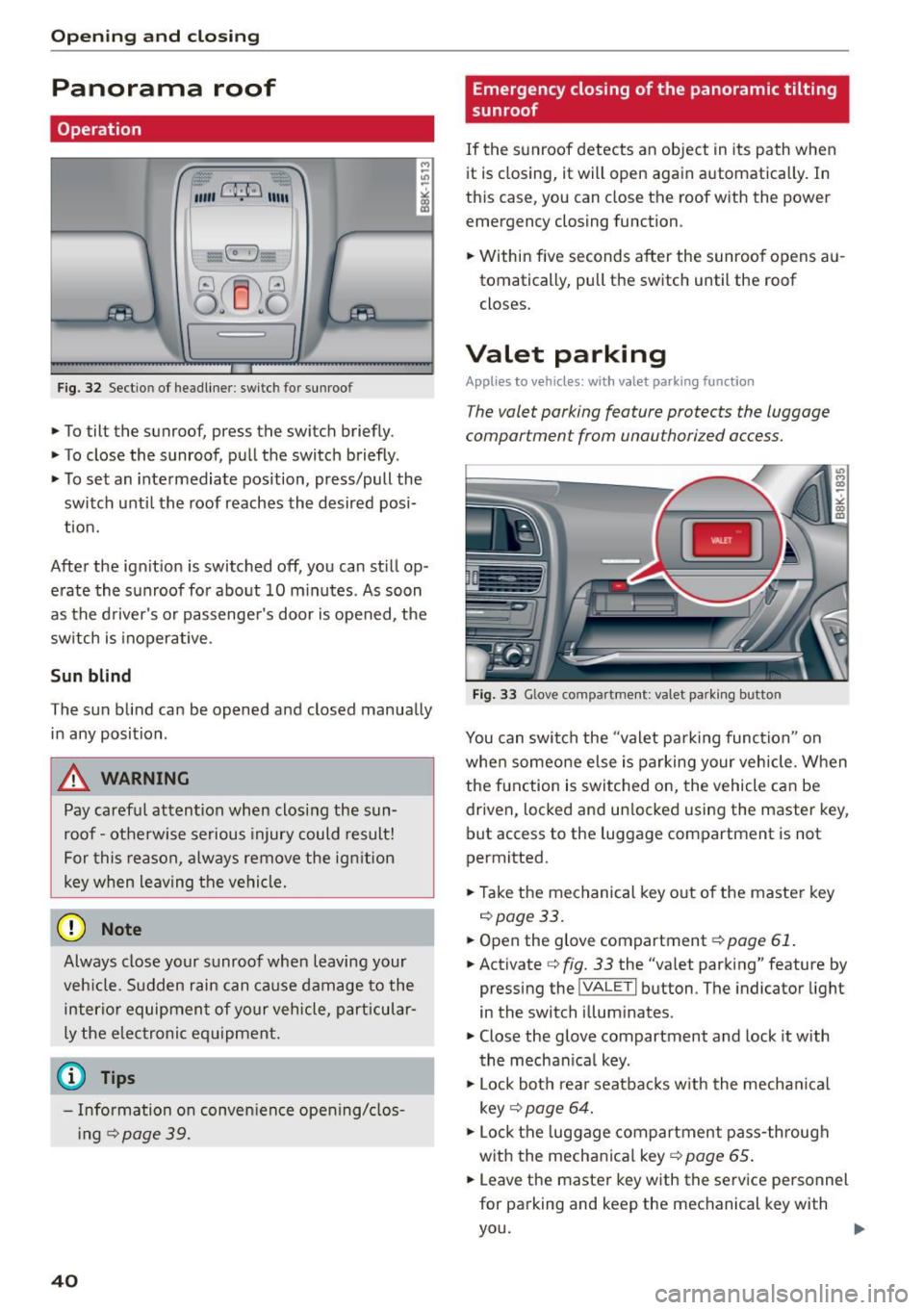
Fig. 32 Sectio n of headliner : swi tc h fo r sunroo f
.,. To tilt the sunroof, press the switch briefly .
• To close the sunroof, pull the switch briefly .
• To set an intermediate position, press/pull the
switch until the roof reaches the desired posi
tion.
After the ignition is switched off, you can still op
erate the sunroof for about 10 minutes . As soon
as the driver's or passenger's door is opened, the
switch is inoperative .
Sun blind
The sun blind can be opened and closed manually in any position .
A WARNING
Pay careful attention when closing the sun
roof - otherwise serious injury could result!
For this reason, always remove the ignition
key when leaving the vehicle.
(D Note
Always close your sunroof when leaving your
veh icle. Sudden rain can cause damage to the
interior equipment of your vehicle, particular
ly the electronic equipment.
- Information on convenience opening/clos
i ng
c::> page 39.
40
Emergency closing of the panoramic tilting
sunroof
If the sunroof detects an object in its path when
it is closing, it will open again automatically . In
this case, you can close the roof with the power
emergency closing function.
• Within five seconds after the sunroof opens au
tomatically, pull the switch until the roof
closes .
Valet parking
Applies to vehicles: wi th valet parkin g function
The valet parking feature protects the luggage
compartment from unau thorized access.
-
Fig. 33 Glove com partment: va let pa rk ing b utto n
You can switch the "valet parking function" on
when someone else is parking your vehicle. When
the function is switched on, the vehicle can be driven, locked and un locked using the master key,
but access to the luggage compartment is not
permitted.
• Take the mechanical key out of the master key
c::>page33.
• Open the glove compartment c::> page 61.
• Activate c::> fig. 33 the "valet parking" feature by
pressing the
! VA LET I button . The indicator light
in the switch illuminates.
• Close the glove compartment and lock it with
the mechanical key .
• Lock both rear seatbacks w ith the mechan ical
key
c::> page 64.
• Lock the luggage compartment pass-through
with the mechanical key
c::> page 65 .
• Leave the master key with the service personnel
for parking and keep the mechanical key with
you.
Page 44 of 264
Opening and closing
Programming or reprogramming buttons
.. Swi tch the ignition on .
.. Press and ho ld the button in the roof head liner
¢ page 41, fig. 35 that you would like to pro
gram for at least 10 seconds. O r
.. Se lect:
ICARI function button> Car system s*
control button > Vehicle settings > Garage
door opener > Program garage door opener .
If
th is path is not available, program the butto n
as descr ibed in version B ¢
page 42 .
.., Fo llow the inst ruc tions in the MM I.
Erasing button programming
The programmed buttons cannot be erased indi
vidually. They must all be erased together. Repro
g ram t he b uttons if necessa ry .
.. Se lect :
ICARI funct ion button> Car systems *
control button > Vehicle sett ings > Garage
door opener > Clear program settings > Yes .
D isplaying the version /status /country code
.. Se lect: I CARI function button > Car sy stem s*
control button > Vehicle sett ings > Garage
door opene r> Version inform ation.
@ Tips
- Programming through the MM!* is not pos
sible with all infotainment systems. If this
i s the case, program the buttons as descri
bed in ve rsion B ¢
page 42.
-The requ ired distance between the hand
transmitter and the Homelink module in
the rad iator g rille
9 page 42, fig . 36 de
pends on the system that you a re program
ming.
- Depend ing on the model of the system, you
may need to release the b utton on the re
mote cont rol during programmi ng a nd
p ress it again. H old each pos ition you try for
at least 15 seconds before try ing another
p osition . Kee p t he turn signa ls o n your ve hi
cle in view when doing t his.
- After programmi ng the gar age door opener,
i t may be necessary to sync hronize the mo
tor with the system. Refer to the manufac
ture r's instructions .
42
Programming the buttons (version B)
Applies to vehicles: with garage door opener (Homelink)
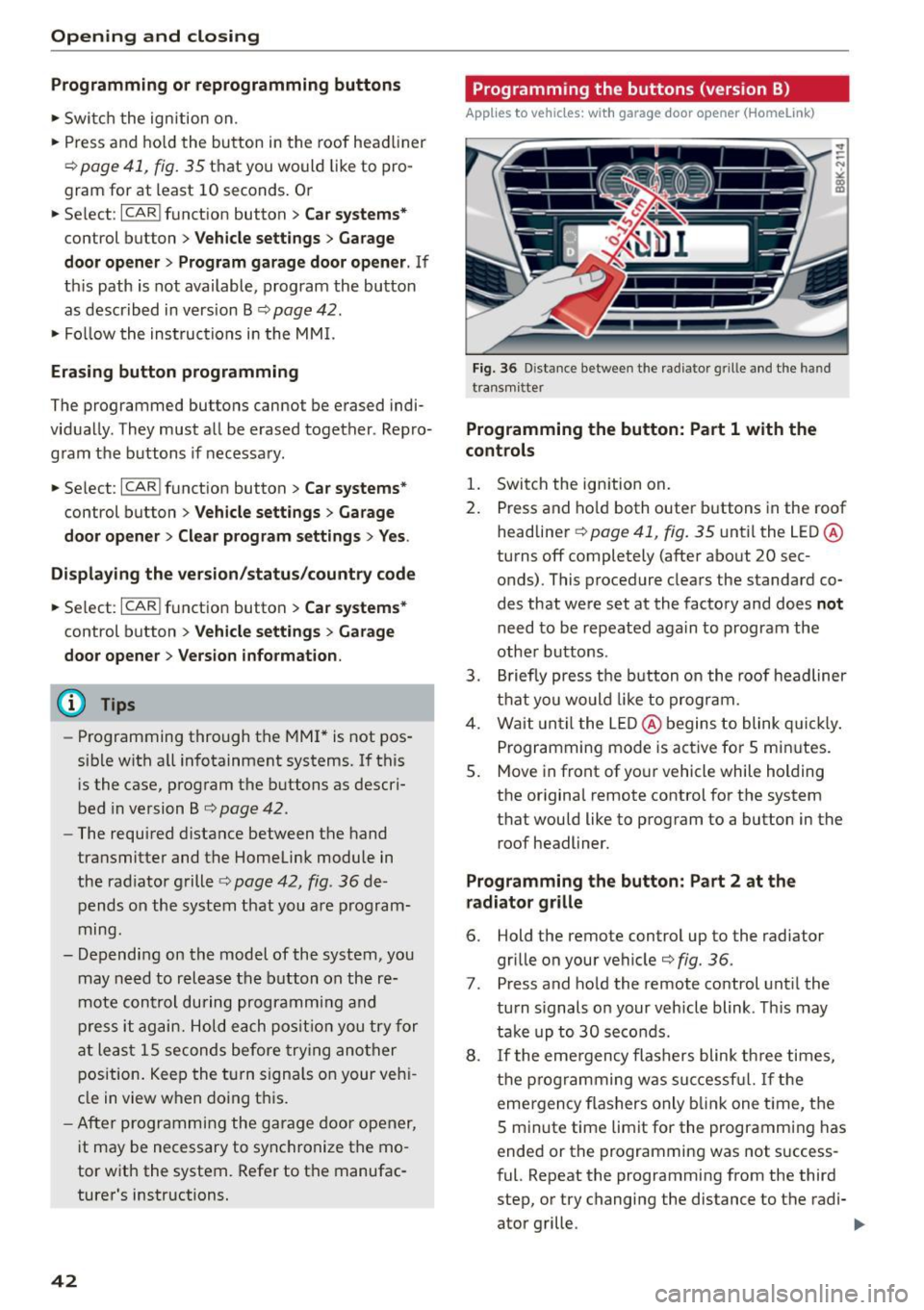
Fig. 36 Dista nce be tween the radiato r grille a nd the hand
tra nsmi tter
Programming the button: Part 1 with the
controls
1. Swi tch the ign ition on .
2. Press and ho ld both outer b uttons in the roof
headline r¢
page 41, fig. 35 unti l the LED @
turns off completely (after about 20 sec
onds). This procedure clears the standard co
des that were set at the factory and does
not
need to be repeated aga in to program the
other buttons .
3 . Briefly press the button on the roof headliner
t h at you wo uld like to program.
4. Wai t until the LED@ begins to blink q uickl y.
Programming mode is act ive for 5 min utes.
5. Move in front of yo ur vehicle while holding
the or iginal remote control for t he system
t h at wou ld like to program to a button in the
roof headliner.
Programming the button: Part 2 at the
radiator grille
6. Hold the remote control up to the radiator
grille on your vehicle¢
fig. 36.
7. Press and ho ld the remote control unt il the
tu rn s ignals on your vehicle blink . Th is may
tak e up to 30 seco nds.
8. If the eme rgency flashers blink t hree times,
the programming w as suc ces sful. I f the
emergency flashers only blink one t ime, the
S minute time limit for the programm ing has
ended or the programming was not s uccess
f ul. Repeat the programming from the third
step, or try changing the distance to the radi-
ator grille .
IJ,,