ignition AUDI A5 2015 Owner´s Manual
[x] Cancel search | Manufacturer: AUDI, Model Year: 2015, Model line: A5, Model: AUDI A5 2015Pages: 264, PDF Size: 66.83 MB
Page 45 of 264
M N
i? co ,...., \!) ..,.,
N ..,., ,....,
9. If the garage door or other system does not
open using the buttons in the roof headliner
even though the programming was success
fu l, the system may use a rolling code in
stead of a f ixed code.
Rolling code program
ming must be performed ¢ page 43.
The other two buttons in the roof headliner can
be programmed accord ing to the instructions
above. Begin w ith the third step .
Erasing button programming
The programmed buttons cannot be erased indi
vidua lly. They must a ll be erased together. Repro
gram the buttons if necessary.
.. Switch the ignition on.
.. Press and hold both outer b uttons in the roof
headliner until the LED ® turns off complete ly
(after about 20 seconds).
Reprogramming the buttons
"'S witch the ign ition on.
"'T o reprogram an individual button, press and
hold the button until the LED® starts to flash
quick ly (after about
10 seconds). Release the
button immediately. Programming mode is ac
t ive for 5 minutes .
.. Conti nue with the fifth step.
(D) Tips
-Programming using the buttons in the roof
headliner is not possib le w ith all Infotain
ment systems . If this is the case, program
the buttons as descr ibed in version A
¢page 41.
-The required distance between the hand
transmitter and the Homelink module in
the radiator grille¢
fig. 36 depends on the
system that you are prog rammin g.
- Depending on the model of the system, you
may need to release the button on the re
mote control during programming and
press it again . Hold each position you try for
at least 15 seconds before trying another
position. Keep the turn signals on your vehi
cle in view when doing this.
Opening and closing
Rolling code programming
Applies to vehicles: with garage door opener (Homelink)
Rolling code programming is also needed for
some systems .
Identifying a rolling code
.. Press and hold the button in the roof headliner
that was already programmed.
"' Watch the LEO @¢
page 41 , fig. 35. If the LED
blinks quickly, the systems (such as a garage
door) is equipped with a roll ing code.
"' Program the rolling code as follows:
Activating the motor unit in a system
.. Locate the programming button on the sys
tem's motor un it. The exact location and color
of the button may vary depend ing on the brand
of the system .
"' Press the programming button on the garage
door opene r moto r un it (th is w ill usually acti
vate an "i ndicator" on the motor unit). You now
have approximately
30 seconds to program the
button in the roof headliner.
Programming the button in the roof
headliner
"'Press and hold the previous ly programmed but
ton in the roof headliner for 2 seconds .
.. To end ro lling code programming, press and
hold the button again for 2 seconds.
.. With some systems, the button may need to be
pressed a third time to end the programming
process .
After programm ing, the system should detect
the signal and begin moving when the button in
the roof headliner is pressed. Now you may pro
gram the ot her buttons as needed .
(D Tips
-The rolling code can be programmed more
quickly and more easily with the help of a
second person.
- If you have difficulty programming the roll
ing code, referring to the user guide for the
system may help .
43
Page 47 of 264
M N
0 loo
rl I.O
"' N
"' rl
the windshield in this a rea in order to
prevent malfunctions or failures .
- Some exterior lighting functions can be ad
ju ste d
~ page 45 .
-When yo u remove your key from the igni tion
while the vehi cle's ligh ts are turned o n, a
buzzer sounds as long as t he driver 's door is
open.
- In coo l o r dam p weather, t he inside of the
h eadlights, turn sig nals and tail lights can
fog over d ue to the temperature difference
between the inside and outs ide. They will
clea r shortly after switching them on. T his
does not affect t he service li fe of the light
i ng.
- In the event of a light sensor malfunction,
the driver is not ified in the instr ume nt clus
te r display~
page 21.
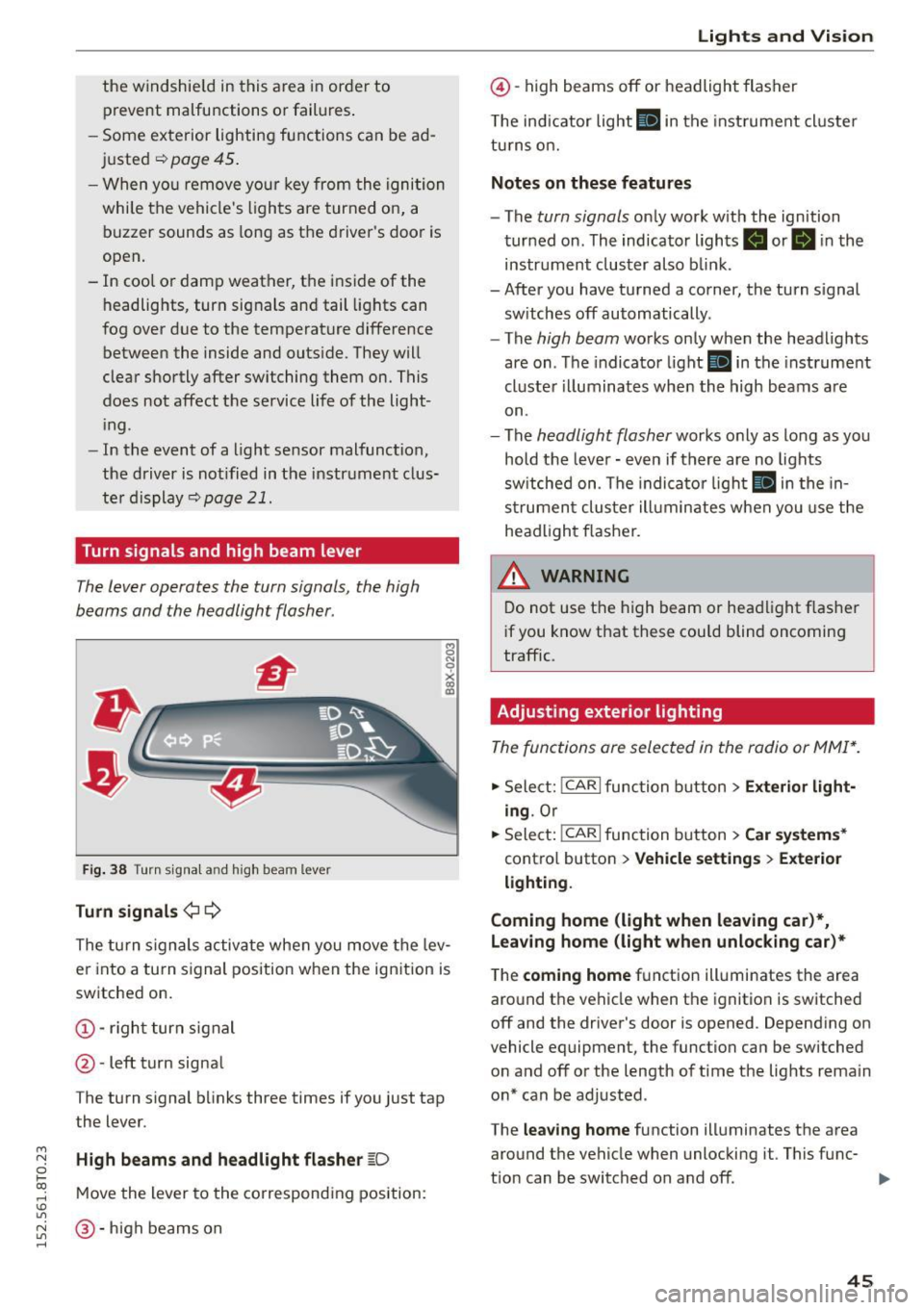
Turn signals and high beam lever
The lever operates the turn signals, the high
b eams and the headlight flasher.
Fi g. 3 8 Tu rn signa l and high beam lever
Turn signals ¢ Q
g N
0
~ CD
The turn signals activate when you move the lev
er into a turn s ignal position when the ignition is
switched on.
@ -righ t tur n signal
@ -left turn signa l
The turn s ignal b links three times if you just tap
the lever.
High beams and headlight flasher
[0
M ove the lever to the corresponding position:
@ -high beams o n
Lights and Vis ion
@ -high beams off or headlight flasher
T he ind icator light
II in t he inst rument cl uste r
tu rns on.
Notes on these features
- The
turn signals on ly wor k w ith the ign ition
tur ned on. The indicator ligh ts . or
II in the
instr um ent clus ter also b link.
-After you have tu rned a corner, the turn s ignal
sw itches off automatically.
- The
high beam works on ly when the headlights
are on . T he indicator light
II in the instrument
cluste r illuminates whe n the high beams a re
on.
- The
headlight flash er works o nly as long as yo u
hold the leve r - even if there are no lights
sw itched on . The indica to r li ght
II in the in
s trumen t cluste r ill umin ates when you use t he
head light flasher.
,&. WARNING
D o not use t he h igh beam or hea dlight flashe r
i f you know that these could blind oncoming
traffic.
Adjusting exterior lighting
The func tions are selected in the radio or MMI* .
.,. Select: !CAR I func tion b utton > Exterior light
ing .
Or
.,. Sele ct: !~C_A _R~ I function b utton > Car systems *
contro l butto n > Vehicle settings > Exterior
lighting .
Coming home (light when leaving car )*,
Leaving home (light when unlocking car)*
The
coming home f u nction illuminates the area
aro und t he vehicle when the ignition is switched
off and the driver's door is opened. Depend ing on
vehicle equipment, the function can be switched o n and off o r the length of t ime t he lig hts rema in
on* can be adjusted .
The
leaving home function illuminates t he area
around th e vehicle when unloc kin g it. This func-
t ion can be switched on and off. ""
45
Page 48 of 264
Lights and Vi sion
The comi ng h ome and leaving h ome fu nctions
only op erat e when it is da rk and the light switch
is in the AUTO position ¢
page 44, fig. 3 7.
Auto headlights*
When the light swit ch is in the A UTO ¢ page 44
posi tion, the sw itch-on po int of the lights can be
changed in the automatic drivi ng light function.
Daytime running lights
USA models :
You can sw itch th e dayt im e running
lights
on and off .
Canada models:
T he function ca nnot be turned
off . It is activated automatically eac h time the ig
n ition is switched on.
Travel mode*
The headlight beam is asymmetrical. This pro
vides stronger illum inat ion on the s ide of the
road on wh ich you a re driving. If you are driving
in a cou ntry that drives o n the opposite side of
the road from your own count ry, this will cause
g lare for oncom ing d rive rs. To prevent glare:
- Travel mode must be selected in vehicles with
Xenon headlights* .
- In veh icles with halogen headlights, certain
areas of the headlight lenses must be covered
with waterproof adhesive cove rs that prevent
l igh t from pass ing t hrough . For more informa
tion, ple ase see you r autho rized Aud i dea le r or
a ut ho rized repair facility.
When tr ave l mode is activa ted, a display in
t he dr ive r inform ati on system i nd ic ates this
e ach t ime yo u sw itch the ignition o n.
46
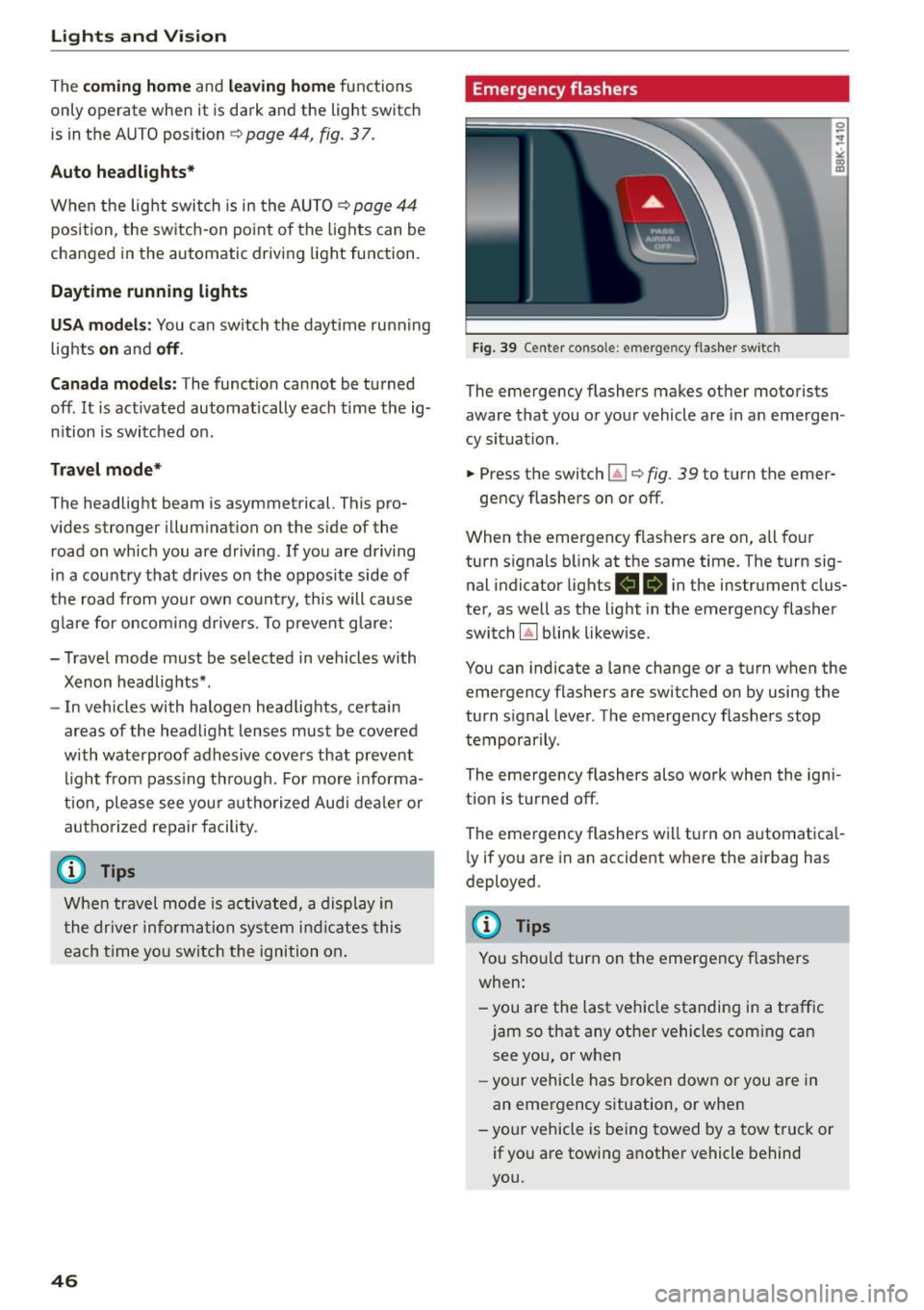
Emergency flashers
Fig. 39 Cente r co nsole : em erg en cy flas he r sw itc h
The emergency flashers makes other motorists
aware that you or you r vehicle a re in an emerge n
cy situat ion .
.. Press the switch~¢
fig. 39 to t urn the emer-
ge ncy flashers on or off.
When the emergency flas hers are on, all fo ur
turn s ignals b link at the same time. The turn sig
nal indicator lights
RB i n the instrument clus
ter, as we ll as the light in the emergency flasher
switch
IA] b link likewise .
You can indicate a lane change or a t urn w hen the
emergency flashers are switched on by using the
turn s ignal leve r. The emergency flashers stop
temporar ily .
The emergency flashers also wo rk when the igni
tion is turned off.
The emergency flashers w ill tu rn on a utomat ica l
l y if you a re in a n accident w here the airbag has
deployed .
@ Tips
You should turn on the emergency f lashers
when:
-yo u are the last veh icle standing in a t raff ic
jam so that any othe r vehicles com ing can
see you, or when
- yo ur vehicle has broken dow n or you a re in
an eme rgency s ituation, or when
-yo ur vehicle is be ing towed by a tow tru ck or
if yo u are towing a not her vehicle behind
you.
Page 49 of 264
M N
0 loo
rl I.O
"' N
"' rl
Interior lighting
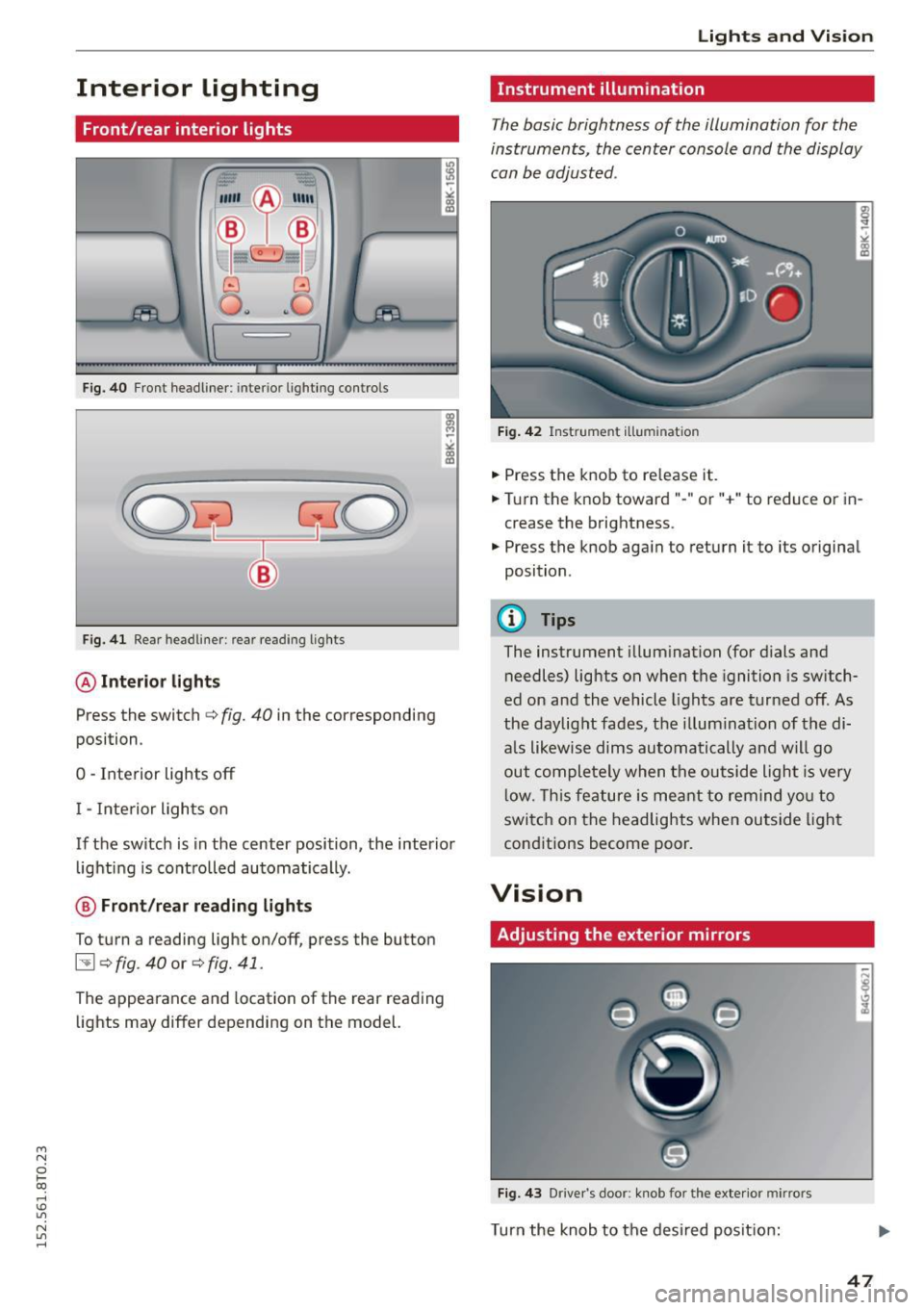
Front/rear interior lights
(• ' .,;,I
~~~
8 8
O. ~O
l
Fig. 40 Front headliner : interior lighting contro ls
Fig. 41 Rear headliner: rear reading lights
@Interior lights
Press the switch c> fig. 40 in the corresponding
position .
0 -Interior lights off
I -Inte rior lights on
If the switch is in the center position, the interior
lighting is controlled automatically.
@ Front /rear reading lights
To turn a reading light on/off, press the button
~ c> fig. 40 or c> fig. 41.
The appearance and location of the rear reading
lights may differ depending on the model.
Lights and Vision
Instrument illumination
The basic brightness of the illumination for the
instruments, the center console and the display
can be adjusted .
Fig. 42 Instrume nt illumination
• Press the knob to re lease it .
.. Turn the knob toward"-" or "+" to reduce or in
crease the brightness.
• Press the knob again to return it to its original
position .
@ Tips
The instrument illumination (for dials and
needles) lights on when the ignition is switch
ed on and the vehicle lights are turned off. As
the daylight fades, the illum ination of the di
als likewise dims automatically and will go
out completely when the outside light is very
low. This feature is meant to remind you to
switch on the headlights when outside light
conditions become poor.
Vision
Adjusting the exterior mirrors
Fig. 43 Drive r's door : knob for the exterio r mir rors
Turn the knob to the desired position:
47
Page 50 of 264
Lights and Vision
Q/P -Adjusting the left/right exterior mirror .
Move the knob in the des ired direction.
4ill -Heat ing the m irror g lass depending on the
outside temperature*.
.9 -Folding exterior mirrors* . In the Infotain
ment system, you can select if the mirrors fold in
automatically when you lock the vehicle
¢ page 36.
Front passenger's exterior mirror tilt
function*
To help you see the curb when backing into a
parking space, the surface of the mirror t ilts
slightly . Fo r this to happen, the knob must be in
the position for the front passenger 's outside
mirror.
You can adjust the tilted mirror su rface by turn
ing the knob in the des ired direction . Wh en you
move out of revers e and into another gear, the
new mirror position is stored and assigned to the
key you are using.
The mirror goes back into its origina l position
once you drive forward faster than 9 mph (15 km/h) or turn the ignition off.
A WARNING
Curved mirror surfaces (convex or spherical*)
increase your field of view. Remember that
vehicles or other objects will appear smaller
and farther away than when seen in a flat mir
ror. If you use this mirror to estimate distan
ces of following vehicles when changing
lanes, you cou ld estimate incorrectly and
cause an accident.
(D Note
-If the mirror hous ing was moved by force
(for example, by running into an object
when maneuvering the vehi cle), the mirror
must be folded all the way in using the pow
er folding function. The mirror housing
must not be moved back into place by hand
because this would impair the function of
the mirror mechanism.
- If you wash the vehicle in an automatic car
wash, you must fold the exterior mirrors in
48
to reduce the risk of damage to the mirrors.
Never fold power folding exterior mirrors*
by hand. Only fold them in and out using
the power controls.
(D Tips
-If the power adjusting function malfunc
tions, the g lass in both mirrors can be ad
justed by pressing on the edge of it by hand.
- The exterior mirror settings are stored with
the memory function* ¢
page 58.
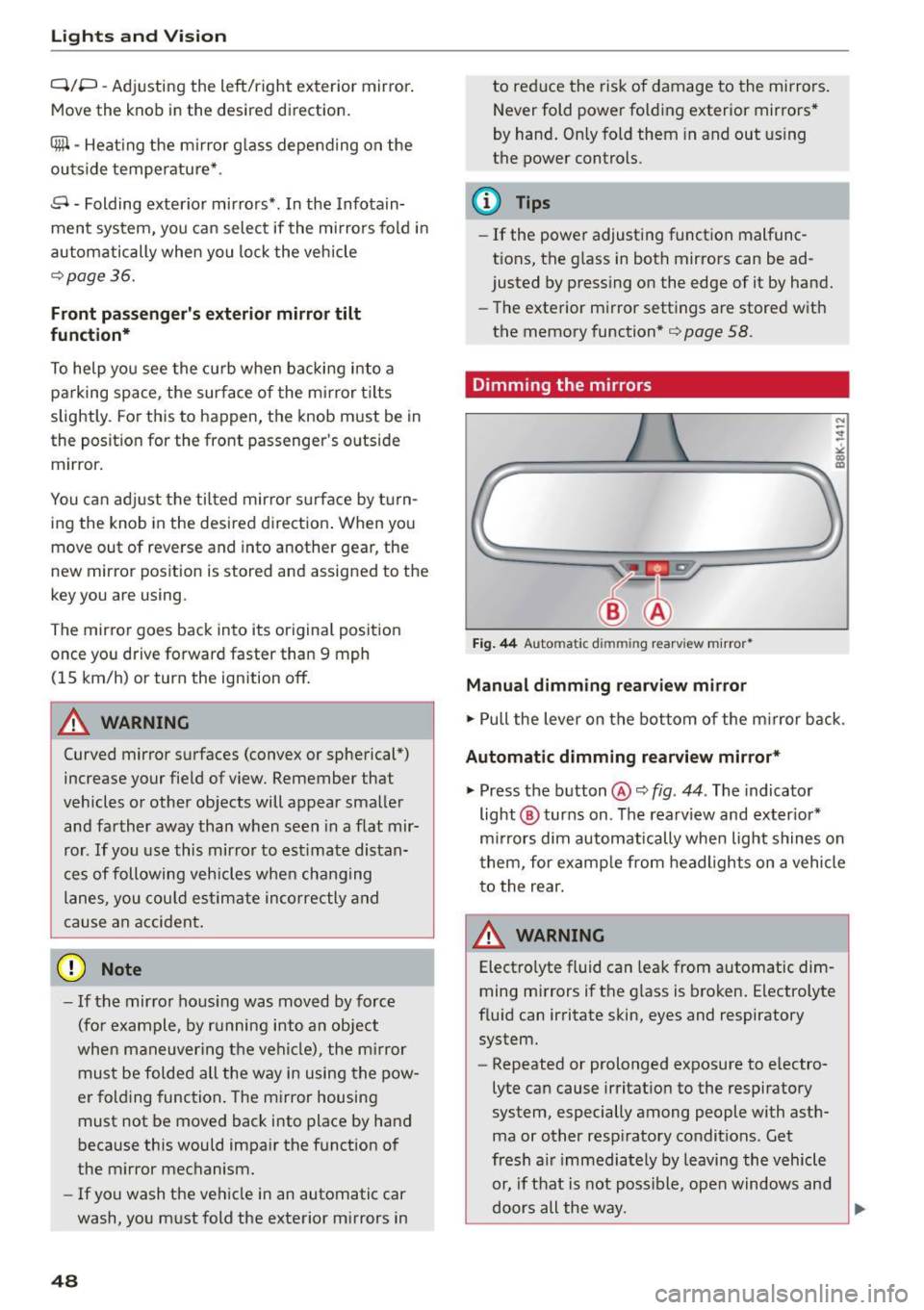
Dimming the mirrors
Fig. 44 Automat ic dimmin g rearv iew mirro r•
Manual dimming rearview mirror
.,. Pull the lever on the bottom of the m irror back .
Automat ic dimming rearview mirror*
.,. Press the button@¢ fig. 44. The indicator
light @ turns on . The rearview and exter ior*
mirrors dim automatically when light shines on
them, for example from headlights on a vehicle
to the rear.
~ WARNING
Electro lyte fluid can leak from automatic dim
ming mirrors if the glass is broken. Electrolyte
fluid can irritate skin, eyes and respiratory system.
- Repeated or prolonged exposure to e lectro
lyte can cause irritation to the respiratory
system, especially among people with asth
ma or other resp iratory conditions . Get
fresh a ir immediately by leaving the vehicle
or, if that is not possible, open windows and
doors all the way.
~
Page 52 of 264
Lights and Vi sion
You can adju st the settings for the rear sun shade
so the shade retracts a utomatica lly when you se
lect the reverse gear. To do this, se lect the
I CAR !
function button
> Windows > Rea r blind > au to
matic > on
or! CA R! function button> Car sys
tems *
control button > Vehicle sett ings > Auto
matic rear blind > On .
The cur ren t setting is au
tomatically stored and assigned to the remote
key. The sun shade is extended again as soon as
the vehicle is traveling forwa rd at a speed gre ater
than
9 mph (15 km/h) if the ignition has not
been switched off in t he meantime .
_& WARNING
Whe n lowe ring or raising the sunshade, make
sure there is nothing in its way and that it has
a free path to t ravel. Th is co uld cause perso n
al injury.
@ Tips
- Pressing t he button ru several times con
secutively can trigger the over load protec
tion. The sun shade can only be extended/ r etracted aga in after a br ief waiting period.
- The rear window sun shade only f unctions
when the vehicle interior is warmer tha n
14°F (-10°C).
Windshield wipers
Switching the windshield wipers on
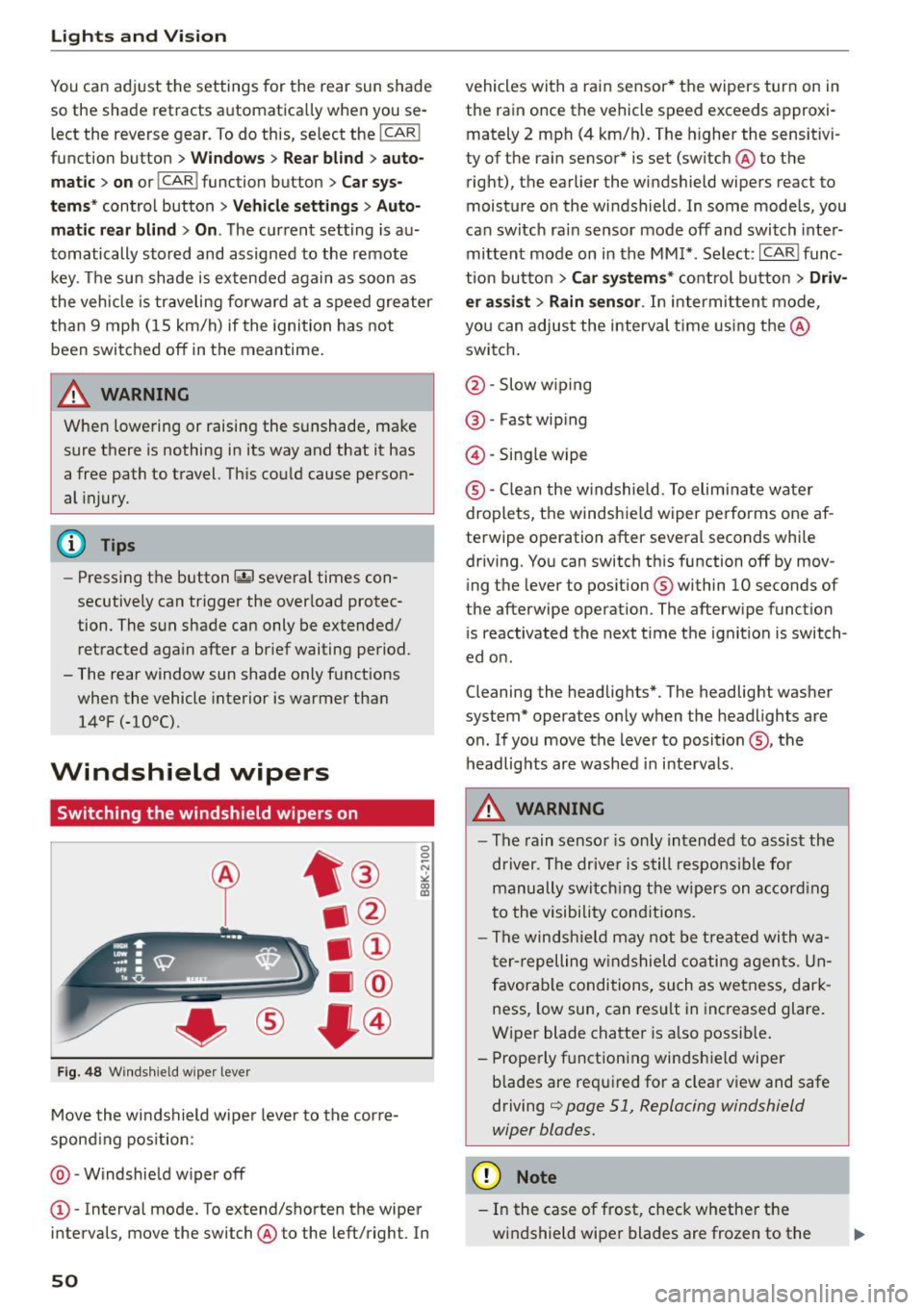
Fig . 48 W inds hield w iper leve r
Move the windshield wipe r leve r to the corre
spond ing pos ition:
@ -Windshie ld w iper off
0 0 -N st co Ul
© -Interva l mode. To extend/shorten the wiper
i n tervals , move the switch @to the left/right. In
50
vehicles with a rain sensor * the wipers turn on in
the rain once the vehicle speed exceeds approxi
mately 2 mph (4 km/h). The higher the sensitivi
ty of the ra in sensor * is set (switch @to the
right), the earlier the windshield wipe rs react to
moist ure o n the windsh ield . In some models, you
can switc h ra in sensor mode off and switch inte r
mittent mode on in the MM !* . Se lect :
I CAR I func
t ion but to n
> Car systems * cont rol bu tton > Driv
er assi st > Rain sensor .
In intermi tten t mode,
you can a djus t the interval time using the @
swi tch .
@ -Slow w iping
@ -Fast wip ing
@ -Sing le wipe
® -C le a n the w indshield. To elim inate water
droplets, the windsh ie ld wiper pe rforms one af
te rwipe operation after several seconds whi le
driv ing. You can switch th is function off by mov
ing the lever to pos ition ® within
10 seconds of
the afterwipe operation. The afterw ipe funct io n
i s reactivated the next t ime t he ignit ion is switch
ed o n.
C leaning the headlig hts". The headlight was her
system* operates on ly when the headlights are
o n. If you move the lever to position @, the
headlig hts are washed in in terva ls .
_& WARNING
- The rain senso r is only intended to assis t the
d river. The drive r is s till respons ible for
manu ally swi tching the wipers on a ccor din g
t o the visibility con ditions.
- The winds hiel d may not be treate d wi th w a
t er -repelling w ind shiel d coati ng a gents. Un
f avor able conditions, su ch as wetness, dar k
ness, low sun , can res ult in inc reased glare.
Wiper blade chatte r is a lso possib le .
- Properly f unctioning windsh ie ld wiper
b lades are req uired for a clear v iew and safe
driving
c::> page 51, Replacing windshield
wiper blades.
(D Note
- In the case of fr ost, check whether the
wi ndshie ld wipe r blades are frozen to t he
Page 53 of 264
M N
i? co ,...., \!) 1.1"1
N 1.1"1 ,....,
windshield. Switching on the windshield
wipers can damage the wiper blades!
- Prior to using a car wash, the windshield
wiper system must be switched off (lever in
position @). Th is helps to prevent uninten
tiona l switching on and damage to the
windsh ield wiper system.
(D Tips
- The windshield wipers are switched off
when the ignition is turned off . Activate the
windsh ield wipers after the ignition is
switched back on by moving the winds hield
wiper lever to any posit ion .
- Worn or dirty windshie ld wiper blades result
i n streaking. This can affect the rain sensor*
funct ion. Check your windshield wiper
blades regularly.
- The washer fluid nozzles of the windshield washer system are heated at low tempera
tures when the ignit ion is on.
- When stopping temporarily , (e.g . at a traffic
light) the set speed of the windsh ield wipers
i s automatically reduced by one speed.
Cleaning windshield wiper blades
C lea n the windshield wi per blades when they be
gin to leave streaks . Use a soft cloth and glass
cleaner to clean the windshield wiper blades.
.,. Place the windshield wiper arms i n the service
pos ition. Re fer to ¢
page 51.
.,. Lift the wiper arm away from the front window .
A WARNING
-
Dirty windshield wiper blades can impair your
view . Th is can lead to acc idents.
Light s and Vis ion
Replacing windshield wiper blades
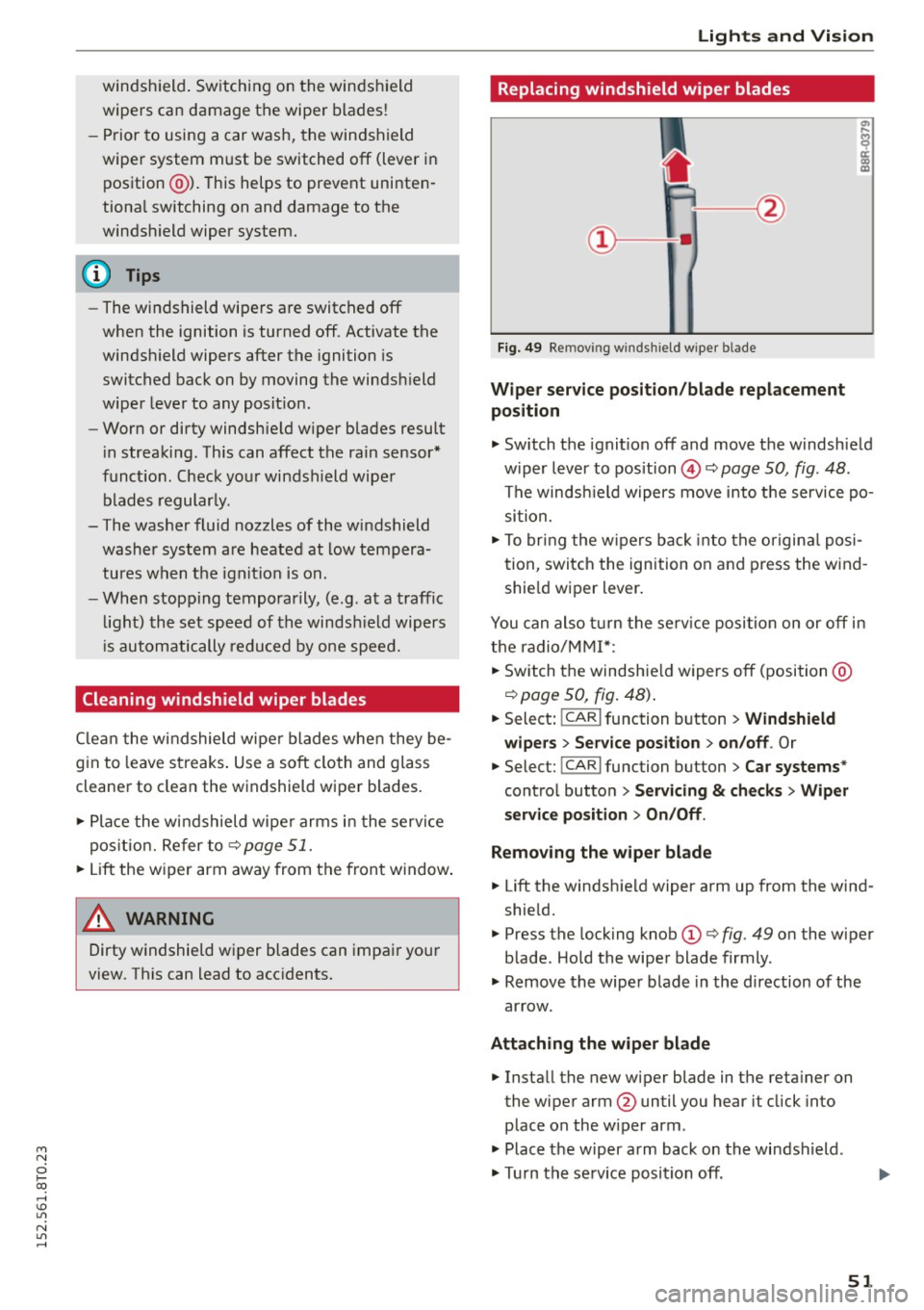
Fig. 49 Re mov ing wi nd sh ie ld wipe r bla de
Wipe r ser vice position /bl ade repl acement
position
.,. Switch the ignit ion off and move the windshield
w iper lever to pos ition @¢
page 50, fig. 48 .
The windsh ield wipers move into the service po
si tion.
.,. To bring the w ipers back into the o rigina l posi
tion , switch the ignition on and press the wind
shie ld wiper l ever .
You can also t urn the se rv ice position on or off in
the radio/MM!*:
.,. Switch the windshie ld wipers off (position @
¢page 50, fig. 48) .
.,. Select: !CAR I function button > Win dshield
wipe rs
> Serv ice po sition > on /off . Or
.,. Select: !CAR I func tion button > C ar systems *
control button
> S erv ici ng & checks > Wip er
s er vice po sition
> On /Off .
R emoving th e wiper bla d e
.,. Lift the windshie ld wiper arm up from the wind
shield.
.,. Press the locking knob
(D ¢ fig. 49 on the wiper
blade . Hold the wiper blade firmly .
.,. Remove the wiper blade in the d irection of the
ar row .
Att aching the w ipe r blade
.,. Install the new wiper blade in the reta iner on
the wiper arm @until you hear it click into
place on the w iper arm .
.,. Place the w iper arm back on the windshield.
.,. Turn the se rvice position off .
51
Page 57 of 264
M N
0 loo
rl I.O
"' N
"' rl
sudden braking or an accident, you would not
be able to brake or accelerate.
Front passenger's seat
Always move the front passenger seat into the rearmost position .
To avoid contac t with the airbag wh ile i t is de
p loying, do not sit a ny closer to the inst rument
panel than necessary and always wear the three
point safety belt provided adj usted correctly. We
recommend that you adjust the passenger's seat
in the following manner:
• Bring the back rest up to an (a lmost) upright
position .
Do not ride with the seat reclined .
• Applies to vehicles with adjustable head re
stra ints: Adjust the head restra int so the upper
edge is as even as possible with the top of your
head.
If that is not possible, try to adjust the
head restraint so that it is as close to this pos i
t io n as poss ible
¢ page 57.
• Place your feet on the f loor in front of the p as
senger 's seat.
Front seats
Power seat adjustment
App lies to vehicles : with power adjustable seats
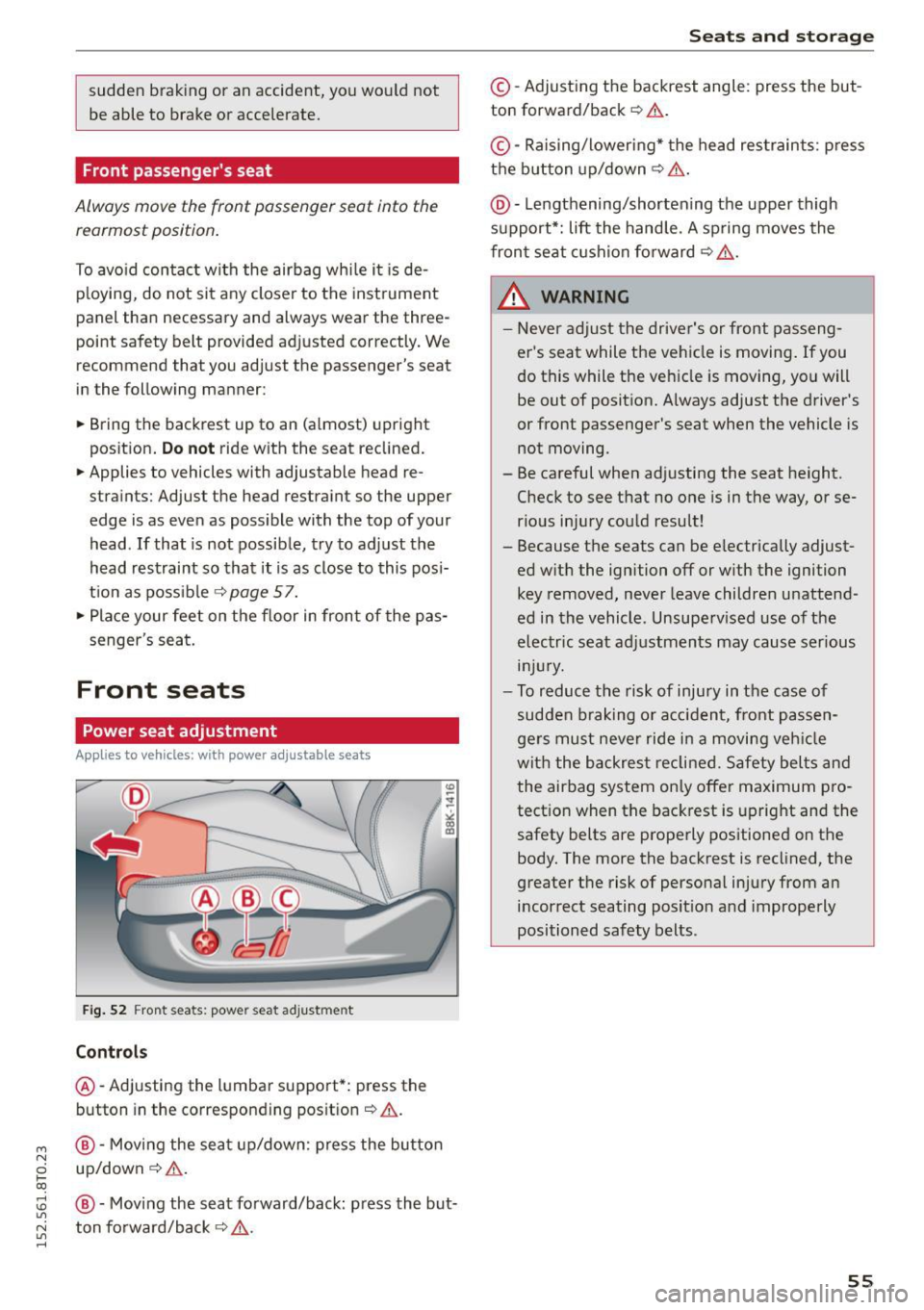
Fig. 52 Front seats: powe r seat a dju st m en t
Controls
@ -Adjusting the l umbar suppo rt*: press the
button in the corresponding pos it io n
c:> & .
@ -Moving the se at up/down: press the bu tto n
up/down ¢ & .
@ -Mov ing the s eat fo rward/back: p ress the but
ton fo rward/back ¢
&,..
Seats and storage
©-Adjust ing the backrest angle : press the but
ton forward/back ¢.&. .
©-Raising/loweri ng* the head res train ts: p ress
t h e b utton up/down¢ &.
@ -Lengthening/shortening the upper thigh
support*: lift the hand le. A sp ring moves the
fron t se at c ushion fo rward ¢
.&..
_& WARNING
-Never a dju st the drive r's or front passeng
er 's seat while the ve hicle is moving .
If you
do this while the ve hicle is moving , you will
be out of position. Always adjust the d river's
or front passenger's seat when the vehicle is
not moving.
- Be careful when adjusting the seat height. Check to see t hat no one is in the way, or se
rious injury cou ld result!
- Because t he seats can be e lectrically adjust
ed w it h the ignition off or w ith the ignition
key removed, never leave children unattend
ed in the vehicle. Unsupe rv ised use of the
elec tric seat ad justments may cause serious
lnJUr y.
-To r educe the risk of inju ry in the case of
sudden b ra king o r ac cident, front passen
ge rs must neve r ride i n a moving veh icle
wit h the b ackres t re clined. Safety bel ts an d
the airbag system only offe r maximum pro
tect ion when the bac krest is upright and the
safety belts are prope rly positioned on the
body. The more the backrest is reclined, the
greater t he risk of personal injury from an
incorrect seating posit io n and improperly
positioned safety belts.
55
Page 61 of 264

M N
0 loo
rl 1.0
"' N
"' rl
In addition to the d river 's seat settings, you can
also store and access the exterior mirror adjust
ment settings* using the remote control key or
memory button.
Remote control key
App lies to vehicles: with seat memory
To assign the driver's seat settings to the remote
control key when locking the veh icle, the funct ion
must be act ivated in the radio or
MM!*
• Select: I CARI function button > Seat adjust·
ment
> Driver's seat > Remote control key >
on .Or
• Select : I CAR I function button > Car sy stem s*
control button > Vehicle settings > Seats >
Driver' s seat > Remot e contro l key > On .
@ Tips
If you do not want anoth er driver's settings to
be assigned to the remote key, sw itc h off the
memory f un ct io n using the radio or MM I* or
the
I O N/OFF I but ton ¢ page 59 .
Memory buttons
Applies to vehicles: with seat memo ry
Fig. 6 0 Driver's door: memory fu nct io n buttons
The memory butto ns are located in the dr iver's
d oor.
Switching the memory function on /off
• Press the ION/O FF I button to switch the memo
ry function on/off . The word
OFF lights up when
the memory function is switched off. Seat p ro·
files are nei ther stored no r r eca lled.
Seats and storage
Storing a seat profile
• Press the ISET I button. Whe n the word SET
lights up, the memory is ready to store set
tings.
• Press a memory button
dil or [II) briefly . A tone
confirms that the settings were stored.
Accessing a seat profile
• If the driver's door is open and the ignition is
sw itched off, press the memory button .
• If the driver's door is closed or the ignition is
switched on, press and hold the memory but
ton unti l the seat adjustment is complete.
A WARNING
- For safety reasons, the seat setting can o nly
be recalled when the veh icle is stationary·
otherwise you risk hav ing an accident.
- In an emergency the recall procedure can be
cancelled by pressing the
I O N/OF F! switch o r
by tappi ng the memory buttons.
Ashtray
Fi g. 6 1 Center console: ashtray
Opening /clo sing
• To open the ashtray, sl ide the cover up
r:!) fig. 61.
• To close the ashtray, press down on the cover.
Emptying the ashtray
• To remove the insert, slide the latch to the right
r:!) fig. 61 -arrow-.
• To insta ll the insert, press it down into the
mou nt.
59
Page 74 of 264
Driving
Driving
Steering
Manually adjustable steering wheel
The steering wheel position is fully adjustable up
and down and forward and back .
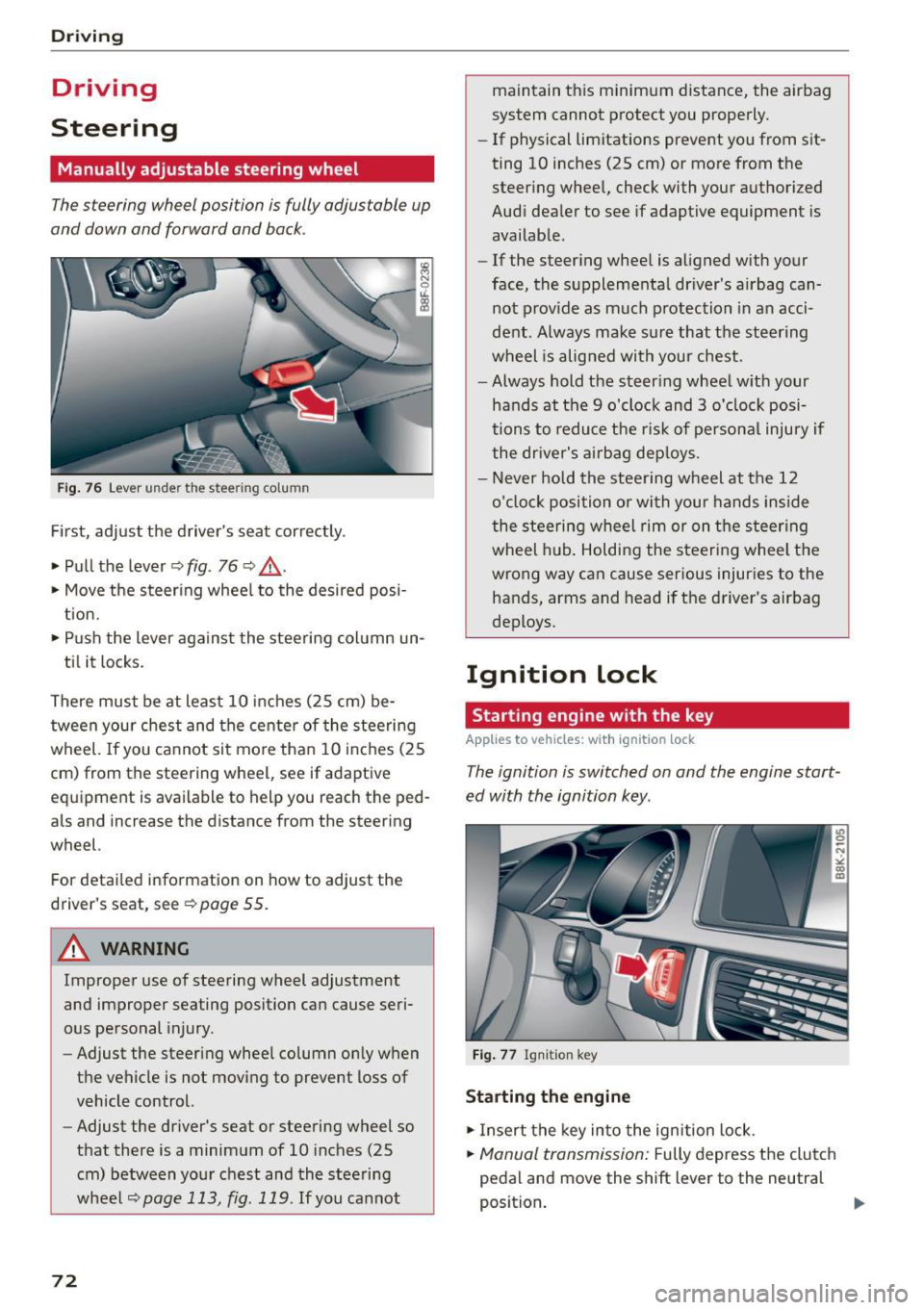
Fig. 76 Lever under the steering column
Firs t, adjust the driver 's seat cor rectly .
• Pull the lever ¢
fig. 76 ¢ .&_.
• Move the steer ing whee l to the desired posi
t ion.
• Push the lever agains t the steering col umn un-
ti l it locks.
There must be at least 10 inches (25 cm) be
tween your chest and the cente r of the steering
wheel.
If you ca nnot sit mo re than 10 i nch es (25
cm) from the steering wheel, see if adaptive
eq uipment is available to help you reach the ped
als and increase the distance from the steering
wheel.
For detai led information on how to adjust the
driver's seat, see
¢ page 55.
A WARNING
Improper use of steering wheel adjustment
and improper seating position can cause seri
ous pe rsonal injury .
- Adjust the steering wheel column on ly when
the vehicle is not moving t o prevent loss of
vehicle control.
- Adjust the driver's seat or steering wheel so
that there is a minim um of 10 inches (25
cm) between your chest and the steering
wheel
¢page 113, fig. 1 19 . If you cannot
72
maintain t his minimum distance, the airbag
system cannot p rotect you properly.
- If physical limitations prevent you from sit
ting 10 inches (25 cm) or more from the
steer ing whee l, check with your authorized
Audi dea ler to see if adaptive equipment is
availab le.
- If the steer ing whee l is aligned with your
face, the supplementa l driver 's a irbag can
not prov ide as much p rotection in a n acci
dent. Always make su re that the steering
wheel is alig ned with your chest.
- Always hold the steer ing wheel w ith your
hands at the 9 o'clock and 3 o'clock posi
tions to reduce the ris k of persona l injury if
the dr iver's air bag dep loys.
- N ever hold the stee ring wheel at the 12
o'cloc k position o r with your hand s inside
the steering wheel rim or on t he steering
wheel hub . Holding the steeri ng whee l the
wrong way can cause serious injuries to the
hands, arms and head if the driver's airbag
deploys.
Ignition lock
Starting engine with the key
App lies to vehicles : wi th ignition lock
The ignition is switched on and the engine start
ed with the ignition key .
Fig . 7 7 Ign iti on key
Starting the engine
• Insert the key into the ignition lock .
• Manual transmission: Fully depress the clutch
pedal an d move the shift lever to the neutral
position . ..,.