wheel AUDI A5 2015 Owner´s Manual
[x] Cancel search | Manufacturer: AUDI, Model Year: 2015, Model line: A5, Model: AUDI A5 2015Pages: 264, PDF Size: 66.83 MB
Page 89 of 264
M N
i? co ,...., \!) 1.1'1
N 1.1'1 ,....,
will return to automatic mode. To keep shifting
using the shift paddles, move the s elector lever
to the right out of the 0/5 position.
The t ransmission automatically shifts up o r down
before critica l engine speed is reached.
The transmission only allows manua l shift ing
when the engine speed is within the permitted range .
@ Tips
-When you sh ift into the next lower gear, the
transmission will downshift only when there i s no poss ibility of over -revving the engine.
- When the kick-down comes on, the trans
mission will sh ift down to a lower gear, de
pending on vehicle and engine speeds .
- Tiptronic is inoperat ive when the transmis
s ion is in the fa il-safe mode .
Kick-down
Appl ies to vehicles: with S tro nic/t iptronic
Kick-down enables maximum acceleration.
When you depress the accelerato r pedal beyond
the resistance po int, the automatic transm iss ion
downshifts into a lower gear, depend ing o n ve hi
cle speed and engine speed. The upsh ift into the
nex t higher gear ta kes place once the maximum
specified engine speed is reached .
A WARNING
Please note that the drive wheels can spin if
kick-down is used on a smooth slippery road -
there is a risk of sk idding.
Launch Control Program
App lies to vehicles: with S tro nic
Th e Launch Control Program provides the best
acceleration possible when starting from a stop .
Requirement: The engine must be at operating
temperature and the steering wheel must not be
turn ed .
.,. Press the
1.$ O FF I button ¢ page 171 while the
engine is running. The
II i ndicator light ill umi
nates i n the instrument cluster and
Stabiliza-
Aut omatic transm issio n
tion control (ESC): Sport. W arning! Re stri cted
s tability
appears in the driver information sys
tem display .
.,. Move the sele ctor leve r to the 0/5 position to
select spo rt mode (5) or se lect the
d y namic
driving mode in drive se lect* ¢ page 103 .
.,. Press the brake pedal strongly with your left
foot and ho ld it down fo r at least 1 second.
.,. At the same time, press the accelerator pedal
down comp lete ly with yo ur right foot u nti l th e
eng ine reaches and mainta ins a high R PM .
.,. Remove your foot from the brake pedal within 5
seconds ¢
,A.
A WARNING
-Always adapt your dr iving to the traff ic flow.
- Onl y use the Launch Cont ro l Program when
road and traffic cond itions allow it and oth
er drivers will not be endangered or annoyed by your driving and the vehicle's acce lera
tion .
- Please note that the driving wheels can spin
and the vehicle can break away when sport
mode is switched on, especially when the
road is s lippery .
- Once you have accelerated, you shou ld
sw itch sport mode off by pressing the
l.f3 OFF I button .
(D Tips
-The tra nsmission temperature may increase
signif icant ly after us ing the Launch Contro l
Program. If that happens , the program may
not be availab le for a few minutes.
It wi ll be
available again afte r a cool-down per iod.
- When acc elerating using the Launch Control
program, a ll vehicle parts are subject to
heavy loads. Thi s can resu lt in in creased
wear.
Transmission malfunction
App lies to vehicles : wi th S tronic/tip tro nic
[cjJ Tran smi ssion: Pre ss brake pedal and select
gear again . ..,.
87
Page 101 of 264
M N
0 loo
rl I.O
"' N
"' rl
General information
Applies to vehicles: with Audi side assist
®
®
©
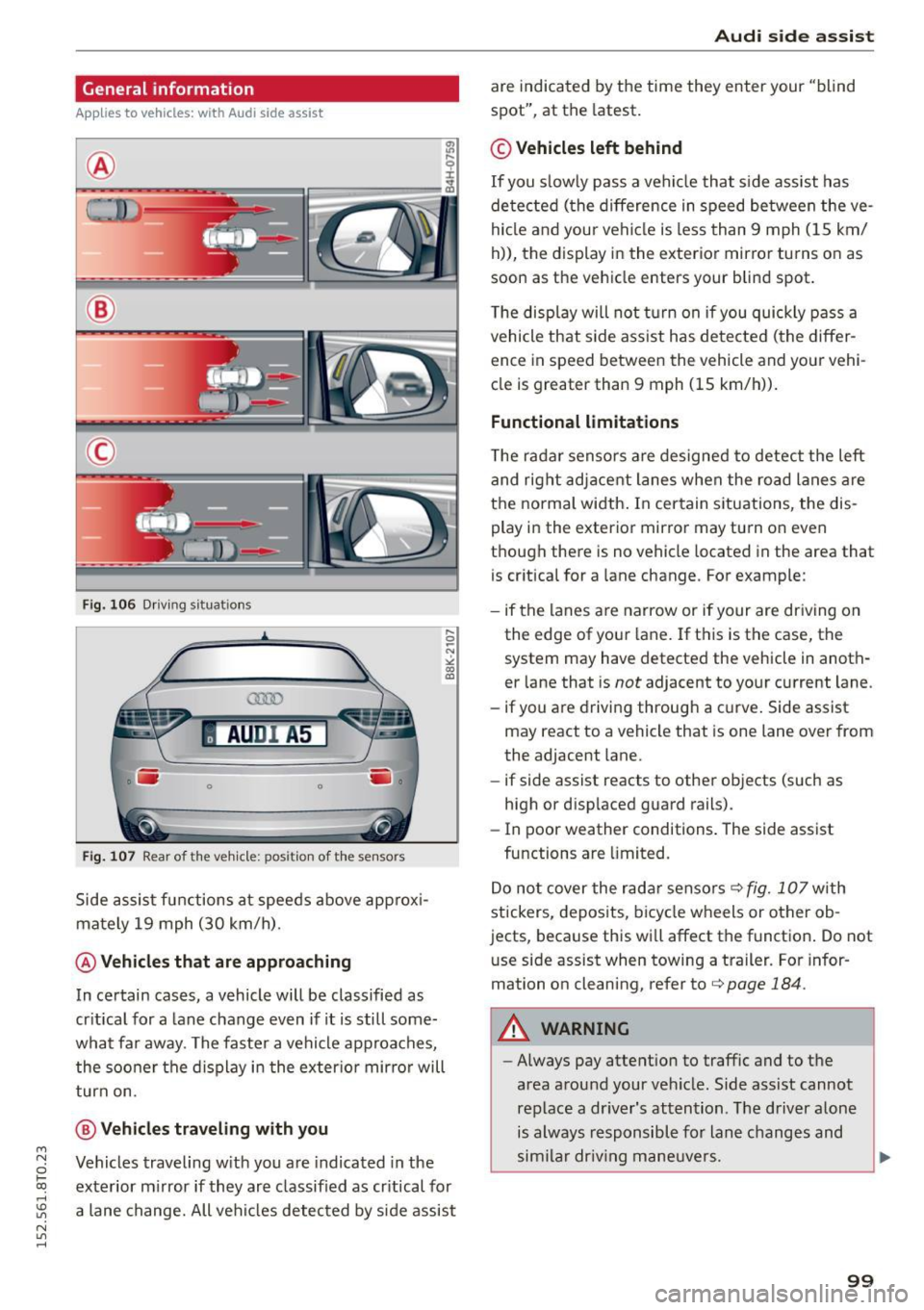
Fig. 106 Driving situat ions
AU DI A5
. .-0 0 iii .
Fig. 107 Rear of the vehicle: positio n of the sensors
Side assist functions at speeds above approxi
mately 19 mph (30 km/h).
@ Vehicles that are approaching
In certain cases, a vehicle will be classified as
critical for a lane change even if it is still some
what far away. The faster a vehicle approaches, the sooner the display in the exterior mirror will
turn on.
@ Vehicles traveling with you
Vehicles traveling with you are indicated in the
exterior mirror if they are classified as critical for
a lane change. All vehicles detected by side assist
Audi side assist
are indicated by the time they enter your "blind
spot", at the latest.
© Vehicles left behind
If you slowly pass a vehicle that side assist has
detected (the difference in speed between the ve
hicle and your vehicle is less than 9 mph (15 km/
h)), the display in the exterior mirror turns on as
soon as the vehicle enters your blind spot.
The display will not turn on if you quickly pass a
vehicle that side assist has detected (the differ
ence in speed between the vehicle and your vehi
cle is greater than 9 mph (15 km/h)).
Functional limitations
The radar sensors are designed to detect the left
and right adjacent lanes when the road lanes are
the normal width. In certain situations, the dis
play in the exterior mirror may turn on even
though there is no vehicle located in the area that is critical for a lane change. For example:
- if the lanes are narrow or if your are driving on
the edge of your lane. If this is the case, the
system may have detected the vehicle in anoth
er lane that is
not adjacent to your current lane.
- if you are driving through a curve. Side assist
may react to a vehicle that is one lane over from
the adjacent lane.
- if side assist reacts to other objects (such as
high or displaced guard rails).
- In poor weather conditions. The side assist
functions are limited.
Do not cover the rada r senso rs¢
fig. 107 with
stickers, deposits, bicycle wheels or other ob
jects, because this will affect the function. Do not
u se side assist when towing a trailer. For infor
mation on cleaning, refer to¢
page 184.
A WARNING
-Always pay attention to traffic and to the
area around your vehicle . Side assist cannot
replace a driver's attention. The driver alone
is always responsible for lane changes and
similar driving maneuvers.
99
Page 102 of 264
Audi side a ssist
- Improper reliance on the side assist system
can cause collisions and serious personal in
jury:
- Never rely only on side assist when chang
ing lanes.
- Always check rear view mirrors to make sure that it is safe to change lanes.
- Side assist cannot detect a ll vehicles under
all conditions- danger of acc ident!
- Please note that side assist indicates there
are approaching vehicles, or vehicles in your blind spot, only after your vehicle has
reached a dr iv ing speed of at least 19 mph
(30 km/h).
- In certa in situations, the system may not
function or its funct ion may be lim ited. For
example:
- if vehicles are approaching or be ing left
behind very qu ickly. The display may not
turn on in time .
- in poor weather condit ions such as heavy
ra in, snow or heavy m ist .
- on very wide lanes, in tight curves or if
there is a rise in the road surface . Vehicles
in the adjacent lane may not be detected
because they ar e outside of the sensor
range .
(D Note
The sensors can be displaced by impacts or
damage to the bumpe r, wheel housing and
unde rbody. This can affect the system . Have
your author ized A udi dealer or authori zed
Audi Service Facility c hec k their fu nction.
(D Tips
- If the window g lass in the d river's doo r or
front passenger's door has been tinted, the
display in the exterio r mirror may be misin
terpreted.
- F or De clarat ion of Compliance to United
States FCC and Indus try Canada regula tions
q poge 247 .
100
Activating and deactivating
App lies to vehicles: wit h Aud i side assist
Fig. 108 D river 's doo r: Side ass ist button
.,. Press the button q A in General information
on page 99
to switch the system on/off . The
LED in the button tu rns on when side assist is
sw itched on .
Adjusting the display brightness
Applies to vehicles: with A udi side ass ist
The signal brightness can be set in the radio or
MMI* .
.,. Select: I CAR I function button > Aud i side as sist.
.,. Select: I CAR I function button > Car sy ste m s*
contro l button > Driver a ssis t > A udi side a s
s is t.
The display brightness adjusts automatically to
the brightness of the surroundings, both in the
i nformation and in the wa rning stage . In very
dark or very brig ht surround ings, the display is al
ready set to the m in imum or maximum level by
the automatic adjustment . In such cases, you
may notice no change when ad justing the bright
ness, or the change may only be noticeable once
the surroundings change .
Adjust the brightness to a leve l where the d isp lay
i n the information stage will not disrupt your
view forward. If you change the brightness, the
display in the exterior mirror will briefly show the brightness level in the information stage. The
brightness of the warning stage is linked to the
brightness in the information stage and is adjust
ed along with the information stage adjustment .
II>
Page 103 of 264
M N
i? co ,...., \!) 1.1'1
N 1.1'1 ,....,
@ Tips
-Side assist is not active wh ile you are mak
i ng the ad justment .
- Your settings are automatically stored and
ass igned to the remote control key being
u sed.
Driver messages
App lies to vehicles: with Audi side assist
If s ide ass ist switches off by itse lf, the LED in the
button turns off and a message wi ll appea r in the
in str ument cluster d is pl ay:
Audi side assist unavailable: Sensors blocked
The radar sensors' vision is a ffected. Do not cover
the area in front of the senso rs with bike wheels ,
stickers, dirt or other objects . Clean t he a rea in
front o f the sensors, i f necessa ry ¢
page 99,
fig. 107.
Audi side assist: Currently unavailable
Side assis t can not be swi tched on t emporarily be
c a use there is a m alfuncti on (for examp le, the
b attery c harge level may be too low).
Audi side assist: System fault!
The system ca nnot guara ntee that it wi ll detect
ve hicles co rrec tly a nd it is sw itched off . Th e sen
sors have bee n disp lace d or are fau lty. H ave t he
sys te m checked by an author ized A udi dealer or
a uthor ized Audi Se rv ic e Facili ty so on .
Audi side assist : Unavailable when towing
Side assist sw itches off aut omatically when a fac
tory- insta lled trailer hitch is c onnected to the
e lectrical co nnector on the tra ile r. The re is no
g ua ran tee the sys tem w ill switch off when usi ng
a retrofitted tra ile r hi tch . D o not use s ide assist
when towing a t ra ile r.
Aud i side assist
101
Page 111 of 264
M N
0 loo
rl I.O
"' N
"' rl
-You can change the volume and pitch of the
signals as well as the display ¢
page 111.
-What appears in the display is time-delayed.
Reverse Parking
Applies to vehicles: with parking system (rear, with rear view
camera)
Parking mode 1 can be used when parking in a
garage or parking space.
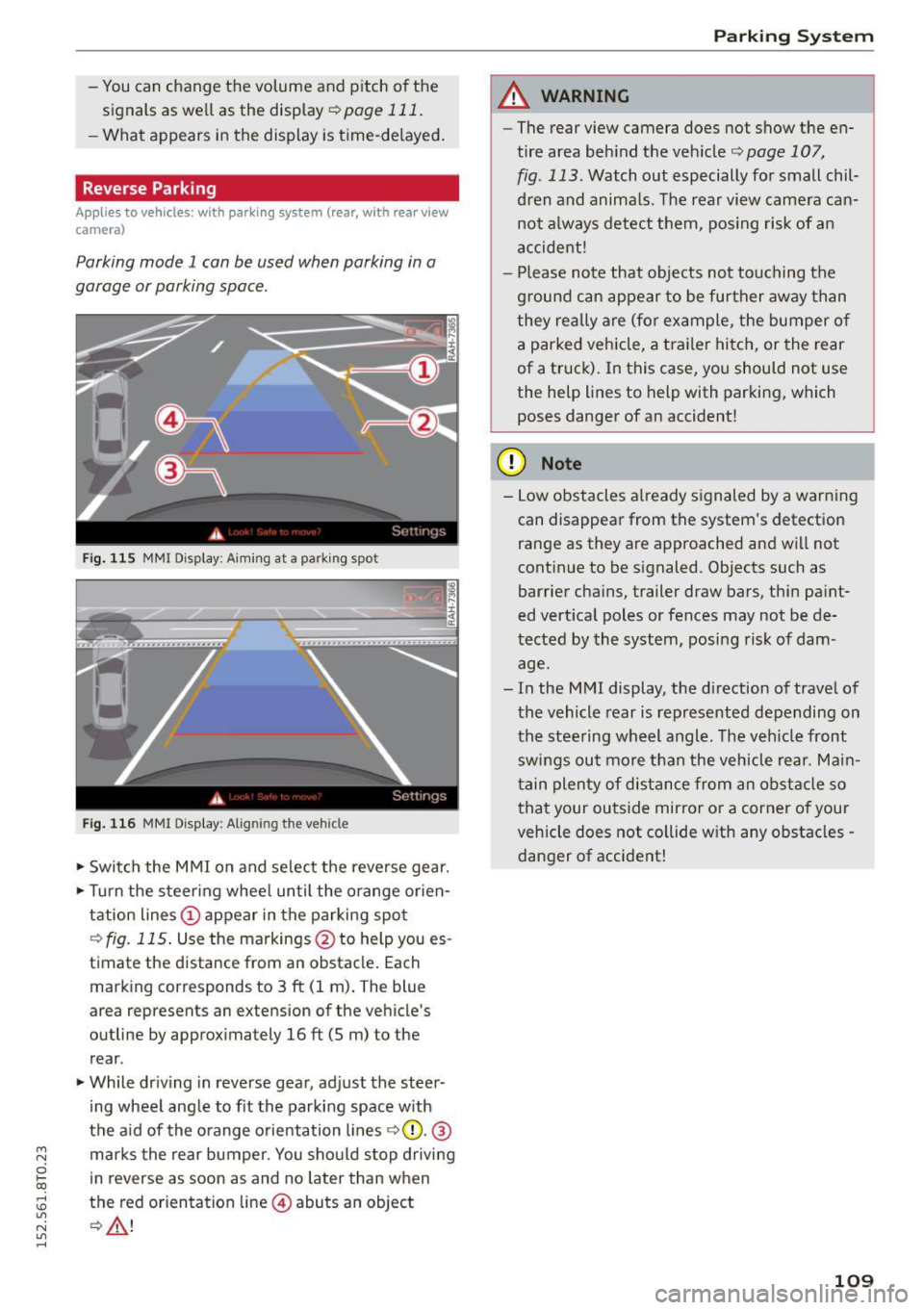
Fig. 11S MMI Disp lay: A imin g at a parking spot
Fig. 116 MMI Display: Aligning the vehicle
.,. Switch the MMI on and select the reverse gear .
.,. Turn the steering wheel until the orange orien
tation lines
(D appear in the parking spot
¢fig. 115. Use the markings @to help you es
timate the distance from an obstacle. Each
marking corresponds to 3
ft (1 m). The blue
area represents an extension of the vehicle's
outline by approximately
16 ft (5 m) to the
rear .
.,. While driving in reverse gear, adjust the steer
ing wheel angle to fit the parking space with
the aid of the orange orientation lines ¢0 .@
marks the rear bumper. You should stop driving
in reverse as soon as and no later than when
the red orientation line@) abuts an object
¢ ,&. !
Parking System
A WARNING
--The rear view camera does not show the en-
tire area behind the vehicle¢
page 107,
fig . 113.
Watch out especially for small chil
dren and animals. The rear view camera can not always detect them, posing risk of an
accident !
- Please note that objects not touching the
ground can appear to be further away than
they really are (for example, the bumper of a parked vehicle, a trailer hitch, or the rear
of a truck). In this case, you should not use
the help lines to help with parking, which
poses danger of an accident!
(D Note
- Low obstacles already signaled by a warning
can disappear from the system's detection
range as they are approached and will not
continue to be signaled. Objects such as
barrier chains, trailer draw bars, thin paint
ed vertical poles or fences may not be de
tected by the system, posing risk of dam age.
- In the MMI display, the direction of travel of
the vehicle rear is represented depending on
the steering wheel angle. The vehicle front
swings out more than the vehicle rear. Main
tain plenty of distance from an obstacle so
that your outside mirror or a corner of your
vehicle does not collide with any obstacles -
danger of accident!
109
Page 112 of 264
Parking Sy stem
Parallel Parking
App lies to vehicles: with parking system (rear, with rear view
camera)
Use parking mode 2 to help you park on the edge
of a street.
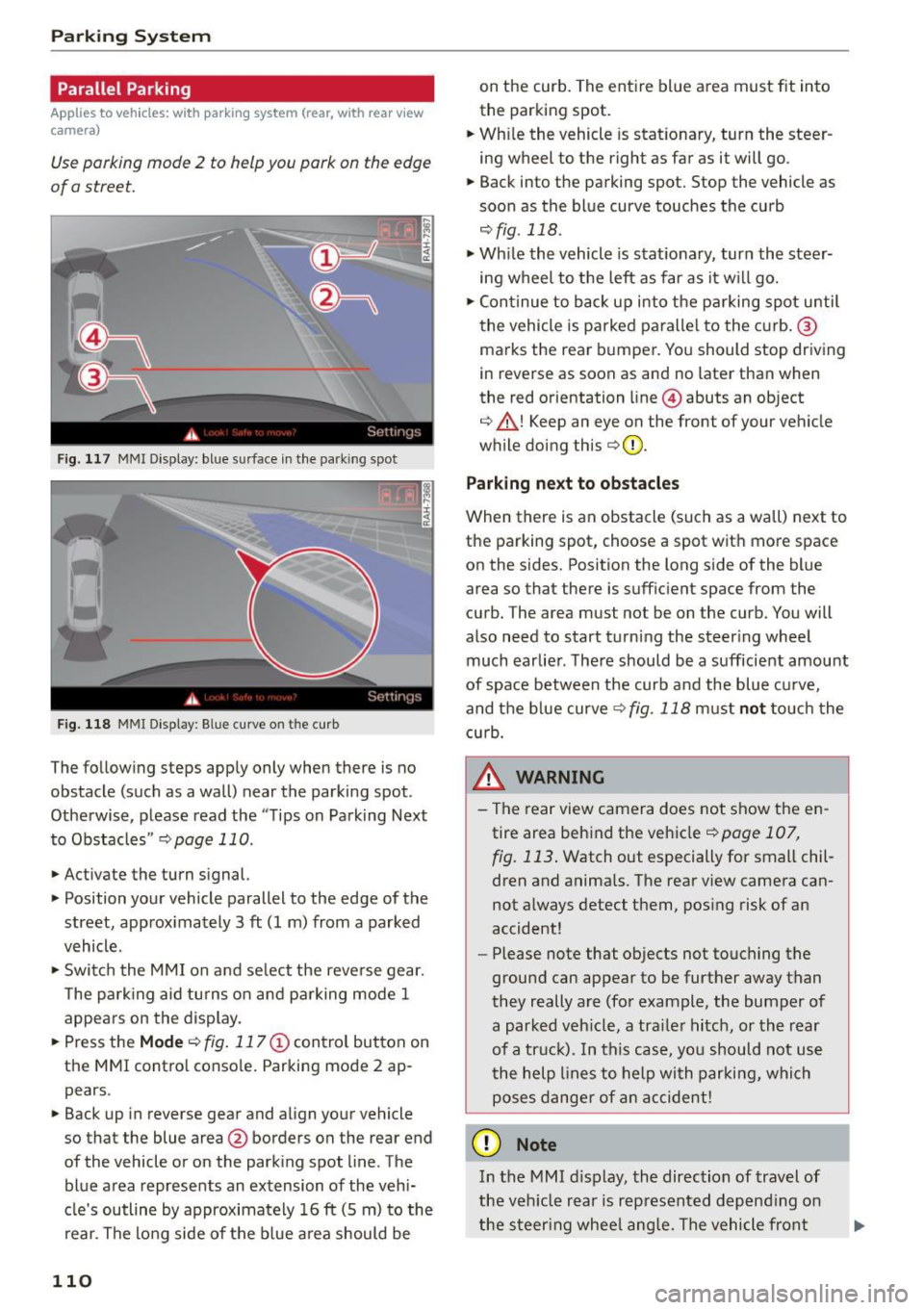
F ig. 117 MMI Display: bl ue s urface in the park ing spot
F ig. 118 MMI Display : B lue curve o n th e curb
The following steps apply only when there is no
obstacle (such as a wall) near the parking spot.
Otherwise, please read the "Tips on Parking Next
to Obstacles "
r::;, page 110.
.,. Activate the turn signal.
.,. Position your vehicle parallel to the edge of the
street, approx imately 3
ft (1 m) from a parked
vehicle .
.,. Swi tch the MMI on and se lect the reverse gear.
T he park ing aid tu rns on and parking mode 1
appears on the display.
... Press the
Mode r::;, fig. 117 © control button on
the MMI contro l conso le . Parking mode 2 ap
pears .
... Back up in reverse gear and align your vehicle
so that the blue area@ borders on the rear end
of the vehicle or on the park ing spot line . The
blue a rea represents an extension of the vehi
cle's outline by approximately 16
ft (5 m) to the
rear. The lo ng side of the b lue area should be
110
on the curb. The ent ire blue area must fit into
the parking spot.
... Wh ile the vehicle is stat ionary, turn the steer
ing wheel to the right as far as it will go.
.,. Back into the parking spot. Stop the vehicle as
soon as the blue curve touches the curb
,:;;, fig . 118 .
.,. Wh ile the vehicle is stationary, turn the steer
ing wheel to the left as far as it w ill go .
.,. Con tinue to back up into the p arking spot until
the vehicle is parked paralle l to the curb. ®
ma rks the rea r bumper. You should stop driving
in reverse as soon as and no later than when
the red orientation line @) abuts an object
r::;, _&! Keep an eye on the front of your veh icle
while doing this
r::;, Q) _
Parking ne xt to ob stacles
When there is an obstacle (such as a wall) next to
the parking spot, choose a spot wit h more space
on the sides. Position the long s ide of the blue
area so that there is sufficient space from the
curb. The area must not be on the curb . You will
also need to start turning the steer ing wheel
much earlie r. The re should be a sufficient amount
of space between the curb and the blue c urve,
and the blue curve
r::;, fig. 118 must not touch the
c u rb.
&_ WARNING
- T he rear view camera does not show the en
tire area beh ind the vehicle
r::;, page 107,
fig. 113 . Watch out especially for small chil
dren and anima ls . The rear view camera can
not a lways detect them, pos ing risk of an
accident!
- Please n ote that objects not touching the
ground can appear to be further away than
they really a re (for example, the bumper of
a parked veh icle, a tra iler hitch, or the rear
of a tr uck). In this ca se, yo u sh ould not us e
t he help lines to help with parki ng, which
poses dange r of an accident!
(D Note
In the MMI d isplay, the direction of travel of
the veh icle rear is rep resented depend ing on
the steer ing whee l ang le. The vehicle fron t
Page 115 of 264
M N
0 loo
rl I.O
"' N
"' rl
.. Fasten your safety belt and wear it properly. Al
so instruct your passengers to fasten their safe
ty belts properly
¢ page 121.
What impairs driving safety?
Safe driving is directly related to the condition of
the vehicle, the driver as well as the driver's abili
ty to concentrate on the road without being dis
tracted .
The driver is responsible for the safety of the ve
hicle and all of its occupants. If your ability to
drive is impaired, safety risks for everybody in the
veh icle increase and you also become a hazard to
everyone else on the road ¢.&, .Therefore:
.. Do not let yourself be distracted by passengers
or by using a cellular te lephone .
.. NEVER drive when your driv ing ability is im
paired (by medicat ions, alcohol, drugs, etc.).
.. Observe all traffic laws, rules of the road and
speed limits and plain common sense .
.. ALWAYS adjust you r speed to road, traff ic and
weather cond itions .
.. Take frequent breaks on long trips. Do not drive
for more than two hours at a stretch .
.. Do NOT drive when you are tired , under pres
sure or when you are stressed.
A WARNING
Impaired driving safety increases the risk of
ser ious personal injury and death whenever a
vehicle is being used.
Driving safety
Correct passenger
seating positions
Proper seating position for the driver
The proper driver seating position is important
for safe, relaxed driving.
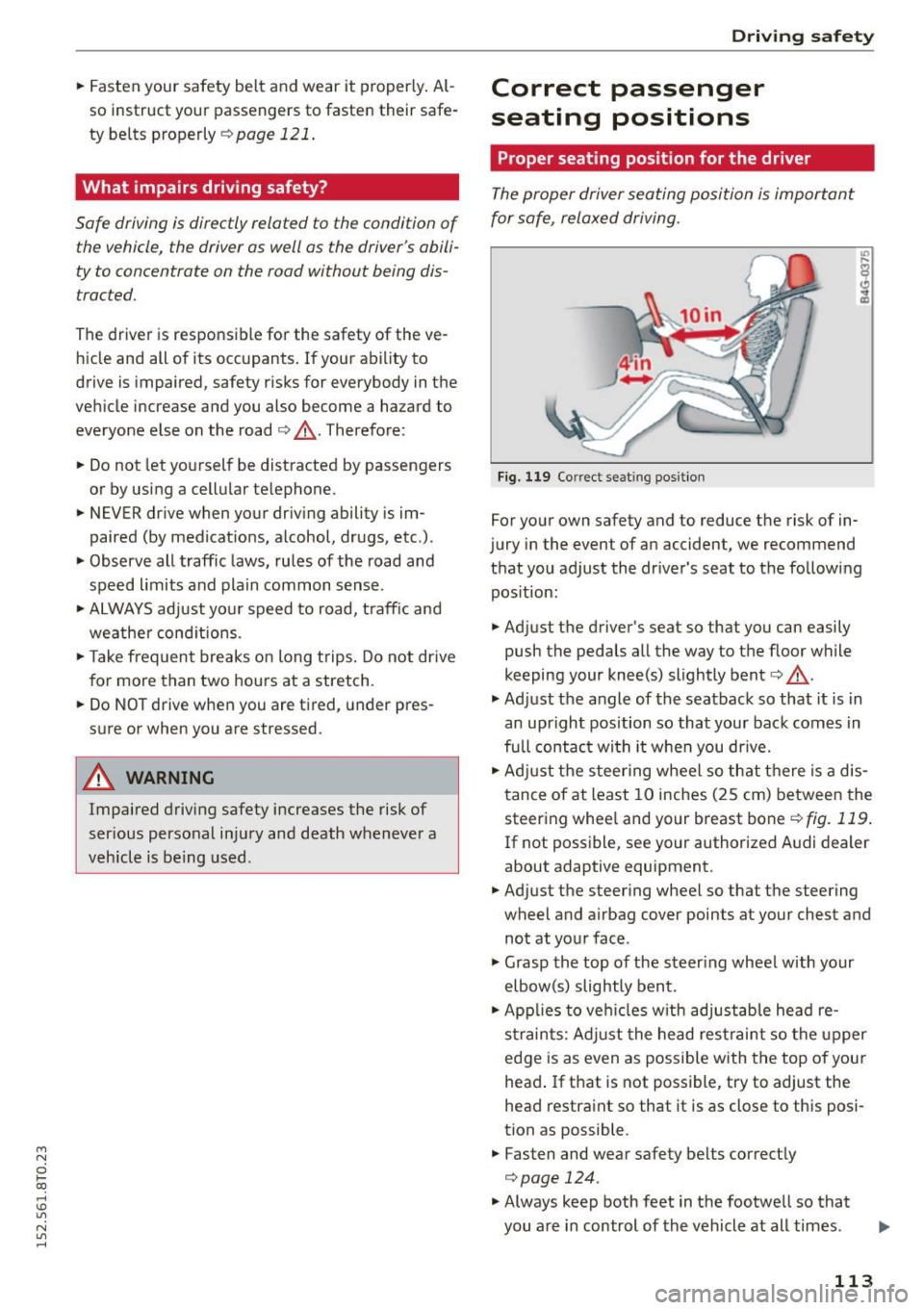
Fig. 119 Correct se ating position
For your own safety and to reduce the risk of in
jury in the event of an accident, we recommend
that you adjust the driver's seat to the following pos ition:
.. Adjust the driver's seat so that you can easily
push the pedals all the way to the floor while
keeping your knee(s) slightly bent¢.&, .
.,. Adjust the angle of the seatback so that it is in
an upright position so that your back comes in
fu ll contact wi th it when you dr ive.
.. Adjust the steer ing wheel so that there is a dis
tance of at least 10 inches (25 cm) between the
steering whee l and your breast bone
¢fig. 119 .
If not possible, see your authorized A udi dealer
about adaptive equipment.
.. Adjust the steering wheel so that the steering
wheel and airbag cover points at your chest and
not at your face .
.,. Grasp the top of the steer ing wheel with your
elbow(s) slightly bent.
.. App lies to veh icles w ith adjustable head re
s tra ints: Adjust the head restraint so the upper
edge is as even as possible with the top of your
head . If that is not possible , try to adjust the
head restraint so that it is as close to this posi
tion as possible.
.. Fasten and wear safety belts correctly
¢page 124.
.,. Always keep both feet in the footwell so that
you are in control of the vehicle at all times.
113
Page 116 of 264
Driving safety
For detailed information on how to adjust the
driver's seat, see
¢ page 55.
A WARNING
Drivers who are unbelted, out of position or
too close to the airbag can be seriously in
jured by an airbag as it unfolds. To help re duce the risk of serious personal injury:
- Always adjust the driver's seat and the
steering wheel so that there are at least
10 inches (25 cm) between your breastbone
and the steering wheel.
- Always hold the steering wheel on the out
side of the steering wheel rim with your
hands at the 9 o'clock and 3 o'clock posi
tions to help reduce the risk of personal in
jury if the driver's airbag inflates .
- Never hold the steering wheel at the
12 o'clock position or with your hands at
other positions inside the steering wheel
rim or on the steering wheel hub . Holding
the steering wheel the wrong way can cause
serious injuries to the hands, arms and head
if the driver's airbag deploys.
- Pointing the steering wheel toward your
face decreases the ability of the supplemen
tal driver's airbag to protect you in a colli
sion.
- Always sit in an upright position and never
lean against or place any part of your body
too close to the area where the airbags are located .
- Before driving, always adjust the front seats
and head restraints properly and make sure
that all passengers are properly restrained.
- Never adjust the seats while the vehicle is
moving . Your seat may move unexpectedly
and you could lose control of the vehicle.
- Never drive with the backrest reclined or
tilted far back! The farther the backrests are
tilted back, the greater the risk of injury due
to incorrect positioning of the safety belt and improper seating position.
- Children must always ride in child safety
seats
¢page 151. Special precautions ap
ply when installing a child safety seat on the
front passenger seat¢
page 129 .
114
-
Proper seating position for the front
passenger
The proper front passenger seating position is
important for safe, relaxed driving.
For your own safety and to reduce the risk of in
jury in the event of an accident, we recommend
that you adjust the seat for the front passenger
to the following position :
.,. Move the front passenger seat back as far as
possible . There must be a minimum of 10 in
ches (25 cm) between the breastbone and the
instrument panel¢,&. .
.,. Adjust the angle of the seatback so that it is in
an upright position and your back comes in full
contact with it whenever the vehicle is moving.
.,. Applies to vehicles with adjustable head re
straints: Adjust the head restraint so the upper
edge is as even as possible with the top of your head. If that is not possible, try to adjust the
head restraint so that it is as close to this posi
tion as possible .
.,. Keep both feet flat on the floor in front of the
front passenger seat.
.,. Fasten and wear safety belts correctly
¢ page 124.
For detailed information on how to adjust the
front passenger's seat, see ¢
page 54.
A WARNING
Front seat passengers who are unbelted, out
of position or too close to the airbag can be
seriously injured or killed by the airbag as it
unfolds . To help reduce the risk of serious per
sonal injury :
- Passengers must always sit in an upright po sition and never lean against or place any
pa rt of their body too close to the area
where the airbags are located.
- Passengers who are unbelted, out of posi
tion or too close to the airbag can be seri
ously injured by an airbag as it unfolds with
great force in the blink of an eye .
-Always make sure that there are at least 10
inches (25 cm) between the front passen
ger's breastbone and the instrument panel.
Page 124 of 264
Safety belts
Why use safety belts?
Frontal collisions and the law of physics
Frontal crashes create very strong forces for peo
ple riding in vehicles .
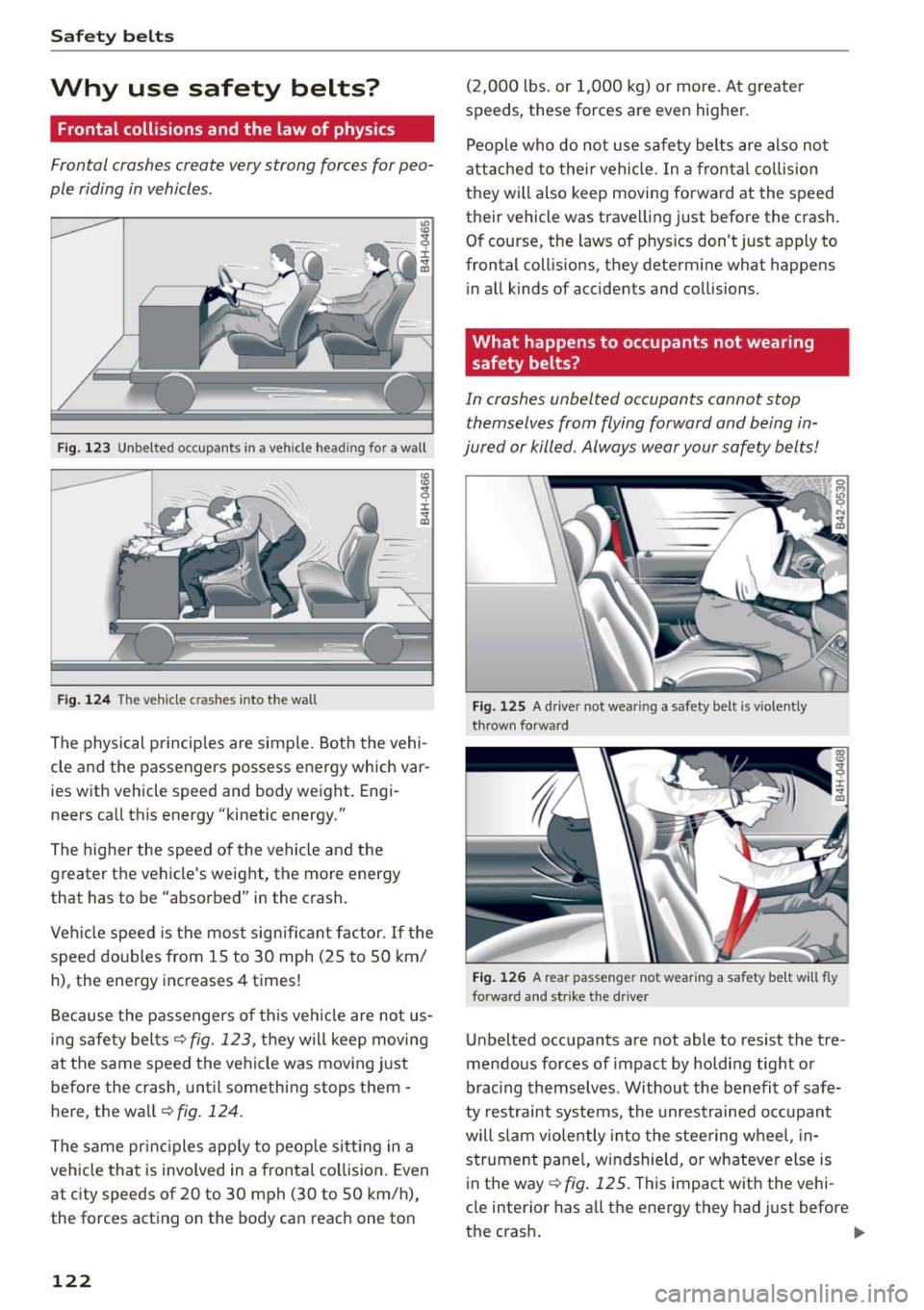
Fig. 123 Unbelted occupants in a veh icle heading for a wall
Fig. 124 The vehicle crashes into the wall
The physical principles are simple. Both the vehi
cle and the passengers possess energy which var
ies w ith vehicle speed and body weight . Engi
neers call this energy "kinetic energy."
The higher the speed of the vehicle and the
greater the vehicle's weight, the more energy
that has to be "absorbed" in the crash.
Vehicle speed is the most significant factor. If the
speed doubles from 15 to 30 mph (25 to 50 km/
h), the energy increases 4 times!
Because the passengers of this vehicle are not us
ing safety belts
c::> fig. 123, they will keep moving
at the same speed the vehicle was moving just
before the crash, until something stops them -
here, the wa ll
c::> fig. 124.
The same principles apply to people sitting in a
vehicle that is involved in a frontal collision. Even
at c ity speeds of 20 to 30 mph (30 to SO km/h),
the forces acting on the body can reach one ton
122
(2,000 lbs . or 1,000 kg) or more. At greater
speeds, these forces are even higher.
People who do not use safety belts are also not
attached to their vehicle. In a frontal collision
they will also keep moving forward at the speed
their vehicle was travelling just before the crash.
Of course, the laws of phys ics don't just apply to
frontal collis ions, they determine what happens
in all kinds of accidents and collisions.
What happens to occupants not wearing
safety belts?
In crashes unbelted occupants cannot stop
themselves from flying forward and being in
jured or killed . Always wear your safety belts!
Fig. 125 A driver not wear ing a safety belt is violently
t hrown forward
Fig. 126 A rear passeng er not wearing a safety be lt will fly
forward and strike the d river
Unbelted occupants are not able to resist the tre
mendous forces of impact by holding tight or
bracing themselves . Without the benefit of safe
ty restraint systems, the unrestrained occupant
will slam violently into the steering wheel, in
strument panel, windshie ld, or whateve r else is
in the way
c::> fig . 125 . This impact with the vehi
cle interior has all the energy they had just before
the crash. .,.
Page 131 of 264
M N
i? co ,...., \!) 1.1'1
N 1.1'1 ,....,
Airbag system Important information
Importance of wearing safety belts and
sitting properly
Airbags are only supplemental restraints. For
airbags to do their job, occupants must always
properly wear their safety belts and be in a prop
er seating position.
F or your safety and the safety of your passen
ge rs, befo re drivi ng off, always:
.,. Adjust the dr iver's seat and steer ing wheel
properly
r::> page 113,
.,. Adjust the front passenger 's seat p roperly
9 page 55,
.,. Wea r sa fety be lts prope rly r::> page 123 ,
.. Always properly use the p roper child restra int
to protect children
r::> page 151.
In a coll is io n air bags must infl ate wi thin the b link
of an eye and with cons iderab le force . The s up
p lemental a irbags can cause injuries if the drive r
or the front seat passenger is not seated p roper ·
Ly. Therefore in order to help the airbag to do its
job, it is importa nt, both as a dr iver and as a pas
senger to sit properly at all times.
By keeping room between your body and the
steer ing whee l and the front of the passenger
compartment, the airbag can inflate fully and
comp letely and provide supplemental protection
in certa in fronta l col lisions
r:> page 113, Correct
passenger seating positions .
For details on the
ope rat ion of the seat adjustment cont ro ls
r::> page 55.
It's especially importa nt that children are prope r
ly rest rained
r:> page 151 .
There is a lot that the driver and the passengers
can and must do to help the ind ividual safety fea
tures ins talled in your Aud i wo rk together as a
system.
Prope r seat ing pos ition is important so that the
fro nt airbag on the dr iver side can do its job . If
you have a physical impairment or cond ition tha t
p reven ts you from sitt ing p roperly on the d river
seat with the safety be lt properly fastened and
Airbag syste m
reaching the peda ls, specia l mod ificat ions to your
vehicle may be necessa ry .
Co nta ct you r auth orized Aud i de aler, or call Aud i
Cu stome r Re lations at 1-800-822- 2834 .
When the airbag syst em dep loys , a gas gene rato r
will fill the airbags, brea k open the padded cov
ers , a nd infl ate between the stee ring wheel and
the driver and between the ins trumen t pane l an d
the front passenger. The ai rbags wi ll deflate im
mediate ly after deployment so that the front oc
c u pants can see th ro ugh the w indshie ld aga in
without interruption .
All o f th is takes p lace in the b lin k of an eye, so
fast that many people don't even realize that the airbags have dep loyed . The airbags also inflate
with a great deal of force and nothing should be in the ir way when they dep loy. Fron t airbags in
combination with properly worn safety belts s low
down and lim it the occupant's forwa rd move
ment . Togethe r they he lp to p revent the dr iver
and fron t seat passenge r from hi tting parts of
t h e inside the ve hicle while re ducin g the for ces
acting on the occupa nt dur ing the crash . In this
way they help to reduce the ris k of i njury to the
head and uppe r body in the crash. Airbags do not
protect the a rms or the lower parts of the body.
B oth fron t airbags w ill not inf late in all fronta l
collisions . The t riggering of the a irbag system de
pends on the vehicle deceleration rate caused by
the coll is ion and registe red by the e lectronic con
trol unit. If t his rate is below the reference value
programmed into the contro l unit, the airbags
will not be t rigge red, even t hough the car may be
badly damaged as a result of t he collis ion . Vehi
cl e damage, r epai r costs or even the lack of vehi
cl e damage is no t necessari ly an indica tion of
whethe r an a irb ag should infl ate o r not.
It is not possib le to defin e a range of vehicle
speeds t hat w ill cove r ev ery possib le kind and an
gle of i mpact tha t will a lways trigger the a irbags,
s in ce the circumst ances w ill vary conside rably be
tween one collision and anot her. Impo rtant fa c
tors include, for example, the nat ure (hard or
soft) of the object w hich the car hits, the angle of
impact, vehicle speed, etc . The front airbags will .,,.
129