mirror AUDI A5 2020 Owners Manual
[x] Cancel search | Manufacturer: AUDI, Model Year: 2020, Model line: A5, Model: AUDI A5 2020Pages: 302, PDF Size: 81.67 MB
Page 9 of 302
8W7012721BA
Quick access
@) Center armrest with storage com-
partment. Depending on vehicle
equipment, it may have:
— Audi music interface .......... 203
—Audi phone box ............... 167
— Starting the engine when there is
A
MALPUNGEION 2 2 aceon 2 wom © & ae 100
@ Electromechanical parking brake
BUTEON scece: oo samen 2 oom 2 x ene 9 110
@ Selector lever (automatic transmis-
SION) seve & # sere & o ES Go OE GB 102
@4 Storage compartment .......... 88
@) [START ENGINE STOP] button .... 100
@ Audi music interface ............ 203
@) Steering wheel adjustment ...... 70
Lever for:
— Cruise control system ......... 130
— Audi adaptive cruise control .... 134
@9) Button for switching the head-up
display on/off, adjusting the height . 23
G0) Instrument illumination ......... 59
62 Connection port for the On Board
Diagnostic System (OBD) ........ 275
@) Light switch ................00. 54
@3 Hood release .........0...0.0.. 222
G4 All-weather lights button ........ 54
@5) Luggage compartment lid button . 36
G6 Exterior mirror adjustment ...... 60
62 Buttons for:
— Power windows .............. 41
— Central power window switch ... 41
—Child safety lock .............. 40
@) Tips
Some the equipment listed here is only instal-
led in certain models or is available as an op-
tion.
Indicator lights overview
The indicator lights in the instrument cluster
blink or turn on. They indicate functions or mal-
functions. Some warning and indicator lights
turn on when you switch the ignition on and must
turn off when the drive system is switched on or
while driving.
With some indicator lights, messages may ap-
pear and warning signals may sound. The indica-
tor lights and messages may be covered by other
displays. To show them again, select the second
tab for messages with the multifunction steering
wheel > page 12.
Some indicator lights in the display can display in
several colors.
OMe elle Lins
If the wA or N indicator light turns on, check
the message in the instrument cluster.
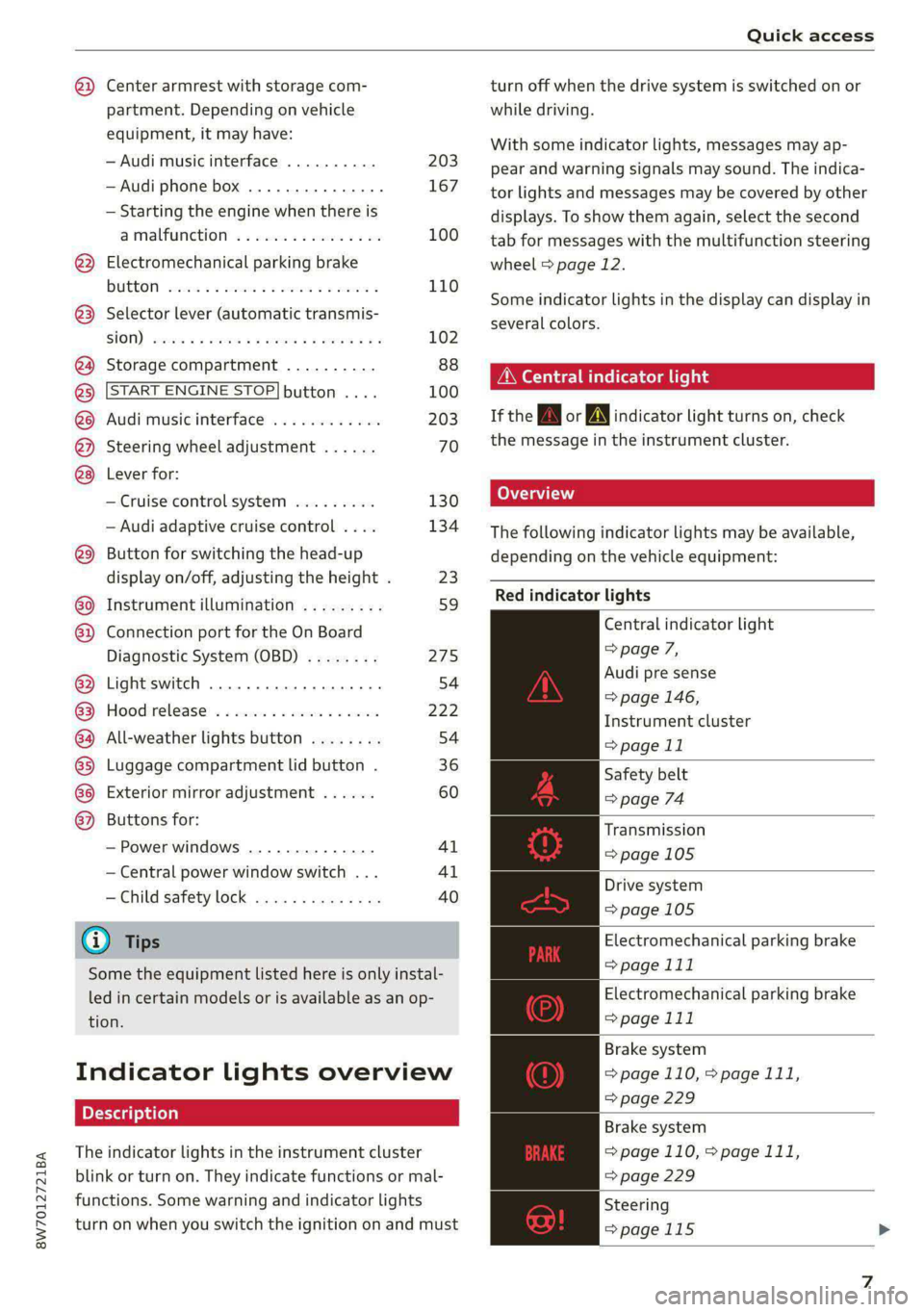
The following indicator lights may be available,
depending on the vehicle equipment:
Red indicator lights
Central indicator light
=> page 7,
Audi pre sense
=> page 146,
Instrument cluster
=> page 11
Safety belt
=> page 74
Transmission
=> page 105
Drive system
=>page 105
Electromechanical parking brake
> page 111
Electromechanical parking brake
=> page 111
Brake system
=> page 110, > page 111,
=> page 229
Brake system
=> page 110, > page 111,
=> page 229
Steering
=>page 115
Page 29 of 302
8W7012721BA
Personalization
Personalization
Users
(ee emul ela)
Applies to: vehicles with personalized user settings
Your vehicle can manage various users in the
MMI. Each user will be assigned the settings that
they last used.
Before you begin driving, you can select a user in
the MMI and load personalized Infotainment and
vehicle
settings.
Possible users in the MMI:
— myAudi user: as a myAudi user, you can use
Audi connect services that require a myAudi ac-
count. Certain settings are transferred online to
your myAudi account. If you log into your
myAudi account in another vehicle, you can
load your settings in the other vehicle.
— Local user: as a local user, you can only store
settings in the current vehicle. Your settings
cannot be transferred to other vehicles. Audi
connect services that can only be used with a
myAudi account will not be available.
— Guest: as a guest, you can store settings in the
vehicle without changing the settings for other
users. Audi recommends only using the guest
user temporarily, because settings can be over-
written by other users.
Depending on vehicle equipment, the following
options may be used to detect the active user so
that the user settings can be loaded automatical-
ly before you start driving.
— Vehicle key
Requirement: the driver's door has been opened.
The detected user must be shown in the MMI.
Confirm the user shown, select another user
= page 27, or add another user > page 27.
ZA WARNING
It may not be possible to load Infotainment
and vehicle settings, or they may only load
partially. The driver is always responsible for
the Infotainment and vehicle settings in order
to reduce the risk of an accident.
@) Tips
— Certain Infotainment and vehicle settings
(such as mirrors, last radio stations) may be
stored, depending on vehicle equipment.
You can find additional information in the
MMI. Select on the home screen: SETTINGS
> General > Legal notes > About Audi con-
nect.
— Applies to: myAudi users: The stored set-
tings can only be transferred to vehicles
that are capable of receiving the transmit-
ted information. There may be restrictions
that prevent this, particularly in other coun-
tries.
— Applies to: myAudi users: The settings can
only be transferred and loaded when there
is coverage from the applicable mobile
phone service provider.
— Applies to: myAudi users with PIN protec-
tion switched on: If the MMI displays a de-
tected user but you simply start driving or
wait without entering the 4-digit PIN, then
the guest user will be selected. Some set-
tings for the detected myAudi user will be
transferred to the guest user.
Teele (aal4
Opening user management
Applies to: MMI
> Press USER on the home screen.
Selecting a user
Applies to: MMI
> Press on the desired user.
> Enter the 4-digit myAudi PIN, if necessary.
Adding myAudi users
Applies to: MMI
Requirement: you must have successfully regis-
tered at my.audi.com and have created a 4-digit
myAudi PIN.
> Press Add user.
> Press Log in now to log in with your myAudi
credentials.
> Follow the system instructions.
27
Page 33 of 302
Opening and closing
8W7012721BA
@) Note Tati ma Reciee lela aate Rest)
The following applies when locking the vehi- You can adjust the central locking system to your
cle: preferences. The settings depend on the vehicle
— If the vehicle key that was last used is de- equipment.
tected inside the passenger compartment,
then the vehicle cannot be locked from the
outside using the sensor. Take the vehicle
key with you and lock the vehicle again. Oth-
erwise, the vehicle will not be protected Door unlocking
against unauthorized access.
— If you try to lock the vehicle using the but-
ton on the vehicle key while the front pas-
senger's or rear door is open, and you acci-
dentally place the key inside the passenger
compartment and close the door, the vehi-
cle will lock at first. But if the keyless sys-
tem detects a vehicle key inside the vehicle
after it locks, then the vehicle will unlock
again. The turn signals will flash several
times to indicate this. If you do not open
the vehicle to remove the vehicle key within
a brief period, then the vehicle will lock au- The entire vehicle will always be locked when you
tomatically. This prevents the vehicle from press the f@ button.
being left unlocked for long periods of time.
The key will then be locked inside the vehi-
> Applies to: MMI: Select on the home screen:
VEHICLE > Settings & Service > Central lock-
ing.
—If you select All, all doors and the luggage
compartment lid will be unlocked when unlock-
ing the vehicle.
— If you select Driver's door, only the driver's
door will be unlocked. To unlock all doors and
the luggage compartment lid, press the & but-
ton on the vehicle key twice. In vehicles with a
convenience key*, only the driver's door will un-
lock when you pull the driver's door handle. If
you pull another door handle, the entire vehicle
will be unlocked.
Long press to open windows
cle. You can select if all windows and the panoramic
— If the luggage compartment lid closes and glass roof* should open using the vehicle key
the system detects that the last vehicle key > page 42, Convenience opening and closing. If
that was used is inside the luggage com- you press and hold the & button on the vehicle
partment, then the luggage compartment key, all of the windows and the panoramic glass
lid will open again. The turn signals will roof* will close.
flash several times to indicate this. The
. . Disable rear lid handle
doors will lock. Always take the vehicle key
with you, or unauthorized persons may be You can select if the luggage compartment lid
able to enter the vehicle. can open with the handle. If you activate this
function, the luggage compartment lid can only
@ Tips be opened with the <3 or 4s button on the vehi-
cle key or in the driver's door. In vehicles with a
convenience key*, you can still open the luggage
compartment lid using the handle if an author-
ized convenience key is detected > page 36.
— Do not leave valuables unattended in the ve-
hicle. A locked vehicle is not a safe!
—The LED in the driver's door rail blinks when
you lock the vehicle. If the LED turns on for
approximately 30 seconds after locking, Fold mirrors
there is a malfunction in the central locking
system. Have the problem corrected by an
authorized Audi dealer or authorized Audi
Service Facility.
You can select if the exterior mirrors automatical-
ly fold in when locking. >
31
Page 57 of 302

8W7012721BA
Lights and Vision
Turn signal and high beam lever
BFV-0012
Fig. 52 Lever: switching on the turn signal and high beams
The lever operates the turn signals, the high
beams and the headlight flasher.
Turn signals 15>
The turn signal activates when you move the lev-
er into a turn signal position when the ignition is
switched on. The respective a or B indicator
light flashes.
@ Right turn signal
@® Left turn signal
The turn signal blinks three times if you tap the
lever (convenience turn signal).
If an indicator light blinks twice as fast as usual,
a turn signal bulb has failed. Carefully drive to an
authorized Audi dealer or authorized Audi Service
Facility immediately to have the malfunction cor-
rected.
High beams 20 and headlight flasher
> Move the lever to the corresponding position:
@) High beams on (vehicles with high beam assis-
tant*) > page 55
@ High beams off or headlight flasher
The
=o) indicator light in the instrument cluster
will turn on.
Z\ WARNING
High beams can cause glare for other drivers,
which increases the risk of an accident. For
this reason, only use the high beams or the
headlight flasher when they will not create
glare for other drivers.
teh m eu ielad
Applies to: vehicles with high beam assistant
The high beam assistant automatically turns the
high beams on or off depending on the surround-
ing conditions.
A camera on the rearview mirror mount can de-
tect light sources from other road users. The high
beams switch on or off automatically depending
on the position of vehicles driving ahead and on-
coming vehicles, the vehicle speed as well as oth-
er environmental factors and traffic conditions.
Switching on the high beam assistant
Requirement: the light switch must be in the AU-
TO position and the high beam assistant must be
switched on in the MMI > page 57.
> To activate the high beam assistant, tap the
lever forward @) > page 55, fig. 52. The faa in-
dicator light appears in the instrument cluster
display and the high beams are switched on or
off automatically. The Ea indicator light turns
on if the high beams are switched on.
Switching the high beams on or off manually
If the high beams did not switch on or off auto-
matically as expected, you may switch them on or
off manually instead:
> To switch the high beams on manually, tap the
lever
forward @) > page 55, fig. 52. The Ea in-
dicator light turns on.
> To switch the high beams off manually, pull the
lever back @) > page 55, fig. 52. The high beam
assistant is deactivated.
Operating the headlight flasher
> To operate the headlight flashers, pull the lever
back @) > page 55, fig. 52. If the high beam as-
sistant is activated, but the high beams were
not turned off, the high beam assistant remains
activated.
ZA WARNING
— Follow the safety precautions and note the
limits of the assist systems, sensors, and
cameras > page 121. >
55
Page 62 of 302

Lights and Vision
Vision
Adjusting exterior mirrors
RAZ-0150
Fig. 58 Driver's door: knob for the exterior mirrors
> Turn the knob in the driver's door to the desired
position:
0 - All adjustment functions are deactivated.
Q/ §- Selects the left or right exterior mirror.
To adjust the mirror glass in a mirror, press the
knob in the desired direction.
GA - Heats the mirror glass depending on the out-
side temperature.
©) - Folds the exterior mirrors*. To fold the mir-
rors out, turn the knob to one of the other posi-
tions. In the MMI, you can select if the mirrors
fold in automatically when you lock the vehicle
=> page 31.
Front passenger's exterior mirror tilt
function*
Requirement: the knob must be in the position
for the front passenger’s exterior mirror.
To help you see the curb when backing into a
parking space, the surface of the mirror will tilt
slightly when reverse gear is selected.
You can adjust the mirror surface by turning the
knob in the desired direction.
The mirror moves from the reversing position
back to the original position:
—When you switch the ignition off
— Once you drive forward at speeds faster than 9
mph (15 km/h)
— When the knob is no longer in the position for
the front passenger exterior mirror
60
Z\ WARNING
Curved mirror surfaces (for example convex)
enlarge the field of vision. However, they
make objects in the mirror appear smaller and
farther away. When using these mirrors to es-
timate your distance to vehicles behind you
when changing lanes, you could estimate in-
correctly, which increases the risk of an acci-
dent.
@) Note
— Applies to: vehicles with power folding exte-
rior mirrors: If the mirror housing was
moved by outside forces (such as an impact
when maneuvering), you must use the pow-
er folding function to fold the mirror all the
way out. The mirrors will make a loud noise
when they latch into place. The mirror hous-
ing must not be moved back into place by
hand because this could impair the function
of the mirror mechanism.
— Applies to: vehicles without power folding
exterior mirrors: If the mirror housing was
moved by outside forces (such as an impact
when maneuvering), you must move it back
in place by hand.
— If you wash the vehicle in an automatic car
wash, you must fold the exterior mirrors in
to reduce the risk of damage to the mirrors.
Never fold power folding exterior mirrors*
by hand. Only fold them in and out using
the power controls.
G) Tips
— If the power adjusting function malfunc-
tions, the glass in both mirrors can be ad-
justed by pressing on the edge of it by hand.
— Certain settings are automatically stored
and assigned to the active user.
Dimming the mirrors
Manual dimming rearview mirror
> Pull the lever on the bottom of the mirror back. >
Page 63 of 302

8W7012721BA
Lights and Vision
Automatic dimming rearview mirror
Applies to: vehicles with automatic dimming rearview mirror
> The interior and exterior mirrors dim automati-
cally when light shines on them, for example
from headlights on a vehicle behind you.
Z\ WARNING
— If the glass on an automatic dimming mir-
ror* breaks, electrolyte can leak out. This
liquid can irritate the skin, eyes and respira-
tory system. If there is contact with the flu-
id, flush immediately with plenty of water.
Consult a physician if necessary.
— Repeated or long-term exposure to electro-
lyte fluid can lead to irritation of the air-
ways, especially in people with asthma or
other respiratory conditions. Take deep
breaths immediately after leaving the vehi-
cle or, if this is not possible, open all of the
doors
and windows as wide as possible.
— If electrolyte fluid comes into contact with
the eyes, flush them thoroughly with plenty
of clean water for at least 15 minutes and
then seek medical attention.
— If electrolyte fluid comes into contact with
the skin, flush the affected area with clean
water for at least 15 minutes, and then
clean with soap and water and seek medical
attention. Clean affected clothing and shoes
thoroughly before wearing again.
— If the fluid was swallowed and the person is
conscious, flush the mouth with water for at
least 15 minutes. Do not induce vomiting
unless this is recommended by medical pro-
fessionals. Seek medical attention immedi-
ately.
iG) Tips
— If the light reaching the rearview mirror is
obstructed, the automatic dimming mirror*
will not function correctly.
—The automatic dimming mirrors* do not dim
when the interior lighting is turned on or re-
verse gear is selected.
|B4M-0075
Fig. 59 Roof headliner: sun visor
Sun visor
The
sun visors for the driver and front passenger
can be released from their mounts and turned to-
ward the doors (a).
They can also be moved back and forth length-
wise in this position.
Vanity mirror
The mirror light switches on when the cover over
the
vanity mirror @) opens.
Windshield wipers
Switching the windshield wipers on
(@) Note
If the glass on an automatic dimming mirror*
breaks, electrolyte can leak out. This liquid
damages plastic surfaces and paint. Clean
this liquid as quickly as possible, for example
with a wet sponge.
[RAZ-0149
Fig. 60 Lever: windshield wipers.
61
Page 66 of 302

Lights and Vision
lever. Drive immediately to an authorized Audi > To turn the compass on or off, press the button
dealer or authorized Audi Service Facility to have @ until the compass display in the mirror turns
the malfunction repaired. on or off.
The digital compass only works when the ignition
is turned on. The directions are indicated with ab-
breviations: N (north), NE (northeast), E (east),
Applies to: vehicles with digital compass : SE (southeast), S (south), SW (southwest), W
(west), NW (northwest).
To prevent inaccurate compass readings, do
not bring any remote controls, electrical devi-
ces or metallic objects near the mirror.
Digital compass
BFV-0288
Fig. 62 Rearview mirror: digital compass is switched on
Applies to: vehicles with digital compass
B42-0405
Fig. 63 Magnetic zone map
The magnetic zone must be adjusted correctly for > Press and hold the button @) > page 64, fig. 62
the compass to read accurately. until the number of the magnetic zone appears
in the interior rearview mirror. >
64
Page 67 of 302

8W7012721BA
Lights and Vision
> Press the button @) repeatedly to select the
correct magnetic zone. The selection mode
turns off after a few seconds.
Calibrating the compass
Applies to: vehicles with digital compass
If the display is incorrect or inaccurate, the com-
pass must be recalibrated.
> Press and hold the button @ until a C
=> page 64, fig. 62 appears in the rearview mir-
ror.
> Drive in a circle at about 6 mph (10 km/h) until
a direction is displayed in the interior rearview
mirror.
To reduce the risk to yourself and other driv-
ers, calibrate the compass in an area where
there is no traffic.
65
Page 68 of 302

Sitting correctly and safely
Sitting correctly and
safely
Correct passenger
seating position
General information
As the driver, you are responsible for making sure
every passenger is sitting correctly in their seat
and maintaining this seating position while driv-
ing. Make sure that:
— Every passenger in the vehicle has adjusted his
or her seat correctly > page 66
— The steering wheel is adjusted correctly
=> page 70
— The mirrors are adjusted so that there is a suffi-
cient view of the area around the vehicle
=> page 60
— Every passenger in the vehicle has his or her
head restraint adjusted correctly > page 71
— Every passenger in the vehicle has his or her
safety belt fastened correctly > page 72
— The activation status of the front passenger's
airbag is suitable for the passenger in the front
passenger's seat > page 79
— Children are secured in suitable child safety
seats that are secured to appropriate vehicle
seats > page 81. Read and observe the impor-
tant safety information pertaining to the use of
child safety seats on the front passenger's seat
= A in General information on page 82.
Examples of incorrect seating positions
Safety belts can only provide its optimal protec-
tion when they are routed correctly. Incorrect
seating positions significantly reduce the protec-
tive functions of the safety belts and increase the
risk of injury due to incorrect belt routing.
The following list includes examples of seating
positions that could be dangerous for all vehicle
occupants. This is not a complete list. The pur-
pose is to provide examples to increase your
awareness of the topic. The following points ap-
ply when the vehicle is in motion:
— Never stand inside the vehicle.
— Never stand on the seats.
66
— Never kneel on the seats.
— Never tilt your backrest too far back.
— Never lean against the instrument panel.
— Never lie down on the rear bench seat.
— Never sit only on the front section of the seat.
— Never sit sideways on the seat.
— Never lean against the window.
— Never place your feet out of the window.
— Never place your feet on the instrument panel.
— Never place your feet on the seat cushion.
— Never ride in the footwell.
— Never sit on the armrests.
— Never drive or ride in a seat without fastening
your safety belt.
— Never ride in the luggage compartment.
ZA WARNING
Incorrect seating positions, failure to wear a
safety belt, or being too close to an airbag in-
crease the risk of serious or fatal injury to ve-
hicle occupants, especially if the airbags de-
ploy and come into contact with occupants
who are not seated correctly. Note the impor-
tant information and warnings in the chapters
for the topics given above.
Gi) Tips
If you or other vehicle passengers have physi-
cal limitations that prevent sitting in a correct
position, modifications to the vehicle may be
necessary. For more information, contact an
authorized Audi dealer or authorized Audi
Service Facility, or call Audi customer support
at 1-800-822-2834.
Front seats
General information
Make sure that:
— You can press the pedals down completely
while your legs are slightly bent
— The distance between your upper body and the
steering wheel or instrument panel is at least
10 inches (25 cm)
— The distance between your knees and the in-
strument panel is at least 4 inches (10 cm) >
Page 77 of 302
8W7012721BA
Sitting correctly and safely
Belt retractor lock
The safety belts on the rear seats and on the
front passenger seat are equipped with a belt re-
tractor lock.
— Ifyou secure a child safety seat with a safety
belt, the belt retractor lock on the safety belt
may need to be activated. Follow the instruc-
tions from the child safety seat manufacturer.
— When a vehicle passenger has fastened a safety
belt, the belt retractor lock should not be acti-
vated. If the belt retractor lock has been acti-
vated unexpectedly, deactivate it.
Deactivating or activating the belt retractor lock
=> page 84.
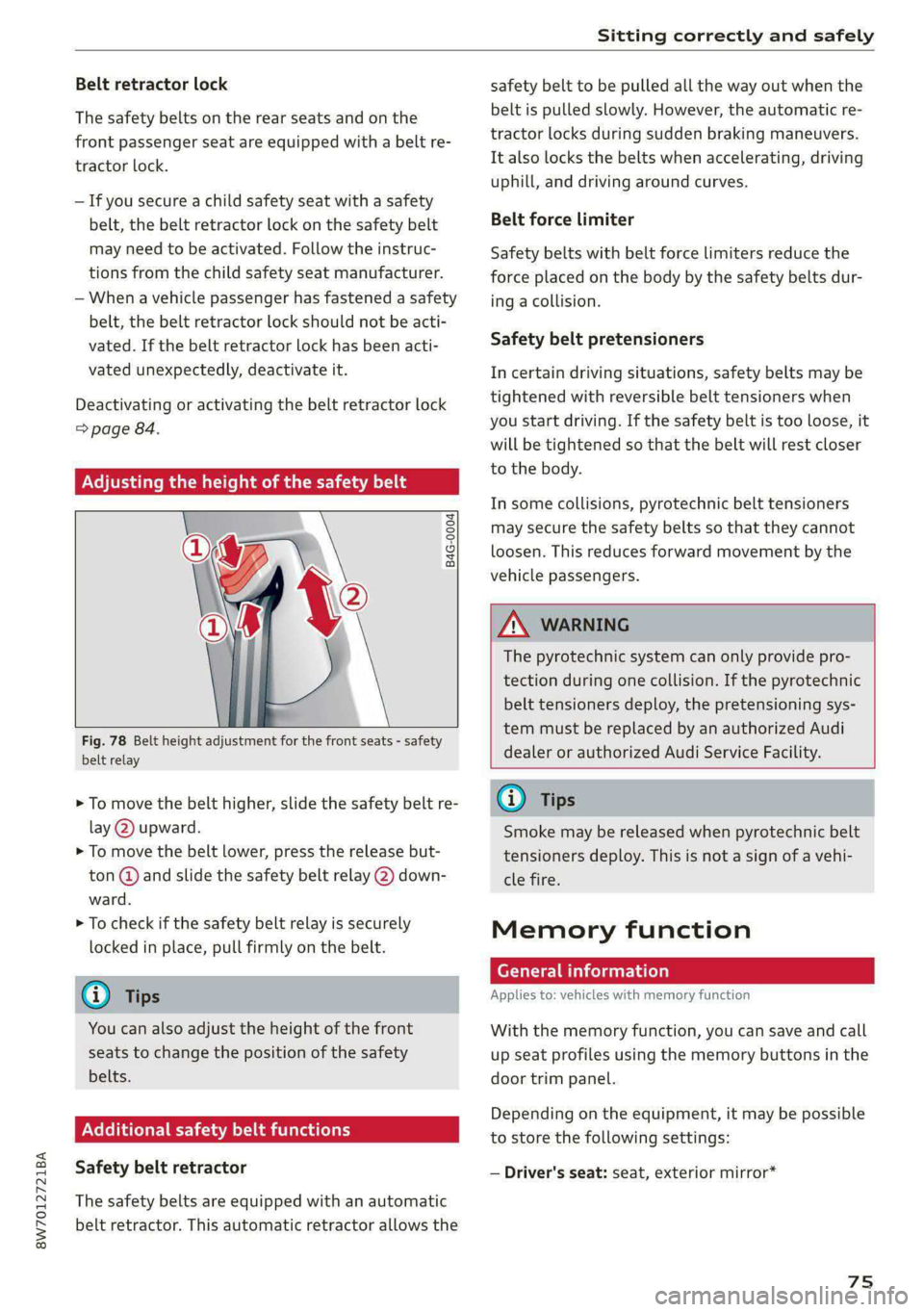
Adjusting the height of the safety belt
B4G-0004
Fig. 78 Belt height adjustment for the front seats - safety
belt relay
> To move the belt higher, slide the safety belt re-
lay @ upward.
> To move the belt lower, press the release but-
ton @ and slide the safety belt relay @) down-
ward.
> To check if the safety belt relay is securely
locked in place, pull firmly on the belt.
@ Tips
You can also adjust the height of the front
seats to change the position of the safety
belts.
ONCE estima delay
Safety belt retractor
The safety belts are equipped with an automatic
belt retractor. This automatic retractor allows the
safety belt to be pulled all the way out when the
belt is pulled slowly. However, the automatic re-
tractor locks during sudden braking maneuvers.
It also locks the belts when accelerating, driving
uphill, and driving around curves.
Belt force limiter
Safety belts with belt force limiters reduce the
force placed on the body by the safety belts dur-
ing a collision.
Safety belt pretensioners
In certain driving situations, safety belts may be
tightened with reversible belt tensioners when
you start driving. If the safety belt is too loose, it
will be tightened so that the belt will rest closer
to the body.
In some collisions, pyrotechnic belt tensioners
may secure the safety belts so that they cannot
loosen. This reduces forward movement by the
vehicle passengers.
ZA WARNING
The pyrotechnic system can only provide pro-
tection during one collision. If the pyrotechnic
belt tensioners deploy, the pretensioning sys-
tem must be replaced by an authorized Audi
dealer or authorized Audi Service Facility.
G) Tips
Smoke may be released when pyrotechnic belt
tensioners deploy. This is not a sign of a vehi-
cle fire.
Memory function
General information
Applies to: vehicles with memory function
With the memory function, you can save and call
up seat profiles using the memory buttons in the
door trim panel.
Depending on the equipment, it may be possible
to store the following settings:
— Driver's seat: seat, exterior mirror*
75