transmission AUDI A5 2021 Owner's Manual
[x] Cancel search | Manufacturer: AUDI, Model Year: 2021, Model line: A5, Model: AUDI A5 2021Pages: 318, PDF Size: 85.96 MB
Page 285 of 318

8W7012721BB
Emergency assistance
(50 km), then transport the vehicle on a
special carrier.
— If the vehicle is towed by a tow truck at the
axle that is not permitted, this can cause se-
vere damage to the transmission.
— The vehicle must not be tow started for
technical reasons.
@® Tips
— If the power supply is interrupted, then it
will not be possible to move the selector
lever out of the "P" position. The parking
lock must be released using the emergency
release before towing the vehicle
=> page 108.
— Switch Audi pre sense* off > page 155 when
loading the vehicle onto a vehicle carrier,
train, ship, or other type of transportation,
or when towing the vehicle. This can prevent
an undesired intervention from the pre
sense* system.
— Follow the local legal regulations for tow-
ing.
Read and follow the important information under
=> page 282.
Preparations
> Only secure the towing cable or tow bar at the
designated towing loop > page 283.
> Make sure the towing cable is not twisted. Oth-
erwise it could disconnect from the towing loop
while towing.
> Switch the emergency flashers on in both
vehicles > page 61. However, do not do this if it
prohibited by law.
Towing vehicle (front)
> Only start to drive when the towing cable is
taut.
> Press the brake pedal very carefully.
» Avoid sudden braking or driving maneuvers.
Vehicle being towed (rear)
> Make sure the ignition is switched on so that
the steering wheel is not locked and so that you
can use the turn signals, the horn, and the
windshield wipers if needed > A\.
> Switching it off before the vehicle has stopped
may
impair the function of the brake booster
and power steering. You would then need to
use more force to steer and brake the vehicle.
> Release the parking brake > page 114.
> Select the “N” selector lever position.
> Make sure the towing cable is always taut.
JN WARNING
— Never tow a vehicle using a tow bar or tow-
ing cable if the vehicle does not have electri-
cal power.
— If the vehicle runs out of power while it is
being towed, stop towing the vehicle imme-
diately and consult an authorized Audi deal-
er or qualified repair facility.
Rear towing loop
Applies to: RS models
Fig. 190 Rear bumper: installing the towing loop
The threaded opening for the towing loop is lo-
cated on the right rear of the bumper.
> Remove the towing loop from the vehicle tool
kit > page 274.
283
>
Page 289 of 318

8W7012721BB
Fuses and bulbs
Fuse panel (4) (brown) Fuse panel © (black)
14 | Fuel injectors, engine control module 1 Left rear door control module, left rear
15 |Ignition coils, heated oxygen sensors power window
16 | Fuel pump 12 | Parking heater
Fuse panel @) (red) Fuse panel (0) (black)
No. | Equipment No. | Equipment
Anti-theft alarm system Front seat electronics, seat ventilation,
2. [Engine control module rearview mirror, rear climate ‘control sys-
1 |tem control panel, neck heating, front pas-
3 Left front seat electronics, lumbar sup- senger's airbag warning light, diagnostic
port, massaging seat connection
4_|Automatic transmission selector lever Diagnostic interface, vehicle electrical sys-
5 |Horn 2 tem control module
6 |Parking brake 3 /Sound generator
7 | Diagnostic interface 4 |Clutch position sensor
8 | Roof electronics control module 5 |Engine start, emergency shut-off
9 | Emergency call module 6 Diagnostic connection, traffic information
10 | Airbag control module antenna (TMC)
1 Electronic Stabilization Control (ESC), An- 7 |USB input
ti-Lock Braking System (ABS) 8 | Garage door opener
12 | Diagnostic connection, light/rain sensor 7 Audi adaptive cruise control, distance reg-
13 | Climate control system ulation
14 | Right front door control module 11 | Front camera
15 | Climate control system compressor 12 | Right headlight
16 Brake system pressure reservoir, left neck 13 | Left headlight
heating 14 |Transmission fluid cooling
Fuse panel © (black) Fuse panel © (red)
No. | Equipment No. | Equipment
1 |Front seat heating 1 | Ignition coils
2 |Windshield wipers 2 |Climate control system compressor
3 | Left headlight electronics 5 | Left headlight
4 | Panoramic glass roof 6 |Automatic transmission
5 |Left front door control module 7 | Instrument panel
6 | Sockets 8 | Climate control system blower
7 Right rear door control module, right rear 9 |Right headlight
power window 10 | Dynamic steering
All wheel drive control module 11 | Engine start
9 | Right headlight electronics
10 Windshield washer system/headlight
washer system control module
287
Page 290 of 318

Fuses and bulbs
Fuse assignment - Driver's side of the
(ole 4) g
Fig. 195 Driver side cockpit: fuse panel with plastic bracket
Fuse assignment - Left side of the luggage
compartment
—
Fuse panel
No. | Equipment
1 Convenience access and start authoriza-
tion control module
2. | Audi phone box, USB input
4 |Head-up display
5S |Audi music interface, USB input
6 | Front climate control system control panel cian othe luggage comparimen’: fuse pane!
7 |Steering column lock
8 | Center display Fuse panel (@) (black)
9 |Instrument cluster No. | Equipment
10 | Volume control 2 |Windshield defroster
11 | Light switch, switch module 3 | Windshield defroster
12 | Steering column electronics 5 |Suspension control
14 | Infotainment system 6 |Automatic transmission
16 Steering column electronics, steering 7 |Rear window defogger
wheel heating 8 |Rear seat heating
9 | Left tail lights
288
10 Airbag control module
a
Luggage compartment lid lock, fuel filler
door lock, convenience system control
module
12 Luggage compartment lid
Fuse panel @) (red)
No. Equipment
Electric compressor
Fuse panel © (brown)
No. Equipment
Exterior antenna
Page 293 of 318

8W7012721BB
Data privacy
— How various systems in your vehicle were oper-
ating;
— Whether or not the driver and passenger safety
belts were buckled/fastened;
— How far (if at all) the driver was depressing the
accelerator and/or brake pedal; and,
— How fast the vehicle was traveling.
These data can help provide a better understand-
ing of the circumstances in which crashes and in-
juries occur. NOTE: EDR data are recorded by your
vehicle only if a non-trivial crash situation occurs;
no data are recorded by the EDR under normal
driving conditions and no personal data (e.g.
name, gender, age, and crash location) are re-
corded. However, other parties, such as law en-
forcement, could combine the EDR data with the
type of personally identifying data routinely ac-
quired during a crash investigation.
To read data recorded by an EDR, special equip-
ment is required, and access to the vehicle or the
EDR is needed. In addition to the vehicle manu-
facturer, other parties, such as law enforcement,
that have the special equipment, can read the in-
formation if they have access to the vehicle or the
EDR.
Data usage
Audi can read out the information stored in the
data memories or similar data, or give this infor-
mation to third parties, especially in the follow-
ing situations:
— If the vehicle owner or lessee agrees
— If there is an official request from the police
— Ifa court or authorities request it
If legally permitted, Audi can also use the data
for analysis of vehicle operation and safety per-
formance or provide this data to third parties for
research purposes.
Transmitted information
Data collection
Applies to: vehicles with data collection
Depending on the country, Audi may collect data
for the following purposes, for example: offer
and product optimization, public safety, provision
of Audi connect remote vehicle services, and
adaptation to customer expectations. For exam-
ple, various technical function data, environmen-
tal data, driving data, and usage data will be col-
lected for a specific purpose and forwarded to
Audi. The data will be sent from the vehicle at
the time the data was collected.
Applies to: MMI: You can find additional informa-
tion about data collection in the MMI. Select on
the home screen: SETTINGS > General > Legal
notes > About Audi connect.
If you would like to deny data transmission to
Audi, contact an authorized Audi dealer or au-
thorized Audi Service Facility for more informa-
tion. You also have the option to deactivate data
transmission within the privacy settings.
Privacy settings
Applies to: vehicles with Audi connect
> Applies to MMI: Select on the home screen:
SETTINGS > Privacy settings.
When using Audi connect services or during data
collection, data will be transmitted from the ve-
hicle.
> To display additional information about the pri-
vacy settings and the associated symbols in the
status bar, press @ in the MMI.
Requirement: the ignition must be switched on.
Setting the maximum privacy settings
When the Activate privacy mode function is
switched on, the data connection is deactivated
or sending of data is restricted, but all safety-re-
lated, legal, or contractually required Audi con-
nect services remain activated. The majority of
the Audi connect services are deactivated.
When the function is switched off, the data con-
nection will be available in order to use Audi con-
nect
services.
Adjusting individual privacy settings
In the MMI, you can adjust individually which da-
ta should be transmitted from the vehicle. If you
switch on a data category, the data will be trans-
mitted.
291
>
Page 294 of 318

Data privacy
You can also deactivate individual services for
your vehicle at my.audi.com if you are logged into
the vehicle as the key user > page 31. These de-
activated services will not be available in the ve-
hicle. For additional information, visit my.audi.
com.)
@) Note
You are responsible for all precautions taken
for data protection, anti-virus protection, and
protection against loss of data on mobile de-
vices that are used to access the Internet
through the Wi-Fi hotspot.
G) Tips
— The following interfaces are not affected by
changes to the privacy settings: Bluetooth,
Bluetooth Low Energy (BLE), Wi-Fi, Audi
smartphone interface (ASI), Near Field
Communication (NFC), charging communi-
cation (high-voltage system), Electronic Toll
Collect (ETC), On-Board Diagnostic System
(OBD) if equipped.
— If the maximum privacy settings are switch-
ed on, your vehicle may not receive security
updates and certificates for establishing an
encrypted connection, depending on vehicle
equipment. In order to receive security up-
dates and certificates, switch the maximum
privacy settings off for at least ten minutes
every six months. Make sure that your vehi-
cle is connected to the Internet. A symbol in
the MMI status bar indicates if the required
data connection is available > page 23.
— If the transmission of data is limited, it will
have the following effects on the exchange
of data for Audi connect services and emer-
gency calls, if equipped:
— The emergency call function will remain
available without restrictions and will con-
tinue to transmit data.
— If an online roadside assistance call is ini-
tiated, no data will be transmitted, but a
call will be made.
— If the Geofencing Alert, Speed Alert,
and/or Valet Alert services have been acti-
D_ In certain countries
292
vated by the key user, then they will re-
main available without restrictions and
continue to transmit data.
— Stored destinations (favorites, last desti-
nations) are only stored in the vehicle. If
you allow transmission of data again,
these destinations will be synchronized via
the myAudi account. To prevent synchroni-
zation of destinations, delete the destina-
tions before you allow data to be trans-
mitted again.
Applies to: vehicles with Audi connect Infotainment
Audi collects, uses, stores and shares your per-
sonal information, such as contact data, vehicle
data, usage data, driving data and precise geolo-
cation, in order to provide you with the products
and services you have purchased or requested,
and for a number of other purposes, for example,
to track quality issues, to performance and safe-
ty, to meet our internal compliance or legal re-
quirements and to market to customers and po-
tential customers. For a more complete list of
the data we collect, how we use it and with
whom we share it, please visit your Audi nation-
al/sales region website at www.audi.com.
The collection, use and sharing may vary depend-
ing on your model and model year, your subscrip-
tion status, or the service offering. For example,
collection, use and sharing may vary between
Audi connect services, if you have designated a
key user, or if you are driving a model equipped
with persistent data logging. Please review the
complete Privacy Statement to understand our
data handling practices with respect to a particu-
lar service.
You can find additional information about our da-
ta privacy practices in your MMI.
> Applies to: MMI: On the home screen, select:
SETTINGS > General > Legal notes > About
Audi connect.
Information about our privacy practices in con-
junction with the mobile Audi connect
Page 301 of 318
8W7012721BB
Technical data
Technical data
Identification data
Vehicle data label
XXX X= HKNK WOK XX
(Hae wrccnce XX XNKKKNKK
Frm XXX XX
2
XX XXKKXKK XK KX XK
3 }—— MOTORS / GET. 8
eco au cone XXX
XXX KW XXX
XXX WX
CQ -ASRAINER YyNX XXX NOK
M. - AUSST. / OPTIONS
EOA 7D5 4UB 6XM 5SG SRW
2EH JOZ 1LB 1AS_ 1BA
3FC SMU 7X1
FOA 9G3 0G7 OYH OJF
SG TLE 3KA 8EH U1A X9B QZ7
1XW 8Q3 9Q8 8Z4 D2D
716 CV7 7KO 4X3 2K2
34 4KC 3Y0 413 5D2
1SA 7GB QIA 4GQ
RAZ-0668
ee
Fig. 198 Vehicle identification label
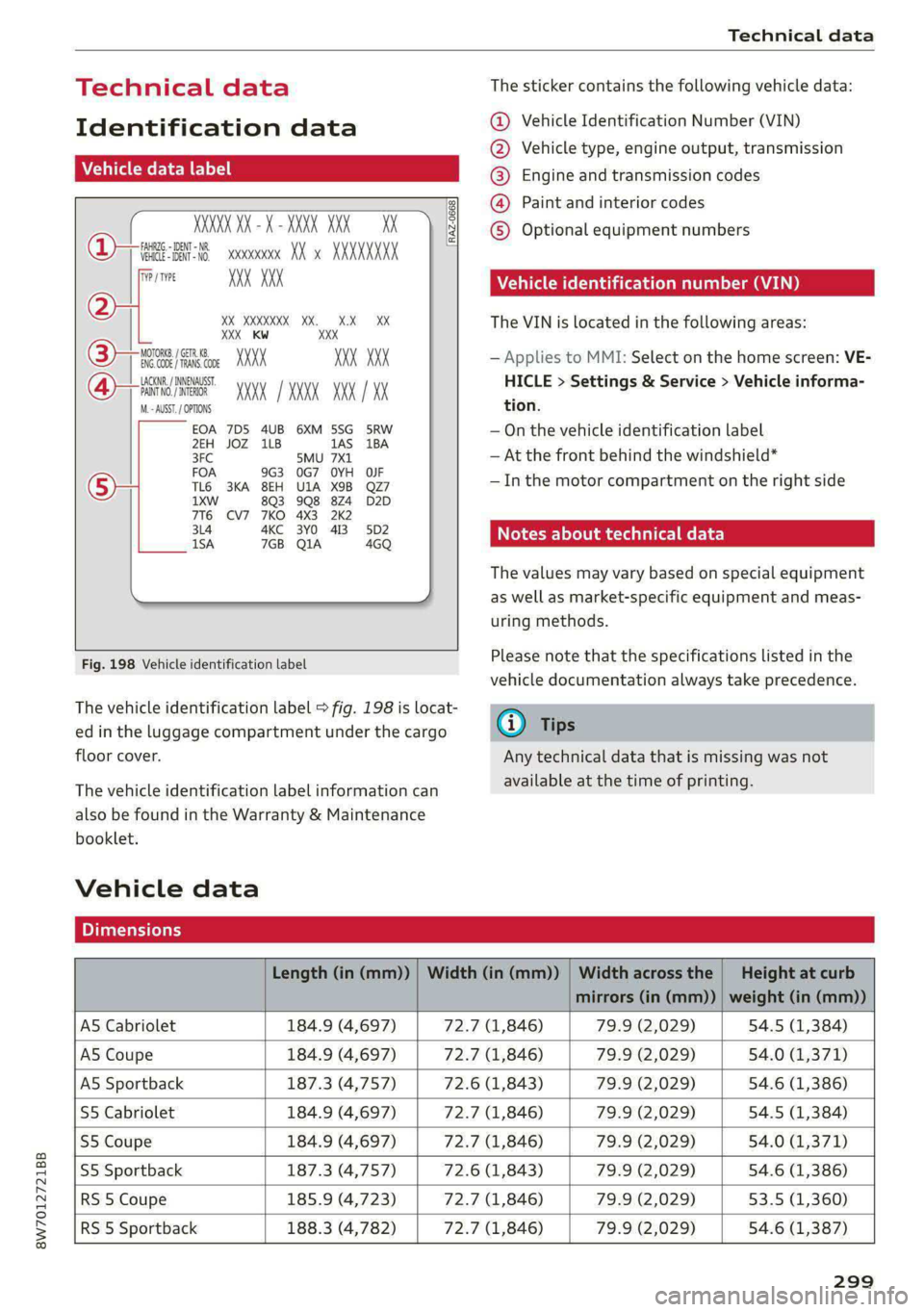
The vehicle identification label > fig. 198 is locat-
ed in the luggage compartment under the cargo
floor cover.
The vehicle identification label information can
also be found in the Warranty & Maintenance
booklet.
Vehicle data
The sticker contains the following vehicle data:
@ Vehicle Identification Number (VIN)
@ Vehicle type, engine output, transmission
® Engine and transmission codes
@) Paint and interior codes
© Optional equipment numbers
Vehicle identification number (VIN)
The VIN is located in the following areas:
— Applies to MMI: Select on the home screen: VE-
HICLE > Settings & Service > Vehicle informa-
tion.
— On the vehicle identification label
— At the front behind the windshield*
— Inthe motor compartment on the right side
Notes about technical data
The values may vary based on special equipment
as well as market-specific equipment and meas-
uring methods.
Please note that the specifications listed in the
vehicle documentation always take precedence.
G) Tips
Any technical data that is missing was not
available at the time of printing.
Length (in (mm)) | Width (in (mm)) | Width across the | Height at curb
mirrors (in (mm)) | weight (in (mm))
AS Cabriolet 184.9 (4,697) 72.7 (1,846) 79.9 (2,029) 54.5 (1,384)
A5 Coupe 184.9 (4,697) 72.7 (1,846) 79.9 (2,029) 54.0 (1,371)
AS Sportback 187.3 (4,757) 72.6 (1,843) 79.9 (2,029) 54.6 (1,386)
S5 Cabriolet 184.9 (4,697) 72.7 (1,846) 79.9 (2,029) 54.5 (1,384)
S5 Coupe 184.9 (4,697) 72.7 (1,846) 79.9 (2,029) 54.0 (1,371)
S5 Sportback 187.3 (4,757) 72.6 (1,843) 79.9 (2,029) 54.6 (1,386)
RS 5 Coupe 185.9 (4,723) 72.7 (1,846) 79.9 (2,029) 53.5 (1,360)
RS 5 Sportback 188.3 (4,782) 72.7 (1,846) 79.9 (2,029) 54.6 (1,387)
299
Page 303 of 318

8W7012721BB
Index
Numbers and
Symbols
3-zone deluxe automatic climate control.... 99
A
AIC cooling MOde:. « « vesiare «sas © wrens 6 avers 99
A/C system refrigerant oil............005 300
Acceleration measurement.............. 134
Accelerator pedal....... 0... cece eee eee ee 107
also refer to Accelerator pedal.......... 107
AGCOSSONICS © iiss 2s weer «wai + wave «6 o5a08 296
Active lane assist
refer to Audi active lane assist.......... 150
Adaptive cruise control................. 139
Adaptive dampers............000 ee eee 119
Adjusting air distribution (automatic climate
control system) ............-. ce eee eee 100
Adjusting the brightness................. 63
Adjusting the sound.................00- 221
Adjusting the temperature (automatic climate
control system) ........ cee eee eee 100
Adjusting the volume..............2.-005 30
Adjusting the volume (announcements).... 221
Adjusting the welcome sound............ 221
Aitbag’syStem « « sams s seen + wees os reese es 79
Alarm system
refer to Anti-theft alarm system.......... 37
Alignment pin (changing the wheel)....... 274
All-weather lights...............-..20--- 58
Allseason tires..........2.220202200005 260
All wheel drive
refer tOQUAtEOmms: 5 = yews « w eam eo ewe 120
Amazon Alexa integration
Media playback’. « oii. eons 6 6 cris 6 0 ow 211
Operating...............0..0 000.0000. 28
AMI
refer to Audi music interface........... 211
Android Auto
refer to Audi smartphone interface...... 219
Anti-lock braking system............0005 121
Anti-Slip Regulation. ................405 121
Anti-theft alarm system ..............000. 37
Apple CarPlay
refer to Audi smartphone interface...... 219
ASR
refer to Anti-Slip Regulation........
Audi active lane assist..............
Cleaning the camera area..........
Audi adaptive cruise control
Cleaning the sensors..............
Predictive control................
Traffic jam assist..........-..00-.
Audi adaptive light.................
Audi connect
FefEr LO CONNECE ss = « awe + e wane seas
Audi drive selects: 2 : ssa as xeaas x een
Audi music interface...............
Audio files...............002--000-
Safety measures ....... 0c. ee eens
Audi side assist
refer to Side assist................
Audi smartphone interface..........
Legalinformation................
Audi virtual cockpit
refer to Instrument cluster.........
AUTO
Automatic climate control system...
Automatic headlights.............
Auto Lock (central locking) ..........
Automatic climate control system....
Automatic luggage compartment lid....
Automatic transmission............
Automatic wipe/wash system........
Average consumption..............
Average speed............0.- 0000
B
Bag hooks............--6- eee sees
Band
refer to Frequency band...........
301
Page 312 of 318

Index
Replacement parts.............-.020005 296
Replacing bulbsescs. «6 voi 2 6 sree #0 were 2 289
Reporting
Safety Defects................ 296
Reverse gear
TEPEFLO.GOANS & secs ¥ waveere ¥ wave eo eee 105
RIMS! « aces oo smn oo corse oo Ree De BS 259
Cleaning....... 00... cece cece 269
Rolling. ..... 0... cee eee ee eee eee 104
Rolling ability
Electromechanical parking brake........ 114
Transmission idlés « < seo x y ose 2 eee « 2 106
Roof
refer to Panoramic glass roof............ 47
Roof load « « seas seee x ¢ peen sc Pee ex eS 300
ROOPECK ose : sae « £ sexe es Heme ss meu eee 96
alsorreferito Roof taCkivrses «sce a wow «oe 96
Route guidance
SEOPPLING erie «© sures © & senmns © o sammeee wo cane 194
also refer to Navigation............... 190
Running direction (tires)................ 279,
S
Safety belt microphone................. 181
Safety belts... 0... 2... eee eee 75
Belt positioner... 0... 0... eee eee 77
Cleaning’: « ¢ saws ¢ ¢ sews oy cee ee ees eee 270
Locking... 0.6... cee eee eee eee eee 88
Securing child safety seats.............. 87
Satellite map... ... eee eee 197
Saving fuel
Energy consumers..............-.--05- i?
Recuperation « « eee ss ceww + ween & + wows ¢ 9 17
Screen
refer to Touch display..........00ees eee 18
SCrewahiver’s x + sxswive wo inane & o sama ow omncam a 274
Search function
refer to Free text search............... 215
Seat: heating secs so cane eo esawere 2 eases 100, 101
Seats
Adjusting. .......... 0. cee eee eee eee 70
ClGANING:: ¢ « saas ss Hess 2 o ReeS eo eRe eA: 270
Easy entry function................200. 72
Folding the rearseats............... 94,95
Head restraints....................05. 73
Memory FUNCHON ¢ wie & 2 mas a ¢ ween » 2 ese 78
310
Resetting the position.................. 71
Storing a seat profile...............000. 78
Seat ventilation.................8. 100, 101
Securing the vehicle................000. 104
Selecting a source (media).............. 212
Selector lever + « wows oo awesome 2 cvtue oo sees 105
Selector lever position
MOPEPEONGCANS :. iacans wo « enerame we % suena @ Heer 105
Sensors
Coverage areaS.. 1. eee eee eee 127
LOGatiONS aes = y seme + a serge « eee ce eS 128
Service interval display................. 242
SET REAR (button).............00000005 100
Setting measurement units.............. 221
Settings... 20... cee eee eee eee eee 221
Announcements and tones............. 221
BlUGtOOEN's ¢ sasns + & were = & sees © v cores & 222
Dateramd timer: « x secmece = x carne © = sms = 5 221
Language............ cece eee eee 221
Measurement units................06- 221
Media... ... cee eee eee eee 216
Navigation..............0..0.00 ee eee 200
RaGiO son x ¢ woe & o cme 2H Hee YB Ee 208
SOUNG aiicssa x a isvars «+ cvenane 2 0 ncanews a 8 seauow oa 221
SysteM . 1... eee eee ee 221
TIMEZONE wis 2 = news a o eoeeR & & SOU GE PETE 221
WisFihotspot. cscs 2 sec x 2 eens e 2 wns « 185
Setting the language................... 221
Setting the times: « + aes neen ee rea ee 221
Shift light indicator’: « escx « s wees se sors «ee 16
Shit Pad dleSiacu « = misuse & = menue 2 § Hepes 2 Ese 107
5S) To)» 184
Shuffle... 0... eee ee 214
Side assist... 0... eee eee eee 156
Cleaning the sensors...............0-. 269
SIM Card... 6... eee ee eee eee 183
Sliding/tilting sunroof
refer to Panoramic glass roof............ 47
Smart Favorites
referto Presets sais so sews v een av were as 205
Smartphone
refer to Telephone ..........ceeeeenees 171
SNOW CHAINS is: os weeiies os eee 6 wow a 6 awa 260
Socket
refer to Power sourceS..........--.00--- 91