antenna AUDI A5 2021 Owners Manual
[x] Cancel search | Manufacturer: AUDI, Model Year: 2021, Model line: A5, Model: AUDI A5 2021Pages: 318, PDF Size: 85.96 MB
Page 173 of 318
8W7012721BB
Telephone
Telephone
Introduction
Applies to: vehicles with telephone
You can operate various telephone functions easi-
ly through the MMI in your vehicle.
Depending on the country and the vehicle equip-
ment, the following options may be available:
— Connecting a cell phone with Bluetooth
— Using two telephones
— Using the Audi phone box
ZA WARNING
— Medical experts warn that mobile devices
can interfere with the function of pacemak-
ers. Always maintain a minimum distance of
about 7.9 inches (20 cm) between the mo-
bile device antennas and the pacemaker.
— Do not carry the mobile device in a pocket
directly over the pacemaker when the
phone is switched on.
— Switch the mobile device off immediately
if you suspect it may be interfering with
the pacemaker.
— Do not use the voice recognition system*
= page 27 in emergencies because your
voice may change in stressful situations. The
system may take longer to dial the number
or may not be able to dial it at all. Dial the
emergency number manually.
— Switch your mobile device off in areas where
there is a risk of an explosion. These loca-
tions are not always clearly marked. This
may include gas stations, fuel and chemical
storage facilities or transport vehicles, or lo-
cations where fuel vapors (such as propane
or gasoline vapor in vehicles or buildings),
chemicals or large quantities of dust parti-
cles (such as flour, sawdust or metal) may
be present in the air. This also applies to all
other locations where you would normally
turn your vehicle engine off.
— The demands of traffic require your full at-
tention. Always read the chapter > page 20,
Traffic safety information.
CG) Note
Read the information about Audi connect, and
be sure to note the connectivity costs section
=> page 182.
G@) Tips
— The Bluetooth connection range is limited
to inside the vehicle.
—Aselection of supported Bluetooth devices
can be found in the database for tested mo-
bile devices at www.audi.com/bluetooth.
Setup
Connecting a mobile phone via Bluetooth
Applies to: vehicles with telephone
Requirement: the vehicle must be stationary and
the ignition must be switched on. The Bluetooth
settings must be open on your mobile device dur-
ing the connection setup. The mobile device to be
connected must not be actively connected to any
other Bluetooth device. The MMI must only be
connected to one mobile device.
> Enable the Bluetooth function and visibility on
the MMI = page 222 and the mobile phone.
> Applies to: MMI: Select on the home screen:
PHONE.
> Follow the system instructions. The available
Bluetooth devices will be displayed after sever-
al seconds.
> Press on the desired mobile device in the list of
displayed Bluetooth devices.
> To update the list, press OQ.
A PIN for a secure Bluetooth connection will be
generated.
> Confirm the PIN on your mobile device.
> Follow the system instructions.
> Pay attention to any other system prompts on
the MMI and on your cell phone.
After connecting successfully
The cell phone contacts are automatically loaded
in the MMI. This process can take several mi-
nutes, depending on the number of contacts.
Depending on your cell phone and the connection
type, you can use the following functions:
171
>
Page 174 of 318
Telephone
Handsfree
Requirement: your cell phone must be connected
to the MMI via a Bluetooth Hands Free Profile
(Bluetooth HFP).
You can use the hands-free system. You can make
calls using the antenna on your mobile device.
Sending and receiving messages
See > page 179.
@) Tips
— Pay attention to any system prompts dis-
played on your mobile device or the MMI,
for example if the system should connect
automatically in the future. Depending on
the mobile device, you may need to down-
load contacts and confirm access to your
messages separately.
— You can also search for the MMI on your mo-
bile device using the Bluetooth device
search.
— You only have to pair your device one time.
Bluetooth devices that are already paired
automatically connect to the MMI when the
Bluetooth function is switched on, when
they are within range, and when the ignition
is switched on. The last connected mobile
device is given first priority.
— You can manage additional settings for con-
nected mobile devices in the Connected de-
vices menu > page 223.
— When leaving the vehicle, the Bluetooth
connection to the mobile device will auto-
matically disconnect. Depending on your
mobile device, phone calls in progress may
be automatically redirected from the MMI
to your mobile device so that you can con-
tinue the call on your phone.
Using two telephones
Applies to: vehicles with telephone, and Audi phone box
You can connect two mobile phones to the MMI
at the same time using the Bluetooth HFP, for ex-
ample a business phone and a private phone. You
can be reached in your vehicle through both mo-
bile phones.
172
Applies to: mobile devices with Bluetooth Mes-
sage Access Profile (MAP): You can send and re-
ceive messages with both mobile devices
=>page 179.
Connecting another mobile device
Requirement: a mobile device must be connected
to the MMI. The vehicle must be stationary and
the ignition must be switched on. The Bluetooth
settings must be open on your mobile device dur-
ing the connection setup. The mobile device to be
connected must not be actively connected to any
other Bluetooth device.
> Enable the Bluetooth function and visibility on
the MMI = page 222 and the mobile phone.
> Applies to: MMI: Select on the home screen:
PHONE > (°, or
> Applies to: MMI: Select on the home screen:
SETTINGS > Connected devices > Telephone 1
or Telephone 2 > New connection.
> Follow the system instructions. The available
Bluetooth devices will be displayed after sever-
al seconds.
> Press on the desired mobile device in the list of
displayed Bluetooth devices.
> To update the list, press OQ.
A PIN for a secure Bluetooth connection will be
generated.
> Confirm the PIN on your mobile device.
> Follow the system instructions.
> Pay attention to any other system prompts on
the MMI and on your cell phone.
After connecting successfully
See > page 171, After connecting successfully.
Switching between two mobile devices
Requirement: phone 1 and phone 2 must be con-
nected to the MMI.
> Applies to: MMI: Select on the home screen:
PHONE > <1.
@) Note
Read the information about Audi connect, and
be sure to note the connectivity costs section
=> page 182.
Page 175 of 318
8W7012721BB
Telephone
Disconnecting a mobile device
Applies to: vehicles with telephone
> To disconnect a Bluetooth device from the MMI,
use the Connected devices menu > page 223.
Using the Audi phone
box
General information
Applies to: vehicles with Audi phone box
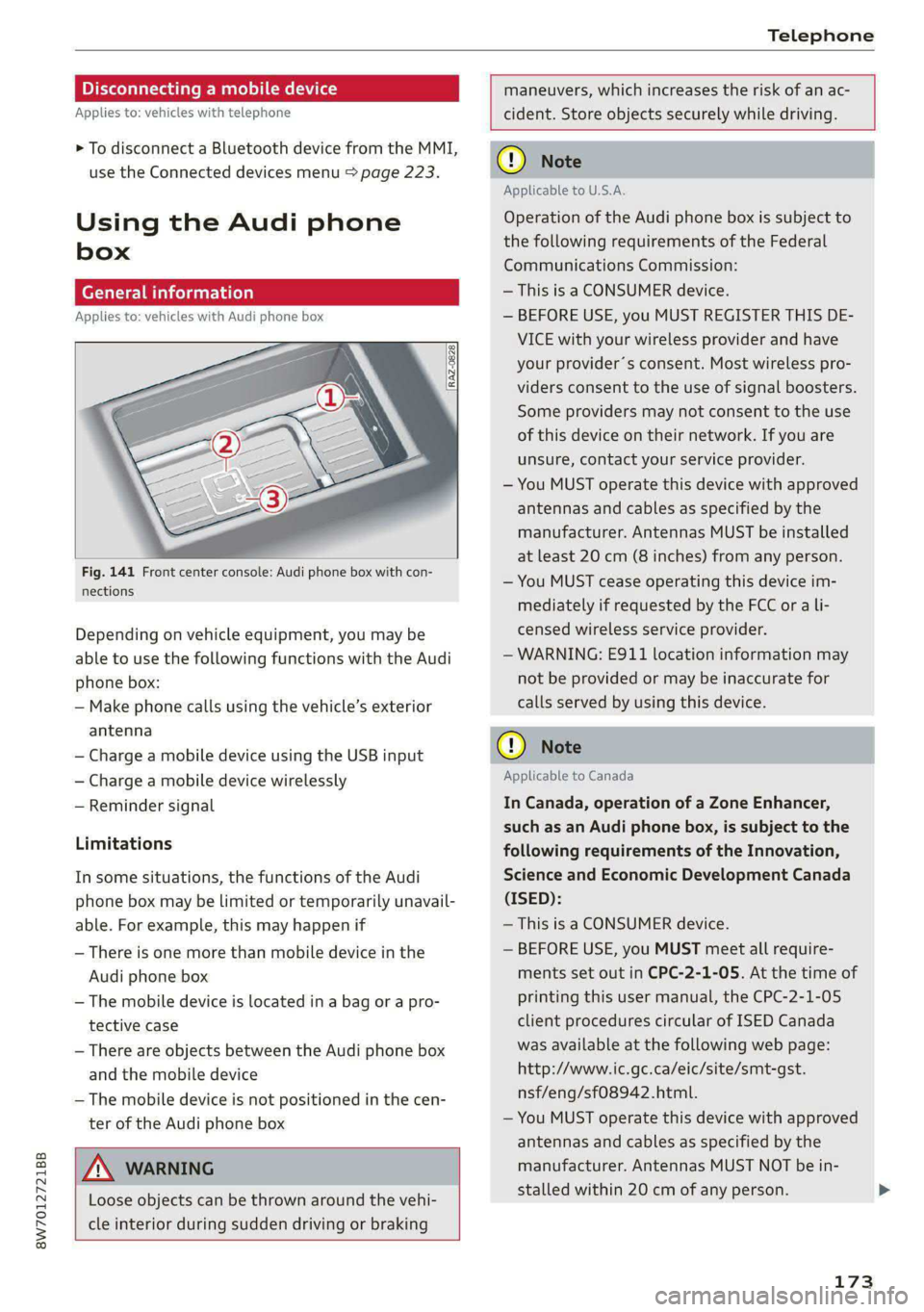
Fig. 141 Front center console: Audi phone box with con-
nections
Depending on vehicle equipment, you may be
able to use the following functions with the Audi
phone box:
— Make phone calls using the vehicle’s exterior
antenna
— Charge a mobile device using the USB input
— Charge a mobile device wirelessly
— Reminder signal
Limitations
In some situations, the functions of the Audi
phone box may be limited or temporarily unavail-
able. For example, this may happen if
— There is one more than mobile device in the
Audi phone box
— The mobile device is located in a bag or a pro-
tective case
— There are objects between the Audi phone box
and the mobile device
— The mobile device is not positioned in the cen-
ter of the Audi phone box
A WARNING
Loose objects can be thrown around the vehi-
cle interior during sudden driving or braking
maneuvers, which increases the risk of an ac-
cident. Store objects securely while driving.
CG) Note
Applicable to U.S.A.
Operation of the Audi phone box is subject to
the following requirements of the Federal
Communications Commission:
— This is a CONSUMER device.
— BEFORE USE, you MUST REGISTER THIS DE-
VICE with your wireless provider and have
your provider’s consent. Most wireless pro-
viders consent to the use of signal boosters.
Some providers may not consent to the use
of this device on their network. If you are
unsure, contact your service provider.
— You MUST operate this device with approved
antennas and cables as specified by the
manufacturer. Antennas MUST be installed
at least 20 cm (8 inches) from any person.
— You MUST cease operating this device im-
mediately if requested by the FCC or a li-
censed wireless service provider.
— WARNING: E911 location information may
not be provided or may be inaccurate for
calls served by using this device.
® Note
Applicable to Canada
In Canada, operation of a Zone Enhancer,
such as an Audi phone box, is subject to the
following requirements of the Innovation,
Science and Economic Development Canada
(ISED):
— This is a CONSUMER device.
— BEFORE USE, you MUST meet all require-
ments set out in CPC-2-1-05. At the time of
printing this user manual, the CPC-2-1-05
client procedures circular of ISED Canada
was available at the following web page:
http://www.ic.gc.ca/eic/site/smt-gst.
nsf/eng/sf08942.html.
— You MUST operate this device with approved
antennas
and cables as specified by the
manufacturer. Antennas MUST NOT be in-
stalled within 20 cm of any person.
173
Page 176 of 318
Telephone
— You MUST cease operating this device im-
mediately if requested by ISED or a licensed
wireless service provider.
— WARNING: £911 location information may
not be provided or may be inaccurate for
calls served by using this device.
@) Tips
The system complies with United States FCC
regulations and ISED regulations > page 297.
Making phone calls using the exterior
ental ar-)
Applies to: vehicles with Audi phone box
With the Audi phone box, you can make calls us-
ing the exterior antenna on the vehicle. Using the
external antenna helps when there is a low signal
and also provides better reception quality.
Requirement: the ignition must be switched on.
> To make phone calls through the vehicle's exte-
rior antenna using your mobile device, lay your
device on the phone symbol @) > page 173,
fig. 141 in the center of the Audi phone box
with the display facing up.
eee laa mem MOM) mil ltig
Applies to: vehicles with Audi phone box
You can charge your mobile device using a special
USB adapter with the Audi phone box
=> page 211.
Requirement: the ignition must be switched on.
> To charge your mobile device via USB, connect it
to the USB input @ > page 173, fig. 141.
G) Tips
— You can purchase a USB adapter from an au-
thorized Audi dealer or authorized Audi
Service Facility, or at specialty stores.
— Audi recommends using Audi Genuine Ac-
cessories. Audi has verified their reliability,
safety, and suitability.
174
Charging a mobile device wirelessly
Applies to: vehicles with Audi phone box
You can charge your mobile device wirelessly us-
ing the Audi phone box.
Requirement: the ignition must be switched on.
Your mobile device must meet the Qi standard.
> Make sure that the wireless charging function is
switched on:
> Applies to: MMI: Select on the home screen:
SETTINGS > General > Reminder signal and
mobile device charging.
> Switch the Mobile device wireless charging
function on.
> To charge your mobile device wirelessly, lay it
on the @ symbol @ © page 173, fig. 141 in the
center of the Audi phone box with the display
facing up.
ZA WARNING
— The mobile device may become hot during
wireless charging. Pay attention to the tem-
perature of your mobile device and be care-
ful when removing it from the Audi phone
box.
— An alternating magnetic field is used for
wireless charging. Maintain a minimum dis-
tance of approximately 2.4 inches (6 cm) to
the Audi phone box charging plate. The
thresholds for prolonged exposure at this
distance comply with ICNIRP1998. There-
fore, interactions such as irritation of senso-
ry organs, malfunctions of active implants
(such as pacemakers, infusion pumps, or
neurostimulators) or effects on passive im-
plants (such as prosthetic limbs) is highly
unlikely. If you have an implant, consult a
medical specialist if you have any questions.
You can also switch the function for wireless
charging in the Audi phone box on and off.
You can continue to charge your mobile de-
vice using a cable connection.
G@) Tips
— The maximum charging output is 5 W.
—The charging time and temperature will vary
depending on the mobile device being used.
Page 192 of 318
Navigation
Navigation
Opening navigation
Applies to: vehicles with navigation system
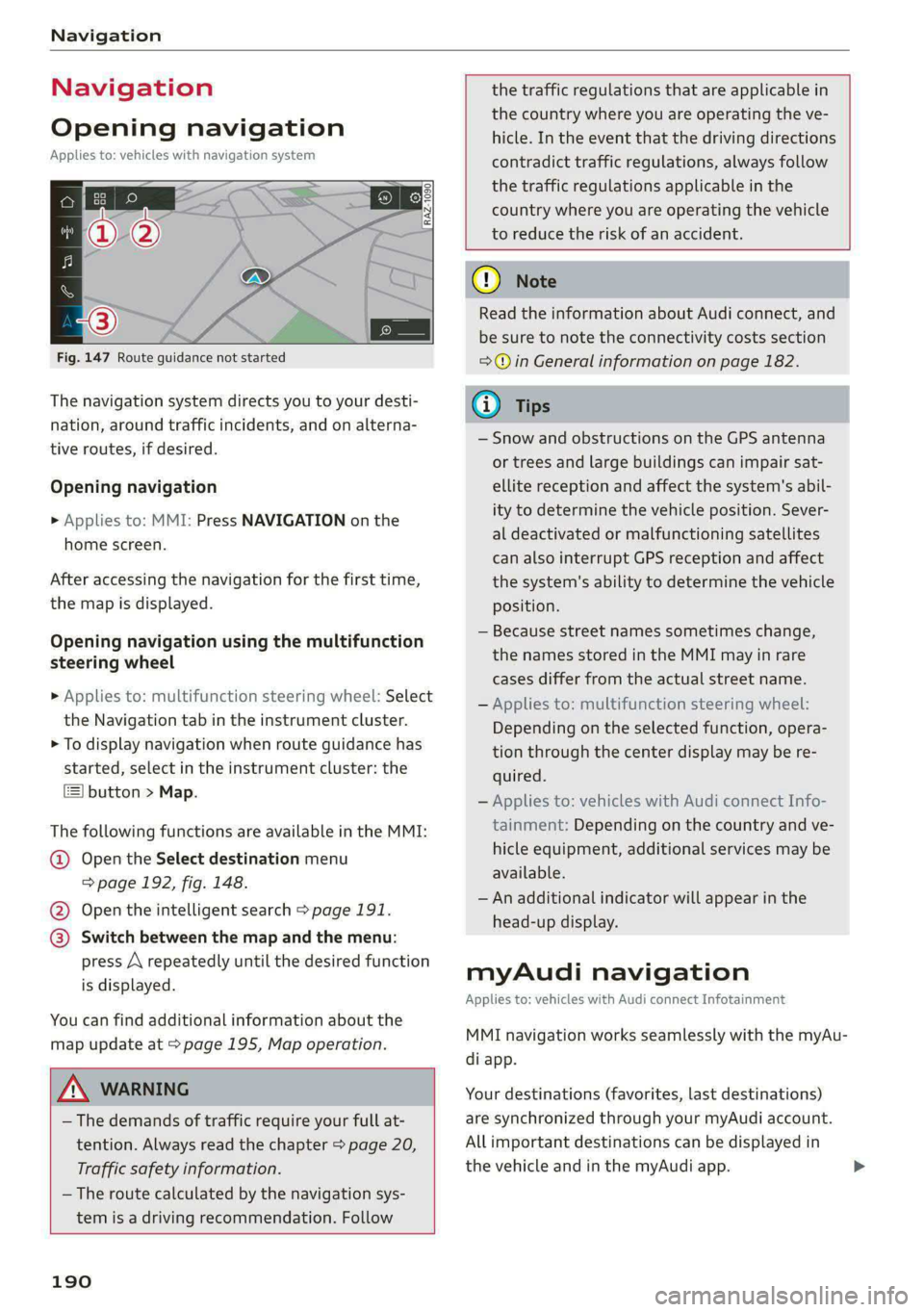
Fig. 147 Route guidance not started
The navigation system directs you to your desti-
nation, around traffic incidents, and on alterna-
tive routes, if desired.
Opening navigation
>» Applies to: MMI: Press NAVIGATION on the
home screen.
After accessing the navigation for the first time,
the map is displayed.
Opening navigation using the multifunction
steering wheel
> Applies to: multifunction steering wheel: Select
the Navigation tab in the instrument cluster.
> To display navigation when route guidance has
started, select in the instrument cluster: the
button > Map.
The following functions are available in the MMI:
@ Open the Select destination menu
=> page 192, fig. 148.
@® Open the intelligent search > page 191.
@ Switch between the map and the menu:
press A repeatedly until the desired function
is displayed.
You can find additional information about the
map update at > page 195, Map operation.
ZA\ WARNING
— The demands of traffic require your full at-
tention. Always read the chapter > page 20,
Traffic safety information.
— The route calculated by the navigation sys-
tem is a driving recommendation. Follow
190
the traffic regulations that are applicable in
the country where you are operating the ve-
hicle. In the event that the driving directions
contradict traffic regulations, always follow
the traffic regulations applicable in the
country where you are operating the vehicle
to reduce the risk of an accident.
() Note
Read the information about Audi connect, and
be sure to note the connectivity costs section
=@ in General information on page 182.
(i) Tips
— Snow and obstructions on the GPS antenna
or trees and large buildings can impair sat-
ellite reception and affect the system's abil-
ity to determine the vehicle position. Sever-
al deactivated or malfunctioning satellites
can also interrupt GPS reception and affect
the system's ability to determine the vehicle
position.
— Because street names sometimes change,
the names stored in the MMI may in rare
cases differ from the actual street name.
— Applies to: multifunction steering wheel:
Depending on the selected function, opera-
tion through the center display may be re-
quired.
— Applies to: vehicles with Audi connect Info-
tainment: Depending on the country and ve-
hicle equipment, additional services may be
available.
— An additional indicator will appear in the
head-up display.
myAudi navigation
Applies to: vehicles with Audi connect Infotainment
MMI navigation works seamlessly with the myAu-
di app.
Your destinations (favorites, last destinations)
are synchronized through your myAudi account.
All important destinations can be displayed in
the vehicle and in the myAudi app.
Page 289 of 318

8W7012721BB
Fuses and bulbs
Fuse panel (4) (brown) Fuse panel © (black)
14 | Fuel injectors, engine control module 1 Left rear door control module, left rear
15 |Ignition coils, heated oxygen sensors power window
16 | Fuel pump 12 | Parking heater
Fuse panel @) (red) Fuse panel (0) (black)
No. | Equipment No. | Equipment
Anti-theft alarm system Front seat electronics, seat ventilation,
2. [Engine control module rearview mirror, rear climate ‘control sys-
1 |tem control panel, neck heating, front pas-
3 Left front seat electronics, lumbar sup- senger's airbag warning light, diagnostic
port, massaging seat connection
4_|Automatic transmission selector lever Diagnostic interface, vehicle electrical sys-
5 |Horn 2 tem control module
6 |Parking brake 3 /Sound generator
7 | Diagnostic interface 4 |Clutch position sensor
8 | Roof electronics control module 5 |Engine start, emergency shut-off
9 | Emergency call module 6 Diagnostic connection, traffic information
10 | Airbag control module antenna (TMC)
1 Electronic Stabilization Control (ESC), An- 7 |USB input
ti-Lock Braking System (ABS) 8 | Garage door opener
12 | Diagnostic connection, light/rain sensor 7 Audi adaptive cruise control, distance reg-
13 | Climate control system ulation
14 | Right front door control module 11 | Front camera
15 | Climate control system compressor 12 | Right headlight
16 Brake system pressure reservoir, left neck 13 | Left headlight
heating 14 |Transmission fluid cooling
Fuse panel © (black) Fuse panel © (red)
No. | Equipment No. | Equipment
1 |Front seat heating 1 | Ignition coils
2 |Windshield wipers 2 |Climate control system compressor
3 | Left headlight electronics 5 | Left headlight
4 | Panoramic glass roof 6 |Automatic transmission
5 |Left front door control module 7 | Instrument panel
6 | Sockets 8 | Climate control system blower
7 Right rear door control module, right rear 9 |Right headlight
power window 10 | Dynamic steering
All wheel drive control module 11 | Engine start
9 | Right headlight electronics
10 Windshield washer system/headlight
washer system control module
287
Page 290 of 318

Fuses and bulbs
Fuse assignment - Driver's side of the
(ole 4) g
Fig. 195 Driver side cockpit: fuse panel with plastic bracket
Fuse assignment - Left side of the luggage
compartment
—
Fuse panel
No. | Equipment
1 Convenience access and start authoriza-
tion control module
2. | Audi phone box, USB input
4 |Head-up display
5S |Audi music interface, USB input
6 | Front climate control system control panel cian othe luggage comparimen’: fuse pane!
7 |Steering column lock
8 | Center display Fuse panel (@) (black)
9 |Instrument cluster No. | Equipment
10 | Volume control 2 |Windshield defroster
11 | Light switch, switch module 3 | Windshield defroster
12 | Steering column electronics 5 |Suspension control
14 | Infotainment system 6 |Automatic transmission
16 Steering column electronics, steering 7 |Rear window defogger
wheel heating 8 |Rear seat heating
9 | Left tail lights
288
10 Airbag control module
a
Luggage compartment lid lock, fuel filler
door lock, convenience system control
module
12 Luggage compartment lid
Fuse panel @) (red)
No. Equipment
Electric compressor
Fuse panel © (brown)
No. Equipment
Exterior antenna
Page 298 of 318
Accessories and technical changes
@) Tips
Because of your vehicle's aluminum body de-
sign, all service and repair procedures affect-
ing the body should be performed by an au-
thorized Audi dealer or authorized Audi Serv-
ice Facility, who will perform the work accord-
ing to Audi factory specifications. Only Audi
Genuine Parts are used when Audi experts
perform repair or service procedures. Failure
to use Audi Genuine Parts or Audi Genuine Ac-
cessories or performing repairs incorrectly
may result in severe vehicle damage, such as
corrosion.
Accessories and parts
Consult with an authorized Audi dealer or author-
ized Audi Service Facility before purchasing ac-
cessories or replacement parts. Audi recom-
mends having your vehicle serviced by an author-
ized Audi dealer or authorized Audi Service Facili-
ty and using Audi Genuine Parts and Audi Genu-
ine Accessories.
Audi does not endorse the use of products and
accessories that it has not evaluated, even if the
product is approved by a certified testing agency
or government agency.
ZA WARNING
— Installing unapproved accessories or incor-
rect replacement parts can cause vehicle
damage and can increase the risk of an acci-
dent.
— On vehicles that have factory-installed li-
cense plate brackets on the front of the ve-
hicle, the brackets may only be replaced
with ones that are the same size and made
of the same material. Do not install any li-
cense plate brackets on the front of vehicles
that do not have factory-installed brackets.
Otherwise, the function of the system could
be impaired.
@) Note
A correctly-installed exterior antenna is re-
quired for operating radio equipment in the
vehicle. Otherwise, the increased electromag-
296
netic waves can cause malfunctions in the ve-
hicle. Observe the regulations in the country
where the vehicle is being operated and the
instructions from the radio equipment manu-
facturer.
Reporting Safety Defects
Applicable to U.S.A.
If you believe that your vehicle
has a defect which could cause a
crash or could cause injury or
death, you should immediately in-
form the National Highway Traffic
Safety Administration (NHTSA) in
addition to notifying
Audi of America, Inc.
2200 Ferdinand Porsche Drive
Herndon, VA 20171
If NHTSA receives similar com-
plaints, it may open an investiga-
tion, and if it finds that a safety
defect exists in a group of
vehicles, it may order a recall and
remedy campaign. However,
NHTSA cannot become involved in
individual problems between you,
your dealer, or Audi of America,
Inc.
To contact NHTSA, you may call
the Vehicle Safety Hotline toll-
free at 1-888-327-4236 (TTY: 1-
800-424-9153); go to http://
www.safercar.gov;
Page 300 of 318

Accessories and technical changes
RSS-Gen
This device contains licence-exempt transmit-
ter(s)/receiver(s) that comply with Innovation,
Science and Economic Development Canada’s li-
cence-exempt RSS(s). Operation is subject to the
following two conditions:
(1) This device may not cause interference; and
(2) This device must accept any interference, in-
cluding interference that may cause undesired
operation of the device.
RSS 102
Radiofrequency radiation exposure Information:
This equipment complies with FCC and ISED radi-
ation exposure limits set forth for an uncontrol-
led environment. This equipment should be in-
stalled and operated with minimum distance of
20 cm (8 inches) between the radiator and your
body. This transmitter must not be co-located or
operating in conjunction with any other antenna
or transmitter.
Integrated Toll Module* - FCC (USA) and
ISED (Canada)
This device complies with FCC rules part 90 and
Innovation, Science, and Economic Development
Canada RSS-137. Operation is subject to the fol-
lowing two conditions: (1) This device may not
cause harmful interference, and (2) This device
must accept any interference that may be re-
ceived including interference that may cause un-
desired operation. WARNING: The transmitter
has been tested and complies with FCC and ISED
rules. Changes or modifications not expressly ap-
proved by the party responsible for compliance
could void the user’s authority to operate the de-
vice.
This equipment complies with FCC and ISED radi-
ation exposure limits set forth for an uncontrol-
led environment. End Users must follow the spe-
cific operating instructions for satisfying RF ex-
posure compliance. This transmitter must be at
least 20 cm (8 inches) from the user and must
not be cotocated or operating in conjunction
with any other antenna or transmitter.
298
G) Tips
Additional information or supplements about
the radio systems based on the vehicle equip-
ment and country can be found on the follow-
ing website: www.audi.com/generalinfo
Page 306 of 318

Index
Drive select
refer to Audi drive select.............0. 118
Drive system... ... 00.20. cee eee eee eee 110
Audi driveselect . cc.0i ices d ceca cain 118
Drive system (message) ........00. eee eee 112
Driving down hills............0. 00.0 eee 116
DrivING PFOGKAME. « « eserce «© sone 6 0 sons aw ane 146
Driving through water.................. 116
DrIVING ELIMI 5 & cescinne 6 5 cose vo een & enawens a 17
Driving tips
Driving through water...............0- 116
Efficient driving................00000- 110
Uphilland downhill................... 116
DFIVING:-trACK es: « 2 sews & 2 seme xc owe oe 116
Driving Up:hills. < 2 sees + » yews 5» ewes c 2 eee 116
Dust filter
refer to Pollutant filter................. 98
DY MAMIE StEEKING = wwe = 2 qewe a 2 anes = noR 119
E
E-itidilss < same « 2 sau: ¢ 5 sepa 2 s neem 2 5 pee 180
SOCHINGSiccsain » sew © © wravens a & soomem w V soveTS 6 180
EDL
refer to Electronic Differential Lock...... 121
EDR
refer to Event Data Recorder (EDR)...... 290
Efficiency assist.............0 02. eee ee 137
PREGietiVe CONTTOlacs ¢ = wax + xeme 2 2 pene 142
Electrical system. ...........0.0020000. 239
Electromechanical parking brake......... 114
Electronic Differential Lock.............. 121
Electronic immobilizer................00. 39
Electronic Stabilization Control........... 121,
Embedded SIM Card « seswiie ss sien os wiven oo 8 183
Emergency assistance ............00000e 274
Emergency braking function............. 115
Emergency call.........cceeeeveee 178, 187
Emergency flashers...............000005 61
Emergency mode............020 eee eee 109
Emergency operation
DOOGIS s seas 3 ¢ Sone 2b ROMA ca aK o ANeRE se 37
Fuel tillerdoor ic = swiss a 2 saves wo wien «2 axe 229
Luggage compartment lid............... 44
Panoramic glass roof...............2-0. 47
Emissions control system..............- 229
304
EMErGy’CONSUMENS Hs 6 ceive e sieves ww neeewe wo x
Energy management... 006. eeee ee eens
Engine
Breakingin.............. cece eee eee
Emergency StOpies : « sews ss weea s eae gs
JUMPISTAREIING » « canseis ws wssins 6 # oeenss a a une
Start/Stop system...........--0000005
Starting/Stopping ws ss caw se ewes yams
Engine compartment
Opening and closing the hood..........
Overview ......- 2. eee cee eee eee
Safety precautions............-0.ee0ee
Engine data
refer to Sport displays..................
Engine oil
AGING «scence ox cesses > 5 eons owes av ara
Changing.......... eee eee eee eee
Checking oillevel.............---000--
CONSUMPTION ess « & sivees 2 o onerees & o ewer @ 8 ov
Indicator light..............02..0000-
Replacement interval.................
Temperature display.................-.
Engine sound
Audi drive select............ 0.00000
Engine Start/Stop mode
refer to Start/Stop system.............
Engine startsSySte ny wcusooe » scaseas o « seas oo one
Engine stop
refer to Start/Stop system.............
Entry/exit lighting. ............0 0...
Entry ASSISTANGE!S. 4 « scusnze » » sxnzece » o asnseue ow anes
also refer to Exit assistance.............
GlSO refer to Seats ¢ seen % 3 aes sv awn % Ears
Environment
Unleaded gasoline..................0.
ESG
refer to Electronic Stabilization Control...
ESCSpOlbnnsos 5 2 omners x x emmes oo nveoeee ao manne ©
eSIM
refer to Embedded SIM card............
Event Data Recorder (EDR)..............
Exitassistamee « scccene a 0 sxesese = v vreuain 3 o anes © 5
EXHE WAP Gicnes 2 a caees vw cscs «Heaven «© enone
Exterionantenna s wise <2 wees 2 6 mec ss oes
Exterior lighting + « ¢ see: +» sees y sae ees