park assist AUDI A5 2021 Owners Manual
[x] Cancel search | Manufacturer: AUDI, Model Year: 2021, Model line: A5, Model: AUDI A5 2021Pages: 318, PDF Size: 85.96 MB
Page 5 of 318
8W7012721BB
Table of contents
Brivirigy cy mieirles. cies i 6 scious 6 6 esses 6 118
Audi drive select............00 eee eee 118
SUSPENSION: + yews a x mem a e Bees se CeRRE L19
StOOKIING cms a v ves 8 ceawem ¥ sen ¥ erzaees LIS.
All wheel drive (quattro) .............. 120
Electronic Stabilization Control......... 121
Trailer towing.................0-. 124
Driving with atrailer................. 124
Assist systems................... 126
Assist systems................00. 126
General information................. 126
Surrounding area detection............ 127
Driving information.............. 130
Speed warning system..............-. 130
Camera-based traffic sign recognition... 130
Traffic light information.............. 132
Lap etime ris « & esuass « 6 mesns « o uve & & meee 133
Acceleration measurement............ 134
Integrated Toll Module............... 135
Driver assistance................. 136
Cruise control system................ 136
Efficiency assist .«
Audi adaptive cruise control........... 139
Traffic jam assist............00.-000- 147
Distance Warning « « sais + s ewe 2 o eee & s 149
Audi active lane assist/lane departure
warning............ 20. ce eee eee 150
AUGi PrESGNSe « esis sx cows < e cams & eaew 152
Sidevassist vccssv: «x ceavous ov aseuase ao cerns © 8 ane 156
Exit warning ...............-e eee eee 157
Parking and maneuvering....... 59:
Introduction. ............ 2. eee eee ee 159
Parkitig:aid plUS = ssa < 2 esos ¢ ¥ Sana 4 x 159
Rearview camera and peripheral cameras. 161
Rear cross-traffic assist............... 165
Assisted parking.........-...0--- eee 166
ParkeaSsiSt’s cass a = sane s x pany s & eens 3 5 168
Infotainment system............ 171
Telephone.............. cece eee U7.
TMEROGUCTION « & cess wo wcinase we a oraeni ow awenaie 171
Setup... 2.2... cee eee eee eee 171
Using the Audi phone box............. 173
Using the telephone.................. 175
SettingS 00... . cece cee eee eee eee 178
MOSSAGES cours « s eauu § 2 eueeS Fo EGE FE BS 179
Troubleshooting sic ss wes oe ween es owe 181
Audi CONNECE : «6: = i e665 st ees so 182
General information................. 182
Audi connect Infotainment............ 182
Using a Wi-Fi hotspot 183
Audi connect Infotainment services..... 183
Functions on demand................ 184
Audi connect vehicle control services.... 184
SOttingS sews + 9 cae ¥ eee ¥ perms we pee 185
Troubleshooting..............--.0005 186
Emergency call................... 187
OVERVIEW. secs. 6 x sxcvers 6 emutes @ a eavaens vw ame
Emergency call
Online roadside assistance............ 188
Navigation.....................05. 190
Opening navigation.................. 190
myAudi navigation................00. 190
Entering adestination..............0- 191
Stopping route guidance.............. 194
Mapes & 5 saves © 2 saws yo sme @ & Hew 2 2 Be 194
Alternative routes................04. 196
Additional functions...............0-- 196
Satellite Map’s + 6 gare = cama a e weep os oe 197
Mapreipdates » cmos + x sre: «2 anes aw onnens 198
Traffic incidents.............. 000 eee 199
SOtuiNGS
wows ¢ « eeen ¢ nae 2 Bees doe 200
Radio....... cece eee 202
Generalinformation................. 202
Radio functions sss < eins 2 + wen 3 6 eacern 203
Online radio... .... eee eee eee 206
Options and settings................. 207
Troubleshooting wisi « s wen» 6 eae o + wae 208
Media................. 0c cece eee 210
General information................. 210
Bluetooth audio player............... 210
Amazon Alexa ..........0.00 eee eee 211
Multimedia connections.............. 211
Playing medias... crocs s 0 samen 4 o snmeie «0 one 212
Options and settings................- 216
Page 8 of 318
Quick access
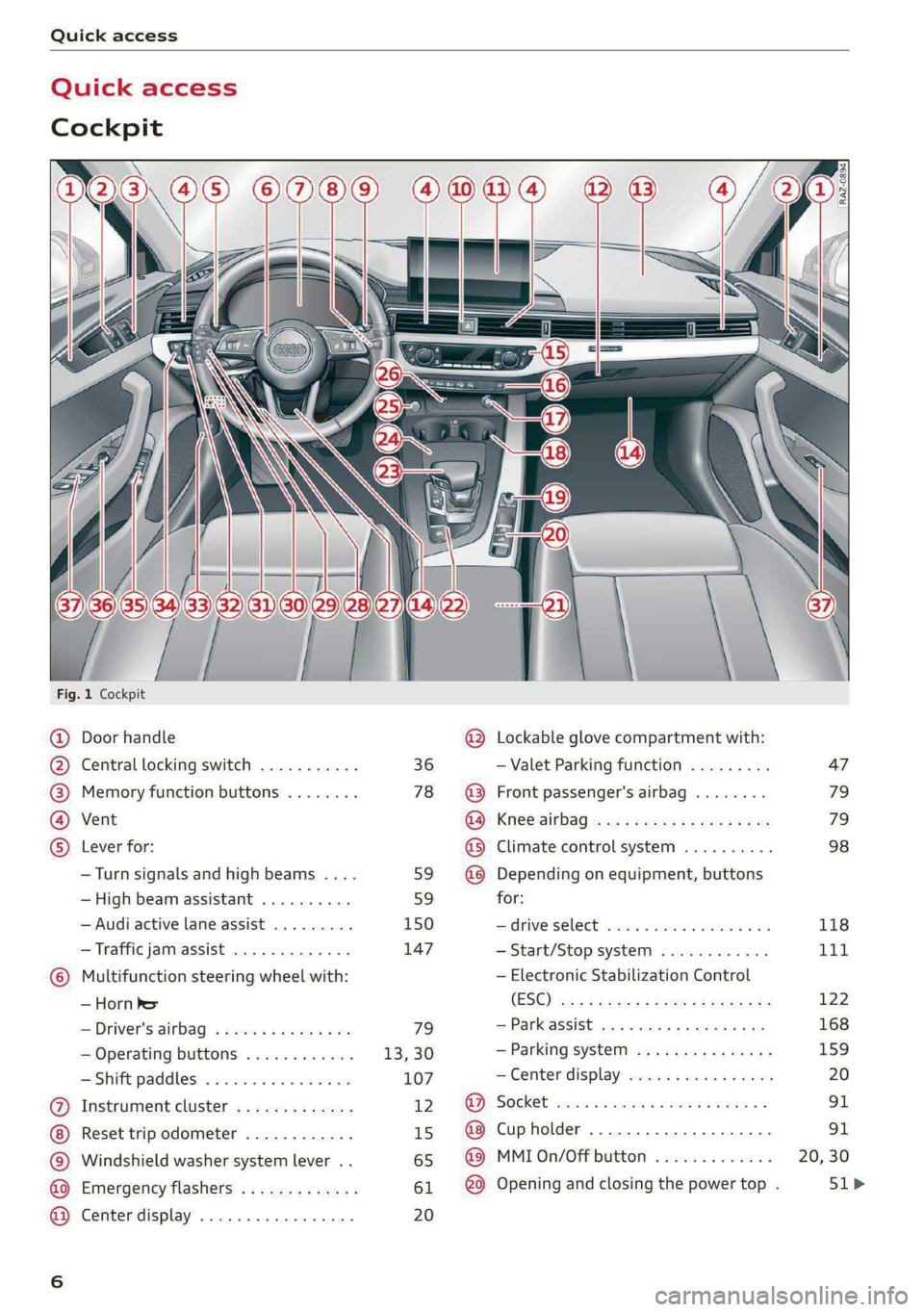
Quick access
Cockpit
Fig. 1 Cockpit
@ @ @ @ ©
©
OO©eCS9
Door handle
Central locking switch
Memory function buttons
Vent
Lever for:
—Turn signals and high beams ....
— High beam assistant ..........
— Audi active lane assist .........
— Traffic jam assist .............
Multifunction steering wheel with:
— Horn he
— Driver's airbag
— Operating buttons
—Shift paddles ................
Instrument cluster .............
Reset trip odometer ............
Windshield washer system lever ..
Emergency flashers .............
Center display .................
36
78
59 59
150 147
79
13,30
107
12 15
65
61 20
®
OOO®
©OO®
Lockable glove compartment with:
— Valet Parking function
Front passenger's airbag
Knee airbag
Climate control system ..........
Depending on equipment, buttons
for:
drive SELCCE cassis «6 sossan © 4 esr © 6s
— Start/Stop system
— Electronic Stabilization Control
(ESC)
— Parkassist os 5 & enies so acs x ¢ ee
— Parking system
—Center display ................
Cup holder ...............0000.
MMI On/Off button
Opening and closing the power top .
[RAZ-0894)
47
79
79
98
118
Tit
122
168
159
Page 10 of 318
Quick access
Brake system
> page 113,
> page 238,
Electromechanical parking brake
>page 115
Electromechanical parking brake
=>page 114
Electromechanical parking brake
>page 114
Steering
=>page 119
Steering lock
>page 119
Adaptive cruise control
=> page 140,
Safe start monitor
=>page 145,
Driver intervention request
=>page 146
Traffic jam assist
=>page 147
Steering intervention request
=>page 148
Distance warning
=>page 149
Active lane assist
=> page 150
Pre sense
> page 153
Hood
> page 231
Engine oil pressure
=> page 233
Engine oil level (MIN)
=> page 233
Electrical system
> page 239
Yellow indicator lights
Central indicator light
=> page 7
Engine speed limitation
=>page 14
Engine speed limitation
> page 14,
Drive system
>page 111
Central
locking
=> page 36
Power top
=> page 53
Bulb failure indicator
=> page 62
Adaptive light
=> page 62
Headlight range control system
=> page 62
Light/rain sensor
=> page 62,
=> page 67
Windshield wipers
=> page 67
Safety systems
=> page 80
Engine start system
=> page 104
Convenience key
=> page 104
Transmission
=> page 109
Brake system
=> page 113
Electromechanical parking brake
=>page 115
Suspension control
=>page 119
Steering
>page 119
Steering lock
>page 119
All wheel drive
> page 121,
Sport differential
=> page 121
Page 11 of 318

8W7012721BB
Quick access
Electronic Stabilization Control
(ESC)
=> page 122
Electronic Stabilization Control
(ESC)
=> page 122
Electronic Stabilization Control
(ESC)
=> page 122
Anti-lock Braking System (ABS)
=>page 122
Anti-lock Braking System (ABS)
=> page 122
Adaptive cruise control
> page 147,
Traffic jam assist
=> page 148
Steering intervention request
=> page 148,
=>page 151
Distance warning
=> page 149
Active lane assist
=> page 150,
=> page 152
Pre sense
> page 152
Side assist, exit warning
>page 157
Parking systems
=>page 161
Rear cross-traffic assist
>page 165
Park assist
=>page 170
Emergency call function
> page 188
Tank system
=> page 227
Malfunction Indicator Lamp (MIL)
=> page 227,
> page 229
Engine oil level (MIN)
=> page 233
Engine oil level (MAX)
=> page 233
Engine oil sensor
=> page 233
Engine warm-up request
=> page 233
Electrical system
> page 239
Washer fluid level
=> page 242
Tire pressure
=> page 262,
=> page 263,
=> page 265,
=> page 265,
=> page 266
Tire pressure
=> page 263,
=> page 266
Other indicator lights
Low beam headlights
=> page 58
Parking lights
=>page 58
Turn signals
=> page 59,
=> page 61
Turn signals
=>page 59,
=> page 61
Start/Stop system
=> page 111
Cruise control system
=> page 136
Cruise control system
=> page 136
Efficiency assist
=> page 138,
> page 138
Efficiency assist
=> page 138
Page 12 of 318

Quick access
Efficiency assist
=> page 138
Efficiency assist
=> page 138
Efficiency assist
=> page 138
Efficiency assist
=> page 138
Efficiency assist
> page 138
Adaptive cruise control
=> page 140
Adaptive cruise control
=> page 140
Adaptive cruise control
=> page 140
Adaptive cruise control
=> page 140
Adaptive cruise control
=> page 145
Traffic jam assist
=> page 147
Traffic jam assist
=> page 147
Active lane assist
=> page 150
High beam headlights
=> page 59,
=>page 59
High beam assistant
=> page 59,
=> page 60
Laser lights
=> page 60
Child safety lock
=>page 45
Child safety lock
=> page 45
Child safety lock
=>page 45
10
Power top
=> page 53
High beam assistant
=> page 59,
=> page 60,
=> page 62
Convenience key
=> page 104
Transmission
=> page 109
Start/Stop system
> page 112
Electromechanical parking brake
>page 115
Electromechanical parking brake
=>page 115
Hold assist
=>page 115
Steering
=>page 119
Speed warning system
=> page 130
Speed warning system
= page 130
Camera-based traffic sign recog-
nition
> page 131
Cruise control system
=> page 136,
=> page 137,
=> page 137
CRUISE
Cruise control system
=> page 136,
=> page 137,
=> page 137
Efficiency assist
=> page 138,
Predictive control
> page 143,
Adaptive cruise control
=> page 147,
Traffic jam assist
=>page 148
Adaptive cruise control
=> page 143
Page 13 of 318
8W7012721BB
Quick access
Adaptive cruise control
=> page 147,
Traffic jam assist
=> page 147,
> page 148
Distance warning
=> page 149
Active lane assist
= page 150,
=> page 152
Pre sense
=>page 152
Pre sense
=> page 153
Side assist, exit warning
=>page 157
Parking systems
=> page 161
A) Rear cross-traffic assist
a7] =>page 165
Are Park assist
ig) => page 170
Park assist
=> page 170
11
Page 29 of 318
8W7012721BB
Voice recognition system
Voice recognition system
General information
Applies to: vehicles with voice recognition system
You can operate many functions in the vehicle
easily using voice commands.
Using the voice recognition system optimally
> Speak clearly and distinctly at a normal volume.
Speak louder when driving faster.
» Emphasize the words in the commands evenly
and do not leave long pauses.
> Close the doors, the windows, and the sunroof*
to reduce background noise. Make sure that
passengers are not speaking when you are giv-
ing a voice command.
> Do not direct the vents toward the hands-free
microphone, which is in the roof headliner near
the front interior lights.
> Only the driver should speak to the system, be-
cause the handsfree microphone is aimed to-
ward this seating position.
ZA\ WARNING
— Direct your full attention to driving. As the
driver, you have complete responsibility for
safety in traffic. Only use the functions in
such a way that you always maintain com-
plete control over your vehicle in all traffic
situations.
— Do not use the voice recognition system in
emergencies because your voice may change
in stressful situations. The system may take
longer to dial the number or may not be
able to dial it at all. Dial the emergency
number manually.
G) Tips
There are no voice guidance* prompts when a
dialog is active.
Description
eye aU mame ees eR
Applies to: vehicles with voice recognition system
Se
Drive me to
Where is a a
Connect
Pre)
Play
Eg
Maes
coy
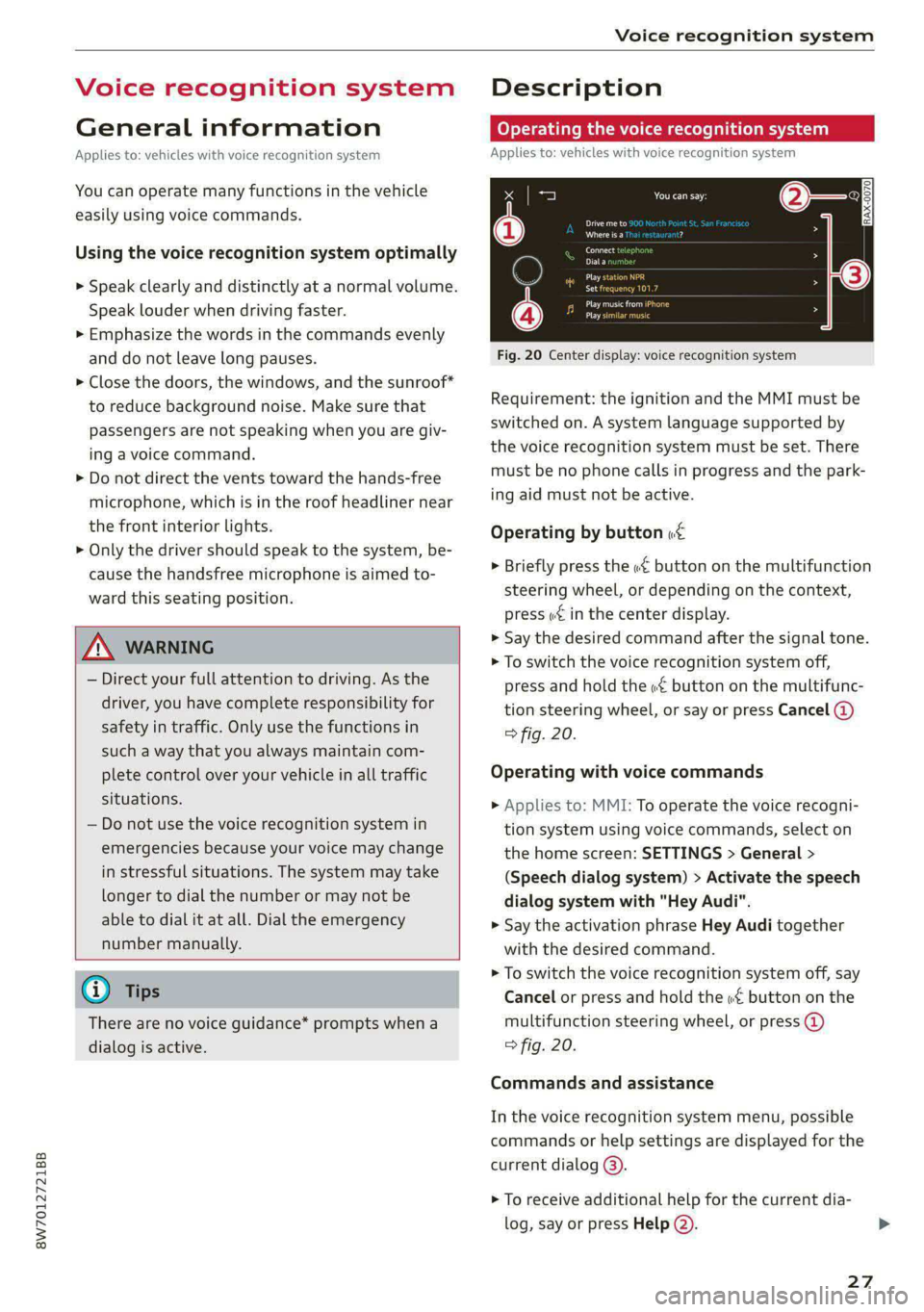
Fig. 20 Center display: voice recognition system
Requirement: the ignition and the MMI must be
switched on. A system language supported by
the voice recognition system must be set. There
must be no phone calls in progress and the park-
ing aid must not be active.
Operating by button «£
> Briefly press the «€ button on the multifunction
steering wheel, or depending on the context,
press we in the center display.
> Say the desired command after the signal tone.
> To switch the voice recognition system off,
press and hold the «€ button on the multifunc-
tion steering wheel, or say or press Cancel (@)
> fig. 20.
Operating with voice commands
> Applies to: MMI: To operate the voice recogni-
tion system using voice commands, select on
the home screen: SETTINGS > General >
(Speech dialog system) > Activate the speech
dialog system with "Hey Audi".
> Say the activation phrase Hey Audi together
with the desired command.
> To switch the voice recognition system off, say
Cancel or press and hold the «£ button on the
multifunction steering wheel, or press @)
> fig. 20.
Commands and assistance
In the voice recognition system menu, possible
commands or help settings are displayed for the
current dialog @).
> To receive additional help for the current dia-
log, say or press Help (2).
27
Page 57 of 318
8W7012721BB
Power top
Power top emergency
operation
Applies to: vehicles with power top
B8W-0258
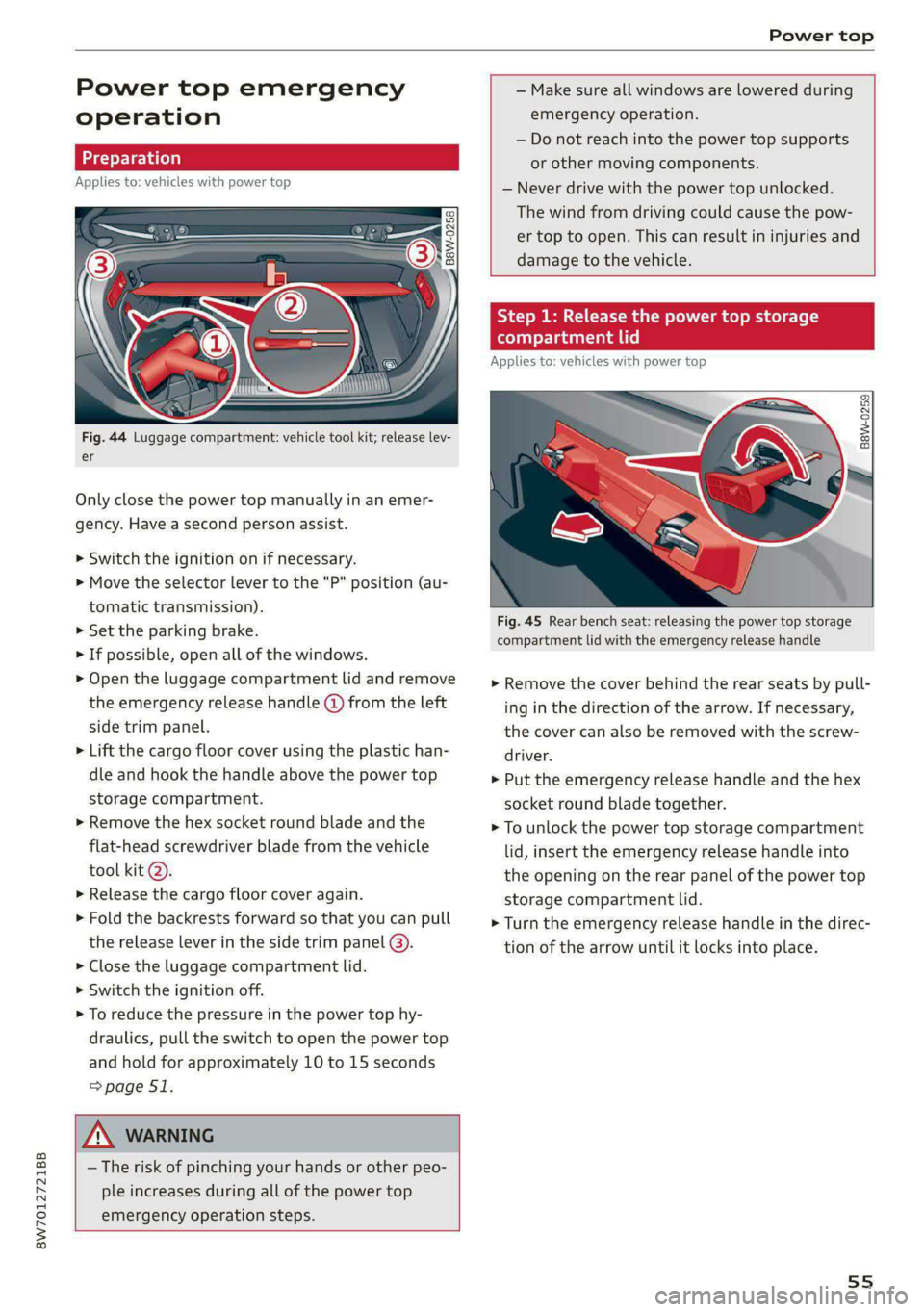
Fig. 44 Luggage compartment: vehicle tool kit; release lev-
er
Only close the power top manually in an emer-
gency. Have a second person assist.
> Switch the ignition on if necessary.
> Move the selector lever to the "P" position (au-
tomatic transmission).
> Set the parking brake.
> If possible, open all of the windows.
> Open the luggage compartment lid and remove
the emergency release handle (d) from the left
side trim panel.
> Lift the cargo floor cover using the plastic han-
dle and hook the handle above the power top
storage compartment.
> Remove the hex socket round blade and the
flat-head screwdriver blade from the vehicle
tool kit @).
>» Release the cargo floor cover again.
> Fold the backrests forward so that you can pull
the release lever in the side trim panel @).
> Close the luggage compartment lid.
> Switch the ignition off.
> To reduce the pressure in the power top hy-
draulics, pull the switch to open the power top
and hold for approximately 10 to 15 seconds
=> page 51.
Z\ WARNING
— The risk of pinching your hands or other peo-
ple increases during all of the power top
emergency operation steps.
— Make sure all windows are lowered during
emergency operation.
— Do not reach into the power top supports
or other moving components.
— Never drive with the power top unlocked.
The wind from driving could cause the pow-
er top to open. This can result in injuries and
damage to the vehicle.
Step 1: Release the power top storage
compartment lid
Applies to: vehicles with power top
B8W-0259
Fig. 45 Rear bench seat: releasing the power top storage
compartment lid with the emergency release handle
> Remove the cover behind the rear seats by pull-
ing in the direction of the arrow. If necessary,
the cover can also be removed with the screw-
driver.
> Put the emergency release handle and the hex
socket round blade together.
> To unlock the power top storage compartment
lid, insert the emergency release handle into
the opening on the rear panel of the power top
storage compartment lid.
> Turn the emergency release handle in the direc-
tion of the arrow until it locks into place.
55
Page 60 of 318

Lights and Vision
Lights and Vision
Exterior lighting
Switching the lights on and off
Fig. 51 Instrument panel: light switch with button
@ Light switch &
Turn the light switch @ to the corresponding po-
sition when the ignition is switched on. The 2
symbol and the selected position will turn on (ex-
cept position 0).
O - The daytime running lights* will automatical-
ly turn on. In vehicles for some markets, you can
switch the automatic daytime running lights on
and off in the MMI.
AUTO - The headlights will automatically adapt to
the surrounding brightness.
300: — Parking lights
2D - Low beam headlights
When the low beam headlights or parking lights
are switched on, the corresponding BB or 200 in-
dicator light will turn on depending on vehicle
equipment.
@ All-weather lights Zo
Requirement: the light switch must be in the AU-
TO or ZO position.
The headlights automatically adjust so that there
will be less glare, for example when the road sur-
face is wet.
Automatic headlight range control
Your vehicle is equipped with automatic head-
light range control. It reduces glare for oncoming
58
traffic if the vehicle load changes. The headlight
range adjusts automatically.
Audi adaptive light
Applies to: vehicles with Audi adaptive light
Audi adaptive light provides better visibility when
driving in the dark. The lights are adapted to the
road conditions based on speed, such as when
driving on expressways, rural roads, at intersec-
tions, and around curves. The adaptive lights only
function when the light switch is in the AUTO po-
sition and the all-weather lights are switched off.
ZA WARNING
— Observe the safety precautions and note the
limits of the assist systems, sensors, and
cameras > page 126.
— Automatic headlights are only intended to
assist the driver. The driver is still responsi-
ble for controlling the headlights and may
need to switch them on and off manually
depending on light and visibility conditions.
For example, fog cannot be detected by the
light sensors. So always switch on the low
beams ZO under these weather conditions
and when driving in the dark.
(i) Tips
— If the vehicle battery has been discharging
for a while, the parking light may switch off
automatically. Avoid using the parking
lights for several hours.
— When using lighting equipment, the driver
is responsible for adhering to any local ap-
plicable regulations while driving and when
parking the vehicle.
— Only the front headlights turn on when the
daytime running lights are switched on*. In
vehicles in certain markets, the tail lights
will also turn on.
—Incool or damp weather, the inside of the
headlights, turn signals, and tail lights can
fog
over due to the temperature difference
between the inside and outside. They will
clear shortly after switching them on. This
does not affect the service life of the light-
ing.
Page 107 of 318
8W7012721BB
Driving
do not inadvertently press the accelerator
pedal and always shift into “P” when the ve-
hicle is stopped.
— If you leave the vehicle, switch the ignition
off and take the key with you. This is espe-
cially important when leaving persons or an-
imals in the vehicle. Otherwise, the vehicle
could start unintentionally, the parking
brake could release, or electronic equipment
could activate, which increases the risk of an
accident.
— No persons or animals should be left in a
locked vehicle. Locked doors make it more
difficult for emergency workers to enter the
vehicle, which puts lives at risk.
— If you do not begin driving immediately af-
ter releasing the brake pedal, your vehicle
may begin to roll backward. Press the brake
pedal or set the parking brake immediately.
@) Note
If you have to stop on an incline, always press
the brake pedal to hold the vehicle in place to
reduce the risk of the vehicle rolling back-
ward. Do not try to hold the vehicle in place
by pressing and holding the accelerator pedal.
The transmission can overheat, which increas-
es the risk of damage.
Hill hold assist
If you take your foot off of the brake pedal when
driving on hills, the braking force will be held for
several seconds. At that time, you can start driv-
ing without the vehicle rolling backward.
Requirement: the driver's door must be closed,
the engine must be on, and the vehicle must be
traveling uphill.
> To activate hill hold assist, press and hold the
brake pedal for several seconds while the vehi-
cle is stationary.
ZA WARNING
— If you do not begin driving immediately af-
ter releasing the brake pedal, your vehicle
may begin to roll backward. Press the brake
pedal or set the parking brake immediately.
— The hill hold assist cannot hold the vehicle
on inclines in every scenario (for example,
on slippery or icy ground).
Gears and driving programs
(y—
(2—*
RAZ-0410:
R
N
i
D/S
~~ NEI
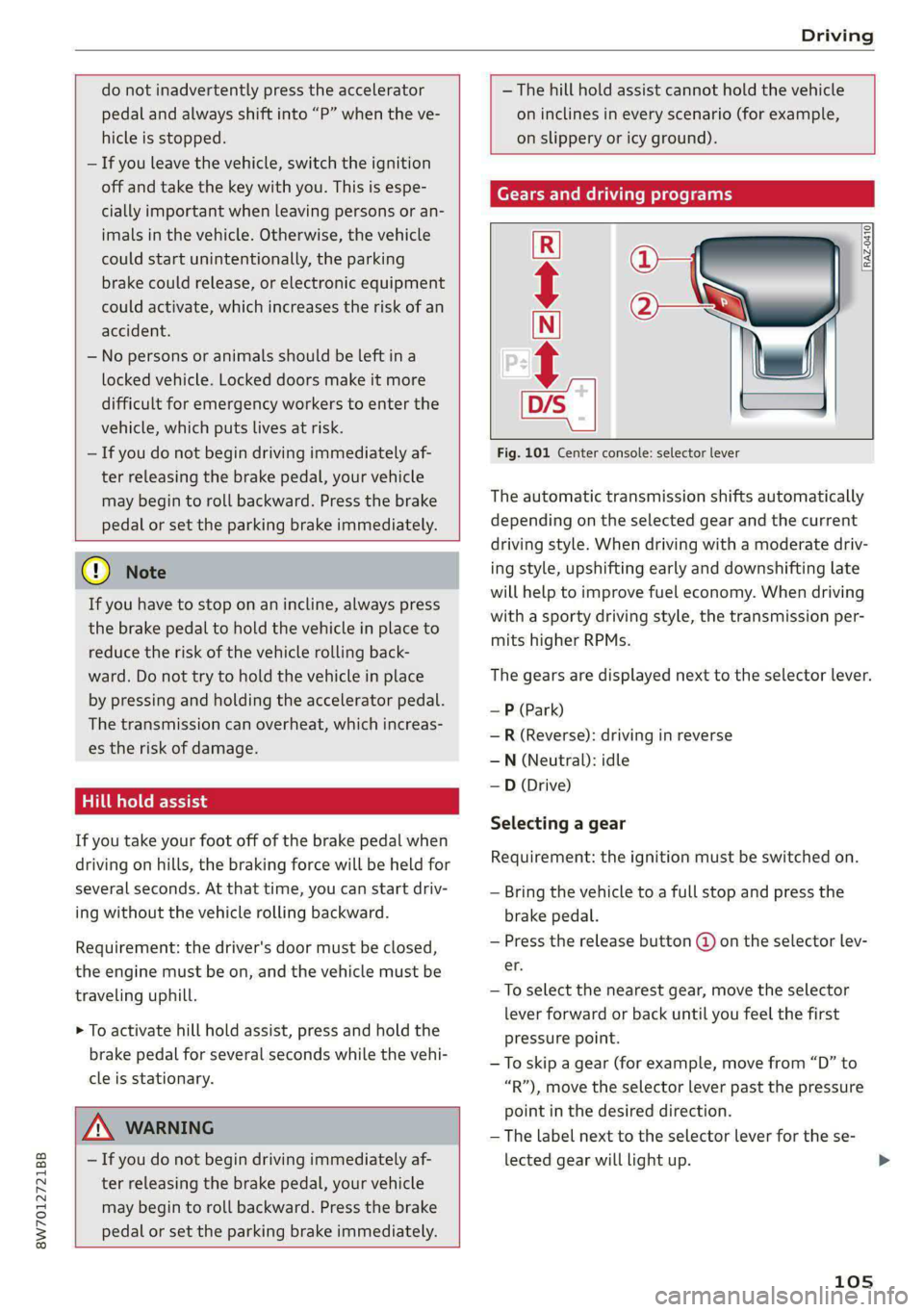
Fig. 101 Center console: selector lever
The automatic transmission shifts automatically
depending on the selected gear and the current
driving style. When driving with a moderate driv-
ing style, upshifting early and downshifting late
will help to improve fuel economy. When driving
with a sporty driving style, the transmission per-
mits higher RPMs.
The gears are displayed next to the selector lever.
— P (Park)
—R (Reverse): driving in reverse
—N (Neutral): idle
—D (Drive)
Selecting a gear
Requirement: the ignition must be switched on.
— Bring the vehicle to a full stop and press the
brake pedal.
— Press the release button (@ on the selector lev-
er.
—To select the nearest gear, move the selector
lever forward or back until you feel the first
pressure point.
—To skip a gear (for example, move from “D” to
“R”), move the selector lever past the pressure
point in the desired direction.
—The label next to the selector lever for the se-
lected gear will light up.
105