ECO mode AUDI A5 CABRIOLET 2010 User Guide
[x] Cancel search | Manufacturer: AUDI, Model Year: 2010, Model line: A5 CABRIOLET, Model: AUDI A5 CABRIOLET 2010Pages: 364, PDF Size: 86.51 MB
Page 33 of 364

Steering malfunction@-
If there is a malfunction in the electronic steering column
lock, the steering cannot be unlocked.
If the ~- symbol in the display blinks, there is a malfunction
in the electronic steering column lock . A driver message
appears as well to explain the malf unction in more detail.
The driver warning goes out after about 5 seconds, b ut it can
be brought up at any time by pressing the
[ SET] button
again.
Stop the vehicle and turn off the engine. Steering
defecti ve
- Obtain professional assistance .
- Do
not tow you r vehicle .
& WARNING
Your vehicle must not be towed in t he e vent of a malfun ctio n in
the e lec tronic ste ering column lo ck because it cannot b e steered
due t o the lo cked steering.
If it is t owed with the stee ring locked ,
t her e is th e risk of an ac cident.
(I) Tips
The symbo l's appearance m igh t be d ifferen t in some mode ls. •
Ignition lock malfunction@-
A malfunction in the ignition lock must be repaired imme
diately.
If the ©- symbol in the display blinks, there is a malfunct ion
in the electronic ignition lock . A driver message appears as
well to explain the malfunct ion in more deta il. The dr iver
Controls and equip
ment Safety first
Dri
ver information display
warning goes out after about 5 seconds, but it can be
brought up at any time by pressing the
(S ET] button aga in
Defective ignition switch Get it serviced!
- Do not turn the engine off.
- Drive immed iately to an author ized serv ice facility to have
the malfunct ion corrected.
If the re is a ma lf u nction in the e lectronic ignition lock , the ignit ion
cannot be tur ned off . Drive immediately to an authorized service
facility to have the cause of the ma lfunct ion corrected.
On vehicles with convenience key*, t he eng ine shou ld not be sw itched
off using the start/stop button because the engine cannot be started
again after the ignition has been swi tched o ff.
[ i ] Tips
Th e symbo l's appea ra nce m ight be different in some models. •
Yellow symbols
Ayellow symbol means WARNING.
-0)
9 a:
ill
Fig. 22 Displ ay:
Yello w warni ng
s ymb ol
Yellow symbols ind icate a prior ity 2 malfunction -Warning!
Vehicle care Technical data
Page 34 of 364
Driver information display
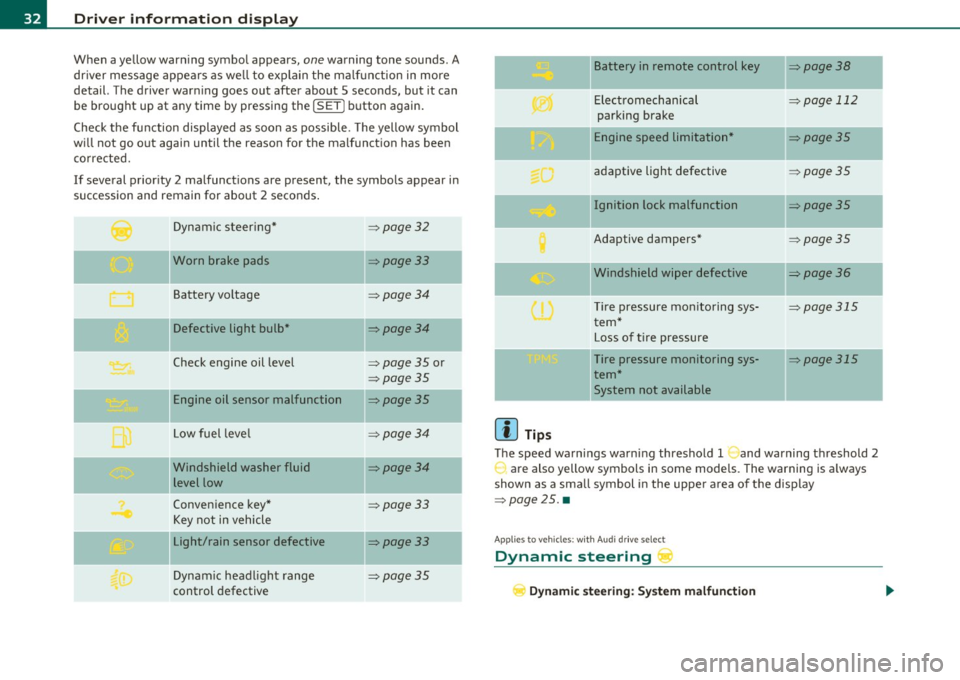
When a yellow warning symbol appears, one warning tone sounds. A
dr iver message appears as well to explain the ma lfunction in more
detail. The driver warning goes out after about 5 seconds, but it can
be brought up at any time by pressing the !SET] button again.
Check the function displayed as soon as possible. The yellow symbol
will not go out again until the reason for the malfunction has been
corrected.
If several priority 2 malfunctions are present, the symbols appear in
succession and remain for about 2 seconds .
Dynamic steer ing*
=:>page 32
'O' I I , Worn brake pads =:>page33
Battery vo ltage => page34
Defective light bulb* =>page34
Check engine oil level => page 35 or
=>page 35
Engine oil sensor malfunction =:>page35
--
Low fuel leve l =>page34
Windshield washer fluid =>page34
level low
Convenience key*
=>page 33
Key not in vehicle
Light/rain sensor defective
=:>page33
--
Dynamic headlight range => page 35
control defective
[{] Tips
Battery in remote control key
Electromechanical
parking brake
Engine speed limitation*
adaptive light defective
Ignition lock malfunction
Adaptive dampers*
Windshield wiper defective
T ire pressure monitoring sys
tem*
Loss of tire pressure
Tire pressure monitoring sys
tem* System not available
=>page 38
-
=> page 112
-
=>page 35
=> page 35
=> page 35
=>page 35
=>page 36
-
=> page 315
=> page 315
The speed warnings warning threshold 1 and warning threshold 2
are also yellow symbols in some models. The warning is a lways
shown as a small symbol in the uppe r area of the display
=>page 25. •
Appli es to vehicles : wit h Au di dr iv e se lec t
Dynamic steering r
Dynamic steering: System malfunction
Page 66 of 364
Clear vision
Adjusting exterior Lighting
The functions are selected in the radio or in the MMI.
- Sel ect: Function button [CARI> E x terior lighting.
Com ing home
The coming home function ensures that after
tu rning off the ignition
and op ening th e driver' s door
the vehi cle periphery is illum inated i n
the dark . In addition, the front fog lights, the ta il lights and the
license p late ligh t are tu rned on. The power-on time can be set for a
per iod from O (off) to 60 seconds .
Leaving home
The leaving home funct ions ensures that
when unlocking , the vehicle
per iphery is illuminated in t he da rk. In addi tion, the front fog l igh ts,
the tai l lights and t he license p late light are turned on . This function
can be tu rned on and off.
Automatic driving ligh ts*
W hen the light switch is in the AUTO=> page 62 position, the switch
on point of the l ights can be changed in the automatic driving light
function.
Daytime running lights*
T he daytime running light s ca n be tu rn ed on o r off using this f unc
tion. If the funct ion is active, the dayt ime runn ing lights are turned
on a utomat ica lly when the ignition is switched on.
In the vers ions for some co unt ries it is not poss ible to switc h off the
daytime running lights or they may not have daytime running lights.
(I) Tips
The coming home/ leaving home f unction is avai lab le only with the
switch in the AUTO position .•
Daytime running Lights (DRL) (USA models)
T he daytime running lights are turned on au tomatically
w hen the ignition is switched on.
On vehicles w ith xenon lights the daytime running lights will come on
autom atically when the ig ni tio n is t urned on and t he lig ht switch
=>
page 62, fig. 65 is in the O position or the AUTO position (only in
d aylig ht co ndit ions). T he
Daytime running light s fu nct ion can be
turned on and off in the MMI menu
E xterior lighting => page 64. On
vehicles wi th
halogen lights there is no dayt ime runn ing lights func
tion .
& WARNING
Neve r use daytime running lights to see where you are going. They
are not bright enough and will not let you see far enough ahead
fo r safety , especiall y at dusk or when it is dark. Be aware of
c hange s in out side light condition s when you are driv ing and
r espond by switching on your low b eams
~D.
0 Note
Always be aware of changes in outside light conditions while you
are d riving. Re spond in t ime to fading daylight by tu rning the light
switch to position
~D (or "AUTO" if your ca r is equ ipped with this
feature)
to turn on your hea dlights. •
Daytime running Lights (Canada models
only)
When you turn on the ignition the daytime running lights
will come on automatically.
T he d aytime running lights a re a ct ivated only when the light sw itch
=>
page 62, fig. 65 is e it h er at the O or the coo: pos it io n. When the .,_
Page 71 of 364

Vision
Sun visors
Using the sun visors makes driving safer.
C
Fig. 73 S un viso r
The s un visors for the dr iver and passenger ca n be p ulled out of their
brackets in the center of the vehicle and turned towa rds the the doors
=> fig. 73 (D .
Vanity mirror
The van ity m irrors on the sun visors are cove red. When the lid is
opened @, the mirror light in the headliner turns on automatically.
It t urns off when the lid is closed and the visor is folded up aga in. •
Con tro ls a nd e quip
m en t Vehicle
OP-eration
Clear vision
Wiper and washer system
Switching on the windshield wipers
Fi g. 7 4 Wind shield
w iper l ever
Move the windshie ld w iper lever to the corresponding position :
©-W indshield wiper off
(D -Inte rval mode . To ex tend/shor ten t he w iper intervals, move the
switch @to the left/r ight . In ve hicles with a rain sensor*, the wind
shield wipers are activated a utomatically s tarting at a speed of 2 mph
(4 km/h) . The higher the sensi tivity of the ra in sensor* is set (sw itch
@ to the right), the earlier the windsh ield wipers react to mo isture
on the w indshield .
@ -Slow wiping
® -Fast wiping
© -Sing le wipe
© -Clean the windshield. To eliminate water droplets, the wind
shield wiper per forms one a fterwipe o pera tion a fter severa l seconds
wh ile dr iving . You can swi tch this funct ion off by moving the lever to
posit ion © with in 10 seconds of t he afterwipe operation . The after
w ipe function is react ivated the ne xt t ime the ignit ion is switched on .
Cleaning the headlights*. The headlight washer system * only func
ti ons whe n the light is switc hed on. The headlights are automat ically
cleaned the first time and every fifth t ime the lever is moved to posi-.,
Vehicle care Do-it-yourselt service iTechnical data
Page 74 of 364
![AUDI A5 CABRIOLET 2010 User Guide Clear vision
(I] Tips
Commercial hot waxes applied by automatic car washes affect t he
how easily the glass surface can be cleaned. •
Mirrors
Manual glare-dimming
Standard settin](/img/6/57573/w960_57573-73.png "AUDI A5 CABRIOLET 2010 User Guide Clear vision
(I] Tips
Commercial hot waxes applied by automatic car washes affect t he
how easily the glass surface can be cleaned. •
Mirrors
Manual glare-dimming
Standard settin")
Clear vision
(I] Tips
Commercial hot waxes applied by automatic car washes affect t he
how easily the glass surface can be cleaned. •
Mirrors
Manual glare-dimming
Standard setting
- Move the small lever (located on the bottom edge of the
mirror) to the front.
Anti-glare setting
- Move the small lever (located on the bottom edge of the
m irror) to the rear .•
A ppli es to vehicl es: w ith automat ica lly dim ming in side m ir ro r
Automatically dimming inside mirror
The automatic dimming function con be turned on and
off if required.
Fi g. 7 7 In sid e re ar
v iew mirr or
Disabling auto dimming
- Press button@=> fig. 77 briefly, -the indicator light ®
goes out.
Activating /reactivating auto dimming
- Press button @ briefly, -the indicator light ® goes on .
Automatic dimming function
The automat ic dimm ing function is act ivated eve ry time t he ig nitio n
is turned on. The green indicator lig ht is lit to indicate auto dimming
is active.
When d imming is activated, the inside mirror w ill darken
automati
cally
in respo nse to the amount o f light s triking the mir ror (suc h as
headlights from rearward approach ing ve hicles). Even in dimming
mode, the mirror surface turns brigh t when:
• the interior light is sw itched on
• reverse gear is engaged .
& WARNING
Broken glass of automatic dimming mirror can cause electrolyte
fluid leak age. Electrolyte fluid can irritate skin, eyes , and resp ira
tory sy stem.
• Repeated or p rolonged e xposu re to electrolyte can cause i rrita
tion to the re spiratory system, especially among people with
asthma or other respiratory conditions . Get fresh air immediately
by leaving the vehicle or , if that is not po ssible , open window s and
doors all the way.
• If electrolyte get s into the eye s, flu sh them thoroughly with
large amounts of clean water fo r at least 15 minutes; medical
attention is recommended.
• If elect rolyte contacts skin , flush affected area with clean
water for at lea st 15 minute s and then wash affected area with
Page 78 of 364

Clear vision
-Hold the@=> page 75, fig. 79 button down until the
number of the set magnetic deflection zone appears on
the interior rear view mirror.
- Adjust the magnetic deflection zone by repeatedly pressing on the @button . The set mode automatically
deactivates after a few seconds. •
Applies to veh icles : w ith d ig ita l comp ass
Calibrating the compass
The compass has to be recalibrated if the display is wrong
or inaccurate.
- Hold the@ button down until the letter C is displayed on
the interior rear view mirror.
- Drive in a circle at a speed of about 5 mph (10 km/h) until a direction is shown on the interior rear view mirror.
& WARNING
The digital compass is to be used as a directional aid only. Even
though you may want to look at it while you are driving, you must
still pay attention to traffic, road and weather conditions as well
as other possible hazards. •
Page 90 of 364
Warm and cold
Warm and cold
Deluxe automatic climate control
Applies to vehicles: with deluxe automat ic climate cont ro l
Description
The climate control system can be used to set a comfort
able temperature inside the vehicle .
The climate control system is a combination of a heating and ventila
tion system as well a cooling system respons ible for dehumid ifying
and cooling the air inside the vehicle.
Th e automatic climate control system automatically maintains a
temperature once it has been set. The temperature of the air from
the vents, fan speed (air volume) and air distribution are a lso auto
matically adjusted . The system also takes into account strong
sunlight so that manual adjustment is not necessary . So in almost all
cases, automatic mode offers the best conditions for the comfort of
the occupants at all times of the year=>
page 90.
Please note the following :
The cooling mode lowers the humidity level inside the vehicle. This
prevents fogging up of the windows.
In the case of high outside humidity and temperatures,
condensation
can drip from the air conditioning system evaporator and form a pool
under the veh icle. This is normal and not an indication of leaks!
At low outs ide temperatures, the fan automatically switches to a
higher speed when the coolant reaches a sufficient temperature
except in the defroster position.
When starting with full throttle, the compressor of the automatic
climate control system is temporarily switched off to achieve full
engine power.
T o ensure engine cooling when the engine is under an extreme load,
the compressor is switched off at h igh coolant temperatures.
Pollutant filter
The pollutant filter (particle filter) ensures that impurities in the
outs ide a ir (e.g. dust, pollen) and odors are significantly reduced or
stopped. The air is also filtered in recirculation mode.
Th e pollutant filter e lement must be changed at the intervals speci
fied in the service plan so that the performance of the automatic
climate control system is not impaired.
If the effect iveness of the filter decreases premat urely due to opera
tion of the vehicle in areas with significant pollution, the filter
element must be changed between the specified service dates.
Key recognition
The current climate control settings are automatically stored and
assigned to the key being used. The settings assigned to the key are
restored automatically when the vehicle is started. These settings are
different when the power top is open or closed. Each driver can use
his or her preferred settings witho ut having to man ually adjust them
when using their own key.
If another driver changes the settings while using your key, your
prefer red sett ings will be erased.
Energy management
To prevent the battery from be ing discharged and to restore the
balance of energy, components which require large amounts of
energy are temporarily cut back or switched off=>
page 247. Heating
systems in partic ular require a great dea l of energy. If you notice, for
example, that the rear window heater is not heating , the n it has been
temporarily reduced or switched off by
energy management . These
systems are available again as soon as the energy balance has been
restored. .,,_
Page 93 of 364

Applies to veh icles : w ith del uxe au toma tic climate cont ro l
Setting the temperature
Fig . 95 Temperature
setting regulato r
-Rotate the regulator to the left to reduce the tempera
ture, or to the right to increase the temperature => fig . 95.
When the radio or MMI* is turned on , the temperature setting
appears for a few seconds on the screen .•
Ap plies to vehicl es: wit h deluxe automat ic climat e con tro l
Fan ~
The automatically preset fan speed can be reduced or
increased.
Con tro ls a nd e quip
m en t
Fig. 96 Fan button
and regulator
Vehicle OP-eration
Warm and cold
-Press the l~I button.
- Rotate the regulator to set the desired fan speed (air
volume) .
We recommend always runn ing the fan at a low speed when driving
slowly .
T o prevent polluted outside air (smell) from entering the interior of
the vehicle, switch to
recirculation mode by pressing the button ! = I.
When the rad io or MMI* is turned on , the fan speed setting appears
for a few seconds on the screen .
(I] Tips
• It is possible that the fan speed may change automatically . This
occurs to ensure that the desired temperature setting is reached as
quickly as possib le.
• The fan speed cannot be regulated separate ly for the driver and
front passenger .•
A pp lies to v ehicl es: w it h d eluxe a utomatic clim ate contro l
Recircul ation mode [6'::> j
The recirculation mode prevents polluted outside air
from entering the vehicle interior .
Activating
-Press the button I~ I=> & .
Deactivating
- Press the button l<::E::>) again, or
- press the
I AUTO] button .
Vehicle care Do-it-yourselt service iTechnical data
Page 94 of 364
Warm and cold
In recirculat ion mode, air is drawn from the vehicle interior, filtered
and recirculated. We recommend selecting recirculation mode under
the following conditions:
When driving through a tunnel or in a traffic jam so that exhaust
fumes and odors cannot enter the vehicle interior .
& WARNING
You should not use the recirculation mode for an extended period
since no fresh air is drawn in. With the air-conditioning switched
off, the windows can fog up, which increases the risk of an
accident! •
Applies to veh icles : w ith deluxe automat ic cl imate contro l
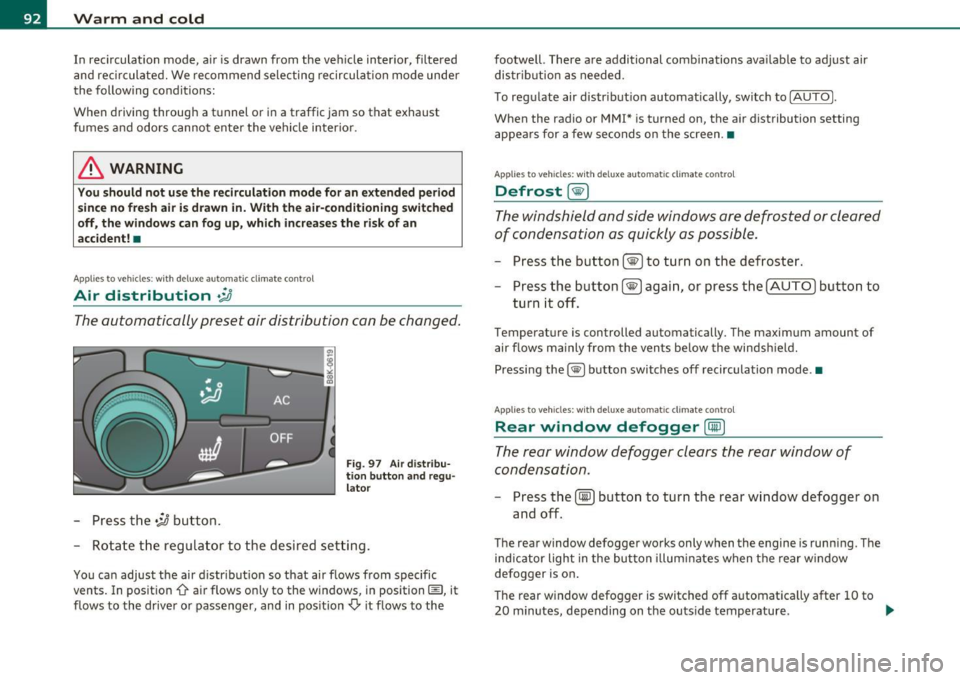
Air distribution .JJ
The automatically preset air distribution can be changed.
-Press the .;J button.
Fig. 97 Air distribu
tion button and regu
lator
- Rotate the regulator to the desired setting.
You can adjust the air distribution so that air flows from specific
vents. In position
0-air flows only to the windows, in position@, it
flows to the driver or passenger, and in position
,0. it flows to the footwell.
There are additional combinations available to adjust air
distribution as needed.
To regulate air distribution automatically, switch to
!AUTO).
When the radio or MMI* is turned on, the air distribution setting
appears for a few seconds on the screen .•
Applies to veh icles: wit h deluxe automat ic cl imate control
Defrost [@)
The windshield and side windows are defrosted or cleared
of condensation as quickly as possible.
- Press the button !@)to turn on the defroster.
- Press the button[@) again, or press the [
AUTO I button to
turn it off.
Temperature is controlled automatically. The maximum amount of
air flows mainly from the vents below the windshield.
Pressing the
I@ ) button switches off recirculation mode .•
Applies to veh icles: w ith d eluxe automat ic cl imate contro l
Rear window defogger [CiID)
The rear window defogger clears the rear window of
condensation.
- Press the (!iiPJ button to turn the rear window defogger on
and off.
The rear window defogger works only when the engine is running. The
ind icator light in the button illuminates when the rear window
defogger is on.
Th e rear window defogger is switched off automatically after 10 to
20 minutes, depending on the outside temperature . ...
Page 95 of 364
![AUDI A5 CABRIOLET 2010 User Guide The rear window defogger can be t urned o n permanently by press ing
t he
IQlil] bu tton for more t han two seconds . This rema ins s tored until
the ignition is switched off . A](/img/6/57573/w960_57573-94.png "AUDI A5 CABRIOLET 2010 User Guide The rear window defogger can be t urned o n permanently by press ing
t he
IQlil] bu tton for more t han two seconds . This rema ins s tored until
the ignition is switched off . A")
The rear window defogger can be t urned o n permanently by press ing
t he
IQlil] bu tton for more t han two seconds . This rema ins s tored until
the ignition is switched off . A rea r window defogger that was
switched on also remains stored for 1 S minutes after the ignition is
switched off .
I f the eng ine is restarted within these 15 minutes, the rear window
defogger is activa ted for 10 to 20 minu tes, depending on o utside
temperature. When a vehicle is parked for a short time, the rear
window defogger does not need to be m anually act ivated aga in.
<£' For the sake of the environment
As soon as the rear window is clear, yo u should switc h the rear
w indow defogger off. The reduced power consumption has a benefi
cial effec t on fue l cons umption. •
Applies to vehicles : w ith del uxe automatic climate con tro l
AC mode !AC]
Deactivating
- Press the [AC] button .
Activating
-Press the !AC ] button again .
The coo ling system is turned on in AC mode . The heating and ventila
tion system is controlled automatically .
W Tips
If the LED in the switch continues to illuminate after AC mode has
been t urned off( = turning the AC off), there is a fau lt in an air-condi
tioning component . Please consult an authorized dealership if there
is an operat ing problem. •
Contro ls a nd e quip
m en t Vehicle
OP-eration
Applies to veh icles : with deluxe a utomatic climate control
Air vents Warm and cold
Air distribution determines the air flow from the indi
vidual vents .
4 '
Fig. 9 8 Ins trument panel: Loca tio n of ai r vent s
Vents @and ®
- Rotate the thum bwheel loca ted next to the ou tlet to open
or cl ose it .
- To adjust the direction of the airflow from the outlet,
move the tab in the center of the outlet in the desired
direction . T he direction of the air delivered from the vents
can be a djusted horizontally and vertica lly.
The air outlets are actuated either automatically or manually
depending on the operat ing mode se lected. Heated or unheated
fresh a ir o r cooled air flows from the vents .
Vehicle care Do-it-yourselt service iTechnical data