brake AUDI A5 CABRIOLET 2010 User Guide
[x] Cancel search | Manufacturer: AUDI, Model Year: 2010, Model line: A5 CABRIOLET, Model: AUDI A5 CABRIOLET 2010Pages: 364, PDF Size: 86.51 MB
Page 34 of 364
Driver information display
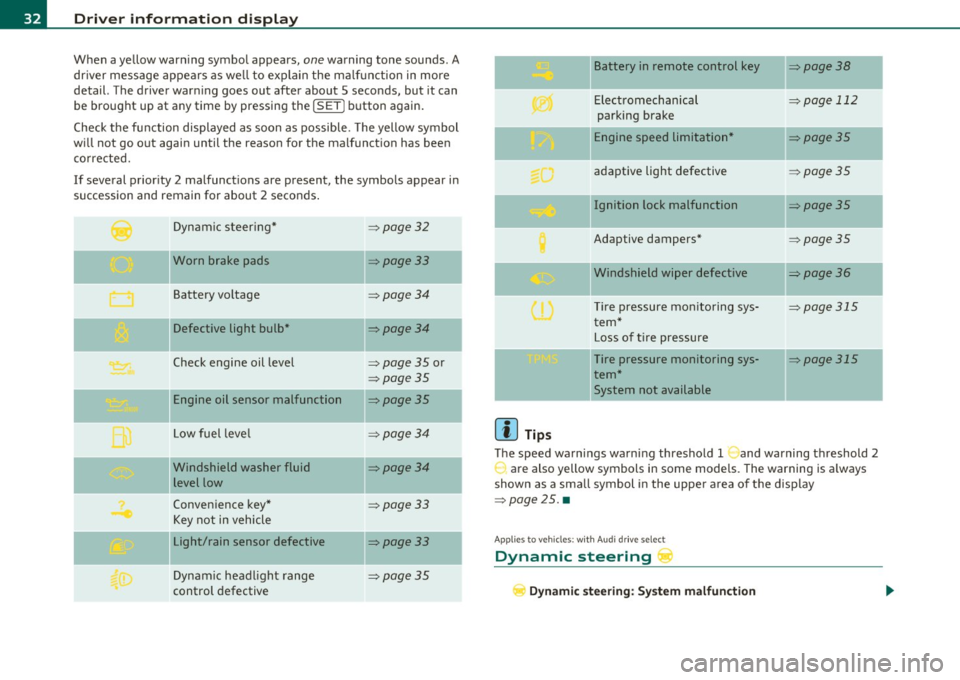
When a yellow warning symbol appears, one warning tone sounds. A
dr iver message appears as well to explain the ma lfunction in more
detail. The driver warning goes out after about 5 seconds, but it can
be brought up at any time by pressing the !SET] button again.
Check the function displayed as soon as possible. The yellow symbol
will not go out again until the reason for the malfunction has been
corrected.
If several priority 2 malfunctions are present, the symbols appear in
succession and remain for about 2 seconds .
Dynamic steer ing*
=:>page 32
'O' I I , Worn brake pads =:>page33
Battery vo ltage => page34
Defective light bulb* =>page34
Check engine oil level => page 35 or
=>page 35
Engine oil sensor malfunction =:>page35
--
Low fuel leve l =>page34
Windshield washer fluid =>page34
level low
Convenience key*
=>page 33
Key not in vehicle
Light/rain sensor defective
=:>page33
--
Dynamic headlight range => page 35
control defective
[{] Tips
Battery in remote control key
Electromechanical
parking brake
Engine speed limitation*
adaptive light defective
Ignition lock malfunction
Adaptive dampers*
Windshield wiper defective
T ire pressure monitoring sys
tem*
Loss of tire pressure
Tire pressure monitoring sys
tem* System not available
=>page 38
-
=> page 112
-
=>page 35
=> page 35
=> page 35
=>page 35
=>page 36
-
=> page 315
=> page 315
The speed warnings warning threshold 1 and warning threshold 2
are also yellow symbols in some models. The warning is a lways
shown as a small symbol in the uppe r area of the display
=>page 25. •
Appli es to vehicles : wit h Au di dr iv e se lec t
Dynamic steering r
Dynamic steering: System malfunction
Page 35 of 364

This driver message and the symbol,;;:;,. appear when a system
malfunction occurs during travel. You can continue to drive carefully
at a reduced speed to a qualified workshop. Steering can be more
difficult or sensitive than usual. The steering whee l can also be at an
angle when driving straight .
Dynamic steering: initialization
If this driver message appears and the indicator lightl, is flash ing on
the instrument panel, dynamic steering is being reinitialized . Once
you start the engine after this is finished, the steering wheel wi ll be
easy to move. Re -initializat ion might be necessary if the steering
wheel was moved hard to the left and right while the vehicle was not
moving. The display goes out as soon as initial izat io n is complete.
& WARNING
Have the dynamic steering system malfunction repaired as soon
as possible by an authorized Audi dealer or any qualified workshop
- risk of accident!
[I) Tips
The dynamic steer ing stability systems are not ava ilab le in the event
of a system ma lfunct ion .•
Ap plies to ve hicles : w it h c onven ien ce key
Key not in vehicle
Key not in vehicle
This reminder appears along with the symbol if the master key is
removed from the vehicle with the engine running. It is int ended to
remind you (e.g. when chang ing drivers) not to continue the journey
without the master key.
If the master key is no longer in the veh icle, you cannot sw itch off the
ignition after stopping the engine and you a lso cannot start the
engine again. You also cannot lock the veh icle from the outs ide .•
Controls and equip
ment Safety first
Driver information display
Light/rain sensor defective
·)
Automatic headlights/automatic wipers defective
If the symbol ill um inates , the light sensor has failed. For safety
reasons the low beams are turned o n permanently with the switch in
AUTO . However, you can continue to turn the lights on and off using
the light switch . In the case of a defect in the ra in sensor, the wind
shield wiper lever functions are still avai lable . Have the light/rain
sensor checked as soon as possib le by an autho rized Audi dealer. •
Worn brake pads ~
Brake pads!
If the warning light illuminates, immediately contact your authorized
Audi dealer or qualified workshop to have all brake pads inspected .
On USA mode ls the warning light comes on together with the
war ning light BRAKE . Both sets of b rake pads on an axle must always
be replaced at the same time.
& WARNING
Driving with bad brakes can cause a collision and serious personal
injury .
• If the warning light and the warning light
BRAKE1> with the
message Brake pads! comes on in the instrument cluster display,
immediately contact your authorized Audi dealer or qualified
workshop to have all brake pads checked or replaced if necessary. •
ll BRAKE : USA mode ls on ly
Vehicle care Technical data
Page 58 of 364
Power top
(I) Tips
• The w ind deflector works best when all of the windows are ro lled
up while driving.
• Only store the wind deflector in the storage bag when it is dry .•
Power top emergency operation
General information
The power top can be closed by hand if there is a malfunc
tion.
- Activate the parking brake.
- Open the windows
- Remove the key from the ignitio n.
Only close the power top manually in an emergency . The best solut ion
is to have yo ur a uthorized Audi dealer correct the ca use of the
malfunct ion .
Powe r top emergency operation consists of the fo llowing steps:
• Unlocking the power top compartm ent cover : The cover on t he
power top compartment must be released by hand.
• Closing the power top : The power top must be lifted out of the
tray and closed.
• Locking the p ower top: The powe r top la tc h es must be locked
with the emergency key.
& WARNING
• When positioning the power top , avoid contact with the
s upport s or other moving part s. Make sure all of the w indows are
lowered . Otherwise you could pi nch your hand s.
& WARNING (contin u ed )
• Never drive when the powe r top i s not locked correctly. The
wind from dr iving coul d caus e the po wer top to open . Thi s can
re sult in injurie s and damage to the vehicle.
(I) Tips
Have a second person assist when closing the power top. Positioning
the power top is easie r whe n there is a second perso n to help. •
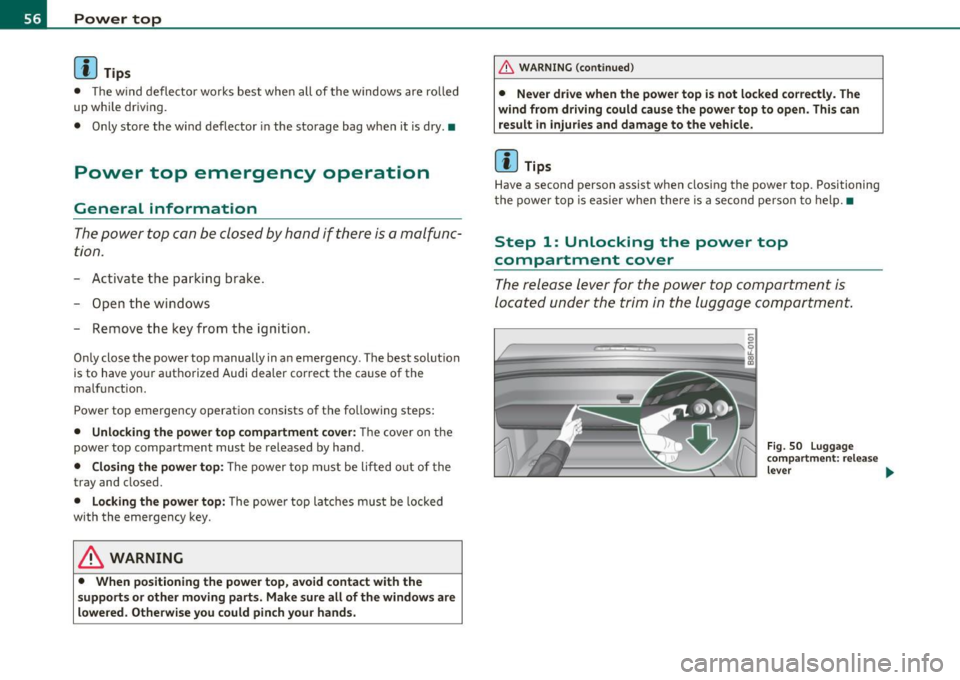
Step 1: Unlocking the power top
compartment cover
The release lever for the po wer top compartment is
located under the trim in the luggage compartment.
-
---
Fig . 50 L uggage
c omp artment : re lease
leve r ...
Page 80 of 364

Seats and storage
-Position the head restraint according to the occupant's
height=>
page 82. For maximum protection, the top of
the head restraint should be at least at eye level, prefer
ably higher and ideally level with the top of the head
=>
page 181, fig. 180.
& WARNING
Never place any objects in the driver's footwell. An object could
get into the pedal area and interfere with pedal function. In case
of sudden braking or an accident, you would not be able to brake
or accelerate. •
Front passenger's seat
Always move the front passenger seat into the rearmost
position.
To avoid contact with the airbag while it is deploying, do not
sit any closer to the instrument panel than necessary and
always wear the three-point safety belt provided adjusted
correctly. We recommend that you adjust the passenger's
seat in the following manner:
- Bring the backrest up to an (almost) upright position.
Do
not ride with the seat reclined.
- The ideal position for the head restraint is with the upper
edge of the restraint level with the top of your head
=> page 82. You should not lower the top of the restraint
below the level of your eyes.
- Place your feet on the floor in front of the passenger's
seat. •
Power front seat adjustment
Seat adjustment controls
The operating logic for the switches corresponds to the
construction and function of the seat.
Fig. 81 Front seat:
Controls for seat
adjustment
The switches to adjust the seat cushion and the seat back correspond
to the layout, the design and the function of the seat. The seats are
adjusted by moving the switches following this logic.
Controls
© Lumbar support
© Seat adjustment
© Seat back and head restraint height adjustment*
@ Upper thigh support* •
Adjusting the seat
Position, angle and shape of the seat can be adjusted
electrically to ensure safe and comfortable seating.
Read and follow the warning notices=>.&, before you adjust
your seat.
~
Page 88 of 364
Seats and storage
- Light your cigarette from the red-hot heating co il of the
cigare tte ligh ter .
- Return the cigarette lighter to its socket .
Using the socket
- Remove the cigarette lighter.
- Insert the plug of the electrical device into the cigarette
ligh ter socke t.
The socket o f the ciga re tte lighter may be used for 12-volt appliances
w ith maximum consumption of up to 100 watts, such as a flash light,
small vacuum cleane r, etc.
Before you purchase any accessor ies, always read and follow the
information in =>
page 345, "Additional accessor ies and parts
replacement" .
& WARNING
• Use care wh en u sing the cigar ette lighter . Inattentive or unsu
pervised u se of the cigarette lighter can cause burns -risk of
injury!
• The cigarette lighter work s when the ignition is swit ched off or
w ith the ignition key removed . Children should nev er be left unsu
pervised in the vehicle, or there could be risk of fire!
• The po wer outlets and therefore the electrical accesso ries
c onnected to them ope rate only with the ignition on . Improper
use of the outlet s or of electrical acce ssor ies can lead to serious
injurie s or cau se a fire. For this rea son , children should ne ver be
left unatt ended in the veh icle -they could be injured!
0 Note
• To avoid damag ing the socket, only use plugs that fit p roperly . •
Only use the cigarette lighter socket as a power source for elec
t rical accessories for short du rat ions. Use the socke ts * in the vehi cle
w hen a power sou rce is needed for longer durations .
(I] Tips
When the engine is off and accessories a re st ill p lugged in and are o n,
the vehicle battery can sti ll be drained .•
Storage
General overview
There are numerous places to store i tems in your vehicle.
Glove compartment => page 87
Storage compartments in the front seats
& WARNING
• Alway s re mo ve object s from the instrument panel. Any item s
not put away could slide ar ound in side the vehicle while d riving or
wh en accelerating or when apply ing the brake s or wh en driving
around a co rner .
• When you ar e driving make sure that anything you may have
pla ced in the center console o r othe r st orage lo cation s cannot fall
out into the footwell s. In case of sudden braking you would not be
able to brake, depress the clutch or accelerate. •
Page 108 of 364

ffl..__O_ n_ t_h _e_ r_o _ a_ d _________________________________________________ _
Ignition Lock and ignition switch
Starting engine with the key
The ignition is switched on and the engine started with
the ignition key.
F ig. 10 8 Igniti on k ey
-Inse rt the key in to the ig n ition lock.
- Step on th e brake pedal and mov e th e selec tor lev er to th e
P or N posi tion.
- Press the key=> fig. 108 -the engine wi ll start.
By pressing the key without stepp ing on the clutch or the b rake, the
ign itio n is switc hed on and o ff . With the ignition on, the steeri ng
w heel is unlocked.
You can o nly remove the key with the ig nition switc hed off . To do this,
you have to press on the key ag ain. Wi th an a utomat ic transm iss io n,
the selector lever must be in the P pos ition.
W hen s tarting the engine, major electrica l loads a re swi tched off
temporarily .
After startin g a cold engine, there may be a brief period of increased
noise be cause the oil p ress ure mu st firs t b uild up in t he hydr auli c
valve adjuste rs. This is normal and not a cause for concern. If
the eng ine s hould not start immediately, the starting process is
a u tom atically st op ped aft er a sh ort t ime. Re peat sta rtin g p ro cedu re.
Driver message in the instrument cluster display
Press brake pedal to start engine
T h is message ap pears i f yo u do not step on the brake pedal to start
t he engine on a vehicle w ith an au toma tic transmission.
Engage N or P to start engine
This message appea rs when at tempti ng to start the eng ine if the
sele ctor lever fo r the au tomatic t ransm ission is no t in the P or N po si·
t ion. The engine can on ly be sta rted wi th the selecto r in these posi
tions.
Shift to P , otherwise vehicle can roll away. Doors do not lock if lever
is not in P .
This message app ears fo r sa fe ty reasons along with a wa rning sig nal.
It appea rs if the selector lever for t he automat ic transm iss io n is not
in the P posi tion af ter the ignition is sw itched off . M ov e t he se lector
lever to the P pos itio n, ot herw ise the vehicle is not secured against
rolling away . You a lso ca nnot lo ck th e ve hi cle u sing the locking
button on the door hand le or us ing the remote key.
& WARNING
• Always take the key with you whenever you leave your vehicle.
Otherwise, the engine could be started or electrical equipment
such a s the power windows could be operated . This can lead to
serious in jury.
• Never leave children or per sons requiring assistan ce unat
tended in the vehicle. The doors can be locked u sing the remote
transmitter, p reventing people from escaping from the vehicle on
their own in the event of an emergency. Depending on the time of
year, people inside the vehicle can be exposed to very high or very low temperatures. ..,
Page 109 of 364
_________________________________________________ O_ n_t_ h _ e_ ro_ a_d __ ffl'II
& WARNING (co ntinued )
• Never remo ve the ignition key from the ignition look while the
vehicle is moving. Otherwi se, the steering lock could suddenly
engage and you would not be able to steer the vehicle.
0 Note
• In the event of a malfunction in the electronic ignit ion lock a
symbo l in th e instr umen t cluster flashes with the message
Ignition
lock defective .
• Avoid h igh eng ine speeds, fast acce lerat ion or heavy eng ine loads
whi le the engine is still co ld. This cou ld damage the engine .
<£> For the sake of the environment
To avoid unnecessary engine wear and to reduce exhaust emiss ions,
do not let your vehicle s tand and w arm up. Be re ady to dr ive off i mme
diately after starting your ve hicle. Mai ntain mode rate speed until the
eng ine is complete ly w arm . R emembe r, the eng ine per forms best at
operat ing temperature.
[I) Tips
• If the key ca nnot be removed from the ignition lock , yo u have to
pull the mec hanica l key o ut o f the maste r key in o rde r to be able to
lock the ve hicle Th e veh icle can be locked with the mec han ical key
=> page 39.
• If you open the driver's door with the ig nit io n switched on, a
buzze r soun ds and the message
Ignition is on appea rs in the instru
ment cl uster d is p lay . Switch t he ig nitio n off .•
Stopping the engine
- Bring the vehic le to a fu ll s top.
Controls and equip
ment Safety first
M
ove the select or lever to the P or N po sit ion .
- Press on t he igni tion key. The engi ne is tu rned of f.
Emergency off
If it is necessary in unusual circ umstances, the engine can be
switched off while the vehicle is mov ing . The eng ine will be switched
off if you press on the key for an extended period.
& WARNING
• Never turn off the engine until the vehicle has come to a
complete stop .
• The brake booster and servotronic only work when the engine
is running . With the ignition turned off, you ha ve to apply more
force when steering or braking. Since you cannot steer and stop
normally, this can lead to accident s and serious injuries.
• The radiator fan can continue to run for up to 10 minute s even
after you have turned of f the engine and removed the ignition key.
The radiator fan can also turn on a gain if the engine coolant heats
up becau se of intense sunlight or heat build-up in the engine
compartment.
0 Note
Do not stop the engine immediately after har d or extended dr iving.
Keep the eng ine runni ng fo r approx imately two m in utes to p revent
excessive heat b uild -up. •
Vehicle care Technical data
Page 110 of 364

ffl..__O_ n_ t_h _ e_ r_ o_ a_ d _________________________________________________ _
Starting and stopping the engine
with convenience key
A pplies to veh ic le s: w ith conven ience ke y
Starting the engine with the
[START ENGINE S TOP] button
This button switches on the ignition and starts the
engine.
Fig. 109 Convenience
key: START ENGINE
STOP button
-Step on the brake pedal and move the selector lever to P
orN =>& .
- Press onthe[START ENGINE STOP)button::::>fig. 109-
the engine will start .
By pressing the [START ENGINE STOP] button without depressing
the clutch or the brake peal, the ignition is switched on and sw itched
off by pressing it again .
If the engine does not start immediately, stop trying after 10 seconds
and then try to restart the engine about 30 seconds later.
After a co ld engine is started, there may be a brief period of increased
noise because oil pressure must first build up in the hydraulic valve
adjusters. This is normal and not a cause for concern.
Driver message in the instrument cluster display
No key identified
This message appears when the !START ENGINE STOP] button is
pressed if there is no master key ins ide the veh icle or if the system
does not recognize it. For example, the master key cannot be recog
nized if it is covered by an object (e.g. aluminum brief case) which
screens the radio signal. Electronic devices such as cell phones can
also interfere with the radio signal.
Press brake pedal to start engine
This message appears if you press the !STAR T ENGINE STOP)
button to start the engine and do not depress the brake pedal. The
eng ine can only be started if the brake peda l is depressed.
Engage N or P to start engine
This message appears when attempting to start the engine if the
selector lever for the automatic transmission is not in the P or N posi
tion. The engine can on ly be started with the selector in these posi
tions.
Key not in vehicle
This message appears along with the.:! symbol if the master key is
removed from the vehicle with the engine running. It is intended to
remind you (e.g. when changing drivers) not to continue the journey
without the master key .
If the master key is no longer in the vehicle, you cannot switch on the
ignition after stopping the engine and you also cannot start the
eng ine again. Moreover, you cannot lock the vehicle from the outside
w ith the key.
Shift to P, otherwise vehicle can roll away. Doors do not lock if lever
is not in P .
This message appears for safety reasons along with a wa rning signal.
It appears if the selector lever for the automatic transmission is not
in the P position when switching off the ignition with the
!START ENGINE STOP] button. Move the selector lever to the P _..
Page 111 of 364
___________________________________________________ O_ n_ t_h _e_ r_o _a_ d __ _
position, otherwise the vehicle is not secured aga inst rolling away.
Y ou also ca n not lock t he vehi cle using th e locking button on the door
hand le or us ing the remote key .
Convenience key defe ctive ! Use ignition lock
T hi s message appears if t he veh icle has to be sta rted not w ith the
! STAR T EN GINE STO PJ bu tton bu t with the ig nition key.
& WARNING
• Never allow the engine to run in confined spaces -danger of
asphyxiation.
• Never turn off the engine until the vehicle has come to a
complete stop.
• The brake booster and servotronic only work when the engine
is running . With the ignition turned off , you have to apply more
force when steering or braking. Since you cannot steer and stop normally, this can lead to accidents and serious injuries.
0 Note
• Avoid high engine rpm, full throttle and heavy engine loa ds until
t he e ngi ne h as r eache d op erat ing temperat ure -oth erwi se you ri sk
eng ine damage.
• Th e en gine ca nnot be sta rted by p us hi ng or tow ing t he veh icle.
• If the eng ine has bee n un der h eavy load for a n ex tended per iod,
heat b uilds up i n the engin e compartmen t after the engine is
switched off- there is a risk o f damag ing the engine. Allow the engine
t o r un at idle for abou t 2 min utes before sw itc hing it off.
[I) Tips
If y ou open t he dr iver 's door wi th th e ig nit io n sw itche d on, a bu zzer
so unds and the message
Ignition is on appears in the instrument
clu ster displa y. Swi tch t he ig nition o ff.•
Controls and equip
ment Safety first
App
lies to vehicles : w ith con venience key
Sw itching engine off with the
[ START ENGINE S TOP] button
- Bring yo ur ve hic le to a co mplete sto p.
- Aut omat ic tra nsmissi on*: Mo ve the select or l eve r to the P
o r N posit ion.
- Press the !ST ART EN GI NE STO P] but to n => page 108,
fig . 109 .
Emergency OFF function
If necessary, the eng ine ca n be switched off with the se lecto r lever in
t he R, Dor S* po sitio ns. To d o so, step o n the b rake pedal and pr ess
and ho ld the
! ST ART ENGINE STOPJ button (vehicle speed must be
les s than 6 mph / 10 km /h.
& WARNING
• Never turn off the engine until the vehicle has come to a
complete stop.
• The brake booster and servotronic only work when the engine
is running . With the ignition turned off , you have to apply more
force when steering or braking. Since you cannot steer and stop normally , this can lead to accidents and serious injuries .
• For safety reasons, you should always park your vehicle with
the selector lever in P . Otherwise, the vehicle could inadvertently
roll away .
• After the engine has been switched off , the radiator fan can
continue to run for up to 10 minutes -even with the ignition
switched off. It can also switch on again after some time if the
coolant temperature rises as the result of a heat buildup or if the
engine is hot and the engine compartment is additionally heated
by the sun's rays.
~
Vehicle care Technical data
Page 112 of 364

ffl..__O_ n_ t_h _e_ r_o _ a_ d _________________________________________________ _
0 Note
If the eng ine has been under heavy load for an extended period, heat
builds up in the engine compartment after the engine is switched off
- there is a risk of damaging the engine. Allow the engine to run at idle
for about 2 minutes before switching it off. •
Electromechanical parking brake
Operation
The electromechanical parking brake replaces the hand
brake.
Fig. 110 Center
consol e: Par king brake
-Pull on the switch @~ fig. 110 to apply the parking
brake . The indicator light in the switch illuminates.
- Step on the brake pedal or the accelerator pedal and press
the switch at the same time to release the parking brake.
The indicator light in the switch goes out.
Your vehicle is equipped with an electromechanical parking brake.
The parking brake is designed to prevent the vehicle from rolling
unintentiona lly and replaces the hand brake. In addition to the normal functions of a traditional hand brake, the
electromecha
nical parking brake provides various convenience and
safety functions.
When starting from rest
• The integral starting assist helps you when driving by automati
cally releas ing the parking brake=>
page 111, "Starting from rest".
• When starting on inclines, the starting assist prevents the vehicle
from unintentionally ro ll ing back. The braking fo rce of the parking
brake is not released until sufficient driving force has been built up at
the whee ls.
Emergency brake function
An emergency brake ensures that the vehicle can be slowed down
even if the
normal brakes fail=> page 112, "Emergency braking" .
Indicator lights
• If the parking brake is closed with the ignition switched on the
ind icator lights come on:::, (USA models)/ ®) (Canada models) in the
instrument cluster and the switch.
• If the park ing brake is closed with the ign it ion
switched off the
indicator lights come on
::'l'n (USA models) I © (Canada models) in the
instrument cluster and the switch fo r about 20 seconds.
& WARNING
If a gear or a drive range (automati c transmission ) is engaged
with the vehicle stationary and the engine running , you must in no
instance accelerate or release the clutch carelessly. Otherwise the
vehicle will start to move immediately -risk of an accident.
0 Note
If the symbol ID in the display or the indicator light BRAKE (USA
mode ls)/ ((j)) (Canada models) in the instrument cluster flashes, there
is a malfunct ion in the brake system. By pressing the
! SET] button,
you can bring up a driver message which explains the ma lf u nction in .,