brake AUDI A5 CABRIOLET 2010 Owner's Guide
[x] Cancel search | Manufacturer: AUDI, Model Year: 2010, Model line: A5 CABRIOLET, Model: AUDI A5 CABRIOLET 2010Pages: 364, PDF Size: 86.51 MB
Page 126 of 364

ffl..__A_ d_a_ p,__ t_iv _ e_ c_r _ u _i _ s _e _ c_o _n _ t_ r_ o_ l ___________________________________________ _
Applie s to vehicles : w ith a daptiv e cr uise co ntrol
Display in the instrument cluster
Fig. 12 2 D ispla y in
the instrum ent clu ster
Scroll throug h the available information displays by briefly tapping
the
[ RESE T] button at the end of the windshie ld wiper lever . You can
select information from the tr ip computer, navigation sys tem * or
adaptive cruise contro l.
@ Vehicle symbol
@ Distance
© Status
© Vehicle symbol
Th e veh icle symbol i ndicates w hether the sys tem has de te ct ed an
object traveling in front .
• Vehicle outline : Open road, no vehicle ahead .
• White v ehicl e: A vehicle is detected ahead.
• Red vehicle : Request for driver to ass ume control.
® Distance
Us ing the a rrows and scale, you can detect how far it is to the vehi cle
in front of you.
• Open road : No arrow appears when the ve hicle is o n an o pen road
and there is no ve hicle ahead.
• Driving in t raffic : If a vehicle is detected ahead, the arrow moves
on t he sc ale. The g ree n area represents the distan ce set . When
approaching slow ly, the arrow moves from the
gray zone to the green
zone on the scale .
• Request for driver to as sume control: When approach ing rapidly,
the arrow serves as an early warning signal. If the distance selected is
exceeded or poss ibly no t reached, t he arrow moves in to the
red z o ne
on the scale. In certain driving s ituations , you as the driver wi ll have
t o take action =>
page 126, "Driver in tervent io n prompt".
@ Status
• T he text ACC OFF appea rs in w hite le tters whe n ad apt ive cr uise
control is turned off.
• T he text
ACC AVAILABLE appears in wh ite lette rs when the
system is turned on but no desired speed has been set .
• T he text
OVERRIDE appears in white letters when you exceed the
desired speed by accelerating .
• T he text
DISTANCE! appears in red letters when the interval to a
vehicle traveling ahead is too short and you have to slow your vehicle
add itionally with the foot brake .
• T he te xt messages
DISTANCE 1 to DISTANCE 4 appea r in green
letters to indicate the time i nterval you have set and adaptive cruise
control is in manageme nt mode .
• If the driving program "standard" is replaced by "comfort" or
"dynam ic" usin g the MM I, the above text message is supp lemen ted
by an appropriate prompt, e .g .
DISTANCE 1 DYN . •
Page 127 of 364

____________________________________________ A_ d_ a.:.p _t_ i_ v _e_ c_r_u _ i_ s _e_ c_o_ n_ t_r _o _l __ _
Appli es to ve hicl es: wi th a daptive cruise cont rol
System status indicator
The text messages and symbols shown in this area of the
display are not displayed permanently .
Time intervals (such as e::::, ____ e::::,)
Fig. 12 3 System
status indicator
The different symbols for the time intervals appear if you change the
sett ings => fig. 123 .
Th e text message ... (three white dots) appears if a setting cannot be
implemented with the operating lever. The following are possible
reasons:
• If you pull the control lever towa rds you to resume speed but no
requested speed was set .
• If you push the lever up to increase (or down to reduce) speed
when no speed has been set previously.
• If you push the lever up to increase (or down to reduce) speed and
this speed is outside the range from 20 to 95 mph (Canada mode ls:
30 to 150 km/h) .
ACC functionality Limited
The text message ACC functionality limited appears when the ACC
system does not detect any objects over an extended time period. For
the time being, the d istance to veh icles up ahead is not being
Controls and equip
ment Safety first
controlled
. The ACC system is not switched off, so increased alertness
is required. The following may be reasons for the text message ACC
Functionally limited:
• The ACC sensor is dirty. The ACC system is not reacting, or is not
reacting correctly, to vehicles traveling ahead.
• It is possible that you are driving on a road with very light traffic
without anything at the s ide of the road (e .g . guard rails, traff ic s igns,
trees). As soon as a vehicle is detected by the system again, it returns
t o its contro l range and the text message disappears.
The ACC sensor is located in the r ig ht front trim grille
=> page 116,
fig. 113. If there is a loss of operation due to heavy contamination,
this area should cleaned to restore proper operat ion .
ACC not available
The text message ACC not available appears, for examp le, if the
t empe rature of the brakes is excessive. Adaptive cruise control is
temporarily not available. A warning tone sounds as a rem inder .
ACC not available!
The text message ACC not available! appears in the event of a
ma lf unct ion. Adaptive cruise control is turned off. A warn ing tone
sounds as a reminder . Have the system inspected by a qualified deal
ersh ip.
ACC sensor blocked !
The text message ACC sensor blocked ! appears when the ACC System
can no longer guarantee safe detection of objects. Adaptive cruise
control is turned off. A warning tone sounds as a reminder.
To decide whether it is necessary to switch off the ACC (ACC sensor
blocked
!) or if it is only a temporary condition (ACC Functionally
limited), the system w ill also takes into consideration the outside
temperature and/or the windshield wiper operation .
Th e ACC sensor is d irty or blocked (e.g. leaves, snow).
The sensor should be cleaned to restore prope r sensor funct ion
=> pagell6,fig.113.
Vehicle care Technical data
Page 128 of 364

BI..__A_ d_a_ p,__ t_iv _ e_ c_r _ u _i _ s _e _ c_o _n _ t_ r_ o_ l ___________________________________________ _
Parking brake!
The text message Parking brake! appears if emergency braking was
manually initiated with the Electromechanical Parking Brake (EPB).
The adapt ive cruise control is turned off. This is accompanied by a
warning tone.
ESP activation
The text message ESP activation appears if the Electronic Stabiliza
tion Program (ESP) has intervened. In this case the adaptive cruise
control is automat ically tur ned off. This is accompanied by a warning
tone.
Speed
The set speed in mph (Canada km/h) always appears when saving or
changing the speed in adaptive cruise control~
page 119, "How is
the speed stored?" and~
page 119, "Changing stored speed".
Speed too low
The text message Speed too low appears if the current speed is too
low
to set or to hold the requested speed.
When setting a desired speed, it must be at least 20 mph (30 km/h).
At speeds below 12 mph (20 km/h), the cruise control is turned off .
In speeds over 95 mph (150 km/h), the system remains active and
resumes the speed of 95 mph (150 km/h) if the driver removes the
foot from the accelerator .
Selector lever position!
The text message Selector lever position! appears when the selector
lever is moved to position
N. In this position , adaptive cruise control
is not available .•
A pplie s to veh icles : wit h adap tive cru ise contro l
Driver intervent ion prompt
The driver intervention prompt calls on the driver to take
over the situation .
Fig. 124 Instrument cluster: Driver intervention prompt
In certain situations, the braking power of the adaptive cruise control
is not sufficient to maintain an adequate distance from the object
ahead . In th is s ituation, the adaptive cruise control calls on you as the
driver to take action.
The
driver intervention prompt alerts you visua lly and audibly.
• A red vehicle is show n in the instrument cluster display
=> fig . 124.
• The text
DISTANCE! appears in the status line .
• T he indicator light in the Instrument cluste r blinks red.
• A warning tone sounds.
Page 129 of 364

____________________________________________ A_ d_ a.._p _t_ i_ v _e_ c_r_u _ i_ s _e_ c_o_ n_ t_r _o _l __ ffl'II
[I) Tips
• If the adaptive cruise control initiates brak ing, the hydraulic brake
system is under pressure. Therefore, the brake pedal distance is
shorter and the peda l "feels" harder.
• Adaptive cruise control is switched off after pressing the foot
brake. The speed saved up this poi nt can be resumed.
• To resume the saved speed, release the brake pedal and press the
control lever:::::,
page 120, "Turning adaptive cruise control off
temporari ly".
• If you use the accelerator to go faster than the speed of the object
ahead of you, the
driver intervention prompt will not be accompa
nied by a warn ing s ignal.
• If the speed you prev iously set is exceeded, the indicator light in
the speedometer will switch off .•
A pplie s to vehicles: w ith adapt iv e cru is e control
MMI settings
Individual settings for adaptive cruise control can be
selected in the
fV/fVII.
Settings for the driving program can be adjusted individually
to the particular user and saved in the MMI.
- Press the [CAR]function button .
- Select
Adaptive Cruise Control. The Adaptive Cruise
Control
menu appears.
- Select
driving program .
-Select the desired driving program .
Controls and equip
ment Safety first
Setting the driving program
In
the driving program menu you can adjust the character istics of
adaptive cru ise control to what you want using
dynamic , standard or
comfort.
Saving settings
Your individual settings are automatica lly saved and assigned to the
remote control key being used (remote key storage) . If the key is
given to another person, the saved settings remain as they are. •
System limitations
Applies to vehicles : with adaptive cruise cont rol
General information
Some driving situations which affect the function of the
radar sensor are described below.
When driving, the adaptive cru ise contro l is governed by physical and
system-specified limits. Also, under certain circumstances, the ACC
system may react unexpectedly or late from the driver's point of view.
Therefore, a lways be attentive and intervene, if necessary:
• when driving around curves:::::,
page 128
• when vehicles in front are not in line with your vehicle:::::, page 128
• whe n other ve hicles are changing lanes:::::, page 128
• when other vehicles are difficult to detect:::::, page 129.
& WARNING
The radar sensor's vision can be reduced by rain, snow and heavy
spray . This can result in vehicles driving ahead being inadequately
detected or, in some circumstances , not detected at all. If neces
sary, take action yourself!•
Vehicle care Technical data
Page 130 of 364

1111..__A_ d_a_ p ::...... t_iv _ e_ c_r _u _i_ s _e _ c_o _n_ t_ r _o_ l ___________________________________________ _
Applie s to vehicles : w ith a daptiv e cr uise co ntrol
When driving around curves
~ ~;:;;;;;;:;;;:;;:;;;======== =;~
~
.J
Entering a curve
Fig. 125 Vehicle
entering a curve
Fig. 126 Vehicle
leaving a curve
When entering a curve, the adaptive cruise control may react to a
vehicle in the next lane and apply the brakes in your vehicle
=> fig. 125. The braking action can be overridden by depressing the
accelerator pedal.
Leaving a curve
At the exit from very long curves the predictive lane reading can cause
the adap tive cruise control to react to another vehicle in the next lane
and apply the brakes in your vehicle => fig. 126. The braking action
can be overridden by depressing the accelerator pedal.•
Appli es to v eh icles : wi th adaptive cru is e co ntro l
Vehicles offset to one side
Fig. 127 Vehicle trav
eling ahead outside
the detection range of
the radar sensor
Vehicles traveling ahead and to one s ide cannot be detected by the
adaptive cruise control until they are within the detection range of
the sensor. •
Appli es to veh icle s: wit h ad aptiv e cruise co ntro l
Lane changes by other vehicles
Fig. 128 A vehicle
changes lanes
Vehicles wh ich move into your lane a short distance ahead cannot be
identified by the adaptive c ruise control until they are in the radar
sensor's detec tion range. •
Page 132 of 364

IIII.___A_ d_ a,.:.p _ t_ i _v _ e_ c_ r _u _ is_ e_ c_o _n_ t_r _o _l _____________________________________________ _
The Audi braking guard is active from a speed of approx. 20 mph
(30 km/h) and works within the system limits=>
page 12 7 even when
the adaptive cruise control is deactivated.
A radar sensor is built into the front of the vehicle=>
page 116,
fig. 113. The system is intended to measure the distance to reflective
surfaces. If a measurement is not possible, the system does not
respond.
When the measurement has taken place, the system can assess a
hazardous situation, when a vehicle ahead suddenly brakes or when
your own vehicle is dr iving at high speed towards a much slower
vehicle ahead. As soon as the system assumes that a possible colli
sion w ith the vehicle ahead can only be avoided by immediate all-out
braking or by an avoiding maneuver, a warning appears .
Th e system has a pre-set response time to be able to warn in good
time. This system response time is automatically reduced if you accel
erate actively, for example to join a highway. Braking, transverse
acceleration and the steering angle can lead to a reduced system
response time. The warning is deactivated if you begin to overtake
with full accelerat ion.
The system draws your attention to two different hazardous situa
tions:
Distance
Th e distance wa rning is issued in the event of inadequate distance to
the vehicle ahead a period of more than S seconds. If the distance is
less than 30 feet (9 meters) at SO mph (80 km/h), for example, an
optical display is faded in on the instrument cluster=>
page 129,
fig. 132.
If the vehicle ahead brakes sharply, a collision cannot be avoided,
even in the case of an immediate response. In this case, increase the
distance to the vehicle ahead.
Speed
If there is a much slower vehicle ahead in your lane, or if the vehicle
ahead brakes sha rply, the Audi braking guard calculates the point from which a collision can only be avoided by all-out braking or by an
avoiding maneuver. If a warning does sound, a possible collision with
the vehicle in front can be avoided through an evasive maneuver or by
braking.
Th e warn ing is given in two stages:
• Pre-warning: An optical display appears in the instrument cluster
and a warning tone sounds.
• Acute warning: If you do not respond to the pre-warning, the
second stage, the acute warning, is issued. A brake jolt reminds you
to concentrate on the road again.
Under heavy breaking, brake assist =>
page 245 also helps you obtain
maximum braking effic ien cy.
& WARNING
Always pay attention to traffic, even when the Audi braking guard
is switched on. You are always resp onsible for
your speed and the
distance between your vehicle and other vehicles.
• Always keep the legally stipulated safety distance between
your vehicle and the vehicle ahead -danger of accident!
• The Audi braking guard does not respond outside the system
limits, for example if you approach a stationary obstacle (end of a
traffic jam or breakdown vehicle).
• Please observe that the Audi braking guard is subject to restric
tions in narrow bends due to the field of vision of the radar sensor.
This may possibly lead to obstacles not being detected.
• The radar sensor's
vision can be reduced by rain, snow and
heavy spray . This can result in vehicles driving ahead being inade
quately detected or, in some circumstances, not detected at all.
Always watch where you are driving.
• Reflecting objects such as e.g. crash barriers or the entrance to
a tunnel may impair the function of the radar sensor.•
Page 150 of 364
ffl..__T_ r _a_ n_s _ m_ i_ s _s_ i_ o _ n _________________________________________________ _
Transmission
Automatic transmission
Applies to vehicles: with automatic transm ission
General information
Your vehicle is equipped with an electronically controlled automatic
transmiss ion. Upshifting and downshifting takes place
automati
cally.
The transmission is also equipped with tiptronic ®. It allows the driver
to shift gears
manually if desired~ page 152 . •
Applies to vehicles : with automatic transm ission
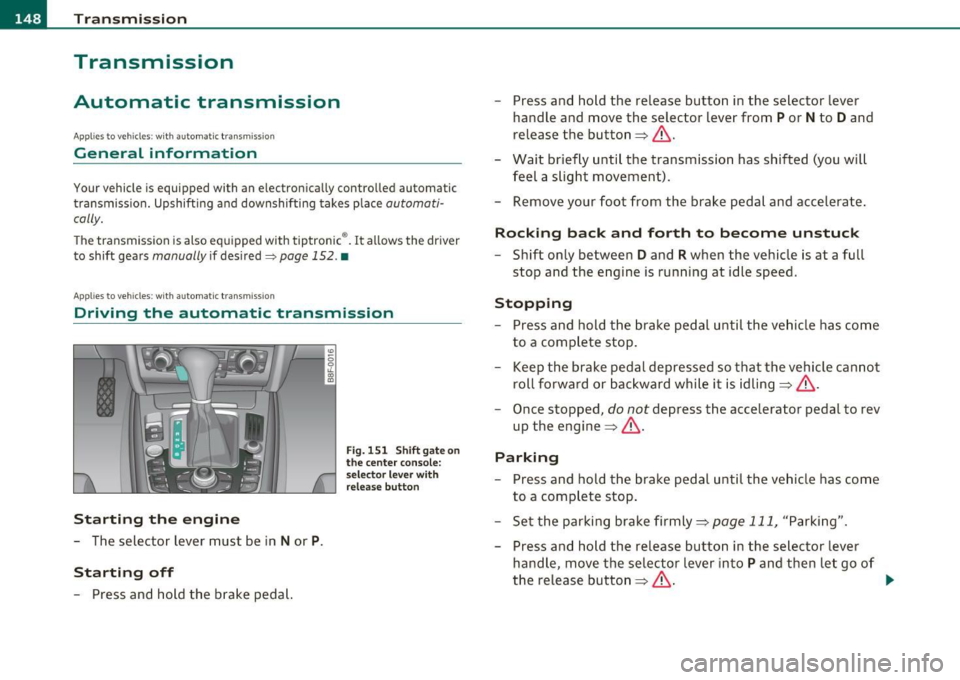
Driving the automati c transmission
St arting the engine
- The selector lever must be in Nor P.
St arting off
- Press and hold the brake pedal.
Fig. 151 Shift ga te on
t he center conso le:
selector leve r with
release butt on
- Press and hold the release button in the selector lever
handle and move the selector lever from
P or N to D and
release the button~ & .
- Wait briefly until the transmission has shifted (you will
feel a slight movement).
- Remove your foot from the brake pedal and accelerate .
Rocking back and forth to become unstuc k
-Shift only between D and R when the vehicle is at a full
stop and the engine is running at idle speed.
Stopp ing
- Press and hold the brake pedal until the vehicle has come
to a complete stop .
Keep the brake pedal depressed so that the vehicle cannot
roll forward or backward while it is idling~& .
- Once stopped,
do not depress the accelerator pedal to rev
up the engine~ &.
Parking
-Press and hold the brake pedal until the vehicle has come
to a complete stop .
- Set the parking brake firmly~
page 111, "Parking".
- Press and hold the release button in the selector lever
handle, move the selector lever into
P and then let go of
the release button~ & - .,
Page 151 of 364

____________________________________________________ T_r_a _ n_ s_m_ i_ s _s_ i_ o _ n __ _
The selector lever must be in Nor P . If one o f the dr iv in g positions is
e n gag ed a saf ety s witch will preven t the engin e from b eing sta rt e d.
S ee also=>
page 106.
Be fore you move t he se lecto r lever from t he P position, yo u m ust
a lw ay s a ppl y the b rake pedal before and while depr ess ing the bu tton
in t he handle of the selector lever.
_& WARNING
• Unintended vehicle movement can cause serious injury.
- When the selector lever is
in a driving position, the vehicle
may creep, even at idle speed. Therefore do not release the
parking brake
or foot brake until you are ready to move,
because power is transmitted to the wheels as soon as a driving
position is engaged.
- Do not accelerate while selecting a driving position . At this
time the engine must be at idle speed so that undue stress is
not placed on the clutches in the transmission.
- Remember : · even when stopped briefly with the automatic
transmission
in " D", "S" or "R", engine power is being trans
mitted to the wheels. Your vehicle could "creep " forward or
backward. When stopped, keep the brake pedal fully
depressed and use the parking brake if necessary to keep the
vehicle from rolling .
• If the selector lever is unintentionally moved into N while you
are driving, take your foot off the accelerator pedal and wait for
the engine to return to idle speed before selecting a driving posi
tion.
• Never shift into "R" or "P " when the vehicle is in motion .
• Never get out of the d river's seat when the engine is running.
• If you must get out of the vehicle , move the selector lever
securely into the P position and apply the parking brake firmly .
• If the engine must remain running, never have any driving
position engaged when checking under the hood. Make sure the
selector lever has securely engaged and is locked in "P " with the
Controls and equip
ment Safety first
& WARNING (
cont inued)
parking brake firmly set=> page 272, "Engine compartment ".
Otherwise, any increase in engine speed may set the vehicle in
motion, even with the parking brake applied. •
App lies to vehicles : w it h auto mat ic t ransmiss ion
Selector lever positions
T his s ection d escrib es the s ele ct or l eve r posi tions and
drivin g ran ges.
Fig. 152 Di splay in
the instrum ent cluster:
selector lever In posi
tio n P
Th e sele ctor lever posi tion engaged appe ars ne xt to the se le ct or lever
as well as in the instr umen t cluster display .
P -Park
In this selector lev er position the transmiss ion is mecha nica lly
l oc ked. Engage
P only when the vehi cle is comple tely sto pp ed=> &
in " Driving t he automatic transmiss io n" on page 148.
T o sh ift in o r o ut of position P , yo u must first press an d hold the brake
peda l
and th en press t he r elease b utton in t he se lec to r l eve r hand le
wh ile moving the selector lever to or from
P. Yo u can s hif t out of thi s
posit ion on ly with t he ignit ion on . .,,
Vehicle care Technical data
Page 152 of 364
ffl..__T_ r_a _n_ s_ m_ is_ s_io _ n ___________________________________________________ _
R -Reverse
Th e transmission will automatically select the lowest gear ratio when
you shift into reverse.
Select
R only when the vehicle is at a full stop and the engine is
running at idle speed=>
& in "Driving the automatic transmission"
on
page 148 .
Before you move the selector lever to R, press both the button in the
handle of the selector lever
and the brake pedal at the same time.
When the ignition is on, the backup lights illum inate when the
selector lever is moved into
R.
N -Neutral
The transmission is in neutral in this position . Shift to this position
for standing with the brakes applied~
page 150.
When the vehicle is stationary or at speeds below 3 mph (5 km/h),
you must always apply the footbrake before and while moving the
lever out of
N.
D -Normal position for driving forward
Position Dis for normal city and highway driving. It ranges from zero
to top speed and all gears shift automatically, depending on engine
load, driving speed and automatically selected shift programs.
When the vehicle is stationary or at speeds below 3 mph (5 km/h),
you must always apply the foot brake before and while moving the
lever to
D out of N .
In certa in circumstances it may be advantageous to temporarily
switch to the manual shift program to manually select gear ratios to
match specific driving conditions~
page 152.
S -Sport position*
Select this position for sportier performance. In this position, the
transmission will not upshift as soon, allowing the vehicle to use the
increased power available at higher engine speeds to achieve livelier
acceleration . When the vehicle
is stationary or at speeds below 3 mph (5 km/h),
you must always apply the foot brake before and while moving the
lever to
S out of N.
& WARNING
Read and follow all WARNINGS=> & in "Driving the automatic
transmission" on
page 148 .
0 Note
Coasting downhill with the transmission in N and the engine not
running will result in damage to the automatic t ransmiss ion and
possibly the catalytic converter. •
Applies to vehicles: with automat ic transmissio n
Automatic Shift Lock (ASL)
The Automatic Shift Lock safeguards you against acci
dentally shifting into a forward or the reverse gear and
causing the vehicle to move unintentionally.
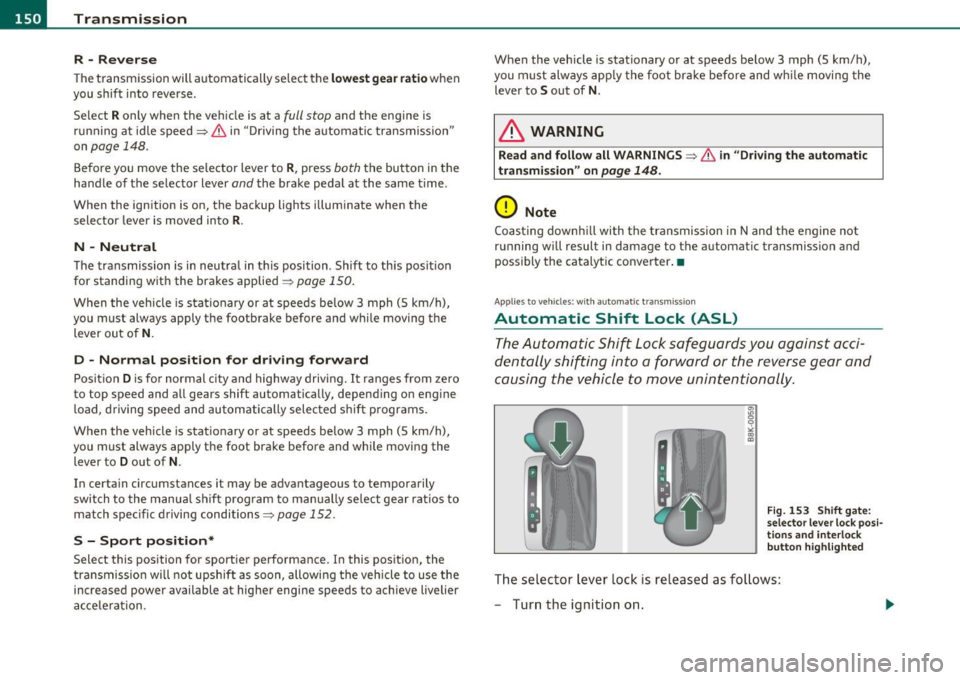
Fig. 153 Shift gate:
selector lever lock posi
tions and interlock
button highlighted
Th e selector lever lock is released as follows:
- Turn the ignition on.
Page 153 of 364

Transmission -
----------------
- Step on the brake peda l. At the same time press and hold
the interlock button on the s ide of the gear selector knob
=:> fi g. 153 wi th your thumb until you have moved the
selector lever to the des ired position .
Automatic selector lever lock
The se lector lever is locked in the P and N positions w hen the ignition
is turned on . To move the leve r from these pos it ions the driver must
dep ress the brake peda l. As a reminder to the d river, the following
warning appears in the instrument cluster display when the se lector
is in
P and N:
When stationary apply footbrake while selecting gear
A time delay e lement prevents t he selector leve r from lock ing when
it is moved throug h the
N posit ion (going from R to D ). The lock ing
element will lock the se lector lever if the lever is left in N (Neutra l) for
more tha n app rox imately 1 second, w ithout t he b rake pedal be ing
pressed.
A t speeds above about 3 mp h (5 km/h) the A utomat ic Shi ft Lock is
automatically deactivated in t he
N position .
Interlock button
The lock button on the selector lever prevents the lever from being
a cciden tally shifted in to cert ain posi tions . Pressing this b utton deac
tivates the selector lever lock. Depend ing on the direction of the
shift, the se lector leve r locks a t different positions. The pos itions are
highlighted in the illustrat io n =>
page 150, fig. 153 .
Igni tion key safety interlock
The key cannot be removed from the ignition unless the selector lever
is in the
P pa rk position. When the igni tion key is removed, the
selector lever will be locked in the
P position. •
Controls and equip
ment Safety first
Applies
to vehicles : with au toma tic transmiss ion
Kick-down
The kick -down feature allows the vehicle to generate
maximum acceleration .
When you press the accelerator peda l beyond the resis tance po int
that is reached at full throttle, the transmission will select a lower
gear rat io b ased on vehicle speed and e ngine RPM . The engine R PM
will be controlled to produce maximum vehicle acceleration as long
as you con tinue to press the acceler ator pedal beyond t his resistance
point .
& WARNING
Be careful when using the kick-down featu re on slippery roads.
Rapid a cceleration may cau se the vehicle to skid .•
App lies to veh icles: with automatic trans mission
Dynamic shift program (DSP)
The automati c transmi ssion is electronically controlled .
The transmiss ion is self adapting and will automatically select the
bes t sh ift p rogram su ited to the dr iv ing cond it io ns and dr iving style .
Th e transmission will select one of the
economy programs when you
drive at a steady speed or a gradually c hanging speed without heavy
acce le ration . This ac hieves optimum fuel efficiency, with early
upshifting and delayed downshifting.
Th e transm iss ion will au tomatically se lect the
s porty shift p rograms
when you dr ive at higher speeds, or w ith heavy acceleration and
frequently chang ing speeds . Upshifts a re de layed to make full use of
engine power . Downs hifting takes place at higher engine speeds than
in the economy programs . _.,
Vehicle care Technical data