brakes AUDI A5 CABRIOLET 2010 User Guide
[x] Cancel search | Manufacturer: AUDI, Model Year: 2010, Model line: A5 CABRIOLET, Model: AUDI A5 CABRIOLET 2010Pages: 364, PDF Size: 86.51 MB
Page 152 of 364
ffl..__T_ r_a _n_ s_ m_ is_ s_io _ n ___________________________________________________ _
R -Reverse
Th e transmission will automatically select the lowest gear ratio when
you shift into reverse.
Select
R only when the vehicle is at a full stop and the engine is
running at idle speed=>
& in "Driving the automatic transmission"
on
page 148 .
Before you move the selector lever to R, press both the button in the
handle of the selector lever
and the brake pedal at the same time.
When the ignition is on, the backup lights illum inate when the
selector lever is moved into
R.
N -Neutral
The transmission is in neutral in this position . Shift to this position
for standing with the brakes applied~
page 150.
When the vehicle is stationary or at speeds below 3 mph (5 km/h),
you must always apply the footbrake before and while moving the
lever out of
N.
D -Normal position for driving forward
Position Dis for normal city and highway driving. It ranges from zero
to top speed and all gears shift automatically, depending on engine
load, driving speed and automatically selected shift programs.
When the vehicle is stationary or at speeds below 3 mph (5 km/h),
you must always apply the foot brake before and while moving the
lever to
D out of N .
In certa in circumstances it may be advantageous to temporarily
switch to the manual shift program to manually select gear ratios to
match specific driving conditions~
page 152.
S -Sport position*
Select this position for sportier performance. In this position, the
transmission will not upshift as soon, allowing the vehicle to use the
increased power available at higher engine speeds to achieve livelier
acceleration . When the vehicle
is stationary or at speeds below 3 mph (5 km/h),
you must always apply the foot brake before and while moving the
lever to
S out of N.
& WARNING
Read and follow all WARNINGS=> & in "Driving the automatic
transmission" on
page 148 .
0 Note
Coasting downhill with the transmission in N and the engine not
running will result in damage to the automatic t ransmiss ion and
possibly the catalytic converter. •
Applies to vehicles: with automat ic transmissio n
Automatic Shift Lock (ASL)
The Automatic Shift Lock safeguards you against acci
dentally shifting into a forward or the reverse gear and
causing the vehicle to move unintentionally.
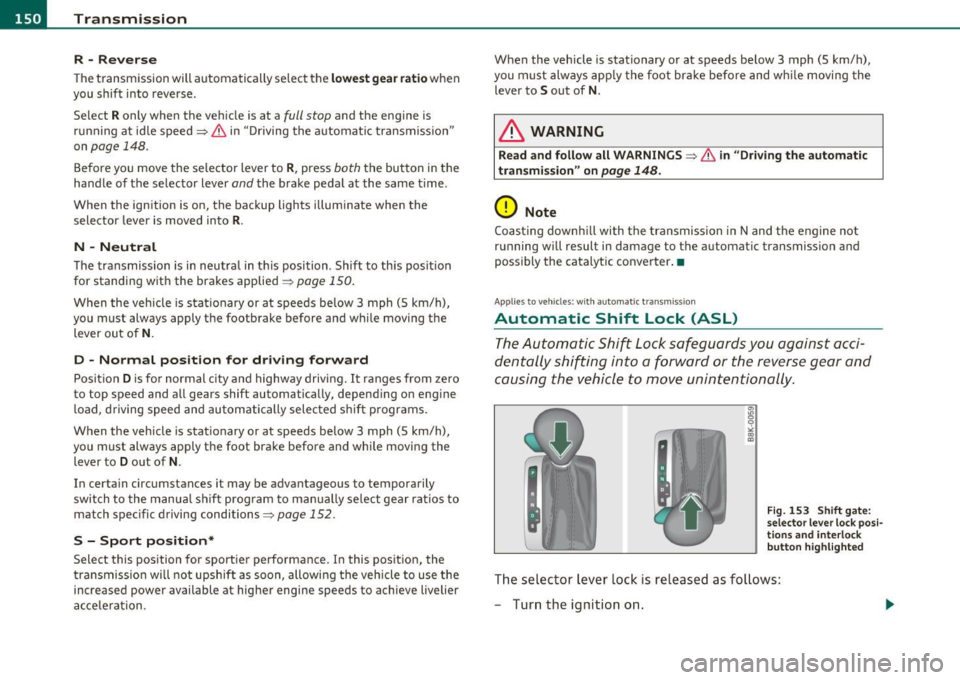
Fig. 153 Shift gate:
selector lever lock posi
tions and interlock
button highlighted
Th e selector lever lock is released as follows:
- Turn the ignition on.
Page 243 of 364

Intelligent technology
--------------------------------------------------' "---.L==--
The system operates across the entire speed range in combination
with the ABS system. If the Anti-Lock Brake System (ABS) malfunc
tions, the ESP will also shut down.
How the system works
The Anti-Lock Brake System (ABS), Electronic Differential Lock (EDL)
and the Anti-Slip Regulation System (ASR) are integ rated in the elec
tronic stabilization program . In addition to the data provided by
these functions, the ESP control unit requires additional measure
ment data provided by high performance sensors . The rotational
speed of the vehicle about its vertical axis, vehicle acceleration in the
fore-and-aft and lateral directions, the brake pressure, and the
steering angle are all measured .
Th e direction in which the driver wishes to travel is determined with
the aid of the steering angle and vehicle speed and is con tinually
compared with the actual behavior of the vehicle. If the two do not
match, for example, when the vehicle starts hydroplaning on a wet
road, ESP will automatically brake the appropriate whee l to correct
the problem.
The vehicle is then stabilized by the forces acting on the whee l during
brak ing.
If the vehicle is oversteering (the vehicle turns too sharply
and the rear wheels slide toward the outside of a curve), the brakes
are mainly applied on the wheel that is on the outside of the curve. In
the case of a vehicle that is
understeering (the vehicle does not turn
sharply enough and pushes out of a curve), the brakes are applied as
needed on the wheel that is on the inside of the curve or additionally
on the other wheels. An acoustic signal indicates when ESP brake
application cuts in=> &.
The system operates across the entire speed range in combination
with the ABS system =>
page 245. If the Anti- Lock Brake System
(ABS) malfunctions, the ESP will be out of action as well.
Activating
When you turn on the engine, ESP will automatically be activated and
w ill perform a self-test. As soon as the test is comp leted, the system
is in normal operating mode.
Controls and equip
ment Safety first Vehicle operation
You can activate a
deactivated ESP or deactivated ESP/ ASR if required
by pressing the =>
page 240, fig. 214 => page 240, fig. 213 button.
When they are activated, the message
ESP/ ASR on appears briefly
in the display.
Deactivating
The ESP should normally be activated all the time. If necessary, you
can deactivate Anti-Slip Regulation (ASR) or the Electron ic Stabiliza
tion Program (ESP) by press ing the button =>
page 240, fig. 214 .
• Deactivating ASR: Tap the button . In certain exceptional s itua
t ions (e.g. driving with tire chains), the Anti-Slip Regu lation (ASR) can
be deact ivated =>
page 242. The message ASR off appears in the
display as we ll.
• Deactivating ESP/ASR Press the button for more than 3 seconds .
With the ESP/ASR deactivated, the ESP check light comes on, see
=>
page 14. The message ESP switched off appea rs in the display as
well.
& WARNING
The Electronic Stabilization Program is nevertheless subject to the
laws of physics. It is particularly important to pay attention to
this fact on wet and slippery roads. It is therefore important that
you always adapt your driving to the condition of the road and
traffic conditions . Do not allow the increased safety provided by
the Electronic Stabilization Program system to lull you into
accepting additional safety risks.
u
Vehicle care Do-it-yourself service Technical data
Page 244 of 364

Intelligent t echnology
---------------------------------------
Electronic differential lock (EDL)
The elec tronic differen tial lock monitors the rotational
speed of the drive wheels.
G en era l not es
The electronic differentia l lock (EDL) helps the ca r to sta rt moving,
accelerate and climb a gradient on surfaces provid ing poor or almost
no grip . W ithout ED L, this would be d iff icu lt, if not impossible.
How the sy stem works
The EDL operates automatically. It mo nitors the rota tional speed of
wheels with the help of the ABS sensors=>
page 245. If a not iceab le
slip is detected at the wheels (e.g. on slippery g round on one side),
the spinn ing wheels are braked and power is transferred to the other
wheels . This is done up to a speed of about 60 mph (100 km/h).
No ises from the brake system signal that wheel sp in is being
controlled.
Driv ing off
When d riving off, always be s ure to keep road conditions in mind as
you accelerate. If one drive wheel spins because it is on a surface with
less grip, apply
plenty of throttle until the car starts to move.
O verheating of bra kes
To prevent the disc b rake of the bra ked wheel from ove rhea ting if
subjected to excessive loads on this wheel, the EDL cuts out tempo
ra rily. The vehicle remains operat io nal and be haves in the same way
as a veh icle without EDL.
As soon as the brake has coo led down, EDL switches on again auto
matically.
Electronic limited slip differential
In vehicles w ith front wheel drive *, an e lectron ic lim ited slip d ifferen
tial engages when driving on curves . The brakes are applied spec ifi
cally to the front wheel that is on the inside of the curve. T his m ini
m izes sliding on the front wheels and enables precise and neutral dr
iv ing t hrouge curves. The electronic lim ited slip differentia l does
no t engage whe n driving in we t cond it io ns or snow.
& WARNING
• Wh en acc elerating on slipp ery s urface s, such a s on ice or snow,
always be careful when depre ssing the accele rator pedal. Even
with the EDL and the electroni c limited slip differential working,
the dr ive wh eels can spin and reduce you r ability to control your
c ar . -Ri sk of cra sh!
• The increased safet y afforded b y EDL and the electronic l imited
slip differ ential d oes not mean th at you can take safety risks .
Alw ay s adapt your d riving st yle to the road c onditions and traffi c
si tuation.
[ i ] Tips
If a fa ult occurs in the ABS, the EDL is also not funct ioning. This is
ind icated by the ABS warn ing light=>
page 16 . •
Anti-Slip Regulation System (ASR)
The Anti-Slip Regulation System prevents the driven
wheels from spinning when the car is a ccelerating.
General notes
T he Anti-Slip Regu lation System (ASR) is in tegrated in the electronic
stabilization program (ESP) . When the veh icle starts up and acceler
a tes, the wheels are preven ted from sp inning by adjust ing the engine
power to match the amount of grip ava ilable from the road surface.
How the system works
ASR performs automatica lly, i.e. without the driver's intervent ion.
With the a id o f the ABS sensors=>
page 245, ASR moni tors the speed
of the driven wheels. If the wheels start to spin, engine torque is
reduced automatically unti l the tires find enough grip to lock onto
the road s urface. The system is active across the entire speed range . .,
Page 245 of 364

Intelligent technology
--------------------------------------------------' "---.L==--
The ASR works in conjunction with the ABS. If a malfunction should
occur in the ABS, the ASR w ill also be out of action.
Activating
The ESP is automatically activated when the engine is started and it
performs a self-test. You can activate a deactivated ASR if required by
pressing the=>
page 240, fig. 214 button. When it is activated, the
message
ESP/ASR on appears briefly in the display .
Deactivating
You can deactivate the ASR if required by pressing the button (for less
than 3 seconds) =>
page 240, fig. 214. With the ASR deactivated , the
ESP check light comes on, see=>
page 14 . The message ASR off
appears in the display as well. The ASR can be deactivated at any
speed .
The ASR should normally be activated a ll the time. Only in certain
exceptional situations when some slip is desirable does it make sense
to deactivate the ASR. Examples:
• when driving with tire chains
• when driving in deep snow or on loose ground and
• when rocking the vehicle loose after it has become stuck .
When the abnormal situation is over, you should activate the ASR again.
& WARNING
The increased safety afforded by ASR does not mean that you can
take safety risks. Always adapt your driving style to the road
conditions and traffic situation.
[I] Tips
To ensu re that the ASR works properly, all four whee ls must be fitted
with ident ical t ires. Any differences in rolling radius of the t ires can
cause the system to reduce eng ine power when this is not desired.
See also=>
page 307, "New tires and replacing tires and wheels". •
Safety first
Braking
General information
What affects braking efficiency?
Operating conditions and driving habits
The brakes on today's automobiles are still subject to wear,
depending la rgely on ope rating conditions and driving habits=>& .
On vehicles that are either driven mostly in stop-and-go city traffic or
are driven hard, the brake pads should be checked by your authorized
Audi dealer more often than specified in the
Warranty & Mainte
nance booklet.
Failure to have your brake pads inspected can result
in reduced brake performance .
On steep slopes, you should use the braking effect of the engine. This
way, you prevent unnecessary wear on the brake system. If you must
use your brakes, do not hold the brakes down continuously. Pump the
brakes at intervals.
Noises may occur when brak ing depending on the speed, braking
force and outside cond itions such as temperatu re and humid ity.
Moisture or road salt
If you are driving faster than 31 mph (50 km/h) and the windshield
wipers are on, the brake pads will briefly touch the brake discs in
regula r interva ls so as to improve reaction time when braking on wet
surfaces. You, the driver, will not not ice anything.
Under certain condit ions, for example, when driving through water or
very heavy rai n, or even after washing your vehicle, the braking effect
can be reduced due to moisture (or in free zing conditions ice) on the
bra ke pads. A few careful brake applications should dry off the brake
pads or remove any ice coatings.
Th e effectiveness of the brakes can be reduced when the vehicle is
dr iven on a salt-covered road and the brakes are not used. H ere too,
you should clean off accumu lated salt coating from brake discs and
pads with a few careful applications of the brake=>&,.
Vehicle care Technical data
Page 246 of 364
Intelligent technology
'-------------------------------------------------
Corrosion
T he re may be a te ndency fo r d irt to build u p on the bra ke pads and
co rrosion to form on the d iscs if the car is not dr iven reg ularly o r only
for short trips with litt le use of the bra kes .
If the brakes a re not used freq uen tly, or if co rrosion has formed o n
the discs, it is advisable to clean off the pads and discs by braking
fir mly a few times from a mode rat ely h igh spee d~ & .
Faults in the brake system
If yo u sh ou ld noti ce a sudden increase in b rake peda l trave l, then one
of the two brake circu its may have failed~& .
Low brake fluid level
Ma lfunctions can occ ur in t he brake system if the brake fluid level is
t oo low. The bra ke f lu id level is moni tore d elec tron ically.
Brake lin ing wear status
Brake lin ing wear may be checked by v isua l inspect ion of the condi
tion of the brake pads throu gh the open ings in the whee l.
If neces
sary, the whe el may be removed fo r thi s insp ection~
page 320,
"Changing a w hee l".
& WARNING
• You should perform braking maneuvers for the purpose of
cleaning the brake system only if road conditions permit. Other
road users must not be put at risk - you may cau se an accident!
• Before descending a steep grade, reduce speed and shift trans
mission into a lower gear or lower driving range. Do not ride the
brakes or hold the pedal down too long or too often . This could
cause the brakes to get hot and diminish braking efficiency.
• Do not "ride the brakes " by resting your foot on the pedal when
you do not intend to brake . This may cause the brakes to overheat ,
premature wear and increased stopping distance.
• Under certain climatic and operating condition s such as
passing through water , driving in heavy rain or after washing the
& WARNING (co ntinued )
vehicle, the effectiveness of the brakes can be reduced . In winter,
ice can ac cumulate on the brake pads, linings, dis cs and drums.
Carefully apply brakes for a test. Brakes will dry and ice coatings
will be cleaned off after a few careful brake appli cations.
• Driving for an extended period of time on salt-covered roads
without u sing your brakes can also affect braking efficiency . Clean
off accumulated salt coating from b rake discs and pads with a few
careful brake applic ations.
• If you damage the front spoiler, or if you install a different
spoiler, be sure the air flow to the front brakes i s not obstructed .
Otherwise the brake system could overheat reducing the effective
ness of the entire brake system.
• Failure of one brake circuit will impair the braking capability
resulting in an increased stopping di stance. Avoid driving the
vehicle and have it towed to the nearest authorized Audi dealer or
qualified workshop.
n
Brake booster
The b roke boost er odds extra broking po wer.
The bra ke boos ter wor ks wi th v acuum pressure whi ch is crea ted o nly
when the eng ine is ru nning~ &.
& WARNING
• Never let the vehicle roll to a stop with the engine shut off.
• If the brake booster is not working, for example when towing
your vehicle , or because the brake booster has somehow been
damaged, the brake pedal mu st be pressed considerably harder to
make up for the lack of booster assistance. •
Page 247 of 364

Intelligent technology
--------------------------------------------------' '----'----
Functioning of Anti-Lock Brake System
(ABS}
ABS prevents the wheels from locking up under braking.
The ABS contributes effectively to vehicle control since it prevents the
w heels from
locking whe n the brakes are applied . This means t hat t he
vehicle rema ins steerable and is less likely to skid.
With ABS you do not need to pump the brake. Ju st hold the brake
pedal down .
However, do not expect the ABS to shorten braking distance under all
circu mstances. When d riving on gr ave l o r on new ly falle n snow o n top
of icy s urfaces, braking distance may be even longer, therefore, under
t he se c ir cu mstances, i t is especially importa nt that you dr ive slowly
and with great care.
How the ABS system works
An a utomat ic check is made when a speed of about 12 mph (20 km/h)
is reached. When this happens, a pumping noise can be heard.
If an individ ual w heel beg ins to rotate too slow ly in relat ion to vehicle
speed and tends to lock, t he ABS automat ic al ly reduces brake pres
sure to prevent t hat wheel from locking .
Thi s automatic adjustment process w ill cause a
slight vibrat ion of
t he bra ke ped al and some noises to aler t you th at vehicle s peed mus t
be adapted to existing road and traff ic conditions.
& WARNING
Although the ABS is very effective , always remember that braking
capability i s limited by tire traction . Always adjust your driving
speed acco rding to the road and traffic condition s. Do not let the
extra safety afforded by the ABS tempt you into taking extra risk s.
T he ABS cannot overcome the laws of physics .
Controls and equip ment Safety first Vehicle operation
(I] Tips
•
If ABS is no t fun ct io ni ng prope rly, a wa rning light will come on .
See =>
page 16.
• If a fault occurs in the A BS, the EDL is also not functioning . This is
indicated by t he ABS warn ing light .•
Brake assist
Brake assist is designed to achieve the optimum braking
effect.
Bra ke ass ist helps to i ncrease the effe ctive br aking power and thus to
achieve a shorte r stopping distance . If the d river presses the brake
peda l very quickly, brake assist automatically boosts the bra king
force to the max imum level, up to the po int whe re the anti-lock b rake
function (ABS) intervenes to stop t he wheels from locki ng . You
should then keep the br ake peda l pressed unti l the ve hicle has braked
to the required speed . Brake ass ist switches itself off as soon as you
re le ase the br ake pedal.
& WARNING
Please remember that the accident risk always increases if you
drive too fast , especially in corners or on a slippery road , or if you
follow the vehicle ahead of you too clo sely. Increased ri sk of an
accident cannot be compensated for even by brake assist , so
alway s maintain a safe speed. •
Vehicle care Do-it-yourself service Technical data
Page 253 of 364

Driving and environment
----------------------------------------------'
New brake pads
- -
Remem ber th at new brake pads do not have a full braking
e ffe ct du ring the first 250 mi les (400 ki lo mete rs) afte r they
are in sta lle d .
N ew br ake pads have to be " burnishe d in" before they have op tim al
grab~ &-
Dur ing the break-in period, you sho uld avoid putting severe loads on
the brakes . Severe loads include, for example, sudden ha rd bra king,
in part icu lar at very high s peeds o r, for example, on mountain passes .
& WARNING
New brake pads don't have the best stopping power and must be
" broken-in " during the in itial 100 to 150 miles (150 to 200 kilo
meters) of normal city driving. You can compensate for this by
pressing the brake pedal mor e firmly . This also applies later when
new pads are installed. n
Avoid damaging the vehicle
When yo u are driving on poor roads, or over c urbs, steep ramps, etc.,
ma ke ce rtain that low-lying pa rts su ch as spoilers and exhaust system
parts do not bottom out and get damaged .
This is es peciall y tr ue for veh icle s wi th low-slung chass is (sports
chassis)" and fully loaded vehicles. •
Driving through water on roads
Note the following to avoid vehicle damage w hen drivi ng through
water, fo r examp le on floode d roa ds:
Controls and equip
ment Safety first Vehicle operation
•
The wate r must not be any higher than the bottom of the vehicle
body .
• Do not drive faster than wa lking speed.
& WARNING
After driving through water , mud , slush , etc ., the brakes may be
slow to take effect because of wet brake rotors and pads . Dry the
brakes first by braking carefully to resto re the full braking effect.
0 Note
Vehicle components such as the engine, transmiss ion, suspension or
ele ct ric al sy stem can be severe ly d amaged by driv ing thro ugh wa ter.
[ i ] Tips
• C heck the de pth o f th e wate r before driving thr oug h it.
• Do not stop the vehicle, drive in reverse or switch the engine off
w he n dr iving throug h wate r.
• Keep in m ind that oncoming vehicles may c reate waves t hat raise
t he water leve l and make it too deep fo r yo ur vehicle t o drive thr oug h
safely.
• Avoid drivi ng through sal t wa ter because it can cause corros io n.
Catalytic converter
It is very important th at your emission control s ystem
( c a ta lytic co n verter) is functionin g proper ly to e nsure
th at y our ve hicl e is ru nn in g in an en vir onm entally sound
m ann er.
- Alwa ys use lead- free g asoline=> p ag e 274, "Fuel sup ply".
- Never ru n the tan k down a ll the way to empty . .,
Vehicle care Do-it-yourself service Technical data
Page 257 of 364

Trailer towing
Driving with a trailer
General information
Your Audi was designed primarily for passenger transpor
tation.
If yo u plan to tow a t rai ler, p lease rem emb er that the add itiona l load
wi ll affect durab ility, economy and performance.
T railer tow ing not on ly p laces mo re s tress on the vehicle, it a lso calls
for more concentrat ion from the driver.
For this reason, a lways follow the ope rating and dr iv ing instr uctions
prov ided and use common sense .
Technical requirements
Trailer hitch
Use a weight-carrying hitch conforming to the gross trailer weig ht.
Th e hitch mus t be suitable for yo ur vehicle a nd tra ile r and mus t be
mounted secure ly on the vehicle's chassis at a
technically sound l oca
t ion. Use only a trailer hitch wi th a remov ab le b all m ount. Alw ays
check w ith the tra iler hitch manufacturer to make sure that you are
using t he cor re ct hi tch.
Do not use a bumper hitch.
The h itch must be installed in such a way t hat it does not interfere
w ith the impa ct-absorbing b umper system. No mod ifi cat ions sho uld
be made to the vehicle exhaust and brake systems. From time to
ti me, chec k tha t all hitc h mou ntin g bol ts rem ain secure ly f aste n ed.
When you a re not tow ing a tra iler, remove the tra iler hitch ba ll
mount. This prevents the hitc h from caus ing damage should yo ur
vehicle be struck from behind=> &.
Controls and equip
ment Safety first Vehicle operation
Trailer brakes
If your trailer is eq
uipped with a braking system, check to be s ure that
i t confo rm s to all regula tions.
The tra iler hydraulic brake system must not be directly connected to
the vehicle's hydraulic brake system=>& .
Safety chains
Alw ays use safety chains be twee n your vehicle and the trai ler.
Trailer lights
Tr ailer l ights m ust meet all reg ulat io ns. Be su re to check with your
author ized Audi deale r for correct wir ing, switches, and re lays.
Mirrors
If you are unab le to see the traffic behind you us ing the regular
outside m irro rs, then you
must install extended m irro rs. It is impor
tant that yo u
always have clear vision to the rear.
& WARNING
• If a trailer has electrical b rake s please note that these brakes
are not activated by the factory-fitted control unit -ri sk of acci
dent!
• After removing the trailer hitch , do not store it in your vehicle.
In case of sudden braking, the hitch could fly fo rward and injure
you or your passengers. •
Operating instructions
Maximum trailer we ight
A trailer for your vehicle is limited to a typical class 1 or class 2 trailer . .,.
Vehicle care Do-it-yourself service Technical data
Page 258 of 364

Trailer towing
"-------------------------------------------------
Trailer load distribution
Be sure the load in the trailer is held securely in pla ce to prevent it
from shifting forward, backward or s ideways.
Never allow a passenger to ride in a trailer => & in "Driving instruc
tions" on
page 256.
Engine cooling system
Towing a trailer makes the eng ine work harde r. It is important that
the cooling system's performance is up to the additional load. Make
sure that the cooling system has enough fluid.
Tire pressure
When towing a trailer, inflate the tires of your vehicle to the cold tire
pressure listed under "Full load" on the label located either on the
dr iver's side B-pillar (visible when the door is open) or inside the fuel
filler flap . Inflate trailer tires to trailer and tire manufacturers' spec
ifications.
Lights
The headl ight settings should be checked w ith the trailer attached
before driving off. Check to make sure both vehicle and trai ler lights
are working properly.
Safety chains
Be sure trailer safety cha ins are properly connected from the trailer
to the hitch on the vehicle. Leave enough s lack in the chains to permit
turning corners. When you install safety chains, make sure they will
not drag on the road when you are driving.
T he chains should cross under the trailer tongue to p revent it from
dropping in case of separation from the hitch.
Driving instruct!ons
Driving with a trailer always requires extra care and
consideration.
To obtain the best possible handling of vehicle and trailer,
please note the following:
- Do not tow a loaded trailer when your car itself is not
loaded.
- Be especially careful when passing other veh icles .
- Observe speed limits.
- Do not drive at the maximum permissible speed.
- Always apply brakes early.
- Monitor the temperature gauge .
Weight distribution
Towing a loaded trailer w ith an empty car results in a highly unstable
distr ibution of weight. If this cannot be avoided, drive at very low
speeds only to avo id the r isk of losing steer ing control.
A "balanced" rig is easier to operate and control. Th is means that the
tow vehicle should be loaded to the extent possible and permissible,
wh ile keeping the trailer as light as possible under the c ircumstances.
Whenever possible, trans fer some cargo to the luggage compart
ment of the tow vehicle while observing tongue load requirements
and vehicle loading considerations.
Speed
Th e higher the speed, the more difficult it becomes for the driver to
control the r ig . Do not drive at the maximum permiss ible speed.
Reduce your speed even more if load, weather or wind conditions are
unfavorable -part icularly when go ing downhill.
Reduce vehicle speed
immediately i f the trailer shows the slightest
sign of swaying.
Do not try to stop the swaying by accelerating. _,
Page 259 of 364
Observe speed limits. In some areas, speeds for vehicles towing
t railers are lowe r than for regular veh icles.
Always apply brakes early. When dr iv ing downh ill, sh ift in to a lower
gear to use the engine braking effect to slow the vehicle. Use of the
brakes alone can cause them to overheat and fail.
Coolant temperature
The coolant temperature gauge~ page 8 must be observed care
fully. If the needle moves close to the upper end of the scale, reduce
speed immediately and/or turn off the air conditione r.
If the coolant temperature warning light in the instrument cluster
star ts flashing
-t- , pull off the road, stop and let the engine idle for
about two minutes to prevent heat bu ild-up.
& WARNING
Anyone not properly restrained in a moving vehicle is at a much
greater risk in an accident. Never let anyone ride in your car who is
not properly wearing the restraints provided by Audi. u
Trailer towing tips
Important to know
------------
Your vehicle handles differently when tow ing a tra iler because of the
additiona l weight and different weight distribution. Safety, perfor
mance and economy will greatly depend on how carefu lly you load
your trailer and operate your rig .
Before you actua lly tow your trailer, practice turning, stopping and
backing up in an area away from traffic. Keep pract icing until you have
become completely familiar with the way your vehicle-t railer combi
nation behaves and responds.
Controls and equip
ment Safety first Vehicle operation
Backing up
is d iff icult and requ ires practice . Backing up with a trailer
generally requires steering action opposite to that when backing up
your vehicle without a trailer.
Maintain a greater distance between your vehicle and the one in front
of you. You will need more room to stop . To compensate fo r the
trailer, you will need a larger than norma l turning radius.
When passing, remember that you cannot accelerate as fast as you
normally would because of the added load. Make sure you have
enough room to pass. After passing, allow plenty of room for you r
trailer before changing lanes again.
Avoid jerky starts, sharp turns or rapid lane changes .
[I) Tips
• Do not tow a trai ler during the break-in per iod of your vehicle.
• If you tow a tra iler, your Audi may requi re more frequent mainte
nance due to the extra toad~
page 343. •
Parking on a slope
Do not park on a slope with a trailer. If it cannot be
avoided, do so only after doing the following:
When parking:
-Apply the foot brake.
- Have someone place chocks under both the vehicle and the
trailer wheels.
- With chocks in place, slowly release the brakes until the
wheel chocks absorb the load.
- Turn the wheels towards the curb.
- Apply the parking brake .
- Move the se lector lever to
P.
Vehicle care Do-it-yourself service Technical data