radio AUDI A5 CABRIOLET 2010 User Guide
[x] Cancel search | Manufacturer: AUDI, Model Year: 2010, Model line: A5 CABRIOLET, Model: AUDI A5 CABRIOLET 2010Pages: 364, PDF Size: 86.51 MB
Page 43 of 364

Power locking system
General description
The power locking system locks or unlocks all doors and
the rear lid simultaneously.
You can lock and u nlock the ve hicle centrally. You have the following
choices:
• Remote master key::::>
page 42
• Door hand les with convenience key* => page 43,
• Lock cylinder at the driver's door ::::> page 44, or
• Powe r locking switch inside~
page 45.
Selecti ve unlocking
When they are closed, the door and rea r lid are locked . When
unlocking, you can set in the radio or in the MMI * whether
only the
dr ive r's door or th e entire vehicl e shou ld b e unloc ked::::>
pag e 42.
Automatic Locking
The automat ic lock ing feature locks all the veh icle doors and the rear
lid when you drive faster than 9 mph (15 km/h).
T he car is unlocked agai n once the ignit io n key is removed. I n add i
tion, the vehicle can be un locked if the open ing function in the power
lo cki ng sys tem swit ch o r at one of t he d oor leve rs is a ctuated. The
Auto Lock function can be turned on and off in the rad io or in the
MM I*
~ page 42 .
Add itiona lly, in the event of a crash w ith a irbag dep loymen t the doors
are automatically u nlocked to allow access to the ve hicle .
Anti-theft alarm warning system
If the anti -theft alarm warning system detects a break-in into the
vehicle, acoustic and visual warning signals are triggered .
Controls and equip
ment Safety first
Opening and closing
T
he anti-theft warning system is activated a utomat ica lly when you
lock the vehi cle. It is dea ctivated w hen unl ocking us ing t he
remote
key ,
with the mechanical key , and when you switch on the ignition .
T he alarm a lso turns off when the alarm cycle has expired .
Turn signals
When you unlock the vehi cle, the tu rn s ignals flash twi ce , when yo u
lock it once . If they do not flash, one of the doors, the rear lid or the
hood is not locked.
Unintentionally Locking yourself out
In the following cases there safeguards to preve nt yo u loc king your
remote master key in the vehicle:
• The vehicle does not lock with the centra l locking sw itch
=>
page 45 if the drive r's door is open.
• On vehicles with convenience key*, if the most recently used
master key is in the luggage compartment, the rea r lid is automati
ca ll y unlo cked again after it is closed;;;> page 46.
Do not lock yo ur vehi cle w it h t he remote m aster key u ntil all doors
and t he rear lid are closed . In this way you avoid locking yourself out
acc iden tally .
& WARNING
• When you leave th e vehicle, alwa ys remove the ignition key
and take it with you. Th is will prevent passengers (children , for
example ) from accidentally being locked in the vehicle should
they accidentally p ress the power locking switch in the front
door s.
• Do not leave child ren inside the vehicle unsupervised . In an
emergency it would be impossible to open the door s from the
outside without the key.
Vehicle care Technical data
Page 44 of 364

Opening and closing
(I) Tips
• In the event of a crash with airbag deployment all locked doors
will be automatically unlocked to give access to the vehicle occupants
from the outside .
• If the power locking system should malfunction, you can lock the
dr iver's door using the mechanical key :::::,
page 46.
• If the power locking system should fail, you can still open the fuel
tank flap in an emergency:::::,
page 2 78 .
• You are well advised not to keep valuables ins ide an unattended
vehicle, v is ible or not. Even a properly locked veh icle cannot provide
the security of a safe.
• If the LED in the upper edge of the driver's door panel comes on
for about 30 seconds after the veh icle is locked, there is a malfunc
tion in the power locking or the anti-theft warning system . Have the
malfunction corrected by an authorized Audi dealership or qualified
repair facility .•
Setting power Locking
The driver can determine the functions for power locking
in the radio or in the MMI *.
In the Central locking menu you can decide which doors
should be unlocked when opening the vehicle.
- Press the [ CAR] function button.
- Select
Central locking . The Central locking menu
appears.
For example, if you switch the item Unlocking single door On , the
passenge r's door is no longer included in the power lo cking system,
and will not be unlocked by pressing the unlock button on the master
key remote control. You can continue to unlock all the doors and the rear lid as before.
Press the opening button on the master key twice.
In addit ion to this, the
Auto locking can be switched on and off .
When locking the vehicle, all doors and the trunk lid are locked auto
matically.
If you switch
Trunk lid/tailgate On, then the handle on the rear lid
=> page 46, fig. 37 is locked. In this case the rear lid can be opened
with the button
c::J on the master key:::::, fig. 31. If the vehicle has the
Convenience key* feature, then the handle will continue to work even
if an valid key is near the proximity sensor.
If you select
Fold m irrors* On, the automatic outside mirror fold
function is activated -the outside m irrors fo ld when the lock ing
button on the remote master key is operated
ffJ :::::, page 73.
When you select Confirmation tone On, a confirmation tone sounds
when you lock the vehicle. •
Unlocking and Locking the vehicle with the
remote control
"'
Fig. 31 Remote
co ntrol: fu nction
buttons
Either the driver's door only or the entire vehicle will unlock
when the unlock button© is pressed once, depending on the
settings in the radio or MMI*
Central locking menu
~page 42 . _.,
Page 45 of 364

- Press button m (@ ) to u nlo ck the ve hicl e=> page 42,
fig. 31 .
- Press button @(@ ) to lock the vehicle=> & in "General
description" on
page 41.
- Press button
- P ush the red
!PANIC] button( @) to activate the panic
funct ion . The horn sounds and the turn signals flash. Push
the red
[PANIC ] button aga in to deactivate the panic func
tion.
If the vehicle is unlocked and no door, the rear lid or the hood is
opened wit hin 60 seconds, the ve hicle locks itse lf aga in automat i
cally . This feature prevents the vehicle from being accidentally left
unloc ked over a long pe riod of t ime .
It depends on the set tings in the radio or in the MMI* whether the
entire vehicle is unlocked or on ly certain doors:::,
page 42.
On vehicles with automatic transm ission*, the se lector lever must be
in the P position , otherwise the vehicle cannot be locked .
& WARNING
Read and follow all WARNINGS :::, & in "Gene ral de scription " on
page 41.
[I) Tips
• In orde r to make sure the locking funct ion is wo rking, you should
always keep your eye on the vehicle to make sure it is proper ly locked.
• Do no t use the remo te con tro l if you are inside the car, o therwise
yo u may un inten tionally lock the veh icle, and then you would set
off
Controls and equip
ment Safety first
Op
ening and closing
the a nti-theft alarm when you try to start the engine or open a door .
In case t his happens any how, p ush t he unlock button
m.
• Use the panic function on ly if you are in an emergen cy si tuat ion. •
App lies to veh icles : w ith conven ience key
Locking and unlocking with convenience
key
The doors and the rear lid can be unlocked and locked
without operating the master key.
Unlocking vehicle
F ig. 3 2 Convenie nce
k ey: Unlo ckin g vehi cle
doo r
F ig. 33 Co nvenie nce
k ey: loc kin g the
vehicle
- Take hold of the door han dle . The door is unlocked auto -
matically .
~
Vehicle care Technical data
Page 66 of 364
Clear vision
Adjusting exterior Lighting
The functions are selected in the radio or in the MMI.
- Sel ect: Function button [CARI> E x terior lighting.
Com ing home
The coming home function ensures that after
tu rning off the ignition
and op ening th e driver' s door
the vehi cle periphery is illum inated i n
the dark . In addition, the front fog lights, the ta il lights and the
license p late ligh t are tu rned on. The power-on time can be set for a
per iod from O (off) to 60 seconds .
Leaving home
The leaving home funct ions ensures that
when unlocking , the vehicle
per iphery is illuminated in t he da rk. In addi tion, the front fog l igh ts,
the tai l lights and t he license p late light are turned on . This function
can be tu rned on and off.
Automatic driving ligh ts*
W hen the light switch is in the AUTO=> page 62 position, the switch
on point of the l ights can be changed in the automatic driving light
function.
Daytime running lights*
T he daytime running light s ca n be tu rn ed on o r off using this f unc
tion. If the funct ion is active, the dayt ime runn ing lights are turned
on a utomat ica lly when the ignition is switched on.
In the vers ions for some co unt ries it is not poss ible to switc h off the
daytime running lights or they may not have daytime running lights.
(I) Tips
The coming home/ leaving home f unction is avai lab le only with the
switch in the AUTO position .•
Daytime running Lights (DRL) (USA models)
T he daytime running lights are turned on au tomatically
w hen the ignition is switched on.
On vehicles w ith xenon lights the daytime running lights will come on
autom atically when the ig ni tio n is t urned on and t he lig ht switch
=>
page 62, fig. 65 is in the O position or the AUTO position (only in
d aylig ht co ndit ions). T he
Daytime running light s fu nct ion can be
turned on and off in the MMI menu
E xterior lighting => page 64. On
vehicles wi th
halogen lights there is no dayt ime runn ing lights func
tion .
& WARNING
Neve r use daytime running lights to see where you are going. They
are not bright enough and will not let you see far enough ahead
fo r safety , especiall y at dusk or when it is dark. Be aware of
c hange s in out side light condition s when you are driv ing and
r espond by switching on your low b eams
~D.
0 Note
Always be aware of changes in outside light conditions while you
are d riving. Re spond in t ime to fading daylight by tu rning the light
switch to position
~D (or "AUTO" if your ca r is equ ipped with this
feature)
to turn on your hea dlights. •
Daytime running Lights (Canada models
only)
When you turn on the ignition the daytime running lights
will come on automatically.
T he d aytime running lights a re a ct ivated only when the light sw itch
=>
page 62, fig. 65 is e it h er at the O or the coo: pos it io n. When the .,_
Page 72 of 364

Clear vision
tion ®· They are also cleaned every time you hold the lever in position
© for long er than 2 seconds .
& WARNING
• The rain sensor is only intended to assist the driver. The driver
is still responsible for manually switching the wipers on according
to the visibility conditions.
• The windshield may not be treated with water-repelling wind
shield coating agents. Unfavorable conditions, such as wetness,
darkness, low sun, can result in increased glare. Wiper blade
chatter is also possible.
• Properly functioning windshield wiper blades are required for
a clear view and safe driving~ page
71, "Installing new wiper
blades ".
0 Note
• In the case of frost, check whether the windshield wiper blades are
frozen to the windshie ld. Switching on the windshield wipers can
damage the wiper blades!
• Prio r to using a car wash, the windsh ield wiper system must be
switched off (lever in position 0) . This prevents unintentional
switching on and damage to the win dshield wiper system.
[ i J Tips
• The windshield wipers are switched off when the ignition is turned
off . Activate the windsh ield wipers after the ignition is switched back
on by moving the windshield wiper lever to any position.
• Worn or dirty windshield wiper blades result in streaking. This can
affect the rain sensor* function . Check your windshield wiper blades
regularly .
• Th e washer fluid nozzles of the w indshield washe r system are
heated at low temperatures when the ignition is on. •
When stopping temporarily, e .g . at a traffic light, the set speed of
the windsh ield wipers is automatically reduced by one speed.•
Service position
The windshield wiper blades are replaced in the service
position.
Fig. 75 Service posi
tion
The service position is set in the radio or in the MMI*.
- If the wiper blades are not frozen to the windshield, bring
the windshield wiper lever to the basic position @
~ page 69, fig . 74.
-Select: Function button [ CAR] > Windshield wipers >
Service position.
• On -changing the windshield wipe r blades can only be done if you
br ing the wiper arms to the service position~ fig. 75 . You will also
avoid paint damage to the hood when working on the wipers in this
position .
• Off -the windshield wipers are moved to their initial position
again.
Page 83 of 364

only going to be used temporarily by a driver whose settings are not
going to be stored. •
Applies to vehicles : w ith seat memory
Storing and recalling settings
Before you can store or recall your settings, the [ ON/OFF]
switch on the seat memory must be engaged (not raised).
Storing settings
- Adjust the driver's seat.
- Adjust the two exterior mirrors .
- Press the
I SETI button and hold it down. In addition, press
one of the memory buttons for at least one second .
- Release the buttons. The settings are now stored under
the corr esponding memory button .
Recalling settings
- If the driver's door is open, tap the corresponding memory
button briefly .
- If the driver's door is closed , press the appropriate
memory button unt il the stored position is reached .
Successful storage is confirmed audibly and by the light in the [SET)
button illuminat ing=> page 80, fig . 83 .
When the vehicle is
loc ked , the current settings are stored and
ass igned to the remote contro l key. B ut the setti ngs sto red on
memory buttons 1 to 2 are not deleted. They can be reca lled at any
time. When the vehicle is
unlo ck ed , the settings stored on the
remote control key are restored.
If your vehicle is driven by other persons using your remote control
key , you should save your individua l seat position on one of the
Controls and equip
ment Safety first
S
eats and storage
memory buttons. You can recall your settings again simply and
conveniently by press ing the cor responding memory button. When
the vehicle is locked, these settings are automatically re-assigned to
the remote control key and stored.
& WARNING
• Fo r sa fe ty reaso ns, th e se at se tting can only b e recalled when
t h e ve hicl e is s tat ion ary -oth erwise yo u risk ha ving an acc ident .
• In an emer gency th e re ca ll pro ce du re can be cancelled b y
p ressing the [
ON/OFF) sw itch or by t appin g of the the memo ry
b utto ns. •
App lies to ve hicles: with seat memory
Activating remote control key memory
To be able to recall the stored settings with the remote
control key, the function has to be activated in the radio
or in the MM!*.
-Select : Function button I CAR]> Seat adjustment >
D river's se at > Key mem . profile > On .
(I) Tips
If you do not want another driver to store their settings on the
remote key, switch
off the Memory function using the radio or the
MMI* or the [OFF] button => page 80 . •
Vehicle care Technical data
Page 93 of 364

Applies to veh icles : w ith del uxe au toma tic climate cont ro l
Setting the temperature
Fig . 95 Temperature
setting regulato r
-Rotate the regulator to the left to reduce the tempera
ture, or to the right to increase the temperature => fig . 95.
When the radio or MMI* is turned on , the temperature setting
appears for a few seconds on the screen .•
Ap plies to vehicl es: wit h deluxe automat ic climat e con tro l
Fan ~
The automatically preset fan speed can be reduced or
increased.
Con tro ls a nd e quip
m en t
Fig. 96 Fan button
and regulator
Vehicle OP-eration
Warm and cold
-Press the l~I button.
- Rotate the regulator to set the desired fan speed (air
volume) .
We recommend always runn ing the fan at a low speed when driving
slowly .
T o prevent polluted outside air (smell) from entering the interior of
the vehicle, switch to
recirculation mode by pressing the button ! = I.
When the rad io or MMI* is turned on , the fan speed setting appears
for a few seconds on the screen .
(I] Tips
• It is possible that the fan speed may change automatically . This
occurs to ensure that the desired temperature setting is reached as
quickly as possib le.
• The fan speed cannot be regulated separate ly for the driver and
front passenger .•
A pp lies to v ehicl es: w it h d eluxe a utomatic clim ate contro l
Recircul ation mode [6'::> j
The recirculation mode prevents polluted outside air
from entering the vehicle interior .
Activating
-Press the button I~ I=> & .
Deactivating
- Press the button l<::E::>) again, or
- press the
I AUTO] button .
Vehicle care Do-it-yourselt service iTechnical data
Page 94 of 364
Warm and cold
In recirculat ion mode, air is drawn from the vehicle interior, filtered
and recirculated. We recommend selecting recirculation mode under
the following conditions:
When driving through a tunnel or in a traffic jam so that exhaust
fumes and odors cannot enter the vehicle interior .
& WARNING
You should not use the recirculation mode for an extended period
since no fresh air is drawn in. With the air-conditioning switched
off, the windows can fog up, which increases the risk of an
accident! •
Applies to veh icles : w ith deluxe automat ic cl imate contro l
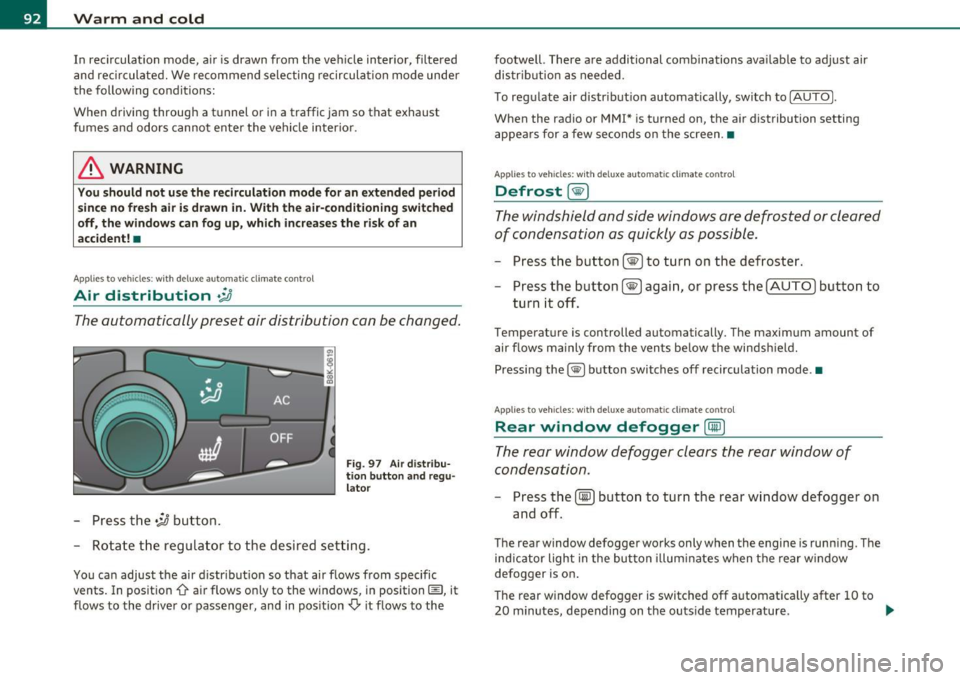
Air distribution .JJ
The automatically preset air distribution can be changed.
-Press the .;J button.
Fig. 97 Air distribu
tion button and regu
lator
- Rotate the regulator to the desired setting.
You can adjust the air distribution so that air flows from specific
vents. In position
0-air flows only to the windows, in position@, it
flows to the driver or passenger, and in position
,0. it flows to the footwell.
There are additional combinations available to adjust air
distribution as needed.
To regulate air distribution automatically, switch to
!AUTO).
When the radio or MMI* is turned on, the air distribution setting
appears for a few seconds on the screen .•
Applies to veh icles: wit h deluxe automat ic cl imate control
Defrost [@)
The windshield and side windows are defrosted or cleared
of condensation as quickly as possible.
- Press the button !@)to turn on the defroster.
- Press the button[@) again, or press the [
AUTO I button to
turn it off.
Temperature is controlled automatically. The maximum amount of
air flows mainly from the vents below the windshield.
Pressing the
I@ ) button switches off recirculation mode .•
Applies to veh icles: w ith d eluxe automat ic cl imate contro l
Rear window defogger [CiID)
The rear window defogger clears the rear window of
condensation.
- Press the (!iiPJ button to turn the rear window defogger on
and off.
The rear window defogger works only when the engine is running. The
ind icator light in the button illuminates when the rear window
defogger is on.
Th e rear window defogger is switched off automatically after 10 to
20 minutes, depending on the outside temperature . ...
Page 96 of 364
![AUDI A5 CABRIOLET 2010 User Guide Warm and cold
(I] Tips
If the climate control is running in cooling mode, air flows mainly
from ve nts @ and @. To achieve adequate cooling, you should never
close these vents c](/img/6/57573/w960_57573-95.png "AUDI A5 CABRIOLET 2010 User Guide Warm and cold
(I] Tips
If the climate control is running in cooling mode, air flows mainly
from ve nts @ and @. To achieve adequate cooling, you should never
close these vents c")
Warm and cold
(I] Tips
If the climate control is running in cooling mode, air flows mainly
from ve nts @ and @. To achieve adequate cooling, you should never
close these vents completely. •
Applies to vehicles: wit h deluxe auto mati c climate c ontro l
Economical use of the climate control
system
Economical use of the climate control system helps save
fuel.
When the climate control system is working in cooling mode,
engine performance is reduced and fuel consumption is
affected. To keep the time the climate control system is on as
short as possible, you should do the following :
- To save fuel, turn off cooling mode by pressing the [AC]
button (indicator light goes out).
- In addition, if you open the window while driving, turn off cooling mode by pressing the
[AC] button (indicator light
goes out).
- If the vehicle is extremely hot due to the heat of the sun,
briefly open doors and windows.
For the sake of the environment
When you save fuel, you reduce emissions from the vehicle. •
App lies to veh ic les: with del uxe automatic climate control
Automatic recirculation
An air quality sensor detects increased concentrations of
pollutants in the outside air and automatically switches
to recirculation mode.
The basic climate control settings can be adjusted in the
radio or
MMI*.
- Select: Function button [CAR]> Climate control switch.
We recommend that you always keep automatic recirculation ON to
prevent polluted outside ai r from entering the vehicle interior.
If the
air quality sensor located in the climate control system detects
polluted outside air, the sensor decides whether the air pollution can
be reduced by the factory-installed pollutant filter or whether it is
necessary to switch to recirculation . With heavy concentrations of
pollutants, the climate control system is switched automatically to
recirculation mode and the supply of outside air is blocked . As soon
as the concentration of pollutants in the outside air drops, fresh air is
supplied to the vehicle interior again.
In the event tha t the windows fog up during au tomatic recircula tion,
press the[@] button immediately.
Under certain operating conditions, automatic recirculation is
switched off automatically. When outside temperatures are below
about SO
°F ( + 10 °(), automatic recirculation is limited to
30 seconds. When outside temperatures are below about 30
°F (-
1 °(), automatic recirculation is limited to 15 seconds .•
Page 104 of 364

1111....__w __ a _r_ m __ a_n_ d_ c_ o _ l_d _______________________________________________ _
Applies to veh icles : wi th d eluxe automat ic clim ate cont rol pl us
Economical use of the climate control
system
Economical use of the climate control system helps save
fuel.
When the climate control system is working in cooling mode,
engine performance is reduced and fuel consumption is
affected. To keep the time the climate control system is on as
short as possible, you should do the following:
- To save fuel, turn off cooling mode by pressing the AC
button (indicator light goes out).
- In addition, if you open the window while driving, turn off
cooling mode by pressing the AC button (indicator light
goes out).
- If the vehicle is extremely hot due to the heat of the sun,
briefly open doors and windows.
~ For the sake of the environment
When you save fuel, you reduce emissions from the vehicle. •
Applies to vehicles: with deluxe automatic climate cont rol plus
Deluxe automatic climate control plus -
basic settings
The basic climate control settings can be adjusted in the
radio or MM!*.
-Select: Function button (CAR]> Climate control switch.
Automatic recirculation
An air quality sensor detects increased concentrations of pollutants
in the outside air and automatically switches to recirculation mode. We recommend that you always keep automatic
recirculation ON to
prevent polluted outside air from entering the vehicle interior.
If the
air quality sensor located in the climate control system detects
polluted outside air, the sensor decides whether the air pollution can
be reduced by the factory-installed pollutant filter or whether it is
necessary to switch to recirculation. With heavy concentrations of
pollutants, the climate control system is switched automatically to
recirculation mode and the supply of outside air is blocked. As soon
as the concentration of pollutants in the outside air drops, fresh air is
supplied to the vehicle interior again.
In the event that the windows fog up during automatic recirculation,
press the
l@I button immediately.
Under certain operating conditions, automatic recirculation is
switched off automatically. When outside temperatures are below
about 50
°F ( + 10 °(), automatic recirculation is limited to
30 seconds. When outside temperatures are below about 30
°F (-
1 °C), automatic recirculation is limited to 15 seconds .
Synchronization
After Synchronization is set to on, all of the subsequent climate
control settings (except for seat heating*) for the driver are trans
ferred to the front passenger .
Synchronization is canceled when settings are adjusted on the front
passenger's side .•