radio AUDI A5 CABRIOLET 2010 Owner's Manual
[x] Cancel search | Manufacturer: AUDI, Model Year: 2010, Model line: A5 CABRIOLET, Model: AUDI A5 CABRIOLET 2010Pages: 364, PDF Size: 86.51 MB
Page 110 of 364

ffl..__O_ n_ t_h _ e_ r_ o_ a_ d _________________________________________________ _
Starting and stopping the engine
with convenience key
A pplies to veh ic le s: w ith conven ience ke y
Starting the engine with the
[START ENGINE S TOP] button
This button switches on the ignition and starts the
engine.
Fig. 109 Convenience
key: START ENGINE
STOP button
-Step on the brake pedal and move the selector lever to P
orN =>& .
- Press onthe[START ENGINE STOP)button::::>fig. 109-
the engine will start .
By pressing the [START ENGINE STOP] button without depressing
the clutch or the brake peal, the ignition is switched on and sw itched
off by pressing it again .
If the engine does not start immediately, stop trying after 10 seconds
and then try to restart the engine about 30 seconds later.
After a co ld engine is started, there may be a brief period of increased
noise because oil pressure must first build up in the hydraulic valve
adjusters. This is normal and not a cause for concern.
Driver message in the instrument cluster display
No key identified
This message appears when the !START ENGINE STOP] button is
pressed if there is no master key ins ide the veh icle or if the system
does not recognize it. For example, the master key cannot be recog
nized if it is covered by an object (e.g. aluminum brief case) which
screens the radio signal. Electronic devices such as cell phones can
also interfere with the radio signal.
Press brake pedal to start engine
This message appears if you press the !STAR T ENGINE STOP)
button to start the engine and do not depress the brake pedal. The
eng ine can only be started if the brake peda l is depressed.
Engage N or P to start engine
This message appears when attempting to start the engine if the
selector lever for the automatic transmission is not in the P or N posi
tion. The engine can on ly be started with the selector in these posi
tions.
Key not in vehicle
This message appears along with the.:! symbol if the master key is
removed from the vehicle with the engine running. It is intended to
remind you (e.g. when changing drivers) not to continue the journey
without the master key .
If the master key is no longer in the vehicle, you cannot switch on the
ignition after stopping the engine and you also cannot start the
eng ine again. Moreover, you cannot lock the vehicle from the outside
w ith the key.
Shift to P, otherwise vehicle can roll away. Doors do not lock if lever
is not in P .
This message appears for safety reasons along with a wa rning signal.
It appears if the selector lever for the automatic transmission is not
in the P position when switching off the ignition with the
!START ENGINE STOP] button. Move the selector lever to the P _..
Page 123 of 364

____________________________________________ A_ d ___ a~p _t __ i_ v _e_ c_r_u _ i_ s _e_ c_o_ n_ t_r _o _l __ _
Appli es to ve hicl es: wi th a daptive cruise cont rol
How is the distance (time interval) set?
Distance con be set in four stages.
m 0 [;; ,.: 00 a,
Fig . 119 Contro l
l ever : Sett ing distance
- Push the slider switch once to the right 0 or to the left Q
~ fig. 119. The distance currently set is shown for 3
seconds in the instrument cluster disp lay .
Push the slider switch ag ain to the right 0 or to the left
Q to increase or to decrease the distance by one step.
S ele ct distan ce
The distance at which the adaptive cru ise control follows a vehicle in
front is determined by
time intervals . A time interval to a vehicle in
front is established and maintained. This produces a speed-depen
dent interval. The higher the speed, the greater the safety interval in
yards (meters) ~
&-
The d istances provided are spec ified values. These d istances may
exceed or fall short of these target distances, depending on the
driving situation and the driving style of the vehicle ahead.
Distan ce 1 ~-~ ---
This sett ing is ideal for brisk driving i n bumper-to-bumper traffic. The
distance is one second. This is the equivalent of, for instance,
• a distance of 36 feet (11 meters) at a speed of 25 mph (40 km/h)
Controls and equip
ment Safety first
•
a distance of 72 feet (22 meters) at a speed of 50 mph (80 km/h)
• a dist ance of 108 feet (33 meters) at a speed of 75 mph (120
km/h)
Di sta nc e 2 ,;::::, -- ~--
This setting is ideal for "keeping pace" comfortably in bumper-to
bumper traffic. The distance is 1.3 seconds. This is the equ ivalent of,
for instance,
• a distance of 46 feet (14 meters) at a speed of 25 mph (40 km/h)
• a distance of 95 feet (29 meters) at a speed of 50 mph (80 km/h)
• a distance of 144 feet (44 meters) at a speed of 75 mph ( 120
km/h)
Di st a nce 3 ~--- ~-
This setting is idea l for "keeping pace" in bumper -to-bumper traffic
and is the equivalent of the generally recommended distance that is
"half of the speedometer speed" . The distance is 1 .8 seconds. This is
the equivalent of, fo r instance,
• a distance of 66 feet (20 meters) at a speed of 25 mph (40 km/h)
• a distance of 131 feet (40 mete rs) at a speed of 50 mph (80 km/h)
• a distance of 197 feet (60 meters) at a speed of 75 mph (120
km/h)
Di sta nce 4 ~-- --~
T his sett ing is ideal for secondary road traffic. The distance is 2.3
seconds. This is the equivalent of, for instance,
• a dista nce of 82 feet (25 mete rs) at a speed of 25 mph (40 km/h)
• a distance of 167 feet (51 meters) at a speed of 50 mph (80 km/h)
• a distance of 249 feet (76 meters) at a speed of 75 mph (120
km/h)
You can set the way your vehicle performs in ACC mode when acce ler
ating and braking in the radio or in MMI*
~ page 127. Depending on
the driving p rogram and distance you se lect , you r veh icle's accelera-
tion and braking can range from dynam ic (1) to comfortable (5) . _,.
Vehicle care Technical data
Page 137 of 364

Audi lane assist -_______________________________ lff'II
Applie s to vehicles: w ith lane assist
Setting the warning time and steering
wheel vibration
You c an use the radio or MM I* to adjust the warning time
and steerin g wheel vibration.
Setting the warning time
- Press the [ CA R] function button .
- Selec t
Systems * in the CAR men u.
- Selec t
Audi lane assist .
Fig. 13 7 MMI D isplay:
S ettin g the w arning
time an d stee ring
w he el vibr ation
- Select Warning early , adaptive or late => fig. 13 7.
Setting the steering wheel vibration
- Press th e [ CAR] function bu tt o n.
- Select
Systems * in the CAR men u.
- Select
Audi lane assist .
-Selec t Steering vibration weak , medium or strong .
Controls and equip
ment Safety first
Setting the warning time
Earl
y: This setting wa rns the driver before a wheel touches the
de tected la ne bounda ry l ine. The warn ing depends on the vehicle's
angle as it approaches the bo undary line . If you app roach a bounda ry
line gradua lly, t he war ning will occ ur earlier. If you app roach the
boundary line at a very sharp angle, the warning will occur just before
a whee l touches the line.
Adapti ve : In this setting, the warning time adjusts to the character
ist ics o f th e road and the veh icle speed . The wa rning occurs later for
c u rves and occurs ear lier for straight stretches of road. The warn ing
occurs later on narrow roads t han on w ide roads .
Late: This setti ng warns the d river when a whee l dr ives over the
detected lane boundary line.
Setting the steer ing wheel vibration
When ad justing the steering wheel vib ration, the steer ing wheel
vibrates so that yo u can c hec k t he intens ity you have set.
(I) Tips
• Whe n mak ing t he ad justment, lane ass ist is not act ivated. The
steering wheel v ibrates briefly only to assist you in chang ing the
se tt ing.
• Your settings are automatically stored and assigned to the remote
cont rol key being used. •
Vehicle care Technical data
Page 143 of 364

_________________________________________________ A_ u _ d_ i_ s_ id_ e_ a _ s_s _ i_s _t _--J_
A pplie s to ve hicles : wi th s id e ass ist
Driving situation: Vehicles dropping back
quickly
@
I
- (OIDJ -
•. _ ...
' I
- Q•n
-~---
Fig. 145 Side assist: Vehicles dropping back quickly
(D Signal on outside mirror does not light up
The vehicle just passed has not yet been detected by side assist. The
signal on the outside mirror does not light up~
& in "Safety tips" on
page 143.
@ Signal on outside mirror does not light up
The vehicle dropping back quickly on the right (difference in speed of
more than 9 mph, or 15 km/h) has been detected by side assist, but
is not considered notable in the event of a lane change, because it is
dropping back so quickly . The signal on the outside mirror does not
light up~
& in "Safety tips" on page 143.
Con tro ls a nd e quip
m en t Vehicle
OP-eration
® Signal on outside mirror does not light up
If you activate your turn signal in driving situation @, the signal still
does not light up on the outside mirror~
& in "Safety tips" on
page 143. •
App lies to ve hicles : with side assis t
Setting the signal brightness on the
outside mirror
The signal brightness can be set in the radio or in the
fv1fv1I*.
- Select: Function button I CAR] > Audi side assist.
- Rotate the control knob to adjust the displayed brightness
of the signal Light on the outside mirrors.
The brightness of the signal light for both the informational a nd alert
stages is automatically adjusted to ambient light conditions. In addi
tion, you can adjust the
basic brightness separately, via the bright
ness function.
While making the adjustment, the new brightness setting is
displayed briefly. The brightness displayed is that of the informa
tional stage signal. The alert stage signal brightness is linked to the
informational stage signal brightness.
The informational stage signal brightness should be adjusted so that
you notice the signal illumination when you look in the outside
mirror, but not when you look forward through the windshield .
In very dark or light surroundings, the automatic brightness setting
adjusts signal light brightness to maximum or minimum intensity, as
needed. In circumstances such as these, you may not notice any
change in the brightness on the outside mirror when adjusting the
basic brightness.
You may not notice the change until lighting conditions are normal
again.
Vehicle care Do-it-yourselt service iTechnical data
Page 148 of 364

llffl..__A_ u_d_ i _d _r_ i_v _e _ s_e _ l_ e _ c_ t _______________________________________________ _
• The dynamic steering may make noise when starting or stopping
the engine. This does not indicate a problem. •
Applies to ve hicle s: wit h Audi d rive select
Selecting the driving mode
You can choose between COMFORT, AUTO, DYNAMIC and
INDIVIDUAL* modes.
w, ...,· _ tVT-'O ___. •tiilf
Fig . 148 Shift gate:
Control for Audi drive
select
Fig . 149 Center
console: Control for
Audi drive select
The control is located on the shift gate~ fig. 148 in vehicles
with a radio, and in vehicles with MMI, it is located in the
center console~ fig. 149.
- Turn on the ignition. -
Press the left or right arrow button until the desired mode
appears in red.
You can change the driv ing mode when the vehicle is stationary or
while driving. If traffic permits , after changing modes, br iefly take
your foot off the accelerator pedal so that the recently selected mode
is a lso act ivated for the eng ine and transmission .
COMFORT
The COMFORT mode provides a comfortable vehicle setting . The
eng ine and automatic transmission* react in a balanced manner to
movements of the acce leration pedal. Steering is light and indirect,
and adaptive dampers provide a soft suspension. The setting is ideal
for driving on long stretches, such as on freeways.
AUTO
Full use of AUTO provides a comfortable, yet dynamic feel. The
se ttin g is per fect fo r daily use.
DYNAMIC
DYNAMIC gives the vehicle a sporty feeling. The eng ine responds
quickly to accelerator pedal movements, and steering is sporty and
direct. The adaptive dampers are adjusted to provide a stiffer suspen
sion, and the automatic transmission* sh ift points are set at higher
eng ine speed ranges . The setting is idea l for sporty driv ing.
INDIVIDUAL*
You can adapt this mode to your personal needs in the MMI.
& WARNING
Pay attention to traffic when operating Audi drive select to
prevent potential risk of an accident.
Page 165 of 364

______________________________________________________ P_a _ r_ k_ a_ s_s _i _ s _t __ _
Park assist
Applies to vehic les: wit h pa rk ing s yst e m
Parking system
D iff erent park assist systems may be used for parking or
maneuvering, depending on the vehicle's features .
Parking system (rear)*:
For the parking system, the acoustic par k assist system is installed in
the rear of the vehicle=>
page 163.
The rear par king assist sys tem uses ultrason ic sensors to determine
the distance of the vehicle from a detected obstacle. There are a total
o f f our sensors located on t he rear bumper (two in the middle and
two on the sides).
Parking system (rear, with rear-view camera)*:
For the parking system (rear , wi th rear-view camera), the rear
aco ustic park assist system is integ ra ted in the rear of the vehicle and
the rear-view camera is integrated in the rear lid=>
page 167.
The parking system (rear, with rear-view camera) uses ultrasonic
senso rs to determine the distance of the vehicle from a detected
obstacle. The re are a total of four sensors located on the rear bumper
(two in the m iddle and two on t he sides). •
Controls and equip
ment Safety first
Parking system (rear)
Ap
plies to vehicl es: w ith pa rk ing s yste m (r ear)
Rear acoustic park assist
The rear acous tic park assist warns you of obstacles or
objects behind your car .
Description
The rear a co ustic parki ng assis t sys tem de termines t he d istance o f
the vehicle from an obstacle us ing ultraso nic sensors . There are 4
sensors in the rear bumpe r.
T he range at which the sensors start to measure is
about :
To the side
Center rear
Acti vation
2 ft (0.60 m)
5.2 ft (1.60 m)
Aco ustic park ing assis t is activated au tomatically when
rever se gear
is engaged. A brief tone confirms that the system is activated .
Warning tones
Distance warning is given by chimes which are generated by the rear
signal generator . The vo lume and the pi tch of the chimes can be
adjusted in the radio or i n the MMI* =>
page 164 .
Reversing
Distance warn ing when reversing starts when an obstacle is detected
in the range o f th e parking ass ist system . As t he distance decre ases,
the time interva l between the a udible tones becomes shorter .
Whe n the distance is less than 1 ft (0.30 m), the tone becomes
c ont inuo us. A t this point you should stop ba cking up.
Vehicle care Technical data
Page 166 of 364

1111...._ __ P_a _ r_ k_ a_ s_ s_is _ t ____________________________________________________ _
Please note that low objects already signa led by a warning can disap
p ear from the system 's de te ct io n ra nge and will not co nti nu e to be
signaled .
If the distance to an obstacle remains the same, the vo lume of the
dis tance war ning is g radually reduce d after abou t 4 seconds.
Approaching another obstacle wi ll result in the distance warning
so unding at t he normal vo lume aga in.
Malfunctions in the system
If a wa rning tone is aud ible fo r abo ut five seconds when you turn on
the ignition, there is a ma lfunction in the system. Have the prob lem
c o rrected by yo ur autho riz e d Aud i de aler.
Keep the se nsors i n the rear bumper clean and free from ice so t hat
t he a cous tic p ark ass is t sys tem can func tion prope rly.
& WARNING
• Sen sor s have dead space s in whi ch objects cannot be dete cted.
Be especiall y alert for small children and animals , since they are
not alway s detected by the sen sors .
• The Acoustic Par king Sy stem is not a substitute for the dr iver 's
own caution and alertne ss. Ul timate re spon sibility always
rema ins with the drive r dur ing pa rking and similar maneu ve rs .
Always watch where you ar e driving .
• You should alwa ys adjust the volume and frequency of the
c hime s so that you can easily hear the a cou stic distan ce warning
e v en if the radio is playing, the air -cond itioner blower is on High
or there i s a high l evel of outside noi se .
- Check the setting s whenever anyone else ha s driven the
vehi cle b efore you .
0 Note
• Remembe r that low obstacles fo r which a war ning has already
been issued may "dive" below the system's sensing zone if the vehicle
is be ing b acked up closer . In this case, the warn ing so und sh utting off does
not ind
icate that you have cleared the obstacle. Instead, impact
is imm inen t.
• Objects such as tra iler hitches, chains, narrow posts or fences
c overed by a th in laye r of pa int may no t always be detected by the
system . They can still damage your vehicle without warning .
[ i ] Tips
Keep the sensors in the rear bumper clean and free of snow and ice so
that the acoustic parking assist system can function properly .•
Ap plies to veh icles : w it h park ing s yst em (rea r)
Adjusting the chimes
T he volume and the pitch (frequency) of the chimes can
be adjusted in the radio or in the fv1fv1I *.
Rear volume adjustment
-Select: [CAR]> Parking system .
-Select Rear volume if you wa nt to cha nge the volume of
the rear s igna l generator .
Rear frequency adjustment
-Sele ct: [CAR)> Parking system.
- Select Rear frequency when you want to change the
frequency of t he rear audible signa l generator.
When ad justing the vo lume and frequency, the new sett ing will
sound for approx. 2 seconds from each aud ible signal generator. The
volume and frequency settings a re automat ica lly stored and assigned
to the master key with remote control. .,,,
Page 172 of 364

lffl!IL____:P:....::a:.:r..:k:..:::a::s:.:s::.:i~s:.:t :..._ _________________________________________________ _
- Back into the parking space until the blue curve touches
the curb~
page 169, fig . 174. Stop the vehic le .
- While the ve hicle is stationa ry, turn the steering whee l to
the left as far as i t will go.
- Continue to back up into the parking spot until the ve hicle
is parked parallel to the curb. ® mar ks the rear bumper.
You shou ld stop dr iving i n reverse as soon as and no later
than when the red orientation line
0 abuts a n object
~ & !Kee p an eye on the front of your vehicle wh ile doing
this ~0.
Parking next to obs tacles
When there is an obstacle (such as a wall) next to the parking spot,
c hoose a spo t w it h more space on the sides. Position the long side of
the blue area so that there is sufficient space from the curb. The area
must not be on the curb . You will a lso need to star t turning the
steering wheel much earlier. There should be a suff icie nt amount of
space between the c urb and the b lue c urve, and the b lue c urve
=> page 169, fig. 17 4 must not touch the curb .
& WARNING
• The rea r-v iew camera does not show the entire area behind the
vehicle =>
page 166, fig. 169 . Watch out e spe cially for small chil
dr en and animal s. The rear-view camera cannot alway s det ect
them, posing risk of an accident!
• Please note that objects not touch ing the ground can appear to
be further away than they really are (for example, the bumper of
a park ed vehicle, a trailer hit ch , or the rear of a truck) . In this case ,
you should not use the help lines to help with parking , which
po ses danger of an accid ent!
0 Note
In the MMI display, the d irection of t ravel of the vehicle rear is rep re
sented depending o n the steering wheel angle . The ve hicle front
swi ngs ou t mo re than the ve hicl e rea r. M aintain plenty of d istance
from an obstacle so that your outside mirror or a corner of your
veh icle does not collide w ith any obstacles - d anger of a ccident!
[ i ] Tips
Th e left or rig ht or ientation lines and surfaces w ill be displayed,
depending on the tur n signa l being used .•
A pp lies to veh icles: with par king system (rear) and r ear-view camera
Adjusting the display and warning tones
The display* and warning tones can be adjusted in the
radio or in the MM!*.
-Select : [CAR)> Parking system.
Display
• Off -when the parking system is switched off, only aud ible sig nals
are g iven.
• On -when the pa rking system is switched on , eithe r the visua l
display or the p ictu re from the rearview camera is displayed.
Warn ing tones
• Front volume -front sensor vo lume
• Front frequency -front sensor frequency
• Rear volume -rear senso r vo lume
• Rear frequency -rear sensor freq uency
• In-car ent ertainment fader -when the park ing system is sw itched
on, the volume of the active audio source is lowere d.
Th e newly adju ste d val ue is briefly he ard from the signal generato r . ..
Page 174 of 364

-HomeLink ® •m ___________________ _
Homelink®
Universal remote control
Applies to veh icles: w ith Hom elin k® un iversal re m ote contro l
General information
The Homelink ® feature can learn up to three radio
frequency codes for most current transmitters used for
operating garage doors, estate gates , home or outdoor
lighting systems, and other devices.
Yo u must fi rst p rogr am the Home link® tra nsmi tte r be fore you can
use the system=>
page 173, "Programming the Home link ® trans
m itter".
In order to program the Homelink ® transm itter fo r devices utilizing
rolling code, a second person on a ladder who can sa fely reach t he
garage door opener motor is recommended. It is also necessary to
locate the "learn" button on yo ur garage door opener motor . Re fer to
t he oper ating ins truc tions fo r th e opene r, as the loca tion and color o f
this button may vary by manufacturer .
Yo u can still use the original remote control for the device at any
t ime .
& WARNING
• Never use the Homelink'"' transmitter with any garage door
opener that does have not the safety stop and rever se feature as
required by fed eral safety standards. This includes any garage
door opener model manufactured before April
l , 1982 .
• A garage door opener which cannot detect an object, signaling
the door to stop and reverse does not meet current federal safety
standards . Using a garage door opener without these features
increases risk of serious injury or death.
& WARNING (cont inu ed )
• For safety reasons never release the parking brake o r start the
engine while anyone i s standing in front of the vehicle .
• A ga rage door or an estate gate may sometimes be set in
motion when the Homelink ® remote control is being
programmed. If the device is repeatedly activated, this can over
s train motor and dam age its electri cal components -an over
heated motor is a fi re hazard!
• To avoid pos sible injurie s or property damage , plea se always
make absolutely certain that no persons or objects are located in
the range of motion of any equipment being operated.
[ i ] Tips
• If you would like mo re inf orma tion o n Hom eli nk ®, whe re to
purchase the Homelink ® compat ible products, or would like to
purc hase the Homeli nk® Home Lighting Pac kage, p lease ca ll to ll
free : 1-800-355-3515 .
• F or Declaration of Compliance to United Sta tes FCC an d Indus try
Canada regulations=>
page 346. •
Page 176 of 364
IIIIL----.:H....:..: o:....:m..:..:.. e= L:.:.i :....: n :.:.k :....: ® __________________________________________________ _
10. Press and hold the trained Homelink® button and
o bserve the in dicator light©==>
page 173, fig. 175.
- If the indicator light is solid/continuous, programming is
complete and your device should activate when you press
and release the trained Homelink ® button .
- If the indicator light blinks rapidly for 2 seconds and is
then a solid/continuous light , proceed with phase 3 to
program a rolling code device .
Phase 3: rolling code progr amming
- A second person on a ladder who can safely reach the
garage door opener motor is recommended.
11. Locate the "learn" button on the garage door opener
motor (refer to the operating instructions for the opener,
as the location of this button may vary by manufacturer) .
12. Press and release the learn button on the garage door opener motor.
- Note: once the button is pressed, the re are 30 seconds in
which to initiate the next s tep .
13. On the Homelink ® keyJ)ad inside the vehicle, firmly press
and hold the Homelink ® button previously programmed
in phases 1 and 2 for two seconds and release. Repeat this
sequence
twice .
-Some vehicles may require the press/hold/release
sequence up to three times to complete the training
process .
-Homelink ® should now activate your rolling code
equipped device .
If the 5 minute time limit is exceeded, the emergency fl ash ers will
fla sh one time
to ind icate that the process has been terminated. In
this case, repeat steps 4 th rough 9 .
If the emergency flashers do not flash
three times (after about 15-
60 seconds), programming was not s uccessful. In th is case, repeat
steps 4 through 9.
Remote control un its for garage doo r openers in Canada are se t to
stop transmitting radio frequency signals after two seconds. This
time may not be sufficient for the Homelink ® system to learn the
radio frequency signal. Perform all other steps as descr ibed above .•
App lies to veh icles: with H omelink ® un iversa l re mote cont ro l
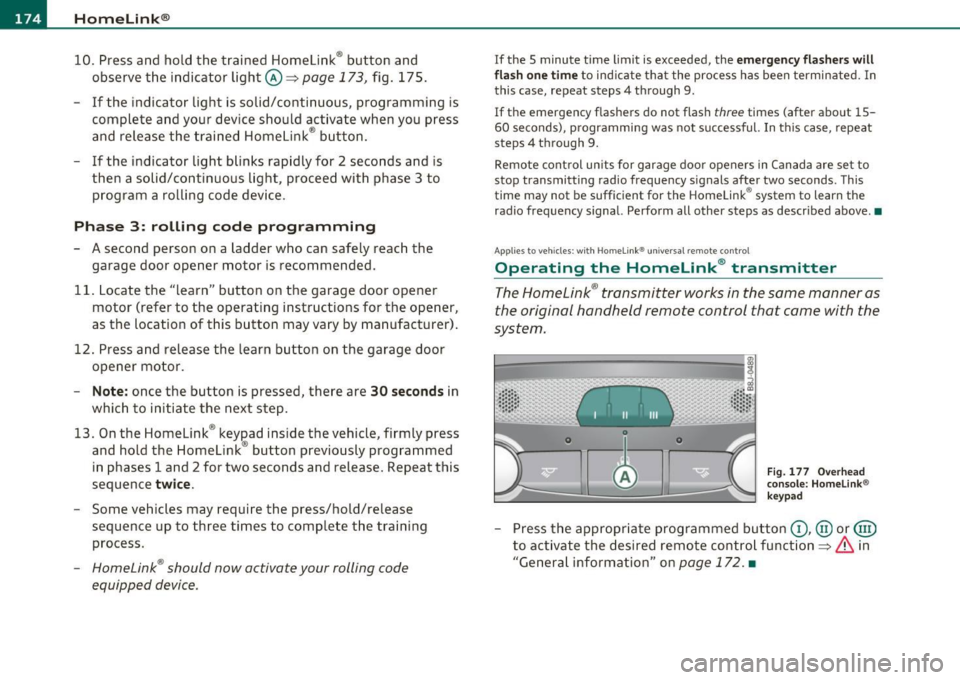
Operating the Homelink ® transmitter
The Homelink ® transmitter works in the same manner as
the original hand held remote control that came with the
system .
0
•
0
~
Fig . 1 77 Ove rhead
co nso le: H om elin k®
k ey pad
- Press the app ropriate programmed bu tton G) , @ or@
to activate the desired remo te cont rol function ==>
& in
"General information" on
page 172. •