ignition AUDI A5 CABRIOLET 2010 Owner's Manual
[x] Cancel search | Manufacturer: AUDI, Model Year: 2010, Model line: A5 CABRIOLET, Model: AUDI A5 CABRIOLET 2010Pages: 364, PDF Size: 86.51 MB
Page 35 of 364

This driver message and the symbol,;;:;,. appear when a system
malfunction occurs during travel. You can continue to drive carefully
at a reduced speed to a qualified workshop. Steering can be more
difficult or sensitive than usual. The steering whee l can also be at an
angle when driving straight .
Dynamic steering: initialization
If this driver message appears and the indicator lightl, is flash ing on
the instrument panel, dynamic steering is being reinitialized . Once
you start the engine after this is finished, the steering wheel wi ll be
easy to move. Re -initializat ion might be necessary if the steering
wheel was moved hard to the left and right while the vehicle was not
moving. The display goes out as soon as initial izat io n is complete.
& WARNING
Have the dynamic steering system malfunction repaired as soon
as possible by an authorized Audi dealer or any qualified workshop
- risk of accident!
[I) Tips
The dynamic steer ing stability systems are not ava ilab le in the event
of a system ma lfunct ion .•
Ap plies to ve hicles : w it h c onven ien ce key
Key not in vehicle
Key not in vehicle
This reminder appears along with the symbol if the master key is
removed from the vehicle with the engine running. It is int ended to
remind you (e.g. when chang ing drivers) not to continue the journey
without the master key.
If the master key is no longer in the veh icle, you cannot sw itch off the
ignition after stopping the engine and you a lso cannot start the
engine again. You also cannot lock the veh icle from the outs ide .•
Controls and equip
ment Safety first
Driver information display
Light/rain sensor defective
·)
Automatic headlights/automatic wipers defective
If the symbol ill um inates , the light sensor has failed. For safety
reasons the low beams are turned o n permanently with the switch in
AUTO . However, you can continue to turn the lights on and off using
the light switch . In the case of a defect in the ra in sensor, the wind
shield wiper lever functions are still avai lable . Have the light/rain
sensor checked as soon as possib le by an autho rized Audi dealer. •
Worn brake pads ~
Brake pads!
If the warning light illuminates, immediately contact your authorized
Audi dealer or qualified workshop to have all brake pads inspected .
On USA mode ls the warning light comes on together with the
war ning light BRAKE . Both sets of b rake pads on an axle must always
be replaced at the same time.
& WARNING
Driving with bad brakes can cause a collision and serious personal
injury .
• If the warning light and the warning light
BRAKE1> with the
message Brake pads! comes on in the instrument cluster display,
immediately contact your authorized Audi dealer or qualified
workshop to have all brake pads checked or replaced if necessary. •
ll BRAKE : USA mode ls on ly
Vehicle care Technical data
Page 37 of 364
Check engine oil 1o
Please top off with ma x. ll of o il. You can keep dri ving.
If the ~ symbo l lights up displaying t his drive r message, t hen ad d a
maximum of
1 liter at your earliest opportunity~ page 285. •
Engine oil level i!:r..,
Please check oil level
When the symbol i lluminates, check the engine oi l level as soo n as
poss ible ~
page 284. Top off the oil at your earliest o pportunity
~ page 285. •
Engine oil sensor defective
" Oil level! Sensor defective
If the symbo l illumina tes, contact your author ized A udi dealer and
have the o il sensor inspected. Until you have this done, check the oil
level each tim e yo u refue l ju st to be on the s afe side ~
page 28 4. •
A pplies t o veh icl es: with eng ine s peed lim itat io n
Engine speed limitation 71
Do not e xceed ma x. engine speed of XXXX rpm
Th e ~ symbo l ill uminates whe n there is an engi ne con trol malfunc
t ion . The ind icator light
Er"" in the instr ument cluster also i llum inates .
Th e engine speed is limited to the s peed disp laye d in the driver info r
mation system . Keep in m ind that the engine speed will not exceed
the value disp layed in the driver information system, for examp le
w hen downshifti ng.
Please go to a n author ized Audi dealer or other qualified workshop to
h ave the mal func tion rep aired .•
Controls and equip
ment Safety first
Driver information display
• Headlight range control defective
)
Headlight range control defective !
If the sym bo l ~ ill um ina tes, the dynam ic he adl ight range con tro l is
no lo nger work ing properly . H ave t he system checked and repa ired at
your authorize d Aud i dea ler. •
App lies to ve hicle s: wit h ad apti ve light
Adaptive light defective f:.J
adaptive light defective
When this symbol Ji.., ill uminates, it means that adaptive light is
defective. Go to an author ized Audi dealer to h ave the headlig hts o r
the contro l unit for the adaptive lig ht repa ire d.•
Ignition lock malfunction ..c,
~ Ignit ion lock defective
If the sym bol i n the displ ay comes on, t here is a mal func tion in t he
elect ronic ignit ion lock . Please go to an authorized Audi dealer or
o th er qu alified w orkshop to have the mal func tio n re pa ir ed .•
A pp lies to ve hicl es: w it h Aud i d ri ve sele ct
Adaptive dampers~
Adaptive dampers: system malfunction
If the symbol in the dis pl ay comes on , there is a malfunction in the
adaptive dampers . P lease go to an au thorized Aud i dea le r or other
qualifie d wo rks hop to have t he malfunct io n repaire d.•
Vehicle care Technical data
Page 39 of 364

Opening and closing
Keys
Key set
Fig. 23 Key set
© Master key with remote control
You can centrally lock a nd u nlock your ve hicle and start the eng ine
with the master key with remote contro l.
® Emergency key
The emergency key is not intended for cons tant use. It should o nly be
used in an emergency . Keep it in a safe place and do not carry it on
your key ring.
Key replacement
If you lose a key , contact your a uthori zed Audi dea le r immedi ately to
have the
lost key disabled . Be sure to bring all your keys w ith you .
Data in the master key
During driving, service and maintenance-relevant data is cont inu
o usly s tore d on yo ur maste r key. Your Aud i service adviser can re ad
out this data and tell you about the work your veh icle needs . This
a pp lies a lso to ve hicles with convenience key* .
Controls and equip
ment Safety first
Opening and closing
Personal comfort
settings
If two peop le use one veh icle, it is recommended that eac h person
a lw ays uses "t heir own " mas ter key. When t he ig nitio n is tu rned off
or when the vehicle is locked, personal conven ience settings for the
following systems are sto red and assigned to the remo te maste r key .
• Climate co ntrol
• C entra l lo ck ing system
• Seat memory*
• Parking sys tem *
• Audi s ide assist*
• Audi dr ive select*
T he sto red sett ings a re a utomatica lly recalled w hen you unlock the
vehicle, when you open the doors o r when you tu rn o n the ignition .
& WARNING
• Do not leave your vehicle unattended w ith the key in the igni
tion lock. Entry by unauthorized per sons could endanger you or
result in theft or damage the vehicle. Alway s lock all doors and
take the key.
• Do not leave children unattended in the veh icle, especially with
access to vehicle key s. Unguarded acce ss to the ke ys pro vide s chil
dren the opportun ity to start the engine and /or activate vehicle
s y stem s such as the power windows etc . Unsupervi sed operation
of any vehicle system by children can result in serious injury.
• Do not remove the ke y from the ignition lock until the vehicle
ha s come to a complete stop. Otherwise the ste ering column lock
could suddenly engage -causing the ri sk of an accident. .,_
Vehicle care Technical data
Page 40 of 364

Opening and closing
(I) Tips
• The operation of the remote control key can be temporarily
disrupted by interference from transmitters in the vicinity of the
vehicle working in the same frequency range (e.g . a cell phone, radio
equipment).
• If you open the driver's door with the key left in the ignition lock,
a chime will sound. This is your reminder to remove the key and lock
the door .
• For security reasons, replacement keys are only available from
Audi dealers.
• For Declaration of Compliance to United States FCC and Industry
Canada regulations=>
page 346 . •
Check Light in the master key
The check light in the master key provides information
about different conditions.
Fig. 24 Check light in
t he master key
The check light comes on briefly once when a button is pressed, and
during an "inquiry" by the convenience key system. If the check
light does not come on, the battery is dead and has to be
replaced. In addition, when the battery is dead the symbo l appears
in the instrument cluster display as well as the message :
Please change key battery
Battery replacement => page 38. •
Master key battery replacement
•
Fig. 25 Remote
master key: Removing
the mechanical key
Fig. 26 Remote
master key: Removing
the battery holder
We recommend having the battery changed by an authorized
Audi dealer. However, if you wish to replace the dead battery
yourself, proceed as follows:
- Press the release button©~ fig. 25 . ..,.
Page 41 of 364

-Pull the mechanical key® out of the master key.
- Press the release button@=>
page 38, fig. 26 on the
batte ry holder and at the same time pull the battery
holder out of the master key in the direction of the arrow.
- Install the new battery CR 2032 with the"+" sign facing
down.
- Push the battery holder carefully into the master key.
- Install the mechanical key.
~ For the sake of the environment
Dispose of dead batteries properly so as not to pollute the environ
ment.
(I] Tips
T he replacement battery must be the same specification as the
original. •
Removing the mechanical key
-Press the release button@=> fig. 27.
Con tro ls a nd e quip
m en t
Fig. 27 Remote
master key: Removing
the mechanica l key
Vehicle OP-eration
Opening and closing
-Pull the mechanical key ® out of the master key.
Using the mechanical key, you can
• Lock and unlock" the storage compartment on the passenger's
side =>
page 87.
• Lock and unlock the vehicle manually => page 44 if this should not
be poss ible with the master key .•
Emergency unlocking of the ignition key
In the event of malfunctions in the electrical system, it
may happen that you cannot remove the ignition key.
Fig. 28 Ignition
switch with igni tio n
key
If you are unable to remove the ignition key, for example
because the vehicle battery is discharged, proceed as follows:
- Press the release button ©=> fig . 28 for example with a
ball point pen and pull the mechanical key® out of the
master key.
- Lock the vehicle using the mechanical key=>
page 44.
-Have the electrical system inspected by an authorized Audi
dealership. •
Vehicle care Do-it-yourselt service iTechnical data
Page 42 of 364
Opening and closing
Starting the vehicle with the emergency key
Fig. 29 Glove
compartment: Adapter
for emergency key
Fig . 30 Insert emer
gency key into the
adapter
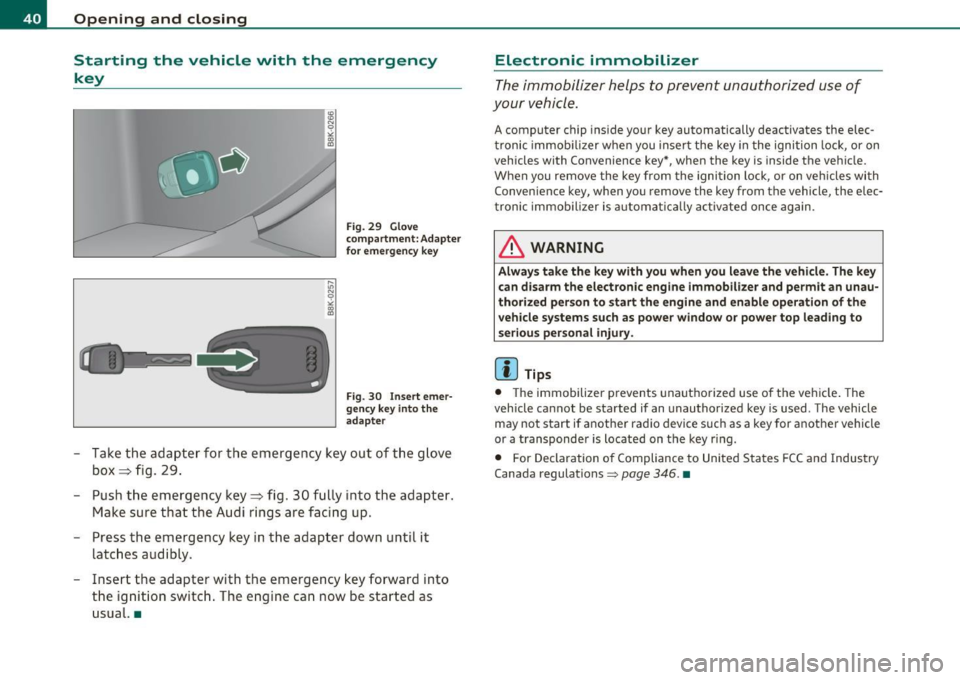
- Take the adapter for the emergency key out of the glove
box ~ fig. 29.
- Push the emergency key~ fig. 30 fully into the adapter.
Make sure that the Audi rings are facing up.
- Press the emergency key in the adapter down until it
latches audibly.
- Insert the adapter with the emergency key forward into
the ignition switch. The engine can now be started as
usual. •
Electronic immobilizer
The immobilizer helps to prevent unauthorized use of
your vehicle.
A computer chip inside your key automatically deactivates the elec
tronic immobilizer when you insert the key in the ignition lock, or on
vehicles with Convenience key*, when the key is inside the vehicle.
When you remove the key from the ignition lock, or on vehicles with
Convenience key, when you remove the key from the vehicle, the elec
tronic immobilizer is automatically activated once again.
& WARNING
Always take the key with you when you leave the vehicle. The key
can disarm the electronic engine immobilizer and permit an unau
thorized person to start the engine and enable operation of the
vehicle systems such as power window or power top leading to
serious personal injury.
[ i] Tips
• The immobilizer prevents unauthorized use of the vehicle. The
vehicle cannot be started if an unauthorized key is used . The vehicle
may not start if another radio device such as a key for another vehicle
or a transponder is located on the key ring .
• For Declaration of Compliance to United States FCC and Industry
Canada regulations
=> page 346 . •
Page 43 of 364

Power locking system
General description
The power locking system locks or unlocks all doors and
the rear lid simultaneously.
You can lock and u nlock the ve hicle centrally. You have the following
choices:
• Remote master key::::>
page 42
• Door hand les with convenience key* => page 43,
• Lock cylinder at the driver's door ::::> page 44, or
• Powe r locking switch inside~
page 45.
Selecti ve unlocking
When they are closed, the door and rea r lid are locked . When
unlocking, you can set in the radio or in the MMI * whether
only the
dr ive r's door or th e entire vehicl e shou ld b e unloc ked::::>
pag e 42.
Automatic Locking
The automat ic lock ing feature locks all the veh icle doors and the rear
lid when you drive faster than 9 mph (15 km/h).
T he car is unlocked agai n once the ignit io n key is removed. I n add i
tion, the vehicle can be un locked if the open ing function in the power
lo cki ng sys tem swit ch o r at one of t he d oor leve rs is a ctuated. The
Auto Lock function can be turned on and off in the rad io or in the
MM I*
~ page 42 .
Add itiona lly, in the event of a crash w ith a irbag dep loymen t the doors
are automatically u nlocked to allow access to the ve hicle .
Anti-theft alarm warning system
If the anti -theft alarm warning system detects a break-in into the
vehicle, acoustic and visual warning signals are triggered .
Controls and equip
ment Safety first
Opening and closing
T
he anti-theft warning system is activated a utomat ica lly when you
lock the vehi cle. It is dea ctivated w hen unl ocking us ing t he
remote
key ,
with the mechanical key , and when you switch on the ignition .
T he alarm a lso turns off when the alarm cycle has expired .
Turn signals
When you unlock the vehi cle, the tu rn s ignals flash twi ce , when yo u
lock it once . If they do not flash, one of the doors, the rear lid or the
hood is not locked.
Unintentionally Locking yourself out
In the following cases there safeguards to preve nt yo u loc king your
remote master key in the vehicle:
• The vehicle does not lock with the centra l locking sw itch
=>
page 45 if the drive r's door is open.
• On vehicles with convenience key*, if the most recently used
master key is in the luggage compartment, the rea r lid is automati
ca ll y unlo cked again after it is closed;;;> page 46.
Do not lock yo ur vehi cle w it h t he remote m aster key u ntil all doors
and t he rear lid are closed . In this way you avoid locking yourself out
acc iden tally .
& WARNING
• When you leave th e vehicle, alwa ys remove the ignition key
and take it with you. Th is will prevent passengers (children , for
example ) from accidentally being locked in the vehicle should
they accidentally p ress the power locking switch in the front
door s.
• Do not leave child ren inside the vehicle unsupervised . In an
emergency it would be impossible to open the door s from the
outside without the key.
Vehicle care Technical data
Page 49 of 364

& WARNING (continued)
compartment and pull the lid shut, becoming trapped and unable
to get out. To reduce the risk of personal injury, never let children
play in or around your vehicle. Always keep the rear lid as well as
the vehicle doors closed when not in use.
• Always ensure that no one is within range of the rear lid when
it is moving, in particular close to the hinges· fingers or hands can
be pinched.
[ i ] Tips
• When the vehicle is locked, the rear lid can be opened separately
by pressing the button~ on the master key. When you close the rear
lid again, it locks automatically .
• If the rear l id is open or not properly closed when the ignition is
turned on, the door and rear lid warning:::::,
page 20 appears in the
instrument cluster display.•
Emergency unlocking of the
luggage compartment lid
There is an emergency release for the rear lid.
Con tro ls a nd e quip
m en t
Fig. 38 Rear lid: Lock
cylinder
Vehicle OP-eration
Opening and closing
-Remove the mechanical key from the master key
=;,page 39.
-Insert the key in the lock cylinder and turn it in the direc
tion of the arrow .•
Power windows
Controls
The driver can control all power windows.
Fig. 39 Section of the
driver's door: Controls
Fig. 40 Center
console: central power
window switch
All power window switches=> fig . 39 are provided with a two-
position function:
~
Vehicle care Do-it-yourselt service iTechnical data
Page 50 of 364

Opening and closing
Opening the windows
- Press the switch to t he first stop and hold i t until t he
window reac hes th e desir ed posi tion.
- P ress the switc h briefly to the
second stop to automati
cally open the window .
Closing the windows
-Pull t he sw itch to th e first stop and ho ld it until t he
w indow reac hes t he desired posi tion .
- P ull the sw itc h brie fly to t he
second stop to a uto matica lly
cl os e th e win dow.
Power window switches
© Drive r's door
© Passenger's doo r
© Left r ear door
@ Right re ar d oo r
You can open or close all the windows w it h the switch=> page
47,
fig . 40.
& WARNING
• Do not leave children unattended in the vehicle, especially with
access to vehicle keys . Unsupe rvised use of the keys can result in
starting of the engine and u se of vehicle sy stem s such as power
windows , etc. which could result in serious injury.
• Remember -you can still open or clo se the power windows for
about ten minutes after the ignition is switched off . Only when
either of the doors are opened are the power windows switched
off .
• Be careful when clo sing the windows . Check to see that no one
is in the way, or serious injury could result!
& WARNING (c on tinued )
• Always remove the ignition key whenever you leave your
vehicle.
• If y ou lo ck your vehicle from the outside, no one, e specially
children, should remain in the vehicle.
• Do not stick anything on the window s or the windshield that
may interfere with the dr iver's field of vision.
[I) Tips
• When you open the doors, the windows automatically lower about
1 0mm.
• After the ignition has been switc hed off, the w indows can still be
opene d or closed fo r ab out 1 0 min utes. The w indow reg ula tors are
not switched until t he d river's or passe nger's door is opened .•
Convenience opening/closing
The wind ows can be ope ned and closed with the mechan
i c al key or the emergenc y key .
Fig. 41 K ey turn s for
o pe nin g an d cl osin g .._
Page 53 of 364

• A message in the instrument cluster display will alert you if a
protection function was activated or if there is a malfunction
~page 51.
• The power top can also be operated manuall y if there is a malfunc
tion~
page 56, "Power top emergency operation". Have you autho
r iz ed A udi dealer correct the cause of the malfunction as soon as
possible.
• If park ing the vehicle with the power top open, remember that the
vehicle interior will not be protected from the weather or from unau
thorized entry. Closing the power top before leaving the vehicle is
recommended. If you leave items in the vehicle, lock them in the
trunk. •
_ Power top operation
The indicator light monitors the power top.
The 4' indicator light illuminates for approximately 2 seconds when
the ignition switches on to check the function and then goes out
again . The indicator light also:
• illuminates when the powe r top opens or closes.
• blinks if the power top switch is operated but the conditions for
opening or clos ing the powe r top are not met . A wa rning message
also appears in the instrument cluster display~
page 51, "Error
message in the instrument cluster display ".
• if the power top did not open or close completely.
[ i ] Tips
The ind icator light stays on if the power top was opened manually. •
Controls and equip
ment Safety first
Power top
Error message in the instrument cluster
display
An error message appears if the power top cannot open
or close.
Several conditions must be met for the power top to open or close
automatically.
An error message in the instrument cluster display indicates if one of the conditions is not met or there is a malfunction.
Power top: please close rear lid
The luggage compartment l id must be closed when the power top is
opening or clos ing. This error message appears in the instrument
cluster display if the luggage compartment lid is not closed.
Storage bay not lowered. Please remove
obstruction
The power top storage bay must lower when the power top is
opening. Th is error message appears in the instrument cluster
display if the storage bay is not lowered.
If the storage bay does not
lower automatically because of objects in the lug gage compartment,
remove the objects that are in the way from the storage bay area.
Otherwise, you can operate the power top storage bay manually
~page 54.
Power top: cannot be used
This error message appears if the convertib le cannot open or close
automatically because of safety reasons or if there is a malfunction.
The follow ing causes are poss ible:
• Vehicle speed too high: Power top operat ion is deactivated and an
error message appears if the vehicle speed is too high . Reduce the
vehicle speed and operate the switch again to open or close the power
top.
• Battery voltage too low: The power top cannot be operated if the
battery voltage is too low . This ensures there w ill be enough battery .,,
Vehicle care Technical data