ignition AUDI A5 CABRIOLET 2010 Workshop Manual
[x] Cancel search | Manufacturer: AUDI, Model Year: 2010, Model line: A5 CABRIOLET, Model: AUDI A5 CABRIOLET 2010Pages: 364, PDF Size: 86.51 MB
Page 121 of 364

____________________________________________ A_ d_ a___,_ p_t_ i_v _e _ c_r _u _ i_ s _e _ c_o _ n_ t_r _o _l _ __.lft'I
App lies to veh icles : w ith a dapt ive cruise contro l
How is the speed stored?
Fig. 1 16 Contro l
l eve r: S tori ng s pee d
With th e sys te m switched on the speed is stored as follows:
- Drive at the speed you want . The speed must be between
20 and 95 mph (30 and 150 km/h) .
- Press the
!SET I button ~ fig . 116 to store the desired
speed .
After the ( SETI button is released, the current speed is stored and
m ain tained .
The saved speed is now shown in th e LED d isplay in the speedom et e r
by one or two illuminated red light diodes=>
page 123. At the same
time, the saved speed is a lso shown fo r a short time in the Info rma
tion line~
page 125 .
(I) Tips
For safety reasons, the stored speed is deleted when the ignition is
turned off .•
Con tro ls a nd e quip
m en t Vehicle
OP-eration
Applies to vehicles : w ith ada ptive cru ise cont ro l
Changing stored speed
The speed can be changed without touching the acceler
ator or brake pedal.
Increasing speed
,... 0
~
ill
Fig . 1 17 Con trol
l e ver: Chan ging spee d
- Press the lever briefly upwards 0 ~ fig. 117 . USA
models : the speed increases by about 2.5 mph . Canada
models : speed will increase by one mark on the speedom
eter scale .
- Press the lever upwards
0 and hold it . As long as you hold
the control switch down, the light diode display in the
speedometer LED display in the speedometer moves
forward and the speed is increased .
Reducing speed
- Press the lever downwards briefly Q. USA models : the
speed decreases by 2 .5 mph . Canada models: speed will
decrease by one mark on the speedometer scale . _,.
Vehicle care Do-it-yourselt service iTechnical data
Page 124 of 364

-Adaptive cruise control .Ml..___,___ _____________ _
Driving pro
gram
Dis tance 1
Distance 2
Distance 3
& WARNING
dynamic
1
2
2
3
standard
2
3
3
4
comfort
3
4
4
5
-
When setting the distance, the dri ver is responsible for adhering
to the respect ive national and country -specific regulations .
• Following other vehicles too closely increase s the risk of colli
sions and serious personal injury.
• Setting short distance s to the traffic ahead reduce s the time
and d istanc e av ailable to bring your vehicle to a safe stop and
makes it even more neces sary to pay clo se attention to traffi c.
• Always use good judgment and select a safe following distance
for the traffic , road and weather condition s.
(I] Tips
The d istance setting is reset to the factory default DISTANCE 3 the
next time the ignition is t urned on .•
Driver information
Ap plies to veh icles: w it h ad aptiv e c ru is e co ntro l
Displays in the instrument cluster
Depending on the driving situation, driver information is
displayed in the instrument cluster.
Fig. 1 20 Ove rv iew i nstrum ent clu ste r
© Speedomete r and indicator light disp lay
@ Display in the ins trument cluste r
© Message in the instr ument cluster disp lay
© Speedometer and indicator light d isplay
Important informa tion concerning vehicle ope ration wi th adap tive
cruise control is shown in display area@. The desired speed you set
is indica ted in the speedome ter (L ED ligh ts aro und the edge).
T he indicator lights show whether the system has detected a veh icle
traveling ahead . .,,.
Page 148 of 364

llffl..__A_ u_d_ i _d _r_ i_v _e _ s_e _ l_ e _ c_ t _______________________________________________ _
• The dynamic steering may make noise when starting or stopping
the engine. This does not indicate a problem. •
Applies to ve hicle s: wit h Audi d rive select
Selecting the driving mode
You can choose between COMFORT, AUTO, DYNAMIC and
INDIVIDUAL* modes.
w, ...,· _ tVT-'O ___. •tiilf
Fig . 148 Shift gate:
Control for Audi drive
select
Fig . 149 Center
console: Control for
Audi drive select
The control is located on the shift gate~ fig. 148 in vehicles
with a radio, and in vehicles with MMI, it is located in the
center console~ fig. 149.
- Turn on the ignition. -
Press the left or right arrow button until the desired mode
appears in red.
You can change the driv ing mode when the vehicle is stationary or
while driving. If traffic permits , after changing modes, br iefly take
your foot off the accelerator pedal so that the recently selected mode
is a lso act ivated for the eng ine and transmission .
COMFORT
The COMFORT mode provides a comfortable vehicle setting . The
eng ine and automatic transmission* react in a balanced manner to
movements of the acce leration pedal. Steering is light and indirect,
and adaptive dampers provide a soft suspension. The setting is ideal
for driving on long stretches, such as on freeways.
AUTO
Full use of AUTO provides a comfortable, yet dynamic feel. The
se ttin g is per fect fo r daily use.
DYNAMIC
DYNAMIC gives the vehicle a sporty feeling. The eng ine responds
quickly to accelerator pedal movements, and steering is sporty and
direct. The adaptive dampers are adjusted to provide a stiffer suspen
sion, and the automatic transmission* sh ift points are set at higher
eng ine speed ranges . The setting is idea l for sporty driv ing.
INDIVIDUAL*
You can adapt this mode to your personal needs in the MMI.
& WARNING
Pay attention to traffic when operating Audi drive select to
prevent potential risk of an accident.
Page 149 of 364
![AUDI A5 CABRIOLET 2010 Workshop Manual ________________________________________________ A_u_ d_i_ d_ r_iv _e_ s_ e_ le_ c_t _ __.fflll
(]] Tips
If you remove the ign it io n key, AUTO mode is set the next time you
star t the](/img/6/57573/w960_57573-148.png "AUDI A5 CABRIOLET 2010 Workshop Manual ________________________________________________ A_u_ d_i_ d_ r_iv _e_ s_ e_ le_ c_t _ __.fflll
(]] Tips
If you remove the ign it io n key, AUTO mode is set the next time you
star t the")
________________________________________________ A_u_ d_i_ d_ r_iv _e_ s_ e_ le_ c_t _ __.fflll
(]] Tips
If you remove the ign it io n key, AUTO mode is set the next time you
star t the ignition .•
App lies to vehicles : w ith MM! and Audi dr ive select
Setting the INDIVIDUAL mode
You can personally specify the vehicle setup in the MMI.
Fig . 1 50 MMI di sp la y:
Sett ing in div idual
s y stem s
- Select : [CAR]> Audi drive select individual.
You need to select this control to drive in the recently set INDIV IDUAL
mode ~
page 146.
The adjustable sys tems in the M MI depend on you r veh icle's fea tures.
[ i J Tips
Your I NDIV IDUAL mode se ttings a re automa tic ally stored and
assigned to the remote control key being used .•
Con tro ls a nd e quip
m en t Vehicle
OP-eration Vehicle care Do-it-yourselt service iTechnical data
Page 152 of 364
ffl..__T_ r_a _n_ s_ m_ is_ s_io _ n ___________________________________________________ _
R -Reverse
Th e transmission will automatically select the lowest gear ratio when
you shift into reverse.
Select
R only when the vehicle is at a full stop and the engine is
running at idle speed=>
& in "Driving the automatic transmission"
on
page 148 .
Before you move the selector lever to R, press both the button in the
handle of the selector lever
and the brake pedal at the same time.
When the ignition is on, the backup lights illum inate when the
selector lever is moved into
R.
N -Neutral
The transmission is in neutral in this position . Shift to this position
for standing with the brakes applied~
page 150.
When the vehicle is stationary or at speeds below 3 mph (5 km/h),
you must always apply the footbrake before and while moving the
lever out of
N.
D -Normal position for driving forward
Position Dis for normal city and highway driving. It ranges from zero
to top speed and all gears shift automatically, depending on engine
load, driving speed and automatically selected shift programs.
When the vehicle is stationary or at speeds below 3 mph (5 km/h),
you must always apply the foot brake before and while moving the
lever to
D out of N .
In certa in circumstances it may be advantageous to temporarily
switch to the manual shift program to manually select gear ratios to
match specific driving conditions~
page 152.
S -Sport position*
Select this position for sportier performance. In this position, the
transmission will not upshift as soon, allowing the vehicle to use the
increased power available at higher engine speeds to achieve livelier
acceleration . When the vehicle
is stationary or at speeds below 3 mph (5 km/h),
you must always apply the foot brake before and while moving the
lever to
S out of N.
& WARNING
Read and follow all WARNINGS=> & in "Driving the automatic
transmission" on
page 148 .
0 Note
Coasting downhill with the transmission in N and the engine not
running will result in damage to the automatic t ransmiss ion and
possibly the catalytic converter. •
Applies to vehicles: with automat ic transmissio n
Automatic Shift Lock (ASL)
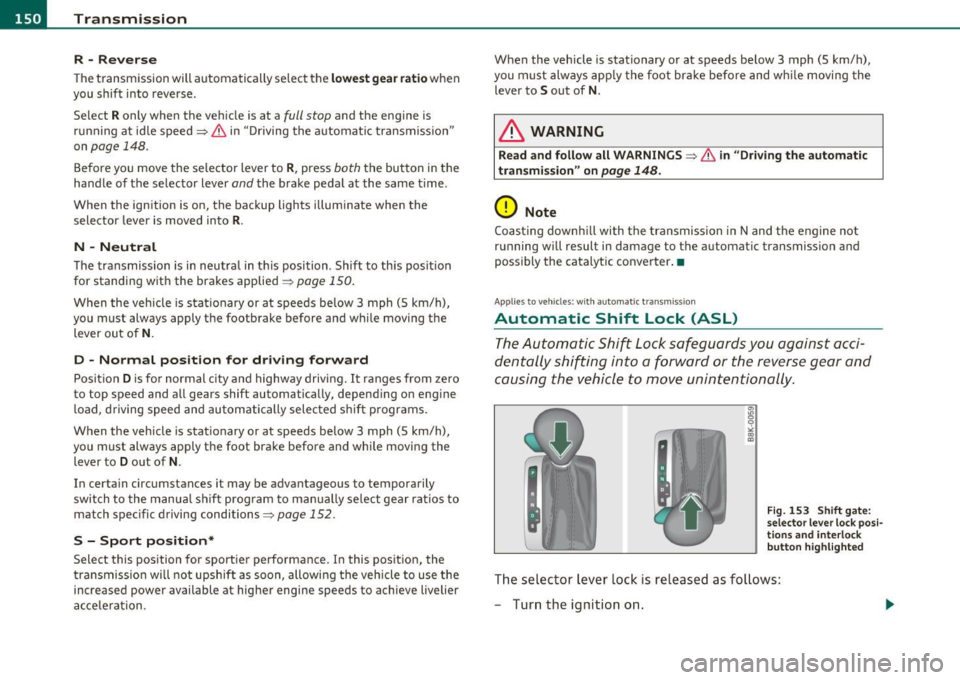
The Automatic Shift Lock safeguards you against acci
dentally shifting into a forward or the reverse gear and
causing the vehicle to move unintentionally.
Fig. 153 Shift gate:
selector lever lock posi
tions and interlock
button highlighted
Th e selector lever lock is released as follows:
- Turn the ignition on.
Page 153 of 364

Transmission -
----------------
- Step on the brake peda l. At the same time press and hold
the interlock button on the s ide of the gear selector knob
=:> fi g. 153 wi th your thumb until you have moved the
selector lever to the des ired position .
Automatic selector lever lock
The se lector lever is locked in the P and N positions w hen the ignition
is turned on . To move the leve r from these pos it ions the driver must
dep ress the brake peda l. As a reminder to the d river, the following
warning appears in the instrument cluster display when the se lector
is in
P and N:
When stationary apply footbrake while selecting gear
A time delay e lement prevents t he selector leve r from lock ing when
it is moved throug h the
N posit ion (going from R to D ). The lock ing
element will lock the se lector lever if the lever is left in N (Neutra l) for
more tha n app rox imately 1 second, w ithout t he b rake pedal be ing
pressed.
A t speeds above about 3 mp h (5 km/h) the A utomat ic Shi ft Lock is
automatically deactivated in t he
N position .
Interlock button
The lock button on the selector lever prevents the lever from being
a cciden tally shifted in to cert ain posi tions . Pressing this b utton deac
tivates the selector lever lock. Depend ing on the direction of the
shift, the se lector leve r locks a t different positions. The pos itions are
highlighted in the illustrat io n =>
page 150, fig. 153 .
Igni tion key safety interlock
The key cannot be removed from the ignition unless the selector lever
is in the
P pa rk position. When the igni tion key is removed, the
selector lever will be locked in the
P position. •
Controls and equip
ment Safety first
Applies
to vehicles : with au toma tic transmiss ion
Kick-down
The kick -down feature allows the vehicle to generate
maximum acceleration .
When you press the accelerator peda l beyond the resis tance po int
that is reached at full throttle, the transmission will select a lower
gear rat io b ased on vehicle speed and e ngine RPM . The engine R PM
will be controlled to produce maximum vehicle acceleration as long
as you con tinue to press the acceler ator pedal beyond t his resistance
point .
& WARNING
Be careful when using the kick-down featu re on slippery roads.
Rapid a cceleration may cau se the vehicle to skid .•
App lies to veh icles: with automatic trans mission
Dynamic shift program (DSP)
The automati c transmi ssion is electronically controlled .
The transmiss ion is self adapting and will automatically select the
bes t sh ift p rogram su ited to the dr iv ing cond it io ns and dr iving style .
Th e transmission will select one of the
economy programs when you
drive at a steady speed or a gradually c hanging speed without heavy
acce le ration . This ac hieves optimum fuel efficiency, with early
upshifting and delayed downshifting.
Th e transm iss ion will au tomatically se lect the
s porty shift p rograms
when you dr ive at higher speeds, or w ith heavy acceleration and
frequently chang ing speeds . Upshifts a re de layed to make full use of
engine power . Downs hifting takes place at higher engine speeds than
in the economy programs . _.,
Vehicle care Technical data
Page 156 of 364
ffl..__T_ r_a _n_ s_ m_ is_ s_io _ n ___________________________________________________ _
You can continue to drive the vehicle. See an authorized Audi dealer
or other qualified workshop at the next opportunity.
Gearbox malfunction: you can continue driving (limited
functionality)
There is a serious system malfunction:
• The program shifts only into certain gears .
• The engine may stall.
• It is not possible to restart the engine if it has been switched off.
• Continuing to drive could result in subsequent damage .
0 Note
If the transmission switches to fail-safe mode, you should take the
vehicle to an authorized Audi dealership as soon as possible to have
the condition corrected.•
Applies to veh icles: w ith automatic transm ission
Emergency release of the selector lever
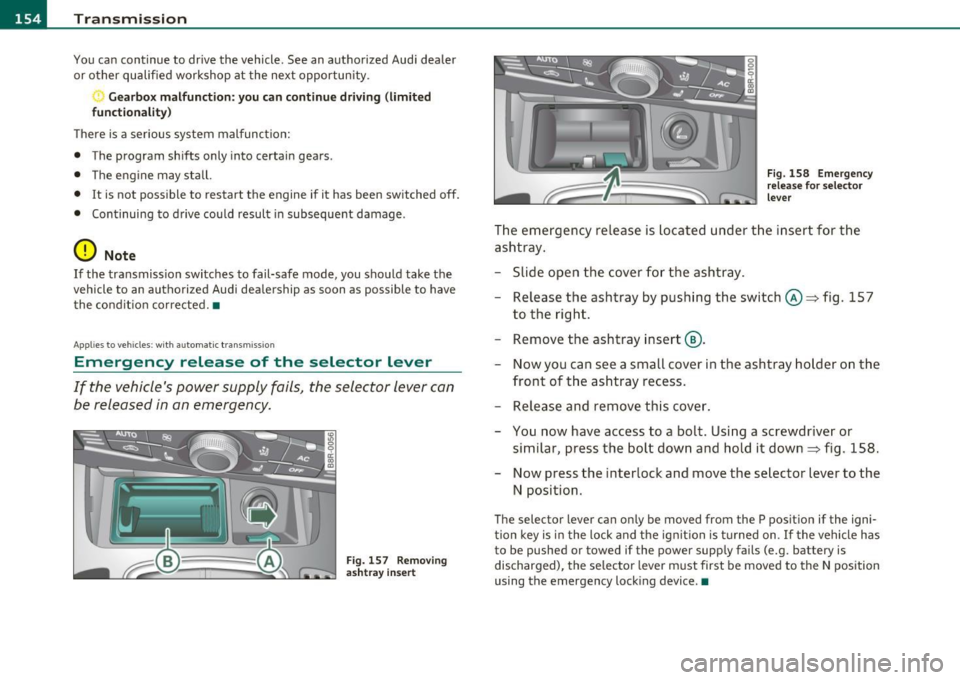
If the vehicle's power supply fails, the selector lever can
be released in an emergency.
Fig . 157 Removing
ashtray insert Fig. 158
Emergency
release for selector
lever
The emergency release is located under the insert for the
ashtray.
- Slide open the cover for the ashtray.
- Release the ashtray by pushing the switch©~ fig. 157
to the right.
- Remove the ashtray insert @ .
- Now you can see a small cover in the ashtray holder on the
front of the ashtray recess.
- Release and remove this cover.
- You now have access to a bolt. Using a screwdriver or
similar, press the bolt down and hold it down~ fig. 158.
Now press the interlock and move the selector lever to the
N position.
The selector lever can only be moved from the P position if the igni
tion key is in the lock and the ignition is turned on. If the vehicle has
to be pushed or towed if the power supply fails (e.g. battery is
discharged), the selector leve r must first be moved to the N position
using the emergency locking device.•
Page 160 of 364
1111....__T_ r_a _n_ s_m _ i_s _s _ i_o _n ___________________________________________________ _
0 Note
Coasting downhill with the transmission in N and the engine not
operating will result in damage to the automatic transmission and
possibly the catalytic converter. •
Applies to veh icles: with multitronic ® Continuously Variable Transm ission (CVT)
Automatic Shift Lock (ASL)
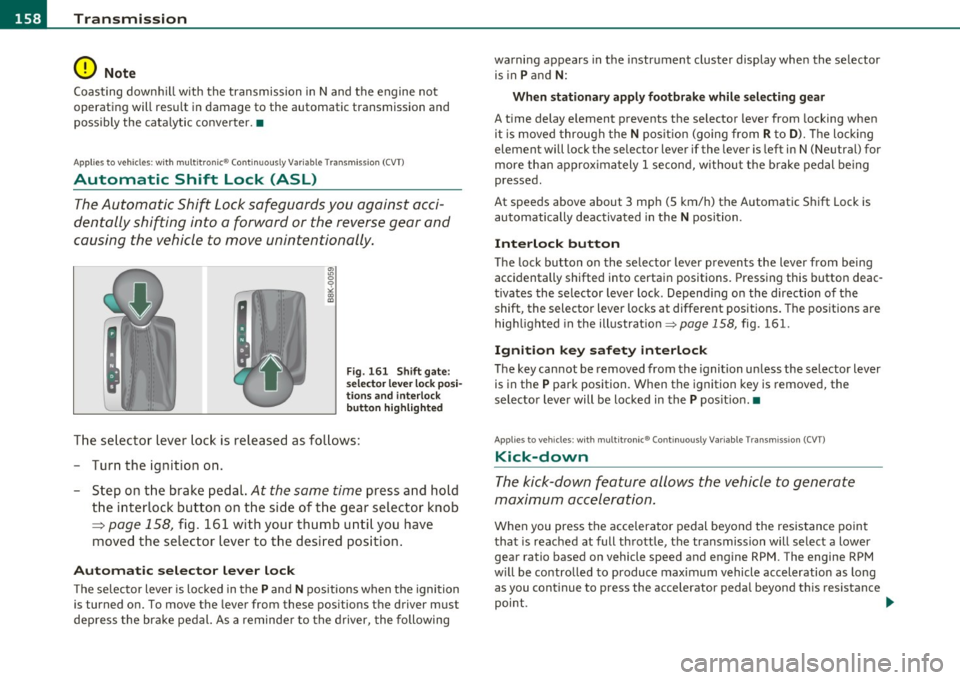
The Automatic Shift Lock safeguards you against acci
dentally shifting into a forward or the reverse gear and
causing the vehicle to move unintentionally.
Fig . 161 Shift gate:
selector lever lock posi
tions and interlock
button highlighted
The selector lever lock is released as follows:
- Turn the ignition on.
- Step on the brake pedal.
At the same time press and hold
the interlock button on the side of the gear selector knob
=:> page 158, fig. 161 with your thumb until you have
moved the selector lever to the desired position.
Automatic selector lever lock
The selector lever is locked in the P and N positions when the ignition
is turned on. To move the lever from these positions the driver must
depress the brake pedal. As a reminder to the driver, the following warning appears
in the instrument cluster display when the selector
is in
P and N:
When stationary apply footbrake while selecting gear
A time delay element prevents the selector lever from locking when
it is moved through the
N position (going from R to D). The locking
element will lock the selector lever if the lever is left in N (Neutral) for
more than approximately 1 second, without the brake pedal being
pressed.
At speeds above about 3 mph (5 km/h) the Automatic Shift Lock is
automatically deactivated in the
N position.
Interlock button
The lock button on the selector lever prevents the lever from being
accidentally shifted into certain positions. Pressing this button deac
tivates the selector lever lock. Depending on the direction of the
shift, the selector lever locks at different positions. The positions are
highlighted in the illustration~
page 158, fig. 161.
Ignition key safety interlock
The key cannot be removed from the ignition unless the selector lever
is in the
P park position. When the ignition key is removed, the
selector lever will be locked in the
P position. •
Applies to veh icles: with mu lt it ron ic ® Cont inuously Variable Transm ission (CVT)
Kick-down
The kick-down feature allows the vehicle to generate
maximum acceleration.
When you press the accelerator pedal beyond the resistance point
that is reached at full throttle, the transmission will select a lower
gear ratio based on vehicle speed and engine RPM. The engine RPM
will be controlled to produce maximum vehicle acceleration as long
as you continue to press the accelerator pedal beyond this resistance
point. ..
Page 164 of 364
1111....__T_ r_a _n_ s_m _ i_s _s _ i_o _n ___________________________________________________ _
- Now press the interlock button and move the se lector
leve r to the
N position.
T he selecto r leve r ca n only be moved from the P pos ition if the igni
tion key is in the lock and the ignition is turned on . If the vehicle has
to be pushed or towed if the powe r supp ly fa ils (e.g. batte ry is
discharged), the selector lever must firs t be moved to t he N posi tion
using the emergency lo cki ng device .•
Page 166 of 364

1111...._ __ P_a _ r_ k_ a_ s_ s_is _ t ____________________________________________________ _
Please note that low objects already signa led by a warning can disap
p ear from the system 's de te ct io n ra nge and will not co nti nu e to be
signaled .
If the distance to an obstacle remains the same, the vo lume of the
dis tance war ning is g radually reduce d after abou t 4 seconds.
Approaching another obstacle wi ll result in the distance warning
so unding at t he normal vo lume aga in.
Malfunctions in the system
If a wa rning tone is aud ible fo r abo ut five seconds when you turn on
the ignition, there is a ma lfunction in the system. Have the prob lem
c o rrected by yo ur autho riz e d Aud i de aler.
Keep the se nsors i n the rear bumper clean and free from ice so t hat
t he a cous tic p ark ass is t sys tem can func tion prope rly.
& WARNING
• Sen sor s have dead space s in whi ch objects cannot be dete cted.
Be especiall y alert for small children and animals , since they are
not alway s detected by the sen sors .
• The Acoustic Par king Sy stem is not a substitute for the dr iver 's
own caution and alertne ss. Ul timate re spon sibility always
rema ins with the drive r dur ing pa rking and similar maneu ve rs .
Always watch where you ar e driving .
• You should alwa ys adjust the volume and frequency of the
c hime s so that you can easily hear the a cou stic distan ce warning
e v en if the radio is playing, the air -cond itioner blower is on High
or there i s a high l evel of outside noi se .
- Check the setting s whenever anyone else ha s driven the
vehi cle b efore you .
0 Note
• Remembe r that low obstacles fo r which a war ning has already
been issued may "dive" below the system's sensing zone if the vehicle
is be ing b acked up closer . In this case, the warn ing so und sh utting off does
not ind
icate that you have cleared the obstacle. Instead, impact
is imm inen t.
• Objects such as tra iler hitches, chains, narrow posts or fences
c overed by a th in laye r of pa int may no t always be detected by the
system . They can still damage your vehicle without warning .
[ i ] Tips
Keep the sensors in the rear bumper clean and free of snow and ice so
that the acoustic parking assist system can function properly .•
Ap plies to veh icles : w it h park ing s yst em (rea r)
Adjusting the chimes
T he volume and the pitch (frequency) of the chimes can
be adjusted in the radio or in the fv1fv1I *.
Rear volume adjustment
-Select: [CAR]> Parking system .
-Select Rear volume if you wa nt to cha nge the volume of
the rear s igna l generator .
Rear frequency adjustment
-Sele ct: [CAR)> Parking system.
- Select Rear frequency when you want to change the
frequency of t he rear audible signa l generator.
When ad justing the vo lume and frequency, the new sett ing will
sound for approx. 2 seconds from each aud ible signal generator. The
volume and frequency settings a re automat ica lly stored and assigned
to the master key with remote control. .,,,