instrument cluster AUDI A5 CABRIOLET 2010 Owner's Manual
[x] Cancel search | Manufacturer: AUDI, Model Year: 2010, Model line: A5 CABRIOLET, Model: AUDI A5 CABRIOLET 2010Pages: 364, PDF Size: 86.51 MB
Page 67 of 364
ignition is switched on, there is a difference between vehicles with bi
xenon lights and halogen lamps:
• On vehicles with b i-xenon lights only the dayt ime running lamps in
the headlights will come on.
• On vehicles with halogen lights the front fog lights, side marker
lights and tail lights come on automatically.
& WARNING
Never u se daytime running lights to see where you are going . They
are not bright enough and will not l et you see fa r en ough ah ead
for safety , espe ciall y at dusk or when it i s dark. Be awar e of
c hanges in out side l ight condit ion s wh en you are dri ving and
respond b y switching on your l ow be am s
tD .
0 Note
• Alw ays be aware of changes in out side light condit ion s while you
are drivin g. Re spond in tim e to fadin g daylight b y turning the light
s witch to po sition
tD (or "AUTO") to turn on yo ur headlight s.
[I) Tips
The daytime running lights function cannot be turned off. •
Contro ls a nd e quip
m en t Vehicle
OP-eration
Clear vision
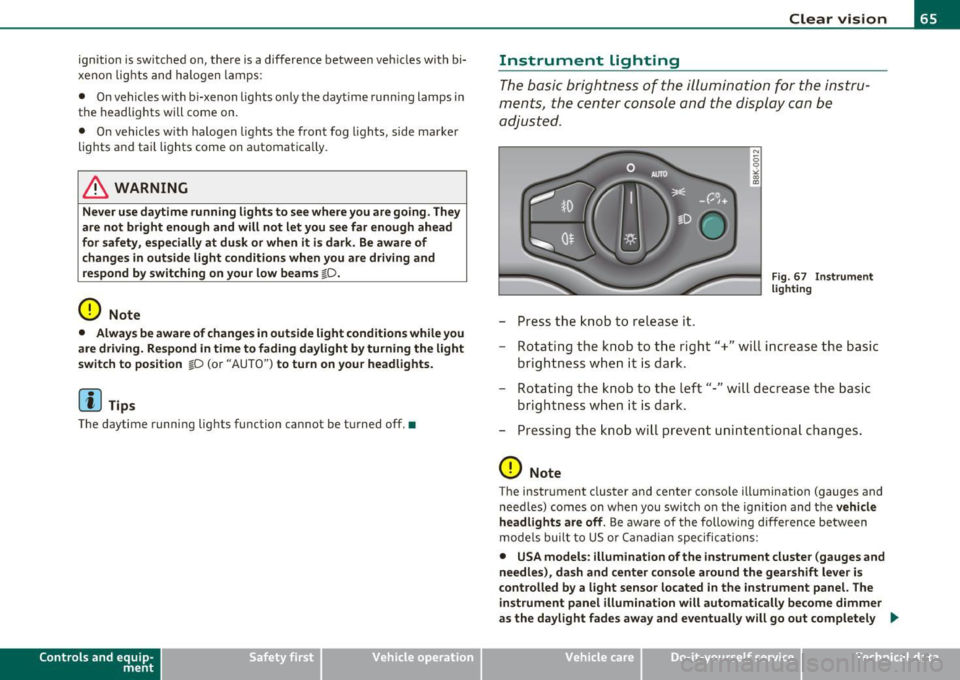
Instrument lighting
The basic brightness of the illumination for the instru
ments, the center console and the display can be
adjusted.
- Press the knob to release it.
N
-0 0 >< 00
"'
Fi g. 6 7 I nst rume nt
l ighti ng
- Rotating the knob to the right"+" will increase the basic
brightness when it is dark.
- Rotating the knob to the left"-" will decrease the basic
brightness when it is dar k.
- Pressing the knob will prevent unin tentiona l changes .
0 Note
The instrument cluster and center conso le illumination (gauges and
need les) comes on when you switch o n the ignition and the
veh icle
h eadlights are off .
Be aware of the following difference between
mode ls built to US or Canadian specifications:
• USA models : illumination of the inst rument cluste r (gauges and
needle s), da sh and center c onsol e around the gearshift l ever i s
c o ntrolled b y a light senso r lo cated in the instrument panel. The
in strument panel illumination will autom atically be come dimmer
as the day light fades away and eventu all y will go out completel y .,
Vehicle care Do-it-yourselt service iTechnical data
Page 69 of 364

The emergency flashers will turn on automatically if you are in an acc ident where the airbag has deployed.
(I) Tips
You shou ld turn on th e emergency flashers when :
• you are the last vehicle standing in a traffic jam so that any other
vehicles com ing can see yo u, or when
• your vehicle has broken down or you are in an emergency situa
tion, or when
• your vehicle is being towed by a tow truck or if you are towing
ano ther vehicle behind you .•
Turn signals -¢ ¢ and high beam 1[D lever
The lever on the le~ side of the steering column is used to
operate the turn signals and the high beam as well as the
headlight flasher .
Fig. 70 Turn si gnal
an d hi gh beam leve r
The turn s ignal and high beam lever has the follow ing func
tions:
Con tro ls a nd e quip
m en t Vehicle
OP-eration
Clear vision
Turn signals
¢ ¢ (D @
- Push the lever up as far as it can go to turn on the right
turn signal or down to tu rn on the le ft turn signal
~ fig. 70.
- Move the lever br iefly until you meet resistance and
release it to flash three times.
- Move the lever (up or down) until you meet res istance a nd
hold it there to determine the flashing t ime for the turn
signals.
High beam ~D ®
- Push the lev er forward to switc h on the high beam .
- Pu ll the leve r back towards you to switch o ff the high
beam.
Headlight flasher ~D ©
- Pull the lever toward the steering wheel to use the head
light flasher.
Notes on these featu res
• Th e turn signals only work with the ign ition t urne d on. The ind i
cator lights ¢ or ¢ in the instrument cluster also blink.
• After you have t urned a corner, the tu rn signal switches off auto
matically.
• The
high beam works only when the head lights are on . The ind i
cator light ~Din the instrument cluster illuminates when the high
beams are on.
• T he
headlight flasher works only as long as you ho ld the lever -
even if there are no lights switched on . The ind icator light ~D in the
instrument cluster illuminates when you use the headlight flasher. _.,
Vehicle care Do-it-yourselt service iTechnical data
Page 108 of 364

ffl..__O_ n_ t_h _e_ r_o _ a_ d _________________________________________________ _
Ignition Lock and ignition switch
Starting engine with the key
The ignition is switched on and the engine started with
the ignition key.
F ig. 10 8 Igniti on k ey
-Inse rt the key in to the ig n ition lock.
- Step on th e brake pedal and mov e th e selec tor lev er to th e
P or N posi tion.
- Press the key=> fig. 108 -the engine wi ll start.
By pressing the key without stepp ing on the clutch or the b rake, the
ign itio n is switc hed on and o ff . With the ignition on, the steeri ng
w heel is unlocked.
You can o nly remove the key with the ig nition switc hed off . To do this,
you have to press on the key ag ain. Wi th an a utomat ic transm iss io n,
the selector lever must be in the P pos ition.
W hen s tarting the engine, major electrica l loads a re swi tched off
temporarily .
After startin g a cold engine, there may be a brief period of increased
noise be cause the oil p ress ure mu st firs t b uild up in t he hydr auli c
valve adjuste rs. This is normal and not a cause for concern. If
the eng ine s hould not start immediately, the starting process is
a u tom atically st op ped aft er a sh ort t ime. Re peat sta rtin g p ro cedu re.
Driver message in the instrument cluster display
Press brake pedal to start engine
T h is message ap pears i f yo u do not step on the brake pedal to start
t he engine on a vehicle w ith an au toma tic transmission.
Engage N or P to start engine
This message appea rs when at tempti ng to start the eng ine if the
sele ctor lever fo r the au tomatic t ransm ission is no t in the P or N po si·
t ion. The engine can on ly be sta rted wi th the selecto r in these posi
tions.
Shift to P , otherwise vehicle can roll away. Doors do not lock if lever
is not in P .
This message app ears fo r sa fe ty reasons along with a wa rning sig nal.
It appea rs if the selector lever for t he automat ic transm iss io n is not
in the P posi tion af ter the ignition is sw itched off . M ov e t he se lector
lever to the P pos itio n, ot herw ise the vehicle is not secured against
rolling away . You a lso ca nnot lo ck th e ve hi cle u sing the locking
button on the door hand le or us ing the remote key.
& WARNING
• Always take the key with you whenever you leave your vehicle.
Otherwise, the engine could be started or electrical equipment
such a s the power windows could be operated . This can lead to
serious in jury.
• Never leave children or per sons requiring assistan ce unat
tended in the vehicle. The doors can be locked u sing the remote
transmitter, p reventing people from escaping from the vehicle on
their own in the event of an emergency. Depending on the time of
year, people inside the vehicle can be exposed to very high or very low temperatures. ..,
Page 110 of 364

ffl..__O_ n_ t_h _ e_ r_ o_ a_ d _________________________________________________ _
Starting and stopping the engine
with convenience key
A pplies to veh ic le s: w ith conven ience ke y
Starting the engine with the
[START ENGINE S TOP] button
This button switches on the ignition and starts the
engine.
Fig. 109 Convenience
key: START ENGINE
STOP button
-Step on the brake pedal and move the selector lever to P
orN =>& .
- Press onthe[START ENGINE STOP)button::::>fig. 109-
the engine will start .
By pressing the [START ENGINE STOP] button without depressing
the clutch or the brake peal, the ignition is switched on and sw itched
off by pressing it again .
If the engine does not start immediately, stop trying after 10 seconds
and then try to restart the engine about 30 seconds later.
After a co ld engine is started, there may be a brief period of increased
noise because oil pressure must first build up in the hydraulic valve
adjusters. This is normal and not a cause for concern.
Driver message in the instrument cluster display
No key identified
This message appears when the !START ENGINE STOP] button is
pressed if there is no master key ins ide the veh icle or if the system
does not recognize it. For example, the master key cannot be recog
nized if it is covered by an object (e.g. aluminum brief case) which
screens the radio signal. Electronic devices such as cell phones can
also interfere with the radio signal.
Press brake pedal to start engine
This message appears if you press the !STAR T ENGINE STOP)
button to start the engine and do not depress the brake pedal. The
eng ine can only be started if the brake peda l is depressed.
Engage N or P to start engine
This message appears when attempting to start the engine if the
selector lever for the automatic transmission is not in the P or N posi
tion. The engine can on ly be started with the selector in these posi
tions.
Key not in vehicle
This message appears along with the.:! symbol if the master key is
removed from the vehicle with the engine running. It is intended to
remind you (e.g. when changing drivers) not to continue the journey
without the master key .
If the master key is no longer in the vehicle, you cannot switch on the
ignition after stopping the engine and you also cannot start the
eng ine again. Moreover, you cannot lock the vehicle from the outside
w ith the key.
Shift to P, otherwise vehicle can roll away. Doors do not lock if lever
is not in P .
This message appears for safety reasons along with a wa rning signal.
It appears if the selector lever for the automatic transmission is not
in the P position when switching off the ignition with the
!START ENGINE STOP] button. Move the selector lever to the P _..
Page 112 of 364

ffl..__O_ n_ t_h _e_ r_o _ a_ d _________________________________________________ _
0 Note
If the eng ine has been under heavy load for an extended period, heat
builds up in the engine compartment after the engine is switched off
- there is a risk of damaging the engine. Allow the engine to run at idle
for about 2 minutes before switching it off. •
Electromechanical parking brake
Operation
The electromechanical parking brake replaces the hand
brake.
Fig. 110 Center
consol e: Par king brake
-Pull on the switch @~ fig. 110 to apply the parking
brake . The indicator light in the switch illuminates.
- Step on the brake pedal or the accelerator pedal and press
the switch at the same time to release the parking brake.
The indicator light in the switch goes out.
Your vehicle is equipped with an electromechanical parking brake.
The parking brake is designed to prevent the vehicle from rolling
unintentiona lly and replaces the hand brake. In addition to the normal functions of a traditional hand brake, the
electromecha
nical parking brake provides various convenience and
safety functions.
When starting from rest
• The integral starting assist helps you when driving by automati
cally releas ing the parking brake=>
page 111, "Starting from rest".
• When starting on inclines, the starting assist prevents the vehicle
from unintentionally ro ll ing back. The braking fo rce of the parking
brake is not released until sufficient driving force has been built up at
the whee ls.
Emergency brake function
An emergency brake ensures that the vehicle can be slowed down
even if the
normal brakes fail=> page 112, "Emergency braking" .
Indicator lights
• If the parking brake is closed with the ignition switched on the
ind icator lights come on:::, (USA models)/ ®) (Canada models) in the
instrument cluster and the switch.
• If the park ing brake is closed with the ign it ion
switched off the
indicator lights come on
::'l'n (USA models) I © (Canada models) in the
instrument cluster and the switch fo r about 20 seconds.
& WARNING
If a gear or a drive range (automati c transmission ) is engaged
with the vehicle stationary and the engine running , you must in no
instance accelerate or release the clutch carelessly. Otherwise the
vehicle will start to move immediately -risk of an accident.
0 Note
If the symbol ID in the display or the indicator light BRAKE (USA
mode ls)/ ((j)) (Canada models) in the instrument cluster flashes, there
is a malfunct ion in the brake system. By pressing the
! SET] button,
you can bring up a driver message which explains the ma lf u nction in .,
Page 114 of 364
![AUDI A5 CABRIOLET 2010 Owners Manual ""L___::O:::.:., n:....:: t.:..:h :.:e :...:.. r.:::o :.::a :.: d=--------------------------------------------------
(I] Tips
For s afety reasons, t he pa rking br ake is r eleased automatical](/img/6/57573/w960_57573-113.png "AUDI A5 CABRIOLET 2010 Owners Manual \"\"L___::O:::.:., n:....:: t.:..:h :.:e :...:.. r.:::o :.::a :.: d=--------------------------------------------------
(I] Tips
For s afety reasons, t he pa rking br ake is r eleased automatical")
""L___::O:::.:., n:....:: t.:..:h :.:e :...:.. r.:::o :.::a :.: d=--------------------------------------------------
(I] Tips
For s afety reasons, t he pa rking br ake is r eleased automatically only
when the driver 's safety belt is engaged in the buck le .•
Starting off with a trailer
To prevent rolling back unintenti onally on an incline, do
the following :
-Keep the switch pu lled and depress the accelerator. T he
parking brake stays a pp lied and prevents the vehic le from
ro lling backward.
- You can re lease the switch once you are sure tha t you are
deve lopi ng enough driving force at t he wheels by
depressing the accelerator .
Depending on the we ight of the rig (vehicle and trailer) and the
sever ity o f the in cl ine, you may roll backwa rds as you start . You can
prevent roll ing backwards by holding the park ing brake sw itch pulled
out and accele ra ting -just as you wou ld when starting on a hill wi th a
conventional hand brake .•
Emergency braking
In the event that the conventional brake system fails or
locks .
-In an emergen cy , pull t he sw itch and contin ue to pull it to
slow your vehic le down with t he p arking brake.
- As soon as you re lease t he swi tch or acce lerate, the
bra king process s tops.
If you pull the switch and hold it above a speed of about 5 mph (8
km/h), the emergency braking fu nction is initiated . The vehicle is braked at all four wheels by activating the
hydraulic brake system.
Th e b rake pe rformance is s imila r to mak ing an eme rge ncy sto p .=>
&
In order not to act ivate the emergency brak ing by m istake, an audib le
warning tone (buzzer) sounds when the switch is pulled. As soon as
t he swi tch is re leased, or the acce lerator pedal is dep ressed , emer
gency braking stops .
& WARNING
Emergency braking should only be used in an eme rgency , when
the normal foot brake has failed or the brake pedal is obstructed .
Using the parking brake to perform emergency braking will slow
your vehicle down as if you had made a full brake application . The
laws of physics cannot be suspended e ven with ESP and its associ ·
at ed components (ABS, ASR, EDS ). In corners and when road or
weather conditions are bad , a full brake application can cause the
vehicle to skid or the rear end to break away· ri sking an accid ent. •
Driver messages in the instrument cluster
Warning Vehicle incline i s excessive
Th is message appears when the parking brake is applied on an incline
t ha t exceeds abo ut 3 0%.
I n th is case the braking power of the parking brake may
not be
adequate
to prevent the vehicle from rolling unintentionally.
Pl ease release parking brak e
Please note that for safety reasons the pa rking brake is re leased auto
matically on ly if the d river's seat be lt is fully engaged i n the buck le .
To relea se the parking brake pre ss the brake pedal
Th is dr iver message appears when the switch to release the parking
brake was pressed . The par king brake can only be released if you s tep
on the brake peda l and at the same time p ress the switc h or you auto- _.,
Page 123 of 364

____________________________________________ A_ d ___ a~p _t __ i_ v _e_ c_r_u _ i_ s _e_ c_o_ n_ t_r _o _l __ _
Appli es to ve hicl es: wi th a daptive cruise cont rol
How is the distance (time interval) set?
Distance con be set in four stages.
m 0 [;; ,.: 00 a,
Fig . 119 Contro l
l ever : Sett ing distance
- Push the slider switch once to the right 0 or to the left Q
~ fig. 119. The distance currently set is shown for 3
seconds in the instrument cluster disp lay .
Push the slider switch ag ain to the right 0 or to the left
Q to increase or to decrease the distance by one step.
S ele ct distan ce
The distance at which the adaptive cru ise control follows a vehicle in
front is determined by
time intervals . A time interval to a vehicle in
front is established and maintained. This produces a speed-depen
dent interval. The higher the speed, the greater the safety interval in
yards (meters) ~
&-
The d istances provided are spec ified values. These d istances may
exceed or fall short of these target distances, depending on the
driving situation and the driving style of the vehicle ahead.
Distan ce 1 ~-~ ---
This sett ing is ideal for brisk driving i n bumper-to-bumper traffic. The
distance is one second. This is the equivalent of, for instance,
• a distance of 36 feet (11 meters) at a speed of 25 mph (40 km/h)
Controls and equip
ment Safety first
•
a distance of 72 feet (22 meters) at a speed of 50 mph (80 km/h)
• a dist ance of 108 feet (33 meters) at a speed of 75 mph (120
km/h)
Di sta nc e 2 ,;::::, -- ~--
This setting is ideal for "keeping pace" comfortably in bumper-to
bumper traffic. The distance is 1.3 seconds. This is the equ ivalent of,
for instance,
• a distance of 46 feet (14 meters) at a speed of 25 mph (40 km/h)
• a distance of 95 feet (29 meters) at a speed of 50 mph (80 km/h)
• a distance of 144 feet (44 meters) at a speed of 75 mph ( 120
km/h)
Di st a nce 3 ~--- ~-
This setting is idea l for "keeping pace" in bumper -to-bumper traffic
and is the equivalent of the generally recommended distance that is
"half of the speedometer speed" . The distance is 1 .8 seconds. This is
the equivalent of, fo r instance,
• a distance of 66 feet (20 meters) at a speed of 25 mph (40 km/h)
• a distance of 131 feet (40 mete rs) at a speed of 50 mph (80 km/h)
• a distance of 197 feet (60 meters) at a speed of 75 mph (120
km/h)
Di sta nce 4 ~-- --~
T his sett ing is ideal for secondary road traffic. The distance is 2.3
seconds. This is the equivalent of, for instance,
• a dista nce of 82 feet (25 mete rs) at a speed of 25 mph (40 km/h)
• a distance of 167 feet (51 meters) at a speed of 50 mph (80 km/h)
• a distance of 249 feet (76 meters) at a speed of 75 mph (120
km/h)
You can set the way your vehicle performs in ACC mode when acce ler
ating and braking in the radio or in MMI*
~ page 127. Depending on
the driving p rogram and distance you se lect , you r veh icle's accelera-
tion and braking can range from dynam ic (1) to comfortable (5) . _,.
Vehicle care Technical data
Page 124 of 364

-Adaptive cruise control .Ml..___,___ _____________ _
Driving pro
gram
Dis tance 1
Distance 2
Distance 3
& WARNING
dynamic
1
2
2
3
standard
2
3
3
4
comfort
3
4
4
5
-
When setting the distance, the dri ver is responsible for adhering
to the respect ive national and country -specific regulations .
• Following other vehicles too closely increase s the risk of colli
sions and serious personal injury.
• Setting short distance s to the traffic ahead reduce s the time
and d istanc e av ailable to bring your vehicle to a safe stop and
makes it even more neces sary to pay clo se attention to traffi c.
• Always use good judgment and select a safe following distance
for the traffic , road and weather condition s.
(I] Tips
The d istance setting is reset to the factory default DISTANCE 3 the
next time the ignition is t urned on .•
Driver information
Ap plies to veh icles: w it h ad aptiv e c ru is e co ntro l
Displays in the instrument cluster
Depending on the driving situation, driver information is
displayed in the instrument cluster.
Fig. 1 20 Ove rv iew i nstrum ent clu ste r
© Speedomete r and indicator light disp lay
@ Display in the ins trument cluste r
© Message in the instr ument cluster disp lay
© Speedometer and indicator light d isplay
Important informa tion concerning vehicle ope ration wi th adap tive
cruise control is shown in display area@. The desired speed you set
is indica ted in the speedome ter (L ED ligh ts aro und the edge).
T he indicator lights show whether the system has detected a veh icle
traveling ahead . .,,.
Page 125 of 364

Adaptive cruise control -____________ __._ __ _
@ Display in the instrument cluster
In disp lay area @ information from the navi gation system * and the
tr ip computer is displayed in add it ion to informa tion about adaptive
c ruise contro l.
You can sele ct among the differe nt info rmatio n by repeated b rief
taps on the
I RESET! button on the winds hield w iper lever => page 24,
"Operat io n".
© Status indicator
Th e info rmation i n area © is no t disp layed per manently. Infor mat ion
is d isplayed o nly if yo u set or c hange the speed setting, change the
ti me in terva l, when messages a re displayed or if the ad apt ive cru ise
cont rol is turned off for safety reasons. •
Appli es to vehicles : w ith a daptive cruise c on tro l
Speedometer and indicator light display
----
- -
- -
@ ®
Desired speed
- -
--
Fig . 121 I nstru ment
cl uste r: Indicator light
T he desired speed set by the driver is displayed by a red LED in the LED
disp lay in the spee dometer.
If the desi red s peed was set be twee n two lines o n the speedo mete r
using the
[ SET J button, the two closest light diodes will come on
=>
page 122, fig. 120.
Controls and equip
ment Safety first
T
he system allows only speeds from 20 to 95 mph (30 to 150 km/ h)
t o be se t. T his spee d range is f aint ly ill um inat ed in t he s pee dome ter
(LED lights) .
Indicator lights (symbols)
• © Open road: The indicator light shows t hat adaptive cruise
co ntrol is a ctive and t hat no objec t is ahe ad of the vehi cle. A sto red
speed req uested is maintained.
• @
Driving in traffic : The indicator l igh t ind icates th at an object
has been detected traveling in front . Your speed is ad justed according
t o the spee d of t he vehicle in front. The adaptive c ruise con trol accel
erates and bra kes au tomatically w it hin the system's operat io n
parame ters.
• ©
Driver intervention prompt : The red flashing warning light
me ans
Request for driver to as sume control. You as the drive r m ust
slow t he ve hicle w ith the foot brake . The symbo l tells yo u that the
adaptive cruise contro l is not able to s low the vehicle down enough to
keep a enough distance to the vehicle in front o f you. An war ning tone
wi ll also so und when the symbol ap pears. Fo r more informat ion
abou t the driver intervent ion prompt=>
page 126 .
W Tips
• If you use the ac cele rator to go fa ster than the speed of the object
ahead of you, the
driver intervention prompt will not be accompa
nied by a war ning signal.
• If the speed you p reviously set is exceeded, the ind icator light in
t he s peedometer w ill swit ch off .•
Vehicle care Technical data
Page 126 of 364

ffl..__A_ d_a_ p,__ t_iv _ e_ c_r _ u _i _ s _e _ c_o _n _ t_ r_ o_ l ___________________________________________ _
Applie s to vehicles : w ith a daptiv e cr uise co ntrol
Display in the instrument cluster
Fig. 12 2 D ispla y in
the instrum ent clu ster
Scroll throug h the available information displays by briefly tapping
the
[ RESE T] button at the end of the windshie ld wiper lever . You can
select information from the tr ip computer, navigation sys tem * or
adaptive cruise contro l.
@ Vehicle symbol
@ Distance
© Status
© Vehicle symbol
Th e veh icle symbol i ndicates w hether the sys tem has de te ct ed an
object traveling in front .
• Vehicle outline : Open road, no vehicle ahead .
• White v ehicl e: A vehicle is detected ahead.
• Red vehicle : Request for driver to ass ume control.
® Distance
Us ing the a rrows and scale, you can detect how far it is to the vehi cle
in front of you.
• Open road : No arrow appears when the ve hicle is o n an o pen road
and there is no ve hicle ahead.
• Driving in t raffic : If a vehicle is detected ahead, the arrow moves
on t he sc ale. The g ree n area represents the distan ce set . When
approaching slow ly, the arrow moves from the
gray zone to the green
zone on the scale .
• Request for driver to as sume control: When approach ing rapidly,
the arrow serves as an early warning signal. If the distance selected is
exceeded or poss ibly no t reached, t he arrow moves in to the
red z o ne
on the scale. In certain driving s ituations , you as the driver wi ll have
t o take action =>
page 126, "Driver in tervent io n prompt".
@ Status
• T he text ACC OFF appea rs in w hite le tters whe n ad apt ive cr uise
control is turned off.
• T he text
ACC AVAILABLE appears in wh ite lette rs when the
system is turned on but no desired speed has been set .
• T he text
OVERRIDE appears in white letters when you exceed the
desired speed by accelerating .
• T he text
DISTANCE! appears in red letters when the interval to a
vehicle traveling ahead is too short and you have to slow your vehicle
add itionally with the foot brake .
• T he te xt messages
DISTANCE 1 to DISTANCE 4 appea r in green
letters to indicate the time i nterval you have set and adaptive cruise
control is in manageme nt mode .
• If the driving program "standard" is replaced by "comfort" or
"dynam ic" usin g the MM I, the above text message is supp lemen ted
by an appropriate prompt, e .g .
DISTANCE 1 DYN . •