ECU AUDI A5 CABRIOLET 2011 User Guide
[x] Cancel search | Manufacturer: AUDI, Model Year: 2011, Model line: A5 CABRIOLET, Model: AUDI A5 CABRIOLET 2011Pages: 364, PDF Size: 86.48 MB
Page 151 of 364

____________________________________________________ T_r_a _ n_ s_m_ i_ s _s_ i_ o _ n __ _
The selector lever must be in Nor P . If one o f the dr iv in g positions is
e n gag ed a saf ety s witch will preven t the engin e from b eing sta rt e d.
S ee also=>
page 106.
Be fore you move t he se lecto r lever from t he P position, yo u m ust
a lw ay s a ppl y the b rake pedal before and while depr ess ing the bu tton
in t he handle of the selector lever.
_& WARNING
• Unintended vehicle movement can cause serious injury.
- When the selector lever is
in a driving position, the vehicle
may creep, even at idle speed. Therefore do not release the
parking brake
or foot brake until you are ready to move,
because power is transmitted to the wheels as soon as a driving
position is engaged.
- Do not accelerate while selecting a driving position . At this
time the engine must be at idle speed so that undue stress is
not placed on the clutches in the transmission.
- Remember : · even when stopped briefly with the automatic
transmission
in " D", "S" or "R", engine power is being trans
mitted to the wheels. Your vehicle could "creep " forward or
backward. When stopped, keep the brake pedal fully
depressed and use the parking brake if necessary to keep the
vehicle from rolling .
• If the selector lever is unintentionally moved into N while you
are driving, take your foot off the accelerator pedal and wait for
the engine to return to idle speed before selecting a driving posi
tion.
• Never shift into "R" or "P " when the vehicle is in motion .
• Never get out of the d river's seat when the engine is running.
• If you must get out of the vehicle , move the selector lever
securely into the P position and apply the parking brake firmly .
• If the engine must remain running, never have any driving
position engaged when checking under the hood. Make sure the
selector lever has securely engaged and is locked in "P " with the
Controls and equip
ment Safety first
& WARNING (
cont inued)
parking brake firmly set=> page 272, "Engine compartment ".
Otherwise, any increase in engine speed may set the vehicle in
motion, even with the parking brake applied. •
App lies to vehicles : w it h auto mat ic t ransmiss ion
Selector lever positions
T his s ection d escrib es the s ele ct or l eve r posi tions and
drivin g ran ges.
Fig. 152 Di splay in
the instrum ent cluster:
selector lever In posi
tio n P
Th e sele ctor lever posi tion engaged appe ars ne xt to the se le ct or lever
as well as in the instr umen t cluster display .
P -Park
In this selector lev er position the transmiss ion is mecha nica lly
l oc ked. Engage
P only when the vehi cle is comple tely sto pp ed=> &
in " Driving t he automatic transmiss io n" on page 148.
T o sh ift in o r o ut of position P , yo u must first press an d hold the brake
peda l
and th en press t he r elease b utton in t he se lec to r l eve r hand le
wh ile moving the selector lever to or from
P. Yo u can s hif t out of thi s
posit ion on ly with t he ignit ion on . .,,
Vehicle care Technical data
Page 158 of 364

IIIIL_..:T..:r..: a::. n :..:.: S:.: •..: •..: • .:.:is :::.::: s~io ::.: n..:.._ ____________________________________________________ _
in. WARNING
• Unintended vehicle movement can cause serious injury.
- When the selector le ve r is in a driving position, the vehicle
may creep, even at idle speed . Therefore do not re lea se the
parking brake o r foot brake until you are ready to move ,
becau se pow er is transmitted to the wheels as soon a s a driving
position is engaged .
- Do not accelerate while selecting a driving position. At this
time the engine must be at idle speed so that undue stre ss is
not plac ed on the clutche s in the transmi ssion.
- Remember : - even when stopped b riefly with the automatic
tran smis sion in "D ", "S " or "R ", engine power is being trans
mitted to the wheels . Your vehicle could "creep " forward or
ba ckward. When stopped, keep the brake pedal fully
depressed and use the pa rking brake if necessary to keep the
vehicle from rolling .
-If the selector lever is unintentionally moved into N while
you are driving, take your foot off the ac celerator pedal and
wait fo r the engine to return to idle speed before selecting a
driving position.
- Never shift into "R" or "P" when the vehicle is in motion.
- Never get out of the driver 's seat when the engine i s running .
- If you must get out of the vehicle , move the selector lever
securely into the P pos ition and apply the parking brake firmly .
- If the engine must remain running , never h ave any driving
position engaged when check ing under the hood. Make sure
the selector lever ha s securely engaged and is lo cked in "P "
with the parking brake firmly set=> page
272, "Engine
compartment". Otherwise , any inc rease in engine speed may
set the veh icle in motion, even with the parking brake
applied. •
App lies to veh icles: with mult itron ic ® Cont in uous ly Var ia bl e Transm ission (CVT)
Selector Lever positions
This section descri bes the selector lever positions and
driving r ang es .
Fig . 160 Di spl ay in
the in strume nt clu ster :
selecto r leve r in po si
t io n D
Th e sele cto r lever posi tion engaged appears next to the se lec tor lever
as well as in the i nstr ument clus ter disp lay .
P - Park
In this selecto r lever position t he t ransmission is mechan ically
lo ck ed.
Engage P only wh en the vehicle is completely stopped=>
& in
" Dr iving the mult itronic ®" on page 155
T o shift into or out of position P, yo u mus t first press and hold the
brake pedal and then press the release b utton in the selector lever
h andl e wh ile mov ing the sele cto r leve r to P.
R - Reverse
Th e tran smi ssion will a utoma tica lly selec t the lowest gear ratio when
you sh ift into reve rse.
Select R only when t he veh icle is at a full stop and the eng ine is
running a t id le speed =>
& in "Driving the mult it ronic ®" on
page 155. _,.,
Page 176 of 364
1111....__H_ o_ m __ e_L _ i_n _k_ ®_ • _________________________________________________ _
Applies to veh icles : w ith Home link® un iversa l remote cont rol
Reprogramming a single button
A Homelink ® button can be reprogrammed individually
without affecting the other button allocations .
Programming the overhead keypad
Press the appropriate Homelink ® button until the indi
cator light begins flashing slowly.
At the radiator grille
1. Point the original remote control to the middle of the
radiator grille of your vehicle~
page 172, fig. 176.
2.
Hold the original remote control at a distance between O
S
in . (0-13 cm) (use the shortest distance possible) .
3. Press and hold the activation button on the remote
control.
4. The emergency flashers will flash
three times (after about
15-60 seconds) when the programming is successful.
Now release the button on the remote control.
- If the device utilizes a rolling code, please follow phase 3
of ~
page 172, "Programming the Homelink ® trans
mitter" for rolling code programming.
This procedure will cause the existing programming on the
Homelink® button to be erased! •
Applies to vehicles: with Home link® un iversa l remote cont rol
Erasing the programming of the
Homelink ® transmitter
When you erase the programming, the programming on
all three of the transmitter channels with be lost!
- Perform steps 1 to 4 as described on~ page 172, "Phase
1: programming the overhead keypad".
When completed, the Homelink® system will be in the programming
mode and is then ready to learn the codes for remote controlled
devices.
[I) Tips
• Programmed buttons cannot be eras ed individually.
• For security reasons you are advised to erase the programming of
the HomeLink ® system before you sell your vehicle. •
Page 179 of 364
Driving Safely ---------------------"~'----
Important things to do before driving
Safety is everybody's job! Vehicle and occupant safety
always depends on the informed and careful driver.
For your safety and the safety of your passengers, before
driving always:
- Make sure that all lights and signals are operating
correctly.
- Make sure that the tire pressure is correct.
- Make sure that all windows are clean and afford good visi-
bility to the outside.
- Secure all luggage and other items carefully::::>
page 87.
-Make sure that nothing can interfere with the pedals.
- Adjust front seat, head restraint and mirrors correctly for your height .
- Instruct passengers to adjust the head restraints according to their height.
- Make sure to use the right child restraint correctly to
protect children ::::,
page 221, "Child Safety".
- Sit properly in your seat and make sure that your passen gers do the same::::,
page 77, "General recommenda
tions".
- Fasten your safety belt and wear it properly. Also instruct
your passengers to fasten their safety belts properly
=:> page 189. •
Controls and equip
ment Safety first Vehicle operation
What impairs driving safety?
Safe driving is directly related to the condition of the
vehicle, the driver as well as the driver's ability to concen
trate on the road without being distracted .
The driver is responsible for the safety of the vehicle and all
of its occupants. If your ability to drive is impaired, safety
risks for everybody in the vehicle increase and you also
become a hazard to everyone else on the road::::,,& . There
fore:
Do not let yourself be distracted by passengers or by using
a cellular telephone.
NEVER drive when your driving ability is impaired (by
medications, alcohol, drugs, etc.).
- Observe all traffic laws, rules of the road and speed limits
and plain common sense .
- ALWAYS adjust your speed to road, traffic and weather
conditions.
- Take frequent breaks on long trips. Do not drive for more than two hours at a stretch.
- Do NOT drive when you are tired, under pressure or when
you are stressed .
& WARNING
Impaired driving safety increases the risk of serious personal
injury and death whenever a vehicle is being used.•
Vehicle care Do-it-yourself service Technical data
Page 182 of 364
• ....__D_ r_iv _i_ n_, g=-- S_ a _ f_e _,Ly _ ______________________________________________ _
& WARNING (continued)
• Never drive with the backrest reclined or tilted far back! The
farther the backrests are tilted back, the greater the risk of injury due to incorrect positioning of the safety belt and improper
seating position.
• Children must always ride in child safety seats~
page 221.
Special precautions apply when installing a child safety seat on
the front passenger seat~
page 199. •
Proper seating positions for passengers in
rear seats
Rear seat passengers must sit upright with both feet on
the floor consistent with their physical size and be prop
erly restrained whenever the vehicle is in use.
To reduce the risk of injury caused by an incorrect seating
position in the event of a sudden braking maneuver or an
accident , your passengers on the rear bench seat must
always observe the following :
- Make sure that the seatback is securely latched in the
upright position ~
page 84.
-Keep both feet flat in the footwell in front of the rear seat.
- Fasten and wear safety belts properly~
page 193.
-Make sure that children are always properly restrained in a
child restraint that is appropriate for their size and age
~page 221.
& WARNING
Passengers who are improperly seated on the rear seat can be seri
ously injured in a crash.
& WARNING (continued)
• Each passenger must always sit on a seat of their own and
properly fasten and wear the safety belt belonging to that seat.
• Safety belts only offer maximum protection when the seatback
is securely latched in the upright position and the safety belts are
properly positioned on the body. By not sitting upright, a rear seat
passenger increases the risk of personal injury from improperly
positioned safety belts! •
Applies to veh icles : w ith adjustable head restraints
Proper adjustment of head restraints
Correctly adjusted head restraints are an important part
of your vehicle's occupant restraint system and can help
to reduce the risk of injuries in accident situations.
Fig. 179 Head
restraint: viewed from
the front
The head restraints must be correctly adjusted to achieve the
best protection.
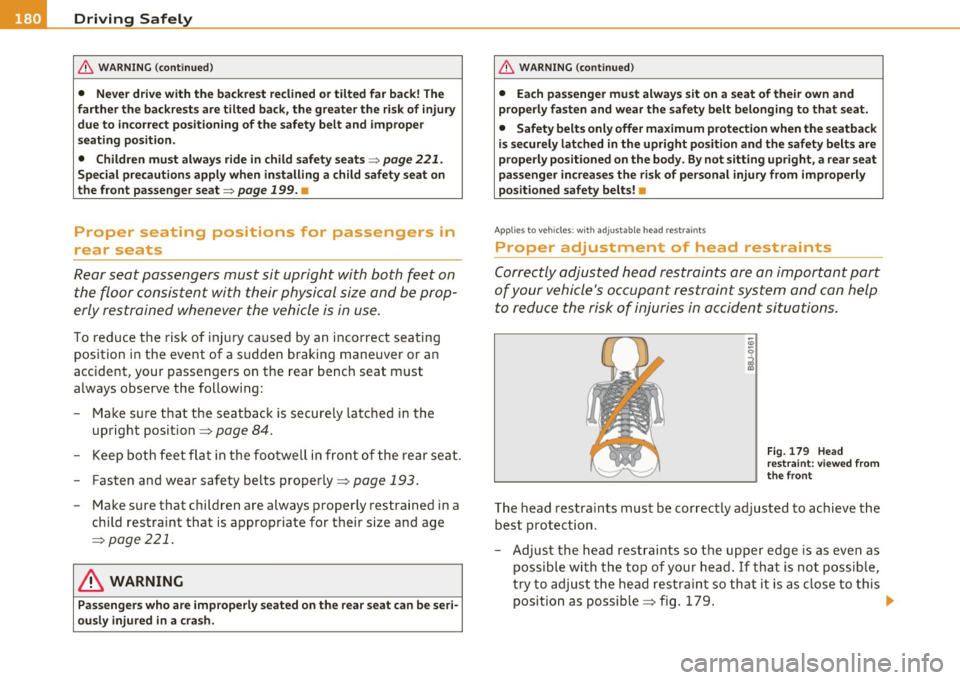
- Adjust the head restraints so the upper edge is as even as
possible with the top of your head. If that is not possible,
try to adjust the head restraint so that it is as close to this
position as possible~ fig. 179.
~
Page 184 of 364
........ _D_ r_iv _i_ n .... g=-- S_ a_f _e _Ly ,.__ ______________________________________________ _
& WARNING (continued)
• Always make sure that all vehicle occupants stay in a proper
seating position and are properly restrained whenever the vehicle
is being used. •
Driver and passenger side footwell
Applies to veh icles : w ith Knee ai rbags
Important safety instructions
& WARNING
Always make sure that the knee airbag can inflate without inter·
ference. Objects between yourself and the airbag can increase the
risk of injury in an accident by interfering with the way the airbag
deploys or by being pushed into you as the airbag deploys.
• No persons (children) or animals should ride in the footwell in
front of the passenger seat. If the airbag deploys, this can result in serious or fatal injuries.
• No objects of any kind should be carried in the footwell area in
front of the driver's or passenger's seat. Bulky objects (shopping bags, for example) can hamper or prevent proper deployment of
the airbag. Small objects can be thrown through the vehicle if the
airbag deploys and injure you or your passengers. •
Pedal area
Pedals
The pedals must always be free to move and must never
be interfered with by a floor mat or any other object.
Make sure that all pedals move freely without interference and that
nothing prevents them from returning to their original positions .
Only use floor mats that leave the pedal area free and can be secured
with floor mat fasteners.
If a brake circuit fails, increased brake pedal travel is required to bring
the vehicle to a full s top.
& WARNING
Pedals that cannot move freely can cause loss of vehicle control
and increase the risk of serious injury .
• Never place any objects in the driver's footwell. An object could
get into the pedal area and interfere with pedal function. In case
of sudden braking or an accident, you would not be able to brake
or accelerate!
• Always make sure that nothing can fall or move into the
driver's footwell. •
Floor mats on the driver side
Always use floor mats that can be securely attached to
the floor mat fasteners and do not interfere with the free
movement of the pedals.
- Make sure that the floor mats are properly secured and
cannot move and interfere with the pedals~& .
Page 185 of 364
________________________________________________ D_ r_ i_ v _i_n ""'g "-- S_a_ f_ e_ l _,,y'-- __
Use only floor mats that leave the pedal area unobstructed and that
are firmly secured so that they cannot slip out of position . You can
obtain suitable floor mats from your authorized Audi dealer.
Floor mat fasteners are installed in your Audi.
Floor mats used in your vehicle must be attached to these fasteners.
Properly securing the floor mats will prevent them from sliding into
positions that could interfere with the pedals or impair safe opera
tion of your vehicle in other ways .
& WARNING
Pedals that cannot move freely can result in a loss of vehicle
control and increase the risk of serious personal injury.
• Always make sure that floor mats are properly secured.
• Never place or install floor mats or other floor coverings in the
vehicle that cannot be properly secured in place to prevent them
from slipping and interfering with the pedals or the ability to
control the vehicle.
• Never place or install floor mats or other floor coverings on top
of already installed floor mats. Additional floor mats and other
coverings will reduce the size of the pedal area and interfere with
the pedals.
• Always properly reinstall and secure floor mats that have been
taken out for cleaning.
• Always make sure that objects cannot fall into the driver foot
well while the vehicle is moving. Objects can become trapped under the brake pedal and accelerator pedal causing a loss of
vehicle control. •
Controls and equip ment Safety first Vehicle operation
Stowing luggage
Loading the luggage compartment
All
luggage and other objects must be properly stowed
and secured in the luggage compartment.
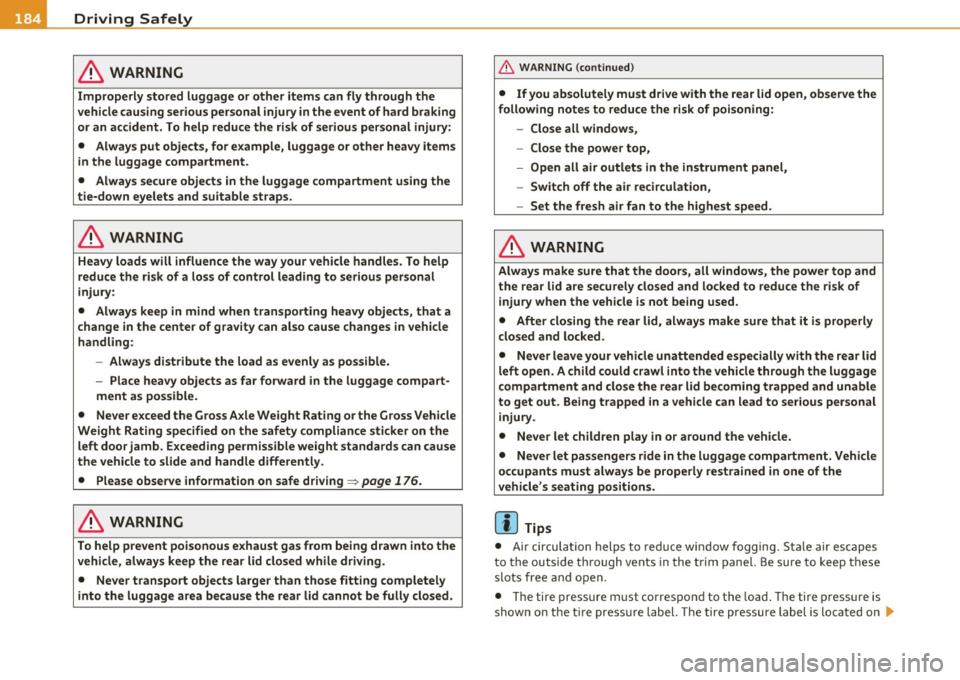
Fig . 180 Safe load
positioning: place
heavy objects as low
and as far forward as
possible.
Loose items in the luggage compartment can shift suddenly,
changing vehicle handling characteristics. Loose items can
also increase the risk of serious personal injury in a sudden
vehicle maneuver or in a collision.
- Distribute the load evenly in the luggage compartment.
- Always place and properly secure heavy items in the
luggage compartment as low and as far forward as
possible => fig. 180.
- Secure luggage using the tie-downs provided=>
page 84.
-Make sure that the rear seatback is securely latched in
place .
Vehicle care Do-it-yourself service Technical data
Page 186 of 364
• ....__D_ r_iv _i_ n_, g=-- S_ a _ f_e _,Ly _ ______________________________________________ _
in. WARNING
Improperly stored luggage or other items can fly through the
vehicle causing serious personal injury in the event of hard braking
or an accident. To help reduce the risk of serious personal injury:
• Always put objects, for example, luggage or other heavy items
in the luggage compartment .
• Always secure objects in the luggage compartment using the
tie-down eyelets and suitable straps.
& WARNING
Heavy loads will influence the way your vehicle handles. To help
reduce the risk of a loss of control leading to serious personal
injury:
• Always keep in mind when transporting heavy objects, that a
change in the center of gravity can also cause changes in vehicle
handling:
-Always distribute the load as evenly as possible.
- Place heavy objects as far forward in the luggage compart-
ment as possible.
• Never exceed the Gross Axle Weight Rating or the Gross Vehicle
Weight Rating specified on the safety compliance sticker on the
left door jamb . Exceeding permissible weight standards can cause
the vehicle to slide and handle differently.
• Please observe information on safe driving=>
page 176.
in. WARNING
To help prevent poisonous exhaust gas from being drawn into the
vehicle, always keep the rear lid closed while driving.
• Never transport objects larger than those fitting completely
into the luggage area because the rear lid cannot be fully closed.
& WARNING (continued)
• If you absolutely must drive with the rear lid open , observe the
following notes to reduce the risk of poisoning:
-Close all windows,
- Close the power top,
- Open all air outlets in the instrument panel,
- Switch off the air recirculation,
- Set the fresh air fan to the highest speed.
in. WARNING
Always make sure that the doors, all windows, the power top and
the rear lid are securely closed and locked to reduce the risk of
injury when the vehicle is not being used.
• After closing the rear lid, always make sure that it is properly
closed and locked.
• Never leave your vehicle unattended especially with the rear lid
left open. A child could crawl into the vehicle through the luggage
compartment and close the rear lid becoming trapped and unable
to get out. Being trapped in a vehicle can lead to serious personal
injury.
• Never let children play in or around the vehicle.
• Never let passengers ride in the luggage compartment. Vehicle
occupants must always be properly restrained in one of the
vehicle's seating positions .
(I) Tips
• Air circulation helps to re du ce win dow fogging. Stale air escap es
to the outside th rough vents in the trim panel. Be sure to keep t hese
slots free and open.
• Th e tire pressure must correspond to the load . The tire pressure is
shown on the tir e pressure label. The tire pressure label is located on .,_
Page 187 of 364
________________________________________________ D_ r_ i_ v _i_n ""'g "-- S_a_ f_ e_ l _,,y'-- __
the driver's s ide B-pillar. The tire pressure label lists the recom
mended co ld tire in flatio n press ures fo r th e ve hicle at its max imum
capacity weight and the tires that were on your vehicle at the time it
was manufactured . For recommended tire press ures for normal loa d
conditions, p lease see chapte r=>
page 300. •
Tie-downs
The luggage compartment is equippe d with four tie
do wns to sec ure lu gga ge a nd oth er items.
Use the t ie-downs to sec ure yo ur cargo properly=> page 183,
"Lo ad ing t he lugg age comp artmen t".
In a co llision, the laws of physics mean that even sma ller it ems that
are loose in the vehicle will become heavy missiles that can cause
ser iou s injury. Ite ms i n t he vehi cle pos se ss e ne rgy w hich va ry w it h
vehicle speed and the we ight of the item. Vehicle speed is t he most
s ig nifi ca nt f acto r.
For examp le, in a frontal coll is io n at a speed of 30 mph (48 km/h),
the forces acting on a 1 0-lb (4. 5 kg) object are a bout 20 times t he
normal weig ht o f the item. T his means that t he weight o f the ite m
wou ld s uddenly be a bo ut 200 lbs. (90 kg) . You can imagine the inju
r ies tha t a 200 lbs . (9 0 kg) item fly ing free ly throug h the p ass enge r
compartment cou ld cause i n a collision lik e this .
& WARNING
Weak , damaged or improper straps used to secure item s to tie
downs can fail during hard braking or in a collision and cause
serious personal injury.
• Always use suitable mounting straps and properly secure items
to the tie-downs in the luggage compartment to help prevent
items from shifting or flying forward as dangerous missiles.
• When the rear seat backre st is folded down, always use suit
able mounting straps and properly secure items to the tie-downs
Controls and equip ment Safety first Vehicle operation
& WARNING
(co ntinued )
in the luggage compartment to help prevent items from flying
forward as dangerous missiles into the passenger compartment.
• Never attach a child safety seat tether strap to a tie -down. •
Reporting Safety Defects
Applicable to U.S.A.
If you believe that your vehi cle has a defect
which could cause a crash or could cause injury
or death , you should immediately inform the
National Highway Traffic Safety Administration
(NHTSA) in addition to notifying Audi of
America, Inc.
If NHTSA receives similar complaints, it may
open an investigation, and if it find s that a
safety defe cts exist s in a group of vehicles, it
may o rder a recall and remedy campaign.
However , NHTSA cannot become involved in
individual problems between you, your dealer,
or Audi of America, Inc.
To contact NHTSA, you may call the Vehicle
Safety Hotline toll-free at:
Tel.: 1-888-327-4236 (TTY: 1-800-424-9153)
or write to:
Administrator
Vehicle care Do-it-yourself service Technical data
Page 190 of 364
• ....__D_ r_iv _i_ n_, g=-- S_ a _ f_e _,Ly _ ______________________________________________ _
-Press the rollbar down until it stops.
- Make sure the rollbar is secure before releasing it .
- Close the cover@::::, fig . 184 .
- Repeat the procedure on the other rollbar.
With the power top closed
- Switch the ignition on .
- Press the convertible switch to adjust the convertible frame until it is vertical=> fig . 184 .
- Pull the loop upward in the direction of the arrow and hold it in place ::::> fig. 183.
- Slide the rollbar down.
- Release the loop just before the rollbar reaches its end pos ition (3-5 cm) .
- Press the rollbar down until it stops.
- Make sure the rollbar is secure before releasing it.
- Close the cover@=> fig. 184.
- Repeat the procedure on the other rollbar .
- You can now close th e pow er top again.
& WARNING
• Have the rollover protection system checked by your autho
rized Audi dealer if it is faulty. Otherwise, the system may not
deploy correctly in a collision.
• Modifying the rollover protection system or individual compo
nents is not permitted .
& WARNING (continued)
• Work on the rollover protection system should only be
performed by your authorized Audi dealer. Otherwise the system
may not function correctly in a collision or it could deploy unex
pectedly.
• Have the system inspected at service intervals. This ensures the
system will always be ready for use. Have your authorized Audi
dealer check the rollover protection system every two years at the
latest. •