fuel AUDI A5 CABRIOLET 2011 User Guide
[x] Cancel search | Manufacturer: AUDI, Model Year: 2011, Model line: A5 CABRIOLET, Model: AUDI A5 CABRIOLET 2011Pages: 364, PDF Size: 86.48 MB
Page 34 of 364

Driver information display
- Turn the engine off.
- Check the engine oil level=>
page 284.
-Contact your authorized Audi dealer if necessary.
Engine oil level too low
If the engine oil level is too low, add engine oil=> page 284.
Engine oil level correct
If the symbol 't=7: flashes even though the engine oil level is correct,
please seek professional assistance . Do not continue driving . Do not
leave the engine running
idle, either.
(I] Tips
• The engine oil pressure symbol~ is not an indicator for a low
engine oil level. Do not rely on it. Instead, check the oil level in your
engine at regular intervals, preferably each time you refuel, and
always before going on a long trip.
• The yellow oil level warning indication ... :lo requires oil refill or
workshop service without delay. Do not wait until the red oil pres
sure warning ~ starts to flash before you respond to the low oil
level warning . By then, your engine may already have suffered
serious damage. •
Fill engine oil now~
~-Please replenish oil now
If the ~ symbol lights up, then the oil has to be replenished right
now =>
page 284. •
Steering malfunction ~-
If there is a malfunction in the electronic steering column
lock, the steering cannot be unlocked.
If the @l- symbol in the display blinks, there is a malfunction
in the electronic steering column lock . A driver message
appears as well to explain the malfunction in more detail.
The driver warning goes out after about 5 seconds, but it can
be brought up at any time by pressing the (SET] button
again.
Stop the vehicle and turn off the engine. Steering
defective
- Obtain professional assistance.
- Do
not tow your vehicle .
& WARNING
Your vehicle must not be towed in the event of a malfunction in
the electronic steering column lock because it cannot be steered
due to the locked steering. If it is towed with the steering locked,
there is the risk of an accident.
(I] Tips
The symbol's appearance might be different in some models. •
Ignition lock malfunction©-
A malfunction in the ignition lock must be repaired imme
diately.
If the ©- symbol in the display blinks, there is a malfunction
in the electronic ignition lock. A driver message appears as
well to explain the malfunction in more detail. The driver
~
Page 35 of 364
warning goes out after about S seconds, but it can be brought up at any time by pressing the !SETI button again
Defective ignition switch Get it serviced!
-Do not turn the engine off.
- Drive immed iately to an authorized service facility to have
the malfunction corrected.
If there is a malfunction in the electron ic ignition lock, the ignition
cannot be turned off . Drive immediately to an authorized service
facility to have the cause of the malfunction corrected.
On vehicles w ith convenience key *, the e ng ine should not be switched
off using the start/stop button because the engine cannot be started
again after the ignit ion has been switched off.
[ i ] Tips
The symbol's appearance might be d ifferent in some models. •
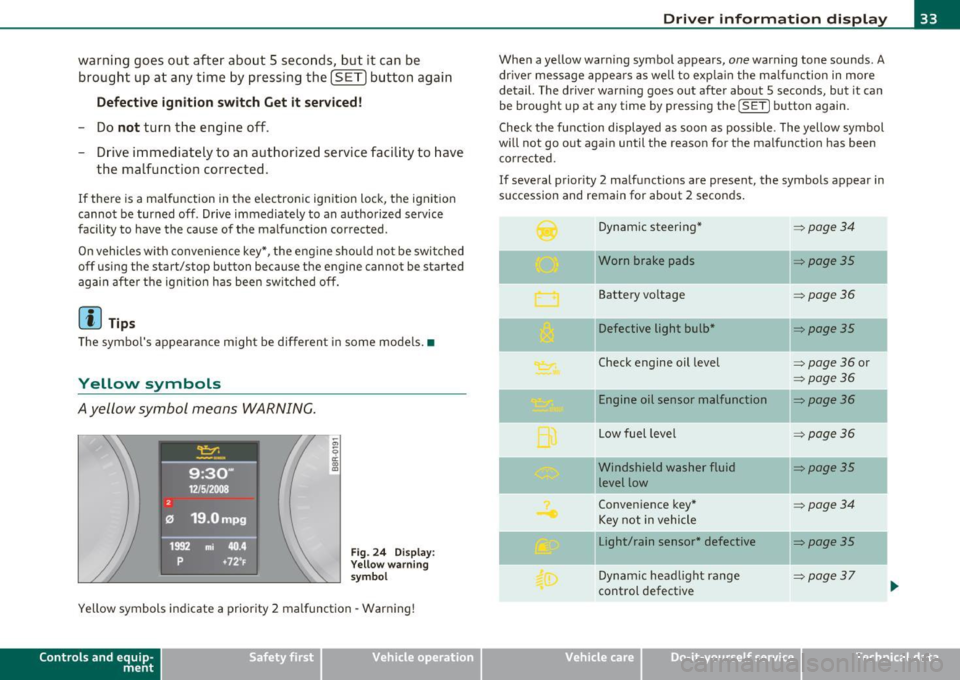
Yellow symbols
Ayellow symbol means WARNING.
Fig. 24 Display:
Yellow warning
symbol
Yellow symbols indicate a priority 2 malfunction -Warning!
Con tro ls a nd e quip
m en t Vehicle
OP-eration
Driver information display
When a yellow warning symbol appears, one warning tone sounds. A
dr iver message appears as well to expla in the malfunction in more
detail. The driver warn ing goes out after about 5 seconds, but it can
be brought up at any time by pressing the
! SET] button again.
Check the function displayed as soon as possible . The yellow symbol
will not go out again until the reason for the malfunction has been
corrected.
If several priority 2 malfunctions are present, the symbols appear in
succession and remain for about 2 seconds.
Dynamic steering*
~ page34
-Worn brake pads ~poge35
Battery voltage ~poge36
Defective light bulb* ~poge35
Check engine oil level => page 36 or
~page36
Engine oil sensor malfunction ~page36
-
Low fuel level =:>page 36
- -Windshield
washer fluid ~poge35
level low
Convenience key*
~poge34
Key not in vehicle
Light/rain sensor* defective
::::>poge35
--
Dynamic headlight range => page37
control defective ...
Vehicle care Do-it-yourselt service iTechnical data
Page 38 of 364

Driver information display
Fuel supply too low I
When the symbol illuminates, this means there are about 2.1
gallons (8 liters) of fuel left in the fuel tank. Time to refuel!
=;, page 275.
If the symbol lights up, even when there is ample fue l in the tank, and
the text
TANK SYSTEM MALFUNCTION! CONTACT WORKSHOP
appears in the display, there is a fault in the system. Contact a quali
fied workshop to have the fault rectified. •
Applies to veh icles: w ith batte ry vol tage warning
Battery voltage L:
If battery power drops into the range where it can limit the ability of
the engine to start, this the symbol appears in the instrument
cluster display with the following driver message battery charge low:
Indicates charging by being driven.
While this driver notification is displayed, you have to be prepared for
limited starting capability.
Driver message appears and goes out again
If this driver message appears after the ignition is turned on or while
driving and it goes out again after a while, the battery has been
adequately recharged.
Driver message appears and does not go out again
If this driver notification appears after the ignition is turned on or
wh ile driving and does not go out again, the battery's state of charge
is not in the optimal range. Starting capability is restricted. Have the
battery checked at an authorized Audi dealer or other qualified work
shop as soon as possible. •
Check engine oil ~
, Add oil, max x qt (l). You may continue driving
If the . symbol lights up displaying this driver message, then add a
maximum of 1 liter at your earliest opportunity~
page 284. •
Engine oil level ~i.
c,,-Please check oil level
When the symbol illuminates, check the engine oi l level as soon as
possible~
page 284. Top off the oil at your earliest opportunity
~page284. •
Engine oil sensor defective
Oil level! Sensor defective
,., _,..
If the symbol illuminates, contact your authorized Audi dealer and
have the oi l sensor inspected. Until you have this done, check the oil
level each time you refuel just to be on the safe side~
page 284. •
Applies to vehicles: with engine speed limitation
Engine speed limitation -~
Do not exceed max. engine speed of XXXX rpm
Th e ·, symbol illuminates when there is an engine control malfunc
tion . The ind icator light 'in the instrument cluster also illuminates.
Th e engine speed is limited to the speed displayed in the driver infor
mation system. Keep in mind that the engine speed will not exceed
the va lue displayed in the driver information system, for example
when downshifti ng.
Please go to an author ized Audi dealer or other qualified workshop to
have the malfunction repaired. •
Page 44 of 364
Opening and closing
• Remote master key~ page 43
• Door hand les wi th co nve nien ce key* ~ page 44,
• Lock cyli nder at the dr iver's door~ page 45, or
• Power locking swi tch inside~
pag e 46.
Selective unlocking
When they are closed, the door and rear lid are locked. When
unloc kin g, you ca n set in the radio or in the MMI* whethe r
only the
dr iver 's door or the entire veh icle s hou ld be unlocked~
page 43.
Automatic locking
The automat ic lock ing feature locks all the vehicle doors and the rear
lid when you d rive f aster th an 9 mph (15 km/h).
The car is unlocked agai n once t he ignition key is removed . In add i
tion , the vehicle can be u nlocked if the open ing function in the power
loc king system switch o r at one of th e door levers is a ctuated. The
Auto Lock function can be turned o n and off i n the ra dio or in the
MMI * ~ page 43.
Add itionally, in the event of a crash with a irbag deployme nt the doors
are au tomatically u nlocked to allow access to the vehi cle.
Anti-theft alarm warning system
If the anti -the ft ala rm warn ing sys tem detec ts a break -in into t he
vehicle, acoustic and v isual warning s ignals are triggered .
T he anti-theft warning system is activated a utomat ica lly when you
lock the vehicle . It is deactivated w hen u nlocking using the
remote
key ,
with the mechanical key , and when you switch o n the ignition.
Th e alarm also turns off whe n the alarm cycle has ex pire d.
Turn signals
W hen you unlock the vehicle, the t urn s ignals f lash twice, when you
loc k it once. If they do not flash, one of the doors, the rear lid or the
hood is not locked .
Unintentionally locking yourself out
In the following cases the re safeguards to prevent yo u locking yo ur
remote maste r key in the vehicle:
• The veh icle does not lock with the central lock ing switch
~ page 4 6 if the d rive r's doo r is open.
• On vehicles with convenience key*, if the most recently used
maste r key is in the luggage compartment , th e re ar lid is au tomati
cally unlocked again after it is closed
~ page 47.
Do not lock yo ur vehicle wi th the remote master key u nti l all doo rs
and the rear lid are closed. In th is way you avoid locking yourself out
accidentally .
& WARNING
• When you leave the vehicle, always remove the ignition key
and take it w ith you. This will prevent passengers (children, for
example) from a ccidentally being locked in the vehicle should
they accidentally press the power locking switch in the front doors.
• Do not leave children inside the veh icle unsupervised. In an
emergency it would be impossible to open the doors from the
outs ide w ithout the key .
W Tips
• In the event of a cras h w it h ai rbag deployme nt all locked doo rs
w ill be a utomat ically un locked to give access to the vehi cle o ccupants
from the outside .
• If the power lo cking system should mal func tion, you c an lock the
dr iver 's door using the mechanical key~
page 47.
• If the power locking sys tem sho uld fail, yo u ca n s till open t he fuel
tank flap in a n emergency ~
page 278.
• You a re well advised not to keep valuables i nside a n un attended
vehicle, v isib le or not. Even a properly locked vehicle cannot provide
t he se cu rity of a sa fe. .,_
Page 96 of 364
![AUDI A5 CABRIOLET 2011 User Guide Warm and cold
(I] Tips
If the climate control is running in cooling mode, air flows mainly
from ve nts @ and @. To achieve adequate cooling, you should never
close these vents c](/img/6/57571/w960_57571-95.png "AUDI A5 CABRIOLET 2011 User Guide Warm and cold
(I] Tips
If the climate control is running in cooling mode, air flows mainly
from ve nts @ and @. To achieve adequate cooling, you should never
close these vents c")
Warm and cold
(I] Tips
If the climate control is running in cooling mode, air flows mainly
from ve nts @ and @. To achieve adequate cooling, you should never
close these vents completely. •
Applies to vehicles: wit h deluxe auto mati c climate c ontro l
Economical use of the climate control
system
Economical use of the climate control system helps save
fuel.
When the climate control system is working in cooling mode,
engine performance is reduced and fuel consumption is
affected. To keep the time the climate control system is on as
short as possible, you should do the following :
- To save fuel, turn off cooling mode by pressing the [AC]
button (indicator light goes out).
- In addition, if you open the window while driving, turn off cooling mode by pressing the
[AC] button (indicator light
goes out).
- If the vehicle is extremely hot due to the heat of the sun,
briefly open doors and windows.
For the sake of the environment
When you save fuel, you reduce emissions from the vehicle. •
App lies to veh ic les: with del uxe automatic climate control
Automatic recirculation
An air quality sensor detects increased concentrations of
pollutants in the outside air and automatically switches
to recirculation mode.
The basic climate control settings can be adjusted in the
radio or
MMI*.
- Select: Function button [CAR]> Climate control switch.
We recommend that you always keep automatic recirculation ON to
prevent polluted outside ai r from entering the vehicle interior.
If the
air quality sensor located in the climate control system detects
polluted outside air, the sensor decides whether the air pollution can
be reduced by the factory-installed pollutant filter or whether it is
necessary to switch to recirculation . With heavy concentrations of
pollutants, the climate control system is switched automatically to
recirculation mode and the supply of outside air is blocked . As soon
as the concentration of pollutants in the outside air drops, fresh air is
supplied to the vehicle interior again.
In the event tha t the windows fog up during au tomatic recircula tion,
press the[@] button immediately.
Under certain operating conditions, automatic recirculation is
switched off automatically. When outside temperatures are below
about SO
°F ( + 10 °(), automatic recirculation is limited to
30 seconds. When outside temperatures are below about 30
°F (-
1 °(), automatic recirculation is limited to 15 seconds .•
Page 104 of 364
1111....__w __ a _r_ m __ a_n_ d_ c_ o _ l_d _______________________________________________ _
Applies to veh icles : wi th d eluxe automat ic clim ate cont rol pl us
Economical use of the climate control
system
Economical use of the climate control system helps save
fuel.
When the climate control system is working in cooling mode,
engine performance is reduced and fuel consumption is
affected. To keep the time the climate control system is on as
short as possible, you should do the following:
- To save fuel, turn off cooling mode by pressing the AC
button (indicator light goes out).
- In addition, if you open the window while driving, turn off
cooling mode by pressing the AC button (indicator light
goes out).
- If the vehicle is extremely hot due to the heat of the sun,
briefly open doors and windows.
~ For the sake of the environment
When you save fuel, you reduce emissions from the vehicle. •
Applies to vehicles: with deluxe automatic climate cont rol plus
Deluxe automatic climate control plus -
basic settings
The basic climate control settings can be adjusted in the
radio or MM!*.
-Select: Function button (CAR]> Climate control switch.
Automatic recirculation
An air quality sensor detects increased concentrations of pollutants
in the outside air and automatically switches to recirculation mode. We recommend that you always keep automatic
recirculation ON to
prevent polluted outside air from entering the vehicle interior.
If the
air quality sensor located in the climate control system detects
polluted outside air, the sensor decides whether the air pollution can
be reduced by the factory-installed pollutant filter or whether it is
necessary to switch to recirculation. With heavy concentrations of
pollutants, the climate control system is switched automatically to
recirculation mode and the supply of outside air is blocked. As soon
as the concentration of pollutants in the outside air drops, fresh air is
supplied to the vehicle interior again.
In the event that the windows fog up during automatic recirculation,
press the
l@I button immediately.
Under certain operating conditions, automatic recirculation is
switched off automatically. When outside temperatures are below
about 50
°F ( + 10 °(), automatic recirculation is limited to
30 seconds. When outside temperatures are below about 30
°F (-
1 °C), automatic recirculation is limited to 15 seconds .
Synchronization
After Synchronization is set to on, all of the subsequent climate
control settings (except for seat heating*) for the driver are trans
ferred to the front passenger .
Synchronization is canceled when settings are adjusted on the front
passenger's side .•
Page 153 of 364
Transmission -
----------------
- Step on the brake peda l. At the same time press and hold
the interlock button on the s ide of the gear selector knob
=:> fi g. 153 wi th your thumb until you have moved the
selector lever to the des ired position .
Automatic selector lever lock
The se lector lever is locked in the P and N positions w hen the ignition
is turned on . To move the leve r from these pos it ions the driver must
dep ress the brake peda l. As a reminder to the d river, the following
warning appears in the instrument cluster display when the se lector
is in
P and N:
When stationary apply footbrake while selecting gear
A time delay e lement prevents t he selector leve r from lock ing when
it is moved throug h the
N posit ion (going from R to D ). The lock ing
element will lock the se lector lever if the lever is left in N (Neutra l) for
more tha n app rox imately 1 second, w ithout t he b rake pedal be ing
pressed.
A t speeds above about 3 mp h (5 km/h) the A utomat ic Shi ft Lock is
automatically deactivated in t he
N position .
Interlock button
The lock button on the selector lever prevents the lever from being
a cciden tally shifted in to cert ain posi tions . Pressing this b utton deac
tivates the selector lever lock. Depend ing on the direction of the
shift, the se lector leve r locks a t different positions. The pos itions are
highlighted in the illustrat io n =>
page 150, fig. 153 .
Igni tion key safety interlock
The key cannot be removed from the ignition unless the selector lever
is in the
P pa rk position. When the igni tion key is removed, the
selector lever will be locked in the
P position. •
Controls and equip
ment Safety first
Applies
to vehicles : with au toma tic transmiss ion
Kick-down
The kick -down feature allows the vehicle to generate
maximum acceleration .
When you press the accelerator peda l beyond the resis tance po int
that is reached at full throttle, the transmission will select a lower
gear rat io b ased on vehicle speed and e ngine RPM . The engine R PM
will be controlled to produce maximum vehicle acceleration as long
as you con tinue to press the acceler ator pedal beyond t his resistance
point .
& WARNING
Be careful when using the kick-down featu re on slippery roads.
Rapid a cceleration may cau se the vehicle to skid .•
App lies to veh icles: with automatic trans mission
Dynamic shift program (DSP)
The automati c transmi ssion is electronically controlled .
The transmiss ion is self adapting and will automatically select the
bes t sh ift p rogram su ited to the dr iv ing cond it io ns and dr iving style .
Th e transmission will select one of the
economy programs when you
drive at a steady speed or a gradually c hanging speed without heavy
acce le ration . This ac hieves optimum fuel efficiency, with early
upshifting and delayed downshifting.
Th e transm iss ion will au tomatically se lect the
s porty shift p rograms
when you dr ive at higher speeds, or w ith heavy acceleration and
frequently chang ing speeds . Upshifts a re de layed to make full use of
engine power . Downs hifting takes place at higher engine speeds than
in the economy programs . _.,
Vehicle care Technical data
Page 154 of 364
-Transmission .n,..__ ______________ _
The selection of the most suitable shift program is a continuous,
automatic process. The driver can also make the transmission switch
to a sporty program by
quickly pressing down the gas pedal.
This causes the transmission to shift down to a lower gear to achieve
rapid acceleration, e .g . for quickly passing another vehicle. You do
not need to press the gas pedal into the kick-down range. After the
transmission has upshifted, the original program is selected
according to your driving style.
An additional shift program allows the automatic transmission to
select the proper gear for uphill and downhill gradients.
This keeps the transmission from shifting up and down unnecessarily
on hills. The transmission will shift down to a lower gear when the
driver presses the brake pedal on a downhill gradient. This makes use
of the braking effect of the engine without the need to shift down
manually. •
Applie s to veh icles: w it h au tomatic transm iss io n
Manual shift program
Using the manual shift program you con manually select
gears.
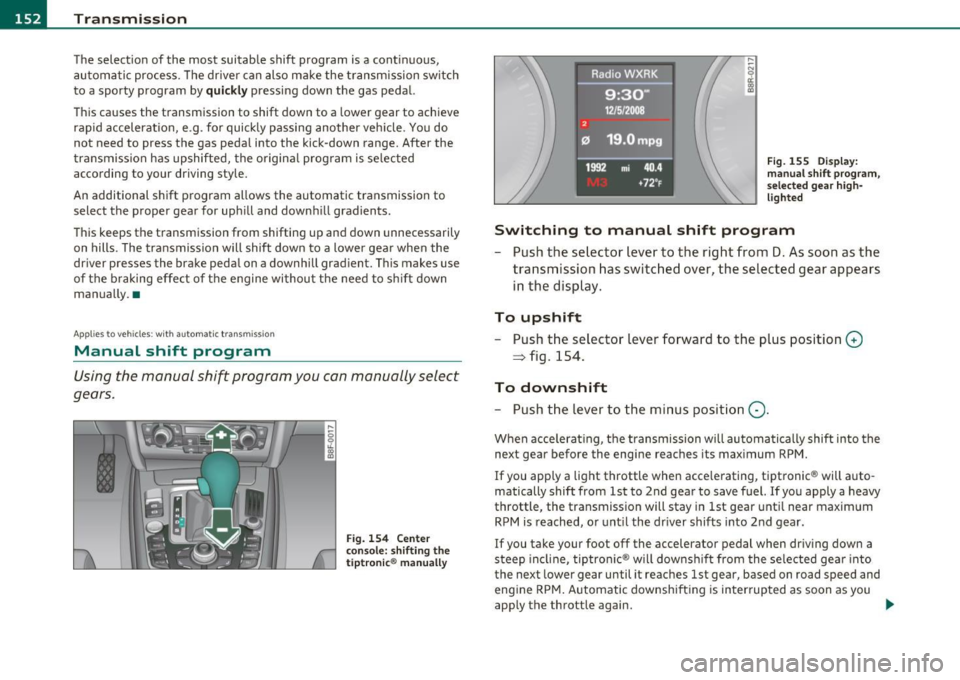
Fig. 154 Center
console: shifting the
tiptronic ® manually
Fig. 155 Display:
manual shift program,
selected gear high
lighted
Switching to manual shift program
- Push the selector lever to the right from D. As soon as the
transmission has switched over, the selected gear appears
in the display.
To upshift
-Push the selector lever forward to the plus position 0
~ fig. 154.
To downshift
- Push the lever to the minus pos ition Q .
When accelerating, the transmission will automatically shift into the
next gear before the engine reaches its maximum RPM.
If you apply a light throttle when accelerating, tiptronic ® will auto
matically shift from 1st to 2nd gear to save fuel. If you apply a heavy
throttle, the transmission will stay in 1st gear until near maximum
RPM is reached, or until the driver shifts into 2nd gear.
If you take your foot off the accelerator pedal when driving down a
steep incline, tiptronic ® will downshift from the selected gear into
the next lower gear until it reaches 1st gear, based on road speed and
eng ine RPM. Automatic downshifting is interrupted as soon as you
app ly the throttle again. _.
Page 156 of 364
ffl..__T_ r_a _n_ s_ m_ is_ s_io _ n ___________________________________________________ _
Applies to veh icles : with automat ic tr ansm ission
Emergency release of the selector lever
If the vehicle's power supply fails, the selector lever can
be released in an emergency.
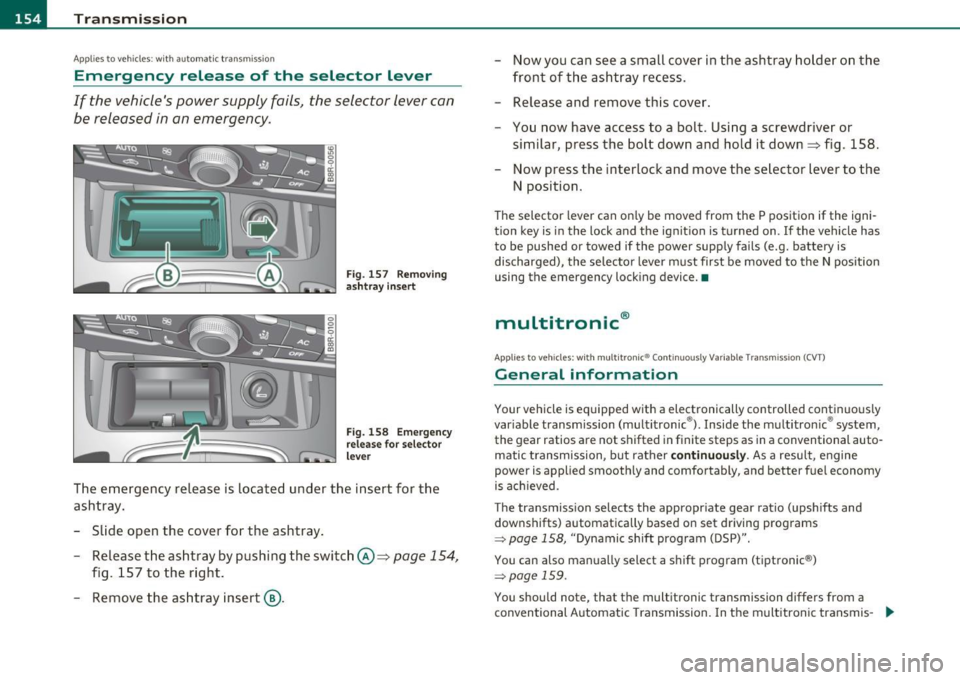
Fig . 157 Removing
ashtr ay in sert
Fig. 158 Emerge ncy
release for selector
lever
The emergency release is located under the insert for the
ashtray.
- Slide open the cover for the ashtray .
- Release the ashtray by pushing the switch @=>
page 154,
fig. 157 to the right.
- Remove the ashtray insert@. -
Now you can see a small cover in the ashtray holder on the
front of the ashtray recess.
- Release and remove this cover.
- You now have access to a bolt. Using a screwdriver or
similar, press the bolt down and hold it down=> fig . 158.
Now press the interlock and move the selector lever to the
N position.
Th e selector lever can on ly be moved from the P position if the igni
tion key is in the lock and the ignit ion is turned on . If the vehicle has
to be pushed or towed if the power supply fails (e.g. battery is
discharged), the selector lever must first be moved to the N position
using the emergency locking device. •
multitronic®
Applies to veh icle s: with mu lt it ron ic® Con tinuously Variable Transmission (CVT)
General information
Your vehicle is equipped with a electronically controlled continuous ly
var iable transmission (multitronic ®). Inside the multitronic ® system,
the gear ratios are not shifted in finite steps as in a conventional auto
matic t ransmission, but rather
continuously. As a result, engine
power is applied smoothly and comfortably, and better fuel economy
is ach ieved .
The transmission selects the appropriate gear ratio (upshifts and
downshifts) automatically based on set driving programs
~ page 158, "Dynamic shift program (DSP)".
You can also manually select a shift program (tiptronic ®)
~ page 159 .
You shou ld note, that the multitronic transmission differs from a
conventional Automatic Transmission . In the multitronic transmis-
9J,,
Page 160 of 364
1111 ...... __ T _r_ a_ n _ s_ m __ is_ s_io _ n _____________________________________________________ _
warning appears in the instrument cluster display when the selector
is in
P and N:
When stationary apply footbrake while selecting gear
A time delay element prevents the selector lever from locking when
it is moved through the
N position (going from R to D). The locking
element will lock the selector lever if the lever is left in N (Neutral) for
more than approximately 1 second, without the brake pedal be ing
pressed .
At speeds above about 3 mph (5 km/h) the Automatic Shift Lock is
automatically deactivated in the
N position.
Interlock button
The lock button on the selector lever prevents the lever from being
accidentally shifted into certain positions. Pressing this button deac
tivates the selector lever lock. Depending on the direction of the
shift, the selector lever locks at different positions. The positions are
high light ed in the illustrat ion~
page 157 , fig. 161.
Ignition key safety interlock
The key can not be removed from the ignition unless the selector lever
is in the
P park position. When the ignition key is removed, the
selector lever w ill be locked in the
P pos it ion .•
Ap plies to v ehicles : w ith mult itronic ® Contin uously Var iable Transm issio n (C VT)
Kick-down
The kick-down feature allows the vehicle to generate
maximum acceleration.
When you press the accelerator pedal beyond the resistance point
that is reached at full throttle, the transmission will select a lower
gear ratio based on vehicle speed and engine RPM . The engine RPM
w ill be co ntro lled to produce maximum vehicle acceleration as long
as you continue to press the accelerato r pedal beyond th is resistance
point .
& WARNING
Be careful when using the kick-down feature on slippery roads.
Rapid acceleration may cause the vehicle to skid. •
Applies to veh icl es: w it h mul tit ro nic® Con tin uous ly Va ria bl e Tran smis s io n ( CVT)
Dynamic shift program (DSP)
The multitronic ® transmission is electronically
controlled .
The transmission selects the appropriate gear ratio (upshifts and
downshifts) automatically based on preset d riving programs.
The transmission will select one of the
economy programs when you
drive at a steady speed or a gradua lly changing speeds without heavy
acceleration . Th is gives best fuel eff iciency, with early upshifting and
delayed downshifting.
Th e transmission will automatically select the
sporty shift programs
when you dr ive at higher speeds, or w ith heavy acceleration and
frequently changing speeds. Upshifts are delayed to make full use of
eng ine power . Downshifting takes place at higher engine speeds than
in the economy programs.
Th e selection of the most suitab le shift program is a continuous,
automatic process. The driver can a lso make the transmission switc h
to a sporty program by
quickly pressing down the gas pedal.
This causes the transmiss ion to sh ift down into a lower gear ratio and
makes quick acceleration possible (to pass another vehicle) You do
not need to press the gas pedal into the kickdown range. After the
transmission has upshifted, the original program is selected
according to your driving style.
An additional shift prog ram allows the automatic t ransmission to
select the proper gear for uph ill and downh ill grad ients.
This prevents the transmiss ion from shifting up and down unneces
sari ly on hills. The transmission will shift down to a lower gear ratio _,,,