radio AUDI A5 CABRIOLET 2011 User Guide
[x] Cancel search | Manufacturer: AUDI, Model Year: 2011, Model line: A5 CABRIOLET, Model: AUDI A5 CABRIOLET 2011Pages: 364, PDF Size: 86.48 MB
Page 47 of 364
Locking vehicle
-Move the selector lever to the P position (automatic trans
mission), otherwise the vehicle cannot be locked.
- Touch the sensor at the door handle
once~ page 44,
fig. 35 to lock the vehicle ~ & in "General description"
on
page 41 .
The vehicle can be locked and unlocked at any door. It depends on the
settings in the radio or in the MMI* whether the entire vehicle is
unlocked or one of the doors=>
page 43. The master key must be
within a range of about 1.5 m from the appropriate door or the rear
lid . It makes no difference whether the master key is in your jacket
pocket or in your brief case.
If you grip the door handle while locking, th is can adversely affect the
locking function.
It is not possible to re-open the door for a brief period directly after
closing it. This allows you to ensure that the doors are properly
locked.
& WARNING
Read and follow all WARNINGS => & in "General description " on
page 41.
[ i ] Tips
If your vehicle has been standing for an extended period, please note
the following :
• The proximity sensors are deactivated after a few days to save
powe r. You then have to pull on the door hand le once to unlock the
vehicle and a second time to open the vehicle .
• To prevent the battery from being discharged and to preserve your
vehicle's ability to start for as long as possible, the energy manage
ment system gradually switches off unnecessary convenience func-
Controls and equip
ment Safety first
Opening and closing
tions. It is possible that you w
ill not be able to unlock your vehicle
us ing these conven ience f unctions .
• For Declaration of Compliance to United States FCC and Industry
Canada regulations =>
page 346. •
Operating locks with the mechanical key
In the event of a failure of the power locking system, the
driver's door con locked and unlocked with the mechan
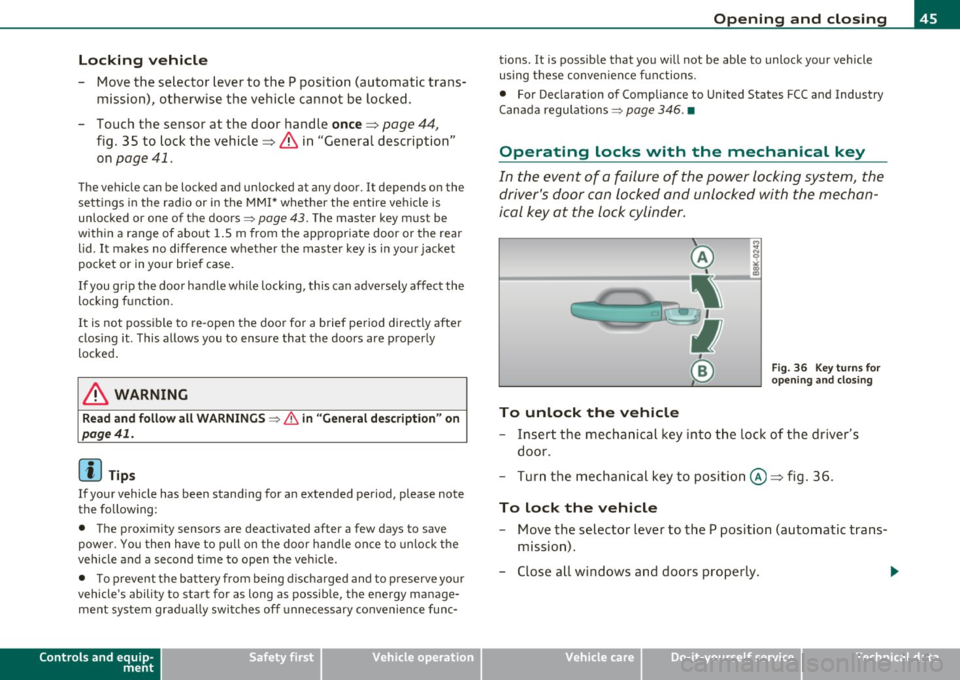
ical key at the lock cylinder.
To unlock the vehicle
Fig. 36 Key turns for
opening and closing
- Insert the mechanical key in to the lock of the driver's
door.
- Turn the mechanical key to position @~ fig . 36.
To lock the vehicle
- Move the selector lever to the P position (automatic trans
mission) .
- Close all windows and doors properly.
~
Vehicle care Technical data
Page 67 of 364
Adjusting exterior Lighting
The functions are selected in the radio or in the fv1fv1I.
- Select: Function button [CAR)> E xterior lighting .
Coming home
The coming home function ensures that after
turn ing off the ignit ion
and ope ning the dri ver' s door
the ve hicle per iphery is illuminated in
the dark . In add ition, the fron t fog lights, the ta il ligh ts and the
l icense p late ligh t are t urned on . The powe r-on time can be set for a
period from O (off) to 60 seconds .
Leaving home
The leaving home functions ensures that
when unloc king , the vehicle
periphery is illum inated in the da rk. In add it io n, the fron t fog ligh ts,
the tai l lights and the license p late light are turned on . This funct ion
can be turned on and off.
Autom atic driving light s*
When the lig ht sw itc h i s in the AUTO => page 63 pos it ion, the switch
on po int of the lights can be changed in the automatic driving light
function.
Daytime running lights*
Th e daytime running lig hts ca n be turned on or off using this func
tion. If the funct ion is act ive, the daytime running l ights are tu rned
on a utoma tica lly w hen the ignition is sw itche d on .
In the versions for some countr ies it is not poss ible to switch off the
daytime running lights or they may not have dayt ime runn ing lig hts.
[ i ] Tips
The coming home/leaving home function is available on ly with the
switch in the AU TO position .•
Controls and equip
ment Safety first
Clear v
ision
Daytime running Lights
When you turn on the ignition the daytime running lights
will come on aut omatically .
USA models
Th e daytime running lights a re a ct ivated when t he lig ht swit ch
=>
page 63, fig. 66 is in the O position or the AUTO position (on ly in
daylig ht condit ions) . The daytime running lights function ca n be
turned on and off in the radio or MMI* menu
E xterior lighting
=> page 65 .
Canada models
Th e daytime r unning lights are activ ated w hen the light switch
=> page 63 , fig . 66 is in the O position, oo oc position or the AUTO posi
tion (only in day light condit ions) . The dayt ime running lights funct ion
cannot be turned off .
& WARNING
Never use daytime running lights to see where you are going. They
are not bright enough and will not l et you see far enough ahead
for s afety , especiall y at dusk or wh en it is dark. Be aware of
change s in outside light condition s when you are dri ving and
respond b y switching on your low beams
io.
0 Note
Always be aware of change s in outside light condition s whil e you
are driving. Respond in time to fading d aylight by turning the light
s witch to po sition
io (or "AUTO ") to turn on your headlight s.•
Vehicle care Technical data
Page 72 of 364
Clear vision
©·Single wipe
© -Clean the windshield. To eliminate water droplets, the wind
shield wiper performs one afterwipe operation after several seconds
while driving. You can switch this function off by moving the lever to
posit ion© within 10 seconds of the afterwipe operation. The after
wipe function is reactivated the next time the ignition is switched on.
Cleaning the headlights*. The headlight washer system* only func
tions when the light is switched on. The headlights are automat ically
cleaned the first time and every fifth time the lever is moved to posi
tion ®· They are also cleaned every time you hold the lever in pos it ion
© for longer than 2 seconds.
& WARNING
• The rain sensor is only intended to assist the driver . The driver
is still responsible for manually switching the wipers on according
to the visibility conditions.
• The windshield may not be treated with water-repelling wind
shield coating agent s. Unfavorable conditions, such as wetness,
darkness, low sun, can result in increased glare. Wiper blade
chatter is also possible.
• Properly functioning windshield wiper blades are required for
a clear view and safe driving=>
page 71, "Replacing windshield
wiper blades" .
0 Note
• In the case of frost, check whether the windshield wiper blades are
frozen to the windshie ld . Switching on the windshield wipers can
damage the wiper blades!
• Prior to using a car wash, the windshield wiper system must be
switched off (lever in position 0). This helps to prevent unintentional
switching on and damage to the windshield wiper system .
[I] Tips
• The w indshield wipe rs are switched off when the ignition is turned
off . Activate the windshield wipers after the ignition is switched back
on by mov ing the windshield w iper lever to any position.
• Worn or dirty windshield wiper blades result in streaking. This can
affect the rain sensor* function. Check your windshie ld wiper blades
regularly.
• The washer fluid nozzles of the w indshield washer system are
heated at low temperatures when the ignition is on .
• When stopping temporar ily, e.g . at a traffic light, the set speed of
the windshield w ipers is automatically reduced by one speed .•
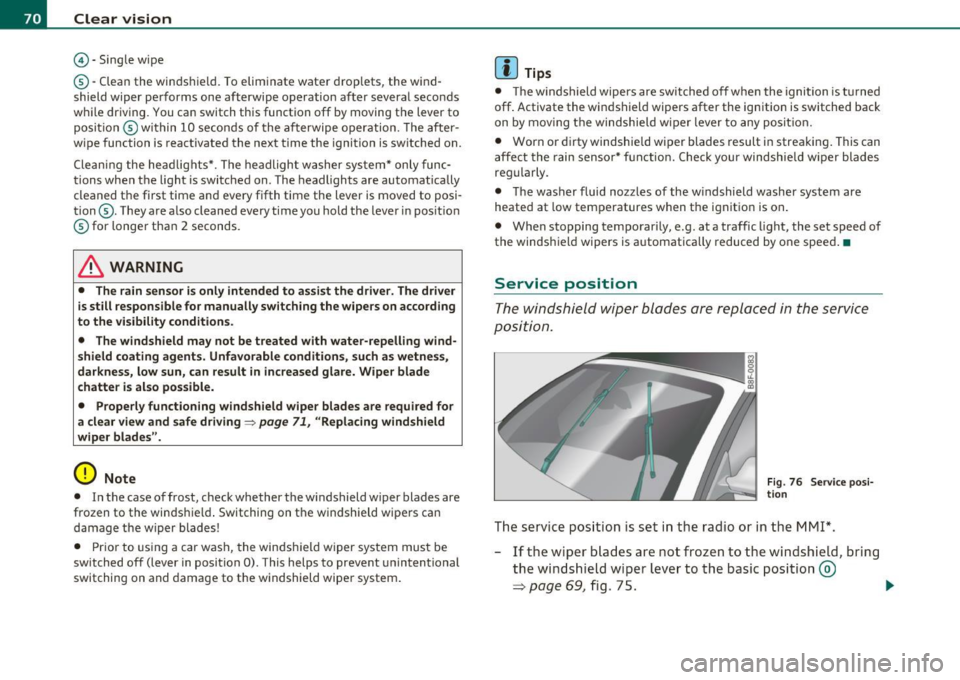
Service position
The windshield wiper blades are replaced in the service
position.
Fig . 76 Service posi
tion
The service position is set in the radio or in the MMI*.
- If the wiper blades are not frozen to the windshield, bring
the windshield wiper lever to the basic position ®
=> page 69, fig. 75. .,_
Page 83 of 364
only going to be used temporarily by a driver whose settings are not
going to be stored. •
Applies to vehicles : w ith seat memory
Storing and recalling settings
Before you can store or recall your settings, the [ ON/OFF]
switch on the seat memory must be engaged (not raised).
Storing settings
- Adjust the driver's seat.
- Adjust the two exterior mirrors .
- Press the
I SETI button and hold it down. In addition, press
one of the memory buttons for at least one second .
- Release the buttons. The settings are now stored under
the corr esponding memory button .
Recalling settings
- If the driver's door is open, tap the corresponding memory
button briefly .
- If the driver's door is closed , press the appropriate
memory button unt il the stored position is reached .
Successful storage is confirmed audibly and by the light in the [SET)
button illuminat ing=> page 80, fig . 84.
When the vehicle is
loc ked , the current settings are stored and
ass igned to the remote contro l key. B ut the setti ngs sto red on
memory buttons 1 to 2 are not deleted. They can be reca lled at any
time. When the vehicle is
unlo ck ed , the settings stored on the
remote control key are restored.
If your vehicle is driven by other persons using your remote control
key , you should save your individua l seat position on one of the
Controls and equip
ment Safety first
S
eats and storage
memory buttons. You can recall your settings again simply and
conveniently by press ing the cor responding memory button. When
the vehicle is locked, these settings are automatically re-assigned to
the remote control key and stored.
& WARNING
• Fo r sa fe ty reaso ns, th e se at se tting can only b e recalled when
t h e ve hicl e is s tat ion ary -oth erwise yo u risk ha ving an acc ident .
• In an emer gency th e re ca ll pro ce du re can be cancelled b y
p ressing the [
ON/OFF) sw itch or by t appin g of the the memo ry
b utto ns. •
App lies to ve hicles: with seat memory
Activating remote control key memory
To be able to recall the stored settings with the remote
control key, the function has to be activated in the radio
or in the MM!*.
-Select : Function button I CAR]> Seat adjustment >
D river's se at > Key mem . profile > On .
(I) Tips
If you do not want another driver to store their settings on the
remote key, switch
off the Memory function using the radio or the
MMI* or the [OFF] button => page 80 . •
Vehicle care Technical data
Page 93 of 364
Applies to veh icles : w ith del uxe au toma tic climate cont ro l
Setting the temperature
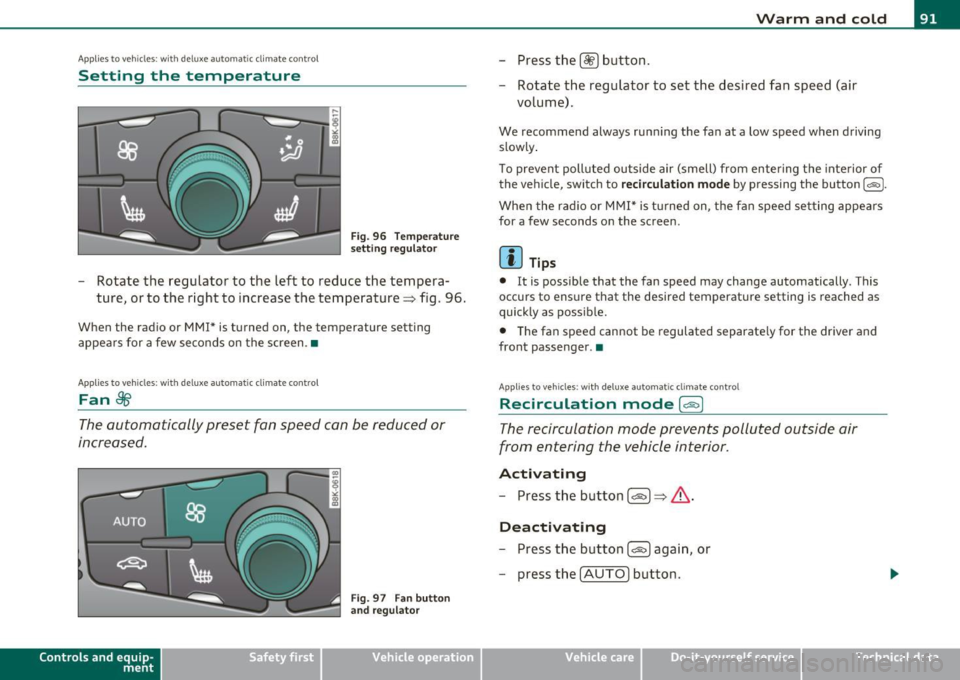
Fig . 96 Temperature
setting regulato r
-Rotate the regulator to the left to reduce the tempera
ture, or to the right to increase the temperature => fig . 96.
When the radio or MMI* is turned on , the temperature setting
appears for a few seconds on the screen .•
Ap plies to vehicl es: wit h deluxe automat ic climat e con tro l
Fan ~
The automatically preset fan speed can be reduced or
increased.
Con tro ls a nd e quip
m en t
Fig. 97 Fan button
and regulator
Vehicle OP-eration
Warm and cold
-Press the l~I button.
- Rotate the regulator to set the desired fan speed (air
volume) .
We recommend always runn ing the fan at a low speed when driving
slowly .
T o prevent polluted outside air (smell) from entering the interior of
the vehicle, switch to
recirculation mode by pressing the button 1 = 1-
When the rad io or MMI* is turned on , the fan speed setting appears
for a few seconds on the screen .
(I] Tips
• It is possible that the fan speed may change automatically . This
occurs to ensure that the desired temperature setting is reached as
quickly as possib le.
• The fan speed cannot be regulated separate ly for the driver and
front passenger .•
A pp lies to v ehicl es: w it h d eluxe a utomatic clim ate contro l
Recircul ation mode [6'::> j
The recirculation mode prevents polluted outside air
from entering the vehicle interior .
Activating
-Press the button I~ I=> & -
Deactivating
- Press the button l<::E::>) again, or
- press the
I AUTO] button .
Vehicle care Do-it-yourselt service iTechnical data
Page 94 of 364
Warm and cold
In recirculat ion mode, air is drawn from the vehicle interior, filtered
and recirculated. We recommend selecting recirculation mode under
the following conditions:
When driving through a tunnel or in a traffic jam so that exhaust
fumes and odors cannot enter the vehicle interior .
& WARNING
You should not use the recirculation mode for an extended period
since no fresh air is drawn in. With the air-conditioning switched
off, the windows can fog up, which increases the risk of an
accident! •
Applies to veh icles : w ith deluxe automat ic cl imate contro l
Air distribution .JJ
The automatically preset air distribution can be changed.
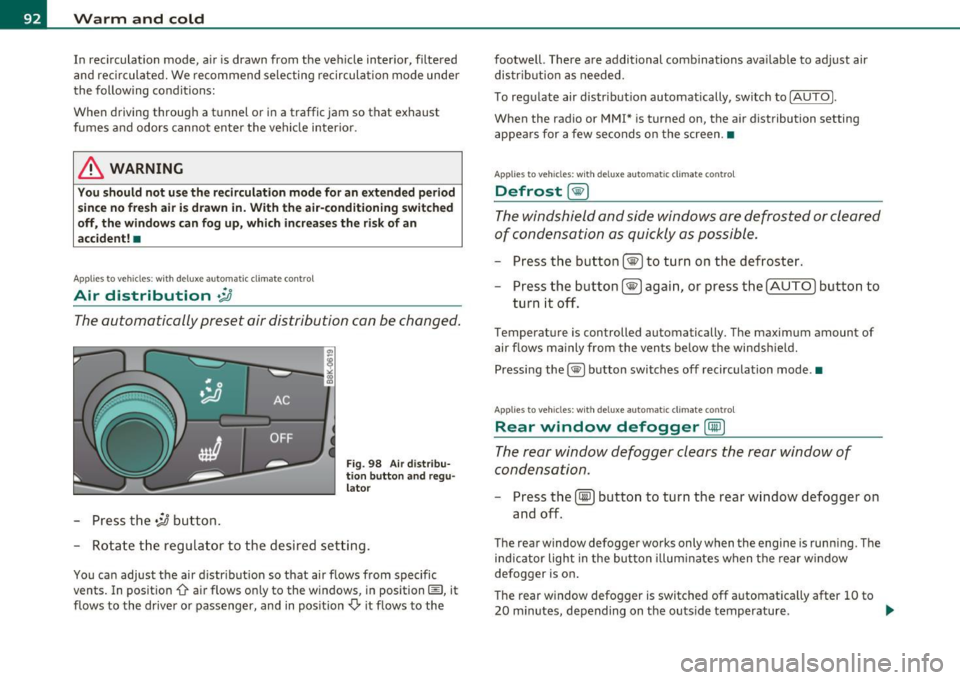
-Press the .;J button.
Fig. 98 Air distribu
tion button and regu
lator
- Rotate the regulator to the desired setting.
You can adjust the air distribution so that air flows from specific
vents. In position
0-air flows only to the windows, in position@, it
flows to the driver or passenger, and in position
,0. it flows to the footwell.
There are additional combinations available to adjust air
distribution as needed.
To regulate air distribution automatically, switch to
!AUTO).
When the radio or MMI* is turned on, the air distribution setting
appears for a few seconds on the screen .•
Applies to veh icles: wit h deluxe automat ic cl imate control
Defrost [@)
The windshield and side windows are defrosted or cleared
of condensation as quickly as possible.
- Press the button !@)to turn on the defroster.
- Press the button[@) again, or press the [
AUTO I button to
turn it off.
Temperature is controlled automatically. The maximum amount of
air flows mainly from the vents below the windshield.
Pressing the
I@ ) button switches off recirculation mode .•
Applies to veh icles: w ith d eluxe automat ic cl imate contro l
Rear window defogger [CiID)
The rear window defogger clears the rear window of
condensation.
- Press the (!iiPJ button to turn the rear window defogger on
and off.
The rear window defogger works only when the engine is running. The
ind icator light in the button illuminates when the rear window
defogger is on.
Th e rear window defogger is switched off automatically after 10 to
20 minutes, depending on the outside temperature . ...
Page 96 of 364
![AUDI A5 CABRIOLET 2011 User Guide Warm and cold
(I] Tips
If the climate control is running in cooling mode, air flows mainly
from ve nts @ and @. To achieve adequate cooling, you should never
close these vents c](/img/6/57571/w960_57571-95.png "AUDI A5 CABRIOLET 2011 User Guide Warm and cold
(I] Tips
If the climate control is running in cooling mode, air flows mainly
from ve nts @ and @. To achieve adequate cooling, you should never
close these vents c")
Warm and cold
(I] Tips
If the climate control is running in cooling mode, air flows mainly
from ve nts @ and @. To achieve adequate cooling, you should never
close these vents completely. •
Applies to vehicles: wit h deluxe auto mati c climate c ontro l
Economical use of the climate control
system
Economical use of the climate control system helps save
fuel.
When the climate control system is working in cooling mode,
engine performance is reduced and fuel consumption is
affected. To keep the time the climate control system is on as
short as possible, you should do the following :
- To save fuel, turn off cooling mode by pressing the [AC]
button (indicator light goes out).
- In addition, if you open the window while driving, turn off cooling mode by pressing the
[AC] button (indicator light
goes out).
- If the vehicle is extremely hot due to the heat of the sun,
briefly open doors and windows.
For the sake of the environment
When you save fuel, you reduce emissions from the vehicle. •
App lies to veh ic les: with del uxe automatic climate control
Automatic recirculation
An air quality sensor detects increased concentrations of
pollutants in the outside air and automatically switches
to recirculation mode.
The basic climate control settings can be adjusted in the
radio or
MMI*.
- Select: Function button [CAR]> Climate control switch.
We recommend that you always keep automatic recirculation ON to
prevent polluted outside ai r from entering the vehicle interior.
If the
air quality sensor located in the climate control system detects
polluted outside air, the sensor decides whether the air pollution can
be reduced by the factory-installed pollutant filter or whether it is
necessary to switch to recirculation . With heavy concentrations of
pollutants, the climate control system is switched automatically to
recirculation mode and the supply of outside air is blocked . As soon
as the concentration of pollutants in the outside air drops, fresh air is
supplied to the vehicle interior again.
In the event tha t the windows fog up during au tomatic recircula tion,
press the[@] button immediately.
Under certain operating conditions, automatic recirculation is
switched off automatically. When outside temperatures are below
about SO
°F ( + 10 °(), automatic recirculation is limited to
30 seconds. When outside temperatures are below about 30
°F (-
1 °(), automatic recirculation is limited to 15 seconds .•
Page 104 of 364
1111....__w __ a _r_ m __ a_n_ d_ c_ o _ l_d _______________________________________________ _
Applies to veh icles : wi th d eluxe automat ic clim ate cont rol pl us
Economical use of the climate control
system
Economical use of the climate control system helps save
fuel.
When the climate control system is working in cooling mode,
engine performance is reduced and fuel consumption is
affected. To keep the time the climate control system is on as
short as possible, you should do the following:
- To save fuel, turn off cooling mode by pressing the AC
button (indicator light goes out).
- In addition, if you open the window while driving, turn off
cooling mode by pressing the AC button (indicator light
goes out).
- If the vehicle is extremely hot due to the heat of the sun,
briefly open doors and windows.
~ For the sake of the environment
When you save fuel, you reduce emissions from the vehicle. •
Applies to vehicles: with deluxe automatic climate cont rol plus
Deluxe automatic climate control plus -
basic settings
The basic climate control settings can be adjusted in the
radio or MM!*.
-Select: Function button (CAR]> Climate control switch.
Automatic recirculation
An air quality sensor detects increased concentrations of pollutants
in the outside air and automatically switches to recirculation mode. We recommend that you always keep automatic
recirculation ON to
prevent polluted outside air from entering the vehicle interior.
If the
air quality sensor located in the climate control system detects
polluted outside air, the sensor decides whether the air pollution can
be reduced by the factory-installed pollutant filter or whether it is
necessary to switch to recirculation. With heavy concentrations of
pollutants, the climate control system is switched automatically to
recirculation mode and the supply of outside air is blocked. As soon
as the concentration of pollutants in the outside air drops, fresh air is
supplied to the vehicle interior again.
In the event that the windows fog up during automatic recirculation,
press the
l@I button immediately.
Under certain operating conditions, automatic recirculation is
switched off automatically. When outside temperatures are below
about 50
°F ( + 10 °(), automatic recirculation is limited to
30 seconds. When outside temperatures are below about 30
°F (-
1 °C), automatic recirculation is limited to 15 seconds .
Synchronization
After Synchronization is set to on, all of the subsequent climate
control settings (except for seat heating*) for the driver are trans
ferred to the front passenger .
Synchronization is canceled when settings are adjusted on the front
passenger's side .•
Page 110 of 364
ffl..__O_ n_ t_h _ e_ r_ o_ a_ d _________________________________________________ _
Starting and stopping the engine
with convenience key
A pplies to veh ic le s: with conven ience ke y
Starting the engine with the
[START ENGINE S TOP] button
This button switches on the ignition and starts the
engine.
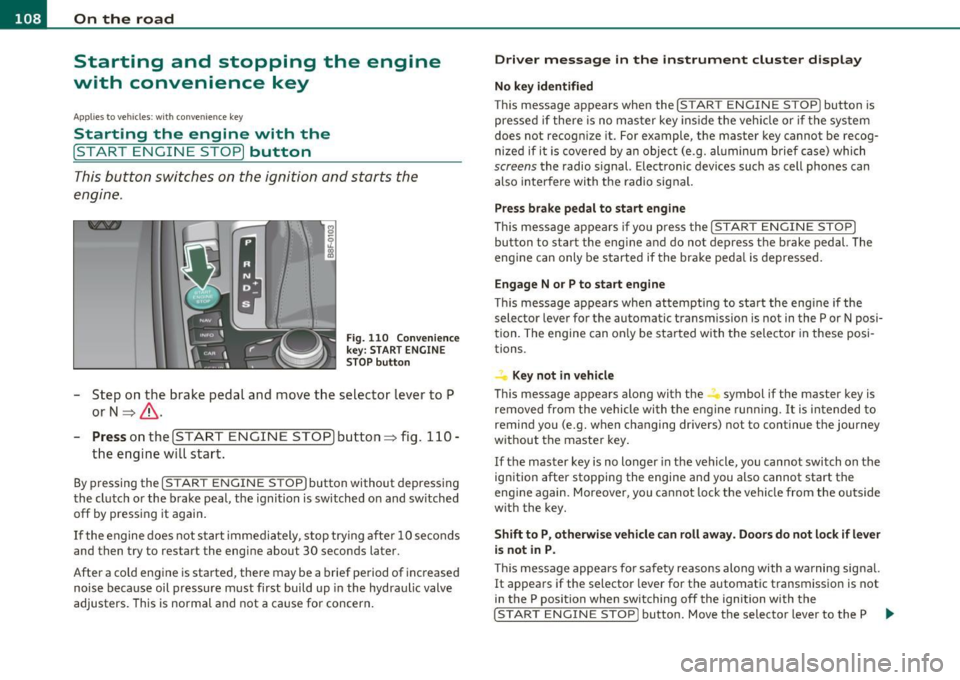
Fig. 110 Convenience
key: START ENGINE
STOP
button
- Step on the brake pedal and move the selector lever to P
orN =>& .
- Pressonthe[START ENGINE STOP)button::::>fig. 110-
the engine will start.
By pressing the [STAR T ENGINE STOP] button without depressing
the clutch or the brake peal, the ignition is switched on and switched
off by pressing it again.
If the engine does not start immediately, stop trying after 10 seconds
and then try to restart the engine about 30 seconds later.
After a cold engine is started, there may be a brief period of increased
noise because oil pressure must first build up in the hydraulic valve
adjusters. This is normal and not a cause for concern.
Driver message in the instrument cluster display
No key identified
This message appears when the !START ENGINE STOP] button is
pressed if there is no master key inside the vehicle or if the system
does not recognize it. For example, the master key cannot be recog
nized if it is covered by an object (e.g. aluminum brief case) which
screens the radio signal. Electronic devices such as cell phones can
also interfere with the radio signal.
Press brake pedal to start engine
This message appears if you press the !START ENGINE STOP)
button to start the engine and do not depress the brake pedal. The
engine can only be started if the brake pedal is depressed.
Engage N or P to start engine
This message appears when attempting to start the engine if the
selector lever for the automatic transmission is not in the P or N posi
tion. The engine can only be started with the selector in these posi
tions.
Key not in vehicle
This message appears along with the.:! symbol if the master key is
removed from the vehicle with the engine running. It is intended to
remind you (e.g. when changing drivers) not to continue the journey
without the master key.
If the master key is no longer in the vehicle, you cannot switch on the
ignition after stopping the engine and you also cannot start the
engine again. Moreover, you cannot lock the vehicle from the outside
with the key.
Shift to P, otherwise vehicle can roll away. Doors do not lock if lever
is not in P.
This message appears for safety reasons along with a warning signal.
It appears if the selector lever for the automatic transmission is not
in the P position when switching off the ignition with the
!START ENGINE STOP] button. Move the selector lever to the P _..
Page 123 of 364
____________________________________________ A_ d ___ a~p _t __ i_ v _e_ c_r_u _ i_ s _e_ c_o_ n_ t_r _o _l __ _
Appli es to ve hicl es: wi th a daptive cruise cont rol
How is the distance (time interval) set?
Distance con be set in four stages.
m 0 [;; ,.: 00 a,
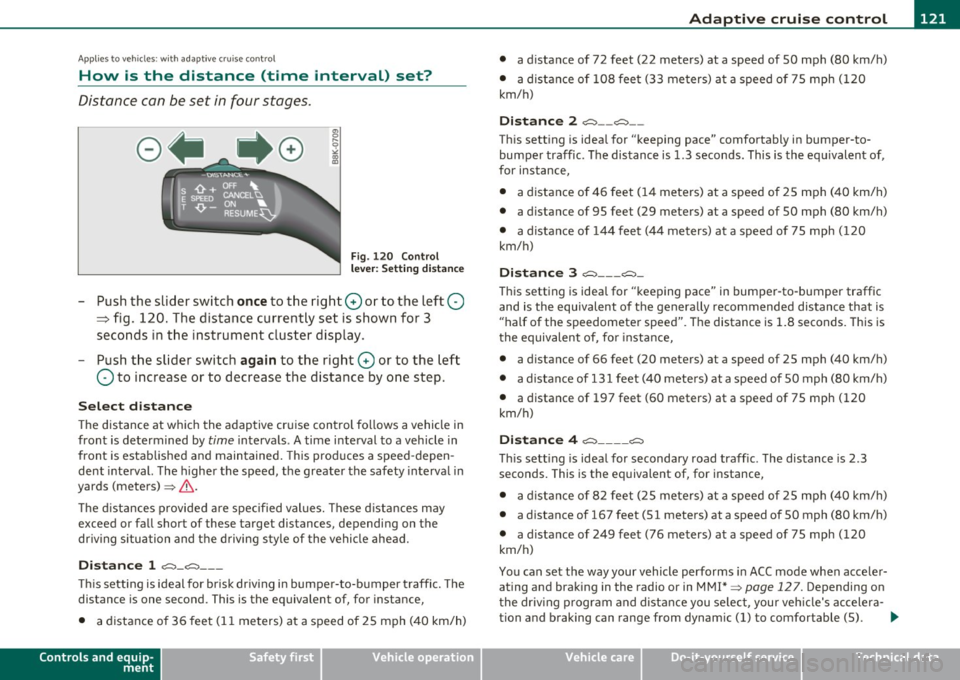
Fig . 120 Control
l ever : Sett ing distance
-Push the slider switch once to the right 0 or to the left Q
~ fig. 120. The distance currently set is shown for 3
seconds in the instrument cluster display.
Push the slider switch again to the right 0 or to the left
Q to increase or to decrease the distance by one step.
Select distance
The distance at which the adaptive cru ise control follows a vehicle in
front is determined by
time intervals . A time interval to a vehicle in
front is estab lished and maintained. This produces a speed-depen
dent interval. The higher the speed, the greater the safety interval in
yards (meters) ~
&-
Th e distances provided are specified values. These distances may
exceed or fall short of these target distances, depending on the
driving situation and the driving style of the vehicle ahead.
Distance 1 ~-~ ---
Thi s sett ing is ideal for brisk driving i n bumper-to-bumper traffic. The
distance is one second. This is the equivalent of, for instance,
• a distance of 36 feet (11 meters) at a speed of 25 mph (40 km/h)
Controls and equip
ment Safety first
•
a distance of 72 feet (22 meters) at a speed of 50 mph (80 km/h)
• a dist ance of 108 feet (33 meters) at a speed of 75 mph (120
km/h)
Distance 2 ,;::::,-- ~--
This setting is ideal for "keeping pace" comfortably in bumper-to
bumper traffic. The distance is 1.3 seconds. This is the equ ivalent of,
for instance,
• a distance of 46 feet (14 meters) at a speed of 25 mph (40 km/h)
• a dista nce of 95 feet (29 meters) at a speed of 50 mph (80 km/h)
• a distance of 144 feet (44 meters) at a speed of 75 mph ( 120
km/h)
Distance 3 ~--- ~-
This setting is idea l for "keeping pace" in bumper-to-bumper traffic
and is the equivalent of the generally recommended distance that is
"half of the speedometer speed" . The distance is 1 .8 seconds. This is
th e equivalent of, fo r instance,
• a distance of 66 feet (20 meters) at a speed of 25 mph (40 km/h)
• a distance of 131 feet (40 meters) at a speed of 50 mph (80 km/h)
• a distance of 197 feet (60 meters) at a speed of 75 mph (120
km/h)
Distance 4 ~---- ~
This sett ing is ideal for secondary road traffic. The distance is 2.3
seconds. This is the equivalent of, for instance,
• a distance of 82 feet (25 meters) at a speed of 25 mph (40 km/h)
• a distance of 167 feet (51 meters) at a speed of 50 mph (80 km/h)
• a distance of 249 feet (76 meters) at a speed of 75 mph (120
km/h)
You can set the way your vehicle performs in ACC mode when acce ler
ating and braking in the radio or in MMI*
~ page 127. Depending on
the driving program and distance you select , you r veh icle's accelera-
tion and braking can range from dynam ic (1) to comfortable (5) . _,.
Vehicle care Technical data