service AUDI A5 CABRIOLET 2011 User Guide
[x] Cancel search | Manufacturer: AUDI, Model Year: 2011, Model line: A5 CABRIOLET, Model: AUDI A5 CABRIOLET 2011Pages: 364, PDF Size: 86.48 MB
Page 33 of 364

& WARNING (continued)
first under hard braking. Rear wheel lock-up can cause loss of
vehicle control and an accident. Have your vehicle repaired imme diately by your authorized Audi dealer or a qualified workshop.
Drive slowly and avoid sudden, hard brake applications. •
Engine cooling system malfunction -•-
A malfunction in the engine cooling system must be repaired as soon as possible.
If the - t-symbol flashes in the display, either the engine
coolant
temperature is too high or the engine coolant level is
too low. A driver message appears as well to explain the
malfunction in more detail. The driver warning goes out after
about 5 seconds, but it can be brought up at any time by
pressing the
[SET] button again.
Switch off engine and check coolant level
- Pull off the road.
- Stop the vehicle.
- Turn off the engine .
- Check coolant level==>
page 287.
- Add coolant if necessary ==> page 288.
- Continue driving only after the engine coolant
warning/indicator light goes out.
- Contact your authorized Audi dealer for assistance if
necessary .
If the engine coolant level is correct, then the radiator fan may be the
cause of the malfunction.
Controls and equip
ment Safety first
Driver information display
& WARNING
•
If your vehicle should break down for mechanical or other
reasons, park at a safe distance from moving traffic, turn off the
engine and turn on the hazard warning lights=>
page 67, "Emer
gency flashers
A".
• Never open the hood if you see or hear steam or coolant
escaping from the engine compartment· you risk being scalded.
Wait until you can no longer see or hear steam or coolant
escaping.
• The engine compartment of any vehicle is a dangerous area.
Before you perform any work in the engine compartment, turn of
the engine and allow it to cool. Follow the warning stickers
=> page 2 72, "Engine compartment".
0 Note
Do not continue driving if the-~- symbol illuminates. There is a
malfunction in the engine cooling system -you could damage your
engine. •
Engine oil pressure malfunction
immediate service or repair. Driving with a low oil pres
sure indication is likely to cause severe engine damage.
If the 'l=:7: symbol on the display flashes, the engine oil pres
sure is too low. A driver message appears as well to explain
the malfunction in more detail. The driver warning goes out
after about 5 seconds, but it can be brought up at any time by
pressing the
[SET] button again.
Switch off engine! Oil pressure too low
-Stop the vehicle.
Vehicle care Technical data
Page 34 of 364

Driver information display
- Turn the engine off.
- Check the engine oil level=>
page 284.
-Contact your authorized Audi dealer if necessary.
Engine oil level too low
If the engine oil level is too low, add engine oil=> page 284.
Engine oil level correct
If the symbol 't=7: flashes even though the engine oil level is correct,
please seek professional assistance . Do not continue driving . Do not
leave the engine running
idle, either.
(I] Tips
• The engine oil pressure symbol~ is not an indicator for a low
engine oil level. Do not rely on it. Instead, check the oil level in your
engine at regular intervals, preferably each time you refuel, and
always before going on a long trip.
• The yellow oil level warning indication ... :lo requires oil refill or
workshop service without delay. Do not wait until the red oil pres
sure warning ~ starts to flash before you respond to the low oil
level warning . By then, your engine may already have suffered
serious damage. •
Fill engine oil now~
~-Please replenish oil now
If the ~ symbol lights up, then the oil has to be replenished right
now =>
page 284. •
Steering malfunction ~-
If there is a malfunction in the electronic steering column
lock, the steering cannot be unlocked.
If the @l- symbol in the display blinks, there is a malfunction
in the electronic steering column lock . A driver message
appears as well to explain the malfunction in more detail.
The driver warning goes out after about 5 seconds, but it can
be brought up at any time by pressing the (SET] button
again.
Stop the vehicle and turn off the engine. Steering
defective
- Obtain professional assistance.
- Do
not tow your vehicle .
& WARNING
Your vehicle must not be towed in the event of a malfunction in
the electronic steering column lock because it cannot be steered
due to the locked steering. If it is towed with the steering locked,
there is the risk of an accident.
(I] Tips
The symbol's appearance might be different in some models. •
Ignition lock malfunction©-
A malfunction in the ignition lock must be repaired imme
diately.
If the ©- symbol in the display blinks, there is a malfunction
in the electronic ignition lock. A driver message appears as
well to explain the malfunction in more detail. The driver
~
Page 35 of 364
warning goes out after about S seconds, but it can be brought up at any time by pressing the !SETI button again
Defective ignition switch Get it serviced!
-Do not turn the engine off.
- Drive immed iately to an authorized service facility to have
the malfunction corrected.
If there is a malfunction in the electron ic ignition lock, the ignition
cannot be turned off . Drive immediately to an authorized service
facility to have the cause of the malfunction corrected.
On vehicles w ith convenience key *, the e ng ine should not be switched
off using the start/stop button because the engine cannot be started
again after the ignit ion has been switched off.
[ i ] Tips
The symbol's appearance might be d ifferent in some models. •
Yellow symbols
Ayellow symbol means WARNING.
Fig. 24 Display:
Yellow warning
symbol
Yellow symbols indicate a priority 2 malfunction -Warning!
Con tro ls a nd e quip
m en t Vehicle
OP-eration
Driver information display
When a yellow warning symbol appears, one warning tone sounds. A
dr iver message appears as well to expla in the malfunction in more
detail. The driver warn ing goes out after about 5 seconds, but it can
be brought up at any time by pressing the
! SET] button again.
Check the function displayed as soon as possible . The yellow symbol
will not go out again until the reason for the malfunction has been
corrected.
If several priority 2 malfunctions are present, the symbols appear in
succession and remain for about 2 seconds.
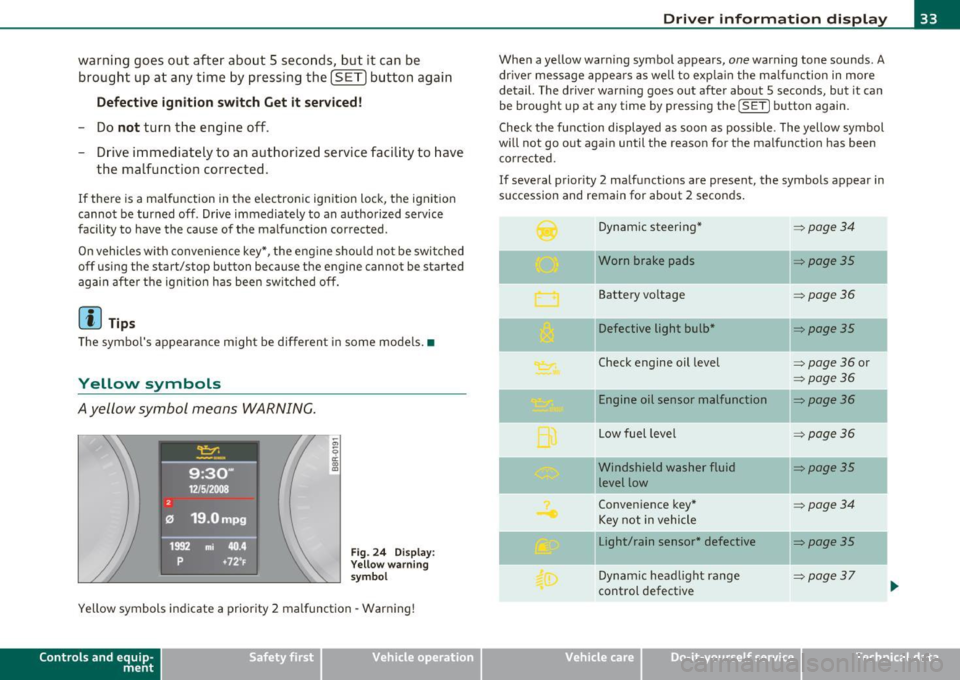
Dynamic steering*
~ page34
-Worn brake pads ~poge35
Battery voltage ~poge36
Defective light bulb* ~poge35
Check engine oil level => page 36 or
~page36
Engine oil sensor malfunction ~page36
-
Low fuel level =:>page 36
- -Windshield
washer fluid ~poge35
level low
Convenience key*
~poge34
Key not in vehicle
Light/rain sensor* defective
::::>poge35
--
Dynamic headlight range => page37
control defective ...
Vehicle care Do-it-yourselt service iTechnical data
Page 40 of 364

Opening and closing
Opening and closing
Keys
Key set
B
Fig. 25 Key se t
© Master key with remote control and integrated
mechanical key
You can centra lly lock and un lock your vehicle and start the engine
w ith the master key w ith remote cont ro l. A mecha nica l key is inte
grated in the master key=>
page 40.
@ Emergency key
The emergency key is not intended for constan t use. It should on ly be
used in an emergency. Keep it in a safe place and do not car ry it on
your key ring.
Key replacement
If you lose a key, cont act your autho riz e d Audi de aler immedia tely to
have the
lost key d isab led. Be sure to bri ng all your keys with you.
Data in the master key
Dur ing d riving, service and maintenance-relevant data is cont in u
ously s tore d on yo ur ma ster key. Your Audi service adviser can re ad out this data a
nd tell you about th e wo rk your ve hicle needs. This
applies also to vehicles with convenience key*.
Personal comfort sett ings
If two peop le use one vehicle, it is recommended that each person
always uses "their own" mas ter key. When t he ignition is t urne d off
or when the vehicle is locked, pe rsonal convenience settings for the
followi ng systems a re stored and assig ned to the remote maste r key.
• Climate control
• Centra l lo cki ng sy stem
• Seat memory*
• Parki ng system *
• Audi s ide ass ist*
• Audi dr ive select *
Th e s tored se ttings a re au toma ticall y recalled when you unlock t he
veh icle, when yo u ope n the doo rs o r whe n you turn on the ign ition.
& WARNING
• Do not leave your vehicle unattended with the key in the igni
tion lo ck . Entry by unauthorized per sons could endanger you or
result in theft or damage the vehicle. Always lock all doors and
take the key.
• Do not leave children unattended in the vehicle, especially with
acce ss to vehicle key s. Unguarded acce ss to the keys provides chil
d ren the opportunity to start the engine and/or activate vehicle
system s such as the power windows et c. Un supervised operation
of any vehicle system by children can result in serious injury .
• Do not remove the key from the ignition lock until the vehicle
has come to a complete stop. Otherwise the steer ing column lock
could suddenly engage -cau sing the ri sk of an accident.
~
Page 41 of 364
![AUDI A5 CABRIOLET 2011 User Guide (]] Tips
• The operation of the remote control key can be temporarily
d isrupted by interfe rence from transmitters in the v icinity of the
vehicle wo rking in the same freq](/img/6/57571/w960_57571-40.png "AUDI A5 CABRIOLET 2011 User Guide (]] Tips
• The operation of the remote control key can be temporarily
d isrupted by interfe rence from transmitters in the v icinity of the
vehicle wo rking in the same freq")
(]] Tips
• The operation of the remote control key can be temporarily
d isrupted by interfe rence from transmitters in the v icinity of the
vehicle wo rking in the same frequency range (e.g. a cell phone, rad io
equipmen t) .
• If you open the dr ive r's doo r with the key left in the ignit ion lo ck,
a ch ime will sound . This is your reminder to remove the key and lock
the doo r.
• For security reasons, replacement keys are only available from
Audi dealers.
• For Declaration of Complia nce to United States FCC and Industry
Canada regulations=>
page 346 . •
Check Light in the master key
The check li ght in the master key provides inform ation
about different conditions.
!
lJl
Fig. 2 6 Che ck lig ht in
t h e maste r key
The check light comes on brief ly once when a button is p ressed, and
du ring an " inquiry" by the convenience key system.
Con tro ls a nd e quip
m en t Vehicle
OP-eration
Opening and closing
If the check light does not come o n, the batte ry is dead and has to be
rep laced. In addi tion , when the batte ry is dead the • sym bol appears
in the instrument cluster d isp lay as well as the message :
Please change ke y batte ry
Battery replacement => page 39. •
Master key battery replacement
..
Fig . 2 7 R em ote
m aste r ke y: Rem ovin g
th e m ech anic al ke y
Fig. 28 Remot e
m as ter k ey: Rem oving
t he batte ry hol der
We recommend having the battery changed by an authorized
Audi dealer . However , if you wish to rep lace the dead battery
yourse lf, proceed as follows :
- P ress the release button©=> fig. 27.
~
Vehicle care Do-it-yourselt service iTechnical data
Page 43 of 364
Starting the vehicle with the emergency
key
I,; N 9
" :g
Fig. 31 Glove
compartment: Adapter
for emergency key
Fig. 32 Insert emer
gency key into the
adapter
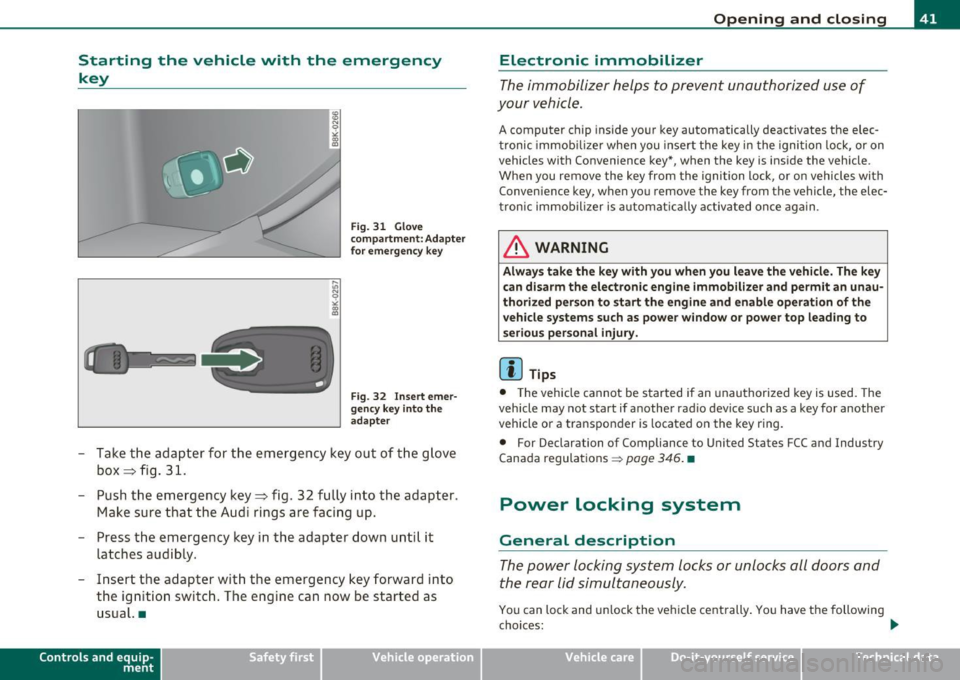
- Take the adapter for the emergency key out of the glove
box ~ fig. 31.
- Push the emergency key~ fig. 32 fully into the adapter.
Make sure that the Audi rings are facing up.
- Press the emergency key in the adapter down until it
latches audibly.
- Insert the adapter with the emergency key forward into
the ign ition switch. The engine can now be started as
usual. •
Contro ls a nd e quip
m en t Vehicle
OP-eration
Opening and closing
Electronic immobilizer
The immobilizer helps to prevent unauthorized use of
your vehicle.
A computer chip inside your key automatically deactivates the elec
tronic immob ilizer when you insert the key in the ignition lock, or on
vehicles with Convenience key*, when the key is inside the vehicle .
When you remove the key from the ignition lock, or on vehicles with
Convenience key, when you remove the key from the vehicle, the elec
tronic immobilizer is automat ica lly activated once again.
& WARNING
Always take the key with you when you leave the vehicle. The key
can disarm the electronic engine immobilizer and permit an unau
thorized person to start the engine and enable operation of the
vehicle systems such as power window or power top leading to
serious personal injury .
[ i ] Tips
• Th e vehicle cannot be started if an unauthorized key is used. The
vehicle may not start if another rad io device such as a key for another
vehicle or a transponder is located on the key ring.
• For Declarat ion of Compliance to United S tates FCC and Industry
Canada regulations =>
page 346. •
Power locking system
General description
The power locking system locks or unlocks all doors and
the rear lid simultaneously.
You can lock and unlock the vehicle cent rally . You have the following
choices: .,_
Vehicle care Do-it-yourselt service Technical data
Page 45 of 364
• If the LED in the upper edge of the driver's door panel comes on
for about 30 seconds after the vehicle is locked, there is a malfunc
tion in the power locking or the anti-theft warning system . Have the
ma lfunct ion corrected by an authorized Audi dea lership or qualified
repair facility. •
Setting power locking
The driver con determine the functions for power locking
in the radio or in the MMI*.
In the Central locking menu you can dec ide which doors
should be unlocked when opening the vehicle .
- Press the
I CAR) function button.
- Select
Central locking . The Central locking menu
appears.
For example, if you switch the i tem Unlocking single door On , the
passenge r's door is no longer included in the power locking system,
and will not be unlocked by pressing the unlock button on the master
key remot e control.
You can cont in ue to unlock all the doors and the rear lid as before .
Press the opening button on the master key twice.
In addit ion to th is, the
Auto locking can be switched on and off.
When lockin g the vehicle, all doors and the trunk lid are locked auto
matically.
If you switch
Trunk lid/tailgate On, then the handle on the rear lid
=>
page 47, fig. 39 is locked. In this case the rear lid can be opened
with the button
cs on the master key=> fig. 33. If the vehicle has the
Convenience key* feature, then the handle will continue to work even
if an valid key is near the prox imity sensor.
If you select
F old mirror s* On , the automatic outside m irror fold
function is activated - the outside mirrors fold when the locking
button on the remote master key is operated {I)=>
page 73.
Contro ls a nd e quip
m en t Vehicle
OP-eration
Opening and closing
When you select Confirmation tone On, a confirmation tone sounds
when you lock the veh icle. •
Unlocking and locking the vehicle with the
remote control
Fig. 33 Remote
con trol: function
buttons
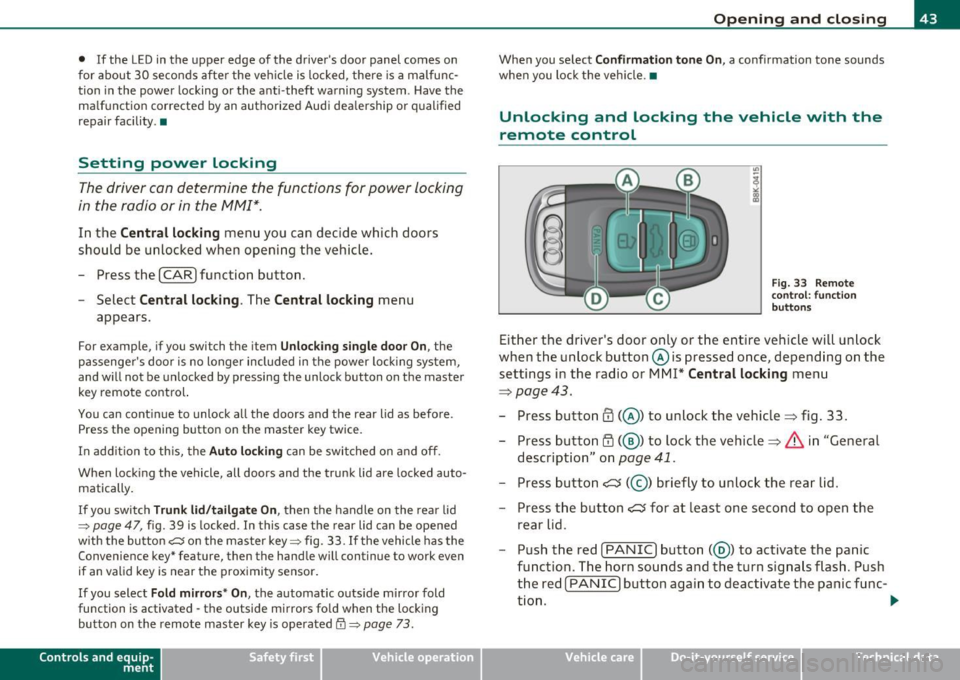
Either the driver's door only or the entire veh icle will unlock
when the unlock button © is pressed once, depending on the
settings in the radio or MM!*
Central locking menu
=>page 43.
- Press button CD(@) to unlock the vehicle=> fig. 33.
- Press button~( @) to lock the vehicle=>
& in "General
description" on
page 41.
- Press but ton c::::::s (@ ) briefly to unlock the rear lid.
- Press the button
c::::::s for at least one second to open the
rear lid.
- Push the red
I PANIC ) button( @) to activate the panic
function. The horn sounds and the turn signals flash. Push
the red [
PANIC] button again to deactivate the panic func-
tion. _.,
Vehicle care Do-it-yourselt service iTechnical data
Page 49 of 364
Emergency locking of the passenger's door
If the power locking system fails (power failure), you will need to lock the passenger door separately.
! a,
Fig. 38 Emergency
locking of the
passenger's door
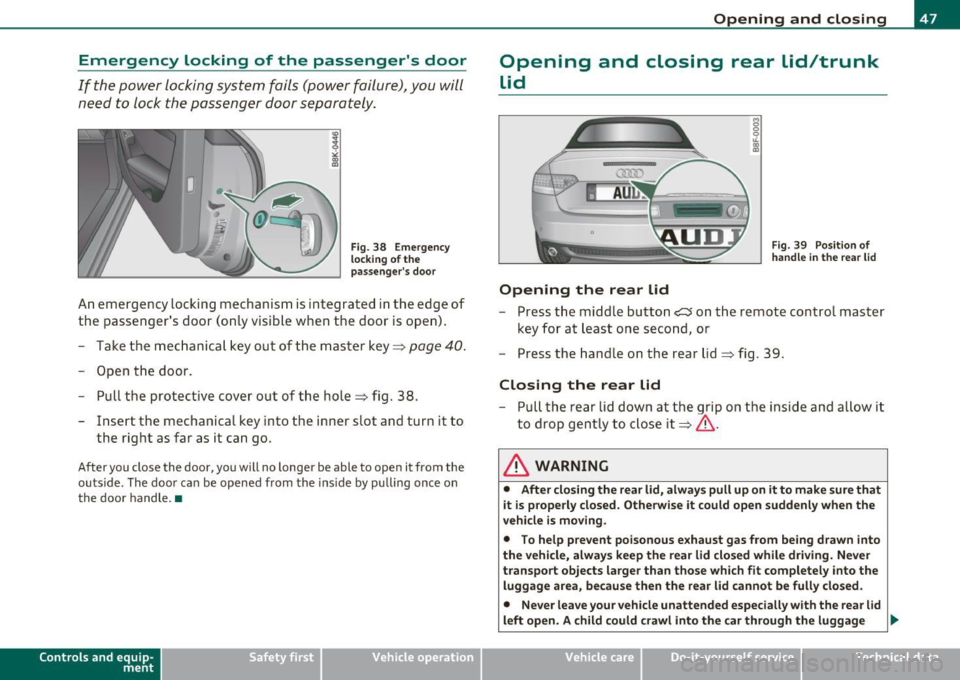
An emergency locking mechanism is integrated in the edge of
the passenger's door (only visible when the door is open).
- Take the mechanical key out of the master key~
page 40.
-Open the door.
- Pull the protective cover out of the hole =} fig. 38 .
- Insert the mechanical key into the inner slot and turn it to
the right as far as it can go .
After you close the door, you will no longer be able to open it from the
outside . The door can be opened from the inside by pulling once on
the door handle .•
Con tro ls a nd e quip
m en t Vehicle
OP-eration
Opening and closing
Opening and closing rear lid/trunk
lid
Opening the rear lid
Fig. 39 Position of
handle in the rear lid
- Press the middle button ?:5 on the remote control master
key for at least one second, or
- Press the handle on the rear lid=} fig . 39.
Closing the rear lid
- Pull the rear lid down at the grip on the inside and allow it
to drop gently to close it~ & .
& WARNING
• After closing the rear lid, always pull up on it to make sure that
it is properly closed . Otherwise it could open suddenly when the
vehicle is moving.
• To help prevent poisonous exhaust gas from being drawn into
the vehicle, always keep the rear lid closed while driving. Never
transport objects larger than those which fit completely into the
luggage area, because then the rear lid cannot be fully closed.
• Never leave your vehicle unattended especially with the rear lid
left open. A child could crawl into the car through the luggage
~
Vehicle care Do-it-yourselt service iTechnical data
Page 55 of 364
voltage left to start the vehicle. The power top can be operated again after the eng ine is sta rted .
• Rollo ve r prot ection acti ve: If the power top is operated cont inu
ously for an extended pe riod o f time, rollover protec tion w ill act ivate
to prevent damage to the hydraulic unit . T his protect ive function
prevents the power top from opening or close for app rox imately 15
to 30 m inutes . It w ill function again after that=>&.
• Malfun ct ion : Fa ilure of system components is one possible cause
for malfunction.
If this happens, you can also operate the power top
by hand =>
page 57.
Power top not secure
This message appears with a war ning to ne if the powe r top is not
completely closed or open and the vehicle speed is above 50 km/h .
Reduce the ve hicle speed below 50 km/h and use the sw itch to open
or close the power top completely .
& WARNING
Never d rive when the power top is not lo cked co rre ctly. The wind
from driving could cau se the power top to open. This can re sult in
injuries and dam age to the vehicle. •
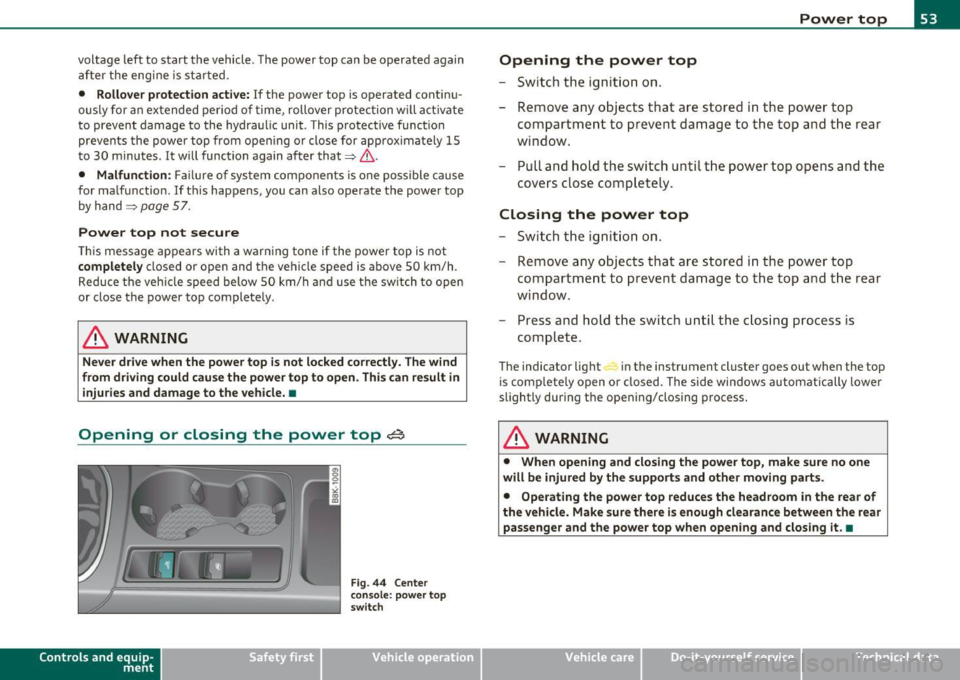
Opening or closing the power top~
Contro ls a nd e quip
m en t
Fig . 4 4 Center
co nsole: p ow er top
sw itch
Vehicle OP-eration
Power top
Opening the power top
- Switch the ignition on.
- Remove any objects that are stored in the power top
compartment to prevent damage to the top and t he rear
window .
- Pull and hold the switch until the power top opens and the
covers close co mpletely.
Closing the power top
-Swi tch th e ign it io n on.
- Remove any objec ts that are stored in the power top
compar tment to p revent da mage to the top a nd t he rear
window.
- Press and hold the switch until the c losing process is
complete.
The indicator light in the instrument clu ster goes out when the top
is com pletely open or closed . The side windows a utomatically lower
slightly during the opening/closing process.
& WARNING
• When opening and closi ng the powe r top , make sure no one
will be injured by the support s and other m oving part s.
• Operating the power top reduces the headroom in the rear of
the vehicle . Make sure there is enough clearan ce between the rear
pas senger and the power top when opening and closing it .•
Vehicle care Do-it-yourselt service iTechnical data
Page 57 of 364
Variable power top storage bay
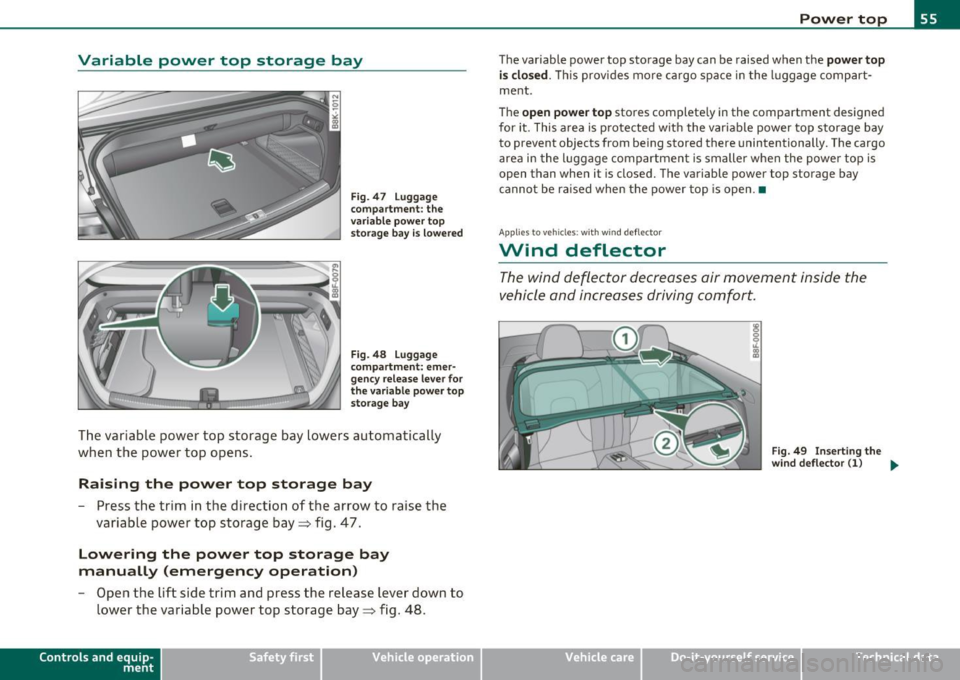
Fig. 47 Lugga ge
co mpar tme nt: th e
v ari able powe r to p
s t o rag e bay is lo wer ed
F ig . 4 8 Lugga ge
c o mpart ment : emer
genc y rele ase le ver for
the var iab le powe r to p
st or ag e ba y
The var iable power top storage bay lowers automatically
when the power top opens .
Raising the power top storage bay
-Press the trim in the direction o f the arrow to raise the
variable power top storage bay=> fig. 47 .
Lowering the power top storage bay
manually (emergency operation)
-Open the lift side trim and press the release lever down to
lower t he variable power top storage bay=> fig. 48.
Con tro ls a nd e quip
m en t Vehicle
OP-eration
Power top
The var iable power top sto rage bay can be raised when the power top
is clo sed .
Thi s prov ides mo re ca rgo space in the l uggage comp art
ment .
T he
open power top stores complete ly in the compartment des igned
for it . This a rea is p rotected w ith the variable powe r top storage bay
to prevent objects from be ing stored there unintent ionally. The cargo
area in the luggage compartmen t is smaller when the powe r top is
open than whe n it is closed. The variable power top storage bay
canno t be r aised when the power top is open .•
App lies to ve hicl es: with w ind defle ctor
Wind deflector
The wind deflector decreases air movement inside the
v ehicle and increases driving comfor t.
F ig. 4 9 Inse rt in g th e
wi nd deflec tor ( 1) .,
Vehicle care Do-it-yourselt service iTechnical data