service AUDI A5 CABRIOLET 2011 Service Manual
[x] Cancel search | Manufacturer: AUDI, Model Year: 2011, Model line: A5 CABRIOLET, Model: AUDI A5 CABRIOLET 2011Pages: 364, PDF Size: 86.48 MB
Page 105 of 364
_________________________________________________ W_ a_ r_m _ a_ n_d_ c_ o_ ld _ ___.lfll
Seat heating
Ap plies to vehicles: w it h fr ont se at heat in g
Front seat heating ~
The seat cushion and the seatback of the front seats can
be heated electrically.
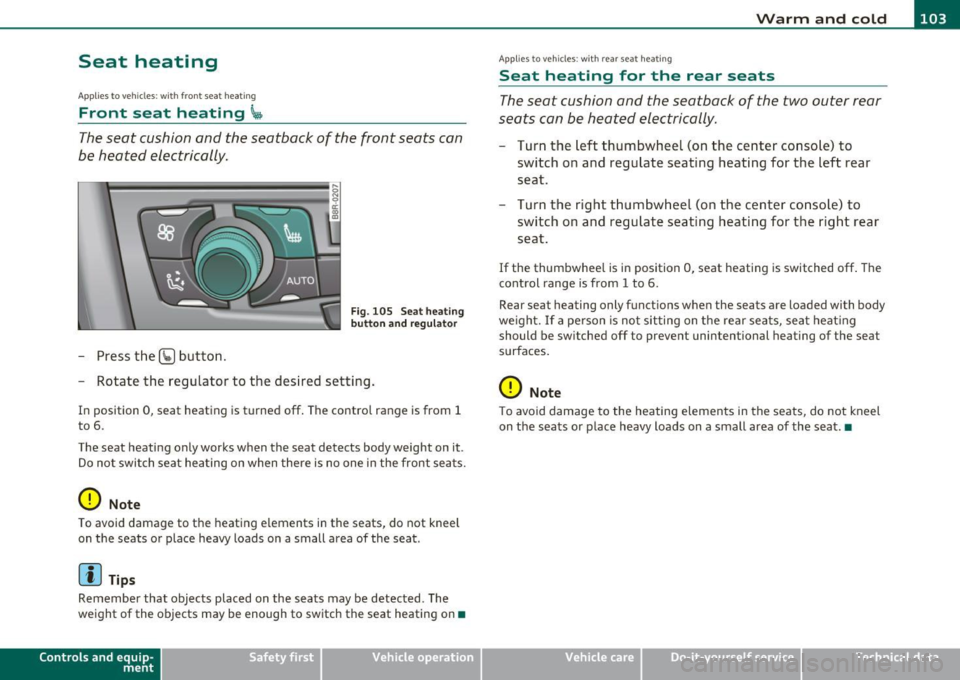
- Press the (g button.
s ci: ., m
Fig. 105 Seat heati ng
button and r egul ator
- Rotate the regulator to the des ired setting .
In position 0, seat heating is turned off . The contro l range is from 1
t o 6.
The seat heating only works when the seat detects body weight on it .
Do no t swi tc h s eat he ating on when the re is no one in the front se ats.
0 Note
To avoid damage to t he heat ing e lements in the seats, do not kneel
on t he seats o r place heavy loads on a small area of the seat .
[I) Tips
Remember that objects placed on the seats may be detected . The
we ight of the objects may be enough to switch the seat heating on •
Contro ls a nd e quip
m en t Vehicle
OP-eration
Applies to ve hicles : w ith rea r sea t heat ing
Seat heating for the rear seats
T he seat cushion and the seatback of the two outer rear
seats c an be heated electrically.
- Turn the left thumbwheel (on t he center conso le) to
switch o n and reg ulate seating heat ing fo r the left rear
seat.
Turn t he right t humbwhee l (on the center co nsole) to
switch on and regulate seat ing heating for the r ight rear
seat.
If the thumbwhee l is i n position 0, seat heating is switched off . The
control range is from 1 to 6.
Rear sea t heating only funct ions when the seats are loaded with body
we igh t. If a pe rson is no t sitting on t he rear sea ts, sea t heat ing
should be sw itched off to preve nt unintentional heating of the seat
surfaces.
0 Note
T o avoid damage to the heatin g elements in the seats, do not kneel
on the sea ts or p lace heavy loads on a small area of the seat .•
Vehicle care Do-it-yourselt service iTechnical data
Page 107 of 364
___________________________________________________ O;,__ n_ t ;,__ h:...:e:.....:.. r..:o :...:a::.:... d.:.;___,J-
On the road
Steering
App lies to veh icles : w ith manu ally adjusta ble steering whe el
Manually adjustable steering wheel
Th e height and rea ch of th e st eer ing wh eel can b e
a dju sted.
Fir st, adj ust the drive r's s eat co rrec tly.
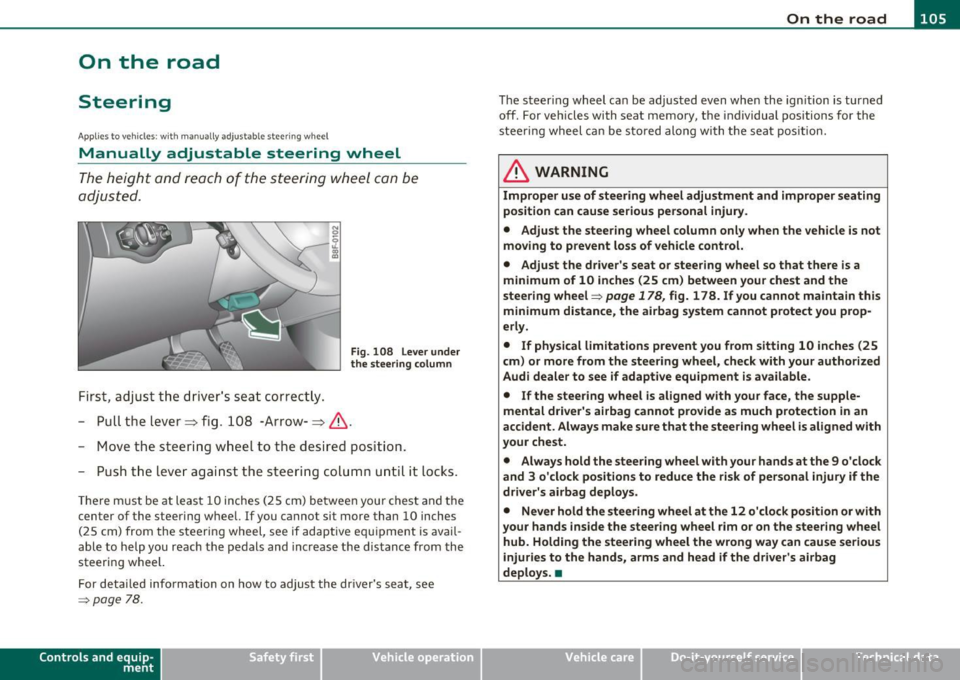
Fig . 108 Lever under
the steering colum n
-Pull th e lever=> fig. 10 8 -Ar row-=> &.
- Move the steeri ng w hee l to the des ired pos it ion.
- Pus h the lever aga inst the s tee ring column until it loc ks .
Th ere m ust be at leas t 10 inches (2 5 cm) be twee n you r chest a nd the
center of the steering whee l. If you cannot si t more than 10 inches
( 2 5 cm) from the s teer ing wheel, see if adaptive eq uipment is av ail
able to help you reach the p edals and inc rease t he distance from the
s teeri ng wheel.
F or det aile d info rmation on how to adju st the dr iver's sea t, see
=> page 78.
Con tro ls a nd e quip
m en t Vehicle
OP-eration The
steeri ng wh eel ca n be adju sted ev en wh en the ign ition is turn ed
off. For ve hicles with seat memory, the individual positions for the
stee ring wheel c an be st ored al ong wi th t he sea t positi on .
& WARNING
Improper use of steering wheel adjustment and improper seating
position can cause serious personal injury .
• Adjust the steer ing wheel column only when the vehicle is not
moving to prevent loss of vehicle control.
• Adjust the dri ver's seat or steering wheel so that there is a
minimum of 10 inches (25 cm) between your chest and the
steering wheel=>
page 178, fig. 178 . If you cannot maintain this
minimum distance , the airbag system cannot protect you prop
erly .
• If physical limitations prevent you from sitting 10 inches (25
cm) or more from the steering wheel, check with your authorized
Audi dealer to see if adaptive equipment is available.
• If the steering wheel is al igned with your face, the supple
mental driver 's airbag cannot provide as much protection in an
accident . Always make sure that the steering wheel is aligned with
your chest.
• Always hold the steering wheel with your hands at the 9 o 'clock
and 3 o'clock positions to reduce the risk of personal injury if the
driver's airbag deploys .
• Never hold the steering wheel at the 12 o'clock po sition or with
your hands inside the steering wheel
rim or on the steer ing wheel
hub. Holding the stee ring wheel the wrong way can cause serious
injur ies to the hands, arms and head if the driver's airbag
deploys. •
Vehicle care Do-it-yourselt service iTechnical data
Page 115 of 364
On the road -_______________ __.
matically release the pa rking brake w ith the starting assist
==;, page 111 .
,
Parking b rake!
Thi s driver message appea rs together wi th t he ye llow J symbol
when there is a parking brake malfunction .
Malfunction starting assi st
Th is driver message appears if there is a starting assist malfunction .
T he automati c re lease of the park ing brake w hen s tarting is malfunc
tioning. You have to release the parking brake manually by pressing
t he swi tch . Have the problem correc ted by an author ized A udi
dealer. •
Cruise control
Applies to veh icl es: w it h cru ise co ntro l
Switching on
The cruise control system makes it possible to drive at a
constant speed starting at 20 mph (30 km/h).
A--
Con tro ls a nd e quip
m en t
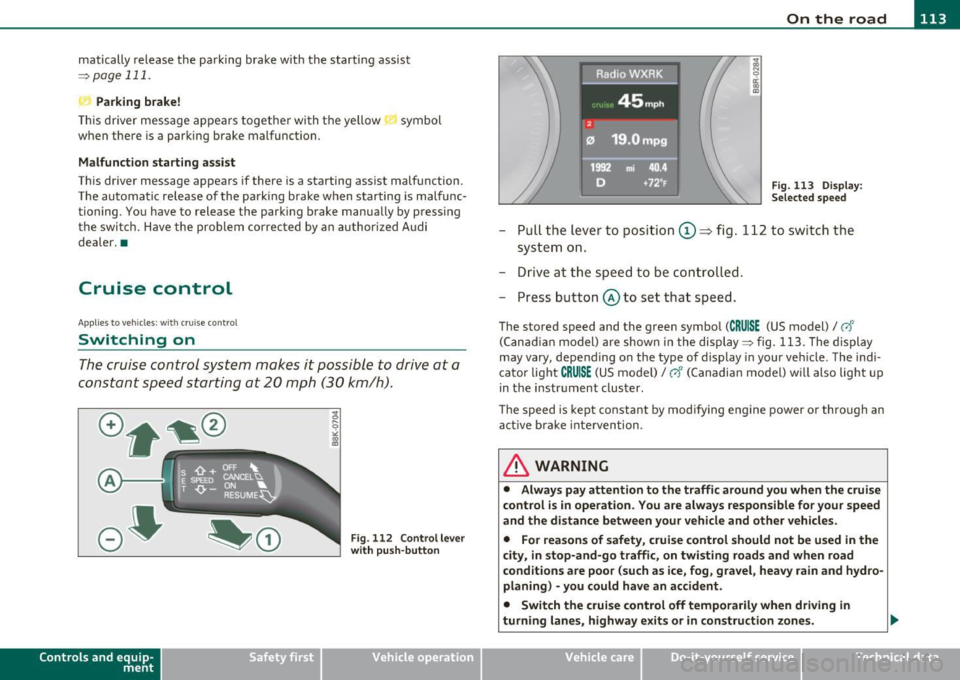
Fig. 11 2 Control lever
w ith push -butt on
Vehicle OP-eration
Radici'WXRK
Fig. 11 3 Disp la y:
Se lect ed spee d
-Pull the lever to position ©~ fig . 112 to sw itch the
system on .
- Drive at th e spee d to be con troll ed .
- Press button @ to set that speed.
The stored speed and the green symbol (CRUISE (US model)/ 0"
(Can ad ian model) are shown in the display ==;, fig. 113. The display
may
vary, depend ing on the type of display in your ve hicle . The indi
cato r light
CRUISE (US model)/ vf (Canadian model) w ill also light u p
in t he instr ument cluster.
The speed is kept constant by modifying engine power or through an act ive brake inte rvention .
& WARNING
• Alway s pay attention to the traffic around you when th e cruise
c ontrol is in operation . You are alwa ys respon sible for your speed
and th e di st a nce betwe en your vehicle and oth er vehicl es.
• Fo r rea sons of safet y, crui se contr ol should not be u sed in the
city, in stop-and-go traffi c, on twisting road s and when road
c ond ition s are poor (su ch as ice , fog , gra vel, he avy rain and hy dro
planing ) -you could hav e an ac cident.
• Switch the crui se c ontrol off temporaril y when dri ving in
turning lane s, highw ay ex it s or in construction zones .
Vehicle care Do-it-yourselt service iTechnical data
Page 121 of 364
____________________________________________ A_ d_ a___,_ p_t_ i_v _e _ c_r _u _ i_ s _e _ c_o _ n_ t_r _o _l _ __.lft'I
App lies to veh icles : w ith a dapt ive cruise contro l
How is the speed stored?
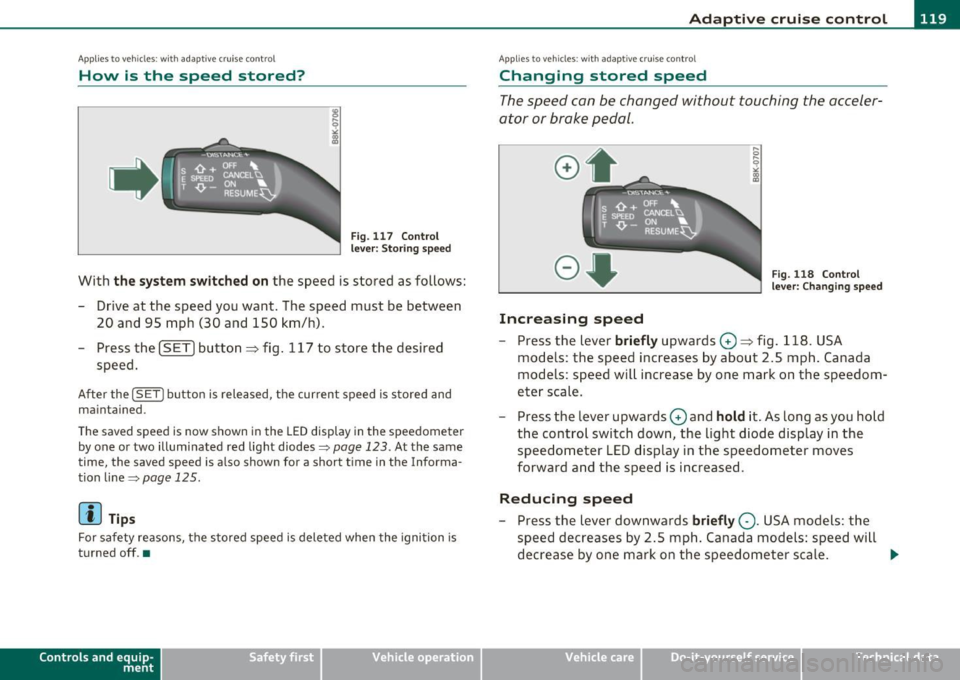
Fig. 1 17 Contro l
l eve r: S tori ng s pee d
With th e sys te m switched on the speed is stored as follows:
- Drive at the speed you want . The speed must be between
20 and 95 mph (30 and 150 km/h) .
- Press the
!SET I button ~ fig . 117 to store the desired
speed .
After the ( SETI button is released, the current speed is stored and
m ain tained .
The saved speed is now shown in th e LED d isplay in the speedom et e r
by one or two illuminated red light diodes=>
page 123. At the same
time, the saved speed is a lso shown fo r a short time in the Info rma
tion line~
page 125 .
(I) Tips
For safety reasons, the stored speed is deleted when the ignition is
turned off .•
Con tro ls a nd e quip
m en t Vehicle
OP-eration
Applies to vehicles : w ith ada ptive cru ise cont ro l
Changing stored speed
The speed can be changed without touching the acceler
ator or brake pedal.
Increasing speed
,... 0
~
ill
Fig . 1 18 Con trol
l e ver: Chan ging spee d
- Press the lever briefly upwards 0 ~ fig. 118 . USA
models : the speed increases by about 2.5 mph . Canada
models : speed will increase by one mark on the speedom
eter scale .
- Press the lever upwards
0 and hold it . As long as you hold
the control switch down, the light diode display in the
speedometer LED display in the speedometer moves
forward and the speed is increased .
Reducing speed
- Press the lever downwards briefly Q. USA models : the
speed decreases by 2 .5 mph . Canada models: speed will
decrease by one mark on the speedometer scale . _,.
Vehicle care Do-it-yourselt service iTechnical data
Page 131 of 364
____________________________________________ A_ d_ a___,_ p_t_ i_v _e _ c_r _u _ i_ s _e _ c_o _ n_ t_r _o _l _ __.ffl'I
A pp lies to vehicl es : wi th a daptiv e cr uise c ontro l
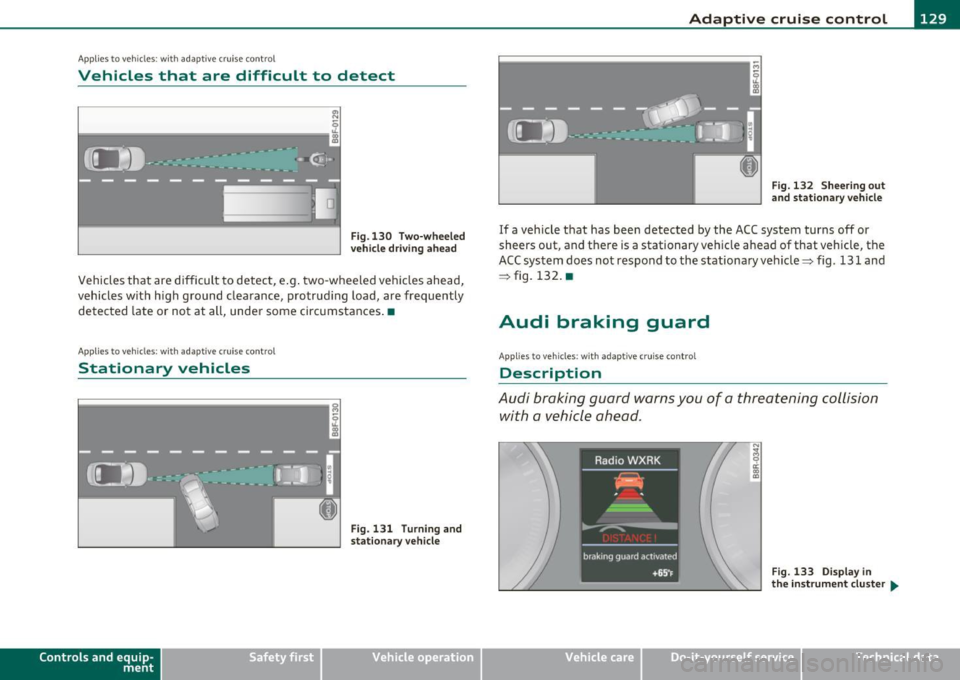
Vehicles that are difficult to detect
OJ
Fig .130 Two-wheeled
vehicle driving ahead
Vehicles that are difficult to detect, e .g . two-wheeled vehicles ahead,
vehicles with h igh ground clearance, protrud ing load, are frequently
detected late or not at all, under some circumstances .•
A ppli es to ve hicl es: with ad apti ve c rui se cont rol
Stationary vehicles
k-----------------· g
Con tro ls a nd e quip
m en t
;
Fig. 131 Turn ing and
stat ionary v ehicle
Vehicle OP-eration
Fig. 132 Sheering out
and stationary vehicle
If a vehicle that has been detected by the ACC system turns off or
sheers out, and there is a stationary veh icle ahead of that vehicle, the
ACC system does not respond to the stationary vehicle=> fig. 131 and
=> fig. 132. •
Audi braking guard
Applies to vehicles: with ada ptiv e cr uise con trol
Description
Audi braking guard warns you of a threatening collision
with a vehicle ahead .
N
I
Fig. 133 Display in
the in strum ent cluster ...
Vehicle care Do-it-yourselt service iTechnical data
Page 141 of 364
_________________________________________________ A_ u _ d_ i_ s_ id_ e_ a _ s_s _ i_s _t _ __.lft'I
A pplie s to vehicles : wi th s ide ass ist
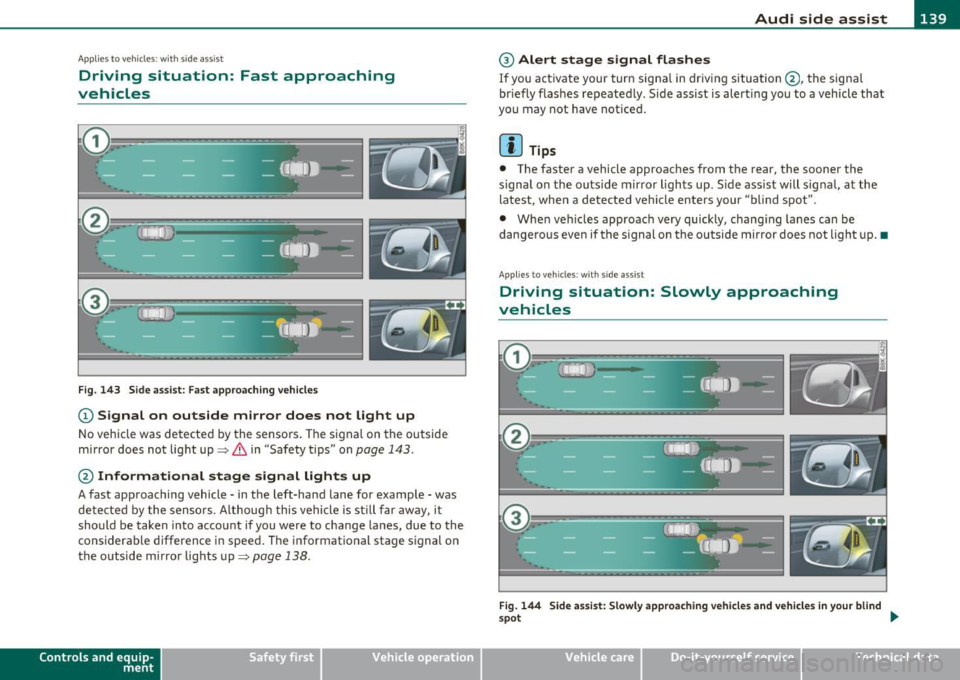
Driving situation: Fast approaching
vehicles
Fig. 143 Side assist: Fast approaching vehicles
(D Signal on outside mirror does not light up
No vehicle was detected by the sensors . The signal on the outside
mirror does not light up~
& in "Safety tips" on page 143.
@ Informational stage signal lights up
A fast approaching vehicle· in the left-hand lane for example· was
detected by the sensors . Although this vehicle is sti ll far away, it
should be taken into account if you were to change lanes, due to the
considerable difference in speed . The informational stage signal on
the outside mirror lights up~
page 138.
Contro ls a nd e quip
m en t Vehicle
OP-eration
® Alert stage signal flashes
If you act ivate your turn signa l in driving situation @, the signa l
br iefly f lashes repeatedly . Side assist is alert ing you to a vehicle that
you may not have noticed .
[I) Tips
• The faster a vehicle approaches from the rear, the sooner the
signal on the outs ide mirror l igh ts up . S ide assist will signal, at the
latest, when a detected vehicle enters your "blind spot".
• Whe n veh icles approach very quickly, chang ing lanes can be
dangerous even if the signal on the outside mirror does not light up. •
App lies to vehicles : with side assis t
Driving situation : Slowly approaching
vehicles
Fig. 144 Side assist: Slowly approach ing vehicles and vehicles in your blind
~ot
~
Vehicle care Do-it-yourselt service iTechnical data
Page 143 of 364
_________________________________________________ A_ u _ d_ i_ s_ id_ e_ a _ s_s _ i_s _t _--J_
A pplie s to ve hicles : wi th s id e ass ist
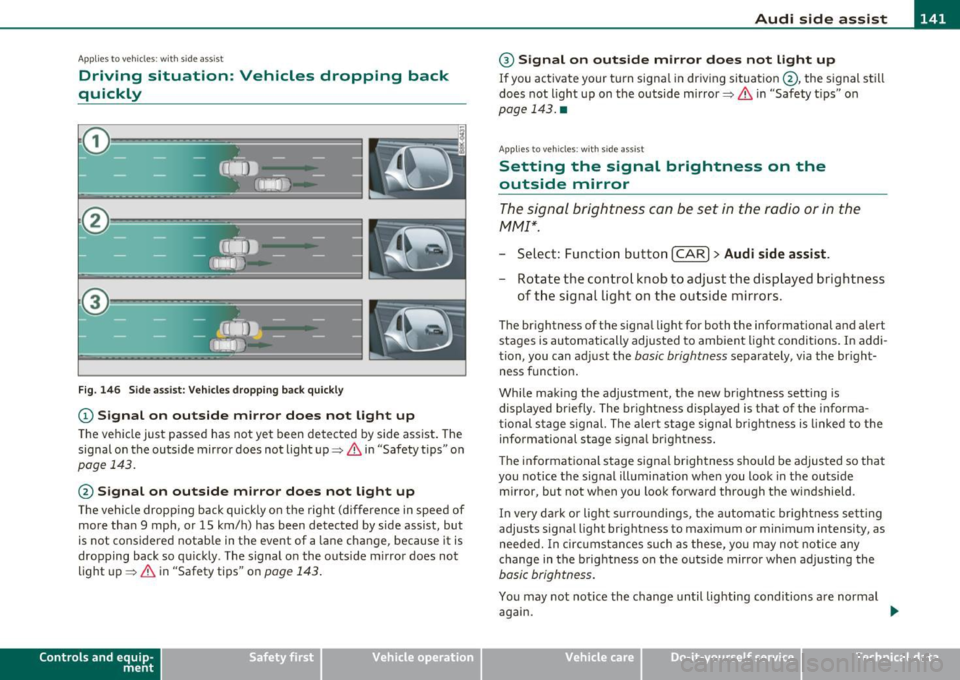
Driving situation: Vehicles dropping back
quickly
@
I
- (OIDJ -
•. _ ...
' I
- Q•n
-~---
Fig. 146 Side assist: Vehicles dropping back quickly
(D Signal on outside mirror does not light up
The vehicle just passed has not yet been detected by side assist. The
signal on the outside mirror does not light up~
& in "Safety tips" on
page 143.
@ Signal on outside mirror does not light up
The vehicle dropping back quickly on the right (difference in speed of
more than 9 mph, or 15 km/h) has been detected by side assist, but
is not considered notable in the event of a lane change, because it is
dropping back so quickly . The signal on the outside mirror does not
light up~
& in "Safety tips" on page 143.
Con tro ls a nd e quip
m en t Vehicle
OP-eration
® Signal on outside mirror does not light up
If you activate your turn signal in driving situation @, the signal still
does not light up on the outside mirror~
& in "Safety tips" on
page 143. •
App lies to ve hicles : with side assis t
Setting the signal brightness on the
outside mirror
The signal brightness can be set in the radio or in the
fv1fv1I*.
- Select: Function button I CAR] > Audi side assist.
- Rotate the control knob to adjust the displayed brightness
of the signal Light on the outside mirrors.
The brightness of the signal light for both the informational a nd alert
stages is automatically adjusted to ambient light conditions. In addi
tion, you can adjust the
basic brightness separately, via the bright
ness function.
While making the adjustment, the new brightness setting is
displayed briefly. The brightness displayed is that of the informa
tional stage signal. The alert stage signal brightness is linked to the
informational stage signal brightness.
The informational stage signal brightness should be adjusted so that
you notice the signal illumination when you look in the outside
mirror, but not when you look forward through the windshield .
In very dark or light surroundings, the automatic brightness setting
adjusts signal light brightness to maximum or minimum intensity, as
needed. In circumstances such as these, you may not notice any
change in the brightness on the outside mirror when adjusting the
basic brightness.
You may not notice the change until lighting conditions are normal
again.
Vehicle care Do-it-yourselt service iTechnical data
Page 155 of 364
![AUDI A5 CABRIOLET 2011 Service Manual Transmission Ill _______________ ___.
(]] Tips
• When you shift into the next lower gear, the transmission w ill
downshift only when there is no possibility of over-revving the](/img/6/57571/w960_57571-154.png "AUDI A5 CABRIOLET 2011 Service Manual Transmission Ill _______________ ___.
(]] Tips
• When you shift into the next lower gear, the transmission w ill
downshift only when there is no possibility of over-revving the")
Transmission Ill _______________ ___.
(]] Tips
• When you shift into the next lower gear, the transmission w ill
downshift only when there is no possibility of over-revving the
eng ine.
• When the kick-down comes on, the transmission will shift down to
a lower gear, depending on vehicle and engine speeds.
• tiptronic ® is inoperative when the transmission is in the fai l-safe
mode. •
Applies to vehicles: w ith tip tro nic -steer ing wheel
Steering wheel with tiptronic ®
The shift buttons on the steering wheel allow the driver to
shift gears manually.
Fig . 156 Steering
wheel: Shift buttons
-To downshift, touch the button on the left 0-
- To upshift, touch the button on the right G).
The shift buttons are activated when the selector lever is in D, Sor in
the manual shift program (tiptronic).
Of course, you can cont inue to use the manual shift program with the
selector lever on the center console. •
Contro ls a nd e quip
m en t Vehicle
OP-eration
Applies to ve hicles : with automa tic t ransmiss ion
Automatic transmission malfunction 0
In the event of a system malfunction, the automatic transmission
switches to emergency operation mode .
Gearbox malfunction: you can continue driving
You can cont inue to drive the vehicle. See an authorized Audi dealer
or other qualified workshop at the next opportunity .
Gearbox malfunction: you can continue driving (limited
funct ionality )
There is a serious system malfunction:
• Th e program shifts only into certain gears.
• The engine may sta ll.
• It is not poss ible to restart the engine if it has been sw itched off .
• Co ntinuing to drive could result in subsequent damage.
0 Note
If the transmission switches to fail-safe mode, you sho uld take the
vehicle to an authorized Audi dealers hip as soon as poss ible to have
the condition corrected. •
Vehicle care Do-it-yourselt service iTechnical data
Page 157 of 364
Transmission Ill _______________ ___.
sion the engine power is transferred via a link-plate chain, rather than
by a conventional torque converter. The m ultitron ic transm ission
greatly reduces vehicle "creep" when at a standstill and the transmis
sion is in
D Sor R . •
Appli es to vehicles : with mul tit ron ic® Con tinu ous ly Variabl e Tra ns missi on (CVT )
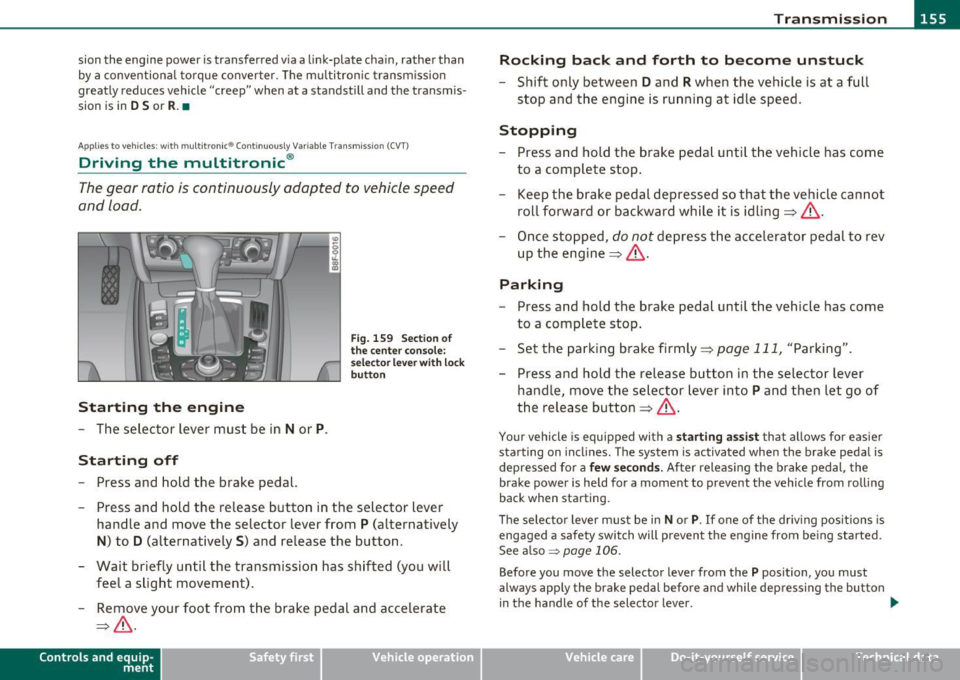
Driving the multitronic ®
The gear ratio is continuously adopted to vehicle speed
and load.
Starting the engin e
- The selector lever must be in Nor P.
Starting off
-Press and hold the brake pedal.
Fig. 159 Sect ion of
the center conso le:
selector leve r with loc k
button
- Press and hold the release button in the selector lever
handle and move the selector lever from
P (alternatively
N) to D (alternatively S) and release the button.
- Wait briefly until the transmission has shifted (you will feel a slight movement).
- Remove your foot from the brake pedal and accelerate
=> & .
Con tro ls a nd e quip
m en t Vehicle
OP-eration
Rocking bac k and forth to become unstuck
- Shift only between D and R when the vehicle is at a full
stop and the engine is running at idle speed .
Stopping
-Press and hold the brake pedal until the veh icle has come
to a complete stop .
- Keep the brake pedal depressed so that the vehicle cannot
roll forward or backward while it is idling=> &.
- Once stopped,
do not depress the accelerator pedal to rev
up the engine => & -
Parking
- Press and hold the brake pedal until the veh icle has come
to a complete stop.
- Se t the parking brake firmly =>
page 111, "Parking".
- Press and hold the release button in the selector lever
handle, move the selector lever into
P and then let go of
the release button=>& .
Your vehicle is equipped with a star ting ass ist that allows for easier
starting on inclines. The system is activated when the brake pedal is
depressed for a
fe w secon ds. After releas ing the brake pedal, the
brake power is held for a moment to prevent the vehicle from rolling
back when starting .
T he selector lever must be in
N or P. If one of the dr iving positions is
engaged a safety switch will prevent the engine from being sta rted .
See also~
page 106 .
Before you move the selector lever from the P position, you must
always apply the brake pedal before and while depressing the button
in the handle of the selector lever. .,_
Vehicle care Do-it-yourselt service iTechnical data
Page 161 of 364
____________________________________________________ T _r_a _n_ s_m _ i_s _s_ i_ o _ n _ ___._
when the driver presses the brake pedal on a downhill gradient . This
makes use of the braking effect of the engine w ithout the need to
shift down manually .
If you are driving in hills and mounta ins, the transmission will contin
uously adjust the gear ratio to the road grade. If you press the brake
pedal when driving downhill, the transmission will downshift auto
matically. This increases the brak ing effect of the engine.
If the cru ise control is on when you are traveling downhill, the trans
mission will automatica lly select a lower gear ratio in order to main
tain the set vehicle speed. Th is will cause the engi ne speed to
increase. •
Applies to vehi cles : wit h mul tit ro nic ® Co nt in uous ly Variabl e Tra ns missi on (CVT )
tiptronic ® manual shift program
Using the manual shi~ program (tiptronic®) you can
manually shift between seven pre-programmed gear
ratios (transmission positions) .
Contro ls a nd e quip
m en t
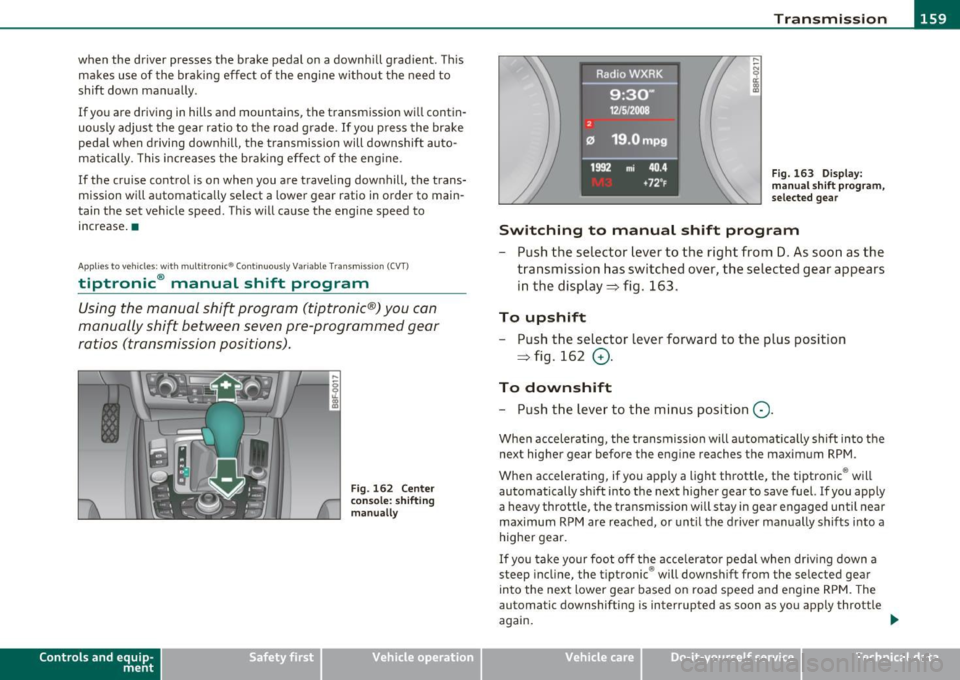
Fig. 162 Center
console: shifting
manually
Vehicle OP-eration
Fig. 163 Di splay:
man ual shift program,
selected gear
Switching to manual shift program
- Push the selector lever to the right from D. As soon as the
transmission has switched over, the selected gear appears
in the display ~ fig . 163.
To upshift
- Push the selector lever forward to the plus position
~ fig . 162
0 -
To downshift
- Push the lev er to the minus position Q.
When accelerating, the transmission will automatically shift into the
next higher gear before the engine reaches the maximum RPM .
When accelerating, if you apply a light throttle, the tiptronic ® will
automatically shift into the next higher gear to save fuel. If you apply
a heavy throttle, the transmiss ion wi ll stay in gear engaged until near
maximum RPM are reached, or until the driver manually shifts into a
higher gear.
If you take your foot off the accelerator pedal when dr iv ing down a
steep incline, the tiptronic ® will downshift from the selected gear
into the next lower gear based on road speed and engine RPM. The
automatic downshifting is interrupted as soon as you apply throttle
again.
Vehicle care Do-it-yourselt service iTechnical data